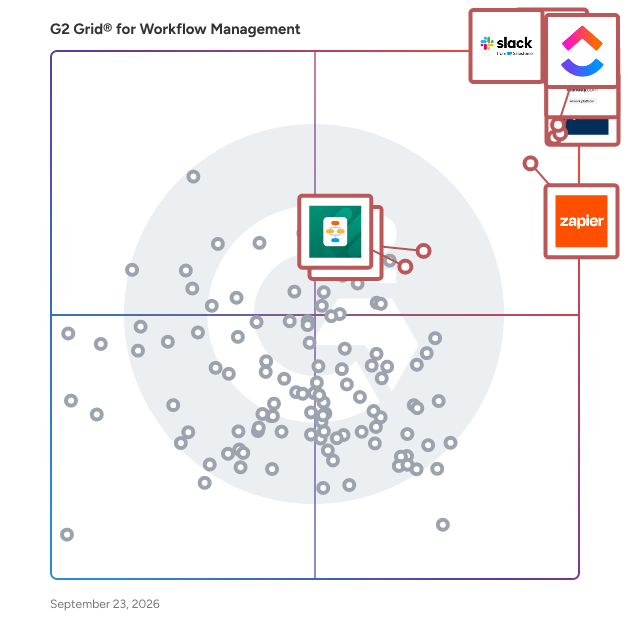
# Best Enterprise Workflow Management Software

  *By [Bijou Barry](https://research.g2.com/insights/author/bijou-barry)*

   Products classified in the overall Workflow Management category are similar in many regards and help companies of all sizes solve their business problems. However, enterprise business features, pricing, setup, and installation differ from businesses of other sizes, which is why we match buyers to the right Enterprise Business Workflow Management to fit their needs. Compare product ratings based on reviews from enterprise users or connect with one of G2&#39;s buying advisors to find the right solutions within the Enterprise Business Workflow Management category.

In addition to qualifying for inclusion in the Workflow Management Software category, to qualify for inclusion in the Enterprise Business Workflow Management Software category, a product must have at least 10 reviews left by a reviewer from an enterprise business.


## How Many Workflow Management Software Products Does G2 Track?
**Total Products under this Category:** 364

### Category Stats (May 2026)
- **Average Rating**: 4.54/5
- **New Reviews This Quarter**: 1,804
- **Buyer Segments**: Small-Business 57% │ Mid-Market 32% │ Enterprise 11%
- **Top Trending Product**: LabCollector LIMS &amp; ELN (+0.089)
*Last updated: May 18, 2026*

  
## How Does G2 Rank Workflow Management Software Products?

**Why You Can Trust G2's Software Rankings:**

- 30 Analysts and Data Experts
- 137,000+ Authentic Reviews
- 364+ Products
- Unbiased Rankings

G2's software rankings are built on verified user reviews, rigorous moderation, and a consistent research methodology maintained by a team of analysts and data experts. Each product is measured using the same transparent criteria, with no paid placement or vendor influence. While reviews reflect real user experiences, which can be subjective, they offer valuable insight into how software performs in the hands of professionals. Together, these inputs power the G2 Score, a standardized way to compare tools within every category.

  
## Top Workflow Management Software at a Glance
| # | Product | Rating | Best For | What Users Say |
|---|---------|--------|----------|----------------|
| 1 | [Slack](https://www.g2.com/products/slack/reviews) | 4.5/5.0 (37,336 reviews) | Real-time team coordination with workflow automation | "[Easy-to-Use Channels That Keep Project Conversations Organized](https://www.g2.com/survey_responses/slack-review-12849038)" |
| 2 | [Asana](https://www.g2.com/products/asana/reviews) | 4.4/5.0 (13,096 reviews) | Multi-team project visibility with task multi-homing | "[Asana Keeps Teams Aligned with Clear Project Visibility and Efficient Workflows](https://www.g2.com/survey_responses/asana-review-12854281)" |
| 3 | [Smartsheet](https://www.g2.com/products/smartsheet/reviews) | 4.4/5.0 (21,639 reviews) | Spreadsheet-native project tracking with cross-team automation | "[Smartsheet’s Powerful, Scalable Workflows with Automation and Integrations](https://www.g2.com/survey_responses/smartsheet-review-12850503)" |
| 4 | [monday Work Management](https://www.g2.com/products/monday-com/reviews) | 4.7/5.0 (14,958 reviews) | Visual project boards with cross-team automations | "[An absolute game-changer for high-stakes, fast-paced event project management!](https://www.g2.com/survey_responses/monday-work-management-review-12860769)" |
| 5 | [ClickUp](https://www.g2.com/products/clickup/reviews) | 4.6/5.0 (11,947 reviews) | Visual task workflows with AI-powered automation | "[Strong Collaboration Potential, Excellent Project Management Hub](https://www.g2.com/survey_responses/clickup-review-12829653)" |
| 6 | [MuleSoft Automation](https://www.g2.com/products/mulesoft-automation/reviews) | 4.3/5.0 (37 reviews) | API-led integration workflows across legacy and modern systems | "[Bridging IT and Business, Excellent for Salesforce Ecosystem](https://www.g2.com/survey_responses/mulesoft-automation-review-12805578)" |
| 7 | [Jotform Workflows](https://www.g2.com/products/jotform-workflows/reviews) | 4.5/5.0 (530 reviews) | Multi-step approval flows with conditional routing | "[Streamlines Church Communications Efficiently](https://www.g2.com/survey_responses/jotform-workflows-review-12838577)" |
| 8 | [Karbon](https://www.g2.com/products/karbon-2025-03-03/reviews) | 4.8/5.0 (820 reviews) | Email-integrated workflow for accounting firms | "[All in One Workflow Tool for Professional Services](https://www.g2.com/survey_responses/karbon-review-9924492)" |
| 9 | [Kintone](https://www.g2.com/products/kintone/reviews) | 4.6/5.0 (262 reviews) | Custom no-code databases replacing spreadsheets | "[Highly Customizable and User-Friendly Data Management for Unique Workflows](https://www.g2.com/survey_responses/kintone-review-12613315)" |
| 10 | [Wrike](https://www.g2.com/products/wrike/reviews) | 4.2/5.0 (4,451 reviews) | Cross-functional marketing workflows with blueprint automation | "[Reliable Tool for Project Workflow Management](https://www.g2.com/survey_responses/wrike-review-12818676)" |


## Which Type of Workflow Management Software Tools Are You Looking For?
  - [Workflow Management Software](https://www.g2.com/categories/workflow-management) *(current)*
  - [Project Management Software](https://www.g2.com/categories/project-management)
  - [Task Management Software](https://www.g2.com/categories/task-management-software)
  - [Project Collaboration Software](https://www.g2.com/categories/project-collaboration)

  
---

**Sponsored**

### Moxo

Moxo is the AI orchestration platform built for business operations teams. From manual coordination to intelligent orchestration, Moxo transforms the way organizations run complex processes. The old way relies on scattered emails and manual follow-ups; the Moxo way keeps every step clear, connected, and accountable. We put human actions and decisions at the center of workflows, while AI and automation clear the manual work behind the scenes. By connecting people, systems, and AI, Moxo drives the right actions, from the right people, at the right time —whether it’s client onboarding, multi-party approvals, or ongoing account management. Business teams can eliminate bottlenecks, reduce drop-offs, and keep critical milestones moving forward. Trusted by leading global enterprises across financial services, consulting, legal, and healthcare, Moxo is the smarter way to orchestrate mission-critical workflows with confidence.


[Visit website](https://www.g2.com/external_clickthroughs/record?secure%5Bad_program%5D=paid_promo&amp;secure%5Bad_slot%5D=category_product_list&amp;secure%5Bcategory_id%5D=1698&amp;secure%5Bmedium%5D=sponsored&amp;secure%5Bprioritized%5D=false&amp;secure%5Bproduct_id%5D=16700&amp;secure%5Bresource_id%5D=1698&amp;secure%5Bresource_type%5D=Category&amp;secure%5Bsource_type%5D=category_page&amp;secure%5Bsource_url%5D=https%3A%2F%2Fwww.g2.com%2Fcategories%2Fworkflow-management%3Fpage%3D3&amp;secure%5Btoken%5D=fbec9eb04f27b20e712451fe6c780f04e5cb5cf202532382873c64982650b2ce&amp;secure%5Burl%5D=https%3A%2F%2Fwww.moxo.com%2Fproduct%2Foverview&amp;secure%5Burl_type%5D=paid_promos)

---

  
## Buyer Guide: Key Questions for Choosing Workflow Management Software Software
  ### What does Workflow Management software do?
  I view Workflow Management software as the system that turns repeatable business processes into structured steps, owners, and status changes. It organizes how work moves from intake to review, approval, completion, and reporting. From what I see across G2 reviewer accounts, these platforms are used for task routing, approval flows, forms, deadlines, automations, notifications, dashboards, and process visibility. When work is spread across email, spreadsheets, chat threads, and manual follow-ups, workflow management software gives teams a controlled path for moving each request or task forward.


  ### Why do businesses use Workflow Management software?
  When I reviewed G2 sentiment in this category, the recurring problem was process drift. Teams had requests, projects, approvals, and client work moving through too many informal channels, which made status, ownership, and next steps hard to track.

From the patterns I evaluated, several outcomes show up consistently:

- Reviewers describe workflow tracking as a way to keep projects, requests, and deadlines moving through clear stages.
- Many appreciate automations, reminders, and notifications because routine follow-ups no longer depend on memory.
- Users mention custom boards, views, and templates as useful for shaping workflows around different teams or clients.
- Several point to dashboards and status updates as the reason managers can see where work is stuck.

However, setup can take time when products are highly configurable. Users also mention learning curves, notification noise, slow updates, search issues, integration limits, and pricing tiers as details to review.


  ### Who uses Workflow Management software primarily?
  After analyzing G2 reviewer profiles, I found that Workflow Management software serves teams that own repeatable processes and handoffs.

- **Project managers:** Build workflow stages, assign owners, track deadlines, and monitor progress.
- **Operations teams:** Manage approvals, recurring requests, process steps, and internal handoffs.
- **Marketing teams:** Track campaign tasks, creative approvals, content calendars, and launch workflows.
- **Client service teams:** Manage client projects, deliverables, updates, and status visibility.
- **IT and business systems teams:** Configure workflows, integrations, permissions, and automation rules.
- **Administrators:** Maintain templates, boards, user access, dashboards, and reporting views.


  ### What types of Workflow Management software should I consider?
  When I examined how reviewers describe the products they use, Workflow Management platforms generally cluster into these groups:

- **Task-based workflow tools:** Best for assigning work, tracking progress, and managing deadlines across teams.
- **Approval workflow platforms:** Best for review cycles, sign-offs, request approvals, and status-based movement.
- **No-code workflow builders:** Best for teams that want forms, rules, routing, and automations without developer support.
- **Project workflow platforms:** Best for client work, campaigns, creative production, and cross-functional delivery.
- **Process automation tools:** Best for connecting workflow steps with data, systems, notifications, and reporting.


  ### What are the core features to look for in Workflow Management software?
  From the G2 review patterns I evaluated, the strongest Workflow Management platforms stand out for these core functions:

- **Workflow stages and statuses:** Custom stages, status changes, and queues show where each request, task, or approval sits.
- **Rules-based automation:** Triggers, reminders, assignments, and notifications reduce manual follow-up across repeatable steps.
- **Forms and intake controls:** Structured request capture gives teams cleaner inputs before work enters the workflow.
- **Approval and review paths:** Sign-offs, comments, approver roles, and change requests keep decisions tied to the work record.
- **Process visibility:** Dashboards, filters, reports, and workload views show stalled work, upcoming deadlines, and team capacity.


  ### What trends are shaping Workflow Management software right now?
  From my analysis of G2 user feedback and recent market signals, several shifts are defining the future of this category:

- **Agentic workflow execution:** AI agents are starting to take action inside timing-sensitive workflows under policy and permission controls.
- **Task-specific AI in enterprise apps:** Workflow tools are adding agents that can complete defined tasks, coordinate steps, and support team-level execution.
- **Low-code process building as standard:** Teams want to model, adjust, and launch workflows without waiting on long development cycles.
- **Workflow automation moving toward orchestration:** Platforms are connecting forms, approvals, documents, apps, and data into end-to-end process flows.
- **Governance built into workflow design:** Permissions, audit trails, policy rules, and reporting are getting built into workflows from the start.


  ### How should I choose Workflow Management software?
  I&#39;d suggest choosing around the process that breaks down most often. Approval-heavy teams should prioritize routing, sign-offs, status changes, and audit history. Teams managing client or campaign work should place more weight on templates, views, dashboards, and deadline tracking. For operations teams, I advise reviewing forms, automation rules, permissions, integrations, and reporting depth. The strongest fit is the product that makes the workflow clear for contributors while giving managers enough visibility to catch stalled work early.


---

  ## What Are the Top-Rated Workflow Management Software Products in 2026?
### 1. [Slack](https://www.g2.com/products/slack/reviews)
  **Average Rating:** 4.5/5.0
  **Total Reviews:** 37,336
  **Product Description:** Slack is your single workspace that connects you with the people and tools you work with everyday, no matter where you are or what you do. With Slack you get real-time messaging through calls and chat, a searchable record of all your files and conversations, and integrations with a growing number of handy bots and apps. Now everyone can finally be on the same page and get their work done. Slack: It’s where work happens.


### What Do G2 Reviewers Say About Slack?
*AI-generated summary from verified user reviews*

**Pros:**

- Users value the **ease of use** of Slack, enhancing communication and teamwork while keeping everything organized and efficient.
- Users appreciate the **effective team collaboration** in Slack, benefiting from organized channels and seamless integrations.
- Users love how Slack enables **easy communication** , streamlining messaging and collaboration while keeping everything organized and casual.
- Users appreciate the **integrations with various tools** in Slack, enhancing organization and real-time communication efficiency.
- Users appreciate the **organized communication channels** in Slack, which simplify collaboration and integration with other tools.

**Cons:**

- Users struggle with **notification issues** , feeling overwhelmed by constant alerts and buried important messages in Slack.
- Users find that **important messages get buried** in active channels, complicating effective communication and focus.
- Users find Slack&#39;s **limited features** lead to clutter and difficulty in managing conversations effectively.
- Users experience **overwhelming notifications** that contribute to stress and disrupt workflow, especially in larger organizations.
- Users face challenges with **overwhelming notifications and potential data exposure** due to poor channel management in Slack.
  #### What Are Recent G2 Reviews of Slack?

**"[Easy-to-Use Channels That Keep Project Conversations Organized](https://www.g2.com/survey_responses/slack-review-12849038)"**

**Rating:** 4.0/5.0 stars
*— Jessica L.*

[Read full review](https://www.g2.com/survey_responses/slack-review-12849038)

---


**Rating:** 5.0/5.0 stars
*— Ana C.*

[Read full review](https://www.g2.com/survey_responses/slack-review-12846647)

---

  #### What Are G2 Users Discussing About Slack?

- [What integrations have you found most effective for streamlining communication in Slack?](https://www.g2.com/discussions/what-integrations-have-you-found-most-effective-for-streamlining-communication-in-slack) - 20 comments, 4 upvotes
- [What is Slack used for?](https://www.g2.com/discussions/what-is-slack-used-for) - 22 comments, 7 upvotes
- [Is Slack a good tool?](https://www.g2.com/discussions/is-slack-a-good-tool) - 20 comments, 22 upvotes
### 2. [Smartsheet](https://www.g2.com/products/smartsheet/reviews)
  **Average Rating:** 4.4/5.0
  **Total Reviews:** 21,639
  **Product Description:** Smartsheet is an Intelligent Work Management Platform that revolutionizes how you manage projects, portfolios, and processes. The Smartsheet AI-powered platform delivers adaptability, sophisticated experiences, and enterprise-grade rigor to support work across industries — from service delivery to construction, clinical trials, and marketing campaigns. Designed to meet demanding requirements, it helps organizations drive efficiency, accelerate innovation, and stay competitive. Over 85% of Fortune 500 companies trust Smartsheet to align their resources to improve efficiency, agility, and collaboration in today’s ever-changing world of work.


### What Do G2 Reviewers Say About Smartsheet?
*AI-generated summary from verified user reviews*

**Pros:**

- Users commend the **ease of use** of Smartsheet, appreciating its flexibility and straightforward integration with other tools.
- Users value the **customizable rows and powerful Control Center** in Smartsheet for effective project management and tracking.
- Users value the **seamless team collaboration** features of Smartsheet, enhancing communication and task management effectively.
- Users value the **automation capabilities** of Smartsheet, enhancing efficiency with reminders and easy integrations.
- Users value the **flexible project tracking** capabilities of Smartsheet, allowing for quick adjustments and insightful data analysis.

**Cons:**

- Users struggle with a **steep learning curve** for formulas and find the interface overwhelming for newcomers.
- Users find **missing features** in Smartsheet frustrating, especially compared to more familiar platforms like Google Sheets.
- Users find Smartsheet&#39;s **interface not intuitive** , leading to challenges in navigating and utilizing its features effectively.
- Users find the **limited features** of Smartsheet frustrating, hindering productivity and collaboration among team members.
- Users express frustration with the **limited customization** options in Smartsheet, affecting collaboration and design flexibility.
  #### What Are Recent G2 Reviews of Smartsheet?

**"[Smartsheet’s Powerful, Scalable Workflows with Automation and Integrations](https://www.g2.com/survey_responses/smartsheet-review-12850503)"**

**Rating:** 4.5/5.0 stars
*— Jasmin A.*

[Read full review](https://www.g2.com/survey_responses/smartsheet-review-12850503)

---

**"[Smartsheet: A Straightforward, Shareable Project Management Upgrade from Excel](https://www.g2.com/survey_responses/smartsheet-review-12839388)"**

**Rating:** 4.0/5.0 stars
*— Victoria C.*

[Read full review](https://www.g2.com/survey_responses/smartsheet-review-12839388)

---

  #### What Are G2 Users Discussing About Smartsheet?

- [In what ways has Smartsheet transformed project management and team collaboration in your organization?](https://www.g2.com/discussions/in-what-ways-has-smartsheet-transformed-project-management-and-team-collaboration-in-your-organization) - 3 comments, 4 upvotes
- [What is Smartsheet used for?](https://www.g2.com/discussions/what-is-smartsheet-used-for) - 4 comments
- [Can I use smartsheet for free?](https://www.g2.com/discussions/can-i-use-smartsheet-for-free) - 10 comments, 1 upvote
### 3. [Asana](https://www.g2.com/products/asana/reviews)
  **Average Rating:** 4.4/5.0
  **Total Reviews:** 13,096
  **Product Description:** Asana is a leading work management platform for human + AI collaboration. Over 170,000 customers like Accenture, Amazon, Anthropic, and Suzuki rely on Asana to align teams and accelerate organizational impact. Whether it’s managing strategic initiatives, cross-functional programs, or company-wide goals, Asana helps organizations bring clarity to complexity—turning plans into action with AI working alongside teams every step of the way. To learn more, visit www.asana.com.


### What Do G2 Reviewers Say About Asana?
*AI-generated summary from verified user reviews*

**Pros:**

- Users love Asana for its **clean and intuitive user interface** , which simplifies team collaboration and enhances productivity.
- Users find that Asana greatly enhances **task management** , especially with its seamless integration with Google Calendar.
- Users find Asana to be a **powerful tool for project management** , enhancing organization and team collaboration significantly.
- Users value Asana for its **effective team collaboration** , enhancing communication and streamlining workflows seamlessly.
- Users benefit from **efficient task tracking** in Asana, streamlining collaboration and project management across multiple teams.

**Cons:**

- Users feel Asana has a **steep learning curve** , making it challenging to efficiently understand and implement its features.
- Users find the **missing features** in Asana, such as time tracking and proper recurring tasks, limiting their experience.
- Users are frustrated by **limited features** , such as archiving completed items and storage restrictions that impede functionality.
- Users find Asana&#39;s **rules setup unintuitive** , leading to frustration and complicated project management experiences.
- Users find the **limitations of the free plan** frustrating, particularly for complex tasks and features availability.
  #### What Are Recent G2 Reviews of Asana?

**"[Asana Keeps Teams Aligned with Clear Project Visibility and Efficient Workflows](https://www.g2.com/survey_responses/asana-review-12854281)"**

**Rating:** 5.0/5.0 stars
*— Lizeth C.*

[Read full review](https://www.g2.com/survey_responses/asana-review-12854281)

---

**"[Reducing Manual Coordination Effort Through Better Workflow Organization](https://www.g2.com/survey_responses/asana-review-12846170)"**

**Rating:** 5.0/5.0 stars
*— VINAY P.*

[Read full review](https://www.g2.com/survey_responses/asana-review-12846170)

---

  #### What Are G2 Users Discussing About Asana?

- [How does Asana help organizations track OKRs and strategic goals?](https://www.g2.com/discussions/how-does-asana-help-organizations-track-okrs-and-strategic-goals) - 1 comment, 2 upvotes
- [What apps and tools does Asana integrate with?](https://www.g2.com/discussions/what-apps-and-tools-does-asana-integrate-with) - 1 comment, 2 upvotes
- [How does Asana use AI to help teams manage work?](https://www.g2.com/discussions/how-does-asana-use-ai-to-help-teams-manage-work) - 1 comment, 2 upvotes
### 4. [monday Work Management](https://www.g2.com/products/monday-com/reviews)
  **Average Rating:** 4.7/5.0
  **Total Reviews:** 14,958
  **Product Description:** monday work management is a flexible, AI-powered platform that empowers organizations to plan, execute, and scale any type of work in one place. It connects every level of work — from everyday tasks to company-wide initiatives — giving teams the freedom to work their way and leaders the visibility and control to turn strategy into impact.  More than 245K customers worldwide, from fast-growing startups to Fortune 500 enterprises, rely on monday work management to operate smarter, move faster, and collaborate seamlessly across departments. Start your 14-day free trial and see monday work management in action.


### What Do G2 Reviewers Say About monday Work Management?
*AI-generated summary from verified user reviews*

**Pros:**

- Users enjoy the **user-friendly interface** of monday Work Management, making onboarding and task management effortless.
- Users appreciate the **seamless team collaboration** in monday.com, enhancing organization and project management effortlessly.
- Users love the **efficient project management** capabilities of monday.com, making teamwork streamlined and organized.
- Users value the **organization capabilities** of monday.com, enabling efficient project management and seamless team collaboration.
- Users appreciate the **intuitive task management** in monday Work Management, ensuring smooth project tracking and team collaboration.

**Cons:**

- Users desire **missing features** like better task management, integrations, and automation to enhance their experience on monday.com.
- Users report a challenging **learning curve** with Monday Work Management, particularly in automations and connecting tasks effectively.
- Users note **limited features** that hinder task efficiency, such as cumbersome filtering and restrictions on data import.
- Users find monday Work Management **not intuitive** , resulting in confusion and a need for better user-friendly features.
- Users find the **limited customization** options frustrating, restricting more complex workflows and varied task setups.
  #### What Are Recent G2 Reviews of monday Work Management?

**"[An absolute game-changer for high-stakes, fast-paced event project management!](https://www.g2.com/survey_responses/monday-work-management-review-12860769)"**

**Rating:** 5.0/5.0 stars
*— Nikki A.*

[Read full review](https://www.g2.com/survey_responses/monday-work-management-review-12860769)

---

**"[Streamlining workflows with Monday.com](https://www.g2.com/survey_responses/monday-work-management-review-10783599)"**

**Rating:** 5.0/5.0 stars
*— Jena R.*

[Read full review](https://www.g2.com/survey_responses/monday-work-management-review-10783599)

---

  #### What Are G2 Users Discussing About monday Work Management?

- [What sets monday.com apart from other project management tools in terms of user experience and customization?](https://www.g2.com/discussions/what-sets-monday-com-apart-from-other-project-management-tools-in-terms-of-user-experience-and-customization) - 3 upvotes
- [What is monday marketer used for?](https://www.g2.com/discussions/what-is-monday-marketer-used-for)
- [Is Monday com any good?](https://www.g2.com/discussions/is-monday-com-any-good) - 10 upvotes
### 5. [Pega Platform](https://www.g2.com/products/pega-platform/reviews)
  **Average Rating:** 4.2/5.0
  **Total Reviews:** 199
  **Product Description:** Pega is a powerful low-code platform that builds agility into the world’s leading organizations so they can adapt to change. Clients use our AI-powered decisioning and workflow automation to solve their most pressing business challenges – from personalizing engagement to automating service to streamlining operations. Since 1983, we’ve built our scalable and flexible architecture to help people focus on what matters most, so they can meet today’s customer demands while continuously transforming for tomorrow. Experience the simplicity and power of the Pega Platform today: https://www.pega.com/platform-guided-tour


### What Do G2 Reviewers Say About Pega Platform?
*AI-generated summary from verified user reviews*

**Pros:**

- Users commend the **helpful customer support** provided, enhancing the onboarding experience and integration capabilities of Pega Platform.
- Users value the **robust data management** capabilities of Pega Platform, enabling effective automation of complex processes.
- Users find the **ease of use** of Pega Platform exceptional, enabling automation without complex coding or developer assistance.
- Users appreciate the **user-friendly interface and integration capabilities** of Pega Platform, enhancing their development experience.
- Users value the **easy integrations** with Pega Platform, enhancing data management across various software systems effortlessly.

**Cons:**

- Users find the **customization limitations** of Pega Platform frustrating, hindering desired UI flexibility and design creativity.
- Users find the **limited features** of the Pega Platform restrictive, hindering customization and preferred UI design.
- Users find the **outdated interface** of Pega Platform frustrating, often compromising on design for compatibility.
- Users find the **poor interface design** of the Pega Platform frustrating and limiting, impacting customization efforts.
- Users find the **poor UI** of Pega Platform frustrating, impacting customization and overall user experience negatively.
  #### What Are Recent G2 Reviews of Pega Platform?

**"[Quick, Easy, and Highly Configurable—Pega Keeps Getting Better](https://www.g2.com/survey_responses/pega-platform-review-12711599)"**

**Rating:** 4.5/5.0 stars
*— Verified User in Banking*

[Read full review](https://www.g2.com/survey_responses/pega-platform-review-12711599)

---

**"[Pega’s Powerful, Future-Ready BPM with Deep Customization and Integrations](https://www.g2.com/survey_responses/pega-platform-review-12751402)"**

**Rating:** 4.5/5.0 stars
*— Surendra P.*

[Read full review](https://www.g2.com/survey_responses/pega-platform-review-12751402)

---

  #### What Are G2 Users Discussing About Pega Platform?

- [What is Pega Platform used for?](https://www.g2.com/discussions/pega-platform-what-is-pega-platform-used-for) - 1 comment
- [Is PEGA SAAS or PaaS?](https://www.g2.com/discussions/is-pega-saas-or-paas)
- [Is PEGA easy or tough?](https://www.g2.com/discussions/is-pega-easy-or-tough) - 1 comment
### 6. [Workfront](https://www.g2.com/products/workfront/reviews)
  **Average Rating:** 4.1/5.0
  **Total Reviews:** 1,142
  **Product Description:** Adobe Workfront is the leader in collaborative work management and marketing work management. Workfront connects strategy to delivery, integrating people and data across the enterprise, and manages work from start to finish to help teams deliver measurable outcomes. At every stage of planning, executing, and automating work, Workfront enables the business capabilities companies need to deliver exceptional customer experiences and to connect planning processes to execution workflows.


### What Do G2 Reviewers Say About Workfront?
*AI-generated summary from verified user reviews*

**Pros:**

- Users value the **organized approach** of Workfront, enabling better alignment and efficient project management.
- Users appreciate the **ease of use** in Workfront, highlighting its clean interface and functional design for project management.
- Users commend **team collaboration** in Workfront, noting seamless communication and effective coordination among team members.
- Users value the **visibility and organization** provided by Workfront, enhancing task management and team efficiency seamlessly.
- Users appreciate the **visibility and organization** Workfront provides, enhancing project management and efficiency across teams.

**Cons:**

- Users experience a **daunting learning curve** with Workfront, making it challenging for new users to navigate effectively.
- Users find the **not intuitive** design of Workfront challenging, often requiring training to navigate effectively.
- Users find Workfront&#39;s interface **overly complex** and cluttered, leading to a steeper learning curve and time-consuming setups.
- Users experience **slow performance** with Adobe Workfront, particularly when managing large datasets or extensive reports.
- Users find that Workfront has **limited features** , often leading to confusion and unmet expectations in functionality.
  #### What Are Recent G2 Reviews of Workfront?

**"[Workfront Keeps Projects Organized and Team Coordination on Track](https://www.g2.com/survey_responses/workfront-review-12855220)"**

**Rating:** 5.0/5.0 stars
*— Muzammil M.*

[Read full review](https://www.g2.com/survey_responses/workfront-review-12855220)

---

**"[Excellent Workstream Visibility with a Clear Audit Trail and Centralized Proofing](https://www.g2.com/survey_responses/workfront-review-9896893)"**

**Rating:** 4.5/5.0 stars
*— Erick J.*

[Read full review](https://www.g2.com/survey_responses/workfront-review-9896893)

---

  #### What Are G2 Users Discussing About Workfront?

- [What is Workfront used for?](https://www.g2.com/discussions/what-is-workfront-used-for) - 1 comment, 1 upvote
- [What is Workfront Fusion?](https://www.g2.com/discussions/what-is-workfront-fusion)
- [What are the advantages and disadvantages of using project management software?](https://www.g2.com/discussions/what-are-the-advantages-and-disadvantages-of-using-project-management-software)
### 7. [IBM Cloud Pak for Business Automation](https://www.g2.com/products/ibm-cloud-pak-for-business-automation/reviews)
  **Average Rating:** 4.3/5.0
  **Total Reviews:** 38
  **Product Description:** IBM Cloud Pak for Business Automation is a modular set of integrated software components, built for any hybrid cloud, each designed to automate work and accelerate the growth of your business. It simplifies complex multi-step workflows, manual tasks, decision-making, data extraction, record management, document governance and compliance, and more. You can start your digital transformation journey by applying robotic process automation (RPA) to free up human employees, speed decisioning with operational intelligence, and expand to automate key types of work across core operations. Security-rich environments bring trust and transparency to multi-party workflows, all of which can be tailored and integrated with your existing investments. Using this complete intelligent automation solution, clients are transforming fragile and disparate workflows—achieving 97% straight-through processing—to stay competitive and deliver more efficient and satisfying customer and employee experiences while reducing operational costs.


  #### What Are Recent G2 Reviews of IBM Cloud Pak for Business Automation?

**"[IBM Cloud Pak - It&#39;s the future of Automation Platform](https://www.g2.com/survey_responses/ibm-cloud-pak-for-business-automation-review-8769550)"**

**Rating:** 5.0/5.0 stars
*— Rajat S.*

[Read full review](https://www.g2.com/survey_responses/ibm-cloud-pak-for-business-automation-review-8769550)

---

**"[Business automation with IBM cloud pack](https://www.g2.com/survey_responses/ibm-cloud-pak-for-business-automation-review-9005558)"**

**Rating:** 5.0/5.0 stars
*— ATUL S.*

[Read full review](https://www.g2.com/survey_responses/ibm-cloud-pak-for-business-automation-review-9005558)

---

  #### What Are G2 Users Discussing About IBM Cloud Pak for Business Automation?

- [What is IBM Cloud Pak for Business Automation used for?](https://www.g2.com/discussions/what-is-ibm-cloud-pak-for-business-automation-used-for) - 1 comment
### 8. [ClickUp](https://www.g2.com/products/clickup/reviews)
  **Average Rating:** 4.6/5.0
  **Total Reviews:** 11,947
  **Product Description:** ClickUp is the world’s first Converged AI Workspace, bringing together all work apps, data, and workflows. ClickUp eliminates all forms of work sprawl to provide 100% context and a single place for humans and agents to work, together. Trusted by more than 20 million users worldwide, ClickUp is on a mission to maximize human productivity.


### What Do G2 Reviewers Say About ClickUp?
*AI-generated summary from verified user reviews*

**Pros:**

- Users find ClickUp incredibly **easy to use** , appreciating its simple task management and seamless integrations.
- Users value the **flexibility and versatility** of ClickUp for customizable task management across personal and team projects.
- Users admire the **user-friendly task management** features of ClickUp, making organization and tracking seamless and efficient.
- Users appreciate ClickUp for its **ability to streamline project management** , enhancing organization and efficiency across teams.
- Users value ClickUp for its **streamlined organization** , enhancing efficiency in managing tasks and resources in one place.

**Cons:**

- Users are frustrated by the **missing features** in ClickUp, particularly basic functionalities like Subfolders and effective guest management.
- Users experience a **steep learning curve** with ClickUp, finding the multitude of features overwhelming and time-consuming to master.
- Users find the **limited features** of ClickUp restrict their ability to fully customize and navigate the platform.
- Users find ClickUp **not intuitive** as the overwhelming features complicate the initial setup and usability.
- Users frequently experience **slow loading** times in ClickUp, especially when managing numerous tasks and fields.
  #### What Are Recent G2 Reviews of ClickUp?

**"[Strong Collaboration Potential, Excellent Project Management Hub](https://www.g2.com/survey_responses/clickup-review-12829653)"**

**Rating:** 4.0/5.0 stars
*— Evan B.*

[Read full review](https://www.g2.com/survey_responses/clickup-review-12829653)

---


**Rating:** 5.0/5.0 stars
*— Diego O.*

[Read full review](https://www.g2.com/survey_responses/clickup-review-12861780)

---

  #### What Are G2 Users Discussing About ClickUp?

- [What features of ClickUp make it a preferred choice for project management in agile teams?](https://www.g2.com/discussions/what-features-of-clickup-make-it-a-preferred-choice-for-project-management-in-agile-teams) - 6 comments, 6 upvotes
- [What is ClickUp used for?](https://www.g2.com/discussions/what-is-clickup-used-for) - 9 comments, 3 upvotes
- [Does Google use ClickUp?](https://www.g2.com/discussions/does-google-use-clickup) - 4 comments, 3 upvotes
### 9. [Quixy](https://www.g2.com/products/quixy/reviews)
  **Average Rating:** 5.0/5.0
  **Total Reviews:** 129
  **Product Description:** Quixy is a cloud-based, user-friendly platform that empowers users without coding skills to create enterprise-grade applications ten times faster using a simple drag-and-drop design. Built for today’s dynamic business environment, Quixy allows businesses to build and manage enterprise applications quickly and effortlessly, enhancing efficiency, transparency, and productivity across operations. With a wide range of pre-built solutions for various use cases such as CRM, Project Management, HRMS, and more. Quixy simplifies application development and helps organizations stay agile while meeting their unique needs. The platform also integrates a seamless cloud database, enterprise-grade security, regulatory compliance, and a scalable infrastructure to support global business operations. Schedule a Demo at https://quixy.com/get-demo/


### What Do G2 Reviewers Say About Quixy?
*AI-generated summary from verified user reviews*

**Pros:**

- Users value Quixy&#39;s **easy and fast workflow automation** , significantly reducing manual work and enhancing overall performance.
- Users find **automation excellence** in Quixy, simplifying workflows and significantly enhancing efficiency without needing coding skills.
- Users find Quixy to be **incredibly easy to use** , enabling rapid workflow automation without technical complexities.
- Users benefit from Quixy&#39;s **efficient workflow automation** , significantly reducing manual work and enhancing overall performance.
- Users value the **efficiency improvement** of Quixy, enabling quick automation of workflows and reducing manual tasks significantly.

**Cons:**

- Users experience **performance issues** such as low refresh speed and missed notifications, affecting overall usability.
- Users experience **slow refresh speed** and buffering issues, leading to missed notifications despite overall satisfaction with the product.
- Users experience **slow loading** times, affecting refresh rates and sometimes leading to missed notifications.
- Users experience **slow performance** due to low refresh speed and occasional buffering, impacting their overall experience.
- Users often experience **slow refresh speeds and missed notifications** , leading to frustration with Quixy&#39;s performance.
  #### What Are Recent G2 Reviews of Quixy?

**"[Automated our workflow](https://www.g2.com/survey_responses/quixy-review-6873231)"**

**Rating:** 5.0/5.0 stars
*— Sanjiv K.*

[Read full review](https://www.g2.com/survey_responses/quixy-review-6873231)

---

**"[Quixy - The only destination for automating workflows](https://www.g2.com/survey_responses/quixy-review-10408888)"**

**Rating:** 5.0/5.0 stars
*— Fojeme M.*

[Read full review](https://www.g2.com/survey_responses/quixy-review-10408888)

---

  #### What Are G2 Users Discussing About Quixy?

- [How do you use Quixy?](https://www.g2.com/discussions/how-do-you-use-quixy)
- [Who owns Quixy?](https://www.g2.com/discussions/who-owns-quixy)
- [How much does Quixy cost?](https://www.g2.com/discussions/how-much-does-quixy-cost)
### 10. [Wrike](https://www.g2.com/products/wrike/reviews)
  **Average Rating:** 4.2/5.0
  **Total Reviews:** 4,451
  **Product Description:** Wrike is a comprehensive work management platform designed to help teams and organizations streamline their collaboration, project planning, and task execution. By centralizing all work-related activities in one accessible location, Wrike aims to simplify complex workflows, enhance productivity, and empower users to focus on their most impactful tasks. This platform caters to a diverse range of industries and team sizes, making it a versatile solution for any organization looking to improve its operational efficiency. The target audience for Wrike includes project managers, team leaders, and organizations of all sizes seeking to optimize their workflows. Whether in marketing, IT, or product development, teams can leverage Wrike&#39;s features to manage projects more effectively. Specific use cases encompass tracking project progress, assigning tasks, setting deadlines, and facilitating communication among team members. By providing a unified space for collaboration, Wrike helps eliminate silos and fosters a culture of transparency and accountability, which is crucial for successful project execution. Key features of Wrike include customizable dashboards, real-time collaboration tools, and advanced reporting capabilities. Users can create tailored workflows that align with their specific processes, ensuring that the platform adapts to their unique needs. The ability to visualize project timelines through Gantt charts and Kanban boards allows teams to monitor progress at a glance, making it easier to identify bottlenecks and adjust plans accordingly. Furthermore, Wrike&#39;s integration with popular tools such as Slack, Google Drive, and Microsoft Teams enhances its functionality, allowing users to work seamlessly across different applications and improving overall efficiency. The benefits of using Wrike extend beyond mere task management. By centralizing communication and documentation, teams can reduce the time spent on administrative tasks and focus on delivering results. The platform&#39;s scalability means that it can grow alongside an organization, accommodating increasing workloads and team expansions without compromising performance. With over 20,000 customers, including well-known brands like Estée Lauder and Siemens, Wrike has established itself as a reliable partner for organizations aiming to thrive in a competitive landscape, ensuring that teams can work smarter and achieve their goals more effectively.


### What Do G2 Reviewers Say About Wrike?
*AI-generated summary from verified user reviews*

**Pros:**

- Users appreciate how Wrike enhances **project tracking and team collaboration** , ensuring organized workflows and efficient task management.
- Users love the **seamless team collaboration** facilitated by Wrike, enhancing productivity and simplifying project management processes.
- Users value the **effective task management** capabilities of Wrike, enhancing organization and team collaboration for better productivity.
- Users appreciate the **organization capabilities** of Wrike, enhancing task visibility and streamlining team collaboration effectively.
- Users value the **ease of use** of Wrike, finding it highly effective for task management and collaboration.

**Cons:**

- Users find Wrike&#39;s **learning curve challenging** , noting its complexity and difficulty in navigation from the start.
- Users find Wrike **not intuitive** , struggling with its interface and faced with difficulties training others on basic functions.
- Users express frustration over **missing features** like built-in templates and customizability, impacting overall usability and efficiency.
- Users find the **limited features** of Wrike restrict their efficiency and complicate project management efforts.
- Users find **Wrike&#39;s complexity** daunting initially, making navigation challenging without familiarity with its workflow.

#### Key Features
  - Permissions
  - Task Prioritization
  - Calendar View
  - Scheduling
  - Baselining / KPIs
  #### What Are Recent G2 Reviews of Wrike?

**"[Managing design work smoothly while keeping projects on track](https://www.g2.com/survey_responses/wrike-review-12736078)"**

**Rating:** 5.0/5.0 stars
*— Ivy M.*

[Read full review](https://www.g2.com/survey_responses/wrike-review-12736078)

---

**"[Reliable Tool for Project Workflow Management](https://www.g2.com/survey_responses/wrike-review-12818676)"**

**Rating:** 4.5/5.0 stars
*— Daud B.*

[Read full review](https://www.g2.com/survey_responses/wrike-review-12818676)

---

  #### What Are G2 Users Discussing About Wrike?

- [How is Wrike facilitating project management and team collaboration in fast-paced business environments?](https://www.g2.com/discussions/how-is-wrike-facilitating-project-management-and-team-collaboration-in-fast-paced-business-environments) - 1 comment
- [How is Wrike being used to enhance operational efficiency and user experience in its specific field?](https://www.g2.com/discussions/how-is-wrike-being-used-to-enhance-operational-efficiency-and-user-experience-in-its-specific-field)
- [What is Wrike used for?](https://www.g2.com/discussions/wrike-what-is-wrike-used-for) - 3 comments
### 11. [ProHance](https://www.g2.com/products/prohance/reviews)
  **Average Rating:** 4.6/5.0
  **Total Reviews:** 217
  **Product Description:** ProHance is a new-age workforce analytics and operations enablement platform that delivers complete end-to-end visibility into your workforce. Serving as a single unified solution, it empowers organizations to maximize productivity, optimize costs, and directly impact the bottom line. By intelligently combining real-time activity tracking, accurate time utilization analysis, omnichannel operations management, and AI-powered insights grounded in indisputable data, ProHance enables leaders to make informed, confident decisions. It seamlessly supports shift planning, automated work allocation, capacity forecasting, and more —covering the entire workforce lifecycle from login to outcomes. ProHance’s new AI solution predicts attrition early, spotting disengagement signals so you can intervene proactively, retain top talent, and escape the costly turnover-rehire cycle. Instant persona-based insights put actionable retention strategies at your fingertips. With intuitive, customizable dashboards, predictive analytics, and proactive alerts, ProHance helps organizations eliminate inefficiencies, balance workloads, retain top talent, and drive sustainable performance improvements. Trusted by leading enterprises in IT, BFSI, healthcare, BPOs, GCCs and beyond, ProHance consistently delivers up to 30% gains in operational efficiency while fostering greater transparency, accountability, and employee engagement.


### What Do G2 Reviewers Say About ProHance?
*AI-generated summary from verified user reviews*

**Pros:**

- Users highlight the **efficient time tracking** in ProHance, making productivity monitoring easy and user-friendly.
- Users praise ProHance for its **efficiency in streamlining business processes** and enhancing employee productivity.
- Users appreciate the **user-friendly interface** of ProHance, making monitoring and tracking tasks effortless and efficient.
- Users appreciate the **time-saving features** of ProHance that enhance productivity and streamline resource management effortlessly.
- Users value the **tracking ease** of ProHance, which simplifies productivity monitoring for teams and individuals alike.

**Cons:**

- Users find **difficult navigation** within ProHance frustrating, impacting efficiency and overall user experience negatively.
- Users find the **limited features** of ProHance restrictive, wishing for more customization and additional options.
- Users often experience **data inaccuracy** due to reliance on manual updates and a need for continuous monitoring.
- Users note the **missing customization options** and limited features that hinder ProHance&#39;s potential as a favorite tool.
- Users find ProHance&#39;s interface to be **not intuitive** , complicating navigation for new users and hindering overall usability.
  #### What Are Recent G2 Reviews of ProHance?

**"[Impressive Dashboards and Smart Automation for Clear Workforce Visibility](https://www.g2.com/survey_responses/prohance-review-12393822)"**

**Rating:** 4.5/5.0 stars
*— Sameer R.*

[Read full review](https://www.g2.com/survey_responses/prohance-review-12393822)

---

**"[Driving Enterprise Wide Productivity Insights Using ProHance](https://www.g2.com/survey_responses/prohance-review-12845776)"**

**Rating:** 4.5/5.0 stars
*— Nirmal H.*

[Read full review](https://www.g2.com/survey_responses/prohance-review-12845776)

---

  #### What Are G2 Users Discussing About ProHance?

- [What is ProHance used for?](https://www.g2.com/discussions/what-is-prohance-used-for) - 1 comment
- [How do you trick time tracking software?](https://www.g2.com/discussions/how-do-you-trick-time-tracking-software)
- [How does ProHance Mate work?](https://www.g2.com/discussions/how-does-prohance-mate-work) - 1 comment
### 12. [Jotform Workflows](https://www.g2.com/products/jotform-workflows/reviews)
  **Average Rating:** 4.5/5.0
  **Total Reviews:** 530
  **Product Description:** Jotform Workflows is a powerful no-code automation platform that makes it easy to streamline, manage, and optimize your business processes from end to end. Using an intuitive drag-and-drop builder, you can design custom workflows that match your exact needs — whether you’re routing approvals, collecting payments, assigning tasks, or automating repetitive steps across your organization. Jotform Workflows eliminates manual work, reduces errors, and helps teams move faster by keeping every process consistent, transparent, and fully automated. With 200+ professionally designed workflow templates, getting started is effortless. Choose a ready-made workflow for HR, finance, operations, customer service, education, healthcare, or any other use case, and customize it to fit your processes. Workflows can include conditional logic, automated notifications, role-based approvals, and dynamic routing rules that adapt to each form submission, ensuring the right steps happen at the right time. For organizations that rely on payments, Jotform Workflows supports automated payment collection and processing through 40+ trusted payment gateways, including PayPal, Square, and Stripe. You can trigger payments based on user selections, approval steps, or predefined conditions, helping you collect funds quickly and accurately without manual intervention. Seamless integration is at the heart of Jotform Workflows. Connect your workflows to 200+ popular apps — including Slack, Google Sheets, Airtable, HubSpot, Trello, and more — to automatically sync data, create tasks, notify team members, or update external systems in real time. This creates a fully connected ecosystem where every submission triggers the right actions across your tools. Jotform Workflows also includes powerful task management capabilities. Create tasks, assign them to team members, track progress, and automate follow-ups based on form responses or workflow conditions. This centralizes all activity into one organized workspace, giving teams full visibility into what needs to happen next. All workflow data is automatically stored and organized in Jotform Tables and Jotform Inbox. View submissions as spreadsheets, calendars, or cards, manage permissions for team members, and respond to approvals or requests quickly from any device. This ensures complete oversight and helps teams make informed decisions faster. With robust automation, deep integrations, secure data handling, and a no-code builder anyone can use, Jotform Workflows empowers organizations of all sizes to create efficient, scalable, and fully automated processes — without relying on developers or technical expertise.


### What Do G2 Reviewers Say About Jotform Workflows?
*AI-generated summary from verified user reviews*

**Pros:**

- Users value the **ease of use** of Jotform Workflows, appreciating the simple setup and seamless integrations.
- Users value the **automation features** of Jotform Workflows, significantly streamlining processes and reducing manual tasks.
- Users appreciate the **form creation capabilities** of Jotform, streamlining processes and enhancing overall efficiency.
- Users love **process automation** with Jotform Workflows, streamlining tasks and enhancing team collaboration effortlessly.
- Users love the **customization options** in Jotform Workflows, enabling easy branding and flexibility in form creation.

**Cons:**

- Users report a **steep learning curve** for Jotform Workflows, especially for those new to automation tools.
- Users find the **complexity of conditional logic** in Jotform Workflows overwhelming and require clearer guidance to navigate effectively.
- Users note the **missing communication features** in Jotform Workflows, hindering direct interaction with form submitters.
- Users find **form issues** , such as time-consuming approvals and glitches, hamper their overall experience with Jotform Workflows.
- Users often face **integration issues** , including reauthorization when cloning forms and limited guidance for setup.

#### Key Features
  - Process Design
  - Process Routing
  - Process Overview
  - Flows
  - Updates
  #### What Are Recent G2 Reviews of Jotform Workflows?

**"[Streamlines Church Communications Efficiently](https://www.g2.com/survey_responses/jotform-workflows-review-12838577)"**

**Rating:** 4.0/5.0 stars
*— Diva D.*

[Read full review](https://www.g2.com/survey_responses/jotform-workflows-review-12838577)

---

**"[Easy-to-Build Forms and Workflows at a Much Lower Cost](https://www.g2.com/survey_responses/jotform-workflows-review-12812056)"**

**Rating:** 4.5/5.0 stars
*— Madison M.*

[Read full review](https://www.g2.com/survey_responses/jotform-workflows-review-12812056)

---

### 13. [FlowForma Process Automation](https://www.g2.com/products/flowforma-process-automation/reviews)
  **Average Rating:** 4.5/5.0
  **Total Reviews:** 96
  **Product Description:** FlowForma is a type of process automation solution designed to help users digitize, automate, and optimize business processes across various complexities. This enterprise-grade platform leverages AI technology to provide a no-code environment, allowing users, regardless of their technical expertise, to create and manage automated workflows efficiently. By integrating intelligent automation into everyday operations, FlowForma addresses the growing need for organizations to enhance productivity and streamline processes. The target audience for FlowForma includes business leaders, IT professionals, and organizations of all sizes seeking to improve their operational efficiency. With its user-friendly interface, FlowForma caters to both small businesses and large enterprises, making it an adaptable solution for diverse industries. Specific use cases range from automating simple tasks, such as data entry and approvals, to managing complex workflows that require intricate decision-making and collaboration among multiple stakeholders. Key features of FlowForma include its agentic AI capabilities, which allow users to design and optimize processes with the assistance of AI as an active collaborator. This functionality not only enhances the automation experience but also enables users to evolve their processes intelligently over time. The platform is built to be scalable and secure, ensuring that organizations can grow and adapt their automation strategies without compromising data integrity or system performance. FlowForma stands out in the process automation category by making automation accessible and affordable. With over 300,000 users worldwide, the platform has proven its effectiveness in delivering measurable results. Users benefit from the ability to streamline operations, reduce manual errors, and enhance overall productivity. The no-code aspect of FlowForma empowers individuals to take control of their automation needs without relying heavily on IT resources, fostering a culture of innovation and agility within organizations. In addition to its robust features, FlowForma offers a free trial, allowing potential users to experience the platform&#39;s capabilities firsthand. This trial period provides an opportunity for organizations to evaluate how FlowForma can transform their processes and drive efficiency, ultimately leading to improved business outcomes.


### What Do G2 Reviewers Say About FlowForma Process Automation?
*AI-generated summary from verified user reviews*

**Pros:**

- Users value the **user-friendly interface** of FlowForma, making automation accessible without requiring coding skills.
- Users appreciate the **efficiency of automation** in FlowForma, enhancing processes and reducing manual workload significantly.
- Users value the **efficiency** of FlowForma, automating processes and streamlining operations for improved productivity and user experience.
- Users appreciate the **automation efficiency** of FlowForma Process Automation, significantly improving productivity and reducing manual efforts.
- Users value the **productivity improvement** provided by FlowForma&#39;s intuitive design and efficient workflow automation.

**Cons:**

- Users find the **learning curve steep** , requiring time and effort to master FlowForma Process Automation effectively.
- Users find the **difficult learning curve** of FlowForma challenging, requiring more intuitive navigation and simpler management of tasks.
- Users find the **customization limitations** in FlowForma frustrating, affecting the visual coherence and overall user experience.
- Users note a **steep learning difficulty** that requires time and effort to master FlowForma&#39;s systems and features.
- Users find the **complexity** of navigating FlowForma&#39;s interface can hinder smooth process management and task execution.
  #### What Are Recent G2 Reviews of FlowForma Process Automation?

**"[FlowForma Makes Automating Forms and Document Generation a Breeze](https://www.g2.com/survey_responses/flowforma-process-automation-review-12473742)"**

**Rating:** 4.0/5.0 stars
*— Jolanta L.*

[Read full review](https://www.g2.com/survey_responses/flowforma-process-automation-review-12473742)

---

**"[Fast, Responsive Support That Resolves Tickets Quickly](https://www.g2.com/survey_responses/flowforma-process-automation-review-12376989)"**

**Rating:** 5.0/5.0 stars
*— Alex B.*

[Read full review](https://www.g2.com/survey_responses/flowforma-process-automation-review-12376989)

---

  #### What Are G2 Users Discussing About FlowForma Process Automation?

- [What do you like most about FlowForma for process automation, and what could be improved?](https://www.g2.com/discussions/what-do-you-like-most-about-flowforma-for-process-automation-and-what-could-be-improved)
- [What is FlowForma Process Automation used for?](https://www.g2.com/discussions/what-is-flowforma-process-automation-used-for) - 1 comment
### 14. [Teamwork.com](https://www.g2.com/products/teamwork-com/reviews)
  **Average Rating:** 4.4/5.0
  **Total Reviews:** 1,176
  **Product Description:** Combining powerful project management and easily streamlined operations - we’re the only platform built for managing client projects, profitably. Deliver work on time and on budget, eliminate client chaos, and understand profitability, all in one platform. Headquartered in Cork, Ireland and founded by a team who have run an agency before, Teamwork.com has more than 20,000 customers around the world with a global team of over 350 employees. Learn more at teamwork.com.


### What Do G2 Reviewers Say About Teamwork.com?
*AI-generated summary from verified user reviews*

**Pros:**

- Users value the **powerful project management capabilities** of Teamwork.com, enhancing team collaboration and workflow efficiency.
- Users value the **task management capabilities** of Teamwork.com, enhancing planning, collaboration, and productivity across teams.
- Users value the **seamless team collaboration** in Teamwork, enhancing productivity and project management efficiency.
- Users appreciate the **ease of use** of Teamwork.com, making task management and collaboration straightforward and efficient.
- Users love the **granular task tracking** capabilities of Teamwork.com, appreciating its ongoing improvements and responsive support.

**Cons:**

- Users find the **learning curve challenging** due to the platform&#39;s complexity and extensive features needing adjustment time.
- Users find the **missing features** in Teamwork.com hinder task visibility and limit reporting customization opportunities.
- Users express concerns over **limited features** , particularly lacking customization and flexibility in reporting and integrations.
- Users find the platform **complex** , often struggling with its extensive features and needing training to navigate effectively.
- Users find Teamwork.com **not intuitive** , struggling with task visibility and needing additional training to navigate effectively.
  #### What Are Recent G2 Reviews of Teamwork.com?

**"[Managing Daily Tasks and Professional Workflow More Easily](https://www.g2.com/survey_responses/teamwork-com-review-12845447)"**

**Rating:** 4.5/5.0 stars
*— Ishan S.*

[Read full review](https://www.g2.com/survey_responses/teamwork-com-review-12845447)

---

**"[Reliable Solution for Team Collaboration and Task Management](https://www.g2.com/survey_responses/teamwork-com-review-12674332)"**

**Rating:** 4.0/5.0 stars
*— Soumyajit B.*

[Read full review](https://www.g2.com/survey_responses/teamwork-com-review-12674332)

---

  #### What Are G2 Users Discussing About Teamwork.com?

- [How teamwork is important?](https://www.g2.com/discussions/how-teamwork-is-important) - 1 comment
- [How much does teamwork cost?](https://www.g2.com/discussions/how-much-does-teamwork-cost)
- [How do you use teamwork projects?](https://www.g2.com/discussions/how-do-you-use-teamwork-projects)
### 15. [Basecamp](https://www.g2.com/products/basecamp/reviews)
  **Average Rating:** 4.1/5.0
  **Total Reviews:** 5,352
  **Product Description:** Basecamp is the #1 collaboration tool for hundreds of thousands of teams worldwide. Teams use Basecamp to work on projects, communicate, and get work organized every day. Whether with teammates across the room, or clients across the world, Basecamp is the best tool to get things done. Basecamp makes it easy for teams to see what everyone is working on, collaborate on documents, schedule projects, and more without meetings or emails. Not convinced? Read our thousands of reviews and sign up for free.


### What Do G2 Reviewers Say About Basecamp?
*AI-generated summary from verified user reviews*

**Pros:**

- Users praise Basecamp for its **ease of use** , allowing seamless project coordination and enhancing team collaboration effortlessly.
- Users value the **seamless team collaboration** in Basecamp, enjoying organized communication and efficient project management.
- Users love how Basecamp provides **easy project management** with streamlined communication and organization in one central platform.
- Users appreciate the **streamlined task management** in Basecamp, enhancing organization and accountability across projects and teams.
- Users value the **organization** features of Basecamp, enjoying effective task management and improved team communication.

**Cons:**

- Users find that Basecamp has **missing features** like advanced task management and real-time collaboration tools, impacting efficiency.
- Users find the **limited features** of Basecamp restrict productivity tracking and advanced project management capabilities.
- Users find Basecamp&#39;s **limited functionality** inadequate for complex project management and lacking in advanced collaborative features.
- Users feel that **task management features are limited** in Basecamp, impacting organization and usability for diverse teams.
- Users find the **lack of advanced features** in Basecamp limiting for detailed reporting and project customization.
  #### What Are Recent G2 Reviews of Basecamp?

**"[Facilitates Team Collaboration, Needs Better Google Integration](https://www.g2.com/survey_responses/basecamp-review-12795975)"**

**Rating:** 4.5/5.0 stars
*— V J Madhu D.*

[Read full review](https://www.g2.com/survey_responses/basecamp-review-12795975)

---

**"[Simplifying Cross-Team Coordination and Workflow Tracking](https://www.g2.com/survey_responses/basecamp-review-12853120)"**

**Rating:** 5.0/5.0 stars
*— VINAY P.*

[Read full review](https://www.g2.com/survey_responses/basecamp-review-12853120)

---

  #### What Are G2 Users Discussing About Basecamp?

- [What makes Basecamp a preferred tool for project management in remote work settings?](https://www.g2.com/discussions/basecamp-what-makes-basecamp-a-preferred-tool-for-project-management-in-remote-work-settings) - 2 comments
- [What makes Basecamp a preferred tool for project management in remote work settings?](https://www.g2.com/discussions/what-makes-basecamp-a-preferred-tool-for-project-management-in-remote-work-settings) - 2 comments
- [What is Basecamp used for?](https://www.g2.com/discussions/basecamp-what-is-basecamp-used-for) - 4 comments
### 16. [Hubstaff](https://www.g2.com/products/hubstaff/reviews)
  **Average Rating:** 4.4/5.0
  **Total Reviews:** 2,221
  **Product Description:** Hubstaff is a time tracking software built for global teams. Track hours with precision, automate payments and invoicing, and gain full visibility into how work gets done — whether your team is remote, hybrid, in-office or field-based. In addition to time tracking, Hubstaff includes built-in productivity monitoring features such as activity rates, app and URL usage, and optional screenshots — helping managers understand how time is spent and where focus is lost. The platform also offers advanced workforce analytics that classify work time, detect unusual activity patterns, and highlight inefficiencies — enabling data-driven decisions that improve performance and reduce wasted hours. Available on Mac, Windows, Linux, iOS, Android, and Chrome, Hubstaff platform integrates with over 35+ tools to streamline operations and support productive, high-performing teams.


### What Do G2 Reviewers Say About Hubstaff?
*AI-generated summary from verified user reviews*

**Pros:**

- Users appreciate the **reliable and convenient time tracking** of Hubstaff, making it easy to monitor work hours.
- Users find Hubstaff&#39;s **ease of use** essential for efficient time tracking and management of remote teams.
- Users appreciate the **ease of tracking** with Hubstaff, finding it invaluable for managing everyday work efficiently.
- Users appreciate the **time-saving benefits** of Hubstaff, enjoying efficient tracking and management of their work activities.
- Users appreciate the **accurate and intuitive time tracking** of Hubstaff, which simplifies productivity management and billing.

**Cons:**

- Users report **inaccurate tracking** with Hubstaff, leading to confusion about app measurement and time logging issues.
- Users experience **time tracking issues** with inaccuracies and unclear notifications, complicating their ability to monitor hours effectively.
- Users report **timer inconsistencies** and bugs in Hubstaff, particularly affecting the accuracy of tracked hours.
- Users note **limited features** , with additional costs for basic functions and challenges in reporting and payroll integration.
- Users find the **missing features** in Hubstaff limiting and wish for more functionalities and connectivity options.
  #### What Are Recent G2 Reviews of Hubstaff?

**"[Helpful Monitoring, Analytics, and Smart Notifications for Remote Teams](https://www.g2.com/survey_responses/hubstaff-review-12824000)"**

**Rating:** 5.0/5.0 stars
*— Kate | Account Manager R.*

[Read full review](https://www.g2.com/survey_responses/hubstaff-review-12824000)

---

**"[Makes Daily Workflow and Time Tracking Much Easier](https://www.g2.com/survey_responses/hubstaff-review-12845811)"**

**Rating:** 4.5/5.0 stars
*— Ishan S.*

[Read full review](https://www.g2.com/survey_responses/hubstaff-review-12845811)

---

  #### What Are G2 Users Discussing About Hubstaff?

- [What is Hubstaff used for?](https://www.g2.com/discussions/hubstaff-what-is-hubstaff-used-for) - 4 comments
- [How do you use the Hubstaff app?](https://www.g2.com/discussions/how-do-you-use-the-hubstaff-app)
- [Is Hubstaff legal?](https://www.g2.com/discussions/is-hubstaff-legal) - 5 comments, 2 upvotes
### 17. [Pipefy](https://www.g2.com/products/pipefy/reviews)
  **Average Rating:** 4.6/5.0
  **Total Reviews:** 213
  **Product Description:** Pipefy is a global leader in business orchestration, currently serving more than 4,000 clients across 150+ countries. Pipefy ia a Business Orchestration and Automation Technology (BOAT), providing a unified control plane that coordinates humans, systems, and AI agents to eliminate process fragmentation. The platform is built on a modular architecture featuring four distinct layers: a Human Interface for fluid service delivery, a Workflow and Rules core for modeling complex logic, a Data and Analytics layer for real-time insights, and an Automation and Integration engine. A standout feature is the Pipefy Agent Studio, which allows non-developers to create specialized AI agents and also providing a Bring Your Own LLM (BYOLLM) strategy, allowing customers to choose which LLM is more appropriate for each need. The platform ensures technical oversight through its Adaptive Governance Framework, establishing safe zones for business areas to co-create agents with the IT department, and its Trust Layer, which provides end-to-end audit logs and causal lineage for every automated action. Pipefy’s primary value lies in its ability to deliver AI results in days, not months. The platform solves the existential pressure of an unsustainable development backlog and the security risks posed by uncontrolled Shadow IT and Shadow AI. It provides a sanctioned, secure environment using an Adaptive Governance Framework, for business technologists to build their own automations without creating technical debt. For Larger companies, Pipefy acts as an orchestration wrapper that modernizes rigid legacy infrastructure, without the cost and systemic risk of a replacing project. The platform specifically addresses the inefficiency of operational silos and the manual white space workflows, by creating a unified Process Fabric. This orchestration layer provides the global compliance, granular RBAC, and end-to-end auditability required to pass rigorous SOC2 and ISO 27001 audits while delivering a modern digital experience over the legacy core.


### What Do G2 Reviewers Say About Pipefy?
*AI-generated summary from verified user reviews*

**Pros:**

- Users find Pipefy&#39;s **ease of use** impressive, enjoying its intuitive interface and no-code automation features.
- Users appreciate the **ease of business process automation** in Pipefy, enabling fast, no-code workflow management.
- Users appreciate the **efficiency** of Pipefy, enjoying reduced workloads and streamlined processes through easy automation and collaboration.
- Users appreciate the **user-friendly interface** of Pipefy, simplifying task organization and enhancing team collaboration effortlessly.
- Users love the **intuitive design** of Pipefy, making business process automation simple and efficient for everyone.

**Cons:**

- Users find Pipefy **expensive** , as many features require a high financial commitment that may not suit all firms.
- Users find the **learning curve steep** , as the extensive features can overwhelm new users at first.
- Users find the **limited integrations** with essential tools like Jira, Notion, and Slack frustrating and restrictive.
- Users report **glitches in automation** that disrupt workflow consistency, leading to frustration in daily operations.
- Users often face **integration issues** with Jira, Notion, and Slack, limiting their effectiveness with Pipefy.
  #### What Are Recent G2 Reviews of Pipefy?

**"[Outstanding Experience from Start to Finish](https://www.g2.com/survey_responses/pipefy-review-11244203)"**

**Rating:** 5.0/5.0 stars
*— William M.*

[Read full review](https://www.g2.com/survey_responses/pipefy-review-11244203)

---

**"[Pipefy: Highly Customizable Automations with Excellent Support](https://www.g2.com/survey_responses/pipefy-review-12275527)"**

**Rating:** 5.0/5.0 stars
*— Lisa K.*

[Read full review](https://www.g2.com/survey_responses/pipefy-review-12275527)

---

  #### What Are G2 Users Discussing About Pipefy?

- [What is Pipefy used for?](https://www.g2.com/discussions/what-is-pipefy-used-for)
### 18. [Creatio](https://www.g2.com/products/creatio/reviews)
  **Average Rating:** 4.6/5.0
  **Total Reviews:** 271
  **Product Description:** Creatio is a global vendor of an agentic CRM and workflow platform with no-code and AI at its core, designed to help users streamline their business processes and enhance customer interactions through no-code solutions and artificial intelligence (AI). This innovative platform enables organizations to create and manage workflows effortlessly, allowing users to focus on their core business activities while automating routine tasks. With millions of workflows operating daily, Creatio supports a diverse clientele across 100 countries, emphasizing a commitment to genuine care for its clients and partners. The platform is particularly beneficial for businesses seeking to enhance their operational efficiency without requiring extensive technical expertise. Its target audience includes small to large enterprises across various industries, particularly those looking to leverage technology to improve customer engagement and internal processes. Creatio&#39;s offerings cater to a wide range of use cases, from marketing automation and sales management to customer service optimization, making it a versatile solution for businesses aiming to adapt to the evolving market landscape. Key features of Creatio include the Creatio Studio, a no-code platform that allows users to build custom applications and AI agents using intuitive visual designers and natural language processing. This empowers users to create tailored solutions that meet their specific business needs without relying on traditional coding methods. Additionally, the CRM suite integrates embedded AI agents across Creatio Marketing, Sales, and Service, enhancing user experience and providing actionable insights to drive decision-making. Creatio also offers a specialized Financial Services CRM platform and industry-specific workflows across 19 verticals, ensuring that businesses can find solutions that resonate with their unique operational requirements. The availability of a marketplace with various add-ons further extends the platform&#39;s capabilities, allowing organizations to customize their experience and enhance functionality as needed. Recognized as a Leader and Strong Performer in prestigious Gartner and Forrester reports, Creatio stands out in its category by combining user-friendly design with powerful automation and AI-driven insights, making it an attractive option for businesses aiming to elevate their customer relationship management efforts. With its headquarters in Boston, MA, and a global presence of 850 employees across ten offices in 25 countries, Creatio has established long-lasting relationships with thousands of customers and over 500 partners worldwide. This extensive network underscores the platform&#39;s reliability and commitment to delivering value to its users, positioning Creatio as a trusted partner in the realm of AI agents, CRM, and workflow automation.


### What Do G2 Reviewers Say About Creatio?
*AI-generated summary from verified user reviews*

**Pros:**

- Users value the **ease of use** of Creatio, which streamlines implementation and customization for their business needs.
- Users value the **efficiency** of Creatio, enabling quick implementation and easy customization for their business needs.
- Users value the **customizability** of Creatio, enabling tailored processes and support for business needs and improvements.
- Users value the **extensive customization options** in Creatio, enabling tailored solutions to meet diverse business needs.
- Users value the **extensive customization options** in Creatio, enhancing their ability to tailor processes to specific needs.

**Cons:**

- Users find a **steep learning curve** for Creatio, requiring training and support to effectively utilize the system.
- Users are frustrated by the **missing features** in Creatio, especially the lack of advanced reporting and contact upload options.
- Users find Creatio&#39;s **limited features** hinder advanced analytics and the overall selection in the Marketplace.
- Users face **limited customization** options in Creatio, restricting their ability to adapt the UI and branding effectively.
- Users find **limited options** in Creatio&#39;s features, needing better support for service-based businesses and data entry efficiency.
  #### What Are Recent G2 Reviews of Creatio?

**"[One of the Best Project Management Tools for Tracking Changes and Attachments](https://www.g2.com/survey_responses/creatio-review-12738056)"**

**Rating:** 4.5/5.0 stars
*— Nitesh S.*

[Read full review](https://www.g2.com/survey_responses/creatio-review-12738056)

---

**"[Flexible Low-Code Platform for Rapid Workflow Automation](https://www.g2.com/survey_responses/creatio-review-11907701)"**

**Rating:** 4.5/5.0 stars
*— Kamesh M.*

[Read full review](https://www.g2.com/survey_responses/creatio-review-11907701)

---

  #### What Are G2 Users Discussing About Creatio?

- [What is Creatio used for?](https://www.g2.com/discussions/what-is-creatio-used-for) - 1 comment
### 19. [IBM Business Automation Workflow (BAW)](https://www.g2.com/products/ibm-business-automation-workflow-baw/reviews)
  **Average Rating:** 4.4/5.0
  **Total Reviews:** 75
  **Product Description:** IBM Business Automation Workflow combines business process management and case management capabilities in one workflow solution. It integrates the capabilities of business process and case management into a single workflow offering. It unites information, process, and users to provide a 360-degree view of work. In addition to process management, workflow uses advanced analytics, business rules, and collaboration to drive more successful, optimized business outcomes. You can choose a deployment option most convenient for your business based on your needs. IBM Business Automation Workflow on Cloud and IBM Business Automation Workflow have the same capabilities. However, the former is a ready-to-use, cloud-based environment that is hosted in IBM Cloud data centers and managed by IBM. Key Features and functionality: -Enable business users to manage workflows -Implement changes quickly for greater agility -Achieve visibility across end-to-end workflows -Increase efficiency and consistency by reusing process components across multiple workflows. -Deliver better speed and scalability -Access the cloud service from the public cloud or mobile devices through the cloud portal or use a separately available Virtual Private Network (VPN) to connect. -Meet governance and compliance requirements Value of the product and what it can do for your users: -IBM Business Automation Workflow helps bridge business strategy and execution to deliver better outcomes -It helps model, design, implement and monitor more competitive front- or back-office workflows -Automate operations at scale to increase straight through processing and case closure rates -Consolidate disparate information to create unified data records linked by case or customer -Improve your ability to meet and manage information lifecycle governance requirements, such as protecting customer data and complying with data retention regulations


### What Do G2 Reviewers Say About IBM Business Automation Workflow (BAW)?
*AI-generated summary from verified user reviews*

**Pros:**

- Users appreciate the **ease of use** of IBM BAW, finding it intuitive and straightforward to apply.

**Cons:**

- Users find the **outdated layout** of IBM BAW uninspiring, which negatively impacts their overall experience.
  #### What Are Recent G2 Reviews of IBM Business Automation Workflow (BAW)?

**"[BWA Evaluation](https://www.g2.com/survey_responses/ibm-business-automation-workflow-baw-review-9498167)"**

**Rating:** 4.5/5.0 stars
*— Domingos  Q.*

[Read full review](https://www.g2.com/survey_responses/ibm-business-automation-workflow-baw-review-9498167)

---

**"[Enterprise-Grade Workflow Automation with Deep Integration Capabilities](https://www.g2.com/survey_responses/ibm-business-automation-workflow-baw-review-11355258)"**

**Rating:** 5.0/5.0 stars
*— Mohamed Ghazali M.*

[Read full review](https://www.g2.com/survey_responses/ibm-business-automation-workflow-baw-review-11355258)

---

  #### What Are G2 Users Discussing About IBM Business Automation Workflow (BAW)?

- [What advice do you have for others considering IBM BAW for business process automation?](https://www.g2.com/discussions/what-advice-do-you-have-for-others-considering-ibm-baw-for-business-process-automation)
- [What is IBM Business Automation Workflow (BAW) used for?](https://www.g2.com/discussions/what-is-ibm-business-automation-workflow-baw-used-for)
- [What is IBM Process Designer?](https://www.g2.com/discussions/what-is-ibm-process-designer)
### 20. [Kissflow](https://www.g2.com/products/kissflow/reviews)
  **Average Rating:** 4.3/5.0
  **Total Reviews:** 560
  **Product Description:** Kissflow is an easy-to-use, low-code platform for custom application development tailored to business operations. Kissflow enables process owners and IT developers to automate and build middle-office processes and applications. Kissflow help solve two main challenges in the enterprise: The first is the custom application backlog. Enterprise IT teams say “not now” to most custom application requests from business teams. While important to a department, they aren’t vital enough to engage limited IT bandwidth. Kissflow gives internal developers a hyper-fast platform to build various applications quickly. The second is starting a citizen development program. Process owners are scattered throughout the organization and need a standard, approved, and governed way to build automated applications that are a step up from spreadsheets. With its simple no-code design, patented rules engine, and comprehensive governance module, Kissflow is the ONLY platform that fulfills all the requirements for true citizen development. Teams can build a wide variety of solutions on Kissflow, from custom multifunctional applications to automated human-centric processes, workflows, case management, and project management. Hundreds of global and Fortune 500 brands rely on Kissflow to transform middle-office operations.


### What Do G2 Reviewers Say About Kissflow?
*AI-generated summary from verified user reviews*

**Pros:**

- Users find Kissflow to be **easy to use** , enhancing workflow management and promoting collaboration across departments.
- Users appreciate the **user-friendly workflow management** of Kissflow, enabling quick setup and automation without coding.
- Users value the **automation features** of Kissflow, enhancing workflow efficiency and simplifying the P2P process.
- Users value the **flexibility** of Kissflow, enabling easy adaptations and streamlined procurement processes in their workflows.
- Users value the **customization options** in Kissflow, enabling tailored workflows to fit specific organizational needs.

**Cons:**

- Users find Kissflow has **limited features** that restrict flexibility and functionality compared to desktop options.
- Users find **missing features** in Kissflow, particularly in legal document editing and limited flexible logic options.
- Users desire a **more flexible customization** option in Kissflow to meet their specific needs effectively.
- Users report **integration issues** with Kissflow, finding them complex and sometimes complicating their workflow experience.
- Users find the **access control management** tricky, leading to inconsistencies and concerns regarding data privacy and permissions.
  #### What Are Recent G2 Reviews of Kissflow?

**"[One Stop optionality for complete P2P process](https://www.g2.com/survey_responses/kissflow-review-11636638)"**

**Rating:** 4.0/5.0 stars
*— Saksham A.*

[Read full review](https://www.g2.com/survey_responses/kissflow-review-11636638)

---

**"[Clean UI and Low-Code Tools Make Workflow Building Easy for Business Teams](https://www.g2.com/survey_responses/kissflow-review-12225713)"**

**Rating:** 4.0/5.0 stars
*— Carlos C.*

[Read full review](https://www.g2.com/survey_responses/kissflow-review-12225713)

---

  #### What Are G2 Users Discussing About Kissflow?

- [What is Kissflow Procurement Cloud used for?](https://www.g2.com/discussions/what-is-kissflow-procurement-cloud-used-for)
- [How much does Kissflow cost?](https://www.g2.com/discussions/how-much-does-kissflow-cost)
- [What are the 3 basic components of workflow?](https://www.g2.com/discussions/what-are-the-3-basic-components-of-workflow)
### 21. [Scoro](https://www.g2.com/products/scoro/reviews)
  **Average Rating:** 4.5/5.0
  **Total Reviews:** 479
  **Product Description:** Scoro is a professional services automation (PSA) software purpose-built for consultancies, agencies, IT firms, architecture companies, and other professional services businesses. It unites projects, resources, and finances in one system, so you don’t need to juggle multiple tools for planning, tracking, and billing for your work. Core features include: - CRM &amp; pipeline – Get a complete overview of your sales funnel and upcoming work - Quote-to-cash – Estimate scope, track progress and budget burn, and bill for work in one system - Capacity &amp; resource planning – Plan ahead with live heatmaps and utilization forecasts - Time &amp; expense tracking – Log time with built-in timers and auto-populated timesheets - Cost &amp; profit forecasts – Understand margins with role or service-level insights - Billing &amp; invoicing – Automate time &amp; material, fixed-fee, and retainer billing - Revenue forecasting – Track project income based on pipeline and committed work - AI-powered insights &amp; actions – Save time with automation and data-driven suggestions - Live dashboards – Monitor progress, profitability, and capacity in real time By uniting this data, Scoro gives you end-to-end visibility across your business. Helping you spot risks sooner, allocate resources smarter, and protect profitability as you scale.


### What Do G2 Reviewers Say About Scoro?
*AI-generated summary from verified user reviews*

**Pros:**

- Users appreciate the **ease of use** of Scoro, enjoying a clean, intuitive platform that simplifies project management.
- Users love the **clarity and simplicity** of Scoro for project management, integrating tools for seamless workflows.
- Users value the **intuitive and detailed project tracking** in Scoro that enhances organization and resource management.
- Users value the **intuitive time tracking** of Scoro, enhancing team organization and project management efficiency.
- Users appreciate the **clarity in task management** that Scoro provides with its all-in-one platform experience.

**Cons:**

- Users find the **learning curve challenging** , needing time and support to adapt to Scoro&#39;s structured interface.
- Users find Scoro&#39;s lack of **expandable subsections for quotes** frustrating, hindering efficient navigation and editing of lengthy documents.
- Users find Scoro **not intuitive** , requiring dedicated training and proper setup to navigate its features effectively.
- Users face a **steep learning curve** with Scoro, needing extensive training to navigate its features effectively.
- Users find the **complexity of Scoro** can create a steep learning curve and restrict agile workflows.
  #### What Are Recent G2 Reviews of Scoro?

**"[All-in-One Solution That Enhances Agency Efficiency](https://www.g2.com/survey_responses/scoro-review-12668796)"**

**Rating:** 4.5/5.0 stars
*— Heather E.*

[Read full review](https://www.g2.com/survey_responses/scoro-review-12668796)

---

**"[Scoro for the win!](https://www.g2.com/survey_responses/scoro-review-9631281)"**

**Rating:** 4.5/5.0 stars
*— Cheryl H.*

[Read full review](https://www.g2.com/survey_responses/scoro-review-9631281)

---

  #### What Are G2 Users Discussing About Scoro?

- [What is Scoro used for?](https://www.g2.com/discussions/what-is-scoro-used-for)
- [What features and benefits does project management software provide?](https://www.g2.com/discussions/what-features-and-benefits-does-project-management-software-provide)
- [What are the features of a project?](https://www.g2.com/discussions/what-are-the-features-of-a-project)
### 22. [M-Files](https://www.g2.com/products/m-files/reviews)
  **Average Rating:** 4.4/5.0
  **Total Reviews:** 228
  **Product Description:** M-Files delivers Context-First Document Management with an AI-native, metadata-driven architecture that eliminates information chaos and improves productivity across the document lifecycle. By linking documents to the people, processes, clients, and projects that give them meaning, M-Files creates a unified, connected environment that accelerates decision-making, strengthens governance, and streamlines industry-specific workflows through advanced workflow automation and AI. M-Files is also the only document management system that is native to Microsoft 365. This unified solution extends Microsoft collaboration, Copilot, and Purview capabilities to curated M-Files content, enabling stronger security, more consistent compliance, and more accurate AI outcomes grounded in trusted, contextualized information. Organizations gain a seamless, future-ready environment that maximizes ROI on their Microsoft investments while supporting smarter and more efficient work across the business. Schedule a Demo: https://bit.ly/3O1SCm0 Free Trial: https://bit.ly/4ehlAsV


### What Do G2 Reviewers Say About M-Files?
*AI-generated summary from verified user reviews*

**Pros:**

- Users love the **ease of use** in M-Files, citing streamlined access to files through smart metadata and global search.
- Users value the **efficient document retrieval** of M-Files, significantly improving organization and access to critical information.
- Users value the **easy access** to files from any device, enhancing productivity and workflow efficiency.
- Users appreciate the **easy data management** of M-Files, enhancing their efficiency and organization in document handling.
- Users appreciate the **effective organization of metadata** in M-Files, enhancing accessibility and security across devices.

**Cons:**

- Users note a **steep learning curve** during setup, requiring additional time for onboarding and workflow configuration.
- Users note that the **training required** for M-Files can lead to a steep learning curve during onboarding.
- Users experience **slow performance** with M-Files, particularly during syncing and navigating through tasks and interfaces.
- Users experience **slow loading** times, especially with large data and unstable internet connections, impacting overall performance.
- Users feel that the **user interface is outdated** , making it difficult for new users to navigate effectively.
  #### What Are Recent G2 Reviews of M-Files?

**"[Powerful, Flexible Platform with Stellar Support—UI Could Be More Modern](https://www.g2.com/survey_responses/m-files-review-11877474)"**

**Rating:** 4.5/5.0 stars
*— Aditya D.*

[Read full review](https://www.g2.com/survey_responses/m-files-review-11877474)

---

**"[Reliable Platform for Managing Documents and Content Workflows](https://www.g2.com/survey_responses/m-files-review-12787325)"**

**Rating:** 5.0/5.0 stars
*— Ishan S.*

[Read full review](https://www.g2.com/survey_responses/m-files-review-12787325)

---

  #### What Are G2 Users Discussing About M-Files?

- [Is anyone else struggling with AI tagging and advanced workflows adding chaos instead of clarity?](https://www.g2.com/discussions/is-anyone-else-struggling-with-ai-tagging-and-advanced-workflows-adding-chaos-instead-of-clarity) - 1 comment
- [How are you dealing with the older‑feeling desktop client and extra clicks in everyday work?](https://www.g2.com/discussions/how-are-you-dealing-with-the-older-feeling-desktop-client-and-extra-clicks-in-everyday-work) - 1 comment
- [What are you doing to cope with slow performance on large data sets and in the cloud?](https://www.g2.com/discussions/what-are-you-doing-to-cope-with-slow-performance-on-large-data-sets-and-in-the-cloud) - 1 comment, 1 upvote
### 23. [Hive](https://www.g2.com/products/hive-hive-hive/reviews)
  **Average Rating:** 4.6/5.0
  **Total Reviews:** 650
  **Product Description:** Hive is a type of project management software solution designed to help teams streamline their workflows and enhance collaboration. This platform provides a comprehensive suite of tools that cater to various project management needs, enabling users to manage tasks, track progress, and communicate effectively within their teams. Hive&#39;s flexibility allows organizations to tailor their project management experience to fit their unique requirements, ensuring that teams can work in a way that suits them best. Targeted at businesses of all sizes, Hive is particularly beneficial for teams that require a high level of customization in their project management processes. Whether it&#39;s a marketing team coordinating campaigns, a product development team managing timelines, or a remote team collaborating on deliverables, Hive offers the versatility needed to adapt to different workflows. The platform is designed to accommodate diverse use cases, making it a valuable asset for organizations looking to improve efficiency and productivity. One of the key features of Hive is its flexible project views, which allow users to visualize their work in a manner that aligns with their preferences. Users can choose from various layouts, such as Kanban boards, Gantt charts, or list views, providing multiple ways to manage tasks and deadlines. This adaptability ensures that teams can find the most effective way to organize their projects, leading to increased clarity and focus. Additionally, Hive offers extensive customization options, enabling users to create workflows that reflect their specific processes. This includes the ability to set custom fields, automate repetitive tasks, and integrate with other tools that teams may already be using. Such features not only save time but also enhance the overall project management experience by allowing teams to work more efficiently and effectively. Another standout aspect of Hive is its commitment to user success. The platform is designed with the understanding that every team has unique needs, and Hive is willing to build additional tools or features to meet those needs. This level of support ensures that organizations can fully leverage the capabilities of the software, ultimately leading to improved project outcomes and faster execution of tasks. By adopting Hive, teams can expect to enhance their project management processes and foster a more collaborative work environment.


### What Do G2 Reviewers Say About Hive?
*AI-generated summary from verified user reviews*

**Pros:**

- Users value the **effective project organization** in Hive, appreciating its ease of use and helpful documentation.
- Users highlight the **ease of use** of Hive, enabling quick project setup and seamless integration with other tools.
- Users appreciate the **enhanced team collaboration** in Hive, fostering seamless communication and efficient project management.
- Users value the **collaborative and efficient features** of Hive, enhancing project organization and tracking effectively.
- Users value the **effective organization** features of Hive, enabling streamlined project management and improved teamwork.

**Cons:**

- Users express frustration over **missing features** in Hive, like limited text formatting and inadequate task dependencies.
- Users experience a **steep learning curve** initially, but support and resources help ease the transition.
- Users feel that Hive&#39;s **limited features** hinder customization and efficiency, impacting the overall project management experience.
- Users find Hive&#39;s interface to be **not intuitive** , making project organization and navigation a challenge.
- Users note a **steep learning curve** with Hive, initially complicating their experience and adaptation to the platform.
  #### What Are Recent G2 Reviews of Hive?

**"[Flexible Views That Boost Project Visibility Across Teams](https://www.g2.com/survey_responses/hive-review-12715385)"**

**Rating:** 4.0/5.0 stars
*— Carter  B.*

[Read full review](https://www.g2.com/survey_responses/hive-review-12715385)

---

**"[Keeps My Healthcare Content and Projects Organized in One Workspace](https://www.g2.com/survey_responses/hive-review-12848273)"**

**Rating:** 5.0/5.0 stars
*— Ishan S.*

[Read full review](https://www.g2.com/survey_responses/hive-review-12848273)

---

### 24. [NewgenONE Digital Transformation Platform](https://www.g2.com/products/newgenone-digital-transformation-platform/reviews)
  **Average Rating:** 4.5/5.0
  **Total Reviews:** 89
  **Product Description:** Transform your business with NewgenONE, an intelligent enterprise orchestration platform, featuring a suite of cutting-edge technologies—from task automation to mission-critical, content-rich applications and advanced workflow orchestration. Effortlessly integrate your existing systems and devices into a seamless ecosystem that ensures personalized, efficient experiences across the board. Build powerful applications at lightning speed with NewgenONE, a completely native low-code platform. Enjoy seamless scalability, robust security, and built-in governance and compliance, all while accelerating automation across your enterprise. Automate thousands of enterprise-wide processes and stay ahead of the competition with rapid, innovative solutions.


### What Do G2 Reviewers Say About NewgenONE Digital Transformation Platform?
*AI-generated summary from verified user reviews*

**Pros:**

- Users value the **low-code, no-code automation** capabilities of NewgenONE, enabling easy access and extensive user management.
- Users value the **end-to-end automation** of NewgenONE, enhancing efficiency without requiring extensive technical skills.
- Users value the **comprehensive end-to-end automation** features of NewgenONE, enhancing efficiency without needing technical expertise.
- Users highlight the **comprehensive end-to-end automation** of NewgenONE, making their workflows seamless and efficient.
- Users praise the **low-code, no-code platform** of NewgenONE, enabling easy accessibility for non-technical users.

**Cons:**

- Users frequently face **bug issues** and a complicated setup process that hinder effective use of NewgenONE.
- Users report many **bugs** in the NewgenONE platform, complicating setups and impacting overall user experience.
- Users find the **complex setup process** challenging and are frustrated by the numerous bugs in the software.
- Users find the **setup process quite complicated** , especially when dealing with bugs and initial configurations.
- Users find the **difficult configuration** process cumbersome, complicating even basic setup tasks within the platform.
  #### What Are Recent G2 Reviews of NewgenONE Digital Transformation Platform?

**"[Powerful Low-Code BPM Platform with Seamless Automation](https://www.g2.com/survey_responses/newgenone-digital-transformation-platform-review-12033531)"**

**Rating:** 4.0/5.0 stars
*— Manu G.*

[Read full review](https://www.g2.com/survey_responses/newgenone-digital-transformation-platform-review-12033531)

---

**"[Great value for money!](https://www.g2.com/survey_responses/newgenone-digital-transformation-platform-review-7777255)"**

**Rating:** 5.0/5.0 stars
*— Ganesh K.*

[Read full review](https://www.g2.com/survey_responses/newgenone-digital-transformation-platform-review-7777255)

---

  #### What Are G2 Users Discussing About NewgenONE Digital Transformation Platform?

- [What does Enterprise document management system comprise?](https://www.g2.com/discussions/newgenone-what-does-enterprise-document-management-system-comprise)
- [What does Enterprise document management system comprise?](https://www.g2.com/discussions/what-does-enterprise-document-management-system-comprise)
- [What are the benefits of enterprise content management?](https://www.g2.com/discussions/omnidocs-enterprise-content-management-suite-what-are-the-benefits-of-enterprise-content-management)
### 25. [Nintex](https://www.g2.com/products/nintex-nintex/reviews)
  **Average Rating:** 4.3/5.0
  **Total Reviews:** 1,272
  **Product Description:** Nintex helps companies unlock the power of endless possibilities with agentic business orchestration. Today, more than 7,000 public and private sector organizations across 100+ countries turn to the Nintex platform to automate how work gets done, remove friction from business processes, and unlock the full potential of their people. Nintex CE allows organizations to govern how people, systems, and AI work together: combining the speed and innovation of easy, low-code application development, with the flexibility of workflow orchestration, and the intelligence of AI agents to build solutions that solve their unique business challenges. Nintex K2 allows organizations to get advanced orchestration, control, and scalability, while keeping data securely on-premises to meet the exacting standards of highly regulated entities or those with strict data sovereignty requirements. Harness powerful on-prem automation, rich application development, and complex case management with full control.


### What Do G2 Reviewers Say About Nintex?
*AI-generated summary from verified user reviews*

**Pros:**

- Users find Nintex **easy to use** , appreciating its logical flow and flexibility in creating effective request forms.
- Users find Nintex&#39;s **workflow management intuitive and efficient** , facilitating easy automation and effective communication.
- Users value the **automation capabilities** of Nintex, which drastically streamline workflows and enhance operational efficiency.
- Users appreciate the **easy setup** of Nintex, enabling even non-technical staff to create workflows effortlessly.
- Users value the **versatility** of Nintex, enabling seamless integration and automation across diverse platforms with ease.

**Cons:**

- Users find the **limited features** of Nintex hinder their ability to create complex workflows effectively.
- Users face a **steep learning curve** with Nintex, complicating their ability to fully utilize the platform&#39;s features.
- Users find the **complexity of Nintex** a barrier, citing navigation issues and a challenging learning curve.
- Users find Nintex to be **expensive** , especially for smaller organizations with less demanding process needs.
- Users find **limited customization options** in Nintex, often needing additional skills or developer assistance for complex features.
  #### What Are Recent G2 Reviews of Nintex?

**"[Boosts Productivity with No-Code Automation](https://www.g2.com/survey_responses/nintex-review-12454818)"**

**Rating:** 4.0/5.0 stars
*— Valerie D.*

[Read full review](https://www.g2.com/survey_responses/nintex-review-12454818)

---

**"[Nintex - Best in Industry that provides Seamless SharePoint Integration That Speeds Up Workflow](https://www.g2.com/survey_responses/nintex-review-12729348)"**

**Rating:** 5.0/5.0 stars
*— Verified User in Information Technology and Services*

[Read full review](https://www.g2.com/survey_responses/nintex-review-12729348)

---

  #### What Are G2 Users Discussing About Nintex?

- [What is Nintex Process Platform used for?](https://www.g2.com/discussions/what-is-nintex-process-platform-used-for) - 1 comment
- [What is Nintex Assuresign used for?](https://www.g2.com/discussions/what-is-nintex-assuresign-used-for)
- [What is Skuid used for?](https://www.g2.com/discussions/what-is-skuid-used-for)

    ## What Is Workflow Management Software?
  [Process Automation Software](https://www.g2.com/categories/process-automation)
  ## What Software Categories Are Similar to Workflow Management Software?
    - [Project Management Software](https://www.g2.com/categories/project-management)
    - [Task Management Software](https://www.g2.com/categories/task-management-software)
    - [Project Collaboration Software](https://www.g2.com/categories/project-collaboration)

  
---

## How Do You Choose the Right Workflow Management Software?

### What You Should Know About Workflow Management Software

### Workflow management software buying insights at a glance

At its core, [workflow management software](https://www.g2.com/categories/workflow-management) helps teams structure how work moves from request to completion. Instead of relying on email chains or manual status updates, these platforms define clear steps, owners, and timelines so tasks progress consistently across teams. By bringing work into a shared system, organizations can track progress, reduce bottlenecks, and make operational processes easier to manage.

As teams coordinate work across departments, locations, and tools, workflow management tools have become an important way to keep processes organized. These platforms allow teams to assign responsibilities, automate approvals, monitor deadlines, and visualize work across projects. In practice, workflow management systems help organizations move beyond simple task lists by connecting daily activities to repeatable processes and broader operational goals.

Based on G2 review data, workflow management software receives strong ratings across usability and support metrics. The category averages 4.49 out of 5 stars and a likelihood to recommend score of 8.98 out of 10. Ease-of-use indicators are also high, including 6.27/7 for Ease of Use, 6.21/7 for Ease of Setup, and 6.22/7 for Quality of Support. These signals suggest that most teams are able to begin using workflow management solutions quickly once processes are defined.

One buying pattern I consistently see in reviews is that teams want flexibility without unnecessary complexity. Organizations evaluating the best workflow management software often need tools that can support custom processes while still remaining intuitive enough for everyday use. The strongest workflow management platforms tend to balance configurable workflows with clear interfaces that make it easy to manage tasks, projects, and approvals.

Organizations typically adopt workflow management software to coordinate tasks, assign responsibilities, and keep projects moving across teams. These platforms also help automate routine steps such as approvals, reminders, and notifications while giving stakeholders a shared space to collaborate and track work. By standardizing repeatable processes and providing visibility into deadlines, workloads, and progress, workflow management tools make it easier for teams to manage operations efficiently.

Pricing for workflow management solutions typically scales with the number of users, automation capabilities, integrations, and reporting features. Entry-level plans often support smaller teams with basic task tracking, while enterprise workflow management tools provide more advanced automation, analytics, and governance controls for larger organizations.

### Top 5 FAQs from software buyers

- How does workflow management software improve operational efficiency?
- What features should teams evaluate when choosing the best workflow management software?
- How customizable are workflow management systems for different business processes?
- Can workflow management tools integrate with [project collaboration tools](https://www.g2.com/categories/project-collaboration) or [project management platforms](https://www.g2.com/categories/project-management)?
- How scalable are workflow management solutions for growing organizations?

G2’s top-rated workflow management software, based on G2 review data, includes [Slack](https://www.g2.com/products/slack/reviews), [Asana](https://www.g2.com/products/asana/reviews), [Smartsheet](https://www.g2.com/products/smartsheet/reviews), [monday Work Management](https://www.g2.com/products/monday-com/reviews), and [ClickUp](https://www.g2.com/products/clickup/reviews).

### What are the top-reviewed workflow management software on G2?

[**Slack**](https://www.g2.com/products/slack/reviews)

- Number of Reviews: 1308
- Satisfaction: 98
- Market Presence: 99
- G2 Score: 99

[**Asana**](https://www.g2.com/products/asana/reviews)

- Number of Reviews: 3215
- Satisfaction: 99
- Market Presence: 89
- G2 Score: 94

[**Smartsheet**](https://www.g2.com/products/smartsheet/reviews)

- Number of Reviews: 8201
- Satisfaction: 99
- Market Presence: 87
- G2 Score: 93

[**monday Work Management**](https://www.g2.com/products/monday-com/reviews)

- Number of Reviews: 6022
- Satisfaction: 100
- Market Presence: 82
- G2 Score: 91

[**ClickUp**](https://www.g2.com/products/clickup/reviews)

- Number of Reviews: 3277
- Satisfaction: 90
- Market Presence: 79
- G2 Score: 85

Satisfaction reflects how users rate their experience with the product based on review signals such as usability, support quality, and likelihood to recommend. ([Source 2](https://www.g2.com/reports/3717b7df-4b9a-41d6-b096-0374d93e62c0/preview?tab=scores))

Market Presence represents a product’s market footprint using signals such as company size, adoption, and product growth indicators. ([Source 2](https://www.g2.com/reports/3717b7df-4b9a-41d6-b096-0374d93e62c0/preview?tab=scores))

G2 Score combines Satisfaction and Market Presence to provide a category-level comparison between products. ([Source 2](https://www.g2.com/reports/3717b7df-4b9a-41d6-b096-0374d93e62c0/preview?tab=scores))

Learn more about how G2 calculates these scores. ([Source 1](https://documentation.g2.com/docs/research-scoring-methodologies))

### What I Often See in Workflow Management Software

#### Feedback Pros: What Users Consistently Appreciate

- **Customizable workflows and automation simplify complex operational processes**

_“I love all the filters that monday Work Management has and all of the customizations that let you make boards your own. With lots of people in our organization doing different things, it&#39;s nice to create a personalized board to see what you&#39;re concerned with while also accessing the overall workspace to understand what others are working on and their bandwidth. The filters and customizations let us use monday Work Management in the best way for us, with lots of great capabilities right out of the box. I also found the onboarding process really simple; it didn&#39;t take long for us to adapt and make it work.”_

- [monday Work Management Review](https://www.g2.com/products/monday-com/reviews/monday-work-management-review-12414838), Madeline S.

- **Clear task organization improves visibility across projects and teams**

_“Asana has been a very useful tool for managing projects and daily tasks over the past year. I’ve been using it to handle company task lists, regular updates, and overall workflow tracking, and it has made coordination much easier. Tasks can be created quickly, assigned to team members, and tracked with clear due dates, which helps everyone stay aligned. The list and board views are especially helpful for organizing work and monitoring progress. We regularly update company-related lists and ongoing activities in Asana, and everything stays well-structured and easy to follow. Adding comments, files, and subtasks within each task keeps all communication in one place and reduces unnecessary back-and-forth on email or other tools. Asana also improves visibility across the team, so everyone knows their responsibilities and upcoming deadlines. Notifications and reminders are reliable and help prevent missed follow-ups. Overall, Asana has improved productivity, collaboration, and transparency in our workflow. It’s a dependable platform for both day-to-day task management and longer-term planning, making it easier to manage work efficiently as a team.”_

- [Asana Review](https://www.g2.com/products/asana/reviews/asana-review-11286790), Muzammil M.

- **Multiple project views help teams track work progress efficiently**

_“ClickUp gives us one place to manage client projects, internal tasks, and documentation. The flexibility is the biggest win. We can customize statuses, fields, and views based on each team’s workflow, whether it’s development, SEO, or content. Dashboards help us track workload and deadlines across multiple projects. Automations also save time by reducing manual follow-ups and status updates. Overall, it keeps our operations organized, and task management becomes easy.”_

- [ClickUp Review](https://www.g2.com/products/clickup/reviews/clickup-review-12343242), Verified User in Consulting

#### Cons: Where Many Platforms Fall Short

- **Advanced workflow configuration can feel complex for new users**

_“One downside is that advanced features like automations and conditional logic can feel overwhelming for new users at first. There is a learning curve when building more complex workflows, but once learned, the system becomes very powerful and efficient.”_

- [Process Street Review](https://www.g2.com/products/process-street/reviews/process-street-review-12386923), Rachel C.

- **Reporting dashboards sometimes lack deeper process insights**

_“One area that could be improved is advanced reporting and MIS-level analytics. The basic dashboards are helpful, but pulling deeper, highly customizable reports for large-scale operational tracking can still take manual effort or require using external tools.”_

- [Asana Review](https://www.g2.com/products/asana/reviews/asana-review-12355463), Mohammad Yaqub S.

- **Interface performance can slow down when managing larger projects**

_“Slack is powerful but still has room to grow. Search can feel overwhelming in large workspaces, so smarter AI-based filtering and summarization would help users quickly find relevant conversations. Thread visibility sometimes hides important context, making discussions harder to track. Notification management can become noisy, so more granular priority controls would improve focus. Performance can slow down in large organizations with heavy integrations. File management and organization could also be more structured, with better categorization and preview options. Overall, refining clarity, speed, and noise control would make Slack more efficient and less distracting for daily work.”_

- [Slack Review](https://www.g2.com/products/slack/reviews/slack-review-12370180), Verified User in Publishing

### My Expert Takeaway on Workflow Management Software in 2026

After reviewing G2 review data, one theme stands out clearly: workflow management software tends to perform well in the areas that drive long-term adoption. The category averages 4.49 out of 5 stars and an 8.98 out of 10 likelihood-to-recommend score, indicating that many teams find these platforms valuable once they become part of daily operations.

The biggest difference I see between average and high-performing teams is how they implement workflows within the software. Teams that see the most benefit usually go beyond basic task tracking and build structured processes into the platform. Instead of managing projects informally, they define clear steps for approvals, recurring tasks, and operational checklists. That structure helps teams reduce manual coordination and maintain visibility across projects.

Industry patterns also appear in the review data. Adoption is particularly common among technology organizations, marketing teams, and professional services firms, where projects often involve multiple stakeholders and moving parts. In these environments, workflow management systems help teams maintain transparency into work progress while ensuring consistent processes across departments.

Another pattern across reviews involves usability and support. Products that receive higher recommendation scores often combine flexible workflow configuration with interfaces that remain easy for teams to navigate. Metrics such as Ease of Use (6.27/7) and Quality of Support (6.22/7) suggest that many organizations can implement workflow management solutions without significant onboarding challenges.

If I were advising a team evaluating the best workflow management software, I would focus on three factors early in the buying process: how easily workflows can be customized to match existing processes, how clearly teams can monitor progress and responsibilities, and how well the platform integrates with collaboration and productivity tools. Platforms that perform well in these areas often become core systems for coordinating work across teams.

### Workflow Management Software FAQs

#### What does workflow management software do?

Workflow management software helps teams organize tasks, automate processes, and track work as it moves through different stages. Instead of managing projects through email or spreadsheets, these platforms create structured workflows with clear responsibilities, deadlines, and progress tracking. Based on G2 review data, organizations often use workflow management tools to standardize recurring processes, improve collaboration, and increase operational visibility across teams.

#### What is the most affordable workflow management software for SMBs?

Small and [midsize businesses](https://www.g2.com/categories/workflow-management/mid-market) often prioritize platforms that are easy to adopt and reasonably priced while still supporting automation and collaboration. Recommended tools include:

- [Slack](https://www.g2.com/products/slack/reviews) is often used by smaller teams to manage lightweight workflows through channels, integrations, and automation features such as Workflow Builder.
- [Smartsheet](https://www.g2.com/products/smartsheet/reviews) provides spreadsheet-style workflow management with automation and reporting features that help SMBs coordinate projects and operational processes.
- [monday Work Management](https://www.g2.com/products/monday-work-management/reviews) is frequently chosen by growing teams because of its intuitive interface and flexible workflow configuration.

#### What platform integrates workflow management with CRM and ERP systems?

Organizations often choose workflow platforms that connect operational processes with other business systems such as [CRM](https://www.g2.com/categories/crm), [ERP](https://www.g2.com/categories/erp-systems), and [productivity tools](https://www.g2.com/categories/collaboration-productivity). Strong integration-focused platforms include:

- [monday Work Management](https://www.g2.com/products/monday-work-management/reviews) offers extensive integrations with tools like Salesforce, HubSpot, and Google Workspace.
- [ClickUp](https://www.g2.com/products/clickup/reviews) supports a wide range of integrations with CRM platforms, collaboration tools, and productivity apps.
- [Smartsheet](https://www.g2.com/products/smartsheet/reviews) is often used by organizations that need workflow systems that connect project workflows with enterprise applications.

#### Which vendor offers AI-powered workflow optimization?

Many modern workflow platforms now include AI features that help automate tasks, generate project insights, and optimize operational processes. Some of the top providers include:

- [ClickUp](https://www.g2.com/products/clickup/reviews) provides AI-powered assistance for task creation, documentation, and workflow automation to help teams manage complex projects more efficiently.
- [Creatio](https://www.g2.com/products/creatio/reviews) combines workflow automation with AI-driven process optimization designed for managing operational and customer-facing workflows.
- [Kintone](https://www.g2.com/products/kintone/reviews) allows organizations to build custom workflow applications while incorporating intelligent automation to streamline internal processes.

#### Which workflow management software offers the best automation capabilities?

Automation is one of the most important features buyers evaluate when choosing workflow platforms. Popular automation-focused tools include:

- [Pipefy](https://www.g2.com/products/pipefy/reviews) focuses on structured workflow automation for approvals, operational processes, and service requests.
- [Zoho Flow](https://www.g2.com/products/zoho-flow/reviews) enables organizations to automate workflows between applications and business processes through integration-based automation.
- [Jotform Workflows](https://www.g2.com/products/jotform-workflows/reviews) supports automated approval flows and task routing for teams managing operational forms and internal processes.

#### Sources

1. [G2 Research Scoring Methodologies](https://documentation.g2.com/docs/research-scoring-methodologies)
2. [G2 Market Presence Score Overview](https://www.g2.com/reports/3717b7df-4b9a-41d6-b096-0374d93e62c0/preview?tab=scores)

**Researched By:** [Bijou Barry](https://research.g2.com/insights/author/bijou-barry)

Last updated on: March 16, 2026