# Best Enterprise Accounts Payable Automation Software

*By [Nathan Calabrese](https://research.g2.com/insights/author/nathan-calabrese)*

The best AP automation software in 2026 is BILL AP/AR, rated 4.4 out of 5 on G2 based on 1,800+ verified reviews. For invoice-centric workflows, Stampli leads with 4.6 stars and 1,400+ reviews. The highest user-rated tool among the top five is Ramp at 4.8 stars, offering AI-powered procure-to-pay automation.

1. BILL AP/AR — 4.4/5 (1,800+ reviews): QuickBooks-integrated AP approval and payment automation
2. Sage Intacct — 4.3/5 (4,200+ reviews): Multi-entity AP automation with dimensional reporting
3. Stampli — 4.6/5 (1,900+ reviews): Invoice-centric AP automation with ERP-native approval workflows
4. Ramp — 4.8/5 (2,400+ reviews): AI-automated procure-to-pay with ERP sync
5. SAP Concur — 4/5 (7,100+ reviews): SAP-native travel-to-invoice AP automation

*Updated June 2026. Based on 2026 G2 verified review data across 5 products.*


Products classified in the overall AP Automation category are similar in many regards and help companies of all sizes solve their business problems. However, enterprise business features, pricing, setup, and installation differ from businesses of other sizes, which is why we match buyers to the right Enterprise Business AP Automation to fit their needs. Compare product ratings based on reviews from enterprise users or connect with one of G2&#39;s buying advisors to find the right solutions within the Enterprise Business AP Automation category.

In addition to qualifying for inclusion in the Accounts Payable Automation Software category, to qualify for inclusion in the Enterprise Business Accounts Payable Automation Software category, a product must have at least 10 reviews left by a reviewer from an enterprise business.


## Top Accounts Payable Automation Software at a Glance
| # | Product | Rating | Best For | What Users Say |
|---|---------|--------|----------|----------------|
| 1 | [BILL AP/AR](https://www.g2.com/products/bill-ap-ar/reviews) | 4.4/5.0 (1,781 reviews) | QuickBooks-integrated AP approval and payment automation | "[Bill.com-Tool for seamless accounts payable process](https://www.g2.com/survey_responses/bill-ap-ar-review-8948375)" |
| 2 | [Sage Intacct](https://www.g2.com/products/sage-intacct/reviews) | 4.3/5.0 (3,929 reviews) | Multi-entity AP automation with dimensional reporting | "[Powerful Multi-Dimensional GL and Streamlined Reporting in Sage Intacct](https://www.g2.com/survey_responses/sage-intacct-review-12949345)" |
| 3 | [Stampli](https://www.g2.com/products/stampli/reviews) | 4.6/5.0 (1,951 reviews) | Invoice-centric AP automation with ERP-native approval workflows | "[All-in-One Invoice View Makes Approvals Fast and Efficient](https://www.g2.com/survey_responses/stampli-review-13061256)" |
| 4 | [Ramp](https://www.g2.com/products/ramp-financial-ramp/reviews) | 4.8/5.0 (2,450 reviews) | AI-automated procure-to-pay with ERP sync | "[Easy, Fast, and Intuitive—Receipt Uploads Made Simple](https://www.g2.com/survey_responses/ramp-review-13079872)" |
| 5 | [SAP Concur](https://www.g2.com/products/sap-concur/reviews) | 4.0/5.0 (7,003 reviews) | SAP-native travel-to-invoice AP automation | "[Powerful Expense &amp; Travel Management with Strong Controls and SAP Integration](https://www.g2.com/survey_responses/sap-concur-review-12991827)" |
| 6 | [Tipalti](https://www.g2.com/products/tipalti/reviews) | 4.5/5.0 (411 reviews) | Global AP automation with multi-entity payments | "[Super Convenient Mobile Receipt Scanning That Saves Time and is more accurate](https://www.g2.com/survey_responses/tipalti-review-12353376)" |
| 7 | [Brex](https://www.g2.com/products/brex/reviews) | 4.8/5.0 (1,582 reviews) | Automated AP with receipt-to-ERP compliance | "[Clean, Fast, and Intelligent Expense Management with Brex](https://www.g2.com/survey_responses/brex-review-12993770)" |
| 8 | [Quadient Accounts Payable](https://www.g2.com/products/quadient-accounts-payable/reviews) | 4.4/5.0 (258 reviews) | Paperless invoice capture with ERP-synced approvals | "[Invoicing Process and Approvals Made Easy](https://www.g2.com/survey_responses/quadient-accounts-payable-review-12967636)" |
| 9 | [Payhawk](https://www.g2.com/products/payhawk/reviews) | 4.5/5.0 (890 reviews) | Unified AP automation with ERP-native sync | "[Expense submission after category selection.](https://www.g2.com/survey_responses/payhawk-review-12300037)" |
| 10 | [Rippling Spend](https://www.g2.com/products/rippling-spend/reviews) | 4.7/5.0 (1,769 reviews) | HR-unified spend approvals and reimbursements | "[Real time visibility into company expenses without checking receipts manually.](https://www.g2.com/survey_responses/rippling-spend-review-12992461)" |

---
## What Are the Most Common Questions About Accounts Payable Automation Software?
*AI-generated · Last updated: May 26, 2026*
### What leading AP automation services?
Based on G2 reviews, buyers evaluating AP automation services most often mention invoice capture, approval routing, ERP or accounting integrations, and payment workflow visibility as the core requirements. According to verified users, BILL AP/AR is frequently praised for reducing manual entry, centralizing invoices and payments, and supporting approval controls, while Sage Intacct reviewers often highlight automation, reporting access, and stronger visibility across financial workflows. G2 reviewers mention that Stampli is valued for approval tracking, invoice collaboration, and keeping communication tied to each invoice record. Across these reviewed products, the strongest service themes are faster processing, fewer manual steps, and clearer oversight for finance teams managing recurring payables.

**Here are some of the top-rated products on G2:**

- [BILL AP/AR](https://www.g2.com/products/bill-ap-ar/reviews) – often used to automate invoice capture, approvals, vendor payments, and accounting sync workflows
- [Sage Intacct](https://www.g2.com/products/sage-intacct/reviews) – commonly used for AP automation, reporting visibility, and multi-entity finance processes
- [Stampli](https://www.g2.com/products/stampli/reviews) – frequently used for invoice approvals, audit trails, and invoice-centric collaboration


### What what&#39;s the most recommended AP automation platform?
Based on G2 reviews, [BILL AP/AR](https://www.g2.com/products/bill-ap-ar/reviews) appears most recommended in this review set because it has the strongest recent review presence among products discussed for AP automation. According to verified users, BILL AP/AR is commonly used to centralize invoices, automate approvals, sync with accounting systems, and speed up vendor payments. G2 reviewers mention that it helps reduce manual entry, improve cash flow visibility, and keep bill tracking in one place. Reviewers also frequently note easy deployment and broad day-to-day usability for finance teams, although some mention syncing issues or reporting limitations. Overall, recent feedback points to BILL AP/AR as the platform most consistently surfaced by users for ongoing AP workflow automation.


### What AP automation app recommendations for mid-sized businesses?
Based on G2 reviews, mid-sized businesses often look for AP automation apps that balance usability, controls, and integrations without adding too much process overhead. According to verified users, BILL AP/AR is commonly used to automate invoice entry, approvals, and payment workflows while keeping accounting syncs centralized. G2 reviewers mention Sage Intacct for teams that need stronger reporting visibility, multi-entity support, and broader financial workflow automation. Reviewers also highlight Stampli for organizations that want invoice approvals, comments, and supporting documents tracked in one place. Across these products, the recurring needs for mid-sized teams are faster invoice handling, easier approvals, and less time spent on manual follow-up between finance staff, approvers, and vendors.


### What best software for automating AP in tech startups?
Based on G2 reviews, startups tend to value AP software that is easy to deploy, reduces manual work quickly, and helps lean finance teams stay organized. According to verified users, BILL AP/AR is often chosen for invoice capture, payment scheduling, approval routing, and syncing with accounting systems. G2 reviewers mention Ramp for teams that want AP bills, reimbursements, and expense workflows in one interface, with finance visibility and easier receipt collection. Reviewers also call out Sage Intacct for automation and reporting depth when finance operations become more complex. Across these products, startup-friendly themes include faster invoice processing, less manual coding, easier onboarding, and workflow automation that supports growing transaction volume without adding too much administrative burden.

**Here are some of the top-rated products on G2:**

- [BILL AP/AR](https://www.g2.com/products/bill-ap-ar/reviews) – a strong fit for automating invoice capture, approvals, and payment workflows with accounting sync
- [Ramp](https://www.g2.com/products/ramp-financial-ramp/reviews) – useful for startups managing AP bills, employee expenses, and finance approvals in one platform
- [Sage Intacct](https://www.g2.com/products/sage-intacct/reviews) – suited to teams that want AP automation with deeper reporting and broader financial controls


### What AP automation software with highest reviews?
Based on G2 reviews, the software with the highest concentration of recent review activity in this dataset includes BILL AP/AR, Sage Intacct, and Stampli. According to verified users, BILL AP/AR is repeatedly cited for invoice capture, vendor payments, approvals, and accounting integrations. G2 reviewers mention Sage Intacct for automation paired with real-time reporting, dashboards, and broader finance management needs. Stampli is frequently highlighted for invoice approvals, audit trails, and keeping communication attached directly to invoice records. Buyers comparing highly reviewed options should pay attention to what reviewers emphasize most often: ease of use, invoice automation, approval visibility, and how smoothly each tool fits into the team’s accounting workflow rather than just overall popularity alone.


### What best accounts payable automation solutions?
Based on G2 reviews, the best accounts payable automation solutions are the ones reviewers consistently say reduce manual entry, improve approval speed, and make invoice tracking easier across teams. According to verified users, BILL AP/AR stands out for centralizing payables, automating approvals, and syncing with accounting platforms. G2 reviewers mention Sage Intacct for AP automation paired with reporting, dashboards, and multi-entity visibility. Reviewers also point to Stampli for invoice-centric collaboration, approval routing, and keeping documentation in one place. Across these solutions, buyers repeatedly value automation that shortens payment cycles, improves record visibility, and supports cleaner handoffs between AP staff, approvers, and finance leadership without relying on email-heavy or paper-based processes.

**Here are some of the top-rated products on G2:**

- [BILL AP/AR](https://www.g2.com/products/bill-ap-ar/reviews) – designed to simplify invoice intake, approvals, vendor payments, and accounting synchronization
- [Sage Intacct](https://www.g2.com/products/sage-intacct/reviews) – often used for AP automation with strong reporting, dashboards, and finance process visibility
- [Stampli](https://www.g2.com/products/stampli/reviews) – helpful for teams prioritizing invoice approvals, audit trails, and invoice-based collaboration


### What top accounts payable automation apps?
Based on G2 reviews, top accounts payable automation apps are usually the ones reviewers trust for reliable invoice intake, approval workflows, and easier payment processing. According to verified users, BILL AP/AR is frequently recognized for streamlining AP tasks, especially invoice matching, approvals, and syncing into accounting workflows. G2 reviewers mention Ramp for combining AP bills, reimbursements, and spend controls in a single workflow that helps finance teams track expenses in real time. Reviewers also highlight Stampli for organizing invoice approvals and keeping comments, supporting documents, and audit history attached to each invoice. The strongest reviewed apps tend to be those that cut repetitive manual work while giving finance teams clearer visibility into pending approvals and vendor payment status.

**Here are some of the top-rated products on G2:**

- [BILL AP/AR](https://www.g2.com/products/bill-ap-ar/reviews) – often used for invoice automation, scheduled payments, and accounting platform synchronization
- [Ramp](https://www.g2.com/products/ramp-financial-ramp/reviews) – useful for teams combining AP, reimbursements, and spend management in one workflow
- [Stampli](https://www.g2.com/products/stampli/reviews) – valued for straightforward approvals, audit visibility, and invoice communication in one place


### What best AP automation systems for enterprise companies?
Based on G2 reviews, enterprise companies often prioritize AP systems that handle larger invoice volumes, support multi-entity operations, and provide stronger workflow controls. According to verified users, Sage Intacct is frequently used where teams need AP automation plus reporting, dashboards, and visibility across broader finance operations. G2 reviewers mention BILL AP/AR for centralizing invoices, approvals, and payments while helping teams keep workflows organized across multiple users or entities. Reviewers also surface Coupa and Tipalti in enterprise-oriented feedback for procurement alignment, payment workflows, and support for larger-scale AP operations. Across enterprise use cases, buyers consistently value automation that reduces bottlenecks, improves approval consistency, and gives finance leadership more visibility into liabilities and cash-related workflows.

**Here are some of the top-rated products on G2:**

- [Sage Intacct](https://www.g2.com/products/sage-intacct/reviews) – well suited for enterprise teams needing AP automation, reporting, and multi-entity financial visibility
- [BILL AP/AR](https://www.g2.com/products/bill-ap-ar/reviews) – commonly used to centralize invoice approvals, payments, and accounting sync at scale
- [Coupa](https://www.g2.com/products/coupa-software-coupa/reviews) – often used for enterprise procurement and invoice workflow management with stronger control needs


### What which AP automation tools are top-rated by software companies?
Based on G2 reviews, software companies often favor AP automation tools that reduce manual review work, integrate with existing finance systems, and support faster approvals for growing teams. According to verified users, BILL AP/AR is one of the most visible options for invoice automation, approval workflows, and syncing payments into accounting platforms. G2 reviewers mention Ramp for finance teams that want AP bills, reimbursements, and spend controls managed together with real-time visibility. Reviewers also highlight Stampli for software organizations that want invoice-centric collaboration, clear audit trails, and easier invoice approval routing. Across software-focused reviews, the strongest themes are automation of repetitive entry, better approval tracking, and cleaner collaboration between finance teams and business stakeholders.

**Here are some of the top-rated products on G2:**

- [BILL AP/AR](https://www.g2.com/products/bill-ap-ar/reviews) – frequently used by finance teams that want invoice automation, approvals, and strong accounting connectivity
- [Ramp](https://www.g2.com/products/ramp-financial-ramp/reviews) – useful for software companies combining AP, reimbursements, and spend visibility in one platform
- [Stampli](https://www.g2.com/products/stampli/reviews) – often chosen for invoice collaboration, approval workflows, and audit-friendly invoice tracking


### What best AP automation software for small business?
Based on G2 reviews, small businesses usually want AP automation software that is simple to learn, reduces manual invoice handling, and fits into existing accounting workflows quickly. According to verified users, BILL AP/AR is often praised for easy setup, invoice capture, approval routing, and payment processing in one place. G2 reviewers mention Ramp for smaller teams that want AP bills, receipt collection, reimbursements, and spending controls with an interface that is easy for non-accounting users. Reviewers also highlight Nickelfor straightforward vendor payments and QuickBooks connectivity in smaller operations. Across small-business use cases, the most valued outcomes are less paperwork, quicker vendor payments, easier reconciliation, and finance workflows that save time without requiring a large back-office team.

**Here are some of the top-rated products on G2:**

- [BILL AP/AR](https://www.g2.com/products/bill-ap-ar/reviews) – a practical option for small teams automating invoices, approvals, and payments with accounting sync
- [Ramp](https://www.g2.com/products/ramp-financial-ramp/reviews) – useful for small businesses managing AP, receipts, reimbursements, and approvals with minimal overhead
- [Nickel](https://www.g2.com/products/nickel/reviews) – often valued for simple vendor payment workflows and QuickBooks-friendly AP operations


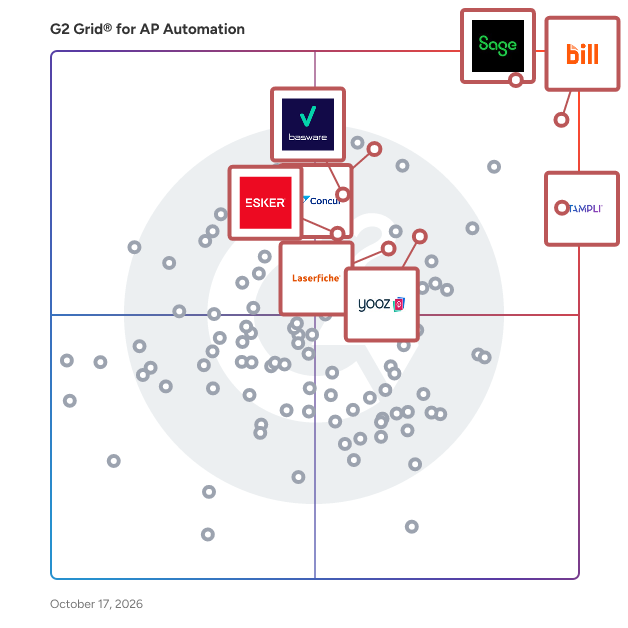
## G2 Grid® for Accounts Payable Automation Software
![G2 Grid® for Accounts Payable Automation Software plotting products by satisfaction and market presence](https://www.g2.com/categories/ap-automation/grids.png?focus%5B%5D=390&focus%5B%5D=310&focus%5B%5D=66702&focus%5B%5D=6006&focus%5B%5D=116726&focus%5B%5D=74889&focus%5B%5D=3066&focus%5B%5D=1285)
Highlighted products: Sage Intacct, SAP Concur, Stampli, BILL AP/AR, Basware, Yooz, Laserfiche, and Hyland OnBase.
Underlying data: [Grid® JSON](https://www.g2.com/categories/ap-automation/grids.json?focus%5B%5D=sage-intacct&amp;focus%5B%5D=sap-concur&amp;focus%5B%5D=stampli&amp;focus%5B%5D=bill-ap-ar&amp;focus%5B%5D=basware-basware&amp;focus%5B%5D=yooz&amp;focus%5B%5D=laserfiche&amp;focus%5B%5D=hyland-onbase&amp;segment=enterprise)


## How Many Accounts Payable Automation Software Products Does G2 Track?
**Total Products under this Category:** 332

### Category Stats (Jul 2026)
- **Average Rating**: 4.43/5 (↓0.01 vs Jun 2026) The average rating of products in this category, based on all submitted ratings
- **Top Trending Product**: PaperLess (+4.22%) - Among all products in this category, PaperLess recorded the largest rating increase compared to last month
*Last updated: July 12, 2026*


## How Does G2 Rank Accounts Payable Automation Software Products?

**Why You Can Trust G2's Software Rankings:**

- 30 Analysts and Data Experts
- 45,900+ Authentic Reviews
- 332+ Products
- Unbiased Rankings

G2's software rankings are built on verified user reviews, rigorous moderation, and a consistent research methodology maintained by a team of analysts and data experts. Each product is measured using the same transparent criteria, with no paid placement or vendor influence. While reviews reflect real user experiences, which can be subjective, they offer valuable insight into how software performs in the hands of professionals. Together, these inputs power the G2 Score, a standardized way to compare tools within every category.


---

**Sponsored**

### SAP Ariba

SAP Ariba automates management of the purchasing lifecycle for indirect goods and services, to streamline workflows, expedite approvals, and eradicate errors and exceptions. By increasing procurement efficiency, it helps users to manage more spend with less effort, and meet demands with agility and speed. For smaller companies relying on manual methods and simple automation, or a large global enterprises using multiple applications and ERP systems, SAP Ariba solutions deliver end-to-end spend visibility, control, and compliance, to help organizations become more flexible, responsive, and fiscally effective.


[Visit website](https://www.g2.com/external_clickthroughs/record?secure%5Bad_program%5D=paid_promo&amp;secure%5Bad_slot%5D=category_product_list&amp;secure%5Bcategory_id%5D=1360&amp;secure%5Bchosen_at%5D=2026-07-13T04%3A37%3A34Z&amp;secure%5Bmedium%5D=sponsored&amp;secure%5Bprioritized%5D=false&amp;secure%5Bproduct_id%5D=510&amp;secure%5Bresource_id%5D=1360&amp;secure%5Bresource_type%5D=Category&amp;secure%5Bsource_type%5D=category_page&amp;secure%5Bsource_url%5D=https%3A%2F%2Fwww.g2.com%2Fcategories%2Fap-automation%2Fenterprise&amp;secure%5Btoken%5D=63ebea7fce3edc4c3348ca880fcaf4debea7590ee7b1fa0e029e2e67d28c0bba&amp;secure%5Burl%5D=https%3A%2F%2Fwww.sap.com%2Fproducts%2Fspend-management%2Fsolutions.html&amp;secure%5Burl_type%5D=paid_promos)

---

## What Are the Top-Rated Accounts Payable Automation Software Products in 2026?
### 1. [Sage Intacct](https://www.g2.com/products/sage-intacct/reviews)
Sage Intacct is a software designed to deliver deep accounting capabilities to businesses across a wide range of industries worldwide. The software provides core accounting functions including general ledger, accounts payable, accounts receivable, cash management, and order management by leveraging a flexible and scalable cloud-based financial platform. It automates financial reporting and multi-entity consolidations and reduces the manual effort required to maintain accurate books across complex organizational structures. Sage Intacct addresses the needs of finance teams requiring real-time visibility and control by offering built-in dashboards, project accounting, revenue management, and time and expense management. The software supports specialized use cases across industries including Nonprofit, Software and SaaS, Professional Services, Financial Services, Healthcare, Hospitality, Wholesale Distribution, and Construction and Real Estate.


**Average Rating:** 4.3/5.0
**Total Reviews:** 3,929
**How Do G2 Users Rate Sage Intacct?**

- **Has the product been a good partner in doing business?:** 8.4/10 (Category avg: 9.0/10)
- **Scoring:** 7.9/10 (Category avg: 8.1/10)
- **Accounting:** 8.9/10 (Category avg: 9.0/10)
- **Analysis:** 8.2/10 (Category avg: 8.4/10)

**Who Is the Company Behind Sage Intacct?**

- **Seller:** [Sage Software](https://www.g2.com/sellers/sage-software-d61a780c-4fb3-4781-9519-baa772f5ea91)
- **Company Website:** https://www.sage.com/
- **Year Founded:** 1981
- **HQ Location:** Newcastle
- **LinkedIn® Page:** https://www.linkedin.com/company/2802/ (15,579 employees on LinkedIn®)
- **Ownership:** SGE.L

**Who Uses This Product?**
- **Who Uses This:** Controller, Senior Accountant
- **Top Industries:** Accounting, Non-Profit Organization Management
- **Company Size:** 58% Mid-Market, 26% Small-Business


#### What Are Sage Intacct's Pros and Cons?

**Pros:**

- Ease of Use (1039 reviews)
- Intuitive (507 reviews)
- Reporting (497 reviews)
- User-Friendly (473 reviews)
- Efficiency (402 reviews)

**Cons:**

- Missing Features (376 reviews)
- Learning Curve (329 reviews)
- Access Limitations (251 reviews)
- Limited Functionality (238 reviews)
- Learning Difficulty (227 reviews)


### What Do G2 Reviewers Say About Sage Intacct?
*AI-generated summary from verified user reviews*

**Pros:**

- Users find Sage Intacct to be **user-friendly** , with ample tools and functions for efficient financial management.
- Users find Sage Intacct **intuitive and user-friendly** , making navigation and finding information a pleasant experience.
- Users value the **comprehensive reporting** capabilities of Sage Intacct, enhancing financial insights and transparency for stakeholders.
- Users find Sage Intacct **incredibly user-friendly** , with intuitive navigation and numerous resources for assistance.
- Users highlight the **efficiency** of Sage Intacct, streamlining processes and enhancing real-time access to vital data.

**Cons:**

- Users feel that the **missing features** significantly hinder usability and add to the overall expense of Sage Intacct.
- Users find that the **learning curve** for Sage Intacct is steep due to its complexity and lengthy support processes.
- Users find the **access limitations** of Sage Intacct challenging, especially when waiting for approvals and tracking expenses.
- Users find the **limited functionality** of Sage Intacct challenging, particularly with module integration and search options.
- Users find the **learning difficulty** of Sage Intacct challenging, requiring time and guidance to navigate the system.

#### What Are Recent G2 Reviews of Sage Intacct?

**"[Smooth Transition with Sage Intacct: Easy Interface, Fast Reconciliations, Great Integrations](https://www.g2.com/survey_responses/sage-intacct-review-12885603)"**

**Rating:** 4.5/5.0 stars
*— Felicitous M.*

[Read full review](https://www.g2.com/survey_responses/sage-intacct-review-12885603)

---

**"[Powerful Multi-Dimensional GL and Streamlined Reporting in Sage Intacct](https://www.g2.com/survey_responses/sage-intacct-review-12949345)"**

**Rating:** 5.0/5.0 stars
*— Kaangeyan P.*

[Read full review](https://www.g2.com/survey_responses/sage-intacct-review-12949345)

---


#### What Are G2 Users Discussing About Sage Intacct?

- [In what ways is Sage Intacct transforming financial management for businesses?](https://www.g2.com/discussions/in-what-ways-is-sage-intacct-transforming-financial-management-for-businesses) - 2 comments
- [What is Sage Intacct used for?](https://www.g2.com/discussions/what-is-sage-intacct-used-for) - 2 comments, 1 upvote
- [What is the difference between Sage and Sage intacct?](https://www.g2.com/discussions/what-is-the-difference-between-sage-and-sage-intacct) - 5 comments, 1 upvote
- [How much does Sage intacct cost?](https://www.g2.com/discussions/sage-intacct-how-much-does-sage-intacct-cost) - 1 comment, 1 upvote
- [What is Sage Software used for?](https://www.g2.com/discussions/sage-intacct-what-is-sage-software-used-for) - 1 comment

### 2. [SAP Concur](https://www.g2.com/products/sap-concur/reviews)
SAP Concur is a software designed to automate and simplify expense reporting, travel booking, and invoice processing for businesses of all sizes. The software provides near real-time spend tracking, automated approval workflows, and policy compliance enforcement by leveraging AI to audit 100% of transactions. It automates receipt capture, expense submission, and travel booking and reduces manual paperwork and processing errors across finance and employee workflows. SAP Concur addresses the challenge of maintaining spend control and policy compliance by integrating real-time data across travel, expenses, and invoices in a single cloud-based platform. The software supports mobile and desktop access, enabling employees to submit expenses on the go while giving finance teams the visibility needed for informed decision-making.


**Average Rating:** 4.0/5.0
**Total Reviews:** 7,003
**How Do G2 Users Rate SAP Concur?**

- **Has the product been a good partner in doing business?:** 8.1/10 (Category avg: 9.0/10)
- **Scoring:** 8.9/10 (Category avg: 8.1/10)
- **Accounting:** 9.4/10 (Category avg: 9.0/10)
- **Analysis:** 8.8/10 (Category avg: 8.4/10)

**Who Is the Company Behind SAP Concur?**

- **Seller:** [SAP Concur](https://www.g2.com/sellers/sap-concur)
- **Company Website:** https://www.concur.com
- **Year Founded:** 1993
- **HQ Location:** Bellevue, WA
- **LinkedIn® Page:** https://www.linkedin.com/company/5822/ (6,605 employees on LinkedIn®)

**Who Uses This Product?**
- **Who Uses This:** Software Engineer, Executive Assistant
- **Top Industries:** Information Technology and Services, Computer Software
- **Company Size:** 55% Enterprise, 36% Mid-Market


#### What Are SAP Concur's Pros and Cons?

**Pros:**

- Ease of Use (519 reviews)
- Expense Management (425 reviews)
- Efficiency (271 reviews)
- Easy Upload (220 reviews)
- Customer Support (187 reviews)

**Cons:**

- Not Intuitive (106 reviews)
- Learning Curve (98 reviews)
- Poor Interface Design (78 reviews)
- Slow Loading (77 reviews)
- Complexity (73 reviews)


### What Do G2 Reviewers Say About SAP Concur?
*AI-generated summary from verified user reviews*

**Pros:**

- Users find SAP Concur&#39;s **ease of use** beneficial for organizing receipts and managing expenses efficiently.
- Users value the **time-saving features** of SAP Concur for managing receipts and expenses efficiently.
- Users value the **efficiency** of SAP Concur for quick receipt scanning and organized expense management.
- Users value the **Easy Upload** feature of SAP Concur for its convenience in organizing and submitting receipts promptly.
- Users appreciate the **responsive customer support** of SAP Concur, ensuring quick and effective issue resolution.

**Cons:**

- Users find SAP Concur&#39;s interface **not intuitive** , with constant updates complicating access and overall usability.
- Users find the **learning curve steep** with SAP Concur, citing lengthy initial setup and overwhelming features.
- Users find the **poor interface design** of SAP Concur frustrating, complicating navigation and usability even with constant updates.
- Users experience **slow loading** issues, leading to frustration during uploads and navigation within SAP Concur.
- Users find the **complexity** of SAP Concur can lead to slow performance and less control over workflows.

#### What Are Recent G2 Reviews of SAP Concur?

**"[Powerful Expense &amp; Travel Management with Strong Controls and SAP Integration](https://www.g2.com/survey_responses/sap-concur-review-12991827)"**

**Rating:** 4.0/5.0 stars
*— Kuldip B.*

[Read full review](https://www.g2.com/survey_responses/sap-concur-review-12991827)

---

**"[SAP Concur Makes Expense Reporting Fast, Easy, and Paperless](https://www.g2.com/survey_responses/sap-concur-review-13086063)"**

**Rating:** 4.5/5.0 stars
*— Umer H.*

[Read full review](https://www.g2.com/survey_responses/sap-concur-review-13086063)

---


#### What Are G2 Users Discussing About SAP Concur?

- [What efficiencies has SAP Concur brought to travel and expense management in large organizations?](https://www.g2.com/discussions/what-efficiencies-has-sap-concur-brought-to-travel-and-expense-management-in-large-organizations) - 1 comment, 2 upvotes
- [What is SAP Concur used for?](https://www.g2.com/discussions/what-is-sap-concur-used-for) - 6 comments, 2 upvotes
- [How much does SAP concur cost?](https://www.g2.com/discussions/how-much-does-sap-concur-cost) - 2 comments
- [How does SAP concur work?](https://www.g2.com/discussions/how-does-sap-concur-work)
- [What is SAP concur?](https://www.g2.com/discussions/what-is-sap-concur)

### 3. [Stampli](https://www.g2.com/products/stampli/reviews)
Stampli is a software designed to streamline the full procure-to-pay lifecycle from purchase request through payment without requiring ERP rework. The software provides data extraction, transaction coding, approval routing, invoice matching, and exception handling by leveraging AI trained on billions of real-world transactions across $150 billion in annual spend. It automates procure-to-pay workflows and reduces manual intervention by mirroring existing ERP charts of accounts, entities, dimensions, and approval hierarchies. Stampli addresses scalability challenges for growing finance teams by absorbing increased invoice volume, entity count, and process complexity without proportional headcount growth. The software supports end-to-end use cases across procurement, accounts payable, vendor management, payments, and corporate cards with audit-ready accuracy.


**Average Rating:** 4.6/5.0
**Total Reviews:** 1,951
**How Do G2 Users Rate Stampli?**

- **Has the product been a good partner in doing business?:** 9.6/10 (Category avg: 9.0/10)
- **Scoring:** 8.5/10 (Category avg: 8.1/10)
- **Accounting:** 9.0/10 (Category avg: 9.0/10)
- **Analysis:** 8.3/10 (Category avg: 8.4/10)

**Who Is the Company Behind Stampli?**

- **Seller:** [Stampli](https://www.g2.com/sellers/stampli)
- **Company Website:** https://www.stampli.com
- **Year Founded:** 2015
- **HQ Location:** Mountain View, California
- **Twitter:** @stampli (9,159 Twitter followers)
- **LinkedIn® Page:** https://www.linkedin.com/company/5273577/ (309 employees on LinkedIn®)

**Who Uses This Product?**
- **Who Uses This:** Controller, Staff Accountant
- **Top Industries:** Accounting, Hospital &amp; Health Care
- **Company Size:** 61% Mid-Market, 28% Small-Business


#### What Are Stampli's Pros and Cons?

**Pros:**

- Ease of Use (669 reviews)
- Invoicing (350 reviews)
- Intuitive (307 reviews)
- Efficiency (300 reviews)
- Customer Support (289 reviews)

**Cons:**

- Invoice Issues (159 reviews)
- Missing Features (130 reviews)
- Approval Issues (119 reviews)
- Technical Issues (106 reviews)
- Invoicing Issues (104 reviews)


### What Do G2 Reviewers Say About Stampli?
*AI-generated summary from verified user reviews*

**Pros:**

- Users appreciate the **ease of use** of Stampli, enabling quick navigation and efficient invoice processing for all team members.
- Users find Stampli&#39;s **user-friendly interface** simplifies invoice approvals and enhances overall expense management efficiency.
- Users love the **intuitive interface** of Stampli, making invoice management quick and efficient for all experience levels.
- Users appreciate Stampli&#39;s **efficiency** in processing invoices, thanks to features like Billy AI and user-friendly design.
- Users appreciate the **prompt and helpful customer support** that enhances their experience with Stampli.

**Cons:**

- Users face significant **invoice issues** with Stampli, including slow approvals and difficulties managing edited vendor names.
- Users find Stampli lacking in **batch processing for invoice edits** , which complicates their workflow and efficiency.
- Users face **approval issues** with slow processing and restricted roles that hinder invoice management and corrections.
- Users experience **technical issues** with invoice recognition and automation, leading to frustrations during their workflow.
- Users encounter **invoicing issues** with Stampli, particularly with manual edits and batch processing delays affecting efficiency.

#### What Are Recent G2 Reviews of Stampli?

**"[All-in-One Invoice View Makes Approvals Fast and Efficient](https://www.g2.com/survey_responses/stampli-review-13061256)"**

**Rating:** 4.0/5.0 stars
*— Tera L.*

[Read full review](https://www.g2.com/survey_responses/stampli-review-13061256)

---

**"[Clear, Easy Invoice Approvals—Perfect for Remote Teams!](https://www.g2.com/survey_responses/stampli-review-13086931)"**

**Rating:** 4.5/5.0 stars
*— Bryan B.*

[Read full review](https://www.g2.com/survey_responses/stampli-review-13086931)

---


#### What Are G2 Users Discussing About Stampli?

- [What is Stampli used for?](https://www.g2.com/discussions/what-is-stampli-used-for)

### 4. [BILL AP/AR](https://www.g2.com/products/bill-ap-ar/reviews)
BILL AP/AR is a software designed to automate accounts payable and accounts receivable workflows for small and midsize businesses. The software provides invoice processing, approval routing, multi-method payment execution, and expense management by leveraging intelligent automation and bank-level security. It automates invoice capture, payment scheduling, and transaction reconciliation and reduces manual data entry and payment cycle time. BILL AP/AR addresses cash flow visibility and financial control challenges by centralizing AP and AR tasks in a single platform with customizable approval workflows. The software supports use cases including expense report management, corporate card integration through BILL Spend &amp; Expense, and two-way sync with accounting systems such as QuickBooks, Xero, and NetSuite.


**Average Rating:** 4.4/5.0
**Total Reviews:** 1,781
**How Do G2 Users Rate BILL AP/AR?**

- **Has the product been a good partner in doing business?:** 8.6/10 (Category avg: 9.0/10)
- **Scoring:** 7.3/10 (Category avg: 8.1/10)
- **Accounting:** 8.6/10 (Category avg: 9.0/10)
- **Analysis:** 7.7/10 (Category avg: 8.4/10)

**Who Is the Company Behind BILL AP/AR?**

- **Seller:** [BILL (previously Bill.com)](https://www.g2.com/sellers/bill-previously-bill-com)
- **Company Website:** https://www.bill.com/
- **Year Founded:** 2006
- **HQ Location:** San Jose, CA
- **Twitter:** @billcom (17,263 Twitter followers)
- **LinkedIn® Page:** https://www.linkedin.com/company/bill/ (3,407 employees on LinkedIn®)

**Who Uses This Product?**
- **Who Uses This:** Controller, Accountant
- **Top Industries:** Accounting, Non-Profit Organization Management
- **Company Size:** 62% Small-Business, 28% Mid-Market


#### What Are BILL AP/AR's Pros and Cons?

**Pros:**

- Ease of Use (622 reviews)
- Easy Payments (301 reviews)
- Integrations (249 reviews)
- Easy Setup (248 reviews)
- Time-saving (241 reviews)

**Cons:**

- Payment Issues (177 reviews)
- Missing Features (166 reviews)
- Technical Issues (153 reviews)
- Invoicing Problems (145 reviews)
- Vendor Management (139 reviews)


### What Do G2 Reviewers Say About BILL AP/AR?
*AI-generated summary from verified user reviews*

**Pros:**

- Users love the **ease of use** of BILL AP/AR, appreciating its organization and minimal training requirements.
- Users value the **easy payment process** of BILL AP/AR, enhancing efficiency and simplifying bill management.
- Users appreciate the **seamless integration** with QuickBooks and other tools, enhancing AP/AR management efficiency.
- Users find the **easy setup** of BILL AP/AR highly beneficial, facilitating quick implementation and minimal training needs.
- Users appreciate the **time-saving features** of BILL AP/AR, dramatically streamlining their accounts payable workflow.

**Cons:**

- Users face significant **payment issues** due to inflexible reporting and lack of access to bank information.
- Users find the **missing features** frustrating, particularly the lack of discount terms for vendors and complex inbox navigation.
- Users experience **technical issues** with invoice dates and syncing glitches, leading to occasional manual adjustments.
- Users report frequent **invoicing problems** , such as confusion over payments and issues with vendor management.
- Users find the **vendor management automation lacking** , especially with multiple locations and varied coding complexities.

#### What Are Recent G2 Reviews of BILL AP/AR?

**"[Bill.com-Tool for seamless accounts payable process](https://www.g2.com/survey_responses/bill-ap-ar-review-8948375)"**

**Rating:** 4.0/5.0 stars
*— Samruddi M.*

[Read full review](https://www.g2.com/survey_responses/bill-ap-ar-review-8948375)

---

**"[Great Bill Payment Platform](https://www.g2.com/survey_responses/bill-ap-ar-review-12713619)"**

**Rating:** 4.5/5.0 stars
*— Jordan Z.*

[Read full review](https://www.g2.com/survey_responses/bill-ap-ar-review-12713619)

---


#### What Are G2 Users Discussing About BILL AP/AR?

- [How does Bill com integrate with QuickBooks?](https://www.g2.com/discussions/how-does-bill-com-integrate-with-quickbooks) - 1 comment
- [What is Bill COM used for?](https://www.g2.com/discussions/what-is-bill-com-used-for) - 1 comment
- [How do I get paid on Bill com?](https://www.g2.com/discussions/how-do-i-get-paid-on-bill-com)
- [How long does Bill com take to pay?](https://www.g2.com/discussions/how-long-does-bill-com-take-to-pay) - 2 comments

### 5. [Basware](https://www.g2.com/products/basware-basware/reviews)
Basware is how the world’s best finance teams gain complete control of every invoice, every time. We offer a cloud-based platform for invoice lifecycle management automation, supporting end-to-end processing of invoices, from receipt or creation, through approval and matching, to payment and archive. Powered by the world’s most sophisticated invoice-centric AI – trained on over 2 billion invoices – Basware&#39;s Intelligent Automation drives real ROI by transforming finance operations. We serve 6,500+ customers globally and are trusted by industry leaders including DHL, Heineken and Sony. Fueled by 40 years of specialized expertise with $10+ trillion in total spend handled, we are pioneering the next era of finance. With Basware, now it all just happens.


**Average Rating:** 4.0/5.0
**Total Reviews:** 124
**How Do G2 Users Rate Basware?**

- **Has the product been a good partner in doing business?:** 7.4/10 (Category avg: 9.0/10)
- **Scoring:** 7.7/10 (Category avg: 8.1/10)
- **Accounting:** 8.1/10 (Category avg: 9.0/10)
- **Analysis:** 7.4/10 (Category avg: 8.4/10)

**Who Is the Company Behind Basware?**

- **Seller:** [Basware](https://www.g2.com/sellers/basware)
- **Company Website:** https://www.basware.com
- **Year Founded:** 1985
- **HQ Location:** Espoo
- **Twitter:** @basware (10,154 Twitter followers)
- **LinkedIn® Page:** https://www.linkedin.com/company/basware/ (1,692 employees on LinkedIn®)

**Who Uses This Product?**
- **Top Industries:** Accounting, Computer Software
- **Company Size:** 63% Enterprise, 26% Mid-Market


#### What Are Basware's Pros and Cons?

**Pros:**

- Ease of Use (12 reviews)
- Invoice Management (9 reviews)
- Efficiency (8 reviews)
- Invoicing (8 reviews)
- Automation (7 reviews)

**Cons:**

- Slow Loading (5 reviews)
- Complexity (4 reviews)
- Delays (4 reviews)
- Improvement Needed (4 reviews)
- Invoice Issues (4 reviews)


### What Do G2 Reviewers Say About Basware?
*AI-generated summary from verified user reviews*

**Pros:**

- Users find Basware to be **exceptionally user-friendly** , making daily tasks simpler and enhancing overall efficiency in invoice processing.
- Users appreciate the **efficiency of automated invoice management** in Basware, which streamlines the procure-to-pay process effectively.
- Users value the **streamlined efficiency** of Basware, significantly reducing manual effort in the procure-to-pay process.
- Users value the **robust AP automation and e-invoicing capabilities** of Basware, significantly enhancing invoice processing efficiency.
- Users value the **streamlined automation** of Basware, enhancing efficiency and reducing manual errors in finance processes.

**Cons:**

- Users often experience **slow loading** times with Basware, which hampers efficiency and user satisfaction.
- Users find the **complexity** of Basware frustrating due to non-intuitive workflows and extensive training requirements.
- Users face frequent **delays** due to slow issue resolution and long implementation times, impacting their overall experience with Basware.
- Users suggest that **Basware&#39;s graphics and usability need improvement** to enhance the overall user experience and efficiency.
- Users face **invoice issues** such as stuck queues and unclear error messages, complicating the troubleshooting process.

#### What Are Recent G2 Reviews of Basware?

**"[A Solid Solution for Managing and Approving Invoices](https://www.g2.com/survey_responses/basware-review-12337141)"**

**Rating:** 4.0/5.0 stars
*— Heidi F.*

[Read full review](https://www.g2.com/survey_responses/basware-review-12337141)

---

**"[Streamlined Invoice Management with Room for Improvement](https://www.g2.com/survey_responses/basware-review-12997513)"**

**Rating:** 4.0/5.0 stars
*— Prabhash  R.*

[Read full review](https://www.g2.com/survey_responses/basware-review-12997513)

---


#### What Are G2 Users Discussing About Basware?

- [What is your experience regarding pricing and costs for Basware, and how has it impacted your procurement processes?](https://www.g2.com/discussions/what-is-your-experience-regarding-pricing-and-costs-for-basware-and-how-has-it-impacted-your-procurement-processes)
- [What is purchase-to-pay process?](https://www.g2.com/discussions/what-is-purchase-to-pay-process) - 1 comment
- [What is verian?](https://www.g2.com/discussions/what-is-verian) - 1 comment
- [What is e invoicing Basware?](https://www.g2.com/discussions/what-is-e-invoicing-basware) - 1 comment
- [What does Basware do?](https://www.g2.com/discussions/what-does-basware-do) - 1 comment

### 6. [Yooz](https://www.g2.com/products/yooz/reviews)
Yooz is a software designed to automate accounts payable and purchase-to-pay processes for finance and accounting teams managing invoice intake, approvals, payments, and audit preparation. The software provides multichannel invoice capture, general ledger coding, two and three-way PO matching, fraud detection through forensic AI analysis, and configurable workflow routing by leveraging machine learning models for document classification and field extraction. It automates invoice processing from initial receipt through ERP posting and reduces manual data entry and exception handling across distributed AP teams. Yooz addresses compliance and fraud risk by maintaining complete audit trails, role-based access permissions, duplicate detection, and document retention capabilities that meet regulatory requirements. The software supports connectivity with more than 250 ERP and accounting systems including Sage, Microsoft Dynamics, Acumatica, NetSuite, and QuickBooks, and accepts documents via email, scanning, mobile capture, sFTP, and structured formats such as UBL, CII, and EDIFACT.


**Average Rating:** 4.4/5.0
**Total Reviews:** 348
**How Do G2 Users Rate Yooz?**

- **Has the product been a good partner in doing business?:** 8.8/10 (Category avg: 9.0/10)
- **Scoring:** 8.1/10 (Category avg: 8.1/10)
- **Accounting:** 8.6/10 (Category avg: 9.0/10)
- **Analysis:** 8.3/10 (Category avg: 8.4/10)

**Who Is the Company Behind Yooz?**

- **Seller:** [Yooz](https://www.g2.com/sellers/yooz)
- **Company Website:** https://GetYooz.com
- **Year Founded:** 2010
- **HQ Location:** Dallas, Texas
- **Twitter:** @WhyYooz (660 Twitter followers)
- **LinkedIn® Page:** https://www.linkedin.com/company/yooz/ (509 employees on LinkedIn®)

**Who Uses This Product?**
- **Who Uses This:** Controller, Parts Manager
- **Top Industries:** Accounting, Automotive
- **Company Size:** 54% Mid-Market, 28% Small-Business


#### What Are Yooz's Pros and Cons?

**Pros:**

- Ease of Use (73 reviews)
- Intuitive (33 reviews)
- Simple (30 reviews)
- Time-saving (29 reviews)
- Invoice Management (24 reviews)

**Cons:**

- Technical Issues (16 reviews)
- Invoicing Issues (15 reviews)
- Design Improvement (10 reviews)
- Vendor Management (10 reviews)
- Invoice Management (9 reviews)


### What Do G2 Reviewers Say About Yooz?
*AI-generated summary from verified user reviews*

**Pros:**

- Users find Yooz to be **extremely user-friendly** , making team setup and data review quick and intuitive.
- Users appreciate the **intuitive design** of Yooz, finding it user-friendly and straightforward for all accounting tasks.
- Users appreciate the **user-friendly interface** of Yooz, making accounting processes simpler and more efficient for teams.
- Users appreciate the **time-saving efficiency** of Yooz, streamlining tasks and reducing the need for follow-ups.
- Users find Yooz&#39;s **invoice management** incredibly easy, with features that streamline corrections and improve efficiency.

**Cons:**

- Users experience **technical issues** with Yooz, including errors and inconsistent data recognition, causing frustration.
- Users experience **invoicing issues** , including AI misrecognition, lack of email confirmations, and inability to edit submitted invoices.
- Users feel the **design improvement** of Yooz is needed, citing clunkiness and lack of modernity in the interface.
- Users find the **vendor management problematic** due to misrecognition and account changes during uploads, complicating processes.
- Users face challenges with **inaccurate data extraction** from invoices, leading to potential errors and manual corrections.

#### What Are Recent G2 Reviews of Yooz?

**"[“Efficient and Reliable AP Automation”](https://www.g2.com/survey_responses/yooz-review-12742425)"**

**Rating:** 5.0/5.0 stars
*— Varun C.*

[Read full review](https://www.g2.com/survey_responses/yooz-review-12742425)

---

**"[Streamlined Invoice Automation with Room for Improvement](https://www.g2.com/survey_responses/yooz-review-12688935)"**

**Rating:** 4.0/5.0 stars
*— Abbas N.*

[Read full review](https://www.g2.com/survey_responses/yooz-review-12688935)

---


### 7. [Laserfiche](https://www.g2.com/products/laserfiche/reviews)
Laserfiche is a software designed to accelerate document management and process automation across enterprises through a cloud-based SaaS platform. The software provides AI-powered document organization, electronic forms, workflow automation, and analytics by leveraging low-code process automation tools and prebuilt solution templates. It automates content routing, approval workflows, and audit trail maintenance and reduces the manual effort of managing documents across disconnected systems. Laserfiche addresses enterprise productivity and compliance challenges by centralizing content, enforcing data privacy standards, and connecting hundreds of mission-critical applications through powerful integrations. The software supports use cases across government, education, and other industries, enabling teams to access documents from a single location and shift focus toward higher-priority strategic work.


**Average Rating:** 4.7/5.0
**Total Reviews:** 1,206
**How Do G2 Users Rate Laserfiche?**

- **Has the product been a good partner in doing business?:** 9.2/10 (Category avg: 9.0/10)
- **Scoring:** 8.6/10 (Category avg: 8.1/10)
- **Accounting:** 8.5/10 (Category avg: 9.0/10)
- **Analysis:** 8.6/10 (Category avg: 8.4/10)

**Who Is the Company Behind Laserfiche?**

- **Seller:** [Laserfiche](https://www.g2.com/sellers/laserfiche)
- **Company Website:** https://www.laserfiche.com/
- **Year Founded:** 1976
- **HQ Location:** Long Beach, California
- **Twitter:** @laserfiche (4,770 Twitter followers)
- **LinkedIn® Page:** https://www.linkedin.com/company/19414/ (403 employees on LinkedIn®)

**Who Uses This Product?**
- **Who Uses This:** Deputy City Clerk, Business Systems Analyst
- **Top Industries:** Government Administration, Education Management
- **Company Size:** 60% Mid-Market, 25% Enterprise


#### What Are Laserfiche's Pros and Cons?

**Pros:**

- Ease of Use (125 reviews)
- Process Automation (88 reviews)
- Automation (83 reviews)
- Workflow Management (70 reviews)
- Document Management (66 reviews)

**Cons:**

- Learning Curve (40 reviews)
- Learning Difficulty (33 reviews)
- Missing Features (28 reviews)
- Update Issues (23 reviews)
- Limited Functionality (22 reviews)


### What Do G2 Reviewers Say About Laserfiche?
*AI-generated summary from verified user reviews*

**Pros:**

- Users appreciate the **ease of use** of Laserfiche, enabling efficient processes without coding or frustrations.
- Users love Laserfiche for its **effective process automation** , streamlining forms and workflows for enhanced productivity.
- Users enjoy the **automation of forms processes** with Laserfiche, enhancing efficiency and document management.
- Users value the **robust and flexible workflow management** in Laserfiche, enhancing document processing and integration capabilities.
- Users appreciate the **easy onboarding and intuitive document management** features of Laserfiche, enhancing workflow and organization.

**Cons:**

- Users face a **small learning curve** with Laserfiche, particularly in fully utilizing metadata fields for efficiency.
- Users find the **learning difficulty** of Quickfield challenging, requiring time and expertise to navigate effectively.
- Users find the **missing features** in Laserfiche frustrating, especially basic functionalities and direct PDF support.
- Users find that **update issues** can disrupt workflows, especially for new users adapting to changes.
- Users find the **limited functionality** of Laserfiche restricts basic process design and ease of setup for new users.

#### What Are Recent G2 Reviews of Laserfiche?

**"[Document Management and Automation](https://www.g2.com/survey_responses/laserfiche-review-3536890)"**

**Rating:** 4.5/5.0 stars
*— Matthew D.*

[Read full review](https://www.g2.com/survey_responses/laserfiche-review-3536890)

---

**"[Robust and Reliable](https://www.g2.com/survey_responses/laserfiche-review-10968098)"**

**Rating:** 4.5/5.0 stars
*— Holly V.*

[Read full review](https://www.g2.com/survey_responses/laserfiche-review-10968098)

---


#### What Are G2 Users Discussing About Laserfiche?

- [What is Laserfiche used for?](https://www.g2.com/discussions/what-is-laserfiche-used-for)
- [What is document imaging software?](https://www.g2.com/discussions/what-is-document-imaging-software) - 1 upvote
- [How much is laserfiche?](https://www.g2.com/discussions/how-much-is-laserfiche)
- [What is Laserfiche software?](https://www.g2.com/discussions/what-is-laserfiche-software) - 2 comments

### 8. [Hyland OnBase](https://www.g2.com/products/hyland-onbase/reviews)
OnBase provides a broad spectrum of turn-key industry and departmental solutions that are expertly tailored to meet specific business challenges. As an enterprise platform, OnBase has purpose-built integrations and connectors to core industry LOBs such as Epic and Workday, supporting critical content and process solutions. With repeatable industry solutions, OnBase provides the capability to intelligently automate your business processes so your team can focus on higher value work without the need to build costly customized solutions. With business ownership of solutions, OnBase enables expansion beyond IT, delivering faster ROI. OnBase speeds up processes and reduces costs by capturing important information into a single system so you can manage data, documents and processes. Workflow can be configured to address your departmental, industry and enterprise challenges. Organizations also benefit from low-code application development and a range of multichannel capture options. OnBase can integrate with your existing systems and provide instant access to everyone who needs it, giving visibility into your processes and system performance while securely storing, protecting and expunging your content.


**Average Rating:** 4.4/5.0
**Total Reviews:** 308
**How Do G2 Users Rate Hyland OnBase?**

- **Has the product been a good partner in doing business?:** 8.9/10 (Category avg: 9.0/10)
- **Scoring:** 8.8/10 (Category avg: 8.1/10)
- **Accounting:** 9.2/10 (Category avg: 9.0/10)
- **Analysis:** 8.8/10 (Category avg: 8.4/10)

**Who Is the Company Behind Hyland OnBase?**

- **Seller:** [Hyland](https://www.g2.com/sellers/hyland-a47a4cc4-7960-4080-8278-3ba399e3d4cd)
- **Company Website:** https://www.hyland.com/
- **Year Founded:** 1991
- **HQ Location:** Westlake, OH
- **Twitter:** @Hyland (13,165 Twitter followers)
- **LinkedIn® Page:** https://www.linkedin.com/company/10043/ (4,269 employees on LinkedIn®)

**Who Uses This Product?**
- **Top Industries:** Government Administration, Higher Education
- **Company Size:** 51% Enterprise, 43% Mid-Market


#### What Are Hyland OnBase's Pros and Cons?

**Pros:**

- Ease of Use (31 reviews)
- Document Management (22 reviews)
- Integrations (14 reviews)
- Features (13 reviews)
- Simple (12 reviews)

**Cons:**

- Missing Features (17 reviews)
- Update Issues (12 reviews)
- Complexity (10 reviews)
- Technical Issues (10 reviews)
- Learning Curve (8 reviews)


### What Do G2 Reviewers Say About Hyland OnBase?
*AI-generated summary from verified user reviews*

**Pros:**

- Users praise the **ease of use** of Hyland OnBase, finding it intuitive and simple to learn for document management.
- Users value the **powerful document categorization** and effortless cross-referencing capabilities of Hyland OnBase.
- Users value the **seamless integrations** of Hyland OnBase, enhancing efficiency and allowing for easy platform expansion.
- Users praise the **seamless integration** of Hyland OnBase with geographic systems, enhancing document management and workflow efficiency.
- Users value the **user-friendly interface** of Hyland OnBase, finding it easy to train and navigate.

**Cons:**

- Users note **missing features** in on-premise implementations, leading to frustrations regarding outdated support and lack of AI access.
- Users report serious **update issues** post-upgrade, particularly with document locking hindering administrative efficiency.
- Users find the **complexity** of Hyland OnBase challenging, often leading to difficulties and required extensive training.
- Users report **technical issues** post-upgrade, particularly with document locking, impacting admin efficiency and system stability.
- Users face a **steep learning curve** with Hyland OnBase, requiring significant training and resources to navigate its complexity.

#### What Are Recent G2 Reviews of Hyland OnBase?

**"[Onbase system admin](https://www.g2.com/survey_responses/hyland-onbase-review-10301258)"**

**Rating:** 4.5/5.0 stars
*— Surbhi D.*

[Read full review](https://www.g2.com/survey_responses/hyland-onbase-review-10301258)

---

**"[Great product with a lot of promise](https://www.g2.com/survey_responses/hyland-onbase-review-11604743)"**

**Rating:** 4.0/5.0 stars
*— Kelly A.*

[Read full review](https://www.g2.com/survey_responses/hyland-onbase-review-11604743)

---


#### What Are G2 Users Discussing About Hyland OnBase?

- [What is OnBase used for?](https://www.g2.com/discussions/what-is-onbase-used-for) - 1 comment
- [What is OnBase Document Management?](https://www.g2.com/discussions/what-is-onbase-document-management) - 2 comments
- [Is OnBase a database?](https://www.g2.com/discussions/is-onbase-a-database) - 1 comment
- [What is OnBase platform?](https://www.g2.com/discussions/what-is-onbase-platform) - 1 comment
- [What is OnBase software used for?](https://www.g2.com/discussions/what-is-onbase-software-used-for) - 1 comment

### 9. [Celonis](https://www.g2.com/products/celonis/reviews)
Celonis makes processes work — for people, companies, and the planet. Powered by process mining and AI, the Celonis Process Intelligence Platform integrates process data and business context to create a living digital twin of business operations. We enable thousands of companies worldwide to understand how their business actually runs and, together with their partners, build intelligent solutions that transform and continuously improve the way they operate — unlocking billions in value. Celonis is headquartered in Munich, Germany, and New York City, USA, with more than 20 offices worldwide. © 2026 Celonis SE. All rights reserved. Celonis and the Celonis “droplet” logo are trademarks or registered trademarks of Celonis SE in Germany and other jurisdictions. All other product and company names are trademarks or registered trademarks of their respective owners.


**Average Rating:** 4.5/5.0
**Total Reviews:** 286
**How Do G2 Users Rate Celonis?**

- **Has the product been a good partner in doing business?:** 8.8/10 (Category avg: 9.0/10)
- **Scoring:** 8.3/10 (Category avg: 8.1/10)
- **Accounting:** 8.6/10 (Category avg: 9.0/10)
- **Analysis:** 8.5/10 (Category avg: 8.4/10)

**Who Is the Company Behind Celonis?**

- **Seller:** [Celonis](https://www.g2.com/sellers/celonis)
- **Company Website:** https://www.celonis.com
- **Year Founded:** 2011
- **HQ Location:** New York
- **Twitter:** @Celonis (17,449 Twitter followers)
- **LinkedIn® Page:** https://www.linkedin.com/company/3118913/ (3,848 employees on LinkedIn®)

**Who Uses This Product?**
- **Who Uses This:** Senior Consultant, Analyst
- **Top Industries:** Information Technology and Services, Oil &amp; Energy
- **Company Size:** 63% Enterprise, 20% Small-Business


#### What Are Celonis's Pros and Cons?

**Pros:**

- Ease of Use (23 reviews)
- Efficiency (17 reviews)
- Insights (15 reviews)
- User Interface (15 reviews)
- Features (14 reviews)

**Cons:**

- Learning Curve (15 reviews)
- Complexity (13 reviews)
- Missing Features (10 reviews)
- Limited Features (9 reviews)
- Slow Performance (8 reviews)


### What Do G2 Reviewers Say About Celonis?
*AI-generated summary from verified user reviews*

**Pros:**

- Users find the **ease of use** of Celonis invaluable, making it accessible to both technical and non-technical team members.
- Users commend the **efficiency** of Celonis for revealing process insights that enhance decision-making and operational improvements.
- Users value the **exceptional visibility** Celonis provides into business processes, facilitating effective identification of bottlenecks and inefficiencies.
- Users appreciate the **user-friendly interface** of Celonis, noting its smooth experience and effective data visualizations.
- Users value the **user-friendly environment** of Celonis, which enhances accessibility and facilitates insightful process analysis.

**Cons:**

- Users find that Celonis has a **steep learning curve** , necessitating significant training for beginners to become proficient.
- Users find the **initial setup and interface complexity** in Celonis daunting, necessitating extensive training and technical effort.
- Users report **missing features** like constant licensing changes and a complex interface hindering usability and efficiency.
- Users are frustrated by **limited features** in Celonis, particularly with the inflexible filter bar and Copilot&#39;s accuracy.
- Users experience **slow performance** in Celonis, with occasional delays in application response time affecting overall efficiency.

#### What Are Recent G2 Reviews of Celonis?

**"[A complete toolset to build a real digital twin of the organization](https://www.g2.com/survey_responses/celonis-review-4528582)"**

**Rating:** 5.0/5.0 stars
*— Joaquim N.*

[Read full review](https://www.g2.com/survey_responses/celonis-review-4528582)

---

**"[Celonis process mining](https://www.g2.com/survey_responses/celonis-review-8129344)"**

**Rating:** 5.0/5.0 stars
*— Gulshan M.*

[Read full review](https://www.g2.com/survey_responses/celonis-review-8129344)

---


#### What Are G2 Users Discussing About Celonis?

- [What is Celonis used for?](https://www.g2.com/discussions/what-is-celonis-used-for) - 1 comment
- [How much does Celonis cost?](https://www.g2.com/discussions/how-much-does-celonis-cost) - 1 comment
- [What is SAP Celonis?](https://www.g2.com/discussions/what-is-sap-celonis) - 2 comments
- [What does Celonis do?](https://www.g2.com/discussions/what-does-celonis-do)
- [What is Celonis software?](https://www.g2.com/discussions/what-is-celonis-software) - 1 comment

### 10. [Corpay Complete](https://www.g2.com/products/corpay-complete/reviews)
Corpay Complete is a software designed to deliver fully managed accounts payable automation by consolidating purchase orders, invoicing, vendor payments, corporate cards, and expense controls into a single automated platform. The software provides real-time spend visibility, built-in fraud protection, and enterprise-grade security by leveraging a vendor network of 3.8 million vendors and processing 1.8 billion payments annually across 200+ countries. It automates the full procure-to-pay process and reduces reliance on manual workflows and disconnected systems across AP and expense management. Corpay Complete addresses the inefficiencies of fragmented payment solutions by providing a unified platform that manages vendor enrollment, payment execution, and expense controls without requiring multiple third-party tools. The software supports ERP integrations with NetSuite, QuickBooks, and Microsoft Dynamics, enabling finance teams to close books faster, optimize cash flow, and scale spend management with confidence.


**Average Rating:** 4.6/5.0
**Total Reviews:** 387
**How Do G2 Users Rate Corpay Complete?**

- **Has the product been a good partner in doing business?:** 9.4/10 (Category avg: 9.0/10)
- **Scoring:** 9.3/10 (Category avg: 8.1/10)
- **Accounting:** 9.5/10 (Category avg: 9.0/10)
- **Analysis:** 9.2/10 (Category avg: 8.4/10)

**Who Is the Company Behind Corpay Complete?**

- **Seller:** [Corpay](https://www.g2.com/sellers/corpay)
- **Company Website:** https://www.corpay.com/ap-automation
- **Year Founded:** 2000
- **HQ Location:** Atlanta, US
- **Twitter:** @CorpayFX (3,102 Twitter followers)
- **LinkedIn® Page:** https://www.linkedin.com/company/corpay/ (7,076 employees on LinkedIn®)

**Who Uses This Product?**
- **Who Uses This:** Controller, Accounts Payable Specialist
- **Top Industries:** Automotive, Primary/Secondary Education
- **Company Size:** 70% Mid-Market, 20% Enterprise


#### What Are Corpay Complete's Pros and Cons?

**Pros:**

- Ease of Use (86 reviews)
- Efficiency (63 reviews)
- Customer Support (53 reviews)
- Payment Processing (47 reviews)
- Time-saving (46 reviews)

**Cons:**

- Payment Issues (29 reviews)
- Vendor Management (21 reviews)
- Poor Customer Support (13 reviews)
- Delays (11 reviews)
- Payment Processing (10 reviews)


### What Do G2 Reviewers Say About Corpay Complete?
*AI-generated summary from verified user reviews*

**Pros:**

- Users find Corpay Complete to be extremely **user-friendly and easy to navigate** , simplifying financial management for all.
- Users commend the **efficiency** of Corpay Complete, streamlining payments and saving substantial time and effort.
- Users commend the **knowledgeable and responsive customer support** of Corpay Complete, enhancing overall payment experiences.
- Users value the **efficient payment processing** that simplifies vendor payments, offering flexibility and excellent customer service.
- Users enjoy the **time-saving payment automation** of Corpay Complete, simplifying transactions and improving efficiency.

**Cons:**

- Users face **payment issues** that delay vendor onboarding and lead to late payments, causing frustration and inefficiency.
- Users find that **switching vendors to electronic payments is time-consuming** , impacting the overall ease of use initially.
- Users express frustration over **poor customer support** , highlighting slow response times and unresolved issues affecting their experience.
- Users experience **delays in payment processing** due to third-party interactions and unclear funds management with Corpay Complete.
- Users experience **delays in payment processing** due to banking setups and lack of transparency in vendor payment methods.

#### What Are Recent G2 Reviews of Corpay Complete?

**"[Improve the management of your business finances with the innovation features of Corpay Complete.](https://www.g2.com/survey_responses/corpay-complete-review-12161335)"**

**Rating:** 5.0/5.0 stars
*— Cindy F.*

[Read full review](https://www.g2.com/survey_responses/corpay-complete-review-12161335)

---

**"[Automate your digital payment processes and manage your financial assets with Corpay Complete.](https://www.g2.com/survey_responses/corpay-complete-review-12173882)"**

**Rating:** 5.0/5.0 stars
*— Steve W.*

[Read full review](https://www.g2.com/survey_responses/corpay-complete-review-12173882)

---


#### What Are G2 Users Discussing About Corpay Complete?

- [What is Corpay Payment Automation used for?](https://www.g2.com/discussions/what-is-corpay-payment-automation-used-for)
- [What is Paymerang used for?](https://www.g2.com/discussions/what-is-paymerang-used-for) - 1 upvote

### 11. [Paymode](https://www.g2.com/products/paymode/reviews)
Paymode, Bottomline’s business payments network, is a provider of secure, streamlined payments for businesses in North America. Working with businesses from the mid-market to enterprise level and partnering with some of the largest banks in America, we work to make every step of traditionally manual and cumbersome payment processes simple, secure, and streamlined. We automate business payments for more than 600,000 businesses, allowing for greater efficiency, security and savings. We do this by: o Automating and digitizing payments by switching from checks to ACH and virtual card o Enrolling vendors in our network and ensuring you&#39;re not stuck holding sensitive bank account information o Reducing payment fraud risk through technology and expertise Paymode offers a truly comprehensive way to solve traditional accounts payable and accounts receivable challenges for payers and vendors alike. By utilizing Paymode to process payments to your suppliers, your business can save time, save money, realize rebates on your AP spend, and forge stronger relationships with your key suppliers. Your vendors, in turn, will receive enhanced remittance, quicker payments and advanced fraud protection.


**Average Rating:** 4.1/5.0
**Total Reviews:** 330
**How Do G2 Users Rate Paymode?**

- **Has the product been a good partner in doing business?:** 8.3/10 (Category avg: 9.0/10)
- **Scoring:** 8.6/10 (Category avg: 8.1/10)
- **Accounting:** 8.8/10 (Category avg: 9.0/10)
- **Analysis:** 8.6/10 (Category avg: 8.4/10)

**Who Is the Company Behind Paymode?**

- **Seller:** [Bottomline ](https://www.g2.com/sellers/bottomline)
- **Company Website:** https://www.bottomline.com/us
- **Year Founded:** 1989
- **HQ Location:** Portsmouth, NH
- **LinkedIn® Page:** https://www.linkedin.com/company/bottomline-payments (2,949 employees on LinkedIn®)
- **Ownership:** EPAY

**Who Uses This Product?**
- **Who Uses This:** Owner, Office Manager
- **Top Industries:** Construction, Accounting
- **Company Size:** 62% Small-Business, 29% Mid-Market


#### What Are Paymode's Pros and Cons?

**Pros:**

- Ease of Use (12 reviews)
- Easy Payments (11 reviews)
- Easy Setup (7 reviews)
- Efficiency (7 reviews)
- Automation (5 reviews)

**Cons:**

- Delays (4 reviews)
- Payment Issues (4 reviews)
- Vendor Management (4 reviews)
- Excessive Fees (3 reviews)
- Poor Customer Support (3 reviews)


### What Do G2 Reviewers Say About Paymode?
*AI-generated summary from verified user reviews*

**Pros:**

- Users value the **ease of use** of Paymode, highlighting its simplicity and seamlessness for efficient payment management.
- Users value the **easy payment process** of Paymode, which significantly streamlines vendor transactions and simplifies financial management.
- Users commend the **easy setup** of Paymode, enhancing convenience and efficiency in managing their payment processes.
- Users benefit from the **efficiency of streamlined payment processes** , enhancing financial management and vendor interactions seamlessly.
- Users appreciate how Paymode offers **smoother automation** , simplifying rent payments and enhancing overall efficiency.

**Cons:**

- Users are frustrated by **delays in customer support** , impacting timely problem resolution and overall experience with Paymode.
- Users face significant **payment issues** with Paymode, including delays, support problems, and frequent declines of virtual card payments.
- Users face significant **vendor management challenges** with long setups, poor support, and lack of account visibility.
- Users are frustrated by Paymode&#39;s **excessive fees** especially for large transactions, impacting their overall budgeting and expenses.
- Users are frustrated with **poor customer support** , experiencing delays and unhelpful responses during critical problem-solving moments.

#### What Are Recent G2 Reviews of Paymode?

**"[Paymode Streamlines Vendor Payments with Clear Tracking and Remittance Details](https://www.g2.com/survey_responses/paymode-review-12909655)"**

**Rating:** 4.0/5.0 stars
*— Lissette B.*

[Read full review](https://www.g2.com/survey_responses/paymode-review-12909655)

---

**"[Great to see the Bottomline team in one place and network with other Real estate companies](https://www.g2.com/survey_responses/paymode-review-11195351)"**

**Rating:** 4.0/5.0 stars
*— John  F.*

[Read full review](https://www.g2.com/survey_responses/paymode-review-11195351)

---


#### What Are G2 Users Discussing About Paymode?

- [What is NexusPayables used for?](https://www.g2.com/discussions/what-is-nexuspayables-used-for)
- [Is Paymode-X safe?](https://www.g2.com/discussions/is-paymode-x-safe) - 2 comments
- [Who uses Paymode-X?](https://www.g2.com/discussions/who-uses-paymode-x) - 1 comment
- [What is Paymode-X premium?](https://www.g2.com/discussions/what-is-paymode-x-premium) - 1 comment
- [What does Paymode-X do?](https://www.g2.com/discussions/what-does-paymode-x-do) - 1 comment

### 12. [DualEntry](https://www.g2.com/products/dualentry/reviews)
DualEntry is an AI-native software designed to automate end-to-end accounting workflows for global, multi-entity, and multi-currency finance operations from mid-market through IPO and beyond. The software provides automated AR/AP processing, revenue management, tax handling, financial reporting, and audit preparation by leveraging a flexible general ledger with unlimited nestable classifications, live FX rates, and 13,000+ bank connections across 60+ countries. It automates intercompany eliminations, journal-entry posting, and reconciliation workflows and reduces manual accounting work across complex organizational structures. DualEntry addresses scalability and compliance challenges by offering SOX, SOC 2, and GDPR-ready financials alongside role-based real-time dashboards and drillable multi-dimensional reporting. The software supports 180 local currencies in 240 countries and integrates with 200+ tools across CRM, AP, AR, and more, enabling finance teams to grow without adding headcount.


**Average Rating:** 4.9/5.0
**Total Reviews:** 122
**How Do G2 Users Rate DualEntry?**

- **Has the product been a good partner in doing business?:** 9.5/10 (Category avg: 9.0/10)
- **Scoring:** 9.3/10 (Category avg: 8.1/10)
- **Accounting:** 9.8/10 (Category avg: 9.0/10)
- **Analysis:** 9.4/10 (Category avg: 8.4/10)

**Who Is the Company Behind DualEntry?**

- **Seller:** [DualEntry](https://www.g2.com/sellers/dualentry)
- **Company Website:** https://www.dualentry.com
- **Year Founded:** 2024
- **HQ Location:** New York, US
- **Twitter:** @dualentry (765 Twitter followers)
- **LinkedIn® Page:** https://www.linkedin.com/company/dualentry/ (71 employees on LinkedIn®)

**Who Uses This Product?**
- **Who Uses This:** Accountant
- **Top Industries:** Accounting, Manufacturing
- **Company Size:** 48% Mid-Market, 34% Small-Business


#### What Are DualEntry's Pros and Cons?

**Pros:**

- Ease of Use (318 reviews)
- Features (272 reviews)
- Efficiency (256 reviews)
- Integrations (235 reviews)
- Time-saving (231 reviews)

**Cons:**

- Improvement Needed (116 reviews)
- Missing Features (92 reviews)
- Limited Customization (91 reviews)
- Not User-Friendly (84 reviews)
- Learning Difficulty (83 reviews)


### What Do G2 Reviewers Say About DualEntry?
*AI-generated summary from verified user reviews*

**Pros:**

- Users value the **ease of use** in DualEntry, enjoying its intuitive tools and automated workflows for efficient tracking.
- Users value the **smooth handling of thousands of transactions** , making it ideal for growing finance teams.
- Users appreciate the **efficiency** of DualEntry, seamlessly managing high volumes of transactions without slowing down.
- Users value the **powerful integrations** of DualEntry, enhancing accuracy and efficiency in financial tracking solutions.
- Users value the **time-saving automation** of DualEntry, enabling teams to focus on strategic decisions and reduce errors.

**Cons:**

- Users find the **dependency on the parent company** potentially confusing for organizational clarity and independence.
- Users express disappointment over the **missing mobile app** , which limits accessibility and on-the-go functionality.
- Users find **limited customization** in DualEntry, impacting their ability to tailor reports and integrations for specific needs.
- Users find the interface impressive but note it can be **overwhelming without sufficient guidance** for new users.
- Users note a significant **learning difficulty** due to insufficient guidance, making initial usage overwhelming for newcomers.

#### What Are Recent G2 Reviews of DualEntry?

**"[Accurate + Convenience](https://www.g2.com/survey_responses/dualentry-review-11367056)"**

**Rating:** 5.0/5.0 stars
*— John Rey C.*

[Read full review](https://www.g2.com/survey_responses/dualentry-review-11367056)

---

**"[DualEntry Makes Data Entry Smoother and More Efficient](https://www.g2.com/survey_responses/dualentry-review-11897989)"**

**Rating:** 5.0/5.0 stars
*— Verified User in Construction*

[Read full review](https://www.g2.com/survey_responses/dualentry-review-11897989)

---


### 13. [Quadient Accounts Payable](https://www.g2.com/products/quadient-accounts-payable/reviews)
Quadient Accounts Payable is a software designed to automate the accounts payable process end-to-end, replacing manual tasks with streamlined workflows for invoice capture, routing, approvals, and payments. The software provides AI-powered header and line item capture with 99% accuracy, digital approval routing, and full invoice lifecycle visibility by leveraging integrations with existing ERP and accounting systems. It automates data entry and approval workflows and reduces manual effort by up to 83%, enabling AP teams to approve invoices up to 9 times faster. Quadient Accounts Payable addresses the challenges of delayed payments and limited process visibility by centralizing invoices, POs, payments, and expenses in a single scalable platform that grows from single-entity to multi-entity environments. The software supports improved vendor relationships and lower processing costs through near-touchless invoice processing and seamless ERP integration.


**Average Rating:** 4.4/5.0
**Total Reviews:** 258
**How Do G2 Users Rate Quadient Accounts Payable?**

- **Has the product been a good partner in doing business?:** 9.0/10 (Category avg: 9.0/10)
- **Scoring:** 7.7/10 (Category avg: 8.1/10)
- **Accounting:** 8.6/10 (Category avg: 9.0/10)
- **Analysis:** 7.9/10 (Category avg: 8.4/10)

**Who Is the Company Behind Quadient Accounts Payable?**

- **Seller:** [Quadient](https://www.g2.com/sellers/quadient)
- **Company Website:** https://www.quadient.com/
- **Year Founded:** 1924
- **HQ Location:** Bagneux, France
- **Twitter:** @Quadient (3,878 Twitter followers)
- **LinkedIn® Page:** https://www.linkedin.com/company/quadient/ (3,966 employees on LinkedIn®)

**Who Uses This Product?**
- **Who Uses This:** Controller, Accountant
- **Top Industries:** Accounting, Hospitality
- **Company Size:** 58% Mid-Market, 33% Small-Business


#### What Are Quadient Accounts Payable's Pros and Cons?

**Pros:**

- Ease of Use (18 reviews)
- Approval Process (10 reviews)
- Customer Support (10 reviews)
- Efficiency (9 reviews)
- Easy Setup (8 reviews)

**Cons:**

- Time-Consuming (8 reviews)
- Poor Customer Support (7 reviews)
- Approval Issues (6 reviews)
- Delays (6 reviews)
- Integration Issues (5 reviews)


### What Do G2 Reviewers Say About Quadient Accounts Payable?
*AI-generated summary from verified user reviews*

**Pros:**

- Users appreciate the **ease of use** of Quadient Accounts Payable, simplifying invoice management and boosting efficiency.
- Users value the **streamlined approval process** in Quadient Accounts Payable, enhancing efficiency and visibility in invoice management.
- Users praise the **responsive customer support** of Quadient Accounts Payable, appreciating their quick resolution of issues.
- Users value the **streamlined efficiency** of Quadient Accounts Payable, simplifying expense management and enhancing overall productivity.
- Users commend the **easy setup** of Quadient Accounts Payable, ensuring a smooth and hassle-free transition to the tool.

**Cons:**

- Users find the **time-consuming processes** of Quadient Accounts Payable frustrating, affecting vendor payments and support responsiveness.
- Users express frustration with **poor customer support** , facing delays, lack of communication, and unresolved payment issues.
- Users face **approval issues** with Quadient Accounts Payable, leading to vendor payment delays and frustration with support.
- Users face **delays** in coding speed and payment processing, leading to frustration with vendor registration and response times.
- Users face significant **integration issues** with Quadient Accounts Payable, causing delays and frustration during the approval process.

#### What Are Recent G2 Reviews of Quadient Accounts Payable?

**"[Invoicing Process and Approvals Made Easy](https://www.g2.com/survey_responses/quadient-accounts-payable-review-12967636)"**

**Rating:** 5.0/5.0 stars
*— Mahek M.*

[Read full review](https://www.g2.com/survey_responses/quadient-accounts-payable-review-12967636)

---

**"[Seamless SAGE100 Integration and workflow with Quadient Accounts Payable](https://www.g2.com/survey_responses/quadient-accounts-payable-review-12716872)"**

**Rating:** 5.0/5.0 stars
*— Lisa V.*

[Read full review](https://www.g2.com/survey_responses/quadient-accounts-payable-review-12716872)

---


#### What Are G2 Users Discussing About Quadient Accounts Payable?

- [How do you automate an AP process?](https://www.g2.com/discussions/how-do-you-automate-an-ap-process)
- [What is Sage AP automation?](https://www.g2.com/discussions/what-is-sage-ap-automation)
- [What is Beanworks?](https://www.g2.com/discussions/what-is-beanworks)
- [What is AP automation?](https://www.g2.com/discussions/beanworks-ap-automation-what-is-ap-automation) - 1 comment

### 14. [MHC Software](https://www.g2.com/products/mhc-software/reviews)
MHC is a global provider of AI-powered SaaS solutions for document and payment automation, purpose-built for highly regulated industries. Our platform helps organizations improve efficiency, ensure compliance, and modernize customer communications at scale. MHC customers generate over 10 billion documents and process billions in AP payments annually using our solutions.


**Average Rating:** 4.4/5.0
**Total Reviews:** 181
**How Do G2 Users Rate MHC Software?**

- **Has the product been a good partner in doing business?:** 8.9/10 (Category avg: 9.0/10)
- **Scoring:** 7.3/10 (Category avg: 8.1/10)
- **Accounting:** 8.3/10 (Category avg: 9.0/10)
- **Analysis:** 7.3/10 (Category avg: 8.4/10)

**Who Is the Company Behind MHC Software?**

- **Seller:** [MHC Software](https://www.g2.com/sellers/mhc-software)
- **Company Website:** https://www.mhcautomation.com
- **Year Founded:** 1980
- **HQ Location:** Burnsville, MN
- **Twitter:** @mhcautomation (135 Twitter followers)
- **LinkedIn® Page:** https://www.linkedin.com/company/mhc-software/about (920 employees on LinkedIn®)

**Who Uses This Product?**
- **Top Industries:** Hospital &amp; Health Care, Government Administration
- **Company Size:** 59% Enterprise, 26% Mid-Market


#### What Are MHC Software's Pros and Cons?

**Pros:**

- Ease of Use (30 reviews)
- Document Management (19 reviews)
- Efficiency (18 reviews)
- Customer Support (14 reviews)
- Automation (12 reviews)

**Cons:**

- Complexity (9 reviews)
- Learning Curve (9 reviews)
- Complex Setup (8 reviews)
- Difficult Setup (7 reviews)
- Inefficient Workflow Management (6 reviews)


### What Do G2 Reviewers Say About MHC Software?
*AI-generated summary from verified user reviews*

**Pros:**

- Users appreciate the **ease of use** of MHC Software, enjoying convenient access to project documentation from any device.
- Users value the **secure and centralized document management** of MHC Software, enhancing efficiency and compliance effortlessly.
- Users value the **efficiency** of MHC Software in automating processes and streamlining HR operations effectively.
- Users commend the **exceptional customer support** of MHC Software, appreciating prompt assistance and expert guidance throughout their experience.
- Users value MHC Software&#39;s **automation features** for streamlining document processes and greatly reducing manual workload.

**Cons:**

- Users find the **complexity** of MHC Software requires significant effort and support for customization and reporting tasks.
- Users find the **steep learning curve** challenging, requiring significant effort to customize workflows and understand licensing complexities.
- Users find the **complex setup** of MHC Software challenging, requiring significant resources and expertise for initial configuration.
- Users find the **difficult setup** of MHC Software cumbersome, making the onboarding process challenging and time-consuming.
- Users find the **inefficient workflow management** frustrating, necessitating excessive human interaction and causing inconsistencies in the process.

#### What Are Recent G2 Reviews of MHC Software?

**"[We finally feel confident that employee hours are always accurate](https://www.g2.com/survey_responses/mhc-software-review-12334325)"**

**Rating:** 4.0/5.0 stars
*— Clarice B.*

[Read full review](https://www.g2.com/survey_responses/mhc-software-review-12334325)

---

**"[Mass Pay and Vendor Onboarding Make Global Payments Effortless](https://www.g2.com/survey_responses/mhc-software-review-12406999)"**

**Rating:** 5.0/5.0 stars
*— Keith A.*

[Read full review](https://www.g2.com/survey_responses/mhc-software-review-12406999)

---


#### What Are G2 Users Discussing About MHC Software?

- [What is MHC Software used for?](https://www.g2.com/discussions/what-is-mhc-software-used-for) - 1 comment

### 15. [Tipalti](https://www.g2.com/products/tipalti/reviews)
Tipalti is a software designed to automate end-to-end accounts payable and global payment processes for businesses managing high-volume supplier and partner payments. The software provides supplier onboarding, PO generation, invoice processing, approval acceleration, and global payments to 196 countries in local currency by leveraging OCR invoice scanning, 2 and 3-way PO matching, and multi-entity support. It automates payables workflows and reduces manual workload by up to 80%, enabling finance teams to close the books 25% faster. Tipalti addresses the complexity of global tax compliance and multi-entity reconciliation by combining employee expenses, physical and virtual cards, and ERP integrations into a single connected suite. The software supports seamless reconciliation through integrations with NetSuite, QuickBooks, Xero, and Sage Intacct, and is trusted by fast-growing companies including Amazon Twitch, ClassPass, GoPro, and Roblox.


**Average Rating:** 4.5/5.0
**Total Reviews:** 411
**How Do G2 Users Rate Tipalti?**

- **Has the product been a good partner in doing business?:** 8.7/10 (Category avg: 9.0/10)
- **Scoring:** 7.4/10 (Category avg: 8.1/10)
- **Accounting:** 8.2/10 (Category avg: 9.0/10)
- **Analysis:** 7.5/10 (Category avg: 8.4/10)

**Who Is the Company Behind Tipalti?**

- **Seller:** [Tipalti](https://www.g2.com/sellers/tipalti)
- **Company Website:** https://tipalti.com
- **Year Founded:** 2010
- **HQ Location:** Palo Alto, CA
- **Twitter:** @tipalti (2,431 Twitter followers)
- **LinkedIn® Page:** https://www.linkedin.com/company/1770643/ (1,116 employees on LinkedIn®)

**Who Uses This Product?**
- **Who Uses This:** Accounting Manager, Controller
- **Top Industries:** Marketing and Advertising, Accounting
- **Company Size:** 61% Mid-Market, 32% Small-Business


#### What Are Tipalti's Pros and Cons?

**Pros:**

- Ease of Use (89 reviews)
- Efficiency (56 reviews)
- Customer Support (51 reviews)
- Helpful (48 reviews)
- Time-saving (46 reviews)

**Cons:**

- Payment Issues (23 reviews)
- Missing Features (21 reviews)
- Poor Customer Support (20 reviews)
- Delays (17 reviews)
- Poor Reporting (17 reviews)


### What Do G2 Reviewers Say About Tipalti?
*AI-generated summary from verified user reviews*

**Pros:**

- Users love the **ease of use** of Tipalti, simplifying onboarding, invoicing, and daily tasks significantly.
- Users appreciate the **efficiency** of Tipalti, with quick vendor payments and streamlined processes improving overall usability.
- Users highly value the **quick and helpful customer support** from Tipalti, enhancing their overall experience and efficiency.
- Users value the **user-friendly interface** of Tipalti, which simplifies accounts payable management and enhances efficiency.
- Users benefit from the **time-saving automation** of Tipalti, streamlining payment processes and enhancing operational efficiency.

**Cons:**

- Users report **payment issues** , including unclear payment failures, slow execution, and frustrating customer service experiences.
- Users note a **lack of essential features** , including multi-bill selection and improved reporting capabilities, affecting usability.
- Users report **poor customer support** from Tipalti, leading to unresolved issues that frustrate their experience.
- Users face **delays** with Tipalti, experiencing slow implementation of suggestions and manual updates for Purchase Orders.
- Users express frustration with Tipalti&#39;s **poor reporting** , particularly regarding static AP Aging reports and OCR inaccuracies.

#### What Are Recent G2 Reviews of Tipalti?

**"[Super Convenient Mobile Receipt Scanning That Saves Time and is more accurate](https://www.g2.com/survey_responses/tipalti-review-12353376)"**

**Rating:** 5.0/5.0 stars
*— Rohan D.*

[Read full review](https://www.g2.com/survey_responses/tipalti-review-12353376)

---

**"[Tipalti’s AP Automation Boosted Efficiency and Vendor Data Accuracy](https://www.g2.com/survey_responses/tipalti-review-13037838)"**

**Rating:** 4.5/5.0 stars
*— Sabrina C.*

[Read full review](https://www.g2.com/survey_responses/tipalti-review-13037838)

---


#### What Are G2 Users Discussing About Tipalti?

- [What is Tipalti used for?](https://www.g2.com/discussions/what-is-tipalti-used-for) - 1 comment
- [What does Tipalti do?](https://www.g2.com/discussions/what-does-tipalti-do)
- [What software does accounts payable use?](https://www.g2.com/discussions/what-software-does-accounts-payable-use)
- [How much does tipalti cost?](https://www.g2.com/discussions/how-much-does-tipalti-cost)
- [Is tipalti safe?](https://www.g2.com/discussions/is-tipalti-safe) - 1 comment

### 16. [Paylocity](https://www.g2.com/products/paylocity/reviews)
Paylocity delivers the most innovative technology bringing HR, Finance, and IT together in one modern, easy-to-use platform to empower teams, simplify processes, and deliver real results. Run payroll, benefits, talent and workforce management while also managing all non-payroll spend including expenses, accounts payable, corporate cards, procurement, and headcount planning. Anchored to a single employee record, policy, limit, and approval workflows stay in lockstep as people join, move, and grow. We&#39;re more than a platform, we’re the partner helping you shape the future of work.


**Average Rating:** 4.4/5.0
**Total Reviews:** 5,995
**How Do G2 Users Rate Paylocity?**

- **Has the product been a good partner in doing business?:** 8.8/10 (Category avg: 9.0/10)
- **Scoring:** 7.7/10 (Category avg: 8.1/10)
- **Accounting:** 9.1/10 (Category avg: 9.0/10)
- **Analysis:** 7.9/10 (Category avg: 8.4/10)

**Who Is the Company Behind Paylocity?**

- **Seller:** [Paylocity](https://www.g2.com/sellers/paylocity)
- **Company Website:** https://www.paylocity.com
- **Year Founded:** 1997
- **HQ Location:** Schaumburg, IL
- **Twitter:** @Paylocity (4,577 Twitter followers)
- **LinkedIn® Page:** https://www.linkedin.com/company/24614/ (6,978 employees on LinkedIn®)

**Who Uses This Product?**
- **Who Uses This:** HR Manager, Controller
- **Top Industries:** Computer Software, Information Technology and Services
- **Company Size:** 69% Mid-Market, 19% Small-Business


#### What Are Paylocity's Pros and Cons?

**Pros:**

- Ease of Use (1400 reviews)
- Helpful (681 reviews)
- Customer Support (627 reviews)
- Intuitive (569 reviews)
- Simple (558 reviews)

**Cons:**

- Poor Customer Support (502 reviews)
- Missing Features (323 reviews)
- Learning Curve (315 reviews)
- Limited Features (256 reviews)
- Time-Consuming (239 reviews)


### What Do G2 Reviewers Say About Paylocity?
*AI-generated summary from verified user reviews*

**Pros:**

- Users find Paylocity to be **user-friendly** , appreciating its straightforward interface and helpful guides for easy navigation.
- Users commend Paylocity for its **excellent customer service** , ensuring timely responses and knowledgeable support for all inquiries.
- Users value Paylocity&#39;s **excellent customer support** , noting easy access to live assistance and effective follow-up on inquiries.
- Users appreciate the **intuitive interface** of Paylocity, finding it straightforward and easy to navigate.
- Users appreciate the **user-friendly and automated system** of Paylocity, enhancing efficiency and streamlining HR processes.

**Cons:**

- Users experience **poor customer support** with long wait times and unhelpful assistance, complicating their use of Paylocity.
- Users find **missing features** in Paylocity, such as limited customization and occasional workflow disruptions from updates.
- Users find the **initial learning curve** of Paylocity challenging, requiring time for setup and adaptation.
- Users express frustration over **limited features** in Paylocity, particularly regarding admin controls and customization options.
- Users find Paylocity to be **time-consuming** and error-prone, leading to frustration and inefficiency in reporting tasks.

#### What Are Recent G2 Reviews of Paylocity?

**"[Seamless All-in-One HR Platform That Saves Hours](https://www.g2.com/survey_responses/paylocity-review-12915096)"**

**Rating:** 5.0/5.0 stars
*— Ahtziri A.*

[Read full review](https://www.g2.com/survey_responses/paylocity-review-12915096)

---

**"[User-Friendly, Seamless Suite with Helpful and Quick Support](https://www.g2.com/survey_responses/paylocity-review-12934263)"**

**Rating:** 4.5/5.0 stars
*— Whitney J.*

[Read full review](https://www.g2.com/survey_responses/paylocity-review-12934263)

---


#### What Are G2 Users Discussing About Paylocity?

- [I&#39;m having trouble understanding how to use Airbase for managing company-wide spend. Could someone explain the best practices?](https://www.g2.com/discussions/i-m-having-trouble-understanding-how-to-use-airbase-for-managing-company-wide-spend-could-someone-explain-the-best-practices)
- [How is Paylocity transforming payroll and human capital management for businesses?](https://www.g2.com/discussions/how-is-paylocity-transforming-payroll-and-human-capital-management-for-businesses)
- [What is Paylocity used for?](https://www.g2.com/discussions/what-is-paylocity-used-for) - 1 comment
- [What is Airbase used for?](https://www.g2.com/discussions/what-is-airbase-used-for) - 3 comments
- [Why is paylocity not working?](https://www.g2.com/discussions/why-is-paylocity-not-working) - 3 comments

### 17. [onPhase](https://www.g2.com/products/onphase/reviews)
onPhase is a modern AP and Payments automation platform designed for the office of the CFO. Unlike traditional AP tools that stop at invoice approvals, onPhase is a true end-to-end platform. From data capture to payment and everything in between, AP and AR teams are able to gain better insights to approvals and their bottomline. onPhase&#39;s robust AI learns on its own, with no complex training required. It quickly captures and processes financial data, while a human-in-the-loop review ensures every detail is accurate before it reaches your team. This powerful combination gives you speed, precision, and peace of mind with up to 98% accuracy. onPhase is built for finance teams that want more than automation. It helps eliminate repetitive tasks, reduce risk, and gain real-time visibility into cash flow. And because payments are fully integrated, you can go from invoice to settlement without jumping between systems. With built-in document management and customizable online forms, finance teams can simplify vendor onboarding, streamline internal requests, and keep records organized—all from one platform. No scattered files, no messy email threads, no extra tools to manage. Whether your team is scaling fast or just ready to stop chasing paper, onPhase gives you the flexibility to work smarter, not harder. It is automation made for real finance teams, built to grow with your business and keep everything moving forward.


**Average Rating:** 4.4/5.0
**Total Reviews:** 88
**How Do G2 Users Rate onPhase?**

- **Has the product been a good partner in doing business?:** 8.6/10 (Category avg: 9.0/10)
- **Scoring:** 7.8/10 (Category avg: 8.1/10)
- **Accounting:** 8.6/10 (Category avg: 9.0/10)
- **Analysis:** 8.6/10 (Category avg: 8.4/10)

**Who Is the Company Behind onPhase?**

- **Seller:** [onPhase](https://www.g2.com/sellers/onphase)
- **Company Website:** https://www.onphase.com/
- **Year Founded:** 2000
- **HQ Location:** Clearwater, FL
- **Twitter:** @DocuPhase (1,075 Twitter followers)
- **LinkedIn® Page:** https://www.linkedin.com/company/onphase/ (124 employees on LinkedIn®)

**Who Uses This Product?**
- **Top Industries:** Accounting, Airlines/Aviation
- **Company Size:** 56% Mid-Market, 22% Enterprise


#### What Are onPhase's Pros and Cons?

**Pros:**

- Ease of Use (21 reviews)
- Customer Support (8 reviews)
- Time-saving (8 reviews)
- Easy Navigation (7 reviews)
- Efficiency (7 reviews)

**Cons:**

- Workflow Issues (4 reviews)
- Learning Curve (3 reviews)
- Missing Features (3 reviews)
- Project Delays (3 reviews)
- Complicated Reporting (2 reviews)


### What Do G2 Reviewers Say About onPhase?
*AI-generated summary from verified user reviews*

**Pros:**

- Users appreciate the **ease of use** of onPhase, finding it intuitive and efficient for document management and workflows.
- Users commend the **responsive customer support** of OnPhase, noting their quick assistance and effective problem-solving abilities.
- Users value the **time-saving capabilities** of onPhase, facilitating faster invoice processing and efficient vendor payments.
- Users appreciate the **easy navigation** of OnPhase, finding the interface intuitive and user-friendly for a smooth experience.
- Users value the **efficiency** of onPhase, enabling streamlined processes with reduced team size and faster invoice processing.

**Cons:**

- Users express frustration with **complex workflow creation** , requiring IT intervention instead of utilizing a straightforward rule builder.
- Users face a **steep learning curve** due to site errors and inadequate training for new users.
- Users find the **missing features** of OnPhase, such as invoice notes and visibility for failed EDI, inconvenient.
- Users experience **project delays** with slow implementation and overloaded managers, making progress frustratingly slower than anticipated.
- Users find the **complicated reporting** process frustrating, as it often requires IT intervention rather than user-friendly tools.

#### What Are Recent G2 Reviews of onPhase?

**"[Easy retrieval of information/status of invoices.  User friendly.](https://www.g2.com/survey_responses/onphase-review-11059479)"**

**Rating:** 4.0/5.0 stars
*— AMY E.*

[Read full review](https://www.g2.com/survey_responses/onphase-review-11059479)

---

**"[Seamless Invoice Management with Top-Notch Support](https://www.g2.com/survey_responses/onphase-review-11058763)"**

**Rating:** 5.0/5.0 stars
*— Kristie B.*

[Read full review](https://www.g2.com/survey_responses/onphase-review-11058763)

---


#### What Are G2 Users Discussing About onPhase?

- [What is DocuPhase used for?](https://www.g2.com/discussions/what-is-docuphase-used-for)
- [What is InvoiceWorks used for?](https://www.g2.com/discussions/what-is-invoiceworks-used-for)

### 18. [Ottimate](https://www.g2.com/products/ottimate/reviews)
Ottimate is an AI-powered Accounts Payable automation platform that empowers finance teams to reduce costs, prevent overpayments, detect fraud, and enforce policy compliance across the entire invoice-to-payment lifecycle. Ottimate delivers unprecedented, powerful automation that encompasses smart invoice capture, precise GL coding, purchase order fulfillment verification (2- or 3-way matching), complex approval workflows, flexible vendor payment, detailed reports and real-time dashboards, secure digital storage, control over employee spending, connectivity with your accounting software, and deep data analysis. Our AI copilot goes beyond traditional automation by applying human-like intelligence that is driven by state-of-the-art Deep Learning AI and has been refined by more than a decade of real-world use. Innovative finance teams use Ottimate to uncover unexpected opportunities throughout the AP lifecycle to improve efficiency, better manage cash flow, and strengthen profitability.


**Average Rating:** 4.6/5.0
**Total Reviews:** 172
**How Do G2 Users Rate Ottimate?**

- **Has the product been a good partner in doing business?:** 9.2/10 (Category avg: 9.0/10)
- **Scoring:** 7.8/10 (Category avg: 8.1/10)
- **Accounting:** 8.9/10 (Category avg: 9.0/10)
- **Analysis:** 8.2/10 (Category avg: 8.4/10)

**Who Is the Company Behind Ottimate?**

- **Seller:** [Plate IQ](https://www.g2.com/sellers/plate-iq)
- **Company Website:** https://www.ottimate.com/
- **Year Founded:** 2014
- **HQ Location:** San Francisco, US
- **Twitter:** @ottimate_ap (605 Twitter followers)
- **LinkedIn® Page:** https://www.linkedin.com/company/ottimate/ (265 employees on LinkedIn®)

**Who Uses This Product?**
- **Who Uses This:** Controller, Accountant
- **Top Industries:** Hospitality, Restaurants
- **Company Size:** 56% Mid-Market, 32% Small-Business


#### What Are Ottimate's Pros and Cons?

**Pros:**

- Ease of Use (23 reviews)
- Invoicing Automation (13 reviews)
- Time Saving (12 reviews)
- Automation (11 reviews)
- Billing (11 reviews)

**Cons:**

- Inefficient Invoicing (5 reviews)
- Export Issues (4 reviews)
- Integration Issues (4 reviews)
- Slow Performance (4 reviews)
- Accuracy Issues (3 reviews)


### What Do G2 Reviewers Say About Ottimate?
*AI-generated summary from verified user reviews*

**Pros:**

- Users find Ottimate to be **very user-friendly** , effectively streamlining accounts payable processes and integration with other software.
- Users value the **invoicing automation** of Ottimate, as it significantly expedites Accounts Payable processes and enhances usability.
- Users highlight the **time-saving features** of Ottimate, dramatically enhancing productivity and streamlining invoice processing.
- Users value the **automation features** of Ottimate, significantly reducing errors and saving time in invoice processing.
- Users appreciate the **ease of use and efficiency** of Ottimate, significantly improving their Accounts Payable processing.

**Cons:**

- Users are frustrated with **inefficient invoicing** , facing excessive notifications and lack of customization options for invoice numbering.
- Users face **export issues** with Ottimate, as offline payments, reports, and processing can be cumbersome and inconsistent.
- Users face **integration issues** with Ottimate, especially with connecting old systems and inconsistent module functionality.
- Users experience **slow performance** with Ottimate, as invoice processing and uploads can take excessively long.
- Users experience **accuracy issues** with Ottimate, including unwanted input errors and incorrect flagging, though they are usually fixable.

#### What Are Recent G2 Reviews of Ottimate?

**"[Streamlines AP with Top-Notch Customer Service](https://www.g2.com/survey_responses/ottimate-review-12705504)"**

**Rating:** 5.0/5.0 stars
*— Debora J.*

[Read full review](https://www.g2.com/survey_responses/ottimate-review-12705504)

---

**"[Ottimate Streamlines AP Approvals and On-Time Vendor Payments](https://www.g2.com/survey_responses/ottimate-review-12891052)"**

**Rating:** 5.0/5.0 stars
*— Jay M.*

[Read full review](https://www.g2.com/survey_responses/ottimate-review-12891052)

---


#### What Are G2 Users Discussing About Ottimate?

- [Who owns plate IQ?](https://www.g2.com/discussions/who-owns-plate-iq)
- [How do you use IQ plate?](https://www.g2.com/discussions/how-do-you-use-iq-plate)
- [How much does Plateiq cost?](https://www.g2.com/discussions/how-much-does-plateiq-cost)
- [What does Plate IQ do?](https://www.g2.com/discussions/what-does-plate-iq-do)

### 19. [Serrala](https://www.g2.com/products/serrala/reviews)
Serrala is the global market leader and innovator in finance process automation. Our award-winning suite of applications is the world’s only fully integrated and fully customizable AI finance automation portfolio. Our solutions give finance leaders the power to evolve, optimize their working capital and streamline all workflows, planning, and compliance, by automating all operational processes across Order to Cash, Procure to Pay, Cash Flow Management, and Treasury. Our AI-powered finance automation suite is trusted by thousands of organizations worldwide to gain real-time insights and create operational excellence through high performance engineering and seamless integration. Our solutions deploy as SAP-embedded extensions of ECC and S/4 HANA, or as cloud-native SaaS for any ERP. We’ve been advancing the office of the CFO for over 40 years with solutions that accelerate growth, enhance decision-making, and achieve sustainable finance success by eliminating obstacles to change like outdated manual processes, fragmented tech ecosystems, and poor data visibility and quality. With our help, our customers can apply breakthrough principles like AI to flexibly create a path to a proactive, strategic, and growth-generating finance function. And see results like: - 50% reductions to cost per invoice and 50%+ straight-through processing rates – even with invoice volumes in the millions. - 99% automation of cash application processes and 30% reductions to DSO via automated credit management and collections. - Full liquidity control and visibility across all global accounts and transactions – no matter how complex their architecture or compliance needs.


**Average Rating:** 4.4/5.0
**Total Reviews:** 98
**How Do G2 Users Rate Serrala?**

- **Has the product been a good partner in doing business?:** 8.4/10 (Category avg: 9.0/10)
- **Scoring:** 8.8/10 (Category avg: 8.1/10)
- **Accounting:** 9.7/10 (Category avg: 9.0/10)
- **Analysis:** 9.0/10 (Category avg: 8.4/10)

**Who Is the Company Behind Serrala?**

- **Seller:** [Serrala](https://www.g2.com/sellers/serrala)
- **Company Website:** https://www.serrala.com
- **Year Founded:** 1984
- **HQ Location:** Norderstedt, DE
- **Twitter:** @WeAreSerrala (677 Twitter followers)
- **LinkedIn® Page:** https://www.linkedin.com/company/serrala/ (813 employees on LinkedIn®)

**Who Uses This Product?**
- **Top Industries:** Accounting, Financial Services
- **Company Size:** 49% Enterprise, 31% Mid-Market


#### What Are Serrala's Pros and Cons?

**Pros:**

- Automation (3 reviews)
- Ease of Use (3 reviews)
- Automation Efficiency (2 reviews)
- Easy Setup (2 reviews)
- Efficiency (2 reviews)

**Cons:**

- Bank Integration (1 reviews)
- Complex Interface (1 reviews)
- Complex Setup (1 reviews)
- Design Improvement (1 reviews)
- Difficult Learning (1 reviews)


### What Do G2 Reviewers Say About Serrala?
*AI-generated summary from verified user reviews*

**Pros:**

- Users value the **automation features** of Serrala, enhancing efficiency and significantly reducing manual workload in cash applications.
- Users find Serrala&#39;s solution to be **easy to implement** , enhancing financial processes with intuitive and reliable functionality.
- Users value the **automation efficiency** of Serrala, achieving a high cash allocation rate and reducing manual effort.
- Users find the **easy setup** of Serrala beneficial for quick implementation and streamlined operations.
- Users commend Serrala for its **efficiency** , enhancing financial processes and providing valuable insights effortlessly.

**Cons:**

- Users find **creating rules in autobank difficult** , needing extensive training to effectively use the system.
- Users find the **complex interface** challenging, especially for those without a technical background in rule creation.
- Users find the **complex setup** in Serrala&#39;s Autobank challenging, necessitating extensive training to become proficient.
- Users note that there is room for **improvement in the user interface and navigation** , affecting overall user experience.
- Users find **difficult learning** curve in Serrala, needing extensive training to create rules in Autobank.

#### What Are Recent G2 Reviews of Serrala?

**"[Automated Bank Statement Rules That Streamline Cash Posting](https://www.g2.com/survey_responses/serrala-review-13062406)"**

**Rating:** 5.0/5.0 stars
*— Kevin L.*

[Read full review](https://www.g2.com/survey_responses/serrala-review-13062406)

---

**"[Serrala Delivers Automation, Standardization, and Clear Visibility](https://www.g2.com/survey_responses/serrala-review-13054607)"**

**Rating:** 5.0/5.0 stars
*— Jessica B.*

[Read full review](https://www.g2.com/survey_responses/serrala-review-13054607)

---


#### What Are G2 Users Discussing About Serrala?

- [What is Payference used for?](https://www.g2.com/discussions/what-is-payference-used-for)
- [What is Serrala used for?](https://www.g2.com/discussions/what-is-serrala-used-for) - 1 comment, 1 upvote

### 20. [Emburse Invoice Enterprise](https://www.g2.com/products/emburse-invoice-enterprise/reviews)
Emburse Invoice Enterprise is a global future-ready solution that allows you to quickly capture, store, match and approve invoices in a modern interface. Say goodbye to frustrations over mounting piles of paper, late payment fees and lack of visibility. Say hello to maximum efficiency, insight and agility with streamlined AP automation.


**Average Rating:** 4.5/5.0
**Total Reviews:** 102
**How Do G2 Users Rate Emburse Invoice Enterprise?**

- **Has the product been a good partner in doing business?:** 8.5/10 (Category avg: 9.0/10)
- **Scoring:** 7.7/10 (Category avg: 8.1/10)
- **Accounting:** 8.6/10 (Category avg: 9.0/10)
- **Analysis:** 7.7/10 (Category avg: 8.4/10)

**Who Is the Company Behind Emburse Invoice Enterprise?**

- **Seller:** [Emburse](https://www.g2.com/sellers/emburse)
- **Year Founded:** 2015
- **HQ Location:** Dallas, Texas
- **Twitter:** @emburse (1,147 Twitter followers)
- **LinkedIn® Page:** https://www.linkedin.com/company/11008286/ (927 employees on LinkedIn®)

**Who Uses This Product?**
- **Top Industries:** Legal Services, Law Practice
- **Company Size:** 53% Mid-Market, 41% Enterprise


#### What Are Emburse Invoice Enterprise's Pros and Cons?

**Pros:**

- Ease of Use (3 reviews)
- Intuitive (3 reviews)
- Ease of Learning (2 reviews)
- Easy Navigation (2 reviews)
- Easy Upload (2 reviews)

**Cons:**

- Receipt Scanning Issues (2 reviews)
- Delays (1 reviews)
- Design Improvement (1 reviews)
- Filtering Issues (1 reviews)
- Formatting Issues (1 reviews)


### What Do G2 Reviewers Say About Emburse Invoice Enterprise?
*AI-generated summary from verified user reviews*

**Pros:**

- Users find the **user-friendly interface** of Emburse Invoice Enterprise easy to navigate and efficient for invoicing tasks.
- Users value the **intuitive interface** of Emburse Invoice Enterprise, making navigation simple and user-friendly for everyone.
- Users find the **ease of learning** of Emburse Invoice Enterprise enhances their experience and facilitates efficient use.
- Users appreciate the **easy navigation** of Emburse Invoice Enterprise, finding the intuitive interface user-friendly.
- Users value the **easy upload feature** for simplifying invoice entry with drag and drop functionality.

**Cons:**

- Users experience **receipt scanning issues** , especially with duplicate invoice submissions complicating the process.
- Users experience **loading delays** and express a need for more extensive filtering options in Emburse Invoice Enterprise.
- Users feel the **browse button position** for uploading invoices is inconveniently located at the bottom.
- Users experience **loading delays and limited filtering options** , wishing for features like vendor name and current process steps.
- Users find **formatting issues** challenging, as identifying specific data errors requires reviewing all data points.

#### What Are Recent G2 Reviews of Emburse Invoice Enterprise?

**"[Best User Friendly Platform](https://www.g2.com/survey_responses/emburse-invoice-enterprise-review-11023733)"**

**Rating:** 4.0/5.0 stars
*— Harumi O.*

[Read full review](https://www.g2.com/survey_responses/emburse-invoice-enterprise-review-11023733)

---

**"[Great source!](https://www.g2.com/survey_responses/emburse-invoice-enterprise-review-10718755)"**

**Rating:** 5.0/5.0 stars
*— Donny T.*

[Read full review](https://www.g2.com/survey_responses/emburse-invoice-enterprise-review-10718755)

---


#### What Are G2 Users Discussing About Emburse Invoice Enterprise?

- [What is automated invoicing?](https://www.g2.com/discussions/emburse-chrome-river-invoice-what-is-automated-invoicing)
- [What is automated invoicing?](https://www.g2.com/discussions/what-is-automated-invoicing)
- [What is invoice management software?](https://www.g2.com/discussions/emburse-chrome-river-invoice-what-is-invoice-management-software)
- [What is invoice management software?](https://www.g2.com/discussions/what-is-invoice-management-software)
- [How do you use Chrome River expenses?](https://www.g2.com/discussions/emburse-chrome-river-invoice-how-do-you-use-chrome-river-expenses-6bf9a8e1-43be-439f-87ab-2e5e8b4e1e9b)

### 21. [Ascend](https://www.g2.com/products/ascend-software-inc-ascend/reviews)
Ascend: Native Workday AP Automation Built for Enterprise Complexity Ascend transforms accounts payable for medium and large enterprises using Workday Financial Management, delivering effortless automation that adapts to your unique business processes rather than forcing you to change them. Our mission is to automate the full surface area and complexity of accounts payable, empowering organizations to achieve scalable growth without compromise. As a Workday Certified Select Partner, Ascend provides native integration with real-time ERP synchronization that feels intuitive to users. Our comprehensive AI ecosystem, AVA, combines our proprietary Dynamic Prediction Engine with advanced capabilities including AI Recognizer for custom prompting on complex scenarios and AI Suggested Rules that proactively identify automation opportunities within your existing workflows. What Sets Ascend Apart: • High Complexity Workflows: Purpose-built for enterprises with complex AP requirements including multi-entity processing, intricate coding rules, and sophisticated approval hierarchies. We excel in the nuanced details that other solutions overlook, delivering powerful customization at scale through AI-powered technology. • Customer-Driven Innovation: Our roadmap reflects real customer needs, delivering solutions for actual operational challenges rather than theoretical features. We build based on existing customer requirements, ensuring every enhancement addresses real-world scenarios and drives meaningful outcomes. • ERP Depth Over Breadth: We prioritize deep, specialized integration with Workday rather than shallow connections across multiple ERPs. This focus results in more reliable, intuitive end-to-end processes that extend Workday&#39;s native capabilities seamlessly. • Scalable Customization: Our platform doesn&#39;t obscure complexity—it empowers users to control it. Extensive feature customization, supplier-specific configurations, and flexible coding requirements accommodate unique enterprise needs without requiring process reengineering. Complete Solution: Beyond invoice automation achieving 80%+ touchless processing, Ascend Payments transforms AP into a profit center through virtual card rebates, comprehensive supplier payment automation, and seamless integration with your existing Workday settlement processes. Experience accounts payable automation that scales with enterprise complexity while maintaining the Workday user experience your teams already know and trust. Join industry leaders who&#39;ve chosen Ascend to achieve effortless accounts payable operations.


**Average Rating:** 4.4/5.0
**Total Reviews:** 60
**How Do G2 Users Rate Ascend?**

- **Has the product been a good partner in doing business?:** 9.2/10 (Category avg: 9.0/10)
- **Scoring:** 8.8/10 (Category avg: 8.1/10)
- **Accounting:** 8.9/10 (Category avg: 9.0/10)
- **Analysis:** 9.0/10 (Category avg: 8.4/10)

**Who Is the Company Behind Ascend?**

- **Seller:** [Ascend Software](https://www.g2.com/sellers/ascend-software)
- **Year Founded:** 2018
- **HQ Location:** Portland, Oregon
- **LinkedIn® Page:** https://www.linkedin.com/company/ascend-software/ (39 employees on LinkedIn®)

**Who Uses This Product?**
- **Who Uses This:** Accounts Payable Specialist
- **Top Industries:** Hospital &amp; Health Care, Accounting
- **Company Size:** 47% Enterprise, 28% Mid-Market


#### What Are Recent G2 Reviews of Ascend?

**"[Ascend Review](https://www.g2.com/survey_responses/ascend-review-5301688)"**

**Rating:** 4.5/5.0 stars
*— Verified User in Food &amp; Beverages*

[Read full review](https://www.g2.com/survey_responses/ascend-review-5301688)

---

**"[Easy Layout, Efficient Clock-In/Out Tool](https://www.g2.com/survey_responses/ascend-review-13063322)"**

**Rating:** 5.0/5.0 stars
*— Hannah F.*

[Read full review](https://www.g2.com/survey_responses/ascend-review-13063322)

---


### 22. [Medius](https://www.g2.com/products/medius/reviews)
By automating every step of spend management, Medius eliminates manual tasks, accelerates invoice processing and saves valuable time. With a modular suite from sourcing to payment you can select the exact product your business needs. Plus, you’ll enjoy the fastest speed-to-value with our rapid implementation, easy to use solutions and insightful analytics that continue to provide improvements. Our modular solution suite includes: Medius AP Automation Medius Pay Medius Procurement Medius Sourcing Medius Contract Management Medius Supplier Management Medius Analytics Medius Risk &amp; Fraud Medius Copilot Medius Supplier Conversations


**Average Rating:** 4.3/5.0
**Total Reviews:** 81
**How Do G2 Users Rate Medius?**

- **Has the product been a good partner in doing business?:** 8.7/10 (Category avg: 9.0/10)
- **Scoring:** 7.2/10 (Category avg: 8.1/10)
- **Accounting:** 8.7/10 (Category avg: 9.0/10)
- **Analysis:** 7.4/10 (Category avg: 8.4/10)

**Who Is the Company Behind Medius?**

- **Seller:** [Medius](https://www.g2.com/sellers/medius)
- **Company Website:** https://www.medius.com
- **Year Founded:** 2001
- **HQ Location:** Linköping
- **LinkedIn® Page:** https://www.linkedin.com/company/medius/ (854 employees on LinkedIn®)

**Who Uses This Product?**
- **Top Industries:** Retail, Wholesale
- **Company Size:** 64% Mid-Market, 31% Enterprise


#### What Are Medius's Pros and Cons?

**Pros:**

- Automation (2 reviews)
- Expense Management (2 reviews)
- Invoicing (2 reviews)
- Accounts Payable Efficiency (1 reviews)
- AI Features (1 reviews)

**Cons:**

- Adoption Issues (1 reviews)
- Approval Process (1 reviews)
- Complex Setup (1 reviews)
- Difficult Setup (1 reviews)
- Expense Management (1 reviews)


### What Do G2 Reviewers Say About Medius?
*AI-generated summary from verified user reviews*

**Pros:**

- Users love how Medius automates **tedious AP tasks** , making invoice approvals effortless and improving spending visibility.
- Users value the **automation of tedious AP tasks** in Medius, enhancing efficiency and spending visibility significantly.
- Users love how Medius simplifies AP tasks with **automated invoicing** , enhancing visibility and streamlining the approval process.
- Users value the **automation of tedious AP tasks** in Medius, enhancing visibility and simplifying invoice management.
- Users appreciate how Medius utilizes **smart AI to automate tedious AP tasks** , making invoice approvals and spending visibility effortless.

**Cons:**

- Users face a **challenging adoption process** due to integration difficulties and a steep learning curve for new teams.
- Users feel that the **custom approval reminders** feature lacks effectiveness, impacting their overall experience with Medius.
- Users find the **complex setup** challenging, particularly when integrating with existing systems and navigating the learning curve.
- Users find the **difficult setup** of Medius challenging, particularly with system integration and automation learning curves.
- Users struggle with the **initial setup and integration challenges** , finding it particularly difficult for teams new to automation.

#### What Are Recent G2 Reviews of Medius?

**"[Highly Accurate Invoice Capture with Smooth Auto-Routing and Flexible UI](https://www.g2.com/survey_responses/medius-review-13078197)"**

**Rating:** 4.5/5.0 stars
*— Michelle K.*

[Read full review](https://www.g2.com/survey_responses/medius-review-13078197)

---

**"[User-Friendly, High Adoption, and Smooth SAP Integration](https://www.g2.com/survey_responses/medius-review-12951760)"**

**Rating:** 4.5/5.0 stars
*— Christophe P.*

[Read full review](https://www.g2.com/survey_responses/medius-review-12951760)

---


#### What Are G2 Users Discussing About Medius?

- [What is Medius used for?](https://www.g2.com/discussions/what-is-medius-used-for)

### 23. [DocuWare](https://www.g2.com/products/docuware/reviews)
DocuWare is a type of digital document management and automated workflow solution designed to help organizations streamline their document processes and enhance operational efficiency. This versatile platform caters to businesses of all sizes and spans various industries, including but not limited to manufacturing, finance, education, and government. By offering a comprehensive suite of tools for managing documents and automating workflows, DocuWare enables users to reduce manual tasks, improve collaboration, and ensure compliance with regulatory requirements. The target audience for DocuWare includes organizations seeking to optimize their document management practices and automate repetitive processes. This solution is particularly beneficial for businesses that handle large volumes of paperwork or require secure access to sensitive information. With its capabilities, DocuWare serves a diverse clientele, from small businesses to large enterprises, making it a flexible choice for any organization looking to enhance its document handling capabilities. DocuWare&#39;s key features include robust document storage, intelligent document processing, advanced search functionalities, and customizable workflow automation. Users can easily store and retrieve documents in a secure digital environment, ensuring that critical information is always accessible. The platform&#39;s advanced search capabilities allow users to locate documents quickly, saving time and improving productivity. Additionally, the customizable workflow automation tools enable organizations to design processes tailored to their specific needs, facilitating smoother operations and reducing the likelihood of errors. One of the standout aspects of DocuWare is its adaptability to various deployment options. Organizations can choose between cloud-based or on-premises solutions, allowing them to select the deployment method that best fits their infrastructure and security requirements. With support for 24 languages, DocuWare is accessible to a global audience, making it a suitable choice for multinational organizations. The platform currently serves over 20,000 customers and 930,000 users across more than 100 countries, backed by a network of over 800 partners, which highlights its widespread acceptance and reliability in the market. Overall, DocuWare provides a comprehensive solution for organizations looking to modernize their document management and workflow processes. By leveraging its advanced features and flexible deployment options, businesses can enhance efficiency, improve collaboration, and ensure that they remain compliant with industry regulations.


**Average Rating:** 4.4/5.0
**Total Reviews:** 238
**How Do G2 Users Rate DocuWare?**

- **Has the product been a good partner in doing business?:** 9.0/10 (Category avg: 9.0/10)
- **Scoring:** 9.6/10 (Category avg: 8.1/10)
- **Accounting:** 9.0/10 (Category avg: 9.0/10)
- **Analysis:** 8.9/10 (Category avg: 8.4/10)

**Who Is the Company Behind DocuWare?**

- **Seller:** [DocuWare](https://www.g2.com/sellers/docuware)
- **Company Website:** https://docuware.com
- **Year Founded:** 1988
- **HQ Location:** Beacon, NY
- **Twitter:** @DocuWare (2,283 Twitter followers)
- **LinkedIn® Page:** https://www.linkedin.com/company/101401/ (649 employees on LinkedIn®)

**Who Uses This Product?**
- **Who Uses This:** Software Analyst
- **Top Industries:** Information Technology and Services, Pharmaceuticals
- **Company Size:** 47% Mid-Market, 30% Enterprise


#### What Are DocuWare's Pros and Cons?

**Pros:**

- Ease of Use (16 reviews)
- Integrations (16 reviews)
- Automation (12 reviews)
- Document Management (12 reviews)
- Easy Integrations (12 reviews)

**Cons:**

- Learning Curve (7 reviews)
- Complexity (5 reviews)
- Missing Features (5 reviews)
- Limited Customization (4 reviews)
- Needs Improvement (4 reviews)


### What Do G2 Reviewers Say About DocuWare?
*AI-generated summary from verified user reviews*

**Pros:**

- Users appreciate the **ease of use** of DocuWare, enabling efficient document management and streamlined workflows.
- Users value the **seamless integrations** of DocuWare, enhancing workflow efficiency and connectivity with essential applications.
- Users love the **workflow automation** of DocuWare, allowing seamless document management and integration with other tools.
- Users appreciate the **efficient document management** in DocuWare, simplifying access and organization of important files.
- Users value the **easy integrations** of DocuWare, enhancing workflow efficiency and seamless collaboration across applications.

**Cons:**

- Users face a **complex learning curve** with DocuWare&#39;s customization and workflow setup, impacting initial usability.
- Users find the **complex customization process** challenging, alongside limited built-in workflow actions and cumbersome data transformation methods.
- Users note the **missing features** in DocuWare, including limited offline access and insufficient reporting capabilities.
- Users find the **limited customization** options challenging and feel the system could benefit from more flexibility.
- Users note that DocuWare has **areas needing improvement** like offline access and customizable reporting, alongside OCR issues.

#### What Are Recent G2 Reviews of DocuWare?

**"[Secure Document Management with Fair Pricing](https://www.g2.com/survey_responses/docuware-review-12929690)"**

**Rating:** 5.0/5.0 stars
*— Natalie S.*

[Read full review](https://www.g2.com/survey_responses/docuware-review-12929690)

---

**"[DocuWare Makes Secure Document Storage and Access Seamless Anywhere](https://www.g2.com/survey_responses/docuware-review-12837116)"**

**Rating:** 5.0/5.0 stars
*— Timothy S.*

[Read full review](https://www.g2.com/survey_responses/docuware-review-12837116)

---


#### What Are G2 Users Discussing About DocuWare?

- [What is DocuWare used for?](https://www.g2.com/discussions/what-is-docuware-used-for)
- [What benefits does DocuWare offer in purchasing?](https://www.g2.com/discussions/what-benefits-does-docuware-offer-in-purchasing) - 1 comment
- [How much does DocuWare cost?](https://www.g2.com/discussions/how-much-does-docuware-cost) - 1 comment
- [How do I use DocuWare?](https://www.g2.com/discussions/how-do-i-use-docuware) - 1 comment
- [What is DocuWare software?](https://www.g2.com/discussions/what-is-docuware-software) - 1 comment

### 24. [Coupa](https://www.g2.com/products/coupa-software-coupa/reviews)
Point solutions are pointless: spend smarter with the leading spend management platform built for companies like you. The Coupa platform allows you to take control of your spend and position your business for resilience and growth. Start your spend management practice with the areas that are most important to your business today, and grow on the platform as your needs change. Gain unparalleled control and visibility by having a single source for all your spend management needs. -Requests and Approvals: Centralize and manage requests of all shapes and sizes. Coupa provides an intuitive, user friendly guided buying experience that makes it easy for your employees to find the things they need and also ensure that their requests get to the right approvers. -Invoices and Expenses: Automate and scale your Accounts Payable with our industry-leading AP automation solution, which delivers multi-level automated invoice validation, dynamic approval workflows, and full mobile access. -Vendor Management: Integrated vendor onboarding and management solution helps vendors self service and eliminates the silos between vendor management and Accounts Payable. -All Payments. One Place: Our fast, secure, global payments platform enables you to maximize your rebate and working capital and automate reconciliation. Coupa integrates easily with your ERP so you can accelerate financial processes, ensure compliance and control spend by giving everyone in your organization a unified and easy way to make smarter purchases and get more from their budgets. Get real, measurable value from spend that’s unobtainable from your ERP system alone.


**Average Rating:** 4.2/5.0
**Total Reviews:** 555
**How Do G2 Users Rate Coupa?**

- **Has the product been a good partner in doing business?:** 8.1/10 (Category avg: 9.0/10)
- **Scoring:** 6.8/10 (Category avg: 8.1/10)
- **Accounting:** 7.9/10 (Category avg: 9.0/10)
- **Analysis:** 7.2/10 (Category avg: 8.4/10)

**Who Is the Company Behind Coupa?**

- **Seller:** [Coupa Software](https://www.g2.com/sellers/coupa-software)
- **Year Founded:** 2006
- **HQ Location:** San Mateo, CA
- **Twitter:** @Coupa (21,263 Twitter followers)
- **LinkedIn® Page:** https://www.linkedin.com/company/coupa-software (3,687 employees on LinkedIn®)
- **Ownership:** NASDAQ: COUP

**Who Uses This Product?**
- **Who Uses This:** Consultant, Senior Accountant
- **Top Industries:** Computer Software, Information Technology and Services
- **Company Size:** 63% Enterprise, 31% Mid-Market


#### What Are Coupa's Pros and Cons?

**Pros:**

- Ease of Use (59 reviews)
- Features (34 reviews)
- Intuitive (29 reviews)
- Efficiency (27 reviews)
- Simple (25 reviews)

**Cons:**

- Missing Features (23 reviews)
- Complexity (20 reviews)
- Learning Curve (18 reviews)
- Limited Functionality (17 reviews)
- Not Intuitive (17 reviews)


### What Do G2 Reviewers Say About Coupa?
*AI-generated summary from verified user reviews*

**Pros:**

- Users appreciate the **user-friendly interface** of Coupa, which simplifies integration and expense management.
- Users appreciate the **user-friendly integration** of Coupa, especially for recurring expenses and ERP compatibility.
- Users value Coupa for its **intuitive design** , making navigation and collaboration seamless for all teams.
- Users praise the **efficiency** of Coupa, benefiting from quick invoice validation and intuitive, flexible tools.
- Users appreciate the **ease of use** in Coupa, making tasks like creating POs and tracking receipts seamless.

**Cons:**

- Users find the **lack of key features** in Coupa frustrating, impacting overall efficiency and usability.
- Users find Coupa&#39;s **complexity** frustrating due to poor documentation and disjointed training materials affecting usability.
- Users find the **learning curve challenging** , needing admin training for complex configurations and workflows in Coupa.
- Users express frustration with Coupa&#39;s **limited functionality** , noting missing features and difficulties with the app interface.
- Users find the system **not intuitive** , leading to frustration and a steep learning curve for new tasks.

#### What Are Recent G2 Reviews of Coupa?

**"[Effortless Invoice Management with Coupa](https://www.g2.com/survey_responses/coupa-review-12667380)"**

**Rating:** 4.5/5.0 stars
*— Kim P.*

[Read full review](https://www.g2.com/survey_responses/coupa-review-12667380)

---

**"[Intuitive and Efficient, but Improvement Needed in Purchase Orders](https://www.g2.com/survey_responses/coupa-review-12661728)"**

**Rating:** 4.0/5.0 stars
*— Felipe Z.*

[Read full review](https://www.g2.com/survey_responses/coupa-review-12661728)

---


#### What Are G2 Users Discussing About Coupa?

- [What is Coupa Supply Chain Design &amp; Planning used for?](https://www.g2.com/discussions/what-is-coupa-supply-chain-design-planning-used-for)
- [How software can help with procurement?](https://www.g2.com/discussions/how-software-can-help-with-procurement)
- [Is coupa an ERP system?](https://www.g2.com/discussions/is-coupa-an-erp-system) - 1 comment
- [What is coupa tool?](https://www.g2.com/discussions/what-is-coupa-tool)
- [What is the coupa system?](https://www.g2.com/discussions/what-is-the-coupa-system)

### 25. [Xelix](https://www.g2.com/products/xelix/reviews)
Since 2018, Xelix has been a pioneer in the Accounts Payable audit and controls space, leveraging AI to detect payment errors and fraud, automate statement reconciliations, and streamline AP Helpdesk operations. Our platform utilises thousands of large language models (LLMs) to support agentic and adaptive workflows, freeing AP resource to focus on strategic initiatives. Our machine learning models ensure exceptional accuracy, while our use of best-in-class AI allows rapid, efficient processing of large data sets. Trusted by global enterprises like AstraZeneca, BAT, and Virgin Atlantic, we process over 115 million invoices annually and audit more than $750 billion in spend. Designed with an intuitive user interface, the solution is easy for finance teams to adopt, and our seamless integration with ERP and finance systems ensures quick, straightforward deployment.


**Average Rating:** 4.8/5.0
**Total Reviews:** 51
**How Do G2 Users Rate Xelix?**

- **Has the product been a good partner in doing business?:** 9.8/10 (Category avg: 9.0/10)
- **Scoring:** 10.0/10 (Category avg: 8.1/10)
- **Accounting:** 10.0/10 (Category avg: 9.0/10)
- **Analysis:** 9.3/10 (Category avg: 8.4/10)

**Who Is the Company Behind Xelix?**

- **Seller:** [Xelix](https://www.g2.com/sellers/xelix)
- **Year Founded:** 2018
- **HQ Location:** London, United Kingdom
- **Twitter:** @Xelix_AI (166 Twitter followers)
- **LinkedIn® Page:** https://www.linkedin.com/company/xelix. (180 employees on LinkedIn®)

**Who Uses This Product?**
- **Top Industries:** Retail, Automotive
- **Company Size:** 85% Enterprise, 13% Mid-Market


#### What Are Recent G2 Reviews of Xelix?

**"[Excellent AP product, really bolstered our controls](https://www.g2.com/survey_responses/xelix-review-9457513)"**

**Rating:** 5.0/5.0 stars
*— Kerry H.*

[Read full review](https://www.g2.com/survey_responses/xelix-review-9457513)

---

**"[Finally chucked my excel template out the door.](https://www.g2.com/survey_responses/xelix-review-9617616)"**

**Rating:** 5.0/5.0 stars
*— Rebecca C.*

[Read full review](https://www.g2.com/survey_responses/xelix-review-9617616)

---


#### What Are G2 Users Discussing About Xelix?

- [What is Xelix used for?](https://www.g2.com/discussions/what-is-xelix-used-for) - 1 comment


## What Is Accounts Payable Automation Software?

[Accounting &amp; Finance Software](https://www.g2.com/categories/accounting-finance)

## What Software Categories Are Similar to Accounts Payable Automation Software?

- [Expense Management Software](https://www.g2.com/categories/expense-management)
- [Invoice Management Software](https://www.g2.com/categories/invoice-management)
- [Spend Management Software](https://www.g2.com/categories/spend-management)


---

## How Do You Choose the Right Accounts Payable Automation Software?

### What You Should Know About AP Automation Software

### What is AP Automation Software?

Companies use accounts payable (AP) automation software to manage large volumes of invoices and financial transactions between a company and its suppliers. AP automation software can reduce manual work and avoid human errors, as well as improve the efficiency and accuracy of the AP department and help with other accounting activities such as financial closing. AP management functionality is included in most accounting systems, but it is not always sufficient for companies that do business with hundreds of suppliers and need to process thousands or tens of thousands of invoices and payments.

AP automation software should not be confused with billing and invoice management systems—the main difference between them is that AP automation focuses exclusively on purchasing transactions while billing and invoicing software manages both sales and purchase invoices.

#### What Types of AP Automation Software Exist?

AP automation software is usually available in two different platforms:

**Standalone AP automation software** &amp;nbsp;

AP automation software is usually delivered as a standalone product that needs to be integrated with other software, such as ERP or accounting solutions. The primary benefit of this type of software is that it focuses exclusively on AP automation and provides the most advanced features in the market for this business need.

**Procure-to-pay suites that include AP automation**

Since AP automation is directly related to purchasing, some vendors decided to create procure-to-pay suites that cover all procurement needs, including AP management. Procure-to-pay suites are usually made of separate products or modules that can be used in different combinations. Buyers should be aware that not all procure-to-pay suites include AP automation as a standard module.

### What are the Common Features of AP Automation Software?

**Invoice management:** Invoice management refers to purchasing invoices (or AP). While these invoices may be created using ERP systems or accounting software, they need to be transferred to an AP automation solution for processing. Importing invoices includes data transfer, optical character recognition (OCR) scanning, or document transfer for files in various formats such as PDF or text.

**Supplier management:** Supplier management for AP automation is usually limited to the financial information required for payments, such as vendor bank account details. Maintaining accurate supplier financial information helps companies avoid banking errors and ensure that vendors receive their payments.

**Purchase order (PO) matching:** PO matching helps companies ensure that suppliers are invoicing them for the products and services they received. Between the moment when companies place a PO and the invoice date, both parties may agree on changes, such as the amount, the number of products, or the payment terms of the invoice.

**Payments management:** Payments tracking does not refer to payment processing but to the ability to identify which invoices have been paid, what invoices are due and when, as well as payment errors. Similar to PO matching, payments need to match the purchasing invoices to avoid overpaying or underpaying.

**Approvals:** Approval workflows allow managers to decide which invoices should be paid and when, based on multiple criteria such as invoice date and priority. Approvals are also required when companies decide that any invoice that exceeds a certain amount should not be processed automatically.

Other Features of Accounts Payable Automation Software: [Benchmarking](https://www.g2.com/categories/ap-automation/f/benchmarking), [Supplier portal](https://www.g2.com/categories/ap-automation/f/supplier-portal)

### Which AP Automation System is the Best for Enterprise Companies

- [Sage Intacct](https://www.g2.com/products/sage-intacct/reviews): A cloud-based financial management platform offering advanced AP automation features, including real-time visibility, multi-entity support, and seamless ERP integrations.
- [Airbase](https://www.g2.com/products/airbase/reviews): A unified spend management platform that combines AP automation, corporate cards, and expense management. Great for growing enterprises needing real-time control and accounting integration.
- [Coupa](https://www.g2.com/products/coupa-software-coupa/reviews): Offers procurement-led AP automation with AI insights, supplier management, and spend optimization—well suited for large, global companies.
- [Tipalti](https://www.g2.com/products/tipalti/reviews): Best for global mass payments. Supports multi-currency, tax compliance, and fraud detection—ideal for companies managing international vendors.
- [Stampli](https://www.g2.com/products/stampli/reviews): Focuses on fast, collaborative invoice processing. Offers smart invoice capture, approval routing, and audit trails, making it easy to integrate into existing ERPs.

### What are the Benefits of AP Automation Software?

There are many benefits to this software that not only automate tasks but also save time and money.

**Less human intervention:** AP automation software can eliminate unnecessary manual intervention that can slow down an AP team&#39;s processes and efficiencies. When using manual AP workflows and procedures, from invoice receipt to payment, there are too many steps that require humans to intervene. Each of these manual steps can lengthen the process of paying an invoice, gaining the correct approval, and ultimately, making the final payment. AP automation software can help eliminate most of these hands-on steps, allowing AP teams to do more than just track down and pay bills.

**Accuracy:** Accuracy in AP is achieved by matching POs, supplier invoices, and payments. This helps companies make sure that they only pay for what they bought and that there are no processing errors that may impact their profitability.

**Return on investment (ROI):** ROI can be achieved relatively fast for AP automation software. This type of software isn’t very expensive, and most products are in the cloud, which makes it easy to implement. AP automation brings immediate benefits, such as cost savings and increased productivity.

**Scalability:** Scalability of payable operations can be a significant challenge for companies whose activities fluctuate in time. For instance, a peak of business may require the processing of thousands of invoices weekly or monthly, while slow periods only generate dozens of invoices. AP automation can help this type of company scale operations without investing in additional personnel for peak periods or being overstaffed during the slow periods.

### Who Uses AP Automation Software?

**Accounting departments:** Accountants need to consolidate AP information with the other financial data of the company. When AP automation is delivered separately, the data it manages needs to be transferred to an accounting or ERP system for the teams mentioned below. AP automation software should, therefore, allow accountants to export and import data. Since errors are unavoidable, accountants also need to be able to find transaction details that may be the source of inaccuracies, such as invoice date, amount, or payment terms.

**Procurement teams:** Procurement professionals can benefit from using AP automation software to match POs and payables. By paying suppliers accurately, companies can maintain a good business relationship and rely on them in the future. Suppliers may also reward good payers by offering them special discounts and other incentives (e.g., free shipping, a high priority for deliveries).

**Vendors and suppliers:** Suppliers use online portals within the software, where they can submit invoices and information for payments and communicate with customers. They can also track the status of the invoices and payments for the products or services they delivered.

**Managers and executives:** Upper management can monitor AP processing activities and refocus manpower on improving working capital management and performance optimization. They are able to spend less time correcting errors and maintaining vendor relationships, and spend more time focusing their efforts on more strategic and value-adding projects.

#### Software Related to AP Automation Software

**Accounting software:** Accounting software manages all the financial transactions of a company, including AP. While standard accounting software includes basic AP functionality, advanced features for AP automation aren’t usually covered.

**ERP systems:** ERP systems manage most business operations that are related to AP, either directly (purchasing) or indirectly (sales, inventory management, and payments).

**Purchasing:** Purchasing software manages procurement activities, from sourcing to PO management and the receiving of the goods delivered by suppliers. Procurement may also apply to the acquisition of services from third-party consultants, brokers, and other providers of professional services.

**Treasury management:** Treasury management manages the cash and liquidity of a company, which is directly related to its ability to pay suppliers. If businesses don’t have enough money to pay suppliers on time, they may be penalized or even lose relationships with vendors that are critical for their business.

**Billing:** Companies use billing software to create and send invoices to customers in order to request payment for the products and services that they deliver. By using this type of software, companies can reduce the time and effort required to manage invoices and improve the accuracy of their billing processes.

**Invoice management:** Invoice management software helps companies automate tasks related to invoice processing. When companies or accounting departments receive invoices, these invoices typically go through an approval process, after which their information is matched with sales and POs, as well as payments. Invoice management software streamlines this workflow by scanning invoices, reading and pulling data into the system, and transferring payments electronically.

### Which AP Automation Software is the Best for Small Business

- [BILL AP/AR](https://www.g2.com/products/bill-ap-ar/reviews): Provides a flexible, cloud-based platform to automate accounts payable and receivable workflows, helping small businesses streamline invoicing, approvals, and payments with built-in fraud detection and audit trails.
- [Ramp](https://www.g2.com/products/ramp-financial-ramp/reviews): Combines bill pay, expense tracking, and corporate card management into a single platform, automating AP tasks while offering real-time visibility and budget control—ideal for lean finance teams.
- [Melio](https://www.g2.com/products/melio/reviews): Tailored for small businesses, Melio allows seamless bill payments via bank transfers or cards, even when vendors only accept checks, making it a simple and affordable AP automation solution.

### Challenges with AP Automation Software

The automation of AP can save companies time and money when implemented and onboarded properly, but all software solutions can come with their own set of challenges.&amp;nbsp;

**Integration:** Integration with accounting and ERP systems is critical because most AP automation solutions are standalone and do not provide accounting features. Since most standalone AP automation solutions are delivered in the cloud, integration with other software is more straightforward. Most vendors also offer APIs or partnerships with ERP or accounting vendors to improve integration. This does not mean that AP automation can be easily integrated with any type of software. Integration with on-premises software can still be a challenge, especially for companies using legacy systems based on obsolete technology and using old programming languages such as COBOL.

**Learning curve**** :** All new software comes with a learning curve, but some are more complex than others. If some AP automation features are too complicated or cumbersome, the automation could be costing the company more money than it’s saving. Oftentimes, a platform will push automatic updates, which can come with new features or updates that require employees to relearn how to use the software.&amp;nbsp;

### How to Buy AP Automation Software

#### Requirements Gathering (RFI/RFP) for AP Automation Software

When selecting AP automation software, it is important to first look at how the business operates, and then familiarize oneself with the different types of software available. There are a variety of options when it comes to AP automation software products, including those designed for the business needs of small and medium-sized businesses.

#### Compare AP Automation Software Products

**Create a long list**

Depending on the industry, the buyer might want to first create a long list of software that is designed to help businesses in the particular industry. For example, there are platforms specifically built for businesses in retail, manufacturers, restaurants, etc., as well as for many other types of commercial organizations.

**Create a short list**

After reviewing and researching the software on the long list, the buyer can widdle down this list based on the budget. AP automation software is available to suit all budgets and some general applications may be downloaded free or bought off the shelf at a lower price.

Buyers must keep in mind, however, that the more specialized a software is, the more expensive it gets. This is the case because the user base for specialized software is usually relatively small. If the company wants something specific to their industry or customized for the business, they should be prepared to pay a premium.

**Conduct demos**

As a rule of thumb, companies should make sure to demo all of the products that end up on their short list. During demos, buyers should ask specific questions related to the functionalities they care most about, for example, one might ask to be walked through any image capturing features, how to run reports, or how to match supplier invoices with corresponding POs.

#### Selection of AP Automation Software

**Choose a selection team**

It is important that the accountants or members of the AP team who will be using this software are involved in the selection process. The accountant may prefer an application that is compatible with the ones they currently use. Every business is different and the accountant is most likely in the best position to offer an educated opinion about which one is the best choice for the particular needs of the business. The accountant may even be able to help the company install and set up the software of choice.

After choosing a software, buyers must remember that they don’t have to be stuck with this selection forever; most platforms allow for add-ons or modifications. However, this decision shouldn’t be made lightly because no matter what software is chosen, it will be a big time and money commitment. In order to see ROI, buyers can’t change their minds a few months later and switch software again.

**Negotiation**

Negotiating a software contract is important to minimize risk, whether it is in terms of performance protection, security protection, or simply making sure that both parties are in complete agreement with what to expect from the other.&amp;nbsp;

If the business has the cash flow, they could ask for a discount in return for annual upfront payment, and many software providers are happy to make that deal. Other times, a software provider may offer unlimited usage if the buyers pay upfront instead of paying a monthly or quarterly package price.

Buyers should also determine if they will need help implementing the AP automation software or integrating with another system. Usually, a software provider&#39;s first offer will include some implementation services in a given timeframe. Buyers can ask for these services to be removed if they can manage it themselves, or if a third party can do it for cheaper.

They also need to decide for how long they will need this software. If the company will use the software for years and years, the buyer can negotiate longer terms which sometimes results in more favorable pricing.

**Final decision**

The final decision should be based on all the information gathered previously. Businesses should try to prioritize needs and select the solution that meets most of, if not all of, their requirements. Companies must remember that there is no one perfect software, but there is one that is best for their business.

If possible, buyers must conduct a pilot program with a smaller sample size of users to gauge how well the software is received. If the platform gets high marks, they can buy with more confidence. If the tool is found to be inefficient or not performing as expected, it might be time to test another software.

### AP Automation Software Trends

**Artificial intelligence** **(AI)**

AI has the potential to analyze large volumes of AP transactions to detect hidden errors or trends. AI can also be used to identify potential issues with future purchases, such as late payments. This type of technology can also be used to create bots that can assist employees and suppliers. While AI is still in its infancy, it is already used to improve accuracy and reduce the time needed to process large numbers of transactions.

**Cloud-based solutions**

Cloud-based AP automation platforms are becoming more popular because of their advantages over on-premises options. Integrating new technologies into existing systems, such as an ERP, can be easier, allowing for product upgrades and new features to be released to customers on a regular basis. Also, companies can be up and running with a prepackaged or customized AP automation platform quicker, therefore improving ROI.

### Accounts Payable Automation Software FAQs

### Most Popular FAQs

#### Which Accounts Payable Automation Software has the best reviews?

Based on thousands of verified G2 reviews, these AP automation platforms consistently earn the highest ratings across real user experiences:

- [Hyperbots A/P Suite](https://www.g2.com/products/hyperbots-a-p-suite/reviews) — An AI-native accounts payable automation platform that applies machine learning to invoice capture, coding, and approval routing, earning near-perfect ratings for dramatically reducing manual processing effort.
- [DualEntry](https://www.g2.com/products/dualentry/reviews) — An AP automation platform built for accounting professionals that streamlines invoice processing and approval workflows, consistently top-rated by both SMB and enterprise reviewers for reliability and ease of use.
- [Corpay Complete](https://www.g2.com/products/corpay-complete/reviews) — A comprehensive AP automation and payments platform that combines invoice processing, approval workflows, and cross-border payment capabilities in a single system, praised for high accuracy and strong enterprise support.
- [Ramp](https://www.g2.com/products/ramp/reviews) — A corporate card and spend management platform with deep AP automation capabilities, consistently top-rated for its clean interface, automated approval workflows, and real-time spend visibility that reduces month-end close time.

#### What is accounts payable automation software?

Accounts payable automation software replaces the manual, paper-intensive process of receiving, coding, approving, and paying vendor invoices with a streamlined digital workflow. In a traditional AP process, invoices arrive by email or mail, are manually keyed into an accounting system, routed through paper or ad hoc approval chains, and then paid—each step introducing delays, data entry errors, and opportunities for fraud or duplicate payments.&amp;nbsp;

AP automation eliminates these friction points by automatically capturing invoice data (via OCR, EDI, or supplier portals), matching invoices to purchase orders and receipts, routing them through configurable approval workflows, and syncing payment data back to the general ledger—all without manual intervention at each step. Modern platforms also provide visibility that manual processes simply can&#39;t: real-time dashboards showing invoice status, aging reports, early payment discount capture, and audit trails that simplify compliance.&amp;nbsp;

The result is faster invoice processing, lower cost-per-invoice, reduced payment errors, and finance teams freed from data entry to focus on higher-value work.

#### Which AP automation platform is most recommended?

The most recommended AP automation platforms combine high invoice capture accuracy, flexible approval workflows, and deep ERP integration that finance teams can rely on at scale. These platforms consistently earn the highest recommendation rates from verified G2 reviewers:

- [Stampli](https://www.g2.com/products/stampli/reviews) — An AP automation platform that layers AI-assisted invoice coding and collaborative approval workflows on top of any existing ERP, praised for its fast implementation, strong support responsiveness, and ability to work within a company&#39;s existing processes rather than forcing workflow changes.
- [Ramp](https://www.g2.com/products/ramp/reviews) — A spend management platform with native AP automation that combines corporate cards, invoice processing, and approval workflows, frequently recommended by finance teams for eliminating manual data entry and providing real-time spend controls.
- [Rippling Spend](https://www.g2.com/products/rippling-spend/reviews) — An AP and spend management platform embedded within Rippling&#39;s broader HR and IT system, recommended for its automated policy enforcement that ties AP workflows directly to employee data—routing approvals and setting limits based on real-time org chart information.
- [Payhawk](https://www.g2.com/products/payhawk/reviews) — A multi-entity spend management platform combining company cards, invoice management, and AP automation, widely recommended by finance teams at scaling businesses for its clean interface, multi-currency capabilities, and ERP sync reliability.

#### Which AP automation tools are top-rated by software companies?

Technology companies have specific AP requirements: high volume of SaaS vendor invoices, multi-subsidiary structures, and a preference for tools that integrate cleanly with modern ERP and financial stacks. Based on G2 review data from IT and software companies, these AP platforms earn the strongest ratings:

- [Corpay Complete](https://www.g2.com/products/corpay-complete/reviews) — An enterprise AP automation and payments platform with particularly strong ratings from tech company reviewers, offering global payment capabilities, multi-entity support, and deep ERP integrations that handle the complexity of modern software businesses.
- [SAP Concur](https://www.g2.com/products/sap-concur/reviews) — A widely deployed enterprise AP and expense management platform with certified integrations to SAP and major ERPs, consistently well-rated by tech enterprise finance teams for its audit trail completeness and large-scale invoice processing capabilities.
- [Zip](https://www.g2.com/products/zip/reviews) — A procurement and AP intake platform purpose-built for modern tech companies, praised for streamlining vendor onboarding, purchase request workflows, and AP approvals in a single system that integrates with the tools SaaS companies already use.
- [Rippling Spend](https://www.g2.com/products/rippling-spend/reviews) — An AP automation platform with native integration into Rippling&#39;s HRIS and IT management, earning high marks from software company reviewers for automated approval routing based on live org chart data and seamless sync with modern accounting tools.

#### Which AP software offers the fastest invoice processing?

Fast invoice processing depends on two things: how quickly the platform can capture and extract invoice data accurately, and how smoothly it routes invoices through approval without bottlenecks. These platforms are most frequently cited by G2 reviewers specifically for speed of invoice processing and reduction in processing time:

- [Stampli](https://www.g2.com/products/stampli/reviews) — Reviewers consistently cite Stampli&#39;s AI-assisted invoice coding—which learns a company&#39;s GL coding patterns and pre-populates fields—as a major driver of faster processing, with many noting they process invoices in a fraction of the time compared to their previous solution.
- [BILL AP/AR](https://www.g2.com/products/bill-ap-ar/reviews) — The most widely reviewed AP automation platform on G2, with the highest volume of speed and fast-processing mentions from users citing automated invoice capture, one-click approvals, and same-day ACH payment capabilities as key time-savers.
- [DualEntry](https://www.g2.com/products/dualentry/reviews) — An AP automation platform built to eliminate double data entry, with reviewers highlighting rapid invoice capture and automated GL sync that cut the time between invoice receipt and payment initiation dramatically.
- [Yooz](https://www.g2.com/products/yooz/reviews) — A cloud-based AP automation platform with AI-powered invoice capture and touchless processing capabilities, rated highly for its ability to handle high invoice volumes at speed with minimal manual review required for standard invoices.

### Small Business FAQs

#### What is the most affordable Accounts Payable Automation Software for SMBs?

Small businesses need AP automation that eliminates manual invoice processing without enterprise-level pricing or lengthy implementation timelines. Based on G2 review data from companies under 200 employees, these platforms offer the strongest combination of affordability and AP automation depth:

- [BILL AP/AR](https://www.g2.com/products/bill-ap-ar/reviews) — One of the most widely adopted AP automation platforms for small businesses, offering accessible pricing that includes digital invoice capture, approval workflows, and ACH/check payment capabilities—making it a cost-effective entry point for SMBs moving away from manual AP.
- [Plooto](https://www.g2.com/products/plooto/reviews) — A payment automation and AP platform designed for small businesses and their accountants, offering flat-rate pricing for domestic and international bill payments with built-in approval workflows and bank-level payment security.
- [ApprovalMax](https://www.g2.com/products/approvalmax/reviews) — An approval workflow automation platform with transparent, SMB-friendly pricing that layers multi-step AP approvals on top of Xero and QuickBooks Online, eliminating email-based approval chains without requiring a full AP platform investment.
- [Melio](https://www.g2.com/products/melio/reviews) — A free-to-use AP and bill payment platform for small businesses that enables digital invoice management and vendor payments via ACH or check, with no monthly fees—making it one of the most accessible options for small teams automating AP for the first time.

#### What is the best Accounts Payable Automation Software for startups?

Startups need AP automation that deploys in days, connects to the accounting tools they&#39;re already using, and scales as invoice volume grows without requiring a dedicated AP team. These platforms are consistently top-rated by startup and early-stage company reviewers on G2:

- [Ramp](https://www.g2.com/products/ramp/reviews) — A corporate card and AP automation platform purpose-built for fast-moving startups, combining invoice management, approval workflows, and spend controls in one platform that integrates quickly with accounting tools and doesn&#39;t require implementation support to deploy.
- [Brex](https://www.g2.com/products/brex/reviews) — A financial platform built for startups that combines corporate cards, AP workflows, and expense management with accounting sync, offering startup-native features like no personal guarantee requirements and AI-powered receipt matching that eliminate manual AP work from the start.
- [DualEntry](https://www.g2.com/products/dualentry/reviews) — An AP automation platform that startup accounting teams and controllers use to eliminate duplicate data entry between invoice capture and accounting systems, with fast setup and high ratings from small team reviewers who need reliable automation without complexity.
- [Centime](https://www.g2.com/products/centime/reviews) — A cash flow management and AP automation platform that gives startup finance leaders visibility into upcoming payments alongside automated invoice processing, helping early-stage teams manage vendor relationships and cash runway in one place.

#### Which Accounts Payable Automation Software is the most user-friendly for startups?

For startups where the founder, ops lead, or a small finance team handles AP alongside many other responsibilities, ease of use isn&#39;t a nice-to-have—it&#39;s the deciding factor. These platforms earn the highest ease-of-use scores from startup-size reviewers on G2:

- [Brex](https://www.g2.com/products/brex/reviews) — Startup reviewers consistently highlight Brex&#39;s polished, intuitive interface as one of its standout qualities, noting that non-finance team members can submit invoices and manage approvals without any training.
- [Ramp](https://www.g2.com/products/ramp/reviews) — Praised across startup reviews for its minimal learning curve and clean dashboard design, with reviewers noting that Ramp&#39;s AP workflows feel natural and require almost no onboarding to operate effectively.
- [ApprovalMax](https://www.g2.com/products/approvalmax/reviews) — A workflow automation tool that startup reviewers cite for its guided setup and simple approval chain configuration, making it easy for non-accountants to build and manage AP approval workflows without relying on IT or an implementation partner.
- [Plooto](https://www.g2.com/products/plooto/reviews) — A payment and AP platform that consistently earns high ease-of-use marks from small business and startup reviewers, with a straightforward interface that makes it easy to manage bill payments and approvals without accounting expertise.

#### What is the best AP automation software for nonprofits?

Nonprofits face unique AP challenges: fund accounting requirements, grant-specific approval workflows, strict audit trails for board and grant compliance, and often lean finance teams managing complex multi-fund structures. Explore purpose-built options on G2&#39;s[accounts payable automation software for small businesses](https://www.g2.com/categories/ap-automation/small-business) page. These platforms are most frequently adopted and highly rated by nonprofit reviewers on G2:

- [Stampli](https://www.g2.com/products/stampli/reviews) — An AP automation platform with strong nonprofit adoption, praised for its ability to configure approval workflows around fund and grant structures, provide complete audit trails for compliance reviews, and integrate with accounting systems commonly used in the nonprofit sector.
- [BILL AP/AR](https://www.g2.com/products/bill-ap-ar/reviews) — A widely used AP platform in the nonprofit sector, valued for its accessible pricing, straightforward vendor payment workflows, and integrations with QuickBooks and Sage Intacct that support the fund accounting structures nonprofits require.
- [Sage Intacct](https://www.g2.com/products/sage-intacct/reviews) — A cloud financial management platform with native AP automation and dimensional accounting capabilities that nonprofits use to manage fund-level reporting, grant tracking, and AP workflows within a single compliant system.
- [MHC Software](https://www.g2.com/products/mhc-software/reviews) — A document management and AP automation platform with strong adoption in healthcare and nonprofit organizations, offering configurable approval workflows, OCR invoice capture, and audit-ready document archiving for compliance-sensitive environments.

#### What is the best AP automation software for construction companies?

Construction companies managing subcontractor invoices, job-cost accounting, and lien waiver workflows need AP automation that goes beyond standard invoice processing. Explore options tailored to this use case on G2&#39;s[accounts payable automation for small businesses](https://www.g2.com/categories/ap-automation/small-business) page. These platforms earn strong marks from construction industry reviewers on G2:

- [Stampli](https://www.g2.com/products/stampli/reviews) — An AP automation platform with strong construction sector adoption, cited by project-based business reviewers for its ability to integrate with job cost accounting systems, manage subcontractor invoice approvals efficiently, and provide complete payment audit trails.
- [AvidXchange](https://www.g2.com/products/avidxchange/reviews) — A purpose-built AP and payment automation platform with dedicated construction workflows, including support for subcontractor compliance, lien waiver management, and integration with leading construction accounting software like Sage 300 and Viewpoint.
- [MakersHub](https://www.g2.com/products/makershub/reviews) — An AP automation platform built specifically for construction and project-based businesses, praised by reviewers for its job cost coding automation, subcontractor invoice handling, and ability to reduce manual AP work in environments with high invoice volumes and complex cost allocation requirements.
- [Procurify](https://www.g2.com/products/procurify/reviews) — A procurement and AP automation platform that construction and project-based companies use to manage purchase orders, vendor invoices, and approval workflows aligned to project budgets, giving finance teams real-time visibility into committed and actual costs.

### Enterprise FAQs

#### What is the best-rated Accounts Payable Automation Software for tech enterprises?

Technology companies at enterprise scale need AP automation that handles high invoice volumes, integrates with modern ERP and procurement stacks, and operates reliably across multi-entity and multi-currency environments. Based on G2 review data from IT and software companies at enterprise scale, these platforms earn the strongest ratings:

- [Corpay Complete](https://www.g2.com/products/corpay-complete/reviews) — An enterprise AP automation and global payments platform that tech enterprise finance teams rate highly for its touchless invoice processing, cross-border payment capabilities, and ERP integrations that handle the complexity of multi-entity software organizations.
- [SAP Concur](https://www.g2.com/products/sap-concur/reviews) — A dominant enterprise AP and travel expense platform with the deepest native integration to SAP ERP environments, widely deployed by large tech companies for its compliance controls, audit trail completeness, and ability to process high volumes of vendor invoices reliably.
- [Zip](https://www.g2.com/products/zip/reviews) — A procurement and AP intake platform built for modern tech enterprises, recognized for streamlining the intake-to-pay process by giving stakeholders a self-service portal for purchase requests while automating routing, approvals, and ERP sync behind the scenes.
- [Rippling Spend](https://www.g2.com/products/rippling-spend/reviews) — An enterprise spend and AP automation platform that integrates directly with Rippling&#39;s HRIS, enabling tech enterprises to automate AP policy enforcement based on live employee data—automatically adjusting approval hierarchies and spending limits as the org scales.

#### What is the most reliable Accounts Payable Automation Software for enterprises?

Enterprise AP reliability means audit-ready accuracy, consistent uptime during high-volume processing periods like month-end close, and ERP integrations that sync data correctly without manual reconciliation. These platforms earn the strongest trust signals from large enterprise reviewers on G2:

- [Stampli](https://www.g2.com/products/stampli/reviews) — One of the most broadly deployed enterprise AP platforms, consistently rated for operational stability during peak processing periods, ERP integration reliability across a wide range of systems, and a customer success model that enterprise reviewers cite as a differentiator in long-term satisfaction.
- [Laserfiche](https://www.g2.com/products/laserfiche/reviews) — An enterprise content management and AP automation platform with a long track record in regulated industries, trusted for its document retention controls, configurable approval workflows, and audit-ready archive capabilities that compliance-sensitive enterprises depend on.
- [Sage Intacct](https://www.g2.com/products/sage-intacct/reviews) — A cloud financial management platform with native AP automation that enterprise finance teams rely on for dimensional reporting accuracy, multi-entity consolidation, and AP workflow integrity across complex organizational structures.
- [Tipalti](https://www.g2.com/products/tipalti/reviews) — A global payables automation platform trusted by mid-market and enterprise companies for its supplier self-service portal, tax compliance automation across 196 countries, and mass payment processing reliability that handles high-volume AP operations at scale.

#### What is the best-reviewed Accounts Payable Automation Software for enterprise app integration?

Integration depth is the single most critical evaluation criterion for enterprise AP buyers—the platform needs to sync invoice data, GL codes, payment status, and vendor records bidirectionally with existing ERP, procurement, and treasury systems without creating reconciliation gaps. These platforms are most frequently cited by enterprise reviewers for integration quality and reliability:

- [Sage Intacct](https://www.g2.com/products/sage-intacct/reviews) — A financial management platform with extensive native AP automation and the highest integration mention volume among enterprise reviewers, praised for its API-based connectivity to Salesforce, Expensify, and dozens of industry-specific platforms that enterprises already run.
- [BILL AP/AR](https://www.g2.com/products/bill-ap-ar/reviews) — The most integration-mentioned AP platform in the category overall, with pre-built connections to QuickBooks, Xero, Sage, and NetSuite that enterprise reviewers cite for reliable bidirectional sync of invoice, vendor, and payment data without manual reconciliation.
- [SAP Concur](https://www.g2.com/products/sap-concur/reviews) — An enterprise AP platform with certified integrations to SAP ERP and a broad partner ecosystem, consistently selected by large enterprises for its ability to embed deeply into multi-system financial architectures and maintain data integrity across complex integration environments.
- [DualEntry](https://www.g2.com/products/dualentry/reviews) — An AP automation platform with strong enterprise integration marks, specifically praised for eliminating double data entry between invoice capture and ERP systems—a pain point enterprise reviewers cite as their primary driver for switching to the platform.

#### What is the best AP automation software for healthcare enterprises?

Healthcare organizations managing high volumes of vendor invoices across clinical and administrative operations need AP automation that supports multi-entity processing, integrates with healthcare-specific ERP systems, and provides the audit trail depth required for regulatory compliance. Explore purpose-built options on G2&#39;s[enterprise accounts payable automation software](https://www.g2.com/categories/ap-automation/enterprise) page. These platforms are most frequently adopted and highly rated by healthcare enterprise reviewers on G2:

- [Laserfiche](https://www.g2.com/products/laserfiche/reviews) — A content management and AP automation platform with deep healthcare sector adoption, trusted by hospital systems and health networks for HIPAA-compliant document management, configurable approval workflows, and long-term retention capabilities that meet regulatory archiving requirements.
- [Stampli](https://www.g2.com/products/stampli/reviews) — An AP automation platform with strong healthcare adoption across hospital systems and healthcare services organizations, cited by reviewers for its ability to integrate with healthcare ERP systems, handle high invoice volumes across multiple facilities, and provide complete audit trails for compliance reviews.
- [AvidXchange](https://www.g2.com/products/avidxchange/reviews) — An AP and payment automation platform with dedicated healthcare workflows, used by healthcare enterprises to automate invoice processing, manage vendor compliance documentation, and integrate with healthcare-specific accounting systems at scale.
- [MHC Software](https://www.g2.com/products/mhc-software/reviews) — An AP automation and document management platform with specific strength in healthcare, offering OCR invoice capture, multi-step approval workflows, and tight integration with healthcare financial systems that enables enterprise health organizations to manage AP across complex departmental structures.

#### What should enterprise finance teams evaluate when selecting AP automation software?

Enterprise AP automation selection involves a more rigorous evaluation than most finance software purchases—the platform will touch every vendor relationship, sit at the center of month-end close, and need to maintain data integrity across complex ERP environments for years.&amp;nbsp;

Explore how top enterprise solutions compare on G2&#39;s[enterprise AP automation software](https://www.g2.com/categories/ap-automation/enterprise) page. Key evaluation dimensions that emerge consistently in enterprise reviewer feedback include: ERP integration certification and bidirectional sync reliability, OCR and AI invoice capture accuracy rates (especially for non-standard invoice formats), approval workflow configurability for multi-entity and multi-level hierarchies, global payment capabilities and tax compliance support for multinational operations, audit trail completeness for SOX and internal controls, supplier portal quality and vendor onboarding experience, and the quality of customer success support during and after implementation.&amp;nbsp;

Enterprise reviewers of platforms like[](https://www.g2.com/products/stampli/reviews)[Stampli](https://www.g2.com/products/stampli/reviews),[](https://www.g2.com/products/tipalti/reviews)[Tipalti](https://www.g2.com/products/tipalti/reviews), and[](https://www.g2.com/products/laserfiche/reviews)[Laserfiche](https://www.g2.com/products/laserfiche/reviews) consistently note that implementation experience and ongoing support quality are as important to long-term satisfaction as the platform&#39;s feature set—making vendor evaluation as important as product evaluation in the enterprise AP selection process.

Last updated on April 24, 2026


