What I Often See in Workflow Management Software
Feedback Pros: What Users Consistently Appreciate
- Customizable workflows and automation simplify complex operational processes
“I love all the filters that monday Work Management has and all of the customizations that let you make boards your own. With lots of people in our organization doing different things, it's nice to create a personalized board to see what you're concerned with while also accessing the overall workspace to understand what others are working on and their bandwidth. The filters and customizations let us use monday Work Management in the best way for us, with lots of great capabilities right out of the box. I also found the onboarding process really simple; it didn't take long for us to adapt and make it work.”
- monday Work Management Review, Madeline S.
- Clear task organization improves visibility across projects and teams
“Asana has been a very useful tool for managing projects and daily tasks over the past year. I’ve been using it to handle company task lists, regular updates, and overall workflow tracking, and it has made coordination much easier. Tasks can be created quickly, assigned to team members, and tracked with clear due dates, which helps everyone stay aligned. The list and board views are especially helpful for organizing work and monitoring progress. We regularly update company-related lists and ongoing activities in Asana, and everything stays well-structured and easy to follow. Adding comments, files, and subtasks within each task keeps all communication in one place and reduces unnecessary back-and-forth on email or other tools. Asana also improves visibility across the team, so everyone knows their responsibilities and upcoming deadlines. Notifications and reminders are reliable and help prevent missed follow-ups. Overall, Asana has improved productivity, collaboration, and transparency in our workflow. It’s a dependable platform for both day-to-day task management and longer-term planning, making it easier to manage work efficiently as a team.”
- Asana Review, Muzammil M.
- Multiple project views help teams track work progress efficiently
“ClickUp gives us one place to manage client projects, internal tasks, and documentation. The flexibility is the biggest win. We can customize statuses, fields, and views based on each team’s workflow, whether it’s development, SEO, or content. Dashboards help us track workload and deadlines across multiple projects. Automations also save time by reducing manual follow-ups and status updates. Overall, it keeps our operations organized, and task management becomes easy.”
- ClickUp Review, Verified User in Consulting
Cons: Where Many Platforms Fall Short
- Advanced workflow configuration can feel complex for new users
“One downside is that advanced features like automations and conditional logic can feel overwhelming for new users at first. There is a learning curve when building more complex workflows, but once learned, the system becomes very powerful and efficient.”
- Process Street Review, Rachel C.
- Reporting dashboards sometimes lack deeper process insights
“One area that could be improved is advanced reporting and MIS-level analytics. The basic dashboards are helpful, but pulling deeper, highly customizable reports for large-scale operational tracking can still take manual effort or require using external tools.”
- Asana Review, Mohammad Yaqub S.
- Interface performance can slow down when managing larger projects
“Slack is powerful but still has room to grow. Search can feel overwhelming in large workspaces, so smarter AI-based filtering and summarization would help users quickly find relevant conversations. Thread visibility sometimes hides important context, making discussions harder to track. Notification management can become noisy, so more granular priority controls would improve focus. Performance can slow down in large organizations with heavy integrations. File management and organization could also be more structured, with better categorization and preview options. Overall, refining clarity, speed, and noise control would make Slack more efficient and less distracting for daily work.”
- Slack Review, Verified User in Publishing
My Expert Takeaway on Workflow Management Software in 2026
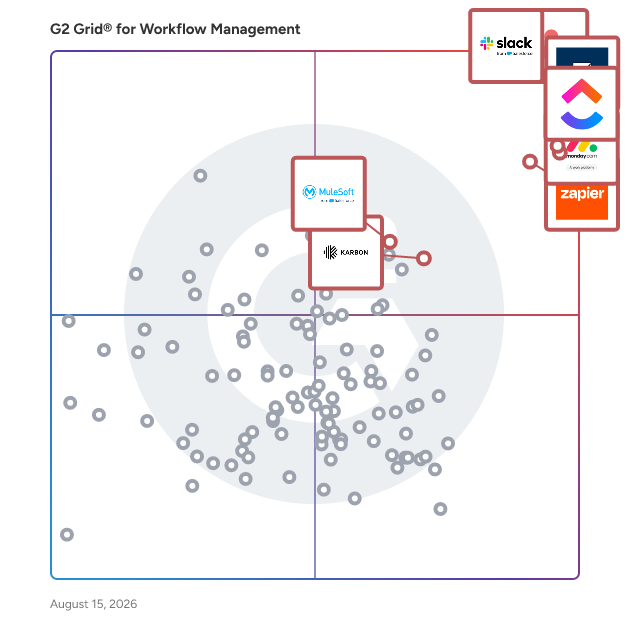
After reviewing G2 review data, one theme stands out clearly: workflow management software tends to perform well in the areas that drive long-term adoption. The category averages 4.49 out of 5 stars and an 8.98 out of 10 likelihood-to-recommend score, indicating that many teams find these platforms valuable once they become part of daily operations.
The biggest difference I see between average and high-performing teams is how they implement workflows within the software. Teams that see the most benefit usually go beyond basic task tracking and build structured processes into the platform. Instead of managing projects informally, they define clear steps for approvals, recurring tasks, and operational checklists. That structure helps teams reduce manual coordination and maintain visibility across projects.
Industry patterns also appear in the review data. Adoption is particularly common among technology organizations, marketing teams, and professional services firms, where projects often involve multiple stakeholders and moving parts. In these environments, workflow management systems help teams maintain transparency into work progress while ensuring consistent processes across departments.
Another pattern across reviews involves usability and support. Products that receive higher recommendation scores often combine flexible workflow configuration with interfaces that remain easy for teams to navigate. Metrics such as Ease of Use (6.27/7) and Quality of Support (6.22/7) suggest that many organizations can implement workflow management solutions without significant onboarding challenges.
If I were advising a team evaluating the best workflow management software, I would focus on three factors early in the buying process: how easily workflows can be customized to match existing processes, how clearly teams can monitor progress and responsibilities, and how well the platform integrates with collaboration and productivity tools. Platforms that perform well in these areas often become core systems for coordinating work across teams.
Workflow Management Software FAQs
What does workflow management software do?
Workflow management software helps teams organize tasks, automate processes, and track work as it moves through different stages. Instead of managing projects through email or spreadsheets, these platforms create structured workflows with clear responsibilities, deadlines, and progress tracking. Based on G2 review data, organizations often use workflow management tools to standardize recurring processes, improve collaboration, and increase operational visibility across teams.
What is the most affordable workflow management software for SMBs?
Small and midsize businesses often prioritize platforms that are easy to adopt and reasonably priced while still supporting automation and collaboration. Recommended tools include:
-
Slack is often used by smaller teams to manage lightweight workflows through channels, integrations, and automation features such as Workflow Builder.
-
Smartsheet provides spreadsheet-style workflow management with automation and reporting features that help SMBs coordinate projects and operational processes.
-
monday Work Management is frequently chosen by growing teams because of its intuitive interface and flexible workflow configuration.
What platform integrates workflow management with CRM and ERP systems?
Organizations often choose workflow platforms that connect operational processes with other business systems such as CRM, ERP, and productivity tools. Strong integration-focused platforms include:
-
monday Work Management offers extensive integrations with tools like Salesforce, HubSpot, and Google Workspace.
-
ClickUp supports a wide range of integrations with CRM platforms, collaboration tools, and productivity apps.
-
Smartsheet is often used by organizations that need workflow systems that connect project workflows with enterprise applications.
Which vendor offers AI-powered workflow optimization?
Many modern workflow platforms now include AI features that help automate tasks, generate project insights, and optimize operational processes. Some of the top providers include:
-
ClickUp provides AI-powered assistance for task creation, documentation, and workflow automation to help teams manage complex projects more efficiently.
-
Creatio combines workflow automation with AI-driven process optimization designed for managing operational and customer-facing workflows.
-
Kintone allows organizations to build custom workflow applications while incorporating intelligent automation to streamline internal processes.
Which workflow management software offers the best automation capabilities?
Automation is one of the most important features buyers evaluate when choosing workflow platforms. Popular automation-focused tools include:
-
Pipefy focuses on structured workflow automation for approvals, operational processes, and service requests.
-
Zoho Flow enables organizations to automate workflows between applications and business processes through integration-based automation.
-
Jotform Workflows supports automated approval flows and task routing for teams managing operational forms and internal processes.
Sources
- G2 Research Scoring Methodologies
- G2 Market Presence Score Overview
Researched By: Bijou Barry
Last updated on: March 16, 2026