Best Corporate Learning Management Systems

How Many Corporate Learning Management Systems Products Does G2 Track?

Total Products under this Category: 487

Category Stats (Aug 2026)

  • Average Rating: 4.49/5 (↑0.01 vs Jul 2026) The average rating of products in this category, based on all submitted ratings
  • Top Trending Product: Easy LMS (+7.08%) - Among all products in this category, Easy LMS recorded the largest rating increase compared to last month

Last updated: August 04, 2026

How Does G2 Rank Corporate Learning Management Systems Products?

Why You Can Trust G2's Software Rankings:

  • 30 Analysts and Data Experts
  • 69,300+ Authentic Reviews
  • 487+ Products
  • Unbiased Rankings

G2's software rankings are built on verified user reviews, rigorous moderation, and a consistent research methodology maintained by a team of analysts and data experts. Each product is measured using the same transparent criteria, with no paid placement or vendor influence. While reviews reflect real user experiences, which can be subjective, they offer valuable insight into how software performs in the hands of professionals. Together, these inputs power the G2 Score, a standardized way to compare tools within every category.

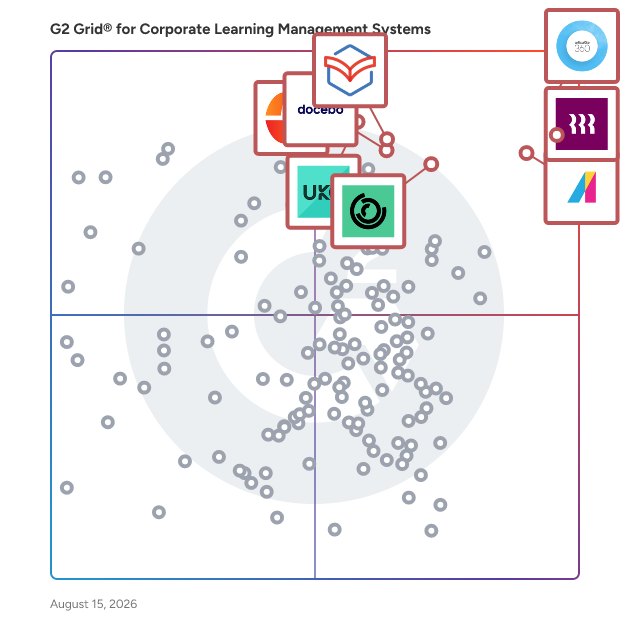
G2 Grid® for Corporate Learning Management Systems

G2 Grid® for Corporate Learning Management Systems plotting products by satisfaction and market presence

Highlighted products: Articulate 360, Rippling, Absorb LMS, Paylocity, 360Learning, Docebo, Zoho Learn, and UKG Pro.

Underlying data: [Grid® JSON](https://www.g2.com/categories/corporate-learning-management-systems/grids.json?focus%5B%5D=articulate-360&focus%5B%5D=rippling&focus%5B%5D=absorb-software-absorb-lms&focus%5B%5D=paylocity&focus%5B%5D=360learning&focus%5B%5D=docebo&focus%5B%5D=zoho-learn&focus%5B%5D=ukg-pro)

Sponsored

Zoho Desk

Zoho Desk is a web-based help desk software solution designed to assist organizations in providing exceptional customer support experiences. This platform serves as a centralized hub for managing customer interactions across multiple channels, allowing businesses to streamline their support processes and enhance overall customer satisfaction. By focusing on the needs of both customers and support agents, Zoho Desk aims to create a more efficient and effective help desk environment. Targeted primarily at businesses of all sizes, Zoho Desk caters to customer support teams looking to improve their service delivery and operational efficiency. The software is particularly beneficial for organizations that require a robust system to manage inquiries from various communication channels, including email, chat, social media, and phone. With its comprehensive feature set, Zoho Desk is well-suited for industries such as retail, technology, healthcare, and finance, where customer engagement and support are critical to success. One of the standout features of Zoho Desk is its omnichannel support capability, which allows businesses to engage with customers seamlessly across different platforms. This ensures that customers receive consistent and timely responses, regardless of how they choose to reach out. Additionally, the platform enhances agent productivity through automation tools that handle repetitive tasks, enabling support teams to focus on more complex customer issues. The integration of AI capabilities further empowers agents by providing them with insights and suggestions based on historical data and customer interactions. Zoho Desk also offers extensive customization options, allowing organizations to tailor the help desk experience to their specific needs. Users can create custom workflows, set up automated responses, and design personalized dashboards to monitor performance metrics. This level of customization ensures that businesses can adapt the software to fit their unique operational requirements, ultimately leading to improved service delivery and customer satisfaction. Furthermore, Zoho Desk provides real-time performance insights, enabling support managers to track key metrics and make data-driven decisions. The ability to analyze customer interactions and agent performance helps organizations identify areas for improvement and optimize their support strategies. With its cost-effective pricing model, Zoho Desk stands out as a practical solution for businesses seeking to enhance their customer support capabilities without incurring excessive expenses.

Visit website

Articulate 360

Articulate 360 is the #1 e-learning platform for creating workplace training. - Build engaging courses with secure, AI-enhanced authoring tools. - Streamline collaboration and approvals with integrated workflows. - Share content with learners using our built-in LMS or export for your own. Plus, with robust onboarding resources and a community of 1.5M+ e-learning professionals, you’ll grow your skills and get answers to your questions in no time. It’s one subscription that sparks endless possibilities.

Average Rating: 4.7/5.0

Total Reviews: 786

How Do G2 Users Rate Articulate 360?

  • Has the product been a good partner in doing business?: 8.9/10 (Category avg: 9.1/10)
  • Content Delivery and Tracking: 8.4/10 (Category avg: 8.8/10)
  • Assessments and Practice: 8.7/10 (Category avg: 8.7/10)
  • Industry Compliance : 10.0/10 (Category avg: 8.7/10)

Who Is the Company Behind Articulate 360?

  • Seller: Articulate
  • Company Website:
  • Year Founded: 2002
  • HQ Location: New York, NY
  • Twitter: @Articulate
    21,573 Twitter followers
  • LinkedIn® Page: www.linkedin.com
    698 employees on LinkedIn®

Who Uses This Product?

  • Who Uses This: Instructional Designer, Senior Instructional Designer
  • Top Industries: E-Learning, Hospital & Health Care
  • Company Size: 48% Large, 24% Medium

What Do G2 Reviewers Say About Articulate 360?

AI-generated summary from verified user reviews

Pros
  • Users praise the ease of use in Articulate 360, making it ideal for creating engaging training materials effortlessly.
  • Users value the interactive course creation features of Articulate 360, enhancing engagement and effectiveness for diverse audiences.
  • Users enjoy the interactive content capabilities of Articulate 360, enhancing engagement and creating impactful learning experiences.
  • Users value the rapid course development capabilities of Articulate 360, enabling quick transformation of ideas into courses.
  • Users find Articulate 360 to be intuitive and easy to use, making course creation quick and efficient.
Cons
  • Users report frequent bug issues with Articulate 360, leading to crashes and complicating their workflow.
  • Users face a steep learning curve with Articulate 360, finding some features complicated and less intuitive.
  • Users find the limited customization options in Articulate 360's Rise restrictive, impacting advanced design and interactivity.
  • Users experience slow performance with Articulate 360, encountering freezes and unresponsive actions that hinder course development.
  • Users feel the lack of limited options in Articulate 360 restricts creativity and functionality in their projects.

What Are Recent G2 Reviews of Articulate 360?

What Are G2 Users Discussing About Articulate 360?

Rippling

Rippling is the AI platform that connects HR, IT, and Finance — giving Rippling AI everything it needs to help run your company. Because employee data, permissions, and approvals all live in one place, Rippling AI has a complete view of your business and can take action quickly and safely, across the entire employee lifecycle, from hiring to benefits administration to access management. Automate business tasks, ensure compliance, and streamline approvals with workflows that understand your organization. Enjoy timely payroll, real-time financial visibility, and dynamic spend policies that adjust as your business changes. Simplify IT with device management, software access, and compliance monitoring, all from one dashboard. Because Rippling AI works from a single source of truth instead of disconnected systems, your business can save time, reduce costs, and enhance efficiency — with the trust and safety that comes from unified data and permissions. Experience the power of AI-driven, unified management with Rippling today.

Average Rating: 4.8/5.0

Total Reviews: 11,649

How Do G2 Users Rate Rippling?

  • Has the product been a good partner in doing business?: 9.1/10 (Category avg: 9.1/10)
  • Content Delivery and Tracking: 9.2/10 (Category avg: 8.8/10)
  • Assessments and Practice: 9.0/10 (Category avg: 8.7/10)
  • Industry Compliance : 8.9/10 (Category avg: 8.7/10)

Who Is the Company Behind Rippling?

  • Seller: Rippling
  • Company Website:
  • Year Founded: 2016
  • HQ Location: San Francisco, CA
  • Twitter: @Rippling
    12,402 Twitter followers
  • LinkedIn® Page: www.linkedin.com
    7,523 employees on LinkedIn®

Who Uses This Product?

  • Who Uses This: Software Engineer, Account Executive
  • Top Industries: Computer Software, Information Technology and Services
  • Company Size: 54% Medium, 29% Small

What Do G2 Reviewers Say About Rippling?

AI-generated summary from verified user reviews

Pros
  • Users value the ease of use of Rippling, enjoying seamless access to multiple tools with one login.
  • Users appreciate the intuitive user interface of Rippling, making navigation and feature access simple and efficient.
  • Users appreciate the ease of navigation with Rippling, enjoying its streamlined and efficient access to essential features.
  • Users appreciate the user-friendly interface of Rippling, enhancing navigation and accessibility for all features.
  • Users appreciate the easy access to Clock in/out and payslips, enjoying a streamlined and efficient experience.
Cons
  • Users find missing features in reporting and app consistency, leading to frustration and inefficiency in their workflows.
  • Users find Rippling not user-friendly, experiencing slow load times, complicated reporting, and an outdated design.
  • Users find the steep learning curve of Rippling challenging, especially due to its many powerful features.
  • Users find Rippling's limited features create an outdated design and cluttered interfaces, hindering usability and aesthetic appeal.
  • Users express the need for improvements in notification functionality and overall system performance, citing confusion and slow load times.

What Are Recent G2 Reviews of Rippling?

What Are G2 Users Discussing About Rippling?

Absorb LMS

Absorb is an agentic AI-powered learning platform designed to deliver results for all learners — employees, partners, and customers alike. With AI agents that handle the heavy lifting across administration, content creation, and learner guidance, Absorb goes beyond traditional LMS capabilities to actively drive learning outcomes at scale. Seamless integrations across your tech stack, native content authoring, and advanced reporting and analytics simplify learning management while AI handles the routine. Personalized learning paths, automated workflows, and white-labeled experiences let your team focus on high-impact learning initiatives rather than managing the system. Absorb helps organizations improve time-to-productivity, ensure compliance, and scale training programs efficiently — whether you’re onboarding employees, training partners, or educating customers.

Average Rating: 4.6/5.0

Total Reviews: 944

How Do G2 Users Rate Absorb LMS?

  • Has the product been a good partner in doing business?: 9.4/10 (Category avg: 9.1/10)
  • Content Delivery and Tracking: 9.0/10 (Category avg: 8.8/10)
  • Assessments and Practice: 8.4/10 (Category avg: 8.7/10)
  • Industry Compliance : 8.8/10 (Category avg: 8.7/10)

Who Is the Company Behind Absorb LMS?

  • Seller: Absorb Software
  • Company Website:
  • Year Founded: 2003
  • HQ Location: Calgary
  • Twitter: @AbsorbLMS
    1,463 Twitter followers
  • LinkedIn® Page: www.linkedin.com
    675 employees on LinkedIn®

Who Uses This Product?

  • Who Uses This: Instructional Designer, Training Manager
  • Top Industries: Hospital & Health Care, Non-Profit Organization Management
  • Company Size: 44% Medium, 37% Large

What Do G2 Reviewers Say About Absorb LMS?

AI-generated summary from verified user reviews

Pros
  • Users find the ease of use of Absorb LMS invaluable for creating effective training materials effortlessly.
  • Users praise the exceptional customer support of Absorb LMS, highlighting its attentiveness and helpfulness in addressing needs.
  • Users praise the outstanding support from knowledgeable staff, enhancing the Absorb LMS experience significantly.
  • Users find Absorb LMS to be incredibly user-friendly, allowing seamless navigation and efficient reporting for daily tasks.
  • Users praise the excellent support from Marcia, appreciating her patience, guidance, and friendly partnership throughout their learning journey.
Cons
  • Users find limited features difficult to discover, which complicates usability and often leads to frustration.
  • Users find the limited customization options of Absorb LMS restrictive, impacting their overall experience and creativity.
  • Users point out the missing features in Absorb LMS, such as audience mapping and tracking learner interactions.
  • Users find the learning curve steep, requiring significant time and practice to navigate Absorb LMS effectively.
  • Users find the reporting features confusing and limited, impacting their experience and flexibility with the LMS.

What Are Recent G2 Reviews of Absorb LMS?

What Are G2 Users Discussing About Absorb LMS?

Paylocity

Paylocity is an award-winning HCM platform that brings HR, Finance, and IT together in one connected system, covering payroll, benefits, talent management, time and labor, spend, and IT provisioning on a single employee record. Cut manual HR tasks, run payroll faster, and get new hires up and running sooner. Get full visibility across expenses, accounts payable, corporate cards, and procurement in one place. Automate account creation and manage IT provisioning without juggling separate systems. AI is built into everyday workflows across all three. Policies, approvals, and workflows stay in lockstep as people join, move, and grow. Paylocity accompanies its clients on the journey to build great workplaces and help every employee do their best work.

Average Rating: 4.4/5.0

Total Reviews: 6,055

How Do G2 Users Rate Paylocity?

  • Has the product been a good partner in doing business?: 8.8/10 (Category avg: 9.1/10)
  • Content Delivery and Tracking: 8.1/10 (Category avg: 8.8/10)
  • Assessments and Practice: 7.9/10 (Category avg: 8.7/10)
  • Industry Compliance : 7.8/10 (Category avg: 8.7/10)

Who Is the Company Behind Paylocity?

  • Seller: Paylocity
  • Company Website:
  • Year Founded: 1997
  • HQ Location: Schaumburg, IL
  • Twitter: @Paylocity
    4,577 Twitter followers
  • LinkedIn® Page: www.linkedin.com
    6,978 employees on LinkedIn®

Who Uses This Product?

  • Who Uses This: HR Manager, Human Resources Manager
  • Top Industries: Computer Software, Information Technology and Services
  • Company Size: 69% Medium, 19% Small

What Do G2 Reviewers Say About Paylocity?

AI-generated summary from verified user reviews

Pros
  • Users find Paylocity to have ease of use, especially after training and during invoice reconciliation processes.
  • Users appreciate the helpful customer service of Paylocity, providing assistance and support when needed.
  • Users appreciate the helpful customer support of Paylocity, enhancing their payroll experience with valuable assistance and resources.
  • Users appreciate the intuitive navigation of Paylocity, making it easy to find information and complete tasks.
  • Users find Paylocity to be a simple and user-friendly solution for managing expenses and integrating with other software.
Cons
  • Users report poor customer support, experiencing long wait times and lack of direct access to assistance.
  • Users often find missing features in Paylocity, leading to frustrations and inefficient workflows during critical tasks.
  • Users find the learning curve steep with Paylocity, citing outdated software and lack of support for new users.
  • Users express frustration with limited features in Paylocity, wishing for better admin controls and customization options.
  • Users report poor support services, facing long wait times and inconsistent resolutions from customer service representatives.

What Are Recent G2 Reviews of Paylocity?

What Are G2 Users Discussing About Paylocity?

FAQs About Corporate Learning Management Systems

Generated using AI

Last updated: June 3, 2026

Best apps for corporate employee training systems

Based on G2 reviews, these products are the most consistently mentioned for centralized training, onboarding, and progress tracking.

  • Rippling — HR, payroll, and training in one.
  • Absorb LMS — scalable onboarding, compliance, and reporting.
  • 360Learning — collaborative learning and cohort training.
  • Trainual — SOPs, onboarding, and process documentation.

Best LMS solutions for large corporations

Based on G2 reviews, these products stand out for handling distributed teams, structured training delivery, and scalable administration.

  • Absorb LMS — scalable training for large employee groups.
  • 360Learning — collaborative learning across multiple programs.
  • Docebo — role-based learning and extended audiences.
  • Rippling — centralized HR and learning workflows.

Best learning management systems for workplace training

Based on G2 reviews, these products are frequently highlighted for workplace training that is easier to assign, complete, and track.

  • Absorb LMS — organized training delivery with strong reporting.
  • 360Learning — engaging workplace learning with collaboration.
  • Trainual — onboarding and process training at scale.
  • LearnUpon LMS — structured paths and streamlined administration.

What are the most important features in corporate learning management systems

According to verified users, the most valued features in corporate learning management systems are easy course assignment, progress tracking, reporting, onboarding workflows, and a learner experience that is simple to navigate. Reviews also repeatedly mention the importance of content creation tools, compliance tracking, automated reminders, and support for both self-paced and instructor-led learning. Buyers should also look for role-based learning paths, integrations with HR or payroll systems, and mobile access. Across recent reviews, products that make training easy to find, complete, and manage across multiple teams tend to create the strongest day-to-day value for administrators and employees alike.

How does corporate learning management systems integrate with payroll

G2 reviewers mention that payroll-related integration matters most when learning is part of a broader employee workflow. In recent reviews, users describe value in systems that connect training with HR records, onboarding, benefits, time tracking, or employee profile updates so teams avoid switching between disconnected tools. Several reviewers also highlight smoother administration when course access, required training, and employee status changes flow alongside payroll or HR data. The clearest benefit is operational efficiency: fewer manual updates, more centralized records, and easier visibility into who has completed required training. For buyers, this means integration is less about payroll alone and more about reducing duplicate work across people operations.

360Learning

360Learning is the AI-driven enterprise LMS that closes skills gaps by capturing internal expertise with collaborative learning Academies. Legacy systems force L&D teams to choose between scale and relevance. 360Learning eliminates this trade-off. Using agentic AI, we transform the expertise that runs your business into scalable learning for your entire organization - upskilling employees, customers, and partners from one platform. The platform merges enterprise LMS and LXP capabilities including agentic automation, adaptive coaching, a multimodal AI content builder, and the market’s #1 rated mobile app. Our ecosystem of 50+ partners includes an SAP Silver Partnership and Workday Design Partnership, ensuring learning connects to your broader business strategy. Over 2,500 companies, including Heineken, Equinox, Michelin, Merlin, and Cisco, trust 360Learning as their enterprise LMS. Rated #1 AI LMS by eLearning Industry and backed by dedicated implementation, support, and services teams, we help L&D become a growth lever, not a cost center. Founded in 2013. $240M raised. Teams across North America and Europe.

Average Rating: 4.6/5.0

Total Reviews: 598

How Do G2 Users Rate 360Learning?

  • Has the product been a good partner in doing business?: 9.2/10 (Category avg: 9.1/10)
  • Content Delivery and Tracking: 8.9/10 (Category avg: 8.8/10)
  • Assessments and Practice: 8.7/10 (Category avg: 8.7/10)
  • Industry Compliance : 8.5/10 (Category avg: 8.7/10)

Who Is the Company Behind 360Learning?

  • Seller: 360Learning
  • Company Website:
  • Year Founded: 2013
  • HQ Location: New York
  • Twitter: @360Learning
    10,748 Twitter followers
  • LinkedIn® Page: www.linkedin.com
    488 employees on LinkedIn®

Who Uses This Product?

  • Who Uses This: CEO, Responsable formation
  • Top Industries: Information Technology and Services, Computer Software
  • Company Size: 53% Medium, 28% Large

What Do G2 Reviewers Say About 360Learning?

AI-generated summary from verified user reviews

Pros
  • Users value the ease of use of 360Learning, enabling effortless content creation and engagement for all learners.
  • Users value the ease of course creation in 360Learning, enabling tailored, interactive content and increased engagement.
  • Users commend the outstanding customer support from 360Learning, enhancing their implementation and overall learning experience.
  • Users value the smooth admin experience of 360Learning, appreciating its user-friendly design and efficient features.
  • Users value the engagement features of 360Learning, enhancing collaborative learning and fostering interactivity among learners.
Cons
  • Users find the limited features of 360Learning challenging, even though support offers helpful navigation assistance.
  • Users experience a steep learning curve during initial setup, requiring time to become familiar with the system.
  • Users feel limited by the lack of customization in organizing and exporting content effectively within 360Learning.
  • Users find that certain features are limited or restrictive, needing extra setup for optimal use and configuration.
  • Users find the difficulty in learning the platform challenging, especially for authors and admins, impacting overall usability.

What Are Recent G2 Reviews of 360Learning?

What Are G2 Users Discussing About 360Learning?

Zoho Learn

Zoho Learn is a comprehensive platform that combines knowledge management and learning management system (LMS) functionalities, enabling organizations to create, manage, and deliver training programs effectively. It allows businesses to build structured courses and manuals tailored to their needs, ensuring teams have access to accurate and up-to-date resources. Key Features and Functionality: - Knowledge Base Creation: Organize company information in a structured hierarchy, making it easily accessible. - Collaborative Authoring: Co-author articles in real time with a collaborative editor. - Course Builder: Design interactive, multimedia training courses using text, video, files, and quizzes. - Assessments and Quizzes: Create quizzes with multiple formats to evaluate learners and track their performance effectively. - Reporting and Analytics: Monitor progress and analyze the effectiveness of courses with built-in reporting tools. Primary Value and Solutions Provided: Zoho Learn empowers businesses by centralizing critical knowledge and training materials, reducing information loss, and enhancing team collaboration. It streamlines employee training and onboarding by providing a unified platform for knowledge sharing and learning, ultimately improving productivity and ensuring consistent knowledge transfer across the organization.

Average Rating: 4.4/5.0

Total Reviews: 169

How Do G2 Users Rate Zoho Learn?

  • Has the product been a good partner in doing business?: 8.6/10 (Category avg: 9.1/10)
  • Content Delivery and Tracking: 8.2/10 (Category avg: 8.8/10)
  • Assessments and Practice: 8.0/10 (Category avg: 8.7/10)
  • Industry Compliance : 7.4/10 (Category avg: 8.7/10)

Who Is the Company Behind Zoho Learn?

  • Seller: Zoho
  • Year Founded: 1996
  • HQ Location: Austin, TX
  • Twitter: @Zoho
    137,880 Twitter followers
  • LinkedIn® Page: www.linkedin.com
    30,766 employees on LinkedIn®
  • Phone: +1 (888) 900-9646

Who Uses This Product?

  • Who Uses This: CEO, Director
  • Top Industries: Information Technology and Services, Computer Software
  • Company Size: 72% Small, 18% Medium

What Do G2 Reviewers Say About Zoho Learn?

AI-generated summary from verified user reviews

Pros
  • Users value the simplicity and user-friendliness of Zoho Learn, enhancing their overall learning experience seamlessly.
  • Users value the simple user interface of Zoho Learn, enabling quick LMS creation and easy modifications.
  • Users commend the easy setup of Zoho Learn, facilitating a smooth transition and user-friendly experience.
  • Users find the ease of learning with Zoho Learn enhances training efficiency and engagement seamlessly.
  • Users appreciate the intuitive interface of Zoho Learn, making knowledge sharing and access effortless and engaging.
Cons
  • Users find feature issues in Zoho Learn, including limited customization and difficulty locating certain functionalities.
  • Users find the learning curve challenging with Zoho Learn, requiring additional resources for effective navigation and use.
  • Users find limited customization options in Zoho Learn, making it difficult to tailor the platform to their brand's needs.
  • Users express disappointment over missing AI and additional features, highlighting a need for better course creation tools.
  • Users note the limited features of Zoho Learn, hindering advanced functionality and streamlined course assignments.

What Are Recent G2 Reviews of Zoho Learn?

What Are G2 Users Discussing About Zoho Learn?

Docebo

Docebo is an AI-powered learning platform designed to support continuous learning across employees, partners, and customers. More than 3,900 organizations use Docebo to deliver onboarding, enablement, compliance, and customer education from a single platform. Learning experiences are personalized at scale, with AI improving content discovery, recommendations, and automation to reduce manual administration. With skills-based insights, flexible delivery, and built-in analytics, Docebo helps organizations keep learning aligned to evolving roles and business goals, so people never stop learning as work changes.

Average Rating: 4.3/5.0

Total Reviews: 730

How Do G2 Users Rate Docebo?

  • Has the product been a good partner in doing business?: 8.7/10 (Category avg: 9.1/10)
  • Content Delivery and Tracking: 8.5/10 (Category avg: 8.8/10)
  • Assessments and Practice: 7.9/10 (Category avg: 8.7/10)
  • Industry Compliance : 8.1/10 (Category avg: 8.7/10)

Who Is the Company Behind Docebo?

  • Seller: Docebo Inc.
  • Company Website:
  • Year Founded: 2005
  • HQ Location: Toronto
  • Twitter: @docebo
    6,629 Twitter followers
  • LinkedIn® Page: www.linkedin.com
    1,009 employees on LinkedIn®

Who Uses This Product?

  • Who Uses This: Instructional Designer, Training Manager
  • Top Industries: Information Technology and Services, Computer Software
  • Company Size: 45% Large, 44% Medium

What Do G2 Reviewers Say About Docebo?

AI-generated summary from verified user reviews

Pros
  • Users love the intuitive user experience of Docebo, allowing easy adaptation for new hires and streamlined training management.
  • Users appreciate the powerful course management features in Docebo, enhancing efficiency and customization in training operations.
  • Users benefit from the efficient course management capabilities of Docebo, enhancing training operations and speeding up delivery.
  • Users value the highly customizable platform of Docebo, enhancing the learning experience to suit their unique needs.
  • Users love Docebo for its intuitive navigation, making platform usage easy and efficient for all employees.
Cons
  • Users often face a steep learning curve with Docebo due to its many features and configuration demands.
  • Users find the limited customization options in Docebo challenging, especially for content and reporting features.
  • Users highlight the limited features of Docebo, particularly in batch actions and content authoring tools.
  • Users find the complexity of configurations daunting, leading to a steep learning curve for newcomers to Docebo.
  • Users find the missing features in Docebo, such as insufficient batch actions and weak content authoring tools, limiting.

What Are Recent G2 Reviews of Docebo?

What Are G2 Users Discussing About Docebo?

UKG Pro

Designed for organizations that prioritize diverse workforces and cultures of trust and belonging, UKG Pro® puts people at the center of your strategy. From HR and complex payroll to talent and industry-focused workforce management (WFM),our comprehensive human capital management solution (HCM) anticipates people’s needs beyond just work. We partner with you every step of the way to drive better business outcomes and create great workplaces for all.

Average Rating: 4.3/5.0

Total Reviews: 2,195

How Do G2 Users Rate UKG Pro?

  • Has the product been a good partner in doing business?: 8.3/10 (Category avg: 9.1/10)
  • Content Delivery and Tracking: 8.5/10 (Category avg: 8.8/10)
  • Assessments and Practice: 8.4/10 (Category avg: 8.7/10)
  • Industry Compliance : 8.5/10 (Category avg: 8.7/10)

Who Is the Company Behind UKG Pro?

  • Seller: UKG
  • Company Website:
  • Year Founded: 1977
  • HQ Location: Weston, FL
  • Twitter: @UKGInc
    42,629 Twitter followers
  • LinkedIn® Page: www.linkedin.com
    16,399 employees on LinkedIn®

Who Uses This Product?

  • Who Uses This: Payroll Manager, HR Generalist
  • Top Industries: Hospital & Health Care, Oil & Energy
  • Company Size: 48% Medium, 46% Large

What Do G2 Reviewers Say About UKG Pro?

AI-generated summary from verified user reviews

Pros
  • Users find UKG Pro to be user-friendly, appreciating its ease of navigation and helpful self-service features.
  • Users commend UKG Pro for its ease of navigation and reliable support, enhancing efficiency and confidence in HR tasks.
  • Users value the responsive customer support of UKG Pro, ensuring assistance is always available when needed.
  • Users appreciate the user-friendly platform of UKG Pro, noting its effective tracking and comprehensive features.
  • Users value the user-friendly interface of UKG Pro, appreciating its organization and accessible features for staff.
Cons
  • Users find UKG Pro's interface not user-friendly, citing difficulties in navigation and an outdated design.
  • Users note that the learning curve can be steep, impacting efficiency and initial usability of UKG Pro.
  • Users report poor customer support with inconsistent service, making it hard to find timely assistance when needed.
  • Users express the need for limited features, such as custom profile picture changes and improved workflow functionality.
  • Users find UKG Pro's non-intuitive design frustrating, particularly during updates, affecting overall system navigation and usability.

What Are Recent G2 Reviews of UKG Pro?

Trainual

Trainual is the training, learning, and knowledge management platform that connects your entire company to how work actually gets done. Every role. Every process. Every policy. All in one place — searchable, assignable, and built to keep every team member aligned and accountable from day one to one thousand. As companies grow more complex, consistency becomes harder to maintain. The way things get done varies by manager, standards slip across locations, and getting new teammates up to speed takes longer than it should. Trainual fixes that by giving your company one central system — where everything your team needs to know is documented, organized by role, and delivered to the right person at the right time. Trainual is the go-to platform for teams across various industries including business services, real estate, construction, healthcare, technology, marketing, legal and cleaning. Build role-based training paths that get every new teammate up to speed the same way, every time. Standardize how work gets done across departments, locations, and roles — then track it to make sure it's actually happening. And when something changes, update it once and it's live everywhere. The built-in AI assistant knows everything your company knows — so instead of pinging a manager or digging through a shared drive, your team gets instant, accurate answers the moment they need them. Think of it as your smartest teammate, always on, always right. Assign responsibilities. Track progress. Automate accountability. No micromanaging required. The result? Faster ramp times. Consistent execution. Higher-performing people.

Average Rating: 4.7/5.0

Total Reviews: 1,063

How Do G2 Users Rate Trainual?

  • Has the product been a good partner in doing business?: 9.5/10 (Category avg: 9.1/10)
  • Content Delivery and Tracking: 9.0/10 (Category avg: 8.8/10)
  • Assessments and Practice: 8.9/10 (Category avg: 8.7/10)
  • Industry Compliance : 8.7/10 (Category avg: 8.7/10)

Who Is the Company Behind Trainual?

  • Seller: Trainual
  • Company Website:
  • Year Founded: 2018
  • HQ Location: Scottsdale, AZ
  • Twitter: @trainual
    1,269 Twitter followers
  • LinkedIn® Page: www.linkedin.com
    139 employees on LinkedIn®

Who Uses This Product?

  • Who Uses This: Operations Manager, Director of Operations
  • Top Industries: Construction, Marketing and Advertising
  • Company Size: 63% Small, 35% Medium

What Do G2 Reviewers Say About Trainual?

AI-generated summary from verified user reviews

Pros
  • Users find Trainual to be incredibly easy to use, streamlining training and improving onboarding processes effectively.
  • Users appreciate the user-friendly design of Trainual, facilitating easy training management and process updates.
  • Users value the clarity and ease of Trainual's training system, ensuring effective onboarding and compliance across teams.
  • Users appreciate the intuitive and user-friendly features of Trainual, enhancing training with multimedia and easy updates.
  • Users find Trainual's intuitive interface simplifies onboarding and training, enhancing team efficiency and consistency.
Cons
  • Users express frustration over limited features, wishing for more customization and flexibility in Trainual's platform.
  • Users express concerns over missing features and limited customizations, impacting their overall experience with Trainual.
  • Users find the limited customization options frustrating, impacting efficiency and the overall user experience with Trainual.
  • Users face organizational difficulties with Trainual, struggling to manage course assignment and hierarchy effectively.
  • Users find poor navigation within Trainual challenging, leading to confusion and difficulty in locating information efficiently.

What Are Recent G2 Reviews of Trainual?

What Are G2 Users Discussing About Trainual?

Workday HCM

Workday Human Capital Management is a single, unified system, offering one security model and a seamless user experience. Infused with artificial intelligence, Workday provides a cloud-based platform that intelligently adapts to your organization's evolving needs. This user-friendly, global system leverages AI to deliver personalized experiences and predictive insights, ensuring you're always on the latest version, whether on a browser or mobile device. As part of the unified Workday suite, which includes Financial Management, Payroll, and Recruiting, its AI capabilities help you make smarter, data-driven decisions for the future of your workforce.

Average Rating: 4.1/5.0

Total Reviews: 1,608

How Do G2 Users Rate Workday HCM?

  • Has the product been a good partner in doing business?: 8.3/10 (Category avg: 9.1/10)
  • Content Delivery and Tracking: 8.3/10 (Category avg: 8.8/10)
  • Assessments and Practice: 8.6/10 (Category avg: 8.7/10)
  • Industry Compliance : 8.7/10 (Category avg: 8.7/10)

Who Is the Company Behind Workday HCM?

  • Seller: Workday
  • Company Website:
  • Year Founded: 2005
  • HQ Location: Pleasanton, CA
  • Twitter: @Workday
    52,273 Twitter followers
  • LinkedIn® Page: www.linkedin.com
    24,145 employees on LinkedIn®

Who Uses This Product?

  • Who Uses This: Recruiter, Account Executive
  • Top Industries: Information Technology and Services, Computer Software
  • Company Size: 69% Large, 22% Medium

What Do G2 Reviewers Say About Workday HCM?

AI-generated summary from verified user reviews

Pros
  • Users appreciate the ease of use of Workday HCM, noting its friendly navigation and user-friendly design.
  • Users value the easy integration and extensive features of Workday HCM, which enhance organization and accessibility.
  • Users value how Workday HCM provides a comprehensive system for managing the entire employee lifecycle efficiently and effectively.
  • Users appreciate the comprehensive features of Workday HCM, enhancing management and user experience across various operations.
  • Users value the intuitive interface and powerful reporting of Workday HCM, enhancing HR management efficiency and engagement.
Cons
  • Users experience a poor interface design with clunky navigation and significant performance issues in Workday HCM.
  • Users find Workday HCM not user-friendly due to clunky navigation and difficulty completing even simple tasks.
  • Users find the learning curve steep, requiring time and specialized training to grasp Workday HCM effectively.
  • Users find limited customization in Workday HCM, making it challenging to tailor the system to their needs.
  • Users find navigation difficult in Workday HCM, often struggling with clunky interfaces and confusing layouts.

What Are Recent G2 Reviews of Workday HCM?

What Are G2 Users Discussing About Workday HCM?

SAP SuccessFactors HCM

SAP SuccessFactors HCM is a global, AI-powered cloud HR suite designed to help organizations thrive in a fast-moving world. With 100+ localizations, it delivers real-time visibility and connected solutions across core HR, payroll, talent management, learning, analytics, planning, and employee experience. More than 10,000 organizations trust SAP SuccessFactors HCM to enhance every employee experience, workforce decision, and people process—turning each employee into a success story. With SAP SuccessFactors HCM, you can: - Empower your workforce with AI-driven tools for self-service, learning, performance, and development to help people work faster and smarter. - Identify and develop top talent with a unified source of people and skills data that supports both HR strategies and business goals. - Stay compliant and agile with built-in legal and regulatory updates tailored to local business requirements. - Accelerate time to value by leveraging proven HR best practices and the strength of a global partner ecosystem.

Average Rating: 4.1/5.0

Total Reviews: 1,474

How Do G2 Users Rate SAP SuccessFactors HCM?

  • Has the product been a good partner in doing business?: 8.3/10 (Category avg: 9.1/10)
  • Content Delivery and Tracking: 8.3/10 (Category avg: 8.8/10)
  • Assessments and Practice: 8.0/10 (Category avg: 8.7/10)
  • Industry Compliance : 8.4/10 (Category avg: 8.7/10)

Who Is the Company Behind SAP SuccessFactors HCM?

  • Seller: SAP
  • Company Website:
  • Year Founded: 1972
  • HQ Location: Walldorf
  • Twitter: @SAP
    297,052 Twitter followers
  • LinkedIn® Page: www.linkedin.com
    141,955 employees on LinkedIn®

Who Uses This Product?

  • Who Uses This: Recruiter, Consultant
  • Top Industries: Information Technology and Services, Computer Software
  • Company Size: 56% Large, 34% Medium

What Do G2 Reviewers Say About SAP SuccessFactors HCM?

AI-generated summary from verified user reviews

Pros
  • Users find SAP SuccessFactors HCM to be very user-friendly, enabling easy management of various HR tasks seamlessly.
  • Users value the complete scalable HR solution of SAP SuccessFactors, benefiting from strong integration and robust talent management features.
  • Users value the comprehensive and scalable HR solution of SAP SuccessFactors, enhancing integration and talent management features.
  • Users find SAP SuccessFactors HCM to be super helpful for remote work management and user-friendly functionality.
  • Users appreciate the intuitive and user-friendly interface of SAP SuccessFactors HCM, enhancing their remote work experience.
Cons
  • Users find SAP SuccessFactors HCM not user-friendly, citing difficulties in navigation and a complex interface as major issues.
  • Users find the interface not intuitive, leading to challenges in navigation and a steeper learning curve.
  • Users find the limited features of SAP SuccessFactors HCM restrict functionality and create confusion in various modules.
  • Users find limited customization options, impacting their ability to tailor SAP SuccessFactors HCM to specific needs.
  • Users find the learning curve challenging, as the application requires time and skill to use effectively.

What Are Recent G2 Reviews of SAP SuccessFactors HCM?

What Are G2 Users Discussing About SAP SuccessFactors HCM?

Paycom

Paycom is the most automated HCM platform and the only HR and payroll software built on a truly single, unique database that automates the entire employee life cycle. Designed as a unified system, Paycom eliminates inefficiencies and errors caused by integrating multiple platforms by using command driven AI and full solution automation. Built on a single data source, Paycom enables uninterrupted data flow across HR and payroll, streamlining performance, communication and compliance. Frequently recognized by third party reviewers as one of the best payroll and HR software solutions, Paycom is used by organizations of all sizes across the U.S. and internationally to simplify workforce management and free HR teams to focus on strategic initiatives.

Average Rating: 4.5/5.0

Total Reviews: 4,702

How Do G2 Users Rate Paycom?

  • Has the product been a good partner in doing business?: 8.3/10 (Category avg: 9.1/10)
  • Content Delivery and Tracking: 8.8/10 (Category avg: 8.8/10)
  • Assessments and Practice: 8.8/10 (Category avg: 8.7/10)
  • Industry Compliance : 8.9/10 (Category avg: 8.7/10)

Who Is the Company Behind Paycom?

  • Seller: Paycom
  • Company Website:
  • Year Founded: 1998
  • HQ Location: Oklahoma City, OK
  • Twitter: @Paycom
    33,252 Twitter followers
  • LinkedIn® Page: www.linkedin.com
    5,844 employees on LinkedIn®

Who Uses This Product?

  • Who Uses This: HR Manager, Human Resources Manager
  • Top Industries: Hospital & Health Care, Non-Profit Organization Management
  • Company Size: 18% Medium, 4% Small

What Do G2 Reviewers Say About Paycom?

AI-generated summary from verified user reviews

Pros
  • Users appreciate the ease of use of Paycom, finding it simple to set up and navigate for tracking hours.
  • Users appreciate the user-friendly technology of Paycom, making payroll processing and time tracking seamless and efficient.
  • Users commend the knowledgeable and responsive customer support of Paycom, enhancing their overall experience and satisfaction.
  • Users love the streamlined payroll management of Paycom, simplifying processes and enhancing efficiency for everyone involved.
  • Users find Paycom's user-friendly technology simplifies payroll and time tracking, increasing accuracy and reducing errors.
Cons
  • Users express disappointment with Paycom's poor customer support, indicating unresponsiveness and a lack of effective solutions.
  • Users experience a steep learning curve with Paycom, finding it unintuitive and frustratingly complex to navigate.
  • Users find the UI unintuitive, making navigation and task completion unnecessarily complicated and time-consuming.
  • Users find Paycom's limited features inadequate for modern needs, causing significant frustration and operational inefficiencies.
  • Users find Paycom not user-friendly, struggling with its unintuitive interface and complicated processes that hinder productivity.

What Are Recent G2 Reviews of Paycom?

Litmos

Litmos is the Learning Acceleration Platform, helping organizations build human capability in the AI era across their workforce, partners, and customers. Backed by a proven success model and decades of real-world best practices, Litmos helps more than 11,000 organizations across 150 countries build, activate, and evolve human capability at the speed of AI. Learn more at www.litmos.com.

Average Rating: 4.3/5.0

Total Reviews: 680

How Do G2 Users Rate Litmos?

  • Has the product been a good partner in doing business?: 8.6/10 (Category avg: 9.1/10)
  • Content Delivery and Tracking: 8.4/10 (Category avg: 8.8/10)
  • Assessments and Practice: 8.3/10 (Category avg: 8.7/10)
  • Industry Compliance : 8.2/10 (Category avg: 8.7/10)

Who Is the Company Behind Litmos?

  • Seller: Litmos
  • Company Website:
  • Year Founded: 2007
  • HQ Location: San Ramon, California
  • Twitter: @Litmos
    7,867 Twitter followers
  • LinkedIn® Page: www.linkedin.com
    221 employees on LinkedIn®

Who Uses This Product?

  • Who Uses This: Training Manager, Training Coordinator
  • Top Industries: Computer Software, Information Technology and Services
  • Company Size: 51% Medium, 34% Large

What Do G2 Reviewers Say About Litmos?

AI-generated summary from verified user reviews

Pros
  • Users love Litmos for its ease of use, making training seamless and enjoyable without unnecessary effort.
  • Users commend the responsive customer support of Litmos, highlighting expertise and assistance in navigating the platform effectively.
  • Users appreciate the intuitive interface and robust localization features, making it easy to navigate and implement.
  • Users appreciate the user-friendly course creation features of Litmos, enhancing functionality and simplifying client onboarding.
  • Users appreciate the intuitive interface of Litmos, making it easy for clients to implement and navigate the platform.
Cons
  • Users find the reporting issues frustrating, struggling to create reports and track compliance data effectively.
  • Users find the poor reporting functionality in Litmos frustrating, often requiring excessive configuration and multiple steps for analysis.
  • Users find inadequate reporting capabilities in Litmos, complicating data handling and creating confusion among team members.
  • Users find limited functionalities in Litmos, leading to challenges in integrations, reporting, and customization options.
  • Users find limited customization options in Litmos challenging, requiring technical skills and extra effort for adjustments.

What Are Recent G2 Reviews of Litmos?

What Are G2 Users Discussing About Litmos?

Kallidus Learn

At Kallidus, we believe learning should be measured by what changes in the organisation - not what was delivered, but what improved. Trusted by over 1,000 organisations worldwide, we help organisations escape The Activity Trap: measuring learning by completion rather than real performance change. Because when learning mitigates risk, key people stay, teams become more productive, and business metrics begin to move. Our award-winning LMS and eLearning content have an intentional AI data layer to make learning, skills, and performance data valuable for the whole business. This helps link L&D initiatives to the goals and objectives of your organisation and your team. Backed by dedicated, in-house support and implementation specialists, we're with you every step, from simplifying mandatory compliance to building the future-ready workforce your business needs to grow and deliver impact.

Average Rating: 4.4/5.0

Total Reviews: 254

How Do G2 Users Rate Kallidus Learn?

  • Has the product been a good partner in doing business?: 8.9/10 (Category avg: 9.1/10)
  • Content Delivery and Tracking: 8.6/10 (Category avg: 8.8/10)
  • Assessments and Practice: 8.3/10 (Category avg: 8.7/10)
  • Industry Compliance : 8.4/10 (Category avg: 8.7/10)

Who Is the Company Behind Kallidus Learn?

  • Seller: Kallidus Ltd
  • Company Website:
  • Year Founded: 2000
  • HQ Location: Bristol, GB
  • Twitter: @Kallidus
    3,110 Twitter followers
  • LinkedIn® Page: www.linkedin.com
    215 employees on LinkedIn®

Who Uses This Product?

  • Who Uses This: Learning and Development Manager, Head of HR
  • Top Industries: Hospital & Health Care, Financial Services
  • Company Size: 59% Medium, 28% Large

What Do G2 Reviewers Say About Kallidus Learn?

AI-generated summary from verified user reviews

Pros
  • Users appreciate the ease of use of Kallidus Learn, which supports efficient navigation and quick team adoption.
  • Users appreciate the user-friendly interface of Kallidus Learn, valuing its flexibility and ease of navigation.
  • Users appreciate the responsive customer support of Kallidus Learn, enhancing their overall experience and satisfaction.
  • Users value the helpful support network of Kallidus Learn, making integration and training straightforward and effective.
  • Users appreciate the intuitive design of Kallidus Learn, making navigation and management effortless for all.
Cons
  • Users find Kallidus Learn has limited features, making event bookings and role assignments unnecessarily complicated.
  • Users face feature issues such as limitations on eTests, group rules, and integration challenges with proctoring services.
  • Users experience reporting issues with Kallidus Learn, including delays and cumbersome sharing processes for reports.
  • Users find the inadequate reporting options challenging, complicating access and usability for effective data sharing.
  • Users find the reporting capabilities inadequate, noting difficulties with mixed data sets and access for managers.

What Are Recent G2 Reviews of Kallidus Learn?

What Are G2 Users Discussing About Kallidus Learn?

D2L Brightspace

Learning That Transforms Lives D2L Brightspace is a powerful, flexible learning platform designed to put learners first. Whether you’re supporting students, employees, or members, Brightspace helps you create personalized, engaging, and measurable learning experiences that drive success. Built for Your World Brightspace adapts to the needs of every learning environment: K–12: Empower teachers and inspire every learner Higher Education: Deliver personalized learning at scale Corporate: Drive business results through smarter learning Associations: Turn training into a competitive advantage Training Providers: Deliver scalable, high-impact learning programs Modernize with Confidence Easily digitize your courses and adopt intuitive tools designed to enhance engagement, accessibility, and outcomes—no technical background required. Scale Personalized Learning Automate routine tasks, unlock actionable insights, and build learning paths that adapt to each learner’s needs. Brightspace helps you save time while improving outcomes. Support Advanced Learning Models From mastery-based progressions to competency-based learning, Brightspace has the power and flexibility to support even the most advanced online and blended strategies. A True Partner in Your Success More than a platform, Brightspace comes with a team dedicated to helping you succeed. From onboarding to optimization, we align our support and services to your goals—every step of the way.

Average Rating: 4.4/5.0

Total Reviews: 668

How Do G2 Users Rate D2L Brightspace?

  • Has the product been a good partner in doing business?: 8.9/10 (Category avg: 9.1/10)
  • Content Delivery and Tracking: 8.8/10 (Category avg: 8.8/10)
  • Assessments and Practice: 9.0/10 (Category avg: 8.7/10)
  • Industry Compliance : 8.8/10 (Category avg: 8.7/10)

Who Is the Company Behind D2L Brightspace?

  • Seller: Desire2Learn
  • Company Website:
  • Year Founded: 1999
  • HQ Location: Kitchener, ON
  • Twitter: @D2L
    23,447 Twitter followers
  • LinkedIn® Page: www.linkedin.com
    1,272 employees on LinkedIn®

Who Uses This Product?

  • Who Uses This: Instructional Designer, Teacher
  • Top Industries: Higher Education, Education Management
  • Company Size: 45% Medium, 40% Large

What Do G2 Reviewers Say About D2L Brightspace?

AI-generated summary from verified user reviews

Pros
  • Users appreciate the user-friendly interface of D2L Brightspace, making navigation and setup effortless for both teachers and students.
  • Users appreciate the supportive customer service from D2L Brightspace, ensuring a smooth and effective administrative experience.
  • Users appreciate the excellent customer support from D2L Brightspace, which significantly enhances their overall experience.
  • Users value the responsive customer support of D2L Brightspace, ensuring prompt assistance and effective solutions.
  • Users appreciate the customizability of D2L Brightspace, enjoying diverse templates and widgets for tailored learning experiences.
Cons
  • Users desire more customization options in D2L Brightspace, feeling limited by the current tools and features available.
  • Users experience navigation issues due to complex structures and excessive clicks needed to access discussions efficiently.
  • Users express frustration over feature inconsistencies in D2L Brightspace, hindering seamless integration and usability across tools.
  • Users report integration issues with D2L Brightspace, complicating access to certain external content and requiring multiple logins.
  • Users experience limited functionality with outdated forums and few collaborative options, impacting engagement and learning quality.

What Are Recent G2 Reviews of D2L Brightspace?

What Are G2 Users Discussing About D2L Brightspace?

Grace Savides
GS
Researched and written by Grace Savides
Updated May 27, 2026

Learn More About Corporate Learning Management Systems

What are Corporate Learning Management Systems?

Corporate learning management system (LMS) solutions are used by companies and training departments to implement and manage corporate training and development initiatives. Corporate LMS platforms are a type of talent management software that provide training solutions for employee onboarding, skill development based on roles, and educational material for career development. These solutions provide administrators with content libraries, creation tools, management control, and reporting tools. Additionally, these solutions give learners easy access to courses, training programs, and their progress.

Key Benefits of Corporate Learning Management Systems

  • Streamline all employee training processes
  • Provide employees with easy-to-use educational material that is available anytime
  • Provide administrators tools for content creation and content management
  • Track employee progress and performance

Why Use Corporate Learning Management Systems?

Learning management systems help companies implement and manage company training initiatives. These solutions are used to manage training programs for onboarding, career development, compliance, and other employee training initiatives.

Onboarding — Corporate LMS platforms help administrators and human resources personnel create a core training program that is accessible to all new hires. This can be used to teach new employees about the company’s history, mission, vision, values, policies, culture, structure, products, services, and more.

Product training — Corporate LMS can be used by managers, training departments, and HR personnel to manage product training initiatives. Product training courses may include courses on the benefits, features, and use of the company’s different products or services.

Skills training — Corporate learning management systems can provide job-specific skills training based on employees’ roles within the company. Sales and customer support skills training, for example, provides users with training on how to sell the product and how to make customers feel supported. This type of job-specific training is essential to help employees predict customers’ needs, close sales, and problem solve.

Channel partner training — Corporate LMS can help companies administer global training. This is essential for remaining compliant with various location-based regulations, such as the European Union’s General Data Protection Regulation (GDPR).

Who Uses Corporate Learning Management Systems?

Corporate trainers, training departments, HR departments, and all employees use and benefit from corporate learning management systems. Corporate training solutions help employees learn specific business skills tied to their organization, role, laws, compliance, or career development.

Kinds of Corporate Learning Management Systems

Commercial corporate LMS — Commercial corporate LMS provides users with a secure, robust system. These can work for businesses of any size and can be accessed via the cloud or deployed on site.

Open-source corporate LMS — Open-source corporate LMS solutions provide users with free access to the code making the solution easily configurable to any businesses’ needs. Open-source training solutions can be found categorized across corporate LMS and learning management system (LMS) solution categories.

Corporate Learning Management Systems Features

Content creation — Corporate learning management systems provide content libraries and tools for creating and uploading educational content including video, courses, and documents.

Central location — Corporate learning management systems help administrators maintain a single repository for all training material. Employees only need to sign in to the LMS to access all training and learning material. This ensures all information related to policy, training, career development, and products are located in a central database. A single source helps maintain accurate and updated information and processes across all departments and mitigates departments from siloing information.

Compliance — Corporate LMS provide compliance features to help companies and solution administrators maintain essential standards and regulations throughout their training content and initiatives.

Performance tracking — Corporate LMS provide managers with performance tracking features to follow employee progress. HR professionals and managers can track which trainings have been started, completed, and the results of assessments. This provides managers with insight into how their employees are performing as well as the effectiveness of various modules, topics, or training sessions.

Assessment and attendance — Corporate LMS track employee attendance and records of performance. Solutions might provide built-in grading schemes, certifications, or gamification features.

Updates — Corporate LMS solutions make it easy to update training materials, saving time and money for organizations. This is especially helpful when it comes to outdated company material, compliance regulations, and recertifications.

Scalability — Corporate LMS are easy to scale as a company grows.

Customization — Corporate LMS’s interfaces can be changed and altered to match the company’s branding and representation.

Security — Corporate LMS security tools allow administrators to grant and restrict access with a user permissions feature. This feature helps secure content and user data from being accessed without permission.

Reporting tools — Corporate LMS feedback tools allow end users to rate their experience with the courses and tools for continual improvement.

Integrations — Corporate LMS platforms provide integrations to tools that already contain learning material to make content creation easier and encourage using single sign-on software for company-wide security.

Additional Corporate LMS Features

Multilingual options — Multilingual corporate LMS platforms help companies implement and manage global learning platforms across the world to meet all of their employees’ language needs.

Blended learning — Corporate LMS provides companies and users with blended learning options. This enables instructors to combine e-learning and instructor-led trainings. This could include videoconferencing, personal messaging, and discussion forums.

Microlearning — Bite-sized learning is a convenient option to improve use and increase engagement for busy employees.

Mobile — Corporate LMS provides employees access to all learning materials on their mobile device. This helps promote blended learning.

Gamification — Employing games as part of learning helps make training fun for all employees. Providing games and awarding users with badges, awards, and rankings promotes engagement.

External training — Corporate LMS platforms help companies provide customer training solutions with e-commerce and billing features, while others integrate with online store solutions .

Feedback tools — Corporate LMS reporting tools collect data about users, courses, and the system allowing administrators to measure and improve their training programs.

Other Features of Corporate Learning Management Systems: All-in-one HR suite, Associations, Customer education, eCommerce, Government, Partner training, Standalone LMS

Potential Issues with Corporate Learning Management Systems

Expense — Corporate learning management systems (LMS) tools have a wide range of pricing, but the upfront cost for these solutions for first time users could still be prohibitive.

Learning curve — It helps to have a dedicated staff member managing training and onboarding initiatives for the company. If there is not a person in this role, an HR employee will have to step in to source, setup, and manage the learning system.

Implementation — Companies must already be technology-based or willing to move their materials to a computer-based system for proper implementation and management of a corporate LMS tool. This requires having someone within the company working with the Corporate LMS provider for proper implementation and use.