Best Workflow Management Software - Page 6

How Many Workflow Management Software Products Does G2 Track?

Total Products under this Category: 529

Category Stats (Oct 2026)

  • Average Rating: 4.54/5 (↓0.01 vs Sep 2026) The average rating of products in this category, based on all submitted ratings
  • Top Trending Product: Striven (+1.0%) - Among all products in this category, Striven recorded the largest rating increase compared to last month

Last updated: October 07, 2026

How Does G2 Rank Workflow Management Software Products?

Why You Can Trust G2's Software Rankings:

  • 30 Analysts and Data Experts
  • 147,900+ Authentic Reviews
  • 529+ Products
  • Unbiased Rankings

G2's software rankings are built on verified user reviews, rigorous moderation, and a consistent research methodology maintained by a team of analysts and data experts. Each product is measured using the same transparent criteria, with no paid placement or vendor influence. While reviews reflect real user experiences, which can be subjective, they offer valuable insight into how software performs in the hands of professionals. Together, these inputs power the G2 Score, a standardized way to compare tools within every category.

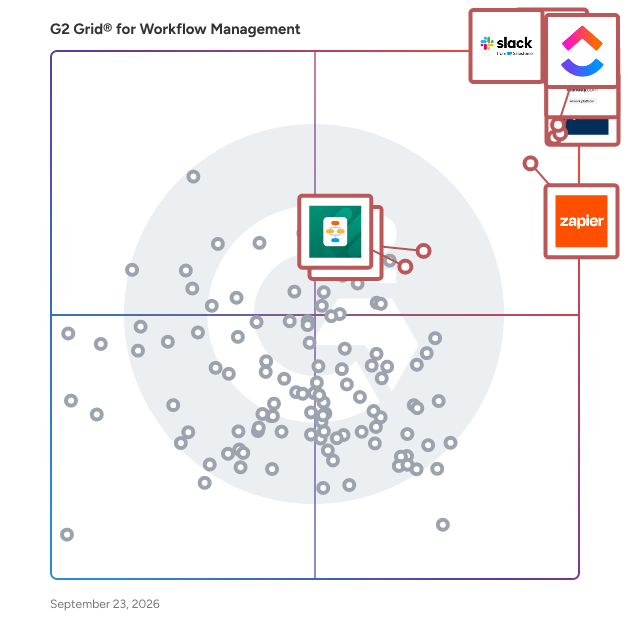
G2 Grid® for Workflow Management Software

G2 Grid® for Workflow Management Software plotting products by satisfaction and market presence

Highlighted products: Slack, Asana, ClickUp, monday AI Work Platform, Smartsheet, Zapier, Karbon, and Jotform Workflows.

Underlying data: [Grid® JSON](https://www.g2.com/categories/workflow-management/grids.json?focus%5B%5D=slack&focus%5B%5D=asana&focus%5B%5D=clickup&focus%5B%5D=monday-com&focus%5B%5D=smartsheet&focus%5B%5D=zapier&focus%5B%5D=karbon-2025-03-03&focus%5B%5D=jotform-workflows)

WorkflowMAX

WorkflowMAX is a job and profitability management software solution specifically designed to assist service firms in optimizing their operations. This platform provides users with comprehensive control over essential aspects such as time management, team collaboration, and profit tracking, all consolidated into a single interface. By streamlining processes like project management, timesheet tracking, invoicing, and purchase order issuance, WorkflowMAX enhances clarity at every stage of a firm's workflow. Targeted primarily at growing service-oriented businesses, WorkflowMAX empowers users to scale their operations effectively. With the ability to monitor where time is allocated and profits are generated, firms can make informed decisions, delegate tasks with accuracy, and expand their services without uncertainty. This adaptability ensures that the software aligns with the unique workflows of each firm, rather than imposing a rigid structure that may not fit their needs. Key features of WorkflowMAX include its robust project management tools, which allow users to create, assign, and track projects in real time. The timesheet functionality simplifies the process of logging hours worked, ensuring that all team members can accurately report their time. Additionally, the invoicing and purchase order capabilities facilitate seamless financial transactions, making it easier for firms to manage their cash flow. The software also integrates deeply with popular accounting platforms like Xero and QuickBooks, enabling users to synchronize financial data effortlessly. The benefits of using WorkflowMAX extend beyond its core functionalities. The software is designed to provide users with insights into their operations, helping them identify areas for improvement and opportunities for growth. The dedicated support team is another significant advantage, as they are genuinely invested in the success of their clients, offering assistance and guidance as needed. This commitment to customer support, combined with the software's comprehensive features, positions WorkflowMAX as a valuable asset for service firms looking to enhance their operational efficiency and profitability.

Average Rating: 4.1/5.0

Total Reviews: 63

How Do G2 Users Rate WorkflowMAX?

  • Has the product been a good partner in doing business?: 8.3/10 (Category avg: 9.2/10)
  • Activities: 7.5/10 (Category avg: 9.0/10)
  • Flows: 7.5/10 (Category avg: 8.9/10)
  • Integration: 8.8/10 (Category avg: 8.4/10)

Who Is the Company Behind WorkflowMAX?

  • Seller: WorkflowMAX
  • Company Website:
  • Year Founded: 2023
  • HQ Location: Melbourne
  • LinkedIn® Page: www.linkedin.com
    27 employees on LinkedIn®

Who Uses This Product?

  • Who Uses This: Director
  • Top Industries: Marketing and Advertising, Accounting
  • Company Size: 76% Small, 14% Medium

What Do G2 Reviewers Say About WorkflowMAX?

AI-generated summary from verified user reviews

Pros
  • Users find WorkflowMax to be easy to use and customize, enhancing their experience with minimal onboarding required.
  • Users appreciate the time tracking simplicity of WorkflowMAX, enhancing productivity and streamlining project management.
  • Users value the easy integration of WorkflowMAX with Xero, enhancing their streamlined invoicing process without double handling.
  • Users appreciate the seamless integration with Xero, enhancing workflow efficiency and minimizing invoice handling.
  • Users love the ease of use of WorkflowMax for managing projects seamlessly and efficiently from start to finish.
Cons
  • Users find the missing features of WorkflowMAX, like multi-currency billing, hinder effective task management.
  • Users find the limited functionality of WorkflowMAX frustrating, noting inefficiencies and outdated processes affecting usability.
  • Users face billing issues, including multi-currency needs and invoice discrepancies that hinder smooth transaction management.
  • Users find that time consumption is an issue with WorkflowMAX due to slow entry processes and multiple clicks.
  • Users express frustration over invoicing problems like discrepancies in quoted and invoice values and missing multi-currency billing.

What Are Recent G2 Reviews of WorkflowMAX?

What Are G2 Users Discussing About WorkflowMAX?

Jira Misc Workflow Extensions (JMWE)

What is Jira Misc Workflow Extensions (JMWE)? JMWE is a powerful, all-in-one Jira automation app that helps teams customize and expand their workflows with ease. It provides an extensive suite of tools to build, configure, and enhance workflows, catering to both non-coders and advanced users alike. Purpose: JMWE simplifies and enhances workflow automation in Jira, empowering teams to create tailored processes that fit their unique needs. It helps streamline repetitive tasks, enforce business rules, and improve overall efficiency - all with no-code and low-code capabilities. Key features: - Workflow extensions: Includes post functions, conditions, and validators that go beyond native Jira functionality. - Live fields: Customize field behavior for enhanced interactivity. - Event-based automation: Trigger automation based on field or issue changes. - Shared actions: Reuse post functions across multiple workflows to save time. - Scheduled Actions: Schedule post functions to automate recurring tasks at specific times - Simplified Scripting: Customize workflows with Jira expressions or Nunjucks, using syntax checking, interactive help, and a script tester. Benefits to users: JMWE empowers teams to create workflows tailored to their needs. With drag-and-drop configurations, reusable actions, and workflow extensions—including post functions, validators, and conditions—teams can automate processes without extensive coding knowledge. And for those seeking more advanced workflow automation, JMWE provides the flexibility to customize automations using low-code scripting. Combining no-code simplicity with low-code flexibility, JMWE is the ultimate solution for teams seeking powerful, scalable workflow automation tailored to their unique needs.

Average Rating: 4.5/5.0

Total Reviews: 21

How Do G2 Users Rate Jira Misc Workflow Extensions (JMWE)?

  • Has the product been a good partner in doing business?: 9.2/10 (Category avg: 9.2/10)
  • Activities: 7.7/10 (Category avg: 9.0/10)
  • Flows: 7.4/10 (Category avg: 8.9/10)
  • Integration: 6.6/10 (Category avg: 8.4/10)

Who Is the Company Behind Jira Misc Workflow Extensions (JMWE)?

  • Seller: Appfire
  • Company Website:
  • Year Founded: 2005
  • HQ Location: Boston, Massachusetts
  • Twitter: @Appfire
    1,632 Twitter followers
  • LinkedIn® Page: www.linkedin.com
    727 employees on LinkedIn®

Who Uses This Product?

  • Company Size: 52% Medium, 17% Small

What Do G2 Reviewers Say About Jira Misc Workflow Extensions (JMWE)?

AI-generated summary from verified user reviews

Pros
  • Users value the flexibility of automation in JMWE, enabling efficient and dynamic Jira workflows without extensive coding.
  • Users find Jira Misc Workflow Extensions easy to use, enhancing workflow efficiency without requiring deep coding skills.
  • Users appreciate the flexibility of JMWE, enhancing automation and adapting workflows to specific project needs effortlessly.
  • Users value the time-saving automation of JMWE, enhancing flexibility and reducing manual tasks in their workflows.
  • Users value the efficiency of JMWE, significantly reducing manual work and streamlining complex workflows with ease.
Cons
  • Users find the steep learning curve of JMWE challenging, especially for new users tackling complex features.
  • Users find the complexity of JMWE challenging, especially for beginners, as it complicates maintenance and troubleshooting.
  • Users experience slow performance with JMWE in large workflows, particularly when many automation rules are applied.
  • Users find the cost of JMWE to be quite high, especially compared to cheaper AI-driven alternatives available.
  • Users experience missing features after migration, requiring significant administration and highlighting the need for improvement.

What Are Recent G2 Reviews of Jira Misc Workflow Extensions (JMWE)?

ScriptRunner for Jira

Designed for Jira administrators of all technical backgrounds, ScriptRunner enables you to surpass the limitations of Jira through its unlimited and advanced automation and customisation capabilities. Harness the power of scripted automation with pre-built templates and an assisted coding experience, allowing you to swiftly fulfill advanced requirements and free yourself of repetitive manual tasks Trigger actions in response to issue creation using the Script Listeners Customise your configurations and gain control over your fields using Behaviours Keep teams synced with readily-calculated info using Scripted Fields Build bespoke workflows, enforce any criteria with validators and conditions, and more. Leverage advanced JQL functions with Enhanced Search (also a standalone app) Get comprehensive documentation, a dedicated support team, and the flexibility to easily scale as your needs grow. Try ScriptRunner for free.

Average Rating: 4.4/5.0

Total Reviews: 25

How Do G2 Users Rate ScriptRunner for Jira?

  • Has the product been a good partner in doing business?: 8.5/10 (Category avg: 9.2/10)
  • Activities: 8.3/10 (Category avg: 9.0/10)
  • Integration: 10.0/10 (Category avg: 8.4/10)

Who Is the Company Behind ScriptRunner for Jira?

  • Seller: Adaptavist
  • Year Founded: 2005
  • HQ Location: London, Greater London
  • Twitter: @Adaptavist
    4,718 Twitter followers
  • LinkedIn® Page: www.linkedin.com
    660 employees on LinkedIn®

Who Uses This Product?

  • Top Industries: Information Technology and Services, Computer Software
  • Company Size: 35% Large, 35% Medium

What Do G2 Reviewers Say About ScriptRunner for Jira?

AI-generated summary from verified user reviews

Pros
  • Users value the easy-to-use automation features of ScriptRunner, enhancing efficiency and streamlining workflow execution.
  • Users value the high customizability of ScriptRunner for Jira, enabling tailored automation and enhanced functionality.
  • Users appreciate the flexibility and customization of ScriptRunner for Jira, enhancing their automation capabilities significantly.
  • Users commend the ease of use in ScriptRunner for automating tasks, enhancing workflow efficiency and customization.
  • Users value the total control Jira Integration offers for customization, empowering both admins and developers effectively.
Cons
  • Users find ScriptRunner for Jira to be complex to set up and use, particularly those lacking scripting skills.
  • Users find difficult learning curves with ScriptRunner, particularly those without prior scripting experience or programming knowledge.
  • Users find the insufficient information problematic, as outdated documentation hinders effective tool utilization.
  • Users find ScriptRunner for Jira has a challenging learning curve due to its advanced scripting capabilities and complexity.
  • Users sometimes experience performance issues with ScriptRunner for Jira, especially regarding extensive customizations affecting system efficiency.

What Are Recent G2 Reviews of ScriptRunner for Jira?

What Are G2 Users Discussing About ScriptRunner for Jira?

AI can help you find the answers. G2 helps you trust them.

Connect G2 to Claude or ChatGPT for answers grounded in G2's trusted reviews, comparisons, and pricing from real user insights.

How it works

FlowForma Process Automation

FlowForma is a type of process automation solution designed to help users digitize, automate, and optimize business processes across various complexities. This enterprise-grade platform leverages AI technology to provide a no-code environment, allowing users, regardless of their technical expertise, to create and manage automated workflows efficiently. By integrating intelligent automation into everyday operations, FlowForma addresses the growing need for organizations to enhance productivity and streamline processes. The target audience for FlowForma includes business leaders, IT professionals, and organizations of all sizes seeking to improve their operational efficiency. With its user-friendly interface, FlowForma caters to both small businesses and large enterprises, making it an adaptable solution for diverse industries. Specific use cases range from automating simple tasks, such as data entry and approvals, to managing complex workflows that require intricate decision-making and collaboration among multiple stakeholders. Key features of FlowForma include its agentic AI capabilities, which allow users to design and optimize processes with the assistance of AI as an active collaborator. This functionality not only enhances the automation experience but also enables users to evolve their processes intelligently over time. The platform is built to be scalable and secure, ensuring that organizations can grow and adapt their automation strategies without compromising data integrity or system performance. FlowForma stands out in the process automation category by making automation accessible and affordable. With over 300,000 users worldwide, the platform has proven its effectiveness in delivering measurable results. Users benefit from the ability to streamline operations, reduce manual errors, and enhance overall productivity. The no-code aspect of FlowForma empowers individuals to take control of their automation needs without relying heavily on IT resources, fostering a culture of innovation and agility within organizations. In addition to its robust features, FlowForma offers a free trial, allowing potential users to experience the platform's capabilities firsthand. This trial period provides an opportunity for organizations to evaluate how FlowForma can transform their processes and drive efficiency, ultimately leading to improved business outcomes.

Average Rating: 4.5/5.0

Total Reviews: 98

How Do G2 Users Rate FlowForma Process Automation?

  • Has the product been a good partner in doing business?: 9.3/10 (Category avg: 9.2/10)
  • Activities: 9.2/10 (Category avg: 9.0/10)
  • Flows: 9.0/10 (Category avg: 8.9/10)
  • Integration: 7.9/10 (Category avg: 8.4/10)

Who Is the Company Behind FlowForma Process Automation?

  • Seller: FlowForma
  • Company Website:
  • Year Founded: 2012
  • HQ Location: Dublin
  • Twitter: @FlowForma
    493 Twitter followers
  • LinkedIn® Page: www.linkedin.com
    24 employees on LinkedIn®

Who Uses This Product?

  • Top Industries: Construction, Information Technology and Services
  • Company Size: 64% Medium, 26% Small

What Do G2 Reviewers Say About FlowForma Process Automation?

AI-generated summary from verified user reviews

Pros
  • Users appreciate the user-friendly interface of FlowForma, making automation simple and efficient for all involved.
  • Users love the efficiency and automation FlowForma brings, enhancing productivity and streamlining healthcare access processes.
  • Users appreciate the efficiency of FlowForma Process Automation, streamlining operations and reducing manual efforts significantly.
  • Users appreciate the automation efficiency of FlowForma, enhancing productivity and reducing manual processing in their workflows.
  • Users value the efficiency and user-friendliness of FlowForma, significantly enhancing their productivity in automating processes.
Cons
  • Users note a steep learning curve that requires time and structured thinking to master FlowForma effectively.
  • Users find the difficult learning curve challenging, requiring structured thinking and better navigation for effective use.
  • Users are frustrated by the lack of customization options in FlowForma, affecting the visual coherence of their processes.
  • Users note a steep learning curve with FlowForma, requiring time and effort to fully navigate the system.
  • Users find the complexity of FlowForma's automation challenging, citing slow loading and difficult navigation in the interface.

What Are Recent G2 Reviews of FlowForma Process Automation?

What Are G2 Users Discussing About FlowForma Process Automation?

GUIDEcx

GUIDEcx is the world's leading Client Onboarding solution that creates a seamless transition between your sales and implementation process. With over five years and 300,000 successful onboarding projects completed, we know how to leverage our wisdom to deliver consistent Customer Onboarding experiences. Our process is designed to drive engagement, increase efficiency, and expand capacity without sacrificing quality of service. Easy to integrate into your existing CRM, GUIDEcx has custom templates, different customer views for each role, purpose-built integrations, and robust reporting. We don't just move your process to our software, our Professional Services team and Guide University resources are here to Guide and support you through every step of the process to accelerate time to value and maximize your onboarding team productivity. Reach out today to and we can help you bring your Customer Onboarding experience to new heights.

Average Rating: 4.6/5.0

Total Reviews: 460

How Do G2 Users Rate GUIDEcx?

  • Has the product been a good partner in doing business?: 9.5/10 (Category avg: 9.2/10)
  • Activities: 8.8/10 (Category avg: 9.0/10)
  • Flows: 8.9/10 (Category avg: 8.9/10)
  • Integration: 8.4/10 (Category avg: 8.4/10)

Who Is the Company Behind GUIDEcx?

  • Seller: GuideCX
  • Year Founded: 2017
  • HQ Location: Lehi, Utah
  • Twitter: @guidecx
    173 Twitter followers
  • LinkedIn® Page: www.linkedin.com
    52 employees on LinkedIn®

Who Uses This Product?

  • Who Uses This: Project Manager, Implementation Manager
  • Top Industries: Computer Software, Information Technology and Services
  • Company Size: 52% Medium, 39% Small

What Do G2 Reviewers Say About GUIDEcx?

AI-generated summary from verified user reviews

Pros
  • Users commend how GUIDEcx enables seamless project management, enhancing onboarding efficiency and team communication.
  • Users commend the responsive customer support from GUIDEcx, which enhances their onboarding and project management experience.
  • Users highlight the effective team collaboration features of GUIDEcx, enhancing communication and project management effortlessly.
  • Users value the automation capabilities of GUIDEcx, significantly reducing administrative workload and enhancing client communication.
  • Users find GUIDEcx's ease of learning exceptional, allowing smooth navigation and quick mastery of the platform.
Cons
  • Users experience slow loading times that hinder navigation and overall user experience in GUIDEcx.
  • Users report glitches and hiccups in GUIDEcx, particularly with ticket creation and profile impersonation issues.
  • Users report experiencing glitches such as lag and unexpected logouts, affecting their workflow significantly.
  • Users note a steep learning curve with GUIDEcx that requires mental effort for initial setup and customization.
  • Users express concern over missing features currently available, leading to frustration about future updates and transparency.

What Are Recent G2 Reviews of GUIDEcx?

What Are G2 Users Discussing About GUIDEcx?

Uku

Uku is a powerful, beautiful, and easy-to-use accounting practice management platform for ambitious firms. Every accountant runs their whole day from one list. Tasks, deadlines, and recurring workflows for every client are sorted the moment they log in, so month-end close never sneaks up and nothing slips. Recurring work generates itself, and one click tracks time straight to billing. When someone is out, the firm keeps running. Add a vacation and Uku reassigns the work automatically, so no deadline falls through and no one scrambles to cover. Billing that used to take days now takes minutes. Uku turns tracked time and your price lists into accurate invoices and e-invoices in a click, chases the unpaid ones, and lets clients pay by card inside the portal. Firms tell us this is where they stop leaving money on the table. The client portal chases missing documents for you. Uku knows what is missing and asks the client before the task even starts, then keeps every file, task, and message in one shared timeline instead of scattered inboxes. Reports show which clients are actually profitable, so you price fairly and fix what drains the firm. Connects to QuickBooks, Xero, e-conomic, and Microsoft 365. In interviews with firms of 15 to 56 people, Uku lifted profit per firm by 28% and saved 12+ hours per person every week. Over 1,000 firms trust Uku, and most are up and running in 1 to 3 weeks with free migration help. SOC 2 Type I certified, EU-hosted, available in 12 languages.

Average Rating: 4.7/5.0

Total Reviews: 109

How Do G2 Users Rate Uku?

  • Has the product been a good partner in doing business?: 9.3/10 (Category avg: 9.2/10)
  • Activities: 8.9/10 (Category avg: 9.0/10)
  • Flows: 8.6/10 (Category avg: 8.9/10)
  • Integration: 8.3/10 (Category avg: 8.4/10)

Who Is the Company Behind Uku?

  • Seller: Getuku
  • Year Founded: 2017
  • HQ Location: Tallinn, EE
  • Twitter: @accountinguku
    48 Twitter followers
  • LinkedIn® Page: www.linkedin.com
    9 employees on LinkedIn®

Who Uses This Product?

  • Who Uses This: Accountant
  • Top Industries: Accounting, Financial Services
  • Company Size: 72% Small, 27% Medium

What Do G2 Reviewers Say About Uku?

AI-generated summary from verified user reviews

Pros
  • Users love the ease of use of Uku, appreciating its intuitive design and flexible, customizable options.
  • Users appreciate how Uku provides effective task management, enhancing workflow organization and client agreement clarity.
  • Users find Uku's efficiency improvement invaluable for task management and time tracking, enhancing daily productivity.
  • Users find Uku to be a time-saving tool, streamlining tasks and enhancing productivity across their teams.
  • Users value the effective time tracking of Uku, enhancing productivity and optimizing team workflows effortlessly.
Cons
  • Users find task management challenging due to difficulties in tracking and scheduling recurring tasks effectively.
  • Users find the learning curve steep for recurring tasks in Uku, requiring time and effort to navigate.
  • Users find the difficult learning process with recurring tasks in Uku to be confusing and time-consuming.
  • Users find the limited functionality of Uku's mobile app frustrating compared to the more robust desktop experience.
  • Users experience task management issues with complex recurring tasks, leading to confusion and potential duplicates in scheduling.

What Are Recent G2 Reviews of Uku?

Dubsado

Business Management Solution

Average Rating: 4.3/5.0

Total Reviews: 72

How Do G2 Users Rate Dubsado?

  • Has the product been a good partner in doing business?: 8.8/10 (Category avg: 9.2/10)
  • Activities: 10.0/10 (Category avg: 9.0/10)
  • Flows: 9.2/10 (Category avg: 8.9/10)
  • Integration: 8.3/10 (Category avg: 8.4/10)

Who Is the Company Behind Dubsado?

  • Seller: Dubsado
  • Year Founded: 2015
  • HQ Location: Burbank , CA
  • Twitter: @mydubsado
    3,355 Twitter followers
  • LinkedIn® Page: www.linkedin.com
    24 employees on LinkedIn®

Who Uses This Product?

  • Who Uses This: CEO, Owner
  • Top Industries: Marketing and Advertising, Management Consulting
  • Company Size: 95% Small, 1% Medium

What Do G2 Reviewers Say About Dubsado?

AI-generated summary from verified user reviews

Pros
  • Users love the seamless automation in Dubsado, enabling effortless business management and efficient scaling.
  • Users commend the excellent customer support of Dubsado, which enhances their experience and ensures smooth operations.
  • Users appreciate the time-saving automations of Dubsado, enabling businesses to run efficiently with minimal manual effort.
Cons
  • Users find the complexity of Dubsado frustrating, often requiring extra effort to accomplish tasks within the platform.
  • Users find the learning curve challenging, often feeling confused and requiring significant effort to navigate Dubsado.
  • Users find Dubsado not intuitive, often feeling confused and overwhelmed by its outdated and complex interface.

What Are Recent G2 Reviews of Dubsado?

What Are G2 Users Discussing About Dubsado?

Content Snare

Content Snare helps accounting firms, mortgage brokers, law firms, and professional services teams collect documents and information from clients without endless email back-and-forth. Customers report a 71% reduction in time spent gathering information, a 67% reduction in stalled projects, and a 23.9× return on investment. Send clients a secure, branded portal with a checklist of exactly what you need. Auto-saving progress means clients can complete the request over multiple sessions; automatic reminders handle the follow-up; in-context approvals and rejections replace the email back-and-forth when something needs correcting. Used by 1,900+ companies across 103 countries to collect tax documents, onboarding information, workpapers, KYC, and ongoing client requests. ISO 27001 certified. Integrates with Xero, Zapier, Make, Google Drive, Dropbox, OneDrive, and SharePoint.

Average Rating: 4.7/5.0

Total Reviews: 53

How Do G2 Users Rate Content Snare?

  • Has the product been a good partner in doing business?: 9.8/10 (Category avg: 9.2/10)

Who Is the Company Behind Content Snare?

  • Seller: Content Snare
  • Year Founded: 2016
  • HQ Location: Brisbane, Queensland
  • Twitter: @contentsnare
    901 Twitter followers
  • LinkedIn® Page: www.linkedin.com
    8 employees on LinkedIn®

Who Uses This Product?

  • Top Industries: Accounting, Marketing and Advertising
  • Company Size: 89% Small, 11% Medium

What Do G2 Reviewers Say About Content Snare?

AI-generated summary from verified user reviews

Pros
  • Users find Content Snare incredibly easy to use, enhancing organization and streamlining client communications effectively.
  • Users highlight the efficiency of Content Snare, significantly streamlining client communication and document collection processes.
  • Users value the efficient client management offered by Content Snare, making document collection organized and stress-free.
  • Users commend the responsive customer support of Content Snare, ensuring smooth operation and client satisfaction.
  • Users love the customization options in Content Snare, enhancing efficiency and client interaction through tailored templates.
Cons
  • Users highlight the excessive email notifications sent to clients, suggesting a daily email summary would be beneficial.
  • Users express frustration over Content Snare's high costs and inadequate support during critical business moments.
  • Users experience significant bugs in Content Snare that lead to costly issues and poor customer support responses.
  • Users face data saving issues as clients lack access to completed requests for their own files.
  • Users find the frequent email notifications could overwhelm clients, suggesting a daily digest feature for better management.

What Are Recent G2 Reviews of Content Snare?

What Are G2 Users Discussing About Content Snare?

Troop Messenger

The Unified Sovereign Workspace | Troop Messenger: The Secure, AI-Enabled Collaboration Powerhouse for Modern Enterprises. Troop Messenger is a high-performance, enterprise-grade communication and collaboration platform designed for organisations that refuse to compromise between user experience and data sovereignty. While traditional tools lock you into their clouds, Troop Messenger gives you the keys by providing a unified "Command Center" that fits your unique security architecture. The Troop Messenger Difference: - Total Deployment Flexibility: Unlike "SaaS-only" competitors, we offer On-Premise, Private Cloud, and Self-Hosted delivery. Maintain 100% ownership of your organizational intelligence. - AI-Enhanced Productivity: Move beyond simple chat. Use AI-Powered File Summaries to digest long briefings instantly and Smart Suggestions to accelerate team responses. - Unified Enterprise Tools: Consolidate your stack. Seamlessly switch between 1:1 & Group messaging, high-definition video conferencing, screen sharing, all within a single, encrypted interface. - Built for High-Stakes Environments: Engineered for industries requiring strict regulatory compliance (BFSI, Healthcare, Legal, and Tech), ensuring your corporate communication meets the highest global standards without sacrificing speed. Primary Solutions Provided: - Eliminate Tool Fragmentation & Silos: Consolidate chat, video, and task management into one cohesive ecosystem. Leverage robust REST APIs and webhooks to build custom workflows and ensure Troop Messenger integrates seamlessly with your existing enterprise application landscape. - Security at the Forefront: Enable global collaboration with end-to-end encryption, multi-factor authentication, SSO, SAML, user authorisations, and advanced role-based administrative controls (RBAC). - Scalable Efficiency: From agile startups to massive enterprises, Troop Messenger scales with your headcount while keeping your overhead low. Experience why forward-thinking enterprises are migrating to a more secure way to work.

Average Rating: 4.7/5.0

Total Reviews: 101

How Do G2 Users Rate Troop Messenger?

  • Has the product been a good partner in doing business?: 9.6/10 (Category avg: 9.2/10)

Who Is the Company Behind Troop Messenger?

Who Uses This Product?

  • Top Industries: Information Technology and Services, Computer Software
  • Company Size: 50% Medium, 43% Small

What Do G2 Reviewers Say About Troop Messenger?

AI-generated summary from verified user reviews

Pros
  • Users appreciate the ease of use of Troop Messenger, experiencing simple communication and quick onboarding without complications.
  • Users value the strong security features of Troop Messenger, ensuring safe sharing of files and communications.
  • Users value the simple and secure communication provided by Troop Messenger, enhancing internal coordination efficiently.
  • Users appreciate the organized file sharing in Troop Messenger, ensuring quick access and enhanced security during collaboration.
  • Users value the organized team communication in Troop Messenger, enhancing productivity and simplifying collaboration effortlessly.
Cons
  • Users find a lack of features in Troop Messenger, noting inconsistencies and the need for advanced options and integrations.
  • Users feel that the user interface could be improved with a more modern and streamlined design for better usability.
  • Users note missing features in Troop Messenger, like unclear navigation and the need for better mobile performance.
  • Users note the need for improved integration issues with third-party services, affecting workflow automation and overall ease of use.
  • Users find the limited participant options for audio and video calls frustrating, particularly for larger teams.

What Are Recent G2 Reviews of Troop Messenger?

What Are G2 Users Discussing About Troop Messenger?

PF 360 Capture

PF 360 Capture is a highly scalable cloud-based document workflow platform that intelligently captures, classifies and transmits critical data from documents and faxes to the right process workflows. Our purpose is to help organizations eliminate costly, time-consuming manual processes and traditional document workflows so users can focus on tasks that require their attention. Our mission is to create and integrate the best cloud technologies to simplify digital transformation experiences for our customers. PF 360 Capture is ISO 27001 and SOC 2 Type II certified and HIPAA compliant. Organizations have the flexibility to decide the best deployment scenario for their environment with enterprise-grade SLAs and 24/7 support.

Average Rating: 4.4/5.0

Total Reviews: 15

How Do G2 Users Rate PF 360 Capture?

  • Has the product been a good partner in doing business?: 8.3/10 (Category avg: 9.2/10)
  • Activities: 8.3/10 (Category avg: 9.0/10)
  • Flows: 6.7/10 (Category avg: 8.9/10)
  • Integration: 7.3/10 (Category avg: 8.4/10)

Who Is the Company Behind PF 360 Capture?

Who Uses This Product?

  • Company Size: 87% Medium, 7% Large

What Do G2 Reviewers Say About PF 360 Capture?

AI-generated summary from verified user reviews

Pros
  • Users find PF 360 Capture's ease of use great for daily tasks, enhancing collaboration and streamlining document workflows.
  • Users value the efficiency of PF 360 Capture, noting its seamless adaptation and smooth implementation for enhanced productivity.
  • Users value the complete solution of PF 360 Capture, enjoying seamless workflows and improved collaboration in their daily tasks.
  • Users value the automation adaptability of PF 360 Capture, seamlessly integrating with business processes and ERP systems.
  • Users appreciate the automation ease of PF 360 Capture, seamlessly integrating with their business processes and ERP software.
Cons
  • Users experience occasional communication issues with PF 360 Capture, though recovery is often straightforward and quick.
  • Users often face connection issues that lead to frustration and hinder their overall experience with PF 360 Capture.
  • Users often face connectivity issues with PF 360 Capture, leading to frustrating experiences during use.
  • Users find that obtaining support and development for PF 360 Capture can be challenging and time-consuming.
  • Users find the limited customization of PF 360 Capture insufficient for their specific needs and preferences.

What Are Recent G2 Reviews of PF 360 Capture?

Shapes

Shapes is the people platform for the AI era. Every HR process lives in one place, from your people directory and time off to performance cycles and analytics, with no spreadsheets or scattered systems in sight. AI agents handle the admin load end-to-end: answering employee questions instantly, running onboarding seamlessly, and flagging patterns or issues that need your attention. Using Vibe Views, any people leader can build the dashboard or tool they've always needed, just by describing it. No engineer required. Connect your people data wherever AI works, through MCP, enabling deep analysis, workflow triggers and custom tooling without ever exporting sensitive data. One clear price. Quick to implement. Built for HR leaders ready to turn off the noise and turn up the strategy.

Average Rating: 4.6/5.0

Total Reviews: 35

How Do G2 Users Rate Shapes?

  • Has the product been a good partner in doing business?: 9.6/10 (Category avg: 9.2/10)
  • Activities: 8.1/10 (Category avg: 9.0/10)
  • Flows: 6.1/10 (Category avg: 8.9/10)
  • Integration: 6.7/10 (Category avg: 8.4/10)

Who Is the Company Behind Shapes?

  • Seller: Shapes
  • Year Founded: 2022
  • HQ Location: Tel Aviv, Israel
  • LinkedIn® Page: www.linkedin.com
    84 employees on LinkedIn®

Who Uses This Product?

  • Top Industries: Computer Software
  • Company Size: 66% Small, 34% Medium

What Do G2 Reviewers Say About Shapes?

AI-generated summary from verified user reviews

Pros
  • Users love the user-friendly interface of Shapes, making it easy to manage HR processes and collaborate effectively.
  • Users commend the exceptional customer support of Shapes, highlighting responsiveness and commitment to resolving issues quickly.
  • Users value the user-friendly interface of Shapes, enhancing project management and collaboration for teams effectively.
  • Users find the intuitive design of Shapes greatly enhances their ability to manage HR processes easily.
  • Users appreciate the comprehensive features of Shapes, which enhance project management and team collaboration effortlessly.
Cons
  • Users note several missing features, such as currency support and integration with essential tools, needing significant improvements.
  • Users request more integration options in Shapes, noting some essential features are currently missing in the new system.
  • Users desire a mobile app for Shapes, as the current web-only access limits convenience and flexibility.
  • Users express the need for a mobile app as the current web-only access limits usability.
  • Users are disappointed by the lack of a mobile app, limiting access to the Shapes product on the go.

What Are Recent G2 Reviews of Shapes?

Emailgistics

Emailgistics is an advanced email management solution designed to enhance Microsoft Outlook 365 shared mailboxes. This software focuses on automation, intelligent routing, and performance tracking, providing a structured, data-driven approach to managing emails. By streamlining shared inbox management, Emailgistics aims to boost team efficiency, accountability, and collaboration, fundamentally transforming how organizations handle their email communications. This solution is particularly beneficial for organizations that deal with high volumes of incoming messages and require a systematic approach to ensure timely responses. Emailgistics addresses common challenges associated with email management, such as the risk of missed messages and delayed replies. By automating the assignment of emails to the appropriate team members, Emailgistics significantly reduces the time spent on manual triage, allowing teams to concentrate on delivering prompt and accurate replies to customers. Key features of Emailgistics include automated message assignment, customizable workflow rules, and one-click availability controls. These functionalities enable teams to manage email interactions efficiently without becoming overwhelmed by administrative tasks. The automation aspect ensures that messages are routed to the right individual, which not only speeds up response times but also enhances accountability among team members. This structured approach promotes a collaborative and efficient work environment, where team members can focus on their core responsibilities rather than getting bogged down by email overload. Additionally, Emailgistics provides performance tracking tools, such as real-time dashboards and detailed reports on response times and productivity metrics. These data-driven insights empower managers to make informed decisions, refine team performance, and continuously improve email management processes. By analyzing performance metrics, organizations can identify areas for improvement and implement strategies to enhance overall efficiency, ensuring that every team member is contributing effectively to email communications. Seamlessly integrated with Outlook 365, Emailgistics enhances existing workflows without disrupting established practices. This integration allows teams to optimize their email management processes, leading to faster, more reliable responses and improved collaboration. By adopting Emailgistics, organizations can transform their email handling capabilities, ensuring that they meet customer expectations while maintaining a high level of operational efficiency.

Average Rating: 4.7/5.0

Total Reviews: 59

How Do G2 Users Rate Emailgistics?

  • Has the product been a good partner in doing business?: 9.4/10 (Category avg: 9.2/10)
  • Activities: 10.0/10 (Category avg: 9.0/10)
  • Flows: 10.0/10 (Category avg: 8.9/10)

Who Is the Company Behind Emailgistics?

  • Seller: Emailgistics
  • Company Website:
  • Year Founded: 2018
  • HQ Location: Oakville, CA
  • LinkedIn® Page: www.linkedin.com
    17 employees on LinkedIn®

Who Uses This Product?

  • Top Industries: Manufacturing
  • Company Size: 44% Small, 42% Medium

What Do G2 Reviewers Say About Emailgistics?

AI-generated summary from verified user reviews

Pros
  • Users praise the excellent customer support from Emailgistics, ensuring assistance is always available for optimal use.
  • Users praise the ease of use in Emailgistics, appreciating the quick setup and intuitive dashboard navigation.
  • Users commend Emailgistics for its time-saving capabilities, significantly enhancing team productivity and streamlining email management.
  • Users appreciate the efficient email management in Emailgistics, enhancing workflows and improving customer service effectiveness.
  • Users value the team collaboration features of Emailgistics, enabling efficient management of shared emails and workflows.
Cons
  • Users face challenges with archiving issues, struggling to adapt to the new email management system effectively.
  • Users find the difficult setup process time-consuming and complex, especially for larger teams with many accounts.
  • Users face slow loading times when searching folders and using the Outlook add-on, affecting their experience.
  • Users desire improved folder management features, citing issues with slow actions and unwanted email movement.
  • Users face challenges due to a lack of training, struggling to adapt to the new email management approach.

What Are Recent G2 Reviews of Emailgistics?

Moxo

Moxo is the AI orchestration platform built for business operations teams. From manual coordination to intelligent orchestration, Moxo transforms the way organizations run complex processes. The old way relies on scattered emails and manual follow-ups; the Moxo way keeps every step clear, connected, and accountable. We put human actions and decisions at the center of workflows, while AI and automation clear the manual work behind the scenes. By connecting people, systems, and AI, Moxo drives the right actions, from the right people, at the right time —whether it’s client onboarding, multi-party approvals, or ongoing account management. Business teams can eliminate bottlenecks, reduce drop-offs, and keep critical milestones moving forward. Trusted by leading global enterprises across financial services, consulting, legal, and healthcare, Moxo is the smarter way to orchestrate mission-critical workflows with confidence.

Average Rating: 4.5/5.0

Total Reviews: 192

How Do G2 Users Rate Moxo?

  • Has the product been a good partner in doing business?: 9.5/10 (Category avg: 9.2/10)
  • Activities: 8.8/10 (Category avg: 9.0/10)
  • Flows: 8.3/10 (Category avg: 8.9/10)
  • Integration: 7.8/10 (Category avg: 8.4/10)

Who Is the Company Behind Moxo?

  • Seller: Moxo
  • Company Website:
  • Year Founded: 2012
  • HQ Location: Cupertino, CA
  • Twitter: @PoweredByMoxo
    10,432 Twitter followers
  • LinkedIn® Page: www.linkedin.com
    220 employees on LinkedIn®

Who Uses This Product?

  • Who Uses This: CEO, Director
  • Top Industries: Financial Services, Marketing and Advertising
  • Company Size: 80% Small, 18% Medium

What Do G2 Reviewers Say About Moxo?

AI-generated summary from verified user reviews

Pros
  • Users love the ease of use of Moxo, finding the interface extremely user-friendly and efficient for their needs.
  • Users appreciate the outstanding customer support from Moxo, enhancing their experience and efficiency with the platform.
  • Users find Moxo's team collaboration features effective, making task assignments and communication seamless and integrated.
  • Users value Moxo for its responsive support and effective solutions in managing client communication and project tasks.
  • Users value the effective communication capabilities of Moxo, enhancing collaboration and streamlining client interactions.
Cons
  • Users note a lack of essential features in Moxo, such as client portal simulations and advanced notification controls.
  • Users note the limited features of Moxo, wishing for more control and better integration options.
  • Users find Moxo lacking features, such as missing client portal simulation and limited notification controls.
  • Users find limited customization in Moxo, lacking key features like client portal simulation and enhanced notification control.
  • Users experience integration issues with Moxo, wishing for improved automation and calendar syncing features.

What Are Recent G2 Reviews of Moxo?

What Are G2 Users Discussing About Moxo?

Box Relay

Box Relay, co-developed with IBM, is a workflow tool that automates and standardizes structured document workflows.

Average Rating: 4.0/5.0

Total Reviews: 11

How Do G2 Users Rate Box Relay?

  • Has the product been a good partner in doing business?: 7.5/10 (Category avg: 9.2/10)

Who Is the Company Behind Box Relay?

  • Seller: Box
  • Year Founded: 1998
  • HQ Location: Redwood City, CA
  • Twitter: @Box
    78,537 Twitter followers
  • LinkedIn® Page: www.linkedin.com
    4,413 employees on LinkedIn®
  • Ownership: NYSE:BOX

Who Uses This Product?

  • Company Size: 45% Large, 45% Small

What Are Recent G2 Reviews of Box Relay?

Productboard

Productboard is the agentic product system for modern product teams. It features Productboard Spark, a built-in agent that knows your product and customers from day one. As your product agent, Spark allows you to interact with your product data and documents conversationally. It's also specifically designed to power core product workflows, like surfacing customer needs and new opportunities, turning ideas into delivery-ready specs, and measuring the impact of what you ship. Over 6,000 companies, including Zoom, Autodesk, and Salesforce, use Productboard to gain clarity on the right products and features to build next. With offices in Prague and San Francisco, Productboard is backed by Sequoia Capital, Kleiner Perkins, Index Ventures, Bessemer Venture Partners, Dragoneer Investment Group, Tiger Global Management, and Credo Ventures. www.productboard.com

Average Rating: 4.2/5.0

Total Reviews: 251

How Do G2 Users Rate Productboard?

  • Has the product been a good partner in doing business?: 8.7/10 (Category avg: 9.2/10)
  • Activities: 8.7/10 (Category avg: 9.0/10)
  • Flows: 8.9/10 (Category avg: 8.9/10)
  • Integration: 7.5/10 (Category avg: 8.4/10)

Who Is the Company Behind Productboard?

  • Seller: productboard
  • Year Founded: 2014
  • HQ Location: San Francisco, CA
  • Twitter: @productboard
    9,984 Twitter followers
  • LinkedIn® Page: www.linkedin.com
    263 employees on LinkedIn®

Who Uses This Product?

  • Who Uses This: Product Manager, Senior Product Manager
  • Top Industries: Computer Software, Information Technology and Services
  • Company Size: 49% Medium, 43% Small

What Do G2 Reviewers Say About Productboard?

AI-generated summary from verified user reviews

Pros
  • Users value the collaboration features of Productboard, enhancing team alignment and integrating seamlessly with existing workflows.
  • Users praise Productboard's fast and responsive customer support, ensuring quick resolutions and satisfaction with their services.
  • Users find Productboard's ease of use enhances team collaboration and streamlines product prioritization effortlessly.
  • Users appreciate the easy integrations in Productboard, enhancing workflow with tools like Slack and Jira effortlessly.
  • Users value Productboard's customer feedback aggregation, enhancing product management and facilitating effective prioritization.
Cons
  • Users report a lack of features in Productboard, hindering efficiency and complicating deeper analytics processes.
  • Users find the learning curve challenging, requiring time to navigate Productboard's complex features effectively.
  • Users find learning difficulties in Productboard due to its complexity and awkward navigation for beginners.
  • Users find the limited customization options frustrating, complicating their experience and hindering effective data management.
  • Users note the missing features in Productboard, specifically in analytics and ease of use for beginners.

What Are Recent G2 Reviews of Productboard?

What Are G2 Users Discussing About Productboard?

Bijou Barry
BB
Researched and written by Bijou Barry
Updated April 9, 2026