Best Distribution ERP Software

How Many Distribution ERP Software Products Does G2 Track?

Total Products under this Category: 236

Category Stats (Sep 2026)

  • Average Rating: 4.07/5 (↓0.15 vs Aug 2026) The average rating of products in this category, based on all submitted ratings
  • Top Trending Product: Rootstock Cloud ERP (+0.35%) - Among all products in this category, Rootstock Cloud ERP recorded the largest rating increase compared to last month

Last updated: September 05, 2026

How Does G2 Rank Distribution ERP Software Products?

Why You Can Trust G2's Software Rankings:

  • 30 Analysts and Data Experts
  • 12,100+ Authentic Reviews
  • 236+ Products
  • Unbiased Rankings

G2's software rankings are built on verified user reviews, rigorous moderation, and a consistent research methodology maintained by a team of analysts and data experts. Each product is measured using the same transparent criteria, with no paid placement or vendor influence. While reviews reflect real user experiences, which can be subjective, they offer valuable insight into how software performs in the hands of professionals. Together, these inputs power the G2 Score, a standardized way to compare tools within every category.

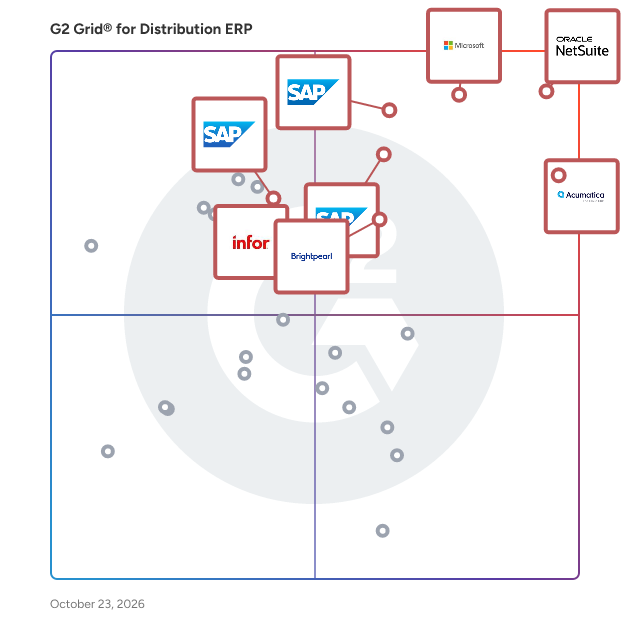
G2 Grid® for Distribution ERP Software

G2 Grid® for Distribution ERP Software plotting products by satisfaction and market presence

Highlighted products: NetSuite, Microsoft Dynamics 365 Business Central, Acumatica, SAP Cloud ERP (SAP S/4HANA Cloud), SAP ECC, Brightpearl, SAP Business ByDesign, and Epicor Prophet 21.

Underlying data: [Grid® JSON](https://www.g2.com/categories/distribution-erp/grids.json?focus%5B%5D=oracle-netsuite&focus%5B%5D=microsoft-microsoft-dynamics-365-business-central&focus%5B%5D=acumatica&focus%5B%5D=sap-cloud-erp-sap-s-4hana-cloud&focus%5B%5D=sap-ecc&focus%5B%5D=brightpearl&focus%5B%5D=sap-business-bydesign&focus%5B%5D=epicor-prophet-21)

NetSuite

NetSuite is the #1 AI cloud ERP, helping organizations streamline operations, improve visibility, and accelerate growth. For more than 28 years, NetSuite has enabled businesses of all sizes—from startups and high-growth companies to global enterprises—to run their entire business on a single, integrated platform. Today, more than 44,000 organizations across a wide range of industries use NetSuite to run their business in over 220 countries and territories. Built natively in the cloud, NetSuite eliminates the need for on-premises infrastructure and complex upgrades, giving organizations continuous access to the latest innovations, security enhancements, and AI capabilities. Originally built to transform financial management, NetSuite has evolved into a comprehensive business management suite that brings together accounting, financial management, inventory and order management, supply chain, procurement, human resources, CRM, professional services automation, and commerce. NetSuite supports organizations across industries including software and technology, manufacturing, wholesale distribution, retail, services, nonprofit, healthcare, advertising and media, and more, with industry-specific capabilities, workflows, dashboards, KPIs, and reports designed to address unique business requirements. With AI embedded throughout the platform, organizations can automate routine tasks, generate insights faster, and make more informed decisions. Ask Oracle, a conversational AI assistant, enables users to interact with NetSuite through natural language by answering questions, analyzing business data, surfacing insights, and providing guidance—all within the security, roles, permissions, and controls already established in NetSuite. Embedded directly into everyday workflows, Ask Oracle helps users make faster, more informed decisions and take action without disrupting their work. Agents and agentic workflows extend these AI capabilities by helping users complete specific tasks and coordinate work across multiple steps. Built-in analytics, AI-powered insights, and customizable reporting provide teams with everything they need to make solid decisions. NetSuite is highly configurable and extensible, allowing businesses to adapt the platform to their unique processes while supporting growth across multiple subsidiaries, currencies, languages, and geographies. By connecting business-critical data and processes in a single cloud platform, NetSuite provides a real-time, unified view of the business, eliminating disconnected systems, manual spreadsheets, and information silos. Organizations gain a single source of truth that improves collaboration across finance, operations, sales, inventory, HR, and customer service while simplifying compliance and reporting. Whether managing rapid growth, expanding internationally, improving financial close processes, optimizing inventory, or gaining deeper operational insights, NetSuite provides the flexibility, automation, and intelligence organizations need to adapt and scale with confidence. By making trusted data readily available and automating core business processes, NetSuite empowers leaders to respond quickly to changing market conditions and make faster, more informed decisions.

Average Rating: 4.1/5.0

Total Reviews: 4,790

How Do G2 Users Rate NetSuite?

  • Has the product been a good partner in doing business?: 7.5/10 (Category avg: 8.2/10)
  • ATP: 7.2/10 (Category avg: 8.1/10)
  • Order History: 8.1/10 (Category avg: 8.7/10)
  • Demand: 7.2/10 (Category avg: 8.1/10)

Who Is the Company Behind NetSuite?

  • Seller: Oracle
  • Company Website:
  • Year Founded: 1977
  • HQ Location: Austin, TX
  • Twitter: @Oracle
    827,997 Twitter followers
  • LinkedIn® Page: www.linkedin.com
    207,576 employees on LinkedIn®

Who Uses This Product?

  • Who Uses This: Controller, Accounting Manager
  • Top Industries: Computer Software, Accounting
  • Company Size: 57% Medium, 31% Small

What Do G2 Reviewers Say About NetSuite?

AI-generated summary from verified user reviews

Pros
  • Users appreciate the ease of use of NetSuite, finding it smooth and customizable for their needs.
  • Users value the customizability of NetSuite, enabling tailored reporting and improved inventory management across various locations.
  • Users appreciate the robust functionality of NetSuite, enjoying seamless integrations and customizable reporting capabilities.
  • Users value the extensive customization options of NetSuite, significantly enhancing business adaptability and efficiency.
  • Users value the extensive customization options in NetSuite, enhancing their business processes and reporting flexibility.
Cons
  • Users find the learning curve steep, requiring significant time and resources to navigate and customize effectively.
  • Users find the complex reports and interface of NetSuite challenging, leading to time-consuming navigation and customization.
  • Users find missing features in NetSuite, such as integration issues and inadequate project functionalities frustratingly limiting.
  • Users find the limited customization options of NetSuite frustrating, hindering their ability to tailor the system effectively.
  • Users find NetSuite's interface not user-friendly, with complex configurations and a challenging report creation process.

What Are Recent G2 Reviews of NetSuite?

What Are G2 Users Discussing About NetSuite?

Microsoft Dynamics 365 Business Central

Grow your business with Microsoft Dynamics 365 Business Central—the first comprehensive business management solution that uses Microsoft Copilot to boost productivity, spark creativity, and improve business performance with next-generation AI. Connect finance, sales, service, and operations teams within a single easy-to-use application that streamlines processes and empowers data-driven decisions. Work seamlessly with Microsoft 365 including Outlook, Excel, and Teams, so employees can get the information they need without switching between applications. Drive continuous improvement and innovation backed by the world-class security, flexibility, and scalability of the Microsoft cloud. Join more than 40,000 small and medium-sized businesses that have moved to the cloud with Dynamics 365 Business Central to work smarter, adapt faster, and perform better.

Average Rating: 4.0/5.0

Total Reviews: 863

How Do G2 Users Rate Microsoft Dynamics 365 Business Central?

  • Has the product been a good partner in doing business?: 7.8/10 (Category avg: 8.2/10)
  • ATP: 8.8/10 (Category avg: 8.1/10)
  • Order History: 8.9/10 (Category avg: 8.7/10)
  • Demand: 8.9/10 (Category avg: 8.1/10)

Who Is the Company Behind Microsoft Dynamics 365 Business Central?

  • Seller: Microsoft
  • Year Founded: 1975
  • HQ Location: Redmond, Washington
  • Twitter: @microsoft
    13,091,739 Twitter followers
  • LinkedIn® Page: www.linkedin.com
    232,750 employees on LinkedIn®
  • Ownership: MSFT

Who Uses This Product?

  • Who Uses This: Controller, Accountant
  • Top Industries: Information Technology and Services, Accounting
  • Company Size: 56% Medium, 24% Small

What Do G2 Reviewers Say About Microsoft Dynamics 365 Business Central?

AI-generated summary from verified user reviews

Pros
  • Users appreciate the ease of use in Microsoft Dynamics 365 Business Central, finding it user-friendly and customizable.
  • Users value the seamless integration with Microsoft products and other platforms, enhancing overall efficiency and client satisfaction.
  • Users highlight the efficiency and comprehensive financial control offered by Microsoft Dynamics 365 Business Central for accounting processes.
  • Users value the seamless integration of Microsoft Dynamics 365 Business Central with Microsoft products and third-party applications.
  • Users value the seamless integration features of Microsoft Dynamics 365 Business Central, enhancing efficiency with various applications.
Cons
  • Users often face a steep learning curve, requiring significant time and training to effectively navigate the system.
  • Users find the learning difficulty in Microsoft Dynamics 365 Business Central to be challenging and time-consuming.
  • Users face challenges with missing features, as advanced functionality often requires costly third-party apps and customizations.
  • Users find the high licensing costs burdensome, particularly affecting smaller businesses trying to scale.
  • Users struggle with the difficult customization of Microsoft Dynamics 365 Business Central, especially during initial setup and integration.

What Are Recent G2 Reviews of Microsoft Dynamics 365 Business Central?

What Are G2 Users Discussing About Microsoft Dynamics 365 Business Central?

Acumatica

Acumatica Cloud ERP is an AI-enabled, cloud-based enterprise resource planning solution built for small and mid-sized businesses that want to grow on their own terms. It brings together a full suite of business management applications—covering finance, inventory, operations, project accounting, and customer management—so every team works from a single, connected platform. Growing businesses shouldn't have to wrestle with disconnected tools or rigid software that can't keep up. Acumatica is designed around real-world needs: the challenges of scaling operations, keeping data accurate across departments, and making confident decisions quickly. Key features and capabilities include: - AI-enabled workflows: Automation powered by artificial intelligence reduces manual tasks across finance, sales, inventory, and customer service, helping teams work more efficiently and consistently. - Open API architecture: Built-in open APIs allow rapid integrations with the software your business already relies on, breaking down data silos and connecting your entire operation. - Consumption-based licensing: Pricing is based on the computing resources you use, not the number of users. Your whole team can access the platform without adding to your licensing costs as you grow. - Remote and mobile access: Acumatica is a true cloud solution, giving employees, field teams, and leadership real-time visibility into operations from any device, anywhere. - Scalable, future-ready platform: The platform adapts as your business evolves, supporting new modules, additional complexity, and emerging technologies without requiring a system overhaul. Acumatica is a practical fit for mid-sized organizations that have moved beyond entry-level accounting tools and need a more adaptable, cost-effective alternative to large enterprise ERP solutions. Common use cases include multi-entity financial management, supply chain coordination, automated compliance reporting, and cross-department synchronization across sales, fulfillment, and customer service. The platform also addresses business resilience directly. Real-time data insights support faster, more informed decisions, while built-in security controls and financial audit capabilities help organizations meet compliance requirements, including SOX, tax, and data security standards. Acumatica is more than software; it is a platform built around the people who run and grow businesses every day. By connecting operations, enabling collaboration, and aligning costs with actual usage, it gives small and mid-sized businesses the tools they need to operate efficiently, adapt confidently, and build for what comes next.

Average Rating: 4.4/5.0

Total Reviews: 1,920

How Do G2 Users Rate Acumatica?

  • Has the product been a good partner in doing business?: 8.5/10 (Category avg: 8.2/10)
  • ATP: 7.5/10 (Category avg: 8.1/10)
  • Order History: 8.4/10 (Category avg: 8.7/10)
  • Demand: 7.8/10 (Category avg: 8.1/10)

Who Is the Company Behind Acumatica?

  • Seller: Acumatica
  • Company Website:
  • Year Founded: 2008
  • HQ Location: Bellevue, WA
  • Twitter: @Acumatica
    28,250 Twitter followers
  • LinkedIn® Page: www.linkedin.com
    810 employees on LinkedIn®

Who Uses This Product?

  • Who Uses This: Controller, CFO
  • Top Industries: Construction, Manufacturing
  • Company Size: 49% Medium, 28% Small

What Do G2 Reviewers Say About Acumatica?

AI-generated summary from verified user reviews

Pros
  • Users value the ease of use of Acumatica, quickly grasping its features and navigating project financials effortlessly.
  • Users value the customization options of Acumatica, enabling tailored solutions for diverse business needs and improved efficiency.
  • Users appreciate the customizability of Acumatica, effortlessly tailoring it to meet their specific business needs.
  • Users appreciate the user-friendly interface and extensive reporting features of Acumatica, making data access effortless.
  • Users value the extensive customization options in Acumatica, enabling tailored solutions for diverse business requirements.
Cons
  • Users find Acumatica's software lacking in critical features and user-friendliness, complicating tasks and implementations.
  • Users experience a steep learning curve with Acumatica, finding initial setup and training quite overwhelming.
  • Users experience a difficult setup with Acumatica, facing challenges in implementing various essential modules.
  • Users find the complex setup of Acumatica overwhelming and time-consuming, complicating the overall implementation process.
  • Users find the setup difficulties of Acumatica overwhelming, facing challenges with implementation and various modules.

What Are Recent G2 Reviews of Acumatica?

SAP Cloud ERP (SAP S/4HANA Cloud)

SAP Cloud ERP (S/4HANA Cloud) is a modular, cloud-based enterprise resource planning (ERP) solution that brings embedded AI into core business processes to help organizations of any size improve productivity, efficiency, and scalability. It supports critical business functions including finance, supply chain, human resources, and sales, while providing industry best-practice processes, predictable subscription-based costs, and the flexibility to add capabilities, users, and functionality as business needs evolve. With proven implementation tools and preconfigured processes, SAP Cloud ERP enables organizations to go live quickly and confidently while supporting ongoing growth and innovation. For midsize organizations who want to adopt SAP Cloud ERP the primary offering is SAP GROW, which combines SAP Cloud ERP with preconfigured best practices, implementation services, and adoption resources to help businesses achieve rapid, scalable cloud ERP deployment. For even quicker deployment, there’s SAP GROW Fast, a prepackaged offering delivered by SAP partners.

Average Rating: 4.4/5.0

Total Reviews: 945

How Do G2 Users Rate SAP Cloud ERP (SAP S/4HANA Cloud)?

  • Has the product been a good partner in doing business?: 8.7/10 (Category avg: 8.2/10)
  • ATP: 8.6/10 (Category avg: 8.1/10)
  • Order History: 9.0/10 (Category avg: 8.7/10)
  • Demand: 9.0/10 (Category avg: 8.1/10)

Who Is the Company Behind SAP Cloud ERP (SAP S/4HANA Cloud)?

  • Seller: SAP
  • Company Website:
  • Year Founded: 1972
  • HQ Location: Walldorf
  • Twitter: @SAP
    297,052 Twitter followers
  • LinkedIn® Page: www.linkedin.com
    149,349 employees on LinkedIn®

Who Uses This Product?

  • Who Uses This: Consultant, Senior Consultant
  • Top Industries: Information Technology and Services, Accounting
  • Company Size: 48% Large, 35% Medium

What Do G2 Reviewers Say About SAP Cloud ERP (SAP S/4HANA Cloud)?

AI-generated summary from verified user reviews

Pros
  • Users appreciate the ease of use of SAP Cloud ERP, making it effective and time-saving for daily tasks.
  • Users appreciate the cloud-based architecture of SAP S/4HANA Cloud for its scalability and reduced IT overhead.
  • Users value the real-time processing and industry-specific functionalities of SAP S/4HANA Cloud for enhanced financial management.
  • Users appreciate the real-time efficiency of SAP S/4HANA Cloud, with instant access to reports and accurate data.
  • Users value the real-time data capabilities of SAP S/4HANA Cloud, enhancing decision-making with instant access to analytics.
Cons
  • Users find the complexity and restrictions of SAP Cloud ERP challenging, leading to costly implementations and training needs.
  • Users find the learning curve steep for SAP Cloud ERP, making initial understanding and training challenging.
  • Users find the learning difficulty significant, as the complex system necessitates extensive training for new users.
  • Users find the complex setup of SAP Cloud ERP challenging, often requiring extensive training and expert assistance.
  • Users find the limited customization of SAP Cloud ERP restrictive, hindering adaptation to unique business processes.

What Are Recent G2 Reviews of SAP Cloud ERP (SAP S/4HANA Cloud)?

What Are G2 Users Discussing About SAP Cloud ERP (SAP S/4HANA Cloud)?

SAP ECC

Leverage world-class ERP software. Sharpen your competitive edge and drive growth with enterprise resource planning from SAP. With more than 40 years of experience and nearly 50,000 customers, our market-leading enterprise resource planning (ERP) software is a proven, trusted foundation built to support the world۪s largest organizations as well as small and midsize companies in 25 different industries. Leverage role-based access to critical data, applications, and analytical tools and streamline your processes across procurement, manufacturing, service, sales, finance, and HR.

Average Rating: 4.2/5.0

Total Reviews: 864

How Do G2 Users Rate SAP ECC?

  • Has the product been a good partner in doing business?: 8.0/10 (Category avg: 8.2/10)
  • ATP: 8.5/10 (Category avg: 8.1/10)
  • Order History: 8.4/10 (Category avg: 8.7/10)
  • Demand: 8.1/10 (Category avg: 8.1/10)

Who Is the Company Behind SAP ECC?

  • Seller: SAP
  • Year Founded: 1972
  • HQ Location: Walldorf
  • Twitter: @SAP
    297,052 Twitter followers
  • LinkedIn® Page: www.linkedin.com
    149,349 employees on LinkedIn®
  • Ownership: NYSE:SAP

Who Uses This Product?

  • Who Uses This: Consultant, Assistant Manager
  • Top Industries: Information Technology and Services, Accounting
  • Company Size: 64% Large, 29% Medium

What Do G2 Reviewers Say About SAP ECC?

AI-generated summary from verified user reviews

Pros
  • Users value the seamless departmental integration of SAP ECC, enhancing operations and simplifying data management across functions.
  • Users find SAP ECC to be easy to use, thanks to its intuitive transaction code interface and detailed data entry.
  • Users value the seamless integration of SAP ECC, which enhances collaboration and streamlines various business functions effectively.
  • Users value the seamless integration across departments in SAP ECC, enhancing operational efficiency and data flow.
  • Users appreciate the strong integration features of SAP ECC, ensuring smooth data flow across departments for streamlined operations.
Cons
  • Users find the time-consuming implementation process of SAP ECC a significant burden, affecting overall efficiency and usability.
  • Users find the complex setup of SAP ECC frustrating, requiring extensive time and resources for effective implementation.
  • Users criticize the steep learning curve of SAP ECC, citing its complex interface and cumbersome processes as major drawbacks.
  • Users find SAP ECC not user-friendly, citing its steep learning curve and outdated interface as major drawbacks.
  • Users find SAP ECC user-unfriendly due to its complex interface, requiring extensive training and skilled resources.

What Are Recent G2 Reviews of SAP ECC?

What Are G2 Users Discussing About SAP ECC?

Brightpearl

Brightpearl is a Retail Operations Platform. Tightly integrated to all of your sales channels, Brightpearl connects your sales orders, fulfillment, inventory management, accounting, reporting and planning, warehouse management, replenishment and more. Designed specifically for retail business models, Brightpearl is built to reliably handle peak trading, integrates with the full retail tech ecosystem, is omnichannel-native, is the system of record for key trading data, provides real-time trading insights and is automated so you can stay in control and manage by exception.

Average Rating: 4.5/5.0

Total Reviews: 95

How Do G2 Users Rate Brightpearl?

  • Has the product been a good partner in doing business?: 8.4/10 (Category avg: 8.2/10)
  • ATP: 8.1/10 (Category avg: 8.1/10)
  • Order History: 9.2/10 (Category avg: 8.7/10)
  • Demand: 7.4/10 (Category avg: 8.1/10)

Who Is the Company Behind Brightpearl?

  • Seller: Sage Software
  • Year Founded: 1981
  • HQ Location: Newcastle
  • LinkedIn® Page: www.linkedin.com
    15,833 employees on LinkedIn®
  • Ownership: SGE.L
  • Phone: +1 (866) 996-7243

Who Uses This Product?

  • Who Uses This: Director
  • Top Industries: Retail, Apparel & Fashion
  • Company Size: 84% Small, 13% Medium

What Do G2 Reviewers Say About Brightpearl?

AI-generated summary from verified user reviews

Pros
  • Users value the efficient inventory management in Brightpearl, simplifying stock control across multiple sales channels.
  • Users benefit from the efficient order management in Brightpearl, greatly enhancing operational efficiency and decision-making.
  • Users appreciate the efficiency of Brightpearl, enjoying streamlined operations and improved decision-making across sales channels.
  • Users appreciate the ease of use of Brightpearl, enabling smooth onboarding and efficient business management.
  • Users value the easy integration with multiple channels in Brightpearl, enhancing operational efficiency and scalability.
Cons
  • Users express frustration about missing features in Brightpearl, leading to unmet expectations and additional costs.
  • Users find Brightpearl to be expensive without clear pricing transparency and often feel underdelivered on promised features.
  • Users express concern over inadequate reporting in Brightpearl, highlighting the need for improved functionality and better exports.
  • Users find system limitations in Brightpearl, including outdated features and disappointing functionality that hinder overall use.
  • Users face integration issues with Brightpearl, including limited updates and reliance on third-party apps for advanced features.

What Are Recent G2 Reviews of Brightpearl?

What Are G2 Users Discussing About Brightpearl?

SAP Business ByDesign

SAP Business ByDesign (ByD) is a comprehensive cloud enterprise resource planning software (Cloud ERP) that is sold and operated as software as a service (SaaS) by SAP SE. It is designed for small to medium-sized enterprises as well as subsidiary businesses. The software is designed to provide business processes across application areas from financials to human resources with embedded business analytics, mobility, e-learning, and support. SAP Business ByDesign is built on the principles of a service-oriented architecture (SOA). The underlying technology is leveraging SAP's in-memory HANA database. A comprehensive set of prepackaged integrations as well as SOAP and oData webservices ensure easy integrations to other SAP or non-SAP applications. The main application areas: Financial Management (FIN) Customer Relationship Management (CRM) Project Management (PRO) and Professional Service Automation (PSA) Supplier Relationship Management (SRM) and Procurement Supply Chain Management (SCM) and Production Human Resource Management (HCM) Fund and Grant Management Integrated Business Analytics Executive support and compliance management. ByDesign is deployed in 144 countries and supports 12 languages. SAP Business ByDesign is available for a monthly software-as-a-service (SaaS) subscription, based on a base package, user types, and number of users. The price includes hosting, unlimited storage, access to all application areas (see above), support etc. Updates are delivered automatically four times a year with no IT staff required.

Average Rating: 4.0/5.0

Total Reviews: 124

How Do G2 Users Rate SAP Business ByDesign?

  • Has the product been a good partner in doing business?: 8.6/10 (Category avg: 8.2/10)
  • ATP: 8.8/10 (Category avg: 8.1/10)
  • Order History: 9.2/10 (Category avg: 8.7/10)
  • Demand: 8.9/10 (Category avg: 8.1/10)

Who Is the Company Behind SAP Business ByDesign?

  • Seller: SAP
  • Year Founded: 1972
  • HQ Location: Walldorf
  • Twitter: @SAP
    297,052 Twitter followers
  • LinkedIn® Page: www.linkedin.com
    149,349 employees on LinkedIn®
  • Ownership: NYSE:SAP

Who Uses This Product?

  • Who Uses This: Consultant, Senior Consultant
  • Top Industries: Information Technology and Services, Computer Software
  • Company Size: 47% Medium, 38% Small

What Do G2 Reviewers Say About SAP Business ByDesign?

AI-generated summary from verified user reviews

Pros
  • Users value the accurate data from SAP Business ByDesign, benefiting from seamless integration across all core business functions.
  • Users value the business growth capabilities of SAP Business ByDesign, facilitating streamlined processes across all departments.
  • Users value the cloud-based integration of SAP Business ByDesign, streamlining all functions in a single system.
  • Users value the integrated data management of SAP Business ByDesign, enhancing efficiency and reducing manual errors.
  • Users appreciate the integrated, end-to-end ERP solution of SAP Business ByDesign, enhancing efficiency across all departments.
Cons
  • Users find SAP Business ByDesign too expensive for small businesses, citing high costs for licensing and implementation.
  • Users experience difficult customization with SAP Business ByDesign, as reports and system performance can be inconsistent.
  • Users find SAP Business ByDesign to be too expensive, particularly for small businesses with limited budgets.
  • Users find the setup for SAP Business ByDesign to be very expensive, making it unsuitable for small businesses.
  • Users experience inadequate reporting capabilities with SAP Business ByDesign, leading to slow performance and configuration issues.

What Are Recent G2 Reviews of SAP Business ByDesign?

What Are G2 Users Discussing About SAP Business ByDesign?

Epicor Prophet 21

For 50 years, Epicor has developed purpose-built solutions for distributors. Our unmatched industry expertise about the unique processes and requirements of distributors are reflected in our solutions, and we partner with customers to develop flexible solutions that meet their current and future needs to support their ongoing growth. With over 250,000 cloud users and a 90% retention rate, our innovative and award-winning solutions are used by leading global distributors who trust Epicor to run their business on a turnkey, integrated platform that streamlines their operations, delivers a seamless integration experience with their customers and suppliers, and drives real growth and profitability. Epicor Prophet 21 is the leading industry productivity solution designed for the unique needs of distributors. Prophet 21 provides the capabilities that distributors need to procure, assemble, ship and deliver the goods their customers want – quickly, efficiently and accurately. Essential supply chain processes are built into Prophet 21 to enable distributors of all sizes to increase sales, improve margins, and increase productivity. Prophet 21 integrates seamlessly with additional distribution systems and modules to deliver a turnkey solution that provides complete visibility into a distributor’s supply chain. Prophet 21 software enables the most critical business functions to work more efficiently, including: • Customer Relationship Management—CRM tools enable distributors to access information quickly and efficiently to streamline day-to-day processes while improving customer service. • Order Management—whether orders are manually entered, remotely via a mobile device or laptop, or online by a customer, information goes directly into Prophet 21 for fast order processing. • eCommerce—with Epicor Commerce a cloud-based eCommerce solution—distributors can increase sales, reach new customers, and shorten sales cycles for all their products and services. • Inventory Management—multiple dynamic inventory replenishment methods give the flexibility to lower carrying costs, minimize excess or obsolete inventory, improve cash flow, and increase customer service levels. • Purchasing—regardless of the number of warehouses, Prophet 21 distribution software centralizes the purchasing process to optimize buying power and inventory levels. • Warehouse Management System—WMS brings a new level of accuracy to all warehouse processes, including receiving, cross-docking, put-away, adjustments, picking, cycle counting, and inventory operations. • Financials—the Prophet 21 real-time general ledger provides up-to-the-minute financial statements, which provides a detailed picture of the company’s financial situation, and make knowledgeable business decisions—allowing distributors to be proactive instead of reactive. • Service and Maintenance—integrated Service and Maintenance helps keep track of service orders, service contracts, preventative maintenance schedules, warranties, and more, while monitoring service technicians’ schedules and open service orders. • Business Intelligence—Prophet 21 solution enables stronger, fact-based decisions with built-in standard reports, “as of” reporting, and analytics tools, while Epicor Data Analytics (EDA) provides interactive dashboards and analysis of data to quickly see important information about business performance.

Average Rating: 4.0/5.0

Total Reviews: 201

How Do G2 Users Rate Epicor Prophet 21?

  • Has the product been a good partner in doing business?: 7.4/10 (Category avg: 8.2/10)
  • ATP: 7.2/10 (Category avg: 8.1/10)
  • Order History: 8.3/10 (Category avg: 8.7/10)
  • Demand: 6.8/10 (Category avg: 8.1/10)

Who Is the Company Behind Epicor Prophet 21?

  • Seller: Epicor
  • Company Website:
  • Year Founded: 1972
  • HQ Location: Austin, TX
  • Twitter: @Epicor
    9,286 Twitter followers
  • LinkedIn® Page: www.linkedin.com
    6,154 employees on LinkedIn®

Who Uses This Product?

  • Who Uses This: IT Manager
  • Top Industries: Wholesale, Industrial Automation
  • Company Size: 61% Medium, 33% Small

What Do G2 Reviewers Say About Epicor Prophet 21?

AI-generated summary from verified user reviews

Pros
  • Users appreciate the ease of use in Epicor Prophet 21, thanks to a friendly interface and helpful resources.
  • Users praise the exceptional inventory management of Epicor Prophet 21 for enhancing their distribution and service operations.
  • Users value the seamless system integration of Epicor Prophet 21, enhancing efficiency across distribution, service, and manufacturing.
  • Users praise the intuitive and flexible features of Epicor Prophet 21, enhancing their distribution operations significantly.
  • Users value the responsive customer support of Epicor Prophet 21, enhancing their experience and operational efficiency.
Cons
  • Users find the high costs of Epicor Prophet 21 burdensome, especially with additional fees and expensive modules.
  • Users find difficult customization in Epicor Prophet 21 hampers implementation of new features and overall usability.
  • Users express concern over missing features in Epicor Prophet 21, limiting access to essential capabilities and updates.
  • Users face customization issues in Epicor Prophet 21, requiring extensive adjustments for desired functionality and features.
  • Users find the limited customization options of Epicor Prophet 21 hinder effective use and feature implementation.

What Are Recent G2 Reviews of Epicor Prophet 21?

What Are G2 Users Discussing About Epicor Prophet 21?

ePROMIS ERP

ePROMIS is a leading global enterprise ERP, HCM, CRM and other business management software solution provider to multiple verticals & industries. ePROMIS ERP - The Next-Gen customizable ERP solution empowers you to synchronize all aspects of your business, share data, drive performance, cut costs, and maximize profitability. ePROMIS ERP tackles the entire spectrum of enterprise functionalities, including finance, supply chain, assets, projects, analytics, human resources, customer relations, and planning. This Full-fledged Enterprise solution can be customized according to the nature and organizational structure of the company, resulting an exclusive enterprise solution integrating proven best practices and organization’s best practices. With ePROMIS Solutions, the sky is the limit. Turn your massive data into insights, keep your workforce productive and get things done quickly with the mighty Business Intelligence tools of ePROMIS Enterprise ERP.

Average Rating: 4.9/5.0

Total Reviews: 46

How Do G2 Users Rate ePROMIS ERP?

  • Has the product been a good partner in doing business?: 9.9/10 (Category avg: 8.2/10)
  • ATP: 10.0/10 (Category avg: 8.1/10)
  • Order History: 10.0/10 (Category avg: 8.7/10)
  • Demand: 10.0/10 (Category avg: 8.1/10)

Who Is the Company Behind ePROMIS ERP?

  • Seller: ePROMIS Solutions
  • Year Founded: 1981
  • HQ Location: Houston, Texas
  • Twitter: @ePROMISGlobal
    1,127 Twitter followers
  • LinkedIn® Page: www.linkedin.com
    96 employees on LinkedIn®

Who Uses This Product?

  • Who Uses This: IT Manager
  • Top Industries: Construction
  • Company Size: 63% Large, 40% Medium

What Are Recent G2 Reviews of ePROMIS ERP?

What Are G2 Users Discussing About ePROMIS ERP?

Infor CloudSuite M3

Infor M3 is a powerful cloud ERP software solution that uses the latest technologies to provide an exceptional user experience and powerful analytics in a multi-company, multi-country, and multi-site ERP cloud solution platform. Infor M3 and related industry-specific CloudSuite solutions come with industry-leading functionality for the chemical, distribution, equipment, fashion, food and beverage, and industrial manufacturing industries. Infor M3 can help medium to large national and global organizations quickly move into the digital age, respond faster to change, reduce excess inventory, and cut costs. In addition, it helps you manage your network of people, technology, activities, information, and resources efficiently and economically. Flexible deployment options and implementation accelerators offer a low total cost of ownership and short time to value.

Average Rating: 3.8/5.0

Total Reviews: 106

How Do G2 Users Rate Infor CloudSuite M3?

  • Has the product been a good partner in doing business?: 7.2/10 (Category avg: 8.2/10)
  • ATP: 7.2/10 (Category avg: 8.1/10)
  • Order History: 6.7/10 (Category avg: 8.7/10)
  • Demand: 7.2/10 (Category avg: 8.1/10)

Who Is the Company Behind Infor CloudSuite M3?

  • Seller: Infor
  • Year Founded: 2002
  • HQ Location: New York
  • Twitter: @Infor
    18,472 Twitter followers
  • LinkedIn® Page: www.linkedin.com
    22,165 employees on LinkedIn®
  • Phone: 800-260-2640

Who Uses This Product?

  • Top Industries: Apparel & Fashion, Hospital & Health Care
  • Company Size: 48% Large, 45% Medium

What Do G2 Reviewers Say About Infor CloudSuite M3?

AI-generated summary from verified user reviews

Pros
  • Users value the accurate data tracking in Infor CloudSuite M3, enabling thorough end-to-end visibility.
  • Users appreciate the end-to-end data tracking in Infor CloudSuite M3, enabling clear insights and visibility.
  • Users value the easy access to end-to-end data tracking, enhancing their operational visibility.
  • Users value the end-to-end tracking capability of Infor CloudSuite M3, allowing for comprehensive data visibility.
  • Users value the end-to-end data tracking capability of Infor CloudSuite M3, ensuring a clear overview of operations.
Cons
  • Users find difficult learning curve for Infor CloudSuite M3, making it challenging to fully utilize the software.
  • Users find Infor CloudSuite M3 difficult to use, which hampers their overall experience with the software.
  • Users find the learning difficulty of Infor CloudSuite M3 a barrier to effectively utilizing the software.
  • Users find the understanding difficulty of Infor CloudSuite M3 to be a significant barrier in usability.
  • Users find the user unfriendliness of Infor CloudSuite M3 makes it challenging to navigate and utilize effectively.

What Are Recent G2 Reviews of Infor CloudSuite M3?

What Are G2 Users Discussing About Infor CloudSuite M3?

QT9 ERP

QT9 ERP is a cloud-based ERP natively integrated with QT9 QMS — giving regulated manufacturers a single, validated platform for production, inventory, supplier, accounting, quality, and compliance data. Perfect for highly regulated industries, such as life sciences, medical device, pharma, aerospace, and food processing, QT9 ERP provides end-to-end traceability and control while supporting ISO 9001, ISO 13485, FDA 21 CFR Part 11, FDA 21 CFR Part 820 and 21 CFR Part 210/211 compliance. Real-time dashboards, barcode scanning, and 25+ included modules mean your team sees operating statuses the moment they change. Ditch the disconnected systems and error-prone processes. Schedule a personalized demo to see how QT9 ERP fits your manufacturing and compliance requirements.

Average Rating: 5.0/5.0

Total Reviews: 11

How Do G2 Users Rate QT9 ERP?

  • Has the product been a good partner in doing business?: 10.0/10 (Category avg: 8.2/10)
  • ATP: 9.0/10 (Category avg: 8.1/10)
  • Order History: 9.8/10 (Category avg: 8.7/10)
  • Demand: 9.3/10 (Category avg: 8.1/10)

Who Is the Company Behind QT9 ERP?

  • Seller: QT9 Software
  • Company Website:
  • Year Founded: 2005
  • HQ Location: Aurora, Illinois
  • Twitter: @Qt9Software
    26 Twitter followers
  • LinkedIn® Page: www.linkedin.com
    69 employees on LinkedIn®

Who Uses This Product?

  • Company Size: 91% Small, 9% Medium

What Do G2 Reviewers Say About QT9 ERP?

AI-generated summary from verified user reviews

Pros
  • Users highlight the exceptional ease of use of QT9 ERP, making it an attractive option for implementation.
  • Users commend the exceptional customer support of QT9 ERP, providing knowledgeable assistance and ensuring compliance with processes.
  • Users value the integration of QMS and ERP functions in QT9 ERP, enhancing overall system effectiveness and support.
  • Users appreciate the simplicity and range of functions in QT9 ERP, enhancing their overall efficiency.
  • Users value the integrated QMS and ERP system of QT9 ERP, finding it streamlines their operations effectively.
Cons
  • Users find the expensive customization fees for reports a drawback, despite free Power BI alternatives available.
  • Users find QT9 ERP not user-friendly due to issues like visibility of costs and restrictive product movement.
  • Users note the reporting limitations with QT9 ERP, though they can use free Power BI for alternatives.
  • Users experience slow performance with frequent delays in switching between functions and screens, leading to frustration.
  • Users are frustrated with the system limitations of QT9 ERP, such as the inability to hide costs.

What Are Recent G2 Reviews of QT9 ERP?

What Are G2 Users Discussing About QT9 ERP?

Epicor Eclipse

For 50 years, Epicor has developed purpose-built solutions for distributors. Our unmatched industry expertise about the unique processes and requirements of distributors are reflected in our solutions, and we partner with customers to develop flexible solutions that meet their current and future needs to support their ongoing growth. With over 250,000 cloud users and a 90% retention rate, our innovative and award-winning solutions are used by leading global distributors who trust Epicor to run their business on a turnkey, integrated platform that streamlines their operations, delivers a seamless integration experience with their customers and suppliers, and drives real growth and profitability. Why Eclipse? Epicor® Eclipse™ is purpose-built to fit the unique needs of distributors – particularly Electrical, Plumbing, PVF, and HVAC distributors. Eclipse is built upon the premise that your business systems need to work the way distributors work—not the other way around and it simplifies the most complex distribution processes found in today’s dynamic supply chains. It’s more than “pick, pack, and ship.” Eclipse is a robust, intuitive ERP solution designed to empower employees, build efficiencies, that helps boost a company’s top and bottom lines. Eclipse excels at the things that matter to distributors: front counter capabilities, work queues, job management, advanced inventory forecasting, EDI, and contract pricing. It’s designed around the business processes distributors us every day. It’s not a one-size-fits-all solution—it’s a solution fit for distributors. Turnkey Industry-Productivity Solution for Distributors Eclipse’s extensive capabilities for key business processes include: • CRM • Order Management • Commercial Job Management • Mobile Showroom • e-Commerce • Inventory Management • Purchasing • Wireless Warehouse Management • Financials • Business Intelligence and Analytics • Document Imaging

Average Rating: 4.1/5.0

Total Reviews: 68

How Do G2 Users Rate Epicor Eclipse?

  • Has the product been a good partner in doing business?: 7.6/10 (Category avg: 8.2/10)
  • ATP: 9.0/10 (Category avg: 8.1/10)
  • Order History: 9.8/10 (Category avg: 8.7/10)
  • Demand: 9.5/10 (Category avg: 8.1/10)

Who Is the Company Behind Epicor Eclipse?

  • Seller: Epicor
  • Company Website:
  • Year Founded: 1972
  • HQ Location: Austin, TX
  • Twitter: @Epicor
    9,286 Twitter followers
  • LinkedIn® Page: www.linkedin.com
    6,154 employees on LinkedIn®

Who Uses This Product?

  • Top Industries: Wholesale, Logistics and Supply Chain
  • Company Size: 65% Medium, 25% Small

What Do G2 Reviewers Say About Epicor Eclipse?

AI-generated summary from verified user reviews

Pros
  • Users find Epicor Eclipse to be relatively easy to use, appreciating its straightforward implementation process.
  • Users praise Epicor Eclipse for its speed and reliability, significantly simplifying inventory and order management processes.
  • Users value the efficiency of Epicor Eclipse, enhancing their inventory and order management processes significantly.
  • Users appreciate the flexibility and configurability of Epicor Eclipse, making it easy to customize for their needs.
  • Users value the flexibility and configurability of Epicor Eclipse, enhancing their ability to tailor the system to needs.
Cons
  • Users express frustration with missing features in Epicor Eclipse, often needing custom code to meet their needs.
  • Users experience customization issues with Epicor Eclipse, needing custom code and facing integration limitations.
  • Users find limited functionality in Epicor Eclipse, hampering flexibility and causing reliance on custom coding.
  • Users find the interface outdated and processes overly complex, leading to frustration with Epicor Eclipse.
  • Users are frustrated with the outdated systems of Epicor Eclipse, as it often complicates their workflow and usability.

What Are Recent G2 Reviews of Epicor Eclipse?

What Are G2 Users Discussing About Epicor Eclipse?

Sage X3

Sage X3 is an AI-powered ERP software suite that includes integrated functionality for financial management, sales, customer service, distribution, inventory, manufacturing, and business intelligence. It is web-based, browser-agnostic, and responsive across mobile devices. Sage X3 offers flexible deployment options, including on-premises, Sage-managed SaaS in the AWS cloud, or partner-provisioned cloud environments. The software is highly configurable to company requirements, user roles, and preferences. Built-in features such as visual processes, automated workflows and alerts, document management, and collaboration tools are designed to streamline operations and enhance productivity. With native support for multi-company, multi-site, multi-language, multi-currency, and multi-legislation environments, Sage X3 is built to support global organizations. Its extensible architecture allows for customizable add-ons and seamless integration with third-party systems, including CRM, WMS, and e-commerce platforms. Embedded Sage AI and Sage Copilot deliver real-time insights, intelligent automation, and conversational interaction across key business functions.

Average Rating: 3.8/5.0

Total Reviews: 51

How Do G2 Users Rate Sage X3?

  • Has the product been a good partner in doing business?: 8.2/10 (Category avg: 8.2/10)

Who Is the Company Behind Sage X3?

  • Seller: Sage Software
  • Company Website:
  • Year Founded: 1981
  • HQ Location: Newcastle
  • LinkedIn® Page: www.linkedin.com
    15,833 employees on LinkedIn®
  • Ownership: SGE.L

Who Uses This Product?

  • Top Industries: Manufacturing, Information Technology and Services
  • Company Size: 70% Medium, 21% Small

What Do G2 Reviewers Say About Sage X3?

AI-generated summary from verified user reviews

Pros
  • Users value the ease of use and simple interface of Sage X3, making training and implementation effortless.
  • Users value the customizability of Sage X3, allowing tailored solutions to meet diverse business needs efficiently.
  • Users value the customization options in Sage X3, enabling tailored adaptations to meet diverse business needs.
  • Users find the integration ease of Sage X3 excellent, enabling smooth connections with various business tools and systems.
  • Users appreciate the seamless integration features of Sage X3, enhancing flexibility and data analysis for optimized processes.
Cons
  • Users experience significant difficulties with data management, particularly due to the cumbersome intercompany journal posting process.
  • Users find the interface design poor and outdated, complicating tasks that should be simple and efficient.
  • Users find Sage X3 to be time-consuming for basic tasks, complicating operations and hindering productivity.
  • Users find the complex processes of Sage X3, especially intercompany journal postings, to be quite frustrating.
  • Users find the complexity of workflows and maintenance in Sage X3 to be a significant challenge for daily operations.

What Are Recent G2 Reviews of Sage X3?

What Are G2 Users Discussing About Sage X3?

Rootstock Cloud ERP

Rootstock is a cloud-based Enterprise Resource Planning (ERP) solution that is purpose-built for companies involved in the manufacturing, distribution, and service sectors. Built natively on the Salesforce platform, Rootstock creates a cohesive environment that enhances business efficiency and drives growth. This ERP solution is tailored for organizations that require a robust system to manage their goods and services, ensuring that all aspects of their operations are streamlined and connected. Targeted primarily at mid-sized to large enterprises, Rootstock serves product-centric businesses that prioritize innovation and scalability. Companies that already utilize Salesforce will find Rootstock particularly advantageous, as it offers a seamless integration with existing CRM and Salesforce cloud functionalities. This integration allows for a unified approach to data management, enabling organizations to leverage a single data model for both customer interactions and operational processes. However, even businesses that do not currently use Salesforce and don't plan to benefit from Rootstock’s enterprise-grade capabilities, ensuring they have access to advanced features and continuous innovation by running their ERP on the word's #1 enterprise business software system. Key features of Rootstock include comprehensive inventory management, production planning, supply chain optimization, financials, and field service. These functionalities enable users to gain real-time visibility into their operations, facilitating informed decision-making. The platform also has artificial intelligence (AI) embedded into the foundation with tools that enhance forecasting and analytics, allowing businesses to anticipate market trends and customer needs more effectively. Additionally, Rootstock's intuitive user interface ensures that employees can navigate the system with ease, reducing the learning curve and promoting user adoption. One of the standout benefits of Rootstock is its commitment to providing a boutique, white-glove service experience for customers while maintaining the robustness of an enterprise solution. This combination allows organizations to receive personalized support tailored to their specific needs without compromising on the reliability and security that comes with an established platform. Rootstock’s unique positioning in the market, blending high-touch service with cutting-edge technology, makes it a compelling choice for businesses looking to optimize their operations and achieve measurable return on investment (ROI).

Average Rating: 4.0/5.0

Total Reviews: 82

How Do G2 Users Rate Rootstock Cloud ERP?

  • Has the product been a good partner in doing business?: 8.4/10 (Category avg: 8.2/10)
  • ATP: 10.0/10 (Category avg: 8.1/10)
  • Order History: 10.0/10 (Category avg: 8.7/10)
  • Demand: 9.4/10 (Category avg: 8.1/10)

Who Is the Company Behind Rootstock Cloud ERP?

  • Seller: Rootstock Software
  • Company Website:
  • Year Founded: 2008
  • HQ Location: San Ramon, CA
  • Twitter: @RootstockMFG
    7,957 Twitter followers
  • LinkedIn® Page: www.linkedin.com
    127 employees on LinkedIn®

Who Uses This Product?

  • Top Industries: Manufacturing, Information Technology and Services
  • Company Size: 66% Medium, 26% Small

What Are Recent G2 Reviews of Rootstock Cloud ERP?

What Are G2 Users Discussing About Rootstock Cloud ERP?

Aptean Food & Beverage ERP

Aptean Food & Beverage ERP is an award-winning enterprise resource planning (ERP) solution purpose-built to address the unique challenges of the food and beverage industry. Aptean Food & Beverage ERP runs on Microsoft Dynamics 365 Business Central—one of the world's most widely adopted and fastest-growing ERP platforms—so the interface feels familiar and easy to use from day one. On top of that Microsoft foundation, Aptean has built industry-specific functionality you won't find in a generic ERP. Aptean Food & Beverage ERP is the current evolution of many trusted legacy systems used across the industry. If you've used or heard of bcFood, Foodware 365, Foodware BC, Foodware Enterprise, JustFood, Linkfresh 365 Business Central, Linkfresh 365 Enterprise, DIN, SI Food, Produce Pro ERP, Drink-IT, Unity, UnityF8, Affinitus ChefServe, and FreshWare you're in the right place. These solutions have been unified under the Aptean umbrella to bring a modern, more powerful experience backed by ongoing support and innovation. Who is Aptean Food & Beverage ERP for? Aptean Food & Beverage ERP is built for food and beverage producers, manufacturers, and distributors who need an ERP tailored to their industry’s demands. Key benefits include: • End-to-End Traceability: Track ingredients at every stage for seamless backward and forward traceability, ensuring quick and efficient recall management. • Integrated Food Safety Management: Maintain regulatory compliance and peace of mind with tools for tracking allergens, nutritional information, and standards like SQF, BRC, and HACCP. • Advanced Warehouse Management: Optimize operations with features like expiration date tracking, allergen segregation, and First Expired, First Out (FEFO) protocols to reduce waste and improve accuracy. • Trade Management: Simplify complex pricing with hierarchical and measurement-based strategies tailored to industry needs. • Scalable Configurations: Flexible to adapt to businesses of all sizes, from small producers to large-scale manufacturers. Beyond the core ERP, Aptean's AppCentral platform connects the system to Enterprise Asset Management, Business Intelligence, Electronic Data Interchange (EDI), Transportation Management, and Product Lifecycle Management. Aptean Intelligence layers AI on top, with GenAI Query, predictive risk detection, and AI agents that catch expiring inventory, flag vendor issues, and keep cash flow moving. Unlike generic ERP systems, Aptean Food & Beverage ERP is purpose-built from the ground up for the industry, often requiring minimal to no customization out of the box. Backed by 30+ years of industry-specific development, Aptean is trusted by more than 1,500 food and beverage companies worldwide. Frost & Sullivan named Aptean its 2026 Technology Innovation Leader, citing the platform’s AI capabilities, faster implementation, and stronger ROI compared with competing solutions. Contact us today for a free, no-obligation consultation or demo!

Average Rating: 4.1/5.0

Total Reviews: 31

How Do G2 Users Rate Aptean Food & Beverage ERP?

  • Has the product been a good partner in doing business?: 8.5/10 (Category avg: 8.2/10)

Who Is the Company Behind Aptean Food & Beverage ERP?

  • Seller: Aptean
  • Company Website:
  • Year Founded: 2012
  • HQ Location: Alpharetta, Georgia
  • Twitter: @Aptean
    1,620 Twitter followers
  • LinkedIn® Page: www.linkedin.com
    3,789 employees on LinkedIn®

Who Uses This Product?

  • Top Industries: Food Production, Food & Beverages
  • Company Size: 52% Medium, 32% Small

What Are Recent G2 Reviews of Aptean Food & Beverage ERP?

What Are G2 Users Discussing About Aptean Food & Beverage ERP?

Nathan Calabrese
NC
Researched and written by Nathan Calabrese
Updated October 3, 2024

Learn More About Distribution ERP Software

What is Distribution ERP Software?

Distribution enterprise resource planning (ERP) software provides distributors and wholesalers with comprehensive solutions for all tasks involved with distributing goods. This management system includes fleet management, warehouse management, inventory control, marketing, shipping, and customer relationship management (CRM). Rather than installing individual software for each step in the distribution supply chain, distribution ERP software provides functionality for all distribution processes by streamlining them using one single platform.

A distribution business (also known as a wholesale distribution) buys finished products from manufacturers and sells them to other companies or individuals. Some distribution companies may also acquire finished goods, which they sell to manufacturers. To help these companies, a distribution ERP software provides a central repository to manage all processes involved with distribution, helps maintain better relationships with customers, and allows users to analyze their operations' financial and operational performance accurately.

What Types of Distribution ERP Software Exist?

There are a few major types of ERP solutions for distribution:

Cloud or on-premises

Cloud ERP is slowly replacing legacy systems delivered on premises, and distribution ERP is no exception to the rule. There are two types of cloud ERP solutions for distribution—traditional on-premises software that have been modernized and moved to the cloud, and cloud-native products that are only available as a subscription model (or software as a service (SaaS)).

Industry agnostic or vertical-focused

The wholesale distribution sector covers multiple industries from manufacturing and retail to construction and minerals. Each of these industries requires special transportation and storage conditioning. For instance, food distribution relies on refrigerated trucks and warehouses, while chemical distribution requires protection from potentially dangerous hazardous materials. A distribution ERP solution for food and beverage companies should provide features to manage expiry dates and sales in bulk or batches (as opposed to pieces and units for discrete products). 

Standalone or part of ERP systems

While some ERP solutions focus exclusively on distribution, ERP for manufacturing software also provides features for logistics. Manufacturers who need advanced logistics features would benefit more from using ERP systems such as discrete ERP, ETO ERP, and mixed mode ERP.

What are the Common Features of Distribution ERP Software?

An ERP system dedicated to distribution is built to serve every business function involved in the distribution process. As such, distribution ERP systems include a wide variety of features and functionalities. From procurement to shipping, the features listed below help any company manage its entire distribution process.

Accounting: Financial management features allow distributors to manage accounts payable, accounts receivable, general ledgers, and other financial aspects involved in the distribution process. Distributors can also set up different modes of payment on their invoices to ensure timely payments from their customers.

Inventory: Distributors need to track the inventory of finished goods stored in their warehouses across multiple locations. Distribution ERP allows inventory managers to monitor inventory movements in real time to ensure that the company can fulfill their customers' orders.

Warehouse management: Warehouse management features allow distributors to manage all aspects of their inventory. This includes inventory control features that track sales orders and match them with inventory availability and business intelligence features that allow distributors to identify stock that is not being purchased.

Purchasing: Distributors create purchase orders to fulfill customer demand. Proactive companies may also acquire goods based on demand forecasting, without having firm orders from customers. Distribution ERP helps the purchasing departments find the optimal balance between the quantities ordered and customer demand.

Sales and marketing: Most distribution ERP systems have customer relationship management (CRM) features that allow users to engage with customers on a more personal level. CRM features provide an entire overview of a customer's profile with contact activity, purchase history, contact information, and related selling opportunities. This helps drive more meaningful and effective customer communication. Also, some distribution ERP systems provide an internet portal for customers, which allows them to place orders and track the estimated arrival time (ETA) on shipping.

Assembly: Distribution companies don't need manufacturing software but may sometimes require functionality for "light" production, sometimes referred to as assembly or kitting. Assembly refers to combining components to create a product (similar to Ikea furniture) while kitting bundles products that can be sold together (like a shirt and a tie). These operations do not require manufacturing software but need to be managed to reduce waste and optimize processes, especially for high-volume assembly and kitting.

Logistics: To be effective, distributors need to track the movement of goods from suppliers to customers accurately. Distribution ERP provides functionality to address this challenge, such as receiving, picking and packing, and shipping. A distribution ERP software is also tailor made for warehousing operations.

Human resources (HR): The HR modules of distribution ERP solutions are usually limited to workforce management and payroll. Functionality for talent management is delivered through integration with human capital management systems.

E-commerce: Some distribution ERP systems allow users to set up digital storefronts from within the software. If the user chooses to set up a digital storefront, the website can be linked to inventory available so that customers can access a complete product catalog. B2B e-commerce features such as order management are often included in the software. 

Analytics: Analytics dashboards allow distributors to evaluate trends and operational data within their business. Users may tailor dashboards to look at inventory performance, shipment times, and sales opportunities to gather more business intelligence.

Other features of distribution ERP software: BOM, Disassembly, Integrations, Payment Batches, and Time & Attendance.

What are the Benefits of Distribution ERP Software?

Distribution ERP software is beneficial in multiple ways, the most common being:

Single source of truth: Distribution ERP software is meant to function as a centralized business management system to manage all front-end and back-office activities for wholesale and distribution companies. From warehouse management to shipping to a customer's front door, distribution ERP software provides features to help wholesale and distribution companies ensure that all their operations and business needs are streamlined.

Supply chain visibility: One of the core reasons to implement a distribution ERP software is for achieving unified visibility into all the distribution processes. The distribution ERP system may be considered a unified software that connects workflows from various business departments. For example, suppose a retail worker makes a sale and records the sold product in the distribution ERP software. In that case, this will automatically alert the warehouse on inventory levels within that particular store. This will let the warehouse know if stock is running low in that specific store and whether they need to send out more shipments. Increased visibility ensures that departments stay connected, allowing businesses to react quickly.

Sales and inventory forecasting: Distribution ERP software makes it easier to plan and forecast demand. Using historical sales and procurement data stored in the software, distributors and suppliers can evaluate which products are in high demand or underperforming. This helps with more accurate sales forecasts and signals the potential financial health of a business.

Increased profitability: Distribution ERP tracks all costs associated with distribution activities, such as product costs, shipping and handling, order processing, and returns. By comparing these costs with sales numbers, the distributor can calculate its level of profitability. 

Improved customer satisfaction: Distribution ERP software makes it easier for distributors to deliver the right products at the right time. With enhanced visibility across the supply chain, customers who place an order on the digital storefront will automatically alert the workers in the warehouse to start packing the order. Once those orders are packed and shipped, the drivers can participate in live communication with fleet managers and customers with updates on when their shipments will arrive. In today's business world, quick shipping times and visibility for customers are crucial to staying competitive.

Who Uses Distribution ERP Software?

Distribution ERP systems are used mainly by departments in charge of purchasing, inventory, warehousing, and logistics. These departments are often found at e-commerce companies, wholesale distributors, and other retail and supply chain businesses. While departments involved with logistics are the primary users for distribution ERP software, the all-encompassing nature of the software allows other departments to benefit from its offerings. This includes sales teams, marketers, and accountants.

Inventory managers: Distribution ERP software provides inventory management and control, generates inventory count documents for cycle counts, tracks sales orders and matches them with inventory availability, and includes features to manage warehouses across multiple locations. These features let warehouses have full visibility over their inventory, allowing them to streamline processes for packing and shipping.

Procurement: Procurement professionals use this software to identify and fulfill the demand for raw materials and finished products. The system calculates the quantities needed to fulfill customer orders and determines the optimal suppliers for these products based on their past performance.

Logistics: Distribution ERP tools help logistics teams plan and monitor activities such as inventory receiving, picking and packing, and shipping. Users can also use the system to outsource operations such as shipping and warehousing and to manage relationships with partners and suppliers. 

Sales: Sales teams use distribution ERP to create and track sales quotes, orders, and invoices, as well as maintain relationships with customers and prospects. By integrating with the inventory module, salespeople can provide customers with information on product availability or an estimated delivery time. Also, sales can track product returns to identify low-performing products and dissatisfied customers.

Accounting: Accountants track costs and profitability of the company using distribution ERP. Most solutions include complete accounting modules with charts of accounts, general ledgers, and financial management features.  

What are the Alternatives to Distribution ERP Software?

Alternatives to distribution ERP software can replace this type of software, either partially or completely:

ERP systems: ERP systems provide functionality for multiple businesses such as manufacturers, professional services providers, and logistics companies. A distribution company can benefit from using ERP systems to expand its operations in new industry segments not covered by distribution ERP solutions.

Supply chain suites: Supply chain management (SCM) suites can be very similar to distribution ERP, with a few notable exceptions. Firstly, SCM suites do not include modules for accounting and finance. They also usually provide advanced features for logistics operations such as transportation, which aren't always included in distribution ERP software.

Software Related to Distribution ERP Software

Related solutions that can be used together with a distribution ERP software include:

E-commerce platforms: While some distribution ERP systems allow users to set up their e-commerce stores, integrating with more robust e-commerce platforms will allow users to access a broader range of features. This also enables users to link their inventory to achieve increased accuracy in the depiction of stock levels.

Accounting: Since financial management features of distribution ERP solutions can be limited, integration with accounting software is often required. For instance, distribution ERP solutions may provide invoicing and cost management functionality but don't always cover requirements such as intercompany transactions or revenue optimization.

Sales: Sales and CRM features such as lead generation and marketing campaigns aren't always included in distribution ERP software, which is why distributors often need to integrate their ERP with CRM and marketing automation tools.

Core HR: As mentioned above, a distribution ERP software may include HR features such as payroll, but advanced functionality requires integration with talent management or core HR software. Distributors may also choose to buy separate payroll software for specific business needs such as global payroll.

Retail POS: Many distribution ERP systems include point of sale (POS) features. When POS is not part of ERP, users can seamlessly integrate the ERP system with POS software. When a customer makes a purchase, this automatically updates inventory levels in stores and tracks that product's sales performance.

Challenges with Distribution ERP Software

While a distribution ERP software helps close many visibility gaps within a warehouse and across the supply chain, it comes with its own set of challenges. From implementation time to cost, users should be aware of these potential issues, which can impact any company's bottom line in the distribution industry.

Cost: The biggest issue with any distribution management software is its expensive nature. With the average price of an ERP software ranging in the thousands, it may be a costly sum for any small or growing business to incur. The price varies based on the number of users on each ERP system, with the cost dramatically increasing with every new user. On the contrary, it should also be noted that ERP software is meant to last at least five years or longer within a business's technology stack. For companies that have the financial means, this may prove to be an intelligent investment. This is primarily because ERP systems cover all business processes through one software rather than introducing the need to install many disparate solutions.

Implementation time: ERP software takes a long time to implement across all departments. It may take anywhere from a few months to a couple of years as users shift from old legacy systems that likely housed all of their distribution data. Users should be aware of these long implementation times and practice patience when it comes to implementation.

Which Companies Should Buy Distribution ERP Software?

As opposed to industry-agnostic ERP software, this type of software focuses on the business needs of the following type of companies:

Wholesalers and distributors: Medium and large manufacturers have departments or divisions in charge of distribution when they don't outsource logistics operations. These business units may need a separate ERP system from the other departments, and it's not unusual that manufacturers use multiple ERP solutions for different purposes. 

Manufacturers: Medium and large manufacturers have departments or divisions in charge of distribution when they don't outsource logistics operations. These business units may need a separate ERP system from the other departments, and it's not unusual for manufacturers to use multiple ERP solutions for different purposes. 

Retailers: Many distribution ERP solutions provide retail features such as POS, which allow retailers to use the same system for all in-store activities and front-office and back-office operations. These features enable retailers to look up customer part numbers and vendor part numbers quickly. Additionally, the POS system accepts various payment types to ensure that every customer has their needs met.

Third-party logistics providers: 3PL companies manage logistics operations on behalf of their customers. A distribution ERP system allows them to manage the inventory of their customers and the movement of goods from suppliers to the end users.

How to Buy Distribution ERP Software

Requirements Gathering (RFI/RFP) for Distribution ERP Software

The requirements list should include essential features needed by the buyer to manage operations. When buyers already use accounting software they don't intend to replace, requirements for financial management should not be included in the list. Instead, requirements for integration between the ERP software and the existing accounting software should be part of the requirements list.

Compare Distribution ERP Software Products

Create a long list

A long list should include all options that may provide the buyers with the functionality they need. The long list should consist of both distribution ERP software and ERP systems with logistics modules if the buyer is a manufacturer.

Create a short list

The best way to create a short list is to eliminate products from the long list using criteria, such as the software's delivery model or the vendor's global presence. Buyers may also eliminate vendors that are not willing to respond to their RFIs or RFPs.

Conduct demos

Demos should focus on how each product provides real-time data and supports distribution activities such as replenishment and warehouse operations. It is also essential to evaluate how user friendly a software is. The user experience is critical for all types of users, from regular employees to managers and mobile employees like truck drivers.

Selection of Distribution ERP Software

Choose a selection team

The selection team includes managers from all departments that would benefit most from using the software, such as procurement, logistics, warehouse, and inventory management. The team can also include members of other departments that will use the system, such as sales, accounting, and HR. Also, complex selection projects may require a dedicated project manager and external consultants with experience in the field.

Negotiation

The products on the short list are usually very similar, so buyers need to negotiate with each vendor to make a final decision. The price of the software is an integral part of the negotiation process, as well as the services that the vendor provides.

As vendors tend to bundle software and services together, buyers need to evaluate the value of their offering, not only its cost. For instance, low-cost software that only provides basic features for distribution may offer less value per dollar spent than a more expensive advanced solution that includes customization and unlimited support.

Final decision

All things considered, the estimated ROI of the software is the most crucial factor when making the final solution. While vendors usually provide an estimated ROI of their software, buyers should request proof that holds the vendor accountable for their offering. For example, buyers can ask to talk with companies similar to theirs to evaluate how the software helped them. A food distribution company should not accept references from wholesalers in other industries such as fashion or electronics.

What Does Distribution ERP Software Cost?

While the pricing of distribution ERP is usually straightforward, buyers should try to identify any hidden costs. For instance, electronic data interchange (EDI) functionality is included, but it requires configuration for different trading partners. 

If buyers plan to expand their operations, they should know how much it will cost them to add new users or implement the system in a new location.

Return on Investment (ROI)

The estimated ROI mentioned above can be compared with the actual benefits of the software, such as cost reductions or increased sales volumes. 

Implementation of Distribution ERP Software

How is Distribution ERP Software Implemented?

Distribution ERP software implementation requires careful planning, a dedicated team, and multiple activities, such as data migration, configuration, testing, and training.

Who is Responsible for Distribution ERP Software Implementation?

The selection team members are usually involved in the implementation since they already have some experience with the software. Vendor partners can be involved when the system is implemented in multiple locations or business units. Vendors also generally provide a dedicated project manager for complex implementations.

What Does the Implementation Process Look Like for Distribution ERP Software?

A phased implementation is preferable for complex operations across multiple locations, such as global manufacturing companies with logistics divisions. The locations or business units that benefit most from using the software should be implemented first. A distribution center should be up and running before manufacturing facilities relying on it start using the system. 

When Should You Implement Distribution ERP Software?

The implementation of distribution ERP software should have a minimum impact on the operations of the buyer. For example, distributors whose peak season is during the winter holidays should avoid implementing new software during this time.

Buyers also need to be ready for the implementation of the new system. This means that the company has enough employees to use all the components of the software. The data that needs to be transferred to the new system should be up to date and accurate. While vendors can help with data cleansing, the buyer is responsible for activities like inventory counts. A distributor should not start using a new software unless they know exactly how many products they have on hand for each location, storage at external warehouses, or in transit from suppliers.