# Best Customer Journey Mapping Tools - Page 6

*By [Alanna Iwuh](https://research.g2.com/insights/author/alanna-iwuh)*


Customer journey mapping software helps companies understand the full customer experience by creating dynamic visualizations of every touchpoint, from initial discovery through purchase and retention, enabling marketers to improve the customer experience, break down organizational silos, and align teams around a customer-focused strategy.

### Core Capabilities of Customer Journey Mapping Software

To qualify for inclusion in the Customer Journey Mapping category, a product must:

- Create dynamic visualizations of a customer&#39;s journey at each touchpoint across multiple channels
- Provide customer journey mapping templates depending on a company&#39;s objectives
- Allow collaboration features across teams, departments, or stakeholders to keep maps up to date

### Common Use Cases for Customer Journey Mapping Software

Marketing, CX, and product teams use journey mapping software to align the organization around the customer perspective. Common use cases include:

- Mapping end-to-end customer journeys across touchpoints such as email, ads, social media, and online reviews
- Visualizing multiple customer personas to identify experience gaps and improvement opportunities
- Distributing journey maps company-wide to align product, sales, and customer service around a shared customer view

### How Customer Journey Mapping Software Differs from Other Tools

Customer journey mapping is often confused with [customer journey analytics software](https://www.g2.com/categories/customer-journey-analytics), but the two are complementary and distinct. Journey analytics software monitors and analyzes real-time behavioral data across channels to eliminate data silos, while journey mapping software focuses on creating structured, visual representations of the customer experience to inform strategy. Many journey mapping tools integrate with [social media management software](https://www.g2.com/categories/social-media-mgmt), [email marketing software](https://www.g2.com/categories/email-marketing), and [marketing automation software](https://www.g2.com/categories/marketing-automation) to incorporate cross-channel data into maps.

### Insights from G2 on Customer Journey Mapping Software

Based on category trends on G2, collaborative mapping features and pre-built journey templates stand out as the most valued capabilities. Improved cross-functional alignment and clearer visibility into customer pain points stand out as primary outcomes of adoption.


## Top Customer Journey Mapping Tools at a Glance
| # | Product | Rating | Best For | What Users Say |
|---|---------|--------|----------|----------------|
| 1 | [Miro](https://www.g2.com/products/miro/reviews) | 4.6/5.0 (13,123 reviews) | Cross-functional journey mapping with real-time co-creation | "[A Creative, Fast Digital Storyboarding Platform with Convenient Drag-and-Drop](https://www.g2.com/survey_responses/miro-review-13095817)" |
| 2 | [Lucid Visual Collaboration Suite](https://www.g2.com/products/lucid-software-inc-lucid-visual-collaboration-suite/reviews) | 4.5/5.0 (8,674 reviews) | Cross-functional customer journey mapping and visualization | "[As a Business Analyst, I believe that Lucidcharts is a game changer.](https://www.g2.com/survey_responses/lucid-visual-collaboration-suite-review-13060586)" |
| 3 | [Agentforce Marketing (formerly Salesforce Marketing Cloud)](https://www.g2.com/products/agentforce-marketing-formerly-salesforce-marketing-cloud/reviews) | 4.0/5.0 (4,384 reviews) | Salesforce-native multi-channel customer journey automation | "[Powerful, Data-Driven Marketing Automation for Enterprise Teams](https://www.g2.com/survey_responses/agentforce-marketing-formerly-salesforce-marketing-cloud-review-12434861)" |
| 4 | [CleverTap](https://www.g2.com/products/clevertap/reviews) | 4.6/5.0 (642 reviews) | Behavioral segmentation with omnichannel lifecycle journeys | "[Multichannel Engagement &amp; Powerful Journeys and Segmentation with Agentic AI](https://www.g2.com/survey_responses/clevertap-review-12504629)" |
| 5 | [Glassbox](https://www.g2.com/products/glassbox/reviews) | 4.9/5.0 (788 reviews) | Tagless session-replay with funnel-level abandonment diagnosis | "[Essential for Identifying User Friction Points](https://www.g2.com/survey_responses/glassbox-review-12699865)" |
| 6 | [Contentsquare](https://www.g2.com/products/contentsquare/reviews) | 4.6/5.0 (630 reviews) | Visual customer journey friction quantification | "[Deep Website Insights with an Intuitive Interface](https://www.g2.com/survey_responses/contentsquare-review-13066116)" |
| 7 | [Quadient Inspire](https://www.g2.com/products/quadient-inspire/reviews) | 4.8/5.0 (120 reviews) | Omni-channel CCM with journey-mapped personalization | "[Seamless One-Ecosystem Template Reuse with Powerful Scripting in Quadient Inspire](https://www.g2.com/survey_responses/quadient-inspire-review-12985774)" |
| 8 | [SAS Customer Intelligence 360](https://www.g2.com/products/sas-customer-intelligence-360-sas/reviews) | 4.4/5.0 (141 reviews) | AI-driven omnichannel journey orchestration with embedded analytics | "[Intuitive, Feature-Rich Toolkit for Creating Truly Personalized Customer Experiences](https://www.g2.com/survey_responses/sas-customer-intelligence-360-review-12761117)" |
| 9 | [MoEngage](https://www.g2.com/products/moengage/reviews) | 4.5/5.0 (509 reviews) | Behavior-triggered cross-channel journey orchestration | "[MoEngage Turns Raw Event Data into Actionable, Visual Campaign Journeys](https://www.g2.com/survey_responses/moengage-review-12502802)" |
| 10 | [Zoho CRM](https://www.g2.com/products/zoho-crm/reviews) | 4.1/5.0 (2,835 reviews) | End-to-end lead journey with pipeline automation | "[Zoho CRM: Powerful, Easy-to-Use Platform with Great Automation and Integrations](https://www.g2.com/survey_responses/zoho-crm-review-13076752)" |


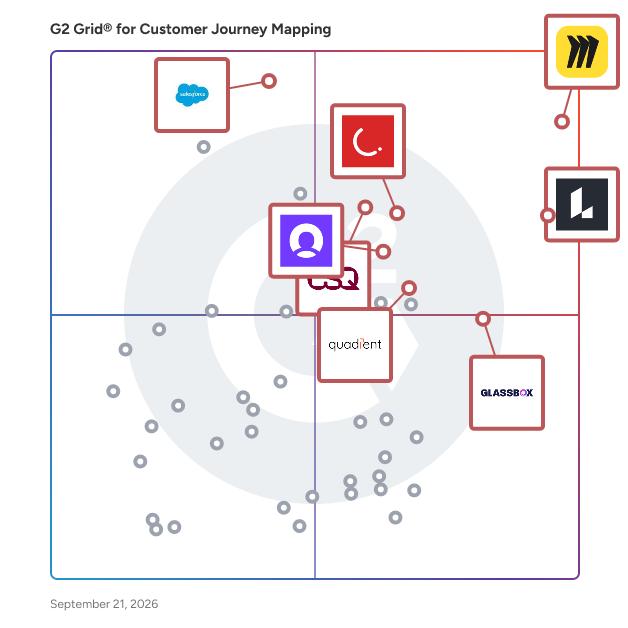
## G2 Grid® for Customer Journey Mapping Tools
![G2 Grid® for Customer Journey Mapping Tools plotting products by satisfaction and market presence](https://www.g2.com/categories/customer-journey-mapping/grids.png?focus%5B%5D=42445&focus%5B%5D=2887&focus%5B%5D=340&focus%5B%5D=16131&focus%5B%5D=23848&focus%5B%5D=51062&focus%5B%5D=28305&focus%5B%5D=170207)
Highlighted products: Miro, Lucid Visual Collaboration Suite, Agentforce Marketing (formerly Salesforce Marketing Cloud), CleverTap, Glassbox, Quadient Inspire, Contentsquare, and SAS Customer Intelligence 360.
Underlying data: [Grid® JSON](https://www.g2.com/categories/customer-journey-mapping/grids.json?focus%5B%5D=miro&amp;focus%5B%5D=lucid-software-inc-lucid-visual-collaboration-suite&amp;focus%5B%5D=agentforce-marketing-formerly-salesforce-marketing-cloud&amp;focus%5B%5D=clevertap&amp;focus%5B%5D=glassbox&amp;focus%5B%5D=quadient-inspire&amp;focus%5B%5D=contentsquare&amp;focus%5B%5D=sas-customer-intelligence-360-sas)


## How Many Customer Journey Mapping Tools Products Does G2 Track?
**Total Products under this Category:** 102

### Category Stats (Jul 2026)
- **Average Rating**: 4.53/5 The average rating of products in this category, based on all submitted ratings
- **Top Trending Product**: Pushwoosh (+0.62%) - Among all products in this category, Pushwoosh recorded the largest rating increase compared to last month
*Last updated: July 13, 2026*


## How Does G2 Rank Customer Journey Mapping Tools Products?

**Why You Can Trust G2's Software Rankings:**

- 30 Analysts and Data Experts
- 45,200+ Authentic Reviews
- 102+ Products
- Unbiased Rankings

G2's software rankings are built on verified user reviews, rigorous moderation, and a consistent research methodology maintained by a team of analysts and data experts. Each product is measured using the same transparent criteria, with no paid placement or vendor influence. While reviews reflect real user experiences, which can be subjective, they offer valuable insight into how software performs in the hands of professionals. Together, these inputs power the G2 Score, a standardized way to compare tools within every category.


## Which Customer Journey Mapping Tools Is Best for Your Use Case?

- **Leader:** [Miro](https://www.g2.com/products/miro/reviews)
- **Highest Performer:** [Glassbox](https://www.g2.com/products/glassbox/reviews)
- **Easiest to Use:** [Glassbox](https://www.g2.com/products/glassbox/reviews)
- **Top Trending:** [Agentforce Marketing (formerly Salesforce Marketing Cloud)](https://www.g2.com/products/agentforce-marketing-formerly-salesforce-marketing-cloud/reviews)
- **Best Free Software:** [Miro](https://www.g2.com/products/miro/reviews)


---

**Sponsored**

### Product Fruits

No-code product adoption platform — user onboarding, feature adoption and in-app support, powered by AI #What it is Product Fruits is a digital adoption platform that helps product and customer success teams guide users to value, drive feature adoption and deliver in-app support. Without writing code. Build product tours, checklists, hints, tooltips and announcements to onboard new users and roll out new features. Layer in an in-app help center, embedded knowledge base and NPS surveys to scale support and catch friction before it becomes a ticket. Two things set Product Fruits apart: 1. Flows guide every user to the next right step. Instead of showing everyone the same generic tour, Flows adapt to where each user is — their role, their progress, their behavior — so the right guidance appears at the right moment. Users never get stuck, and they never see steps they&#39;ve already mastered. 2. Elvin, the built-in AI agent, is the speed layer. It generates onboarding flows, copy and adaptive logic in minutes — no design or engineering sprints. Teams ship and iterate on their own. #Who it&#39;s for Built for product teams who own activation and adoption, and CS teams who own retention and support. Common industries include financial services, education, healthcare, e-commerce and SaaS. #What you can do with Product Fruits - Shorten time to value with personalized onboarding journeys - Increase feature adoption by guiding users to new capabilities - Reduce churn by addressing struggles before users disengage - Scale onboarding across thousands of users without manual effort - Lower support tickets with contextual answers where users need them #How it works Setup takes two steps. First, install the Product Fruits Chrome extension to build tours and guidance flows visually. Then add a JavaScript snippet to your application to publish experiences live. Most teams complete setup in under an hour. #What&#39;s included - Flows &amp; guidance: Adaptive product tours, checklists, tooltips and beacons that route each user to their next right step - AI personalization: Elvin designs flow structure and copy that adapts to each user - In-app communication: AI-generated announcements, banners, pop-ups and newsfeeds that keep users informed about updates and features - Feedback &amp; insights: Elvin creates contextual and NPS surveys based on user behavior, capturing sentiment and surfacing friction - Knowledge &amp; support: Centralized help center and Elvin Copilot answering questions from your approved sources, #Why teams choose Product Fruits AI powers every feature and Flows make sure that power lands at the right moment. From building tours to answering support questions, Product Fruits personalizes each step of the journey. The result: faster adoption, higher satisfaction and fewer support escalations.


[Visit website](https://www.g2.com/external_clickthroughs/record?secure%5Bad_program%5D=ppc&amp;secure%5Bad_slot%5D=category_product_list&amp;secure%5Bcategory_id%5D=2108&amp;secure%5Bchosen_at%5D=2026-07-14T09%3A58%3A00Z&amp;secure%5Bdisplayable_resource_id%5D=1561&amp;secure%5Bdisplayable_resource_type%5D=Category&amp;secure%5Bmedium%5D=sponsored&amp;secure%5Bplacement_reason%5D=retargeted_product&amp;secure%5Bplacement_resource_ids%5D%5B%5D=146555&amp;secure%5Bprioritized%5D=false&amp;secure%5Bproduct_id%5D=146555&amp;secure%5Bresource_id%5D=2108&amp;secure%5Bresource_type%5D=Category&amp;secure%5Bsource_type%5D=category_page&amp;secure%5Bsource_url%5D=https%3A%2F%2Fwww.g2.com%2Fcategories%2Fcustomer-journey-mapping%3Fpage%3D4&amp;secure%5Btoken%5D=13cdedef50d92cb985c6a9e11a20212e14943b4784bc5ddd513fb6cf7a8fd77b&amp;secure%5Burl%5D=https%3A%2F%2Fproductfruits.com%2Fdemo%3Futm_medium%3Dpaid%26utm_source%3DG2%26utm_campaign%3Dclicks&amp;secure%5Burl_type%5D=book_demo)

---


## What Is Customer Journey Mapping Tools?

[Conversion Rate Optimization Tools](https://www.g2.com/categories/conversion-rate-optimization-tools)

## What Software Categories Are Similar to Customer Journey Mapping Tools?

- [Marketing Automation Software](https://www.g2.com/categories/marketing-automation)
- [Marketing Analytics Software](https://www.g2.com/categories/marketing-analytics)
- [Customer Journey Analytics Software](https://www.g2.com/categories/customer-journey-analytics)


---
## What Are the Most Common Questions About Customer Journey Mapping Tools?
*AI-generated · Last updated: June  3, 2026*
### Best journey mapping tools for service design teams
Based on G2 reviews, these products are commonly used for service design collaboration and journey mapping.

- [Miro](https://www.g2.com/products/miro) — collaborative workshops and journey mapping.
- [Lucid Visual Collaboration Suite](https://www.g2.com/products/lucid-software-inc-lucid-visual-collaboration-suite) — process documentation and user flow mapping.
- [CleverTap](https://www.g2.com/products/clevertap) — lifecycle journeys and behavioral segmentation.
- [Contentsquare](https://www.g2.com/products/contentsquare) — friction analysis and journey optimization.


### Which is the best customer journey mapping tool for marketers
Based on G2 reviews, marketers often shortlist these tools for campaign planning, journey visibility, and audience analysis.

- [CleverTap](https://www.g2.com/products/clevertap) — multichannel campaigns and lifecycle automation.
- [WebEngage](https://www.g2.com/products/webengage) — retention journeys and behavioral targeting.
- [Netcore Customer Engagement Platform](https://www.g2.com/products/netcore-customer-engagement-platform) — omnichannel messaging and personalization.
- [Agentforce Marketing (formerly Salesforce Marketing Cloud)](https://www.g2.com/products/agentforce-marketing-formerly-salesforce-marketing-cloud) — journey automation and audience personalization.


### Which customer journey mapping software integrates with CRM
Based on G2 reviews, these tools are frequently used when CRM connectivity is important to the workflow.

- [Agentforce Marketing (formerly Salesforce Marketing Cloud)](https://www.g2.com/products/agentforce-marketing-formerly-salesforce-marketing-cloud) — Salesforce CRM connected journey orchestration.
- [CleverTap](https://www.g2.com/products/clevertap) — CRM workflows with multichannel engagement.
- [Zoho CRM](https://www.g2.com/products/zoho-crm) — centralized records and lifecycle workflows.
- [ChurnZero](https://www.g2.com/products/churnzero) — account health and CRM-linked automation.


### What should buyers look for in customer journey mapping tools
According to verified users, buyers tend to focus on a few recurring themes: clear visual mapping, easy collaboration, reusable templates, and a shared workspace that keeps research, ideas, and process details in one place. Reviews also point to the importance of integrations, especially when teams need journey work to connect with CRM, ticketing, or project systems. For marketing and analytics-focused use cases, users value segmentation, event tracking, funnels, and automation that support follow-up actions. Many reviewers also call out practical concerns like performance on large boards, ease of onboarding for new contributors, and how quickly teams can move from brainstorming to an agreed next step.


### How do teams use customer journey mapping for onboarding
According to verified users, onboarding is one of the clearest workflow use cases in this category. Teams use journey mapping to visualize each stage a customer goes through, from first touch to setup, training, adoption, and early success milestones. Reviews describe teams using maps to spot drop-off points, clarify handoffs between departments, and keep onboarding tasks, notes, and customer context in one visible place. In more operational tools, users also mention automating reminders, segmenting customers by stage, and triggering targeted outreach when someone stalls or needs help. The common benefit is better alignment across teams and a more consistent onboarding experience.


