Best Cloud Directory Services

How Many Cloud Directory Services Products Does G2 Track?

Total Products under this Category: 43

Category Stats (Oct 2026)

  • Average Rating: 4.31/5 The average rating of products in this category, based on all submitted ratings
  • Top Trending Product: ManageEngine ADManager Plus (+0.2%) - Among all products in this category, ManageEngine ADManager Plus recorded the largest rating increase compared to last month

Last updated: October 15, 2026

How Does G2 Rank Cloud Directory Services Products?

Why You Can Trust G2's Software Rankings:

  • 30 Analysts and Data Experts
  • 8,600+ Authentic Reviews
  • 43+ Products
  • Unbiased Rankings

G2's software rankings are built on verified user reviews, rigorous moderation, and a consistent research methodology maintained by a team of analysts and data experts. Each product is measured using the same transparent criteria, with no paid placement or vendor influence. While reviews reflect real user experiences, which can be subjective, they offer valuable insight into how software performs in the hands of professionals. Together, these inputs power the G2 Score, a standardized way to compare tools within every category.

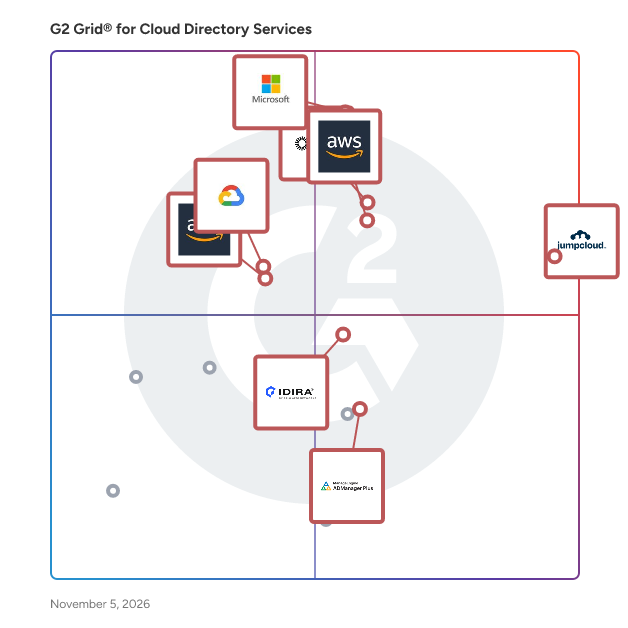
G2 Grid® for Cloud Directory Services

G2 Grid® for Cloud Directory Services plotting products by satisfaction and market presence

Highlighted products: JumpCloud, Microsoft Entra ID, Okta, AWS Directory Service, Managed Microsoft AD, Amazon Cloud Directory, Idira Identity Security Platform, and ManageEngine ADManager Plus.

Underlying data: [Grid® JSON](https://www.g2.com/categories/cloud-directory-services/grids.json?focus%5B%5D=jumpcloud&focus%5B%5D=microsoft-entra-id&focus%5B%5D=okta&focus%5B%5D=aws-directory-service&focus%5B%5D=managed-microsoft-ad&focus%5B%5D=amazon-cloud-directory&focus%5B%5D=idira-identity-security-platform&focus%5B%5D=manageengine-admanager-plus)

JumpCloud

JumpCloud® is the AI-powered identity infrastructure that unifies lifecycle management for humans, devices, and autonomous agents. JumpCloud gives IT teams complete visibility and control over every identity and every access point. JumpCloud helps organizations cut complexity, automate secure workflows, and put AI to work safely. Secure every identity. Human or not. Intelligent, secure IT for the agentic era.

Average Rating: 4.5/5.0

Total Reviews: 3,987

How Do G2 Users Rate JumpCloud?

  • Has the product been a good partner in doing business?: 9.0/10 (Category avg: 9.0/10)
  • On-premise identity repositories supported: 8.5/10 (Category avg: 8.8/10)
  • Directory Listing Management: 8.8/10 (Category avg: 8.8/10)
  • Partner Access: 8.3/10 (Category avg: 8.6/10)

Who Is the Company Behind JumpCloud?

  • Seller: JumpCloud Inc.
  • Company Website:
  • Year Founded: 2012
  • HQ Location: Louisville, CO
  • Twitter: @JumpCloud
    36,368 Twitter followers
  • LinkedIn® Page: www.linkedin.com
    998 employees on LinkedIn®

Who Uses This Product?

  • Who Uses This: IT Manager, System Administrator
  • Top Industries: Information Technology and Services, Computer Software
  • Company Size: 54% Medium, 35% Small

What Do G2 Reviewers Say About JumpCloud?

AI-generated summary from verified user reviews

Pros
  • Users value the ease of use of JumpCloud, simplifying user management across diverse systems and enhancing productivity.
  • Users value JumpCloud's straightforward device management, enabling seamless user management across various systems with intuitive controls.
  • Users value the enhanced security provided by JumpCloud's passwordless login and MFA enforcement features.
  • Users appreciate the seamless integrations with popular apps, simplifying user management across platforms effortlessly.
  • Users find JumpCloud's intuitive user management and responsive support invaluable for seamless integration and enhanced security.
Cons
  • Users report missing features such as better macOS controls and advanced reporting capabilities, limiting overall effectiveness.
  • Users find that improvement is needed in navigation and feature clarity, particularly for beginners navigating JumpCloud.
  • Users note the limited features of JumpCloud, especially in SSO app catalog and Linux device management capabilities.
  • Users face deployment challenges and lack of advanced endpoint controls, impacting their overall experience with JumpCloud.
  • Users feel the user interface needs improvement, as it should be more user-friendly and interactive.

What Are Recent G2 Reviews of JumpCloud?

What Are G2 Users Discussing About JumpCloud?

Microsoft Entra ID

Entra ID is a complete identity and access management solution with integrated security that connects people to their apps, devices, and data and helps protect from identity compromise. With Entra ID, you get: • Secure adaptive access with multi-factor authentication and Conditional Access policies • Seamless user experience with single sign-on, passwordless and user portal • Unified identity management that connect all internal and external users to all apps and devices. • Simplified Identity Governance with provisioning, access packages, and access reviews. Microsoft Entra is our new product family that encompasses all of Microsoft’s identity and access capabilities. The Entra family includes Microsoft Entra ID, as well as two new product categories: Cloud Infrastructure Entitlement Management (CIEM) and decentralized identity. The products in the Entra family will help provide secure access to everything for everyone, by providing identity and access management, cloud infrastructure entitlement management, and identity verification.

Average Rating: 4.5/5.0

Total Reviews: 874

How Do G2 Users Rate Microsoft Entra ID?

  • Has the product been a good partner in doing business?: 9.0/10 (Category avg: 9.0/10)
  • On-premise identity repositories supported: 8.7/10 (Category avg: 8.8/10)
  • Directory Listing Management: 9.1/10 (Category avg: 8.8/10)
  • Partner Access: 8.6/10 (Category avg: 8.6/10)

Who Is the Company Behind Microsoft Entra ID?

  • Seller: Microsoft
  • Year Founded: 1975
  • HQ Location: Redmond, Washington
  • Twitter: @microsoft
    13,091,739 Twitter followers
  • LinkedIn® Page: www.linkedin.com
    232,750 employees on LinkedIn®
  • Ownership: MSFT

Who Uses This Product?

  • Who Uses This: Software Engineer, System Engineer
  • Top Industries: Information Technology and Services, Computer Software
  • Company Size: 39% Medium, 37% Large

What Do G2 Reviewers Say About Microsoft Entra ID?

AI-generated summary from verified user reviews

Pros
  • Users praise the strong security features of Microsoft Entra ID, ensuring efficient identity management without compromising user experience.
  • Users commend the intuitive interface of Microsoft Entra ID, making it simple to navigate without prior training.
  • Users appreciate the seamless integration of Microsoft Entra ID with Microsoft 365 and its robust identity management capabilities.
  • Users appreciate the easy integrations of Microsoft Entra ID, simplifying identity management across various applications and services.
  • Users appreciate the seamless SSO integration of Microsoft Entra ID, enhancing security and simplifying access across applications.
Cons
  • Users often face complexity in configuration and management of Microsoft Entra ID, leading to frustration and confusion.
  • Users find the complex administration of Microsoft Entra ID challenging, especially with configuration and licensing issues.
  • Users find Microsoft Entra ID's complex configuration challenging, particularly with Conditional Access and licensing clarity.
  • Users find the complex usability of Microsoft Entra ID challenging, especially with configuration and licensing issues.
  • Users find the complex setup of Microsoft Entra ID daunting, especially for beginners and smaller IT teams.

What Are Recent G2 Reviews of Microsoft Entra ID?

What Are G2 Users Discussing About Microsoft Entra ID?

Okta

Okta, Inc. is The World’s Identity Company™. We secure AI, machine, and human identity so everyone is free to safely use any technology. Our customer and workforce solutions empower businesses and developers to protect their AI agents, users, employees, and partners while driving security, efficiencies, and innovation. Learn why the world’s leading brands trust Okta for authentication, authorization, and more at okta.com.

Average Rating: 4.5/5.0

Total Reviews: 1,400

How Do G2 Users Rate Okta?

  • Has the product been a good partner in doing business?: 9.0/10 (Category avg: 9.0/10)
  • On-premise identity repositories supported: 9.4/10 (Category avg: 8.8/10)
  • Directory Listing Management: 9.3/10 (Category avg: 8.8/10)
  • Partner Access: 9.3/10 (Category avg: 8.6/10)

Who Is the Company Behind Okta?

  • Seller: Okta
  • Company Website:
  • Year Founded: 2009
  • HQ Location: San Francisco, California
  • Twitter: @okta
    42,953 Twitter followers
  • LinkedIn® Page: www.linkedin.com
    7,840 employees on LinkedIn®

Who Uses This Product?

  • Who Uses This: Software Engineer, Account Executive
  • Top Industries: Computer Software, Information Technology and Services
  • Company Size: 50% Medium, 39% Large

What Do G2 Reviewers Say About Okta?

AI-generated summary from verified user reviews

Pros
  • Users value the ease of use of Okta, appreciating its centralized authentication and simple setup process.
  • Users value the enhanced security provided by Okta, streamlining logins and supporting various security applications seamlessly.
  • Users value the strong SSO and MFA capabilities of Okta, which greatly enhance security and user experience.
  • Users love the efficiency of single sign-on in Okta, streamlining access and enhancing security effortlessly.
  • Users value the easy access provided by Okta, streamlining app logins and enhancing security across systems.
Cons
  • Users face authentication issues with Okta, including lockouts and complex setups that hinder smooth access.
  • Users face login issues with Okta, citing difficulties with repeated sign-ins and dependency on multi-factor authentication.
  • Users find Okta to be expensive, particularly due to high licensing costs that challenge smaller organizations' adoption.
  • Users find the initial setup and policy configuration complex with Okta, especially as user numbers grow.
  • Users find the frequent authentication process in Okta to be tedious, impacting their overall user experience.

What Are Recent G2 Reviews of Okta?

What Are G2 Users Discussing About Okta?

AI can help you find the answers. G2 helps you trust them.

Connect G2 to Claude or ChatGPT for answers grounded in G2's trusted reviews, comparisons, and pricing from real user insights.

How it works

AWS Directory Service

AWS Directory Service is a fully managed service that enables organizations to run Microsoft Active Directory (AD) in the AWS Cloud without the need to deploy and maintain their own infrastructure. It simplifies the integration of AD-dependent applications and services, allowing users to access AWS resources using their existing AD credentials. Key Features and Functionality: - Managed Microsoft Active Directory: AWS Directory Service offers a native Microsoft AD environment, eliminating the need for data synchronization or replication from on-premises directories. - High Availability: The service deploys domain controllers across multiple Availability Zones, ensuring resilience and continuous operation. - Seamless Integration: It integrates with various AWS services, including Amazon EC2, Amazon RDS for SQL Server, and Amazon WorkSpaces, facilitating the deployment of directory-aware workloads. - Security and Compliance: AWS Directory Service provides end-to-end encryption and meets compliance standards such as SOC, PCI, HIPAA, and FedRAMP. - Scalability: The service supports organizations of different sizes, offering Standard, Enterprise, and Hybrid editions to meet varying needs. Primary Value and Solutions Provided: AWS Directory Service addresses the challenges of managing and scaling Active Directory infrastructure by offering a fully managed, secure, and scalable solution in the cloud. It enables organizations to: - Simplify Cloud Migration: Easily migrate AD-dependent workloads to AWS without modifying existing applications or user credentials. - Enhance Security: Leverage AWS's robust security measures to protect directory data and meet regulatory compliance requirements. - Reduce Operational Overhead: Offload routine maintenance tasks such as patching, monitoring, and backups to AWS, allowing IT teams to focus on strategic initiatives. - Ensure High Availability: Benefit from a highly available directory service that spans multiple Availability Zones, providing resilience against failures. By utilizing AWS Directory Service, organizations can seamlessly extend their on-premises AD to the cloud, maintain a consistent user experience, and efficiently manage access to AWS resources.

Average Rating: 4.1/5.0

Total Reviews: 18

How Do G2 Users Rate AWS Directory Service?

  • Has the product been a good partner in doing business?: 9.0/10 (Category avg: 9.0/10)
  • On-premise identity repositories supported: 10.0/10 (Category avg: 8.8/10)
  • Directory Listing Management: 10.0/10 (Category avg: 8.8/10)

Who Is the Company Behind AWS Directory Service?

  • Seller: Amazon Web Services (AWS)
  • Year Founded: 2006
  • HQ Location: Seattle, WA
  • Twitter: @awscloud
    2,232,483 Twitter followers
  • LinkedIn® Page: www.linkedin.com
    148,266 employees on LinkedIn®
  • Ownership: NASDAQ: AMZN

Who Uses This Product?

  • Company Size: 57% Medium, 24% Large

What Are Recent G2 Reviews of AWS Directory Service?

What Are G2 Users Discussing About AWS Directory Service?

FAQs About Cloud Directory Services

Generated using AI

Last updated: June 3, 2026

Which Cloud Directory Services support real-time user synchronization across multiple cloud applications without manual scripting

Based on G2 reviews, these products are most often described as strong fits for centralized identity sync and connected app access.

  • JumpCloud — centralized sync across mixed environments.
  • Microsoft Entra ID — unified identity across cloud services.
  • Okta — centralized authentication for many apps.
  • Rippling IT — automated account setup across tools.

Cloud Directory Services platforms that automate onboarding and offboarding without requiring IT staff to manually provision accounts

According to verified users, the strongest recurring theme is lifecycle automation that reduces repetitive admin work. Reviewers describe faster user setup, cleaner offboarding, and more consistent permission handling when accounts, groups, devices, and apps are managed from one place. Common buyer benefits include fewer manual tickets, fewer missed access removals, and better control over distributed teams. Across recent reviews, automated provisioning is often mentioned alongside device enrollment, policy assignment, and security enforcement, which makes these platforms especially useful for organizations trying to simplify day-one readiness and reduce risk when employees change roles or leave.

Cloud Directory Services with zero-trust security and MFA that integrate seamlessly into Azure or cloud productivity suites

According to verified users, this use case centers on combining secure sign-in with broad application access. Recent reviews frequently mention MFA, conditional access, single sign-on, and centralized identity controls as the capabilities that matter most. Buyers also call out smoother integration with Microsoft environments, Google Workspace, and other productivity apps when they want one identity layer across cloud services. The most consistent value in the review set is stronger access control without forcing admins to manage separate tools for authentication, policy enforcement, and user lifecycle changes, especially in hybrid or distributed organizations.

What are cloud directory services

Cloud directory services are platforms that centralize user identities, access policies, authentication, and connected resources from a cloud-based control point. In recent G2 reviews, buyers consistently describe them as a way to manage users, groups, devices, and application access without relying on fragmented tools or heavy on-premises infrastructure. Common capabilities mentioned include single sign-on, MFA, conditional access, user provisioning and deprovisioning, policy management, and audit visibility. For buyers, the practical value is simpler administration, faster onboarding and offboarding, more consistent security controls, and easier access management across cloud apps, endpoints, and mixed operating environments.

How does Cloud Directory Services integrate with device management

According to verified users, integration with device management is one of the clearest practical benefits in this category. Recent reviews describe cloud directory services working alongside endpoint controls so IT teams can connect identity, device enrollment, policy rollout, patching, and access decisions in one workflow. Buyers repeatedly mention value in managing Windows, macOS, Linux, and mobile devices from a central console while tying permissions and security policies to user accounts. This helps teams onboard devices faster, enforce compliance more consistently, troubleshoot issues with better visibility, and support remote or mixed-device environments without stitching together as many separate admin tools.

Managed Microsoft AD

Use a highly available, hardened service running actual Microsoft® Active Directory (AD).

Average Rating: 4.4/5.0

Total Reviews: 29

How Do G2 Users Rate Managed Microsoft AD?

  • Has the product been a good partner in doing business?: 8.7/10 (Category avg: 9.0/10)
  • On-premise identity repositories supported: 7.6/10 (Category avg: 8.8/10)
  • Directory Listing Management: 8.7/10 (Category avg: 8.8/10)
  • Partner Access: 7.9/10 (Category avg: 8.6/10)

Who Is the Company Behind Managed Microsoft AD?

  • Seller: Google
  • Year Founded: 1998
  • HQ Location: Mountain View, CA
  • Twitter: @google
    31,899,995 Twitter followers
  • LinkedIn® Page: www.linkedin.com
    301,144 employees on LinkedIn®
  • Ownership: NASDAQ:GOOG

Who Uses This Product?

  • Top Industries: Information Technology and Services
  • Company Size: 41% Small, 38% Medium

What Are Recent G2 Reviews of Managed Microsoft AD?

Amazon Cloud Directory

Amazon Cloud Directory is a managed cloud-native directory service, designed to enable users to build flexible cloud-native directories for organizing hierarchies of data along multiple dimensions.

Average Rating: 4.4/5.0

Total Reviews: 12

How Do G2 Users Rate Amazon Cloud Directory?

  • Has the product been a good partner in doing business?: 8.7/10 (Category avg: 9.0/10)
  • On-premise identity repositories supported: 9.2/10 (Category avg: 8.8/10)
  • Directory Listing Management: 9.0/10 (Category avg: 8.8/10)
  • Partner Access: 8.6/10 (Category avg: 8.6/10)

Who Is the Company Behind Amazon Cloud Directory?

  • Seller: Amazon Web Services (AWS)
  • Year Founded: 2006
  • HQ Location: Seattle, WA
  • Twitter: @awscloud
    2,232,483 Twitter followers
  • LinkedIn® Page: www.linkedin.com
    148,266 employees on LinkedIn®
  • Ownership: NASDAQ: AMZN

Who Uses This Product?

  • Company Size: 54% Small, 38% Large

What Are Recent G2 Reviews of Amazon Cloud Directory?

What Are G2 Users Discussing About Amazon Cloud Directory?

Idira Identity Security Platform

One platform to Secure Every Identity Identity is the control plane for the AI enterprise. Introducing Idira®, the only platform that seamlessly integrates modern privilege access management (PAM), machine and agentic identity security capabilities.

Average Rating: 4.5/5.0

Total Reviews: 244

How Do G2 Users Rate Idira Identity Security Platform?

  • Has the product been a good partner in doing business?: 9.0/10 (Category avg: 9.0/10)

Who Is the Company Behind Idira Identity Security Platform?

  • Seller: Palo Alto Networks
  • Company Website:
  • Year Founded: 2005
  • HQ Location: Santa Clara, CA
  • Twitter: @PaloAltoNtwks
    128,951 Twitter followers
  • LinkedIn® Page: www.linkedin.com
    23,492 employees on LinkedIn®

Who Uses This Product?

  • Who Uses This: IT Manager
  • Top Industries: Information Technology and Services, Financial Services
  • Company Size: 53% Large, 37% Medium

What Are Recent G2 Reviews of Idira Identity Security Platform?

What Are G2 Users Discussing About Idira Identity Security Platform?

ManageEngine ADManager Plus

ADManager Plus is an identity governance and administration (IGA) solution that simplifies identity management, ensures security, and improves compliance. With ADManager Plus, manage the user life cycle from provisioning to deprovisioning, run access certification campaigns, orchestrate identity management across enterprise applications, and protect data on your enterprise platforms with regular backups. The solution provides comprehensive identity risk assessment and proactive management of your organization's risk exposure by highlighting potential security vulnerabilities and visualizing attack paths to privileged entities. This enables IT teams to prioritize remediation efforts and strengthen their security posture before threats can be exploited. Use over 200 reports to gain valuable insights into identities and their access rights, and leverage customizable dashboards and scheduled report generation for continuous monitoring. The platform supports compliance frameworks including the GDPR and HIPAA through automated audit trails and detailed access reviews. Improve the efficiency of your IGA operations with workflows, automations, and role-based access control policies. Built-in templates streamline common tasks while multi-stage approval workflows ensure proper oversight of critical changes. ADManager Plus' Android and iOS applications help with on-the-go AD and Microsoft Entra ID management, enabling administrators to respond quickly to urgent requests.

Average Rating: 4.5/5.0

Total Reviews: 105

How Do G2 Users Rate ManageEngine ADManager Plus?

  • Has the product been a good partner in doing business?: 9.1/10 (Category avg: 9.0/10)
  • On-premise identity repositories supported: 9.1/10 (Category avg: 8.8/10)
  • Directory Listing Management: 9.0/10 (Category avg: 8.8/10)
  • Partner Access: 8.1/10 (Category avg: 8.6/10)

Who Is the Company Behind ManageEngine ADManager Plus?

  • Seller: Zoho
  • Year Founded: 1996
  • HQ Location: Austin, TX
  • Twitter: @Zoho
    137,880 Twitter followers
  • LinkedIn® Page: www.linkedin.com
    30,913 employees on LinkedIn®
  • Phone: +1 (888) 900-9646

Who Uses This Product?

  • Top Industries: Banking, Government Administration
  • Company Size: 58% Medium, 37% Large

What Do G2 Reviewers Say About ManageEngine ADManager Plus?

AI-generated summary from verified user reviews

Pros
  • Users appreciate the strong automation in ManageEngine ADManager Plus, significantly reducing manual Active Directory tasks and enhancing efficiency.
  • Users appreciate the ease of use of ManageEngine ADManager Plus, facilitating efficient Active Directory management with its intuitive interface.
  • Users love the strong automation and reporting capabilities of ManageEngine ADManager Plus, enhancing efficiency and reducing manual work.
  • Users value the efficiency optimization of ManageEngine ADManager Plus, streamlining tasks and enhancing productivity effortlessly.
  • Users value the strong automation and reporting capabilities of ADManager Plus, enhancing efficiency in Active Directory management.
Cons
  • Users find the interface cluttered and overwhelming, particularly affecting new users and advanced feature navigation.
  • Users find the interface complexity of ManageEngine ADManager Plus overwhelming, particularly for newcomers navigating its features.
  • Users find the complex reporting features of ManageEngine ADManager Plus to be less intuitive and cumbersome to navigate.
  • Users often find the interface cluttered and overwhelming, making it challenging for new users to navigate effectively.
  • Users find the learning curve steep, as the interface can be overwhelming and advanced features require time to master.

What Are Recent G2 Reviews of ManageEngine ADManager Plus?

What Are G2 Users Discussing About ManageEngine ADManager Plus?

Rippling IT

Rippling IT is a unified IT platform for identity, device, access, and security management, giving IT teams a single dashboard to run every workflow, from provisioning apps and laptops to enforcing security policies. Rippling IT manages the entire employee lifecycle automatically, granting and revoking app access, configuring devices, and maintaining least-privilege controls as employees join, change roles, and leave. Real-time monitoring, automated patching, and integrated endpoint protection keep companies compliant, while instant lockouts and secure device recovery make offboarding fast and secure. Because hardware, software, and user risk all live in one system, IT teams get full visibility without juggling multiple tools. Companies use Rippling IT to cut costs, eliminate manual work, and strengthen security, so their teams can move faster. Experience the power of unified IT management with Rippling today.

Average Rating: 4.7/5.0

Total Reviews: 1,111

How Do G2 Users Rate Rippling IT?

  • Has the product been a good partner in doing business?: 8.9/10 (Category avg: 9.0/10)
  • On-premise identity repositories supported: 9.1/10 (Category avg: 8.8/10)
  • Directory Listing Management: 9.2/10 (Category avg: 8.8/10)
  • Partner Access: 9.1/10 (Category avg: 8.6/10)

Who Is the Company Behind Rippling IT?

  • Seller: Rippling
  • Company Website:
  • Year Founded: 2016
  • HQ Location: San Francisco, CA
  • Twitter: @Rippling
    12,402 Twitter followers
  • LinkedIn® Page: www.linkedin.com
    7,798 employees on LinkedIn®

Who Uses This Product?

  • Who Uses This: Software Engineer, CEO
  • Top Industries: Computer Software, Information Technology and Services
  • Company Size: 59% Medium, 27% Small

What Do G2 Reviewers Say About Rippling IT?

AI-generated summary from verified user reviews

Pros
  • Users appreciate the ease of use in Rippling IT, enjoying its organized interface and streamlined processes.
  • Users find Rippling to be intuitive and well-organized, making it easy to access essential applications and information.
  • Users love the user-friendly and intuitive design of Rippling IT, simplifying navigation and enhancing their experience.
  • Users appreciate the easy access Rippling provides to essential applications, enhancing efficiency in their daily work routines.
  • Users appreciate the simple and intuitive user interface that facilitates easy navigation and efficient use of features.
Cons
  • Users express frustration with the missing features of Rippling IT, particularly in integration and support functionalities.
  • Users find the limited features of Rippling IT frustrating, especially with payroll and integration issues complicating the experience.
  • Users express a need for improved organization and functionality within Rippling IT’s payroll and password management features.
  • Users find the learning curve steep, especially for those who are not tech-savvy, impacting their experience.
  • Users express frustration with poor customer support, citing limitations in assistance and the need for custom solutions.

What Are Recent G2 Reviews of Rippling IT?

Oracle Identity Management

Oracle Identity Management is a comprehensive suite of identity and access management (IAM) solutions designed to help organizations manage the entire lifecycle of user identities and access privileges across enterprise resources, both on-premises and in the cloud. By automating user provisioning, enforcing security policies, and ensuring compliance with regulatory requirements, Oracle Identity Management enhances operational efficiency and strengthens security postures. Key Features and Functionality: - Identity Governance: Manages user provisioning and deprovisioning, enforces access policies, and provides actionable identity intelligence for rapid remediation of high-risk entitlements. - Access Management: Delivers risk-aware, end-to-end multifactor authentication (MFA) and single sign-on (SSO) capabilities, integrating identities and systems across cloud and on-premises environments. - Directory Services: Offers scalable and flexible directory solutions that support growth without unnecessary over-provisioning, facilitating seamless expansion without impacting existing services. - User Provisioning: Automates the creation and assignment of user accounts, reducing administrative overhead and minimizing human error. - Identity Analytics: Utilizes machine learning to detect and prevent suspicious identity activities, enhancing security through proactive monitoring. - Single Sign-On (SSO): Consolidates user credentials behind a single account with strong password policies, simplifying access to services and improving user experience. - Multifactor Authentication (MFA): Implements secondary authentication controls to verify user identities, reducing exposure from stolen credentials. - Risk-Based Authentication: Employs algorithms to assess the risk of user actions, blocking or reporting activities with high-risk scores. - Identity Governance and Administration (IGA): Controls entitlements to reduce risks associated with excessive access and privileges. Primary Value and Solutions Provided: Oracle Identity Management addresses critical security challenges by ensuring consistent user access rules and policies across an organization, thereby reducing the risk of data breaches and unauthorized access. By automating identity-related processes, it enhances operational efficiency, reduces administrative costs, and ensures compliance with regulatory standards. The suite's comprehensive approach to identity governance and access management enables organizations to securely manage user identities, enforce security policies, and respond swiftly to evolving security threats, ultimately safeguarding sensitive data and maintaining trust in business operations.

Average Rating: 3.8/5.0

Total Reviews: 52

How Do G2 Users Rate Oracle Identity Management?

  • Has the product been a good partner in doing business?: 7.0/10 (Category avg: 9.0/10)
  • On-premise identity repositories supported: 8.3/10 (Category avg: 8.8/10)
  • Directory Listing Management: 8.3/10 (Category avg: 8.8/10)
  • Partner Access: 7.5/10 (Category avg: 8.6/10)

Who Is the Company Behind Oracle Identity Management?

  • Seller: Oracle
  • Year Founded: 1977
  • HQ Location: Austin, TX
  • Twitter: @Oracle
    827,997 Twitter followers
  • LinkedIn® Page: www.linkedin.com
    207,576 employees on LinkedIn®
  • Ownership: NYSE:ORCL

Who Uses This Product?

  • Top Industries: Information Technology and Services, Telecommunications
  • Company Size: 65% Large, 21% Medium

What Do G2 Reviewers Say About Oracle Identity Management?

AI-generated summary from verified user reviews

Pros
  • Users value the ease of access control in Oracle Identity Management, simplifying resource management and security tasks.
  • Users appreciate the easy access management capabilities of Oracle Identity Management for controlling user resources effectively.
  • Users value the prompt and efficient customer support provided by Oracle Identity Management, enhancing their overall experience.
  • Users value the customization options in Oracle Identity Management, enhancing ease of implementation and user interaction.
  • Users find Oracle Identity Management to be exceptionally effective for managing systems and user access smoothly and securely.
Cons
  • Users struggle with error handling, facing bugs that hinder results and suggest the need for straightforward upgrades.
  • Users experience performance issues due to an unfriendly interface and bugs that hinder effective results.
  • Users find the poor interface design cumbersome, complicating navigation and hindering efficient access to results.
  • Users find the poor UI of Oracle Identity Management cumbersome, causing frustration due to navigation difficulties and bugs.
  • Users struggle with technical errors, finding bugs and an unfriendly interface hinder their overall experience.

What Are Recent G2 Reviews of Oracle Identity Management?

What Are G2 Users Discussing About Oracle Identity Management?

OneLogin

OneLogin simplifies identity management with secure, one-click access, for employees, customers and partners, through all device types, to all enterprise cloud and on-premises applications. OneLogin enables IT identity policy enforcement and instantly disables app access for employees who leave or change roles in real-time by removing them from Active Directory. Take control over application access, quickly on- and off-board team members, and provide end-users with easy access to all their applications on every device. Extend your on-premises security model to the cloud in minutes. Eliminate the pain and expense of extensive identity policy management. OneLogin reduces identity infrastructure costs and complex integration projects for each new app and efficiently extends identity policies to the cloud. OneLogin eliminates the need for lengthy integration and provisioning projects, manual de-provisioning, protracted on- and off-boarding processes, username and password resets, and Shadow IT.

Average Rating: 4.4/5.0

Total Reviews: 273

How Do G2 Users Rate OneLogin?

  • Has the product been a good partner in doing business?: 8.7/10 (Category avg: 9.0/10)
  • On-premise identity repositories supported: 9.0/10 (Category avg: 8.8/10)
  • Directory Listing Management: 8.9/10 (Category avg: 8.8/10)
  • Partner Access: 8.7/10 (Category avg: 8.6/10)

Who Is the Company Behind OneLogin?

  • Seller: One Identity
  • HQ Location: Aliso Viejo, CA
  • Twitter: @OneIdentity
    7,871 Twitter followers
  • LinkedIn® Page: www.linkedin.com
    744 employees on LinkedIn®

Who Uses This Product?

  • Who Uses This: Account Manager
  • Top Industries: Computer Software, Education Management
  • Company Size: 49% Medium, 40% Large

What Do G2 Reviewers Say About OneLogin?

AI-generated summary from verified user reviews

Pros
  • Users appreciate the easy access OneLogin provides, simplifying login with just one passphrase for all applications.
  • Users value the robust security features of OneLogin, ensuring safe access with MFA and password management.
  • Users value the seamless Single Sign-On experience of OneLogin, enhancing security and access management effectively.
  • Users value the seamless SSO integration of OneLogin, enhancing access and security across applications effortlessly.
  • Users appreciate the effective SSO functionality of OneLogin, enhancing security and simplifying access to applications.
Cons
  • Users face limited features in OneLogin, affecting functionality and support during critical security processes.
  • Users express concerns over the limited functionality of OneLogin, particularly its basic focus on SSO and MFA.
  • Users express concern over login issues due to outages, stressing the need for alternative access methods.
  • Users are frustrated by the missing features of OneLogin, noting limited advanced IAM capabilities and slow support.
  • Users express concern over outages that disrupt services and affect business operations significantly.

What Are Recent G2 Reviews of OneLogin?

What Are G2 Users Discussing About OneLogin?

Red Hat Directory Server

Red Hat Directory Server is an operating system-independent, network-based registry that lets administrators centrally store user identity and application information.

Average Rating: 4.6/5.0

Total Reviews: 10

How Do G2 Users Rate Red Hat Directory Server?

  • Has the product been a good partner in doing business?: 7.2/10 (Category avg: 9.0/10)
  • On-premise identity repositories supported: 7.2/10 (Category avg: 8.8/10)
  • Directory Listing Management: 6.9/10 (Category avg: 8.8/10)
  • Partner Access: 7.3/10 (Category avg: 8.6/10)

Who Is the Company Behind Red Hat Directory Server?

  • Seller: Red Hat
  • Year Founded: 1993
  • HQ Location: Raleigh, NC
  • Twitter: @RedHat
    300,769 Twitter followers
  • LinkedIn® Page: www.linkedin.com
    19,487 employees on LinkedIn®

Who Uses This Product?

  • Company Size: 50% Small, 40% Medium

What Are Recent G2 Reviews of Red Hat Directory Server?

Apache Directory

The Apache Directory Project provides directory solutions entirely written in Java. These include a directory server, which has been certified as LDAP v3 compliant by the Open Group (ApacheDS), and Eclipse-based directory tools (Apache Directory Studio).

Average Rating: 3.8/5.0

Total Reviews: 13

How Do G2 Users Rate Apache Directory?

  • Has the product been a good partner in doing business?: 7.8/10 (Category avg: 9.0/10)
  • On-premise identity repositories supported: 8.1/10 (Category avg: 8.8/10)
  • Directory Listing Management: 7.5/10 (Category avg: 8.8/10)
  • Partner Access: 7.4/10 (Category avg: 8.6/10)

Who Is the Company Behind Apache Directory?

Who Uses This Product?

  • Top Industries: Computer Software
  • Company Size: 69% Medium, 31% Small

What Are Recent G2 Reviews of Apache Directory?

What Are G2 Users Discussing About Apache Directory?

Azure Compute

Azure compute is an on-demand computing service for running cloud-based applications.

Average Rating: 4.6/5.0

Total Reviews: 11

How Do G2 Users Rate Azure Compute?

  • Has the product been a good partner in doing business?: 9.4/10 (Category avg: 9.0/10)
  • On-premise identity repositories supported: 10.0/10 (Category avg: 8.8/10)
  • Directory Listing Management: 10.0/10 (Category avg: 8.8/10)
  • Partner Access: 10.0/10 (Category avg: 8.6/10)

Who Is the Company Behind Azure Compute?

  • Seller: Microsoft
  • Year Founded: 1975
  • HQ Location: Redmond, Washington
  • Twitter: @microsoft
    13,091,739 Twitter followers
  • LinkedIn® Page: www.linkedin.com
    232,750 employees on LinkedIn®
  • Ownership: MSFT

Who Uses This Product?

  • Company Size: 42% Large, 42% Small

What Are Recent G2 Reviews of Azure Compute?

What Are G2 Users Discussing About Azure Compute?

HelloID

HelloID is a complete, cloud-based IDaaS solution that streamlines user provisioning, self-service, and single sign-on processes within your organization or educational institution. Automate the entire user lifecycle process with HelloID by connecting your HR/SIS data to all your downstream systems. Account details and usage rights are automatically kept up-to-date, which reduces human error and increases security. HelloID puts the power of IDM into your hands to meet current and future needs.

Average Rating: 4.5/5.0

Total Reviews: 31

How Do G2 Users Rate HelloID?

  • Has the product been a good partner in doing business?: 9.6/10 (Category avg: 9.0/10)
  • On-premise identity repositories supported: 9.6/10 (Category avg: 8.8/10)
  • Directory Listing Management: 9.8/10 (Category avg: 8.8/10)
  • Partner Access: 9.7/10 (Category avg: 8.6/10)

Who Is the Company Behind HelloID?

  • Seller: Tools4ever
  • Year Founded: 1999
  • HQ Location: Lynbrook, New York
  • Twitter: @Tools4ever
    329 Twitter followers
  • LinkedIn® Page: www.linkedin.com
    62 employees on LinkedIn®

Who Uses This Product?

  • Top Industries: Primary/Secondary Education, Education Management
  • Company Size: 59% Medium, 38% Large

What Are Recent G2 Reviews of HelloID?

What Are G2 Users Discussing About HelloID?

Brandon Summers-Miller
BS
Researched and written by Brandon Summers-Miller
Updated October 3, 2024

Learn More About Cloud Directory Services

Cloud directory services are cloud-based identity management and directory systems. Companies use these systems to store information about, and manage the lifecycle of, individual identities. The tools also authenticate users across devices and applications. Information stored within a cloud directory service may include usernames, passwords, user preferences, and information about devices. 

Cloud directories can also provide single sign-on (SSO) features, making it easy for end users to access multiple operating systems with just one set of credentials. This, in turn, improves security and limits the costs associated with identity management.

Common features of cloud directory services

The following are some core features of cloud-based directory services that organizations use to manage access control, user identities, and endpoint access management. 

Note that specific features may vary between different products.

  • User and group management: This component allows admins to create, modify, and delete user accounts, permissions, and groups, controlling access to various resources and information. These tools can also categorize users for easier management and access control.
  • Authentication and authorization: Cloud directory services often include features for verifying users and confirming their access to specific applications or data.
  • Single sign-on (SSO): SSO lets users log in once to access multiple applications without having to re-enter their login credentials several times.
  • Multi-factor authentication (MFA): Thanks to MFA, cloud director services also require users to provide verification beyond a password. This often includes elements like an email address, the answer to a security question, birthday, or fingerprint. 
  • Application programming interfaces (APIs) for automation: APIs automate directory-related tasks and integrate them with other applications, workflows, and services.
  • Device management: This type of software lets users manage devices that connect to the network, which enforces security policies and ensures compliance.
  • Automated provisioning and de-provisioning: This refers to the ability to create and manage accounts across various platforms automatically as a user's status or role changes within an organization.
  • Scalability: Cloud directories can scale as an organization grows, changes its priorities, or hires more employees.
  • Self-service password reset: Users can reset their passwords on their own, which reduces the administrative overhead and downtime associated with lost or forgotten codes.
  • Cross-platform support: Cloud directories often have support for various operating systems and platforms, including Mac, Windows, Linux, and apps on mobile devices.

What are the types of directory services?

There are two types of directory services a company can choose.

  • On-premise directories: As the name suggests, an on-premise directory is installed on the servers of the business network. This type is often used by companies who want full control over their identity management system.
  • Cloud directories: This cloud-based solution provides businesses with a scalable and secure identity management system that operates solely in the cloud. 

What are the benefits of cloud directories? 

Companies may choose to use cloud directory services instead of, or in addition to, traditional on-premise directories for several reasons. Some key advantages to doing so are discussed here.

  • Cost efficiency: Companies that use cloud directories reduce costs thanks to lower upfront expenses compared to the hardware, software, and licensing fees required for on-premises solutions. Typically, they typically operate on a subscription model, which includes updates and maintenance, offering improved cost predictability.
  • Scalability: Cloud-based services can be easily scaled up or down based on the organization's needs, budget, and number of employees. This allows companies to pay solely for what they use and quickly adjust resources as they grow or as demand fluctuates.
  • Disaster recovery: Cloud directories help companies come back from unexpected catastrophes because they usually include built-in redundancy and backup procedures, ensuring that directory data is safeguarded against loss from hardware failure, natural disasters, or other disruptive events.
  • Security: Cloud directory solutions invest heavily in security, often more than what some organizations could afford for their on-prem solutions. They usually offer a range of security features like MFA, encryption, and routine security audits.
  • Reduced IT overhead: Managing an on-premises directory requires significant effort and expertise. Cloud directories offload this burden to the service provider, which then frees IT resources to focus on other tasks and initiatives.
  • Simple integration: These tools provide connectors and APIs that link with other cloud applications and services in addition to on-site systems.
  • Enhanced collaboration: Since cloud directory services have centralized access to resources and tools across an organization, they also offer improved collaboration for employees and their various workloads.
  • Usability: Users can access their cloud directory from anywhere, at any time, making it more convenient for companies that have a hybrid or remote-first staff.

Cloud directory services vs. identity and access management software

Sometimes, cloud directory services and identity and access management (IAM) software are confused with each other, but the two have key differences. Despite both being crucial components to any company’s security strategy, IAM manages identities and controls access to data, systems, and applications. IAM encompasses everything from user provisioning, access control, auditing, authentication, authorization, and lifecycle management.

A cloud directory service is a library where companies can store all identity cards for their employees, and IAM software verifies identity, grants access based on specific permissions, and tracks library movements.

Who uses Cloud Directory Services?

Various roles within an organization may use cloud directory services. 

  • IT administrators are responsible for managing and maintaining the organization’s infrastructure. They often coordinate a network’s user accounts, groups, and permissions. Cloud computing directories also allow IT admins to modify, create, and delete user accounts to ensure the directory stays secure.
  • Application developers integrate the directory with their applications for user authentication and authorization. They also use directory services to manage user access to various applications and VPNs.
  • Security teams utilize directory features for access control and identity governance. Monitoring user activities, looking into security incidents, and complying with the company’s security policies all fall under the purview of this department. The security team also configures certain elements, like MFA, to enhance overall security.
  • Project managers determine who has access to project resources and who can collaborate with team members through the directory.
  • System administrators often use cloud directory services for tasks related to device management, including registering and managing devices that access the network and enforcing security policies.
  • Human resources professionals interact with cloud directory services during the onboarding and offboarding processes. They use a cloud directory service to manage user accounts, update employee information, and make sure access aligns with each role.

Cloud directory services pricing factors

Price ranges for cloud directory services will depend and vary from vendor to vendor. It’ll also depend on the size and scale of an organization. The total cost of this type of software is determined by how many employees an organization has, plus the cost of the ongoing management of the services. In addition to the provider and the number of users, prices also fluctuate based on features and storage.

Organizations looking for the right cloud directory service should always compare prices from different providers. Additionally, start with a free tier if one is available. It’s important to choose a plan that meets both a company’s current needs and allows for future growth.

Challenges with Cloud Directory services

While cloud directory services are a valuable tool for storing information, users should understand the challenges they may encounter. 

  • Synchronization issues: Delays or inconsistencies in syncing user data across the cloud and on-premises systems can cause frustration and access problems.
  • Compatibility issues: Integrating the directory service with various applications and on-premises systems might require complex configurations, causing obstacles to compatibility.
  • Integration problems: Organizations often use multiple cloud services and applications. When this occurs, users may experience challenges when integrating cloud directory services with other applications, especially if there are compatibility issues or misconfigurations.
  • Data breaches and compromised accounts: If there are inadequate cybersecurity controls or if user negligence happens, a directory could undergo a data breach, compromising sensitive information and impacting user trust.
  • Compliance challenges: Depending on an organization’s industry, meeting regulations and data privacy laws like GDPR or HIPAA requires careful configuration and ongoing maintenance of the directory service.
  • Scalability constraints: It’s important that an organization choose a directory service that can handle future growth in user volume or data storage, which helps avoid performance bottlenecks or service disruptions.

Which companies should invest in cloud directory services?

While cloud service directories are great for several types of businesses, specific companies benefit more than others from investing in these tools. 

  • Healthcare organizations: Complying with HIPAA regulations and securing patient data require strong identity management and access controls.
  • SaaS providers: Managing customer identities and access to specific applications requires a cloud directory service.
  • Enterprise organizations: Large companies that need to manage large-scale user identities and complex access needs require a centralized and scalable solution like cloud directory services in their tech stack.
  • Educational institutions: Being able to securely manage student and faculty identities and access to learning resources is a must for schools, colleges, and universities.
  • Financial institutions: Banks and other types of financial organizations must guarantee secure access to financial data and applications, which requires cloud directory services.
  • Startups: Companies just starting out should implement flexible and scalable cloud directory services for rapid growth and collaboration.
  • Remote or hybrid organizations: Organizations with remote, hybrid, or distributed employees can use cloud directory services to provide secure access to resources for employees working from different offices, locations, and time zones.

How to Choose a Cloud Directory Service

The following explains the step-by-step process buyers can use to find suitable cloud directory services for their businesses. 

Identify business needs and priorities

Businesses should identify their specific needs for the service. For example, companies may find it challenging to manage user accounts and permissions across multiple applications and systems, which can be time-consuming and lead to errors, especially as a company grows. The right cloud directory service supplies a single source of truth for user identities and streamlines user provisioning, de-provisioning, and access updates.

Implementing a cloud directory service can improve efficiency, reduce administrative overhead, and increase consistency in user access.

Choose the necessary technology and features

Next, companies ought to narrow down the features and functionality they need most. Some essential technology and features a company may be looking for are as follows.

  • Identity management: User creation, modification, and deletion with specific access control capabilities.
  • Group management: Defining and managing user groups for smooth access control and authorization.
  • Authentication: SSO for simplified access to multiple applications with minimal login prompts and attempts.
  • Encryption: Data encryption to protect sensitive user information.
  • Compliance: Support for industry regulations like GDPR, HIPAA, and SOC 2 for data privacy and security compliance.

Once buyers short-list services based on their requirements and must-have functionalities, it’s easier to determine which options best suit their needs.

Review vendor vision, roadmap, viability, and support

In this stage, buyers should start vetting selected vendors and conducting demos to determine if the cloud directory service does what they need it to do. Ideally, buyers should share detailed requirements in advance so vendors know which features to showcase.

Below are some questions buyers should ask vendors during the demo.

  • Which user management features are available?
  • Which security measures are in place to protect user data? 
  • Do you offer disaster recovery and failover options?
  • What are your capabilities for integrating with existing applications and systems?
  • Do you support device management or mobile device integration?
  • How do you handle incident response and data breaches?
  • How can your service accommodate our current and future user base?
  • Can your service scale quickly to handle peak traffic or sudden growth?

Evaluate the deployment and purchasing model

Once buyers have received answers and are ready to move on to the next stage, they loop in key stakeholders, at least one member of the IT department, and at least one employee from other departments that will use the software.

The final evaluation should also consider end-users feedback on workflow integration, usability, and departmental requirements of must-have features. 

Put it all together

After getting buy-in from everyone on the selection committee, including end-users, the buyer makes a final decision. This buy-in is essential for bringing everyone to the same page regarding the implementation and usage of the cloud directory service.