Best Identity and Access Management (IAM) Software

How Many Identity and Access Management (IAM) Software Products Does G2 Track?

Total Products under this Category: 320

Category Stats (Nov 2026)

  • Average Rating: 4.48/5 The average rating of products in this category, based on all submitted ratings
  • Top Trending Product: SSOJet (+1.88%) - Among all products in this category, SSOJet recorded the largest rating increase compared to last month

Last updated: November 01, 2026

How Does G2 Rank Identity and Access Management (IAM) Software Products?

Why You Can Trust G2's Software Rankings:

  • 30 Analysts and Data Experts
  • 43,000+ Authentic Reviews
  • 320+ Products
  • Unbiased Rankings

G2's software rankings are built on verified user reviews, rigorous moderation, and a consistent research methodology maintained by a team of analysts and data experts. Each product is measured using the same transparent criteria, with no paid placement or vendor influence. While reviews reflect real user experiences, which can be subjective, they offer valuable insight into how software performs in the hands of professionals. Together, these inputs power the G2 Score, a standardized way to compare tools within every category.

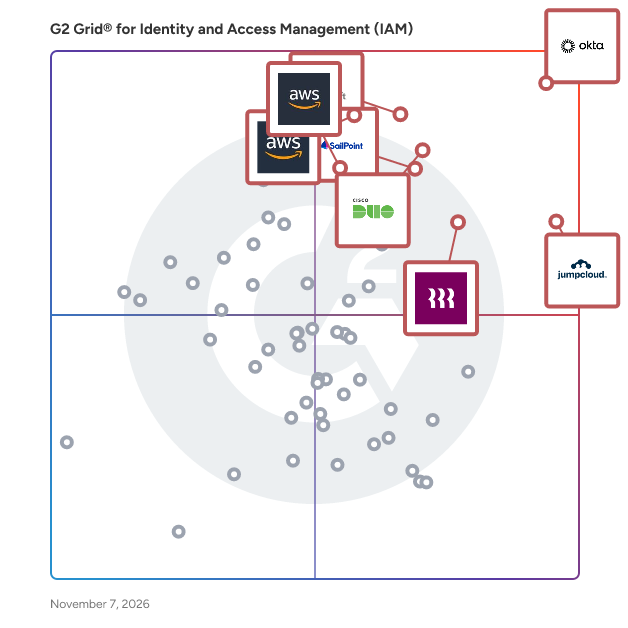
G2 Grid® for Identity and Access Management (IAM) Software

G2 Grid® for Identity and Access Management (IAM) Software plotting products by satisfaction and market presence

Highlighted products: Okta, JumpCloud, Microsoft Entra ID, Cisco Duo, SailPoint, Rippling IT, AWS Identity and Access Management (IAM), and AWS Vertrified Access.

Underlying data: [Grid® JSON](https://www.g2.com/categories/identity-and-access-management-iam/grids.json?focus%5B%5D=okta&focus%5B%5D=jumpcloud&focus%5B%5D=microsoft-entra-id&focus%5B%5D=cisco-duo&focus%5B%5D=sailpoint&focus%5B%5D=rippling-it&focus%5B%5D=aws-identity-and-access-management-iam&focus%5B%5D=aws-vertrified-access)

Okta

Okta is a software designed to secure AI, machine, and human identity across any technology environment. The software provides authentication, authorization, and access management by leveraging a cloud-native identity platform trusted by leading global brands. It automates identity verification workflows and reduces the risk of unauthorized access for users, employees, and partners. Okta addresses the challenge of securing diverse digital ecosystems by empowering businesses and developers with customer and workforce identity solutions. The software supports AI agent protection, single sign-on, and identity governance across enterprise and mid-market organizations.

Average Rating: 4.5/5.0

Total Reviews: 1,409

How Do G2 Users Rate Okta?

  • Has the product been a good partner in doing business?: 9.0/10 (Category avg: 9.3/10)
  • Activity Tracking: 9.1/10 (Category avg: 8.7/10)
  • User provisioning: 9.4/10 (Category avg: 9.1/10)
  • On-premises solution: 9.1/10 (Category avg: 8.3/10)

Who Is the Company Behind Okta?

  • Seller: Okta
  • Company Website:
  • Year Founded: 2009
  • HQ Location: San Francisco, California
  • LinkedIn® Page: www.linkedin.com
    7,840 employees on LinkedIn®
  • Ownership: OKTA

Who Uses This Product?

  • Who Uses This: Software Engineer, Account Executive
  • Top Industries: Computer Software, Information Technology and Services
  • Company Size: 50% Medium, 39% Large

What Do G2 Reviewers Say About Okta?

AI-generated summary from verified user reviews

Pros
  • Users value the ease of use of Okta, appreciating its centralized authentication and simple setup process.
  • Users value the enhanced security provided by Okta, streamlining logins and supporting various security applications seamlessly.
  • Users value the strong SSO and MFA capabilities of Okta, which greatly enhance security and user experience.
  • Users love the efficiency of single sign-on in Okta, streamlining access and enhancing security effortlessly.
  • Users value the easy access provided by Okta, streamlining app logins and enhancing security across systems.
Cons
  • Users face authentication issues with Okta, including lockouts and complex setups that hinder smooth access.
  • Users face login issues with Okta, citing difficulties with repeated sign-ins and dependency on multi-factor authentication.
  • Users find Okta to be expensive, particularly due to high licensing costs that challenge smaller organizations' adoption.
  • Users find the initial setup and policy configuration complex with Okta, especially as user numbers grow.
  • Users find the frequent authentication process in Okta to be tedious, impacting their overall user experience.

What Are Recent G2 Reviews of Okta?

What Are G2 Users Discussing About Okta?

JumpCloud

JumpCloud is a software designed to unify identity, device, and access management across organizations of all sizes. The software provides secure management of user identities and multi-OS devices by leveraging a single cloud-based platform supporting Windows, Apple, Linux, and Android. It automates user provisioning and access workflows and reduces the complexity of managing distributed IT environments. JumpCloud addresses the challenge of enabling secure remote work by giving IT teams and MSPs centralized control over devices and access policies. The software supports cross-platform device management, troubleshooting, and security enforcement for mid-market and small-business environments.

Average Rating: 4.5/5.0

Total Reviews: 3,998

How Do G2 Users Rate JumpCloud?

  • Has the product been a good partner in doing business?: 9.0/10 (Category avg: 9.3/10)
  • Activity Tracking: 8.5/10 (Category avg: 8.7/10)
  • User provisioning: 9.0/10 (Category avg: 9.1/10)
  • On-premises solution: 8.2/10 (Category avg: 8.3/10)

Who Is the Company Behind JumpCloud?

  • Seller: JumpCloud Inc.
  • Company Website:
  • Year Founded: 2012
  • HQ Location: Louisville, CO
  • LinkedIn® Page: www.linkedin.com
    998 employees on LinkedIn®

Who Uses This Product?

  • Who Uses This: IT Manager, System Administrator
  • Top Industries: Information Technology and Services, Computer Software
  • Company Size: 54% Medium, 35% Small

What Do G2 Reviewers Say About JumpCloud?

AI-generated summary from verified user reviews

Pros
  • Users value the ease of use of JumpCloud, praising its centralized management and intuitive interface.
  • Users value JumpCloud for its centralized identity and device management, streamlining IT administration across platforms.
  • Users appreciate JumpCloud for its centralized security and management, providing efficient control and comprehensive auditing capabilities.
  • Users appreciate the centralized identity and device management of JumpCloud, simplifying administration across multiple platforms.
  • Users appreciate the centralized identity and device management of JumpCloud, streamlining operations across multiple platforms efficiently.
Cons
  • Users note the missing features in JumpCloud, including limited reporting options and complex configuration aspects.
  • Users find that JumpCloud's complexity and limited reporting options hinder initial setup and overall user experience.
  • Users find JumpCloud's limited features hinder advanced functionality and ease of use, especially for mobile and MDM tools.
  • Users find JumpCloud to have a complex configuration process and limited features compared to other IAM tools.
  • Users find the initial setup and complexity of JumpCloud challenging, requiring significant technical expertise and time investment.

What Are Recent G2 Reviews of JumpCloud?

What Are G2 Users Discussing About JumpCloud?

Microsoft Entra ID

Microsoft Entra ID is a software designed to provide complete identity and access management with integrated security for connecting users to their apps, devices, and data. The software provides adaptive access, single sign-on, passwordless authentication, and identity governance by leveraging multi-factor authentication and Conditional Access policies. It automates user provisioning and access reviews and reduces the risk of identity compromise across internal and external users. Microsoft Entra ID addresses the challenge of unified identity management in complex hybrid environments by connecting all users to all apps and devices through a centralized platform. The software supports Cloud Infrastructure Entitlement Management, decentralized identity, and identity verification as part of the broader Microsoft Entra product family.

Average Rating: 4.5/5.0

Total Reviews: 875

How Do G2 Users Rate Microsoft Entra ID?

  • Has the product been a good partner in doing business?: 9.0/10 (Category avg: 9.3/10)
  • Activity Tracking: 8.8/10 (Category avg: 8.7/10)
  • User provisioning: 9.1/10 (Category avg: 9.1/10)
  • On-premises solution: 8.5/10 (Category avg: 8.3/10)

Who Is the Company Behind Microsoft Entra ID?

  • Seller: Microsoft
  • Year Founded: 1975
  • HQ Location: Redmond, Washington
  • LinkedIn® Page: www.linkedin.com
    232,750 employees on LinkedIn®
  • Ownership: MSFT
  • Phone: +1 (877) 276-2464

Who Uses This Product?

  • Who Uses This: Software Engineer, System Engineer
  • Top Industries: Information Technology and Services, Computer Software
  • Company Size: 39% Medium, 37% Large

What Do G2 Reviewers Say About Microsoft Entra ID?

AI-generated summary from verified user reviews

Pros
  • Users appreciate the seamless integration of Entra ID with Microsoft 365, enhancing access and management efficiency.
  • Users value the strong security features of Microsoft Entra ID, enhancing safety and streamlining user access management.
  • Users value the seamless single sign-on experience of Microsoft Entra ID, greatly enhancing their productivity and security.
  • Users appreciate the seamless integration of Microsoft Entra ID with Microsoft 365, enhancing identity management for various environments.
  • Users value the seamless integrations of Microsoft Entra ID within the Microsoft ecosystem, enhancing efficiency and user experience.
Cons
  • Users find the complexity of configuration challenging, affecting usability and management of Microsoft Entra ID.
  • Users find the cost for premium features of Microsoft Entra ID to be prohibitively high and complex to navigate.
  • Users find the complex administration of Microsoft Entra ID challenging, especially in configuration and licensing management.
  • Users find difficult learning curves in Microsoft Entra ID, complicating implementation and configuration for those less experienced.
  • Users find the complex setup of Microsoft Entra ID challenging, especially with licensing and reporting difficulties.

What Are Recent G2 Reviews of Microsoft Entra ID?

What Are G2 Users Discussing About Microsoft Entra ID?

AI can help you find the answers. G2 helps you trust them.

Connect G2 to Claude or ChatGPT for answers grounded in G2's trusted reviews, comparisons, and pricing from real user insights.

How it works

Cisco Duo

Cisco Duo is a software designed to stop identity-based threats and boost workforce productivity through continuous identity security. The software provides access management across users, devices, and applications by leveraging identity visibility and context aggregated from multiple identity sources. It automates continuous authentication evaluation and reduces the risk of compromised credentials enabling unauthorized access. Cisco Duo addresses the challenge of securing workforce access across diverse environments by delivering an adaptive, context-aware access management experience. The software supports multi-factor authentication, device trust verification, and enterprise-grade security for mid-market and enterprise organizations.

Average Rating: 4.5/5.0

Total Reviews: 610

How Do G2 Users Rate Cisco Duo?

  • Has the product been a good partner in doing business?: 9.2/10 (Category avg: 9.3/10)
  • Activity Tracking: 9.3/10 (Category avg: 8.7/10)
  • User provisioning: 9.4/10 (Category avg: 9.1/10)
  • On-premises solution: 8.8/10 (Category avg: 8.3/10)

Who Is the Company Behind Cisco Duo?

  • Seller: Cisco
  • Year Founded: 1984
  • HQ Location: San Jose, CA
  • LinkedIn® Page: www.linkedin.com
    95,294 employees on LinkedIn®
  • Ownership: NASDAQ:CSCO
  • Phone: 847-678-6600

Who Uses This Product?

  • Who Uses This: Software Engineer, Network Administrator
  • Top Industries: Information Technology and Services, Higher Education
  • Company Size: 39% Medium, 39% Large

What Do G2 Reviewers Say About Cisco Duo?

AI-generated summary from verified user reviews

Pros
  • Users appreciate the ease of use of Cisco Duo, highlighting its seamless setup and efficient approval process.
  • Users value the advanced security features of Cisco Duo, appreciating its strong MFA and ease of use.
  • Users appreciate the strong, easy-to-use multi-factor authentication of Cisco Duo, enhancing security and user confidence.
  • Users value the easy access provided by Cisco Duo, simplifying approval processes and enhancing security effortlessly.
  • Users value the authentication ease of Cisco Duo, enjoying quick approvals and streamlined multi-factor authentication processes.
Cons
  • Users report frequent authentication issues with Cisco Duo, including loops, lagging notifications, and app crashes disrupting workflows.
  • Users often face login issues with Cisco Duo, including slow notifications and frustrating authentication loops.
  • Users find the complexity of troubleshooting Cisco Duo can hinder effective administration and user experience.
  • Users experience notification issues with Cisco Duo, including delays and failures that disrupt workflows and require IT support.
  • Users experience delay issues with push notifications, leading to workflow disruptions and frustration when attempting to connect.

What Are Recent G2 Reviews of Cisco Duo?

What Are G2 Users Discussing About Cisco Duo?

SailPoint

SailPoint is the leader in identity security for the modern enterprise. Harnessing the power of AI and machine learning, SailPoint automates the management and control of access, delivering only the required access to the right identities and technology resources at the right time. Our sophisticated identity platform seamlessly integrates with existing systems and workflows, providing the singular view into all identities and their access. We meet customers where they are with an intelligent identity solution that matches the scale, velocity and environmental needs of the modern enterprise. SailPoint empowers the most complex enterprises worldwide to build a security foundation grounded in identity security.

Average Rating: 4.6/5.0

Total Reviews: 337

How Do G2 Users Rate SailPoint?

  • Has the product been a good partner in doing business?: 8.8/10 (Category avg: 9.3/10)
  • Activity Tracking: 7.4/10 (Category avg: 8.7/10)
  • User provisioning: 9.2/10 (Category avg: 9.1/10)
  • On-premises solution: 8.5/10 (Category avg: 8.3/10)

Who Is the Company Behind SailPoint?

  • Seller: SailPoint
  • Company Website:
  • Year Founded: 2004
  • HQ Location: Austin, TX
  • LinkedIn® Page: www.linkedin.com
    3,811 employees on LinkedIn®
  • Phone: (512) 346-2000

Who Uses This Product?

  • Who Uses This: Senior Manager, IAM Engineer
  • Top Industries: Financial Services, Banking
  • Company Size: 78% Large, 16% Medium

What Do G2 Reviewers Say About SailPoint?

AI-generated summary from verified user reviews

Pros
  • Users find SailPoint to be exceptionally easy to use, simplifying access management and automating previously manual processes.
  • Users appreciate SailPoint's strong identity governance capabilities, enabling easy control and auditing of access across systems.
  • Users value the robust security features of SailPoint, enhancing access control and reducing identity-related risks.
  • Users value the strong identity governance capability of SailPoint, enhancing visibility and reducing identity-related risks.
  • Users appreciate the seamless integrations of SailPoint, simplifying access management across multiple applications effectively.
Cons
  • Users note that improvement is needed in implementation complexity and costs associated with SailPoint's solutions.
  • Users experience poor customer support with SailPoint, facing delays and difficulty reaching resolutions in a timely manner.
  • Users express concerns about missing features in SailPoint, citing delays in roadmapped functionalities impacting overall efficiency.
  • Users find SailPoint too expensive due to high implementation, maintenance costs, and paywalled customizations.
  • Users find SailPoint's difficult learning curve hinders effective implementation and integration for teams and non-IT personnel.

What Are Recent G2 Reviews of SailPoint?

What Are G2 Users Discussing About SailPoint?

AWS Identity and Access Management (IAM)

AWS Identity and Access Management (IAM) is a software designed to securely control access to AWS services and resources for authenticated and authorized users. The software provides centralized access control, granular permissions, identity federation, and multi-factor authentication by leveraging the AWS cloud infrastructure. It automates permission management and temporary credential issuance and reduces the risk associated with long-term credentials and unauthorized access. AWS Identity and Access Management (IAM) addresses the critical need for secure and compliant access governance in AWS environments by enabling fine-grained least-privilege controls across users and workloads. The software supports identity federation with corporate directories and third-party providers, regulatory compliance, and enhanced security posture for mid-market and enterprise AWS deployments.

Average Rating: 4.5/5.0

Total Reviews: 154

How Do G2 Users Rate AWS Identity and Access Management (IAM)?

  • Has the product been a good partner in doing business?: 9.1/10 (Category avg: 9.3/10)
  • Activity Tracking: 8.6/10 (Category avg: 8.7/10)
  • User provisioning: 9.2/10 (Category avg: 9.1/10)
  • On-premises solution: 8.5/10 (Category avg: 8.3/10)

Who Is the Company Behind AWS Identity and Access Management (IAM)?

Who Uses This Product?

  • Who Uses This: Software Engineer, Software Developer
  • Top Industries: Information Technology and Services, Computer Software
  • Company Size: 33% Medium, 32% Large

What Do G2 Reviewers Say About AWS Identity and Access Management (IAM)?

AI-generated summary from verified user reviews

Pros
  • Users value the strong security and granular access control that AWS IAM provides for managing permissions effectively.
  • Users appreciate the user-friendly interface of AWS IAM, making management of users and permissions straightforward even for beginners.
  • Users value the granular access control features of AWS IAM, enhancing security and compliance effortlessly.
  • Users enjoy the intuitive interface of AWS IAM, making it easy to manage users, roles, and permissions.
  • Users appreciate the easy management capabilities of AWS IAM, streamlining user, group, and policy administration effortlessly.
Cons
  • Users find IAM's complexity challenging, particularly due to steep learning curves and difficult policy management in large environments.
  • Users find IAM to have a difficult learning curve due to its complexity and unintuitive error diagnostics.
  • Users struggle with the steep learning curve of IAM, often finding it complex and difficult to troubleshoot effectively.
  • Users struggle with complex error handling in IAM, leading to time-consuming troubleshooting and unclear access error messages.
  • Users struggle with lack of clear information on IAM policies and documentation, complicating setup and usage.

What Are Recent G2 Reviews of AWS Identity and Access Management (IAM)?

Rippling IT

Rippling IT is a software designed to unify identity, device, access, and security management for organizations seeking to streamline IT operations. The software provides app provisioning, device configuration, compliance enforcement, and endpoint protection by leveraging a single centralized dashboard. It automates the full employee lifecycle from onboarding to offboarding and reduces manual IT work by automatically granting, revoking, and governing access. Rippling IT addresses the challenges of fragmented IT tooling and security gaps by centralizing least-privilege controls, real-time monitoring, and automated patching in one platform. The software supports instant offboarding lockouts, secure device recovery, and full visibility across hardware, software, and user risk for mid-market organizations.

Average Rating: 4.7/5.0

Total Reviews: 1,156

How Do G2 Users Rate Rippling IT?

  • Has the product been a good partner in doing business?: 8.9/10 (Category avg: 9.3/10)
  • Activity Tracking: 9.2/10 (Category avg: 8.7/10)
  • User provisioning: 9.5/10 (Category avg: 9.1/10)
  • On-premises solution: 9.0/10 (Category avg: 8.3/10)

Who Is the Company Behind Rippling IT?

  • Seller: Rippling
  • Company Website:
  • Year Founded: 2016
  • HQ Location: San Francisco, CA
  • LinkedIn® Page: www.linkedin.com
    7,798 employees on LinkedIn®

Who Uses This Product?

  • Who Uses This: Software Engineer, CEO
  • Top Industries: Computer Software, Information Technology and Services
  • Company Size: 59% Medium, 27% Small

What Do G2 Reviewers Say About Rippling IT?

AI-generated summary from verified user reviews

Pros
  • Users appreciate the ease of use of Rippling IT, benefiting from seamless onboarding and centralized management.
  • Users find Rippling IT to be intuitive and user-friendly, enhancing efficiency in managing IT processes seamlessly.
  • Users find Rippling IT to be simple and user-friendly, streamlining access to essential tools and permissions.
  • Users appreciate the easy access provided by Rippling IT, streamlining their work and enhancing onboarding efficiency.
  • Users find the user interface incredibly friendly, enabling fast navigation and ease of use within Rippling IT.
Cons
  • Users find the missing features in Rippling IT cumbersome, especially with payroll split across different sections.
  • Users find the limited features of Rippling IT restrict their workflows and reporting flexibility, impacting overall usability.
  • Users experience a lack of transparency in troubleshooting, leading to challenges in quickly resolving issues with Rippling IT.
  • Users find the learning curve quite steep due to the extensive features and initial setup complexity of Rippling IT.
  • Users experience poor customer support, particularly with payroll delays and unresponsive contracting issues, affecting overall satisfaction.

What Are Recent G2 Reviews of Rippling IT?

Google Cloud Identity & Access Management (IAM)

Google Cloud Identity & Access Management (IAM) is a software designed to provide fine-grained access control and visibility for centrally managing cloud resources. The software provides precise permission management and resource-level access governance by leveraging Google Cloud's infrastructure. It automates access policy enforcement across cloud environments and reduces the risk of over-provisioned permissions. Google Cloud Identity & Access Management (IAM) addresses the challenge of managing distributed cloud resource access by centralizing control and auditability in a single platform. The software supports small-business and mid-market organizations managing access across Google Cloud services and integrated applications.

Average Rating: 4.4/5.0

Total Reviews: 55

How Do G2 Users Rate Google Cloud Identity & Access Management (IAM)?

  • Has the product been a good partner in doing business?: 8.8/10 (Category avg: 9.3/10)
  • Activity Tracking: 8.7/10 (Category avg: 8.7/10)
  • User provisioning: 9.1/10 (Category avg: 9.1/10)
  • On-premises solution: 7.7/10 (Category avg: 8.3/10)

Who Is the Company Behind Google Cloud Identity & Access Management (IAM)?

  • Seller: Google
  • Year Founded: 1998
  • HQ Location: Mountain View, CA
  • LinkedIn® Page: www.linkedin.com
    301,144 employees on LinkedIn®
  • Ownership: NASDAQ:GOOG
  • Phone: +1 (650) 253-0000

Who Uses This Product?

  • Top Industries: Information Technology and Services, Computer Software
  • Company Size: 47% Small, 26% Medium

What Do G2 Reviewers Say About Google Cloud Identity & Access Management (IAM)?

AI-generated summary from verified user reviews

Pros
  • Users value the straightforward access control of Google Cloud IAM, simplifying management and enhancing security effectively.
  • Users value the security and straightforward access control that Google Cloud IAM offers, enhancing management efficiency.
  • Users appreciate the straightforward access control of Google Cloud IAM, which simplifies management and enhances security.
  • Users appreciate the intuitive interface of Google Cloud IAM, simplifying access management and enhancing security effortlessly.
  • Users appreciate the straightforward access control of Google Cloud IAM, enhancing security and simplifying permission management.
Cons
  • Users find Google Cloud IAM's interface difficult to navigate, causing confusion with roles, permissions, and account management.
  • Users find Google Cloud IAM's complexity overwhelming, especially with its intricate roles and permission settings.
  • Users find the complex usage of Google Cloud IAM challenging, especially with roles and permissions management.
  • Users face challenges with confusing access permissions, leading to misconfigurations and unexpected access issues.
  • Users find the complexity of access control in Google Cloud IAM confusing and challenging to navigate.

What Are Recent G2 Reviews of Google Cloud Identity & Access Management (IAM)?

AWS Vertrified Access

AWS Vertrified Access is a software designed to enable secure, VPN-less access to corporate applications and resources based on user identity and device security status. The software provides fine-grained access policies, continuous request evaluation, and device posture assessment by leveraging zero trust principles and integration with AWS IAM Identity Center and third-party identity providers. It automates real-time access decisions and reduces the risks associated with traditional remote connectivity and long-standing VPN dependencies. AWS Vertrified Access addresses the challenge of securely connecting remote users to corporate applications by centralizing policy management and enforcing security criteria before granting access. The software supports HTTP(S) and non-HTTP(S) applications including databases and EC2 instances over SSH, TCP, and RDP, with comprehensive logging for audit and incident response.

Average Rating: 4.7/5.0

Total Reviews: 38

How Do G2 Users Rate AWS Vertrified Access?

  • Has the product been a good partner in doing business?: 9.2/10 (Category avg: 9.3/10)
  • Activity Tracking: 9.3/10 (Category avg: 8.7/10)
  • User provisioning: 9.3/10 (Category avg: 9.1/10)
  • On-premises solution: 9.5/10 (Category avg: 8.3/10)

Who Is the Company Behind AWS Vertrified Access?

Who Uses This Product?

  • Top Industries: Information Technology and Services
  • Company Size: 48% Medium, 29% Large

What Do G2 Reviewers Say About AWS Vertrified Access?

AI-generated summary from verified user reviews

Pros
  • Users value the strong security of AWS Verified Access, enhancing visibility and compliance without relying on VPNs.
  • Users value the reliable security of AWS Verified Access, ensuring only authorized access to critical systems and applications.
  • Users appreciate the intuitive security features of AWS Verified Access, enhancing control over application access and user productivity.
  • Users appreciate the strong security and controlled access of AWS Verified Access for protecting their applications hosted on AWS.
  • Users appreciate the seamless integrations of AWS Verified Access, enhancing security while simplifying access to applications.
Cons
  • Users find the difficult learning curve of AWS Verified Access a challenge, especially for teams new to AWS identity services.
  • Users find the initial setup of AWS Verified Access to be complex and challenging, requiring extensive configuration and learning.
  • Users express concerns about the lack of detailed information that complicates initial setup and troubleshooting processes.
  • Users find the initial setup of AWS Verified Access to have a challenging learning curve, especially for those unfamiliar with AWS.
  • Users find the high cost and complexity of AWS Verified Access to be significant barriers to effective implementation.

What Are Recent G2 Reviews of AWS Vertrified Access?

Salesforce Platform

Agentforce 360 Platform (formerly Salesforce Platform) is a software designed to empower teams to build and extend customer-facing solutions with AI, automation, and data through a leading low-code development environment. The software provides a harmonized, unified view of customers and tools for automating manual processes by leveraging the Salesforce Customer 360 ecosystem. It automates inefficient business workflows and reduces development time and IT costs for organizations of all sizes. Agentforce 360 Platform (formerly Salesforce Platform) addresses the challenge of delivering seamless, connected customer experiences by keeping the customer at the center of every process and application built on the platform. The software supports Salesforce development acceleration, employee productivity, and integrated customer engagement for mid-market and enterprise organizations.

Average Rating: 4.5/5.0

Total Reviews: 4,405

How Do G2 Users Rate Salesforce Platform?

  • Has the product been a good partner in doing business?: 8.8/10 (Category avg: 9.3/10)
  • Activity Tracking: 8.8/10 (Category avg: 8.7/10)
  • User provisioning: 8.7/10 (Category avg: 9.1/10)
  • On-premises solution: 8.7/10 (Category avg: 8.3/10)

Who Is the Company Behind Salesforce Platform?

  • Seller: Salesforce
  • Company Website:
  • Year Founded: 1999
  • HQ Location: San Francisco, CA
  • LinkedIn® Page: www.linkedin.com
    89,711 employees on LinkedIn®
  • Ownership: NYSE:CRM

Who Uses This Product?

  • Who Uses This: Salesforce Developer, Account Executive
  • Top Industries: Information Technology and Services, Computer Software
  • Company Size: 44% Medium, 35% Large

What Do G2 Reviewers Say About Salesforce Platform?

AI-generated summary from verified user reviews

Pros
  • Users appreciate the ease of use of Salesforce Platform, especially its intuitive drag-and-drop interface and ongoing feature updates.
  • Users value the versatile features of Salesforce Platform, enjoying its comprehensive capabilities and smooth onboarding process.
  • Users value the customization capabilities of Salesforce Platform, facilitating integration and enhancing development efficiency.
  • Users value the customizability of Salesforce Platform, enabling tailored applications and seamless integration with external tools.
  • Users value the extensive customization options of Salesforce Platform, enabling seamless integration and tailored applications.
Cons
  • Users find the learning curve steep due to the platform's complexity and overlapping tools, impacting navigation and usage.
  • Users find the complexity of the Salesforce Platform overwhelming, particularly due to its numerous overlapping features and settings.
  • Users find the pricing steep, with high costs for licensing and add-ons, making it hard for small businesses.
  • Users find that the difficult learning curve and complex navigation hinder their efficiency with the Salesforce Platform.
  • Users are frustrated by missing features like limited access to standard objects and reporting on sibling-level records.

What Are Recent G2 Reviews of Salesforce Platform?

What Are G2 Users Discussing About Salesforce Platform?

IBM Verify CIAM

IBM Verify CIAM is a software designed to centrally manage customer and workforce identity and access across cloud, on-premises, and hybrid environments. The software provides single sign-on, multifactor authentication, adaptive AI-based access, passwordless access, and lifecycle and consent management by leveraging a single-stack architecture with reverse proxy capabilities. It automates identity lifecycle events and directory unification and reduces friction associated with migrating from on-premises to cloud identity systems. IBM Verify CIAM addresses the challenges of complex enterprise identity governance and legacy system integration by supporting CRM applications, federated client workforces, and over 150,000 authorization groups. The software supports FedRAMP authorization, SOC 2, ISO 27001, and PCI DSS compliance, and is deployed across Mac, iOS, Android, Windows, Linux, and Z mainframe operating systems for enterprise and mid-market customers.

Average Rating: 4.3/5.0

Total Reviews: 179

How Do G2 Users Rate IBM Verify CIAM?

  • Has the product been a good partner in doing business?: 8.3/10 (Category avg: 9.3/10)
  • Activity Tracking: 8.6/10 (Category avg: 8.7/10)
  • User provisioning: 8.6/10 (Category avg: 9.1/10)
  • On-premises solution: 8.4/10 (Category avg: 8.3/10)

Who Is the Company Behind IBM Verify CIAM?

  • Seller: IBM
  • Company Website:
  • Year Founded: 1911
  • HQ Location: Armonk, New York, United States
  • LinkedIn® Page: www.linkedin.com
    344,328 employees on LinkedIn®
  • Ownership: SWX:IBM

Who Uses This Product?

  • Top Industries: Information Technology and Services, Computer Software
  • Company Size: 52% Large, 38% Medium

What Do G2 Reviewers Say About IBM Verify CIAM?

AI-generated summary from verified user reviews

Pros
  • Users value the robust security offered by IBM Verify CIAM, enhancing protection while ensuring a smooth user experience.
  • Users appreciate the ease of use of IBM Verify CIAM, highlighting its smooth setup and clean dashboard experience.
  • Users value the multiple factor authentication of IBM Verify CIAM, enhancing security while ensuring easy access.
  • Users appreciate the security and reliability of IBM Verify CIAM, enhancing user experience with flexible authentication options.
  • Users appreciate the strong security features of IBM Verify CIAM, enhancing protection and user experience significantly.
Cons
  • Users find the complex setup of IBM Verify CIAM challenging, especially for beginners and small organizations.
  • Users find the complex nature of IBM Verify CIAM challenging, especially during initial setup and policy creation.
  • Users find the difficult learning curve of IBM Verify CIAM challenging, requiring time before achieving a smooth experience.
  • Users find the difficult setup of IBM Verify CIAM challenging and time-consuming, especially for beginners.
  • Users find the complex administration of IBM Verify CIAM challenging, requiring extensive training and technical expertise.

What Are Recent G2 Reviews of IBM Verify CIAM?

What Are G2 Users Discussing About IBM Verify CIAM?

1Password

1Password is a software designed to improve enterprise password security, visibility, and control over how passwords and company data are protected. The software provides password management, IAM infrastructure integration, and security policy enforcement by leveraging an enterprise-grade platform trusted by over 180,000 businesses. It automates password generation and security policy application at scale and reduces risk from weak, reused, or exposed credentials. 1Password addresses the challenge of maintaining strong credential hygiene across large organizations by enabling proactive threat management and detailed password security posture reporting. The software supports integration with existing IAM infrastructure, company-wide policy enforcement, and secure sign-in workflows for small-business and mid-market environments.

Average Rating: 4.6/5.0

Total Reviews: 1,800

G2 Deal: Try 1Password for Free

Try 1Password Business free for 14 days

Price: ~~19.95~~ → 0

View this exclusive G2 deal

How Do G2 Users Rate 1Password?

  • Has the product been a good partner in doing business?: 9.3/10 (Category avg: 9.3/10)
  • Activity Tracking: 9.3/10 (Category avg: 8.7/10)
  • User provisioning: 9.2/10 (Category avg: 9.1/10)
  • On-premises solution: 9.1/10 (Category avg: 8.3/10)

Who Is the Company Behind 1Password?

  • Seller: 1Password
  • Company Website:
  • Year Founded: 2005
  • HQ Location: Ontario
  • LinkedIn® Page: www.linkedin.com
    3,263 employees on LinkedIn®

Who Uses This Product?

  • Who Uses This: Software Engineer, CEO
  • Top Industries: Computer Software, Information Technology and Services
  • Company Size: 54% Small, 32% Medium

What Do G2 Reviewers Say About 1Password?

AI-generated summary from verified user reviews

Pros
  • Users appreciate the ease of use with 1Password, enjoying seamless autofill and effortless password management across devices.
  • Users value the robust security of 1Password, simplifying password management while ensuring safety across devices.
  • Users love the simple and stress-free password management that 1Password provides, enhancing security and usability.
  • Users appreciate the intuitive design of 1Password, making it easy to manage and share passwords effectively.
  • Users enjoy the easy access to their passwords, appreciating seamless integration and effortless auto log-ins.
Cons
  • Users note that autofill issues exist on some websites, complicating the login experience and resulting in frustration.
  • Users find 1Password's pricing to be too high compared to competitors, especially for enterprise-level needs.
  • Users report login issues with autofill, including incorrect field detection and challenges with multistep logins.
  • Users experience autofill issues on various websites, which can hinder usability and require manual input for logins.
  • Users feel that the pricing of 1Password is higher than competitors, making it less appealing for enterprise use.

What Are Recent G2 Reviews of 1Password?

What Are G2 Users Discussing About 1Password?

Oracle Identity Cloud Service

Oracle Identity Cloud Service is a software designed to deliver comprehensive Identity-as-a-Service capabilities for managing user access and entitlements across cloud and on-premises applications. The software provides single sign-on, identity governance, adaptive multifactor authentication, and self-service account management by leveraging a multi-tenant cloud infrastructure built on open standards including OpenID Connect, OAuth 2.0, SAML, and SCIM. It automates user provisioning, access reviews, and password management and reduces administrative overhead across hybrid IT environments. Oracle Identity Cloud Service addresses the challenges of identity governance and compliance in complex organizations by centralizing identity management with seamless integration into existing on-premises directories and applications. The software supports zero trust security adoption, hybrid cloud deployments, and regulatory compliance for mid-market and enterprise organizations in automotive and technology industries.

Average Rating: 4.6/5.0

Total Reviews: 28

How Do G2 Users Rate Oracle Identity Cloud Service?

  • Has the product been a good partner in doing business?: 8.5/10 (Category avg: 9.3/10)
  • Activity Tracking: 8.2/10 (Category avg: 8.7/10)
  • User provisioning: 8.9/10 (Category avg: 9.1/10)
  • On-premises solution: 8.8/10 (Category avg: 8.3/10)

Who Is the Company Behind Oracle Identity Cloud Service?

  • Seller: Oracle
  • Year Founded: 1977
  • HQ Location: Austin, TX
  • LinkedIn® Page: www.linkedin.com
    207,576 employees on LinkedIn®
  • Ownership: NYSE:ORCL
  • Phone: +1 (650) 506-7000

Who Uses This Product?

  • Top Industries: Automotive
  • Company Size: 47% Medium, 37% Large

What Do G2 Reviewers Say About Oracle Identity Cloud Service?

AI-generated summary from verified user reviews

Pros
  • Users value the secure authentication and SSO integration of Oracle Identity Cloud Service, enhancing convenience and protection.
  • Users value the secure authentication and convenience of single sign-on in Oracle Identity Cloud Service for seamless access.
  • Users value the secure authentication and SSO integration of Oracle Identity Cloud Service for enhanced convenience and protection.
  • Users value the granular role-based access controls in Oracle Identity Cloud Service for precise permission tailoring.
  • Users appreciate the intuitive admin interface of Oracle Identity Cloud Service, making identity management simple and efficient.
Cons
  • Users face a difficult learning curve with Oracle Identity Cloud Service, making setup and integration quite challenging.
  • Users find the implementation process complex, particularly for those lacking deep Oracle expertise, hindering initial setup and integration.
  • Users face integration issues with Oracle Identity Cloud Service, making setup and customization more complicated than anticipated.
  • Users note a lack of expertise in Oracle Identity Cloud Service, complicating setup and integration for organizations.
  • Users face a high learning curve with Oracle Identity Cloud Service, finding the console less intuitive than Azure AD.

What Are Recent G2 Reviews of Oracle Identity Cloud Service?

Auth0

Auth0 is a software designed to provide secure authentication and authorization for web, mobile, and legacy applications for any user at scale. The software provides Universal Login, Fine Grained Authorization, and single sign-on by leveraging OAuth 2.0, standards-based protocols, and a central authorization server that keeps credentials from being transferred across sources. It automates authentication flows for native and web applications and reduces exposure to phishing and credential stuffing attacks. Auth0 addresses the challenge of integrating flexible, customizable identity management across diverse application types by going beyond role-based access control with fine-grained authorization capabilities. The software supports billions of monthly login transactions, SSO enablement, and integration with the broader Okta identity platform for small-business and mid-market customers.

Average Rating: 4.3/5.0

Total Reviews: 288

How Do G2 Users Rate Auth0?

  • Has the product been a good partner in doing business?: 8.4/10 (Category avg: 9.3/10)
  • Activity Tracking: 9.0/10 (Category avg: 8.7/10)
  • User provisioning: 8.9/10 (Category avg: 9.1/10)
  • On-premises solution: 8.8/10 (Category avg: 8.3/10)

Who Is the Company Behind Auth0?

  • Seller: Okta
  • Company Website:
  • Year Founded: 2009
  • HQ Location: San Francisco, California
  • LinkedIn® Page: www.linkedin.com
    7,840 employees on LinkedIn®
  • Ownership: OKTA

Who Uses This Product?

  • Who Uses This: Software Engineer, Senior Software Engineer
  • Top Industries: Computer Software, Information Technology and Services
  • Company Size: 51% Small, 30% Medium

What Do G2 Reviewers Say About Auth0?

AI-generated summary from verified user reviews

Pros
  • Users appreciate the ease of use of Auth0, enjoying a smooth setup and helpful community support.
  • Users value the strong security features of Auth0, ensuring fast and secure authentication for peace of mind.
  • Users appreciate the fast and secure authentication provided by Auth0, streamlining identity management seamlessly.
  • Users appreciate the seamless integrations with identity providers, enhancing security and simplifying authentication processes.
  • Users value the easy integrations of Auth0, simplifying authentication processes while enhancing security and flexibility.
Cons
  • Users are frustrated by the expensive pricing of Auth0, which can escalate unexpectedly as usage increases.
  • Users find the pricing sneaky, as costs can unexpectedly escalate, especially with advanced features and growing user bases.
  • Users find the pricing of Auth0 expensive, especially as user numbers grow and advanced features are needed.
  • Users find that difficult learning curves arise from complex customizations and advanced features, especially for new users.
  • Users find Auth0's interface overly complex, leading to confusion and frustration with numerous settings and configurations.

What Are Recent G2 Reviews of Auth0?

What Are G2 Users Discussing About Auth0?

Willow AI Governance Control Plane

The AI Basecamp for the enterprise. Willow is the Agentic Access Platform for the enterprise, the AI Basecamp where every AI agent checks in before it touches a single system. Most companies are stitching together a gateway, a shadow AI scanner, a DLP bolt-on, and a manual approval process. Seven tools pretending to be one. Willow is the platform. One control plane for every AI agent, tool, MCP, skill, and plugin in the enterprise, covering identity, runtime guardrails, shadow AI detection, and audit, from the same place. What Willow does: - Secure gateway between any AI agent, Claude, ChatGPT, Cursor, Copilot, custom agents, and your internal systems: Jira, GitHub, Salesforce, Snowflake, Slack, and 1,000+ more. - Governs the action inside each tool, not just the connection. Least privilege enforced at runtime, not detected after the fact. - Detects shadow AI the moment it appears, through a browser extension and endpoint agent, before an unmanaged MCP or skill becomes an incident. - Self-serve employee portal so every department, not just engineering, connects approved tools without IT tickets. - Full audit trail tied to a real human identity, streamed to your SIEM in real time. Deploys SaaS, dedicated cloud, or fully on-prem inside your VPC. SOC 2 Type II, ISO, GDPR compliant. Why teams pick Willow over a point solution: Gateways route traffic. Scanners give you visibility with no way to act on it. DLP bolts on after the mistake already happened. Willow governs the action, detects what's unmanaged, and lets the whole org self-serve, on one control plane. Visibility - Control - Governance - Enforcement Live in production at Wix (~5,000 weekly active users, ~600 governed tools and MCPs, 1M+ governed tool calls per week), Innovid, Papaya Global, Riskified, Freetrade, Agora, Lansweeper and more. Built for CISOs, VPs of Engineering, platform leads, and CTOs rolling out AI at scale.

Average Rating: 4.9/5.0

Total Reviews: 162

How Do G2 Users Rate Willow AI Governance Control Plane?

  • Has the product been a good partner in doing business?: 9.8/10 (Category avg: 9.3/10)
  • Activity Tracking: 10.0/10 (Category avg: 8.7/10)
  • User provisioning: 10.0/10 (Category avg: 9.1/10)
  • On-premises solution: 10.0/10 (Category avg: 8.3/10)

Who Is the Company Behind Willow AI Governance Control Plane?

  • Seller: Willow
  • Company Website:
  • Year Founded: 2025
  • HQ Location: New York
  • LinkedIn® Page: www.linkedin.com
    15 employees on LinkedIn®

Who Uses This Product?

  • Who Uses This: Software Engineer, Product Manager
  • Top Industries: Computer Software, Financial Services
  • Company Size: 73% Large, 41% Medium

What Are Recent G2 Reviews of Willow AI Governance Control Plane?

Brandon Summers-Miller
BS
Researched and written by Brandon Summers-Miller
Updated July 28, 2025

Learn More About Identity and Access Management (IAM) Software

What is Identity and Access Management (IAM) Software?

Companies use identity and access management (IAM) software to both enforce their security controls regarding who has access to corporate assets and to promote worker productivity with ease of access to the tools they need to do their jobs. IAM software achieves this by allowing only authorized and authenticated users, such as employees, contractors, and devices, to access corporate resources at their appropriate permission level based on predetermined policy-based controls. 

Using IAM software, company administrators can quickly provision, deprovision, or change user identities and access rights to corporate assets at scale. Each user is granted the right level of access permissions based on their user or group membership type. This makes it easier for security teams to manage who has access to what accounts at scale, and for end users to quickly gain access to the tools they need to do their jobs instead of waiting for their individual accounts to be provisioned one by one. For example, a newly promoted departmental leader at a company may need permissions to fully access the proprietary data stored within an application. This can easily be granted to them due to their management group membership, while a junior-level employee would not need that kind of granular access, so they would only be permissioned to view non sensitive data stored within the application. IAM software also tracks user activity, enabling administrators to confirm that users are accessing corporate assets in compliance with company policies.

Using IAM software and utilizing policy-based controls to enforce least privilege strategies, companies can protect against unauthorized access from both external actors like hackers and non permissioned internal users (insider threats) who have insufficient access level permissions. IAM software is used as an important component of a company’s zero-trust, least-privilege security model, where all users’ identities are verified prior to granting access to corporate resources. This is different from prior security models that enforced perimeter security where once a user is inside the corporate network, they are granted free access and movement across the network, and not required to be authenticated again to use other applications.

What Does IAM Stand For?

IAM, sometimes also listed as IdAM, stands for identity and access management. IAM software is sometimes also referred to as workforce identity or employee identity management. Other acronyms related to IAM include CIAM for customer identity and access management (CIAM) software which is used for customer-related identity management. Similarly, for government-related identity products, the acronym ICAM stands for Identity, credential, and access management. Another acronym, IDaaS, stands for identity as a service.

What are the Common Features of Identity and Access Management (IAM) Software?

The following are some core features within IAM software:

Authentication: IAM providers offer multi-factor authentication (MFA) methods for users to prove their identity prior to being granted access to corporate resources. MFA requires more than a single authentication factor, such as only a username and password. Authentication factors can include one-time passcodes (OTPs), software tokens, mobile-push, hardware tokens, and more. More advanced authentication methods include biometric authentication and passwordless authentication. 

More recently, IAM providers are utilizing risk-based authentication (RBA) methods, also known as contextual authentication, intelligent MFA, or adaptive MFA, which analyzes real-time information about users, such as their IP addresses, devices, and behaviors to continually verify their identity. 

Identity lifecycle management or user provisioning and deprovisioning: IAM software providers offer administrators the ability to manage the lifecycle of an identity—from quickly provisioning to deprovisioning, along with user changes including attributes, roles, permissions, and other entitlements. Some IAM providers also offer a universal directory.

Directory: IAM providers will either integrate with existing directory providers or offer a universal directory service.

Single sign-on (SSO): IAM software provides SSO functionality to enable end users to access their business applications all in one place and requiring them to authenticate once.

User activity monitoring: IAM software enables administrators to track user activity, including anomalous activity. This kind of auditing is to ensure compliance with secure access control policies. IAM solutions often provide standard reports for this.

What are the Benefits of Identity and Access Management (IAM) Software?

Security: The main benefit of implementing identity and access manager software is for improved security. IAM software manages access governance, allowing only verified, authorized, and permissioned users to access company assets. This helps mitigate risks from external hackers or insider threats.

Productivity or enabling the workforce: In addition to improved security, companies that deploy IAM software to streamline the login experience, may lead to productivity gains with users. Having a simple to use security product with SSO requiring only one login and that also organizes the user’s corporate applications and accounts all in one place can save the user time and frustration. 

Regulatory compliance: Many global governmental or industry regulations require companies to have security controls to be in place. Identity management is a major component of a well-rounded information security program.

Who Uses Identity and Access Management (IAM) Software?

Information security (infosec) professionals: Infosec professionals use IAM software as a foundational component of their security program.

IT Administrators: IT admins may be responsible for managing IAM software, especially as it relates to provisioning and deprovisioning users.

End users and devices: End users such as employees or contractors use IAM software in their day-to-day work activities to access corporate assets needed to do their jobs. Devices such as internet of things (IoT) devices require the validity of their identity in order to access corporate resources, including other IoT devices.

What are the Alternatives to Identity and Access Management (IAM) Software?

Alternatives to IAM solutions can replace this type of software, either partially or completely include:

Single sign-on (SSO) software: SSO software, which is a component of a complete IAM software solution, is an authentication tool that allows users to sign into multiple applications or databases with a single set of credentials. SSO software will not have identity governance and user lifecycle management features that an IAM solution would provide.

Multi-factor authentication (MFA) software: MFA, which is a component of a complete IAM software solution, is used to have users prove their identity in two or more ways before granting them access privileges to corporate accounts. There are many types of authentication factors above the standard single factor of login credentials like usernames and passwords, including something the user has like a mobile device or security token, something the user is, such as a scan of their faceprint or fingerprint, or somewhere the user is, like their geographical location and IP address. Newer forms of MFA include risk-based authentication and passwordless authentication.

Password manager software: Password manager software, or password management software, stores a user's individual passwords through either an encrypted vault downloaded to a user’s computer or mobile device, or digitally through browser plugins or extensions. The passwords stored in this software are managed by the user, not by a corporate administrator.

Software Related to Identity and Access Management (IAM) Software

Related solutions that can be used together with IAM software include many types of identity management software:

Customer identity and access management (CIAM) software: CIAM software is similar to IAM software, but used for customer identities instead of workforce identities like employees, contractors, and corporate devices. 

Privileged access management (PAM) software: PAM software helps companies protect the most critical IT resources by ensuring the credentials of their privileged accounts, such as admin accounts are only accessed by those with proper permissions to do so. When users access these privileged accounts, they must check in and check out and are often monitored during the time they are using the privileged account. PAM solutions are used in conjunction with IAM software, which provides authentication of general user identities; PAM software, however, provides more granular control and visibility of administrative or privileged user identities. 

User provisioning and governance tools: User provisioning and governance tools enable companies to manage user account identities throughout their lifecycle, including provisioning and deprovisioning. These solutions are often deployed on-premises, but many tools are offering cloud-based solutions, as well. 

Cloud directory services software: Similar to user provisioning and governance tools, cloud directory services software enables companies to manage user identities throughout their lifecycle, including provisioning and deprovisioning, in a cloud-deployed manner. Companies use these tools as they transition away from traditional on premises or locally operating identity management software to cloud services and SaaS applications. 

Challenges with Identity and Access Management (IAM) Software

Identity management solutions and IAM systems can come with their own set of challenges. 

Policy and group management: Managing corporate access policies and group management is a company policy-related issue, not necessarily a technical one. It can get overwhelming for IAM administrators when companies have undefined or even conflicting policies as to which users have access to what resources. Administrators may be asked by leadership to provide users with much higher levels of access than their policy or group access control would normally allow, thus introducing risks into the environment.

Identity for cloud vs. on-premises applications: Depending on the company’s technology stack, businesses may have a mix of both on-premises and cloud-based applications and resources. Companies must ensure that their IAM solution has connectors to the types of systems they need support for, especially for hybrid IT environments.

Insufficient MFA methods: It is important that the MFA component of the identity program is strong to prevent unauthorized use which can lead to data breaches. Many IAM providers are moving away from less secure MFA methods, such as email one-time-passcodes to stronger authentication methods like risk-based authentication or contextual authentication.

How to Buy Identity and Access Management (IAM) Software

Requirements Gathering (RFI/RFP) for Identity and Access Management (IAM) Software

When gathering and prioritizing the company's requirements, it is important to consider the following factors.

Ease for end users: In order for IAM software to be effective, end users have to actually use it. The IAM solution must be easy to use by the end user and become part of their everyday routine. 

Authentication methods: Are there limitations on the types of authentication factors that the company’s employees, contractors, and devices can use? For example, employees may be able to use authentication methods such as hardware tokens and biometrics, while temporary contractors might rely on in-app mobile pushes or OTPs sent via email, SMS, or phone. Additionally, if employees in a manufacturing facility or healthcare unit cannot carry a mobile phone with them, authentication factors requiring a mobile device may not be suitable.

Regional considerations: Is the company global? Does the IAM solution need to support multiple languages, use cases, and adhere to local data protection regulations? Businesses must ensure the IAM provider can accommodate the company’s geographic and regional-based needs.

Integrations: Companies should determine which integrations are important to them. The most critical integration would likely be the user directory solution, such as an HR system, if a directory is not provided by or being used within the IAM solution.

Timeline: The company must decide how quickly they need to implement the solution.

Level of support: Buyers should know if they require high-quality support or if they prefer implementing the solution in house.

Compare Identity and Access Management (IAM) Software Products

Create a long list

There are many providers of IAM software. The best way to begin narrowing the search for products that would work well for the company would be to start by company segment size, such as small, medium, or enterprise-size businesses. By visiting the Identity and Access Management (IAM) software page on G2.com, buyers can filter solutions by market segment using the left-hand filter radio buttons.

Create a short list

After looking through IAM solutions for particular company size, buyers should ensure it meets the authentication and regional needs. If a specific language is a requirement, buyers can filter solutions by language by visiting the Identity and Access Management (IAM) software page on G2.com. For other requirements, such as how easy it is to use, the “Easiest to use” section of the Identity and Access Management (IAM) software page on G2 helps compare options. Users can further narrow the selection by reading user reviews, checking the product’s ranking on the G2 Grid® report for the Identity and Access Management (IAM) software category, and reading other related IAM-related resources.

Conduct demos

At each demo, buyers must be sure to ask the same questions and use case scenarios to best evaluate each product. Potential buyers can contact many vendors directly on g2.com to request demos by selecting the “Get a quote” button. 

Selection of Identity and Access Management (IAM) Software

Choose a selection team

The selection team should include the day-to-day administrator of this product, who is likely an information security or related cybersecurity professional or an IT administrator professional. Companies may also consider having someone from HR join the selection committee to provide context regarding new hire onboarding and employee offboarding, as it relates to the user provisioning or deprovisioning aspect of IAM software. And lastly, it is important to include a typical day-to-day end user to ensure that the end user experience is easy to use and can be widely adopted by the workforce.

Negotiation

When negotiating the contract, buyers must consider pricing, implementation, and support. Typically longer length contracts and larger license counts can improve price discounting. 

Final decision

The final decision maker should likely be the day-to-day administrator of the solution, likely an information security professional or an IT administrator professional, with input from other stakeholders on the selection team. Prior to purchasing an IAM solution, buyers should check if they can get a trial period to test with a small number of users before going all in on the product. If the tool is well received by end users and administrators, businesses can feel more confident in their purchase.
Which IAM platform is best for managing user roles?

When choosing an IAM platform that's best for managing user roles, I would consider some of these popular IAM platforms:

These platforms are known for their robust features and efficient management of user roles.

What is the best identity management tool with multi-factor authentication?

If you're seeking identity management tools with multi-factor authentication, here are some top options to consider:

  • Microsoft Entra ID: excels with its risk-based conditional access that can dynamically require different authentication factors based on login patterns, device health, and location signals.
  • JumpCloud: provides a cloud-based directory platform that manages user identities, devices, and access across various systems. It supports multiple operating systems and offers features like SSO, MFA, and device management, catering well to hybrid and remote work environments.
  • Okta: offers robust identity management features, including single sign-on (SSO) and multi-factor authentication (MFA). It’s highly scalable and integrates well with various applications