Best User Provisioning and Governance Tools

How Many User Provisioning and Governance Tools Products Does G2 Track?

Total Products under this Category: 189

Category Stats (Oct 2026)

  • Average Rating: 4.48/5 The average rating of products in this category, based on all submitted ratings
  • Top Trending Product: SailPoint (+0.91%) - Among all products in this category, SailPoint recorded the largest rating increase compared to last month

Last updated: October 15, 2026

How Does G2 Rank User Provisioning and Governance Tools Products?

Why You Can Trust G2's Software Rankings:

  • 30 Analysts and Data Experts
  • 15,100+ Authentic Reviews
  • 189+ Products
  • Unbiased Rankings

G2's software rankings are built on verified user reviews, rigorous moderation, and a consistent research methodology maintained by a team of analysts and data experts. Each product is measured using the same transparent criteria, with no paid placement or vendor influence. While reviews reflect real user experiences, which can be subjective, they offer valuable insight into how software performs in the hands of professionals. Together, these inputs power the G2 Score, a standardized way to compare tools within every category.

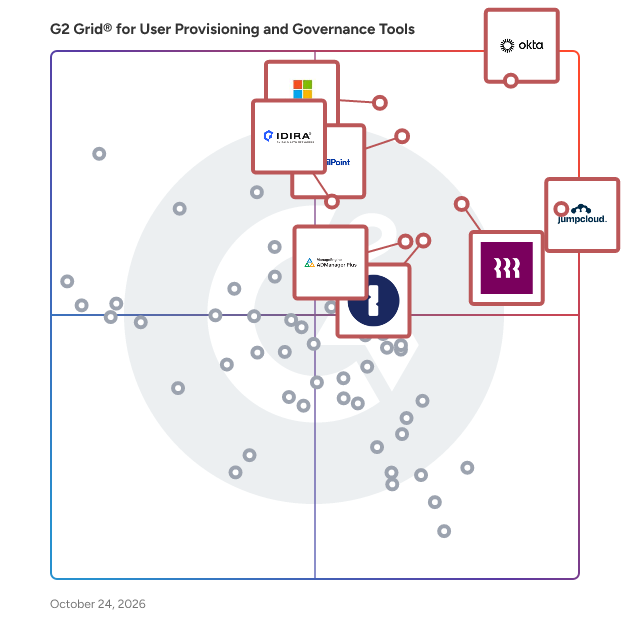
G2 Grid® for User Provisioning and Governance Tools

G2 Grid® for User Provisioning and Governance Tools plotting products by satisfaction and market presence

Highlighted products: Okta, JumpCloud, Microsoft Entra ID, SailPoint, Rippling IT, 1Password, ManageEngine ADManager Plus, and Idira Identity Security Platform.

Underlying data: [Grid® JSON](https://www.g2.com/categories/user-provisioning-and-governance-tools/grids.json?focus%5B%5D=okta&focus%5B%5D=jumpcloud&focus%5B%5D=microsoft-entra-id&focus%5B%5D=sailpoint&focus%5B%5D=rippling-it&focus%5B%5D=1password&focus%5B%5D=manageengine-admanager-plus&focus%5B%5D=idira-identity-security-platform)

Okta

Okta, Inc. is The World’s Identity Company™. We secure AI, machine, and human identity so everyone is free to safely use any technology. Our customer and workforce solutions empower businesses and developers to protect their AI agents, users, employees, and partners while driving security, efficiencies, and innovation. Learn why the world’s leading brands trust Okta for authentication, authorization, and more at okta.com.

Average Rating: 4.5/5.0

Total Reviews: 1,400

How Do G2 Users Rate Okta?

  • Has the product been a good partner in doing business?: 9.0/10 (Category avg: 9.0/10)
  • Mobile App: 8.9/10 (Category avg: 7.5/10)
  • APIs: 9.1/10 (Category avg: 8.5/10)
  • Bi-directional Identity Synchronization: 9.1/10 (Category avg: 8.6/10)

Who Is the Company Behind Okta?

  • Seller: Okta
  • Company Website:
  • Year Founded: 2009
  • HQ Location: San Francisco, California
  • Twitter: @okta
    42,953 Twitter followers
  • LinkedIn® Page: www.linkedin.com
    7,840 employees on LinkedIn®

Who Uses This Product?

  • Who Uses This: Software Engineer, Account Executive
  • Top Industries: Computer Software, Information Technology and Services
  • Company Size: 50% Medium, 39% Large

What Do G2 Reviewers Say About Okta?

AI-generated summary from verified user reviews

Pros
  • Users value the ease of use of Okta, appreciating its centralized authentication and simple setup process.
  • Users value the enhanced security provided by Okta, streamlining logins and supporting various security applications seamlessly.
  • Users value the strong SSO and MFA capabilities of Okta, which greatly enhance security and user experience.
  • Users love the efficiency of single sign-on in Okta, streamlining access and enhancing security effortlessly.
  • Users value the easy access provided by Okta, streamlining app logins and enhancing security across systems.
Cons
  • Users face authentication issues with Okta, including lockouts and complex setups that hinder smooth access.
  • Users face login issues with Okta, citing difficulties with repeated sign-ins and dependency on multi-factor authentication.
  • Users find Okta to be expensive, particularly due to high licensing costs that challenge smaller organizations' adoption.
  • Users find the initial setup and policy configuration complex with Okta, especially as user numbers grow.
  • Users find the frequent authentication process in Okta to be tedious, impacting their overall user experience.

What Are Recent G2 Reviews of Okta?

What Are G2 Users Discussing About Okta?

JumpCloud

JumpCloud® is the AI-powered identity infrastructure that unifies lifecycle management for humans, devices, and autonomous agents. JumpCloud gives IT teams complete visibility and control over every identity and every access point. JumpCloud helps organizations cut complexity, automate secure workflows, and put AI to work safely. Secure every identity. Human or not. Intelligent, secure IT for the agentic era.

Average Rating: 4.5/5.0

Total Reviews: 3,984

How Do G2 Users Rate JumpCloud?

  • Has the product been a good partner in doing business?: 9.0/10 (Category avg: 9.0/10)
  • Mobile App: 7.4/10 (Category avg: 7.5/10)
  • APIs: 8.3/10 (Category avg: 8.5/10)
  • Bi-directional Identity Synchronization: 8.5/10 (Category avg: 8.6/10)

Who Is the Company Behind JumpCloud?

  • Seller: JumpCloud Inc.
  • Company Website:
  • Year Founded: 2012
  • HQ Location: Louisville, CO
  • Twitter: @JumpCloud
    36,368 Twitter followers
  • LinkedIn® Page: www.linkedin.com
    998 employees on LinkedIn®

Who Uses This Product?

  • Who Uses This: IT Manager, System Administrator
  • Top Industries: Information Technology and Services, Computer Software
  • Company Size: 54% Medium, 35% Small

What Do G2 Reviewers Say About JumpCloud?

AI-generated summary from verified user reviews

Pros
  • Users value the ease of use of JumpCloud, simplifying user management across diverse systems and enhancing productivity.
  • Users value JumpCloud's straightforward device management, enabling seamless user management across various systems with intuitive controls.
  • Users value the enhanced security provided by JumpCloud's passwordless login and MFA enforcement features.
  • Users appreciate the seamless integrations with popular apps, simplifying user management across platforms effortlessly.
  • Users find JumpCloud's intuitive user management and responsive support invaluable for seamless integration and enhanced security.
Cons
  • Users report missing features such as better macOS controls and advanced reporting capabilities, limiting overall effectiveness.
  • Users find that improvement is needed in navigation and feature clarity, particularly for beginners navigating JumpCloud.
  • Users note the limited features of JumpCloud, especially in SSO app catalog and Linux device management capabilities.
  • Users face deployment challenges and lack of advanced endpoint controls, impacting their overall experience with JumpCloud.
  • Users feel the user interface needs improvement, as it should be more user-friendly and interactive.

What Are Recent G2 Reviews of JumpCloud?

What Are G2 Users Discussing About JumpCloud?

Microsoft Entra ID

Entra ID is a complete identity and access management solution with integrated security that connects people to their apps, devices, and data and helps protect from identity compromise. With Entra ID, you get: • Secure adaptive access with multi-factor authentication and Conditional Access policies • Seamless user experience with single sign-on, passwordless and user portal • Unified identity management that connect all internal and external users to all apps and devices. • Simplified Identity Governance with provisioning, access packages, and access reviews. Microsoft Entra is our new product family that encompasses all of Microsoft’s identity and access capabilities. The Entra family includes Microsoft Entra ID, as well as two new product categories: Cloud Infrastructure Entitlement Management (CIEM) and decentralized identity. The products in the Entra family will help provide secure access to everything for everyone, by providing identity and access management, cloud infrastructure entitlement management, and identity verification.

Average Rating: 4.5/5.0

Total Reviews: 874

How Do G2 Users Rate Microsoft Entra ID?

  • Has the product been a good partner in doing business?: 9.0/10 (Category avg: 9.0/10)
  • Mobile App: 8.4/10 (Category avg: 7.5/10)
  • APIs: 8.9/10 (Category avg: 8.5/10)
  • Bi-directional Identity Synchronization: 8.7/10 (Category avg: 8.6/10)

Who Is the Company Behind Microsoft Entra ID?

  • Seller: Microsoft
  • Year Founded: 1975
  • HQ Location: Redmond, Washington
  • Twitter: @microsoft
    13,091,739 Twitter followers
  • LinkedIn® Page: www.linkedin.com
    232,750 employees on LinkedIn®
  • Ownership: MSFT

Who Uses This Product?

  • Who Uses This: Software Engineer, System Engineer
  • Top Industries: Information Technology and Services, Computer Software
  • Company Size: 39% Medium, 37% Large

What Do G2 Reviewers Say About Microsoft Entra ID?

AI-generated summary from verified user reviews

Pros
  • Users praise the strong security features of Microsoft Entra ID, ensuring efficient identity management without compromising user experience.
  • Users commend the intuitive interface of Microsoft Entra ID, making it simple to navigate without prior training.
  • Users appreciate the seamless integration of Microsoft Entra ID with Microsoft 365 and its robust identity management capabilities.
  • Users appreciate the easy integrations of Microsoft Entra ID, simplifying identity management across various applications and services.
  • Users appreciate the seamless SSO integration of Microsoft Entra ID, enhancing security and simplifying access across applications.
Cons
  • Users often face complexity in configuration and management of Microsoft Entra ID, leading to frustration and confusion.
  • Users find the complex administration of Microsoft Entra ID challenging, especially with configuration and licensing issues.
  • Users find Microsoft Entra ID's complex configuration challenging, particularly with Conditional Access and licensing clarity.
  • Users find the complex usability of Microsoft Entra ID challenging, especially with configuration and licensing issues.
  • Users find the complex setup of Microsoft Entra ID daunting, especially for beginners and smaller IT teams.

What Are Recent G2 Reviews of Microsoft Entra ID?

What Are G2 Users Discussing About Microsoft Entra ID?

AI can help you find the answers. G2 helps you trust them.

Connect G2 to Claude or ChatGPT for answers grounded in G2's trusted reviews, comparisons, and pricing from real user insights.

How it works

SailPoint

SailPoint is the leader in identity security for the modern enterprise. Harnessing the power of AI and machine learning, SailPoint automates the management and control of access, delivering only the required access to the right identities and technology resources at the right time. Our sophisticated identity platform seamlessly integrates with existing systems and workflows, providing the singular view into all identities and their access. We meet customers where they are with an intelligent identity solution that matches the scale, velocity and environmental needs of the modern enterprise. SailPoint empowers the most complex enterprises worldwide to build a security foundation grounded in identity security.

Average Rating: 4.6/5.0

Total Reviews: 243

How Do G2 Users Rate SailPoint?

  • Has the product been a good partner in doing business?: 8.8/10 (Category avg: 9.0/10)
  • Mobile App: 6.1/10 (Category avg: 7.5/10)
  • APIs: 7.7/10 (Category avg: 8.5/10)
  • Bi-directional Identity Synchronization: 8.0/10 (Category avg: 8.6/10)

Who Is the Company Behind SailPoint?

  • Seller: SailPoint
  • Company Website:
  • Year Founded: 2004
  • HQ Location: Austin, TX
  • Twitter: @SailPoint
    15,037 Twitter followers
  • LinkedIn® Page: www.linkedin.com
    3,811 employees on LinkedIn®

Who Uses This Product?

  • Who Uses This: Senior Manager, Software Engineer
  • Top Industries: Financial Services, Information Technology and Services
  • Company Size: 78% Large, 16% Medium

What Do G2 Reviewers Say About SailPoint?

AI-generated summary from verified user reviews

Pros
  • Users value the ease of use of SailPoint, facilitating straightforward access management and integration across applications.
  • Users appreciate the ease of access control and automated governance features of SailPoint, enhancing security and simplicity.
  • Users value the automated security management of SailPoint, enhancing user permissions and ensuring robust identity security.
  • Users appreciate SailPoint for its automated access reviews and policy enforcement, enhancing security and simplifying user management.
  • Users value the easy integrations of SailPoint, simplifying access management across multiple applications efficiently.
Cons
  • Users note the limited advancements in the RBAC module and slow response times from support can hinder effectiveness.
  • Users experience poor customer support with slow response times, unnecessary details, and difficulties in communication across time zones.
  • Users find missing features frustrating as they hinder functionality and prolong the implementation of necessary updates.
  • Users find the platform to be expensive due to costs associated with cloud rules and complex implementations.
  • Users find the difficult learning curve challenging, especially those without programming backgrounds needing extensive ramp-up time.

What Are Recent G2 Reviews of SailPoint?

What Are G2 Users Discussing About SailPoint?

Rippling IT

Rippling IT is a unified IT platform for identity, device, access, and security management, giving IT teams a single dashboard to run every workflow, from provisioning apps and laptops to enforcing security policies. Rippling IT manages the entire employee lifecycle automatically, granting and revoking app access, configuring devices, and maintaining least-privilege controls as employees join, change roles, and leave. Real-time monitoring, automated patching, and integrated endpoint protection keep companies compliant, while instant lockouts and secure device recovery make offboarding fast and secure. Because hardware, software, and user risk all live in one system, IT teams get full visibility without juggling multiple tools. Companies use Rippling IT to cut costs, eliminate manual work, and strengthen security, so their teams can move faster. Experience the power of unified IT management with Rippling today.

Average Rating: 4.7/5.0

Total Reviews: 1,097

How Do G2 Users Rate Rippling IT?

  • Has the product been a good partner in doing business?: 8.9/10 (Category avg: 9.0/10)
  • Mobile App: 8.0/10 (Category avg: 7.5/10)
  • APIs: 8.7/10 (Category avg: 8.5/10)
  • Bi-directional Identity Synchronization: 8.8/10 (Category avg: 8.6/10)

Who Is the Company Behind Rippling IT?

  • Seller: Rippling
  • Company Website:
  • Year Founded: 2016
  • HQ Location: San Francisco, CA
  • Twitter: @Rippling
    12,402 Twitter followers
  • LinkedIn® Page: www.linkedin.com
    7,798 employees on LinkedIn®

Who Uses This Product?

  • Who Uses This: Software Engineer, CEO
  • Top Industries: Computer Software, Information Technology and Services
  • Company Size: 59% Medium, 27% Small

What Do G2 Reviewers Say About Rippling IT?

AI-generated summary from verified user reviews

Pros
  • Users appreciate the ease of use in Rippling IT, enjoying its organized interface and streamlined processes.
  • Users find Rippling to be intuitive and well-organized, making it easy to access essential applications and information.
  • Users love the user-friendly and intuitive design of Rippling IT, simplifying navigation and enhancing their experience.
  • Users appreciate the easy access Rippling provides to essential applications, enhancing efficiency in their daily work routines.
  • Users appreciate the simple and intuitive user interface that facilitates easy navigation and efficient use of features.
Cons
  • Users express frustration with the missing features of Rippling IT, particularly in integration and support functionalities.
  • Users find the limited features of Rippling IT frustrating, especially with payroll and integration issues complicating the experience.
  • Users express a need for improved organization and functionality within Rippling IT’s payroll and password management features.
  • Users find the learning curve steep, especially for those who are not tech-savvy, impacting their experience.
  • Users express frustration with poor customer support, citing limitations in assistance and the need for custom solutions.

What Are Recent G2 Reviews of Rippling IT?

1Password

1Password is a unified access platform that helps organizations discover, secure, and audit access across people, AI agents, and machines. We protect the credentials, secrets, and access paths that modern businesses rely on, while giving IT and security teams the visibility and control they need to reduce risk and keep work moving. 1Password Enterprise Password Manager secures passwords, passkeys, SSH keys, API tokens, developer secrets, and AI agent credentials in encrypted, policy-governed vaults. Teams can centralize sensitive information, manage permissions, support secure sharing, identify weak or exposed credentials, and connect audit events to their security information and event management (SIEM) tools. Our zero-knowledge architecture encrypts data before it reaches our servers, so only authorized users and devices can decrypt it. 1Password SaaS Manager helps organizations discover, secure, and optimize their SaaS and AI environments. It continuously identifies sanctioned and unsanctioned applications through identity providers, single sign-on systems, finance platforms, device agents, 1Password vaults, and browser activity. IT teams can manage app access requests, automate onboarding and offboarding, conduct access reviews, identify unused licenses and overlapping applications, and track AI usage and spend. 1Password Privileged Access replaces standing privileges with just-in-time, just-enough access for people and AI agents. Teams can provision narrowly scoped permissions across cloud infrastructure, databases, Kubernetes, and SaaS platforms, then remove access when the task or session ends. Policy-based approvals, dynamic guardrails, intent monitoring, and detailed audit logs help security teams control high-risk access without slowing down legitimate work. 1Password Credential Broker authenticates machine workloads and AI agents at runtime, then delivers only the credentials approved for that specific job. This reduces long-lived secrets in pipelines and environments while recording who or what requested access and which policy authorized it. 1Password Device Trust verifies device identity and health before granting access to protected resources. Together, these capabilities give organizations a practical foundation for secure access across human, machine, and AI identities, from growing teams to enterprise environments.

Average Rating: 4.6/5.0

Total Reviews: 1,797

G2 Deal: Try 1Password for Free

Try 1Password Business free for 14 days

Price: ~~19.95~~ → 0

View this exclusive G2 deal

How Do G2 Users Rate 1Password?

  • Has the product been a good partner in doing business?: 9.3/10 (Category avg: 9.0/10)
  • Mobile App: 9.0/10 (Category avg: 7.5/10)
  • APIs: 8.3/10 (Category avg: 8.5/10)
  • Bi-directional Identity Synchronization: 9.2/10 (Category avg: 8.6/10)

Who Is the Company Behind 1Password?

  • Seller: 1Password
  • Company Website:
  • Year Founded: 2005
  • HQ Location: Ontario
  • Twitter: @1Password
    139,683 Twitter followers
  • LinkedIn® Page: www.linkedin.com
    3,263 employees on LinkedIn®

Who Uses This Product?

  • Who Uses This: Software Engineer, CEO
  • Top Industries: Computer Software, Information Technology and Services
  • Company Size: 54% Small, 32% Medium

What Do G2 Reviewers Say About 1Password?

AI-generated summary from verified user reviews

Pros
  • Users value the ease of use of 1Password, enjoying its secure and organized password management across devices.
  • Users value the robust security features of 1Password, ensuring peace of mind while managing their passwords effortlessly.
  • Users enjoy the secure and easy password management of 1Password, providing peace of mind and efficient access.
  • Users find 1Password intuitive, with easy navigation and seamless syncing across devices enhancing password management efficiency.
  • Users praise the easy access of 1Password, streamlining logins and consolidating credentials effortlessly across devices.
Cons
  • Users often find password tracking and management cumbersome, leading to frustration with functionality and usability issues.
  • Users feel that the pricing can be quite high for individuals, making it less accessible for some.
  • Users experience login issues with 1Password, affecting usability and creating frustration during their workflow.
  • Users experience autofill issues with 1Password, finding it intrusive and lacking control over credentials management.
  • Users find the high cost of 1Password concerning, especially with no free plan and limited trial period.

What Are Recent G2 Reviews of 1Password?

What Are G2 Users Discussing About 1Password?

ManageEngine ADManager Plus

ADManager Plus is an identity governance and administration (IGA) solution that simplifies identity management, ensures security, and improves compliance. With ADManager Plus, manage the user life cycle from provisioning to deprovisioning, run access certification campaigns, orchestrate identity management across enterprise applications, and protect data on your enterprise platforms with regular backups. The solution provides comprehensive identity risk assessment and proactive management of your organization's risk exposure by highlighting potential security vulnerabilities and visualizing attack paths to privileged entities. This enables IT teams to prioritize remediation efforts and strengthen their security posture before threats can be exploited. Use over 200 reports to gain valuable insights into identities and their access rights, and leverage customizable dashboards and scheduled report generation for continuous monitoring. The platform supports compliance frameworks including the GDPR and HIPAA through automated audit trails and detailed access reviews. Improve the efficiency of your IGA operations with workflows, automations, and role-based access control policies. Built-in templates streamline common tasks while multi-stage approval workflows ensure proper oversight of critical changes. ADManager Plus' Android and iOS applications help with on-the-go AD and Microsoft Entra ID management, enabling administrators to respond quickly to urgent requests.

Average Rating: 4.5/5.0

Total Reviews: 105

How Do G2 Users Rate ManageEngine ADManager Plus?

  • Has the product been a good partner in doing business?: 9.1/10 (Category avg: 9.0/10)
  • Mobile App: 7.7/10 (Category avg: 7.5/10)
  • APIs: 8.3/10 (Category avg: 8.5/10)
  • Bi-directional Identity Synchronization: 8.9/10 (Category avg: 8.6/10)

Who Is the Company Behind ManageEngine ADManager Plus?

  • Seller: Zoho
  • Year Founded: 1996
  • HQ Location: Austin, TX
  • Twitter: @Zoho
    137,880 Twitter followers
  • LinkedIn® Page: www.linkedin.com
    30,913 employees on LinkedIn®
  • Phone: +1 (888) 900-9646

Who Uses This Product?

  • Top Industries: Banking, Government Administration
  • Company Size: 58% Medium, 37% Large

What Do G2 Reviewers Say About ManageEngine ADManager Plus?

AI-generated summary from verified user reviews

Pros
  • Users appreciate the strong automation in ManageEngine ADManager Plus, significantly reducing manual Active Directory tasks and enhancing efficiency.
  • Users appreciate the ease of use of ManageEngine ADManager Plus, facilitating efficient Active Directory management with its intuitive interface.
  • Users love the strong automation and reporting capabilities of ManageEngine ADManager Plus, enhancing efficiency and reducing manual work.
  • Users value the efficiency optimization of ManageEngine ADManager Plus, streamlining tasks and enhancing productivity effortlessly.
  • Users value the strong automation and reporting capabilities of ADManager Plus, enhancing efficiency in Active Directory management.
Cons
  • Users find the interface cluttered and overwhelming, particularly affecting new users and advanced feature navigation.
  • Users find the interface complexity of ManageEngine ADManager Plus overwhelming, particularly for newcomers navigating its features.
  • Users find the complex reporting features of ManageEngine ADManager Plus to be less intuitive and cumbersome to navigate.
  • Users often find the interface cluttered and overwhelming, making it challenging for new users to navigate effectively.
  • Users find the learning curve steep, as the interface can be overwhelming and advanced features require time to master.

What Are Recent G2 Reviews of ManageEngine ADManager Plus?

What Are G2 Users Discussing About ManageEngine ADManager Plus?

Idira Identity Security Platform

One platform to Secure Every Identity Identity is the control plane for the AI enterprise. Introducing Idira®, the only platform that seamlessly integrates modern privilege access management (PAM), machine and agentic identity security capabilities.

Average Rating: 4.5/5.0

Total Reviews: 244

How Do G2 Users Rate Idira Identity Security Platform?

  • Has the product been a good partner in doing business?: 9.0/10 (Category avg: 9.0/10)
  • Mobile App: 6.9/10 (Category avg: 7.5/10)
  • APIs: 7.7/10 (Category avg: 8.5/10)
  • Bi-directional Identity Synchronization: 8.4/10 (Category avg: 8.6/10)

Who Is the Company Behind Idira Identity Security Platform?

  • Seller: Palo Alto Networks
  • Company Website:
  • Year Founded: 2005
  • HQ Location: Santa Clara, CA
  • Twitter: @PaloAltoNtwks
    128,951 Twitter followers
  • LinkedIn® Page: www.linkedin.com
    23,492 employees on LinkedIn®

Who Uses This Product?

  • Who Uses This: IT Manager
  • Top Industries: Information Technology and Services, Financial Services
  • Company Size: 53% Large, 37% Medium

What Are Recent G2 Reviews of Idira Identity Security Platform?

What Are G2 Users Discussing About Idira Identity Security Platform?

Saviynt

Saviynt helps organizations transform their organization with identity security, enabling them to build and run AI with confidence. Saviynt enables enterprises to secure every identity — human, non-human, and AI — in any application and environment, strengthen their identity security posture, streamline operations, and ensure every user and agent has the right access at the right time. With Saviynt Zuma, enterprises can discover, protect, and manage AI identities from a single control plane, delivering the necessary tools to flag and fix shadow AI, control access at runtime, establish accountability, and empower secure agentic development across the entire organization. In turn, organizations enjoy lower risk, complete visibility and governance, reduced total cost of ownership, and much more throughout their entire identity security program.

Average Rating: 4.3/5.0

Total Reviews: 98

How Do G2 Users Rate Saviynt?

  • Has the product been a good partner in doing business?: 9.0/10 (Category avg: 9.0/10)
  • Mobile App: 5.9/10 (Category avg: 7.5/10)
  • APIs: 7.8/10 (Category avg: 8.5/10)
  • Bi-directional Identity Synchronization: 8.1/10 (Category avg: 8.6/10)

Who Is the Company Behind Saviynt?

  • Seller: Saviynt
  • Company Website:
  • Year Founded: 2010
  • HQ Location: El Segundo, US
  • Twitter: @saviynt
    1,242 Twitter followers
  • LinkedIn® Page: www.linkedin.com
    1,743 employees on LinkedIn®

Who Uses This Product?

  • Top Industries: Information Technology and Services, Financial Services
  • Company Size: 79% Large, 6% Small

What Do G2 Reviewers Say About Saviynt?

AI-generated summary from verified user reviews

Pros
  • Users commend Saviynt for its exceptional ease of use, enabling efficient task performance with minimal training required.
  • Users value the exceptional functionality of Saviynt, appreciating its ease of use and regular updates.
  • Users commend the easy setup of Saviynt, enabling quick configuration and enhancing overall workflow efficiency.
  • Users value the 24/7 customer support from Saviynt, ensuring prompt assistance for product-related issues.
  • Users value the seamless integration with various tools, enhancing collaboration and efficiency across platforms.
Cons
  • Users find the difficult learning curve with Saviynt due to its complicated UX and confusing forms.
  • Users find a lack of features in Saviynt, particularly regarding customization and support for specific functionalities.
  • Users find limited features in Saviynt, including inflexible SavRoles and challenges with upgrades affecting functionality.
  • Users are frustrated by the poor interface design, making setup and navigation unnecessarily complicated and confusing.
  • Users find the complex setup of Saviynt challenging, impacting ease of use and flexibility in adoption.

What Are Recent G2 Reviews of Saviynt?

Auth0

Auth0 takes a modern approach to identity, providing secure access to any application, for any user. Safeguarding billions of login transactions each month, Auth0 delivers convenience, privacy, and security so customers can focus on innovation. Auth0 is part of Okta, The World’s Identity Company™. Auth0 lets you quickly integrate authentication and authorization for web, mobile, and legacy applications, with new Fine Grained Authorization (FGA) that goes beyond role-based access control. Authenticate users across all applications with a customized, secure, and standards-based single login. Universal Login connects users to a central authorization server. Credentials aren’t transferred across sources, which boosts security and protects against phishing and credential stuffing attacks. OAuth 2.0 recommends that only external user agents (like the browser) be used by native applications for authentication flows. Auth0’s Universal Login achieves this while also enabling SSO.

Average Rating: 4.3/5.0

Total Reviews: 277

How Do G2 Users Rate Auth0?

  • Has the product been a good partner in doing business?: 8.4/10 (Category avg: 9.0/10)
  • Mobile App: 8.3/10 (Category avg: 7.5/10)
  • APIs: 8.9/10 (Category avg: 8.5/10)
  • Bi-directional Identity Synchronization: 8.4/10 (Category avg: 8.6/10)

Who Is the Company Behind Auth0?

  • Seller: Okta
  • Company Website:
  • Year Founded: 2009
  • HQ Location: San Francisco, California
  • Twitter: @okta
    42,953 Twitter followers
  • LinkedIn® Page: www.linkedin.com
    7,840 employees on LinkedIn®

Who Uses This Product?

  • Who Uses This: Software Engineer, Senior Software Engineer
  • Top Industries: Computer Software, Information Technology and Services
  • Company Size: 49% Small, 30% Medium

What Do G2 Reviewers Say About Auth0?

AI-generated summary from verified user reviews

Pros
  • Users appreciate the ease of use of Auth0, enabling quick implementation of secure authentication without hassle.
  • Users appreciate the robust security features of Auth0, enabling quick implementation of secure authentication effortlessly.
  • Users appreciate the easy and flexible authentication flows of Auth0, which enhance security and streamline implementation.
  • Users value the diverse integrations offered by Auth0, enhancing authentication flexibility and streamlining user management.
  • Users value the easy integrations of Auth0, enabling seamless connections with various authentication methods and applications.
Cons
  • Users find Auth0 expensive, especially for small businesses and accessing advanced customization and security features.
  • Users find the cost prohibitive, particularly for small businesses needing advanced features and customizations.
  • Users find the expensive pricing of Auth0 challenging, especially for small businesses and growing applications.
  • Users find the difficult learning curve challenging, requiring significant technical expertise before using Auth0 effectively.
  • Users find complex configurations challenging, especially beginners, and feel restricted by pricing tiers for advanced features.

What Are Recent G2 Reviews of Auth0?

What Are G2 Users Discussing About Auth0?

BetterCloud

BetterCloud is a comprehensive SaaS management platform designed to assist IT teams in effectively managing and optimizing their software-as-a-service (SaaS) applications. This solution focuses on automating essential processes such as onboarding, offboarding, mid-lifecycle changes, give you greater control and insight into your SaaS apps, thousands of forward-thinking organizations rely on BetterCloud to transform employee experience, optimize software spend, and strengthen overall security. By leveraging BetterCloud, organizations can significantly reduce the manual workload associated with SaaS management, achieving up to a 78% reduction in operational tasks. Targeted primarily at IT departments and SaaS operations teams, BetterCloud addresses the challenges faced by organizations that utilize multiple SaaS applications. As businesses increasingly adopt cloud-based solutions, the complexity of managing user access, security policies, and application lifecycles grows. BetterCloud provides a centralized platform that streamlines these processes, ensuring that IT teams can maintain control and compliance while enhancing overall operational efficiency. Key features of BetterCloud include automated user lifecycle management, which simplifies the onboarding and offboarding of employees, ensuring that access rights are promptly granted or revoked as needed. Additionally, the platform offers robust security policy management, allowing organizations to enforce compliance and protect sensitive data across their SaaS ecosystem. BetterCloud also supports mid-lifecycle changes, enabling IT teams to adapt user access as roles and responsibilities evolve within the organization. The benefits of using BetterCloud extend beyond mere automation. By reducing the time spent on repetitive tasks, IT teams can focus on strategic initiatives that drive business growth and innovation. Furthermore, the platform's ability to provide insights into application usage and security posture empowers organizations to make informed decisions about their SaaS investments. With a strong reputation in the industry, backed by over a decade of experience and recognition from leading analyst firms, BetterCloud stands out as a trusted partner for organizations looking to optimize their SaaS operations. In summary, BetterCloud is not just a tool for managing SaaS applications; it is a strategic solution that transforms the way organizations handle their cloud-based software. By automating critical processes and providing valuable insights, BetterCloud enables IT teams to enhance productivity, improve security, and ultimately drive better business outcomes in a rapidly evolving digital landscape.

Average Rating: 4.4/5.0

Total Reviews: 481

How Do G2 Users Rate BetterCloud?

  • Has the product been a good partner in doing business?: 9.1/10 (Category avg: 9.0/10)
  • Mobile App: 6.0/10 (Category avg: 7.5/10)
  • APIs: 8.1/10 (Category avg: 8.5/10)
  • Bi-directional Identity Synchronization: 7.8/10 (Category avg: 8.6/10)

Who Is the Company Behind BetterCloud?

  • Seller: CORESTACK
  • Company Website:
  • Year Founded: 2016
  • HQ Location: Bellevue, WA
  • Twitter: @corestack
    1,021 Twitter followers
  • LinkedIn® Page: www.linkedin.com
    210 employees on LinkedIn®

Who Uses This Product?

  • Who Uses This: IT Manager, Systems Administrator
  • Top Industries: Information Technology and Services, Computer Software
  • Company Size: 60% Medium, 28% Large

What Do G2 Reviewers Say About BetterCloud?

AI-generated summary from verified user reviews

Pros
  • Users value the automation capabilities of BetterCloud, significantly improving efficiency in onboarding and offboarding processes.
  • Users find BetterCloud extremely intuitive, simplifying tasks like onboarding, offboarding, and managing app integrations.
  • Users find BetterCloud's onboarding and offboarding automation invaluable, streamlining tasks and saving significant time.
  • Users highlight BetterCloud's intuitive management features that streamline settings and automate workflows for enhanced efficiency.
  • Users appreciate how BetterCloud provides time-saving automation for onboarding and offboarding tasks, enhancing efficiency significantly.
Cons
  • Users find limited features in BetterCloud, wishing for more integrations and improved functionality across platforms.
  • Users experience integration issues with BetterCloud, particularly with Visa Online, Sentilink, and Citrix products, limiting functionality.
  • Users find the missing features in BetterCloud frustrating, as they limit functionality with various SaaS platforms.
  • Users find the access limitations of BetterCloud frustrating, particularly with restricted API functionality and auto-reply settings.
  • Users find BetterCloud lacking features, such as customizable alerts and sorting options, hindering user experience.

What Are Recent G2 Reviews of BetterCloud?

What Are G2 Users Discussing About BetterCloud?

Hire2Retire

RoboMQ’s Hire2Retire is an Identity Governance and Administration (IGA) solution designed to manage the complete workforce lifecycle, encompassing joiners, movers, and leavers (JML) events such as hiring, role changes, department transfers, terminations, and long-term leaves. This solution effectively bridges the gap between HR systems and IT infrastructure by synchronizing identity data with platforms like Active Directory (AD), Entra ID, Okta, and Google Workspace. By ensuring that user access and privileges are consistently aligned with their roles within the organization, Hire2Retire enhances overall operational efficiency. Targeted primarily at mid to large, fast-growing organizations, Hire2Retire addresses the challenges associated with manual and fragmented lifecycle management processes. Traditional methods of onboarding and offboarding can be slow, error-prone, and resource-intensive, often leading to security vulnerabilities, compliance risks, and diminished employee experiences. By automating these processes, Hire2Retire not only streamlines operations but also significantly reduces operational overhead, allowing organizations to focus on more strategic initiatives. One of the standout features of Hire2Retire is its extensive integration capabilities. With connections to 27 HR and Applicant Tracking Systems (ATS), major identity providers, and over 10 leading service management platforms such as ServiceNow, Salesforce, SolarWinds, and FreshService, the solution enables seamless identity orchestration. Its robust library of connectors allows for the automatic provisioning and deprovisioning of access to third-party applications based on profile-driven entitlements, making it a scalable and flexible IGA solution that adapts to the needs of modern enterprises. From a governance and security standpoint, Hire2Retire enforces role-based access control and continuously aligns user privileges with their job functions. This ensures that employees have the right level of access at all times, reducing the risk of over-provisioning. Additionally, timely deprovisioning during terminations or role changes helps prevent unauthorized access, protecting the organization from potential security breaches and reputational risks. Hire2Retire supports organizational compliance with key regulatory frameworks and standards including SOX, HIPAA, ISO 27001, and GDPR, providing complete audit trails for every identity lifecycle event.

Average Rating: 4.7/5.0

Total Reviews: 76

How Do G2 Users Rate Hire2Retire?

  • Has the product been a good partner in doing business?: 9.4/10 (Category avg: 9.0/10)
  • Mobile App: 5.8/10 (Category avg: 7.5/10)
  • APIs: 8.0/10 (Category avg: 8.5/10)
  • Bi-directional Identity Synchronization: 8.1/10 (Category avg: 8.6/10)

Who Is the Company Behind Hire2Retire?

  • Seller: RoboMQ
  • Company Website:
  • Year Founded: 2012
  • HQ Location: Vienna, VA
  • Twitter: @robomq
    266 Twitter followers
  • LinkedIn® Page: in.linkedin.com
    100 employees on LinkedIn®

Who Uses This Product?

  • Top Industries: Non-Profit Organization Management, Manufacturing
  • Company Size: 80% Medium, 14% Large

What Do G2 Reviewers Say About Hire2Retire?

AI-generated summary from verified user reviews

Pros
  • Users commend the exceptional customer support of Hire2Retire, noting their quick responses and effective issue resolution.
  • Users value the ease of use of Hire2Retire, praising its intuitive design and seamless integration with HRIS.
  • Users value the easy integrations of Hire2Retire, streamlining HR processes with automated onboarding and seamless system connectivity.
  • Users commend the ease of implementation with Hire2Retire, highlighting excellent support and streamlined onboarding processes.
  • Users appreciate the automation capabilities of Hire2Retire, making complex processes straightforward and efficient.
Cons
  • Users find the implementation process to be quite involved, leading to delays in getting the system fully operational.
  • Users find the difficult setup of Hire2Retire challenging, requiring extra time and training for effective implementation.
  • Users wish for a better error handling process, especially regarding immediate terminations and repetitive messages.
  • Users face a steep learning curve during setup, requiring better training materials for a smoother experience.
  • Users experience integration issues with Hire2Retire, particularly with Paycom, though improvements have been made over time.

What Are Recent G2 Reviews of Hire2Retire?

DoControl

DoControl is a SaaS data security platform that helps organizations discover, understand, and protect sensitive data across business-critical applications like Google Workspace, Microsoft 365, Slack, Salesforce, and Box. DoControl gives security teams continuous visibility into where sensitive data lives, who and what has access to it, and how it’s being used - helping address risks from excessive permissions, external sharing, insider threats, third-party access, Shadow AI, and risky OAuth applications. Combining SaaS DLP, Data Access Governance, data classification, insider risk detection, and automated remediation, DoControl goes beyond alerting to actively reduce risk. Its agentless, API-driven platform uses identity and business context to detect risky activity and automatically enforce policies - revoking access, removing public sharing, quarantining sensitive data, and remediating exposure at scale - without proxies, endpoint agents, or disruption to users.

Average Rating: 4.7/5.0

Total Reviews: 55

How Do G2 Users Rate DoControl?

  • Mobile App: 5.0/10 (Category avg: 7.5/10)
  • APIs: 10.0/10 (Category avg: 8.5/10)

Who Is the Company Behind DoControl?

Who Uses This Product?

  • Top Industries: Computer Software, Manufacturing
  • Company Size: 54% Large, 46% Medium

What Do G2 Reviewers Say About DoControl?

AI-generated summary from verified user reviews

Pros
  • Users value the clear visibility into SaaS data, ensuring informed decision-making and improved security oversight.
  • Users value the clear visibility and continuous monitoring of DoControl, enhancing their ability to detect security flaws.
  • Users value the real-time monitoring capabilities of DoControl, enhancing visibility into SaaS data and user activities.
  • Users value the enhanced security monitoring of DoControl, enabling them to identify and address potential security flaws effectively.
  • Users value the robust access control feature of DoControl, enhancing security by monitoring cloud application activities effectively.
Cons
  • Users find the complexity of configurations challenging, particularly when dealing with policy management and user access settings.
  • Users find the difficult learning curve in onboarding and policy management interface challenging in DoControl.
  • Users find the policy management interface confusing, making it challenging to manage strict user access effectively.
  • Users find complex configuration time-consuming, limiting the effectiveness of the otherwise easy-to-create custom policies.
  • Users find configuration issues arise from limited options and the complexity of creating custom setups takes time.

What Are Recent G2 Reviews of DoControl?

tenfold

Protect What Matters. Start With Identity. tenfold is the leading no-code solution for managing access rights and detecting identity threats. Our IGA platform ensures that the right people have access to the right resources at the right time. Thanks to its off-the-shelf plugins and streamlined setup, tenfold is fully operational in weeks - helping you avoid long & costly setup phases. Go from access risks to full control over IT privileges with tenfold's comprehensive IGA toolset: - User Lifecycle Management - Role-based Access - End User Self-Service - Approval Workflows - Data Access Governance - Shared Content Governance - User Access Reviews - Separation of Duties

Average Rating: 4.5/5.0

Total Reviews: 115

How Do G2 Users Rate tenfold?

  • Has the product been a good partner in doing business?: 8.8/10 (Category avg: 9.0/10)
  • APIs: 8.3/10 (Category avg: 8.5/10)
  • Bi-directional Identity Synchronization: 9.4/10 (Category avg: 8.6/10)

Who Is the Company Behind tenfold?

  • Seller: tenfold
  • Company Website:
  • HQ Location: New York, US
  • LinkedIn® Page: www.linkedin.com
    21 employees on LinkedIn®

Who Uses This Product?

  • Top Industries: Information Technology and Services, Insurance
  • Company Size: 52% Medium, 42% Large

What Do G2 Reviewers Say About tenfold?

AI-generated summary from verified user reviews

Pros
  • Users value the ease of use of tenfold, enabling quick setup and management without complex coding.
  • Users love the intuitive operation of tenfold, making it easy to configure without any complex scripts.
  • Users appreciate the automated user processes in tenfold, significantly reducing manual work and enhancing efficiency.
  • Users value the time-saving automation of user processes, streamlining HR tasks and enhancing efficiency across departments.
  • Users appreciate the automation in tenfold, simplifying user management and enhancing efficiency across departments.
Cons
  • Users note the missing features in Tenfold, leading to limitations in customization and functionality.
  • Users find the poor UI of Tenfold makes navigation difficult, leading to a steep learning curve for beginners.
  • Users find the difficult learning curve challenging, especially due to the many features and non-intuitive menu items.
  • Users find the difficult navigation of Tenfold requires significant training and time to master its features.
  • Users find the difficult setup of Tenfold challenging due to its extensive features and initial learning curve.

What Are Recent G2 Reviews of tenfold?

NIM

NIM effortlessly streamlines user provisioning and lifecycle management, blending power with simplicity. Designed for ease of use and rapid implementation, NIM seamlessly manages any volume of users or systems for both commercial organizations and educational institutions. NIM's advanced data aggregation combines information from multiple sources, streamlining provisioning, rostering, and exports. This integration guarantees data is accurate and ready. The simplicity of NIM extends to role modeling, where you can create and analyze roles across systems with the Role Mining tool. NIM simplifies audits with real-time impact analysis, making comprehensive report generation easy and efficient. NIM's flexible, open design and customizable Apps simplify tailoring solutions to your needs, streamlining user provisioning. Its automated processes minimize manual work, enhancing accuracy and efficiency. NIM simplifies complex tasks, ensuring organizations achieve high efficiency with ease.

Average Rating: 5.0/5.0

Total Reviews: 20

How Do G2 Users Rate NIM?

  • Has the product been a good partner in doing business?: 9.8/10 (Category avg: 9.0/10)
  • APIs: 8.3/10 (Category avg: 8.5/10)
  • Bi-directional Identity Synchronization: 9.2/10 (Category avg: 8.6/10)

Who Is the Company Behind NIM?

  • Seller: Tools4ever
  • Year Founded: 1999
  • HQ Location: Lynbrook, New York
  • Twitter: @Tools4ever
    329 Twitter followers
  • LinkedIn® Page: www.linkedin.com
    62 employees on LinkedIn®

Who Uses This Product?

  • Top Industries: Primary/Secondary Education, Education Management
  • Company Size: 50% Large, 50% Medium

What Do G2 Reviewers Say About NIM?

AI-generated summary from verified user reviews

Pros
  • Users appreciate the ease of use in NIM, highlighting its intuitive navigation and flexible user management capabilities.
  • Users highly value the automation capabilities of NIM, significantly enhancing user account management and support responsiveness.
  • Users praise the quick and efficient customer support of NIM, resolving issues promptly and enhancing user satisfaction.
  • Users appreciate the seamless access control of NIM, enhancing onboarding and account management efficiency across platforms.
  • Users value the customization options in NIM, enhancing data visibility and supporting flexible configurations with responsive support.
Cons
  • Users find the complex setup of NIM challenging, requiring time and effort to learn effectively.
  • Users experience a steep learning curve with NIM, requiring time to understand its complex functionalities.
  • Users note a steep learning curve with NIM, requiring time and effort to master its complexity.
  • Users face a steep learning curve with NIM, requiring time to navigate its complex system effectively.
  • Users find the reporting and documentation lacking, wishing for a more user-friendly experience with NIM.

What Are Recent G2 Reviews of NIM?

Brandon Summers-Miller
BS
Researched and written by Brandon Summers-Miller
Updated October 29, 2024

Learn More About User Provisioning and Governance Tools

What are user provisioning and governance tools and software?

User provisioning and governance tools help companies automate the process of creating, permissioning, managing, and deactivating user accounts on corporate systems and applications across the enterprise. Typical use cases include user lifecycle stages such as setting up accounts for newly hired employees during onboarding and providing them access to the tools they need, changing user groups and permissions when employees are promoted or move within departments, and removing user accounts after an employee leaves the company. User provisioning and governance tools software automate user account creation by connecting information in user identity stores such as HR systems and/or user directories like Active Directory or G Suite to enterprise applications to systems that employees use such as email systems, databases, CRM systems, communication systems, employee productivity software, file storage systems, ERP applications, subscriptions, custom company applications, and more.

There is considerable overlap between user provisioning and governance tools and identity and access management (IAM) software functionality, as both offer user provisioning and govern user access. User provisioning and governance solutions focus more specifically on user lifecycle and group management. At the same time, IAM software includes additional benefits, such as centralized identity functions for both on-premises and cloud accounts and providing user authentication before granting user access to corporate systems.

Key benefits of user provisioning and governance software solutions

  • Automate user account lifecycle from provisioning during onboarding through de-provisioning after leaving the company
  • Grant access to applications and systems based on user type through role or group management functions
  • Reduce the time helpdesk team members need to spend manually creating users
  • Improve end-user experience by offering self-service tools and integrations with single sign-on solutions and password management tools

Why use user provisioning and governance systems?

Using automated tools to manage user lifecycles, companies can eliminate manual user provisioning and de-provisioning tasks, which can ultimately reduce the burden on IT help desk teams and free up staff time for more high-level work. Deploying user provisioning and governance solutions reduces human error when creating accounts while reducing the threat of “permission creep" when accounts are not properly changed after promotions, demotions, or terminations. Using this software enables companies to manage large numbers of users at once by applying role or group policies across users in a standard fashion.

Setting up new hires — Companies use user provisioning and governance tools to ensure new hires receive access to the accounts they need as quickly as possible during onboarding. If IT staff manually created user accounts, the process could take days, weeks, or even months and be prone to human error.

Removing access for terminated employees—It is important to remove access for terminated employees as quickly as possible to prevent security risks, either from the terminated employees themselves or from hackers accessing abandoned user accounts. Using user provisioning and governance tools, companies can automatically de-provision user accounts when an employee is removed from an HR system or other identity store.

Enforcing role or group-based policies — When managing hundreds (if not thousands) of user accounts, taking actions, such as providing access to new applications based on the users’ role or group types, can save a lot of time and get these users up and running quickly. For example, suppose all sales representatives should have access to a particular sales-related application. In that case, those user accounts can automatically be provisioned with access if they belong to the sales group. On the other hand, employees in the legal department may not need access to that sales application, so they would not be provisioned with an account for that specific sales software.

Security — Insider threats can occur when user accounts are given too much access for their job type, and employees use the information they shouldn’t have access to. For example, an intern-employee likely shouldn’t be given the same access to the company’s accounts, like an accounting system, as the chief operating officer has. Using role- and group-based policies, IT administrators can easily remove permissions no longer needed by a type or group of employees and prevent permission creep.

Reducing costs—Labor is typically one of the highest expenses companies have. Using user provisioning and governance tools frees up time for IT help desk team members to do other higher-value work. Many user provisioning and governance tools solutions allow end-user self-service to make changes like name changes directly.

Who uses user provisioning and governance software tools?

Most companies would benefit from using identity governance software solutions to manage employee user account provisioning, management, and de-provisioning. In particular, companies with many employees and user accounts to manage, such as enterprise-level companies, would benefit from using identity governance platforms, as manual account creation is difficult, laborious, and prone to error.

IT administrators and help desk teams typically manage user provisioning and governance tools within a company’s corporate structure. With automated lifecycle management, however, multiple stakeholders across the enterprise can work in tandem to ensure users are set up correctly and have the proper access. For example, HR representatives can change new hires or people who have left the company in the HR system. This information can be pulled by the user provisioning and governance tools system to automatically take actions on a user’s associated accounts. End users can use self-service tools to make changes to their user profile, like name or title changes.

Features of user provisioning and governance tools

At their core, user provisioning/governance software must, at minimum, provide tools to automatically provision and de-provision user accounts based on user identities and grant permissions based on governance rules for users to access specific enterprise applications. Many user provisioning/governance software offers additional features to further automate user account lifecycles and provide a better end-user experience. These features may include:

Automatic user provisioning and de-provisioning — User provisioning/governance software pulls data from identity stores like HR systems to provision new accounts. Specific access to accounts can be automated based on roles or group membership. When an employee leaves or is terminated or when a contractor’s contract date expires, the software can automatically terminate accounts to prevent abandoned accounts from living on in systems.

Lifecycle management — The software takes user account actions throughout employee lifecycle changes from onboarding and promotions to termination.

Integrations — A main tenet of user provisioning/governance software is integrating with other software applications such as HR systems, user directories, ERP applications, email systems, databases, CRM systems, communication systems, employee productivity software, and file storage systems.

Identity synchronization — User provisioning/governance software can synchronize identity information changes across multiple applications. For example, if a user changes their personal information, such as a phone number or title, in one system, those changes are pushed to their other applications in corporate systems.

Access governance, role/group management, and policy enforcement — Governing who has access to what applications or systems is determined by a user’s role and group membership. Using role-based or group membership factors to determine what access a user should be granted ensures that access to a company application is granted uniformly and adheres to company policies.

Delegated access authorization—When business managers need to give their subordinates access to company accounts or change their permissions, they can approve access using delegation workflows.

Access verification workflow — User provisioning/governance software can regularly query managers to confirm their subordinates' access and whether changes need to be made.

Reports and audits—User provisioning/governance software can conduct audits and provide reports on account usage, including account creation and deactivation. This may be a necessary feature for companies in highly regulated industries that need to periodically audit users.

User self-service and improved user experience — Providing users with self-service functionality, such as allowing employees to change their names and titles directly in the system or being able to request access to specific applications for manager approval, can further remove manual processes off IT helpdesk staff and improve employee productivity.

Password management and single sign-on—Many user provisioning and governance tools offer additional end-user benefits, such as password management and single sign-on functionality.

Other Features of User Provisioning and Governance Tools: Bi-directional identity synchronization, Identifies and alerts for threats, Mobile app