Best Cloud Directory Services for Small Business

How Many Cloud Directory Services Products Does G2 Track?

Total Products under this Category: 43

Category Stats (Oct 2026)

  • Average Rating: 4.31/5 The average rating of products in this category, based on all submitted ratings
  • Top Trending Product: Okta (+0.15%) - Among all products in this category, Okta recorded the largest rating increase compared to last month

Last updated: October 22, 2026

How Does G2 Rank Cloud Directory Services Products?

Why You Can Trust G2's Software Rankings:

  • 30 Analysts and Data Experts
  • 8,600+ Authentic Reviews
  • 43+ Products
  • Unbiased Rankings

G2's software rankings are built on verified user reviews, rigorous moderation, and a consistent research methodology maintained by a team of analysts and data experts. Each product is measured using the same transparent criteria, with no paid placement or vendor influence. While reviews reflect real user experiences, which can be subjective, they offer valuable insight into how software performs in the hands of professionals. Together, these inputs power the G2 Score, a standardized way to compare tools within every category.

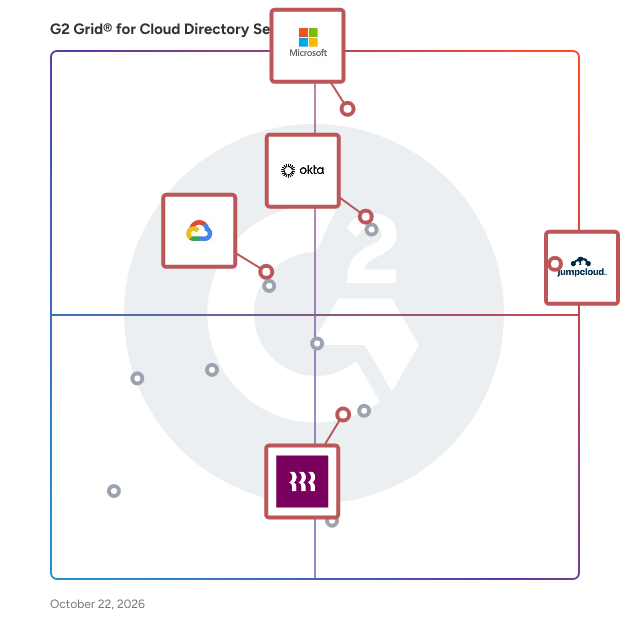
G2 Grid® for Cloud Directory Services

G2 Grid® for Cloud Directory Services plotting products by satisfaction and market presence

Highlighted products: JumpCloud, Microsoft Entra ID, Okta, Managed Microsoft AD, and Rippling IT.

Underlying data: [Grid® JSON](https://www.g2.com/categories/cloud-directory-services/grids.json?focus%5B%5D=jumpcloud&focus%5B%5D=microsoft-entra-id&focus%5B%5D=okta&focus%5B%5D=managed-microsoft-ad&focus%5B%5D=rippling-it&segment=small-business)

JumpCloud

JumpCloud® is the AI-powered identity infrastructure that unifies lifecycle management for humans, devices, and autonomous agents. JumpCloud gives IT teams complete visibility and control over every identity and every access point. JumpCloud helps organizations cut complexity, automate secure workflows, and put AI to work safely. Secure every identity. Human or not. Intelligent, secure IT for the agentic era.

Average Rating: 4.5/5.0

Total Reviews: 3,990

How Do G2 Users Rate JumpCloud?

  • Has the product been a good partner in doing business?: 9.0/10 (Category avg: 9.0/10)
  • On-premise identity repositories supported: 8.5/10 (Category avg: 8.8/10)
  • Directory Listing Management: 8.8/10 (Category avg: 8.8/10)
  • Partner Access: 8.3/10 (Category avg: 8.6/10)

Who Is the Company Behind JumpCloud?

  • Seller: JumpCloud Inc.
  • Company Website:
  • Year Founded: 2012
  • HQ Location: Louisville, CO
  • Twitter: @JumpCloud
    36,368 Twitter followers
  • LinkedIn® Page: www.linkedin.com
    998 employees on LinkedIn®

Who Uses This Product?

  • Who Uses This: IT Manager, System Administrator
  • Top Industries: Information Technology and Services, Computer Software
  • Company Size: 54% Medium, 35% Small

What Do G2 Reviewers Say About JumpCloud?

AI-generated summary from verified user reviews

Pros
  • Users value the ease of use of JumpCloud, simplifying user management across diverse systems and enhancing productivity.
  • Users value JumpCloud's straightforward device management, enabling seamless user management across various systems with intuitive controls.
  • Users value the enhanced security provided by JumpCloud's passwordless login and MFA enforcement features.
  • Users appreciate the seamless integrations with popular apps, simplifying user management across platforms effortlessly.
  • Users find JumpCloud's intuitive user management and responsive support invaluable for seamless integration and enhanced security.
Cons
  • Users report missing features such as better macOS controls and advanced reporting capabilities, limiting overall effectiveness.
  • Users find that improvement is needed in navigation and feature clarity, particularly for beginners navigating JumpCloud.
  • Users note the limited features of JumpCloud, especially in SSO app catalog and Linux device management capabilities.
  • Users face deployment challenges and lack of advanced endpoint controls, impacting their overall experience with JumpCloud.
  • Users feel the user interface needs improvement, as it should be more user-friendly and interactive.

What Are Recent G2 Reviews of JumpCloud?

What Are G2 Users Discussing About JumpCloud?

Microsoft Entra ID

Entra ID is a complete identity and access management solution with integrated security that connects people to their apps, devices, and data and helps protect from identity compromise. With Entra ID, you get: • Secure adaptive access with multi-factor authentication and Conditional Access policies • Seamless user experience with single sign-on, passwordless and user portal • Unified identity management that connect all internal and external users to all apps and devices. • Simplified Identity Governance with provisioning, access packages, and access reviews. Microsoft Entra is our new product family that encompasses all of Microsoft’s identity and access capabilities. The Entra family includes Microsoft Entra ID, as well as two new product categories: Cloud Infrastructure Entitlement Management (CIEM) and decentralized identity. The products in the Entra family will help provide secure access to everything for everyone, by providing identity and access management, cloud infrastructure entitlement management, and identity verification.

Average Rating: 4.5/5.0

Total Reviews: 874

How Do G2 Users Rate Microsoft Entra ID?

  • Has the product been a good partner in doing business?: 9.0/10 (Category avg: 9.0/10)
  • On-premise identity repositories supported: 8.7/10 (Category avg: 8.8/10)
  • Directory Listing Management: 9.1/10 (Category avg: 8.8/10)
  • Partner Access: 8.6/10 (Category avg: 8.6/10)

Who Is the Company Behind Microsoft Entra ID?

  • Seller: Microsoft
  • Year Founded: 1975
  • HQ Location: Redmond, Washington
  • Twitter: @microsoft
    13,091,739 Twitter followers
  • LinkedIn® Page: www.linkedin.com
    232,750 employees on LinkedIn®
  • Ownership: MSFT

Who Uses This Product?

  • Who Uses This: Software Engineer, System Engineer
  • Top Industries: Information Technology and Services, Computer Software
  • Company Size: 39% Medium, 37% Large

What Do G2 Reviewers Say About Microsoft Entra ID?

AI-generated summary from verified user reviews

Pros
  • Users commend the intuitive interface of Microsoft Entra ID, making it simple to navigate without prior training.
  • Users praise the strong security features of Microsoft Entra ID, ensuring efficient identity management without compromising user experience.
  • Users appreciate the seamless SSO integration of Microsoft Entra ID, enhancing security and simplifying access across applications.
  • Users value the strong security and seamless management of identities in Microsoft Entra ID, enhancing protection and integration.
  • Users appreciate the seamless integration of Microsoft Entra ID with Microsoft 365 and its robust identity management capabilities.
Cons
  • Users often face complexity in configuration and management of Microsoft Entra ID, leading to frustration and confusion.
  • Users find the cost of Microsoft Entra ID to be significant, especially for larger organizations needing advanced features.
  • Users find the complex administration of Microsoft Entra ID challenging, especially with configuration and licensing issues.
  • Users find the learning curve for difficult features and configurations in Microsoft Entra ID to be quite steep.
  • Users find the complex setup of Microsoft Entra ID daunting, especially for beginners and smaller IT teams.

What Are Recent G2 Reviews of Microsoft Entra ID?

What Are G2 Users Discussing About Microsoft Entra ID?

Okta

Okta, Inc. is The World’s Identity Company™. We secure AI, machine, and human identity so everyone is free to safely use any technology. Our customer and workforce solutions empower businesses and developers to protect their AI agents, users, employees, and partners while driving security, efficiencies, and innovation. Learn why the world’s leading brands trust Okta for authentication, authorization, and more at okta.com.

Average Rating: 4.5/5.0

Total Reviews: 1,401

How Do G2 Users Rate Okta?

  • Has the product been a good partner in doing business?: 9.0/10 (Category avg: 9.0/10)
  • On-premise identity repositories supported: 9.4/10 (Category avg: 8.8/10)
  • Directory Listing Management: 9.3/10 (Category avg: 8.8/10)
  • Partner Access: 9.3/10 (Category avg: 8.6/10)

Who Is the Company Behind Okta?

  • Seller: Okta
  • Company Website:
  • Year Founded: 2009
  • HQ Location: San Francisco, California
  • Twitter: @okta
    42,953 Twitter followers
  • LinkedIn® Page: www.linkedin.com
    7,840 employees on LinkedIn®

Who Uses This Product?

  • Who Uses This: Software Engineer, Account Executive
  • Top Industries: Computer Software, Information Technology and Services
  • Company Size: 50% Medium, 39% Large

What Do G2 Reviewers Say About Okta?

AI-generated summary from verified user reviews

Pros
  • Users value the ease of use of Okta, appreciating its centralized authentication and simple setup process.
  • Users value the enhanced security provided by Okta, streamlining logins and supporting various security applications seamlessly.
  • Users value the strong SSO and MFA capabilities of Okta, which greatly enhance security and user experience.
  • Users love the efficiency of single sign-on in Okta, streamlining access and enhancing security effortlessly.
  • Users value the easy access provided by Okta, streamlining app logins and enhancing security across systems.
Cons
  • Users face authentication issues with Okta, including lockouts and complex setups that hinder smooth access.
  • Users face login issues with Okta, citing difficulties with repeated sign-ins and dependency on multi-factor authentication.
  • Users find Okta to be expensive, particularly due to high licensing costs that challenge smaller organizations' adoption.
  • Users find the initial setup and policy configuration complex with Okta, especially as user numbers grow.
  • Users find the frequent authentication process in Okta to be tedious, impacting their overall user experience.

What Are Recent G2 Reviews of Okta?

What Are G2 Users Discussing About Okta?

AI can help you find the answers. G2 helps you trust them.

Connect G2 to Claude or ChatGPT for answers grounded in G2's trusted reviews, comparisons, and pricing from real user insights.

How it works

Managed Microsoft AD

Use a highly available, hardened service running actual Microsoft® Active Directory (AD).

Average Rating: 4.4/5.0

Total Reviews: 29

How Do G2 Users Rate Managed Microsoft AD?

  • Has the product been a good partner in doing business?: 8.7/10 (Category avg: 9.0/10)
  • On-premise identity repositories supported: 7.6/10 (Category avg: 8.8/10)
  • Directory Listing Management: 8.7/10 (Category avg: 8.8/10)
  • Partner Access: 7.9/10 (Category avg: 8.6/10)

Who Is the Company Behind Managed Microsoft AD?

  • Seller: Google
  • Year Founded: 1998
  • HQ Location: Mountain View, CA
  • Twitter: @google
    31,899,995 Twitter followers
  • LinkedIn® Page: www.linkedin.com
    301,144 employees on LinkedIn®
  • Ownership: NASDAQ:GOOG

Who Uses This Product?

  • Top Industries: Information Technology and Services
  • Company Size: 41% Small, 38% Medium

What Are Recent G2 Reviews of Managed Microsoft AD?

Rippling IT

Rippling IT is a unified IT platform for identity, device, access, and security management, giving IT teams a single dashboard to run every workflow, from provisioning apps and laptops to enforcing security policies. Rippling IT manages the entire employee lifecycle automatically, granting and revoking app access, configuring devices, and maintaining least-privilege controls as employees join, change roles, and leave. Real-time monitoring, automated patching, and integrated endpoint protection keep companies compliant, while instant lockouts and secure device recovery make offboarding fast and secure. Because hardware, software, and user risk all live in one system, IT teams get full visibility without juggling multiple tools. Companies use Rippling IT to cut costs, eliminate manual work, and strengthen security, so their teams can move faster. Experience the power of unified IT management with Rippling today.

Average Rating: 4.7/5.0

Total Reviews: 1,117

How Do G2 Users Rate Rippling IT?

  • Has the product been a good partner in doing business?: 8.9/10 (Category avg: 9.0/10)
  • On-premise identity repositories supported: 9.1/10 (Category avg: 8.8/10)
  • Directory Listing Management: 9.2/10 (Category avg: 8.8/10)
  • Partner Access: 9.1/10 (Category avg: 8.6/10)

Who Is the Company Behind Rippling IT?

  • Seller: Rippling
  • Company Website:
  • Year Founded: 2016
  • HQ Location: San Francisco, CA
  • Twitter: @Rippling
    12,402 Twitter followers
  • LinkedIn® Page: www.linkedin.com
    7,798 employees on LinkedIn®

Who Uses This Product?

  • Who Uses This: Software Engineer, CEO
  • Top Industries: Computer Software, Information Technology and Services
  • Company Size: 59% Medium, 27% Small

What Do G2 Reviewers Say About Rippling IT?

AI-generated summary from verified user reviews

Pros
  • Users appreciate the ease of use in Rippling IT, enjoying its organized interface and streamlined processes.
  • Users find Rippling to be intuitive and well-organized, making it easy to access essential applications and information.
  • Users love the user-friendly and intuitive design of Rippling IT, simplifying navigation and enhancing their experience.
  • Users appreciate the easy access Rippling provides to essential applications, enhancing efficiency in their daily work routines.
  • Users appreciate the simple and intuitive user interface that facilitates easy navigation and efficient use of features.
Cons
  • Users express frustration with the missing features of Rippling IT, particularly in integration and support functionalities.
  • Users find the limited features of Rippling IT frustrating, especially with payroll and integration issues complicating the experience.
  • Users express a need for improved organization and functionality within Rippling IT’s payroll and password management features.
  • Users find the learning curve steep, especially for those who are not tech-savvy, impacting their experience.
  • Users express frustration with poor customer support, citing limitations in assistance and the need for custom solutions.

What Are Recent G2 Reviews of Rippling IT?

Brandon Summers-Miller
BS
Researched and written by Brandon Summers-Miller
Updated
Reviews & FAQs

Reviews Summary: The Best Cloud Directory Services Software for Small-Business Businesses

Thanks to 8099 Cloud Directory Services software reviews and associated data from users working for small-sized companies, at G2 we have some of the most definitive data on the best Cloud Directory Services software for the smaller space. We have identified 5 individual Cloud Directory Services products offering the features, pricing and support that Small-Business companies look for when comparing Cloud Directory Services software and solutions. These reviews are generated using the qualitative and quantitative feedback from G2 members working in small-sized companies and who have used these Cloud Directory Services software products.

When G2 reviewers submit their Cloud Directory Services software reviews, they often provide information on the type of company they work for and what market segment they belong to. We break these different market segments into three distinct groups:

  • Small Business Cloud Directory Services Software Reviews (< 50 employees)
  • smaller Cloud Directory Services Software Reviews (51-1,000 employees)
  • Enterprise Cloud Directory Services Software Reviews (1,001+ employees)

smaller businesses have their own unique requirements when it comes to Cloud Directory Services software compared to small or enterprise companies. That is why these individual small-sized company Cloud Directory Services software reviews are especially helpful when comparing product set up, ease of use and overall cost.

Below you will find FAQs and review snippets for Cloud Directory Services software products that work well in smaller environments. These reviews are written by real G2 users working for these Small-Business companies who have real-world experience with these Cloud Directory Services software products.

FAQs About Cloud Directory Services Software for Small-Business Businesses

Q. What are the best Cloud Directory Services software products for small-sized businesses, according to G2 reviewers?
  • JumpCloud - 4.5-stars, 909 reviews (36% from smaller reviewers)
  • Microsoft Entra ID - 4.5-stars, 72 reviews (19% from smaller reviewers)
  • Okta - 4.4-stars, 30 reviews (8% from smaller reviewers)
  • Managed Microsoft AD - 4.1-stars, 12 reviews (41% from smaller reviewers)
  • Rippling IT - 4.3-stars, 17 reviews (24% from smaller reviewers)
Q. What are the least-liked Cloud Directory Services software products for professionals at small-sized companies, based on the overall G2 rating?
  • Not enough data to answer this question.
Q. What are the highest-rated Cloud Directory Services software tool features according to employees at Small-Business companies?
  • Multi-Factor Authentication - 4.5-stars
  • SSO - 4.5-stars
  • Access Termination - 4.5-stars
Q. What are the features that are rated lowest by employees at Small-Business companies?
  • Partner Access - 4.2-stars
  • Ease of Connecting Applications - 4.2-stars
  • On-premise identity repositories supported - 4.2-stars
Q. How many Cloud Directory Services software reviews are from users working in smaller companies?

1067 out of all Cloud Directory Services software reviews on G2 are from users working in Small-Business companies (13%).

Here's What Reviewers Working at smaller Businesses Have to Say About Cloud Directory Services Software

What Small-Business Professionals Liked What Small-Business Professionals Disliked

JumpCloud: “Once you understand the basics, the possibilities are endless”

Read Review

Microsoft Entra ID: “There is a great deal to dislike. External Authentication Mechanisms doesn't support primary factors so MSFT forces me to try and go Passwordless "their way" -their implementation of passkeys is not appropriate for enterprise use, it appears more consumer oriented. SAML integration is done through "federation" which is not granular the way Okta and every other SAML SSO is. In general the product is painful to set up, use and maintain. I haven't even started on the "hybrid" aspects with on Prem AD. It's like a sequel to a bad horror movie.”

Read Review

Okta: “The best thing is no need to enter an authentication code. You can directly click on Yes I'm. It automatically verifies our web app or software.”

Read Review

Rippling IT: “1) Tax Withholding; I tried changing my tax exemption and filing status to get my withholding up, but there was no way to do this. I was underpaying and owed a lot at tax time. 2) FSA Claims: I have never had so many denied claims. I ended up not participating after dealing with a third party (Touchcare). They told me that the plan administrator had to help me with my denied claims. That was my boss. Seemed like a HIPAA violation to me. I ended up losing money over "unused claims" which were denied for reasons I was never able to figure out. The support was useless.”

Read Review

JumpCloud: “There is no other solution that packs in MDM for Apple IOS and Microsoft Windows devices at this price point. Jumpcloud has enabled the decommissioning of on-premise AD servers and allow SSO with all oAuth 2.0 providers such as Microsoft or Cisco Duo etc..”

Read Review

JumpCloud: “Support is terrible. 8 months to resolve an issue. Often one or two week replies even when I have been put onto someone senior. Asked for compensation - they stated leave and go elsewhere. Not exactly making you feel a valued customer. I'd avoid and go with the other options available.”

Read Review

Recommendations To Others Problems Solved & Benefits

JumpCloud: “I would probably not sign up for anticipated users up front and instead add and pay by the user as it takes some time to migrate everyone.”

Read Review

Rippling IT: “Onboarding and offboarding are the main features we use. When a new hire is added, their laptop, accounts, and access policies are triggered all at once, so day-one setup is no longer an endless checklist. Offboard is also quick. We also like the Device Management features, mainly encryption, OS updates, and security policies which are applied automatically based on role and location.”

Read Review

JumpCloud: “Yes. Sure go for it. It's cost effective and reliable with easy integration and management tools.”

Read Review

JumpCloud: “It keeps all of my passwords, QR codes and Passkeys in one secure place.”

Read Review

Okta: “Okta is best for verification user”

Read Review

JumpCloud: “Remote connecting to devices (either with user interaction or background) work great.”

Read Review