# Best Accounting Practice Management Software - Page 2

*By [Nathan Calabrese](https://research.g2.com/insights/author/nathan-calabrese)*

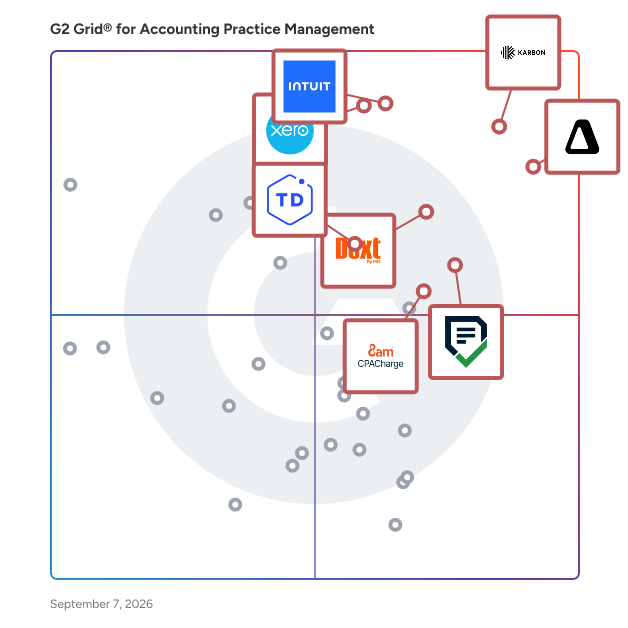
The best accounting practice management software in 2026 is Karbon, rated 4.8 out of 5 on G2 based on 800+ verified reviews. Financial Cents matches Karbon&#39;s top rating at 4.8 stars and specializes in QBO-native automation for firms already using QuickBooks Online.

1. Karbon — 4.8/5 (800+ reviews): Accounting workflow automation with email triage
2. Canopy — 4.6/5 (700+ reviews): All-in-one tax firm workflow consolidation
3. Xero Practice Manager — 4.5/5 (40+ reviews): Xero-native client workflow and billing
4. QuickBooks Online Accountant — 4.4/5 (80+ reviews): Multi-client bookkeeping with Intuit ecosystem integration
5. Financial Cents — 4.7/5 (200+ reviews): QBO-native accounting workflow and client task automation

*Updated June 2026. Based on 2026 G2 verified review data across 5 products.*


Accounting practice management software manages the front- and back-office operations for companies providing accounting services. This type of software is used to organize the services offering of a company, as well as to track delivery using workflows and task management. Accounting practice management solutions help accounting professionals increase productivity and improve the relationships with their customers. These software products can be implemented and used across the entire company but are most beneficial for independent accountants.

Accounting practice management software needs to integrate with [accounting software](https://www.g2.com/categories/accounting) and [small-business accounting software](https://www.g2.com/categories/small-business-accounting). When not included in the product, integration with[project management software](https://www.g2.com/categories/project-management) is also essential.

To qualify for inclusion in the Accounting Practice Management category, a product must:

- Maintain the portfolio of services offered by professional accountants
- Manage relationships with customers and prospects
- Monitor tasks and activities related to the accounting practice
- Provide portals for customers to communicate with accountants
- Track the status of each project and calculate the billable time
- Create invoices for the services provided and track payments


## Top Accounting Practice Management Software at a Glance
| # | Product | Rating | Best For | What Users Say |
|---|---------|--------|----------|----------------|
| 1 | [Karbon](https://www.g2.com/products/karbon-2025-03-03/reviews) | 4.8/5.0 (883 reviews) | Accounting workflow automation with email triage | "[Karbon Saves Hours Each Week with Powerful Workflow Automation](https://www.g2.com/survey_responses/karbon-review-13029458)" |
| 2 | [Canopy](https://www.g2.com/products/canopy-2026-05-12/reviews) | 4.6/5.0 (701 reviews) | All-in-one tax firm workflow consolidation | "[Securing and Sharing Data and Docs with my Loyal Clients!](https://www.g2.com/survey_responses/canopy-review-6575608)" |
| 3 | [QuickBooks Online Accountant](https://www.g2.com/products/quickbooks-online-accountant/reviews) | 4.4/5.0 (78 reviews) | Multi-client bookkeeping with Intuit ecosystem integration | "[QB FTW](https://www.g2.com/survey_responses/quickbooks-online-accountant-review-11699164)" |
| 4 | [Xero Practice Manager](https://www.g2.com/products/xero-practice-manager/reviews) | 4.5/5.0 (45 reviews) | Xero-native client workflow and billing | "[The ultimate workflow and invoicing hub for our team](https://www.g2.com/survey_responses/xero-practice-manager-review-12980410)" |
| 5 | [Financial Cents](https://www.g2.com/products/financial-cents/reviews) | 4.7/5.0 (241 reviews) | QBO-native accounting workflow and client task automation | "[Financial Cents: Powerful, Affordable Practice Management That Streamlines Month-End Close](https://www.g2.com/survey_responses/financial-cents-review-12747009)" |
| 6 | [8am CPACharge](https://www.g2.com/products/8am-cpacharge/reviews) | 4.7/5.0 (103 reviews) | Client invoicing and recurring payment collection | "[Low Fees and Easy Payments for Invoicing](https://www.g2.com/survey_responses/8am-cpacharge-review-13052688)" |
| 7 | [TaxDome](https://www.g2.com/products/taxdome/reviews) | 4.7/5.0 (699 reviews) | All-in-one tax firm workflow automation | "[TaxDome Pipelines &amp; Integrations Save Us Time](https://www.g2.com/survey_responses/taxdome-review-12560172)" |
| 8 | [Suralink](https://www.g2.com/products/suralink/reviews) | 4.5/5.0 (171 reviews) | PBC request tracking with secure client exchange | "[Streamlines Audit Collaboration &amp; Strong Audit Trail](https://www.g2.com/survey_responses/suralink-review-12989030)" |
| 9 | [Checkpoint](https://www.g2.com/products/thomson-reuters-checkpoint/reviews) | 4.3/5.0 (20 reviews) | Multi-jurisdiction tax research and compliance | "[Test title](https://www.g2.com/survey_responses/checkpoint-review-11144184)" |
| 10 | [Firm360](https://www.g2.com/products/firm360/reviews) | 4.4/5.0 (148 reviews) | Unified accounting firm workflow and billing | "[Our Firm360 Review](https://www.g2.com/survey_responses/firm360-review-12936671)" |


## How Many Accounting Practice Management Software Products Does G2 Track?
**Total Products under this Category:** 128

### Category Stats (Jul 2026)
- **Average Rating**: 4.41/5 (↑0.01 vs Jun 2026) The average rating of products in this category, based on all submitted ratings
- **Top Trending Product**: Bright (+0.82%) - Among all products in this category, Bright recorded the largest rating increase compared to last month
*Last updated: July 06, 2026*


## How Does G2 Rank Accounting Practice Management Software Products?

**Why You Can Trust G2's Software Rankings:**

- 30 Analysts and Data Experts
- 4,600+ Authentic Reviews
- 128+ Products
- Unbiased Rankings

G2's software rankings are built on verified user reviews, rigorous moderation, and a consistent research methodology maintained by a team of analysts and data experts. Each product is measured using the same transparent criteria, with no paid placement or vendor influence. While reviews reflect real user experiences, which can be subjective, they offer valuable insight into how software performs in the hands of professionals. Together, these inputs power the G2 Score, a standardized way to compare tools within every category.


## Which Accounting Practice Management Software Is Best for Your Use Case?

- **Leader:** [Karbon](https://www.g2.com/products/karbon-2025-03-03/reviews)
- **Highest Performer:** [Firm360](https://www.g2.com/products/firm360/reviews)
- **Easiest to Use:** [Financial Cents](https://www.g2.com/products/financial-cents/reviews)
- **Top Trending:** [Financial Cents](https://www.g2.com/products/financial-cents/reviews)
- **Best Free Software:** [Karbon](https://www.g2.com/products/karbon-2025-03-03/reviews)


---

**Sponsored**

### Levvy

Levvy is a next-gen Practice Management Platform built for accounting &amp; CAS firms, connecting teams with everything they need to do work- all in one place. It eliminates digital friction to improve team collaboration, boost productivity, and enhance client service delivery with features like: Real-time capacity management, • Dynamic Workspace that lets teams view, schedule, and track progress on all work in one seamless space • Embedded chat and document sharing for seamless team communication • All-in-one view of task details, instructions, files, and comments to eliminate switching between apps. • Automated workflows for enhanced operations


[Visit website](https://www.g2.com/external_clickthroughs/record?secure%5Bad_program%5D=ppc&amp;secure%5Bad_slot%5D=category_product_list&amp;secure%5Bcategory_id%5D=1592&amp;secure%5Bchosen_at%5D=2026-07-07T03%3A34%3A36Z&amp;secure%5Bdisplayable_resource_id%5D=1592&amp;secure%5Bdisplayable_resource_type%5D=Category&amp;secure%5Bmedium%5D=sponsored&amp;secure%5Bplacement_reason%5D=page_category&amp;secure%5Bplacement_resource_ids%5D%5B%5D=1592&amp;secure%5Bprioritized%5D=false&amp;secure%5Bproduct_id%5D=1391978&amp;secure%5Bresource_id%5D=1592&amp;secure%5Bresource_type%5D=Category&amp;secure%5Bsource_type%5D=category_page&amp;secure%5Bsource_url%5D=https%3A%2F%2Fwww.g2.com%2Fcategories%2Faccounting-practice-management%3Fpage%3D2&amp;secure%5Btoken%5D=868f68eaac4881fc0efecf84c41d62c4b793bce3eb7bea73794c9e73ee647ea2&amp;secure%5Burl%5D=https%3A%2F%2Fwww.levvy.com%2F&amp;secure%5Burl_type%5D=product_website)

---

## What Are the Top-Rated Accounting Practice Management Software Products in 2026?
### 1. [AuditDashboard](https://www.g2.com/products/auditdashboard-inc-auditdashboard/reviews)
AuditDashboard is the client experience and collaboration platform that helps accounting firms and their clients manage how information is exchanged during tax, audit, review, and cybersecurity engagements. The software solution automates engagement coordination, document management, and request tracking in a single workspace, replacing the fragmented mix of email threads, spreadsheet trackers, and disconnected systems that firms have traditionally relied on to coordinate assurance, tax, and advisory work. AuditDashboard is used by accounting professionals at firms of all sizes, from regional practices to global networks. Its users span service lines including audit and assurance teams, risk assurance advisors, corporate tax preparers, advisory consultants, and corporate finance teams, along with the client-side controllers, CFOs, and finance staff who supply supporting documentation. The platform is secure by design, backed by SOC 2 Type 2 reports since 2016, and offers white-label configuration, enabling firms to present a branded portal that integrates with their existing service delivery model. Beyond document collection, AuditDashboard provides scheduling tools to plan engagement timelines and milestones, generates real-time visibility into outstanding items for both firm and client teams, and applies automation and artificial intelligence to reduce manual coordination that consumes engagement hours. The platform connects with tools accounting teams already use, including Outlook, Microsoft 365, and Copilot, and syncs data across firm systems through native integrations and an open API. - Collaborative scheduling and prepared by client (PBC) request lists to streamline engagement coordination and organize requirements, information requests, and engagement milestones in one shared workspace. - Secure file sharing with Outlook integration and fully integrated electronic signatures, so large attachments and documents can move through a system of record rather than scattered email threads. - Engagement and practice insights that surface bottlenecks, track progress, and provide reporting on engagement performance across teams and service lines. - Artificial intelligence and automation to elevate the client experience, streamline routine tasks, and improve responsiveness. - Integrations and an open API that connect AuditDashboard with existing practice management, document management, and productivity tools. By consolidating engagement coordination into a standardized client experience platform, AuditDashboard reduces the time professional staff spend chasing information and managing administrative workflows, freeing capacity for substantive client work.


**Average Rating:** 4.8/5.0
**Total Reviews:** 31
**How Do G2 Users Rate AuditDashboard?**

- **Has the product been a good partner in doing business?:** 9.4/10 (Category avg: 9.1/10)
- **New Client:** 9.2/10 (Category avg: 8.4/10)
- **Job Status:** 8.8/10 (Category avg: 8.7/10)

**Who Is the Company Behind AuditDashboard?**

- **Seller:** [AuditDashboard](https://www.g2.com/sellers/auditdashboard-a81ab86f-45e6-414f-b367-07b219143da6)
- **Company Website:** https://www.auditdashboard.com
- **Year Founded:** 2013
- **HQ Location:** Oakville, Ontario
- **Twitter:** @AuditDashboard (569 Twitter followers)
- **LinkedIn® Page:** https://www.linkedin.com/company/auditdashboard/ (8 employees on LinkedIn®)

**Who Uses This Product?**
- **Top Industries:** Accounting
- **Company Size:** 52% Small-Business, 48% Mid-Market


#### What Are AuditDashboard's Pros and Cons?

**Pros:**

- Ease of Use (6 reviews)
- Customer Support (2 reviews)
- Functionality (2 reviews)
- Efficiency (1 reviews)
- Efficiency Improvement (1 reviews)

**Cons:**

- Poor Notifications (1 reviews)


### What Do G2 Reviewers Say About AuditDashboard?
*AI-generated summary from verified user reviews*

**Pros:**

- Users value the **ease of use** of AuditDashboard, enhancing efficiency and client communication throughout the audit process.
- Users value the **helpful customer support** provided by AuditDashboard, enhancing their overall experience and satisfaction.
- Users find the **dashboard and reporting features** exceptional, improving both client relations and overall performance metrics.
- Users value the **efficiency** of AuditDashboard, enhancing all audit phases and enabling quicker client access to information.
- Users value the **efficiency improvement** of AuditDashboard, enhancing audit processes from planning to execution and review.

**Cons:**

- Users find that the **poor notifications** from AuditDashboard often lead to ignored emails by clients and staff.

#### What Are Recent G2 Reviews of AuditDashboard?

**"[Extremely Easy Client Communication Through the Dashboard](https://www.g2.com/survey_responses/auditdashboard-review-12501868)"**

**Rating:** 4.5/5.0 stars
*— Harini R.*

[Read full review](https://www.g2.com/survey_responses/auditdashboard-review-12501868)

---

**"[AuditDashboard: Intuitive, User-Friendly Platform That Streamlines Audit Requests](https://www.g2.com/survey_responses/auditdashboard-review-12646694)"**

**Rating:** 5.0/5.0 stars
*— Matthew W.*

[Read full review](https://www.g2.com/survey_responses/auditdashboard-review-12646694)

---


#### What Are G2 Users Discussing About AuditDashboard?

- [What is AuditDashboard used for?](https://www.g2.com/discussions/what-is-auditdashboard-used-for)

### 2. [Jetpack Workflow](https://www.g2.com/products/jetpack-workflow/reviews)
Jetpack Workflow is a workflow management tool that helps firms standardize, track and automate their processes allowing them to complete more work and prevent tasks from falling through the cracks. Serving over 16K customers globally, we help firm owners meet deadlines, track team progress, and grow their practice without worry. Jetpack Workflow also offers native integration with QBO and the G-Suite, as well as our integration with Zapier, we keep you connected to all the important areas of your business and clients. Our template library has over 70 ready-to-use templates that will get you organized, fast. With world-class support available via chat, phone, or email, our workflow specialists ensure you get the most out of our software so you can focus on growing your business.


**Average Rating:** 4.2/5.0
**Total Reviews:** 13
**How Do G2 Users Rate Jetpack Workflow?**

- **Has the product been a good partner in doing business?:** 10.0/10 (Category avg: 9.1/10)
- **Reporting:** 1.7/10 (Category avg: 7.8/10)
- **New Client:** 6.7/10 (Category avg: 8.4/10)
- **Job Status:** 10.0/10 (Category avg: 8.7/10)

**Who Is the Company Behind Jetpack Workflow?**

- **Seller:** [Jetpack Workflow](https://www.g2.com/sellers/jetpack-workflow)
- **Year Founded:** 2015
- **HQ Location:** Pittsburgh, US
- **Twitter:** @JetpackWorkflow (1,382 Twitter followers)
- **LinkedIn® Page:** https://www.linkedin.com/company/jetpackworkflow/ (7 employees on LinkedIn®)

**Who Uses This Product?**
- **Top Industries:** Accounting
- **Company Size:** 77% Small-Business, 15% Mid-Market


#### What Are Jetpack Workflow's Pros and Cons?

**Pros:**

- Ease of Use (1 reviews)
- Setup Ease (1 reviews)
- User Interface (1 reviews)
- Workflow Customization (1 reviews)

**Cons:**

- Email Integration (1 reviews)


### What Do G2 Reviewers Say About Jetpack Workflow?
*AI-generated summary from verified user reviews*

**Pros:**

- Users love the **ease of use** of Jetpack Workflow, enabling quick setup and seamless access to its features.
- Users praise the **easy setup** of Jetpack Workflow, allowing for a quick start without complications.
- Users appreciate the **clean and straightforward UI** of Jetpack Workflow, tailored specifically for accounting practices.
- Users appreciate the **workflow customization** in Jetpack Workflow, tailored specifically for accounting practices with a user-friendly interface.

**Cons:**

- Users find the **lack of email integration options** limiting, wishing for better connectivity and document storage features.

#### What Are Recent G2 Reviews of Jetpack Workflow?

**"[Wonderful workflow solution for Accounting Practices](https://www.g2.com/survey_responses/jetpack-workflow-review-10975641)"**

**Rating:** 5.0/5.0 stars
*— James H.*

[Read full review](https://www.g2.com/survey_responses/jetpack-workflow-review-10975641)

---

**"[Effortless Organization with Jetpack Workflow](https://www.g2.com/survey_responses/jetpack-workflow-review-12344649)"**

**Rating:** 5.0/5.0 stars
*— Daniel L.*

[Read full review](https://www.g2.com/survey_responses/jetpack-workflow-review-12344649)

---


#### What Are G2 Users Discussing About Jetpack Workflow?

- [What is Jetpack Workflow used for?](https://www.g2.com/discussions/what-is-jetpack-workflow-used-for)

### 3. [IRIS Practice Management](https://www.g2.com/products/iris-practice-management/reviews)
The Iris Software Group Americas suite is precise and efficient software that is truly integrated to enhance the productivity of even the most successful accountant or practice.


**Average Rating:** 3.7/5.0
**Total Reviews:** 16
**How Do G2 Users Rate IRIS Practice Management?**

- **Has the product been a good partner in doing business?:** 7.4/10 (Category avg: 9.1/10)
- **Reporting:** 6.7/10 (Category avg: 7.8/10)
- **New Client:** 8.3/10 (Category avg: 8.4/10)
- **Job Status:** 8.3/10 (Category avg: 8.7/10)

**Who Is the Company Behind IRIS Practice Management?**

- **Seller:** [IRIS Software Group](https://www.g2.com/sellers/iris-software-group)
- **Year Founded:** 1978
- **HQ Location:** Alpharetta, GA
- **Twitter:** @IRISSoftwareGrp (1,340 Twitter followers)
- **LinkedIn® Page:** https://www.linkedin.com/company/iris-software-group/ (3,042 employees on LinkedIn®)

**Who Uses This Product?**
- **Top Industries:** Accounting
- **Company Size:** 63% Mid-Market, 31% Small-Business


#### What Are Recent G2 Reviews of IRIS Practice Management?

**"[Intuitive Software for Accounting Team](https://www.g2.com/survey_responses/iris-practice-management-review-8417534)"**

**Rating:** 4.5/5.0 stars
*— Sarfaraz A.*

[Read full review](https://www.g2.com/survey_responses/iris-practice-management-review-8417534)

---

**"[Experience with Iris Software Group Americas has been seamless and I highly recommend it to other.](https://www.g2.com/survey_responses/iris-practice-management-review-8494096)"**

**Rating:** 4.5/5.0 stars
*— Rohit S.*

[Read full review](https://www.g2.com/survey_responses/iris-practice-management-review-8494096)

---


#### What Are G2 Users Discussing About IRIS Practice Management?

- [What is IRIS Practice Management used for?](https://www.g2.com/discussions/what-is-iris-practice-management-used-for)

### 4. [SuiteFiles](https://www.g2.com/products/suitefiles-suitefiles/reviews)
SuiteFiles is an intelligent workspace solution specifically designed for professional service firms, aimed at streamlining the way teams manage their documents and client interactions. This comprehensive platform integrates essential functions such as document creation, review, approval, client collaboration, and digital signing into a single, cohesive system. By eliminating the need to juggle multiple folders, emails, and manual follow-ups, SuiteFiles provides a structured environment that enhances productivity and ensures efficient completion of work. The target audience for SuiteFiles encompasses a diverse range of professional service firms, including law offices, accounting firms, and consultancy agencies. These organizations often handle extensive documentation and require effective communication with clients. SuiteFiles addresses these challenges by creating a centralized workspace where all relevant documents, conversations, and approvals are easily accessible. This organization reduces the likelihood of important information being overlooked or lost, ultimately fostering better collaboration among team members and clients. Key features of SuiteFiles include seamless integration with widely-used tools such as Microsoft 365, Xero, Karbon, WorkflowMax, HubSpot, and QuickBooks Online. This compatibility allows firms to enhance their existing tech stack rather than complicate it with additional software. By connecting these tools, SuiteFiles helps create a more efficient workflow, enabling users to manage their tasks and client interactions without the hassle of switching between different applications. The platform’s ability to consolidate various functions into one interface simplifies the user experience and promotes a more streamlined approach to document management. The benefits of using SuiteFiles extend beyond mere organization; it empowers professional service firms to focus on their core competencies by minimizing busy work. With everything living in context, teams can spend less time chasing down documents or coordinating approvals and more time on delivering quality service to their clients. The platform promotes clarity and control, ensuring that all team members are aligned and that client confidence is maintained throughout the process. SuiteFiles is designed for firms that prioritize efficiency and client satisfaction. By providing an intelligent workspace that consolidates essential functions and integrates with existing tools, it enables professional service firms to work smarter, not harder, ultimately leading to more finished work and enhanced client relationships. This solution not only supports the operational needs of these firms but also contributes to a more collaborative and productive work environment.


**Average Rating:** 4.5/5.0
**Total Reviews:** 59
**How Do G2 Users Rate SuiteFiles?**

- **Has the product been a good partner in doing business?:** 9.1/10 (Category avg: 9.1/10)
- **Reporting:** 5.3/10 (Category avg: 7.8/10)
- **New Client:** 8.0/10 (Category avg: 8.4/10)
- **Job Status:** 5.6/10 (Category avg: 8.7/10)

**Who Is the Company Behind SuiteFiles?**

- **Seller:** [SuiteFiles](https://www.g2.com/sellers/suitefiles)
- **Company Website:** https://www.suitefiles.com/
- **Year Founded:** 2012
- **HQ Location:** Wellington, NZ
- **Twitter:** @SuiteFiles (681 Twitter followers)
- **LinkedIn® Page:** https://www.linkedin.com/company/suitefiles/ (25 employees on LinkedIn®)

**Who Uses This Product?**
- **Top Industries:** Accounting
- **Company Size:** 93% Small-Business, 7% Mid-Market


#### What Are SuiteFiles's Pros and Cons?

**Pros:**

- Centralization (2 reviews)
- Customer Support (2 reviews)
- Easy Editing (2 reviews)
- Efficiency (2 reviews)
- Organization Features (2 reviews)

**Cons:**

- Accessibility Issues (1 reviews)
- Difficult Learning (1 reviews)
- Difficult Navigation (1 reviews)
- Document (1 reviews)
- Document Management (1 reviews)


### What Do G2 Reviewers Say About SuiteFiles?
*AI-generated summary from verified user reviews*

**Pros:**

- Users appreciate the **centralization** of SuiteFiles, enhancing collaboration and efficiency with all documents and correspondence in one place.
- Users commend the **reliable and quick customer support** of SuiteFiles, enhancing their overall experience and satisfaction.
- Users value the **easy editing** capabilities of SuiteFiles, enhancing collaboration and efficiency in document management.
- Users find SuiteFiles to greatly enhance **efficiency** , enabling seamless collaboration and streamlined document management.
- Users value the **organization features** of SuiteFiles, as it streamlines collaboration and document management efficiently.

**Cons:**

- Users find the **accessibility issues** in SuiteFiles can make document retrieval cumbersome and frustrating at times.
- Users face **difficult learning** curves with SuiteFiles due to new system intricacies and attachment limitations.
- Users find the **difficult navigation** of SuiteFiles cumbersome, making document access less efficient.
- Users find the **document access experience somewhat clunky** , which can hinder efficiency and frustrate workflows.
- Users find accessing documents can be a bit **chunky at times** , impacting their efficiency when using SuiteFiles.

#### What Are Recent G2 Reviews of SuiteFiles?

**"[Easy to onboard, friendly assistance from staff, a great solution to our needs](https://www.g2.com/survey_responses/suitefiles-review-10795153)"**

**Rating:** 4.0/5.0 stars
*— Valerie O.*

[Read full review](https://www.g2.com/survey_responses/suitefiles-review-10795153)

---

**"[System that&#39;s easy to use and improves efficiencies!](https://www.g2.com/survey_responses/suitefiles-review-10282837)"**

**Rating:** 5.0/5.0 stars
*— Sue T.*

[Read full review](https://www.g2.com/survey_responses/suitefiles-review-10282837)

---


### 5. [Bright](https://www.g2.com/products/bright/reviews)
Bright provides a suite of industry-leading software solutions for accountants and bookkeepers across the UK and Ireland. Bright&#39;s multi-award-winning, user-friendly and innovative products let users support clients while profitably running their practices, with the backing of exceptional support.


**Average Rating:** 4.5/5.0
**Total Reviews:** 27
**How Do G2 Users Rate Bright?**

- **Has the product been a good partner in doing business?:** 8.3/10 (Category avg: 9.1/10)
- **Reporting:** 8.9/10 (Category avg: 7.8/10)
- **New Client:** 8.1/10 (Category avg: 8.4/10)
- **Job Status:** 8.3/10 (Category avg: 8.7/10)

**Who Is the Company Behind Bright?**

- **Seller:** [Thesaurus Software](https://www.g2.com/sellers/thesaurus-software)
- **Year Founded:** 1992
- **HQ Location:** Duleek, County Meath
- **Twitter:** @GreatPayroll (1,886 Twitter followers)
- **LinkedIn® Page:** https://www.linkedin.com/company/2812633 (25 employees on LinkedIn®)

**Who Uses This Product?**
- **Who Uses This:** Director
- **Top Industries:** Accounting
- **Company Size:** 68% Small-Business, 29% Mid-Market


#### What Are Bright's Pros and Cons?

**Pros:**

- Ease of Use (7 reviews)
- Automation (2 reviews)
- Easy Management (2 reviews)
- Payroll (2 reviews)
- Comprehensive Features (1 reviews)

**Cons:**

- Login Problems (1 reviews)
- Slow Loading (1 reviews)


### What Do G2 Reviewers Say About Bright?
*AI-generated summary from verified user reviews*

**Pros:**

- Users appreciate the **ease of use** in importing and managing spreadsheets, simplifying workflow automation and centralization.
- Users value the **automation features** of Bright, enhancing workflow efficiency and simplifying account management.
- Users find Bright to be a **super friendly and easy management** solution for spreadsheets and accounting tasks.
- Users appreciate the **automatic task generation and historical payment tracking** in Bright&#39;s payroll system for efficiency.
- Users value the **comprehensive features** of Bright, which significantly simplify their daily tasks and enhance productivity.

**Cons:**

- Users experience **login problems** with Bright, finding the sign-in process finicky and requiring frequent password changes.
- Users feel that the **slow loading** times hinder usability and recommend improvements to the interface.

#### What Are Recent G2 Reviews of Bright?

**"[User-Friendly Payroll Software with Easily Accessible Support](https://www.g2.com/survey_responses/bright-review-12947950)"**

**Rating:** 5.0/5.0 stars
*— Christine D.*

[Read full review](https://www.g2.com/survey_responses/bright-review-12947950)

---

**"[Comprehensive Accounting, Tax &amp; Payroll Suite for Accountants](https://www.g2.com/survey_responses/bright-review-12970179)"**

**Rating:** 4.5/5.0 stars
*— Peter S.*

[Read full review](https://www.g2.com/survey_responses/bright-review-12970179)

---


### 6. [SafeSend](https://www.g2.com/products/safesend/reviews)
SafeSend® provides the tax and accounting profession with automation technologies, helping practitioners improve efficiency and better serve clients. SafeSend offers workflow automation solutions for the tax and accounting profession. The SafeSend Suite™ platform delivers powerful functionality to tax and accounting professionals to address every client touch point across the tax engagement: Engagement Letters – SafeSend Signatures™ Client Organizers – SafeSend Organizers™ Assemble &amp; Delivery – SafeSend Returns® Extensions – SafeSend Extensions™ At the core of the suite, award-winning SafeSend Returns eliminates the manual, labor-intensive elements many tax departments experience producing client-ready returns. Visit safesend.com.


**Average Rating:** 3.8/5.0
**Total Reviews:** 15
**How Do G2 Users Rate SafeSend?**

- **Has the product been a good partner in doing business?:** 8.3/10 (Category avg: 9.1/10)
- **Reporting:** 10.0/10 (Category avg: 7.8/10)
- **New Client:** 10.0/10 (Category avg: 8.4/10)
- **Job Status:** 10.0/10 (Category avg: 8.7/10)

**Who Is the Company Behind SafeSend?**

- **Seller:** [SafeSend](https://www.g2.com/sellers/safesend-b54b4b9d-ab31-46e6-9325-80e863b12724)
- **Year Founded:** 2008
- **HQ Location:** Ann Arbor, MI
- **LinkedIn® Page:** https://www.linkedin.com/company/349504/ (80 employees on LinkedIn®)

**Who Uses This Product?**
- **Top Industries:** Accounting
- **Company Size:** 63% Small-Business, 25% Mid-Market


#### What Are SafeSend's Pros and Cons?

**Pros:**

- Payment Efficiency (2 reviews)
- Automation (1 reviews)
- Customer Support (1 reviews)
- E-Signatures (1 reviews)
- Pricing (1 reviews)

**Cons:**

- File Management (1 reviews)
- Pricing Issues (1 reviews)
- Tax Software Issues (1 reviews)


### What Do G2 Reviewers Say About SafeSend?
*AI-generated summary from verified user reviews*

**Pros:**

- Users value the **payment efficiency** of SafeSend, highlighting significant time and cost savings during tax season.
- Users appreciate the **automation** of SafeSend, greatly increasing efficiency and saving valuable time during tax season.
- Users praise the **exceptional customer support** of SafeSend, enhancing their experience during tax season with efficient solutions.
- Users value the **automated reminders** for signing forms and processing payments, ensuring timely responses from clients.
- Users find SafeSend&#39;s **valuable pricing** justified by its time-saving features and efficiency in document delivery.

**Cons:**

- Users find the **program structure for file management** confusing, making preference setup and navigation challenging.
- Users express concern over **pricing issues** with SafeSend, feeling misled about its integration and refund policies.
- Users often face **integration issues** with UltraTax CS in SafeSend, leading to frustration and missed refunds.

#### What Are Recent G2 Reviews of SafeSend?

**"[Extremely Efficient and Responsive](https://www.g2.com/survey_responses/safesend-review-9919985)"**

**Rating:** 5.0/5.0 stars
*— Chris H.*

[Read full review](https://www.g2.com/survey_responses/safesend-review-9919985)

---

**"[SafeSend saved our firm so much time this past tax season](https://www.g2.com/survey_responses/safesend-review-11057960)"**

**Rating:** 5.0/5.0 stars
*— Carla S.*

[Read full review](https://www.g2.com/survey_responses/safesend-review-11057960)

---


### 7. [OfficeTools by CARET](https://www.g2.com/products/officetools-by-caret/reviews)
OfficeTools provides everything you need to run your tax and accounting practice from a single solution. With OfficeTools Workspace, you can track projects from start to completion, organize client data, manage staff and tax workflow, and automate billing from one central dashboard—all while integrating with the applications you use most. OfficeTools Workspace helps your firm streamline day-to-day operations and work as a unified team.


**Average Rating:** 3.6/5.0
**Total Reviews:** 82
**How Do G2 Users Rate OfficeTools by CARET?**

- **Has the product been a good partner in doing business?:** 6.2/10 (Category avg: 9.1/10)
- **Reporting:** 5.8/10 (Category avg: 7.8/10)
- **New Client:** 5.8/10 (Category avg: 8.4/10)
- **Job Status:** 5.0/10 (Category avg: 8.7/10)

**Who Is the Company Behind OfficeTools by CARET?**

- **Seller:** [CARET](https://www.g2.com/sellers/caret-891b58ed-205f-4e4e-a01f-a392a0b14764)
- **Year Founded:** 1983
- **HQ Location:** San Diego, CA
- **LinkedIn® Page:** https://www.linkedin.com/company/get-caret/ (362 employees on LinkedIn®)

**Who Uses This Product?**
- **Who Uses This:** Owner
- **Top Industries:** Accounting, Financial Services
- **Company Size:** 97% Small-Business, 2% Enterprise


#### What Are Recent G2 Reviews of OfficeTools by CARET?

**"[Office Automation](https://www.g2.com/survey_responses/officetools-by-caret-review-8329678)"**

**Rating:** 5.0/5.0 stars
*— Usman  H.*

[Read full review](https://www.g2.com/survey_responses/officetools-by-caret-review-8329678)

---

**"[Office Tools is a Game Changer - Updated June 29th 2022](https://www.g2.com/survey_responses/officetools-by-caret-review-4181066)"**

**Rating:** 4.0/5.0 stars
*— Alessandro C.*

[Read full review](https://www.g2.com/survey_responses/officetools-by-caret-review-4181066)

---


#### What Are G2 Users Discussing About OfficeTools by CARET?

- [What do you like most about OfficeTools for practice management, and what could be improved?](https://www.g2.com/discussions/what-do-you-like-most-about-officetools-for-practice-management-and-what-could-be-improved)
- [What is OfficeTools used for?](https://www.g2.com/discussions/what-is-officetools-used-for)

### 8. [Fieldguide AI Platform](https://www.g2.com/products/fieldguide-ai-platform/reviews)
Built by and for practitioners, Fieldguideʼs AI Advisory &amp; Audit Cloud makes it amazingly easy for clients and teams to automate the entire lifecycle of any type of engagement. Our cloud-based software helps firms take advantage of the increasing demand for audit and advisory services by addressing the challenges of scarce talent, remote collaboration, and modern client expectations. Fieldguide provides end-to-end visibility across all engagements, streamlined collaboration with distributed clients and teams, and unparalleled staff productivity for any framework, including SOC 1 &amp; SOC 2, HITRUST, PCI DSS, HIPAA, and many more. Instead of juggling siloed legacy tools, practitioners can rely on Fieldguide as a single source of truth, with all the capabilities that they need to run engagements from kickoff to completion. Streamlined requests, AI-powered document management, intelligent framework mapping, and one-click reports are just some of the unique Fieldguide features that help firms drive greater visibility across all engagements, while delivering a first-class client experience. Top 500 firms like Wipfli, Mazars and BerryDunn trust Fieldguide to increase revenue, boost client satisfaction, and improve profits. Fieldguide has received multiple awards from industry associations, and the company is backed by top venture capital firms, including 8VC, Y Combinator, and Floodgate.


**Average Rating:** 4.4/5.0
**Total Reviews:** 10

**Who Is the Company Behind Fieldguide AI Platform?**

- **Seller:** [Fieldguide](https://www.g2.com/sellers/fieldguide)
- **Year Founded:** 2020
- **HQ Location:** San Francisco, California, United States
- **Twitter:** @fieldguide (176 Twitter followers)
- **LinkedIn® Page:** https://www.linkedin.com/company/fieldguide-inc (204 employees on LinkedIn®)

**Who Uses This Product?**
- **Top Industries:** Accounting
- **Company Size:** 40% Enterprise, 40% Mid-Market


#### What Are Recent G2 Reviews of Fieldguide AI Platform?

**"[Fieldguide Overview](https://www.g2.com/survey_responses/fieldguide-ai-platform-review-7171728)"**

**Rating:** 4.5/5.0 stars
*— Verified User in Information Technology and Services*

[Read full review](https://www.g2.com/survey_responses/fieldguide-ai-platform-review-7171728)

---

**"[Task management and powerful team collaboration tool](https://www.g2.com/survey_responses/fieldguide-ai-platform-review-7250991)"**

**Rating:** 4.5/5.0 stars
*— Johanna B.*

[Read full review](https://www.g2.com/survey_responses/fieldguide-ai-platform-review-7250991)

---


#### What Are G2 Users Discussing About Fieldguide AI Platform?

- [What is Fieldguide used for?](https://www.g2.com/discussions/what-is-fieldguide-used-for)

### 9. [Pixie](https://www.g2.com/products/usepixie/reviews)
Pixie is a cloud-based practice management software for accounting and bookkeeping firms. Our platform helps you centralise clients, deadlines, workflow, email, and document management. Firm owners that use Pixie spend less time doing manual admin, streamline their workflows, become less client-facing and easily get their team on the same page.


**Average Rating:** 4.7/5.0
**Total Reviews:** 12
**How Do G2 Users Rate Pixie?**

- **Has the product been a good partner in doing business?:** 9.3/10 (Category avg: 9.1/10)
- **Reporting:** 7.1/10 (Category avg: 7.8/10)
- **New Client:** 9.3/10 (Category avg: 8.4/10)
- **Job Status:** 10.0/10 (Category avg: 8.7/10)

**Who Is the Company Behind Pixie?**

- **Seller:** [Pixie](https://www.g2.com/sellers/pixie)
- **Year Founded:** 2019
- **HQ Location:** London, UK
- **Twitter:** @usepixie (806 Twitter followers)
- **LinkedIn® Page:** https://www.linkedin.com/company/28177092 (4 employees on LinkedIn®)

**Who Uses This Product?**
- **Top Industries:** Accounting
- **Company Size:** 83% Small-Business, 8% Mid-Market


#### What Are Pixie's Pros and Cons?

**Pros:**

- Automation (1 reviews)
- Centralization (1 reviews)
- Customization (1 reviews)
- Ease of Use (1 reviews)
- Efficiency (1 reviews)

**Cons:**

- Poor Customer Support (1 reviews)
- Update Issues (1 reviews)


### What Do G2 Reviewers Say About Pixie?
*AI-generated summary from verified user reviews*

**Pros:**

- Users value the **automation features** of Pixie, reducing mental load and streamlining project management effectively.
- Users value the **centralized management** of tasks and projects in Pixie, enhancing efficiency and reducing mental load.
- Users value the **customization options** in Pixie, allowing for tailored workflows and improved efficiency in project management.
- Users find Pixie&#39;s **ease of use** invaluable, transforming project organization and task management into a streamlined process.
- Users value the **efficiency** of Pixie, as it streamlines workflows and reduces the mental load of project management.

**Cons:**

- Users express frustration with Pixie&#39;s **poor customer support** , experiencing long delays in issue resolution and limited responsiveness.
- Users are frustrated by **update issues** in Pixie, causing disruptions and prolonged downtime instead of improvements.

#### What Are Recent G2 Reviews of Pixie?

**"[Great Workflow Tool with Frustrating Support Challenges](https://www.g2.com/survey_responses/pixie-review-11575622)"**

**Rating:** 4.0/5.0 stars
*— Amy C.*

[Read full review](https://www.g2.com/survey_responses/pixie-review-11575622)

---

**"[Can’t fault Pixie! 🤙](https://www.g2.com/survey_responses/pixie-review-7787813)"**

**Rating:** 5.0/5.0 stars
*— Emilio V.*

[Read full review](https://www.g2.com/survey_responses/pixie-review-7787813)

---


### 10. [Smart Audit](https://www.g2.com/products/smart-audit-smart-audit/reviews)
Audit Workflow Software for SMPs


**Average Rating:** 4.8/5.0
**Total Reviews:** 11

**Who Is the Company Behind Smart Audit?**

- **Seller:** [Smart Audit](https://www.g2.com/sellers/smart-audit)
- **Year Founded:** 2013
- **HQ Location:** Singapore, Singapore
- **Twitter:** @smartauditteam (93 Twitter followers)
- **LinkedIn® Page:** https://www.linkedin.com/company/smart-audit-pte-ltd (11 employees on LinkedIn®)

**Who Uses This Product?**
- **Top Industries:** Accounting
- **Company Size:** 55% Small-Business, 36% Mid-Market


#### What Are Recent G2 Reviews of Smart Audit?

**"[Well designed Audit Tool](https://www.g2.com/survey_responses/smart-audit-review-7015632)"**

**Rating:** 5.0/5.0 stars
*— Anish S.*

[Read full review](https://www.g2.com/survey_responses/smart-audit-review-7015632)

---

**"[Review for Smart Audit](https://www.g2.com/survey_responses/smart-audit-review-5204691)"**

**Rating:** 5.0/5.0 stars
*— Darshan B.*

[Read full review](https://www.g2.com/survey_responses/smart-audit-review-5204691)

---


#### What Are G2 Users Discussing About Smart Audit?

- [What is the best auditing software?](https://www.g2.com/discussions/what-is-the-best-auditing-software)
- [What are the benefits of using audit software?](https://www.g2.com/discussions/what-are-the-benefits-of-using-audit-software)
- [What is audit features?](https://www.g2.com/discussions/what-is-audit-features)
- [What is a smart audit?](https://www.g2.com/discussions/what-is-a-smart-audit)

### 11. [TaxCalc](https://www.g2.com/products/taxcalc/reviews)
TaxCalc provides high quality and affordable software for over 8,000 accountancy practices.


**Average Rating:** 4.6/5.0
**Total Reviews:** 8
**How Do G2 Users Rate TaxCalc?**

- **Has the product been a good partner in doing business?:** 10.0/10 (Category avg: 9.1/10)
- **Reporting:** 9.2/10 (Category avg: 7.8/10)
- **New Client:** 6.7/10 (Category avg: 8.4/10)
- **Job Status:** 8.3/10 (Category avg: 8.7/10)

**Who Is the Company Behind TaxCalc?**

- **Seller:** [TaxCalc](https://www.g2.com/sellers/taxcalc)
- **Year Founded:** 2005
- **HQ Location:** Wokingham, GB
- **Twitter:** @taxcalc (2,617 Twitter followers)
- **LinkedIn® Page:** https://www.linkedin.com/company/519049 (92 employees on LinkedIn®)

**Who Uses This Product?**
- **Company Size:** 50% Small-Business, 38% Enterprise


#### What Are Recent G2 Reviews of TaxCalc?

**"[Great Self Assessment and anti-money laundering package](https://www.g2.com/survey_responses/taxcalc-review-9390056)"**

**Rating:** 4.0/5.0 stars
*— Andrew R.*

[Read full review](https://www.g2.com/survey_responses/taxcalc-review-9390056)

---

**"[Easy Client Tracking, Strong Support, and Smooth Xero/QuickBooks Integration](https://www.g2.com/survey_responses/taxcalc-review-12585630)"**

**Rating:** 5.0/5.0 stars
*— John J.*

[Read full review](https://www.g2.com/survey_responses/taxcalc-review-12585630)

---


#### What Are G2 Users Discussing About TaxCalc?

- [What is TaxCalc used for?](https://www.g2.com/discussions/what-is-taxcalc-used-for)

### 12. [Auditi](https://www.g2.com/products/auditi/reviews)
Auditi - A Powerful Solution to Accelerate Your Audit Workflows Since 2012, Auditi has been empowering audit, accounting, and legal firms with a streamlined and efficient platform for file exchange, ensuring seamless communication and productive workflows. Trusted by over 500 firms and used by more than 40,000 clients daily, Auditi is ISO 27001 certified, meeting the highest standards of data security. One of Auditi’s most valued features, is the ability to easily keep track of all documents in one centralized location. No more scattered emails or misplaced files – Auditi ensures that everything stays organized for a smoother audit process. What is the product? PBC (Provided by Client) Requests: Centralize data transfers and keep all your audit files in one place for easy access and organization. - Delegate and Monitor Tasks: Assign tasks, track progress, and receive real-time notifications, ensuring every step of the audit process stays on track. - Save Time with Templates: Use firm-wide templates and easily roll them forward to streamline future audits, benefiting from a curated selection of templates tailored to your firm’s needs. - Improve Client Experience: Provide your clients with a professional, state-of-the-art audit process that enhances relationships and builds trust through transparency and efficiency. NEW! Quickshare Auditi now offers Quickshare, a feature that allows firms to send and receive large files quickly and securely through MS Outlook or the Auditi platform. For added security, files are automatically deleted after transfer, ensuring top-level protection. With Auditi, you can stop chasing files and focus on what matters – delivering efficient, high-quality audits. Discover how Auditi can transform your audit process.


**Average Rating:** 4.7/5.0
**Total Reviews:** 12
**How Do G2 Users Rate Auditi?**

- **Has the product been a good partner in doing business?:** 10.0/10 (Category avg: 9.1/10)
- **Reporting:** 8.3/10 (Category avg: 7.8/10)
- **New Client:** 10.0/10 (Category avg: 8.4/10)
- **Job Status:** 8.3/10 (Category avg: 8.7/10)

**Who Is the Company Behind Auditi?**

- **Seller:** [Auditi GmbH](https://www.g2.com/sellers/auditi-gmbh)
- **Year Founded:** 2012
- **HQ Location:** Düsseldorf, Nordrhein-Westfalen
- **LinkedIn® Page:** https://www.linkedin.com/company/auditi/ (13 employees on LinkedIn®)

**Who Uses This Product?**
- **Top Industries:** Accounting
- **Company Size:** 46% Mid-Market, 38% Small-Business


#### What Are Auditi's Pros and Cons?

**Pros:**

- Ease of Use (5 reviews)
- Intuitive (4 reviews)
- User Interface (4 reviews)
- Communication (3 reviews)
- Audit Efficiency (2 reviews)

**Cons:**

- Poor Communication Features (2 reviews)
- Audit Management (1 reviews)
- Bug Issues (1 reviews)
- Client Management (1 reviews)
- File Management (1 reviews)


### What Do G2 Reviewers Say About Auditi?
*AI-generated summary from verified user reviews*

**Pros:**

- Users value the **ease of use** of Auditi, appreciating its intuitive design and straightforward operation.
- Users appreciate the **intuitive design** of Auditi, making it easy to integrate into daily business processes.
- Users value the **intuitive and user-friendly interface** of Auditi, enhancing efficiency in audits and consulting projects.
- Users value the **clear communication** from Auditi&#39;s customer support, facilitating seamless interactions and efficient workflows.
- Users value the **efficient auditing process** facilitated by Auditi&#39;s intuitive design and effective communication tools.

**Cons:**

- Users struggle with **poor communication features** in Auditi, hindering timely updates and clear task assignments.
- Users find the **audit management feature lacking automation** , requiring extra steps to manage rejected items effectively.
- Users experience **bug issues** with Auditi, particularly regarding item status handling and comment functionalities.
- Users find the **client management cumbersome** due to difficulty in adding clients and assigning responsibilities efficiently.
- Users are frustrated with the **inefficient file management process** that complicates item tracking and deadlines.

#### What Are Recent G2 Reviews of Auditi?

**"[daily use of auditi](https://www.g2.com/survey_responses/auditi-review-8890691)"**

**Rating:** 4.0/5.0 stars
*— Verified User in Accounting*

[Read full review](https://www.g2.com/survey_responses/auditi-review-8890691)

---

**"[A responsive and fast way to exchange data and documents with clients - a must have for Audit firms](https://www.g2.com/survey_responses/auditi-review-9200402)"**

**Rating:** 5.0/5.0 stars
*— Verified User in Accounting*

[Read full review](https://www.g2.com/survey_responses/auditi-review-9200402)

---


#### What Are G2 Users Discussing About Auditi?

- [What does Auditi do?](https://www.g2.com/discussions/what-does-auditi-do)
- [Which software is used for auditing?](https://www.g2.com/discussions/which-software-is-used-for-auditing)
- [What should I look for in audit software?](https://www.g2.com/discussions/what-should-i-look-for-in-audit-software)

### 13. [Capium](https://www.g2.com/products/capium/reviews)
Capium is a fully integrated accounting suite based in the Cloud, which means there is no need to have any hosted desktop or internal/external servers. It&#39;s everything you would expect from your basic desktop accounts software, but continually accessible virtually. Capium suite can be accessed from laptops, mobiles and tablets from anywhere, granted there is an internet connection available. About Capium: The company was established in 2015 when it launched the first 6 modules to facilitate professional accountants and Small to medium size enterprises (SMEs). By 2018, Capium had acquired 750+ firms using their modules and 6 award nominations, and in 2019, Capium won 2 national accounting awards. Capium is a firm focused on the accountant as the valued client. The accounting tech software market is worth more than 1 billion pounds in the UK, with a compound annual rate of 8.5% forecasted for the period of 2021-2026. With the arrival of the enforcement established by the HMRC of making tax digital (MTD) by the year 2023, it created a need for accountants to seek the appropriate tool/software to help ease their transition into submitting taxes via the cloud to the local government. This has provided Capium (and competing firm) a visible and exponential opportunity for growth in 2022.


**Average Rating:** 4.8/5.0
**Total Reviews:** 6
**How Do G2 Users Rate Capium?**

- **Has the product been a good partner in doing business?:** 10.0/10 (Category avg: 9.1/10)
- **Reporting:** 8.3/10 (Category avg: 7.8/10)
- **New Client:** 10.0/10 (Category avg: 8.4/10)
- **Job Status:** 10.0/10 (Category avg: 8.7/10)

**Who Is the Company Behind Capium?**

- **Seller:** [Capium Limited](https://www.g2.com/sellers/capium-limited)
- **Year Founded:** 2012
- **HQ Location:** London, GB
- **Twitter:** @Capium (938 Twitter followers)
- **LinkedIn® Page:** https://www.linkedin.com/company/capium/ (83 employees on LinkedIn®)

**Who Uses This Product?**
- **Company Size:** 83% Small-Business, 17% Enterprise


#### What Are Capium's Pros and Cons?


**Cons:**

- Billing Issues (1 reviews)
- Poor Usability (1 reviews)
- Software Bugs (1 reviews)


### What Do G2 Reviewers Say About Capium?
*AI-generated summary from verified user reviews*


**Cons:**

- Users often experience **billing issues** with Capium, leading to frustration and confusion over charges.
- Users experience **poor usability** with Capium, leading to frustration and difficulties in navigating the interface.
- Users experience frequent **software bugs** that hinder the performance and reliability of Capium.

#### What Are Recent G2 Reviews of Capium?

**"[A Game-Changer for Our Accounting Practice](https://www.g2.com/survey_responses/capium-review-7875311)"**

**Rating:** 5.0/5.0 stars
*— Aaron P.*

[Read full review](https://www.g2.com/survey_responses/capium-review-7875311)

---

**"[Capium’s All-in-One Integration Boosts Efficiency and Client Service](https://www.g2.com/survey_responses/capium-review-12646024)"**

**Rating:** 5.0/5.0 stars
*— Vanessa  A.*

[Read full review](https://www.g2.com/survey_responses/capium-review-12646024)

---


### 14. [Entera](https://www.g2.com/products/entera/reviews)
Entera is a cloud-based software that automates the input of accounting documents. Combining AI and OCR technologies service can enter documents 10 times faster than human performance. Key Features: — Upload documents from different sources: scans, photos, email, PDFs, Xls, doc, and another digital formats — 98% recognition accuracy — Recognize up to 100 documents simultaneously — Integration with QuickBooks, odoo, Tally, Zoho, and other systems — Store and find your documents in seconds with our digital archive


**Average Rating:** 4.3/5.0
**Total Reviews:** 6
**How Do G2 Users Rate Entera?**

- **Has the product been a good partner in doing business?:** 10.0/10 (Category avg: 9.1/10)

**Who Is the Company Behind Entera?**

- **Seller:** [Entera](https://www.g2.com/sellers/entera)
- **Year Founded:** 2018
- **HQ Location:** Dubai, AE
- **Twitter:** @EnteraGlobal (13 Twitter followers)
- **LinkedIn® Page:** https://www.linkedin.com/company/entera-global/ (19 employees on LinkedIn®)

**Who Uses This Product?**
- **Company Size:** 67% Small-Business, 33% Mid-Market


#### What Are Recent G2 Reviews of Entera?

**"[Process your Document Easily](https://www.g2.com/survey_responses/entera-review-7121175)"**

**Rating:** 4.5/5.0 stars
*— Anjali P.*

[Read full review](https://www.g2.com/survey_responses/entera-review-7121175)

---

**"[Document Processing Made Easy](https://www.g2.com/survey_responses/entera-review-7135301)"**

**Rating:** 4.0/5.0 stars
*— Karan K.*

[Read full review](https://www.g2.com/survey_responses/entera-review-7135301)

---


### 15. [Iris Star Practice Management](https://www.g2.com/products/iris-star-practice-management/reviews)
Practice Management solution uses a modular approach, with a core system offering a powerful state-of-the-art time and billing solution to accommodate client needs and change as they grow


**Average Rating:** 3.9/5.0
**Total Reviews:** 6
**How Do G2 Users Rate Iris Star Practice Management?**

- **Has the product been a good partner in doing business?:** 8.3/10 (Category avg: 9.1/10)
- **Reporting:** 8.3/10 (Category avg: 7.8/10)
- **New Client:** 10.0/10 (Category avg: 8.4/10)
- **Job Status:** 10.0/10 (Category avg: 8.7/10)

**Who Is the Company Behind Iris Star Practice Management?**

- **Seller:** [IRIS Software Group](https://www.g2.com/sellers/iris-software-group)
- **Company Website:** https://www.IRISglobal.com
- **Year Founded:** 1978
- **HQ Location:** Alpharetta, GA
- **Twitter:** @IRISSoftwareGrp (1,340 Twitter followers)
- **LinkedIn® Page:** https://www.linkedin.com/company/iris-software-group/ (3,042 employees on LinkedIn®)

**Who Uses This Product?**
- **Top Industries:** Accounting
- **Company Size:** 83% Mid-Market, 17% Enterprise


#### What Are Iris Star Practice Management's Pros and Cons?

**Pros:**

- Centralization (2 reviews)
- Ease of Use (2 reviews)
- Time Saving (2 reviews)
- Automation (1 reviews)
- Centralized Management (1 reviews)

**Cons:**

- Difficult Learning (1 reviews)
- Difficult Setup (1 reviews)
- Learning Curve (1 reviews)
- Limited Customization (1 reviews)
- Limited Features (1 reviews)


### What Do G2 Reviewers Say About Iris Star Practice Management?
*AI-generated summary from verified user reviews*

**Pros:**

- Users value the **centralized management** of IRIS Star, enhancing visibility and improving team collaboration seamlessly.
- Users rave about the **ease of use** of Iris Star Practice Management, streamlining operations and enhancing team collaboration.
- Users appreciate the **time-saving capabilities** of Iris Star Practice Management, enhancing productivity and reducing manual errors.
- Users value the **automation of repetitive tasks** in Iris Star Practice Management, enhancing efficiency and productivity in their practice.
- Users value the **centralized management** of IRIS Star Practice Management, providing clear visibility into tasks and billing processes.

**Cons:**

- Users find the **difficult learning** curve frustrating initially, wishing for quicker onboarding and a more modern UI.
- Users find the **difficult setup** process time-consuming, affecting configuration for specific firm workflows.
- Users find there is a **learning curve** initially, and onboarding could improve with a more modern interface.
- Users find the **limited customization options** in Iris Star Practice Management restrict their ability to tailor workflows effectively.
- Users desire more **access and flexibility** in Iris Star Practice Management to enhance automation and utilize AI features.

#### What Are Recent G2 Reviews of Iris Star Practice Management?

**"[Efficient Practice Management Solution with Great Workflow Features](https://www.g2.com/survey_responses/iris-star-practice-management-review-11848172)"**

**Rating:** 4.0/5.0 stars
*— Dhiraj C.*

[Read full review](https://www.g2.com/survey_responses/iris-star-practice-management-review-11848172)

---

**"[Reliable practice management for accounting firms](https://www.g2.com/survey_responses/iris-star-practice-management-review-11876543)"**

**Rating:** 5.0/5.0 stars
*— Mansi P.*

[Read full review](https://www.g2.com/survey_responses/iris-star-practice-management-review-11876543)

---


#### What Are G2 Users Discussing About Iris Star Practice Management?

- [What is Star Practice Management used for?](https://www.g2.com/discussions/what-is-star-practice-management-used-for)

### 16. [MYOB](https://www.g2.com/products/myob/reviews)
MYOB Business is the fast and easy way to manage your cashflow and ATO compliance requirements. Includes time saving features that automates everyday tasks, giving you great insights and making compliance easy. Manage your business anywhere on your laptop or mobile. Keep your data safe and secure in the cloud. Get real-time cashflow, invoicing and payments. Access expert software and business support by phone or online 7 days a week. Try free for 30 days today.


**Average Rating:** 3.7/5.0
**Total Reviews:** 45
**How Do G2 Users Rate MYOB?**

- **Has the product been a good partner in doing business?:** 8.3/10 (Category avg: 9.1/10)

**Who Is the Company Behind MYOB?**

- **Seller:** [MYOB](https://www.g2.com/sellers/myob)
- **Year Founded:** 1991
- **HQ Location:** Cremorne, AU
- **Twitter:** @MYOB (18,643 Twitter followers)
- **LinkedIn® Page:** https://www.linkedin.com/company/7850/ (2,984 employees on LinkedIn®)
- **Ownership:** ASX:MYO

**Who Uses This Product?**
- **Top Industries:** Accounting
- **Company Size:** 72% Small-Business, 23% Mid-Market


#### What Are MYOB's Pros and Cons?

**Pros:**

- Ease of Use (7 reviews)
- User-Friendly (5 reviews)
- Easy Setup (3 reviews)
- Efficiency (3 reviews)
- Setup Ease (3 reviews)

**Cons:**

- Limited Features (2 reviews)
- Missing Features (2 reviews)
- Not User-Friendly (2 reviews)
- User Unfriendliness (2 reviews)
- Billing Issues (1 reviews)


### What Do G2 Reviewers Say About MYOB?
*AI-generated summary from verified user reviews*

**Pros:**

- Users appreciate the **ease of use** of MYOB, which streamlines finance tasks and centralizes important data efficiently.
- Users appreciate the **user-friendly interface** of MYOB, making tasks like invoicing and reporting straightforward and efficient.
- Users find MYOB&#39;s **easy setup** to be straightforward, streamlining their initial experience and enhancing usability.
- Users love the **efficiency** of MYOB, finding it time-saving and simplifying accounting tasks significantly.
- Users find the **setup process easy** , enabling quick installation and efficient use for their accounting needs.

**Cons:**

- Users find MYOB&#39;s **limited features** outdated and not user-friendly for non-accountants, hindering overall efficiency.
- Users find the **missing asset register and automatic depreciation** complicate usability for non-accountants, requiring manual workarounds.
- Users find MYOB **not user-friendly** , with outdated features and clunky navigation complicating their experience.
- Users find MYOB **user unfriendliness** due to outdated features and complicated navigation hindering their experience.
- Users face **billing issues** as paying overdue bills causes unexpected changes to purchase order numbers.

#### What Are Recent G2 Reviews of MYOB?

**"[Streamlines Cross-Border Bookkeeping with Robust Features, Yet Lacks German Compliance](https://www.g2.com/survey_responses/myob-review-13058260)"**

**Rating:** 4.5/5.0 stars
*— Holderness L.*

[Read full review](https://www.g2.com/survey_responses/myob-review-13058260)

---

**"[Streamlines Multi-Currency but Needs Better Compliance Support](https://www.g2.com/survey_responses/myob-review-13064360)"**

**Rating:** 4.0/5.0 stars
*— Thamyres A.*

[Read full review](https://www.g2.com/survey_responses/myob-review-13064360)

---


#### What Are G2 Users Discussing About MYOB?

- [What are the disadvantages of MYOB?](https://www.g2.com/discussions/what-are-the-disadvantages-of-myob)
- [What are MYOB essentials?](https://www.g2.com/discussions/myob-what-are-myob-essentials)
- [What are advantage of using MYOB?](https://www.g2.com/discussions/what-are-advantage-of-using-myob)
- [What does MYOB software do?](https://www.g2.com/discussions/what-does-myob-software-do) - 1 comment

### 17. [Praszo Practice](https://www.g2.com/products/praszo-practice/reviews)
Praszo Practice is a flagship product within the Praszo OS, a purpose-built layer of a larger operating system engineered to change how professional firms operate. This product wasn’t created from assumptions. It was shaped by the lived reality of audit, accounting, advisory, and consulting firms, people who shared their struggles openly: the chasing, the chaos, the disconnected tools, rising client expectations, and the growing fear of losing clients to firms with tighter systems and faster delivery. The need for a real practice-management solution wasn’t just obvious, it was urgent. We saw that these challenges weren’t created by the teams. They were created by the systems they were forced to use. So we built Praszo Practice with them, for them. Their struggles became the blueprint. Their questions shaped the design. Our goal is simple: to give you back clarity, order, and confidence. One that finally unifies your work, your people, and your practice.


**Average Rating:** 4.3/5.0
**Total Reviews:** 6
**How Do G2 Users Rate Praszo Practice?**

- **Has the product been a good partner in doing business?:** 9.2/10 (Category avg: 9.1/10)
- **Reporting:** 10.0/10 (Category avg: 7.8/10)
- **New Client:** 10.0/10 (Category avg: 8.4/10)
- **Job Status:** 10.0/10 (Category avg: 8.7/10)

**Who Is the Company Behind Praszo Practice?**

- **Seller:** [Difinity Digital](https://www.g2.com/sellers/difinity-digital)
- **Year Founded:** 2023
- **HQ Location:** Kochi, IN
- **LinkedIn® Page:** https://www.linkedin.com/company/difinity-digital (82 employees on LinkedIn®)

**Who Uses This Product?**
- **Top Industries:** Accounting
- **Company Size:** 100% Mid-Market


#### What Are Recent G2 Reviews of Praszo Practice?

**"[Clean, Intuitive UI That Streamlines Timesheets and Project Tracking](https://www.g2.com/survey_responses/praszo-practice-review-12668121)"**

**Rating:** 4.5/5.0 stars
*— Verified User in Accounting*

[Read full review](https://www.g2.com/survey_responses/praszo-practice-review-12668121)

---

**"[Stronger Governance, Visibility, and Control Across Projects with Praszo Practice.](https://www.g2.com/survey_responses/praszo-practice-review-12659349)"**

**Rating:** 4.5/5.0 stars
*— Jancy T.*

[Read full review](https://www.g2.com/survey_responses/praszo-practice-review-12659349)

---


### 18. [Advance Practice Management Suite](https://www.g2.com/products/advance-practice-management-suite/reviews)
A unified suite of applications in one SQL Server Database


**Average Rating:** 3.7/5.0
**Total Reviews:** 5
**How Do G2 Users Rate Advance Practice Management Suite?**

- **Reporting:** 10.0/10 (Category avg: 7.8/10)
- **New Client:** 10.0/10 (Category avg: 8.4/10)
- **Job Status:** 10.0/10 (Category avg: 8.7/10)

**Who Is the Company Behind Advance Practice Management Suite?**

- **Seller:** [Commercial Logic](https://www.g2.com/sellers/commercial-logic)
- **Year Founded:** 1983
- **HQ Location:** Del Mar, California, United States
- **LinkedIn® Page:** https://www.linkedin.com/company/abacus-next/ (369 employees on LinkedIn®)

**Who Uses This Product?**
- **Company Size:** 60% Small-Business, 20% Enterprise


#### What Are Recent G2 Reviews of Advance Practice Management Suite?

**"[Perfect software for your healthcare needs](https://www.g2.com/survey_responses/advance-practice-management-suite-review-8221874)"**

**Rating:** 5.0/5.0 stars
*— Verified User in Accounting*

[Read full review](https://www.g2.com/survey_responses/advance-practice-management-suite-review-8221874)

---

**"[Advance Practice Management Suite Review](https://www.g2.com/survey_responses/advance-practice-management-suite-review-5410097)"**

**Rating:** 4.5/5.0 stars
*— Ankita B.*

[Read full review](https://www.g2.com/survey_responses/advance-practice-management-suite-review-5410097)

---


#### What Are G2 Users Discussing About Advance Practice Management Suite?

- [What is Advance Practice Management Suite used for?](https://www.g2.com/discussions/what-is-advance-practice-management-suite-used-for)

### 19. [CCH iFirm](https://www.g2.com/products/cch-ifirm/reviews)
Monitor and streamline every aspect of your tax and accounting business with CCH iFirm.


**Average Rating:** 2.8/5.0
**Total Reviews:** 5

**Who Is the Company Behind CCH iFirm?**

- **Seller:** [Wolters Kluwer](https://www.g2.com/sellers/wolters-kluwer-0ec90624-3c0b-49b8-a8df-2bb1756379c1)
- **Year Founded:** 1987
- **HQ Location:** Alphen aan den Rijn, NL
- **Twitter:** @Wolters_Kluwer (17,786 Twitter followers)
- **LinkedIn® Page:** https://www.linkedin.com/company/wolters-kluwer/ (22,177 employees on LinkedIn®)
- **Ownership:** AMS:WKL

**Who Uses This Product?**
- **Company Size:** 60% Small-Business, 20% Mid-Market


#### What Are Recent G2 Reviews of CCH iFirm?

**"[CCH iFirm Smart Softwate for accounting](https://www.g2.com/survey_responses/cch-ifirm-review-1923848)"**

**Rating:** 4.5/5.0 stars
*— Verified User in Information Services*

[Read full review](https://www.g2.com/survey_responses/cch-ifirm-review-1923848)

---


#### What Are G2 Users Discussing About CCH iFirm?

- [What is CCH iFirm used for?](https://www.g2.com/discussions/what-is-cch-ifirm-used-for)

### 20. [ElephantCPA](https://www.g2.com/products/elephantcpa/reviews)
ElephantCPA is is a cloud-based software solution for Small to Medium Size accounting firms. Elephant was built by CPAs to streamline, enhance, and increase productivity of accounting firms while also increasing client satisfaction.


**Average Rating:** 4.4/5.0
**Total Reviews:** 5
**How Do G2 Users Rate ElephantCPA?**

- **Has the product been a good partner in doing business?:** 10.0/10 (Category avg: 9.1/10)
- **New Client:** 10.0/10 (Category avg: 8.4/10)
- **Job Status:** 10.0/10 (Category avg: 8.7/10)

**Who Is the Company Behind ElephantCPA?**

- **Seller:** [ElephantCPA](https://www.g2.com/sellers/elephantcpa)
- **Year Founded:** 2021
- **HQ Location:** Totowa, US
- **Twitter:** @ElephantCPA (101 Twitter followers)
- **LinkedIn® Page:** https://www.linkedin.com/company/elephant-cpa/ (1 employees on LinkedIn®)

**Who Uses This Product?**
- **Company Size:** 100% Small-Business


#### What Are Recent G2 Reviews of ElephantCPA?

**"[User-friendly tool that  provides easy access of information](https://www.g2.com/survey_responses/elephantcpa-review-7101520)"**

**Rating:** 5.0/5.0 stars
*— Jonalyn T.*

[Read full review](https://www.g2.com/survey_responses/elephantcpa-review-7101520)

---

**"[Great solution for small and midsize CPA firms](https://www.g2.com/survey_responses/elephantcpa-review-8249608)"**

**Rating:** 5.0/5.0 stars
*— Verified User in Accounting*

[Read full review](https://www.g2.com/survey_responses/elephantcpa-review-8249608)

---


### 21. [Accounting Flow](https://www.g2.com/products/accounting-flow/reviews)
Accounting Flow is a modern, AI-powered practice management platform designed specifically for small to mid-sized accountancy firms. Created by accountants, for accountants, Accounting Flow replaces messy spreadsheets and disjointed tools with one intuitive system that helps streamline operations, improve transparency, and drive profitability. Our platform is more than just software, it’s a partner in your firm’s evolution. Whether you’re looking to scale, sell, or simply regain control of your time, Accounting Flow gives you the flexibility to run your practice your way. Unlike rigid, one-size-fits-all tools, we actively collaborate with firms to shape Accounting Flow around their unique workflows, clients, and team needs. Key Features: ⭐ AI-Infused Workflows: Automate repetitive tasks, assign work, and track progress—all from one central dashboard. ⭐ Client Questionnaires: Easily collect onboarding or compliance information with custom digital forms. ⭐ Built-In Document Signing: Securely sign and share documents in-platform—no third-party tools needed. ⭐ Time &amp; Billing Management: Accurately track hours and generate client invoices with ease. ⭐ AI Chatbot Assistant: Instantly surface the information you need—no more digging through emails or files. ⭐ HMRC &amp; Companies House Integrations: Real-time syncing with government records for faster, more accurate filings. What Makes Us Different? Accounting Flow is an early-stage, fast-growing platform that adapts as you grow. While legacy tools require you to change your processes to fit them, we do the opposite—we work with you to mould our software around your practice. This bespoke approach means faster adoption, better results, and more time focused on serving your clients. Whether you&#39;re preparing for retirement, succession planning, or just ready to ditch spreadsheets for good, Accounting Flow helps future-proof your practice with a system that evolves alongside you. Trusted by modern UK accountancy firms, Accounting Flow delivers the efficiency, transparency, and flexibility your team needs, without the headache of outdated tools.


**Average Rating:** 4.9/5.0
**Total Reviews:** 9
**How Do G2 Users Rate Accounting Flow?**

- **Reporting:** 10.0/10 (Category avg: 7.8/10)
- **New Client:** 10.0/10 (Category avg: 8.4/10)
- **Job Status:** 10.0/10 (Category avg: 8.7/10)

**Who Is the Company Behind Accounting Flow?**

- **Seller:** [Accounting Flow](https://www.g2.com/sellers/accounting-flow)
- **Year Founded:** 2023
- **HQ Location:** London, GB
- **LinkedIn® Page:** https://www.linkedin.com/company/accounting-flow (4 employees on LinkedIn®)

**Who Uses This Product?**
- **Top Industries:** Accounting
- **Company Size:** 100% Small-Business


#### What Are Accounting Flow's Pros and Cons?

**Pros:**

- Efficiency Improvement (4 reviews)
- Time Saving (4 reviews)
- Automation (3 reviews)
- Efficiency (3 reviews)
- Integrations (3 reviews)


### What Do G2 Reviewers Say About Accounting Flow?
*AI-generated summary from verified user reviews*

**Pros:**

- Users value the **efficiency improvement** brought by Accounting Flow, streamlining tasks and enhancing overall productivity in their practices.
- Users value **time-saving features** in Accounting Flow, which enhance efficiency and simplify accountancy practice management.
- Users value the **automation features** of Accounting Flow, enhancing efficiency and simplifying accounting tasks seamlessly.
- Users highlight the **efficiency** of Accounting Flow, praising its seamless integration and streamlined processes for accounting practices.
- Users value the **seamless integrations** of Accounting Flow, enhancing workflows and client interactions significantly.


#### What Are Recent G2 Reviews of Accounting Flow?

**"[Accounting Flow Review (2025)](https://www.g2.com/survey_responses/accounting-flow-review-11325697)"**

**Rating:** 5.0/5.0 stars
*— Verified User in Accounting*

[Read full review](https://www.g2.com/survey_responses/accounting-flow-review-11325697)

---

**"[Associate](https://www.g2.com/survey_responses/accounting-flow-review-11288872)"**

**Rating:** 4.5/5.0 stars
*— Verified User in Accounting*

[Read full review](https://www.g2.com/survey_responses/accounting-flow-review-11288872)

---


### 22. [Aero Workflow](https://www.g2.com/products/aero-workflow/reviews)
Aero gives you the tools you need to take your firm&#39;s knowledge capital and put it to work


**Average Rating:** 3.8/5.0
**Total Reviews:** 4
**How Do G2 Users Rate Aero Workflow?**

- **Has the product been a good partner in doing business?:** 8.3/10 (Category avg: 9.1/10)
- **Reporting:** 3.3/10 (Category avg: 7.8/10)
- **New Client:** 0.0/10 (Category avg: 8.4/10)
- **Job Status:** 3.3/10 (Category avg: 8.7/10)

**Who Is the Company Behind Aero Workflow?**

- **Seller:** [Aero](https://www.g2.com/sellers/aero)
- **Year Founded:** 2013
- **HQ Location:** Charlottesville, US
- **Twitter:** @AeroWorkflow (1,181 Twitter followers)
- **LinkedIn® Page:** https://www.linkedin.com/company/aero-workflow (5 employees on LinkedIn®)

**Who Uses This Product?**
- **Company Size:** 50% Enterprise, 50% Small-Business


#### What Are Aero Workflow's Pros and Cons?

**Pros:**

- User Interface (1 reviews)

**Cons:**

- Poor Reporting (1 reviews)
- Time Tracking (1 reviews)


### What Do G2 Reviewers Say About Aero Workflow?
*AI-generated summary from verified user reviews*

**Pros:**

- Users enjoy the **intuitive user interface** of Aero Workflow, making navigation and management of client information seamless.

**Cons:**

- Users find Aero Workflow has **poor reporting** and unreliable time tracking, hindering efficient project management.
- Users find the **time tracking unreliable** , lacking better reporting and export options for essential information.

#### What Are Recent G2 Reviews of Aero Workflow?

**"[Best accounting software](https://www.g2.com/survey_responses/aero-workflow-review-5427389)"**

**Rating:** 5.0/5.0 stars
*— Saurabh A.*

[Read full review](https://www.g2.com/survey_responses/aero-workflow-review-5427389)

---

**"[Aero Workflow - Neeraj Bhatia Review](https://www.g2.com/survey_responses/aero-workflow-review-5426642)"**

**Rating:** 4.5/5.0 stars
*— Neeraj B.*

[Read full review](https://www.g2.com/survey_responses/aero-workflow-review-5426642)

---


#### What Are G2 Users Discussing About Aero Workflow?

- [What is Aero Workflow used for?](https://www.g2.com/discussions/what-is-aero-workflow-used-for)

### 23. [EasyCloudBooks](https://www.g2.com/products/easycloudbooks/reviews)
A Cloud based Practice Management Platform for professionals like CA, CS, CMA, Lawyers, and Management Consultants, &amp; SME&#39;s etc.


**Average Rating:** 4.1/5.0
**Total Reviews:** 4

**Who Is the Company Behind EasyCloudBooks?**

- **Seller:** [EasyCloudBooks](https://www.g2.com/sellers/easycloudbooks-9997d061-c770-4798-96b2-59e1d9c022ce)
- **Year Founded:** 2014
- **HQ Location:** Surat, IN
- **LinkedIn® Page:** http://www.linkedin.com/company/easycloud-consultants-pvt-ltd (12 employees on LinkedIn®)

**Who Uses This Product?**
- **Company Size:** 75% Small-Business, 25% Mid-Market


#### What Are Recent G2 Reviews of EasyCloudBooks?

**"[The best cloud-based software for accounting and finance includes options like QuickBooks Online, Xero, FreshBooks, and Zoho Books. These platforms offer features such as invoicing, expense tracking, and financial reporting, making them suitable for businesses of various sizes.](https://www.g2.com/survey_responses/easycloudbooks-review-6853354)"**

**Rating:** 4.5/5.0 stars
*— Pragya A.*

[Read full review](https://www.g2.com/survey_responses/easycloudbooks-review-6853354)

---

**"[Ease of Doing Business](https://www.g2.com/survey_responses/easycloudbooks-review-5204357)"**

**Rating:** 4.0/5.0 stars
*— CS Ankita M.*

[Read full review](https://www.g2.com/survey_responses/easycloudbooks-review-5204357)

---


### 24. [IRS Solutions](https://www.g2.com/products/irs-solutions/reviews)
IRS Solutions® is a full-service tax resolution and IRS monitoring/alert platform that helps tax specialists, CPAs, attorneys, and enrolled agents earn more in fewer hours. The software calculates and recommends solutions, submits autofilled forms and reports, communicates with clients, and processes invoices and payments all within one easy-to-use, intuitive system. - Determine and submit tax resolution proposals with system-generated calculations and recommendations. - Monitor client IRS transcripts 24/7 with IRS Advance Notice™ (IAN). Receive customized alerts when changes are detected. - Access, download, and print client transcripts with our ultra-fast retrieval tool. - Easily find required IRS forms to handle client resolution cases. - Auto-populate forms and request electronic signatures. Upload straight to the CAF Unit. - Streamline communication using auto-populated letters branded with your logo. - Save clients&#39; data within the platform. Access their case details with the click of a button. - Stay current on CEU requirements with free classes. - Get help in our online community.


**Average Rating:** 4.9/5.0
**Total Reviews:** 10
**How Do G2 Users Rate IRS Solutions?**

- **Has the product been a good partner in doing business?:** 10.0/10 (Category avg: 9.1/10)
- **Reporting:** 7.5/10 (Category avg: 7.8/10)
- **New Client:** 8.8/10 (Category avg: 8.4/10)
- **Job Status:** 7.5/10 (Category avg: 8.7/10)

**Who Is the Company Behind IRS Solutions?**

- **Seller:** [IRS Solutions](https://www.g2.com/sellers/irs-solutions)
- **Year Founded:** 2011
- **HQ Location:** Valencia, US
- **Twitter:** @IRSSolutions1 (136 Twitter followers)
- **LinkedIn® Page:** https://www.linkedin.com/company/irs-solutions-inc./ (32 employees on LinkedIn®)

**Who Uses This Product?**
- **Top Industries:** Accounting
- **Company Size:** 100% Small-Business


#### What Are IRS Solutions's Pros and Cons?

**Pros:**

- Ease of Use (7 reviews)
- Customer Support (4 reviews)
- Efficiency Improvement (3 reviews)
- Client Communication (2 reviews)
- Document Management (2 reviews)

**Cons:**

- Inefficiency (2 reviews)
- Overwhelming Complexity (2 reviews)
- Client Management (1 reviews)
- Download Issues (1 reviews)
- Email Integration (1 reviews)


### What Do G2 Reviewers Say About IRS Solutions?
*AI-generated summary from verified user reviews*

**Pros:**

- Users value the **ease of use** of IRS Solutions, enabling efficient navigation and quick integration for tax resolution.
- Users highlight the **excellent customer support** of IRS Solutions, enhancing their overall experience and effectiveness.
- Users benefit from the **efficiency improvements** of IRS Solutions, enhancing client service through streamlined processes and intuitive use.
- Users appreciate the **secure client communication** portal that enhances interaction and monitoring for improved service.
- Users love the **intuitive document management** features of IRS Solutions that simplify the tax processing experience.

**Cons:**

- Users find the **inefficiency** of scanning and uploading documents cumbersome, hindering their overall experience with IRS Solutions.
- Users find the **overwhelming complexity** of IRS Solutions hinders their ability to utilize all features effectively.
- Users find **client management cumbersome** due to limited software communication and manual data entry for clients.
- Users face **download issues** as they find the scanning process cumbersome and wish for a direct scanning feature.
- Users find the **lack of email integration** limiting, complicating workflows and client communication with other software.

#### What Are Recent G2 Reviews of IRS Solutions?

**"[IRS Solutions is a valuable tool for managing my clients relationship with the IRS](https://www.g2.com/survey_responses/irs-solutions-review-10600612)"**

**Rating:** 4.5/5.0 stars
*— Todd G.*

[Read full review](https://www.g2.com/survey_responses/irs-solutions-review-10600612)

---

**"[Easy software program that checks the boxes!](https://www.g2.com/survey_responses/irs-solutions-review-10599603)"**

**Rating:** 4.5/5.0 stars
*— Morgan A.*

[Read full review](https://www.g2.com/survey_responses/irs-solutions-review-10599603)

---


### 25. [Senta](https://www.g2.com/products/senta/reviews)
Senta provides sublime practice management software for accountants and bookkeepers all around the world. It’s a cloud-based CRM and workflow tool which combines email &amp; text automation, secure document exchange and a client portal to support you in running your practice and delivering excellent client service.


**Average Rating:** 3.8/5.0
**Total Reviews:** 4
**How Do G2 Users Rate Senta?**

- **Has the product been a good partner in doing business?:** 3.3/10 (Category avg: 9.1/10)

**Who Is the Company Behind Senta?**

- **Seller:** [Senta](https://www.g2.com/sellers/senta)
- **Year Founded:** 2014
- **HQ Location:** N/A
- **LinkedIn® Page:** https://www.linkedin.com/company/senta/ (2 employees on LinkedIn®)

**Who Uses This Product?**
- **Company Size:** 75% Small-Business, 25% Mid-Market


#### What Are Recent G2 Reviews of Senta?

**"[Senta Review](https://www.g2.com/survey_responses/senta-review-5409784)"**

**Rating:** 4.5/5.0 stars
*— Verified User in Accounting*

[Read full review](https://www.g2.com/survey_responses/senta-review-5409784)

---

**"[Feature rich solution for accounting firms](https://www.g2.com/survey_responses/senta-review-4700397)"**

**Rating:** 4.5/5.0 stars
*— Mohsin E.*

[Read full review](https://www.g2.com/survey_responses/senta-review-4700397)

---


## What Is Accounting Practice Management Software?

[Accounting &amp; Finance Software](https://www.g2.com/categories/accounting-finance)

## What Software Categories Are Similar to Accounting Practice Management Software?

- [Tax Practice Management Software](https://www.g2.com/categories/tax-practice-management)
- [Financial Audit Software](https://www.g2.com/categories/financial-audit)


---

## How Do You Choose the Right Accounting Practice Management Software?

### What You Should Know Accounting Practices Management Software

### What is Accounting Practice Management Software?

Accounting practice management (APM) software manages the front- and back-office operations for companies providing accounting services. This type of software is used to organize a company&#39;s services offering and track delivery using workflows and task management.

APM solutions help accounting professionals increase productivity and improve customer relationships. These software products can be implemented and used across the entire company but are most beneficial for independent accountants.

### What are the Common Features of Accounting Practice Management Software?

The following are some core features within accounting practice management (APM) software that can help users to better communicate with customers, automate tasks, and track projects.

**Customer relationship management:** This software helps standardize the onboarding process by using templates to bring more clients quicker. It also manages workflows and shares notes, emails, tasks, and activities related to each client or job. APM software can also provide customers with detailed reports about efficiency and other critical metrics.

**Task automation:** APM software can help automate time-consuming, low-value tasks such as collecting client data and storing files. This software can also automatically update due dates, assignees, and statuses as milestones are achieved.

**Communication portals:** Portals allow accountants to message clients, share documents, and share contact info through one dashboard. This feature allows for easier collaboration, a more streamlined workflow, and the ability to easily reference notes, documents, and other client information.

**Project tracking:** This software can create, assign, and track projects from beginning to end. It can also keep team members notified about tasks, updates, and due dates through real-time emails and instant messaging.

### What are the Benefits of Accounting Practice Management Software?

There are many benefits of APM software that can help improve the overall efficiency of accounting firms, as mentioned below:

**Efficiency:** APM software can minimize or even eliminate various tasks, such as manual billing, and removes a lot of paperwork, helping to speed up operations.

**Workload analysis:** APM software can highlight upcoming, current, and late tasks and deadlines to provide an overview of what has been completed and what needs to be. It can also break down jobs into more manageable tasks.

**Better communication:** Team members can easily share information through one centralized system, allowing for better accountability throughout all operations by tracking who worked on what, when, and what changes were made.

### Who Uses Accounting Practice Management Software

The following personnel work most closely with APM software:

**Accountants:** Accountants use APM software to increase productivity and improve customer relationships through collaboration, project management, and workflow automation.

**Office Managers:** Office managers use APM software to track and process time to create and send invoices, run reports, and collect payments from clients.&amp;nbsp;

#### Software Related to Accounting Practice Management Software

Related solutions that can be used together with accounting practice management (APM) software include:

[Accounting software](https://www.g2.com/categories/accounting) **:** Accounting software helps businesses streamline and automate finance management processes, ensuring accurate records and increasing operational efficiency across recurring processes such as invoicing and reconciliation.

[Project management software](https://www.g2.com/categories/project-management) **:** Project management software assists employees, administrators, and teams with managing team goals and long-term projects, as well as coordinating individual tasks. It accomplishes this through a range of tools to manage workloads, monitor productivity, and allocate resources.

### Which Companies Should Buy Accounting Practice Management Software?

**Companies providing accounting services:** Any company that provides accounting services to its customers can use this software. They need it to manage the front- and back-office operations, organize their company&#39;s service offerings, and track delivery using workflows and task management.

### How to Buy Accounting Practice Management Software

#### Requirements Gathering (RFI/RFP) for Accounting Practice Management Software

When selecting APM software, it is essential to first look at how the business operates and then familiarize oneself with the different types of software available. There are various options for APM software products, including those designed for the business needs of small and medium-sized companies. Some things to consider while buying accounting practice management software include its ability to track the status of projects, automated tasks, and easily communicate with customers.

#### Compare Accounting Practice Management Software Products

**Create a long list**

Depending on the industry, the buyer will want to create a long list of software products designed to help businesses in their particular industry. For example, there are platforms specifically built for enterprise-sized accounting firms, while other platforms have flexibility with the number of users and allow additional seats as a company grows.

**Create a short list**

After reviewing and researching the software on the long list, the buyer can whittle it down based on their budget. APM software is available for all budgets, and some general applications may be downloaded free or bought off the shelf at a lower price.

However, buyers must remember that the more specialized a software is, the more expensive it gets. This is the case because the user base for specialized software is relatively small. The company should be prepared to pay a premium if it wants something specific to its industry or customized for its business.

**Conduct demos**

As a rule of thumb, companies should demo all products on their short list. During demos, buyers should ask specific questions about the functionalities they care about most. For example, one might ask to be walked through any features for task management, customer portals, project management, or customer billing.

#### Selection of Accounting Practice Management Software

**Choose a selection team**

The managers from departments such as finance and accounting who will be using this software must be involved in the selection process. Every business is different, and frequent users are in the best position to offer an educated opinion about the best choice for the business&#39;s particular needs. Users may even be able to help the company install and set up the software of choice.

After choosing a software, buyers must remember that they don’t have to be stuck with this selection forever; most platforms allow for add-ons or modifications. However, the company shouldn’t make this decision lightly because no matter what software is chosen, it will involve a considerable commitment of time and money. To see a return on investment (ROI), buyers cannot change their minds in a few months and switch software again.

**Negotiation**

Negotiating a software contract is vital to minimize risk, whether in terms of performance protection, security protection, or simply ensuring that both parties agree on what to expect from the other. If the business has the cash flow, it could ask for a discount in return for an annual upfront payment, and many software providers are happy to make that deal. A software provider may offer unlimited usage if the buyer pays up front instead of a monthly or quarterly package price.&amp;nbsp;

Buyers should also determine if they need help implementing or integrating the software with other systems. Usually, a software provider&#39;s first offer will include some implementation services in a given timeframe. Buyers can ask for these services to be removed if they can manage it themselves or if a third party can do it for cheaper. Buyers also need to decide for how long they will need this software. If the company uses the software for years, the buyer can negotiate longer terms which sometimes results in a more favorable pricing.

**Final decision**

The final decision should be based on all the information gathered previously. Businesses should try to prioritize needs and select the solution that meets most, if not all, of their requirements. Companies must remember that there isn&#39;t a perfect software, but there is one that is best for their business.&amp;nbsp;

If possible, buyers should try to conduct a pilot program with a smaller sample size of users to gauge how well the software is received, integrated, and implemented. If the platform receives high marks, then they can buy with more confidence. If the tool is inefficient or not performing as expected, it might be time to test another software.


