# Best Accounting Practice Management Software

  *By [Nathan Calabrese](https://research.g2.com/insights/author/nathan-calabrese)*

   Accounting practice management software manages the front- and back-office operations for companies providing accounting services. This type of software is used to organize the services offering of a company, as well as to track delivery using workflows and task management. Accounting practice management solutions help accounting professionals increase productivity and improve the relationships with their customers. These software products can be implemented and used across the entire company but are most beneficial for independent accountants.

Accounting practice management software needs to integrate with [accounting software](https://www.g2.com/categories/accounting) and [small-business accounting software](https://www.g2.com/categories/small-business-accounting). When not included in the product, integration with[project management software](https://www.g2.com/categories/project-management) is also essential.

To qualify for inclusion in the Accounting Practice Management category, a product must:

- Maintain the portfolio of services offered by professional accountants
- Manage relationships with customers and prospects
- Monitor tasks and activities related to the accounting practice
- Provide portals for customers to communicate with accountants
- Track the status of each project and calculate the billable time
- Create invoices for the services provided and track payments


## Category Overview

**Total Products under this Category:** 124


## Trust & Credibility Stats

**Why You Can Trust G2's Software Rankings:**

- 30 Analysts and Data Experts
- 4,300+ Authentic Reviews
- 124+ Products
- Unbiased Rankings

G2's software rankings are built on verified user reviews, rigorous moderation, and a consistent research methodology maintained by a team of analysts and data experts. Each product is measured using the same transparent criteria, with no paid placement or vendor influence. While reviews reflect real user experiences, which can be subjective, they offer valuable insight into how software performs in the hands of professionals. Together, these inputs power the G2 Score, a standardized way to compare tools within every category.


## Best Accounting Practice Management Software At A Glance

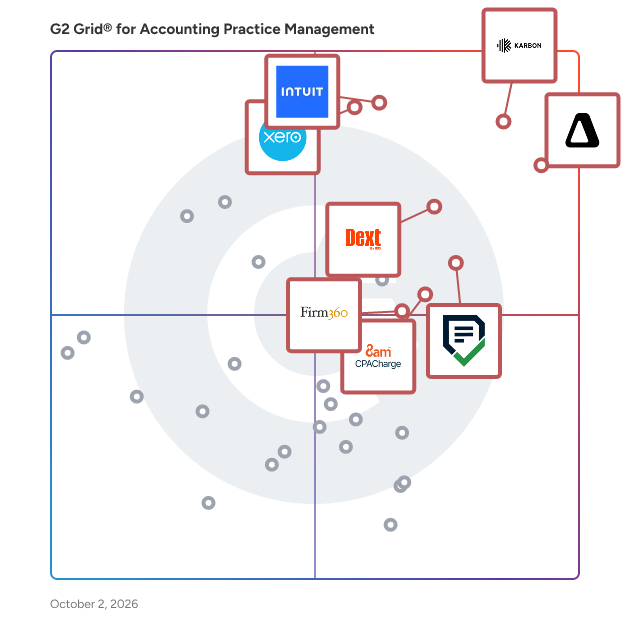
- **Leader:** [Karbon](https://www.g2.com/products/karbon-2025-03-03/reviews)
- **Highest Performer:** [8am CPACharge](https://www.g2.com/products/8am-cpacharge/reviews)
- **Easiest to Use:** [Financial Cents](https://www.g2.com/products/financial-cents/reviews)
- **Top Trending:** [Financial Cents](https://www.g2.com/products/financial-cents/reviews)
- **Best Free Software:** [Karbon](https://www.g2.com/products/karbon-2025-03-03/reviews)


---

**Sponsored**

### Levvy

Levvy is a next-gen Practice Management Platform built for accounting &amp; CAS firms, connecting teams with everything they need to do work- all in one place. It eliminates digital friction to improve team collaboration, boost productivity, and enhance client service delivery with features like: Real-time capacity management, • Dynamic Workspace that lets teams view, schedule, and track progress on all work in one seamless space • Embedded chat and document sharing for seamless team communication • All-in-one view of task details, instructions, files, and comments to eliminate switching between apps. • Automated workflows for enhanced operations


[Visit website](https://www.g2.com/external_clickthroughs/record?secure%5Bad_program%5D=ppc&amp;secure%5Bad_slot%5D=category_product_list&amp;secure%5Bcategory_id%5D=1592&amp;secure%5Bdisplayable_resource_id%5D=1592&amp;secure%5Bdisplayable_resource_type%5D=Category&amp;secure%5Bmedium%5D=sponsored&amp;secure%5Bplacement_reason%5D=page_category&amp;secure%5Bplacement_resource_ids%5D%5B%5D=1592&amp;secure%5Bprioritized%5D=false&amp;secure%5Bproduct_id%5D=1391978&amp;secure%5Bresource_id%5D=1592&amp;secure%5Bresource_type%5D=Category&amp;secure%5Bsource_type%5D=category_page&amp;secure%5Bsource_url%5D=https%3A%2F%2Fwww.g2.com%2Fcategories%2Faccounting-practice-management%2Fsmall-business&amp;secure%5Btoken%5D=555374d7eeec8ae40e2282dc5b8db7d6bbeab0c76f1d75281d569cee60c3a8f3&amp;secure%5Burl%5D=https%3A%2F%2Fwww.levvy.com%2F&amp;secure%5Burl_type%5D=product_website&amp;secure%5Bvisitor_segment%5D=180)

---

## Top-Rated Products (Ranked by G2 Score)
### 1. [Karbon](https://www.g2.com/products/karbon-2025-03-03/reviews)
  Karbon is a Practice Management platform for accounting firms. It provides a truly collaborative platform to manage workflows, communicate with teams and deliver exceptional client work. By combining email, discussions, tasks and powerful workflows, Karbon aligns your team with a single place to communicate and collaborate, increasing capacity to deliver on time and budget.


  **Average Rating:** 4.8/5.0
  **Total Reviews:** 819

**User Satisfaction Scores:**

- **Has the product been a good partner in doing business?:** 9.3/10 (Category avg: 9.1/10)
- **Reporting:** 7.6/10 (Category avg: 7.8/10)
- **New Client:** 8.9/10 (Category avg: 8.4/10)
- **Job Status:** 9.2/10 (Category avg: 8.6/10)


**Seller Details:**

- **Seller:** [KarbonHQ](https://www.g2.com/sellers/karbonhq)
- **Company Website:** https://karbonhq.com
- **Year Founded:** 2014
- **HQ Location:** Sausalito, California
- **Twitter:** @karbonhq (3,654 Twitter followers)
- **LinkedIn® Page:** https://www.linkedin.com/company/3795518/ (383 employees on LinkedIn®)

**Reviewer Demographics:**
  - **Who Uses This:** Accountant, Director
  - **Top Industries:** Accounting, Financial Services
  - **Company Size:** 86% Small-Business, 9% Mid-Market


#### Pros & Cons

**Pros:**

- Ease of Use (138 reviews)
- Task Management (93 reviews)
- Efficiency (83 reviews)
- Communication (72 reviews)
- Team Collaboration (65 reviews)

**Cons:**

- Missing Features (38 reviews)
- Email Issues (30 reviews)
- Learning Curve (29 reviews)
- Poor Usability (27 reviews)
- Email Integration (24 reviews)

### 2. [Canopy](https://www.g2.com/products/canopy-2024-06-06/reviews)
  Canopy is an all-in-one accounting practice management software built to help tax, bookkeeping, advisory, and CPA firms work smarter and more efficiently. As a central hub for your practice, Canopy streamlines how you manage clients, staff, projects, documents, and billing—so you can spend less time on administrative work and more time building client relationships. Instead of switching between multiple disconnected tools, firms can manage their entire practice from one platform. From task tracking to secure document sharing, Canopy brings together the tools you need to keep your team aligned and your clients supported. Canopy is a flexible practice management solution well suited for small, mid-sized, and large firms alike, providing the scalability to grow with your practice. Key capabilities include: Smart Intake &amp; client acquisition: Use questionnaires to gather information on leads or prospects that help you evaluate if they’re the right client for you. Ask them to attach the last 3 months of transactions to better evaluate for bookkeeping services. Or have them upload last year’s tax return to see if they fit your characteristics for individual or business tax clients. Then use Smart Intake and leverage AI to create unique request lists to capture the exact information (via questions or files) before you start any work. Engagements &amp; Proposals: Send a professional, branded Engagement wizard filled with firm branding, an attachment (video or PDF), and pricing options. Then clarify billing frequencies and terms of service eliminating any potential scope creep and delivering a 5 star experience from day one. Client Management &amp; Portal: Keep client records organized with complete histories, communication logs, and custom fields. With a secure client portal, firms can share documents, collect eSignatures, and collaborate in real time. With a robust CRM, you can also give specific contacts different permission settings for a single client portal. Workflow &amp; Task Management: Build consistency with customizable templates, automate recurring steps, and assign tasks across your team while tracking progress in real time. Document Management: Request, store, and share files securely. Clients can upload documents directly into their portal, reducing email back-and-forth (and security issues) while keeping everything in one place. Time &amp; Billing: Track billable and non-billable hours, generate invoices, and collect payments faster with integrated billing and payment options. Communication Tools: Consolidate conversations with built-in email, ensuring nothing slips through the cracks. Utilize internal comments on files, emails, and tasks so that conversations happen in context. Tax Resolution: Access IRS transcripts, forms, and resolution tools directly within the platform to streamline tax-related services. Canopy also includes automation and AI features that minimize repetitive tasks, simplify payment collection, and keep projects moving forward on schedule. This allows firms of all sizes to improve productivity without adding complexity. By combining workflow management, document organization, billing, and client collaboration, Canopy gives accounting professionals the structure and visibility needed to run a modern, client-focused practice.


  **Average Rating:** 4.6/5.0
  **Total Reviews:** 644

**User Satisfaction Scores:**

- **Has the product been a good partner in doing business?:** 9.0/10 (Category avg: 9.1/10)
- **Reporting:** 7.4/10 (Category avg: 7.8/10)
- **New Client:** 8.5/10 (Category avg: 8.4/10)
- **Job Status:** 8.3/10 (Category avg: 8.6/10)


**Seller Details:**

- **Seller:** [Canopy](https://www.g2.com/sellers/canopy-8ce787c5-6e22-4298-a210-10b2b7228799)
- **Company Website:** https://www.getcanopy.com/
- **Year Founded:** 2014
- **HQ Location:** Draper, Utah
- **Twitter:** @canopysuite (2,003 Twitter followers)
- **LinkedIn® Page:** https://www.linkedin.com/company/canopy-inc/about (299 employees on LinkedIn®)

**Reviewer Demographics:**
  - **Who Uses This:** Owner, CPA
  - **Top Industries:** Accounting, Financial Services
  - **Company Size:** 82% Small-Business, 2% Mid-Market


#### Pros & Cons

**Pros:**

- Ease of Use (167 reviews)
- Task Management (102 reviews)
- Document Management (82 reviews)
- Efficiency (75 reviews)
- Efficiency Improvement (66 reviews)

**Cons:**

- Task Management (33 reviews)
- Limited Customization (31 reviews)
- Document Management Issues (30 reviews)
- Inefficiency (23 reviews)
- Time-Consuming Setup (22 reviews)

### 3. [QuickBooks Online Accountant](https://www.g2.com/products/quickbooks-online-accountant/reviews)
  QuickBooks Online Accountant is a comprehensive, cloud-based accounting solution tailored for accounting professionals to efficiently manage multiple clients and streamline their practice workflows. By providing real-time access to client data, it enables accountants to offer timely and informed financial advice, enhancing client relationships and service quality. Key Features and Functionality: - Client Management: Access and manage all client files through a single, secure login, eliminating the need for multiple accounts and simplifying workflow. - Customizable Home Base: Each team member has a personalized dashboard highlighting essential tasks, reminders, and insights, ensuring that critical activities are prioritized and nothing is overlooked. - Data Integrity Alerts: Receive immediate notifications for disconnected bank feeds or data connection issues, allowing for prompt resolution and ensuring that financial data remains current and accurate. - Role-Based Access Control: Assign specific roles to team members, enabling delegation of tasks while maintaining compliance and security across services such as accounts payable, accounts receivable, and payroll. - AI-Powered Client Insights: Utilize artificial intelligence to monitor client portfolios, identifying significant trends and anomalies across key financial indicators, payroll data, and bill payments, facilitating proactive advisory services. - Efficient Month-End Close: Streamline the review and closing process with AI-driven anomaly detection and automated updates, supported by customizable templates and statuses to fit the firm&#39;s specific procedures. - Customer Relationship Management: Manage leads and client interactions within a unified platform, automating follow-ups and personalizing communications to strengthen client relationships from initial contact through ongoing engagement. Primary Value and Solutions Provided: QuickBooks Online Accountant empowers accounting professionals by centralizing client management, automating routine tasks, and providing advanced analytical tools. This integration reduces manual workload, minimizes errors, and enhances the ability to deliver strategic financial advice. The platform&#39;s scalability and AI-driven features support the growth of accounting practices, enabling them to offer high-quality services to a broader client base efficiently.


  **Average Rating:** 4.4/5.0
  **Total Reviews:** 78

**User Satisfaction Scores:**

- **Has the product been a good partner in doing business?:** 8.9/10 (Category avg: 9.1/10)
- **Reporting:** 10.0/10 (Category avg: 7.8/10)
- **New Client:** 10.0/10 (Category avg: 8.4/10)
- **Job Status:** 9.3/10 (Category avg: 8.6/10)


**Seller Details:**

- **Seller:** [Intuit](https://www.g2.com/sellers/intuit)
- **Year Founded:** 1983
- **HQ Location:** Mountain View, California
- **Twitter:** @Intuit (80,589 Twitter followers)
- **LinkedIn® Page:** https://www.linkedin.com/company/1666/ (17,722 employees on LinkedIn®)
- **Ownership:** VIE:INTU

**Reviewer Demographics:**
  - **Who Uses This:** Accountant
  - **Top Industries:** Accounting
  - **Company Size:** 77% Small-Business, 17% Mid-Market


#### Pros & Cons

**Pros:**

- Ease of Use (4 reviews)
- Integrations (4 reviews)
- Customer Support (3 reviews)
- Efficiency (2 reviews)
- Updates (2 reviews)

**Cons:**

- Learning Curve (1 reviews)
- Overwhelming Complexity (1 reviews)
- Software Integration (1 reviews)
- UX Improvement (1 reviews)

### 4. [Xero Practice Manager](https://www.g2.com/products/xero-practice-manager/reviews)
  Xero Practice Manager is a comprehensive, cloud-based practice management solution tailored for accounting and bookkeeping firms. It streamlines the management of clients, jobs, timesheets, invoicing, and reporting, providing a centralized platform to oversee all aspects of practice operations. By integrating seamlessly with Xero&#39;s suite of products, it ensures real-time data synchronization, enhancing efficiency and collaboration within the firm. Key Features and Functionality: - Client and Job Management: Assign tasks to staff, set deadlines, and monitor job progress through a unified dashboard. - Time Tracking and Invoicing: Record billable hours accurately and convert them into invoices, which are automatically synchronized with Xero accounting software. - Customizable Reporting: Generate standard or tailored reports to gain insights into practice performance and client engagements. - Seamless Integration: Sync client records and financial data across Xero HQ and other Xero products, ensuring consistency and reducing manual data entry. - Mobile Accessibility: Utilize the Xero Practice Manager mobile app to manage tasks, track time, and access client information on the go. Primary Value and Solutions Provided: Xero Practice Manager addresses the complexities of managing an accounting practice by offering an integrated platform that consolidates client information, job tracking, and financial data. This integration reduces administrative overhead, minimizes errors, and enhances collaboration among team members. By automating routine tasks and providing real-time insights, it empowers firms to focus on delivering high-quality services to their clients, ultimately driving growth and profitability.


  **Average Rating:** 4.5/5.0
  **Total Reviews:** 44

**User Satisfaction Scores:**

- **Has the product been a good partner in doing business?:** 8.1/10 (Category avg: 9.1/10)
- **Reporting:** 9.5/10 (Category avg: 7.8/10)
- **New Client:** 9.6/10 (Category avg: 8.4/10)
- **Job Status:** 9.4/10 (Category avg: 8.6/10)


**Seller Details:**

- **Seller:** [Xero](https://www.g2.com/sellers/xero-390f429b-8d4b-4170-a85d-f071f0cc536d)
- **Year Founded:** 2006
- **HQ Location:** Wellington
- **Twitter:** @Xero (77,564 Twitter followers)
- **LinkedIn® Page:** https://www.linkedin.com/company/50780/ (6,169 employees on LinkedIn®)
- **Ownership:** ASX:XRO

**Reviewer Demographics:**
  - **Top Industries:** Accounting
  - **Company Size:** 78% Small-Business, 20% Mid-Market


#### Pros & Cons

**Pros:**

- Ease of Use (5 reviews)
- Centralized Management (1 reviews)
- Client Management (1 reviews)
- Customer Support (1 reviews)
- Functionality (1 reviews)

**Cons:**

- Invoicing Issues (1 reviews)
- Limited Features (1 reviews)
- Slow Performance (1 reviews)
- Update Issues (1 reviews)
- Website Downtime (1 reviews)

### 5. [Financial Cents](https://www.g2.com/products/financial-cents/reviews)
  An all-in-one and easy-to-use accounting practice management software that has everything you need to collaborate with your team, track client work, automate workflows, get organized and hit your deadlines. Financial Cents simplifies your day-to-day—so you and your team can stop juggling spreadsheets, multiple apps and emails, and focus on serving clients. Financial Cents brings everything you need into a single, intuitive platform: - Accounting Workflow Management and Automation - Team collaboration tools - Built-in client communication - Capacity Management - Email Integration &amp; Management - 200+ Workflow templates - Client Portal - CRM - Inbuilt payment collection &amp; automation - Business insights and reports: Realization &amp; profitabily report, team utilization, work insights, revenue insights and more. - Proposals and Engagement Letters - Document Management &amp; secure file sharing (unlimited storage) - and more


  **Average Rating:** 4.7/5.0
  **Total Reviews:** 236

**User Satisfaction Scores:**

- **Has the product been a good partner in doing business?:** 9.4/10 (Category avg: 9.1/10)
- **Reporting:** 8.6/10 (Category avg: 7.8/10)
- **New Client:** 9.1/10 (Category avg: 8.4/10)
- **Job Status:** 9.3/10 (Category avg: 8.6/10)


**Seller Details:**

- **Seller:** [Financial Cents](https://www.g2.com/sellers/financial-cents)
- **Year Founded:** 2020
- **HQ Location:** Atlanta, US
- **Twitter:** @_FinancialCents (1,282 Twitter followers)
- **LinkedIn® Page:** https://www.linkedin.com/company/financial-cents/ (59 employees on LinkedIn®)

**Reviewer Demographics:**
  - **Who Uses This:** Owner, CEO
  - **Top Industries:** Accounting, Financial Services
  - **Company Size:** 98% Small-Business, 2% Mid-Market


#### Pros & Cons

**Pros:**

- Ease of Use (85 reviews)
- Task Management (65 reviews)
- Efficiency Improvement (31 reviews)
- Communication (29 reviews)
- Team Collaboration (28 reviews)

**Cons:**

- Expensive (16 reviews)
- Document Management Issues (14 reviews)
- Limited Functionality (14 reviews)
- Task Management (13 reviews)
- Poor Usability (11 reviews)

### 6. [TaxDome](https://www.g2.com/products/taxdome/reviews)
  Winner of the Comprehensive Firm Workflow Solutions category in the 2024 CPA Practice Advisor Readers’ Choice Awards, TaxDome is the leading practice management platform for tax, bookkeeping and full-service accounting firms. Trusted by more than 10,000 firms to communicate with more than 3 million of their clients, TaxDome focuses not just on firm operations, but on elevating the client experience. The TaxDome client mobile app consistently rates in the top 100 of the iOS app store Finance category and has a 4.9/5 rating across 6,000+ ratings. TaxDome’s user-friendly and comprehensive practice management platform improves team collaboration, provides managers with visibility, and enables tax preparers and bookkeepers to accomplish their work faster and more effectively. The product suite includes workflow automation, CRM, secure document storage, client engagement tools, AI-reporting and analytics, proposals, engagement letters, e-signatures and more. Accessible from desktop and mobile, TaxDome is the complete solution for any firm, allowing accountants to focus on value-adding meaningful client interactions. Every client, every email, every job, every invoice, all in one shared hub for your team.


  **Average Rating:** 4.7/5.0
  **Total Reviews:** 699

**User Satisfaction Scores:**

- **Has the product been a good partner in doing business?:** 9.0/10 (Category avg: 9.1/10)
- **Reporting:** 8.0/10 (Category avg: 7.8/10)
- **New Client:** 8.6/10 (Category avg: 8.4/10)
- **Job Status:** 8.6/10 (Category avg: 8.6/10)


**Seller Details:**

- **Seller:** [TaxDome](https://www.g2.com/sellers/taxdome)
- **Year Founded:** 2017
- **HQ Location:** New York, US
- **LinkedIn® Page:** https://www.linkedin.com/company/taxdome/ (329 employees on LinkedIn®)

**Reviewer Demographics:**
  - **Who Uses This:** Owner, President
  - **Top Industries:** Accounting, Financial Services
  - **Company Size:** 99% Small-Business, 0% Mid-Market


#### Pros & Cons

**Pros:**

- Ease of Use (78 reviews)
- Efficiency (39 reviews)
- Client Management (37 reviews)
- Customer Support (37 reviews)
- Document Management (37 reviews)

**Cons:**

- Learning Curve (32 reviews)
- Missing Features (26 reviews)
- Difficult Learning (20 reviews)
- Time-Consuming Setup (18 reviews)
- Limited Features (17 reviews)

### 7. [Checkpoint](https://www.g2.com/products/thomson-reuters-checkpoint/reviews)
  Checkpoint products are a family of research and guidance solutions for tax and accounting professionals that provides fast, accurate, and trusted answers. Checkpoint provides fast access to thoroughly integrated and up-to-date research materials, editorial insight, productivity tools, online learning, news updates, and marketing resources. Get trusted answers to your tax, accounting, finance, and trade questions, plus guidance and resources to help you make confident decisions quickly — adding more value to your firm or business. Try Checkpoint Edge Checkpoint Edge has the industry’s most sophisticated AI-powered algorithm built with larger sources of human-curated data and more diverse sets of features within its machine learning. The typeahead predictive search feature returns the most targeted results based on full-phrasal, natural language questions. Explore the benefits of a Premium plan with a free 7-day trial. Copy this link into your browser to get started today! https://tax.thomsonreuters.com/en/products/checkpoint-edge/trial


  **Average Rating:** 4.3/5.0
  **Total Reviews:** 20

**User Satisfaction Scores:**

- **Has the product been a good partner in doing business?:** 9.4/10 (Category avg: 9.1/10)
- **Reporting:** 10.0/10 (Category avg: 7.8/10)
- **New Client:** 10.0/10 (Category avg: 8.4/10)
- **Job Status:** 10.0/10 (Category avg: 8.6/10)


**Seller Details:**

- **Seller:** [Thomson Reuters](https://www.g2.com/sellers/thomson-reuters)
- **Year Founded:** 2008
- **HQ Location:** Toronto, CA
- **Twitter:** @thomsonreuters (150,455 Twitter followers)
- **LinkedIn® Page:** https://www.linkedin.com/company/1400/ (36,465 employees on LinkedIn®)
- **Ownership:** NYSE:TRI

**Reviewer Demographics:**
  - **Top Industries:** Accounting
  - **Company Size:** 45% Enterprise, 40% Small-Business


#### Pros & Cons

**Pros:**

- Comprehensive (1 reviews)
- Tax Management (1 reviews)
- Updates (1 reviews)


### 8. [Suralink](https://www.g2.com/products/suralink/reviews)
  Suralink is the leading client collaboration platform designed to streamline engagement workflows for audit, tax, and advisory teams at accounting firms. Our mission is to ensure that engagements stay on track, within budget, and run efficiently by providing powerful tools that enhance collaboration and eliminate inefficiencies. With our Request List Management tool, firms can automate and simplify document requests, track engagement progress in real-time, and ensure clients remain aligned every step of the way. Suralink Workpaper Suite integrates with any Excel-based binder solution and connects directly to Request List Management. It automates data matching for sample testing or population analysis, streamlines reviews with linked client documents, and enables direct client follow-up—all without ever leaving your Excel workpapers. Clients’ responses and support documents sync automatically into your workbook, ensuring real-time updates and smoother collaboration. By combining Request List Management’s powerful, secure document request management with Workpaper Suite’s seamless integration with Excel, Suralink empowers firms to simplify workflows, reduce manual tasks, and foster better collaboration with clients. These tools help firms keep engagements on track, minimize inefficiencies, and enhance client interactions—ensuring a more efficient and cost-effective engagement process from initial PBC requests to workpaper review. Suralink is headquartered in Salt Lake City, Utah, with a remote workforce nationwide.


  **Average Rating:** 4.5/5.0
  **Total Reviews:** 147

**User Satisfaction Scores:**

- **Has the product been a good partner in doing business?:** 8.9/10 (Category avg: 9.1/10)
- **Reporting:** 8.5/10 (Category avg: 7.8/10)
- **New Client:** 8.1/10 (Category avg: 8.4/10)
- **Job Status:** 8.1/10 (Category avg: 8.6/10)


**Seller Details:**

- **Seller:** [Suralink](https://www.g2.com/sellers/suralink)
- **Company Website:** https://www.suralink.com
- **Year Founded:** 2014
- **HQ Location:** Salt Lake City,Utah
- **Twitter:** @Suralink (724 Twitter followers)
- **LinkedIn® Page:** https://www.linkedin.com/company/suralink/ (103 employees on LinkedIn®)

**Reviewer Demographics:**
  - **Who Uses This:** Senior Manager
  - **Top Industries:** Accounting, Consulting
  - **Company Size:** 43% Small-Business, 41% Mid-Market


#### Pros & Cons

**Pros:**

- Ease of Use (36 reviews)
- Secure Document Sharing (14 reviews)
- User Interface (14 reviews)
- Setup Ease (11 reviews)
- Efficiency (9 reviews)

**Cons:**

- Poor Notifications (9 reviews)
- Missing Features (8 reviews)
- File Management (7 reviews)
- Access Issues (5 reviews)
- Difficult Learning (5 reviews)

### 9. [8am CPACharge](https://www.g2.com/products/8am-cpacharge/reviews)
  8am CPACharge is trusted by the AICPA, 35+ state CPA societies and more than 150,000 professionals as the best payment solution for CPAs, Enrolled Agents and Accountants—providing a simple, secure way for accounting firms to accept client credit, debit, and eCheck payments from anywhere at anytime. With next-day payments, you can keep cash flow predictable and your firm moving forward without delays.


  **Average Rating:** 4.7/5.0
  **Total Reviews:** 98

**User Satisfaction Scores:**

- **Has the product been a good partner in doing business?:** 9.5/10 (Category avg: 9.1/10)
- **Reporting:** 8.5/10 (Category avg: 7.8/10)
- **New Client:** 8.6/10 (Category avg: 8.4/10)
- **Job Status:** 8.6/10 (Category avg: 8.6/10)


**Seller Details:**

- **Seller:** [8am](https://www.g2.com/sellers/8am-31dcab59-2905-4459-9914-316d0e558c27)
- **Company Website:** https://www.8am.com/
- **Year Founded:** 2005
- **HQ Location:** N/A
- **LinkedIn® Page:** https://www.linkedin.com/company/weare8am/ (708 employees on LinkedIn®)

**Reviewer Demographics:**
  - **Who Uses This:** Owner
  - **Top Industries:** Accounting
  - **Company Size:** 98% Small-Business, 2% Mid-Market


#### Pros & Cons

**Pros:**

- Ease of Use (18 reviews)
- Easy Payments (10 reviews)
- Payment Efficiency (9 reviews)
- Invoicing (7 reviews)
- Customer Support (4 reviews)

**Cons:**

- Billing Issues (5 reviews)
- Payment Issues (5 reviews)
- High Fees (4 reviews)
- Email Integration (3 reviews)
- Expensive (3 reviews)

### 10. [Onvio Firm Management](https://www.g2.com/products/onvio-firm-management/reviews)
  Onvio Firm Management is a comprehensive cloud-native solution that helps tax and accounting professionals collect, share, and store documents, track time and billing, save time with trial balance tools, manage projects, and stay synchronized with colleagues and clients, on a single, universally accessible integrated platform. An intuitive interface provides users with a consistent and familiar experience with clients using multi-factor authentication and other security protocols. Plus, all data is encrypted whether in transit or stored. Firms can initiate projects through due date and task tracking, budgeting tools, and reporting that ensure productive workflows and successful results. The speed, flexibility, and security provide firms the opportunity to run their business anytime, anywhere, and collaborate easily with clients. Time and expense tracking, along with customized billing make it easy to monitor effectiveness and business performance. Onvio Firm Management offers the convenience of e-signature capability, source document scanning through a mobile device, and online bill pay to boost customer satisfaction and support the growth and future of your firm.


  **Average Rating:** 3.6/5.0
  **Total Reviews:** 13

**User Satisfaction Scores:**

- **Has the product been a good partner in doing business?:** 8.9/10 (Category avg: 9.1/10)
- **Reporting:** 8.3/10 (Category avg: 7.8/10)
- **New Client:** 6.7/10 (Category avg: 8.4/10)
- **Job Status:** 8.3/10 (Category avg: 8.6/10)


**Seller Details:**

- **Seller:** [Thomson Reuters](https://www.g2.com/sellers/thomson-reuters)
- **Year Founded:** 2008
- **HQ Location:** Toronto, CA
- **Twitter:** @thomsonreuters (150,455 Twitter followers)
- **LinkedIn® Page:** https://www.linkedin.com/company/1400/ (36,465 employees on LinkedIn®)
- **Ownership:** NYSE:TRI

**Reviewer Demographics:**
  - **Top Industries:** Accounting
  - **Company Size:** 46% Small-Business, 23% Mid-Market


#### Pros & Cons

**Pros:**

- Ease of Use (1 reviews)
- Secure Document Sharing (1 reviews)
- Task Management (1 reviews)
- Tax Management (1 reviews)

**Cons:**

- Difficult Learning (1 reviews)
- Learning Curve (1 reviews)

### 11. [Firm360](https://www.g2.com/products/firm360/reviews)
  Firm360 is the all-in-one platform built for accountants by accountants to eliminate the chaos of juggling disconnected tools and manual processes. We understand the work behind the workflow — so we’ve designed Firm360 to streamline every part of running an accounting firm. From project management and client communication to time tracking, billing, e-signatures, reporting, and secure document sharing, everything is in one place. Firms use Firm360 to save hours each week, improve team collaboration, and deliver a better client experience. More than 3,000 accounting professionals trust Firm360 to operate with clarity, not complexity — supported by tailored onboarding, ongoing training, and a responsive team that’s always ready to help.


  **Average Rating:** 4.5/5.0
  **Total Reviews:** 102

**User Satisfaction Scores:**

- **Has the product been a good partner in doing business?:** 9.1/10 (Category avg: 9.1/10)
- **Reporting:** 7.9/10 (Category avg: 7.8/10)
- **New Client:** 8.6/10 (Category avg: 8.4/10)
- **Job Status:** 8.8/10 (Category avg: 8.6/10)


**Seller Details:**

- **Seller:** [Firm Software LLC](https://www.g2.com/sellers/firm-software-llc)
- **Company Website:** https://www.myfirm360.com
- **Year Founded:** 2019
- **HQ Location:** Raleigh, NC
- **Twitter:** @firm360 (775 Twitter followers)
- **LinkedIn® Page:** https://www.linkedin.com/company/myfirm360 (17 employees on LinkedIn®)

**Reviewer Demographics:**
  - **Who Uses This:** Accountant, Partner
  - **Top Industries:** Accounting, Financial Services
  - **Company Size:** 84% Small-Business, 8% Mid-Market


#### Pros & Cons

**Pros:**

- Ease of Use (38 reviews)
- Customer Support (20 reviews)
- Centralized Management (17 reviews)
- Document Management (15 reviews)
- Efficiency Improvement (15 reviews)

**Cons:**

- Limited Features (8 reviews)
- Client Management (7 reviews)
- Poor Usability (7 reviews)
- File Management (6 reviews)
- Download Issues (5 reviews)

### 12. [Double](https://www.g2.com/products/double-double/reviews)
  Double is a practice management and close management solution that helps accountants, bookkeepers, and internal accounting teams catch and correct errors, communicate with clients and stakeholders, deliver stunning financial reports, and manage the entire month-end close from start to finish. Double serves as a centralized operational hub, designed to sit on top of the existing accounting ledger to streamline both internal workflows and external client communication. By utilizing a two-way sync with major accounting software—including QuickBooks Online, Xero, Sage Intacct, and NetSuite—Double identifies missing information and potential errors in real-time. Instead of manual exports for transaction questions or fragmented email threads, Double allows teams to address uncategorized transactions, missing receipts, and coding inconsistencies directly through a secure, custom-branded portal. The bidirectional sync ensures that any updates made within Double, such as reclassifying a transaction or attaching a document, are instantly reflected in the client’s ledger, maintaining a single source of truth. The platform is built specifically for accounting professionals who want to automate repetitive tasks and standardize their workflows. It replaces the need for separate task managers, document storage tools, and countless email threads by consolidating these functions into a unified interface. By automating routine administrative tasks and providing intuitive AI-assisted features, teams can increase their processing capacity and improve the accuracy of their financial reporting overall. 2-way sync with the ledger: Features a live sync to the GL/ERP that flags errors and allows users to update transaction coding, attachments, and statuses across both platforms simultaneously. AI-assisted reconciliation and journal entries: Leverages AI to convert complex source documents, such as payroll reports or settlement statements, into balanced journal entries while pinpointing specific discrepancies when bank feeds do not tie to the ledger. Practice management dashboard: Provides high-level visibility into the status of all closes, team assignments, and outstanding questions through a centralized control center. Integrated receipt management: Uses AI to extract data from uploaded receipts and offers coding suggestions that can be posted directly to the ledger with human approval. Through this combination of workflow automation and integrated communication, Double helps accounting and finance teams reduce the manual labor associated with the close, allowing staff to focus on higher-level advisory services and data integrity.


  **Average Rating:** 5.0/5.0
  **Total Reviews:** 79

**User Satisfaction Scores:**

- **Has the product been a good partner in doing business?:** 9.9/10 (Category avg: 9.1/10)
- **Reporting:** 8.6/10 (Category avg: 7.8/10)
- **New Client:** 9.3/10 (Category avg: 8.4/10)
- **Job Status:** 9.6/10 (Category avg: 8.6/10)


**Seller Details:**

- **Seller:** [Double](https://www.g2.com/sellers/double-052b6191-dd0d-4334-8f60-99591df73878)
- **Year Founded:** 2020
- **HQ Location:** NYC, US
- **LinkedIn® Page:** https://www.linkedin.com/company/79906704 (84 employees on LinkedIn®)

**Reviewer Demographics:**
  - **Who Uses This:** Owner, Bookkeeper
  - **Top Industries:** Accounting
  - **Company Size:** 96% Small-Business, 3% Mid-Market


#### Pros & Cons

**Pros:**

- Ease of Use (14 reviews)
- Collaboration (10 reviews)
- Organization (8 reviews)
- Time-Saving (8 reviews)
- Communication (6 reviews)

**Cons:**

- Client Management (3 reviews)
- Limitations (3 reviews)
- Poor Reporting (3 reviews)
- Email Integration (2 reviews)
- Poor Usability (2 reviews)

### 13. [Accounting CS](https://www.g2.com/products/accounting-cs/reviews)
  Accounting CS is a comprehensive accounting software solution designed for professional accountants and CPA firms. It integrates various accounting functions, including write-up, trial balance, payroll, financial reporting, and client accounting, into a single platform. This unified approach streamlines operations, enhances productivity, and facilitates real-time collaboration between firms and their clients. Key Features and Functionality: - Versatile Integration: Seamlessly imports data from client spreadsheets and integrates with third-party software like QuickBooks®, enabling efficient data management. - Industry Adaptability: Supports various entity types, reporting periods, and client structures, making it suitable for diverse industries and business models. - Multi-User and Multi-Tasking Capabilities: Allows multiple users to work on different tasks or clients simultaneously, enhancing team collaboration and efficiency. - Enhanced Security and Controls: Offers customizable workspaces and user permissions, ensuring that staff access only the information pertinent to their roles. - Customized Reporting: Provides robust reporting tools, including a custom report designer, to analyze data and generate client-specific reports. - Client Access Portal: Facilitates real-time collaboration with clients through a shared online portal, enabling secure data sharing and communication. Primary Value and Solutions Provided: Accounting CS addresses the challenges faced by accounting firms in managing multiple clients and complex accounting tasks. By consolidating essential accounting functions into a single, integrated platform, it reduces the need for multiple software solutions, minimizes data entry errors, and accelerates workflow processes. The real-time collaboration features enhance client engagement and satisfaction, while the customizable reporting and security controls ensure that firms can tailor the software to their specific needs. Overall, Accounting CS empowers accounting professionals to deliver high-quality services efficiently and effectively.


  **Average Rating:** 3.5/5.0
  **Total Reviews:** 28

**User Satisfaction Scores:**

- **Has the product been a good partner in doing business?:** 5.3/10 (Category avg: 9.1/10)
- **Reporting:** 8.3/10 (Category avg: 7.8/10)
- **New Client:** 10.0/10 (Category avg: 8.4/10)
- **Job Status:** 10.0/10 (Category avg: 8.6/10)


**Seller Details:**

- **Seller:** [Thomson Reuters](https://www.g2.com/sellers/thomson-reuters)
- **Year Founded:** 2008
- **HQ Location:** Toronto, CA
- **Twitter:** @thomsonreuters (150,455 Twitter followers)
- **LinkedIn® Page:** https://www.linkedin.com/company/1400/ (36,465 employees on LinkedIn®)
- **Ownership:** NYSE:TRI

**Reviewer Demographics:**
  - **Who Uses This:** Accountant
  - **Top Industries:** Accounting
  - **Company Size:** 89% Small-Business, 11% Mid-Market


#### Pros & Cons

**Pros:**

- Ease of Use (3 reviews)
- Integrations (2 reviews)
- Automation (1 reviews)
- Centralized Management (1 reviews)
- Comprehensive (1 reviews)

**Cons:**

- Difficult Learning (1 reviews)
- Difficult Setup (1 reviews)
- Formatting Issues (1 reviews)
- Learning Curve (1 reviews)
- Overwhelming Complexity (1 reviews)

### 14. [DataSnipper](https://www.g2.com/products/datasnipper/reviews)
  DataSnipper is the intelligent automation platform transforming how audit and finance teams work. Powered by AI Agents, DataSnipper helps professionals reduce manual work, analyze documents and data faster, and focus more time on judgement and analysis where it matters most. In 2025, DataSnipper delivered more than $1.4B in productivity savings across audit and finance workflows, as organizations increasingly adopted AI to support complex, regulated processes. At the center of this innovation are Excel Agents and Disclosure Agents, designed to move beyond task-level automation and support end-to-end audit and reporting workflows directly inside Excel. DataSnipper&#39;s innovation has been recognized globally, including the 2026 Forbes Fintech 50 — the only European company on the list — and TIME&#39;s Best Inventions of 2025 in the Artificial Intelligence category for DocuMine, highlighting breakthrough AI designed to help professionals analyze large volumes of documents with speed and transparency. Trusted by Fortune 500 companies, government agencies, global enterprises, and all Big Four audit firms, DataSnipper is used by professionals in 175 countries to accelerate audit and finance workflows while maintaining full transparency and control. AI Agents: The Next Generation of Audit &amp; Finance Automation At the core of DataSnipper are Excel Agents and Disclosure Agents, designed to go beyond task-level automation and support complete audit and reporting workflows: - Excel Agents — Describe a task in plain language and the agent plans and executes it end-to-end: matching sample data to documents, extracting key fields, and comparing results to expectations. No templates, no complex setup — just prompt-driven automation with explainable, audit-ready outputs and full cross-references. - Disclosure Agents — Turn days of manual disclosure checklist reviews into minutes. Automatically analyze checklists against financial statements across IFRS, GAAP, and other global standards, cross-check firm-specific policies, and link every requirement to transparent, verifiable evidence. Intelligent Automation Features DataSnipper also gives audit and finance teams a full suite of automation capabilities directly in Excel: - Document Matching — Automatically match Excel data to invoices, bank statements, contracts, and other source documents. - Data Extraction — Extract data from documents with consistent layouts and apply the same logic at scale. - DocuMine — AI-powered document intelligence that lets teams mine, analyze, and verify large volumes of documents. Named to TIME&#39;s Best Inventions of 2025 in the Artificial Intelligence category, alongside Nvidia, Anthropic, and DeepSeek. - AI Extractions — Turn unstructured documents across languages and formats into analysis-ready data directly in Excel. - Cross-Referencing &amp; Audit Trail — Every snip, extraction, and AI output links back to its source document, creating a fully traceable, verifiable audit trail. - Real-Time Collaboration — Work simultaneously with team members in the same workbook, syncing data and references in real time. Why Audit &amp; Finance Teams Choose DataSnipper - Lives inside Excel — No new tools to learn. Teams adopt DataSnipper immediately within the environment they already know, supported by a dedicated customer success team. - $1.4B+ in productivity savings delivered in 2025 — Measurable impact across audit and finance workflows globally. - 600,000+ professionals across 175 countries — Trusted by all Big Four firms (Deloitte, EY, KPMG, PwC), Fortune 500 companies, government agencies, and global enterprises. - Award-winning innovation — 2026 Forbes Fintech 50 (only European company on the list) · TIME Best Inventions 2025 (AI category) · Fast Company Next Big Things in Tech 2025 · G2 Leader in Financial Audit Software. - Scales with your team — Three packages (Start, Accelerate, Elevate) to support firms from small practices to global organizations. Built for Trust and Transparency Every AI output is grounded in source evidence. DataSnipper does not train or fine-tune models on customer data. Customer prompts and documents are processed temporarily (up to 24 hours) and then permanently deleted. SOC 2 Type II certified, with data encrypted in transit and at rest, and regional data centers across the U.S., EU, and Australia. See DataSnipper in Action Ready to automate your audit and finance workflows with AI Agents? Book a personalized demo and discover how DataSnipper can help your team reduce manual work, improve quality, and reclaim time for higher-value analysis, all without leaving Excel.


  **Average Rating:** 4.8/5.0
  **Total Reviews:** 217

**User Satisfaction Scores:**

- **Has the product been a good partner in doing business?:** 8.9/10 (Category avg: 9.1/10)
- **Reporting:** 2.5/10 (Category avg: 7.8/10)
- **New Client:** 2.5/10 (Category avg: 8.4/10)
- **Job Status:** 2.5/10 (Category avg: 8.6/10)


**Seller Details:**

- **Seller:** [DataSnipper](https://www.g2.com/sellers/datasnipper)
- **Company Website:** https://Datasnipper.com
- **Year Founded:** 2017
- **HQ Location:** Amsterdam, NL
- **Twitter:** @DataSnipper (147 Twitter followers)
- **LinkedIn® Page:** https://www.linkedin.com/company/datasnipper/ (292 employees on LinkedIn®)

**Reviewer Demographics:**
  - **Who Uses This:** Auditor, Associate
  - **Top Industries:** Accounting, Financial Services
  - **Company Size:** 43% Enterprise, 37% Mid-Market


#### Pros & Cons

**Pros:**

- Ease of Use (28 reviews)
- Document Management (13 reviews)
- Efficiency (12 reviews)
- Time Saving (8 reviews)
- Audit Efficiency (7 reviews)

**Cons:**

- Slow Loading (5 reviews)
- Bugs (3 reviews)
- Formatting Issues (3 reviews)
- Missing Features (3 reviews)
- Poor Usability (3 reviews)

### 15. [Docyt](https://www.g2.com/products/docyt/reviews)
  Experience AI bookkeeping with Docyt, saving 500 hours and $2,000 annually on average. Our AI automation software offers real-time insights into expenses and profitability, eliminating manual data entry and tedious tasks. Docyt learns your business intricacies, automating back-office and bookkeeping duties. It handles time-consuming tasks. Gain instant financial status visibility through real-time reports, ensuring constant financial control. Generate consolidated roll-up and individual financial statements for all business locations effortlessly, aiding in strategic decision-making. Embrace the revolution of AI bookkeeping with Docyt, saving time and gaining real-time insights to boost your business success. Use Docyt on top of your existing Quickboooks Online or Desktop solution to manage expenses, corporate credit cards and real time revenue reconciliation for one or many locations. We integrate with all major POS and PMS systems and provide industry specific reporting.


  **Average Rating:** 4.7/5.0
  **Total Reviews:** 35

**User Satisfaction Scores:**

- **Has the product been a good partner in doing business?:** 8.6/10 (Category avg: 9.1/10)
- **Reporting:** 9.4/10 (Category avg: 7.8/10)
- **New Client:** 9.5/10 (Category avg: 8.4/10)
- **Job Status:** 9.1/10 (Category avg: 8.6/10)


**Seller Details:**

- **Seller:** [Docyt](https://www.g2.com/sellers/docyt)
- **HQ Location:** Santa Clara, CA
- **Twitter:** @Docyt_inc (293 Twitter followers)
- **LinkedIn® Page:** https://www.linkedin.com/company/docyt/ (213 employees on LinkedIn®)

**Reviewer Demographics:**
  - **Top Industries:** Retail, Hospitality
  - **Company Size:** 89% Small-Business, 9% Mid-Market


#### Pros & Cons

**Pros:**

- Customer Support (5 reviews)
- Ease of Use (5 reviews)
- Automation (3 reviews)
- Efficiency Improvement (3 reviews)
- Integrations (3 reviews)

**Cons:**

- Delays (2 reviews)
- Project Delays (2 reviews)
- Vendor Management (2 reviews)
- Bug Issues (1 reviews)
- Communication Issues (1 reviews)

### 16. [Uku](https://www.g2.com/products/uku/reviews)
  A powerful, beautiful and easy-to-use Accounting Practice Management Software for ambitious accounting firms. Uku originates from Scandinavia and is also trusted by accounting firms across the UK, USA, and Canada. What truly sets Uku apart is its focus on simplicity and efficiency — your team spends less time on admin, yet nothing gets missed. With Uku, every task, deadline and email is automatically managed, so your workflow stays clear and organized without extra effort. Uku’s automated billing transforms invoicing from a multi-day chore into a 30-minute process. Flexible billing options like fixed, hourly, or service-based — integrate seamlessly with your accounting software (Quicbooks, Xero, e-conomic etc.), ensuring fast, accurate invoicing and improved cash flow. Choose Uku to experience a practice management platform where powerful automation meets practical results.


  **Average Rating:** 4.7/5.0
  **Total Reviews:** 108

**User Satisfaction Scores:**

- **Has the product been a good partner in doing business?:** 9.3/10 (Category avg: 9.1/10)
- **Reporting:** 9.1/10 (Category avg: 7.8/10)
- **New Client:** 9.4/10 (Category avg: 8.4/10)
- **Job Status:** 9.0/10 (Category avg: 8.6/10)


**Seller Details:**

- **Seller:** [Getuku](https://www.g2.com/sellers/getuku)
- **Year Founded:** 2017
- **HQ Location:** Tallinn, EE
- **Twitter:** @accountinguku (53 Twitter followers)
- **LinkedIn® Page:** https://www.linkedin.com/company/getuku/ (9 employees on LinkedIn®)

**Reviewer Demographics:**
  - **Who Uses This:** Accountant
  - **Top Industries:** Accounting, Financial Services
  - **Company Size:** 71% Small-Business, 27% Mid-Market


#### Pros & Cons

**Pros:**

- Ease of Use (25 reviews)
- Task Management (17 reviews)
- Efficiency Improvement (12 reviews)
- Time-saving (11 reviews)
- Time Tracking (10 reviews)

**Cons:**

- Task Management (8 reviews)
- Learning Curve (6 reviews)
- Difficult Learning (4 reviews)
- Limited Functionality (4 reviews)
- Task Management Issues (4 reviews)

### 17. [Countable](https://www.g2.com/products/countable-countable/reviews)
  Countable is a comprehensive community engagement platform designed to foster meaningful interactions between organizations and their stakeholders. It offers a suite of tools that enable companies, nonprofits, and government entities to build and manage online communities, facilitating discussions, content sharing, and collaborative decision-making. By providing a centralized hub for engagement, Countable helps organizations strengthen relationships, gather valuable insights, and drive collective action. Key Features and Functionality: - Customizable Community Hubs: Create branded online spaces tailored to specific audiences, allowing for personalized user experiences. - Interactive Content Modules: Share articles, videos, and other media to inform and engage community members effectively. - Discussion Forums: Facilitate open dialogues and debates on pertinent topics, encouraging active participation and diverse viewpoints. - Actionable Campaigns: Launch initiatives that prompt users to take specific actions, such as signing petitions or participating in surveys. - Analytics Dashboard: Monitor engagement metrics and user behavior to assess the effectiveness of community strategies. - Integration Capabilities: Seamlessly connect with existing CRM systems, social media platforms, and other tools to streamline operations. Primary Value and Solutions Provided: Countable addresses the challenge organizations face in building and maintaining active, engaged communities. By offering a centralized platform with interactive features, it enables organizations to: - Enhance Stakeholder Engagement: Foster deeper connections with audiences through meaningful interactions and content sharing. - Drive Collective Action: Mobilize community members around causes, campaigns, or initiatives, leading to tangible outcomes. - Gather Actionable Insights: Utilize analytics to understand community dynamics, preferences, and feedback, informing strategic decisions. - Strengthen Brand Loyalty: Build trust and loyalty by providing a transparent and participatory environment for stakeholders. In summary, Countable empowers organizations to create vibrant online communities that drive engagement, collaboration, and positive change.


  **Average Rating:** 4.7/5.0
  **Total Reviews:** 14

**User Satisfaction Scores:**

- **Has the product been a good partner in doing business?:** 10.0/10 (Category avg: 9.1/10)
- **Reporting:** 4.2/10 (Category avg: 7.8/10)
- **New Client:** 6.8/10 (Category avg: 8.4/10)
- **Job Status:** 7.3/10 (Category avg: 8.6/10)


**Seller Details:**

- **Seller:** [Countable](https://www.g2.com/sellers/countable)
- **Year Founded:** 2014
- **HQ Location:** San Francisco, US
- **LinkedIn® Page:** https://www.linkedin.com/company/5057551/ (26 employees on LinkedIn®)

**Reviewer Demographics:**
  - **Top Industries:** Accounting
  - **Company Size:** 100% Small-Business


#### Pros & Cons

**Pros:**

- Ease of Use (10 reviews)
- Customer Support (5 reviews)
- Integrations (4 reviews)
- Automation (2 reviews)
- Customization (2 reviews)

**Cons:**

- Poor Usability (2 reviews)
- Slow Performance (2 reviews)
- Formatting Issues (1 reviews)
- Learning Curve (1 reviews)
- Limited Features (1 reviews)

### 18. [Levvy](https://www.g2.com/products/levvy/reviews)
  Levvy is a next-gen Practice Management Platform built for accounting &amp; CAS firms, connecting teams with everything they need to do work- all in one place. It eliminates digital friction to improve team collaboration, boost productivity, and enhance client service delivery with features like: Real-time capacity management, • Dynamic Workspace that lets teams view, schedule, and track progress on all work in one seamless space • Embedded chat and document sharing for seamless team communication • All-in-one view of task details, instructions, files, and comments to eliminate switching between apps. • Automated workflows for enhanced operations


  **Average Rating:** 5.0/5.0
  **Total Reviews:** 13

**User Satisfaction Scores:**

- **Has the product been a good partner in doing business?:** 9.3/10 (Category avg: 9.1/10)
- **Reporting:** 8.7/10 (Category avg: 7.8/10)
- **New Client:** 9.8/10 (Category avg: 8.4/10)
- **Job Status:** 9.5/10 (Category avg: 8.6/10)


**Seller Details:**

- **Seller:** [Levvy](https://www.g2.com/sellers/levvy)
- **Company Website:** https://levvy.com/
- **Year Founded:** 2020
- **HQ Location:** Brooklyn, US
- **LinkedIn® Page:** https://www.linkedin.com/company/levvy (8 employees on LinkedIn®)

**Reviewer Demographics:**
  - **Top Industries:** Accounting
  - **Company Size:** 92% Small-Business


#### Pros & Cons

**Pros:**

- Ease of Use (7 reviews)
- Task Management (7 reviews)
- Efficiency Improvement (5 reviews)
- Team Collaboration (4 reviews)
- Workflow Management (4 reviews)

**Cons:**

- Task Management (2 reviews)
- Billing Issues (1 reviews)
- Invoicing Issues (1 reviews)
- Limited Integrations (1 reviews)
- Poor Reporting (1 reviews)

### 19. [Cone](https://www.g2.com/products/cone-accounting-practice-management/reviews)
  Cone is all-in-one accounting practice management and proposal software - built for modern accounting and bookkeeping firms. From proposals and engagement letters to billing, payments, workflow automation, and client communication - Cone delivers a unified experience that replaces multiple tools. Cone’s platform includes: - Customizable Proposals &amp; Engagement Letters (standalone or integrated) - Billing &amp; Payments (with automated invoicing, reminders, and recurring billing) - Multiple Pricing Packages - Time Tracking - Document Management - Email Management - Workflow Automation - Client Portal - Integrations with Xero, QBO, GoCardless, Stripe, Google Drive, SharePoint, and more Trusted by thousands of accountants and bookkeepers globally - across the UK, US, Australia, and beyond - Cone helps firms start small or scale confidently, without switching between tools or breaking the bank. P.S.: Cone’s proposal and engagement letter software is also available as a standalone product - perfect for firms looking to streamline onboarding and get paid faster.


  **Average Rating:** 4.8/5.0
  **Total Reviews:** 33

**User Satisfaction Scores:**

- **Has the product been a good partner in doing business?:** 9.6/10 (Category avg: 9.1/10)
- **Reporting:** 8.3/10 (Category avg: 7.8/10)
- **New Client:** 10.0/10 (Category avg: 8.4/10)
- **Job Status:** 10.0/10 (Category avg: 8.6/10)


**Seller Details:**

- **Seller:** [Cone](https://www.g2.com/sellers/cone)
- **Year Founded:** 2022
- **HQ Location:** United States
- **LinkedIn® Page:** https://www.linkedin.com/company/getcone (10 employees on LinkedIn®)

**Reviewer Demographics:**
  - **Top Industries:** Accounting
  - **Company Size:** 97% Small-Business, 3% Mid-Market


#### Pros & Cons

**Pros:**

- Ease of Use (18 reviews)
- Customer Support (15 reviews)
- Time-saving (11 reviews)
- Efficiency (8 reviews)
- Pricing (8 reviews)

**Cons:**

- Learning Curve (2 reviews)
- Deletion Problems (1 reviews)
- Difficult Setup (1 reviews)
- Initial Usage Difficulty (1 reviews)
- Limited Customization (1 reviews)

### 20. [Accounting Power](https://www.g2.com/products/accounting-power/reviews)
  Have you realized that the accounting systems which are sold directly to your clients, bypassing you, are hurting your practice? You’re not alone. Thousands of accountants came to the same realization - and they wanted to regain control. We created Accounting Power just for accountants like you. Sold exclusively to accountants, Accounting Power includes both a powerful professional system and a fully integrated comprehensive G/L system. This breakthrough approach gives you the stronger control over clients accounting to best serve all your clients, offer client accounting services and boost your margins.


  **Average Rating:** 4.3/5.0
  **Total Reviews:** 11

**User Satisfaction Scores:**

- **Has the product been a good partner in doing business?:** 8.3/10 (Category avg: 9.1/10)
- **Reporting:** 8.3/10 (Category avg: 7.8/10)
- **New Client:** 6.7/10 (Category avg: 8.4/10)
- **Job Status:** 7.8/10 (Category avg: 8.6/10)


**Seller Details:**

- **Seller:** [IRIS Software Group](https://www.g2.com/sellers/iris-software-group)
- **Year Founded:** 1978
- **HQ Location:** Alpharetta, GA
- **Twitter:** @IRISSoftwareGrp (1,341 Twitter followers)
- **LinkedIn® Page:** https://www.linkedin.com/company/iris-software-group/ (2,976 employees on LinkedIn®)

**Reviewer Demographics:**
  - **Company Size:** 58% Mid-Market, 42% Small-Business


#### Pros & Cons

**Pros:**

- Comprehensive (1 reviews)
- Document Management (1 reviews)
- Organization Features (1 reviews)
- Pricing (1 reviews)

**Cons:**

- Limited Features (1 reviews)

### 21. [Caseware](https://www.g2.com/products/caseware/reviews)
  Caseware delivers a complete, secure audit and assurance platform trusted by accounting firms around the world. Our unified platform connects every stage of the engagement—from planning and risk assessment to review and completion—so teams can collaborate seamlessly and deliver work with confidence. With 30+ years of industry partnership and a deep commitment to audit quality, Caseware helps firms achieve faster turnaround, stronger client relationships, and greater peace of mind knowing their data is protected.


  **Average Rating:** 4.0/5.0
  **Total Reviews:** 59

**User Satisfaction Scores:**

- **Has the product been a good partner in doing business?:** 7.6/10 (Category avg: 9.1/10)
- **Reporting:** 3.3/10 (Category avg: 7.8/10)
- **Job Status:** 10.0/10 (Category avg: 8.6/10)


**Seller Details:**

- **Seller:** [Caseware International](https://www.g2.com/sellers/caseware-international)
- **Company Website:** https://www.caseware.com
- **Year Founded:** 1988
- **HQ Location:** Toronto, ON
- **Twitter:** @CaseWare (5,816 Twitter followers)
- **LinkedIn® Page:** https://www.linkedin.com/company/80551/ (615 employees on LinkedIn®)

**Reviewer Demographics:**
  - **Top Industries:** Accounting
  - **Company Size:** 38% Small-Business, 31% Mid-Market


#### Pros & Cons

**Pros:**

- Ease of Use (4 reviews)
- Efficiency (3 reviews)
- Automation (2 reviews)
- Comprehensive (2 reviews)
- Templates (2 reviews)

**Cons:**

- Learning Curve (3 reviews)
- Slow Performance (2 reviews)
- Time-Consumption (2 reviews)
- Bugs (1 reviews)
- Difficult Learning (1 reviews)

### 22. [Uncat](https://www.g2.com/products/uncat/reviews)
  Fix Uncategorized Transactions &amp; Automate Your Accounting with Uncat. No more spreadsheets! Streamline your accounting for just $9/client/month with Uncat, the all-in-one client platform used by over 20,000 professionals. Effortlessly categorize transactions, process receipts, and manage client requests all in one place. Uncat syncs with QuickBooks Online, Xero, and QuickBooks Desktop. Uncat is highly rated by accountants and bookkeepers, and, most importantly, by their clients. Check out an introduction or a full demo of Uncat on YouTube. Introducing Uncat: https://www.youtube.com/watch?v=jVb3P0q3Ziw Full demo of Uncat: https://www.uncat.com/tutorial-jason


  **Average Rating:** 4.7/5.0
  **Total Reviews:** 40

**User Satisfaction Scores:**

- **Has the product been a good partner in doing business?:** 10.0/10 (Category avg: 9.1/10)
- **Reporting:** 6.7/10 (Category avg: 7.8/10)
- **New Client:** 9.2/10 (Category avg: 8.4/10)
- **Job Status:** 10.0/10 (Category avg: 8.6/10)


**Seller Details:**

- **Seller:** [Uncat](https://www.g2.com/sellers/uncat)
- **Year Founded:** 2019
- **HQ Location:** Knoxville, TN
- **Twitter:** @uncatexpense (562 Twitter followers)
- **LinkedIn® Page:** https://www.linkedin.com/company/uncat (3 employees on LinkedIn®)

**Reviewer Demographics:**
  - **Top Industries:** Accounting
  - **Company Size:** 93% Small-Business, 7% Mid-Market


#### Pros & Cons

**Pros:**

- Ease of Use (2 reviews)
- Communication (1 reviews)
- Document Management (1 reviews)
- Time Saving (1 reviews)

**Cons:**

- Limited Customization (1 reviews)
- Limited Features (1 reviews)
- Poor Reporting (1 reviews)

### 23. [AuditDashboard](https://www.g2.com/products/auditdashboard-inc-auditdashboard/reviews)
  AuditDashboard is the client experience and collaboration platform that helps accounting firms and their clients manage how information is exchanged during tax, audit, review, and cybersecurity engagements. The software solution automates engagement coordination, document management, and request tracking in a single workspace, replacing the fragmented mix of email threads, spreadsheet trackers, and disconnected systems that firms have traditionally relied on to coordinate assurance, tax, and advisory work. AuditDashboard is used by accounting professionals at firms of all sizes, from regional practices to global networks. Its users span service lines including audit and assurance teams, risk assurance advisors, corporate tax preparers, advisory consultants, and corporate finance teams, along with the client-side controllers, CFOs, and finance staff who supply supporting documentation. The platform is secure by design, backed by SOC 2 Type 2 reports since 2016, and offers white-label configuration, enabling firms to present a branded portal that integrates with their existing service delivery model. Beyond document collection, AuditDashboard provides scheduling tools to plan engagement timelines and milestones, generates real-time visibility into outstanding items for both firm and client teams, and applies automation and artificial intelligence to reduce manual coordination that consumes engagement hours. The platform connects with tools accounting teams already use, including Outlook, Microsoft 365, and Copilot, and syncs data across firm systems through native integrations and an open API. - Collaborative scheduling and prepared by client (PBC) request lists to streamline engagement coordination and organize requirements, information requests, and engagement milestones in one shared workspace. - Secure file sharing with Outlook integration and fully integrated electronic signatures, so large attachments and documents can move through a system of record rather than scattered email threads. - Engagement and practice insights that surface bottlenecks, track progress, and provide reporting on engagement performance across teams and service lines. - Artificial intelligence and automation to elevate the client experience, streamline routine tasks, and improve responsiveness. - Integrations and an open API that connect AuditDashboard with existing practice management, document management, and productivity tools. By consolidating engagement coordination into a standardized client experience platform, AuditDashboard reduces the time professional staff spend chasing information and managing administrative workflows, freeing capacity for substantive client work.


  **Average Rating:** 4.8/5.0
  **Total Reviews:** 31

**User Satisfaction Scores:**

- **Has the product been a good partner in doing business?:** 9.4/10 (Category avg: 9.1/10)
- **New Client:** 9.2/10 (Category avg: 8.4/10)
- **Job Status:** 8.8/10 (Category avg: 8.6/10)


**Seller Details:**

- **Seller:** [AuditDashboard](https://www.g2.com/sellers/auditdashboard-a81ab86f-45e6-414f-b367-07b219143da6)
- **Company Website:** https://www.auditdashboard.com
- **Year Founded:** 2013
- **HQ Location:** Oakville, Ontario
- **Twitter:** @AuditDashboard (570 Twitter followers)
- **LinkedIn® Page:** https://www.linkedin.com/company/auditdashboard/ (10 employees on LinkedIn®)

**Reviewer Demographics:**
  - **Top Industries:** Accounting
  - **Company Size:** 52% Small-Business, 48% Mid-Market


#### Pros & Cons

**Pros:**

- Ease of Use (6 reviews)
- Customer Support (2 reviews)
- Functionality (2 reviews)
- Efficiency (1 reviews)
- Efficiency Improvement (1 reviews)

**Cons:**

- Poor Notifications (1 reviews)

### 24. [SuiteFiles](https://www.g2.com/products/suitefiles-suitefiles/reviews)
  SuiteFiles is an intelligent workspace solution specifically designed for professional service firms, aimed at streamlining the way teams manage their documents and client interactions. This comprehensive platform integrates essential functions such as document creation, review, approval, client collaboration, and digital signing into a single, cohesive system. By eliminating the need to juggle multiple folders, emails, and manual follow-ups, SuiteFiles provides a structured environment that enhances productivity and ensures efficient completion of work. The target audience for SuiteFiles encompasses a diverse range of professional service firms, including law offices, accounting firms, and consultancy agencies. These organizations often handle extensive documentation and require effective communication with clients. SuiteFiles addresses these challenges by creating a centralized workspace where all relevant documents, conversations, and approvals are easily accessible. This organization reduces the likelihood of important information being overlooked or lost, ultimately fostering better collaboration among team members and clients. Key features of SuiteFiles include seamless integration with widely-used tools such as Microsoft 365, Xero, Karbon, WorkflowMax, HubSpot, and QuickBooks Online. This compatibility allows firms to enhance their existing tech stack rather than complicate it with additional software. By connecting these tools, SuiteFiles helps create a more efficient workflow, enabling users to manage their tasks and client interactions without the hassle of switching between different applications. The platform’s ability to consolidate various functions into one interface simplifies the user experience and promotes a more streamlined approach to document management. The benefits of using SuiteFiles extend beyond mere organization; it empowers professional service firms to focus on their core competencies by minimizing busy work. With everything living in context, teams can spend less time chasing down documents or coordinating approvals and more time on delivering quality service to their clients. The platform promotes clarity and control, ensuring that all team members are aligned and that client confidence is maintained throughout the process. SuiteFiles is designed for firms that prioritize efficiency and client satisfaction. By providing an intelligent workspace that consolidates essential functions and integrates with existing tools, it enables professional service firms to work smarter, not harder, ultimately leading to more finished work and enhanced client relationships. This solution not only supports the operational needs of these firms but also contributes to a more collaborative and productive work environment.


  **Average Rating:** 4.5/5.0
  **Total Reviews:** 59

**User Satisfaction Scores:**

- **Has the product been a good partner in doing business?:** 9.1/10 (Category avg: 9.1/10)
- **Reporting:** 5.3/10 (Category avg: 7.8/10)
- **New Client:** 8.0/10 (Category avg: 8.4/10)
- **Job Status:** 5.6/10 (Category avg: 8.6/10)


**Seller Details:**

- **Seller:** [SuiteFiles](https://www.g2.com/sellers/suitefiles)
- **Company Website:** https://www.suitefiles.com/
- **Year Founded:** 2012
- **HQ Location:** Wellington, NZ
- **Twitter:** @SuiteFiles (679 Twitter followers)
- **LinkedIn® Page:** https://www.linkedin.com/company/suitefiles/ (25 employees on LinkedIn®)

**Reviewer Demographics:**
  - **Top Industries:** Accounting
  - **Company Size:** 93% Small-Business, 7% Mid-Market


#### Pros & Cons

**Pros:**

- Document Organization (3 reviews)
- Ease of Use (3 reviews)
- Centralization (2 reviews)
- Content Management (2 reviews)
- Customer Support (2 reviews)

**Cons:**

- Accessibility Issues (1 reviews)
- Difficult Learning (1 reviews)
- Difficult Navigation (1 reviews)
- Document (1 reviews)
- Document Management (1 reviews)

### 25. [Jetpack Workflow](https://www.g2.com/products/jetpack-workflow/reviews)
  Jetpack Workflow is a workflow management tool that helps firms standardize, track and automate their processes allowing them to complete more work and prevent tasks from falling through the cracks. Serving over 16K customers globally, we help firm owners meet deadlines, track team progress, and grow their practice without worry. Jetpack Workflow also offers native integration with QBO and the G-Suite, as well as our integration with Zapier, we keep you connected to all the important areas of your business and clients. Our template library has over 70 ready-to-use templates that will get you organized, fast. With world-class support available via chat, phone, or email, our workflow specialists ensure you get the most out of our software so you can focus on growing your business.


  **Average Rating:** 4.2/5.0
  **Total Reviews:** 13

**User Satisfaction Scores:**

- **Has the product been a good partner in doing business?:** 10.0/10 (Category avg: 9.1/10)
- **Reporting:** 1.7/10 (Category avg: 7.8/10)
- **New Client:** 6.7/10 (Category avg: 8.4/10)
- **Job Status:** 10.0/10 (Category avg: 8.6/10)


**Seller Details:**

- **Seller:** [Jetpack Workflow](https://www.g2.com/sellers/jetpack-workflow)
- **Year Founded:** 2015
- **HQ Location:** Pittsburgh, US
- **Twitter:** @JetpackWorkflow (1,386 Twitter followers)
- **LinkedIn® Page:** https://www.linkedin.com/company/jetpackworkflow/ (5 employees on LinkedIn®)

**Reviewer Demographics:**
  - **Top Industries:** Accounting
  - **Company Size:** 77% Small-Business, 15% Mid-Market


#### Pros & Cons

**Pros:**

- Ease of Use (1 reviews)
- Setup Ease (1 reviews)
- User Interface (1 reviews)
- Workflow Customization (1 reviews)

**Cons:**

- Email Integration (1 reviews)


## Parent Category

[Accounting &amp; Finance Software](https://www.g2.com/categories/accounting-finance)


## Related Categories

- [Tax Practice Management Software](https://www.g2.com/categories/tax-practice-management)
- [Financial Audit Software](https://www.g2.com/categories/financial-audit)


---

## Buyer Guide

### What You Should Know Accounting Practices Management Software

### What is Accounting Practice Management Software?

Accounting practice management (APM) software manages the front- and back-office operations for companies providing accounting services. This type of software is used to organize a company&#39;s services offering and track delivery using workflows and task management.

APM solutions help accounting professionals increase productivity and improve customer relationships. These software products can be implemented and used across the entire company but are most beneficial for independent accountants.

### What are the Common Features of Accounting Practice Management Software?

The following are some core features within accounting practice management (APM) software that can help users to better communicate with customers, automate tasks, and track projects.

**Customer relationship management:** This software helps standardize the onboarding process by using templates to bring more clients quicker. It also manages workflows and shares notes, emails, tasks, and activities related to each client or job. APM software can also provide customers with detailed reports about efficiency and other critical metrics.

**Task automation:** APM software can help automate time-consuming, low-value tasks such as collecting client data and storing files. This software can also automatically update due dates, assignees, and statuses as milestones are achieved.

**Communication portals:** Portals allow accountants to message clients, share documents, and share contact info through one dashboard. This feature allows for easier collaboration, a more streamlined workflow, and the ability to easily reference notes, documents, and other client information.

**Project tracking:** This software can create, assign, and track projects from beginning to end. It can also keep team members notified about tasks, updates, and due dates through real-time emails and instant messaging.

### What are the Benefits of Accounting Practice Management Software?

There are many benefits of APM software that can help improve the overall efficiency of accounting firms, as mentioned below:

**Efficiency:** APM software can minimize or even eliminate various tasks, such as manual billing, and removes a lot of paperwork, helping to speed up operations.

**Workload analysis:** APM software can highlight upcoming, current, and late tasks and deadlines to provide an overview of what has been completed and what needs to be. It can also break down jobs into more manageable tasks.

**Better communication:** Team members can easily share information through one centralized system, allowing for better accountability throughout all operations by tracking who worked on what, when, and what changes were made.

### Who Uses Accounting Practice Management Software

The following personnel work most closely with APM software:

**Accountants:** Accountants use APM software to increase productivity and improve customer relationships through collaboration, project management, and workflow automation.

**Office Managers:** Office managers use APM software to track and process time to create and send invoices, run reports, and collect payments from clients.&amp;nbsp;

#### Software Related to Accounting Practice Management Software

Related solutions that can be used together with accounting practice management (APM) software include:

[Accounting software](https://www.g2.com/categories/accounting) **:** Accounting software helps businesses streamline and automate finance management processes, ensuring accurate records and increasing operational efficiency across recurring processes such as invoicing and reconciliation.

[Project management software](https://www.g2.com/categories/project-management) **:** Project management software assists employees, administrators, and teams with managing team goals and long-term projects, as well as coordinating individual tasks. It accomplishes this through a range of tools to manage workloads, monitor productivity, and allocate resources.

### Which Companies Should Buy Accounting Practice Management Software?

**Companies providing accounting services:** Any company that provides accounting services to its customers can use this software. They need it to manage the front- and back-office operations, organize their company&#39;s service offerings, and track delivery using workflows and task management.

### How to Buy Accounting Practice Management Software

#### Requirements Gathering (RFI/RFP) for Accounting Practice Management Software

When selecting APM software, it is essential to first look at how the business operates and then familiarize oneself with the different types of software available. There are various options for APM software products, including those designed for the business needs of small and medium-sized companies. Some things to consider while buying accounting practice management software include its ability to track the status of projects, automated tasks, and easily communicate with customers.

#### Compare Accounting Practice Management Software Products

**Create a long list**

Depending on the industry, the buyer will want to create a long list of software products designed to help businesses in their particular industry. For example, there are platforms specifically built for enterprise-sized accounting firms, while other platforms have flexibility with the number of users and allow additional seats as a company grows.

**Create a short list**

After reviewing and researching the software on the long list, the buyer can whittle it down based on their budget. APM software is available for all budgets, and some general applications may be downloaded free or bought off the shelf at a lower price.

However, buyers must remember that the more specialized a software is, the more expensive it gets. This is the case because the user base for specialized software is relatively small. The company should be prepared to pay a premium if it wants something specific to its industry or customized for its business.

**Conduct demos**

As a rule of thumb, companies should demo all products on their short list. During demos, buyers should ask specific questions about the functionalities they care about most. For example, one might ask to be walked through any features for task management, customer portals, project management, or customer billing.

#### Selection of Accounting Practice Management Software

**Choose a selection team**

The managers from departments such as finance and accounting who will be using this software must be involved in the selection process. Every business is different, and frequent users are in the best position to offer an educated opinion about the best choice for the business&#39;s particular needs. Users may even be able to help the company install and set up the software of choice.

After choosing a software, buyers must remember that they don’t have to be stuck with this selection forever; most platforms allow for add-ons or modifications. However, the company shouldn’t make this decision lightly because no matter what software is chosen, it will involve a considerable commitment of time and money. To see a return on investment (ROI), buyers cannot change their minds in a few months and switch software again.

**Negotiation**

Negotiating a software contract is vital to minimize risk, whether in terms of performance protection, security protection, or simply ensuring that both parties agree on what to expect from the other. If the business has the cash flow, it could ask for a discount in return for an annual upfront payment, and many software providers are happy to make that deal. A software provider may offer unlimited usage if the buyer pays up front instead of a monthly or quarterly package price.&amp;nbsp;

Buyers should also determine if they need help implementing or integrating the software with other systems. Usually, a software provider&#39;s first offer will include some implementation services in a given timeframe. Buyers can ask for these services to be removed if they can manage it themselves or if a third party can do it for cheaper. Buyers also need to decide for how long they will need this software. If the company uses the software for years, the buyer can negotiate longer terms which sometimes results in a more favorable pricing.

**Final decision**

The final decision should be based on all the information gathered previously. Businesses should try to prioritize needs and select the solution that meets most, if not all, of their requirements. Companies must remember that there isn&#39;t a perfect software, but there is one that is best for their business.&amp;nbsp;

If possible, buyers should try to conduct a pilot program with a smaller sample size of users to gauge how well the software is received, integrated, and implemented. If the platform receives high marks, then they can buy with more confidence. If the tool is inefficient or not performing as expected, it might be time to test another software.