Best Corporate Learning Management Systems

How Many Corporate Learning Management Systems Products Does G2 Track?

Total Products under this Category: 1,086

Category Stats (Nov 2026)

  • Average Rating: 4.5/5 (↑0.01 vs Oct 2026) The average rating of products in this category, based on all submitted ratings
  • Top Trending Product: Letmino (+3.37%) - Among all products in this category, Letmino recorded the largest rating increase compared to last month

Last updated: November 01, 2026

How Does G2 Rank Corporate Learning Management Systems Products?

Why You Can Trust G2's Software Rankings:

  • 30 Analysts and Data Experts
  • 82,200+ Authentic Reviews
  • 1,086+ Products
  • Unbiased Rankings

G2's software rankings are built on verified user reviews, rigorous moderation, and a consistent research methodology maintained by a team of analysts and data experts. Each product is measured using the same transparent criteria, with no paid placement or vendor influence. While reviews reflect real user experiences, which can be subjective, they offer valuable insight into how software performs in the hands of professionals. Together, these inputs power the G2 Score, a standardized way to compare tools within every category.

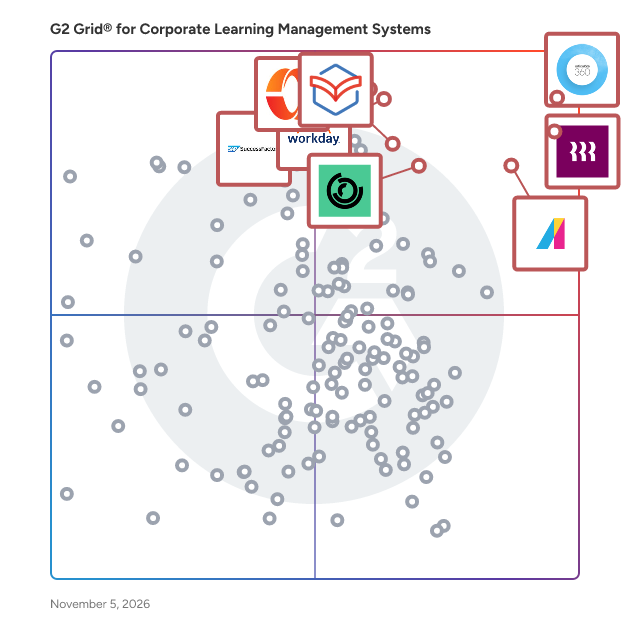
G2 Grid® for Corporate Learning Management Systems

G2 Grid® for Corporate Learning Management Systems plotting products by satisfaction and market presence

Highlighted products: Articulate 360, Rippling, Absorb LMS, Workday HCM, Paylocity, 360Learning, Zoho Learn, and SAP SuccessFactors HCM.

Underlying data: [Grid® JSON](https://www.g2.com/categories/corporate-learning-management-systems/grids.json?focus%5B%5D=articulate-360&focus%5B%5D=rippling&focus%5B%5D=absorb-software-absorb-lms&focus%5B%5D=workday-hcm&focus%5B%5D=paylocity&focus%5B%5D=360learning&focus%5B%5D=zoho-learn&focus%5B%5D=sap-sap-successfactors-hcm)

Articulate 360

Articulate 360 is the #1 AI-powered platform for workplace training. Create: Turn knowledge into capability with AI built for learning. Collaborate: Comment, review, and resolve feedback—all in one place. Distribute: Share training wherever your team works, then track engagement and completion in one analytics dashboard. Scale: Translate your training into 80+ languages for effortless global distribution. It’s easy to get started with simple tools, tutorials, and access to a community of 1.5M+ training pros.

Average Rating: 4.7/5.0

Total Reviews: 1,025

How Do G2 Users Rate Articulate 360?

  • Has the product been a good partner in doing business?: 9.0/10 (Category avg: 9.2/10)
  • Content Delivery and Tracking: 8.5/10 (Category avg: 8.8/10)
  • Assessments and Practice: 8.7/10 (Category avg: 8.7/10)
  • Industry Compliance : 10.0/10 (Category avg: 8.8/10)

Who Is the Company Behind Articulate 360?

  • Seller: Articulate
  • Company Website:
  • Year Founded: 2002
  • HQ Location: New York, NY
  • LinkedIn® Page: www.linkedin.com
    711 employees on LinkedIn®

Who Uses This Product?

  • Who Uses This: Instructional Designer, Senior Instructional Designer
  • Top Industries: Hospital & Health Care, E-Learning
  • Company Size: 47% Large, 25% Medium

What Do G2 Reviewers Say About Articulate 360?

AI-generated summary from verified user reviews

Pros
  • Users find Articulate 360 to be incredibly intuitive and user-friendly, enabling quick and professional course creation.
  • Users love the ease of creating engaging and professional courses with Articulate 360’s intuitive tools and resources.
  • Users value the interactive content features of Articulate 360, enhancing engagement and streamlining course development efficiently.
  • Users value the ease of creating professional educational courses with Articulate 360's intuitive tools and AI features.
  • Users find Articulate 360 incredibly intuitive and easy to use, enhancing their eLearning development experience significantly.
Cons
  • Users report frequent bug issues causing glitches and slow performance, impacting their overall experience with Articulate 360.
  • Users face a steep learning curve with Articulate 360, making it challenging for new or occasional users.
  • Users find the limited customization in Articulate 360 restrictive, affecting design flexibility and branding alignment.
  • Users experience slow performance with Articulate 360, particularly with larger files and complex elements, impacting usability.
  • Users wish for more customization options in Articulate 360 without needing to request changes or wait for updates.

What Are Recent G2 Reviews of Articulate 360?

What Are G2 Users Discussing About Articulate 360?

Rippling

Rippling is the AI workforce management platform that connects HR, IT, and Finance — giving Rippling AI everything it needs to help run your company. Because employee data, permissions, and approvals all live in one place, Rippling AI has a complete view of your business and can take action quickly and safely, across the entire employee lifecycle, from hiring to benefits administration to access management. Automate business tasks, ensure compliance, and streamline approvals with workflows that understand your organization. Enjoy timely payroll, real-time financial visibility, and dynamic spend policies that adjust as your business changes. Simplify IT with device management, software access, and compliance monitoring, all from one dashboard. Because Rippling AI works from a single source of truth instead of disconnected systems, your business can save time, reduce costs, and enhance efficiency — with the trust and safety that comes from unified data and permissions. Experience the power of AI-driven, unified management with Rippling today.

Average Rating: 4.7/5.0

Total Reviews: 13,102

How Do G2 Users Rate Rippling?

  • Has the product been a good partner in doing business?: 9.1/10 (Category avg: 9.2/10)
  • Content Delivery and Tracking: 9.2/10 (Category avg: 8.8/10)
  • Assessments and Practice: 9.0/10 (Category avg: 8.7/10)
  • Industry Compliance : 8.9/10 (Category avg: 8.8/10)

Who Is the Company Behind Rippling?

  • Seller: Rippling
  • Company Website:
  • Year Founded: 2016
  • HQ Location: San Francisco, CA
  • LinkedIn® Page: www.linkedin.com
    7,798 employees on LinkedIn®

Who Uses This Product?

  • Who Uses This: Software Engineer, Account Executive
  • Top Industries: Computer Software, Information Technology and Services
  • Company Size: 56% Medium, 28% Small

What Do G2 Reviewers Say About Rippling?

AI-generated summary from verified user reviews

Pros
  • Users find the platform intuitive and easy to use, helping employees and administrators handle day-to-day tasks simply.
  • Users find the initial setup easy and straightforward, helping them get started quickly.
  • Users like the clean, well-organized interface and clear layout, which makes information easy to navigate without feeling overwhelming.
  • Users find navigation intuitive and straightforward, helping them locate features and get to the tasks they need quickly.
  • Users like having workplace tools consolidated in one platform, making it easier to manage work without juggling separate systems.
Cons
  • Users find navigation confusing and unintuitive, with features and settings sometimes buried or requiring extra clicks to locate.
  • Users find the interface unintuitive and confusing, with features sometimes feeling complicated or clunky to use.
  • Users say the platform takes time to learn, especially navigating its many features and advanced settings.
  • Users report slow or inconsistent support responses and difficulty reaching a live agent by phone or chat.
  • Users find setup and implementation time-consuming and challenging, with small errors sometimes causing bigger downstream problems.

What Are Recent G2 Reviews of Rippling?

What Are G2 Users Discussing About Rippling?

Absorb LMS

Absorb is an agentic AI-powered learning platform designed to deliver results for all learners — employees, partners, and customers alike. With AI agents that handle the heavy lifting across administration, content creation, and learner guidance, Absorb goes beyond traditional LMS capabilities to actively drive learning outcomes at scale. Seamless integrations across your tech stack, native content authoring, and advanced reporting and analytics simplify learning management while AI handles the routine. Personalized learning paths, automated workflows, and white-labeled experiences let your team focus on high-impact learning initiatives rather than managing the system. Absorb helps organizations improve time-to-productivity, ensure compliance, and scale training programs efficiently — whether you’re onboarding employees, training partners, or educating customers.

Average Rating: 4.6/5.0

Total Reviews: 986

How Do G2 Users Rate Absorb LMS?

  • Has the product been a good partner in doing business?: 9.4/10 (Category avg: 9.2/10)
  • Content Delivery and Tracking: 9.0/10 (Category avg: 8.8/10)
  • Assessments and Practice: 8.4/10 (Category avg: 8.7/10)
  • Industry Compliance : 8.8/10 (Category avg: 8.8/10)

Who Is the Company Behind Absorb LMS?

  • Seller: Absorb Software
  • Company Website:
  • Year Founded: 2003
  • HQ Location: Calgary
  • LinkedIn® Page: www.linkedin.com
    675 employees on LinkedIn®
  • Phone: 1 (877) 920-2575

Who Uses This Product?

  • Who Uses This: Instructional Designer, Training Manager
  • Top Industries: Hospital & Health Care, Non-Profit Organization Management
  • Company Size: 45% Medium, 37% Large

What Do G2 Reviewers Say About Absorb LMS?

AI-generated summary from verified user reviews

Pros
  • Users find the platform intuitive and easy to navigate for both administrators and learners, with little experience needed.
  • Users value responsive, knowledgeable support that answers questions quickly and helps resolve issues.
  • Users value flexible configuration that lets them tailor the learner experience and platform setup to organizational needs.
  • Users value detailed, accessible reporting and customization that make training data easy to retrieve and learner progress clear.
  • Users value the intuitive learner experience, easy access and organization of modules, and support for meaningful learning outcomes.
Cons
  • Users say limited customization and settings flexibility make it difficult to tailor the platform to their needs.
  • Users find the admin interface unintuitive and overwhelming, with a steep learning curve that often requires extensive training.
  • Users find reporting limited in detail and flexibility, with missing data and customization options.
  • Users find reports difficult to create and navigate, and often need manual work to update or consolidate data.
  • Users struggle to find features and navigate between areas, with menus and labels often feeling unintuitive.

What Are Recent G2 Reviews of Absorb LMS?

What Are G2 Users Discussing About Absorb LMS?

AI can help you find the answers. G2 helps you trust them.

Connect G2 to Claude or ChatGPT for answers grounded in G2's trusted reviews, comparisons, and pricing from real user insights.

How it works

Workday HCM

Workday Human Capital Management is a single, unified system, offering one security model and a seamless user experience. Infused with artificial intelligence, Workday provides a cloud-based platform that intelligently adapts to your organization's evolving needs. This user-friendly, global system leverages AI to deliver personalized experiences and predictive insights, ensuring you're always on the latest version, whether on a browser or mobile device. As part of the unified Workday suite, which includes Financial Management, Payroll, and Recruiting, its AI capabilities help you make smarter, data-driven decisions for the future of your workforce.

Average Rating: 4.2/5.0

Total Reviews: 2,228

How Do G2 Users Rate Workday HCM?

  • Has the product been a good partner in doing business?: 8.3/10 (Category avg: 9.2/10)
  • Content Delivery and Tracking: 8.4/10 (Category avg: 8.8/10)
  • Assessments and Practice: 8.6/10 (Category avg: 8.7/10)
  • Industry Compliance : 8.7/10 (Category avg: 8.8/10)

Who Is the Company Behind Workday HCM?

  • Seller: Workday
  • Company Website:
  • Year Founded: 2005
  • HQ Location: Pleasanton, CA
  • LinkedIn® Page: www.linkedin.com
    25,204 employees on LinkedIn®
  • Ownership: NYSE:WDAY

Who Uses This Product?

  • Who Uses This: Account Executive, Recruiter
  • Top Industries: Information Technology and Services, Computer Software
  • Company Size: 71% Large, 22% Medium

What Do G2 Reviewers Say About Workday HCM?

AI-generated summary from verified user reviews

Pros
  • Users appreciate the ease of use of Workday HCM, enhancing collaboration and customization for better workflows.
  • Users appreciate the intuitive UI and real-time reporting of Workday HCM, which streamline HR processes effectively.
  • Users value the customizable business process configurations of Workday HCM, enhancing efficiency and user experience greatly.
  • Users value the comprehensive features of Workday HCM, enabling tailored processes and centralized management for enhanced efficiency.
  • Users appreciate the intuitive UI and real-time reporting in Workday HCM, streamlining HR processes effectively.
Cons
  • Users find the poor interface design of Workday HCM complicates navigation, leading to frustration and inefficiency.
  • Users find Workday HCM not user-friendly, citing complexity, rigidity, and frustrating limitations in AI features and reporting.
  • Users find the learning curve steep for Workday HCM, complicating onboarding and efficient usage of the platform.
  • Users find limited customization in Workday HCM frustrating, hindering the ability to tailor processes effectively.
  • Users struggle with navigation difficulty, often facing too many clicks and hard-to-find payroll reports.

What Are Recent G2 Reviews of Workday HCM?

What Are G2 Users Discussing About Workday HCM?

FAQs About Corporate Learning Management Systems

Generated using AI

Last updated: June 3, 2026

Best apps for corporate employee training systems

Based on G2 reviews, these products are the most consistently mentioned for centralized training, onboarding, and progress tracking.

  • Rippling — HR, payroll, and training in one.
  • Absorb LMS — scalable onboarding, compliance, and reporting.
  • 360Learning — collaborative learning and cohort training.
  • Trainual — SOPs, onboarding, and process documentation.

Best LMS solutions for large corporations

Based on G2 reviews, these products stand out for handling distributed teams, structured training delivery, and scalable administration.

  • Absorb LMS — scalable training for large employee groups.
  • 360Learning — collaborative learning across multiple programs.
  • Docebo — role-based learning and extended audiences.
  • Rippling — centralized HR and learning workflows.

Best learning management systems for workplace training

Based on G2 reviews, these products are frequently highlighted for workplace training that is easier to assign, complete, and track.

  • Absorb LMS — organized training delivery with strong reporting.
  • 360Learning — engaging workplace learning with collaboration.
  • Trainual — onboarding and process training at scale.
  • LearnUpon LMS — structured paths and streamlined administration.

What are the most important features in corporate learning management systems

According to verified users, the most valued features in corporate learning management systems are easy course assignment, progress tracking, reporting, onboarding workflows, and a learner experience that is simple to navigate. Reviews also repeatedly mention the importance of content creation tools, compliance tracking, automated reminders, and support for both self-paced and instructor-led learning. Buyers should also look for role-based learning paths, integrations with HR or payroll systems, and mobile access. Across recent reviews, products that make training easy to find, complete, and manage across multiple teams tend to create the strongest day-to-day value for administrators and employees alike.

How does corporate learning management systems integrate with payroll

G2 reviewers mention that payroll-related integration matters most when learning is part of a broader employee workflow. In recent reviews, users describe value in systems that connect training with HR records, onboarding, benefits, time tracking, or employee profile updates so teams avoid switching between disconnected tools. Several reviewers also highlight smoother administration when course access, required training, and employee status changes flow alongside payroll or HR data. The clearest benefit is operational efficiency: fewer manual updates, more centralized records, and easier visibility into who has completed required training. For buyers, this means integration is less about payroll alone and more about reducing duplicate work across people operations.

Paylocity

Paylocity is an award-winning HCM platform that brings HR, Finance, and IT together in one connected system, covering payroll, benefits, talent management, time and labor, spend, and IT provisioning on a single employee record. Cut manual HR tasks, run payroll faster, and get new hires up and running sooner. Get full visibility across expenses, accounts payable, corporate cards, and procurement in one place. Automate account creation and manage IT provisioning without juggling separate systems. AI is built into everyday workflows across all three. Policies, approvals, and workflows stay in lockstep as people join, move, and grow. Paylocity accompanies its clients on the journey to build great workplaces and help every employee do their best work.

Average Rating: 4.4/5.0

Total Reviews: 6,279

How Do G2 Users Rate Paylocity?

  • Has the product been a good partner in doing business?: 8.7/10 (Category avg: 9.2/10)
  • Content Delivery and Tracking: 8.1/10 (Category avg: 8.8/10)
  • Assessments and Practice: 7.9/10 (Category avg: 8.7/10)
  • Industry Compliance : 7.8/10 (Category avg: 8.8/10)

Who Is the Company Behind Paylocity?

  • Seller: Paylocity
  • Company Website:
  • Year Founded: 1997
  • HQ Location: Schaumburg, IL
  • LinkedIn® Page: www.linkedin.com
    7,164 employees on LinkedIn®
  • Ownership: NASDAQ: PCTY

Who Uses This Product?

  • Who Uses This: HR Manager, Human Resources Manager
  • Top Industries: Computer Software, Hospital & Health Care
  • Company Size: 69% Medium, 20% Small

What Do G2 Reviewers Say About Paylocity?

AI-generated summary from verified user reviews

Pros
  • Users find the platform easy to learn and navigate, helping them handle daily tasks with little difficulty.
  • Users value responsive, helpful support that answers questions promptly and provides assistance when needed.
  • Users like having HR, payroll, employee records, and related tools in one place, making information and functions easier to access.
  • Users find payroll processing straightforward and efficient, helping them run payroll quickly and manage it with ease.
  • Users find setup and implementation easy and smooth, with helpful onboarding support guiding them through the process.
Cons
  • Users find navigation unintuitive, with layered menus and multiple paths making features and tasks harder to locate.
  • Users report inconsistent answers, limited product knowledge, and support that overlooks problem details or gives vague, unhelpful guidance.
  • Users report slow support replies, long phone hold times, and difficulty reaching the right department.
  • Users describe initial setup as difficult and confusing, with configuration mistakes and implementation follow-through issues.
  • Users find reporting confusing and difficult to create, navigate, and use.

What Are Recent G2 Reviews of Paylocity?

What Are G2 Users Discussing About Paylocity?

360Learning

360Learning is the AI-driven enterprise LMS that closes skills gaps by capturing internal expertise with collaborative learning Academies. Legacy systems force L&D teams to choose between scale and relevance. 360Learning eliminates this trade-off. Using agentic AI, we transform the expertise that runs your business into scalable learning for your entire organization - upskilling employees, customers, and partners from one platform. The platform merges enterprise LMS and LXP capabilities including agentic automation, adaptive coaching, a multimodal AI content builder, and the market’s #1 rated mobile app. Our ecosystem of 50+ partners includes an SAP Silver Partnership and Workday Design Partnership, ensuring learning connects to your broader business strategy. Over 2,500 companies, including Heineken, Equinox, Michelin, Merlin, and Cisco, trust 360Learning as their enterprise LMS. Rated #1 AI LMS by eLearning Industry and backed by dedicated implementation, support, and services teams, we help L&D become a growth lever, not a cost center. Founded in 2013. $240M raised. Teams across North America and Europe.

Average Rating: 4.6/5.0

Total Reviews: 629

How Do G2 Users Rate 360Learning?

  • Has the product been a good partner in doing business?: 9.2/10 (Category avg: 9.2/10)
  • Content Delivery and Tracking: 8.9/10 (Category avg: 8.8/10)
  • Assessments and Practice: 8.7/10 (Category avg: 8.7/10)
  • Industry Compliance : 8.5/10 (Category avg: 8.8/10)

Who Is the Company Behind 360Learning?

  • Seller: 360Learning
  • Company Website:
  • Year Founded: 2013
  • HQ Location: New York
  • LinkedIn® Page: www.linkedin.com
    498 employees on LinkedIn®

Who Uses This Product?

  • Who Uses This: CEO, Chef de projet formation
  • Top Industries: Information Technology and Services, Computer Software
  • Company Size: 53% Medium, 29% Large

What Do G2 Reviewers Say About 360Learning?

AI-generated summary from verified user reviews

Pros
  • Users value the ease of use in 360Learning, enhancing collaboration and streamlining their training processes effectively.
  • Users commend 360Learning for its easy and intuitive course creation, enhancing collaborative and engaging learning experiences.
  • Users value the exceptional customer support from 360Learning, fostering a strong partnership in enhancing learning strategies.
  • Users value the ease of course creation in 360Learning, allowing for quick and engaging training delivery.
  • Users value the engagement features of 360Learning, fostering collaboration and efficiency in knowledge sharing.
Cons
  • Users find 360Learning's limited features can restrict functionality and require additional setup for detailed reporting.
  • Users find the learning curve steep due to complex setup processes and the need for additional configuration.
  • Users find limited customization options frustrating, as some features seem restrictive and require extra setup for detailed reports.
  • Users find that missing features like user completion marking and audit trails hinder the effectiveness of 360Learning.
  • Users find setup difficult and settings unintuitive, complicating the experience despite the platform’s many strengths.

What Are Recent G2 Reviews of 360Learning?

What Are G2 Users Discussing About 360Learning?

Zoho Learn

Zoho Learn is a comprehensive platform that combines knowledge management and learning management system (LMS) functionalities, enabling organizations to create, manage, and deliver training programs effectively. It allows businesses to build structured courses and manuals tailored to their needs, ensuring teams have access to accurate and up-to-date resources. Key Features and Functionality: - Knowledge Base Creation: Organize company information in a structured hierarchy, making it easily accessible. - Collaborative Authoring: Co-author articles in real time with a collaborative editor. - Course Builder: Design interactive, multimedia training courses using text, video, files, and quizzes. - Assessments and Quizzes: Create quizzes with multiple formats to evaluate learners and track their performance effectively. - Reporting and Analytics: Monitor progress and analyze the effectiveness of courses with built-in reporting tools. Primary Value and Solutions Provided: Zoho Learn empowers businesses by centralizing critical knowledge and training materials, reducing information loss, and enhancing team collaboration. It streamlines employee training and onboarding by providing a unified platform for knowledge sharing and learning, ultimately improving productivity and ensuring consistent knowledge transfer across the organization.

Average Rating: 4.4/5.0

Total Reviews: 220

How Do G2 Users Rate Zoho Learn?

  • Has the product been a good partner in doing business?: 8.7/10 (Category avg: 9.2/10)
  • Content Delivery and Tracking: 8.3/10 (Category avg: 8.8/10)
  • Assessments and Practice: 8.0/10 (Category avg: 8.7/10)
  • Industry Compliance : 7.4/10 (Category avg: 8.8/10)

Who Is the Company Behind Zoho Learn?

  • Seller: Zoho
  • Year Founded: 1996
  • HQ Location: Austin, TX
  • LinkedIn® Page: www.linkedin.com
    30,913 employees on LinkedIn®
  • Phone: +1 (888) 900-9646

Who Uses This Product?

  • Who Uses This: CEO, Director
  • Top Industries: Information Technology and Services, Education Management
  • Company Size: 66% Small, 21% Medium

What Do G2 Reviewers Say About Zoho Learn?

AI-generated summary from verified user reviews

Pros
  • Users find Zoho Learn exceptionally easy to use, enjoying a seamless interface and helpful support throughout their experience.
  • Users find Zoho Learn exceptionally easy to use with a user-friendly interface and helpful customer support.
  • Users appreciate the intuitive interface of Zoho Learn, making knowledge management and documentation simple and centralized.
  • Users appreciate the easy setup of Zoho Learn, enhancing their experience and facilitating quick onboarding.
  • Users enjoy the comprehensive features of Zoho Learn, appreciating its ease of use and integration capabilities.
Cons
  • Users find the missing features in Zoho Learn limiting, wishing for AI and text-to-voice options.
  • Users find feature issues in Zoho Learn, particularly with limited customization and difficulty locating important options.
  • Users find the learning curve steep, making initial setup and understanding functionality quite challenging for new users.
  • Users find the limited customization options in Zoho Learn restrict their ability to personalize the platform effectively.
  • Users note the limited features of Zoho Learn, particularly in API integration and reporting tools, affecting overall experience.

What Are Recent G2 Reviews of Zoho Learn?

What Are G2 Users Discussing About Zoho Learn?

SAP SuccessFactors HCM

SAP SuccessFactors HCM is a global, AI-powered cloud HR suite designed to help organizations thrive in a fast-moving world. With 100+ localizations, it delivers real-time visibility and connected solutions across core HR, payroll, talent management, learning, analytics, planning, and employee experience. More than 10,000 organizations trust SAP SuccessFactors HCM to enhance every employee experience, workforce decision, and people process—turning each employee into a success story. With SAP SuccessFactors HCM, you can: - Empower your workforce with AI-driven tools for self-service, learning, performance, and development to help people work faster and smarter. - Identify and develop top talent with a unified source of people and skills data that supports both HR strategies and business goals. - Stay compliant and agile with built-in legal and regulatory updates tailored to local business requirements. - Accelerate time to value by leveraging proven HR best practices and the strength of a global partner ecosystem.

Average Rating: 4.1/5.0

Total Reviews: 1,490

How Do G2 Users Rate SAP SuccessFactors HCM?

  • Has the product been a good partner in doing business?: 8.3/10 (Category avg: 9.2/10)
  • Content Delivery and Tracking: 8.3/10 (Category avg: 8.8/10)
  • Assessments and Practice: 8.0/10 (Category avg: 8.7/10)
  • Industry Compliance : 8.4/10 (Category avg: 8.8/10)

Who Is the Company Behind SAP SuccessFactors HCM?

  • Seller: SAP
  • Company Website:
  • Year Founded: 1972
  • HQ Location: Walldorf
  • LinkedIn® Page: www.linkedin.com
    149,349 employees on LinkedIn®
  • Ownership: NYSE:SAP

Who Uses This Product?

  • Who Uses This: Recruiter, Consultant
  • Top Industries: Information Technology and Services, Computer Software
  • Company Size: 56% Large, 34% Medium

What Do G2 Reviewers Say About SAP SuccessFactors HCM?

AI-generated summary from verified user reviews

Pros
  • Users find SAP SuccessFactors HCM to be intuitive and easy to use, streamlining talent management effortlessly.
  • Users appreciate the end-to-end lifecycle management and strong talent management tools of SAP SuccessFactors HCM, enhancing HR processes.
  • Users value the easy implementation and user-friendly tools in SAP SuccessFactors HCM, enhancing overall HR management efficiency.
  • Users appreciate the comprehensive features of SAP SuccessFactors HCM, enhancing HR consistency and visibility throughout the employee lifecycle.
  • Users value the intuitive integration of SAP SuccessFactors HCM, enhancing workforce planning and talent management efficiency.
Cons
  • Users find SAP SuccessFactors HCM not user-friendly, often struggling with its complex layout and difficult reporting tools.
  • Users find SuccessFactors not intuitive, struggling with its complexity and the need for advanced technical knowledge.
  • Users express concern over limited customization, highlighting the need for more personalization options and user-requested enhancements.
  • Users find the learning curve challenging, often necessitating costly expert help for simple updates and configurations.
  • Users feel that SAP SuccessFactors suffers from limited features, hindering improvement and customization options for various needs.

What Are Recent G2 Reviews of SAP SuccessFactors HCM?

What Are G2 Users Discussing About SAP SuccessFactors HCM?

UKG Pro

Designed for organizations that prioritize diverse workforces and cultures of trust and belonging, UKG Pro® puts people at the center of your strategy. From HR and complex payroll to talent and industry-focused workforce management (WFM),our comprehensive human capital management solution (HCM) anticipates people’s needs beyond just work. We partner with you every step of the way to drive better business outcomes and create great workplaces for all.

Average Rating: 4.3/5.0

Total Reviews: 2,214

How Do G2 Users Rate UKG Pro?

  • Has the product been a good partner in doing business?: 8.3/10 (Category avg: 9.2/10)
  • Content Delivery and Tracking: 8.5/10 (Category avg: 8.8/10)
  • Assessments and Practice: 8.4/10 (Category avg: 8.7/10)
  • Industry Compliance : 8.5/10 (Category avg: 8.8/10)

Who Is the Company Behind UKG Pro?

  • Seller: UKG
  • Company Website:
  • Year Founded: 1977
  • HQ Location: Weston, FL
  • LinkedIn® Page: www.linkedin.com
    16,190 employees on LinkedIn®
  • Phone: (800) 432-1729

Who Uses This Product?

  • Who Uses This: Payroll Manager, HR Generalist
  • Top Industries: Hospital & Health Care, Oil & Energy
  • Company Size: 48% Medium, 46% Large

What Do G2 Reviewers Say About UKG Pro?

AI-generated summary from verified user reviews

Pros
  • Users find UKG Pro's ease of use improves with familiarity, making navigation and HR management effective over time.
  • Users value the comprehensive automation of UKG Pro, especially its real-time payroll and compliance features.
  • Users commend UKG Pro's user-friendly support options, making it easy to address their payroll and HR questions.
  • Users appreciate the user-friendly platform of UKG Pro, noting its effective tracking and comprehensive features.
  • Users find UKG Pro's intuitive user interface greatly enhances navigation, making task management efficient and user-friendly.
Cons
  • Users find UKG Pro not user-friendly, struggling with navigation, troubleshooting, and inadequate customer support during updates.
  • Users face a steep learning curve with UKG Pro, struggling with onboarding and navigating system updates and changes.
  • Users experience poor customer support with UKG Pro, making troubleshooting and system navigation frustratingly difficult.
  • Users find limited integration features of UKG Pro create significant hurdles and reduce overall efficiency in workflows.
  • Users find UKG Pro not intuitive, facing challenges with navigation and overall usability that hinder productivity.

What Are Recent G2 Reviews of UKG Pro?

Docebo

Docebo is an AI-powered learning platform designed to support continuous learning across employees, partners, and customers. More than 3,900 organizations use Docebo to deliver onboarding, enablement, compliance, and customer education from a single platform. Learning experiences are personalized at scale, with AI improving content discovery, recommendations, and automation to reduce manual administration. With skills-based insights, flexible delivery, and built-in analytics, Docebo helps organizations keep learning aligned to evolving roles and business goals, so people never stop learning as work changes.

Average Rating: 4.3/5.0

Total Reviews: 731

How Do G2 Users Rate Docebo?

  • Has the product been a good partner in doing business?: 8.7/10 (Category avg: 9.2/10)
  • Content Delivery and Tracking: 8.5/10 (Category avg: 8.8/10)
  • Assessments and Practice: 7.9/10 (Category avg: 8.7/10)
  • Industry Compliance : 8.1/10 (Category avg: 8.8/10)

Who Is the Company Behind Docebo?

  • Seller: Docebo Inc.
  • Company Website:
  • Year Founded: 2005
  • HQ Location: Toronto
  • LinkedIn® Page: www.linkedin.com
    1,014 employees on LinkedIn®
  • Ownership: TSX: DCBO

Who Uses This Product?

  • Who Uses This: Instructional Designer, LMS Administrator
  • Top Industries: Information Technology and Services, Computer Software
  • Company Size: 45% Large, 44% Medium

What Do G2 Reviewers Say About Docebo?

AI-generated summary from verified user reviews

Pros
  • Users appreciate the intuitive user experience of Docebo, enabling quick adaptation and effective training management.
  • Users appreciate the powerful management features of Docebo, enhancing course delivery and learner support effectively.
  • Users value the course creation and management features of Docebo for centralizing workloads and enhancing training efficiency.
  • Users love the customization options in Docebo, enabling tailored learning experiences that align with their company branding.
  • Users find Docebo’s intuitive navigation essential for seamless learning management and efficient training customization.
Cons
  • Users note a limited feature set in Docebo, particularly regarding batch actions and content authoring tools.
  • Users find the learning curve steep with Docebo, as initial setup and feature configuration can be overwhelming.
  • Users find limited customization in Docebo, hindering quick adjustments and advanced content authoring capabilities.
  • Users note the missing features in Docebo, particularly the lack of batch actions and advanced content authoring tools.
  • Users face a steep learning curve with Docebo, as complex configurations and setup can be overwhelming for newcomers.

What Are Recent G2 Reviews of Docebo?

What Are G2 Users Discussing About Docebo?

EasyLlama

EasyLlama helps organizations reduce risk, protect their people, and stay compliant through training employees actually complete. Built for HR, L&D, and People teams, EasyLlama brings compliance and security training, learning management, and AI-powered course creation together in one easy-to-use platform. Instead of juggling multiple tools, teams can create, assign, deliver, and track all their compliance requirements and training from a single place. Compliance Advisor tells you exactly what training your organization is legally required to run in less than 5 minutes. Backed by 800+ lawyer-curated and verified mandates, it shows you what applies, why, and who needs to take it. EasyLlama's library of 500+ legally vetted courses covers essential topics like harassment prevention, cybersecurity, workplace violence, ethics, and diversity. With training available in 100+ languages, organizations can train employees around the world while meeting regulatory requirements with confidence. EasyLlama helps teams create training that feels relevant to their organization. Whether it's incorporating company policies, reinforcing workplace expectations, or building role-specific learning, teams can use EasyLlama's AI Course Authoring Tool and modern LMS to create engaging, branded training in minutes. Automated assignments, reminders, reporting, and analytics take the busywork out of training management, helping teams stay organized, track progress, and keep employees up to date. Whether supporting compliance, onboarding, or professional development, EasyLlama makes it easier to deliver training at scale without sacrificing the learner experience. From startups to enterprise organizations, companies choose EasyLlama to simplify training, save time, strengthen workplace culture, and build safer, more productive teams.

Average Rating: 4.8/5.0

Total Reviews: 467

How Do G2 Users Rate EasyLlama?

  • Has the product been a good partner in doing business?: 9.7/10 (Category avg: 9.2/10)
  • Content Delivery and Tracking: 9.3/10 (Category avg: 8.8/10)
  • Assessments and Practice: 9.6/10 (Category avg: 8.7/10)
  • Industry Compliance : 9.5/10 (Category avg: 8.8/10)

Who Is the Company Behind EasyLlama?

  • Seller: EasyLlama
  • Company Website:
  • Year Founded: 2019
  • HQ Location: Covina, CA
  • LinkedIn® Page: www.linkedin.com
    68 employees on LinkedIn®

Who Uses This Product?

  • Who Uses This: HR Manager, Manager
  • Top Industries: Computer Software, Information Technology and Services
  • Company Size: 64% Medium, 21% Small

What Do G2 Reviewers Say About EasyLlama?

AI-generated summary from verified user reviews

Pros
  • Users appreciate the ease of use of EasyLlama, finding its courses engaging and manageable in segments.
  • Users appreciate the engaging and interactive courses that make compliance training feel more enjoyable and effective.
  • Users find the AI Course Authoring Tool exceptionally helpful for generating customized compliance training efficiently.
  • Users love the engaging content of EasyLlama, making compliance training enjoyable and motivating to complete.
  • Users praise the training efficiency of EasyLlama, appreciating its engagement and conciseness for effective learning.
Cons
  • Users find that the length issues make course completion unpredictable, often exceeding initial time estimates.
  • Users find the course length excessive, with training sessions often feeling longer and repetitive than necessary.
  • Users find the long courses time-consuming, wishing for a way to skip sections they already know.
  • Users find limited access frustrating, as switching tasks during courses disrupts their learning experience.
  • Users experience technical issues like trouble switching programs and persistent pop-up messages during video playback.

What Are Recent G2 Reviews of EasyLlama?

What Are G2 Users Discussing About EasyLlama?

Leapsome

AI is changing how companies win, and that shift runs through people. Leapsome is the Agentic HR platform built for this moment: company leaders and HR teams at more than 2,000 ambitious organizations run agentic HR and cohesive talent strategies on Leapsome. AI agents execute core people ops end to end, alongside the deepest Talent Suite on the market, empowering HR leaders to turn real-time workforce signals into action: upskilling teams, steering performance, reshaping the workforce as roles, skills, and organizational needs shift. The result: lean HR teams lead the AI transition with outsized impact, and become the architects of great organizations. ℹ️ Learn more here: https://hubs.li/Q04Ckjk80 💬 Join 10,000+ HR & People Ops pros in our community: https://hubs.li/Q02_B0Gc0 Check out our 2027 Workforce Trends Report: https://www.leapsome.com/2027-report

Average Rating: 4.8/5.0

Total Reviews: 2,603

How Do G2 Users Rate Leapsome?

  • Has the product been a good partner in doing business?: 9.5/10 (Category avg: 9.2/10)
  • Content Delivery and Tracking: 9.1/10 (Category avg: 8.8/10)
  • Assessments and Practice: 9.2/10 (Category avg: 8.7/10)
  • Industry Compliance : 9.1/10 (Category avg: 8.8/10)

Who Is the Company Behind Leapsome?

  • Seller: Leapsome
  • Company Website:
  • Year Founded: 2016
  • HQ Location: New York, New York, United States
  • LinkedIn® Page: www.linkedin.com
    144 employees on LinkedIn®

Who Uses This Product?

  • Who Uses This: Software Engineer, Senior Software Engineer
  • Top Industries: Information Technology and Services, Computer Software
  • Company Size: 64% Medium, 19% Large

What Do G2 Reviewers Say About Leapsome?

AI-generated summary from verified user reviews

Pros
  • Users find Leapsome to be easy to use, with intuitive organization and seamless integration into daily workflows.
  • Users appreciate the helpful feedback and assessments in Leapsome, fostering an amazing culture and streamlined workflows.
  • Users love the intuitive interface of Leapsome, making it effortlessly easy for employees to navigate and engage.
  • Users appreciate the user-friendly design of Leapsome, finding it intuitive and easy to integrate into workflows.
  • Users value the intuitive feedback system of Leapsome, fostering a positive and organized culture in their teams.
Cons
  • Users express concerns about missing features in Leapsome, noting limitations in praise options, notifications, and the LMS.
  • Users highlight the steep learning curve for HR admins, complicating the initial setup despite ease for employees.
  • Users find the navigation difficult, as workflows can be complex and time-consuming to adapt to initially.
  • Users find the interface not intuitive, with unclear instructions and issues in carrying over meeting notes accurately.
  • Users face feedback issues due to over-complication, missing features, and a lack of notifications in Leapsome.

What Are Recent G2 Reviews of Leapsome?

What Are G2 Users Discussing About Leapsome?

D2L Brightspace

Learning That Transforms Lives D2L Brightspace is a powerful, flexible learning platform designed to put learners first. Whether you’re supporting students, employees, or members, Brightspace helps you create personalized, engaging, and measurable learning experiences that drive success. Built for Your World Brightspace adapts to the needs of every learning environment: K–12: Empower teachers and inspire every learner Higher Education: Deliver personalized learning at scale Corporate: Drive business results through smarter learning Associations: Turn training into a competitive advantage Training Providers: Deliver scalable, high-impact learning programs Modernize with Confidence Easily digitize your courses and adopt intuitive tools designed to enhance engagement, accessibility, and outcomes—no technical background required. Scale Personalized Learning Automate routine tasks, unlock actionable insights, and build learning paths that adapt to each learner’s needs. Brightspace helps you save time while improving outcomes. Support Advanced Learning Models From mastery-based progressions to competency-based learning, Brightspace has the power and flexibility to support even the most advanced online and blended strategies. A True Partner in Your Success More than a platform, Brightspace comes with a team dedicated to helping you succeed. From onboarding to optimization, we align our support and services to your goals—every step of the way.

Average Rating: 4.4/5.0

Total Reviews: 673

How Do G2 Users Rate D2L Brightspace?

  • Has the product been a good partner in doing business?: 8.9/10 (Category avg: 9.2/10)
  • Content Delivery and Tracking: 8.8/10 (Category avg: 8.8/10)
  • Assessments and Practice: 9.0/10 (Category avg: 8.7/10)
  • Industry Compliance : 8.8/10 (Category avg: 8.8/10)

Who Is the Company Behind D2L Brightspace?

  • Seller: Desire2Learn
  • Company Website:
  • Year Founded: 1999
  • HQ Location: Kitchener, ON
  • LinkedIn® Page: www.linkedin.com
    1,271 employees on LinkedIn®
  • Ownership: TSX: DTOL

Who Uses This Product?

  • Who Uses This: Instructional Designer, Teacher
  • Top Industries: Higher Education, Education Management
  • Company Size: 45% Medium, 40% Large

What Do G2 Reviewers Say About D2L Brightspace?

AI-generated summary from verified user reviews

Pros
  • Users value the ease of use of D2L Brightspace, noting its intuitive design and straightforward navigation for all users.
  • Users appreciate the user-friendly interface of D2L Brightspace, which simplifies course management and enhances the learning experience.
  • Users appreciate the intuitive interface of D2L Brightspace, enabling students to engage in learning with ease.
  • Users value the feature diversity of D2L Brightspace, enhancing their administrative control and content creation efficiently.
  • Users value the powerful toolkit of D2L Brightspace, enhancing flexibility and ease of use for diverse educational needs.
Cons
  • Users are frustrated with course creation inefficiencies that hinder project timelines and complicate overall user experience.
  • Users report challenges with grading issues, including manual grading of anonymous posts and a clunky grading tool.
  • Users face limited customization options that complicate navigation and require more administrative involvement than desired.
  • Users find the limited features of Brightspace hinder collaboration and create an inflexible learning environment.
  • Users face integration issues that complicate tool implementation and navigation, creating challenges for administrators and instructors.

What Are Recent G2 Reviews of D2L Brightspace?

What Are G2 Users Discussing About D2L Brightspace?

Paycom

Paycom is a leading human capital management software provider that helps organizations across the U.S. and internationally automate routine decisions and workflows. Through built-in decisioning logic and full-solution automation, Paycom reduces administrative burden for HR, managers and employees while streamlining HR and payroll processes. Frequently recognized by third party reviewers as one of the best payroll and HR software solutions, Paycom is used by organizations of all sizes across the U.S. and internationally to simplify workforce management and free HR teams to focus on strategic initiatives.

Average Rating: 4.7/5.0

Total Reviews: 10,371

How Do G2 Users Rate Paycom?

  • Has the product been a good partner in doing business?: 8.4/10 (Category avg: 9.2/10)
  • Content Delivery and Tracking: 8.8/10 (Category avg: 8.8/10)
  • Assessments and Practice: 8.8/10 (Category avg: 8.7/10)
  • Industry Compliance : 8.9/10 (Category avg: 8.8/10)

Who Is the Company Behind Paycom?

  • Seller: Paycom
  • Company Website:
  • Year Founded: 1998
  • HQ Location: Oklahoma City, OK
  • LinkedIn® Page: www.linkedin.com
    5,537 employees on LinkedIn®
  • Ownership: NYSE: PAYC

Who Uses This Product?

  • Who Uses This: HR Manager, Human Resources Manager
  • Top Industries: Hospital & Health Care, Manufacturing
  • Company Size: 39% Medium, 13% Small

What Do G2 Reviewers Say About Paycom?

AI-generated summary from verified user reviews

Pros
  • Users value the ease of use of Paycom, appreciating its straightforward navigation and supportive implementation process.
  • Users appreciate the dedicated support and easy navigation of Paycom, enhancing the overall employee management experience.
  • Users appreciate the ease of navigation in Paycom, enhancing overall payroll management and employee satisfaction.
  • Users laud the exceptional customer support from Paycom, praising their responsiveness and ease of implementation.
  • Users appreciate the simple navigation of Paycom, making it easy to use and efficient for HR processes.
Cons
  • Users find Paycom's learning curve steep, leading to challenges in navigation and execution despite its versatility.
  • Users find customer support lacking, struggling with inconsistent assistance and unresolved issues despite multiple follow-ups.
  • Users face limited features in Paycom, leading to frustration and high costs relative to the functionality provided.
  • Users find Paycom not intuitive, making navigation complex and overwhelming, especially for new administrators and workflows.
  • Users find Paycom's system to be not user-friendly, with a steep learning curve and inefficient navigation.

What Are Recent G2 Reviews of Paycom?

iSpring Suite

iSpring Suite is an AI-powered authoring tool that helps instructional designers, corporate trainers, educators, and subject-matter experts build interactive online courses inside Microsoft PowerPoint. It supports creating slide-based and scrollable eLearning courses, quizzes, video lessons, screencasts, and branching scenarios for delivery through an LMS or as standalone HTML5 content. The tool combines a PowerPoint-based editor with AI capabilities built for each stage of course production. Course creators can turn a topic description or existing materials, such as SME notes, slides, and PDFs, into a structured course outline built around instructional principles like Bloom's Taxonomy, then generate slide text, quiz questions, images, and narration inside the same file. Cloud-based AI tools extend a similar workflow to scrollable, page-like courses created and edited in a browser. Because the editor is built on PowerPoint, users keep native slide design features such as animations, transitions, and SmartArt, and publish finished projects to SCORM, xAPI, cmi5, HTML5, and AICC-compatible systems. An in-product AI assistant also answers technical questions about the software itself, so that users don’t have to search through separate documentation. A fully desktop-based deployment option, without cloud functionality, is available for organizations with data-security requirements that limit cloud tool use. Main capabilities include: - AI course generation that drafts a course structure, slide text, and assessments from a topic or uploaded source material - AI-powered voiceovers, image generation, and course translation into 70+ languages, alongside 14 quiz question types and 14 interaction templates - Branching scenarios and role-plays for practicing decision-making, plus screencasting and video-lesson tools - A library of more than 130,000 ready-made characters, backgrounds, and templates - Compatibility with 160+ LMS platforms and standard eLearning publishing formats iSpring Suite is used across corporate training, compliance, and onboarding programs, in academic settings, and by independent course developers and consultants building eLearning content for clients. It supports more than 61,000 clients in over 170 countries and has over 4.5 million users worldwide.

Average Rating: 4.6/5.0

Total Reviews: 865

How Do G2 Users Rate iSpring Suite?

  • Has the product been a good partner in doing business?: 9.4/10 (Category avg: 9.2/10)
  • Content Delivery and Tracking: 8.6/10 (Category avg: 8.8/10)
  • Assessments and Practice: 9.0/10 (Category avg: 8.7/10)
  • Industry Compliance : 8.6/10 (Category avg: 8.8/10)

Who Is the Company Behind iSpring Suite?

  • Seller: iSpring
  • Company Website:
  • Year Founded: 2001
  • HQ Location: Alexandria, VA
  • LinkedIn® Page: www.linkedin.com
    270 employees on LinkedIn®

Who Uses This Product?

  • Who Uses This: Instructional Designer, President
  • Top Industries: E-Learning, Higher Education
  • Company Size: 46% Small, 32% Medium

What Do G2 Reviewers Say About iSpring Suite?

AI-generated summary from verified user reviews

Pros
  • Users commend iSpring Suite for its ease of use, enabling seamless course creation and a streamlined workflow.
  • Users appreciate the easy course creation of iSpring Suite, enjoying a streamlined, unified environment for developing interactive content.
  • Users appreciate the engaging course player of iSpring Suite, enhancing learning with integrated video and PowerPoint slides.
  • Users enjoy the seamless PowerPoint integration in iSpring Suite, enabling effortless course creation and enhanced interactivity.
  • Users value the ease of learning with iSpring Suite, enjoying its intuitive interface and streamlined course creation.
Cons
  • Users find the limited features of iSpring Suite hinder overall flexibility and ease of use during course creation.
  • Users face persistent technical issues with iSpring Suite, particularly with OneDrive and mobile device compatibility.
  • Users face limited customization in iSpring Suite, restricting advanced interactions and creative learning experiences.
  • Users frequently deal with technical issues, particularly with reliability on OneDrive and mobile display problems.
  • Users experience a steep learning curve initially, as mastering all features takes time and exploration.

What Are Recent G2 Reviews of iSpring Suite?

What Are G2 Users Discussing About iSpring Suite?

Grace Savides
GS
Researched and written by Grace Savides
Updated October 16, 2026

Learn More About Corporate Learning Management Systems

What are Corporate Learning Management Systems?

Corporate learning management system (LMS) solutions are used by companies and training departments to implement and manage corporate training and development initiatives. Corporate LMS platforms are a type of talent management software that provide training solutions for employee onboarding, skill development based on roles, and educational material for career development. These solutions provide administrators with content libraries, creation tools, management control, and reporting tools. Additionally, these solutions give learners easy access to courses, training programs, and their progress.

Key Benefits of Corporate Learning Management Systems

  • Streamline all employee training processes
  • Provide employees with easy-to-use educational material that is available anytime
  • Provide administrators tools for content creation and content management
  • Track employee progress and performance

Why Use Corporate Learning Management Systems?

Learning management systems help companies implement and manage company training initiatives. These solutions are used to manage training programs for onboarding, career development, compliance, and other employee training initiatives.

Onboarding — Corporate LMS platforms help administrators and human resources personnel create a core training program that is accessible to all new hires. This can be used to teach new employees about the company’s history, mission, vision, values, policies, culture, structure, products, services, and more.

Product training — Corporate LMS can be used by managers, training departments, and HR personnel to manage product training initiatives. Product training courses may include courses on the benefits, features, and use of the company’s different products or services.

Skills training — Corporate learning management systems can provide job-specific skills training based on employees’ roles within the company. Sales and customer support skills training, for example, provides users with training on how to sell the product and how to make customers feel supported. This type of job-specific training is essential to help employees predict customers’ needs, close sales, and problem solve.

Channel partner training — Corporate LMS can help companies administer global training. This is essential for remaining compliant with various location-based regulations, such as the European Union’s General Data Protection Regulation (GDPR).

Who Uses Corporate Learning Management Systems?

Corporate trainers, training departments, HR departments, and all employees use and benefit from corporate learning management systems. Corporate training solutions help employees learn specific business skills tied to their organization, role, laws, compliance, or career development.

Kinds of Corporate Learning Management Systems

Commercial corporate LMS — Commercial corporate LMS provides users with a secure, robust system. These can work for businesses of any size and can be accessed via the cloud or deployed on site.

Open-source corporate LMS — Open-source corporate LMS solutions provide users with free access to the code making the solution easily configurable to any businesses’ needs. Open-source training solutions can be found categorized across corporate LMS and learning management system (LMS) solution categories.

Corporate Learning Management Systems Features

Content creation — Corporate learning management systems provide content libraries and tools for creating and uploading educational content including video, courses, and documents.

Central location — Corporate learning management systems help administrators maintain a single repository for all training material. Employees only need to sign in to the LMS to access all training and learning material. This ensures all information related to policy, training, career development, and products are located in a central database. A single source helps maintain accurate and updated information and processes across all departments and mitigates departments from siloing information.

Compliance — Corporate LMS provide compliance features to help companies and solution administrators maintain essential standards and regulations throughout their training content and initiatives.

Performance tracking — Corporate LMS provide managers with performance tracking features to follow employee progress. HR professionals and managers can track which trainings have been started, completed, and the results of assessments. This provides managers with insight into how their employees are performing as well as the effectiveness of various modules, topics, or training sessions.

Assessment and attendance — Corporate LMS track employee attendance and records of performance. Solutions might provide built-in grading schemes, certifications, or gamification features.

Updates — Corporate LMS solutions make it easy to update training materials, saving time and money for organizations. This is especially helpful when it comes to outdated company material, compliance regulations, and recertifications.

Scalability — Corporate LMS are easy to scale as a company grows.

Customization — Corporate LMS’s interfaces can be changed and altered to match the company’s branding and representation.

Security — Corporate LMS security tools allow administrators to grant and restrict access with a user permissions feature. This feature helps secure content and user data from being accessed without permission.

Reporting tools — Corporate LMS feedback tools allow end users to rate their experience with the courses and tools for continual improvement.

Integrations — Corporate LMS platforms provide integrations to tools that already contain learning material to make content creation easier and encourage using single sign-on software for company-wide security.

Additional Corporate LMS Features

Multilingual options — Multilingual corporate LMS platforms help companies implement and manage global learning platforms across the world to meet all of their employees’ language needs.

Blended learning — Corporate LMS provides companies and users with blended learning options. This enables instructors to combine e-learning and instructor-led trainings. This could include videoconferencing, personal messaging, and discussion forums.

Microlearning — Bite-sized learning is a convenient option to improve use and increase engagement for busy employees.

Mobile — Corporate LMS provides employees access to all learning materials on their mobile device. This helps promote blended learning.

Gamification — Employing games as part of learning helps make training fun for all employees. Providing games and awarding users with badges, awards, and rankings promotes engagement.

External training — Corporate LMS platforms help companies provide customer training solutions with e-commerce and billing features, while others integrate with online store solutions .

Feedback tools — Corporate LMS reporting tools collect data about users, courses, and the system allowing administrators to measure and improve their training programs.

Other Features of Corporate Learning Management Systems: Associations, Customer education, eCommerce, Government, Partner training

Potential Issues with Corporate Learning Management Systems

Expense — Corporate learning management systems (LMS) tools have a wide range of pricing, but the upfront cost for these solutions for first time users could still be prohibitive.

Learning curve — It helps to have a dedicated staff member managing training and onboarding initiatives for the company. If there is not a person in this role, an HR employee will have to step in to source, setup, and manage the learning system.

Implementation — Companies must already be technology-based or willing to move their materials to a computer-based system for proper implementation and management of a corporate LMS tool. This requires having someone within the company working with the Corporate LMS provider for proper implementation and use.