# Best Video Conferencing Software

## How Many Video Conferencing Software Products Does G2 Track?

**Total Products under this Category:** 263

### Category Stats (Aug 2026)

- **Average Rating:** 4.39/5 The average rating of products in this category, based on all submitted ratings
- **Top Trending Product:** Tencent RTC (+2.24%) - Among all products in this category, Tencent RTC recorded the largest rating increase compared to last month

_Last updated: August 19, 2026_

## How Does G2 Rank Video Conferencing Software Products?

**Why You Can Trust G2's Software Rankings:**

- 30 Analysts and Data Experts
- 197,900+ Authentic Reviews
- 263+ Products
- Unbiased Rankings

G2's software rankings are built on verified user reviews, rigorous moderation, and a consistent research methodology maintained by a team of analysts and data experts. Each product is measured using the same transparent criteria, with no paid placement or vendor influence. While reviews reflect real user experiences, which can be subjective, they offer valuable insight into how software performs in the hands of professionals. Together, these inputs power the G2 Score, a standardized way to compare tools within every category.

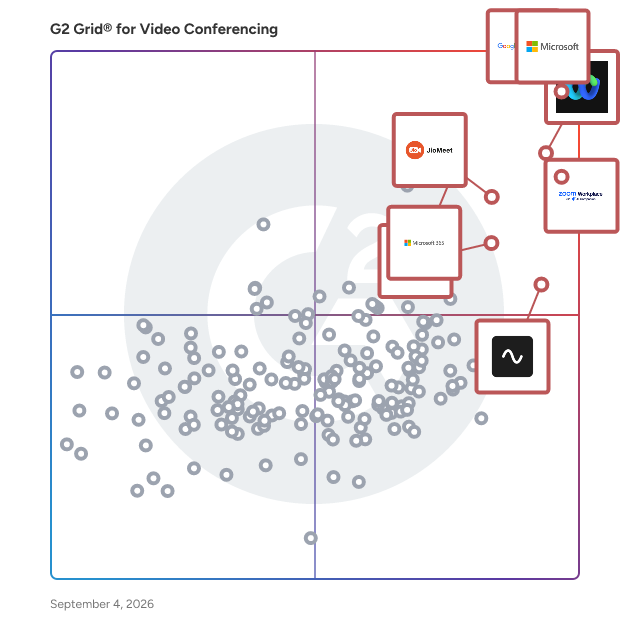
## G2 Grid® for Video Conferencing Software
 ![G2 Grid® for Video Conferencing Software plotting products by satisfaction and market presence](https://www.g2.com/categories/video-conferencing/grids.png?focus%5B%5D=1434&focus%5B%5D=25592&focus%5B%5D=18255&focus%5B%5D=7372&focus%5B%5D=129179&focus%5B%5D=663&focus%5B%5D=136204&focus%5B%5D=306)

Highlighted products: Google Workspace, Microsoft Teams, Webex Suite, Zoom Workplace, JioMeet, Microsoft 365, Riverside, and GoTo Meeting.

Underlying data: [Grid® JSON](https://www.g2.com/categories/video-conferencing/grids.json?focus%5B%5D=google-workspace&focus%5B%5D=microsoft-teams&focus%5B%5D=cisco-webex-suite&focus%5B%5D=zoom-workplace&focus%5B%5D=jiomeet&focus%5B%5D=microsoft365&focus%5B%5D=riverside&focus%5B%5D=goto-meeting)

**Sponsored**

### Ultatel

Ultatel is an intelligent cloud communications platform that brings AI into everyday business conversations across calling, meetings, messaging, and customer interactions. With 50+ advanced features, Ultatel brings all your business communications into one powerful platform built to support organizations at scale. From AI meeting assistant tools that automatically capture summaries and action items, to Intelligent Voice AI Agents that help automate repetitive workflows, Ultatel is designed to help teams communicate more efficiently and stay focused on what matters most. With integrated calling, collaboration, Microsoft Teams connectivity, CRM integrations, and 24/7 live support, Ultatel delivers a modern communications experience built for growing businesses.

[Visit website](https://www.g2.com/external_clickthroughs/record?secure%5Bad_program%5D=ppc&secure%5Bad_slot%5D=category_product_list_llm&secure%5Bcategory_id%5D=19&secure%5Bchosen_at%5D=2026-08-25T01%3A53%3A52Z&secure%5Bdisplayable_resource_id%5D=19&secure%5Bdisplayable_resource_type%5D=Category&secure%5Bmedium%5D=sponsored&secure%5Bplacement_reason%5D=page_category&secure%5Bplacement_resource_ids%5D%5B%5D=19&secure%5Bprioritized%5D=false&secure%5Bproduct_id%5D=1206636&secure%5Bresource_id%5D=19&secure%5Bresource_type%5D=Category&secure%5Bsource_type%5D=category_page&secure%5Bsource_url%5D=https%3A%2F%2Fwww.g2.com%2Fcategories%2Fvideo-conferencing&secure%5Btoken%5D=a0aa5e68f85240b7f8bc1af05db6014ab129c3d3379b1950a51f1dff5fac38d8&secure%5Burl%5D=https%3A%2F%2Fwww.ultatel.com%2F%3Futm_source%3DG2&secure%5Burl_type%5D=custom_url)

### [Google Workspace](https://www.g2.com/de/products/google-workspace/reviews)

Google Workspace ist eine umfassende Produktivitäts- und Kollaborationslösung, die entwickelt wurde, um Nutzern zu helfen, ihre Arbeitsprozesse zu optimieren, indem sie wesentliche Werkzeuge wie E-Mail, Chat, Dateispeicherung und Videokonferenzen in einer einheitlichen Plattform integriert. Diese Suite von Anwendungen ist auf Unternehmen, Bildungseinrichtungen und Einzelpersonen zugeschnitten, die ihre Kommunikations- und Kollaborationsbemühungen verbessern möchten, während sie die Leistungsfähigkeit der künstlichen Intelligenz von Google nutzen. Google Workspace richtet sich an ein vielfältiges Publikum und bedient Teams jeder Größe, von kleinen Start-ups bis hin zu großen Unternehmen. Es ist besonders vorteilhaft für Remote-Teams und Organisationen, die die Zusammenarbeit über verschiedene Standorte hinweg priorisieren. Die Plattform unterstützt verschiedene Anwendungsfälle, einschließlich Projektmanagement, Teamkommunikation, Dokumentenfreigabe und virtuellen Meetings, was sie zu einer idealen Wahl für Fachleute macht, die effizient zusammenarbeiten müssen, unabhängig von ihrem physischen Standort. Eines der Hauptmerkmale von Google Workspace ist die nahtlose Integration von Anwendungen wie Gmail, Google Meet, Google Drive und Google Docs. Diese Vernetzung ermöglicht es den Nutzern, mühelos zwischen Aufgaben zu wechseln, sei es beim Versenden von E-Mails, bei der Teilnahme an Videoanrufen oder bei der Zusammenarbeit an Dokumenten in Echtzeit. Die in die Plattform eingebetteten KI-Funktionen verbessern die Benutzererfahrung, indem sie intelligente Vorschläge bieten, sich wiederholende Aufgaben automatisieren und die Suchfunktionen verbessern, was letztendlich Zeit spart und die Produktivität steigert. Darüber hinaus priorisiert Google Workspace Sicherheit und Datenschutz und bietet robuste Funktionen wie Zwei-Faktor-Authentifizierung, erweiterten Phishing-Schutz und anpassbare Zugriffskontrollen. Diese Maßnahmen stellen sicher, dass sensible Informationen sicher bleiben, während Teams frei zusammenarbeiten können. Die Plattform unterstützt auch Integrationen von Drittanbietern, die es den Nutzern ermöglichen, ihre bevorzugten Anwendungen und Werkzeuge zu verbinden und so ihren Arbeitsablauf weiter zu verbessern. Zusammenfassend zeichnet sich Google Workspace in der Kategorie der Produktivitätssoftware durch einen ganzheitlichen Ansatz zur Zusammenarbeit aus. Die benutzerfreundliche Oberfläche, kombiniert mit leistungsstarken, KI-gesteuerten Funktionen und starken Sicherheitsprotokollen, macht es zu einem wertvollen Werkzeug für jeden, der seine Arbeitsprozesse verbessern und effektive Teamarbeit fördern möchte. Ob für das Management von Projekten, die Kommunikation mit Kollegen oder das Teilen von Dateien, Google Workspace ist darauf ausgelegt, die vielfältigen Bedürfnisse seiner Nutzer zu erfüllen und ist damit eine unverzichtbare Ressource im digitalen Arbeitsplatz von heute.

**Average Rating:** 4.6/5.0

**Total Reviews:** 45,674

#### How Do G2 Users Rate Google Workspace?

- **War the product ein guter Geschäftspartner?:** 9.0/10 (Category avg: 8.9/10)
- **Darbietungen:** 9.1/10 (Category avg: 8.9/10)
- **Berechtigungen für Teilnehmer:** 8.8/10 (Category avg: 8.8/10)
- **Whiteboarding (Englisch):** 8.3/10 (Category avg: 8.6/10)

#### Who Is the Company Behind Google Workspace?

- **Verkäufer:** [Google](https://www.g2.com/de/sellers/google)
- **Gründungsjahr:** 1998
- **Hauptsitz:** Mountain View, CA
- **Twitter:** @google  
31,899,995 Twitter-Follower
- **LinkedIn®-Seite:** [www.linkedin.com](https://www.g2.com/de/external_clickthroughs/record?secure%5Bsource_type%5D=product_profile&secure%5Btoken%5D=fe4a5936665c9702418dd53c477fef5a7baea08078bb117ed67e966fc581b9ec&secure%5Burl%5D=https%3A%2F%2Fwww.linkedin.com%2Fcompany%2F1441%2F&secure%5Burl_type%5D=linkedin_company_website)  
341,888 Mitarbeiter\*innen auf LinkedIn®
- **Eigentum:** NASDAQ:GOOG

#### Who Uses This Product?

- **Who Uses This:** Student, Lehrer
- **Top Industries:** Informationstechnologie und Dienstleistungen, Bildungsmanagement
- **Company Size:** 46% Small, 35% Medium

#### What Do G2 Reviewers Say About Google Workspace?

_AI-generated summary from verified user reviews_

##### Pros

- Benutzer schätzen die **Benutzerfreundlichkeit** von Google Workspace, die ein reibungsloses und effizientes Workflow-Management ermöglicht.
- Benutzer lieben die **nahtlose Teamzusammenarbeit** in Google Workspace, die die Kommunikation verbessert und die Produktivität mühelos steigert.
- Benutzer lieben die **nahtlosen Integrationen** in Google Workspace, die die Effizienz durch einfachen Zugriff auf Werkzeuge und Terminplanung verbessern.
- Benutzer loben die **Benutzerfreundlichkeit und Integration** in Google Workspace, was die Produktivität und Zusammenarbeit nahtlos verbessert.
- Benutzer genießen das **intuitive Design** von Google Workspace, das die Produktivität erleichtert und eine reibungslose Integration wesentlicher Werkzeuge ermöglicht.

##### Cons

- Benutzer stehen vor **fehlenden Funktionen** in Google Workspace, wie z.B. eingeschränkte Offline-Fähigkeiten und Einschränkungen beim Zugriff auf bestimmte Funktionalitäten.
- Benutzer finden die **begrenzten Funktionen** von Google Workspace für kleinere Teams unnötig, da es an wesentlichen Werkzeugen für ihre Bedürfnisse mangelt.
- Benutzer finden, dass Google Workspace **im Vergleich zu anderen Plattformen an Funktionen mangelt** , was sich auf das effektive Kampagnenmanagement und die Datenverarbeitung auswirkt.
- Benutzer finden, dass der **Mangel an erweiterten Funktionen** in Google Workspace ihre Produktivität und Anpassungsmöglichkeiten einschränkt.
- Benutzer finden **begrenzte Anpassungsmöglichkeiten** in Google Workspace, insbesondere für Kalender und Formulare, was die Flexibilität und Kreativität einschränkt.

#### What Are Recent G2 Reviews of Google Workspace?

**["Alles-in-Einem, Schnell und Benutzerfreundlich mit Intelligenten Auto-Vorschlägen"](https://www.g2.com/de/survey_responses/google-workspace-review-13286093)**

**Rating:** 5.0/5.0 stars

_— Pratiksha K._

[Read full review](https://www.g2.com/de/survey_responses/google-workspace-review-13286093)

**["Truly the best tool for team work and note taking."](https://www.g2.com/de/survey_responses/google-workspace-review-13337639)**

**Rating:** 4.5/5.0 stars

_— Rohini S._

[Read full review](https://www.g2.com/de/survey_responses/google-workspace-review-13337639)

#### What Are G2 Users Discussing About Google Workspace?

- [Welche Tipps haben Sie, um die erweiterten Funktionen von Google Meet effektiv für große virtuelle Meetings zu nutzen?](https://www.g2.com/de/discussions/what-tips-do-you-have-for-effectively-using-google-meet-s-advanced-features-for-large-virtual-meetings) - 17 comments, 12 upvotes
- [Wofür werden Google-Umfragen verwendet?](https://www.g2.com/de/discussions/what-is-google-surveys-used-for) - 9 comments, 3 upvotes
- [What does G Suite do?](https://www.g2.com/de/discussions/what-does-g-suite-do) - 8 comments, 5 upvotes
- [Welche Unternehmen nutzen G Suite?](https://www.g2.com/de/discussions/what-companies-use-g-suite) - 5 comments, 3 upvotes
- [Enthält G Suite Google Classroom?](https://www.g2.com/de/discussions/does-g-suite-include-google-classroom) - 9 comments, 5 upvotes

### [Microsoft Teams](https://www.g2.com/products/microsoft-teams/reviews)

Microsoft Teams is a comprehensive collaboration platform developed by Microsoft, designed to streamline communication and teamwork within organizations. It integrates chat, video conferencing, file storage, and application integration into a single interface, facilitating seamless collaboration across various devices and operating systems. As part of the Microsoft 365 suite, Teams enhances productivity by providing a centralized hub for team interactions and project management. Key Features and Functionality: - Chat and Messaging: Facilitates real-time text communication with individuals or groups, supporting rich text, emojis, stickers, and GIFs. - Video Conferencing: Offers high-quality video meetings with features like screen sharing, custom backgrounds, and live captions, accommodating both small team huddles and large webinars. - File Sharing and Collaboration: Enables secure file storage and sharing through integration with OneDrive and SharePoint, allowing multiple users to co-author documents simultaneously. - Integration with Applications: Supports integration with a wide range of Microsoft and third-party applications, enhancing workflow efficiency by bringing various tools into one platform. - Security and Compliance: Provides enterprise-grade security measures, including data encryption for meetings, chats, calls, and files, ensuring compliance with industry standards. Primary Value and Solutions Provided: Microsoft Teams addresses the challenges of modern workplace collaboration by unifying communication channels, reducing the need for multiple disparate tools. It enhances team productivity by centralizing resources, facilitating real-time collaboration, and ensuring secure information sharing. By integrating with the broader Microsoft 365 ecosystem, Teams offers a cohesive environment that supports remote work, hybrid teams, and in-person collaboration, adapting to the diverse needs of today's workforce.

**Average Rating:** 4.4/5.0

**Total Reviews:** 17,673

#### How Do G2 Users Rate Microsoft Teams?

- **Has the product been a good partner in doing business?:** 8.9/10 (Category avg: 8.9/10)
- **Presentations:** 9.1/10 (Category avg: 8.9/10)
- **Participant Permissions:** 8.8/10 (Category avg: 8.8/10)
- **Whiteboarding:** 8.5/10 (Category avg: 8.6/10)

#### Who Is the Company Behind Microsoft Teams?

- **Seller:** [Microsoft](https://www.g2.com/sellers/microsoft)
- **Year Founded:** 1975
- **HQ Location:** Redmond, Washington
- **Twitter:** @microsoft  
13,091,739 Twitter followers
- **LinkedIn® Page:** [www.linkedin.com](https://www.g2.com/external_clickthroughs/record?secure%5Bsource_type%5D=product_profile&secure%5Btoken%5D=9458f51bd6ded48ad432a804f19ad736469f007787569b63827154231c315630&secure%5Burl%5D=https%3A%2F%2Fwww.linkedin.com%2Fcompany%2Fmicrosoft%2F&secure%5Burl_type%5D=linkedin_company_website)  
231,632 employees on LinkedIn®
- **Ownership:** MSFT

#### Who Uses This Product?

- **Who Uses This:** Software Engineer, Project Manager
- **Top Industries:** Information Technology and Services, Computer Software
- **Company Size:** 39% Large, 38% Medium

#### What Do G2 Reviewers Say About Microsoft Teams?

_AI-generated summary from verified user reviews_

##### Pros

- Users find **team collaboration seamless** with Microsoft Teams, integrating meetings, chats, and file sharing efficiently.
- Users find Microsoft Teams **very easy to use** , enhancing daily communication and collaboration across different platforms effortlessly.
- Users find Microsoft Teams to be a **superb tool for communication** , enhancing collaboration through integrated features and organization.
- Users value the **easy file sharing** in Microsoft Teams, enhancing collaboration and streamlining communication across teams.
- Users value the **easy communication** features of Microsoft Teams, enhancing collaboration and availability awareness among team members.

##### Cons

- Users often experience **slow loading** with Microsoft Teams, especially when using multiple applications or during video meetings.
- Users experience **performance issues** with Teams, including high resource consumption and difficulties in low-bandwidth situations.
- Users report the **user interface can be overwhelming and slow** , complicating their navigation and experience during usage.
- Users often face **connectivity issues** with Microsoft Teams, particularly during low-bandwidth situations disrupting their experience.
- Users experience **performance delays** with Microsoft Teams, leading to frustration, particularly on older machines and low-bandwidth connections.

#### What Are Recent G2 Reviews of Microsoft Teams?

**["Microsoft Teams Screen Sharing Makes Remote Collaboration Clear and Easy"](https://www.g2.com/survey_responses/microsoft-teams-review-13350570)**

**Rating:** 4.5/5.0 stars

_— lujain y._

[Read full review](https://www.g2.com/survey_responses/microsoft-teams-review-13350570)

**["Microsoft Teams for Client Communication and Team Coordination"](https://www.g2.com/survey_responses/microsoft-teams-review-13347926)**

**Rating:** 5.0/5.0 stars

_— Gajanan H._

[Read full review](https://www.g2.com/survey_responses/microsoft-teams-review-13347926)

#### What Are G2 Users Discussing About Microsoft Teams?

- [What software do you need for Microsoft teams?](https://www.g2.com/discussions/what-software-do-you-need-for-microsoft-teams) - 19 comments, 10 upvotes
- [What is the use of Microsoft teams?](https://www.g2.com/discussions/what-is-the-use-of-microsoft-teams) - 19 comments, 6 upvotes
- [What are the best features of Microsoft teams?](https://www.g2.com/discussions/what-are-the-best-features-of-microsoft-teams) - 20 comments, 7 upvotes
- [What are Microsoft teams features?](https://www.g2.com/discussions/what-are-microsoft-teams-features) - 13 comments, 4 upvotes

### [Webex Suite](https://www.g2.com/products/cisco-webex-suite/reviews)

Webex Suite is an all-in-one, AI-powered collaboration suite built to increase productivity and maximize teamwork in today’s hybrid work. With 8 powerful individual workflows – Meetings, Messaging, Calling, Webinar, Events, Polling, Whiteboarding and Video Messaging in one, Webex Suite delivers exceptional value, world-class user experiences, and incredible audio and video, anywhere on any device. With a variety of collaboration and AI innovations, such as Webex AI Assistant, Real-time Translation, Background Noise Removal, and more, Webex Suite delivers rich and innovative experiences for employees and customers, enabling them to seamlessly connect, collaborate, engage and get work done. Webex Suite is powered by the industry-leading Webex Platform that is secure, compliant, and easily managed with built-in pervasive intelligence, bringing AI innovations across the entire Webex portfolio. The entire Webex Suite can be managed via the single-pane-of-glass management tool, Webex Control Hub. Webex Suite is backed by Cisco’s industry-leading security and networking infrastructure that ensures the best quality video and audio communications. Webex Suite Workflows: Meetings: Drive more productive meetings with AI-powered experiences and high-quality audio and video. Messaging: Collaborate async with rich messaging, secure file sharing, and digital whiteboarding to keep work flowing between meetings. Calling: Stay connected with modern business phone system and flexible calling options. Webinar: Host high quality webinars and drive engagement with immersive content and interactive audience experiences. Events: Power virtual, in-person, and hybrid events with immersive multi-track agendas, ticketing, attendee networking, analytics, and more. Polling: Enable active participation in every meeting with quizzes, polling, and interactive Q&A. Whiteboarding: Unleash creativity with a digital whiteboarding solution for everyone, on any device. Video Messaging: Record, share ideas, engage, and facilitate real-time feedback with intuitive video messaging.

**Average Rating:** 4.2/5.0

**Total Reviews:** 17,669

#### How Do G2 Users Rate Webex Suite?

- **Has the product been a good partner in doing business?:** 8.7/10 (Category avg: 8.9/10)
- **Presentations:** 9.1/10 (Category avg: 8.9/10)
- **Participant Permissions:** 8.7/10 (Category avg: 8.8/10)
- **Whiteboarding:** 8.8/10 (Category avg: 8.6/10)

#### Who Is the Company Behind Webex Suite?

- **Seller:** [Cisco](https://www.g2.com/sellers/cisco)
- **Company Website:** www.cisco.com
- **Year Founded:** 1984
- **HQ Location:** San Jose, CA
- **Twitter:** @Cisco  
720,366 Twitter followers
- **LinkedIn® Page:** [www.linkedin.com](https://www.g2.com/external_clickthroughs/record?secure%5Bsource_type%5D=product_profile&secure%5Btoken%5D=476aeabc5a712d049453edd5c54ea0318890d9e60d93782e37fe028224df1cbd&secure%5Burl%5D=https%3A%2F%2Fwww.linkedin.com%2Fcompany%2Fcisco%2F&secure%5Burl_type%5D=linkedin_company_website)  
95,545 employees on LinkedIn®

#### Who Uses This Product?

- **Who Uses This:** Software Engineer, Senior Software Engineer
- **Top Industries:** Information Technology and Services, Computer Software
- **Company Size:** 50% Large, 31% Medium

#### What Do G2 Reviewers Say About Webex Suite?

_AI-generated summary from verified user reviews_

##### Pros

- Users appreciate the **ease of use** of Webex Suite for its all-in-one solution for communication and collaboration.
- Users value the **high-quality video and audio** of Webex Suite, enabling effective and seamless collaboration across locations.
- Users appreciate the **reliable connections** provided by Webex Suite, enhancing their collaboration experience seamlessly.
- Users value the **all-in-one collaboration capabilities** of Webex Suite, enhancing productivity with excellent video and audio quality.
- Users commend the **excellent video quality** of Webex Suite, enhancing their meeting and collaboration experiences.

##### Cons

- Users often experience **slow loading** issues with Webex Suite, causing frustration during calls and overall usage.
- Users find Webex Suite **not user-friendly** , citing a cluttered interface and confusion with settings as major drawbacks.
- Users report **performance issues** with Webex Suite, describing lag, freezes, and a cluttered interface that complicates usability.
- Users find the **lack of intuitiveness** in Webex Suite's interface challenging, especially for new users navigating features.
- Users find the **user interface cluttered and less intuitive** , impacting the overall experience and learning curve.

#### What Are Recent G2 Reviews of Webex Suite?

**["Reliable video conferencing and project plaining suite"](https://www.g2.com/survey_responses/webex-suite-review-13183133)**

**Rating:** 4.0/5.0 stars

_— Chandra K._

[Read full review](https://www.g2.com/survey_responses/webex-suite-review-13183133)

**["Feature loaded Webex Suite with Reliable Audio and Video for Hybrid Meetings."](https://www.g2.com/survey_responses/webex-suite-review-13335358)**

**Rating:** 4.5/5.0 stars

_— Rohini S._

[Read full review](https://www.g2.com/survey_responses/webex-suite-review-13335358)

#### What Are G2 Users Discussing About Webex Suite?

- [How has the Webex App evolved to meet the demands of hybrid work environments and virtual collaboration?](https://www.g2.com/discussions/how-has-the-webex-app-evolved-to-meet-the-demands-of-hybrid-work-environments-and-virtual-collaboration) - 4 comments, 5 upvotes
- [How has Webex Meetings catered to the evolving needs of global virtual teams and large-scale webinars?](https://www.g2.com/discussions/how-has-webex-meetings-catered-to-the-evolving-needs-of-global-virtual-teams-and-large-scale-webinars) - 3 comments, 5 upvotes
- [What is Webex Meetings used for?](https://www.g2.com/discussions/what-is-webex-meetings-used-for) - 4 comments, 3 upvotes
- [What is Webex App used for?](https://www.g2.com/discussions/what-is-webex-app-used-for) - 5 comments, 2 upvotes
- [What is the Cisco Webex meetings desktop app?](https://www.g2.com/discussions/what-is-the-cisco-webex-meetings-desktop-app) - 2 comments, 1 upvote

### [Zoom Workplace](https://www.g2.com/products/zoom-workplace/reviews)

Goodbye app overload. Hello effortless work. Work can be complicated. Your tools shouldn't be. Zoom Workplace connects all the ways you collaborate — from meetings to docs to chat and more — with built-in AI and seamless integrations that help teams focus and work flawlessly. Zoom Communications: Unified, Effortless Connection for Modern Work Bring every way your teams communicate—meetings, chat, calls, email, and scheduling—into one seamless experience. With Zoom, collaboration happens faster and more naturally across channels, without switching apps or losing context. From spontaneous chats to scheduled meetings and calls, everything stays connected, searchable, and secure—powered by one intuitive platform built for how modern teams work. Zoom Productivity: Workflows Connected, Work Effortless Transform how work gets done with AI-first collaboration that keeps people, content, and actions in one place. From brainstorming on whiteboards to co-creating in docs, sharing clips, and automating follow-ups, Zoom connects every step of your workflow. With Zoom Hub and integrated video management, knowledge stays organized, accessible, and actionable—so teams can move from idea to outcome without friction. Zoom Spaces: Smarter, Connected Workplaces for Every Team Bring your physical and hybrid environments to life with intelligent, connected spaces. Zoom Spaces unifies meeting rooms, desk reservations, digital signage, and visitor management into one seamless experience—making it simple to collaborate, navigate, and manage the workplace. Whether employees are remote, hybrid, or on-site, Zoom creates a consistent, secure, and flexible environment that keeps teams connected wherever work happens. Zoom Employee Engagement: Connect, Inspire, and Empower Every Employee Foster belonging and alignment with Workvivo by Zoom—a modern employee experience platform that unites communication, culture, and community in one place. From company-wide updates to recognition, feedback, and social engagement, Workvivo gives every employee a voice and a sense of connection. Built right into Zoom Workplace, it helps organizations strengthen culture, boost engagement, and keep teams informed and inspired—no matter where they work.

**Average Rating:** 4.5/5.0

**Total Reviews:** 53,581

#### How Do G2 Users Rate Zoom Workplace?

- **Has the product been a good partner in doing business?:** 9.1/10 (Category avg: 8.9/10)
- **Presentations:** 9.3/10 (Category avg: 8.9/10)
- **Participant Permissions:** 8.9/10 (Category avg: 8.8/10)
- **Whiteboarding:** 8.8/10 (Category avg: 8.6/10)

#### Who Is the Company Behind Zoom Workplace?

- **Seller:** [Zoom](https://www.g2.com/sellers/zoom-a5000ea1-6d30-4ab4-b591-20723189ac97)
- **Company Website:** www.zoom.com
- **Year Founded:** 2011
- **HQ Location:** San Jose, CA
- **Twitter:** @zoom  
1,042,714 Twitter followers
- **LinkedIn® Page:** [www.linkedin.com](https://www.g2.com/external_clickthroughs/record?secure%5Bsource_type%5D=product_profile&secure%5Btoken%5D=ea58933ffb5ea1e88769e70b1323ea336f3f35193bdf38ad87831cfc56794a9a&secure%5Burl%5D=https%3A%2F%2Fwww.linkedin.com%2Fcompany%2F2532259%2F&secure%5Burl_type%5D=linkedin_company_website)  
13,494 employees on LinkedIn®

#### Who Uses This Product?

- **Who Uses This:** Owner, Software Engineer
- **Top Industries:** Information Technology and Services, Computer Software
- **Company Size:** 51% Small, 31% Medium

#### What Do G2 Reviewers Say About Zoom Workplace?

_AI-generated summary from verified user reviews_

##### Pros

- Users love the **ease of use** of Zoom Workplace, enjoying seamless access to features with just a click.
- Users appreciate the **ease of collaboration** in Zoom Workplace, especially with breakout rooms and seamless screen sharing.
- Users value the **reliability** of Zoom Workplace, ensuring seamless connectivity and stability even during adverse conditions.
- Users find the **ease of use for meetings** in Zoom Workplace invaluable for seamless collaboration and productivity.
- Users enjoy the **easy-to-use video conferencing** features of Zoom, facilitating smooth communication and collaboration in hybrid work settings.

##### Cons

- Users note the **limited features** of Zoom Workplace, expressing a need for improved built-in collaboration tools.
- Users experience **Zoom issues** like fatigue, connectivity problems, and confusing configurations that hinder their overall meeting effectiveness.
- Users experience **Zoom fatigue** , notification overload, and connectivity issues, making long meetings feel overwhelming and impersonal.
- Users find **missing features** in Zoom Workplace, like improved sharing links and chat access post-calls, frustrating.
- Users often face **connection issues** with Zoom Workplace, leading to a frustrating and less seamless experience.

#### What Are Recent G2 Reviews of Zoom Workplace?

**["Zoom’s One-Click Reliability with Seamless Screen Sharing and Stable Quality"](https://www.g2.com/survey_responses/zoom-workplace-review-13290295)**

**Rating:** 4.5/5.0 stars

_— Battier mal B._

[Read full review](https://www.g2.com/survey_responses/zoom-workplace-review-13290295)

**["Effortlessly Connects Teams, Great for Remote Work"](https://www.g2.com/survey_responses/zoom-workplace-review-13232000)**

**Rating:** 5.0/5.0 stars

_— Mazelo X._

[Read full review](https://www.g2.com/survey_responses/zoom-workplace-review-13232000)

#### What Are G2 Users Discussing About Zoom Workplace?

- [Is Zoom Workplace worth it?](https://www.g2.com/discussions/is-zoom-workplace-worth-it) - 29 comments, 38 upvotes
- [What are your tips for using Zoom Workplace effectively?](https://www.g2.com/discussions/what-are-your-tips-for-using-zoom-workplace-effectively) - 7 comments, 11 upvotes
- [What does Zoom do?](https://www.g2.com/discussions/what-does-zoom-do) - 30 comments, 12 upvotes
- [What are the features offered by Zoom?](https://www.g2.com/discussions/what-are-the-features-offered-by-zoom) - 5 comments, 2 upvotes
- [How do you add features in Zoom?](https://www.g2.com/discussions/how-do-you-add-features-in-zoom) - 18 comments, 2 upvotes

### [JioMeet](https://www.g2.com/de/products/jiomeet/reviews)

JioMeet ist eine indische App, die die Welt näher zusammenbringt! JioMeet verbindet uns alle mit seinen Videokonferenzlösungen! Es sind nicht nur die nahtlosen Videoanrufe, sondern auch die Vielzahl an Funktionen, die es seinen Nutzern bietet, die JioMeet zu einer revolutionären Plattform für persönliche und berufliche Anrufe machen! Darüber hinaus werden Unternehmen mit JioMeet Enterprise in verschiedenen Branchen mit zusätzlichen Funktionen ausgestattet, um effizient zu verbinden, zusammenzuarbeiten und zu synergieren! Berufstätige können Enterprise-Grade-Funktionen und Sicherheit genießen, um ihre Produktivität in hybriden Arbeitsmodellen zu steigern! JioMeet bringt eine Welle der digitalen Transformation in die Art und Weise, wie wir uns bei persönlichen und beruflichen Anrufen verbinden, mit seinem - ● Neuen intuitiven und interaktiven Layout ● Mehrsprachigen Unterstützung ● WhatsApp-Integration ● In-Call-Reaktionen ● Große Meeting-Fähigkeiten ● HD-Audio- und Videoqualität ● Aufnahmefunktion, um Ihre Erinnerungen und Meetings zu speichern ● App-Integrationen auf WhatsApp, Microsoft Teams und Microsoft Outlook ● Unbegrenzte und unterbrechungsfreie Anrufe für bis zu 24 Stunden ● Passwortgeschützte Meetings ● Virtuelle Hintergründe zur Anpassung des Benutzererlebnisses ● Whiteboard- und Bildschirmfreigabefunktionen ● Nur-Audio-Modus für instabile Internetverbindungen ● Multi-Device-Login-Unterstützung für bis zu 5 Geräte ● Nahtloses Wechseln von einem Gerät zum anderen während des Anrufs ● Aktive Sprecheransicht-Layout ● Warteräume, um dem Gastgeber mehr Kontrolle über die Meeting-Teilnehmer zu geben ● Gruppen erstellen und mit einem Klick anrufen/chatten ● Einfache Anmeldung mit Mobilnummer/E-Mail-ID. Wir unterstützen nur indische Mobilnummern. ● Verfügbarkeit auf Android, Windows, iOS, Mac, SIP/H.323-Systemen

**Average Rating:** 4.4/5.0

**Total Reviews:** 458

#### How Do G2 Users Rate JioMeet?

- **War the product ein guter Geschäftspartner?:** 8.9/10 (Category avg: 8.9/10)
- **Darbietungen:** 8.8/10 (Category avg: 8.9/10)
- **Berechtigungen für Teilnehmer:** 8.2/10 (Category avg: 8.8/10)
- **Whiteboarding (Englisch):** 8.2/10 (Category avg: 8.6/10)

#### Who Is the Company Behind JioMeet?

- **Verkäufer:** [JioSign](https://www.g2.com/de/sellers/jiosign)
- **Hauptsitz:** Ghansoli, IN
- **LinkedIn®-Seite:** [www.linkedin.com](https://www.g2.com/de/external_clickthroughs/record?secure%5Bsource_type%5D=product_profile&secure%5Btoken%5D=8f1d5d935f4cef667445682c733c60695d978a2c1577b3b2a1df0062946fc68d&secure%5Burl%5D=https%3A%2F%2Fwww.linkedin.com%2Fcompany%2Fjiosign%2F&secure%5Burl_type%5D=linkedin_company_website)

#### Who Uses This Product?

- **Who Uses This:** Student, Software-Ingenieur
- **Top Industries:** Informationstechnologie und Dienstleistungen, Computersoftware
- **Company Size:** 36% Small, 18% Medium

#### What Do G2 Reviewers Say About JioMeet?

_AI-generated summary from verified user reviews_

##### Pros

- Benutzer bewundern die **Benutzerfreundlichkeit** von JioMeet und genießen die benutzerfreundliche Oberfläche sowie das reibungslose, unkomplizierte Erlebnis.
- Benutzer loben JioMeet für seine **einfache Einrichtung** , was es zu einer benutzerfreundlichen Wahl für Videokonferenzen macht.
- Benutzer schätzen die **hochauflösende Videoqualität** von JioMeet, die virtuelle Interaktionen reibungslos und ansprechend macht.
- Benutzer schätzen die **zuverlässige Konnektivität** von JioMeet, die reibungslose Meetings ohne Unterbrechungen gewährleistet, selbst bei mobilen Daten.
- Benutzer loben die **ausgezeichnete Audioqualität** von JioMeet, die die Echtzeitkommunikation verbessert und Interaktionen reibungslos macht.

##### Cons

- Benutzer finden, dass JioMeet **eingeschränkte Funktionen** hat und im Vergleich zu robusteren Plattformen an fortschrittlichen Kollaborationstools fehlt.
- Benutzer finden, dass JioMeet **fortschrittliche Kollaborationsfunktionen** vermisst, was seine Effektivität für größere und komplexere Meetings einschränkt.
- Benutzer haben häufig mit **Audioverzögerungen und Verbindungsproblemen** zu kämpfen, was die Gesamtqualität der JioMeet-Erfahrung beeinträchtigt.
- Benutzer berichten von **schlechter Qualität** bei JioMeet, einschließlich Videoverzögerungen, Audioproblemen bei der Synchronisation und eingeschränkten Funktionen im Vergleich zu Wettbewerbern.
- Benutzer finden die **Oberfläche zu einfach** im Vergleich zu Wettbewerbern und benötigen fortschrittlichere Funktionen und eine reibungslosere Navigation.

#### What Are Recent G2 Reviews of JioMeet?

**["Convenient and Reliable for Client and Team Meetings"](https://www.g2.com/de/survey_responses/jiomeet-review-13347808)**

**Rating:** 5.0/5.0 stars

_— Gajanan H._

[Read full review](https://www.g2.com/de/survey_responses/jiomeet-review-13347808)

**["JioMeet macht Projektanrufe einfach und zuverlässig"](https://www.g2.com/de/survey_responses/jiomeet-review-13229749)**

**Rating:** 4.5/5.0 stars

_— Muhammed A._

[Read full review](https://www.g2.com/de/survey_responses/jiomeet-review-13229749)

#### What Are G2 Users Discussing About JioMeet?

- [Wofür wird JioMeet verwendet?](https://www.g2.com/de/discussions/what-is-jiomeet-used-for) - 11 comments, 8 upvotes

### [Microsoft 365](https://www.g2.com/de/products/microsoft365/reviews)

Starten und wachsen Sie Ihr Unternehmen mit Microsoft 365. Machen Sie mehr, schneller, mit intelligenten Tools, um professionelle, gebrandete Dokumente mit Ihren Kunden und Ihrem Team zu erstellen, zu senden, zu teilen und sicher in der Cloud zu speichern. Microsoft 365 ist eine cloudbasierte Suite von Software-Tools, die Ihnen helfen soll, mehr zu erreichen – mit erstklassigen Kommunikations-, Design- und Datenverwaltungs-Apps, intelligenten Cloud-Diensten und fortschrittlicher Sicherheit. Greifen Sie von überall auf Ihre Daten zu, arbeiten Sie in Echtzeit mit Teammitgliedern zusammen, treffen Sie sich virtuell mit Menschen und nutzen Sie Tausende von vorgefertigten Vorlagen, um besser mit Kunden zu kommunizieren und Ihr Unternehmen zu verwalten – alles mit integrierter Sicherheitstechnologie, die Ihre Daten und Geräte von überall schützt. Erhalten Sie die neuesten Office-Apps wie Microsoft Teams, Word, Excel, PowerPoint, Outlook, OneDrive und mehr.

**Average Rating:** 4.6/5.0

**Total Reviews:** 5,547

#### How Do G2 Users Rate Microsoft 365?

- **War the product ein guter Geschäftspartner?:** 8.8/10 (Category avg: 8.9/10)
- **Darbietungen:** 9.1/10 (Category avg: 8.9/10)
- **Berechtigungen für Teilnehmer:** 9.0/10 (Category avg: 8.8/10)
- **Whiteboarding (Englisch):** 8.6/10 (Category avg: 8.6/10)

#### Who Is the Company Behind Microsoft 365?

- **Verkäufer:** [Microsoft](https://www.g2.com/de/sellers/microsoft)
- **Gründungsjahr:** 1975
- **Hauptsitz:** Redmond, Washington
- **Twitter:** @microsoft  
13,091,739 Twitter-Follower
- **LinkedIn®-Seite:** [www.linkedin.com](https://www.g2.com/de/external_clickthroughs/record?secure%5Bsource_type%5D=product_profile&secure%5Btoken%5D=9458f51bd6ded48ad432a804f19ad736469f007787569b63827154231c315630&secure%5Burl%5D=https%3A%2F%2Fwww.linkedin.com%2Fcompany%2Fmicrosoft%2F&secure%5Burl_type%5D=linkedin_company_website)  
231,632 Mitarbeiter\*innen auf LinkedIn®
- **Eigentum:** MSFT

#### Who Uses This Product?

- **Who Uses This:** Eigentümer, Software-Ingenieur
- **Top Industries:** Informationstechnologie und Dienstleistungen, Bildungsmanagement
- **Company Size:** 37% Medium, 35% Small

#### What Do G2 Reviewers Say About Microsoft 365?

_AI-generated summary from verified user reviews_

##### Pros

- Benutzer heben die **Benutzerfreundlichkeit** von Microsoft 365 hervor und genießen die unkomplizierte Implementierung und nahtlose Navigation.
- Benutzer schätzen die **nahtlose Teamzusammenarbeit** in Microsoft 365, die Effizienz und Kommunikation über verschiedene Anwendungen hinweg verbessert.
- Benutzer schätzen die **einfache Integration mit Microsoft-Apps** , die den Datenzugriff und die Zusammenarbeit über Geräte hinweg verbessert.
- Benutzer schätzen die **einfache Integration** von Microsoft 365 mit anderen Tools, was die Zusammenarbeit und Zugänglichkeit über verschiedene Geräte hinweg verbessert.
- Benutzer lieben die **nahtlose Integration** von Microsoft 365 mit anderen Apps, was die Zugänglichkeit und Zusammenarbeit verbessert.

##### Cons

- Benutzer finden Microsoft 365 **zu teuer** für kleine Teams und stoßen auf frustrierende Einschränkungen und Probleme mit Updates.
- Benutzer finden die **fehlenden Funktionen** frustrierend, da wesentliche Werkzeuge hinter teureren Plänen gesperrt sind und Updates die Funktionalität stören.
- Benutzer finden die **Lernkurve einschüchternd** bei Microsoft 365 und fühlen sich oft von seiner Komplexität und den Funktionen überwältigt.
- Benutzer haben oft **technische Probleme** mit Microsoft 365, einschließlich langsamer Leistung und frustrierender App-Updates und -Konfigurationen.
- Benutzer finden Microsoft 365 **fehlt es an wesentlichen Funktionen** , insbesondere mit häufigen Updates, die etablierte Arbeitsabläufe und Einstellungen stören.

#### What Are Recent G2 Reviews of Microsoft 365?

**["Microsoft 365: Produktiv, Sicher, Datenlebenszyklusmanagement und Mühelose Zusammenarbeit Überall"](https://www.g2.com/de/survey_responses/microsoft-365-review-13234875)**

**Rating:** 5.0/5.0 stars

_— patan b._

[Read full review](https://www.g2.com/de/survey_responses/microsoft-365-review-13234875)

**["Microsoft 365: Ein umfassendes, sicheres Kollaborationsökosystem, angetrieben von Copilot"](https://www.g2.com/de/survey_responses/microsoft-365-review-13193350)**

**Rating:** 5.0/5.0 stars

_— Rene "Rocky" E._

[Read full review](https://www.g2.com/de/survey_responses/microsoft-365-review-13193350)

#### What Are G2 Users Discussing About Microsoft 365?

- [Was sind die Verwendungszwecke von Microsoft-Software?](https://www.g2.com/de/discussions/what-are-the-uses-of-microsoft-software) - 2 comments, 1 upvote
- [Welche Art von Software ist Microsoft Office?](https://www.g2.com/de/discussions/what-kind-of-software-is-microsoft-office) - 1 comment, 1 upvote
- [Welche Programme sind in der Microsoft Office Suite enthalten?](https://www.g2.com/de/discussions/what-programs-are-in-microsoft-office-suite) - 1 comment
- [Was sind die Funktionen von Microsoft Office?](https://www.g2.com/de/discussions/what-is-microsoft-office-features) - 2 comments

### [Riverside](https://www.g2.com/pt/products/riverside/reviews)

Riverside (anteriormente Riverside.fm) é a plataforma tudo-em-um para gravação, transmissão ao vivo, edição, reaproveitamento e publicação de vídeos e podcasts com qualidade de estúdio. Criadores e empresas a utilizam para produzir conteúdo de qualidade de transmissão sem o labirinto de produção de múltiplas ferramentas, estúdios caros ou expertise técnica. Grave vídeos em até 4K e áudio sem compressão localmente no dispositivo de cada participante, para que a qualidade se mantenha mesmo com internet ruim. Edite editando a transcrição. Transforme gravações longas em clipes, legendas, notas de show e traduções com IA. Webinars escalam para 10.000 participantes. Confiado por podcasters independentes como Tim Ferriss, Mel Robbins e Guy Raz, e por marcas incluindo Spotify, Marvel, HubSpot, Microsoft e Intuit. Quais são os principais benefícios do Riverside? - Tudo-em-um: Grave, transmita ao vivo, edite, reaproveite, hospede e publique de uma única plataforma. Resultados com qualidade de estúdio, sem necessidade de estúdio: Vídeo em até 4K e áudio sem compressão, gravados localmente para que a qualidade não dependa da conexão de internet. - IA que faz o trabalho pesado: Edite conversando ou editando texto, crie clipes automaticamente, melhore o áudio, traduza e gere notas de show em segundos. - Velocidade sem comprometer a qualidade: Reduza horas de pós-produção em minutos. - Alcance máximo de cada gravação: Reaproveitamento embutido em clipes, legendas, transcrições, traduções e formatos sociais. - Sem curva de aprendizado: Fácil o suficiente para iniciantes, profundo o suficiente para profissionais. Convidados entram a partir de um link de navegador. Quais são os principais recursos do Riverside? - Grave áudio e vídeo cristalinos independentemente da conexão de internet - Edite conteúdo com ferramentas intuitivas e que economizam tempo, aproveitando a IA - Reaproveite conteúdo automaticamente para múltiplos canais - Transmita ao vivo para qualquer plataforma social (YouTube, Facebook, Instagram, Twitch e mais) - Transcreva arquivos de áudio e vídeo em mais de 100 idiomas com 99% de precisão - Hospede e distribua seu podcast para diretórios principais como Spotify, Apple e YouTube. Para que o Riverside é melhor utilizado? Para criadores: - Gravação, edição, hospedagem e publicação de podcasts - Entrevistas em vídeo remotas com convidados em qualquer lugar do mundo - Vídeos do YouTube e conteúdo de longa duração - Shows ao vivo e podcasts ao vivo - Gravações solo, captura de tela e tutoriais Para empresas e equipes: - Vídeo de marketing: depoimentos, estudos de caso, conteúdo social, podcasts de marca - Webinars e eventos virtuais para até 10.000 participantes - Comunicações internas: reuniões gerais, atualizações executivas, reuniões gerais - Aprendizado e desenvolvimento: treinamento, integração, conhecimento interno - Vendas: demonstrações, chamadas de prospecção, histórias de clientes - Produto: demonstrações, chamadas de usuários gravadas, tutoriais - Produtores e agências: produção remota com múltiplos convidados com controle total do produtor O que o Riverside oferece para empresas? Controle total de produção: - Modo Produtor: Conduza a sessão sem aparecer na gravação. Controle microfones, câmeras, layouts e teleprompters dos convidados. - Branding de estúdio: Trave fontes, cores, logos e sobreposições para que o conteúdo permaneça na marca em escala. Colaboração em equipe: - Espaços de trabalho, funções e permissões: Organize equipes, atribua acesso, compartilhe arquivos dentro/fora da empresa. - Comentários no editor: Feedback sem threads do Slack ou gravações de tela. - API do Riverside Escala e velocidade: - Gravação, armazenamento e exportações ilimitadas. - Edição simultânea em equipe. Segurança e suporte de nível empresarial: - Criptografia de ponta a ponta. SSO disponível. - Suporte ao vivo 24/7 - Gerente de Sucesso do Cliente dedicado. - Produtor sob demanda

**Average Rating:** 4.8/5.0

**Total Reviews:** 1,736

#### How Do G2 Users Rate Riverside?

- **the product tem sido um bom parceiro comercial?:** 9.5/10 (Category avg: 8.9/10)

#### Who Is the Company Behind Riverside?

- **Vendedor:** [Riverside](https://www.g2.com/pt/sellers/riverside)
- **Website da Empresa:** riverside.com
- **Ano de Fundação:** 2020
- **Localização da Sede:** Palo Alto, California
- **Twitter:** @RiversidedotFM  
10,509 seguidores no Twitter
- **Página do LinkedIn®:** [www.linkedin.com](https://www.g2.com/pt/external_clickthroughs/record?secure%5Bsource_type%5D=product_profile&secure%5Btoken%5D=0019de22888d50b222c26cd9bbb7c49aefd52f7e022cf82ecb406e771e4d40a7&secure%5Burl%5D=https%3A%2F%2Fwww.linkedin.com%2Fcompany%2Friverside-fm%2F&secure%5Burl_type%5D=linkedin_company_website)  
450 funcionários no LinkedIn®

#### Who Uses This Product?

- **Who Uses This:** Fundador, Proprietário
- **Top Industries:** Entretenimento, Produção de Mídia
- **Company Size:** 90% Small, 10% Medium

#### What Do G2 Reviewers Say About Riverside?

_AI-generated summary from verified user reviews_

##### Pros

- Os usuários apreciam a **facilidade de uso** do Riverside, simplificando a produção de podcasts e melhorando significativamente o fluxo de trabalho.
- Os usuários elogiam a **qualidade de áudio superior** do Riverside, tornando-o a melhor escolha para gravações de podcast remotas.
- Os usuários valorizam a **alta qualidade** do Riverside, elogiando seu profissionalismo e recursos intuitivos para gravação de vídeo.
- Os usuários apreciam o Riverside por sua **plataforma de gravação de vídeo simplificada e profissional** , destacando seu excelente suporte e recursos.
- Os usuários adoram a **alta qualidade de vídeo** do Riverside, permitindo-lhes produzir programas com aparência profissional sem esforço.

##### Cons

- Os usuários relatam **problemas de gravação** , incluindo problemas de qualidade de áudio e correções manuais complicadas para erros de transcrição.
- Os usuários acham que o Riverside carece de **recursos essenciais** como tela verde e ferramentas colaborativas, afetando a usabilidade e conveniência geral.
- Os usuários desejam **melhorias de recursos** como capacidade nativa de tela verde e integração com Zapier para melhor usabilidade.
- Os usuários relatam **problemas de áudio** , incluindo ruídos de zumbido e faixas ausentes, afetando sua experiência geral com o Riverside.
- Os usuários relatam **problemas de edição** com o Riverside, muitas vezes precisando de ferramentas externas devido à desconexão no processo de edição.

#### What Are Recent G2 Reviews of Riverside?

**["Produção de Podcast Rica em Recursos Facilitada—com Suporte Rápido e Edição por IA"](https://www.g2.com/pt/survey_responses/riverside-review-13272233)**

**Rating:** 5.0/5.0 stars

_— Tom D._

[Read full review](https://www.g2.com/pt/survey_responses/riverside-review-13272233)

**["A gravação local salvou meu programa de entrevistas remoto!"](https://www.g2.com/pt/survey_responses/riverside-review-13257044)**

**Rating:** 5.0/5.0 stars

_— Carlos M._

[Read full review](https://www.g2.com/pt/survey_responses/riverside-review-13257044)

#### What Are G2 Users Discussing About Riverside?

- [How do I record on Riverside FM?](https://www.g2.com/pt/discussions/how-do-i-record-on-riverside-fm)
- [Você pode compartilhar a tela no Riverside FM?](https://www.g2.com/pt/discussions/can-you-screen-share-on-riverside-fm) - 3 comments
- [What is Riverside FM?](https://www.g2.com/pt/discussions/what-is-riverside-fm) - 2 comments
- [Como funciona o Riverside FM?](https://www.g2.com/pt/discussions/how-does-riverside-fm-work) - 1 comment

### [GoTo Meeting](https://www.g2.com/de/products/goto-meeting/reviews)

Ein Branchenführer im Bereich Online-Videokonferenzen für Unternehmen weltweit, GoTo Meeting ist jetzt Teil von GoTo Connect, der All-in-One-Kommunikationssoftware, die für KMUs entwickelt wurde. Die Meeting-Lösung, die auch eigenständig erhältlich ist, wird täglich von Millionen von Menschen für Echtzeit-Virtuelle Kommunikation und Zusammenarbeit genutzt. Erhalten Sie eine schnelle, einfache und zuverlässige professionelle Online-Meeting-Lösung, die es Kunden ermöglicht, sich von Angesicht zu Angesicht zu treffen, mit Kollegen über In-Meeting-Chat oder Telefonkonferenzen zu kommunizieren und ihre Präsentationen per Bildschirmfreigabe zu teilen, alles mit einem Klick. Nichts kann das Momentum Ihres Teams oder Unternehmens übertreffen, wenn es von einer preisgekrönten Kollaborationslösung angetrieben wird, die Meeting-Lösung von GoTo Connect kombiniert Produktivität mit Flexibilität, um Mitarbeitern zu ermöglichen, jederzeit, überall und auf jedem Gerät effektiv zu arbeiten.

**Average Rating:** 4.2/5.0

**Total Reviews:** 16,583

#### How Do G2 Users Rate GoTo Meeting?

- **War the product ein guter Geschäftspartner?:** 8.7/10 (Category avg: 8.9/10)
- **Darbietungen:** 9.0/10 (Category avg: 8.9/10)
- **Berechtigungen für Teilnehmer:** 8.7/10 (Category avg: 8.8/10)
- **Whiteboarding (Englisch):** 8.6/10 (Category avg: 8.6/10)

#### Who Is the Company Behind GoTo Meeting?

- **Verkäufer:** [GoTo](https://www.g2.com/de/sellers/goto-e9cfa0d5-5de0-41fa-9bc6-a0e0ce54cb86)
- **Gründungsjahr:** 2003
- **Hauptsitz:** Boston, MA
- **Twitter:** @goto  
41,211 Twitter-Follower
- **LinkedIn®-Seite:** [www.linkedin.com](https://www.g2.com/de/external_clickthroughs/record?secure%5Bsource_type%5D=product_profile&secure%5Btoken%5D=c36bce21331780a56ed18c4420c1c18d88af55b922dce06cdc8cff0c4ec83019&secure%5Burl%5D=https%3A%2F%2Fwww.linkedin.com%2Fcompany%2F37788%2F&secure%5Burl_type%5D=linkedin_company_website)  
993 Mitarbeiter\*innen auf LinkedIn®

#### Who Uses This Product?

- **Who Uses This:** Projektmanager, Software-Ingenieur
- **Top Industries:** Informationstechnologie und Dienstleistungen, Computersoftware
- **Company Size:** 41% Small, 39% Medium

#### What Do G2 Reviewers Say About GoTo Meeting?

_AI-generated summary from verified user reviews_

##### Pros

- Benutzer schätzen die **Benutzerfreundlichkeit** von GoTo Meeting, die eine problemlose Planung und Teilnahme ohne Installationen ermöglicht.
- Benutzer lieben die **einfache Einrichtung** von GoTo Meeting, die schnellen Zugang für Teilnehmer ohne komplexe Installationen ermöglicht.
- Benutzer schätzen die **Zuverlässigkeit** von GoTo Meeting und profitieren von seiner nahtlosen Leistung und benutzerfreundlichen Funktionen für die virtuelle Zusammenarbeit.
- Benutzer schätzen die **intuitive Benutzeroberfläche** von GoTo Meeting, die es einfach macht, für nahtlose Online-Zusammenarbeit zu navigieren.
- Benutzer loben GoTo Meeting für seine **außergewöhnlich einfache Bildschirmfreigabe** , die die Zusammenarbeit unkompliziert und effizient macht.

##### Cons

- Benutzer stehen vor erheblichen **Integrationsproblemen** mit GoTo Meeting, was die Funktionalität einschränkt und separate Werkzeuge für wesentliche Aufgaben erforderlich macht.
- Benutzer erleben **schlechte Qualität** bei GoTo Meeting, einschließlich Audioausfällen und Herausforderungen mit der Videoqualität.
- Benutzer finden die **Benutzeroberfläche unintuitiv** , was oft Unterstützung erfordert und zu Fehlern während Besprechungen führt.
- Benutzer finden GoTo Meeting **teuer** , insbesondere da viele nützliche Funktionen hinter kostenpflichtigen Plänen gesperrt sind und die Unterstützung für Teilnehmer begrenzt ist.
- Benutzer äußern Frustration über **begrenzte Funktionen** in GoTo Meeting und wünschen sich mehr Funktionalitäten für eine verbesserte Zusammenarbeit.

#### What Are Recent G2 Reviews of GoTo Meeting?

**["Einfache Einrichtung, zuverlässige Audio-/Videoqualität und großartige Kollaborationswerkzeuge"](https://www.g2.com/de/survey_responses/goto-meeting-review-13316437)**

**Rating:** 4.5/5.0 stars

_— Operant s._

[Read full review](https://www.g2.com/de/survey_responses/goto-meeting-review-13316437)

**["Nahtlose und zuverlässige Online-Meeting-Lösung"](https://www.g2.com/de/survey_responses/goto-meeting-review-11811982)**

**Rating:** 5.0/5.0 stars

_— Anish G._

[Read full review](https://www.g2.com/de/survey_responses/goto-meeting-review-11811982)

#### What Are G2 Users Discussing About GoTo Meeting?

- [Was macht join.me zu einer bevorzugten Wahl für Online-Meetings und Teamzusammenarbeit?](https://www.g2.com/de/discussions/what-makes-join-me-a-go-to-choice-for-online-meetings-and-team-collaboration) - 3 comments
- [Welche einzigartigen Merkmale heben GoTo Meeting im Vergleich zu anderen Videokonferenz-Tools hervor?](https://www.g2.com/de/discussions/what-unique-features-make-goto-meeting-stand-out-in-comparison-to-other-video-conferencing-tools) - 2 comments
- [Wie wird join.me genutzt, um die betriebliche Effizienz und das Benutzererlebnis in seinem spezifischen Bereich zu verbessern?](https://www.g2.com/de/discussions/how-is-join-me-being-used-to-enhance-operational-efficiency-and-user-experience-in-its-specific-field) - 2 comments
- [Wofür wird GoTo Meeting verwendet?](https://www.g2.com/de/discussions/what-is-goto-meeting-used-for) - 3 comments
- [Wofür wird join.me verwendet?](https://www.g2.com/de/discussions/join-me-what-is-join-me-used-for) - 2 comments

### [Amazon Chime](https://www.g2.com/de/products/amazon-chime/reviews)

Amazon Chime ist ein Kommunikationsdienst, der es Ihnen ermöglicht, innerhalb und außerhalb Ihrer Organisation zu treffen, zu chatten und Geschäftsanrufe zu tätigen, alles mit einer einzigen Anwendung. Mit Amazon Chime haben Sie die Flexibilität, die Funktionen auszuwählen, die Sie für Online-Meetings, Videokonferenzen und Geschäftsanrufe benötigen, und zahlen nur, wenn Sie sie nutzen. Amazon Chime Voice Connector ist ein Dienst, der Ihren Sprachverkehr über das Internet überträgt und elastisch skaliert, um Ihre Kapazitätsanforderungen zu erfüllen. Dies ermöglicht es Ihnen, Geld zu sparen, indem Sie feste Telefonnetzkosten eliminieren und Ihre Sprachnetzwerkverwaltung vereinfachen, indem Sie sie in die AWS Cloud verlagern. Wählen Sie, wie Sie kommunizieren Amazon Chime ermöglicht es Ihnen, die Kommunikationsoptionen auszuwählen, die am besten zu Ihrem Unternehmen passen. Sie haben die Möglichkeit, zwischen Meetings, Chat und Geschäftsanrufen zu wählen oder den Voice Connector zu verwenden, um Ihren Sprachverkehr über das Internet zu leiten. Mit Chime haben Sie die Flexibilität, die Kommunikationsoption zu wählen, die zu Ihren Geschäftsanforderungen passt, und die Freiheit, je nach Bedarf zu skalieren. Verwenden Sie eine App für all Ihre Kommunikation Amazon Chime ermöglicht es Ihnen, mit einer einzigen, sicheren Anwendung zu treffen, zu chatten und Geschäftsanrufe zu tätigen. Sie müssen nicht zwischen Anwendungen wechseln, um zusammenzuarbeiten, und können sofort von einem Chat zu einem Anruf wechseln, Ihren Bildschirm teilen und sogar mehr Personen einladen, an Ihrem Meeting teilzunehmen. Wenn es Zeit für Ihr Meeting ist, wird Amazon Chime Sie auf all Ihren Geräten anrufen, um sicherzustellen, dass Sie nie zu spät kommen und Ihre Meetings pünktlich beginnen. Zahlen Sie nur für das, was Sie nutzen Amazon Chime bietet eine nutzungsabhängige Preisgestaltung, die es Ihnen ermöglicht, für die Funktionen zu zahlen, die Sie nutzen, an den Tagen, an denen Sie sie nutzen. Mit der nutzungsabhängigen Preisgestaltung gibt es keine Vorabinvestitionen oder langfristigen Verträge. Sie können zwischen Basisfunktionen, die keine Kosten verursachen, und Pro-Funktionen, die Kosten verursachen, wechseln. Sie können die richtigen Funktionen für Ihr Unternehmen nutzen, ohne sich Sorgen über Überschreitungen zu machen. Online-Meetings • Vereinfachte Beitrittserfahrung: Treten Sie mit einem einfachen Tippen bei und vermeiden Sie die Notwendigkeit langer Passwörter oder wählen Sie „Verspätet“, um alle wissen zu lassen, dass sie hinter dem Zeitplan liegen. • Meetings mit Alexa beitreten: Sie können einfach sagen „Alexa, starte mein Meeting“, und Alexa startet Ihr Meeting. Erfahren Sie mehr über Alexa for Business • Amazon Chime ruft mich an: Mit Amazon Chime ruft mich an, geben Sie einfach Ihre Telefonnummer in die Webanwendung ein und beantworten den eingehenden Anruf, um einem Meeting beizutreten. • Einwahl: Amazon Chime bietet Einwahlnummern in über 70 Ländern und niedrige Minutenpreise. • Personalisierte Meeting-Links: Erstellen und verwenden Sie personalisierte Meeting-URLs für Ihre Online-Meetings. • Nehmen Sie Ihre Meetings auf: Amazon Chime ermöglicht es Ihnen, Ihre Meetings aufzuzeichnen. • Bildschirmfreigabe: Sie können Ihren Bildschirm teilen oder Informationen präsentieren, ohne um Erlaubnis zu bitten. Sie können auch die Fernsteuerung einer Bildschirmfreigabe für eine reichhaltigere Zusammenarbeit zulassen. Videokonferenzen • Konferenzraum-Videosysteme: Amazon Chime unterstützt die meisten Session Initiation Protocol (SIP) und H.323-Videokonferenzsysteme, und Meeting-Teilnehmer können Meetings einfach beitreten, indem sie die Meeting-ID in die Gerätekonsole eingeben. • Videokonferenzen: Sie können hochwertige Breitband-Audio- und HD-Videokonferenzen für bis zu 16 Personen auf Ihrem Desktop oder 8 Personen auf mobilen Geräten nutzen. • Hochwertiges Audio und HD-Video: Amazon Chime verwendet rauschunterdrückende Breitbandtechnologie und hochauflösendes Video. Teamzusammenarbeit • Visuelles Teilnehmerverzeichnis: Das visuelle Teilnehmerverzeichnis zeigt Ihnen, wer dem Meeting beigetreten ist oder es abgelehnt hat, wer verspätet ist, wer gerade spricht, und lässt Sie sehen, wo Hintergrundgeräusche herkommen, damit Sie diese Leitung stummschalten können. • Einfache Planung: Verwenden Sie Ihren Outlook-Kalender oder fügen Sie meet@chime.aws zu Ihrer Meeting-Einladung hinzu. • Intelligente Präsenz: Amazon Chime verwendet intelligente Präsenz, um Ihren Status anzuzeigen, wobei Grün bedeutet, dass Sie verfügbar sind, und Rot bedeutet, dass Sie beschäftigt sind. Sie können Ihre Präsenz auch manuell einstellen, um anzuzeigen, dass Sie nicht verfügbar sind, oder Ihren Präsenzstatus vollständig verbergen. • Eingehende Webhooks: Entwickler können ihre Anwendungen so konfigurieren, dass sie eingehende Webhooks verwenden, um Nachrichten in Amazon Chime-Chatrooms zu posten, sobald Anwendungsaktualisierungen auftreten. Sicherheit • Auf AWS Cloud aufgebaut: Amazon Chime ist ein AWS-Dienst, was bedeutet, dass Sie von einer Rechenzentrums- und Netzwerkarchitektur profitieren, die entwickelt wurde, um die Anforderungen der sicherheitssensibelsten Organisationen zu erfüllen. Darüber hinaus verfügt Amazon Chime über Sicherheitsfunktionen, die direkt in den Dienst integriert sind. • Verschlüsselung: Nachrichten, Sprache, Video und Inhalte werden mit AES 256-Bit-Verschlüsselung verschlüsselt. • AWS CloudTrail-Integration: Sie können Kontoaktivitäten im Zusammenhang mit Aktionen, die in der Amazon Chime-Konsole durchgeführt werden, mit AWS CloudTrail protokollieren, kontinuierlich überwachen und aufzeichnen. • Single Sign-On: Verwenden Sie Active Directory oder SSO, um Benutzer zu authentifizieren und zu verwalten. Benutzer können vorhandene Anmeldeinformationen verwenden, um sich bei Amazon Chime anzumelden.

**Average Rating:** 4.3/5.0

**Total Reviews:** 639

#### How Do G2 Users Rate Amazon Chime?

- **War the product ein guter Geschäftspartner?:** 8.7/10 (Category avg: 8.9/10)
- **Darbietungen:** 8.8/10 (Category avg: 8.9/10)
- **Berechtigungen für Teilnehmer:** 8.4/10 (Category avg: 8.8/10)
- **Whiteboarding (Englisch):** 8.3/10 (Category avg: 8.6/10)

#### Who Is the Company Behind Amazon Chime?

- **Verkäufer:** [Amazon Web Services (AWS)](https://www.g2.com/de/sellers/amazon-web-services-aws-3e93cc28-2e9b-4961-b258-c6ce0feec7dd)
- **Gründungsjahr:** 2006
- **Hauptsitz:** Seattle, WA
- **Twitter:** @awscloud  
2,232,483 Twitter-Follower
- **LinkedIn®-Seite:** [www.linkedin.com](https://www.g2.com/de/external_clickthroughs/record?secure%5Bsource_type%5D=product_profile&secure%5Btoken%5D=072881eee28a2afe24f8d1bda9f20e3e146b9fb4b214f216411ce2ed6898b31e&secure%5Burl%5D=https%3A%2F%2Fwww.linkedin.com%2Fcompany%2Famazon-web-services%2F&secure%5Burl_type%5D=linkedin_company_website)  
147,094 Mitarbeiter\*innen auf LinkedIn®
- **Eigentum:** NASDAQ: AMZN

#### Who Uses This Product?

- **Who Uses This:** Software-Ingenieur, Student
- **Top Industries:** Informationstechnologie und Dienstleistungen, Computersoftware
- **Company Size:** 35% Large, 31% Small

#### What Do G2 Reviewers Say About Amazon Chime?

_AI-generated summary from verified user reviews_

##### Pros

- Benutzer schätzen die **Benutzerfreundlichkeit** von Amazon Chime, das die Kommunikation mit seinen intuitiven Funktionen und der professionellen Umgebung verbessert.
- Benutzer finden **die einfache Einrichtung von Amazon Chime** reibungslos, was einen schnellen Zugang zu Meetings ohne Aufwand ermöglicht.
- Benutzer schätzen die **hochwertige Audio- und Videoqualität** von Amazon Chime, die die professionelle Kommunikation während Besprechungen verbessert.
- Benutzer schätzen die **zuverlässige Qualität** von Amazon Chime, die eine strukturierte und professionelle Kommunikation während Besprechungen verbessert.
- Benutzer schwärmen von der **zuverlässigen und hochwertigen Videoerfahrung** von Amazon Chime, die eine effektive Kommunikation in Meetings verbessert.

##### Cons

- Benutzer finden die **Benutzeroberfläche mangelhaft** und berichten, dass sie starr und weniger intuitiv als die der Konkurrenz wirkt.
- Benutzer finden die **begrenzten Funktionen** von Amazon Chime unzureichend, insbesondere im Vergleich zu fortschrittlicheren Konkurrenzplattformen.
- Benutzer finden **fehlende Funktionen** in Amazon Chime, es mangelt an Intuitivität und integrierten Kollaborationstools im Vergleich zu Wettbewerbern.
- Benutzer erleben häufig **Verbindungsprobleme** mit Amazon Chime, einschließlich unterbrochener Verbindungen und inkonsistenter Bildschirmfreigabe während Anrufen.
- Benutzer erleben **eingeschränkte Integrationen** mit Amazon Chime, was es weniger vielseitig erscheinen lässt als seine Konkurrenten.

#### What Are Recent G2 Reviews of Amazon Chime?

**["Mühelose Ein-Klick-Meetings mit klarem Audio, Geräuschunterdrückung und Transkripten"](https://www.g2.com/de/survey_responses/amazon-chime-review-13139425)**

**Rating:** 5.0/5.0 stars

_— Praveen Prem Kumar S._

[Read full review](https://www.g2.com/de/survey_responses/amazon-chime-review-13139425)

**["Reibungslose Meeting-Links und nahtlose Kalenderintegration"](https://www.g2.com/de/survey_responses/amazon-chime-review-12812753)**

**Rating:** 4.5/5.0 stars

_— Aditya K._

[Read full review](https://www.g2.com/de/survey_responses/amazon-chime-review-12812753)

#### What Are G2 Users Discussing About Amazon Chime?

- [What is Amazon Chime used for?](https://www.g2.com/de/discussions/what-is-amazon-chime-used-for) - 2 comments
- [Wer kann Amazon Chime nutzen?](https://www.g2.com/de/discussions/amazon-chime-who-can-use-amazon-chime) - 2 comments
- [Funktioniert Chime mit Amazon?](https://www.g2.com/de/discussions/does-chime-work-with-amazon) - 2 comments
- [Was macht Amazon Chime?](https://www.g2.com/de/discussions/what-does-amazon-chime-do) - 2 comments

### [Zoho Meeting](https://www.g2.com/de/products/zoho-meeting/reviews)

Eine Komplettlösung zur Verwaltung Ihrer Online-Meetings, Videokonferenzen, Besprechungsräume, Geschäftstelefone und Webinare für Ihre Organisation. Die beste Lösung für Ihre Remote-Zusammenarbeit für die hybride Arbeit. Kommunikation und Zusammenarbeit, die sich durch alle Abteilungen einer Organisation von EX zu CX zieht. Online-Meetings oder Webkonferenzen sind ein schnell wachsendes Segment des Internets, da immer mehr Unternehmen sich dafür entscheiden, mit Kunden und Partnern aus der Ferne zu kommunizieren. Zoho Meeting ist das einfachste und kostengünstigste Online-Webkonferenz-Tool, um die Geschäftszusammenarbeit mit Bildschirm-/Anwendungsfreigabe, Whiteboard-Freigabe, Fernsteuerung, Audio- und Videokonferenzen zu verbessern. Es bietet einzelnen Nutzern sowie kleinen und großen Organisationen eine schnelle und einfache Möglichkeit, sichere und kostengünstige Online-Meetings zu veranstalten und durchzuführen. Veranstalten Sie Produkteinführungen, Funktionsdemonstrationen, Verkaufspräsentationen, Lead-Nurturing-Webinare, Benutzer-Schulungs-Webinare und Online-Meetings direkt von Ihrem Browser aus. Zoho Meeting wird typischerweise in den folgenden Szenarien verwendet. Sie können sichere, robuste Web-Meetings veranstalten und Ihren Bildschirm online mit Ihrem entfernten Publikum über jeden Browser oder jedes Computerbetriebssystem teilen. Ihr entferntes Publikum kann aus jedem Teil der Welt stammen und sich an verschiedenen Standorten befinden. Zoho Meeting spart Zeit, Reisen und Geld, indem es Echtzeit-Virtual-Meetings bietet - Während persönliche Treffen in vielen Situationen immer noch notwendig und unersetzlich sind, bietet die Kraft eines Zoho Meetings die nächstbeste Möglichkeit. Online-Meetings sind auch eng integriert mit Zoho CRM, Zoho Projects, Microsoft Teams, Slack, Gmail und mehr. Jetzt können Sie Meetings planen, einladen, veranstalten und Berichte und Aufzeichnungen von Ihrem Zoho CRM-Konto aus anzeigen. Sie können kostengünstige Verkaufs- und Marketing-Meetings mit nur wenigen einfachen Klicks Ihrer Maus organisieren. Demonstrieren Sie Ihre Produkte und Dienstleistungen potenziellen Kunden, verbinden Sie sich mit Ihren Kollegen für Diskussionen und regelmäßige Meetings, engagieren Sie größere Zielgruppen und leisten Sie sogar After-Sales-Support. Vereinfachen Sie Ihren Verkaufsprozess mit Online-Präsentationen, führen Sie Web-Meetings für Geschäftsstrategie und Marketing durch; kommunizieren Sie effizient und schnell mit Ihren Kunden überall und jederzeit. Sie können neue Interessenten ansprechen oder neue Produkteinführungen Ihrer bestehenden Kundenbasis mit Zoho Meeting ankündigen. Veranstalten Sie große virtuelle Events und streamen Sie sie live auf sozialen Plattformen. Webinare und Medieneinführungen können effektiv verwaltet werden, um Ihnen eine Menge Zeit und Geld zu sparen.

**Average Rating:** 4.5/5.0

**Total Reviews:** 1,144

#### How Do G2 Users Rate Zoho Meeting?

- **War the product ein guter Geschäftspartner?:** 9.0/10 (Category avg: 8.9/10)
- **Darbietungen:** 9.0/10 (Category avg: 8.9/10)
- **Berechtigungen für Teilnehmer:** 9.0/10 (Category avg: 8.8/10)
- **Whiteboarding (Englisch):** 8.7/10 (Category avg: 8.6/10)

#### Who Is the Company Behind Zoho Meeting?

- **Verkäufer:** [Zoho](https://www.g2.com/de/sellers/zoho-b00ca9d5-bca8-41b5-a8ad-275480841704)
- **Gründungsjahr:** 1996
- **Hauptsitz:** Austin, TX
- **Twitter:** @Zoho  
137,880 Twitter-Follower
- **LinkedIn®-Seite:** [www.linkedin.com](https://www.g2.com/de/external_clickthroughs/record?secure%5Bsource_type%5D=product_profile&secure%5Btoken%5D=9c8e45ddb296c32c6c5597ef9ba945c94562c57624f7bd1dcf1a9e9931f71578&secure%5Burl%5D=https%3A%2F%2Fwww.linkedin.com%2Fcompany%2F38373%2F&secure%5Burl_type%5D=linkedin_company_website)  
30,766 Mitarbeiter\*innen auf LinkedIn®
- **Telefon:** +1 (888) 900-9646 

#### Who Uses This Product?

- **Who Uses This:** CEO, Gründer
- **Top Industries:** Informationstechnologie und Dienstleistungen, Computersoftware
- **Company Size:** 80% Small, 15% Medium

#### What Do G2 Reviewers Say About Zoho Meeting?

_AI-generated summary from verified user reviews_

##### Pros

- Benutzer schätzen die **Benutzerfreundlichkeit** von Zoho Meeting, wodurch es für Benutzer aller technischen Fähigkeiten zugänglich ist.
- Benutzer schätzen die **einfache Einrichtung** von Zoho Meeting, die schnellen Zugriff auf hochauflösende Anrufe ohne App-Downloads ermöglicht.
- Benutzer schätzen die **kostengünstigen Funktionen** von Zoho Meeting und heben seine Vorteile gegenüber Wettbewerbern in Bezug auf Funktionalität hervor.
- Benutzer genießen die **Einfachheit** von Zoho Meeting und finden es schnell und einfach, Meetings mühelos zu starten.
- Benutzer finden Zoho Meeting als außergewöhnlich **erschwinglich** und bieten großen Wert für kleine und mittlere Teams.

##### Cons

- Benutzer erleben **Verzögerungen und verschwommenes Video** , was die Gesamteffektivität von Zoho Meeting beeinträchtigt.
- Benutzer erleben **Audio-Probleme** mit Zoho Meeting, was zu frustrierenden Kommunikationsproblemen während der Sitzungen führt.
- Benutzer finden **fehlende Funktionen** in Zoho Meeting, wie begrenzte Anpassungsmöglichkeiten und das Fehlen fortschrittlicher Engagement-Tools.
- Benutzer finden die **fehlende Funktionalität** grundlegender Funktionen frustrierend, was ihre Erfahrung und Benutzerfreundlichkeit einschränkt.
- Benutzer erleben oft **schlechte Qualität** Probleme wie Verzögerungen, verschwommenes Video und Audioprobleme während Anrufen auf Zoho Meeting.

#### What Are Recent G2 Reviews of Zoho Meeting?

**["Das Teilen meines Bildschirms erspart mir viel Hin und Her."](https://www.g2.com/de/survey_responses/zoho-meeting-review-13064237)**

**Rating:** 4.5/5.0 stars

_— Alamgir H._

[Read full review](https://www.g2.com/de/survey_responses/zoho-meeting-review-13064237)

**["Zoho Meeting funktioniert einfach: Einfache Einrichtung, zuverlässige Webinare, großartiger Wert"](https://www.g2.com/de/survey_responses/zoho-meeting-review-13071020)**

**Rating:** 5.0/5.0 stars

_— Beyond T._

[Read full review](https://www.g2.com/de/survey_responses/zoho-meeting-review-13071020)

#### What Are G2 Users Discussing About Zoho Meeting?

- [Wofür wird Zoho Meeting verwendet?](https://www.g2.com/de/discussions/zoho-meeting-what-is-zoho-meeting-used-for) - 1 comment
- [How do I host a Zoho Meeting?](https://www.g2.com/de/discussions/how-do-i-host-a-zoho-meeting) - 1 comment
- [Ist Zoho Meeting kostenlos?](https://www.g2.com/de/discussions/is-zoho-meeting-free) - 2 comments, 1 upvote
- [Wofür wird Zoho Meeting verwendet?](https://www.g2.com/de/discussions/what-is-zoho-meeting-used-for) - 2 comments

### [RingEX](https://www.g2.com/products/ringex/reviews)

WHAT IS RINGEX? RingEX is the all-in-one business communications platform that connects teams, customers, and conversations across voice, video, messaging, SMS, and AI agents all powered by AI. Designed for organizations that value productivity, customer satisfaction, and simplicity, RingEX brings together everything your business needs to collaborate and engage effectively from anywhere. ADVANCED AI WITH AIR, AVA, AND ACE RingEX transforms every interaction into a strategic advantage through three specialized AI agents. AI Receptionist (AIR) acts as an intelligent digital front desk, answering calls 24/7 in natural, multilingual conversations to answer FAQs, capture leads, schedule appointments, and route complex calls with full context. AI Virtual Assistant (AVA) acts as a proactive co-pilot for daily tasks, automatically capturing meeting summaries, generating follow-up actions, and drafting context-aware messages. AI Conversation Expert (ACE) serves as a flagship conversation intelligence platform, analyzing every interaction to provide coaching, automated call scoring, and deep sentiment analysis. By turning raw data into executive insights and syncing directly with your CRM, ACE helps leaders replicate winning behaviors and stay ahead of customer trends. NEW: CUSTOMER ENGAGEMENT BUNDLE Built for small and mid-sized customer-facing teams, the Customer Engagement Bundle helps businesses deliver faster, more connected customer support without the complexity of a full contact center. The bundle seamlessly blends voice and SMS support in one unified workspace. Key capabilities include a shared SMS inbox for team visibility, automated SMS opt-out compliance, and reply templates to maintain a consistent brand voice. It also features queue transparency with place-in-line updates and live reports for real-time visibility into agent performance and service quality. WHY RINGEX? Whether your team is connecting internally or engaging customers, RingEX delivers reliability, flexibility, and intelligence in one platform. Backed by enterprise-grade security, RingEX helps you stay connected and responsive at every moment that matters. RingEX customers gain smarter communication with AVA, revenue intelligence with ACE, and better customer experiences through the Customer Engagement Bundle. RingEX isn’t just a phone system. It is the intelligent core of your business that ensures every conversation—internal or external—is connected, analyzed, and impactful.

**Average Rating:** 4.2/5.0

**Total Reviews:** 1,398

#### How Do G2 Users Rate RingEX?

- **Has the product been a good partner in doing business?:** 8.3/10 (Category avg: 8.9/10)
- **Presentations:** 9.1/10 (Category avg: 8.9/10)
- **Participant Permissions:** 8.9/10 (Category avg: 8.8/10)
- **Whiteboarding:** 8.6/10 (Category avg: 8.6/10)

#### Who Is the Company Behind RingEX?

- **Seller:** [RingCentral](https://www.g2.com/sellers/ringcentral)
- **Company Website:** www.ringcentral.com
- **Year Founded:** 1999
- **HQ Location:** Belmont, CA
- **Twitter:** @RingCentral  
61,963 Twitter followers
- **LinkedIn® Page:** [www.linkedin.com](https://www.g2.com/external_clickthroughs/record?secure%5Bsource_type%5D=product_profile&secure%5Btoken%5D=c5feb596db1b6a55b89021e6c3d499a6bb38b1cce9bfb6bcc3e569df83d09956&secure%5Burl%5D=https%3A%2F%2Fwww.linkedin.com%2Fcompany%2F60868%2F&secure%5Burl_type%5D=linkedin_company_website)  
6,726 employees on LinkedIn®

#### Who Uses This Product?

- **Who Uses This:** CEO, Owner
- **Top Industries:** Computer Software, Information Technology and Services
- **Company Size:** 57% Small, 34% Medium

#### What Do G2 Reviewers Say About RingEX?

_AI-generated summary from verified user reviews_

##### Pros

- Users appreciate the **ease of use** of RingEX, making communication and collaboration seamless for their teams.
- Users value the **helpful customer support** of RingEX, enhancing the overall experience and usability for everyone.
- Users appreciate the **high-definition voice quality** of RingEX, enhancing communication and customer support experiences.
- Users praise the **user-friendly interface** and **AI note-taking** , enhancing communication and collaboration efficiently.
- Users find RingEX to be **incredibly helpful** for maintaining client connections, enhancing reliability and support.

##### Cons

- Users find the **customer support challenging** , often facing difficulties in communication and unnecessary complications.
- Users find the **complex processes** in RingEX challenging, particularly when navigating setup and administration aspects.
- Users often face **call issues** with RingEX, including inadequate tracking of calls and poor customer support experiences.
- Users find the **customer support difficult to access** , making resolutions more complicated than necessary for known issues.
- Users find the **admin config options unintuitive** , making tasks like changing voicemail messages and hold music overly complex.

#### What Are Recent G2 Reviews of RingEX?

**["RingEX Makes Multi-Time-Zone Business Hours and Call Routing Effortless"](https://www.g2.com/survey_responses/ringex-review-13345292)**

**Rating:** 4.5/5.0 stars

_— foster e._

[Read full review](https://www.g2.com/survey_responses/ringex-review-13345292)

**["Seamless Integration and Exceptional Support"](https://www.g2.com/survey_responses/ringex-review-12608346)**

**Rating:** 5.0/5.0 stars

_— Javier M._

[Read full review](https://www.g2.com/survey_responses/ringex-review-12608346)

#### What Are G2 Users Discussing About RingEX?

- [What is RingCentral MVP used for?](https://www.g2.com/discussions/what-is-ringcentral-mvp-used-for)
- [Is RingCentral good?](https://www.g2.com/discussions/is-ringcentral-good) - 2 comments, 1 upvote
- [What are the three RingCentral plans products?](https://www.g2.com/discussions/what-are-the-three-ringcentral-plans-products)
- [What is RingCentral office?](https://www.g2.com/discussions/what-is-ringcentral-office)

### [Avaya Unified Communications](https://www.g2.com/de/products/avaya-unified-communications/reviews)

Avaya Unified Communications (UC) ist eine integrierte Plattform, die mehrere Kommunikations- und Kollaborationskanäle in ein einziges, kohärentes System konsolidiert. Entwickelt für moderne Unternehmen, ermöglicht Avaya UC Organisationen, die Kommunikation über Sprache, Video, Messaging und Konferenzen zu optimieren, während flexible Arbeitsumgebungen und nahtlose Geräte-Mobilität unterstützt werden. Kernfähigkeiten Avaya Unified Communications umfasst eine umfassende Reihe von Funktionen, darunter: Sprache & Anrufe: VoIP, Anrufweiterleitung, Transfer, Konferenzen und Mehrlinienunterstützung Messaging & Präsenz: Instant Messaging, Präsenzanzeige (zeigt, wer verfügbar, beschäftigt oder offline ist) und SMS/Fax-Funktionen Videokonferenzen: Browserbasierte HD-Videokonferenzen mit Bildschirmfreigabe, Anmerkungswerkzeugen und personalisierten Besprechungsräumen Zusammenarbeit: Teamarbeitsbereiche, Kalenderintegration, Kontaktmanagement und Integration von Drittanbieteranwendungen Bereitstellungsmodelle Avaya bietet mehrere UC-Lösungen, um unterschiedlichen organisatorischen Bedürfnissen gerecht zu werden: Avaya Cloud Office ist eine cloudbasierte Unified Communications as a Service (UCaaS) Plattform, die Telefone, Apps, Messaging, Konferenzen, Video und Team-Meeting-Funktionen in einem einzigen, flexiblen Angebot bereitstellt. Verfügbar in den Abonnementstufen Standard, Premium und Ultimate, bietet es eine optimierte globale Verwaltung mit minimalem IT-Aufwand. Avaya IP Office Subscription unterstützt sowohl traditionelle Telefonie-Nutzer als auch fortgeschrittene UC-Nutzer. UC-Nutzer erhalten Mobilitätsfunktionen, einschließlich Softphone-Anwendungen, Videoanrufe, Instant Messaging, Präsenzfunktionen und Integrationen mit Salesforce, Outlook und Microsoft Teams. Avaya Aura ist eine Kommunikationsplattform, die vor Ort, in der privaten Cloud oder in hybriden Konfigurationen bereitgestellt werden kann und eine robuste Grundlage für Sprache, Video, Messaging und Zusammenarbeit mit Integration für moderne Kollaborationstools bietet. Avaya Aura Private Cloud bietet cloud-gehostete UC-Bundles—Essentials, Advanced und Ultra—mit Funktionen wie Telefonie, Voicemail, Instant Messaging, Teamkonferenzen, Mobilität und nahtlose Integration mit Microsoft Teams und Zoom. Avaya Managed Services bietet dedizierten Support für Organisationen, die eine Vereinfachung des Betriebs suchen, mit gestuften UC-Angeboten und laufendem Anbietermanagement. Wesentliche Vorteile Einheitliche Erfahrung: Eine einzige Schnittstelle für alle Kommunikationsmodi reduziert Kontextwechsel und verbessert die Produktivität Mobilität: Arbeiten Sie von überall mit sicherem mobilem Zugriff und Multi-Device-Anrufmanagement Skalierbarkeit: Lösungen für kleine Teams bis hin zu großen Unternehmen mit flexiblen Abonnement- und Lizenzmodellen Integration: Nahtlose Kompatibilität mit Microsoft Teams, Zoom, Salesforce und anderen geschäftskritischen Anwendungen Sicherheit: Unternehmenssicherheit mit Geräteanmeldung, Anrufdetailaufzeichnung und Compliance-Funktionen Kosteneffizienz: Cloudbasierte Optionen reduzieren Investitionen in die Infrastruktur und den IT-Verwaltungsaufwand Zusammenfassung Avaya Unified Communications dient Organisationen, die moderne, integrierte Kommunikationsplattformen suchen, die hybride und Remote-Arbeit unterstützen, Kommunikationssilos reduzieren und es Mitarbeitern ermöglichen, effektiv von jedem Standort aus zusammenzuarbeiten. Ob vor Ort, in der Cloud oder in hybriden Konfigurationen bereitgestellt, bietet Avaya UC die Flexibilität, Zuverlässigkeit und Funktionsvielfalt, die Unternehmen benötigen.

**Average Rating:** 4.2/5.0

**Total Reviews:** 38

#### How Do G2 Users Rate Avaya Unified Communications?

- **War the product ein guter Geschäftspartner?:** 8.9/10 (Category avg: 8.9/10)
- **Darbietungen:** 10.0/10 (Category avg: 8.9/10)
- **Berechtigungen für Teilnehmer:** 8.8/10 (Category avg: 8.8/10)

#### Who Is the Company Behind Avaya Unified Communications?

- **Verkäufer:** [Avaya](https://www.g2.com/de/sellers/avaya)
- **Gründungsjahr:** 2000
- **Hauptsitz:** Morristown, NJ
- **Twitter:** @Avaya  
36,704 Twitter-Follower
- **LinkedIn®-Seite:** [www.linkedin.com](https://www.g2.com/de/external_clickthroughs/record?secure%5Bsource_type%5D=product_profile&secure%5Btoken%5D=cb7b6b87b0fee52cbc9e0a2fcc8e720949ef23b4dac0afa2a3d3662f9753a20a&secure%5Burl%5D=https%3A%2F%2Fwww.linkedin.com%2Fcompany%2F1494%2F&secure%5Burl_type%5D=linkedin_company_website)  
11,775 Mitarbeiter\*innen auf LinkedIn®

#### Who Uses This Product?

- **Company Size:** 60% Large, 24% Medium

#### What Do G2 Reviewers Say About Avaya Unified Communications?

_AI-generated summary from verified user reviews_

##### Pros

- Benutzer schätzen die **nahtlosen Kommunikationsfunktionen** von Avaya UCaaS, die die Zusammenarbeit und Konnektivität auf ganzer Linie verbessern.
- Benutzer schätzen den **hohen Grad an Anpassungsfähigkeit** in Avaya Unified Communications, was ihre Kommunikation und Produktivität verbessert.
- Benutzer schätzen die **Anpassungsoptionen** in Avaya UCaaS, die die Kommunikationseffizienz und Flexibilität für ihre Bedürfnisse verbessern.
- Benutzer finden, dass die **Benutzerfreundlichkeit** von Avaya Unified Communications die Effizienz steigert und ihre Kommunikationsprozesse optimiert.
- Benutzer schätzen die **einfache Implementierung** von Avaya Unified Communications und loben die intuitive Handhabung und den Einrichtungsprozess.

##### Cons

- Benutzer haben oft **Audio-Probleme** mit Avaya, was zu abgebrochenen Anrufen und frustrierenden Verzögerungen bei Videokonferenzen führt.
- Benutzer erleben **Audio-Probleme** mit Avaya, einschließlich verpasster Anrufe und Störungen, die die Kommunikationsqualität negativ beeinflussen.
- Benutzer äußern Frustration über **Probleme mit der Anrufkonnektivität** und weisen darauf hin, dass die Konfiguration entscheidend ist, um Fehler und Abbrüche zu vermeiden.
- Benutzer haben mit Avaya **Anrufabbrüche** und Audioprobleme, was ihre Kommunikationserfahrung erheblich beeinträchtigt.
- Benutzer erleben häufig **Verbindungsprobleme** mit Avaya, was zu unterbrochenen Anrufen und Audioproblemen während der Kommunikation führt.

#### What Are Recent G2 Reviews of Avaya Unified Communications?

**["Kristallklare Anrufe mit flexiblen Anrufeinstellungen"](https://www.g2.com/de/survey_responses/avaya-unified-communications-review-12316055)**

**Rating:** 5.0/5.0 stars

_— Jose Pablo P._

[Read full review](https://www.g2.com/de/survey_responses/avaya-unified-communications-review-12316055)

**["hervorragend"](https://www.g2.com/de/survey_responses/avaya-unified-communications-review-3175470)**

**Rating:** 4.5/5.0 stars

_— Verifizierter Benutzer in Bankwesen_

[Read full review](https://www.g2.com/de/survey_responses/avaya-unified-communications-review-3175470)

### [Adobe Connect](https://www.g2.com/de/products/adobe-connect/reviews)

Adobe Connect bietet Ihnen das wahre Potenzial der virtuellen Technologie, um unvergessliche Geschichten zu gestalten. Nutzen Sie seine anpassungsfähige Plattform, um außergewöhnliche virtuelle Erlebnisse für vielfältige Zielgruppen zu schaffen und zu präsentieren. Heben Sie Ihre Schulungen, Webinare und Meetings auf ein außergewöhnliches Niveau und sorgen Sie für eine sichere Reichweite über das Gewöhnliche hinaus. Echte Verbindungen schaffen: Definieren Sie das Engagement des Publikums neu, indem Sie immersive virtuelle Erlebnisse mit robusten Storyboarding- und Engagement-Design-Tools gestalten. Globale Reichweite: Nutzen Sie die echte Kraft der virtuellen Kommunikation, um mit Zielgruppen aus verschiedenen Hintergründen und Fähigkeiten weltweit in Kontakt zu treten. Alles-in-Einem-Lösung: Ihre Suche endet hier. Eine einheitliche Plattform, um Ihre Veranstaltungen zu planen, durchzuführen und zu überwachen. Wir haben alle Ihre Veranstaltungsabläufe abgedeckt.

**Average Rating:** 4.0/5.0

**Total Reviews:** 918

#### How Do G2 Users Rate Adobe Connect?

- **War the product ein guter Geschäftspartner?:** 7.8/10 (Category avg: 8.9/10)
- **Darbietungen:** 8.9/10 (Category avg: 8.9/10)
- **Berechtigungen für Teilnehmer:** 8.6/10 (Category avg: 8.8/10)
- **Whiteboarding (Englisch):** 8.3/10 (Category avg: 8.6/10)

#### Who Is the Company Behind Adobe Connect?

- **Verkäufer:** [Adobe](https://www.g2.com/de/sellers/adobe)
- **Gründungsjahr:** 1982
- **Hauptsitz:** San Jose, CA
- **Twitter:** @Adobe  
956,842 Twitter-Follower
- **LinkedIn®-Seite:** [www.linkedin.com](https://www.g2.com/de/external_clickthroughs/record?secure%5Bsource_type%5D=product_profile&secure%5Btoken%5D=4bd838466d461c6fe81e09c861e82adaaf56d5a567f856b855f9808677f90560&secure%5Burl%5D=https%3A%2F%2Fwww.linkedin.com%2Fcompany%2F1480%2F&secure%5Burl_type%5D=linkedin_company_website)  
42,087 Mitarbeiter\*innen auf LinkedIn®
- **Eigentum:** NASDAQ:ADBE

#### Who Uses This Product?

- **Who Uses This:** Lehrer, Instruktor
- **Top Industries:** Höhere Bildung, Primär-/Sekundärbildung
- **Company Size:** 37% Medium, 33% Large

#### What Do G2 Reviewers Say About Adobe Connect?

_AI-generated summary from verified user reviews_

##### Pros

- Benutzer schätzen die **Benutzerfreundlichkeit** von Adobe Connect, was ihre virtuelle Kommunikation und Projektzusammenarbeit effizient verbessert.
- Benutzer schätzen die **robusten Funktionen** von Adobe Connect für effektive Zusammenarbeit und Präsentation in virtuellen Arbeitsbereichen.
- Benutzer loben die **ausgezeichnete Videoqualität** von Adobe Connect, die ihre virtuellen Meetings und die Zusammenarbeit effektiv verbessert.
- Benutzer schätzen die **Effizienz** von Adobe Connect, da es die Zusammenarbeit und Präsentationsfähigkeiten für nahtloses virtuelles Teamwork verbessert.
- Benutzer schätzen die **hohe Sicherheit** von Adobe Connect, die Vertraulichkeit und kontrollierten Zugang während virtueller Meetings gewährleistet.

##### Cons

- Benutzer finden Adobe Connect **für kleinere Organisationen teuer** , was den Zugang zu wesentlichen Funktionen und Merkmalen einschränkt.
- Benutzer finden die **Leistung der mobilen App unzureichend** auf Telefonen und älteren Laptops und bevorzugen mehr Funktionalität von Desktop-Versionen.
- Benutzer erleben **inkonsistente Audio- und Videoqualität** und mögen den eingeschränkten Mikrofonzugang nicht, ohne die Software für das Hosting zu kaufen.
- Benutzer erleben **Probleme mit der Admin-Kontrolle** , die den persönlichen Zugang einschränken und eine effektive Teilnahme an Besprechungen behindern.
- Benutzer erleben **Anwendungsinstabilität** auf mobilen Geräten und älteren Laptops, was zu einer frustrierenden Erfahrung führt.

#### What Are Recent G2 Reviews of Adobe Connect?

**["Adobe Connect, eine Plattform, die Ihnen hilft, Ihre Projekte und Arbeitsziele voranzutreiben."](https://www.g2.com/de/survey_responses/adobe-connect-review-11711543)**

**Rating:** 5.0/5.0 stars

_— Daniel K._

[Read full review](https://www.g2.com/de/survey_responses/adobe-connect-review-11711543)

**["Teilen Sie Ihre Geschichten und Arbeitsprojekte mit den virtuellen Kommunikationsfunktionen von Adobe Connect."](https://www.g2.com/de/survey_responses/adobe-connect-review-12717016)**

**Rating:** 5.0/5.0 stars

_— Amir S._

[Read full review](https://www.g2.com/de/survey_responses/adobe-connect-review-12717016)

#### What Are G2 Users Discussing About Adobe Connect?

- [Wofür wird Adobe Connect verwendet?](https://www.g2.com/de/discussions/what-is-adobe-connect-used-for) - 1 comment
- [Was bedeutet "step away" in Adobe Connect?](https://www.g2.com/de/discussions/what-is-step-away-in-adobe-connect) - 1 comment
- [How do I use Adobe Connect?](https://www.g2.com/de/discussions/how-do-i-use-adobe-connect)
- [Ist Adobe Connect kostenlos?](https://www.g2.com/de/discussions/is-adobe-connect-free) - 1 comment
- [Was kann Adobe Connect tun?](https://www.g2.com/de/discussions/what-can-adobe-connect-do) - 1 comment

### [Gather](https://www.g2.com/products/gather-town-gather/reviews)

Gather is an AI-powered workspace that brings together meetings, chat, and context from all your teammates and apps. - All-in-one communication suite: Schedule meetings, join coworking sessions, and communicate async with rich chat—all in one integrated workspace. - The information you need in an instant: Get fast, accurate answers without wasting time in message threads and meetings. - Collaborate instantly: Forget scheduling and meeting links. Look around to find who’s free and start talking in seconds. - Create your ideal workspace in minutes: Move meeting rooms, organize team areas, and customize your space precisely how you need for maximum productivity. - Minimize distractions: You decide who gets your attention. Control what you see and hear, and show others when you're busy. - Connect your favorite apps: Bring live updates & app-specific context right into Gather. Try Gather free with your team. Your first 30 days are on us!

**Average Rating:** 4.8/5.0

**Total Reviews:** 319

#### How Do G2 Users Rate Gather?

- **Has the product been a good partner in doing business?:** 9.4/10 (Category avg: 8.9/10)
- **Presentations:** 9.1/10 (Category avg: 8.9/10)
- **Participant Permissions:** 8.2/10 (Category avg: 8.8/10)
- **Whiteboarding:** 7.8/10 (Category avg: 8.6/10)

#### Who Is the Company Behind Gather?

- **Seller:** [Gather.town](https://www.g2.com/sellers/gather-town)
- **Year Founded:** 2020
- **HQ Location:** San Francisco, CA
- **Twitter:** @gather\_town  
14,153 Twitter followers
- **LinkedIn® Page:** [www.linkedin.com](https://www.g2.com/external_clickthroughs/record?secure%5Bsource_type%5D=product_profile&secure%5Btoken%5D=ca290606fd9233f06956b88dc102d69cb69e56898cabb487a5d8b8cd85bea672&secure%5Burl%5D=https%3A%2F%2Fwww.linkedin.com%2Fcompany%2Fgathertown&secure%5Burl_type%5D=linkedin_company_website)  
77 employees on LinkedIn®

#### Who Uses This Product?

- **Who Uses This:** CTO, Software Engineer
- **Top Industries:** Computer Software, Information Technology and Services
- **Company Size:** 67% Small, 24% Medium

#### What Do G2 Reviewers Say About Gather?

_AI-generated summary from verified user reviews_

##### Pros

- Users appreciate the **natural team collaboration** in Gather, enhancing connections and fostering a vibrant, interactive workspace.
- Users love how Gather fosters **a sense of connection** in remote work, allowing for spontaneous interactions and collaboration.
- Users praise the **ease of use** of Gather, finding it intuitive and simple to integrate into their workflow.
- Users love the **seamless remote collaboration** in Gather, making teamwork feel as natural and engaging as an in-person experience.
- Users appreciate the **playful and customizable interface** of Gather, enhancing collaboration and making remote work feel more connected.

##### Cons

- Users experience **slow performance** with Gather, especially on lower-end devices or slower internet, impacting usability and engagement.
- Users feel the **missing features** in Gather's V2 detract from the overall experience and usability.
- Users report a **steep learning curve** with Gather, making team onboarding and comfortable usage a challenge.
- Users experience **technical issues** with Gather, including performance problems on older devices and occasional connectivity glitches.
- Users experience **performance issues** on slower connections and devices, impacting usability and overall satisfaction with Gather.

#### What Are Recent G2 Reviews of Gather?

**["An Engaging Virtual Workspace for Seamless Remote Collaboration"](https://www.g2.com/survey_responses/gather-review-12908513)**

**Rating:** 4.0/5.0 stars

_— Jeni J._

[Read full review](https://www.g2.com/survey_responses/gather-review-12908513)

**["It Keeps Team Collaboration and Planning More Organized"](https://www.g2.com/survey_responses/gather-review-12928844)**

**Rating:** 5.0/5.0 stars

_— Ishan S._

[Read full review](https://www.g2.com/survey_responses/gather-review-12928844)

### [ClickMeeting](https://www.g2.com/de/products/clickmeeting/reviews)

ClickMeeting ist eine funktionsreiche, browserbasierte Webinar- und Online-Meeting-Plattform, die von Tausenden von Vermarktern, Verkäufern, Lehrern, Trainern und Managern weltweit ausgewählt und geliebt wird. ClickMeeting ist geeignet für Freiberufler und Organisationen aller Art: von Kleinstunternehmen bis hin zu internationalen Unternehmen. Es erweist sich als wertvolle Mehrzweckanwendung, die sich der Verwaltung und Durchführung verschiedener Arten von Online-Veranstaltungen widmet: • Online-Meetings – bei denen bis zu 25 Teilnehmer sich in einem virtuellen Konferenzraum sehen, hören und miteinander sprechen können. • Live-Webinare – um Ihre Inhalte in Echtzeit einem breiteren Publikum von bis zu 1000 Teilnehmern zu präsentieren. • Automatisierte Webinare – um Ihre Webinare auf Autopilot zu setzen und dabei Ihre Zeit zurückzugewinnen. • On-Demand-Webinare – um Ihrem Publikum zu ermöglichen, Ihre Webinar-Aufzeichnungen jederzeit anzusehen. • Bezahlte Webinare – um den Zugang zu Ihren Online-Kursen und Schulungen zu verkaufen und Ihr Fachwissen in eine primäre oder zusätzliche Einnahmequelle zu verwandeln. • Große virtuelle Veranstaltungen – um Ihre Inhalte mit Webcast-Technologie auf Tausende von Teilnehmern zu skalieren und zu streamen. Als europäische Einheit ist ClickMeeting verpflichtet, in Übereinstimmung mit der DSGVO zu handeln - dem umfassendsten Katalog von Regeln zur Informationsverarbeitung.

**Average Rating:** 4.2/5.0

**Total Reviews:** 269

#### How Do G2 Users Rate ClickMeeting?

- **War the product ein guter Geschäftspartner?:** 8.3/10 (Category avg: 8.9/10)
- **Darbietungen:** 8.8/10 (Category avg: 8.9/10)
- **Berechtigungen für Teilnehmer:** 8.8/10 (Category avg: 8.8/10)
- **Whiteboarding (Englisch):** 9.0/10 (Category avg: 8.6/10)

#### Who Is the Company Behind ClickMeeting?

- **Verkäufer:** [ClickMeeting](https://www.g2.com/de/sellers/clickmeeting)
- **Gründungsjahr:** 2012
- **Hauptsitz:** Gdansk, Poland
- **Twitter:** @clickmeeting  
5,208 Twitter-Follower
- **LinkedIn®-Seite:** [www.linkedin.com](https://www.g2.com/de/external_clickthroughs/record?secure%5Bsource_type%5D=product_profile&secure%5Btoken%5D=02a58e78e5b05d25705d8051158647187809e4b856c004ac23c06f3a705d5c08&secure%5Burl%5D=https%3A%2F%2Fwww.linkedin.com%2Fcompany%2F1514856%2F&secure%5Burl_type%5D=linkedin_company_website)  
78 Mitarbeiter\*innen auf LinkedIn®

#### Who Uses This Product?

- **Who Uses This:** Eigentümer, CEO
- **Top Industries:** E-Learning, Non-Profit-Organisationsmanagement
- **Company Size:** 66% Small, 25% Medium

#### What Do G2 Reviewers Say About ClickMeeting?

_AI-generated summary from verified user reviews_

##### Pros

- Benutzer finden ClickMeeting **einfach zu bedienen** , da es mit seiner einfachen Benutzeroberfläche und leistungsstarken Funktionen das Veranstaltungsmanagement verbessert.
- Benutzer schätzen die **intuitive Benutzeroberfläche und den ausgezeichneten Support** von ClickMeeting, was ihre Webinar-Erfahrung erheblich verbessert.
- Benutzer loben ClickMeeting für seine **intuitive Benutzeroberfläche** , die das Abhalten von Webinaren auch für technisch weniger versierte Personen einfach macht.
- Benutzer loben die **Zuverlässigkeit** von ClickMeeting und heben die reibungslose Leistung auch bei großen Teilnehmerzahlen während Webinaren hervor.
- Benutzer schätzen den **schnellen und hilfreichen Kundensupport** von ClickMeeting, was ihre Gesamterfahrung erheblich verbessert.

##### Cons

- Benutzer erleben **Verbindungsprobleme** gelegentlich, was ihre Fähigkeit beeinträchtigt, während Besprechungen reibungslos zu interagieren.
- Benutzer haben oft **Verbindungsprobleme** , die das Erlebnis stören können und die Zuverlässigkeit und Benutzerfreundlichkeit beeinträchtigen.
- Benutzer finden die Preise von ClickMeeting **hoch** , insbesondere für kleinere Unternehmen, die höhere Teilnehmergrenzen benötigen.
- Benutzer finden **begrenzte Anpassungsoptionen** für Design und Branding auf ClickMeeting, was die Personalisierungsbemühungen einschränken kann.
- Benutzer bemerken die **fehlenden Funktionen** auf mobilen Geräten im Vergleich zu Desktop und schlagen Verbesserungen für die Ereignisnavigation vor.

#### What Are Recent G2 Reviews of ClickMeeting?

**["Nützlich für die Verwaltung von Webinaren, Meetings und Online-Sitzungen"](https://www.g2.com/de/survey_responses/clickmeeting-review-12958095)**

**Rating:** 4.5/5.0 stars

_— Ishan S._

[Read full review](https://www.g2.com/de/survey_responses/clickmeeting-review-12958095)

**["ClickMeeting: Einfache, funktionsreiche Webinare mit leistungsstarker Automatisierung und großartigem Support"](https://www.g2.com/de/survey_responses/clickmeeting-review-12899002)**

**Rating:** 5.0/5.0 stars

_— Marketing K._

[Read full review](https://www.g2.com/de/survey_responses/clickmeeting-review-12899002)

#### What Are G2 Users Discussing About ClickMeeting?

- [Wofür wird ClickMeeting verwendet?](https://www.g2.com/de/discussions/what-is-clickmeeting-used-for)
- [Which webinar software is the best?](https://www.g2.com/de/discussions/clickmeeting-which-webinar-software-is-the-best)
- [Is ClickMeeting safe?](https://www.g2.com/de/discussions/is-clickmeeting-safe)
- [How do I use ClickMeeting?](https://www.g2.com/de/discussions/how-do-i-use-clickmeeting)
- [What is ClickMeeting?](https://www.g2.com/de/discussions/what-is-clickmeeting)

- &lsaquo; Prev ‹ Prev
- 1
- [2](/categories/video-conferencing?order=g2_score&page=2#product-list)
- [3](/categories/video-conferencing?order=g2_score&page=3#product-list)
- [4](/categories/video-conferencing?order=g2_score&page=4#product-list)
- [5](/categories/video-conferencing?order=g2_score&page=5#product-list)
- …
- [17](/categories/video-conferencing?order=g2_score&page=17#product-list)
- [18](/categories/video-conferencing?order=g2_score&page=18#product-list)
- [Next &rsaquo; Next ›](/categories/video-conferencing?order=g2_score&page=2#product-list)

Spotlight Categories

[Online Backup Software](https://www.g2.com/categories/online-backup)

[Retail POS Systems](https://www.g2.com/categories/retail-pos)

[Contact Center Quality Assurance Software](https://www.g2.com/categories/contact-center-quality-assurance)

[User Research Tools](https://www.g2.com/categories/user-research)

[Conversation Intelligence Software](https://www.g2.com/categories/conversation-intelligence)

Similar Categories

- [Team Collaboration](/categories/team-collaboration)
- [Other Collaboration](/categories/other-collaboration)
- [Agentic AI Browser](/categories/agentic-ai-browser)
- [AI Meeting Assistants](/categories/ai-meeting-assistants)
- [AI Presentation Tools](/categories/ai-presentation-tools)

- [Audio Conferencing](/categories/audio-conferencing)
- [Board Management](/categories/board-management)
- [Bookmark Manager](/categories/bookmark-manager)
- [Browser](/categories/browsers)
- [Business Scheduling](/categories/business-scheduling)

- [Calendar](/categories/calendar-software)
- [Cloud PBX Platforms](/categories/cloud-pbx-platforms)
- [Collaborative Research Writing Tools](/categories/collaborative-research-writing-tools)
- [Decision-Making](/categories/decision-making)
- [Digital Adoption Platform](/categories/digital-adoption-platform)

[Browse Video Conferencing Themes](/categories/video-conferencing/themes)

 ![Neeraja Prakash](/assets/transparent-ad5be28fbcd25b7b08d2cebe1d957125437fb5407d75ee717965ad22c8808791.gif "Neeraja Prakash")
NP

Researched and written by [Neeraja Prakash](https://research.g2.com/insights/author/neeraja-prakash)

Updated April 9, 2026

Video conferencing software enables online communication through audio calls, video meetings, and virtual seminars, offering built-in capabilities such as chat, screen sharing, and recording to support long-distance collaboration and reduce travel costs. These tools allow employees, partners, and customers to meet virtually from any location while maintaining consistent and effective communication.

### Core Capabilities of Video Conferencing Software

To qualify for inclusion in the Video Conferencing category, a product must:

- Provide online video and audio communication between two or more parties
- Allow video conference hosts to modify meeting specifications and invite guests
- Offer features such as screen sharing and chat within individual conferences
- Offer recording capabilities for future reference or presentations

### How Video Conferencing Software Differs from Other Tools

Video conferencing platforms reduce the need for in-person meetings by supporting both quick internal discussions and formal client sessions. Unlike broader collaboration or communication suites, these tools focus specifically on real-time visual and audio interaction. Some systems also integrate with related tools like [Marketing Automation Software](https://www.g2.com/categories/marketing-automation) and [CRM Software](https://www.g2.com/categories/crm), syncing key business data to streamline follow-up actions and account updates.

### Insights from G2 on Video Conferencing Software

Based on category trends on G2, the convenience of eliminating travel, the ability to connect dispersed teams, and the improved consistency of client and internal communication stand out as primary benefits.

Top Tools at a Glance

| Product | Best for | User Review |
| --- | --- | --- |
| [![Product Avatar Image](https://images.g2crowd.com/uploads/product/image/large_detail/large_detail_4a9a6d57cdd833bf0381d21fd9246641/google-workspace.png "Product Avatar Image")](https://www.g2.com/products/google-workspace/reviews)[Google Workspace](https://www.g2.com/products/google-workspace/reviews)[4.6/5(48,181)](https://www.g2.com/products/google-workspace/reviews) | Integrated collaboration workspace | "All-in-One, Fast, and User-Friendly with Smart Auto-Suggestions" |
| [![Product Avatar Image](https://images.g2crowd.com/uploads/product/image/large_detail/large_detail_218a6468d313312e43446d6a8135f441/microsoft-teams.png "Product Avatar Image")](https://www.g2.com/products/microsoft-teams/reviews)[Microsoft Teams](https://www.g2.com/products/microsoft-teams/reviews)[4.4/5(19,291)](https://www.g2.com/products/microsoft-teams/reviews) | Enterprise chat and meetings | "Microsoft Teams for Client Communication and Team Coordination" |
| [![Product Avatar Image](https://images.g2crowd.com/uploads/product/image/large_detail/large_detail_ced7ac8079efaa2bfefdea53d11f54bb/cisco-webex-suite.png "Product Avatar Image")](https://www.g2.com/products/cisco-webex-suite/reviews)[Webex Suite](https://www.g2.com/products/cisco-webex-suite/reviews)[4.2/5(18,926)](https://www.g2.com/products/cisco-webex-suite/reviews) | Structured enterprise meetings | "Reliable video conferencing and project plaining suite" |
| [![Product Avatar Image](https://images.g2crowd.com/uploads/product/image/large_detail/large_detail_e4029f90aa02b12ad570377a645f5ed9/zoom-workplace.png "Product Avatar Image")](https://www.g2.com/products/zoom-workplace/reviews)[Zoom Workplace](https://www.g2.com/products/zoom-workplace/reviews)[4.5/5(56,584)](https://www.g2.com/products/zoom-workplace/reviews) | Easy video meetings with recording | "Zoom’s One-Click Reliability with Seamless Screen Sharing and Stable Quality" |
| [![Product Avatar Image](https://images.g2crowd.com/uploads/product/image/large_detail/large_detail_56ab507fa7050ddf8f644e6e63d0ccea/jiomeet.png "Product Avatar Image")](https://www.g2.com/products/jiomeet/reviews)[JioMeet](https://www.g2.com/products/jiomeet/reviews)[4.4/5(606)](https://www.g2.com/products/jiomeet/reviews) | Simple video calls | "Convenient and Reliable for Client and Team Meetings" |
| [![Product Avatar Image](https://images.g2crowd.com/uploads/product/image/large_detail/large_detail_ae5d46296d0f8afa0fd352fc44bf419d/microsoft365.png "Product Avatar Image")](https://www.g2.com/products/microsoft365/reviews)[Microsoft 365](https://www.g2.com/products/microsoft365/reviews)[4.6/5(5,861)](https://www.g2.com/products/microsoft365/reviews) | Productivity suite with meeting access | "Microsoft 365: Productive, Secure, data life cycle management and Effortless Collaboration Anywhere" |
| [![Product Avatar Image](https://images.g2crowd.com/uploads/product/image/large_detail/large_detail_e79ca793b5194435a820f255cea120d4/goto-meeting.png "Product Avatar Image")](https://www.g2.com/products/goto-meeting/reviews)[GoTo Meeting](https://www.g2.com/products/goto-meeting/reviews)[4.2/5(17,122)](https://www.g2.com/products/goto-meeting/reviews) | Simple remote meeting access | "Seamless and Reliable Online Meeting Solution" |
| [![Product Avatar Image](https://images.g2crowd.com/uploads/product/image/large_detail/large_detail_dd2cb7ce28768d6490870c9453edea61/amazon-chime.png "Product Avatar Image")](https://www.g2.com/products/amazon-chime/reviews)[Amazon Chime](https://www.g2.com/products/amazon-chime/reviews)[4.3/5(736)](https://www.g2.com/products/amazon-chime/reviews) | AWS-aligned meeting communication | "Frictionless Meeting Links and Smooth Calendar Integration" |
| [![Product Avatar Image](https://images.g2crowd.com/uploads/product/image/large_detail/large_detail_3f60536ec4900cf8411336a8b1315310/zoho-meeting.png "Product Avatar Image")](https://www.g2.com/products/zoho-meeting/reviews)[Zoho](https://www.g2.com/products/zoho-meeting/reviews)[4.5/5(1,256)](https://www.g2.com/products/zoho-meeting/reviews) | Webinars and online meetings | "Sharing my screen saves me from a lot of back-and-forth" |

* * *

Show More

### Video Conferencing Topics

- [What is Video Conferencing Software?](#what-is-video-conferencing-software)
- [What are the Common Features of Video Conferencing Software?](#what-are-the-common-features-of-video-conferencing-software)
- [What are the Benefits of Video Conferencing Software?](#what-are-the-benefits-of-video-conferencing-software)
- [Who Uses Video Conferencing Software?](#who-uses-video-conferencing-software)
- [Challenges with Video Conferencing Software&nbsp;](#challenges-with-video-conferencing-software)
- [What are the top video conferencing software options for remote teams?](#what-are-the-top-video-conferencing-software-options-for-remote-teams)
- [What is the best video conferencing app for small businesses?](#what-is-the-best-video-conferencing-app-for-small-businesses)
- [How to Buy Video Conferencing Software&nbsp;](#how-to-buy-video-conferencing-software)
- [Video Conferencing Software Trends](#video-conferencing-software-trends)

[
### Video Conferencing Topics
 Expand/Collapse ](#)
- [What is Video Conferencing Software?](#what-is-video-conferencing-software)
- [What are the Common Features of Video Conferencing Software?](#what-are-the-common-features-of-video-conferencing-software)
- [What are the Benefits of Video Conferencing Software?](#what-are-the-benefits-of-video-conferencing-software)
- [Who Uses Video Conferencing Software?](#who-uses-video-conferencing-software)
- [Challenges with Video Conferencing Software&nbsp;](#challenges-with-video-conferencing-software)
- [What are the top video conferencing software options for remote teams?](#what-are-the-top-video-conferencing-software-options-for-remote-teams)
- [What is the best video conferencing app for small businesses?](#what-is-the-best-video-conferencing-app-for-small-businesses)
- [How to Buy Video Conferencing Software&nbsp;](#how-to-buy-video-conferencing-software)
- [Video Conferencing Software Trends](#video-conferencing-software-trends)

## Learn More About Video Conferencing Software

### What is Video Conferencing Software?
 

Video conferencing software enables online communication for audio meetings, video meetings, and seminars, with built-in features such as chat, screen sharing, and recording. This software can be an incredibly flexible tool in a business’s software ecosystem. Video conferencing solutions eliminate the need for in-person attendance, adding convenience to daily schedules for all involved, improving client relationships, and ensuring open and consistent communication between teams.


These solutions can be used for internal check-ins, conference calls, external meetings, and presentations. Many video conferencing tools also offer additional functionality outside of video conferencing itself, providing file sharing and instant communication features that support collaboration within teams.&nbsp;Some video conferencing systems offer integrations with [marketing automation software](https://www.g2.com/categories/marketing-automation) and [CRM software](https://www.g2.com/categories/crm) to sync critical business data into relevant conferences and allow for streamlined follow-up communications and updates to contact accounts.


Outside of the straightforward video calling capability, many video conferencing products come with extensive feature sets that support collaboration and communication on several fronts. This can include the option for simple audio calling without video, whiteboarding and screen sharing, and call recording tools. Understanding which of these features the business might need outside of video conferencing is key to finding the best product.


### What are the Common Features of Video Conferencing Software?
 

The following are some core features within video conferencing software that enable users to communicate and collaborate in real time:


**Video calling:** Apart from face-to-face meetings, high-quality video calls are the next best thing for one-on-ones or team meetings. Video calling not only enhances collaboration but helps teams feel more connected when they are unable to meet in person.


**Audio calling** : Many video conferencing tools will offer the option to attend a video conference via audio only by joining via a dial-in number. These calls are akin to a typical phone call or phone system, and utilize VoIP software. Similarly, most products will give participants the option to join a conference call with either audio only or video and audio.


**Recording:** Products with this feature will allow users to record a video or audio conference call so it can be reviewed later. Some products will even host the recorded video within the platform with the option to download it to share either within or outside of the organization.


**Screen sharing:** This feature allows participants to share their screens alongside, or instead of, a webcam feed. [Screen sharing software](https://www.g2.com/categories/screen-sharing) is a great collaborative tool, especially for remote or hybrid teams that participate in frequent online meetings.&nbsp;


**Document sharing:** Document sharing features will occasionally be built inside of a text chat function, but this is not a hard-and-fast rule. Some video conferencing software will offer straightforward document sharing without a text chat.


**Scheduling:** The ability to schedule meetings in-app comes with some video conferencing tools. Others will integrate with external scheduling or [calendar software](https://www.g2.com/categories/calendar).


**Text chat:** Some video conferencing tools provide a live text chat for participants to use alongside or instead of audio. These text chats can be recorded and referred to later. Some video conferencing products will allow for peer-to-peer or peer-to-group instant messaging outside of video meetings as well.


**Presentations:** While some video conferencing tools will allow for presentation hosting via integration with external [presentation software](https://www.g2.com/categories/presentation), others will allow users to build and present slideshows within the application.


**Subtitles and closed captions:** Some video conferencing products offer subtitles and closed captions, which is not only inclusive but allows global teams to reduce friction around language barriers or cultural differences. In some cases, live transcription may be available as well. However, the supported languages may differ from one product to another.


**Other Features of Video Conferencing Software:** [Hand Raising](https://www.g2.com/categories/video-conferencing/f/hand-raising), [Presentations](https://www.g2.com/categories/video-conferencing/f/presentations), [Whiteboarding](https://www.g2.com/categories/video-conferencing/f/whiteboarding)


### What are the Benefits of Video Conferencing Software?
 

**Save costs:** Video conferencing software can be a financially beneficial tool as it can save users the costs associated with long distance and international calls. For businesses, this means no hiccups in communication for remote employees, potential prospects, or outside stakeholders, regardless of travel capability. Video conferencing software can also reduce travel costs by allowing employees to attend meetings from the comfort of their office. This can be especially useful for small businesses looking to grow without exorbitant travel costs.


Another financial benefit of some video conferencing platforms is the ability to utilize this software in replacement of traditional [webinar software](https://www.g2.com/categories/webinar). If a company needs to host a webinar or virtual event but doesn’t necessarily need all of the bells and whistles of a traditional webinar tool, using video conferencing software can result in substantial savings. Furthermore, savings can increase significantly if a company can get by on a free plan vs paid plan as many video conferencing tools offer free plans (with limitations, of course).


**Maximize time and resources:** By utilizing video conferencing software, colleagues can easily meet for a quick one-on-one or hold a last-minute virtual meeting. Others can boost team collaboration by screen sharing, file sharing, and using collaborative whiteboards—all without leaving their desks or having to book meeting rooms unnecessarily. This can save time and free up conference rooms for those who need them.&nbsp;


**Empower remote and hybrid teams:** In addition to enhancing collaboration, video conferencing enables teams to work together while working remotely. Employees are no longer required to work from the same office building or even the same state, or country, for that matter. In a post-pandemic world that is shifting to remote and hybrid teams, video conferencing tools are critical for connection and collaboration. Additionally, these tools allow companies to pursue prospects outside of a specific location, which can boost talent acquisition.


### Who Uses Video Conferencing Software?

**Most businesses:** A variety of businesses and industries, regardless of size, can benefit from video conferencing tools. Client-facing businesses, such as consulting and advisory firms, legal firms, and other services providers, can leverage these tools as a means to reduce unnecessary travel and work with clients near and far.&nbsp;Video conferencing software is also used by growing businesses to expand their prospects and check in with employees, regardless of location. Even mid-market and enterprise-level businesses use video conferencing in their daily operations to connect with stakeholders and prospects.&nbsp;&nbsp;

**Freelancers:** Many free video conferencing options are available as well, making them an appealing tool for small businesses, freelancers, and other self-employed individuals. Free versions of video conferencing offerings usually provide less extensive functionality and limit the number of participants, making these plans more suitable for single users or small teams.

**Schools:** Video conferencing tools are sometimes built into [online learning platforms](https://www.g2.com/categories/online-learning-platform) or [learning management systems](https://www.g2.com/categories/learning-management-system-lms) as a medium to connect teachers with their students. These offerings are more specialized to the online learning environment, often providing additional collaboration tools such as file sharing, polling, and whiteboarding capability to effectively simulate a physical learning space.

### Challenges with Video Conferencing Software&nbsp;

Video conferencing solutions can come with their own set of challenges, including:&nbsp;

**Call quality:** One of the most common issues with video conferencing software is call quality. While the software itself can be robust, the quality of the video or audio itself is highly dependent on the internet speed of the users involved. It’s critical to ensure that users have access to reliable internet when using video conferencing software to prevent potential frustration.

**Security concerns:** As with any software used for internal and confidential communication, buyers need to assess a product’s security protocol. While video conferencing tools have been the subject of security breaches in the past, vendors have taken steps to enhance meeting security, such as requiring passcodes to enter a meeting, implementing the use of waiting rooms, and strengthening administrative controls.

### What are the top video conferencing software options for remote teams?

For remote teams, the best video conferencing software offers reliability, strong collaboration features, and seamless integration across devices and tools. Based on G2 reviews, these platforms are top choices for distributed workforces:

- [Google Meet](https://www.g2.com/products/google-meet/reviews): A simple, browser-based solution that integrates with Google Workspace, offering real-time captions, screen sharing, and easy calendar-based scheduling for remote collaboration.
- [Skype](https://www.g2.com/products/skype/reviews): Known for its familiarity and ease of use, Skype supports HD video and chat for smaller teams needing a straightforward communication tool without added complexity.
- [Microsoft Teams](https://www.g2.com/products/microsoft-teams/reviews): Combines video conferencing, team chat, file sharing, and app integrations in one platform, ideal for remote teams already using Microsoft 365.
- [Zoom Workplace](https://www.g2.com/products/zoom-workplace/reviews): Delivers consistently high-quality video and audio, along with breakout rooms, recordings, and strong security controls, making it a remote work staple for businesses of all sizes.

### What is the best video conferencing app for small businesses?

For everyday meetings and client calls, [small businesses](https://www.g2.com/categories/video-conferencing/small-business) value simplicity, reliability, and strong core features. According to G2 reviews, these tools deliver exactly that:

- [Zoho Meeting](https://www.g2.com/products/zoho-meeting/reviews): A browser-based platform that offers secure video meetings, screen sharing, and webinar tools—well-suited for small teams looking for affordability and ease of use without sacrificing essential features.
- [Webex Suite](https://www.g2.com/products/cisco-webex-suite/reviews): Provides HD video, built-in AI enhancements (like background noise removal), and whiteboarding tools, all in a scalable package that supports small businesses as they grow.
- [BlueJeans Meetings](https://www.g2.com/products/bluejeans-meetings/reviews): Delivers crisp audio and video quality with Dolby Voice, along with meeting analytics and calendar integrations,ideal for small businesses prioritizing call clarity and professionalism.

### How to Buy Video Conferencing Software&nbsp;

#### Requirements Gathering (RFI/RFP) for Video Conferencing Software

Whether a company is just starting to explore video conferencing software or looking for a more appropriate solution for its needs, G2.com can help inform buyers of the market and assist them in selecting the best software for their business.

The first step in deciding what kind of video conferencing software a buyer should look at is to assess the needs of the organization as a whole. Does the organization already use this kind of software? If so, what works and what doesn’t? Is this the first time the organization will be using video conferencing software? If that’s the case, buyers will need to determine how they plan to implement this software and whether or not their current systems are compatible. Some points to consider are:

**Company size:** Buyers will need to ensure that the products they are looking at will suit the size and need of the organization. When purchasing software, it’s important to ensure the product has the appropriate scalability to adapt to changing needs.&nbsp;

**Integrations:** Many companies need to leverage adaptable solutions that easily fit into an existing software ecosystem. To ensure that a new product is adopted and properly utilized by employees, it’s critical to ensure that the new tool is compatible with a company’s devices and applications, such as calendars, [email software](https://www.g2.com/categories/email), [CRM software](https://www.g2.com/categories/crm), and [project management software](https://www.g2.com/categories/project-management). Additionally, buyers must confirm that the new conferencing system is compatible with existing technology such as room systems, mobile devices (iOS and Android), operating systems such as PC and Mac, as well as common web browsers such as Safari and Chrome. This will help to reduce any potential friction users frequently face when implementing new technology.&nbsp;

#### Compare Video Conferencing Software Products

**Create a long list**

The first step to finding the perfect video conferencing software is to create a preliminary list of products that fit the buyer’s general needs. The next step is to narrow down the list by selecting specific features that are must haves or requirements for the buyer. G2.com provides information about the best video conferencing software, allowing buyers to filter options as well as user reviews to help narrow down the product list to a more relevant selection.

**Create a short list**

Creating a short list of products is an important step in the buying process. While it may be daunting to filter through various products, users can get help by utilizing G2’s compare feature. This feature will take products of choice and display them side by side so the buyer can easily determine which software ticks the important boxes on the list.

**Conduct demos**

Once the buyer has narrowed down the product list, the next step is to conduct a demo. Demos allow buyers to see a product and its features in more detail. To ensure a buyer gets the most out of a demo, it’s important to go in prepared. Buyers should have a business scenario ready that will fully test each product in consideration. Additionally, buyers should inquire about cost, vendor support, and any concerns they have about the product. Adequate preparation will make it easier for a buyer to compare products after the demos are completed.

#### Selection of Video Conferencing Software

**Choose a selection team**

Video conferencing software is very practical and widely used in many businesses. With that in mind, a good starting point would be to select three to five team members from various departments and seniority levels (such as IT, upper management, and associates) to be part of the selection team. The more varied the selection team is, the better a company can assess how well a product will meet its needs.

**Negotiation**

Once the selection team has narrowed down their software picks, it’s time to discuss customization options, pricing, and the type of support needed from the vendor. It’s always important to address pricing options, even when they are listed on a vendor’s website. Many software vendors will provide discounts and custom pricing options based on what the buyer is looking to purchase.&nbsp;

**Final decision**

Once a buyer has made the final decision on a product and is ready to move forward with a purchase, it is recommended that they conduct a final demo, inquire about a trial run, and determine what the next steps are if the product doesn’t ultimately fit their needs. It's also important to look into the kind of support the vendor provides following implementation. Most vendors will provide customer support services, such as video chat, to ensure ease of use as well as a pleasant customer experience. These steps can provide a buyer with an additional sense of security and confidence when making a final decision.

### Video Conferencing Software Trends

**Focus on security and privacy**

Due to remote work and hybrid teams becoming more common, companies will begin to permanently rely on video conferencing software for everyday communications. As a result, privacy and security are becoming increasingly important to businesses. Following some well-known security concerns in 2020, such as the infamous [FBI warning](https://www.fbi.gov/contact-us/field-offices/boston/news/press-releases/fbi-warns-of-teleconferencing-and-online-classroom-hijacking-during-covid-19-pandemic) about hackers and the hijacking of online meetings, software vendors are continuing to implement changes to ensure customers are protected from outside threats. Features such as end-to-end encryption, passcodes, and multi-factor authentication are becoming more common across various video conferencing tools.&nbsp;

**Enhanced user experience**

Vendors are utilizing advanced artificial intelligence (AI) and machine learning to enhance audio and video functionality and quality, which is vital now that so many people are working from home who rely on these tools daily. For example, natural language processing, a subset of AI, can automatically detect unwanted sounds, toning down the background noise for those who are not on mute and enhancing the speaker’s voice. Visually, computer vision is used to blur the user’s background or add a virtual backdrop, adjust color and lighting, and even touch up the user’s appearance. These advanced features take HD video conferencing solutions to a new level.