Best Work Management Software - Page 4

How Many Work Management Software Products Does G2 Track?

Total Products under this Category: 241

Category Stats (Oct 2026)

  • Average Rating: 4.5/5 The average rating of products in this category, based on all submitted ratings
  • Top Trending Product: Semsto (+11.11%) - Among all products in this category, Semsto recorded the largest rating increase compared to last month

Last updated: October 26, 2026

How Does G2 Rank Work Management Software Products?

Why You Can Trust G2's Software Rankings:

  • 30 Analysts and Data Experts
  • 148,100+ Authentic Reviews
  • 241+ Products
  • Unbiased Rankings

G2's software rankings are built on verified user reviews, rigorous moderation, and a consistent research methodology maintained by a team of analysts and data experts. Each product is measured using the same transparent criteria, with no paid placement or vendor influence. While reviews reflect real user experiences, which can be subjective, they offer valuable insight into how software performs in the hands of professionals. Together, these inputs power the G2 Score, a standardized way to compare tools within every category.

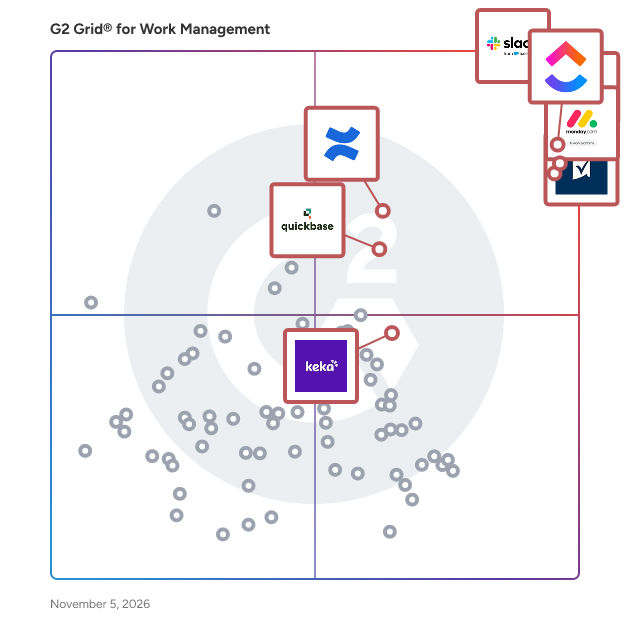
G2 Grid® for Work Management Software

G2 Grid® for Work Management Software plotting products by satisfaction and market presence

Highlighted products: Slack, ClickUp, Asana, monday AI Work Platform, Smartsheet, Confluence, Quickbase, and Keka.

Underlying data: [Grid® JSON](https://www.g2.com/categories/work-management/grids.json?focus%5B%5D=slack&focus%5B%5D=clickup&focus%5B%5D=asana&focus%5B%5D=monday-com&focus%5B%5D=smartsheet&focus%5B%5D=confluence&focus%5B%5D=quickbase&focus%5B%5D=keka)

IBM Targetprocess

IBM Targetprocess, is a platform for enterprise agile planning (EAP) and strategic portfolio management (SPM) solutions that allows business and technology planners at all levels to dynamically plan and manage work, resources, investments, programs, and portfolios while ensuring continuous alignment to the enterprise strategy in a single source of truth. IBM Targetprocess is a platform for enterprise agile planning (EAP) and strategic portfolio management (SPM) solutions that allows business and technology planners at all levels to dynamically plan and manage work, resources, investments, programs, and portfolios while ensuring continuous alignment to the enterprise strategy in a single source of truth. The combination of flexible architecture and Solutions Library helps to ensure the fastest time to value for every solution. IBM Targetprocess integrates directly with the financial management platform to provide financial insights into labor allocations, labor capitalization, and labor forecasts to improve how a company measures, plans, and invests in their workforce. Solutions: IBM Targetprocess' solutions-led strategy to make Enterprise Agile easier, allowing teams to take a building-block style approach to their agile transformation. Strategic planning solutions allow business leaders to capture strategy and OKRs in a single source of truth, and even update priorities with confidence that portfolio, product managers, and even autonomous Agile teams will see and align their work to the new priorities. Resource Management solutions allow portfolio and product teams to plan and forecast capacity and dynamically manage resources while minimizing risks and optimizing resource utilization. The Portfolio budgeting solutions enabled by IBM Targetprocess partners financial teams with product and portfolio managers to enable a shift to continuous product funding, and Program Management solutions ensure the successful execution of Agile programs across hybrid and strategic portfolios. Strategic Planning: Align work, labor, and investments to the strategic objectives of the business and maximize execution. • Capture and communicate corporate objectives in a persistent tool visible by the entire organization. • Link specific elements of execution to strategic objectives (i.e. initiatives, epics, features, teams, budgets, etc.). • View the split between Run-the-Business and Change-the-Business goals and pivot investments. • Easily track and view progress of strategic objectives. Portfolio Budgeting: Align with finance as you shift from annual funding of projects to continuous product funding. • View portfolio totals, actuals, OpEx, and CapEx, budgeted costs, and labor and non-labor costs in one place. • One source of truth to view portfolio budgets and their initiatives. • View the split between labor and non-labor actuals on a monthly basis. • Quickly change Funded costs and labor/non-labor costs in the initiative breakdown. Resource Management: Optimize resources, capacity, and demand to reduce risk and maximize utilization of headcount. • Monitor the impact of changes in real-time, with multiple views of reports to minimize inefficiency and overutilization. • Dashboards allow optimization of incoming demand against capacity. • Connect resource bill rates, team rates, and blended rates and utilization with automatic cost forecasting. Program Management: Digitize and automate quarterly business and program increment planning. • Seamlessly setup PI Planning with connected backlogs for Portfolio, Product, and Teams. • Visualize key metrics and flow of value with Flow metrics in a customizable dashboard. • Execute confidently by easily tracking progress in real-time, quickly identifying dependencies, and adapting to changes through the Program Board. Market Differentiators: - Flexible architecture: Targetprocess flexible architecture adapts to your organizations operating models – no matter how unique. - Time to value: Targetprocess Solutions Library minimizes administrative overhead and delivers rapid time to value for every solution. - Holistic financials: Targetprocess and IBM Apptio provide visibility to labor and non-labor costs for planning and managing investments.

Average Rating: 4.3/5.0

Total Reviews: 236

How Do G2 Users Rate IBM Targetprocess?

  • Has the product been a good partner in doing business?: 9.0/10 (Category avg: 9.1/10)
  • Planning: 8.0/10 (Category avg: 9.0/10)
  • Procedures: 6.9/10 (Category avg: 8.5/10)
  • Insights: 7.6/10 (Category avg: 8.6/10)

Who Is the Company Behind IBM Targetprocess?

Who Uses This Product?

  • Who Uses This: Software Developer
  • Top Industries: Computer Software, Information Technology and Services
  • Company Size: 42% Medium, 35% Small

What Do G2 Reviewers Say About IBM Targetprocess?

AI-generated summary from verified user reviews

Pros
  • Users value the clear visibility across all work and teams, facilitating better coordination and project management.
  • Users appreciate the flexibility of IBM Targetprocess, as it adapts well to various frameworks and organizational needs.
  • Users value the clear visibility across all work and teams, enhancing coordination and strategic decision-making.
  • Users value the clear visibility across all work and teams, enhancing coordination and project management efficiency.
  • Users commend the seamless team collaboration of IBM Targetprocess, enhancing communication and project tracking effectively.
Cons
  • Users experience a challenging learning curve due to lack of clear documentation and insufficient training resources.
  • Users find the learning difficulty problematic due to unclear documentation and inadequate training resources, hindering best practices.
  • Users find the complexity of IBM Targetprocess challenging, particularly during setup and navigation in large implementations.
  • Users find the difficult navigation in IBM Targetprocess frustrating, hindering their ability to easily access information.
  • Users struggle with navigation difficulty in IBM Targetprocess, finding it hard to locate essential features and information.

What Are Recent G2 Reviews of IBM Targetprocess?

What Are G2 Users Discussing About IBM Targetprocess?

Moovila

Moovila Perfect Project is an AI-powered project management and automation platform developed by Moovila to help organizations plan, predict, and deliver projects with precision. Built for Managed Service Providers (MSPs), IT service firms, and other project-driven organizations, Moovila enables teams to manage complex, resource-dependent workflows while eliminating uncertainty in project timelines. Unlike traditional project management tools, the platform uses artificial intelligence to dynamically create and maintain optimized project schedules, ensuring that teams can adapt in real time while staying on track for on-time delivery. Moovila is designed for organizations that manage a high volume of concurrent projects, particularly MSPs, consulting firms, and professional services teams that rely on structured workflows and accurate resource planning. Its ideal users are teams working within PSA environments such as ConnectWise PSA, Autotask PSA, and HaloPSA, where alignment between sales, operations, and project delivery is critical. These organizations often face challenges such as missed deadlines, limited visibility into project health, and inefficient resource allocation, all of which Moovila is built to solve through automation and intelligent forecasting. What differentiates Moovila Perfect Project from other platforms is its focus on predictability and real-time intelligence rather than manual tracking. At the core of the platform is its AI-driven Critical Path Engine, which automatically maps task dependencies and continuously recalculates the most efficient path to project completion as conditions evolve. This is paired with real-time risk detection, which monitors projects for potential delays or bottlenecks and proactively alerts teams with recommended actions to mitigate those risks before they impact delivery timelines. Another key advantage of Moovila is its native bi-directional integration with major PSA systems, including ConnectWise PSA, Autotask PSA, and HaloPSA, allowing for seamless, real-time synchronization of project data without the need for middleware or manual data entry. This integration ensures that all teams are working from the same source of truth. In addition, Moovila has read-only integrations with Box, Dropbox, Google Drive, Microsoft OneDrive, Microsoft SharePoint, Google Calendar, Microsoft Outlook, Microsoft Teams, Cisco Webex, Salesforce, HubSpot, QuickBooks Online, Jira, Microsoft Excel, Microsoft 365, Microsoft Exchange Online, Visual Studio Team Services (Azure DevOps). The platform also features Smart Scheduling, which automatically generates and adjusts timelines based on real-time inputs, ensuring that project plans remain accurate without constant manual updates. Moovila supports structured, dependency-driven workflows through a waterfall methodology, with optional Gantt chart visualization for teams that require a visual representation of project timelines. Its Project Hub further enhances efficiency by providing a library of pre-built templates, enabling teams to quickly launch standardized, well-structured projects with confidence and consistency. Moovila Perfect Project is used across a variety of use cases, including client project delivery such as onboarding, migrations, and implementations, as well as internal operations management and cross-functional coordination. It is equally effective for both short-term initiatives and long-term strategic projects, making it a flexible solution for organizations that require both structure and adaptability. By automating scheduling, monitoring risks, and optimizing resources, Moovila helps teams stay aligned, accountable, and in control of even the most complex project environments. By combining automation, real-time intelligence, and seamless integration, Moovila Perfect Project enables organizations to move from simply managing projects to delivering them with consistency and precision.

Average Rating: 4.8/5.0

Total Reviews: 55

How Do G2 Users Rate Moovila?

  • Has the product been a good partner in doing business?: 9.9/10 (Category avg: 9.1/10)
  • Planning: 9.4/10 (Category avg: 9.0/10)
  • Procedures: 7.5/10 (Category avg: 8.5/10)
  • Insights: 8.3/10 (Category avg: 8.6/10)

Who Is the Company Behind Moovila?

  • Seller: Moovila
  • Company Website:
  • HQ Location: Mount Pleasant, South Carolina
  • Twitter: @Moovila_App
    767 Twitter followers
  • LinkedIn® Page: www.linkedin.com
    26 employees on LinkedIn®

Who Uses This Product?

  • Who Uses This: Project Manager
  • Top Industries: Information Technology and Services, Computer & Network Security
  • Company Size: 54% Small, 41% Medium

What Do G2 Reviewers Say About Moovila?

AI-generated summary from verified user reviews

Pros
  • Users commend Moovila for its user-friendly interface and efficient project management capabilities, facilitating seamless collaboration and organization.
  • Users find Moovila's ease of use invaluable, simplifying project management with its friendly UI and dashboard customization.
  • Users value how Moovila's automation reduces human errors, significantly enhancing team efficiency and project management.
  • Users value the effective project tracking features of Moovila, enhancing organization and resource planning significantly.
  • Users commend the outstanding customer support of Moovila, highlighting responsiveness and helpful onboarding experiences.
Cons
  • Users find the limited customization options of Moovila frustrating, impacting ease of use and interface intuitiveness.
  • Users face integration issues with Moovila, finding discrepancies in functionality across different ticketing platforms.
  • Users find the steep learning curve challenging, making it difficult to navigate and utilize the platform effectively.
  • Users find Moovila's limited features hinder intuitive use and customization, impacting their overall project management experience.
  • Users find Moovila's interface not intuitive, citing a steep learning curve and overwhelming design challenges.

What Are Recent G2 Reviews of Moovila?

What Are G2 Users Discussing About Moovila?

WORKetc

WORKetc was created as a tool to help every team across your business communicate and collaborate more efficiently. From sales leads, project management, billing, CRM and more, WORKetc can adjust to the needs of your entire team and ensure that everyone stays informed about the most important elements of their job. Start your 14-day free trial today and witness first hand how our experienced team can help your business streamline and optimize your workflows with WORKetc.

Average Rating: 4.6/5.0

Total Reviews: 51

How Do G2 Users Rate WORKetc?

  • Has the product been a good partner in doing business?: 9.3/10 (Category avg: 9.1/10)

Who Is the Company Behind WORKetc?

  • Seller: WORKetc
  • Year Founded: 2016
  • HQ Location: San Francisco, CA
  • Twitter: @WORKetc
    20,071 Twitter followers
  • LinkedIn® Page: www.linkedin.com
    7 employees on LinkedIn®
  • Phone: 800-322-7860

Who Uses This Product?

  • Top Industries: Information Technology and Services, Computer Software
  • Company Size: 79% Small, 8% Medium

What Are Recent G2 Reviews of WORKetc?

What Are G2 Users Discussing About WORKetc?

AI can help you find the answers. G2 helps you trust them.

Connect G2 to Claude or ChatGPT for answers grounded in G2's trusted reviews, comparisons, and pricing from real user insights.

How it works

Kytes

Kytes is an AI-enabled Professional Services Automation (PSA) and Project & Portfolio Management (PPM) platform that digitises the entire project lifecycle on a single data foundation - from opportunity to cash, and from idea to launch. Rather than a point tool for timesheets or task boards, Kytes unifies project management, resource management, project financials, estimation and proposals, timesheets and leave, workflow automation and analytics in one system. Enterprises run it as their system of record for delivery, utilisation and margin. Purpose-built for verticals: Kytes ships with domain templates and best-practice workflows for IT and engineering services, pharmaceuticals and life sciences, EPC, and Global Capability Centres (GCCs), so teams configure rather than build from scratch. One platform covers three project journeys. Customer Projects runs the full Opportunity-to-Cash process, including estimation, proposals, revenue recognition, billing and project P&L. New Product Development covers stage-gate NPD and NPI, dossier management, portfolio prioritisation and launch readiness. Internal Initiatives brings governance and visibility to transformation programmes. AI sits at the core. Conversational intelligence lets teams query project data and generate reports in plain language. Predictive intelligence forecasts delays, flags resource conflicts before they bite, and auto-generates charters, WBS, minutes and executive decks. Knowledge intelligence searches by meaning and extracts skills from resumes. Customers report 14% higher resource utilisation, 21% faster delivery cycles, a 12% increase in billable hours and 9% margin uplift through predictive forecasting. Enterprise-ready by design: multi-currency and multi-entity financials with intra-company transactions, pre-built integrations to SAP, Oracle, Workday, Darwinbox, Power BI and Tableau, and a mobile app. Kytes has served project-driven enterprises since 2006, including Volkswagen Group Digital Solutions India, Mitsubishi Electric India, Quest Global, Alkem Laboratories, Mega Lifesciences, TVS and Egnyte.

Average Rating: 4.3/5.0

Total Reviews: 95

How Do G2 Users Rate Kytes?

  • Has the product been a good partner in doing business?: 9.3/10 (Category avg: 9.1/10)
  • Planning: 9.4/10 (Category avg: 9.0/10)
  • Procedures: 9.0/10 (Category avg: 8.5/10)
  • Insights: 9.4/10 (Category avg: 8.6/10)

Who Is the Company Behind Kytes?

  • Seller: Kytes
  • Company Website:
  • Year Founded: 2006
  • HQ Location: Pune, IN
  • LinkedIn® Page: in.linkedin.com
    170 employees on LinkedIn®

Who Uses This Product?

  • Who Uses This: Project Manager
  • Top Industries: Information Technology and Services, Computer Software
  • Company Size: 68% Medium, 21% Large

What Do G2 Reviewers Say About Kytes?

AI-generated summary from verified user reviews

Pros
  • Users praise the ease of use of Kytes, enjoying its intuitive interface and smooth implementation process.
  • Users value the comprehensive project management features of Kytes, effectively streamlining activities and resource tracking.
  • Users value the comprehensive project tracking features of Kytes, enhancing resource management and productivity across teams.
  • Users appreciate the comprehensive resource management capabilities of Kytes, enhancing project delivery and visibility across projects.
  • Users value the effective team collaboration features of Kytes, enhancing project management and resource planning seamlessly.
Cons
  • Users experience slow loading times, especially with volume-based reports, affecting overall performance and efficiency.
  • Users experience slow performance with Kytes, especially during report generation and file uploads, impacting overall efficiency.
  • Users experience a challenging learning curve with Kytes due to confusing layouts, though support is helpful.
  • Users find the limited reporting capabilities of Kytes frustrating, affecting their analysis and decision-making processes.
  • Users find missing features like limited reporting and lack of AI/ML integration to be significant drawbacks.

What Are Recent G2 Reviews of Kytes?

What Are G2 Users Discussing About Kytes?

Planview AdaptiveWork

Planview® AdaptiveWork: Adapt and Deliver with Confidence Any Portfolio, Any Project, Any Team. Planview AdaptiveWork (formerly Clarizen) is a versatile portfolio, project, and work management software embedded with practical AI capabilities that adapts to how you operate so you can proactively plan and deliver any type and size of portfolio, project, and work. Whether you manage IT initiatives, business projects, R&D programs, or professional services, AdaptiveWork provides ready-to-use capabilities whether you’re just starting, expanding and growing, or ready to scale into a full enterprise-wide strategy execution machine. Planview Anvi™, the AI for Connected Work, delivers expert-level guidance and intelligent actions powered by deep domain expertise and contextual data intelligence across your work ecosystem. This AI-driven capability enables strategic work execution by understanding your unique business context, helping organizations make more informed decisions and optimize their workflows. Built for (Nearly) Any Project Type Examples on projects include: - IT Portfolios - Business Projects - R&D Programs - Professional Services Key Capabilities Ready on Day One - Artificial Intelligence - Portfolio Management - Project Management - Resource Planning - Team Collaboration Quick to Start, Ready to Adapt Start with out-of-box templates and workflows, then adjust as needed. AdaptiveWork grows with your organization while maintaining consistency across all portfolios.

Average Rating: 4.1/5.0

Total Reviews: 521

How Do G2 Users Rate Planview AdaptiveWork?

  • Has the product been a good partner in doing business?: 8.3/10 (Category avg: 9.1/10)
  • Planning: 9.4/10 (Category avg: 9.0/10)
  • Procedures: 9.1/10 (Category avg: 8.5/10)
  • Insights: 8.9/10 (Category avg: 8.6/10)

Who Is the Company Behind Planview AdaptiveWork?

  • Seller: Planview
  • Company Website:
  • Year Founded: 1989
  • HQ Location: Austin, TX
  • Twitter: @Planview
    3,049 Twitter followers
  • LinkedIn® Page: www.linkedin.com
    1,834 employees on LinkedIn®

Who Uses This Product?

  • Who Uses This: Project Manager, Senior Project Manager
  • Top Industries: Information Technology and Services, Computer Software
  • Company Size: 49% Medium, 41% Large

What Do G2 Reviewers Say About Planview AdaptiveWork?

AI-generated summary from verified user reviews

Pros
  • Users value the easy management features of Planview AdaptiveWork, allowing seamless tracking and customization of projects.
  • Users appreciate the customizability and ease of use in Project Management with Planview AdaptiveWork for seamless tracking.
  • Users value the high customizability of Planview AdaptiveWork, allowing easy creation of workflows without coding skills.
  • Users value the extensive customization options of Planview AdaptiveWork, enabling easy creation of tailored workflows and views.
  • Users love the ease of use in Planview AdaptiveWork, making customization and workflow creation accessible to everyone.
Cons
  • Users face significant access limitations with Planview AdaptiveWork, often having to rely on external processes and lacking support.
  • Users face subpar app functionality with many processes needing to be completed externally before entering the tool.
  • Users find that change adjustments are problematic, with many processes needing to be handled outside the tool.
  • Users find that inadequate tools lead to reliance on external processes, hampering efficiency and support experiences.
  • Users find the manual data entry troublesome as many processes must be done outside the tool before entry.

What Are Recent G2 Reviews of Planview AdaptiveWork?

What Are G2 Users Discussing About Planview AdaptiveWork?

WETHOD

wethod is an integrated management platform that breaks down the traditional barriers between CRM and Project Management. Designed specifically for project-based organizations, it provides a real-time, unified view of budgets, resources, and margins, ensuring financial health is never an afterthought. Beyond simple task tracking, wethod coordinates complex activities by turning operational data into strategic insights: - End-to-end visibility: seamlessly connect your sales pipeline to project delivery. Forecast workloads and future revenues before the deal is even signed. - Real-time profitability: Monitor margins and budget consumption as they happen. No more waiting for end-of-month reports. - Resource harmony: Balance team capacity with a visual planning tool that respects both project deadlines and people's time. By centralizing KPIs from lead to invoice, wethod is a "single source of truth": a decision-making engine to scale with confidence while keeping teams aligned.

Average Rating: 4.6/5.0

Total Reviews: 14

How Do G2 Users Rate WETHOD?

  • Has the product been a good partner in doing business?: 9.3/10 (Category avg: 9.1/10)
  • Planning: 10.0/10 (Category avg: 9.0/10)
  • Procedures: 9.2/10 (Category avg: 8.5/10)
  • Insights: 9.5/10 (Category avg: 8.6/10)

Who Is the Company Behind WETHOD?

  • Seller: WETHOD
  • Year Founded: 2015
  • HQ Location: Roncade, IT
  • Twitter: @wethodhq
    135 Twitter followers
  • LinkedIn® Page: www.linkedin.com
    16 employees on LinkedIn®

Who Uses This Product?

  • Top Industries: Consulting
  • Company Size: 57% Medium, 43% Small

What Are Recent G2 Reviews of WETHOD?

What Are G2 Users Discussing About WETHOD?

Synergist

Synergist is an all-in-one agency and project management software, designed for agencies that want to improve performance and profitability. From CRM, job costing, project management, resource scheduling and capacity planning to timesheets, expenses, billing and reporting, Synergist gives you everything you need to manage your agency’s projects, people, clients, and financials. Synergist comes with hundreds of features and gives you more advanced functionality as you grow. But we get that every agency is unique, so your system setup should be too. Synergist’s flexible nature means it can be configured to work as your agency does and give you the exact data intelligence you need. https://www.synergist.co.uk/

Average Rating: 4.6/5.0

Total Reviews: 32

How Do G2 Users Rate Synergist?

  • Has the product been a good partner in doing business?: 9.0/10 (Category avg: 9.1/10)
  • Planning: 7.1/10 (Category avg: 9.0/10)
  • Procedures: 7.9/10 (Category avg: 8.5/10)
  • Insights: 8.6/10 (Category avg: 8.6/10)

Who Is the Company Behind Synergist?

  • Seller: Synergist
  • Company Website:
  • Year Founded: 2003
  • HQ Location: Bollington, England, United Kingdom
  • LinkedIn® Page: www.linkedin.com
    40 employees on LinkedIn®
  • Ownership: Private

Who Uses This Product?

  • Top Industries: Marketing and Advertising
  • Company Size: 64% Small, 33% Medium

What Do G2 Reviewers Say About Synergist?

AI-generated summary from verified user reviews

Pros
  • Users appreciate the ease of use of Synergist, enabling informed decisions through streamlined project visibility and reporting.
  • Users appreciate the end-to-end visibility provided by Synergist, enhancing project management and decision-making processes.
  • Users value the all-in-one project management solution of Synergist, appreciating its seamless functionality and excellent support.
  • Users find Synergist easy to learn due to excellent training videos and responsive support, enhancing their experience.
  • Users appreciate the end-to-end visibility that Synergist offers, enhancing project management and informed decision-making.
Cons
  • Users find the initial learning curve of Synergist steep, requiring time and training to master its features.
  • Users find Synergist's complexity challenging, particularly for those unfamiliar with its extensive features and navigation.
  • Users find the steep learning curve challenging, requiring training to navigate features effectively and gain full confidence.
  • Users find difficult navigation in Synergist challenging at first, but support is available to aid learning.
  • Users face a difficult onboarding experience with Synergist, necessitating extensive training to maximize its capabilities.

What Are Recent G2 Reviews of Synergist?

What Are G2 Users Discussing About Synergist?

Screendragon

Screendragon is an enterprise work management and orchestrated intelligence platform built for complex marketing, and agency operations.​ It combines structured work management with AI-powered workflow orchestration, giving organisations real-time operational intelligence across projects, people, budgets, approvals, and performance. By connecting planning, execution, governance, and reporting in one platform, Screendragon helps teams run work with confidence at scale.​ Designed for organisations managing high volumes of work, multiple stakeholders, and strict governance requirements, Screendragon is commonly used by enterprise content teams, in-house agencies, external agencies, and marketing project teams that need visibility, control, and automation beyond basic task management.​ Key capabilities include configurable workflows, automated and AI-assisted approvals, resource and capacity planning, financial forecasting, and advanced operational reporting. The platform adapts to existing processes rather than forcing rigid templates, making it well suited to complex or regulated environments.​ Screendragon is designed to work as part of a broader enterprise ecosystem. It integrates with existing tools and platforms and provides an open API, enabling organisations to extend workflows, automate data exchange, and connect Screendragon to their wider technology stack.​ Trusted by global organisations including Kellogg’s, BP, TBWA, and McCann Worldgroup.

Average Rating: 4.7/5.0

Total Reviews: 110

How Do G2 Users Rate Screendragon?

  • Has the product been a good partner in doing business?: 9.7/10 (Category avg: 9.1/10)
  • Planning: 8.4/10 (Category avg: 9.0/10)
  • Procedures: 9.3/10 (Category avg: 8.5/10)
  • Insights: 8.3/10 (Category avg: 8.6/10)

Who Is the Company Behind Screendragon?

  • Seller: Screendragon
  • Company Website:
  • Year Founded: 2001
  • HQ Location: London, England
  • Twitter: @screendragon
    4,101 Twitter followers
  • LinkedIn® Page: www.linkedin.com
    85 employees on LinkedIn®

Who Uses This Product?

  • Who Uses This: Project Manager
  • Top Industries: Marketing and Advertising, Consumer Goods
  • Company Size: 50% Medium, 45% Large

What Do G2 Reviewers Say About Screendragon?

AI-generated summary from verified user reviews

Pros
  • Users praise Screendragon's excellent customer support for quick responses and effective solutions to customization needs.
  • Users commend the efficient and responsive team collaboration that tailors support to meet unique project needs.
  • Users find Screendragon to be extremely easy to use, simplifying project management and collaboration with clients.
  • Users value the flexibility of Screendragon, appreciating its adaptability for diverse project scopes and workflows.
  • Users highly value the quick response of Screendragon's team, appreciating their efficiency and eagerness to assist.
Cons
  • Users face platform limitations that hinder flexibility and user-friendliness, complicating effective use in large organizations.
  • Users find the complexity of the admin console to be a barrier to a smoother user experience.
  • Users find the admin console complex, noting that it can lack user-friendly dynamics and ease of use.
  • Users find the confusing platform of Screendragon limits their ability to create reports independently and easily.
  • Users find reporting inadequate in Screendragon, facing challenges with manual builds and exporting data effectively.

What Are Recent G2 Reviews of Screendragon?

What Are G2 Users Discussing About Screendragon?

OneDeck

OneDeck is a business management platform designed to help users efficiently manage their business information and data. This comprehensive solution enables organizations to publish documents, automate workflows, and gain valuable insights, ultimately streamlining operations and enhancing productivity. By integrating various functionalities into a single platform, OneDeck serves as a centralized hub for businesses looking to optimize their management processes. Targeted towards small to medium-sized enterprises, OneDeck caters to a diverse range of industries that require effective management of their operational data. The platform is particularly beneficial for teams seeking to improve collaboration and communication while simplifying their workflows. With its user-friendly interface and customizable features, OneDeck allows businesses to tailor their management solutions to meet specific requirements, making it an ideal choice for organizations aiming to enhance their efficiency. OneDeck's core features include document publishing, workflow automation, data management, and analytical insights. Each feature is designed to be intuitive and flexible, allowing users to create a management system that aligns with their unique business needs. Document publishing enables teams to share important information seamlessly, while workflow automation reduces the time spent on repetitive tasks, allowing employees to focus on more strategic initiatives. The platform's data management capabilities ensure that all business information is organized and easily accessible, promoting informed decision-making. Additionally, OneDeck provides analytical insights that empower users to monitor performance metrics and identify areas for improvement. By leveraging these insights, businesses can make data-driven decisions that enhance operational efficiency and drive growth. The combination of these features not only simplifies the management process but also fosters a culture of collaboration and innovation within teams. Overall, OneDeck stands out in the business management software category by offering a highly customizable and user-friendly platform that adapts to the evolving needs of organizations. Its focus on enhancing collaboration, simplifying workflows, and providing actionable insights makes it a valuable tool for businesses looking to optimize their management practices and achieve their goals.

Average Rating: 5.0/5.0

Total Reviews: 24

How Do G2 Users Rate OneDeck?

  • Has the product been a good partner in doing business?: 9.7/10 (Category avg: 9.1/10)
  • Planning: 10.0/10 (Category avg: 9.0/10)
  • Procedures: 0.0/10 (Category avg: 8.5/10)
  • Insights: 10.0/10 (Category avg: 8.6/10)

Who Is the Company Behind OneDeck?

Who Uses This Product?

  • Top Industries: Facilities Services
  • Company Size: 96% Small, 4% Medium

What Do G2 Reviewers Say About OneDeck?

AI-generated summary from verified user reviews

Pros
  • Users value the intuitive task management of OneDeck, enhancing workflow efficiency and overall organization.
  • Users appreciate the ease of use of OneDeck, finding it intuitive and efficient for daily operations.
  • Users appreciate the excellent organization of OneDeck, enhancing collaboration and efficiency across various projects and tasks.
  • Users commend the fast and efficient customer service of OneDeck, enhancing their overall experience with the platform.
  • Users value the ease of use and efficiency of OneDeck, enhancing project management and customer service experience.
Cons
  • Users feel limited by the lack of essential features like user flow visualization and direct payment integrations.
  • Users find OneDeck to be expensive, especially since essential features require purchasing a higher-tier plan.
  • Users desire more integration options, noting reliance on additional tools for essential functions.
  • Users desire more integrations with essential tools, as the lack complicates processes and workflows.
  • Users wish for limited integrations with other tools, finding it less convenient but not critical to usage.

What Are Recent G2 Reviews of OneDeck?

PSOHUB.

PSOhub is PSA software purpose-built for professional services organizations: IT firms, consultancies, marketing agencies, and financial services teams. It covers the entire delivery cycle in one connected platform, from quoting and project management through resource and capacity planning, time and expense tracking, and invoicing. Built by a founding team with over 30 years of combined experience in professional services, and trusted by organizations across 40+ countries. From quote to project When a quote is accepted, the project is ready to start. Tasks are structured, budgets are set, and the team is assigned. Project managers get a real-time view of task progress, budget burn, and margin at every stage, so there are no surprises at month-end. Most professional services teams run 6 to 10 separate tools. PSOhub replaces that stack so data flows without manual handovers at every step. Resource and capacity planning The AI scheduling layer automatically assigns and reschedules resources based on skills, live capacity, and current utilization. When someone hits full utilization, the system flags it and suggests moving tasks to another team member with headroom. Keeping utilization high without blowing deadlines used to mean constant manual oversight. With PSOhub, it largely handles itself. Time and expense tracking Time and expenses connect directly to each project's budget and contract type. Whether billing fixed-fee, time and material, or retainer, hours log against the right scope and invoices generate without a manual reconciliation step. AI project and risk management The AI Copilot generates a full project plan, including financials, team assignment, and timeline, in around 10 seconds, drawing on the organization's own historical data rather than generic benchmarks. It monitors margins continuously, flags scope creep early, including situations like a senior consultant logging hours on a junior task, and generates risk assessments with concrete recommended actions. Integrations For teams using HubSpot as their CRM, a native two-way integration connects closed deals directly to projects, with time logs flowing back to the CRM. Also integrates with SAP Business One, QuickBooks, Xero, and Salesforce. Works for organizations of 10 to 1,000+.

Average Rating: 4.1/5.0

Total Reviews: 252

G2 Deal: Claim our G2 Deal and start using PSOhub with a 15% discount*!

PSOhub provides unique All-in-One Project Management software through predictive project management, smart resource management, self-driving time and expense tracking, and invoicing in a seamlessly integrated platform. Take a look, try it for free, or book a demo to get more information!

Price: ~~$25 Essentials, $35 Professional, $45 Enterprise~~ → $21 Essentials, $30 Professional, $38 Enterprise

View this exclusive G2 deal

How Do G2 Users Rate PSOHUB.?

  • Has the product been a good partner in doing business?: 8.5/10 (Category avg: 9.1/10)
  • Planning: 8.1/10 (Category avg: 9.0/10)
  • Procedures: 6.8/10 (Category avg: 8.5/10)
  • Insights: 7.6/10 (Category avg: 8.6/10)

Who Is the Company Behind PSOHUB.?

  • Seller: PSOHUB.
  • Company Website:
  • Year Founded: 2020
  • HQ Location: Bussum, North Holland, Netherlands
  • Twitter: @PSOhub
    38 Twitter followers
  • LinkedIn® Page: www.linkedin.com
    15 employees on LinkedIn®

Who Uses This Product?

  • Who Uses This: Security Analyst, Consultant
  • Top Industries: Consulting, Marketing and Advertising
  • Company Size: 59% Small, 39% Medium

What Do G2 Reviewers Say About PSOHUB.?

AI-generated summary from verified user reviews

Pros
  • Users find PSOhub's ease of use remarkable, facilitating smooth project management and time tracking.
  • Users appreciate the easy timesheet and project management interface of PSOhub, which enhances productivity and efficiency.
  • Users appreciate the ease of use of PSOHUB, citing its efficient data entry and project management capabilities.
  • Users appreciate the efficiency of project tracking with PSOHUB, making data management a breeze across multiple projects.
  • Users appreciate the clear and intuitive UI of PSOhub, finding it simple and user-friendly for daily tasks.
Cons
  • Users find PSOHUB not intuitive, struggling with navigation and feature understanding, affecting overall usability.
  • Users find the limited customization options restricting, impacting their ability to tailor reports effectively.
  • Users find limited features in PSOhub, particularly in reporting customization and mobile app functionality compared to competitors.
  • Users face time tracking issues, struggling with complexity and bugs that disrupt task management and progress tracking.
  • Users find PSOHUB to have a complex usability that requires time and effort to fully understand.

What Are Recent G2 Reviews of PSOHUB.?

What Are G2 Users Discussing About PSOHUB.?

Agiled

Agiled is a business and work management platform which helps users manage their business in one place. Agiled offers CRM, HRM, Financial Management, Projects and Task Management, Contracts and Professional Proposals. Agiled comes with many native Integrations along with Zapier Integration, Integromate Integration, API and Custom Webhooks. With Agiled businesses can stop switching between tools and manage their business in one integrated place.

Average Rating: 4.7/5.0

Total Reviews: 372

How Do G2 Users Rate Agiled?

  • Has the product been a good partner in doing business?: 9.3/10 (Category avg: 9.1/10)
  • Planning: 8.7/10 (Category avg: 9.0/10)
  • Procedures: 8.9/10 (Category avg: 8.5/10)
  • Insights: 8.8/10 (Category avg: 8.6/10)

Who Is the Company Behind Agiled?

  • Seller: ZTABS
  • Year Founded: 2015
  • HQ Location: Houston, Texas
  • LinkedIn® Page: www.linkedin.com
    7 employees on LinkedIn®

Who Uses This Product?

  • Who Uses This: CEO, Owner
  • Top Industries: Marketing and Advertising, Information Technology and Services
  • Company Size: 94% Small, 1% Medium

What Do G2 Reviewers Say About Agiled?

AI-generated summary from verified user reviews

Pros
  • Users commend Agiled for its comprehensive project management capabilities, providing seamless tools for efficient project handling.
  • Users value the awesome customer support of Agiled, appreciating timely responses and effective communication for their business needs.
  • Users value the intuitive interface of Agiled, allowing for seamless navigation and efficient project management.
  • Users value the efficiency of Agiled, appreciating its fast performance and effective project management capabilities.
  • Users appreciate the flexibility of Agiled, enjoying seamless integrations and adaptability for diverse business needs.
Cons
  • Users face a challenging learning curve with Agiled due to its clunky UI and overwhelming number of options.
  • Users find Agiled's features limited, particularly for managing physical products and note-taking capabilities.
  • Users find the missing essential features in Agiled, such as Polish language support and project management tools, frustrating.
  • Users find Agiled's limited customization frustrating, especially with the kanban and note-taking features lacking flexibility.
  • Users find Agiled's interface not intuitive, lacking essential features for project management and task organization.

What Are Recent G2 Reviews of Agiled?

What Are G2 Users Discussing About Agiled?

Planview AgilePlace

Planview AgilePlace is a kanban-based work management software solution that helps engineering and delivery teams visualize, plan, and manage work at the team and cross-team level. It translates tasks, steps, and handoffs into boards and cards, giving anyone on the team a clear view of what is in progress, what is blocked, and where work stands at any point in the delivery cycle. AgilePlace's kanban model is methodology-agnostic. It supports Scrum, SAFe, Kanban, waterfall, and hybrid delivery equally, so teams can configure boards around their existing process rather than adopting a new one. The software scales from a single team's board to cross-team and portfolio-level views of larger initiatives, connecting day-to-day delivery work to broader objectives. Primary users include software engineering leaders, application development leaders, CTOs and CPOs, and Agile or Lean transformation leads, typically in organizations that already have delivery teams in place and are working to improve cross-team visibility, delivery predictability, or consistency at scale. Main capabilities include: • Configurable Kanban boards and cards with an unlimited number of boards, flexible layouts, and a library of board templates for common team and program use cases • Work in process (WIP) limits and lane policies that restrict how much work a team or individual can take on at once, along with blocked-status flags that surface impediments immediately • Cross-team dependency visibility, including card connections that link related work items and roll up status across teams • Collaboration tools such as card comments, mentions, and notifications that keep discussion and context attached to the work itself • Lean and Agile metrics and reporting, along with OKR integration that connects team-level delivery to shared objectives and key results AgilePlace is designed to work alongside the tools already in use across a delivery organization rather than replace them, connecting teams working in different tools and methodologies into a shared view of status and priority. Organizations use it to reduce reliance on manual status updates, spreadsheets, and disconnected reporting, and to give both individual teams and cross-team programs a consistent way to track flow, manage dependencies, and measure delivery performance over time.

Average Rating: 4.1/5.0

Total Reviews: 363

How Do G2 Users Rate Planview AgilePlace?

  • Has the product been a good partner in doing business?: 8.2/10 (Category avg: 9.1/10)
  • Planning: 9.5/10 (Category avg: 9.0/10)
  • Procedures: 9.2/10 (Category avg: 8.5/10)
  • Insights: 9.6/10 (Category avg: 8.6/10)

Who Is the Company Behind Planview AgilePlace?

  • Seller: Planview
  • Year Founded: 1989
  • HQ Location: Austin, TX
  • Twitter: @Planview
    3,049 Twitter followers
  • LinkedIn® Page: www.linkedin.com
    1,834 employees on LinkedIn®

Who Uses This Product?

  • Who Uses This: Project Manager
  • Top Industries: Information Technology and Services, Computer Software
  • Company Size: 45% Large, 31% Medium

What Do G2 Reviewers Say About Planview AgilePlace?

AI-generated summary from verified user reviews

Pros
  • Users praise the easy learning curve of Planview AgilePlace, highlighting its intuitive interface and user-friendly design.
  • Users value the ease of use of Planview AgilePlace, appreciating its intuitive interface and reduced clicks.
  • Users value the intuitive interface of Planview AgilePlace, making it easy to learn and use efficiently.
  • Users love the great interface of Planview AgilePlace, finding it easy to use and customer-oriented.
  • Users appreciate the user-friendly interface of Planview AgilePlace, making it easy to learn and navigate.

What Are Recent G2 Reviews of Planview AgilePlace?

Furious

Furious is the Team Operating System designed for agencies, consulting firms, and IT services companies. CRM, quotes, projects, staffing, HR, time tracking, invoicing… Furious connects your entire business in a single platform and understands the interactions between your teams, clients, projects, and performance indicators. With industry-specific AI and memory, Furious turns this data into action: detecting risks before they impact profitability, optimizing staffing, automating low-value tasks, and helping you make better decisions, faster. In the age of AI, performance no longer comes from stacking tools, but from connecting your teams, data, and knowledge.

Average Rating: 4.5/5.0

Total Reviews: 25

How Do G2 Users Rate Furious?

  • Has the product been a good partner in doing business?: 8.9/10 (Category avg: 9.1/10)

Who Is the Company Behind Furious?

Who Uses This Product?

  • Top Industries: Marketing and Advertising, Public Relations and Communications
  • Company Size: 88% Small, 8% Medium

What Do G2 Reviewers Say About Furious?

AI-generated summary from verified user reviews

Pros
  • Users value the automation efficiency of Furious, enhancing clarity and reducing data management time significantly.
  • Users value the exceptional customer service of Furious, especially its efficient AI chatbot and smooth onboarding process.
  • Users value the exceptional customer support of Furious, enhancing their operational efficiency and providing seamless onboarding.
  • Users value the customization options in Furious, enhancing agency operations with seamless, tailored functionalities.
  • Users appreciate the complete centralization of operations in Furious, enhancing clarity and efficiency across tasks.
Cons
  • Users find the learning curve steep, requiring time for teams to adapt to the feature-rich platform.
  • Users find the overwhelming experience of Furious can hinder adaptation and complicate the onboarding process.
  • Users find the overwhelming options in Furious can hinder adaptation and complicate the onboarding process.
  • Users find the time-consuming onboarding process can delay full adoption of Furious, especially for large data sets.

What Are Recent G2 Reviews of Furious?

TAM

TAM - Project Management Tool is a comprehensive and flexible platform designed to streamline project and task management for teams of all sizes. With TAM, organizations can efficiently plan, organize, and track their work in one centralized space, ensuring seamless collaboration and productivity. Key Features: Workspaces and Spaces: Create tailored environments for teams or projects, complete with custom settings and permissions. Task Management: Easily assign tasks, set priorities, track progress, and manage deadlines with intuitive task properties. Custom Fields: Add personalized data fields at workspace, space, folder, or list levels for more granular control. Collaboration Tools: Enable real-time discussions, file sharing, and activity logs for enhanced communication. Views and Visualizations: Use list, board, calendar, and timeline views to track and manage tasks effectively. User Roles and Permissions: Ensure data security with role-based access control and customizable permissions. TAM empowers teams to stay organized, improve transparency, and deliver results faster, making it an ideal choice for marketing teams, software developers, creative agencies, and more. Whether you're managing day-to-day tasks or long-term projects, TAM adapts to your workflow to help you achieve your goals.

Average Rating: 4.7/5.0

Total Reviews: 11

How Do G2 Users Rate TAM?

  • Has the product been a good partner in doing business?: 10.0/10 (Category avg: 9.1/10)
  • Planning: 8.6/10 (Category avg: 9.0/10)
  • Procedures: 8.3/10 (Category avg: 8.5/10)
  • Insights: 8.8/10 (Category avg: 8.6/10)

Who Is the Company Behind TAM?

Who Uses This Product?

  • Company Size: 69% Medium, 31% Small

What Do G2 Reviewers Say About TAM?

AI-generated summary from verified user reviews

Pros
  • Users appreciate the ease of use of TAM Software, enhancing workflow with its intuitive and efficient design.
  • Users value the effective organization provided by TAM Software, enabling better tracking and a structured workflow.
  • Users appreciate the intuitive task management of TAM, enhancing collaboration and workflow efficiency for teams.
  • Users appreciate the efficient task tracking of TAM, enhancing collaboration and productivity for teams effectively.
  • Users appreciate the tracking ease of TAM, allowing for organized task management and efficient collaboration among team members.
Cons
  • Users report glitches during peak usage times, which can disrupt operations but are addressed by a responsive support team.
  • Users find integration difficulty with third-party apps and limited automation features challenging, affecting overall experience.
  • Users face integration issues with third-party apps in TAM, limiting advanced functionalities and user experience.
  • Users find that limited automations restrict some advanced functionalities, affecting overall efficiency in using TAM.
  • Users find the limited customization options of TAM restrictive, especially for advanced functionalities like app integrations.

What Are Recent G2 Reviews of TAM?

BQE CORE

BQE CORE is an all-in-one project management, time tracking, billing, CRM, and accounting platform for architecture and engineering firms. Most firms are stuck tracking the wrong metrics, or none at all, while the numbers that actually drive profitability stay buried in spreadsheets and disconnected systems. That gets harder to ignore once a firm has grown past a single office, brought on dedicated finance and operations staff, and started running several projects at once. CORE gives firm leaders one place to see the metrics that matter: billing multiplier, effective billing rate, utilization, and realization, in real time. The difference shows up in the numbers. In BQE's 2026 A&E Benchmarking Report, firms with the highest billing multiplier ran profit margins 7.5 points higher and grew revenue twice as fast as the rest of the industry. Thousands of A&E firms use CORE to run more efficient, more profitable practices, so their teams spend less time on manual tracking and more time on the design and engineering work they set out to do.

Average Rating: 4.3/5.0

Total Reviews: 442

How Do G2 Users Rate BQE CORE?

  • Has the product been a good partner in doing business?: 8.4/10 (Category avg: 9.1/10)
  • Planning: 8.6/10 (Category avg: 9.0/10)
  • Procedures: 8.8/10 (Category avg: 8.5/10)
  • Insights: 8.7/10 (Category avg: 8.6/10)

Who Is the Company Behind BQE CORE?

  • Seller: BQE Software, Inc.
  • Company Website:
  • Year Founded: 1995
  • HQ Location: Torrance, CA
  • Twitter: @bqesoftware
    3,923 Twitter followers
  • LinkedIn® Page: www.linkedin.com
    414 employees on LinkedIn®

Who Uses This Product?

  • Who Uses This: Office Manager, Architect
  • Top Industries: Architecture & Planning, Civil Engineering
  • Company Size: 79% Small, 19% Medium

What Do G2 Reviewers Say About BQE CORE?

AI-generated summary from verified user reviews

Pros
  • Users value the easy time tracking feature of BQE CORE, simplifying project management and enhancing usability.
  • Users appreciate the intuitive interface of BQE CORE, which enhances project management and reporting efficiency.
  • Users value the easy invoicing and expensing process in BQE CORE, enhancing overall efficiency and client communication.
  • Users appreciate the easy invoicing process in BQE CORE, enhancing efficiency and clarity in billing clients.
  • Users appreciate the ease of time tracking in BQE CORE, enhancing project management efficiency and accuracy.
Cons
  • Users experience slow loading times with BQE CORE, impacting workflow efficiency and user satisfaction.
  • Users notice slow performance in BQE CORE, experiencing lag and delays during page loads and submission processes.
  • Users find the learning difficulty of BQE CORE frustrating due to complicated navigation and cumbersome processes.
  • Users find the complex usability of BQE CORE challenging, especially during initial navigation and training scheduling.
  • Users find the learning curve steep, making initial navigation and training a challenge for new users.

What Are Recent G2 Reviews of BQE CORE?

What Are G2 Users Discussing About BQE CORE?

Subhransu Sahu
SS
Researched and written by Subhransu Sahu
Updated April 9, 2026