Best Task Management Software for Small Business - Page 4

How Many Task Management Software Products Does G2 Track?

Total Products under this Category: 570

Category Stats (Sep 2026)

  • Average Rating: 4.46/5 (↑0.01 vs Aug 2026) The average rating of products in this category, based on all submitted ratings
  • Top Trending Product: Chaser (+1.82%) - Among all products in this category, Chaser recorded the largest rating increase compared to last month

Last updated: September 01, 2026

How Does G2 Rank Task Management Software Products?

Why You Can Trust G2's Software Rankings:

  • 30 Analysts and Data Experts
  • 119,100+ Authentic Reviews
  • 570+ Products
  • Unbiased Rankings

G2's software rankings are built on verified user reviews, rigorous moderation, and a consistent research methodology maintained by a team of analysts and data experts. Each product is measured using the same transparent criteria, with no paid placement or vendor influence. While reviews reflect real user experiences, which can be subjective, they offer valuable insight into how software performs in the hands of professionals. Together, these inputs power the G2 Score, a standardized way to compare tools within every category.

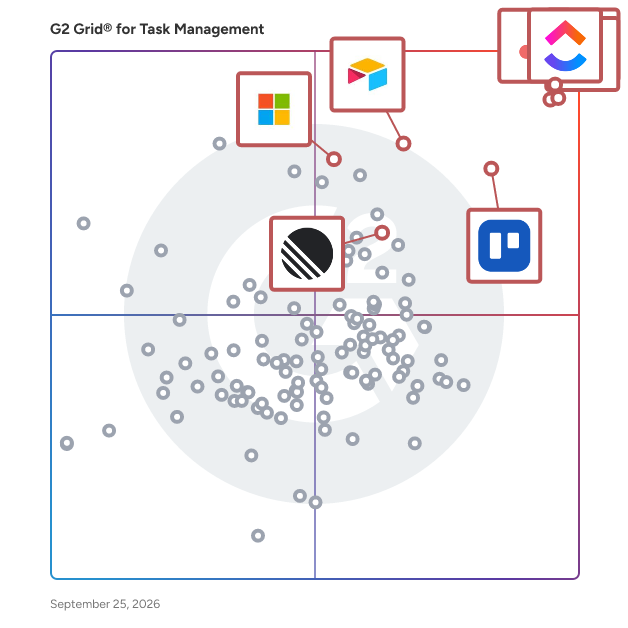
G2 Grid® for Task Management Software

G2 Grid® for Task Management Software plotting products by satisfaction and market presence

Highlighted products: Asana, ClickUp, monday AI Work Platform, Smartsheet, Trello, Airtable, Linear, and Microsoft Planner.

Underlying data: [Grid® JSON](https://www.g2.com/categories/task-management-software/grids.json?focus%5B%5D=asana&focus%5B%5D=clickup&focus%5B%5D=monday-com&focus%5B%5D=smartsheet&focus%5B%5D=trello&focus%5B%5D=airtable&focus%5B%5D=linear&focus%5B%5D=microsoft-planner&segment=small-business)

Workflowy

Workflowy is a organizational tool designed to help users manage tasks, projects, and ideas through a simple yet powerful interface. It employs a nested list structure, allowing users to create and organize information hierarchically, making it ideal for note-taking, brainstorming, and project management. Key Features and Functionality: - Infinite Nesting: Create lists within lists to any depth, enabling detailed organization of information. - Real-Time Collaboration: Share lists with others and collaborate simultaneously, enhancing team productivity. - Tagging and Filtering: Use tags to categorize items and quickly filter through content. - Search Functionality: Instantly locate any item within your lists using the robust search feature. - Cross-Platform Availability: Access your lists on various devices, including web browsers, iOS, and Android applications. - Offline Access: Work on your lists without an internet connection; changes sync once you're back online. - Keyboard Shortcuts: Utilize a range of shortcuts to navigate and manage lists efficiently. Primary Value and User Solutions: Workflowy simplifies the process of organizing complex information, making it accessible and manageable. By providing a flexible and intuitive platform, it caters to individuals and teams seeking to enhance productivity, streamline workflows, and maintain clarity in their projects and daily tasks.

Average Rating: 4.5/5.0

Total Reviews: 33

How Do G2 Users Rate Workflowy?

  • Has the product been a good partner in doing business?: 9.2/10 (Category avg: 9.0/10)
  • Task Prioritization: 6.5/10 (Category avg: 8.8/10)
  • Creation & Assignment: 7.7/10 (Category avg: 9.0/10)
  • To-Do Lists: 8.1/10 (Category avg: 8.9/10)

Who Is the Company Behind Workflowy?

  • Seller: WorkFlowy
  • Year Founded: 2010
  • HQ Location: Centennial, US
  • Twitter: @WorkFlowy
    15,836 Twitter followers
  • LinkedIn® Page: www.linkedin.com
    9 employees on LinkedIn®

Who Uses This Product?

  • Company Size: 71% Small, 21% Medium

What Do G2 Reviewers Say About Workflowy?

AI-generated summary from verified user reviews

Pros
  • Users find Workflowy very easy to learn, enjoying the simple and intuitive bullet list formatting that makes it quick to start.
  • Users commend the ease of use of Workflowy, finding it simple to get started by just typing.
  • Users love the easy setup of Workflowy, allowing them to start typing and instantly create organized bullet lists.
  • Users love how simple it is to get started with Workflowy, allowing easy organization by just typing.
Cons
  • Users find Workflowy's pricing to be expensive, especially with limited features on the free plan and only one costly paid option.
  • Users note the limited features in Workflowy, especially for advanced needs and pricing options that may be restrictive.

What Are Recent G2 Reviews of Workflowy?

What Are G2 Users Discussing About Workflowy?

GUIDEcx

GUIDEcx is the world's leading Client Onboarding solution that creates a seamless transition between your sales and implementation process. With over five years and 300,000 successful onboarding projects completed, we know how to leverage our wisdom to deliver consistent Customer Onboarding experiences. Our process is designed to drive engagement, increase efficiency, and expand capacity without sacrificing quality of service. Easy to integrate into your existing CRM, GUIDEcx has custom templates, different customer views for each role, purpose-built integrations, and robust reporting. We don't just move your process to our software, our Professional Services team and Guide University resources are here to Guide and support you through every step of the process to accelerate time to value and maximize your onboarding team productivity. Reach out today to and we can help you bring your Customer Onboarding experience to new heights.

Average Rating: 4.6/5.0

Total Reviews: 460

How Do G2 Users Rate GUIDEcx?

  • Has the product been a good partner in doing business?: 9.5/10 (Category avg: 9.0/10)
  • Task Prioritization: 8.7/10 (Category avg: 8.8/10)
  • Creation & Assignment: 9.0/10 (Category avg: 9.0/10)
  • To-Do Lists: 8.8/10 (Category avg: 8.9/10)

Who Is the Company Behind GUIDEcx?

  • Seller: GuideCX
  • Year Founded: 2017
  • HQ Location: Lehi, Utah
  • Twitter: @guidecx
    173 Twitter followers
  • LinkedIn® Page: www.linkedin.com
    53 employees on LinkedIn®

Who Uses This Product?

  • Who Uses This: Project Manager, Implementation Manager
  • Top Industries: Computer Software, Information Technology and Services
  • Company Size: 52% Medium, 39% Small

What Do G2 Reviewers Say About GUIDEcx?

AI-generated summary from verified user reviews

Pros
  • Users commend how GUIDEcx enables seamless project management, enhancing onboarding efficiency and team communication.
  • Users commend the responsive customer support from GUIDEcx, which enhances their onboarding and project management experience.
  • Users highlight the effective team collaboration features of GUIDEcx, enhancing communication and project management effortlessly.
  • Users value the automation capabilities of GUIDEcx, significantly reducing administrative workload and enhancing client communication.
  • Users find GUIDEcx's ease of learning exceptional, allowing smooth navigation and quick mastery of the platform.
Cons
  • Users experience slow loading times that hinder navigation and overall user experience in GUIDEcx.
  • Users report glitches and hiccups in GUIDEcx, particularly with ticket creation and profile impersonation issues.
  • Users report experiencing glitches such as lag and unexpected logouts, affecting their workflow significantly.
  • Users note a steep learning curve with GUIDEcx that requires mental effort for initial setup and customization.
  • Users express concern over missing features currently available, leading to frustration about future updates and transparency.

What Are Recent G2 Reviews of GUIDEcx?

What Are G2 Users Discussing About GUIDEcx?

liftOS - The ultimate productivity Workspace

#1 Easiest Project Management Software - Made in Germany Built-in Projects, Wikis, Documents and Whiteboard help small to large teams work with many tools in one place. Trusted by over 2000+ Businesses, Agencies and Freelancers. Detailed Features: - Todos (manage projects) - Notes (write, share, and create knowledgebase) - Files (share and store files) - Whiteboard (brainstorm in real time) - Chat (communicate with team & clients) - Calendar (visualize your day & week) - Google Workspace (Natively integrate Google Sheets, Docs or Slides) - Miro & more websites or weblinks

Average Rating: 4.9/5.0

Total Reviews: 18

How Do G2 Users Rate liftOS - The ultimate productivity Workspace?

  • Has the product been a good partner in doing business?: 10.0/10 (Category avg: 9.0/10)
  • Task Prioritization: 9.4/10 (Category avg: 8.8/10)
  • Creation & Assignment: 9.3/10 (Category avg: 9.0/10)
  • To-Do Lists: 9.7/10 (Category avg: 8.9/10)

Who Is the Company Behind liftOS - The ultimate productivity Workspace?

  • Seller: liftOS
  • Year Founded: 2021
  • HQ Location: Berlin, DE
  • LinkedIn® Page: www.linkedin.com
    3 employees on LinkedIn®

Who Uses This Product?

  • Company Size: 100% Small

What Do G2 Reviewers Say About liftOS - The ultimate productivity Workspace?

AI-generated summary from verified user reviews

Pros
  • Users love the seamless integration of productivity tools in liftOS, enhancing organization and efficiency in their workflows.
  • Users appreciate the easy integrations of liftOS, seamlessly combining productivity tools into a single, efficient workspace.
  • Users love the seamless integrations with various apps, enhancing their productivity and simplifying workflow management.
  • Users find the out-of-the-box templates in liftOS invaluable, saving time and providing structure for their tasks.
  • Users appreciate the responsive customer support of liftOS, noting its helpfulness and genuine care for user needs.
Cons
  • Users find the learning curve steep initially, but adaptability leads to smoother usage over time.
  • Users note the missing features in liftOS, but see potential as updates are on the way.
  • Users express a desire for improved template creation options, seeking enhanced customization and flexibility in LiftOS.
  • Users find difficult navigation at first, but eventually adapt for a smoother experience with liftOS.
  • Users express frustration over integration issues that limit functionality and hinder seamless workflow within liftOS.

What Are Recent G2 Reviews of liftOS - The ultimate productivity Workspace?

Teamflect

Teamflect is a performance management and employee engagement platform, natively developed for Microsoft 365, living fully inside the communication platforms your people use every day: Microsoft Teams and Outlook. Performance reviews, goals and OKRs, succession planning, individual development plans, 360-degree feedback, recognition, and engagement surveys all actually sit in the flow of work for your employees. Each module seamlessly connects to each other, as well as to detailed analytics and reporting dashboards. As a fully integrated and intuitive solution for admins and everyday users alike, Teamflect fully removes the adoption issues that plague most HR software rollouts. Since the software meets your employees where they are, Teamflect is the ideal choice for HR professionals who need a tool that employees actually use. Trusted by over 1,000 organizations, from Fortune 500 companies to fast-growing startups, Teamflect is SOC 1 and SOC 2 Type I and Type II certified, GDPR- and CCPA-compliant, and integrates with over 260 HRIS systems.

Average Rating: 4.5/5.0

Total Reviews: 189

How Do G2 Users Rate Teamflect?

  • Has the product been a good partner in doing business?: 9.2/10 (Category avg: 9.0/10)
  • Task Prioritization: 9.2/10 (Category avg: 8.8/10)
  • Creation & Assignment: 9.2/10 (Category avg: 9.0/10)
  • To-Do Lists: 9.2/10 (Category avg: 8.9/10)

Who Is the Company Behind Teamflect?

  • Seller: Teamflect
  • Company Website:
  • Year Founded: 2018
  • HQ Location: Unit 501 Leroy House, 434-436 Essex Road, London, England, N1 3QP
  • Twitter: @teamflect
    2,366 Twitter followers
  • LinkedIn® Page: www.linkedin.com
    55 employees on LinkedIn®

Who Uses This Product?

  • Top Industries: Non-Profit Organization Management, Information Technology and Services
  • Company Size: 49% Small, 37% Medium

What Do G2 Reviewers Say About Teamflect?

AI-generated summary from verified user reviews

Pros
  • Users praise the ease of use of Teamflect, highlighting its seamless integration with Teams and intuitive features.
  • Users highlight the effortless goal-setting capabilities of Teamflect, enhancing collaboration and tracking progress with ease.
  • Users value the seamless integration of Teamflect with Microsoft Teams, enhancing workflow and task management efficiency.
  • Users value the easy integrations of Teamflect, enhancing clarity and streamlining workflows with tools like Microsoft Teams.
  • Users value the intuitive functionality of Teamflect, enhancing task management and automation for seamless workflows.
Cons
  • Users find the missing features in Teamflect restrict their goal-setting capabilities and complicate the objectives process.
  • Users find Teamflect to be not user-friendly, citing complexity in areas like targets, goals, and settings.
  • Users find the interface not intuitive, expressing concerns about complexity in accessing goals and meeting notes.
  • Users find the learning curve challenging, especially those unfamiliar with performance management tools or Microsoft Teams integration.
  • Users face integration issues with Teamflect, needing manual uploads instead of seamless connections to existing systems.

What Are Recent G2 Reviews of Teamflect?

What Are G2 Users Discussing About Teamflect?

GQueues

GQueues is the leading task manager built specifically for teams on Google Workspace. Collaborate with your team and keep work moving forward with its intuitive design and familiar interface. GQueues has deep integrations with Google Calendar, Gmail, Google Drive, Google Contacts and Chrome making your team more efficient, less stressed, and more organized.

Average Rating: 4.8/5.0

Total Reviews: 34

How Do G2 Users Rate GQueues?

  • Has the product been a good partner in doing business?: 9.2/10 (Category avg: 9.0/10)
  • Task Prioritization: 5.0/10 (Category avg: 8.8/10)
  • Creation & Assignment: 6.7/10 (Category avg: 9.0/10)

Who Is the Company Behind GQueues?

  • Seller: GQueues
  • Company Website:
  • Year Founded: 2009
  • HQ Location: Chicago, IL
  • Twitter: @gqueues
    825 Twitter followers
  • LinkedIn® Page: www.linkedin.com
    1 employees on LinkedIn®

Who Uses This Product?

  • Who Uses This: Owner
  • Top Industries: Information Technology and Services
  • Company Size: 79% Small, 15% Medium

What Are Recent G2 Reviews of GQueues?

What Are G2 Users Discussing About GQueues?

Lytho

Lytho is an enterprise content governance platform designed to help organizations ensure that their marketing content is compliant, on-brand, and audit-ready throughout its entire lifecycle. As businesses increasingly rely on diverse teams, tools, and AI systems for content creation, maintaining brand integrity and adhering to regulatory requirements can become challenging. Traditional review processes often lead to bottlenecks, and content generated outside established workflows may go unchecked, resulting in risks and inconsistencies. The platform addresses these challenges by embedding governance directly into the content lifecycle. Lytho utilizes AI-powered features to apply brand and regulatory standards in real-time within the tools that teams already use, such as design platforms, content management systems (CMS), and collaboration tools. This proactive approach ensures that content is guided and validated during the creation process, rather than relying solely on post-creation reviews. By integrating governance into the workflow, Lytho helps organizations streamline their content production while maintaining compliance. Content governance refers to the system of controls, workflows, and standards that ensure every piece of content aligns with brand guidelines, regulatory requirements, and organizational policies. Without a robust governance framework, teams often depend on inconsistent manual reviews, which can lead to delays, compliance gaps, and off-brand outputs. Lytho integrates governance seamlessly into the workflow, automating checks, standardizing processes, and providing comprehensive visibility across the content lifecycle. This capability not only enhances efficiency but also fosters accountability among team members. Organizations choose Lytho for several key reasons. First, it ensures compliance across the entire content lifecycle by applying brand and regulatory standards from the initial creation phase through to distribution, complete with built-in audit trails for every asset. Second, Lytho embeds governance into existing workflows, allowing compliance checks to occur within the tools teams already utilize, thereby reducing friction and eliminating disjointed review processes. This integration enables organizations to scale their content production without increasing risk, accommodating growing demands and AI-generated output while maintaining control and consistency. Lytho serves enterprise marketing organizations, including leaders in brand management, content creation, operations, and compliance, who are tasked with protecting brand integrity while enabling growth. By using Lytho, organizations can reduce compliance risks, accelerate their time to market, and uphold brand integrity across all channels. This platform empowers marketing leaders to confidently embrace AI and meet the evolving demands of modern content creation, all while governing content at scale without hindering team efficiency.

Average Rating: 4.3/5.0

Total Reviews: 364

How Do G2 Users Rate Lytho?

  • Has the product been a good partner in doing business?: 9.4/10 (Category avg: 9.0/10)
  • Task Prioritization: 8.3/10 (Category avg: 8.8/10)
  • Creation & Assignment: 8.9/10 (Category avg: 9.0/10)
  • To-Do Lists: 8.5/10 (Category avg: 8.9/10)

Who Is the Company Behind Lytho?

  • Seller: Lytho
  • Company Website:
  • Year Founded: 1999
  • HQ Location: Morrisville, NC
  • LinkedIn® Page: www.linkedin.com
    78 employees on LinkedIn®

Who Uses This Product?

  • Who Uses This: Graphic Designer, Senior Graphic Designer
  • Top Industries: Marketing and Advertising, Higher Education
  • Company Size: 52% Medium, 22% Large

What Do G2 Reviewers Say About Lytho?

AI-generated summary from verified user reviews

Pros
  • Users highlight the ease of use of Lytho, streamlining workflows and enhancing collaboration within the team.
  • Users appreciate the unified creative workflow of Lytho, enhancing collaboration and project management efficiency across teams.
  • Users love Lytho for its efficient team collaboration, streamlining feedback and approvals across multiple projects.
  • Users value Lytho for its effective organization of assets and clarity in managing project approvals and communications.
  • Users praise Lytho for its user-friendly interface, making navigation and project management effortless and efficient.
Cons
  • Users face missing features in Lytho, particularly in search functionality, project selection, and integration limitations.
  • Users find Lytho not intuitive, with confusing comment layouts and cumbersome review processes that hinder user experience.
  • Users find the learning curve steep and navigation confusing, complicating their interaction with Lytho.
  • Users struggle with adjustment issues related to the commenting tools and new mobile UI, complicating feedback management.
  • Users find Lytho's complexity burdensome, with complicated navigation and manual updates leading to potential errors.

What Are Recent G2 Reviews of Lytho?

What Are G2 Users Discussing About Lytho?

Kanbanchi

Kanbanchi is a powerful project management tool that seamlessly integrates with Google Workspace or Microsoft, including Google Drive or OneDrive, Gmail or Outlook, Calendar, Forms, SharePoint, and more. It features an intuitive Kanban board, Gantt Chart, Time Tracker, and more built-in tools designed specifically for Google and Microsoft users. The Google Kanban board visualizes workflows for your tasks and activities, letting teams collaborate in real-time and manage projects visually within the Google environment! The Microsoft Kanban board works similarly for Microsoft users. As the only project management tool natively integrated with Google Workspace, Kanbanchi offers unmatched convenience. Sign up with your Google account and work with project boards stored directly in your Google Drive, sharing them effortlessly with colleagues. Kanbanchi provides flexible access permissions and a familiar interface with no learning curve - simply deploy Kanbanchi to all your organization's users from the Google Admin Console. The Microsoft version can also be accessed with a Microsoft account, and it works similarly in the Microsoft environment. Kanbanchi has high security standards. Your files remain on YOUR Google Drive with authentication managed by Google. This Google task management system is SOC2 Type II, ISO 27001, and CASA certified, GDPR and PCI DSS compliant, and follows HIPAA rules. Kanbanchi needs some permission to access certain parts of your Google Drive because Kanbanchi doesn’t store data on its side. All your files and sensitive information are stored in your Google Drive. However, the app should be able to operate within your Google Drive. Core functionality of the Kanbanchi project management app: – Create and share unlimited project boards and cards – Share internally and externally according to your company's policies – Receive notifications about board updates – Add events to Google Calendar – Attach files from Google Drive and Shared Drives, OneDrive, or SharePoint – Communicate with colleagues about tasks – Organize cards with text and color tags – Sort and filter cards as needed – Create boards as files in Google Drive (Shared Drives for Enterprise users) or OneDrive for Microsoft users – Launch Kanbanchi from any page with our Chrome extension to switch from browsing to planning instantly – Work from your computer, mobile phone, or tablet – Import your Trello Boards or import data from CSV Advanced functionality of the Kanbanchi project management app: — Gantt Chart for Project Management Convert your Kanbanchi board to a Gantt Chart with one click. See how all your cards relate in time and plan project schedules visually. — Time Tracker for Task Management Track time directly in Kanbanchi - choose a card, start the timer, and monitor your team's progress in the Timing tab, where all user timing data is recorded. — Building Reports for Project Tracking Monitor team progress to adjust the workflow quickly. Check user performance to manage resources effectively within your Google task management system. Extract any data and connect it to your preferred reporting dashboard, like Google Data Studio or Power BI. — Task Prioritization Simplify work by prioritizing each task and sorting accordingly. Automate this process for better control in your project management workflow. — Corporate Branding Customize Kanbanchi's look by adding your company's logo and background images. — Export to Google Sheets or CSV Export all board data, including assignments, dates, checklists, and comments, directly to Google Spreadsheets or CSV. — Card Creation from Gmail or Outlook Create new cards by emailing your board's unique address or installing our Gmail add-on to send information to any accessible board. — Backups for Project Security Back up important Kanbanchi boards for easy recovery, so your project data stays safe. — List View for Task Organization View all cards in a scrollable list, quickly navigate from top to bottom, and filter as needed. — Subcards for Detailed Task Management Organize complex tasks by breaking them into subcards that can be assigned and tracked separately. — Templates for Project Efficiency Speed up workflows with our template gallery or create custom board templates. Create card templates to streamline repetitive tasks. — Shared Drives Integration Attach files from Shared Drives to cards; enterprise users can create boards directly in their Shared Drives. — Swimlanes for Project Organization Easily manage multiple projects on a single board by using swimlanes. This feature lets you visually separate and track tasks from different projects in one place, giving you a clear overview of all your work within your Kanban board. Install Kanbanchi and start your free trial now!

Average Rating: 4.7/5.0

Total Reviews: 93

How Do G2 Users Rate Kanbanchi?

  • Has the product been a good partner in doing business?: 9.3/10 (Category avg: 9.0/10)
  • Task Prioritization: 9.2/10 (Category avg: 8.8/10)
  • Creation & Assignment: 10.0/10 (Category avg: 9.0/10)
  • To-Do Lists: 9.7/10 (Category avg: 8.9/10)

Who Is the Company Behind Kanbanchi?

  • Seller: Kanbanchi
  • Year Founded: 2013
  • HQ Location: Dartford, United Kingdom
  • Twitter: @Kanbanchi
    512 Twitter followers
  • LinkedIn® Page: www.linkedin.com
    9 employees on LinkedIn®

Who Uses This Product?

  • Top Industries: Information Technology and Services, Marketing and Advertising
  • Company Size: 59% Small, 23% Medium

What Are Recent G2 Reviews of Kanbanchi?

What Are G2 Users Discussing About Kanbanchi?

Nifty

Nifty is the all-in-one workspace to keep people, projects, & functions aligned across your organization. With chat, tasks, goals, docs, and files all in one place — Nifty lets you focus on work instead of juggling tools. Nifty helps reduce project development cycles and improves team productivity by combining all of the important features of project management into one software. The end result is milestone-driven progress automation that keeps every stakeholder aligned, ensuring organizational goals remain on schedule. Nifty’s software allows you to manage tasks through Kanban, List, and Timeline views. Collaborating on Nifty is natural because each project has an individual discussion thread encouraging projects have a dedicated knowledge-hub. Nifty is built to encourage cross departmental collaboration like no other. With a built-in calendar, Nifty can be integrated with Google, Outlook as well as file and document sharing.

Average Rating: 4.7/5.0

Total Reviews: 425

How Do G2 Users Rate Nifty?

  • Has the product been a good partner in doing business?: 9.3/10 (Category avg: 9.0/10)
  • Task Prioritization: 9.2/10 (Category avg: 8.8/10)
  • Creation & Assignment: 9.4/10 (Category avg: 9.0/10)
  • To-Do Lists: 9.2/10 (Category avg: 8.9/10)

Who Is the Company Behind Nifty?

Who Uses This Product?

  • Who Uses This: Owner, CEO
  • Top Industries: Marketing and Advertising, Information Technology and Services
  • Company Size: 89% Small, 7% Medium

What Do G2 Reviewers Say About Nifty?

AI-generated summary from verified user reviews

Pros
  • Users value the efficient project management capabilities of Nifty, enhancing organization and productivity across teams.
  • Users love the handy task management features of Nifty, bringing all project needs together in one platform.
  • Users love the ease of use of Nifty, highlighting its intuitive interface and smooth team onboarding.
  • Users love the easy integration of Nifty, consolidating tasks and tools for seamless project management.
  • Users love the navigation ease of Nifty, finding it intuitive and effortless to manage multiple projects.
Cons
  • Users report that Nifty's app functionality is buggy, making it difficult to rely on for critical tasks.
  • Users find Nifty expensive due to additional costs for features like forms and poor support for lifetime deal customers.
  • Users feel that Nifty lacks important features like detailed budgeting tools and advanced reporting, impacting usability.
  • Users report severe billing issues with Nifty, facing unresponsive support and unfair charges for unnecessary seats.
  • Users express concern over the additional cost for forms that should be included in the business plan.

What Are Recent G2 Reviews of Nifty?

Rocketlane

Rocketlane is the world’s first Agentic Professional Services Automation (PSA) platform, built to transform how professional services teams deliver value in the AI-first era. While traditional PSAs focus on recording work, Rocketlane accelerates it through a connected system that unifies the entire front and back office. The platform brings together project delivery, resource management, time tracking, billing, and financial operations alongside collaboration capabilities such as Spaces, real-time chat, a modern client portal, Sheets for structured data, and a powerful Custom Apps framework that lets teams model any workflow inside Rocketlane. Everything lives in a single ecosystem, eliminating tool sprawl and fragmented data that slows down services teams. At the core of this is Nitro, Rocketlane's agentic execution layer: a network of intelligent AI agents that execute real delivery tasks, automate setup, manage workflows, detect risks, enforce governance, and continuously learn from patterns across the organization. This shift unlocks faster go-lives, better utilization, proactive issue detection, consistent delivery quality, and a level of operational resilience that was previously impossible. Over 650 companies, including Retool, Coursera, Postman, Intercom, Glean, AuditBoard, Vercel, Sprinklr, Worldpay, Grafana, OpenGov, and Outreach trust Rocketlane to run their mission-critical delivery processes. Customers across SaaS, services, and consulting use Rocketlane to shorten onboarding timelines, reduce escalations, improve forecasting accuracy, and accelerate moving from booked to consumed revenue. Founded in 2020, headquartered in the US, and operating globally with teams across India and the UK, Rocketlane is backed by leading investors, including Nexus Venture Partners and 8VC. The company’s rapid growth reflects strong market confidence in its category-defining vision for Agentic PSA.

Average Rating: 4.7/5.0

Total Reviews: 844

How Do G2 Users Rate Rocketlane?

  • Has the product been a good partner in doing business?: 9.4/10 (Category avg: 9.0/10)
  • Task Prioritization: 9.2/10 (Category avg: 8.8/10)
  • Creation & Assignment: 9.3/10 (Category avg: 9.0/10)
  • To-Do Lists: 9.1/10 (Category avg: 8.9/10)

Who Is the Company Behind Rocketlane?

  • Seller: Rocketlane Corp
  • Company Website:
  • Year Founded: 2020
  • HQ Location: Walnut, US
  • Twitter: @RocketlaneHQ
    1,470 Twitter followers
  • LinkedIn® Page: www.linkedin.com
    310 employees on LinkedIn®

Who Uses This Product?

  • Who Uses This: Customer Success Manager, Software Engineer
  • Top Industries: Computer Software, Information Technology and Services
  • Company Size: 56% Medium, 27% Small

What Do G2 Reviewers Say About Rocketlane?

AI-generated summary from verified user reviews

Pros
  • Users appreciate the extensive features of Rocketlane, streamlining onboarding and implementation for effective project management.
  • Users find Rocketlane's interface to be extremely user-friendly, allowing for quick report generation and easy customization.
  • Users value the streamlined project management and client collaboration features of Rocketlane, enhancing organization and efficiency.
  • Users value the easy project tracking in Rocketlane, enhancing organization, visibility, and client collaboration effortlessly.
  • Users appreciate the effective task management in Rocketlane, enjoying seamless onboarding and streamlined project setups.
Cons
  • Users are frustrated by the missing features in Rocketlane, hindering effective customer health monitoring and experience.
  • Users experience slow performance with Rocketlane, especially as project complexity and data entry grow.
  • Users face significant filtering issues and bugs, complicating their experience with Rocketlane's project management capabilities.
  • Users find the learning curve steep, requiring dedicated resources and understanding for successful implementation and use.
  • Users find limited customization in reporting features, impacting their ability to adapt the tool to specific needs.

What Are Recent G2 Reviews of Rocketlane?

What Are G2 Users Discussing About Rocketlane?

Todo Cloud

Todo Cloud is a to-do task list and goal tracker. With Todo Cloud, you can daily plan, track and finish your to-do tasks whether they be simple grocery shopping lists, daily habits tied to goals, single work tasks or complex multi-person projects. Todo Cloud is an easy-to-use productivity app that Macworld says, “…oozes with awesomeness.” Refined over 10 years of constant perfecting, Todo Cloud is an all-encompassing productivity system helping millions of users to: • Improve time efficiency • Remember important details • Deliver results on time • Increase quality & consistency • Become more reliable • Create wealth • Build healthy habits and achieve goals • Change behavior Simple to customize and fun to use, Todo Cloud has everything you’d expect in a productivity system including: • START & END DATES - Measure the start, duration and forecasted finish dates. • TASK NOTES & COMMENTS - Add important notes. Comments are tracked by day and person. • TASK ACTIONS – Associate any task with a person in your address book, a URL or a phone number so you can take quick action when it is time to get work done. Build a smart list to see all tasks with actions related to people. • MULTIPLE REMINDERS – Want a nudge 1 month, 1 week, 1 day and 1 hour before a task is due. Go ahead and be our guest with multiple ways to get to results. But beware of alert fatigue. • RECURRING TASKS – Set a task to repeat when you need it with the recurrence based on due date or completion date. If you want to be reminded to take the trash out every Thursday without fail, then choose recurrence based on due date. If you want a daily recurring reminder to send a thank you note to someone else every few days, choose the recurrence based on completion date and you'll have flexibility to send that note when it is convenient. • LOCATION REMINDERS – Need to remember to buy an item or complete a task when you arrive at a certain location? No problem. Drop a pin on that location and Todo Cloud will alert you with the task details when you get there. • EMAIL TASK CREATION – Log in to the Todo Cloud web client, select settings and copy your custom email address. Then email yourself tasks that are dropped into your Todo Cloud inbox or you can log in to your settings to customize the default location for new tasks. • SECURE CLOUD SYNC – The Todo Cloud sync reliably backs up your data to our secure cloud seamlessly making it available whether you are working on Windows, Mac, Web, iOS or Android. • SMART LISTS – Create custom lists using filters that organize tasks by any data element in Todo Cloud. Want to see tasks due 4 weeks and beyond? Want to see tasks assigned to a person? Want to see tasks tagged with a specific word? You can do that and more. Push everything into Todo Cloud with the power to search, organize and track tasks just the way you want. • CALENDAR VIEW – From any list view, click the calendar icon to see a monthly view of tasks organized by due dates. Want to quickly change any task due date? Drag and drop the task to the new calendar date and your due date is changed. • FOCUS LISTS – Quickly see all your tasks due today or in the past. • SIRI VOICE TO TEXT – Use Siri voice commands to capture tasks on the go. Search the Todo Cloud help file for more instructions. • SHARE LISTS – Invite others to view and contribute to tasks. • TODO FOR BUSINESS – All of these productivity capabilities are available for teams of people with additional administrator management. The mobile-first approach will boost your team’s output with powerful task management. Learn more at: https://www.appigo.com/for-business/ Download Todo Cloud and get a 14-Day FREE Trial of Premium features available for a low-cost monthly/yearly subscription! After which the basic features remain free. See the pricing details here: https://www.appigo.com/pricing

Average Rating: 3.9/5.0

Total Reviews: 93

How Do G2 Users Rate Todo Cloud?

  • Has the product been a good partner in doing business?: 7.6/10 (Category avg: 9.0/10)
  • Task Prioritization: 8.9/10 (Category avg: 8.8/10)
  • Creation & Assignment: 7.0/10 (Category avg: 9.0/10)
  • To-Do Lists: 9.2/10 (Category avg: 8.9/10)

Who Is the Company Behind Todo Cloud?

  • Seller: Appigo
  • Year Founded: 2008
  • HQ Location: Orem, UT
  • Twitter: @AppiGo
    9 Twitter followers
  • LinkedIn® Page: www.linkedin.com
    3 employees on LinkedIn®

Who Uses This Product?

  • Top Industries: Information Technology and Services, Higher Education
  • Company Size: 35% Small, 34% Medium

What Do G2 Reviewers Say About Todo Cloud?

AI-generated summary from verified user reviews

Pros
  • Users value the effective organization features of Todo Cloud, enabling structured management of tasks and deadlines.
  • Users value the effective task organization in Todo Cloud, appreciating its versatile lists and date management options.
Cons
  • Users report calendar issues with Todo Cloud, particularly with limited integrations and problematic Google Calendar syncing.
  • Users face integration issues with Todo Cloud, particularly with Google Calendar sync not functioning smoothly.
  • Users encounter a lack of integration with Todo Cloud, particularly with issues in syncing to Google Calendar.

What Are Recent G2 Reviews of Todo Cloud?

What Are G2 Users Discussing About Todo Cloud?

Taskworld

Get it done! Taskworld is the world's first integrated project management platform that makes it easy to scale your organization. Taskworld helps you and your team collaborate remotely, set timelines, share files, visualize insights and work on tasks across different departments simultaneously. Move to your digital workspace today and start scaling the execution capabilities of your organization by increasing productivity, engagement & satisfaction.

Average Rating: 4.4/5.0

Total Reviews: 90

How Do G2 Users Rate Taskworld?

  • Has the product been a good partner in doing business?: 8.7/10 (Category avg: 9.0/10)
  • Task Prioritization: 9.2/10 (Category avg: 8.8/10)
  • Creation & Assignment: 8.8/10 (Category avg: 9.0/10)
  • To-Do Lists: 7.4/10 (Category avg: 8.9/10)

Who Is the Company Behind Taskworld?

  • Seller: Taskworld
  • Year Founded: 2012
  • HQ Location: New York, NY
  • Twitter: @taskworld
    9,552 Twitter followers
  • LinkedIn® Page: www.linkedin.com
    65 employees on LinkedIn®

Who Uses This Product?

  • Top Industries: Marketing and Advertising, Computer Software
  • Company Size: 61% Small, 35% Medium

What Do G2 Reviewers Say About Taskworld?

AI-generated summary from verified user reviews

Pros
  • Users value the efficient task management features of Taskworld, enhancing team collaboration and productivity significantly.
  • Users appreciate the efficient task organization in Taskworld, which enhances team collaboration and project visibility.
  • Users love the intuitive interface of Taskworld, which simplifies tracking task status and priorities effectively.
  • Users appreciate the efficient task management features of Taskworld, enabling seamless task creation, assignment, and tracking.
  • Users appreciate the efficient task management features of Taskworld, facilitating effective team collaboration and tracking.
Cons
  • Users find that while basics are simple, advanced features can be overwhelming and require significant time to master.
  • Users find some advanced features of Taskworld to be overwhelming for new users, requiring extra time to master.
  • Users experience slow performance with Taskworld on large projects, leading to delays in loading views and updates.
  • Users find that mastering advanced features of Taskworld can be time-consuming and overwhelming for beginners.

What Are Recent G2 Reviews of Taskworld?

OnRamp

OnRamp is an intelligent customer onboarding and engagement solution designed to help businesses streamline their customer success processes. By automating the onboarding project kick-off directly from the CRM, OnRamp enables organizations to provide a more efficient and personalized experience for their customers. This software solution focuses on reducing the time it takes for customers to realize value from a product or service, thereby minimizing churn risk and fostering long-term relationships. Targeted primarily at customer success teams, OnRamp is particularly beneficial for companies that prioritize customer engagement and retention. It caters to a diverse range of industries, including SaaS, e-commerce, and service-based businesses, where effective onboarding is crucial for maximizing customer satisfaction and loyalty. The platform's personalized workflows guide customers through the onboarding process, ensuring that they receive the support and resources they need at every stage of their journey. Key features of OnRamp include real-time visibility into onboarding progress, inline collaboration tools, and usage insights that keep customers engaged. The ability to monitor onboarding milestones and track customer interactions allows businesses to proactively address any challenges that may arise, further enhancing the customer experience. Additionally, the scalable workflows offered by OnRamp enable organizations to deliver a high-touch experience without the need for increasing headcount, making it a cost-effective solution for managing customer success initiatives. By leveraging OnRamp, companies can achieve faster onboarding times, higher product adoption rates, and stronger customer relationships. The platform not only helps in retaining existing customers but also supports revenue growth through expansion opportunities. As businesses utilize OnRamp to enhance their customer engagement strategies, they can expect measurable improvements in customer satisfaction and loyalty, ultimately transforming customer success into a sustainable growth engine.

Average Rating: 4.4/5.0

Total Reviews: 194

How Do G2 Users Rate OnRamp?

  • Has the product been a good partner in doing business?: 9.5/10 (Category avg: 9.0/10)
  • Task Prioritization: 8.6/10 (Category avg: 8.8/10)
  • Creation & Assignment: 8.9/10 (Category avg: 9.0/10)
  • To-Do Lists: 8.3/10 (Category avg: 8.9/10)

Who Is the Company Behind OnRamp?

Who Uses This Product?

  • Who Uses This: Implementation Specialist, Customer Success Manager
  • Top Industries: Computer Software, Information Technology and Services
  • Company Size: 50% Medium, 46% Small

What Do G2 Reviewers Say About OnRamp?

AI-generated summary from verified user reviews

Pros
  • Users value the ease of use of OnRamp, enhancing collaboration and streamlining onboarding processes effectively.
  • Users commend the unmatched customer support from OnRamp, enhancing implementation and overall experience significantly.
  • Users value the streamlined efficiency of OnRamp, enhancing project management and improving customer experience effortlessly.
  • Users appreciate the efficient task management in OnRamp, enhancing organization and productivity for better project execution.
  • Users value the effective team collaboration features of OnRamp, enhancing project tracking and communication for better outcomes.
Cons
  • Users experience missing features such as inadequate customer mention visibility and limited customization options in OnRamp.
  • Users face a steep learning curve with OnRamp, finding navigation and efficient usage challenging due to numerous features.
  • Users express frustration over the limited customization options in OnRamp, finding bulk updates tedious and inflexible.
  • Users highlight missing functionality in OnRamp, such as lack of subtasks and complicated internal contributor interface.
  • Users experience issues with field population and bulk updates, making task management tedious and inefficient.

What Are Recent G2 Reviews of OnRamp?

Progress Podio

Progress Podio is a flexible, custom collaboration database that enables you to accelerate and simplify your work. An all-in-one solution to accelerate productivity, digitize essential processes, streamline data collection, and automate document workflows in one secure tool. Progress Podio can automate, operationalize, and secure important business and document processes that reduces manual work and increases efficiency. Transform how work is done with versatile forms, powerful data collection, and automated client and document workflows— customized all by you with a few simple clicks. From key industries such as, creative agencies, legal services, accounting firms, real-estate, construction / manufacturing, to key departmental areas—sales, HR, marketing, legal, finance. Podio’s ability to connect diverse teams and disparate processes helps thousands of companies optimize their entire operations in one place. With Progress Podio, give your team a single tool to automate timely processes that unify in one tool. From simplifying client data collection to automating client interactions and agreements, Progress Podio simplifies your business’s most core activities.

Average Rating: 4.2/5.0

Total Reviews: 507

How Do G2 Users Rate Progress Podio?

  • Has the product been a good partner in doing business?: 8.4/10 (Category avg: 9.0/10)
  • Task Prioritization: 9.5/10 (Category avg: 8.8/10)
  • Creation & Assignment: 8.9/10 (Category avg: 9.0/10)
  • To-Do Lists: 9.5/10 (Category avg: 8.9/10)

Who Is the Company Behind Progress Podio?

  • Seller: Progress Software
  • Company Website:
  • Year Founded: 1981
  • HQ Location: Burlington, MA.
  • Twitter: @ProgressSW
    48,773 Twitter followers
  • LinkedIn® Page: www.linkedin.com
    4,242 employees on LinkedIn®

Who Uses This Product?

  • Who Uses This: Owner, Project Manager
  • Top Industries: Real Estate, Information Technology and Services
  • Company Size: 61% Small, 28% Medium

What Do G2 Reviewers Say About Progress Podio?

AI-generated summary from verified user reviews

Pros
  • Users find Progress Podio's ease of use invaluable, simplifying tasks and enhancing collaboration across various business processes.
  • Users appreciate the automation capabilities of Progress Podio, streamlining workflows and enhancing productivity across various tasks.
  • Users love the integrated workflows and no-code capabilities of Progress Podio, enhancing efficiency in task management.
  • Users appreciate the powerful integrations of Progress Podio, enhancing collaboration and streamlining various business processes.
  • Users love the ease of task tracking with Progress Podio, benefiting from its integrations and simple interface.
Cons
  • Users find the billing issues and lack of responsive customer service frustrating in Progress Podio.
  • Users find the learning curve steep for Progress Podio, making setup challenging and performance occasionally sluggish.
  • Users find poor customer support frustrating, often needing to hire external assistance for setup and issues.
  • Users find Progress Podio to be fiddly for newcomers and occasionally experience slow performance during use.
  • Users struggle with colum management complexities requiring excessive effort and leading to maintenance issues and slow performance.

What Are Recent G2 Reviews of Progress Podio?

What Are G2 Users Discussing About Progress Podio?

LaunchBay

LaunchBay is the client experience platform for B2B service providers, agencies, and software companies that want to deliver a best-in-class customer experience without having to hire more staff or add work to their existing team's plate. From onboarding and implementation to ongoing service delivery, LaunchBay brings every step including tasks, communication, approvals, time tracking, resource management, and data collection into one platform your team and your clients actually use. For internal teams, LaunchBay delivers the operational clarity of a professional services automation tool with the client experience layer most PSA platforms leave out. A real-time projects dashboard gives ops leaders visibility into health scores, project status, and blockers across every active engagement. Spot which projects are on track and which are behind at a glance, drill into any blocker instantly, and take action before clients complain. Reusable templates standardize delivery across every project, automated reminders replace manual follow-up, and a shared message center with private internal notes keeps client communication centralized and your team aligned. For clients, LaunchBay creates a premium self-service experience. Each customer gets a secure, branded portal with loginless access via magic link, no account creation required. Clients complete tasks with clear context on what to do and why, track their own project progress in real time, and always know exactly where things stand without emailing your team to ask. The result is faster time-to-value, fewer status calls, and a client experience that reflects your brand's professionalism at every touchpoint. Whether you're a SaaS company managing customer onboarding, a marketing agency running client kickoff projects, or a professional services firm delivering complex implementations, LaunchBay gives you the workflow automation, task management, and client communication tools to deliver with speed, consistency, and confidence. LaunchBay helps growing B2B teams run all client work in one place, streamline service delivery, and deliver an exceptional client experience.

Average Rating: 4.6/5.0

Total Reviews: 56

How Do G2 Users Rate LaunchBay?

  • Has the product been a good partner in doing business?: 9.3/10 (Category avg: 9.0/10)
  • Task Prioritization: 10.0/10 (Category avg: 8.8/10)
  • To-Do Lists: 10.0/10 (Category avg: 8.9/10)

Who Is the Company Behind LaunchBay?

Who Uses This Product?

  • Top Industries: Marketing and Advertising
  • Company Size: 98% Small, 2% Medium

What Do G2 Reviewers Say About LaunchBay?

AI-generated summary from verified user reviews

Pros
  • Users appreciate the ease of use of LaunchBay, making client collaboration and project management effortless and efficient.
  • Users find the client management features of LaunchBay to be streamlined and effective for project collaboration.
  • Users commend the excellent customer support of LaunchBay, enhancing their overall project management experience.
  • Users appreciate the centralized organization of LaunchBay, enhancing communication and streamlining project management for teams.
  • Users value the intuitive interface of LaunchBay, which simplifies client collaboration and enhances project management efficiency.
Cons
  • Users find limited features in LaunchBay, lacking robust project and user management capabilities for effective tracking.
  • Users find LaunchBay lacking in robust features, desiring better project management and visibility enhancements.
  • Users feel the need for better document management features to enhance project organization within LaunchBay.
  • Users find inefficient task management in LaunchBay due to cumbersome setup and document upload limitations.
  • Users face integration issues with LaunchBay, as it currently only connects with Zapier, limiting automation options.

What Are Recent G2 Reviews of LaunchBay?

Manifestly Checklists

Manifestly is the AI-first way to run every recurring process the right way. On time, every time. Audited. Secure. Dependable. We ship a native MCP server that makes every workflow callable by Claude, ChatGPT, Gemini, and any MCP-compatible assistant, so AI agents can start runs, complete steps, and read process data directly. And because that automation happens inside Manifestly, it inherits everything your SOPs already give you. Your processes get assigned, scheduled, and tracked, with deadlines, data capture, and audit-ready history. The SOP in the wiki becomes the SOP your team (and now your AI) actually follows, governed and audited, not run in a separate black box. Trusted by teams at Compass, Foxconn, Keller Williams, Ford and Sheraton, alongside thousands of operations, IT, HR, and services teams. ** How Manifestly works ** * Build your SOP once as a reusable template — start from a blank checklist or one of our pre-built ones * Schedule it to recur on any cadence, or trigger it from Slack, an API call, an email, or a Salesforce event * Each task gets assigned to the right person or role automatically when the workflow runs * Your team checks off steps, captures form data, attaches files, and signs off as work happens * You see live progress, get notified of blockers, and pull audit-ready reports any time ** Where Manifestly does its best work ** * IT and DevOps runbooks — access reviews, patching, deployments, incident response * Compliance and change control — approvals, evidence capture, sign-offs, ITGCs * Employee onboarding and offboarding * Customer onboarding and recurring services delivery * Finance and HR routines that must run the same way every time * Multi-location operations — store openings, property turnovers, facility checks * Manufacturing changeovers, quality inspections, and field service procedures ** Industries that rely on us ** * IT / SysAdmin and DevOps * Accounting and finance * HR and People Ops * SaaS and professional services * Healthcare operations * Manufacturing and field ops * Real estate and property management * Hospitality and multi-unit retail ** Why teams choose Manifestly ** * Fast to deploy — most teams have their first SOP running in under an hour, not a quarter * Actually gets used — simple enough that teams adopt it without weeks of training * Change tracking built in — see what changed, who changed it, and roll back when needed * Accountability that holds — every task has an owner and a deadline; nothing slips * Audit-ready by default — searchable history, captured data, file attachments, and exports for any review * Conditional logic — show or hide steps based on answers earlier in the workflow * Role-based assignments — assign by role, not by person, so workflows stay correct as your team changes ** Governance without the overhead ** * SOC 2 Type II audited annually * SAML SSO and role-based access control * Full version history and audit logs for every workflow run * Granular permissions and departments * Built to work with the AI agents your team already uses — Claude, ChatGPT, Copilot, Gemini ** Runs where your team already works ** * Slack — start, complete, and discuss checklists right in channel * Microsoft Teams — same, with notifications routed to the right channel * Salesforce — trigger workflows from records, log progress back * Notion — embed checklists in your existing docs * Zapier — connect to thousands of tools without code * Public API and webhooks — for the rest ** Quick answers ** * How fast can we be running? Most teams have their first SOP running in under an hour. No implementation project, no setup fees. * Do we need IT involved to deploy? No. Self-serve signup, with optional SAML SSO when you're ready. * Is there a free trial? Yes — 14 days, full Business plan, no credit card required. * What does it cost? $10/user/month for Business (or $100/user/year — save 17%). Enterprise tier with SSO and onboarding starts at $20/user/month, annual contract. * Is our data secure? SOC 2 Type II audited annually. Encrypted in transit and at rest. Standard SaaS deployment.

Average Rating: 4.5/5.0

Total Reviews: 136

How Do G2 Users Rate Manifestly Checklists?

  • Has the product been a good partner in doing business?: 9.0/10 (Category avg: 9.0/10)
  • Task Prioritization: 5.0/10 (Category avg: 8.8/10)
  • Creation & Assignment: 9.5/10 (Category avg: 9.0/10)
  • To-Do Lists: 9.7/10 (Category avg: 8.9/10)

Who Is the Company Behind Manifestly Checklists?

  • Seller: Manifestly
  • Company Website:
  • Year Founded: 2013
  • HQ Location: Madison, US
  • Twitter: @ManifestlyApp
    449 Twitter followers
  • LinkedIn® Page: www.linkedin.com
    2 employees on LinkedIn®

Who Uses This Product?

  • Top Industries: Information Technology and Services, Computer Software
  • Company Size: 46% Small, 38% Medium

What Do G2 Reviewers Say About Manifestly Checklists?

AI-generated summary from verified user reviews

Pros
  • Users value the ease of use of Manifestly, facilitating efficient workflows and simplifying team training and updates.
  • Users benefit from timely notifications in Manifestly Checklists, which help keep tasks on track and enhance accountability.
  • Users value the clarity and ease of workflow management with Manifestly, enhancing operations and compliance effortlessly.
  • Users commend the responsive customer support of Manifestly Checklists, consistently providing helpful and timely assistance.
  • Users value the ease of learning with Manifestly Checklists, finding it accessible and quick to adopt for all employees.
Cons
  • Users find that Manifestly lacks the ability to resolve confusion in undefined processes, requiring additional context for effective use.
  • Users find it challenging to make changes due to difficulties in usage while working on their current checklist iteration.
  • Users feel that the layout issues hinder navigation, suggesting a table of contents for better accessibility.
  • Users feel there is a steep learning curve and Manifestly requires adaptation rather than providing immediate clarity.
  • Users find Manifestly lacks flexibility in features, limiting its capacity to improve or adapt broken processes.

What Are Recent G2 Reviews of Manifestly Checklists?

What Are G2 Users Discussing About Manifestly Checklists?

Subhransu Sahu
SS
Researched and written by Subhransu Sahu
Updated