Best Lead Capture Software for Small Business - Page 6

How Many Lead Capture Software Products Does G2 Track?

Total Products under this Category: 784

Category Stats (Nov 2026)

  • Average Rating: 4.56/5 The average rating of products in this category, based on all submitted ratings
  • Top Trending Product: CJ Affiliate Marketing Solution (+5.14%) - Among all products in this category, CJ Affiliate Marketing Solution recorded the largest rating increase compared to last month

Last updated: November 01, 2026

How Does G2 Rank Lead Capture Software Products?

Why You Can Trust G2's Software Rankings:

  • 30 Analysts and Data Experts
  • 147,100+ Authentic Reviews
  • 784+ Products
  • Unbiased Rankings

G2's software rankings are built on verified user reviews, rigorous moderation, and a consistent research methodology maintained by a team of analysts and data experts. Each product is measured using the same transparent criteria, with no paid placement or vendor influence. While reviews reflect real user experiences, which can be subjective, they offer valuable insight into how software performs in the hands of professionals. Together, these inputs power the G2 Score, a standardized way to compare tools within every category.

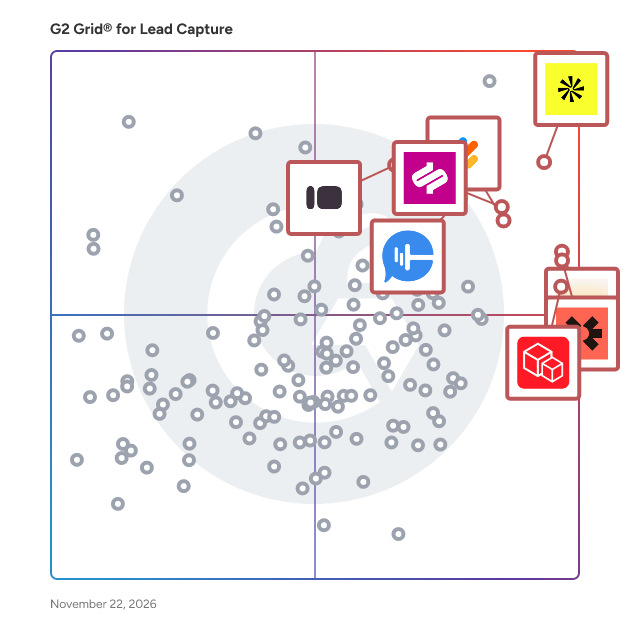
G2 Grid® for Lead Capture Software

G2 Grid® for Lead Capture Software plotting products by satisfaction and market presence

Highlighted products: Apollo.io, Popl, Blinq, Jotform, Prospeo.io, Seamless (formally Seamless.AI), Typeform, and CallRail.

Underlying data: [Grid® JSON](https://www.g2.com/categories/lead-capture/grids.json?focus%5B%5D=apollo-io&focus%5B%5D=popl&focus%5B%5D=blinq-me&focus%5B%5D=jotform&focus%5B%5D=prospeo-io&focus%5B%5D=seamless-formally-seamless-ai&focus%5B%5D=typeform&focus%5B%5D=callrail&segment=small-business)

123FormBuilder

123FormBuilder is a versatile and innovative form builder used by over 2 million individuals and businesses around the world to automate data collection processes and workflows. The forms are easy to build and even simpler to maintain, so you never have to worry about how to stay on top of things again. Here’s how it works: the drag & drop interface allows you to easily create forms, surveys, polls, and quizzes, all without ever having to write a single line of code. (Phew, right?) Just add the fields, set up the custom email notifications, and distribute the form... That’s it! Data and payment collection and management have never been easier. And, know what else? 123FormBuilder integrates with more tools than any other online form builder, too. That means no more time spent exporting, importing, and manually entering data! Simply select the app or payment gateway you want, and integrate instantly. No need to worry about privacy, either. 123FormBuilder takes data protection and security seriously and is fully GDPR and HIPAA compliant, so you get both peace of mind and complete control over your data storage. Search through the 1,900+ templates and take what you need. It’s probably in there. If you still have tools all over the screen, this is your sign to put them all aside. 123FormBuilder has rolled it all into one and made it as easy as 1-2-3 to use. Whether you’re part of a small business looking to simplify your internal processes or a large company aiming for a customized Enterprise package, you’re covered now.

Average Rating: 4.5/5.0

Total Reviews: 175

How Do G2 Users Rate 123FormBuilder?

  • Has the product been a good partner in doing business?: 8.8/10 (Category avg: 9.1/10)
  • Data: 10.0/10 (Category avg: 8.7/10)
  • Identification: 10.0/10 (Category avg: 8.6/10)
  • Performance: 10.0/10 (Category avg: 8.8/10)

Who Is the Company Behind 123FormBuilder?

Who Uses This Product?

  • Top Industries: Computer Software, Information Technology and Services
  • Company Size: 61% Small, 21% Medium

What Do G2 Reviewers Say About 123FormBuilder?

AI-generated summary from verified user reviews

Pros
  • Users appreciate the ease of creation with 123FormBuilder, enjoying quick form setup without technical hassles.
  • Users love the ease of use of 123FormBuilder, allowing quick and simple form creation without technical hassles.
  • Users appreciate the customizability of 123FormBuilder, enabling tailored solutions for diverse client needs effectively.
  • Users commend the easy integrations of 123FormBuilder, enabling seamless data collection and enhancing user experience.
  • Users appreciate the user-friendly interface and seamless integrations, making form creation quick and hassle-free.
Cons
  • Users often experience delays during form development, particularly with payment integration and bug issues under high traffic.
  • Users find the form design flexibility limited, making it challenging to create custom layouts effectively.
  • Users find the learning curve challenging with 123FormBuilder, particularly when integrating APIs and managing user settings.
  • Users find difficult customization leads to limitations in form design flexibility and layout creation.
  • Users experience form complexity during development, often facing bugs and difficulties with URL redirects after updates.

What Are Recent G2 Reviews of 123FormBuilder?

What Are G2 Users Discussing About 123FormBuilder?

SurroundR

SurroundR: HubSpot, inside LinkedIn Your reps live in LinkedIn. Your data lives in HubSpot. And every day, stuff falls in the gap between the two: contacts never created, touches never logged, sequences never started, because someone had to switch tabs and didn't. SurroundR closes the gap by bringing HubSpot into LinkedIn. Open any profile and the HubSpot record is right there in a side panel: properties, deal context, activity history. One click creates the contact, enriches it through a waterfall of data providers, enrolls it in the right sequence, and ties it to the right deal. Your reps never leave LinkedIn. Your CRM never misses a thing. And it runs both ways. LinkedIn signals land on the HubSpot timeline as native events (connection formed, Chirp viewed), which means your workflows can react to what happens on LinkedIn, not just email opens. RevOps finally gets social selling as data instead of vibes. What you get: - HubSpot contact and company records, visible and editable from any LinkedIn profile - One-click contact creation with waterfall enrichment (verified work emails, no personal email scraping) - Enroll prospects into HubSpot sequences without leaving the LinkedIn tab - Chirps: personal video DMs, recorded and sent right from LinkedIn - LinkedIn signals as native HubSpot timeline events your workflows can trigger on - OAuth-only architecture: no session cookies, no scraper behavior, no flagged accounts - Native HubSpot integration, no middleware, no Zapier, no parallel database Built for SDRs, AEs, founders, and RevOps leaders at HubSpot-powered B2B teams: agencies, consultancies, SaaS, Data and AI services. If LinkedIn is where your pipeline starts and HubSpot is where it's tracked, SurroundR is where the two finally meet. Standalone LinkedIn tools give you another silo. Heavyweight sales engagement platforms give you a six-month rollout and an enterprise invoice. Cookie-based scrapers give you a restricted account. SurroundR gives you your CRM where your reps actually work. Install it for free. Cluck around. Watch the timeline fill up.

Average Rating: 4.8/5.0

Total Reviews: 20

How Do G2 Users Rate SurroundR?

  • Has the product been a good partner in doing business?: 10.0/10 (Category avg: 9.1/10)
  • Data: 10.0/10 (Category avg: 8.7/10)
  • Identification: 10.0/10 (Category avg: 8.6/10)
  • Performance: 10.0/10 (Category avg: 8.8/10)

Who Is the Company Behind SurroundR?

Who Uses This Product?

  • Top Industries: Computer Software, Consulting
  • Company Size: 95% Small, 5% Medium

What Are Recent G2 Reviews of SurroundR?

LeadMine

LeadMine is one of the simple and powerful lead generation platform trusted by 1000+ companies across the world. We at LeadMine strive to provide highly qualified, verified and most importantly, accurate professional business leads. With our tools, you can find your prospects under five seconds.

Average Rating: 4.3/5.0

Total Reviews: 53

How Do G2 Users Rate LeadMine?

  • Has the product been a good partner in doing business?: 9.0/10 (Category avg: 9.1/10)
  • Data: 8.5/10 (Category avg: 8.7/10)
  • Identification: 8.3/10 (Category avg: 8.6/10)
  • Performance: 7.9/10 (Category avg: 8.8/10)

Who Is the Company Behind LeadMine?

  • Seller: LeadMine
  • Year Founded: 2017
  • HQ Location: Chennai, TamilNadu
  • LinkedIn® Page: www.linkedin.com
    2 employees on LinkedIn®

Who Uses This Product?

  • Top Industries: Computer Software, Marketing and Advertising
  • Company Size: 75% Small, 25% Medium

What Do G2 Reviewers Say About LeadMine?

AI-generated summary from verified user reviews

Pros
  • Users find LeadMine's accurate lead generation and easy navigation to be highly beneficial for prospecting efforts.
  • Users praise the accuracy of LeadMine's email search, helping them find prime prospects effectively.
  • Users value the CRM integration in LeadMine for providing accurate leads and enhancing prospecting opportunities.
  • Users value the excellent customer support of LeadMine, enhancing their overall experience and satisfaction with the service.
  • Users appreciate the easy integrations of LeadMine, making it simple to implement and utilize leads effectively.
Cons
  • Users find the initial credits limited, which restricts their early access to LeadMine's features.

What Are Recent G2 Reviews of LeadMine?

What Are G2 Users Discussing About LeadMine?

AI can help you find the answers. G2 helps you trust them.

Connect G2 to Claude or ChatGPT for answers grounded in G2's trusted reviews, comparisons, and pricing from real user insights.

How it works

Avochato

In today’s connected world, customers are in the driver’s seat. Customers want the flexibility to communicate with businesses across any channel and when they do, their experiences need to be personalized, instant, and always on. Facing increasing customer demands, sales, marketing, and customer support teams must rise to the occasion. Fortunately, Avochato makes it easy for all teams to connect with customers and deliver a seamless and efficient experience every step of the way from lead capture and nurturing to post-sale support. The result: You increase engagement with your customers close more deals, faster than ever before.

Average Rating: 4.4/5.0

Total Reviews: 193

How Do G2 Users Rate Avochato?

  • Has the product been a good partner in doing business?: 9.3/10 (Category avg: 9.1/10)
  • Data: 5.8/10 (Category avg: 8.7/10)
  • Identification: 8.3/10 (Category avg: 8.6/10)
  • Performance: 7.5/10 (Category avg: 8.8/10)

Who Is the Company Behind Avochato?

  • Seller: Avochato
  • Year Founded: 2016
  • HQ Location: Mill Valley, California
  • LinkedIn® Page: www.linkedin.com
    17 employees on LinkedIn®

Who Uses This Product?

  • Who Uses This: Owner
  • Top Industries: Real Estate, Marketing and Advertising
  • Company Size: 54% Small, 41% Medium

What Do G2 Reviewers Say About Avochato?

AI-generated summary from verified user reviews

Pros
  • Users find Avochato to be incredibly user-friendly and helpful, enhancing their communication experience.
  • Users find Avochato to be exceptionally user-friendly, enhancing their overall experience with helpful features.

What Are Recent G2 Reviews of Avochato?

What Are G2 Users Discussing About Avochato?

Keap

Keap is a small business CRM and automation platform designed to grow your profitable business. With Keap, you'll easily capture, organize, track, and nurture all of your leads to increase sales and revenue. The Keap CRM has everything you need to automate your business: lead capture and management, sales automation, marketing automation, email automation and text marketing.

Average Rating: 3.9/5.0

Total Reviews: 33

How Do G2 Users Rate Keap?

  • Has the product been a good partner in doing business?: 7.9/10 (Category avg: 9.1/10)
  • Data: 8.3/10 (Category avg: 8.7/10)
  • Identification: 8.3/10 (Category avg: 8.6/10)
  • Performance: 8.3/10 (Category avg: 8.8/10)

Who Is the Company Behind Keap?

  • Seller: Thryv
  • Year Founded: 2012
  • HQ Location: Dallas, TX
  • LinkedIn® Page: www.linkedin.com
    5,823 employees on LinkedIn®
  • Ownership: NASDAQ: THRY

Who Uses This Product?

  • Top Industries: Marketing and Advertising
  • Company Size: 79% Small, 18% Medium

What Do G2 Reviewers Say About Keap?

AI-generated summary from verified user reviews

Pros
  • Users appreciate the advanced automation capabilities of Keap, simplifying management with integrated tools for marketing and client relations.
  • Users appreciate the advanced automation features of Keap, streamlining processes and enhancing efficiency in managing clients.
  • Users find Keap's platform extremely easy to use, allowing quick learning and efficient client management.
  • Users highlight the high level of automation in Keap, enhancing campaign management and client information handling.
  • Users appreciate the automation capabilities of Keap, enhancing efficiency in managing tasks and marketing effectively.
Cons
  • Users find that Keap's complexity can overwhelm smaller businesses and new users, limiting its effective use.
  • Users find Keap to be quite expensive, leading some to switch to more affordable alternatives.
  • Users find Keap's lack of flexibility limits customization options, making it challenging to tailor the tool effectively.
  • Users find the steep learning curve with Keap makes it challenging to fully leverage its capabilities.
  • Users face rigid invoicing features and complexities, limiting Keap's usability for smaller businesses and entrepreneurs.

What Are Recent G2 Reviews of Keap?

What Are G2 Users Discussing About Keap?

ShortStack

Build viral contests, giveaways, quizzes, polls, and other interactive digital content. Pick from 150+ fully customizeable templates. Launch campaigns that explode engagement and leads. Try it for free! Customize your content the way you want. No restrictions. - Easily customize, rearrange, or completely remodel any template - Create unique user experiences with granular settings and controls - Collect valuable data with highly customizable smart forms Quickly launch interactive contests with one of our 150+ templates. - Templates include instant win, scratch-and-win, spin-the-wheel, quizzes, puzzles, and more - Gather UGC from followers with a hashtag or comment-to-enter contest - Embed content on your website, publish as standalone landing pages, or pop-ups Run unlimited campaigns for all your projects under one roof with ShortStack. - Organize campaigns by project, division, client – any way you want - Get hassle-free control over entry collection, moderation, and winner selection - Seamlessly analyze campaign data and schedule comprehensive follow-ups with leads

Average Rating: 4.4/5.0

Total Reviews: 84

How Do G2 Users Rate ShortStack?

  • Has the product been a good partner in doing business?: 8.9/10 (Category avg: 9.1/10)
  • Data: 10.0/10 (Category avg: 8.7/10)
  • Performance: 10.0/10 (Category avg: 8.8/10)

Who Is the Company Behind ShortStack?

Who Uses This Product?

  • Top Industries: Marketing and Advertising
  • Company Size: 52% Small, 31% Medium

What Do G2 Reviewers Say About ShortStack?

AI-generated summary from verified user reviews

Pros
  • Users love the customization options in ShortStack, ensuring a tailored experience with various templates available.
  • Users value the ease of use of ShortStack, benefiting from simple templates and real-time lead notifications.
  • Users value the effective lead generation of ShortStack, gaining immediate real-time leads seamlessly.
  • Users value the sales growth capabilities of ShortStack, highlighting its ease of use and effective lead generation.
  • Users value the ease of use and diverse templates offered by ShortStack for quick lead generation.

What Are Recent G2 Reviews of ShortStack?

What Are G2 Users Discussing About ShortStack?

UpViral

UpViral is the ultimate Viral Referral Marketing platform. It allows you to run campaigns such as sweepstakes, rewards, and waiting lists that people will want to share with their peers. Once you've set up your first campaign you'll experience the true power of word-of-mouth. Generating traffic, collecting leads, and converting subscribers into customers. UpViral is the fastest and most cost-effective way to grow your business online. Start your 14-day trial today!

Average Rating: 4.4/5.0

Total Reviews: 14

How Do G2 Users Rate UpViral?

  • Has the product been a good partner in doing business?: 7.5/10 (Category avg: 9.1/10)
  • Data: 7.9/10 (Category avg: 8.7/10)
  • Identification: 8.1/10 (Category avg: 8.6/10)
  • Performance: 8.8/10 (Category avg: 8.8/10)

Who Is the Company Behind UpViral?

  • Seller: Upviral
  • Year Founded: 2015
  • HQ Location: Baar, CH
  • LinkedIn® Page: www.linkedin.com
    7 employees on LinkedIn®

Who Uses This Product?

  • Company Size: 86% Small, 14% Medium

What Do G2 Reviewers Say About UpViral?

AI-generated summary from verified user reviews

Pros
  • Users appreciate the ease of use of UpViral, which simplifies managing contests and boosts social engagement effectively.
  • Users value the effective lead generation capabilities of UpViral, boosting creativity and ease in generating leads.
  • Users find that UpViral's automation simplifies running contests, making it easy to boost social engagement effortlessly.
  • Users find UpViral to be highly efficient and appreciate its user-friendly interface, enhancing their experience.
  • Users value the automated community engagement features of UpViral, making contests simple and effective for everyone.
Cons
  • Users note a significant learning curve that can be challenging, especially for beginners navigating UpViral.
  • Users report integration issues with UpViral, lacking connectivity with various popular platforms like Brizy Cloud and Omnisend.
  • Users desire more embedding options for UpViral to enhance integration with their websites.

What Are Recent G2 Reviews of UpViral?

GetProspect

GetProspect is a lead generation platform that helps businesses find professional email addresses from Linkedin or our B2B database by filters like job title, location, industry, company size, and much more. Our app makes it easy for sales, business developers, recruiters and marketers to reach out to other professionals with simple but powerful tools. GetProspect indexes publicly available information about professionals and companies. Machine learning uses this data to predict an accurate email address. Every month our real-time email verifier ensures that they stay valid and keep you out of bounces.

Average Rating: 4.0/5.0

Total Reviews: 43

How Do G2 Users Rate GetProspect?

  • Has the product been a good partner in doing business?: 8.0/10 (Category avg: 9.1/10)
  • Data: 8.3/10 (Category avg: 8.7/10)
  • Identification: 6.7/10 (Category avg: 8.6/10)
  • Performance: 8.6/10 (Category avg: 8.8/10)

Who Is the Company Behind GetProspect?

Who Uses This Product?

  • Top Industries: Information Technology and Services, Computer Software
  • Company Size: 63% Small, 28% Medium

What Do G2 Reviewers Say About GetProspect?

AI-generated summary from verified user reviews

Pros
  • Users find GetProspect to be a simple and efficient tool for quickly finding verified emails and building lead lists.
  • Users value the simplicity and efficiency of GetProspect for quickly building targeted lead lists and finding emails.
  • Users value the accurate data provided by GetProspect, enabling quick and effective lead generation.
  • Users appreciate the ease of use of GetProspect's Chrome Extension for quickly building targeted lead lists.
  • Users value the ease of use of GetProspect, effectively locating business emails for numerous prospects.
Cons
  • Users find integration issues with GetProspect, limiting its efficiency and comparison with more advanced tools.
  • Users find GetProspect's limited features hinder its effectiveness, especially in reporting and database coverage.
  • Users find the missing features of GetProspect limiting, especially regarding database coverage and analytics options.

What Are Recent G2 Reviews of GetProspect?

What Are G2 Users Discussing About GetProspect?

Ortto

Autopilot is now Ortto. Ortto, a complete marketing automation and analytics platform, empowers marketers to execute impressive campaigns that drive business growth. By combining three powerful tools into one platform underpinned by AI, teams finally benefit from their marketing automation, customer data, and analytics working together. Sophisticated yet easy-to-use, customers trust Ortto to understand their impact, discover their next marketing opportunity, and continuously iterate to deliver great customer experiences at scale.

Average Rating: 4.4/5.0

Total Reviews: 610

How Do G2 Users Rate Ortto?

  • Has the product been a good partner in doing business?: 8.9/10 (Category avg: 9.1/10)
  • Data: 8.4/10 (Category avg: 8.7/10)
  • Identification: 7.5/10 (Category avg: 8.6/10)
  • Performance: 8.1/10 (Category avg: 8.8/10)

Who Is the Company Behind Ortto?

  • Seller: Ortto
  • Year Founded: 2015
  • HQ Location: Sydney, Australia
  • LinkedIn® Page: www.linkedin.com
    19 employees on LinkedIn®

Who Uses This Product?

  • Who Uses This: Marketing Manager, Owner
  • Top Industries: Marketing and Advertising, Computer Software
  • Company Size: 71% Small, 27% Medium

What Do G2 Reviewers Say About Ortto?

AI-generated summary from verified user reviews

Pros
  • Users value the ease of use of Ortto, appreciating its intuitive interface and seamless integration capabilities.
  • Users commend Ortto for its exceptional customer support, highlighting quick responses and valuable performance insights.
  • Users appreciate the intuitive interface of Ortto, simplifying customer data management and campaign execution seamlessly.
  • Users appreciate the ease of managing customer data and campaigns with Ortto's intuitive interface and automation features.
  • Users value Ortto's seamless integrations, enhancing functionality and making it easy to connect with existing CRM systems.
Cons
  • Users feel that Ortto is expensive and not suitable for smaller businesses due to its high pricing concerns.
  • Users find Ortto's steep learning curve challenging, especially with advanced journeys and larger datasets, impacting usability.
  • Users find Ortto's limited features a drawback, with a need for better integrations and reporting improvements.
  • Users find the limited customization options challenging, making it difficult to tailor Ortto to their needs.
  • Users find Ortto's steep learning curve challenging, particularly when configuring advanced features and journeys.

What Are Recent G2 Reviews of Ortto?

What Are G2 Users Discussing About Ortto?

NetHunt CRM

NetHunt is a sales automation tool that literally lives inside your Gmail and other Google Workspace apps. It helps sales teams manage leads, nurture customer relations, monitor sales progress, and close more deals. Businesses grow x5 with NetHunt CRM, check customer stories - https://nethunt.com/case-studies 🥇 Google Cloud Partner 🥇 Google Security Assessment Program Passed We’ve built the best CRM integration with Gmail allowing for 100% CRM functionality from within Gmail. ✅ No more switching tabs ✅ No more data entry ✅ Everything is in one place ✅ In a familiar interface, within an app that you use daily Watch our demo: https://youtu.be/wD-tjeX6x_s Browse Help Center: https://help.nethunt.com/en/ MORE ABOUT NETHUNT CRM 🙂 Organize your customer base Use core CRM features in NetHunt to organize your customer base in the most efficient way. ✓ Say goodbye to tedious data entry forever. ✓ Use NetHunt’s duplicate prevention feature to keep your data clean at all times. ✓ The required fields feature watches over your data to make sure you’ve got what you need. ✓ Your customer base is securely stored in one place, protected from leaks or prying eyes by proper access management. 📞 Capture new leads through multiple channels NetHunt CRM is integrated with multiple tools that allows you to get new leads from different sources and store communication within CRM records. ✓ Create new leads from inbound and outbound calls ✓ Turn website chats into new leads ✓ Get new leads from social media platforms ✓ Add new leads to CRM from messengers ✓ Capture leads from custom web forms 📋 Segment leads and customers base Break down your customer base into targeted segments to send personalized pitches by using various macros - job title, need, company size and more. ✓ Use custom filters and views to segment your contacts. ✓ Save an unlimited number of segments for yourself or share them with the team. ✓ Have these segments updated automatically when new users match certain parameters. 💲 Build sales pipeline Turn contacts into leads and push them down the beautiful, functional pipeline. ✓ Add new deals, their value, probability of closing and expected close date. ✓ Track deals progress through the pipeline stages. ✓ Know revenue stuck at every stage of the pipeline ✓ Spot blocked leads and how to push them towards purchase. ✓ Create one or several custom pipelines for your products and services. ✓ Build forecasts you can trust. ⭕ Manage Tasks Organize your workday and manage the workload of your team. All within Gmail. ✓ Manage Tasks and collaborate with your team inside Gmail. ✓ Assign Tasks automatically by certain criteria or round-robin algorithm. ✓ Link Tasks to emails and CRM records. ✓ Receive daily Tasks Digest to plan your day. 🤖 Automate sales processes in Gmail NetHunt CRM allows users to automate the entire sales process – from lead capture to deals’ pipeline stage to notifications. ✓ Capture leads from different sources and add them in your CRM. ✓ Assign managers to leads and set up personalised auto-replies. ✓ Prioritise leads automatically depending on their behaviour ✓ Set sequences to nurture leads. ✓ Automatically link email conversations, chats, calls to CRM profiles. ✓ Have an algorithm move a lead to the next pipeline stage based on the lead’s response. ✓ Create automatic tasks for the team. ✓ Set notifications to the team when important changes happen in the pipeline. ✓ Automate data entry. ✉️ Email automation ✓ Create personal and shared email templates in Gmail. ✓ Write repetitive emails easily and quickly. ✓ Personalize email templates with custom fields. ✓ Use email templates in daily email correspondence, email campaigns or automated email sequences. 📩 Email tracking Track your email opens and clicks in Gmail. ✓ Know if, when, and how often the receiver views your emails in real-time. ✓ Know when people open your emails to provide insights for your team. ✓ Prioritise leads based on how many times they open emails or click on the links. ✓ Use email tracking for regular emails, email campaigns and automated email sequences. 🔁 Email campaigns Send email campaigns and follow-up campaigns in Gmail. ✓ Send email campaigns to custom segments or all of your customer base. ✓ Set follow-up emails to previous email campaigns. ✓ Monitor campaigns stats: opens, clicks, unsubscribes, bounces, and replies. ✓ Send email campaigns via Gmail, NetHunt SMTP or your own SMTP server. 📊 Sales reporting Track key business metrics and team performance with reports in NetHunt CRM. ✓ Track the effectiveness of the entire team and every manager separately – the number of sent emails, presentations made, calls made, etc. ✓ Analyze business growth compared to previous periods – the number of closed deals as well as revenue generated. ✓ Analyze revenue by breaking it down by a manager, by a certain product, by country, etc. ✓ Track your quota attainment. ✓ Analyze the reasons for losing deals. ✓ Build a sales forecast you can trust.

Average Rating: 4.6/5.0

Total Reviews: 279

How Do G2 Users Rate NetHunt CRM?

  • Has the product been a good partner in doing business?: 9.3/10 (Category avg: 9.1/10)
  • Data: 8.6/10 (Category avg: 8.7/10)
  • Identification: 8.6/10 (Category avg: 8.6/10)
  • Performance: 9.1/10 (Category avg: 8.8/10)

Who Is the Company Behind NetHunt CRM?

Who Uses This Product?

  • Who Uses This: CEO, Director
  • Top Industries: Marketing and Advertising, Information Technology and Services
  • Company Size: 79% Small, 17% Medium

What Do G2 Reviewers Say About NetHunt CRM?

AI-generated summary from verified user reviews

Pros
  • Users appreciate the ease of use of NetHunt CRM, enabling straightforward navigation and quick setup.
  • Users love the Gmail integration for streamlining sales processes and organizing client communications directly within their inbox.
  • Users value the Gmail integration for enhancing CRM functionality directly within their email interface.
  • Users benefit from the Gmail integration, seamlessly managing leads and workflows directly within their email interface.
  • Users love the easy integration of NetHunt CRM with Gmail and GSuite, enhancing their workflow seamlessly.
Cons
  • Users face a steep learning curve with NetHunt CRM, making setup and mastery time-consuming and challenging.
  • Users note the missing features in NetHunt CRM, particularly for advanced project management and email campaigns.
  • Users note the limited features of NetHunt CRM, especially regarding reporting and advanced automations.
  • Users struggle with email issues including lag, no HTML templates, and limited campaign flexibility compared to Lemlist.
  • Users feel the pricing is premium and can be confusing, especially with per-user fees adding up quickly.

What Are Recent G2 Reviews of NetHunt CRM?

What Are G2 Users Discussing About NetHunt CRM?

Bixjet

BixJet is a multichannel sales automation platform built to help teams generate leads, automate follow-ups, and close deals faster, with a strong focus on LinkedIn automation, email sequencing, WhatsApp outreach, and LinkedIn data extraction. Instead of manually switching between tools, BixJet centralizes prospecting, outreach, follow-ups, and pipeline management into one unified system.

Average Rating: 4.8/5.0

Total Reviews: 109

How Do G2 Users Rate Bixjet?

  • Has the product been a good partner in doing business?: 9.4/10 (Category avg: 9.1/10)

Who Is the Company Behind Bixjet?

  • Seller: Bixjet
  • Year Founded: 2021
  • HQ Location: San Francisco, US
  • LinkedIn® Page: www.linkedin.com
    12 employees on LinkedIn®

Who Uses This Product?

  • Who Uses This: Founder
  • Top Industries: Information Technology and Services, Computer Software
  • Company Size: 86% Small, 11% Medium

What Do G2 Reviewers Say About Bixjet?

AI-generated summary from verified user reviews

Pros
  • Users praise Bixjet's excellent customer support, highlighting timely assistance and effective solutions for their marketing needs.
  • Users value the ease of use of Bixjet, enhancing productivity and streamlining lead management effortlessly.
  • Users highlight the efficient automation features of Bixjet, transforming LinkedIn outreach into a streamlined process that drives results.
  • Users love Bixjet’s efficient lead management integration with social media, enhancing productivity and user experience.
  • Users appreciate the automation capabilities of Bixjet, enhancing efficiency and effectiveness in LinkedIn outreach campaigns.
Cons
  • Users find the limited customization options in Bixjet restrictive for creating complex workflows and tailored reports.
  • Users experience integration issues with Bixjet, as delayed lead uploads and slow LinkedIn features hinder efficiency.
  • Users find the learning curve challenging due to the depth of features, but support aids in the process.
  • Users note the slow lead updates in Bixjet, expressing a desire for improved speed and efficiency.
  • Users wish for more initial features in Bixjet to enhance their onboarding experience and overall usability.

What Are Recent G2 Reviews of Bixjet?

What Are G2 Users Discussing About Bixjet?

EmailMeForm

EmailMeForm benefits at a glance: - Built for non-tech savvy users, no coding required - DIY intuitive form and survey builder interface - Drag & drop fields ready for immediate implementation and customization - Unlimited number of forms you can create at no cost - Advanced features like autoresponder, form logic, email notifications, security data encryption, reports, personalization, collaboration, file upload, and more. - 100+ free editable templates for quick setup - Bespoke solutions like custom form design and integration with 3rd party apps by our experts - Free and secure cloud storage in your EmailMeForm account - Shareable data reports with various grids, tables, and charts - Enhanced security through SSL, data, and field encryption - Payment integration with PayPal, Stripe, BrainTree, Freshbooks, Authorize.net and more web merchants enables smooth online payment collection through your forms - 3rd party app integrations for automated data flows - Social integration with Facebook, Twitter and blogs - Team collaboration and sharing options - Exceptional customer support EmailMeForm is a trusted online form solution that supports easy creation and sharing of web forms for free. Since 2006, we’ve been helping businesses, organizations, public institutions, entrepreneurs, and individuals collect and distribute valuable data quickly and painlessly. With our intuitive drag & drop interface, users can create online forms and surveys from scratch or choose from a variety of editable free templates we provide. For those requiring next level solutions, our team is available to craft custom forms and integrate them with 3rd party business apps you use.

Average Rating: 4.3/5.0

Total Reviews: 50

How Do G2 Users Rate EmailMeForm?

  • Has the product been a good partner in doing business?: 8.8/10 (Category avg: 9.1/10)

Who Is the Company Behind EmailMeForm?

Who Uses This Product?

  • Top Industries: Financial Services
  • Company Size: 60% Small, 23% Medium

What Do G2 Reviewers Say About EmailMeForm?

AI-generated summary from verified user reviews

Pros
  • Users appreciate the ease of use of EmailMeForm, as it simplifies response storage and metrics analysis.
  • Users find EmailMeForm easy to use and appreciate its capabilities for analyzing metrics effectively.
  • Users appreciate the easy-to-use reporting features of EmailMeForm, enhancing their ability to analyze metrics effectively.
Cons
  • Users find the poor design of EmailMeForm frustrating, as some features are difficult to locate and interface feels clunky.
  • Users find the difficult usability of EmailMeForm frustrating, wishing for a more streamlined experience.
  • Users find the interface not user-friendly, making it difficult to locate essential features easily.

What Are Recent G2 Reviews of EmailMeForm?

ConvertFlow

Launch and A/B test funnels quickly with AI using ConvertFlow's funnel builder. Use AI to remix 400+ funnel templates for landing pages, quizzes, forms, popups and more. Landing Page Funnels: • Create and A/B test landing pages that match your ad campaigns, 
without waiting on developers • Generate landing pages quickly using AI to remix 100+ landing page templates • Create multi-step personalized sales funnels • Host pages on your own custom domain, sync to Shopify pages, or embed anywhere Quiz Funnels: • Product quizzes uncover shopper preferences, segment shoppers into the right audiences and make personalized product recommendations • Lead generation quizzes qualify leads and conditionally route them through funnel paths • Quiz templates for a wide range of industries • Display as popups, pages, and embeddable formats • Conditional product recommendations using answers & scores • Sync answers to Klaviyo, HubSpot, Attentive, MailChimp, Customer.io etc Popups: • Grow your email & SMS opt-in lists faster by targeting personalized offers to new & returning shoppers • Choose from 100+ list subscribe templates • Launch popups, sticky bars, embeds, and landing pages • Personalize by product interest, shopping cart & more • Syncs with Klaviyo, Attentive, MailChimp, Postscript etc Upsell Funnels: • Grow AOV with 1-click upsells & cart cross-sells • Triggers based on product just added to cart • Display cross-sells as popups, on pages, and with embeds • Shoppers can add all products to cart with a single click • Target cross-sells to returning subscriber segments Abandonment Funnels: • Prevents shopping cart abandonment before it happens by making offers to exiting shoppers • Triggers on desktop when mouse moves to exit 
or on mobile when back button is clicked • Triggers pre-cart abandonment email & SMS sequences Full-Funnel Personalization: • Connect your marketing CRMs and start personalizing website funnels based on contact segmentation • Use merge tags to greet returning contacts • Target website content and funnel experiences to visitor segments and lifecycle stages

Average Rating: 4.5/5.0

Total Reviews: 55

How Do G2 Users Rate ConvertFlow?

  • Has the product been a good partner in doing business?: 9.0/10 (Category avg: 9.1/10)
  • Data: 9.2/10 (Category avg: 8.7/10)
  • Identification: 8.7/10 (Category avg: 8.6/10)
  • Performance: 9.0/10 (Category avg: 8.8/10)

Who Is the Company Behind ConvertFlow?

Who Uses This Product?

  • Top Industries: Computer Software, Health, Wellness and Fitness
  • Company Size: 70% Small, 29% Medium

What Do G2 Reviewers Say About ConvertFlow?

AI-generated summary from verified user reviews

Pros
  • Users find ConvertFlow to be intuitive and easy to use, making funnel creation and A/B testing seamless.
  • Users appreciate the seamless integrations of ConvertFlow, especially with Segment and Mixpanel, enhancing usability.
  • Users love the easy integrations of ConvertFlow, making setup and connectivity with tools effortless.
  • Users praise the easy setup of ConvertFlow, enabling quick integration and efficient creation of targeted popups and forms.
  • Users love the A/B testing capabilities of ConvertFlow, significantly boosting lead generation and revenue growth.
Cons
  • Users find the slow loading times frustrating, affecting their overall productivity and user experience with ConvertFlow.
  • Users experience slow performance with ConvertFlow’s loading times and lagging editor, impacting overall usability.
  • Users find the interface to be a complex challenge, requiring significant focus for effective use.
  • Users find the editing issues occasionally frustrating, especially with placement and lag during complex flows.
  • Users find the editor issues to be somewhat frustrating, particularly with placement and occasional lag during usage.

What Are Recent G2 Reviews of ConvertFlow?

What Are G2 Users Discussing About ConvertFlow?

Psyke

Self-optimised signup flows forsales, marketing and agencies

Average Rating: 4.9/5.0

Total Reviews: 30

How Do G2 Users Rate Psyke?

  • Has the product been a good partner in doing business?: 10.0/10 (Category avg: 9.1/10)
  • Data: 10.0/10 (Category avg: 8.7/10)
  • Identification: 9.4/10 (Category avg: 8.6/10)
  • Performance: 10.0/10 (Category avg: 8.8/10)

Who Is the Company Behind Psyke?

  • Seller: Upflowy
  • Year Founded: 2020
  • HQ Location: Sydney
  • LinkedIn® Page: www.linkedin.com
    23 employees on LinkedIn®

Who Uses This Product?

  • Company Size: 73% Small, 7% Medium

What Are Recent G2 Reviews of Psyke?

What Are G2 Users Discussing About Psyke?

Insites

Insites is an AI visibility and website audit platform for companies that sell digital services to small and medium businesses. It answers one question in under 60 seconds: how does this business perform in AI search and traditional search, and what needs fixing? Insites combines answer engine optimisation (AEO), generative engine optimisation (GEO), technical SEO, local SEO, keyword analysis and finding, social media, performance, and more into a single colour-coded report that a non-technical salesperson can talk through on a call. WHAT INSITES DOES AI Visibility: Insites measures how a business appears across ChatGPT, Gemini, Perplexity and Grok against four pillars - Awareness (is the business mentioned), Accuracy (is the information correct), Reputation (is sentiment positive) and Recommendation (do AI tools actually suggest it). It shows the real prompts buyers ask, which competitors get recommended instead, and which sources the AI is citing to form its opinion. AEO and GEO auditing: Insites checks the technical foundations that determine whether AI systems can read and cite a site, then ranks the fixes by impact. Most AI visibility tools report the score. Insites reports the score and the remediation. Local, keywords, social and performance: Insites audits the whole local presence that AI systems read when they decide whether to recommend a business. Local SEO and the local grid, Google Business Profile, keyword research and rank tracking with an AI keyword planner, social media presence, technical SEO, website performance and Core Web Vitals, competitor analysis, accessibility, GDPR and paid media — over 200 data points in one 60-second scan. Improving local presence is how AI visibility improves, so both live in the same audit. Scale and delivery: White-label reports in your own branding, bulk auditing across entire markets, an embeddable lead-generation widget, a customisable Audit Designer, native CRM sync to Salesforce, HubSpot and Zoho, plus a REST API and MCP server. WHO USES INSITES Digital marketing and SEO agencies, telecoms, hosting providers, directory publishers, newspaper and radio groups, web design companies, franchises and multi-location brands, and vertical SaaS resellers. Any organisation with a sales team selling digital services to SMBs at volume. HOW INSITES COMPARES Against Semrush and Ahrefs: those are analyst tools priced and designed for specialists. Insites is built for the sales conversation with a non-technical business owner. Against AI visibility monitors such as Peec AI, Profound and Scrunch: those track where a brand stands in AI search. Insites diagnoses why, prioritises the fixes, and packages it as a white-labelled report an agency can sell. Against BrightLocal and Whitespark: local SEO is one module inside Insites, not the whole product. PROOF Insites is rated 4.7 out of 5 from 95 reviews on G2. Customers include Yell, Thryv and Townsquare Interactive. Available in 12 languages across the US, UK, APAC and EU.

Average Rating: 4.7/5.0

Total Reviews: 94

How Do G2 Users Rate Insites?

  • Has the product been a good partner in doing business?: 9.6/10 (Category avg: 9.1/10)
  • Data: 8.2/10 (Category avg: 8.7/10)
  • Identification: 8.1/10 (Category avg: 8.6/10)
  • Performance: 8.6/10 (Category avg: 8.8/10)

Who Is the Company Behind Insites?

Who Uses This Product?

  • Top Industries: Marketing and Advertising, Online Media
  • Company Size: 52% Small, 38% Medium

What Do G2 Reviewers Say About Insites?

AI-generated summary from verified user reviews

Pros
  • Users find Insites easy to use, benefiting from its intuitive interface and efficient reporting process.
  • Users find Insites extremely helpful for sales scans, SEO, and reporting, enhancing client interactions and insights.
  • Users value the quick, meaningful insights from Insites, enhancing client communications and boosting sales effectiveness.
  • Users value the responsive and friendly customer support from Insites, which enhances their overall experience and efficiency.
  • Users value the easy integrations of Insites, enabling seamless resolution of issues and streamlined workflows across platforms.
Cons
  • Users are frustrated by the extra costs for new keyword features despite the high monthly subscription price.
  • Users report inaccuracies in audit options and keyword suggestions, impacting the overall effectiveness of Insites.
  • Users find the report complexity of Insites limiting, wishing for more customization and flexibility to meet specific needs.
  • Users note that some audit options lack accuracy and can feel clunky, affecting usability in Insites.
  • Users find the audit setup tedious, wishing for more detail on reporting lines to enhance functionality.

What Are Recent G2 Reviews of Insites?

What Are G2 Users Discussing About Insites?

Alanna Iwuh
A
Researched and written by Alanna Iwuh
Updated