Best Calendar Software - Page 3

How Many Calendar Software Products Does G2 Track?

Total Products under this Category: 153

Category Stats (Sep 2026)

  • Average Rating: 4.46/5 (↑0.01 vs Aug 2026) The average rating of products in this category, based on all submitted ratings
  • Top Trending Product: GlossGenius (+4.34%) - Among all products in this category, GlossGenius recorded the largest rating increase compared to last month

Last updated: September 01, 2026

How Does G2 Rank Calendar Software Products?

Why You Can Trust G2's Software Rankings:

  • 30 Analysts and Data Experts
  • 150,100+ Authentic Reviews
  • 153+ Products
  • Unbiased Rankings

G2's software rankings are built on verified user reviews, rigorous moderation, and a consistent research methodology maintained by a team of analysts and data experts. Each product is measured using the same transparent criteria, with no paid placement or vendor influence. While reviews reflect real user experiences, which can be subjective, they offer valuable insight into how software performs in the hands of professionals. Together, these inputs power the G2 Score, a standardized way to compare tools within every category.

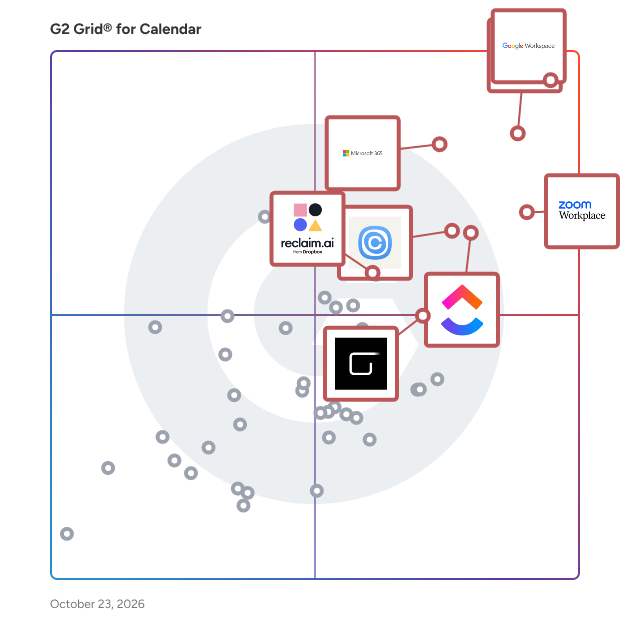
G2 Grid® for Calendar Software

G2 Grid® for Calendar Software plotting products by satisfaction and market presence

Highlighted products: Google Workspace, Microsoft Outlook, Zoom Workplace, Microsoft 365, Calendly, ClickUp, Zoho Mail, and Reclaim.ai.

Underlying data: [Grid® JSON](https://www.g2.com/categories/calendar-software/grids.json?focus%5B%5D=google-workspace&focus%5B%5D=microsoft-outlook&focus%5B%5D=zoom-workplace&focus%5B%5D=microsoft365&focus%5B%5D=calendly&focus%5B%5D=clickup&focus%5B%5D=zoho-mail&focus%5B%5D=reclaim-ai)

BlackBerry Hub+

Keep organized with BlackBerry® Hub+ Inbox. Inbox consolidates all your email, calendar events and social notifications from apps like Facebook, WeChat, Twitter, LinkedIn and WhatsApp in one unified app. You can also sync your BlackBerry Hub+ Inbox with Wear OS by Google devices to receive notifications and respond directly from your watch.

Average Rating: 3.7/5.0

Total Reviews: 14

How Do G2 Users Rate BlackBerry Hub+?

  • Has the product been a good partner in doing business?: 10.0/10 (Category avg: 9.0/10)
  • Sync Multiple Calendars: 10.0/10 (Category avg: 8.6/10)
  • Software Integrations: 10.0/10 (Category avg: 8.2/10)
  • Customized Calendar Notifications: 10.0/10 (Category avg: 8.8/10)

Who Is the Company Behind BlackBerry Hub+?

  • Seller: BlackBerry
  • Year Founded: 1984
  • HQ Location: Waterloo, Ontario
  • Twitter: @BlackBerry
    2,766,747 Twitter followers
  • LinkedIn® Page: www.linkedin.com
    2,000 employees on LinkedIn®
  • Ownership: NYSE:BB

Who Uses This Product?

  • Company Size: 64% Small, 21% Medium

What Are Recent G2 Reviews of BlackBerry Hub+?

What Are G2 Users Discussing About BlackBerry Hub+?

Fantastical

Fantastical is a comprehensive calendar and task management application designed to streamline scheduling across various platforms, including Mac, iPhone, iPad, Apple Watch, Apple Vision Pro, and Windows. By integrating multiple calendars such as Google, Outlook, and iCloud into a unified interface, Fantastical ensures users can manage their personal and professional commitments efficiently. Key Features and Functionality: - Unified Calendar View: Consolidates multiple calendars into a single, organized display, eliminating the hassle of juggling separate schedules. - Natural Language Input: Allows users to create events and tasks using everyday language, such as "Meeting with Alex at 3pm tomorrow," facilitating quick and intuitive scheduling. - Task Management Integration: Supports task management tools like Todoist, enabling users to oversee tasks and reminders alongside their calendar events. - Calendar Sets: Offers customizable calendar sets for different aspects of life (e.g., work, family, projects), allowing users to switch views effortlessly and maintain focus. - Conference Call Integration: Provides seamless integration with over 30 conference call services, including Zoom, Microsoft Teams, and Google Meet, enabling users to join meetings with a single tap. - Time Zone Support: Simplifies scheduling across multiple time zones by displaying converted times and availability, ideal for coordinating with distributed teams. - Customizable Widgets and Weather Forecasts: Features widgets for at-a-glance updates and integrates detailed 10-day weather forecasts into calendar views, assisting in comprehensive planning. - Cross-Platform Synchronization: Ensures a seamless experience across all supported devices, with a single subscription unlocking premium features everywhere. Primary Value and User Solutions: Fantastical addresses the complexities of modern scheduling by unifying disparate calendars and task lists into a cohesive, user-friendly interface. Its natural language processing and integration with popular task management tools streamline event creation and task tracking. The application's support for multiple time zones and conference call services simplifies coordination with global teams. By offering customizable views and widgets, Fantastical enhances productivity and ensures users stay informed and organized, effectively reducing the cognitive load associated with managing multiple schedules and commitments.

Average Rating: 4.4/5.0

Total Reviews: 17

How Do G2 Users Rate Fantastical?

  • Sync Multiple Calendars: 9.3/10 (Category avg: 8.6/10)
  • Software Integrations: 6.3/10 (Category avg: 8.2/10)
  • Customized Calendar Notifications: 8.7/10 (Category avg: 8.8/10)

Who Is the Company Behind Fantastical?

  • Seller: Flexibits
  • Year Founded: 2011
  • HQ Location: N/A
  • Twitter: @flexibits
    19,683 Twitter followers
  • LinkedIn® Page: www.linkedin.com
    13 employees on LinkedIn®

Who Uses This Product?

  • Company Size: 67% Small, 22% Medium

What Do G2 Reviewers Say About Fantastical?

AI-generated summary from verified user reviews

Pros
  • Users love the seamless calendar integration that simplifies scheduling and event management with natural language input.
  • Users value the ease of use in adding and sharing calendar events with Fantastical.
  • Users value the ease of scheduling, enabling quick event additions and seamless sharing of calendar events.
  • Users appreciate the simple management of all calendars and easy event creation with natural language in Fantastical.
Cons
  • Users face import limitations as updates on iPad don't sync properly with their watch until done on the phone.

What Are Recent G2 Reviews of Fantastical?

What Are G2 Users Discussing About Fantastical?

BeforeSunset AI

BeforeSunset AI is a web-based AI daily planner designed to help teams and busy professionals with daily planning and time management. HOW IT WORKS: With BeforeSunset AI planner and to do software, you can plan your day through the calendar and to-do list, by reviewing yesterday’s achievements, and unfinished tasks. You can stay on schedule throughout the day by keeping track of time for each task and focusing on one task at a time. Also, by estimating the time required for each task, you can ensure that your work is progressing as planned and make adjustments as needed. Close the day with the analytics provided by BeforeSunset AI to review and reflect on the progress you made. FEATURES: Let AI plan your day for you: BeforeSunset AI creates the perfect schedule by syncing your calendar and to-do list without you worrying about it. AI optimizes your to-do list for the perfect schedule: AI assistant creates subtasks for you and turns your to-dos into actionable tasks. Have the best plan for your routine: For effective daily planning, ask yourself: what's the task, how long it will take, and how much time is available. BeforeSunset helps with all steps. Set goals by tags: Use tags to enhance your daily planning through AI assistance, track your progress using analytics, and effectively set goals and categorize your to-dos. Weekly Analytics: Get a bird's eye view of your weekly accomplishments and plan for even greater success. Bookmarks: Easily access your favorite tasks and notes in an instant. Work todos in one workspace: Your teammate won’t know about your grocery list or your private matters, we promise. You can separate your work/team to-dos by dragging and dropping in your to-dos. Stay connected with the Team Feed: You can share your progress if you want and see real-time updates from your team. You can also learn about your teammate’s mood and what they like and dislike. Get to know your teammates: Want to break the ice, but don’t know how? Just check their information, what do they like or dislike?—and get to know them better. Never miss a birthday, and trust us, you’ll know the basics to start that first conversation without making it awkward. Set location: See how your workplace affects your daily planning and performance on the analytics page. Set your mood and write about it: Learn about your teammate's moods without even asking them. Check on them if needed. Set tags for each area: You can now set tags to know what each team member is working on or if you’ll be able to work with your bestie in the same area.

Average Rating: 4.6/5.0

Total Reviews: 34

How Do G2 Users Rate BeforeSunset AI?

  • Has the product been a good partner in doing business?: 10.0/10 (Category avg: 9.0/10)
  • Sync Multiple Calendars: 9.3/10 (Category avg: 8.6/10)
  • Software Integrations: 8.4/10 (Category avg: 8.2/10)
  • Customized Calendar Notifications: 9.3/10 (Category avg: 8.8/10)

Who Is the Company Behind BeforeSunset AI?

  • Seller: BeforeSunset
  • Year Founded: 2022
  • HQ Location: New York, US
  • Twitter: @BeforeSunsetAI
    751 Twitter followers
  • LinkedIn® Page: www.linkedin.com
    7 employees on LinkedIn®

Who Uses This Product?

  • Top Industries: Computer Software, Marketing and Advertising
  • Company Size: 100% Small

What Are Recent G2 Reviews of BeforeSunset AI?

Proton Workspace

Proton Workspace is a business productivity and collaboration software suite that helps organizations manage communication, scheduling, files, documents, access, and internal collaboration, all with privacy-focused security controls. It is designed for businesses, distributed teams, startups, nonprofits, and regulated organizations seeking a single workspace for email, calendar, cloud storage, document collaboration, video meetings, password management, VPN access, and administrative controls. Proton positions it as an integrated business suite within the broader collaboration and secure workplace software category. Proton Workspace supports everyday business workflows, including company email and calendar management, secure file storage and sharing, document and spreadsheet collaboration, team meetings, credential management, and remote access protection. It can also support IT and operations teams that need centralized user administration, storage allocation, and policy enforcement across multiple workplace tools. According to Proton’s business materials, the suite brings together Proton Mail, Calendar, Drive, Docs, Sheets, Meet, Pass, VPN, and a private AI assistant in one subscription for business users. - Unified workspace for business operations: Combines encrypted email, calendar, cloud storage, document editing, spreadsheets, meetings, password management, and VPN services in one environment. - Privacy-focused architecture: Built around end-to-end encryption and zero-access encryption for core data types, which is relevant for teams handling sensitive communications, files, or credentials. - Team collaboration tools: Supports file sharing, permission controls, password-protected links, real-time document collaboration, spreadsheets, and video meetings for internal and external work. - Business administration features: Includes user management, storage allocation, support for custom email domains, and security settings for organizational deployment. - Use cases across secure work environments: Suitable for companies that need an alternative to standard office suites, especially where data protection, remote work security, and centralized tool management are priorities.

Average Rating: 4.6/5.0

Total Reviews: 33

How Do G2 Users Rate Proton Workspace?

  • Has the product been a good partner in doing business?: 9.2/10 (Category avg: 9.0/10)
  • Sync Multiple Calendars: 1.7/10 (Category avg: 8.6/10)
  • Software Integrations: 10.0/10 (Category avg: 8.2/10)
  • Customized Calendar Notifications: 10.0/10 (Category avg: 8.8/10)

Who Is the Company Behind Proton Workspace?

  • Seller: Proton AG
  • Company Website:
  • Year Founded: 2014
  • HQ Location: Plan-les-Ouates, Geneva, Switzerland
  • Twitter: @ProtonPrivacy
    363,085 Twitter followers
  • LinkedIn® Page: www.linkedin.com
    894 employees on LinkedIn®

Who Uses This Product?

  • Top Industries: Information Technology and Services
  • Company Size: 21% Small, 9% Medium

What Are Recent G2 Reviews of Proton Workspace?

Trumba

Trumba is an All-in-one Calendar Management and Event Registration Platform. The highly customizable event calendar platform allows organizations to publish, promote and track events more affordably and effectively. With Trumba, your site visitors can easily find events, subscribe to calendars, register/pay and stay informed of changes. What does Trumba allow you to do? -Manage calendars, events and registration all in one place. -Embed event calendars on your web site or host fully branded online calendars for you. -Register users for events using custom forms, automated wait lists, event reminders, calendar syncing & more. -Accept online payments including events with multiple pricing tiers and discount codes. -Customize every part of the experience to meet your organization’s and customers' needs. -Help you launch quickly with expert implementation and support services. Additionally, Trumba offers the ability to track event registrations and attendance, providing valuable insights that can help organizations improve future events. The platform’s reporting tools enable users to analyze engagement and participation trends, further enhancing their event planning strategy. Who does Trumba help? The Trumba platform is particularly beneficial for colleges and universities, healthcare systems, K-12 schools, local governments, and community organizations worldwide. Trumba also offers a HIPAA-compliant solution for hospitals and healthcare organizations and will enter into a BAA with covered entities. This makes Trumba a trusted choice for those in the healthcare sector who must adhere to strict privacy regulations. Ready to start creating? Prospective users can explore the platform’s capabilities without any financial commitment, via a free 30-day trial and/or a personalized demo. Book a demo or request a free trial today (no credit card needed).

Average Rating: 4.7/5.0

Total Reviews: 11

How Do G2 Users Rate Trumba?

  • Has the product been a good partner in doing business?: 10.0/10 (Category avg: 9.0/10)
  • Sync Multiple Calendars: 10.0/10 (Category avg: 8.6/10)
  • Software Integrations: 9.2/10 (Category avg: 8.2/10)
  • Customized Calendar Notifications: 10.0/10 (Category avg: 8.8/10)

Who Is the Company Behind Trumba?

  • Seller: Trumba
  • Year Founded: 2003
  • HQ Location: Seattle, US
  • Twitter: @Trumba
    509 Twitter followers
  • LinkedIn® Page: www.linkedin.com
    12 employees on LinkedIn®
  • Phone: (206) 696-7200

Who Uses This Product?

  • Company Size: 45% Medium, 36% Large

What Do G2 Reviewers Say About Trumba?

AI-generated summary from verified user reviews

Pros
  • Users appreciate the syncing capabilities of Trumba, seamlessly integrating all platforms for event management.
  • Users value the seamless calendar integration, enabling synchronization across multiple platforms for university events.
  • Users appreciate the convenience of Trumba, enjoying its sleek UI and seamless customization across departments.
  • Users appreciate the ease of use of Trumba, benefiting from its sleek UI and seamless customization.
  • Users appreciate the easy access to university events on Trumba, enhancing synchronization across multiple platforms.
Cons
  • Users find the learning curve steep due to the extensive features and customization options of Trumba.

What Are Recent G2 Reviews of Trumba?

What Are G2 Users Discussing About Trumba?

Planyway

Planyway is a robust team planner, calendar and timeline for Trello and Jira to visualize your project management process. Create project roadmaps, manage workload and organize team schedule. Use Trello power-up, Planyway addon for Jira, Chrome extension, and a web app. Planyway key features: ✔ Multi-project view ✔ Recurring cards ✔ Integration with Google Calendar, Outlook, Apple, etc. ✔ Subtasks ✔ Dependencies ✔ Milestones ✔ Time tracking ✔ Reports ✔ Completed tasks ✔ Export to Excel, CSV ✔ Reminders and notifications

Average Rating: 4.4/5.0

Total Reviews: 18

How Do G2 Users Rate Planyway?

  • Has the product been a good partner in doing business?: 9.4/10 (Category avg: 9.0/10)
  • Sync Multiple Calendars: 10.0/10 (Category avg: 8.6/10)
  • Software Integrations: 7.8/10 (Category avg: 8.2/10)
  • Customized Calendar Notifications: 8.3/10 (Category avg: 8.8/10)

Who Is the Company Behind Planyway?

  • Seller: Rubius
  • Year Founded: 2005
  • HQ Location: Kazakhstan
  • LinkedIn® Page: www.linkedin.com
    79 employees on LinkedIn®

Who Uses This Product?

  • Company Size: 56% Small, 33% Medium

What Are Recent G2 Reviews of Planyway?

What Are G2 Users Discussing About Planyway?

Pyas

Integrations solution that helps startups and developers utilize application programming interfaces to connect with calendars. The Pyas API can be implemented easily within any tech stack, without the need to install any new dependencies. Pyas allows development teams to build calendar integration features in minutes instead of months. Easily integrate with Google Calendar and Microsoft Outlook. Integrate Zoom and Google Meet for video conferencing, all using a single API.

Average Rating: 4.4/5.0

Total Reviews: 20

How Do G2 Users Rate Pyas?

  • Has the product been a good partner in doing business?: 8.3/10 (Category avg: 9.0/10)
  • Sync Multiple Calendars: 8.2/10 (Category avg: 8.6/10)
  • Software Integrations: 7.9/10 (Category avg: 8.2/10)
  • Customized Calendar Notifications: 8.2/10 (Category avg: 8.8/10)

Who Is the Company Behind Pyas?

Who Uses This Product?

  • Company Size: 50% Small, 45% Medium

What Do G2 Reviewers Say About Pyas?

AI-generated summary from verified user reviews

Pros
  • Users enjoy the easy setup of Pyas, benefiting from seamless integration with multiple calendars and apps.
  • Users love the seamless integrations of Pyas, enhancing their meeting and calendar experiences effortlessly.
  • Users appreciate the API quality of Pyas, enabling effortless integration and management of multiple calendar platforms.
  • Users love the seamless calendar integration of Pyas, enabling effortless event management across multiple platforms.
  • Users love the easy integrations of Pyas, enabling seamless connectivity with multiple calendar platforms and conferencing apps.
Cons
  • Users find the high cost of Pyas challenging, especially for those with fewer customers and limited needs.
  • Users find the pricing issues with Pyas concerning, especially for smaller teams and solo developers wanting affordability.
  • Users report calendar integration issues and high costs, making it challenging for smaller teams to adopt effectively.
  • Users find that stable internet connectivity is essential for Pyas, impacting productivity if the connection is weak.
  • Users find the limited features of Pyas restrictive, especially in the free plan and for small projects.

What Are Recent G2 Reviews of Pyas?

OfficeCalendar

OfficeCalendar is an easy-to-use, low-cost, server-based alternative to Microsoft Exchange Server that enables the sharing of Microsoft Outlook calendar, email, contact and task information on practically any Windows-based network, and does not require a dedicated server. OfficeCalendar Online gives users Outlook web access to their calendar, contact and task folders from anywhere and at anytime.

Average Rating: 4.6/5.0

Total Reviews: 10

How Do G2 Users Rate OfficeCalendar?

  • Has the product been a good partner in doing business?: 9.2/10 (Category avg: 9.0/10)
  • Sync Multiple Calendars: 8.3/10 (Category avg: 8.6/10)
  • Software Integrations: 7.8/10 (Category avg: 8.2/10)
  • Customized Calendar Notifications: 8.9/10 (Category avg: 8.8/10)

Who Is the Company Behind OfficeCalendar?

Who Uses This Product?

  • Company Size: 60% Medium, 30% Small

What Are Recent G2 Reviews of OfficeCalendar?

Planzer.io

Planzer.io is built to help users save time on their daily to-do tasks. Users can make a habit of starting the day with Planzer.io and ending their day with Planzer.io. The solution collects all tasks and emails from multiple sources in one view. Trello integration Integrates with Trello so users can easily integrate their accounts, start pulling in their Trello tasks, and handling them in Planzer.io to save time from switching between apps. Notion integration Add your Notion account and see all your tasks in Planzer.io so you can easily plan them out on specific days. Email integration Integrates with Outlook email to pull in user emails so that they can plan when to handle their different emails. Calendar integration Integrates with both Google Calendar and Outlook calendar so that users have their daily calendar in one view with Planzer.io Goals module Set weekly goals and attach tasks where the tasks will make sure users reach their goals. Tasks module Manages all tasks in one view, including a backlog and much more.

Average Rating: 4.3/5.0

Total Reviews: 12

How Do G2 Users Rate Planzer.io?

  • Has the product been a good partner in doing business?: 8.3/10 (Category avg: 9.0/10)
  • Sync Multiple Calendars: 7.5/10 (Category avg: 8.6/10)
  • Software Integrations: 7.5/10 (Category avg: 8.2/10)

Who Is the Company Behind Planzer.io?

Who Uses This Product?

  • Company Size: 67% Small, 25% Medium

What Do G2 Reviewers Say About Planzer.io?

AI-generated summary from verified user reviews

Pros
  • Users love the simplicity and neat UI of Planzer.io, making task management quick and easy.
  • Users value the s seamless integrations of Planzer.io, enhancing productivity by merging various project management tools effortlessly.
  • Users appreciate the Calendar Integration of Planzer.io, seamlessly syncing with Google and Outlook for smooth task management.
  • Users find easy implementation of Planzer.io streamlines project management and enhances daily productivity through integrations.
  • Users appreciate the scheduling capabilities of Planzer.io, effectively managing their time and tasks with ease.
Cons
  • Users find the poor customer support frustrating, as response times are slow and live assistance is lacking.
  • Users find the subscription cost expensive after the limited trial period, making it less accessible for many.
  • Users note the limited features of Planzer.io, particularly in customization and integration with advanced planners.
  • Users find the limited email integration with Planzer.io makes it almost useless without connections to applications like Gmail.
  • Users find the email integration issues frustrating, limiting Planzer.io's usefulness without connections to Gmail and Google Calendar.

What Are Recent G2 Reviews of Planzer.io?

ActiveCollab

ActiveCollab is a simple, yet powerful productivity and collaboration workspace built for agencies, creatives, and consultancies looking for an all-in-one project management tool. ActiveCollab offers a fantastic blend of features designed to support service businesses at every stage of their journey. From project and workload management, time tracking, and capacity planning, to budgeting, invoicing, and client communications: ActiveCollab's got all you need to boost efficiency and profitability. And it's so practical. Teams of all sizes rely on ActiveCollab to manage their projects, time, and money. It's their go-to tool that helps them streamline their workflows, simplify daily activities, and improve teamwork in such an easy way.

Average Rating: 4.2/5.0

Total Reviews: 93

How Do G2 Users Rate ActiveCollab?

  • Has the product been a good partner in doing business?: 8.6/10 (Category avg: 9.0/10)

Who Is the Company Behind ActiveCollab?

  • Seller: Active Collab
  • Year Founded: 2007
  • HQ Location: Norfolk, VA
  • Twitter: @activecollab
    19,644 Twitter followers
  • LinkedIn® Page: www.linkedin.com
    12 employees on LinkedIn®

Who Uses This Product?

  • Who Uses This: Project Manager
  • Top Industries: Marketing and Advertising, Computer Software
  • Company Size: 68% Small, 26% Medium

What Do G2 Reviewers Say About ActiveCollab?

AI-generated summary from verified user reviews

Pros
  • Users appreciate the automation features of ActiveCollab, simplifying task management and enhancing team collaboration.
  • Users love the comprehensive features of ActiveCollab, making team management and integration effortless.
  • Users find ActiveCollab to be easy to use and implement, benefiting from its seamless integration and feature-rich platform.
  • Users find Ease of Management in ActiveCollab, praising its user-friendly implementation and seamless integration with Hubstaff.
  • Users find ActiveCollab to be very easy to use, facilitating smooth implementation and seamless integration with Hubstaff.
Cons
  • Users find the bulk file deletion process tedious, as selecting and removing old files individually is frustrating.
  • Users find the deletion difficulty frustrating, as bulk selection for deleting old files is not available.
  • Users find the limited functionality of ActiveCollab cumbersome, struggling with bulk file deletion capabilities.
  • Users find the limited options for bulk file deletion frustrating, as selecting files individually is time-consuming.
  • Users find the limited storage problematic, as deleting old files requires tedious individual selection.

What Are Recent G2 Reviews of ActiveCollab?

What Are G2 Users Discussing About ActiveCollab?

SyncGene

SyncGene is a cloud service that synchronizes Contacts, Calendar, and Tasks cross-platform automatically. The service is compatible with Google, iCloud, Office 365, and Microsoft Exchange. It also works with Android devices, iPhone, Samsung, and Windows phones. Save time and effort from entering the same information on several different devices or services manually. Merge Calendars, Contacts, Tasks into one unified view. You can choose one of the following SyncGene subscriptions: Premium, Team, or Enterprise. SyncGene Premium and Team plans give you the power to: 1. Synchronize data both ways 2. Choose what and where to sync with folder mapping 3. Transfer Contacts, Calendar, and Tasks from one platform to another 4. Share Calendars What to expect from SyncGene Enterprise? 1. Add unlimited users to one Enterprise account 2. Centralized member administration and billing 3. Dedicated account manager 4. Share Calendars and Contacts 5. Salesforce Contacts synchronization

Average Rating: 4.5/5.0

Total Reviews: 10

How Do G2 Users Rate SyncGene?

  • Has the product been a good partner in doing business?: 10.0/10 (Category avg: 9.0/10)
  • Sync Multiple Calendars: 8.3/10 (Category avg: 8.6/10)
  • Software Integrations: 10.0/10 (Category avg: 8.2/10)
  • Customized Calendar Notifications: 8.3/10 (Category avg: 8.8/10)

Who Is the Company Behind SyncGene?

  • Seller: CiraApps Ltd
  • Year Founded: 2016
  • HQ Location: San Jose, California
  • Twitter: @cirasync
    71 Twitter followers
  • LinkedIn® Page: www.linkedin.com
    56 employees on LinkedIn®

Who Uses This Product?

  • Company Size: 55% Medium, 45% Small

What Are Recent G2 Reviews of SyncGene?

What Are G2 Users Discussing About SyncGene?

Virto Calendar App

Virto Calendar App consolidates all your events into a single, user-friendly calendar, compatible with Microsoft 365, Microsoft Teams, and SharePoint. With flexible viewing options—day, week, month, year, and task views—and integration with external calendars like Google Calendar and iCalendar, it is perfect for managing both simple and complex schedules. Features and Advantages: 1. Easy Setup: Enjoy a single license that covers SharePoint, Microsoft Teams, and Azure, saving on extra costs and simplifying setup. 2. Clear Visualization: Use compact mini calendars on your SharePoint site to manage projects effectively and keep track of your schedule at a glance. 3. Personalized Experience: Customize your calendar with color-coded events and diverse display options, all without coding. Just a few clicks to make it yours. 4. Comprehensive Integration: Integrate SharePoint lists, Outlook, Planner, Google Calendar, iCal, and Apple Calendars for a seamless scheduling experience. 5. Industry-Grade Security: Depend on strong security and privacy features, making it ideal for any industry. Trusted by Top Organizations: Join leading organizations like NASA, NATO, Disney, WarnerBros, Sony, and FedEx. Try Virto Calendar App free for 14 days.

Average Rating: 4.4/5.0

Total Reviews: 11

How Do G2 Users Rate Virto Calendar App?

  • Has the product been a good partner in doing business?: 9.4/10 (Category avg: 9.0/10)
  • Sync Multiple Calendars: 8.1/10 (Category avg: 8.6/10)
  • Software Integrations: 8.8/10 (Category avg: 8.2/10)
  • Customized Calendar Notifications: 8.8/10 (Category avg: 8.8/10)

Who Is the Company Behind Virto Calendar App?

  • Seller: VirtoSoftware
  • Year Founded: 2009
  • HQ Location: Los Angeles, US
  • Twitter: @VirtoSoftware
    896 Twitter followers
  • LinkedIn® Page: www.linkedin.com
    15 employees on LinkedIn®

Who Uses This Product?

  • Company Size: 64% Small, 18% Large

What Are Recent G2 Reviews of Virto Calendar App?

What Are G2 Users Discussing About Virto Calendar App?

Eventable

Tap into calendars (Google, Outlook, iOS, etc) as a marketing channel. Target your audience by geography, behavior, or your CRM data. Go beyond the default 15-minute "calendar reminder" with custom calendar notifications. Track all activity inside your customers' calendars, such as in-calendar impressions, link clicks, social shares and more. Join thousands of businesses already using Eventable to boost conversions, from webinar attendance to in-store purchases.

Average Rating: 2.9/5.0

Total Reviews: 17

How Do G2 Users Rate Eventable?

  • Has the product been a good partner in doing business?: 4.5/10 (Category avg: 9.0/10)
  • Sync Multiple Calendars: 6.7/10 (Category avg: 8.6/10)
  • Software Integrations: 6.7/10 (Category avg: 8.2/10)

Who Is the Company Behind Eventable?

  • Seller: DoubleVerify
  • Year Founded: 2008
  • HQ Location: New York, US
  • Twitter: @doubleverify
    6,097 Twitter followers
  • LinkedIn® Page: www.linkedin.com
    1,334 employees on LinkedIn®
  • Ownership: NYSE: DV

Who Uses This Product?

  • Company Size: 71% Small, 24% Medium

What Are Recent G2 Reviews of Eventable?

What Are G2 Users Discussing About Eventable?

Let's Calendar

Let’s Calendar is a powerful scheduling solution designed for businesses, event organizers, and teams that need to send bulk calendar invites instantly without manual effort. From conferences and webinars to training sessions and client meetings, Let’s Calendar ensures every invite reaches the right person, on time and in their calendar. Why Choose Let’s Calendar? - Scale with ease – Send anywhere from 10 to 1,000,000 calendar invites in just a few clicks. - Seamless integrations – Works with Google Calendar, Outlook, Office 365, and connects with 5,000+ apps via Zapier. - Flexible scheduling – Upload via CSV imports, set recurring events, and send real-time updates. - Boost attendance – Deliver calendar-native invites that sync directly with attendees’ devices, reducing missed events. Key Features - Discreet 1:1 invites for personalized scheduling. - Custom messaging for tailored communications. - Automatic updates when plans change. - Apple Wallet & Google Wallet passes for contactless event check-ins. - Instant delivery for faster coordination. Who Uses Let’s Calendar? - Marketing teams: to maximize webinar attendance. - HR departments: for smooth company-wide training sessions. - Event planners: to manage large conferences and ensure no invite is missed. - Sales & client teams: to schedule meetings at scale without hassle. The Let’s Calendar Advantage Unlike traditional email invites, Let’s Calendar guarantees higher engagement, better attendance, and smoother coordination. It’s reliable, scalable, and easy-to-use, making it the go to solution for organizations of all sizes. Getting started is simple sign up for a free demo account and see how effortless bulk scheduling can be. Learn more at www.letscalendar.com

Average Rating: 4.5/5.0

Total Reviews: 14

How Do G2 Users Rate Let's Calendar?

  • Has the product been a good partner in doing business?: 8.3/10 (Category avg: 9.0/10)
  • Sync Multiple Calendars: 10.0/10 (Category avg: 8.6/10)
  • Software Integrations: 8.3/10 (Category avg: 8.2/10)
  • Customized Calendar Notifications: 6.1/10 (Category avg: 8.8/10)

Who Is the Company Behind Let's Calendar?

Who Uses This Product?

  • Company Size: 50% Medium, 50% Small

What Are Recent G2 Reviews of Let's Calendar?

3veta

3veta is a full suite of appointment scheduling and video conferencing tools for remote teams. Prominent use cases: → Appointment Scheduling (booking page, shared team calendar, 2-way calendar sync, synchronization with Microsoft Exchange, Google Calendar, Apple Calendar; meeting reminders, etc.) → Full HD video conferencing → Custom branding ((possibility to fully white label the whole experience) → Integrations with 5000+ other web apps

Average Rating: 4.7/5.0

Total Reviews: 21

How Do G2 Users Rate 3veta?

  • Has the product been a good partner in doing business?: 8.3/10 (Category avg: 9.0/10)

Who Is the Company Behind 3veta?

  • Seller: Threevita
  • Year Founded: 2020
  • HQ Location: Sofia, BG
  • Twitter: @_3veta_
    122 Twitter followers
  • LinkedIn® Page: www.linkedin.com
    4 employees on LinkedIn®

Who Uses This Product?

  • Company Size: 59% Small, 32% Medium

What Are Recent G2 Reviews of 3veta?

What Are G2 Users Discussing About 3veta?

Neeraja Prakash
NP
Researched and written by Neeraja Prakash
Updated March 6, 2025