Learn More About Benefits Administration Software
Benefits administration software buying insights at a glance
-
What is benefits administration software? Software that manages employee benefits enrollment, carrier connections, and compliance; also called benefit administration systems or benefits administration solutions. G2 tracks 232 products with a 4.33/5 average rating.
-
Who uses benefits administration software? Mid-market companies make up 47% of Fall 2026 Grid Report reviewers, followed by small businesses (34%) and enterprises (19%).
-
What are the key features of benefits administration software rated by G2 reviewers? Self-service portal (92%), benefits dashboards (90%), and benefits record management (90%) are the highest-rated features across the eight leading products, while carrier integration and integration APIs are the lowest at 85%.
-
What are the key benefits of benefits administration software identified by G2 reviewers? Reviewers report one system instead of several, less manual admin time, fewer routine HR requests, easier open enrollment, and less manual compliance work.
-
What are the main challenges of benefits administration software identified by G2 reviewers? Inconsistent support is a con for 10 of 14 products, learning curves for 9 of 14, and limited features or customization for 11 of 14.
-
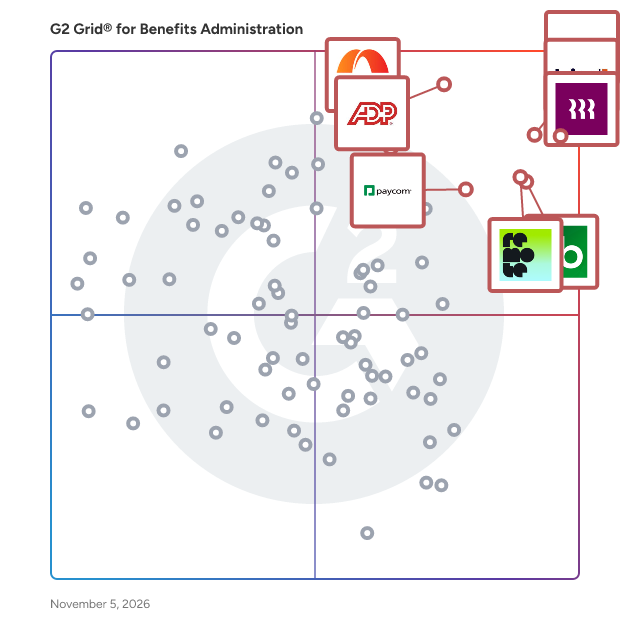
What are the top-reviewed benefits administration software on G2? Rippling, Gusto, TriNet PEO, ADP Workforce Now, and Remote lead the Fall 2026 Grid Report, with Rippling at NPS 89 and 95% likelihood to recommend.
-
How much does benefits administration software cost? Cost scales with headcount, add-on modules, and service level, and average contract terms run from 2 months for Gusto to 26 months for Workday HCM.
-
How long does it take to implement benefits administration software? Go-live averages approximately 2.3 months across nine leading products, ranging from 0.7 months for Gusto to 6.5 months for Workday HCM.
What is benefits administration software?
Benefits administration software, also called benefit administration systems or benefits administration solutions, is a platform HR teams use to plan, manage, and administer employee benefits, including insurance plans, retirement plans, and open enrollment, while tracking compliance with regulations such as the ACA and HIPAA.
In practice, the software holds plans, eligibility rules, and employee elections in one record. Employees enroll through a self-service portal at hire, during open enrollment, or after a life event; the system applies eligibility rules, and elections flow to carriers and to payroll as deductions.
The core problem it solves is fragmentation. Reviewers describe replacing separate payroll, HR, and benefits tools, and the spreadsheets between them, with one system.
G2 tracks 232 products in the category, with an average rating of 4.33/5 as of October 24, 2026. Common use cases in the category definition are:
- Managing annual open enrollment and mid-year benefits changes
- Identifying which benefits give employees the most value while reducing overall cost
-
Meeting federal and local benefits regulations, which connects to HR compliance and ACA compliance tools
The software is sold standalone or inside a wider suite, so buyers often compare it with HCM software and Core HR. It differs from employee perks software, which covers benefits outside the standard package rather than core plan administration and compliance.
Who uses benefits administration software?
Mid-market companies are the largest reviewer segment for benefits administration software on G2. In the Fall 2026 Grid Report, 47% of reviewers come from mid-market companies (51 to 1,000 employees), 34% from small businesses (50 or fewer employees), and 19% from enterprises (over 1,000 employees).
The mix shifts by product and by profile:
-
By business size: Mid-market leads for 5 of the 8 products at the top of the grid (Rippling, ADP Workforce Now, Remote, Paylocity, Paycom), and small business leads for 3 (Gusto, TriNet PEO, Justworks). Small-business splits are highest for Gusto (81%), Justworks (77%), and TriNet PEO (51%). Mid-market splits are highest for Paylocity (81%), Paycom (80%), ADP Workforce Now (71%), Rippling (61%), and Remote (54%). Enterprise reviewers concentrate in Workday HCM (77%) and Forma (73%).
-
By industry: Computer Software and Information Technology and Services lead Rippling's 2026 Benefits Administration reviews, ahead of Hospital & Health Care . The profiles of Remote, BambooHR and Justworks list the same two software and services industries among their top, while ADP Workforce Now, Paycom and Paylocity list Hospital & Health Care.
-
By profession: Gusto's profile lists owners and CEOs among its top reviewer roles, Justworks lists operations managers and CEOs, and ADP Workforce Now, Paycom and Paylocity list HR managers. Of Rippling's 994 Benefits Administration reviews in 2026 that report a role, 539 (54%) come from users and 411 (41%) from administrators.
What are the key features of benefits administration software rated by G2 reviewers?
Core features of benefits administration software include employee self-service, enrollment management, benefits recordkeeping, and compliance support, alongside eligibility tracking, payroll deduction management, benefits cost reporting, and tools that help employees compare and choose plans. In G2’s Fall 2026 Grid® Report, employee self-service is the highest-rated benefits administration feature. The following scores reflect G2’s category averages for each feature:
-
Self-service portal (89%): Gives employees a central place to view benefits options, make enrollment elections, and update their information. This helps employees handle routine benefits tasks while reducing the administrative work passed to HR.
-
Benefits record management (88%): Organizes employee benefits elections, dependent information, and plan details in one system. Maintaining these records helps HR teams track coverage and manage changes throughout the employee lifecycle.
-
Regulatory compliance (88%): Supports the recordkeeping, checks, and reporting involved in meeting benefits-related requirements. These tools help teams manage compliance work, although the specific regulations and reporting capabilities supported vary by product.
-
Enrollment planning (87%): Helps HR teams organize open enrollment and manage benefits elections for new hires and employees experiencing qualifying life events. It provides a structured way to coordinate enrollment periods and track employee selections.
-
Benefits dashboards (87%): Bring benefits information and enrollment status into a consolidated view. Administrators can use these dashboards to monitor progress, identify outstanding actions, and understand where follow-up is needed.
-
Document management (86%): Keeps benefits forms, plan documents, and supporting materials organized and accessible. Centralizing this paperwork helps HR teams maintain records and makes it easier to find the information needed for benefits administration.
Other rated capabilities extend beyond these core workflows. Mobile benefits access (86%) lets employees access benefits information from mobile devices, while total compensation statements (85%) help communicate the value of benefits alongside pay. Integrations / APIs (84%) support data exchange with other business systems, and third-party carrier integration (83%) connects benefits administration workflows with insurance providers.
Together, these ratings point to employee access and core administrative workflows as category strengths. When comparing products, buyers should also check whether carrier connections, mobile capabilities, reporting, and access controls meet their specific needs: feature satisfaction scores do not establish how extensive each product’s capabilities are.
What are the key benefits of benefits administration software identified by G2 reviewers?
Based on 2026 G2 reviews of the category's leading products like Rippling and Gusto, these are the outcomes reviewers credit most:
-
Replaces fragmented tools with one system. Reviewers of benefits administration software value having payroll, benefits, and employee information in one place, making records easier to access and reducing the need to navigate separate tools.
“I love how easy and straightforward Gusto is to use. As an employee, I mainly use it to view my paychecks, download tax documents, manage time off, and submit expense reimbursements. Everything I need is organized in one place, and the interface feels genuinely intuitive. I don’t have to waste time hunting for information or trying to figure out how to complete basic tasks. Overall, it makes the administrative side of work incredibly convenient and hassle-free.” -Kelsie A, Immigration Paralegal, Small-Business
-
Cuts manual data entry and admin time. Review feedback highlights less repetitive data entry and easier management of routine HR and payroll tasks, with connected records helping reduce administrative effort.
“What I like best is how it unifies HR, IT, and Finance into a single employee record. Onboarding a new hire takes just a few clicks because it simultaneously handles payroll setup, benefits enrollment, and hardware/app provisioning. It eliminates the need to jump between multiple disjointed systems, saving our team hours of manual data entry every single week.”
-Angelica A., Support triage, Mid-Market
-
Reduces routine requests to HR. Employees look up payslips, benefits, and documents themselves instead of asking HR for them.
“Rippling simplifies payroll management by offering a centralized platform where I can quickly access my payslips, track payments, and review my employment information in one place. It removes the hassle of manually requesting documents or reaching out to HR for basic payroll questions. Overall, it saves me time, improves transparency, and makes it much easier to manage my employment-related information efficiently.” - David Benedict M., Lead Security Analyst, Mid-Market
-
Makes open enrollment easier for employees. Step-by-step enrollment flows with cost breakdowns help employees compare plans without HR guidance.
“Rippling solves the frustration of workplace "app sprawl" by consolidating my paystubs, PTO, health benefits, and company directory into one clean dashboard. Instead of logging into multiple confusing portals or constantly emailing HR, I can manage all my employment details—from tracking vacation days to downloading tax documents—with a single sign-on. This centralization saves me significant time and eliminates administrative stress, especially during open benefits enrollment where the platform breaks down complex insurance choices into clear, step-by-step options.” -Debamrita D., Software Senior Engineer I7, Mid-Market
-
Supports compliance with less manual work. Built-in help desks and prompts keep teams current on state and local rules.
“I love that all of our international employees are in one system now. Previously, we used one system for Canada payroll and a separate system for U.S. payroll, which included an HRIS for all employees, and that setup often caused confusion for Canadian employees about which system to use for different needs. Rippling has some really nice built-in flows, like prompting an employee to update their taxes when they move to a new state or jurisdiction, which is genuinely helpful.
It’s also great that they offer so many HRIS functionalities—HR Help Desk, LMS, ATS, onboarding, goals, benefits, and more. I especially love the HR Help Desk for staying on top of compliance and state laws. Another big plus is that they remove terminated employees from the org chart automatically, which was an ongoing frustration with our last payroll company.
Employee feedback has been very positive; they like the ease of use and the fun paycheck emails.” -Crystal S., People Director, Mid-Market
What are the main challenges of benefits administration software identified by G2 reviewers?
Based on the latest reviews of benefits administration software, these are the most recurring challenges or limitations, along with what buyers can do about each:
1. Inconsistent customer support. Customer support emerges as a recurring frustration in G2 review summaries. Some reviewers praise responsive, helpful service, while others report slow replies or difficulty getting issues resolved, suggesting that support experiences vary.
“It's a little time-consuming to get through to a human customer support agent if the AI support doesn't resolve an issue or answer a question. As payroll and compliance can work on tight deadlines, there are times I've wished that there was a quicker process to reach a real person. Additionally, some of our less tech-savvy team members struggle to submit expenses for reimbursement in the current way, which is one by one or in bulk by typing into a Rippling bulk spreadsheet. This can be a little tricky, as it can add to the workloads of already busy employees. It would be great to see expense management allow bulk importing of expenses from employees via csv/spreadsheet imports for ease of use and efficiency.” - Zoya R., HR Coordinator, Small-Business
- Ask your benefits administration vendor: What support channels and response times apply to payroll and compliance issues, and when can we reach a named contact or a human agent?
- How to tackle the challenge: Test support with a real question during the trial, and compare Quality of Support ratings, which average 88% across the eight leading products (80% for ADP Workforce Now to 94% for Rippling).
2. Learning curve and configuration complexity. G2 reviewers frequently describe a steep learning curve, with navigation and configuration posing recurring challenges. Customization offers flexibility, but learning to build workflows and tailor the system can take time.
“The biggest challenge for me is that Rippling is so configurable that sometimes it can feel more complex than it needs to be. I love having the flexibility to build and customize. It definitely takes time if you have never built workflows on your own, but once you learn the process it gets a lot easier, and it saves so much time in the long run.” - Nicole L., Director of People Operations, Mid-Market
- Ask your benefits administration vendor: What training and sandbox access do you provide, and how long does admin setup take for a team our size?
- How to tackle the challenge: Plan admin training and a phased rollout ahead of open enrollment, and check Ease of Admin, which averages 88% across the eight leading products (82% for Workday HCM to 94% for Gusto and Justworks).
3. Limited features, customization, and reporting. Missing or limited functionality is a recurring concern in G2 review summaries, with reviewers noting gaps in features, customization options, and reporting capabilities.
“One area that could be improved is adding more flexibility and visibility to the time-tracking features—for example, clearer weekly summaries and simpler access to past time records. I’ve also found that some features can feel less useful depending on an employee’s role or on how the employer has configured the platform. Overall, my experience with Gusto has been positive, but more customization options and more detailed reporting would make it even more useful.” - Anissa H., Brand Assistant, Small-Business
- Ask your benefits administration vendor: Which reports, eligibility rules, and plan setups can administrators build themselves, and which need vendor support or a paid add-on?
- How to tackle the challenge: List the required reports and eligibility rules before buying, and check Customization, which averages 82% across the eight leading products (79% for Justworks to 90% for Rippling).
4. Add-on pricing. Several reviewers say features such as workflows, custom fields, and AI are priced as separate add-ons, and cost is a stated con for the PEO-style services.
“My biggest frustration with Rippling is that so many features come at an additional cost. While I appreciate the flexibility of choosing the tools that best fit an organization's needs, the add-on pricing can quickly become expensive. This is especially true of the newer AI features, which I would love to take advantage of but find difficult to justify at their current price point. These would be wonderful enhancements to an already excellent platform if they were more affordable or included in the existing subscription. I would love to see Rippling make more of these innovative features accessible without continually increasing the overall cost.” - Shawn S., HR Consultant, Mid-Market
- Ask your benefits administration vendor: Which modules, workflows, and AI features are in the quoted price, and which are billed separately?
- How to tackle the challenge: Request a line-item quote that names every module the workflow needs.
5. Carrier and system integration gaps. Third-party carrier integration and integration APIs are the two lowest-rated features, each averaging 85% across the leading products with ratings.
“Limited flexibility for local payroll requirements: Country-specific allowances, deductions, benefits, pay cycles, and statutory rules may require workarounds or additional configuration. If local payroll remains with another provider, data synchronization may still require manual intervention and reconciliation.” - Ariane Marie L., Accounting Lead, Mid-Market
- Ask your benefits administration vendor: Which insurance carriers and payroll providers do you have live feeds with, and how do enrollment changes and deductions sync?
- How to tackle the challenge: Confirm feeds for the carriers in use before signing, and test a sync with the current payroll provider.
What are the top-reviewed benefits administration software on G2?
These five top benefits administration software products lead the Fall 2026 Grid Report for Benefits Administration, listed in the order the report profiles them. The metrics shown are NPS, likelihood to recommend, and Meets Requirements from the same report.
-
Rippling: NPS 89, likelihood to recommend 95%, Meets Requirements 96%. Reviewers value the single login across HR, payroll, and IT tools and the easy access to payslips and time clocks.
-
Gusto: NPS 77, likelihood to recommend 92%, Meets Requirements 93%. Reviewers value simple payroll and a setup they describe as quicker than older systems such as ADP.
-
TriNet PEO: NPS 48, likelihood to recommend 84%, Meets Requirements 89%. Reviewers value responsive partners, efficient payroll, and comprehensive HR management through the PEO model.
-
ADP Workforce Now: NPS 44, likelihood to recommend 83%, Meets Requirements 88%. Reviewers value integrated HR functions and easy access to payroll and benefits.
-
Remote: NPS 71, likelihood to recommend 90%, Meets Requirements 91%. Reviewers value structured onboarding and responsive support for international employees.
Net Promoter Score (NPS) compares the share of reviewers likely to recommend a product with the share unlikely to. Likelihood to recommend and Meets Requirements are reviewer ratings from the Fall 2026 Grid Report. Learn how G2 calculates its scores in the G2 scoring methodology.
How much does benefits administration software cost?
Benefits administration software is priced per employee per month, usually with a base fee, a service tier, or additional products on top. Three pricing models appear across the leading products:
-
Base fee plus per-employee pricing: his model pairs a fixed monthly fee with a per-employee charge, so costs increase with headcount and the selected plan. Based on the listed Gusto and Justworks Payroll plans, pricing ranges from $49–$180 per month in base fees, plus $6–$22 per employee per month.
-
Bundled PEO pricing:This model combines payroll, HR consulting, and compliance support in a per-employee fee, with benefits administration varying by plan. Justworks PEO pricing ranges from $79–$124 per employee per month, with no base fee. PEO Plus includes medical, dental, and vision administration and HSA/FSA accounts. For 10 employees, monthly service fees range from $790–$1,240.
-
Modular, quote-based suites: This model combines a platform fee with charges for selected products. Rippling lists a starting price of $8 per employee per month plus a monthly base fee on its pricing page, then prices each additional product by custom quote. G2's Rippling pricing page shows no public prices.
Add-ons raise totals further. Justworks lists time tracking at $8 per employee per month, dedicated HR consulting at $30 per employee per month, and employer of record services at $599 per employee per month.
G2 reviewers also indicate how quickly these products pay for themselves. In the Fall 2026 Grid Report, the estimated payback period averages 12 months across the category. Among the leading products, it ranges from 5 months for Remote and 7 for Gusto to 8 for Rippling, 9 for Justworks, 10 for Paycom, 13 for Paylocity, 14 for Workday HCM, and 17 for TriNet PEO and ADP Workforce Now.
Two tips follow from these plans. First, price each product at the company's own headcount. The plan tier changes the total more than the base fee does. Second, compare what each price includes: Justworks PEO plans bundle payroll, HR consulting, and compliance support into one per-employee fee, while Rippling quotes each product separately, so we could ask every vendor for an itemized proposal.
How long does it take to implement benefits administration software?
Most leading products go live in under three months, and the average is approximately 2.3 months across the nine products below (20.5 total months divided by 9), ranging from 0.7 to 6.5 months. The Fall 2026 grid reports average months to go live for these products:
Two factors explain most of the spread. The first is product scope: payroll-first and small-business products such as Gusto and Justworks go live fastest, while broader suites and enterprise products take longer. Workday HCM, with 77% enterprise reviewers, has the longest go-live time.
The second is who does the work. Reviewers report using an in-house team for 81% of Gusto implementations and 75% of Justworks implementations, against 59% for ADP Workforce Now and Paycom and 38% for Workday HCM. Seller services teams handle 28% of ADP Workforce Now implementations, 22% of Paycom, and 21% of Paylocity, and third-party consultants handle 29% of Workday HCM implementations.
What G2 reviews show: the vendor's implementation specialist keeps the project on track, but the work of completing it still falls on the buyer.
How to choose benefits administration software?
The best benefits administration software depends on company size, carrier requirements, support needs and total cost. Six criteria follow from the G2 data above:
-
Customer fit. Mid-market companies are 47% of Grid Report reviewers, followed by small businesses (34%) and enterprises (19%), but the mix varies by product. Gusto has 81% small-business reviewers, Paylocity 81% mid-market, and Workday HCM 77% enterprise.
-
Carrier connections. Third-party carrier integration averages 85% across the leading products with ratings, one of the two lowest-rated features, so confirm that feeds exist for the carriers in use.
-
Support quality. Poor support is a con for 10 of 14 products with review summaries, and Quality of Support averages 88% across the eight leading products. Test support during the trial.
-
Full cost. Add-ons and contract terms drive spend. Terms in the grid run from 2 to 26 months, and reviewers report separate charges for workflows and AI features.
-
Implementation capacity. Go-live averages approximately 2.3 months across nine leading products and ranges from 0.7 to 6.5, and the buyer's team often does the work. Check how many hours an in-house team can commit.
-
Admin control. Ease of Admin averages 88% and Customization 82% across the eight leading products, so confirm that administrators can configure the rules and reports the program needs.
By buyer type:
-
Small businesses: Gusto and Justworks fit best, with go-live in 0.7 and 1.1 months, 81% and 77% small-business reviewers, and NPS of 77 and 78.
-
Mid-market HR teams: Rippling fits teams that want benefits, payroll, and IT in one system, with NPS 89 and Ease of Use at 96%. ADP Workforce Now, Paylocity, and Paycom fit HR-led teams that can plan for 2.4 to 3.2 months of implementation.
-
Enterprises: Workday HCM fits organizations that can support a 6.5-month implementation, and Forma fits those centered on flexible spending accounts, with 77% and 73% enterprise reviewers.
What are the most frequently asked questions about benefits administration software?
Q. How does benefits administration software work?
The software keeps one record of plans and employee elections. Employees enroll through a portal at hire, during open enrollment, or after a life event; then the system sends elections to carriers, deductions to payroll, and reports on compliance.
Q. How do carrier connections work?
Elections reach insurers through electronic data interchange (EDI), file feeds, or API connections, which removes manual re-entry. Third-party carrier integration averages 85% across the leading products with ratings, one of the two lowest-rated features in the Fall 2026 grid, so buyers should confirm which carriers a product supports.
Q. What is the difference between software-only and managed benefits administration?
Software-only products leave configuration, carrier feeds, and compliance to the buyer's team. Managed options pair the platform with a service team, as in ADP Comprehensive Services and PEO services such as TriNet PEO and ADP TotalSource. Companies usually choose managed options to cut manual HR work when benefits tasks span too many carriers, systems, and payroll handoffs, and reviewers cite cost as a con for the PEO-style services.
Q. What is the best benefits administration software for small businesses?
Gusto and Justworks have the most small-business reviewers on the Fall 2026 grid, at 81% and 77%. They also go live fastest, in 0.7 and 1.1 months, with NPS of 77 and 78.
Q. What is the best benefits administration software for mid-market companies?
Mid-market companies are the largest reviewer segment at 47%. Paylocity (81% mid-market reviewers), Paycom (80%), ADP Workforce Now (71%), and Rippling (61%) lead on mid-market reviewers, and Rippling has the highest NPS of the four at 89, against 62 for Paycom, 57 for Paylocity, and 44 for ADP Workforce Now.
Q. What is the best benefits administration software for enterprises?
Workday HCM (77% enterprise reviewers) and Forma (73%) have the most enterprise reviewers in the Fall 2026 grid. Rippling's reviewers are 3% enterprise, which makes it a stronger fit for mid-market teams.
Q. Which benefits administration software is best for technology companies that need easy integration?
Computer Software and Information Technology and Services are among the top reviewer industries for Rippling, Remote, BambooHR, and Justworks. Rippling has the highest Integration APIs rating among the leading products at 89%, ahead of Workday HCM at 87% and Gusto at 84%, and it goes live in 1.4 months on average.
Q. Which benefits administration software do operations managers trust most?
Justworks lists operations managers among its top reviewer roles, with Ease of Doing Business at 94% and an NPS of 78. Rippling has the highest Meets Requirements rating among the leading products at 96%, followed by Gusto and Justworks at 93%.
Q. Which benefits administration software offers real-time visibility without sacrificing data integrity?
Benefits dashboards average 90% across the eight leading products and are led by Rippling at 96%, with Gusto and Justworks at 92%. Benefits record management, which holds the underlying employee and plan data, also averages 90% and is led by Rippling at 95%.
Q. Which benefits administration software is simplest to set up for non-technical teams?
Ease of Use is rated 96% for Rippling, 95% for Gusto and Justworks, and 94% for Remote, and Ease of Setup is 94% for Justworks and 93% for Rippling, Gusto, and Remote. Gusto averages 0.7 months to go live and Rippling 1.4 months, and Rippling has a 61% mid-market reviewer base.
Q. Which benefits administration software avoids expensive implementation or outside consulting?
Third-party consultants handle 29% of Workday HCM implementations and 6% or less for every other leading product in the Fall 2026 grid. In-house teams run 81% of Gusto and 75% of Justworks implementations, and Gusto averages 0.7 months to go live, while cost is a stated con for the PEO-style services TriNet PEO and ADP TotalSource.
Q. Which benefits administration software do teams keep using after rollout?
G2 does not publish a retention rate. The closest signals are likelihood to recommend and NPS: Rippling 95% and 89, Justworks 92% and 78, Gusto 92% and 77, and Remote 90% and 71. Ease of Use is 94% or higher for all four, which supports day-to-day adoption.
Q. How is benefits administration software different from HCM or HRIS software?
Rippling, ADP Workforce Now, and Workday HCM bundle core HR, payroll, and benefits. Benefits administration software focuses on plan setup, enrollment, carrier connections, and compliance, and is sold standalone or inside a suite. See HCM software and Core HR for suite comparisons.
Q. Can benefits administration software support employees in multiple countries?
Internationalization ratings in the Fall 2026 grid are 89% for Rippling, 86% for Remote, and 85% for Workday HCM, against 79% for ADP Workforce Now and Paycom and 77% for Paylocity.
Q. How does the software handle qualifying life events?
A life event such as marriage, a birth, or loss of coverage opens a mid-year change window, and the system collects the required documents and passes the change to carriers and payroll. Enrollment planning averages 89% across the eight leading products and is led by Rippling at 95%.
Sources
-
G2 Grid Report for Benefits Administration, Fall 2026: feature ratings, satisfaction by category, customer size and implementation data
-
G2 Benefits Administration category page: category stats (updated October 24, 2026) and review summaries
- G2 scoring methodology
-
G2 product pages: Rippling, Gusto, TriNet PEO, ADP Workforce Now, Remote, Justworks, Paylocity, Paycom, Workday HCM, Forma, ADP TotalSource and ADP Comprehensive Services
- 2026 G2 reviews cited above, each linked in place
Data as of November, 2026.