Best Note-Taking Software

How Many Note-Taking Software Products Does G2 Track?

Total Products under this Category: 243

Category Stats (Nov 2026)

  • Average Rating: 4.4/5 (↑0.01 vs Oct 2026) The average rating of products in this category, based on all submitted ratings
  • Top Trending Product: Fyxer (+1.05%) - Among all products in this category, Fyxer recorded the largest rating increase compared to last month

Last updated: November 01, 2026

How Does G2 Rank Note-Taking Software Products?

Why You Can Trust G2's Software Rankings:

  • 30 Analysts and Data Experts
  • 103,800+ Authentic Reviews
  • 243+ Products
  • Unbiased Rankings

G2's software rankings are built on verified user reviews, rigorous moderation, and a consistent research methodology maintained by a team of analysts and data experts. Each product is measured using the same transparent criteria, with no paid placement or vendor influence. While reviews reflect real user experiences, which can be subjective, they offer valuable insight into how software performs in the hands of professionals. Together, these inputs power the G2 Score, a standardized way to compare tools within every category.

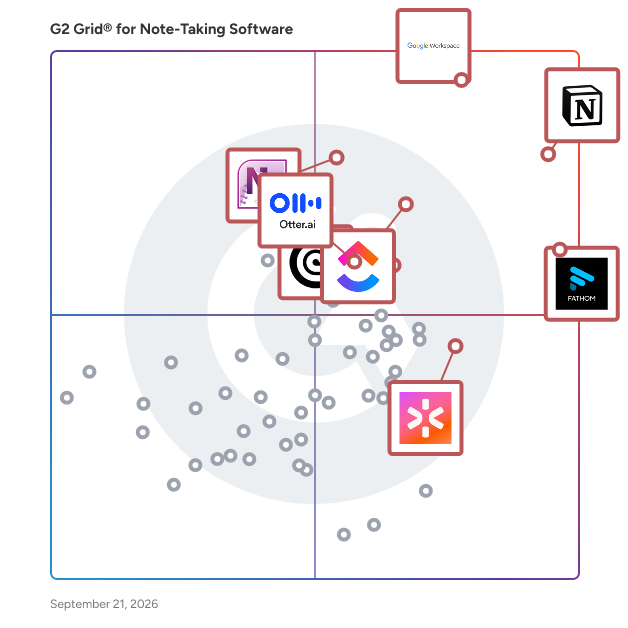
G2 Grid® for Note-Taking Software

G2 Grid® for Note-Taking Software plotting products by satisfaction and market presence

Highlighted products: Notion, Google Workspace, Fathom, ClickUp, Microsoft OneNote, Rev, CoRecruit (formerly Quil), and Otter.ai.

Underlying data: [Grid® JSON](https://www.g2.com/categories/note-taking-software/grids.json?focus%5B%5D=notion&focus%5B%5D=google-workspace&focus%5B%5D=fathom-video&focus%5B%5D=clickup&focus%5B%5D=microsoft-onenote&focus%5B%5D=rev&focus%5B%5D=corecruit-formerly-quil&focus%5B%5D=otter-ai)

Notion

Notion is the connected AI workspace that brings all work together in a tool that adapts to every team—with AI to find answers and automate busywork. It's one place for search, manage projects, capture notes and company knowledge, and collaborate as a team. Millions love Notion because it increases productivity, reduces tools & costs, and empowers everyone to do their best work. Unlike fragmented, rigid software, Notion connects work into one tool that’s customizable and people love to use. Now you have beautiful tools to build your life’s work.

Average Rating: 4.6/5.0

Total Reviews: 12,615

How Do G2 Users Rate Notion?

  • Has the product been a good partner in doing business?: 8.8/10 (Category avg: 9.1/10)
  • Quality of Support: 8.4/10 (Category avg: 8.5/10)
  • Ease of Use: 8.3/10 (Category avg: 8.9/10)

Who Is the Company Behind Notion?

  • Seller: Notion
  • Company Website:
  • Year Founded: 2016
  • HQ Location: San Francisco, California
  • LinkedIn® Page: www.linkedin.com
    7,360 employees on LinkedIn®

Who Uses This Product?

  • Who Uses This: Software Engineer, Student
  • Top Industries: Computer Software, Information Technology and Services
  • Company Size: 62% Small, 24% Medium

What Do G2 Reviewers Say About Notion?

AI-generated summary from verified user reviews

Pros
  • Users value its intuitive, user-friendly design, which makes everyday work easy to navigate and use.
  • Users value the flexible customization that lets them shape pages and workspaces around their needs and workflows.
  • Users value having work, information, and tools centralized in one organized workspace, making everything easier to access and manage.
  • Users like how easily they can organize notes, work, and information into structured pages, keeping everything tidy and accessible.
  • Users find setup quick and straightforward, helping them get started with little effort.
Cons
  • Users say the steep learning curve and time needed to become comfortable can make getting started difficult.
  • Users report slow loading and lag, especially with large or complex pages and databases.
  • Users find the interface confusing, unintuitive, and sometimes clunky to use.
  • Users find the abundance of features and customization options overwhelming, making the platform difficult to learn and manage.
  • Users find the initial setup confusing and time-consuming, especially when building a workspace or workflow that fits their needs.

What Are Recent G2 Reviews of Notion?

Google Workspace

Google Workspace is a comprehensive productivity and collaboration solution designed to help users streamline their work processes by integrating essential tools such as email, chat, file storage, and video conferencing into a unified platform. This suite of applications is tailored for businesses, educational institutions, and individuals looking to enhance their communication and collaboration efforts, all while leveraging the power of Google’s artificial intelligence. Targeted at a diverse audience, Google Workspace caters to teams of all sizes, from small startups to large enterprises. It is particularly beneficial for remote teams and organizations that prioritize collaboration across different locations. The platform supports various use cases, including project management, team communication, document sharing, and virtual meetings, making it an ideal choice for professionals who need to work together efficiently, regardless of their physical location. One of the key features of Google Workspace is its seamless integration of applications such as Gmail, Google Meet, Google Drive, and Google Docs. This interconnectedness allows users to switch effortlessly between tasks, whether they are sending emails, participating in video calls, or collaborating on documents in real-time. The AI capabilities embedded within the platform enhance user experience by providing smart suggestions, automating repetitive tasks, and improving search functionalities, ultimately saving time and increasing productivity. Additionally, Google Workspace prioritizes security and data protection, offering robust features such as two-factor authentication, advanced phishing protection, and customizable access controls. These measures ensure that sensitive information remains secure while allowing teams to collaborate freely. The platform also supports third-party integrations, enabling users to connect their favorite applications and tools, further enhancing their workflow. In summary, Google Workspace stands out in the productivity software category by providing a holistic approach to collaboration. Its user-friendly interface, combined with powerful AI-driven features and strong security protocols, makes it a valuable tool for anyone looking to improve their work processes and foster effective teamwork. Whether for managing projects, communicating with colleagues, or sharing files, Google Workspace is designed to meet the diverse needs of its users, making it an essential resource in today’s digital workplace.

Average Rating: 4.6/5.0

Total Reviews: 45,741

How Do G2 Users Rate Google Workspace?

  • Has the product been a good partner in doing business?: 9.0/10 (Category avg: 9.1/10)
  • Quality of Support: 8.6/10 (Category avg: 8.5/10)
  • Ease of Use: 9.3/10 (Category avg: 8.9/10)

Who Is the Company Behind Google Workspace?

  • Seller: Google
  • Year Founded: 1998
  • HQ Location: Mountain View, CA
  • LinkedIn® Page: www.linkedin.com
    301,144 employees on LinkedIn®
  • Ownership: NASDAQ:GOOG
  • Phone: +1 (650) 253-0000

Who Uses This Product?

  • Who Uses This: Student, Teacher
  • Top Industries: Information Technology and Services, Education Management
  • Company Size: 47% Small, 35% Medium

What Do G2 Reviewers Say About Google Workspace?

AI-generated summary from verified user reviews

Pros
  • Users like its intuitive, familiar interface and simple navigation, making everyday tasks easy to handle.
  • Users like smooth integration across Workspace apps and outside tools, helping keep workflows connected and efficient.
  • Users value real-time co-editing, which lets teams work together on shared documents and review changes as they happen.
  • Users value having work tools together in one place, making it easier to access resources and manage everyday tasks.
  • Users find everyday work simpler and more efficient, helping them save time and get tasks done faster.
Cons
  • Users find offline functionality limited and sometimes unreliable, with editing and access constrained without an internet connection.
  • Users find subscription costs high, and expenses can rise as teams grow or plans are upgraded.
  • Users find the apps lack depth and power for advanced work compared with desktop and specialized tools.
  • Users find the interface cluttered and unintuitive, making navigation and settings difficult to manage.
  • Users find sharing and managing file permissions confusing, especially across large teams, shared drives, and external collaborators.

What Are Recent G2 Reviews of Google Workspace?

What Are G2 Users Discussing About Google Workspace?

Fathom

Fathom, the #1-rated AI meeting partner, captures what matters in every conversation and turns it into momentum for what comes next. Now part of Superhuman. ● Meeting Capture: Bot-based or fully Bot-Free - join with a visible notetaker or record silently, your choice, on every call. Bot-Free available on Mac today; Windows coming soon. ● Mobile: iOS app ● Meeting Intelligence: Ask Fathom instantly answers questions across your entire meeting history. Trackers proactively alert you when topics you care about come up. And Fathom's MCP integration brings your meeting context directly into Claude and ChatGPT, plus syncs with your CRM and productivity tools. Recognition: Named to G2's 2026 Best Software Awards Top 100 and HubSpot's 2025 Most Used App of the Year. Outcome: Fathom turns meetings into a searchable, connected knowledge base - teams spend less time on admin and more time acting on what was decided, with the intelligence to back it up.

Average Rating: 5.0/5.0

Total Reviews: 7,126

How Do G2 Users Rate Fathom?

  • Has the product been a good partner in doing business?: 9.7/10 (Category avg: 9.1/10)
  • Quality of Support: 9.7/10 (Category avg: 8.5/10)
  • Ease of Use: 9.7/10 (Category avg: 8.9/10)

Who Is the Company Behind Fathom?

  • Seller: Superhuman
  • Company Website:
  • HQ Location: San Francisco, California
  • LinkedIn® Page: www.linkedin.com
    7,182 employees on LinkedIn®

Who Uses This Product?

  • Who Uses This: CEO, Founder
  • Top Industries: Marketing and Advertising, Computer Software
  • Company Size: 78% Small, 20% Medium

What Do G2 Reviewers Say About Fathom?

AI-generated summary from verified user reviews

Pros
  • Users appreciate the excellent summarization and note-taking capabilities of Fathom, enhancing their meetings and workflow efficiency.
  • Users value the accuracy of summaries and transcripts from Fathom, enhancing clarity and efficiency in meetings.
  • Users find Fathom to be a highly helpful note-taker, enhancing efficiency and clarity in their meeting documentation.
  • Users find Fathom to be an easy-to-use note-taking tool, seamlessly integrating into their workflows and enhancing efficiency.
  • Users find Fathom's note-taking capabilities invaluable for summarizing meetings and enhancing productivity with accurate context.
Cons
  • Users face recording errors during long pauses and difficulties with automatic app loading on Fathom.
  • Users experience recording issues with Fathom, particularly with transcriptions and missed speakers during discussions.
  • Users find the missing features in Fathom hinder usability, particularly concerning call attribution and transcript visibility.
  • Users often face call issues with Fathom, experiencing difficulties with account selection and recording quality.
  • Users face recording limitations with Fathom, struggling to retrieve long pause recordings and navigating storage constraints.

What Are Recent G2 Reviews of Fathom?

AI can help you find the answers. G2 helps you trust them.

Connect G2 to Claude or ChatGPT for answers grounded in G2's trusted reviews, comparisons, and pricing from real user insights.

How it works

ClickUp

ClickUp is the world’s first Converged AI Workspace, bringing together all work apps, data, and workflows. ClickUp eliminates all forms of work sprawl to provide 100% context and a single place for humans and agents to work, together. Trusted by more than 20 million users worldwide, ClickUp is on a mission to maximize human productivity.

Average Rating: 4.6/5.0

Total Reviews: 14,521

How Do G2 Users Rate ClickUp?

  • Has the product been a good partner in doing business?: 9.0/10 (Category avg: 9.1/10)
  • Quality of Support: 8.8/10 (Category avg: 8.5/10)
  • Ease of Use: 8.5/10 (Category avg: 8.9/10)

Who Is the Company Behind ClickUp?

  • Seller: ClickUp
  • Company Website:
  • Year Founded: 2017
  • HQ Location: San Diego, California
  • LinkedIn® Page: www.linkedin.com
    7,082 employees on LinkedIn®

Who Uses This Product?

  • Who Uses This: CEO, Project Manager
  • Top Industries: Marketing and Advertising, Computer Software
  • Company Size: 77% Small, 19% Medium

What Do G2 Reviewers Say About ClickUp?

AI-generated summary from verified user reviews

Pros
  • Users value the flexible customization that lets them tailor workflows, workspaces, and views to their needs.
  • Users like having tasks, projects, documents, and communication centralized in one workspace, reducing the need to switch between multiple apps.
  • Users like the organized task management that helps them plan, track, and keep projects and work in order.
  • Users like its straightforward, intuitive design, which makes daily tasks easy to navigate and learn.
  • Users find team setup quick and straightforward, helping them get started with little effort.
Cons
  • Users face a steep learning curve, with the interface and features taking time to understand and use effectively.
  • Users say the interface can feel slow or laggy, especially when loading or working in large workspaces.
  • Users find the abundance of features and options overwhelming, making the platform feel more complex than necessary.
  • Users find the initial setup complicated and time-consuming, especially when configuring workspaces and workflows.
  • Users say the interface can feel cluttered and overwhelming, with too many visible controls and information.

What Are Recent G2 Reviews of ClickUp?

What Are G2 Users Discussing About ClickUp?

Microsoft OneNote

Microsoft OneNote is a note-taking application designed to help users capture, organize, and share information across various devices. It allows for the creation of digital notebooks where users can input text, drawings, screen clippings, and audio commentaries. OneNote's free-form canvas enables users to place content anywhere on the page, facilitating a flexible and intuitive note-taking experience. Integrated with Microsoft 365, OneNote supports real-time collaboration, allowing multiple users to edit and share notes simultaneously. Its cross-platform availability ensures seamless access to notes on Windows, macOS, iOS, Android, and through web browsers. Key Features and Functionality: - Flexible Note-Taking: Users can type, handwrite, or draw notes, insert images, and embed multimedia content, accommodating various input preferences. - Organizational Tools: Notebooks are structured into sections and pages, with powerful search capabilities to quickly locate information. - Collaboration: Multiple users can work on the same notebook simultaneously, with changes synced in real-time, enhancing teamwork and productivity. - Integration with Microsoft 365: Seamless integration with other Microsoft applications like Word, Excel, and PowerPoint allows for easy sharing and embedding of content. - Cross-Platform Accessibility: OneNote is available on various platforms, including Windows, macOS, iOS, Android, and web browsers, ensuring access to notes from any device. Primary Value and User Solutions: OneNote addresses the need for a centralized, flexible, and collaborative note-taking solution. It simplifies information management by allowing users to capture diverse content types in a single location, organize them effectively, and access them across multiple devices. The application's collaborative features enhance teamwork by enabling shared access and real-time editing, making it ideal for both personal productivity and professional projects. By integrating with the Microsoft 365 suite, OneNote streamlines workflows and ensures that users have the tools they need to capture ideas, plan projects, and share information efficiently.

Average Rating: 4.5/5.0

Total Reviews: 1,827

How Do G2 Users Rate Microsoft OneNote?

  • Has the product been a good partner in doing business?: 8.9/10 (Category avg: 9.1/10)
  • Quality of Support: 8.6/10 (Category avg: 8.5/10)
  • Ease of Use: 8.9/10 (Category avg: 8.9/10)

Who Is the Company Behind Microsoft OneNote?

  • Seller: Microsoft
  • Year Founded: 1975
  • HQ Location: Redmond, Washington
  • LinkedIn® Page: www.linkedin.com
    232,750 employees on LinkedIn®
  • Ownership: MSFT
  • Phone: +1 (877) 276-2464

Who Uses This Product?

  • Who Uses This: Student, Project Manager
  • Top Industries: Information Technology and Services, Computer Software
  • Company Size: 44% Large, 30% Medium

What Do G2 Reviewers Say About Microsoft OneNote?

AI-generated summary from verified user reviews

Pros
  • Users value the adaptability of OneNote for effective note-taking across personal and professional contexts.
  • Users value the adaptability of Microsoft OneNote for both personal and professional note organization and information management.
  • Users value the seamless integrations of Microsoft OneNote, enhancing their note-taking and information management experience.
  • Users appreciate the ease of use of Microsoft OneNote, highlighting its user-friendly interface and straightforward setup.
  • Users love the flexibility of Microsoft OneNote, enabling seamless organization and access to notes anytime, anywhere.
Cons
  • Users often face connectivity issues with OneNote, impacting syncing and online features across devices.
  • Users find the UI clutter of Microsoft OneNote hampers usability, especially for new users navigating its interface.
  • Users experience limited features in OneNote, particularly with syncing issues and basic formatting options compared to competitors.
  • Users face note-taking issues with lagging typing speeds and challenging export and print settings in OneNote.
  • Users struggle with organization difficulties in OneNote, leading to messy notebooks without strict structural guidelines.

What Are Recent G2 Reviews of Microsoft OneNote?

What Are G2 Users Discussing About Microsoft OneNote?

Rev

Rev is the Investigative Platform that turns digital evidence into a searchable, citable record, built for attorneys, prosecutors, law enforcement, and investigators who are drowning in evidence. Body-worn camera footage, dash cam video, jail calls, 911 recordings, witness interviews, photos, and depositions pile up faster than any team can review by hand, and Rev exists to close that gap between the evidence teams have and the time they have to work through it. Rev combines industry-leading speech recognition, purpose-built for the hardest audio environments in legal and law enforcement, with AI that cites every finding back to a timestamp or image in the original source file. Nothing is generated without being verifiable. That distinction matters: legal transcription accuracy is table stakes, but a citation that can't be traced back to the record isn't useful in a courtroom, a suppression hearing, or an internal affairs review. Every result Rev produces is built to hold up under that kind of scrutiny. What sets Rev apart is what happens after transcription. Investigators and attorneys can search across dozens of files at once instead of reviewing one recording at a time, surfacing the inconsistency or the corroborating detail before opposing counsel or the other side finds it first. Rev also analyzes images and video stills for relevant visual evidence, and it drafts reports, memos, and case documents directly from the record, cutting down the time spent moving information from a recording into a usable document. All of this happens without replacing the judgment of the professional responsible for the case. Rev keeps humans in control by design, and when precision is non-negotiable, optional human review adds another layer of assurance. Security is built in, not bolted on. Rev meets CJIS, HIPAA, and SOC 2 compliance standards and shares zero data with third-party LLMs. Evidence stays in a closed loop, and nothing trains a third-party model, ever. That makes Rev usable in environments where general-purpose AI tools create real ethical and security risk for legal and investigative teams working with sensitive case data. The result is faster case review, fewer missed details, fewer overtime hours, and more time spent on analysis and decision-making instead of playback and paperwork. Responsibility for judgment stays exactly where it belongs, with the people trained to exercise it.

Average Rating: 4.7/5.0

Total Reviews: 644

How Do G2 Users Rate Rev?

  • Has the product been a good partner in doing business?: 9.5/10 (Category avg: 9.1/10)
  • Quality of Support: 9.2/10 (Category avg: 8.5/10)
  • Ease of Use: 9.4/10 (Category avg: 8.9/10)

Who Is the Company Behind Rev?

  • Seller: Rev.com
  • Company Website:
  • Year Founded: 2010
  • HQ Location: Austin, Texas
  • LinkedIn® Page: www.linkedin.com
    3,968 employees on LinkedIn®
  • Ownership: NYSE: REVG

Who Uses This Product?

  • Who Uses This: Attorney, Owner
  • Top Industries: Marketing and Advertising, Higher Education
  • Company Size: 60% Small, 23% Medium

What Do G2 Reviewers Say About Rev?

AI-generated summary from verified user reviews

Pros
  • Users value the accuracy of transcriptions from Rev, which saves time and enhances meeting note quality.
  • Users appreciate the time-saving and accurate transcriptions from Rev, making meeting note creation hassle-free and efficient.
  • Users appreciate the ease of use of Rev, enabling quick and accurate transcription without hassle.
  • Users value the high transcription accuracy of Rev, significantly reducing time spent creating and verifying meeting notes.
  • Users value Rev for its time-saving benefits, efficiently transcribing meetings and summarizing notes without hassle.
Cons
  • Users find the inaccurate transcription of dialects and accents frustrating, requiring them to make corrections manually.
  • Users find Rev struggles with AI inaccuracy, particularly in understanding dialects and quiet speech, leading to inconvenient corrections.
  • Users report significant inaccuracy in transcriptions especially under noisy conditions or with quieter speech, requiring extensive edits.
  • Users are frustrated with Rev's poor transcription accuracy, particularly with dialects and accents affecting transcription quality.
  • Users express frustration with recording limitations, including Wi-Fi dependency and minute caps affecting their transcription needs.

What Are Recent G2 Reviews of Rev?

What Are G2 Users Discussing About Rev?

CoRecruit (formerly Quil)

CoRecruit is an AI recruiting platform designed to eliminate the "admin tax" for high-performing agencies. Built for mid-market and enterprise search firms, CoRecruit automatically transforms every interview into fully updated ATS records and polished, client-ready candidate submissions. Recruiting at scale fails when critical information lives only in a recruiter’s head. CoRecruit captures the nuance of every conversation—whether it happens over a cell phone call, VoIP, video conference, or in-person—and turns it into structured, actionable data. By automating the transition from "interview" to "submission," CoRecruit allows teams to move candidates faster and increase placement volume without adding headcount. On average, recruiting teams using CoRecruit reclaim 8+ hours per week per recruiter, ensuring that data stays consistent and high-value talent never falls through the cracks. Key Features and Functionality Omnichannel Interview Capture: The only platform that supports the full recruiter workflow: mobile calls, VoIP (RingCentral, Aircall), video (Zoom, Teams, Meet), and even in-person meetings. Deep ATS/CRM Synchronization: Bi-directional integration with Bullhorn, JobAdder, Loxo, Crelate, and more. Notes, candidate attributes, and statuses update automatically—no manual data entry required. Automated Candidate Submittals: Generate "client-ready" candidate summaries and branded write-ups instantly. Reduce client pushback by delivering consistent, professional submissions every time. Structured Team Data: Standardize interviews, intake calls, and BD meetings with reusable templates. Ensure every recruiter on the team captures the exact data points required for your specific vertical. CoRecruit Intelligence: A powerful search layer across your entire firm’s conversations. Instantly surface candidate insights or specific interview details across thousands of past meetings. Leadership Coaching Tools: Gain visibility into the "black box" of interviews. Leaders can review call context to provide targeted coaching and improve team-wide closing rates.

Average Rating: 4.7/5.0

Total Reviews: 500

How Do G2 Users Rate CoRecruit (formerly Quil)?

  • Has the product been a good partner in doing business?: 9.2/10 (Category avg: 9.1/10)
  • Quality of Support: 9.5/10 (Category avg: 8.5/10)
  • Ease of Use: 9.0/10 (Category avg: 8.9/10)

Who Is the Company Behind CoRecruit (formerly Quil)?

Who Uses This Product?

  • Who Uses This: Recruitment Consultant, Managing Director
  • Top Industries: Staffing and Recruiting, Consulting
  • Company Size: 87% Small, 6% Medium

What Do G2 Reviewers Say About CoRecruit (formerly Quil)?

AI-generated summary from verified user reviews

Pros
  • Users appreciate the ease of use of CoRecruit, allowing them to focus on meaningful conversations without distractions.
  • Users value the time-saving features of CoRecruit, allowing them to focus on conversations without note-taking distractions.
  • Users appreciate the efficient note-taking feature of CoRecruit, allowing them to focus more on conversations.
  • Users appreciate the exceptional customer support of CoRecruit, enhancing efficiency and focus during client interactions.
  • Users value the time-saving transcription and recording features of CoRecruit, allowing focus on meaningful conversations.
Cons
  • Users experience connectivity issues with dropped calls and low volume, complicating their overall experience with CoRecruit.
  • Users experience bugs with CoRecruit, including dropped calls, awkward silences, and app performance issues.
  • Users find integration issues with CoRecruit challenging, affecting meeting experiences and mobile call handling.
  • Users experience occasional inaccuracies in transcription, particularly with accents and technical terms, requiring minor edits.
  • Users find the inefficiency in tracking calls and data, noting difficulty in integration and repetitive outputs.

What Are Recent G2 Reviews of CoRecruit (formerly Quil)?

Otter.ai

Otter.ai is the leading AI Meeting Assistant that helps sales, marketing, product, finance, operations design, customer success, customer support and cross functional teams automatically record, transcribe, and summarize all their meetings, making it easy to recall action items and easily share key insights. Otter integrates with leading video conference platforms, including Zoom, Microsoft Teams, and Google Meet, to automatically join and generate meeting notes. Otter AI Chat is like having ChatGPT for your meetings, it allows meeting participants to ask Otter questions about the meeting, including “what did I miss”, or “write a follow-up email to all participants”. Otter offers iOS and Android Apps to make it easy to record and transcribe in-person meetings. Otter also allows users to import and transcribe pre-recorded audio and video files. Designed specifically for the workflow of sales teams, OtterPilot for Sales shortens sales cycles by capturing critical information in real-time and automating follow-up emails and sentiment analysis. OtterPilot for Sales integrates with Salesforce and Hubspot to help automate call reporting. Improve win rates by sharing best practices and coaching reps based on data-driven insights. Boost productivity and free up time by automating tedious tasks like note-taking and data entry so SDRs, Sale Reps, Account Executives, Customer Success Managers, Sales Leaders and CROs can focus all of their attention on the customer and closing more deals. Otter.ai has over 15 million registered users and has transcribed over a billion meetings. Otter was named a top AI App by The Wall Street Journal in June 2023.

Average Rating: 4.4/5.0

Total Reviews: 529

How Do G2 Users Rate Otter.ai?

  • Has the product been a good partner in doing business?: 8.6/10 (Category avg: 9.1/10)
  • Quality of Support: 8.5/10 (Category avg: 8.5/10)
  • Ease of Use: 9.0/10 (Category avg: 8.9/10)

Who Is the Company Behind Otter.ai?

  • Seller: Otter.ai
  • Company Website:
  • HQ Location: Mountain View, California
  • LinkedIn® Page: www.linkedin.com
    298 employees on LinkedIn®

Who Uses This Product?

  • Who Uses This: CEO, Founder
  • Top Industries: Computer Software, Marketing and Advertising
  • Company Size: 70% Small, 21% Medium

What Do G2 Reviewers Say About Otter.ai?

AI-generated summary from verified user reviews

Pros
  • Users appreciate the ease of use of Otter.ai, benefiting from seamless integration and efficient meeting organization.
  • Users appreciate the helpful summaries and transcription features of Otter.ai, enhancing meeting productivity and retention.
  • Users value the high accuracy of Otter.ai, appreciating effective meeting transcriptions and helpful summaries.
  • Users praise the excellent transcription capabilities of Otter.ai, particularly enjoying the browser extension for enhanced functionality.
  • Users value the effective transcription and summarization features of Otter.ai, enhancing meeting productivity and information retention.
Cons
  • Users report recording issues with inaccuracies, inconsistent speaker identification, and challenges in noisy environments.
  • Users experience accuracy issues with Otter.ai, particularly with diverse accents affecting transcription reliability.
  • Users experience AI inaccuracy with Otter.ai, especially with diverse regional and accent pronunciations affecting transcription quality.
  • Users find the inaccuracy in transcription frustrating, especially with diverse accents affecting overall performance.
  • Users note the missing features in Otter.ai, impacting transcription accuracy and limiting advanced workflow capabilities.

What Are Recent G2 Reviews of Otter.ai?

What Are G2 Users Discussing About Otter.ai?

Bluedot

Bluedot is a secure, privacy-first AI note-taker that records, transcribes, and summarizes online and in-person meetings without sending a bot into your calls. It captures audio directly from your device and supports audio and video recording across Chrome, macOS, Windows, iOS, Android, and Apple Watch. Bluedot is GDPR-compliant, SOC 2 Type II audited, and never uses customer data to train AI models. Named one of Google's favorite Chrome extensions in 2025, Bluedot is trusted by 50,000+ companies, from startups to enterprises.

Average Rating: 4.8/5.0

Total Reviews: 223

How Do G2 Users Rate Bluedot?

  • Has the product been a good partner in doing business?: 9.0/10 (Category avg: 9.1/10)
  • Quality of Support: 9.4/10 (Category avg: 8.5/10)
  • Ease of Use: 9.5/10 (Category avg: 8.9/10)

Who Is the Company Behind Bluedot?

  • Seller: Twiso
  • Company Website:
  • HQ Location: London, United Kingdom
  • LinkedIn® Page: www.linkedin.com
    22 employees on LinkedIn®

Who Uses This Product?

  • Who Uses This: CEO, Recruiter
  • Top Industries: Computer Software, Information Technology and Services
  • Company Size: 66% Small, 19% Medium

What Do G2 Reviewers Say About Bluedot?

AI-generated summary from verified user reviews

Pros
  • Users appreciate the ease of use with Bluedot, effortlessly capturing notes and streamlining meeting preparation.
  • Users appreciate the ease of note-taking with Bluedot, making task assignment and conversation capture seamless.
  • Users value the impressive transcription accuracy of Bluedot, effectively capturing detailed and technical conversations seamlessly.
  • Users appreciate the automated meeting transcription and summaries from Bluedot, enhancing organization and saving valuable time.
  • Users appreciate the high quality of transcripts from Bluedot, allowing effortless focus during calls without note-taking distractions.
Cons
  • Users note some missing features in Bluedot, including limited integrations and issues with speaker identification during calls.
  • Users experience recording issues with Bluedot, especially with speaker identification and limited integrations, affecting usability.
  • Users note that transcript accuracy can falter during multiple speaker discussions, requiring minor edits for clarity.
  • Users experience AI inaccuracy in speaker recognition, especially during overlapping dialogue, affecting overall transcription quality.
  • Users feel that Bluedot's pricing is expensive for active teams, making it a consideration before signing up.

What Are Recent G2 Reviews of Bluedot?

Evernote Teams

Evernote Business brings your teams work together. Create documents, collaborate on projects, and store information all in one place. Teammates can access, edit, upload, and share notes and files from any device--even if theyre offline. Cut through the noise, and quickly find the information you need with powerful search capabilities and integrations with tools you already use. Unify your workflow with Evernote Business.

Average Rating: 4.3/5.0

Total Reviews: 77

How Do G2 Users Rate Evernote Teams?

  • Has the product been a good partner in doing business?: 9.2/10 (Category avg: 9.1/10)
  • Quality of Support: 8.9/10 (Category avg: 8.5/10)
  • Ease of Use: 8.9/10 (Category avg: 8.9/10)

Who Is the Company Behind Evernote Teams?

  • Seller: Evernote
  • Year Founded: 2008
  • HQ Location: Redwood City, CA
  • LinkedIn® Page: www.linkedin.com
    175 employees on LinkedIn®

Who Uses This Product?

  • Top Industries: Computer Software, Information Technology and Services
  • Company Size: 51% Small, 35% Medium

What Are Recent G2 Reviews of Evernote Teams?

What Are G2 Users Discussing About Evernote Teams?

Claap

Claap is conversation intelligence for sales teams. It records your video calls, phone calls and in-person meetings (with or without a bot), syncs your emails, and turns every conversation into trusted data your AI agents can use to keep your CRM accurate, catch deal risks early and scale your playbook. Every conversation is transcribed, labeled and structured for retrieval, then opened to any AI agent through MCP (Model Context Protocol). From there, agents take over the rest: updating your CRM, drafting follow-up emails and sales decks, surfacing coaching insights and triggering workflows across your stack. Claap is part of the lemlist group and used by 10,000+ sales reps at companies including Revolut, Qonto, Skello, Figures and OpenClassrooms.

Average Rating: 4.6/5.0

Total Reviews: 485

How Do G2 Users Rate Claap?

  • Has the product been a good partner in doing business?: 9.1/10 (Category avg: 9.1/10)
  • Quality of Support: 9.1/10 (Category avg: 8.5/10)
  • Ease of Use: 9.4/10 (Category avg: 8.9/10)

Who Is the Company Behind Claap?

  • Seller: Claap
  • Year Founded: 2021
  • HQ Location: Hempstead, New York
  • LinkedIn® Page: www.linkedin.com
    49 employees on LinkedIn®

Who Uses This Product?

  • Who Uses This: Software Engineer, Manager
  • Top Industries: Computer Software, Information Technology and Services
  • Company Size: 46% Small, 39% Medium

What Do G2 Reviewers Say About Claap?

AI-generated summary from verified user reviews

Pros
  • Users appreciate the ease of use of Claap, facilitating quick onboarding and efficient feedback sharing.
  • Users appreciate Claap for its time-saving capabilities, enabling efficient feedback and reducing unnecessary meetings.
  • Users find Claap's AI-native recording technology invaluable for efficient collaboration and reducing meeting disruptions.
  • Users appreciate the easy recording feature of Claap, enhancing collaboration and streamlining feedback without disrupting meetings.
  • Users commend Claap for its efficiency in enabling quick feedback and seamless async collaboration without unnecessary meetings.
Cons
  • Users find recording limitations frustrating, particularly with the free plan's 10-minute video cap and processing delays.
  • Users experience slow performance with Claap, especially during video processing, leading to frustration and delays.
  • Users experience slow loading times with Claap, especially when processing high volumes of videos.
  • Users report recording issues that can lead to confusion and inconvenience during meetings, affecting usability.
  • Users experience frustrating delays with video processing and uploads, impacting efficiency and overall satisfaction with Claap.

What Are Recent G2 Reviews of Claap?

Goodnotes

Goodnotes was founded back in 2013 and currently has offices in Hong Kong and London with 200+ employees from 30+ nationalities. Our app offers industry-first digital paper, powered by AI, and with over 26 million monthly active users and average rating of 4.75/5 from 1.8 million user reviews, Goodnotes is the No. 1 App for Productivity on the App Store. We won Apple’s iPad App of the Year for 2022. Goodnotes 6 is a powerful note-taking app designed to provide a seamless and natural handwriting experience on digital paper. The comprehensive solution combines the simplicity of handwriting, the power of digital tools, and advanced AI features to enhance productivity, planning, organization and live collaboration. Whether you're in a meeting, on a call, or brainstorming, Goodnotes keeps your ideas organized and accessible. Key Features: - Seamless Handwriting Experience - PDF Document Annotation - Sharing & Collaboration - Advanced Spell-check & Word Prediction - Shape Recognition - Voice Recording - Sync Across Devices Enjoy seamless digital handwriting with real-time spell-check and intelligent word prediction, helping you maintain both accuracy and speed. Import and annotate any document, including PDFs and images, highlight, underline, create, save and reuse your custom designs, graphics and elements, take notes directly within the documents and share with your team to collaborate on in real time. Sync your notes across all your devices effortlessly, ensuring you have access to your important information anytime, anywhere. Effortlessly draw and create perfect shapes with our intelligent shape recognition technology, ensuring your diagrams and illustrations are precise and presentation-ready.

Average Rating: 4.7/5.0

Total Reviews: 125

How Do G2 Users Rate Goodnotes?

  • Has the product been a good partner in doing business?: 8.9/10 (Category avg: 9.1/10)
  • Quality of Support: 8.5/10 (Category avg: 8.5/10)
  • Ease of Use: 9.3/10 (Category avg: 8.9/10)

Who Is the Company Behind Goodnotes?

  • Seller: Goodnotes
  • Company Website:
  • Year Founded: 2011
  • HQ Location: London, United Kingdom
  • LinkedIn® Page: www.linkedin.com
    314 employees on LinkedIn®

Who Uses This Product?

  • Top Industries: Higher Education, Computer Software
  • Company Size: 70% Small, 11% Medium

What Do G2 Reviewers Say About Goodnotes?

AI-generated summary from verified user reviews

Pros
  • Users value the intuitive interface of Goodnotes, enhancing their note-taking and organization experience seamlessly.
  • Users love the excellent note-taking experience in Goodnotes, particularly its organization and handwriting features with the Apple Pencil.
  • Users praise the easy organization of notes in Goodnotes, enhancing productivity and clarity in their studies and work.
  • Users love the exceptional writing experience with Goodnotes, especially when using the Apple Pencil for their notes.
  • Users commend Goodnotes for its optimal writing experience, superb PDF handling, and efficient organization of notes.
Cons
  • Users experience connectivity issues with GoodNotes, particularly with cloud synchronization and integration with other systems.
  • Users report slow performance with lagging and loading issues, particularly when using larger notebooks or new features.
  • Users notice a lack of features in Goodnotes, missing essential tools that could enhance their experience.
  • Users experience a significant learning curve with Goodnotes, finding the interface difficult to navigate and master.
  • Users find Goodnotes has limited features, particularly when compared to competing products and additional paid options.

What Are Recent G2 Reviews of Goodnotes?

What Are G2 Users Discussing About Goodnotes?

Lark

Built by ByteDance, Lark is an enterprise AI workspace designed for seamless human-agent collaboration. It unifies teams, communication, knowledge, and business workflows in one connected environment with an open architecture for AI models and agents. By bringing work into one place rather than scattering it across separate apps, Lark gives AI complete, real-time context and the native ability to act across the entire business. Today, organizations in more than 190 markets use Lark to turn AI into measurable business value.

Average Rating: 4.6/5.0

Total Reviews: 185

How Do G2 Users Rate Lark?

  • Has the product been a good partner in doing business?: 9.5/10 (Category avg: 9.1/10)
  • Quality of Support: 9.0/10 (Category avg: 8.5/10)
  • Ease of Use: 9.1/10 (Category avg: 8.9/10)

Who Is the Company Behind Lark?

Who Uses This Product?

  • Top Industries: Information Technology and Services, Computer Software
  • Company Size: 50% Small, 32% Medium

What Do G2 Reviewers Say About Lark?

AI-generated summary from verified user reviews

Pros
  • Users find Lark's ease of use essential for seamless collaboration and productivity throughout their workday.
  • Users highlight Lark's integrated features that enhance collaboration, organization, and productivity in the workplace.
  • Users value the seamless team collaboration offered by Lark, integrating communication, tasks, and documents in one platform.
  • Users admire Lark's innovative communication tools, enhancing collaboration with real-time features and seamless integration.
  • Users value Lark as a super comprehensive platform that unifies collaboration tools, enhancing productivity and simplicity.
Cons
  • Users face a notable learning curve with Lark, as navigating features can be confusing at first.
  • Users face integration issues that interrupt workflows and complicate the use of Lark with other platforms.
  • Users experience slow performance during video conferences, especially when sharing screens, which affects their overall experience.
  • Users find the limited features of Lark frustrating, as some critical tools and integrations are missing or hard to find.
  • Users find Lark's interface not intuitive, facing a steep learning curve due to overwhelming features and navigation.

What Are Recent G2 Reviews of Lark?

What Are G2 Users Discussing About Lark?

Evernote

Evernote helps you capture and manage ideas, projects, memories, and to-do lists, so nothing gets missed. Write notes, attach documents, scan images, take voice memos or clip from the web. Organize everything from big projects to personal moments in a single place, accessible on your computer, tablet, or phone—even when offline. Quickly find the information you need with a powerful search that recognizes words in handwriting, images, and attachments. With Evernote, you can focus on what matters.

Average Rating: 4.3/5.0

Total Reviews: 2,023

How Do G2 Users Rate Evernote?

  • Has the product been a good partner in doing business?: 8.7/10 (Category avg: 9.1/10)
  • Quality of Support: 8.5/10 (Category avg: 8.5/10)
  • Ease of Use: 8.9/10 (Category avg: 8.9/10)

Who Is the Company Behind Evernote?

  • Seller: Evernote
  • Year Founded: 2008
  • HQ Location: Redwood City, CA
  • LinkedIn® Page: www.linkedin.com
    175 employees on LinkedIn®

Who Uses This Product?

  • Who Uses This: Owner, Project Manager
  • Top Industries: Computer Software, Information Technology and Services
  • Company Size: 47% Small, 29% Medium

What Do G2 Reviewers Say About Evernote?

AI-generated summary from verified user reviews

Pros
  • Users highlight the ease of use of Evernote, appreciating its intuitive interface and seamless cross-platform syncing.
  • Users value Evernote for its quick and reliable note-taking features, making organization and accessibility effortless.
  • Users value the organization capabilities of Evernote, finding it easy to manage notes and documents efficiently.
  • Users love the customization options in Evernote, allowing tailored organization and unique task displays for personal needs.
  • Users appreciate the easy setup of Evernote, making it simple to start organizing notes quickly.
Cons
  • Users find the tool limitations of Evernote frustrating, particularly with restricted devices and reduced functionality in the free version.
  • Users experience connectivity issues while migrating data, leading to frustrations and a sense of being trapped in Evernote.
  • Users are frustrated by usage limitations in Evernote, including unclear subscriptions and restrictions on storage and notes.
  • Users find interoperability and data migration challenging, feeling somewhat trapped with their data due to connection difficulties.
  • Users experience integration issues with Evernote, finding data migration to platforms like Notion frustrating and cumbersome.

What Are Recent G2 Reviews of Evernote?

What Are G2 Users Discussing About Evernote?

Fellow

Fellow is the only AI meeting assistant built from the ground up with privacy and security at its core. With both bot and botless recording options, Fellow gives teams full control over how meetings are captured — whether through a visible meeting bot or seamless, native recording with no bot required. Every recording, transcript, and summary is protected by enterprise-grade privacy and access controls, ensuring only the right people see the right information. Fellow delivers the most accurate AI meeting notes, transcripts, and summaries — and with Ask Fellow, you can instantly search across all your past meetings to surface key decisions, action items, and context without digging through notes. Leaders at Shopify, Aledade, Vidyard, and HubSpot trust Fellow to save their teams time and money by revolutionizing the way they meet.

Average Rating: 4.7/5.0

Total Reviews: 2,433

How Do G2 Users Rate Fellow?

  • Has the product been a good partner in doing business?: 9.3/10 (Category avg: 9.1/10)
  • Quality of Support: 9.3/10 (Category avg: 8.5/10)
  • Ease of Use: 9.0/10 (Category avg: 8.9/10)

Who Is the Company Behind Fellow?

Who Uses This Product?

  • Who Uses This: Team Lead, Product Manager
  • Top Industries: Computer Software, Information Technology and Services
  • Company Size: 38% Medium, 33% Small

What Do G2 Reviewers Say About Fellow?

AI-generated summary from verified user reviews

Pros
  • Users find Fellow's ease of use exceptional, streamlining meeting preparation and workflow organization effortlessly.
  • Users appreciate the efficiency and ease of use of Fellow for managing meeting notes and action items.
  • Users find Fellow's note-taking efficiency invaluable for organizing workflows and improving meeting preparation.
  • Users value the efficient action item creation feature of Fellow, enhancing meeting preparation and daily workflow organization.
  • Users find Fellow to be highly efficient, enhancing organization and streamlining workflows for meetings and tasks.
Cons
  • Users experience issues with meeting management, particularly due to email account separation and unreliable recording features.
  • Users find the lack of integration with Gmail challenges task tracking, leading to duplication and management difficulties.
  • Users find the calendar integration lacking, requiring frequent manual resyncs that disrupt workflow and usability.
  • Users find template issues in Fellow, noting difficulties with customization and visual appeal during sharing.
  • Users experience integration issues with Fellow, facing challenges with meeting platforms and unreliable recording features.

What Are Recent G2 Reviews of Fellow?

What Are G2 Users Discussing About Fellow?

Neeraja Prakash
NP
Researched and written by Neeraja Prakash
Updated March 3, 2025

Learn More About Note-Taking Software

What is Note-Taking Software?

Note-taking software is very straightforward. These no-nonsense applications allow users to quickly document and access informally recorded information. Additionally, note-taking apps are very versatile and give the user plenty of freedom to decide how to use the application. These software options are often used for business-focused tasks such as to-do lists but have many personal applications as well, such as grocery list management.

Note-taking software aims to be readily available when users need to quickly jot down or pull up information, so many offer convenient mobile apps that sync with their desktop counterparts. For business-geared note-taking apps, collaborative features tend to be highlighted as well, and users can share their notes with teammates.

Key Benefits of Note-Taking Software

  • Fewer instances of forgotten meetings, dates, or information
  • Dedicated space for brainstorming
  • Informal information-sharing and collaboration with teammates
  • Collect all important notes in one application

Why Use Note-Taking Software?

Convenience — Opening up a dedicated document creation program can feel like overkill when all you need to do is jot down a quick note or reminder. Note-taking apps provide the same type of text-based platform to record information but are typically low fidelity. They offer only the basic features a user needs for taking notes.

Informality — Since these spaces are less formal, users can focus on the substance of the information they need to remember rather than its format. Many note-taking management applications are intended for individual use and don’t have to be shared, so users feel more inclined to use shorthand.

Consolidation and organization — Physical sticky notes can be convenient, but they’re also easily lost. If a sticky note with an important phone number is left at work, it is what it is. A note-taking app can be as easy as throwing a digital sticky note onto your laptop for yourself later. Most, if not all, note-taking solutions sync across all devices, putting all your notes in one place wherever you need them.

Who Uses Note-Taking Software?

Notes are universally helpful whether you’re at home making a grocery list or at work recording important dates. The beauty of note-taking apps is that they’re helpful to almost everyone regardless of industry profession. Most note-taking management tools are very general and can be applied to any profession. However, others are built for particular professions, such as health care or engineering, and will provide integrations with the popular software solutions in a given space.

Kinds of Note-Taking Software

Note-taking software is notably straightforward, and there’s little variation in terms of overall features between products. Many notepads are standalone applications, but some collaboration and productivity software options will offer a notepad within their product as well.

Notepad — The vast majority of note-taking apps will function like a notepad, where users can quickly type their thoughts. While most notepad apps use text as their input, others will allow the users to write or scribble using their fingers and a touch screen.

Sticky Notes — Some note-taking tools function like digital sticky notes for your computer or phone. The app will allow users to drag and drop a sticky note onto their home screen that can be edited, moved, or deleted at any time.

Note-Taking Software Features

While note-taking apps are straightforward in what they offer, they can differ substantially from product to product. One of the main distinctions between products is their organizing principle. Some popular organizational systems include tags, sections, notebooks, and association trees. Picking an organizational system that makes sense to you and your use case is the best way to narrow down potential software solutions.

Other notable note-taking app features can include the following:

Syncing — Allows users to create and open notes from multiple devices via file sync.

Search — Enables users to search through their notes by title, content, or tagging methodology.

Hyperlinking — Users can add hyperlinks within their notes to external websites.

Printing — Notes can be printed out physically within the application.

Image Insertion — Images can be attached and inserted into notes.

List Creation — Notes can be formatted as lists and may allow users to cross off items.