# Best Business Instant Messaging Software - Page 3

*By [Neeraja Prakash](https://research.g2.com/insights/author/neeraja-prakash)*


Business instant messaging (BIM) software is a real-time, text-based internal messaging platform for businesses. It typically enables users to create small group chats for team collaboration, as well as larger channels for dispersing company-wide information.

The rapid nature of these instant messaging products provides an internal space to quickly address coworkers without using informal means such as texting from a personal phone number. This enables teams to share information faster and more efficiently, which can help enhance productivity across the enterprise. Regardless of the device used, BIM platforms provide security features via encrypted messages and channel access control. Similar to [email software](https://www.g2.com/categories/email), BIM software enables users to share files, thread messages, archive conversations, and search internally within chats.

A growing number of these products now have artificial intelligence (AI) capabilities, which enable smart replies and auto-responses when activated, as well as sentiment analysis for mood detection with responses.

BIM platforms often have integrations with [AI chatbots software](https://www.g2.com/categories/ai-chatbots) and virtual assistant software to amplify productivity, especially in strengthening search capabilities and real-time language translation. AI also reinforces such platforms’ security features by continually monitoring communication channels and detecting threats to the platform.

Businesses of all types and sizes use BIM solutions with other products, either alongside them or via integrations. This type of communication software allows for customization based on the company’s needs. It can often be integrated with [productivity bots software](https://www.g2.com/categories/productivity-bots), [video conferencing software](https://www.g2.com/categories/best-video-conferencing-software), [screen sharing software](https://www.g2.com/categories/screen-sharing), [project management tools](https://www.g2.com/categories/project-management-tools) and more. Business instant messaging tools can also be integrated with software such as [employee intranet software](https://www.g2.com/categories/employee-intranet) or [employee engagement software](https://www.g2.com/categories/employee-engagement) as ways to strengthen the employee experience. However, there are standalone BIM solutions available that can integrate other productivity software natively. This allows for further personalization based on the needs of the enterprise.

To qualify for inclusion in the Business Instant Messaging (BIM) category, a product must:

- Allow users to engage in peer-to-peer conversations, group chats, or channels in an instant messaging format
- Provide secure file sharing capabilities
- Enable users to search within the channels and chat histories
- Track conversation history
- Integrate with chatbots, employee intranet, video conferencing or productivity apps


## Top Business Instant Messaging Software at a Glance
| # | Product | Rating | Best For | What Users Say |
|---|---------|--------|----------|----------------|
| 1 | [Microsoft Teams](https://www.g2.com/products/microsoft-teams/reviews) | 4.4/5.0 (17,548 reviews) | Microsoft-365-native persistent team messaging | "[Bringing Work Together: A Practical Review of Microsoft Teams](https://www.g2.com/survey_responses/microsoft-teams-review-12997916)" |
| 2 | [Slack](https://www.g2.com/products/slack/reviews) | 4.5/5.0 (37,411 reviews) | Channel-based messaging with cross-app workflow integration | "[Consistently Fast and Reliable: Slack&#39;s Intuitive UI, Integrations, and AI](https://www.g2.com/survey_responses/slack-review-13048129)" |
| 3 | [Google Workspace](https://www.g2.com/products/google-workspace/reviews) | 4.6/5.0 (45,604 reviews) | Cross-app messaging inside Google&#39;s productivity ecosystem | "[Seamless Collaboration, Smart AI, and All-in-One Value with Google Workspace](https://www.g2.com/survey_responses/google-workspace-review-12989188)" |
| 4 | [Zoom Workplace](https://www.g2.com/products/zoom-workplace/reviews) | 4.5/5.0 (53,492 reviews) | Persistent team chat with AI-captured meeting context | "[Zoom Workplace: Seamless All-in-One Hub That Streamlines My Workflow](https://www.g2.com/survey_responses/zoom-workplace-review-13045001)" |
| 5 | [Microsoft 365](https://www.g2.com/products/microsoft365/reviews) | 4.6/5.0 (5,521 reviews) | Cross-app messaging inside Microsoft 365 ecosystem | "[All-in-One Office Ecosystem with Reliable Apps and Seamless Collaboration](https://www.g2.com/survey_responses/microsoft-365-review-12834956)" |
| 6 | [Webex Suite](https://www.g2.com/products/cisco-webex-suite/reviews) | 4.2/5.0 (17,655 reviews) | Unified messaging inside Cisco-anchored collaboration workflows | "[All Your Collaboration Tools United with Brilliant AI Audio and Ironclad Security](https://www.g2.com/survey_responses/webex-suite-review-13050555)" |
| 7 | [Connecteam](https://www.g2.com/products/connecteam/reviews) | 4.6/5.0 (3,491 reviews) | Deskless-team messaging with workforce operations consolidation | "[Connecteam Review](https://www.g2.com/survey_responses/connecteam-review-10735494)" |
| 8 | [ClickUp](https://www.g2.com/products/clickup/reviews) | 4.6/5.0 (12,366 reviews) | Task-anchored team chat with cross-functional context | "[The Most Customizable Tool I&#39;ve Used](https://www.g2.com/survey_responses/clickup-review-4437533)" |
| 9 | [RingCentral Video](https://www.g2.com/products/ringcentral-video/reviews) | 4.2/5.0 (494 reviews) | Unified calling, messaging, and AI-transcribed meetings | "[Instant On, Seamless Notetaking](https://www.g2.com/survey_responses/ringcentral-video-review-12585915)" |
| 10 | [Missive](https://www.g2.com/products/missive/reviews) | 4.7/5.0 (839 reviews) | In-thread team chat for shared inboxes | "[Managing Patient Follow Ups and Clinic Communication Became More Organized](https://www.g2.com/survey_responses/missive-review-12858905)" |

---
## What Are the Most Common Questions About Business Instant Messaging Software?
*AI-generated · Last updated: May 26, 2026*
### Which messaging platform integrates with project management tools?
Based on G2 reviews, Slack is the clearest fit when buyers want a messaging platform that connects closely with project management and developer workflows. According to verified users, Slack is frequently used with tools like Jira, GitHub, Google Drive, and CI/CD notifications, helping teams centralize updates and respond quickly inside channels. G2 reviewers mention that these integrations reduce app switching, keep conversations tied to ongoing work, and support faster coordination across engineering and cross-functional teams. Reviewers also note tradeoffs such as notification overload and pricing concerns, but recent feedback most consistently highlights Slack for integration-heavy collaboration.


### Top messaging platforms for customer support teams?
Based on G2 reviews, customer support teams often value tools that keep conversations organized, speed up responses, and reduce email back-and-forth. G2 reviewers mention shared inbox visibility, searchable history, fast internal coordination, and easier handoffs as important benefits. According to verified users, products in this category are especially helpful when teams need to manage customer questions, assign ownership, and keep context in one place. Reviews also show that support teams watch for tradeoffs like notification overload, search limitations, or basic reporting. The strongest patterns in recent feedback point to platforms that combine messaging with conversation organization and simple collaboration features.

**Here are some of the top-rated products on G2:**

- [Slack](https://www.g2.com/products/slack/reviews) – helps support and cross-functional teams keep conversations organized in channels and searchable threads
- [Microsoft Teams](https://www.g2.com/products/microsoft-teams/reviews) – supports internal coordination, meetings, file sharing, and quick stakeholder communication in one workspace
- [Zoom Workplace](https://www.g2.com/products/zoom-workplace/reviews) – brings chat, meetings, and collaboration together for faster customer and team communication


### Top-rated tools for real-time business messaging?
Based on G2 reviews, buyers looking for real-time business messaging consistently mention fast communication, searchable conversations, organized channels, and fewer email threads as key outcomes. According to verified users, the strongest products in this category help teams move quickly, share files, coordinate across locations, and stay aligned without switching among too many apps. G2 reviewers mention that notification control, search quality, and performance during busy workflows can shape the day-to-day experience just as much as chat itself. Across the recent review set, the most frequently praised options are the ones that combine immediate messaging with practical collaboration features for internal teamwork and cross-functional coordination.

**Here are some of the top-rated products on G2:**

- [Microsoft Teams](https://www.g2.com/products/microsoft-teams/reviews) – centralizes chat, meetings, file sharing, and channels for daily business communication
- [Slack](https://www.g2.com/products/slack/reviews) – organizes real-time discussions with channels, threads, reminders, and strong workflow integrations
- [Google Workspace](https://www.g2.com/products/google-workspace/reviews) – supports quick team communication through Chat alongside connected collaboration tools


### Best instant messaging tools for large organizations?
Based on G2 reviews, large organizations often prioritize centralized communication, broad integrations, and support for distributed teams. G2 reviewers mention Microsoft Teams most often in this context because it brings chats, meetings, channels, file sharing, and Microsoft ecosystem access into one platform for enterprise coordination. According to verified users, it helps reduce scattered communication across offices, campuses, and global teams while keeping projects and stakeholders connected. Reviewers also call out challenges such as notification volume, search friction, and heavier system use, but the overall pattern shows strong fit for large environments that need one broad collaboration hub rather than a lightweight point solution.

**Here are some of the top-rated products on G2:**

- [Microsoft Teams](https://www.g2.com/products/microsoft-teams/reviews) – supports enterprise-wide messaging, meetings, file sharing, and cross-office collaboration
- [Slack](https://www.g2.com/products/slack/reviews) – organizes high-volume team communication with channels, search, and integrations across departments
- [Google Workspace](https://www.g2.com/products/google-workspace/reviews) – keeps global teams connected with Chat plus linked docs, files, and calendars


### Top tools for secure corporate messaging?
Based on G2 reviews, secure corporate messaging buyers focus on privacy, centralized control, and keeping sensitive conversations in approved systems. According to verified users, security-related themes appear across products that emphasize encrypted communication, controlled workspaces, or enterprise administration. G2 reviewers mention that secure messaging is especially valuable when teams want to avoid fragmented tools, protect confidential information, and keep communication inside a managed environment. Review patterns also show that security alone is not enough; buyers still care about usability, file sharing, and reliable day-to-day collaboration. The best-reviewed secure options balance internal control with enough ease of use for broad employee adoption.

**Here are some of the top-rated products on G2:**

- [Microsoft Teams](https://www.g2.com/products/microsoft-teams/reviews) – keeps communication, files, and meetings in one monitored workplace for internal collaboration
- [Slack](https://www.g2.com/products/slack/reviews) – provides centralized team communication with organized channels and searchable history for internal work
- [Google Workspace](https://www.g2.com/products/google-workspace/reviews) – combines Chat with shared docs, email, and files in one managed collaboration suite


### Best instant messaging software for remote collaboration?
Based on G2 reviews, Microsoft Teams is the most frequently supported choice for remote collaboration in this dataset. According to verified users, it helps remote and hybrid teams keep chats, meetings, scheduling, channels, and file sharing in one place, which reduces the need to jump between tools. G2 reviewers mention reliable video meetings, threaded conversations, document collaboration, and easier coordination across offices and time zones. They also note common drawbacks like heavier performance, notification overload, and occasional search frustration. Even with those tradeoffs, the review volume and consistency most strongly point to Microsoft Teams for buyers who need one platform for everyday remote teamwork.


### Which platform offers the most robust mobile app?
Based on G2 reviews, Microsoft Teams shows the strongest mobile-related coverage in this category because reviewers repeatedly mention using it across devices for chats, meetings, scheduling, and daily communication. According to verified users, it is valued for keeping work accessible on desktop and mobile while supporting calls, file sharing, and calendar-based collaboration. G2 reviewers mention mobile convenience as a practical benefit for staying connected outside the desk, though some also report occasional sync delays or lag in certain situations. Overall, recent review volume and recurring cross-device feedback make Microsoft Teams the best-supported answer for buyers prioritizing mobile access.


### Best solutions for encrypted internal communications?
Based on G2 reviews, encrypted internal communication buyers care most about keeping messages, files, and team discussions inside secure, controlled environments. G2 reviewers mention this need most often when discussing workplace tools that reduce fragmented communication while keeping collaboration centralized. According to verified users, the strongest solutions also need to remain practical for daily work, offering simple messaging, searchable history, and file sharing rather than security that slows everyone down. In this review set, larger collaboration suites are more heavily represented than niche encrypted chat tools, so the most evidence-backed recommendations come from products that pair internal communication with broader workplace coordination and managed access.

**Here are some of the top-rated products on G2:**

- [Google Workspace](https://www.g2.com/products/google-workspace/reviews) – keeps chat, files, and collaboration linked in one managed workspace for internal teams
- [Microsoft Teams](https://www.g2.com/products/microsoft-teams/reviews) – supports internal messaging, meetings, and file sharing inside a centralized collaboration hub
- [Slack](https://www.g2.com/products/slack/reviews) – centralizes team discussions, searchable history, and workflow notifications for internal communication


### Which business messaging platform has the best file sharing features?
Based on G2 reviews, Microsoft Teams stands out most often for file sharing because reviewers repeatedly mention sending documents, screenshots, logs, PDFs, and shared resources directly inside conversations. According to verified users, its value comes from combining chat with document access and Microsoft ecosystem connections, making file collaboration easier during meetings, project work, and daily messaging. G2 reviewers mention quick sharing and centralized access as major benefits, though they also note that finding older files or organizing content can sometimes be less intuitive. Even with those limitations, the review evidence most strongly supports Microsoft Teams for business messaging tied closely to file sharing.


### Which is the best business instant messaging platform for teams?
Based on G2 reviews, Slack appears as the strongest overall fit when teams want a business instant messaging platform centered on organized communication. According to verified users, it helps replace long email chains with channels, threaded conversations, reminders, and searchable history that support both quick updates and ongoing collaboration. G2 reviewers mention that it works especially well for keeping departments, projects, and updates in one place while integrating with common tools teams already use. Some users do report notification fatigue, pricing pressure, or occasional performance concerns, but recent review coverage most consistently supports Slack as the best-supported team messaging choice in this category.


## How Many Business Instant Messaging Software Products Does G2 Track?
**Total Products under this Category:** 113

### Category Stats (Jul 2026)
- **Average Rating**: 4.45/5 The average rating of products in this category, based on all submitted ratings
- **Top Trending Product**: HubEngage (+0.22%) - Among all products in this category, HubEngage recorded the largest rating increase compared to last month
*Last updated: July 02, 2026*


## How Does G2 Rank Business Instant Messaging Software Products?

**Why You Can Trust G2's Software Rankings:**

- 30 Analysts and Data Experts
- 214,200+ Authentic Reviews
- 113+ Products
- Unbiased Rankings

G2's software rankings are built on verified user reviews, rigorous moderation, and a consistent research methodology maintained by a team of analysts and data experts. Each product is measured using the same transparent criteria, with no paid placement or vendor influence. While reviews reflect real user experiences, which can be subjective, they offer valuable insight into how software performs in the hands of professionals. Together, these inputs power the G2 Score, a standardized way to compare tools within every category.


## Which Business Instant Messaging Software Is Best for Your Use Case?

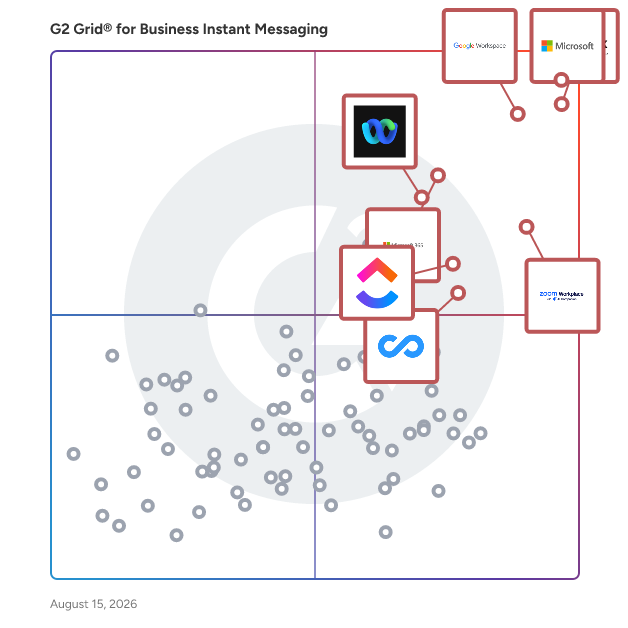
- **Leader:** [Microsoft Teams](https://www.g2.com/products/microsoft-teams/reviews)
- **Highest Performer:** [Missive](https://www.g2.com/products/missive/reviews)
- **Easiest to Use:** [morningmate](https://www.g2.com/products/morningmate/reviews)
- **Top Trending:** [Google Workspace](https://www.g2.com/products/google-workspace/reviews)
- **Best Free Software:** [Slack](https://www.g2.com/products/slack/reviews)


---

**Sponsored**

### Hive

Hive is an all-in-one project management software platform that helps teams plan, collaborate, automate workflows, and deliver projects faster. Designed for organizations of every size, Hive combines powerful project planning, task management, team collaboration, and workflow automation tools in one customizable workspace. Whether you&#39;re managing marketing campaigns, product launches, creative projects, client work, or cross-functional initiatives, Hive adapts to your team&#39;s unique processes. Unlike rigid project management tools, Hive offers flexible workflows, customizable dashboards, and multiple project views so every team can work the way they work best. Hive empowers marketing, operations, product, IT, creative, and remote teams with the tools they need to stay organized and aligned. With customizable workflows and powerful collaboration features, teams can centralize work, reduce manual tasks, and improve visibility across every project. Key capabilities include: - Multiple project views, including Kanban boards, Gantt charts, calendars, tables, and lists - Task management with custom fields, dependencies, milestones, and priorities - Workflow automation to eliminate repetitive work - Real-time team collaboration with messaging, comments, and file sharing - Time tracking, reporting, and analytics - Integrations with hundreds of popular business applications Every organization works differently, which is why Hive is built to be one of the most customizable project management platforms available. Teams can create workflows tailored to their business processes using custom fields, project templates, automations, approvals, and integrations. Instead of forcing teams to change how they work, Hive adapts to existing workflows — helping organizations improve efficiency without disrupting productivity. Hive gives teams the flexibility to manage projects from the perspective that works best for them. Switch seamlessly between: - Kanban boards for agile workflows - Gantt charts for timeline planning - Calendar views for scheduling - Table and List views for detailed task management These flexible project views help teams track deadlines, manage resources, identify bottlenecks, and keep projects moving forward. Hive brings projects, communication, and documentation together in one centralized workspace. Team members can collaborate in real time, assign tasks, share files, provide feedback, and monitor project progress without switching between multiple tools. By combining project planning, collaboration, automation, and reporting in a single platform, Hive helps teams reduce busywork and focus on delivering results. Hive is more than just task management software—it&#39;s a scalable work management platform built to evolve alongside your business. As your needs change, Hive continues to expand through new features, integrations, and customer-driven enhancements. With flexible customization, powerful automation, and dedicated customer support, Hive enables organizations to streamline workflows, improve cross-functional collaboration, and execute projects with greater speed and confidence.


[Visit website](https://www.g2.com/external_clickthroughs/record?secure%5Bad_program%5D=ppc&amp;secure%5Bad_slot%5D=category_product_list&amp;secure%5Bcategory_id%5D=2174&amp;secure%5Bchosen_at%5D=2026-07-02T14%3A37%3A11Z&amp;secure%5Bdisplayable_resource_id%5D=2174&amp;secure%5Bdisplayable_resource_type%5D=Category&amp;secure%5Bmedium%5D=sponsored&amp;secure%5Bplacement_reason%5D=page_category&amp;secure%5Bplacement_resource_ids%5D%5B%5D=2174&amp;secure%5Bprioritized%5D=false&amp;secure%5Bproduct_id%5D=27036&amp;secure%5Bresource_id%5D=2174&amp;secure%5Bresource_type%5D=Category&amp;secure%5Bsource_type%5D=category_page&amp;secure%5Bsource_url%5D=https%3A%2F%2Fwww.g2.com%2Fcategories%2Fbusiness-instant-messaging&amp;secure%5Btoken%5D=08c9504accf912084e28280af61dd3d1eea012c9a913fc08e6441356aef04816&amp;secure%5Burl%5D=https%3A%2F%2Fhive.com%2F&amp;secure%5Burl_type%5D=company_website)

---

## What Are the Top-Rated Business Instant Messaging Software Products in 2026?
### 1. [Deputy](https://www.g2.com/products/deputy/reviews)
Deputy is the leading workforce management software and unified end-to-end people platform for shift-based work.Trusted by over 390,000 workplaces globally, Deputy simplifies the entire employee lifecycle by combining HR, advanced scheduling, time tracking, and compliance tools into a single seamless app. Move beyond employee scheduling with a platform that provides a centralised source of visibility for navigating complex labor laws, streamlining team communication, and controlling costs in real-time. Whether you need to simplify recruitment and onboarding with Deputy HR, capture accurate timesheets with GPS verification, or bridge the gap to pay with 300+ payroll integrations, Deputy empowers you to manage your entire workforce infrastructure from anywhere.


**Average Rating:** 4.6/5.0
**Total Reviews:** 647
**How Do G2 Users Rate Deputy?**

- **Has the product been a good partner in doing business?:** 9.2/10 (Category avg: 8.8/10)

**Who Is the Company Behind Deputy?**

- **Seller:** [Deputy](https://www.g2.com/sellers/deputy)
- **Company Website:** https://www.deputy.com
- **Year Founded:** 2008
- **HQ Location:** Sydney, Australia
- **Twitter:** @deputyapp (4,306 Twitter followers)
- **LinkedIn® Page:** https://www.linkedin.com/company/2451628/ (471 employees on LinkedIn®)

**Who Uses This Product?**
- **Who Uses This:** Owner, Barista
- **Top Industries:** Hospitality, Retail
- **Company Size:** 53% Small-Business, 33% Mid-Market


#### What Are Deputy's Pros and Cons?

**Pros:**

- Ease of Use (241 reviews)
- Scheduling (148 reviews)
- Scheduling Ease (135 reviews)
- Intuitive (129 reviews)
- User Interface (108 reviews)

**Cons:**

- Scheduling Issues (48 reviews)
- Shift Management (41 reviews)
- Clocking Issues (27 reviews)
- Missing Features (25 reviews)
- Slow Loading (24 reviews)


### What Do G2 Reviewers Say About Deputy?
*AI-generated summary from verified user reviews*

**Pros:**

- Users find Deputy to be extremely **user-friendly** , facilitating ease of use for viewing shifts and managing tasks.
- Users appreciate Deputy for its **user-friendly scheduling** , effectively notifying employees and enhancing overall management efficiency.
- Users love the **easy scheduling** with Deputy, finding it reliable and simple to track shifts and request time off.
- Users find Deputy to be **intuitive and straightforward** , enhancing shift management with simple setup and useful features.
- Users appreciate the **user-friendly interface** of Deputy, making shift management and scheduling tasks easy and efficient.

**Cons:**

- Users find **scheduling issues** challenging, noting a lack of calendar integration and search functionality.
- Users find it **tedious to manage unavailability and rostering** in Deputy, affecting the overall scheduling experience.
- Users often face **clocking issues** with Deputy, experiencing delays and location inaccuracies that hinder time tracking.
- Users express dissatisfaction with Deputy&#39;s **missing search feature** and unreliable integration support, causing significant operational issues.
- Users often experience **slow loading** times, resulting in glitches and issues with clocking in and out.

#### What Are Recent G2 Reviews of Deputy?

**"[Simple, User-Friendly Interface for Time-Off Requests and Weekly Timecards](https://www.g2.com/survey_responses/deputy-review-12630419)"**

**Rating:** 4.0/5.0 stars
*— Verified User in Automotive*

[Read full review](https://www.g2.com/survey_responses/deputy-review-12630419)

---

**"[Seamless Scheduling, Multi-Business Support](https://www.g2.com/survey_responses/deputy-review-11854030)"**

**Rating:** 5.0/5.0 stars
*— Christina D.*

[Read full review](https://www.g2.com/survey_responses/deputy-review-11854030)

---


#### What Are G2 Users Discussing About Deputy?

- [What is Deputy used for?](https://www.g2.com/discussions/what-is-deputy-used-for) - 1 comment
- [How do I change my availability on deputy?](https://www.g2.com/discussions/how-do-i-change-my-availability-on-deputy)
- [How much does Deputy app cost?](https://www.g2.com/discussions/how-much-does-deputy-app-cost)
- [Can Deputy track your location?](https://www.g2.com/discussions/can-deputy-track-your-location) - 2 comments
- [What is deputy app?](https://www.g2.com/discussions/what-is-deputy-app)

### 2. [Steeple](https://www.g2.com/products/steeple/reviews)
Steeple is a comprehensive internal communication platform designed to enhance collaboration and engagement within organizations. It offers a suite of tools that facilitate seamless information sharing, real-time messaging, and efficient management of job postings and documents. By centralizing these functions, Steeple aims to streamline internal processes and foster a more connected workplace environment. Key Features and Functionality: - Multi-Device Accessibility: Steeple ensures that employees can access the platform across various devices, promoting flexibility and continuous connectivity. - Instant Messaging: The platform includes a real-time messaging system that allows for quick and efficient communication among team members. - Job Management: Steeple provides tools for sharing, managing, and promoting internal job offers, simplifying the recruitment and internal mobility processes. - Document Database: A centralized repository for documents enables easy storage, retrieval, and sharing of important files within the organization. - Event Organization: The platform supports event planning and management, facilitating the coordination of company events and activities. - Automatic Translation: To cater to diverse workforces, Steeple offers automatic translation features, ensuring clear communication across different languages. - API Integration: Steeple provides APIs that allow for seamless integration with existing systems, enhancing the platform&#39;s versatility and adaptability. Primary Value and Solutions Provided: Steeple addresses common challenges in internal communication by offering a unified platform that consolidates various communication and management tools. This integration reduces the need for multiple disparate systems, thereby increasing efficiency and reducing information silos. By facilitating real-time communication, document sharing, and event coordination, Steeple enhances employee engagement and collaboration. Its user-friendly interface and multi-device support ensure that all employees, regardless of their technical proficiency or location, can stay informed and connected. Ultimately, Steeple empowers organizations to create a more cohesive and productive work environment.


**Average Rating:** 4.3/5.0
**Total Reviews:** 16
**How Do G2 Users Rate Steeple?**

- **Has the product been a good partner in doing business?:** 7.7/10 (Category avg: 8.8/10)
- **Web Application:** 8.6/10 (Category avg: 9.0/10)
- **Integrations:** 8.3/10 (Category avg: 8.4/10)
- **File Sharing:** 9.3/10 (Category avg: 8.9/10)

**Who Is the Company Behind Steeple?**

- **Seller:** [Steeple](https://www.g2.com/sellers/steeple)
- **Year Founded:** 2017
- **HQ Location:** Rennes, FR
- **LinkedIn® Page:** https://www.linkedin.com/company/steeple (50 employees on LinkedIn®)

**Who Uses This Product?**
- **Company Size:** 56% Mid-Market, 19% Enterprise


#### What Are Steeple's Pros and Cons?

**Pros:**

- Ease of Use (8 reviews)
- Communication (7 reviews)
- Convenience (6 reviews)
- Daily Use (3 reviews)
- Features (3 reviews)

**Cons:**

- Limited Customization (4 reviews)
- Missing Features (3 reviews)
- Lack of Clarity (2 reviews)
- Learning Curve (2 reviews)
- Limited Features (2 reviews)


### What Do G2 Reviewers Say About Steeple?
*AI-generated summary from verified user reviews*

**Pros:**

- Users love the **ease of use** of Steeple, which enhances communication and engagement for all employees seamlessly.
- Users appreciate the **engaging and interactive communication** features of Steeple, making updates feel more connected and accessible.
- Users find **Steeple&#39;s convenience** invaluable for easy communication and quick access to vital information in one hub.
- Users appreciate the **engaging and user-friendly platform** of Steeple for enhancing internal communication and employee connectivity.
- Users appreciate the **employee recognition features** of Steeple, enhancing morale and fostering a supportive work culture.

**Cons:**

- Users find the **limited customization options** in Steeple hinder personalization, making the platform feel too generic and less engaging.
- Users note **missing features** , particularly in customization, analytics, and UI, hindering more complex communication needs.
- Users find the **lack of clarity** in analytics prevents effective data-driven communication strategy development.
- Users find the **learning curve steep** for Steeple, needing time and training for a smoother setup experience.
- Users note the **limited features** of Steeple, wishing for more customization and advanced tools for better communication.

#### What Are Recent G2 Reviews of Steeple?

**"[Unifies Communication, Needs Better Integrations](https://www.g2.com/survey_responses/steeple-review-12456818)"**

**Rating:** 4.0/5.0 stars
*— Billue N.*

[Read full review](https://www.g2.com/survey_responses/steeple-review-12456818)

---

**"[Transforms Internal Communication Effectively](https://www.g2.com/survey_responses/steeple-review-12156501)"**

**Rating:** 4.5/5.0 stars
*— Golu Y.*

[Read full review](https://www.g2.com/survey_responses/steeple-review-12156501)

---


### 3. [Wimi](https://www.g2.com/products/wimi/reviews)
Wimi is the best all-in-one collaboration tool for businesses. This is not just words, Wimi includes into dedicated workspaces: social network, file sharing &amp; drive, task management, calendar sharing, instant messaging and video conferencing. With this full set of features carefully crafted inside an intuitive and powerful solution, thousands of businesses ranging from small to Fortune 500 companies save time every day and allow their teams to be more productive.


**Average Rating:** 4.2/5.0
**Total Reviews:** 105
**How Do G2 Users Rate Wimi?**

- **Has the product been a good partner in doing business?:** 8.6/10 (Category avg: 8.8/10)
- **Web Application:** 9.3/10 (Category avg: 9.0/10)
- **Integrations:** 8.3/10 (Category avg: 8.4/10)
- **File Sharing:** 8.8/10 (Category avg: 8.9/10)

**Who Is the Company Behind Wimi?**

- **Seller:** [Wimi](https://www.g2.com/sellers/wimi)
- **Year Founded:** 2010
- **HQ Location:** Paris, France
- **Twitter:** @WimiPro (928 Twitter followers)
- **LinkedIn® Page:** https://www.linkedin.com/company/2406591/ (87 employees on LinkedIn®)

**Who Uses This Product?**
- **Top Industries:** Information Technology and Services, Hospital &amp; Health Care
- **Company Size:** 42% Enterprise, 40% Mid-Market


#### What Are Recent G2 Reviews of Wimi?

**"[Create secure administration and collaborations with the work team.](https://www.g2.com/survey_responses/wimi-review-7283087)"**

**Rating:** 4.5/5.0 stars
*— Giovanny L.*

[Read full review](https://www.g2.com/survey_responses/wimi-review-7283087)

---

**"[We make use of Wimi Drive feature to ensure that team members work on right version of our documents](https://www.g2.com/survey_responses/wimi-review-8187794)"**

**Rating:** 4.0/5.0 stars
*— Mohana R.*

[Read full review](https://www.g2.com/survey_responses/wimi-review-8187794)

---


### 4. [StraightText](https://www.g2.com/products/straighttext/reviews)
StraightText is a bulk messaging application that enables users to send personalized iMessages and SMS directly from their own phone number. Designed for Mac and Windows, it allows businesses and individuals to efficiently communicate with large groups without the need for additional phone numbers or complex setups. By leveraging the native messaging capabilities of iMessage, StraightText ensures high engagement rates and maintains the authenticity of personal communication. Key Features and Functionality: - Bulk Messaging: Send unlimited iMessages to iOS users and SMS to Android users without per-text fees. - Personalization: Utilize merge tags like {{firstName}} to customize messages for each recipient, enhancing engagement. - Media Attachments: Include images, videos, and other file types in messages, with automatic optimization for seamless delivery. - Automation: Integrate with tools like Zapier to automate message sending based on triggers from platforms such as Google Sheets or CRM systems. - NumberGuard™: Protect your phone number&#39;s reputation with real-time monitoring that pauses sending if potential spam flags are detected. - Native Integration: Replies appear directly in your Mac or iPhone&#39;s Messages app, allowing for natural and continuous conversations. Primary Value and User Solutions: StraightText addresses the need for efficient, personalized mass communication without compromising the personal touch of direct messaging. By sending messages from the user&#39;s actual phone number, it fosters trust and recognition among recipients. The platform is particularly beneficial for: - Real Estate Professionals: Quickly inform clients about new listings and schedule viewings. - Small Businesses: Engage customers with promotions, updates, and personalized follow-ups. - Fitness and Wellness Centers: Send class reminders, motivational messages, and special offers to clients. By combining the reach of bulk messaging with the authenticity of personal communication, StraightText enhances customer engagement and streamlines outreach efforts.


**Average Rating:** 4.4/5.0
**Total Reviews:** 17
**How Do G2 Users Rate StraightText?**

- **Has the product been a good partner in doing business?:** 10.0/10 (Category avg: 8.8/10)
- **Web Application:** 8.8/10 (Category avg: 9.0/10)
- **Integrations:** 7.7/10 (Category avg: 8.4/10)
- **File Sharing:** 8.8/10 (Category avg: 8.9/10)

**Who Is the Company Behind StraightText?**

- **Seller:** [StraightText](https://www.g2.com/sellers/straighttext)
- **Year Founded:** 2019
- **HQ Location:** Sheridan, WY
- **LinkedIn® Page:** https://www.linkedin.com/company/porterhouseapp/

**Who Uses This Product?**
- **Top Industries:** Accounting
- **Company Size:** 41% Mid-Market, 41% Small-Business


#### What Are StraightText's Pros and Cons?

**Pros:**

- Ease of Use (2 reviews)
- Convenience (1 reviews)
- Intuitive (1 reviews)
- Setup Ease (1 reviews)
- Simple (1 reviews)

**Cons:**

- Performance Issues (1 reviews)
- Slow Loading (1 reviews)


### What Do G2 Reviewers Say About StraightText?
*AI-generated summary from verified user reviews*

**Pros:**

- Users find StraightText **easy to use** , appreciating its user-friendly setup for effective client communication.
- Users find **uploading contacts easily** convenient, whether through CSV or Apple contacts integration.
- Users find StraightText to be very **intuitive** , enhancing their overall user experience with ease of use.
- Users appreciate the **easy setup** of StraightText, enhancing communication efficiency with clients and customers.
- Users appreciate the **unlimited messaging** feature of StraightText, allowing personalized communication without restrictions or costs.

**Cons:**

- Users often face **performance issues** , noting that the application can be slow and experience lag at times.
- Users report experiencing **slow loading** times and lag, which detracts from their overall enjoyment of StraightText.

#### What Are Recent G2 Reviews of StraightText?

**"[Convenient Messaging, Connection Issues](https://www.g2.com/survey_responses/straighttext-review-12673564)"**

**Rating:** 4.0/5.0 stars
*— Maryah H.*

[Read full review](https://www.g2.com/survey_responses/straighttext-review-12673564)

---

**"[Easy to Use, Operator-Friendly Interface](https://www.g2.com/survey_responses/straighttext-review-12709904)"**

**Rating:** 5.0/5.0 stars
*— Iris H.*

[Read full review](https://www.g2.com/survey_responses/straighttext-review-12709904)

---


#### What Are G2 Users Discussing About StraightText?

- [What is Porterhouse App used for?](https://www.g2.com/discussions/what-is-porterhouse-app-used-for)

### 5. [Unipile](https://www.g2.com/products/unipile/reviews)
Integrating LinkedIn, Email, and WhatsApp with Unipile’s API into your software empowers your users to streamline their outreach and communication workflows. Enable advanced features like sending LinkedIn Invitations, InMails, and WhatsApp messages, while syncing inboxes across channels. Automate profile enrichment and data retrieval to enhance efficiency and deliver a unified communication experience. Optimize your users&#39; workflows across LinkedIn, Email, and WhatsApp seamlessly!


**Average Rating:** 4.3/5.0
**Total Reviews:** 15
**How Do G2 Users Rate Unipile?**

- **Has the product been a good partner in doing business?:** 10.0/10 (Category avg: 8.8/10)
- **Web Application:** 9.0/10 (Category avg: 9.0/10)
- **Integrations:** 8.8/10 (Category avg: 8.4/10)
- **File Sharing:** 8.3/10 (Category avg: 8.9/10)

**Who Is the Company Behind Unipile?**

- **Seller:** [Unipile](https://www.g2.com/sellers/unipile)
- **Year Founded:** 2020
- **HQ Location:** Riorges, FR
- **LinkedIn® Page:** https://www.linkedin.com/company/unipile/ (14 employees on LinkedIn®)

**Who Uses This Product?**
- **Company Size:** 40% Mid-Market, 33% Small-Business


#### What Are Unipile's Pros and Cons?

**Pros:**

- Customer Support (1 reviews)
- Ease of Use (1 reviews)
- Easy Setup (1 reviews)
- Intuitive (1 reviews)
- Setup Ease (1 reviews)

**Cons:**

- Connectivity Issues (1 reviews)
- Inadequate Tracking (1 reviews)
- Missing Features (1 reviews)


### What Do G2 Reviewers Say About Unipile?
*AI-generated summary from verified user reviews*

**Pros:**

- Users appreciate the **excellent customer support** of Unipile, with quick access to knowledgeable assistance when needed.
- Users find Unipile incredibly **easy to use** , appreciating its simple setup and effective live support.
- Users find the **easy setup** of Unipile refreshing, appreciating how quickly they can start using the platform.
- Users value the **intuitive simplicity** of Unipile, appreciating its ease of use and quick setup process.
- Users appreciate the **easy setup** of Unipile, noting it only takes a few minutes to get started.

**Cons:**

- Users experience **connectivity issues** due to lack of access to logs, complicating troubleshooting and resolution efforts.
- Users find **inadequate tracking** frustrating, lacking access to logs for better issue resolution and understanding of connectivity problems.
- Users desire **missing log features** in Unipile, which could help in troubleshooting issues more effectively.

#### What Are Recent G2 Reviews of Unipile?

**"[&quot;Accessible Messaging Channels at Your Fingertips using Unipile&quot;](https://www.g2.com/survey_responses/unipile-review-8985689)"**

**Rating:** 5.0/5.0 stars
*— Dirisala L.*

[Read full review](https://www.g2.com/survey_responses/unipile-review-8985689)

---

**"[Seamless Multi-Channel Outreach with Stellar Support](https://www.g2.com/survey_responses/unipile-review-12279107)"**

**Rating:** 5.0/5.0 stars
*— Jonas S.*

[Read full review](https://www.g2.com/survey_responses/unipile-review-12279107)

---


#### What Are G2 Users Discussing About Unipile?

- [What is Unipile used for?](https://www.g2.com/discussions/what-is-unipile-used-for) - 1 comment

### 6. [Element](https://www.g2.com/products/element-io/reviews)
Element is a secure communications platform built on Matrix: a decentralised and end-to-end encrypted protocol. Bring your teams together, boost productivity and workplace satisfaction, while retaining complete ownership of your data. Element is a leader in the Forrester Wave: Secure Communications report. Easily collaborate with your partners, suppliers or clients with video calls and instant messaging: like email for the 21st century. You can even connect your Slack, MS Teams, WhatsApp accounts. On the other hand Element can be closed for high security environments using secure border and cross domain gateways, and even air-gapped deployments. Being built on Matrix, there is no single point of failure for the network thanks to the decentralised network architecture, making it perfect for mission-critical environments. Please contact us to explore how your business can benefit from Element.


**Average Rating:** 4.2/5.0
**Total Reviews:** 39
**How Do G2 Users Rate Element?**

- **Has the product been a good partner in doing business?:** 8.6/10 (Category avg: 8.8/10)
- **Web Application:** 9.2/10 (Category avg: 9.0/10)
- **Integrations:** 8.6/10 (Category avg: 8.4/10)
- **File Sharing:** 8.3/10 (Category avg: 8.9/10)

**Who Is the Company Behind Element?**

- **Seller:** [Element](https://www.g2.com/sellers/element-6016c92f-6976-477d-b311-b5cbdaf3821d)
- **Year Founded:** 2017
- **HQ Location:** Chiswick, London
- **Twitter:** @element_hq (20,909 Twitter followers)
- **LinkedIn® Page:** https://www.linkedin.com/company/element-hq/ (103 employees on LinkedIn®)

**Who Uses This Product?**
- **Top Industries:** Information Technology and Services
- **Company Size:** 60% Small-Business, 23% Mid-Market


#### What Are Element's Pros and Cons?

**Pros:**

- Security (4 reviews)
- Ease of Use (3 reviews)
- Connectivity (2 reviews)
- Customization (2 reviews)
- Features (2 reviews)

**Cons:**

- Not Intuitive (3 reviews)
- Complexity (2 reviews)
- Lack of Notifications (2 reviews)
- Learning Difficulty (2 reviews)
- Status Issues (2 reviews)


### What Do G2 Reviewers Say About Element?
*AI-generated summary from verified user reviews*

**Pros:**

- Users value the **end-to-end encryption** of Element, enhancing privacy and control over data security.
- Users love the **ease of use** of Element, highlighting its straightforward setup and management for effective collaboration.
- Users value the **strong connectivity** of Element, facilitating seamless communication and collaboration across teams and projects.
- Users appreciate the **customization options** of Element, which enhance collaboration and ensure privacy and security.
- Users value Element&#39;s **configurability and security** , appreciating its comprehensive file transfer and searching capabilities.

**Cons:**

- Users find Element **not intuitive** , leading to a frustrating learning curve and difficulty in navigating its features.
- Users find the **complexity overwhelming** , especially with self-hosting and technical configurations, leading to delays and issues.
- Users experience significant **notification delays** , which hinder communication and make it challenging to stay updated.
- Users find the **learning difficulty** of Element to be frustrating, particularly for non-tech users and large groups.
- Users express frustration over **status issues** , including notification delays and lack of customer support from Element.

#### What Are Recent G2 Reviews of Element?

**"[Intuitive, Secure Communication at a Fair Price](https://www.g2.com/survey_responses/element-review-12701770)"**

**Rating:** 4.0/5.0 stars
*— Ariel B.*

[Read full review](https://www.g2.com/survey_responses/element-review-12701770)

---

**"[Decentralized, Encrypted Control with Flexible Self-Hosting](https://www.g2.com/survey_responses/element-review-12603214)"**

**Rating:** 4.0/5.0 stars
*— Verified User in Oil &amp; Energy*

[Read full review](https://www.g2.com/survey_responses/element-review-12603214)

---


#### What Are G2 Users Discussing About Element?

- [Is element Matrix secure?](https://www.g2.com/discussions/is-element-matrix-secure)
- [How does element IO make money?](https://www.g2.com/discussions/how-does-element-io-make-money)
- [Is element a safe app?](https://www.g2.com/discussions/is-element-a-safe-app)

### 7. [Teams.cc by 500apps](https://www.g2.com/products/teams-cc-by-500apps/reviews)
Teams.cc by 500apps is a Team Chat Software, it transforms the way your team collaborates with unlimited team messaging, secure file-sharing, channel management, in-app video calling, and powerful productivity tools, all under one platform. 1. Enhanced Channel Management - Teams.cc enables you to rapidly develop and maintain channels in order to increase the overall productivity of your team. The software&#39;s interface is simple to navigate, and you&#39;ll be adding new members with just a few clicks. 2. Third-party Integrations - With Teams.cc, you can also integrate the top apps on the market. The concept is that you don&#39;t have to switch between applications when working on different activities. Instead, integration is done to ensure that you work from a single dashboard, which is exactly what Teams.cc provides. 3. Voice and Video Calls - Teams.cc is backed by another powerful app by500 apps and that is 500Conference. You can initiate video chat in a channel or with the individual using any device even when you are far from your workplace. 4. Secure Messaging - Your communications will be safely stored in the cloud if you use secure messaging. This lets your team share files without having to be concerned about cyber threats affecting your system. 5. Stay in Sync - Teams.cc is a cloud-based service that can be accessed from anywhere with an internet connection. The mobile access feature also ensures that your team interacts effectively even if they are not physically present.


**Average Rating:** 4.4/5.0
**Total Reviews:** 35
**How Do G2 Users Rate Teams.cc by 500apps?**

- **Has the product been a good partner in doing business?:** 7.8/10 (Category avg: 8.8/10)
- **Web Application:** 8.7/10 (Category avg: 9.0/10)
- **Integrations:** 7.9/10 (Category avg: 8.4/10)
- **File Sharing:** 8.4/10 (Category avg: 8.9/10)

**Who Is the Company Behind Teams.cc by 500apps?**

- **Seller:** [500apps](https://www.g2.com/sellers/500apps)
- **Year Founded:** 2019
- **HQ Location:** New York, California
- **Twitter:** @SitePing500apps (26 Twitter followers)
- **LinkedIn® Page:** https://www.linkedin.com/company/outreachly-by-500apps/ (1 employees on LinkedIn®)

**Who Uses This Product?**
- **Company Size:** 46% Small-Business, 37% Mid-Market


#### What Are Teams.cc by 500apps's Pros and Cons?

**Pros:**

- Communication (8 reviews)
- Ease of Use (7 reviews)
- Team Collaboration (6 reviews)
- Setup Ease (4 reviews)
- Convenience (2 reviews)

**Cons:**

- Slow Loading (3 reviews)
- Learning Curve (2 reviews)
- Missing Features (2 reviews)
- Software Glitches (2 reviews)
- Connectivity Issues (1 reviews)


### What Do G2 Reviewers Say About Teams.cc by 500apps?
*AI-generated summary from verified user reviews*

**Pros:**

- Users highlight the **effective communication** capabilities of Teams.cc, praising its organization and seamless collaboration across time zones.
- Users appreciate the **ease of use** of Teams.cc, enjoying its intuitive interface and organized communication features.
- Users value the **team collaboration features** for enhancing productivity and staying connected with coworkers in real-time.
- Users find the **initial setup straightforward and quick** , enabling immediate use without the need for formal training.
- Users appreciate the **convenience** of Teams.cc by 500apps, as it enhances productivity and streamlines remote communication.

**Cons:**

- Users experience **slow loading** issues, impacting the overall efficiency and smoothness of their interactions with Teams.cc.
- Users find the **steep learning curve** challenging for full adoption, causing occasional difficulties in starting meetings.
- Users find **missing features** like advanced search and HR tools hinder the effectiveness of Teams.cc for collaboration.
- Users experience **software glitches** that disrupt usage, including unexpected shutdowns and notification failures.
- Users experience occasional **connectivity issues** with low call quality and video freezing, affecting their overall experience.

#### What Are Recent G2 Reviews of Teams.cc by 500apps?

**"[Centralizes Team Communication Seamlessly](https://www.g2.com/survey_responses/teams-cc-by-500apps-review-12244421)"**

**Rating:** 4.0/5.0 stars
*— Harshit R.*

[Read full review](https://www.g2.com/survey_responses/teams-cc-by-500apps-review-12244421)

---

**"[Teams.cc: All-in-One Collaboration That Keeps Everyone Connected](https://www.g2.com/survey_responses/teams-cc-by-500apps-review-12467444)"**

**Rating:** 5.0/5.0 stars
*— Ratish K.*

[Read full review](https://www.g2.com/survey_responses/teams-cc-by-500apps-review-12467444)

---


#### What Are G2 Users Discussing About Teams.cc by 500apps?

- [What is Teams.cc by 500apps used for?](https://www.g2.com/discussions/what-is-teams-cc-by-500apps-used-for) - 1 comment

### 8. [Wire](https://www.g2.com/products/wire/reviews)
Wire™ protects critical communications for the world’s most security-demanding organizations. Wire™ highest security standards enable users to communicate securely, thanks to the most advanced encryption and its Zero-Trust architecture while facilitating user administrators to manage and control their organization&#39;s information, guaranteeing the sovereignty of their data. Created by the founders of Skype, Wire™ provides end-to-end encryption for messages, audio and video conferencing, file exchange, external collaboration, and beyond. Used by most of the world&#39;s G7 Governments and other security-critical organizations globally, Wire™ is pushing the limits of secure communication, pioneering work for standardized encryption with Messaging Layer Security. To learn more, visit wire.com


**Average Rating:** 4.2/5.0
**Total Reviews:** 57
**How Do G2 Users Rate Wire?**

- **Has the product been a good partner in doing business?:** 7.9/10 (Category avg: 8.8/10)
- **Web Application:** 9.1/10 (Category avg: 9.0/10)
- **Integrations:** 8.1/10 (Category avg: 8.4/10)
- **File Sharing:** 8.4/10 (Category avg: 8.9/10)

**Who Is the Company Behind Wire?**

- **Seller:** [Wire](https://www.g2.com/sellers/wire)
- **Year Founded:** 2012
- **HQ Location:** Berlin, DE
- **Twitter:** @wire (20,931 Twitter followers)
- **LinkedIn® Page:** https://www.linkedin.com/company/wire-secure-communication (237 employees on LinkedIn®)

**Who Uses This Product?**
- **Top Industries:** Information Technology and Services, Computer Software
- **Company Size:** 66% Small-Business, 23% Mid-Market


#### What Are Wire's Pros and Cons?

**Pros:**

- Ease of Use (2 reviews)
- Security (2 reviews)
- Cross-Platform (1 reviews)
- Daily Use (1 reviews)
- Easy Setup (1 reviews)

**Cons:**

- Connectivity Issues (1 reviews)
- File Sharing Issues (1 reviews)
- Limited Options (1 reviews)
- Participant Limitations (1 reviews)
- Performance Delays (1 reviews)


### What Do G2 Reviewers Say About Wire?
*AI-generated summary from verified user reviews*

**Pros:**

- Users appreciate the **ease of use** of Wire, enjoying a clean interface and seamless functionality across devices.
- Users value the **high level of security** in Wire, appreciating the end-to-end encryption for enhanced privacy.
- Users appreciate Wire&#39;s **cross-platform functionality** , enabling seamless communication across multiple devices with a clean interface.
- Users appreciate the **secure and privacy-focused** nature of Wire, with an easy-to-use interface across devices.
- Users value Wire&#39;s **easy setup** , making it quick to get started and enhancing team collaboration.

**Cons:**

- Users experience **connectivity issues** with delays during peak times, affecting messaging and video calls.
- Users experience frustrating **file sharing issues** due to noticeable delays in server response during peak usage times.
- Users find the **limited options for contacts** on Wire restrict communication and sometimes experience slowness.
- Users find the **participant limitations** of Wire restrict communication options and can lead to slower interactions.
- Users experience frustrating **performance delays** during peak times, impacting message delivery and video call initiation.

#### What Are Recent G2 Reviews of Wire?

**"[Secure End-to-End Encryption with Clean, Intuitive Collaboration](https://www.g2.com/survey_responses/wire-review-12602994)"**

**Rating:** 4.0/5.0 stars
*— Verified User in Oil &amp; Energy*

[Read full review](https://www.g2.com/survey_responses/wire-review-12602994)

---

**"[Unmatched Security for Regulatory Compliance](https://www.g2.com/survey_responses/wire-review-12666419)"**

**Rating:** 4.0/5.0 stars
*— Yarka K.*

[Read full review](https://www.g2.com/survey_responses/wire-review-12666419)

---


#### What Are G2 Users Discussing About Wire?

- [What is Wire used for?](https://www.g2.com/discussions/what-is-wire-used-for)
- [What is wire made of?](https://www.g2.com/discussions/what-is-wire-made-of)
- [Is the wire App Safe?](https://www.g2.com/discussions/is-the-wire-app-safe)
- [Is wire free for personal use?](https://www.g2.com/discussions/is-wire-free-for-personal-use)
- [What is wire app used for?](https://www.g2.com/discussions/what-is-wire-app-used-for)

### 9. [Twist](https://www.g2.com/products/twist/reviews)
Teamwork tools like email and group-chat are disorganized, dysfunctional and distracting. Twist is a team communication app that fosters mindful communication and gives modern teams a central place to grow their knowledge base and have organized, on-topic conversations that are accessible to everyone. Twist gives teams the space to fully discuss complex ideas and projects from start to finish without making people feel like they&#39;re missing out if they don&#39;t respond immediately.


**Average Rating:** 4.1/5.0
**Total Reviews:** 33
**How Do G2 Users Rate Twist?**

- **Has the product been a good partner in doing business?:** 8.6/10 (Category avg: 8.8/10)
- **Web Application:** 8.3/10 (Category avg: 9.0/10)
- **Integrations:** 7.2/10 (Category avg: 8.4/10)
- **File Sharing:** 8.6/10 (Category avg: 8.9/10)

**Who Is the Company Behind Twist?**

- **Seller:** [Doist](https://www.g2.com/sellers/doist)
- **Year Founded:** 2007
- **HQ Location:** Palo Alto, CA
- **Twitter:** @doist (19,918 Twitter followers)
- **LinkedIn® Page:** https://www.linkedin.com/company/2934200/ (122 employees on LinkedIn®)
- **Ownership:** Founder &amp; CEO, Amir Salihefendic

**Who Uses This Product?**
- **Company Size:** 60% Small-Business, 31% Mid-Market


#### What Are Twist's Pros and Cons?

**Pros:**

- Ease of Use (11 reviews)
- Communication (9 reviews)
- Organization (9 reviews)
- Team Collaboration (7 reviews)
- Customization (6 reviews)

**Cons:**

- Integration Issues (6 reviews)
- Slow Loading (6 reviews)
- Limited Customization (3 reviews)
- Limited Features (3 reviews)
- Missing Features (3 reviews)


### What Do G2 Reviewers Say About Twist?
*AI-generated summary from verified user reviews*

**Pros:**

- Users appreciate the **ease of use** of Twist, enabling organized communication and seamless team collaboration.
- Users value the **structured thread-based communication** in Twist, which enhances organization and reduces distractions for effective teamwork.
- Users appreciate the **structured, thread-based communication** in Twist, enhancing organization and clarity in team discussions.
- Users value Twist&#39;s **calm and organized collaboration** , enhancing productivity through meaningful, asynchronous conversations without pressure.
- Users love the **customization options** in Twist, allowing organization of conversations and tailored notification settings for better productivity.

**Cons:**

- Users experience **integration issues** with Twist, noting a lack of native tools that hinder efficient collaboration.
- Users find that the **slow loading** and real-time communication of Twist hampers urgent discussions, leading to mental friction.
- Users find the **limited customization options** frustrating, wishing for more personalization to enhance team collaboration.
- Users find Twist has **limited features** , making it less intuitive and expressive compared to other messaging apps.
- Users find Twist lacks **essential features** , making urgent communication difficult and limiting overall user experience.

#### What Are Recent G2 Reviews of Twist?

**"[Structured Threads and a Clean Interface Keep Conversations Organized](https://www.g2.com/survey_responses/twist-review-12431907)"**

**Rating:** 4.0/5.0 stars
*— Verified User in Oil &amp; Energy*

[Read full review](https://www.g2.com/survey_responses/twist-review-12431907)

---

**"[Organized Team Communication Simplified](https://www.g2.com/survey_responses/twist-review-12452416)"**

**Rating:** 4.0/5.0 stars
*— Rishitha C.*

[Read full review](https://www.g2.com/survey_responses/twist-review-12452416)

---


### 10. [Edworking](https://www.g2.com/products/edworking_/reviews)
Edworking is an AI powered workspace that brings project management, documents, team chat, video meetings, file sharing, and search together in one place. Teams plan work with list and kanban views, manage sprints, assign owners, set due dates and estimates, and break down tasks with subtasks and checklists. Conversations stay in context with chats inside tasks, private messages, team spaces, and meeting rooms. Start a video call from any conversation when sync is faster than typing. Share and preview files where work happens, and use quick video stories for async updates. AI is woven across the platform to help you move faster. In documents, AI assists with drafting, rephrasing, and summarizing so writing feels effortless. In search, AI finds answers across documents, images, PDFs, and files in seconds, not just keyword matches but intent aware results. In chat and tasks, smart suggestions help you keep work organized and progress unblocked. Edworking is designed for startups, agencies, and SMBs that want fewer tools and better alignment across product, marketing, operations, and client delivery. It reduces tool switching, preserves context, and gives clear visibility from planning to delivery. Pricing is flexible with per user plans for focused teams and a team license with a single flat rate for unlimited users. Choose monthly for flexibility or yearly for savings. Edworking helps you replace scattered apps with one integrated workspace so your team can collaborate clearly, deliver faster, and stay on the same page.


**Average Rating:** 4.7/5.0
**Total Reviews:** 28
**How Do G2 Users Rate Edworking?**

- **Has the product been a good partner in doing business?:** 8.6/10 (Category avg: 8.8/10)
- **Web Application:** 9.2/10 (Category avg: 9.0/10)
- **Integrations:** 8.3/10 (Category avg: 8.4/10)
- **File Sharing:** 9.7/10 (Category avg: 8.9/10)

**Who Is the Company Behind Edworking?**

- **Seller:** [Ed technology ltd](https://www.g2.com/sellers/ed-technology-ltd)
- **Year Founded:** 2021
- **HQ Location:** London, GB
- **LinkedIn® Page:** https://www.linkedin.com/company/edworkingremote/ (3 employees on LinkedIn®)

**Who Uses This Product?**
- **Top Industries:** Information Technology and Services
- **Company Size:** 83% Small-Business, 21% Mid-Market


#### What Are Edworking's Pros and Cons?

**Pros:**

- Ease of Use (3 reviews)
- File Sharing (3 reviews)
- Security (3 reviews)
- Communication (2 reviews)
- Easy Access (2 reviews)

**Cons:**

- Connection Issues (1 reviews)
- Connectivity Issues (1 reviews)
- Customer Support (1 reviews)
- Integration Issues (1 reviews)
- Lack of Integration (1 reviews)


### What Do G2 Reviewers Say About Edworking?
*AI-generated summary from verified user reviews*

**Pros:**

- Users love the **user-friendly interface** of Edworking, making task management and communication simple and efficient.
- Users value the **direct and secure file sharing** feature of Edworking, enhancing collaboration and workflow efficiency.
- Users value the **high security** of Edworking, ensuring encrypted communication and safe document sharing for all operations.
- Users value the **effective communication features** of Edworking, enabling seamless collaboration and secure messaging with teams and clients.
- Users appreciate the **easy access** of Edworking, consolidating all business communications and tasks in one secure platform.

**Cons:**

- Users often face **connectivity issues** , including dropped calls and unreliable internet, affecting their overall experience.
- Users often face **connectivity issues** like dropped calls and poor internet quality, impacting their experience with Edworking.
- Users note that **customer support response times** are slow and suggest improvements for third-party app integrations.
- Users find **integration issues** problematic, with slow interface speeds and a need for improved customer response times.
- Users feel that the **lack of integration** with third-party apps hampers functionality and responsiveness in Edworking.

#### What Are Recent G2 Reviews of Edworking?

**"[Perfect Platform for Remote Teams and Freelancers](https://www.g2.com/survey_responses/edworking-review-12164797)"**

**Rating:** 4.0/5.0 stars
*— Sara Y.*

[Read full review](https://www.g2.com/survey_responses/edworking-review-12164797)

---

**"[One solution to manage files and business confidential data](https://www.g2.com/survey_responses/edworking-review-11600905)"**

**Rating:** 4.5/5.0 stars
*— Raaj P.*

[Read full review](https://www.g2.com/survey_responses/edworking-review-11600905)

---


#### What Are G2 Users Discussing About Edworking?

- [Is solidworks good for woodworking?](https://www.g2.com/discussions/is-solidworks-good-for-woodworking)
- [What SketchUp to use for woodworking?](https://www.g2.com/discussions/what-sketchup-to-use-for-woodworking)
- [How do you make a woodworking plan?](https://www.g2.com/discussions/how-do-you-make-a-woodworking-plan)
- [What are two pros for digital woodworking?](https://www.g2.com/discussions/what-are-two-pros-for-digital-woodworking)

### 11. [BigAnt](https://www.g2.com/products/bigant/reviews)
BigAnt is a secure corporate instant messaging system designed to enhance internal communication within organizations. It offers a self-hosted platform that ensures all messaging data remains under the company&#39;s control, providing a reliable and efficient solution for businesses of all sizes. With features like real-time messaging, file sharing, and integration with LDAP/Active Directory, BigAnt facilitates seamless collaboration among team members. Its user-friendly interface and robust administrative tools make it adaptable for various industries, aiming to boost office productivity and streamline communication processes. Key Features and Functionality: - Real-Time Messaging: Enables instant text communication among colleagues, enhancing responsiveness and collaboration. - File Sharing: Supports the transfer of various file types without size limitations, facilitating efficient information exchange. - Audio and Video Conferencing: Allows users to conduct voice and video calls, supporting remote meetings and discussions. - Mobile and Web Applications: Provides access through mobile apps and web interfaces, ensuring connectivity across different devices. - Integration with LDAP/Active Directory: Ensures seamless user management and authentication within existing IT infrastructures. - Customizable Branding: Offers the ability to tailor the platform&#39;s appearance to align with company branding. - Security and Compliance: Features SSL encryption and administrative controls to maintain data security and compliance with organizational policies. Primary Value and Solutions Provided: BigAnt addresses the need for a secure and efficient internal communication system within organizations. By offering a self-hosted platform, it ensures that all messaging data remains under the company&#39;s control, mitigating risks associated with third-party services. The integration with existing IT infrastructures, such as LDAP/Active Directory, simplifies user management and authentication processes. With features like real-time messaging, file sharing, and audio/video conferencing, BigAnt enhances collaboration and productivity among team members. Its customizable branding options allow organizations to maintain a consistent corporate identity across communication tools. Overall, BigAnt provides a comprehensive solution for businesses seeking a reliable and secure instant messaging system to streamline their internal communications.


**Average Rating:** 4.4/5.0
**Total Reviews:** 34
**How Do G2 Users Rate BigAnt?**

- **Has the product been a good partner in doing business?:** 10.0/10 (Category avg: 8.8/10)
- **Web Application:** 9.1/10 (Category avg: 9.0/10)
- **Integrations:** 8.5/10 (Category avg: 8.4/10)
- **File Sharing:** 9.1/10 (Category avg: 8.9/10)

**Who Is the Company Behind BigAnt?**

- **Seller:** [BigAnt](https://www.g2.com/sellers/bigant)
- **HQ Location:** Melbourne
- **Twitter:** @BigAntSoft (1 Twitter followers)
- **LinkedIn® Page:** https://www.linkedin.com/company/No-Linkedin-Presence-Added-Intentionally-By-DataOps (1 employees on LinkedIn®)

**Who Uses This Product?**
- **Top Industries:** Information Technology and Services
- **Company Size:** 46% Small-Business, 40% Mid-Market


#### What Are BigAnt's Pros and Cons?

**Pros:**

- Ease of Use (5 reviews)
- Communication (3 reviews)
- Simple (3 reviews)
- Team Collaboration (3 reviews)
- File Sharing (2 reviews)

**Cons:**

- Integration Issues (2 reviews)
- Limited Customization (2 reviews)
- Performance Issues (2 reviews)
- File Sharing Issues (1 reviews)
- Group Management (1 reviews)


### What Do G2 Reviewers Say About BigAnt?
*AI-generated summary from verified user reviews*

**Pros:**

- Users appreciate the **ease of use** of BigAnt, which simplifies onboarding and promotes effective team communication.
- Users value the **effective communication** capabilities of BigAnt, facilitating organized collaboration across teams with ease.
- Users love the **straightforward interface** of BigAnt, making communication and collaboration simple and efficient for all team members.
- Users appreciate the **seamless team collaboration** in BigAnt, enjoying an easy-to-use platform for messaging and tasks.
- Users appreciate the **seamless file sharing** of BigAnt, which enhances team collaboration and keeps communication organized.

**Cons:**

- Users face **integration issues** with BigAnt, as its compatibility with third-party tools is limited and often challenging.
- Users note the **limited customization** options in BigAnt, making it less adaptable for diverse team needs.
- Users experience occasional **performance issues** with BigAnt, especially when managing large files or extensive chat histories.
- Users find **file sharing issues** with BigAnt frustrating due to limitations and lack of refinement compared to modern platforms.
- Users find the **limited group management** features of BigAnt disappointing compared to more modern communication platforms.

#### What Are Recent G2 Reviews of BigAnt?

**"[Effortless Team Collaboration Made Simple](https://www.g2.com/survey_responses/bigant-review-12086028)"**

**Rating:** 4.0/5.0 stars
*— GangaPrasad K.*

[Read full review](https://www.g2.com/survey_responses/bigant-review-12086028)

---

**"[A Simple and Reliable Tool for Team Communication and Collaboration](https://www.g2.com/survey_responses/bigant-review-12091491)"**

**Rating:** 4.5/5.0 stars
*— DIVYA .*

[Read full review](https://www.g2.com/survey_responses/bigant-review-12091491)

---


#### What Are G2 Users Discussing About BigAnt?

- [What is BigAnt used for?](https://www.g2.com/discussions/what-is-bigant-used-for) - 1 comment

### 12. [Spike](https://www.g2.com/products/spike/reviews)
Spike is an AI-powered email and team communication platform that combines email, chat, meetings, and collaboration tools into a single, organized workspace. It is designed for professionals, small teams, and businesses that use email as their primary communication channel but want a faster, more streamlined way to manage daily interactions and tasks. By transforming traditional email into a chat-like format, Spike simplifies how users read and reply to messages. The platform removes repetitive headers, quoted text, and long chains, allowing conversations to appear as clean, continuous threads. Users can manage all email accounts, calendars, and contacts in one place while taking advantage of built-in AI to summarize conversations, draft replies, and organize the inbox automatically. Spike supports both individual and team use. Freelancers and professionals use it to manage clients and projects more efficiently, while teams rely on Spike to centralize communication, share files, and collaborate in real time without switching between multiple tools. Core Features: Conversational Email: Presents emails as natural chat-like conversations while remaining fully compatible with standard email protocols. AI Productivity Tools: Provides automatic summaries, suggested replies, translations, and content drafting to speed up workflow. Priority Inbox: Uses AI to sort incoming messages into relevant categories—Priority, Other, Notes, and Starred—helping users focus on what matters most. Integrated Meetings: Enables voice and video calls directly from email threads for faster coordination. Collaborative Notes and Docs: Allows users to create, edit, and share documents in real time within the inbox. Unified Inbox and Search: Consolidates multiple email accounts and calendars into a single interface with cross-account search. Shared Inbox: Helps teams manage customer and project communications collaboratively, ensuring faster response times. Compatibility: Works with Gmail, Outlook, iCloud, Office 365, Yahoo Mail, and all IMAP-supported accounts across desktop, mobile, and web platforms. Security and Privacy: Spike is ad-free and never sells or monetizes user data. All message data is encrypted using the AES-256 standard. Spike is suited for users seeking a unified communication platform that enhances productivity while maintaining the familiarity of email. It bridges the gap between traditional email clients and modern collaboration tools, offering a single, AI-enhanced workspace that helps individuals and teams stay focused and efficient.


**Average Rating:** 4.6/5.0
**Total Reviews:** 250
**How Do G2 Users Rate Spike?**

- **Has the product been a good partner in doing business?:** 8.6/10 (Category avg: 8.8/10)
- **Web Application:** 9.2/10 (Category avg: 9.0/10)
- **Integrations:** 8.1/10 (Category avg: 8.4/10)
- **File Sharing:** 8.9/10 (Category avg: 8.9/10)

**Who Is the Company Behind Spike?**

- **Seller:** [Spike](https://www.g2.com/sellers/spike)
- **Year Founded:** 2014
- **HQ Location:** Herzliya, IL
- **Twitter:** @SpikeNowHQ (3,036 Twitter followers)
- **LinkedIn® Page:** https://www.linkedin.com/company/3240452/ (30 employees on LinkedIn®)

**Who Uses This Product?**
- **Who Uses This:** CEO, Owner
- **Top Industries:** Information Technology and Services, Computer Software
- **Company Size:** 72% Small-Business, 15% Mid-Market


#### What Are Spike's Pros and Cons?

**Pros:**

- Ease of Use (47 reviews)
- Email Management (35 reviews)
- Communication (33 reviews)
- Helpful (27 reviews)
- Features (24 reviews)

**Cons:**

- Missing Features (19 reviews)
- Limited Features (12 reviews)
- Integration Issues (10 reviews)
- Expensive (9 reviews)
- Limited Customization (9 reviews)


### What Do G2 Reviewers Say About Spike?
*AI-generated summary from verified user reviews*

**Pros:**

- Users find Spike incredibly **easy to use** , particularly appreciating its chat-like functionality and AI-driven features.
- Users love the **easy email management** of Spike, as it simplifies organization and enhances readability.
- Users value the **modern chat-style interface** of Spike, enhancing communication and reducing inbox anxiety significantly.
- Users praise Spike for its **intuitive chat-style interface** , greatly enhancing email management and reducing anxiety.
- Users love Spike&#39;s **intuitive chat-style interface** , simplifying email management and reducing inbox anxiety effectively.

**Cons:**

- Users highlight **missing features** in Spike, such as limited message history and inadequate task integration, impacting productivity.
- Users highlight **limited features** in Spike, including restricted message history and inadequate support for Japanese text searches.
- Users report **integration issues** with Spike, highlighting challenges with third-party support and syncing with other email providers.
- Users find Spike to be **expensive** , noting that the pricing may push them toward paid plans too quickly.
- Users are frustrated by the **limited customization** options in Spike, impacting notifications and overall user experience.

#### What Are Recent G2 Reviews of Spike?

**"[Transformative Chat-Based Email Efficiency](https://www.g2.com/survey_responses/spike-review-12664813)"**

**Rating:** 4.0/5.0 stars
*— Virat K.*

[Read full review](https://www.g2.com/survey_responses/spike-review-12664813)

---

**"[All-in-One Email Productivity Tool](https://www.g2.com/survey_responses/spike-review-12264685)"**

**Rating:** 5.0/5.0 stars
*— Sorabuddin M.*

[Read full review](https://www.g2.com/survey_responses/spike-review-12264685)

---


#### What Are G2 Users Discussing About Spike?

- [What is Spike used for?](https://www.g2.com/discussions/what-is-spike-used-for) - 1 comment
- [What is Spike analysis?](https://www.g2.com/discussions/what-is-spike-analysis)
- [Why is a spike called a spike in agile?](https://www.g2.com/discussions/why-is-a-spike-called-a-spike-in-agile) - 1 comment
- [What is a spike task?](https://www.g2.com/discussions/what-is-a-spike-task) - 2 comments
- [What is a spike in Devops?](https://www.g2.com/discussions/what-is-a-spike-in-devops) - 2 comments, 1 upvote

### 13. [Band](https://www.g2.com/products/band/reviews)
BAND is a comprehensive group communication platform designed to streamline collaboration and organization for various groups, including sports teams, school organizations, businesses, and hobbyist communities. By integrating multiple communication tools into a single, user-friendly interface, BAND ensures that members stay connected and informed. Key Features and Functionality: - Community Board: A centralized space where members can post text, photos, and videos, facilitating rich and dynamic communication. - Shared Calendar: Organize and manage events with integrated RSVP functionality, ensuring all members are aware of upcoming activities. - File Sharing: Easily share documents, photos, and videos within the group, enhancing collaboration and information dissemination. - Polls and Surveys: Collect opinions and make collective decisions efficiently through customizable polls. - 1:1 and Group Chat: Engage in private or group conversations with instant messaging capabilities. - Admin Control: Manage group settings, control member permissions, and oversee communication to maintain a structured environment. Primary Value and Solutions Provided: BAND addresses the common challenges of group communication by consolidating various tools into one platform, reducing the need for multiple apps or fragmented communication channels. It enhances coordination through shared calendars and event reminders, ensures effective information sharing via community boards and file sharing, and fosters engagement with interactive features like polls and chats. By offering a secure and private environment, BAND helps groups maintain organized, transparent, and efficient communication, ultimately strengthening group cohesion and productivity.


**Average Rating:** 4.2/5.0
**Total Reviews:** 16
**How Do G2 Users Rate Band?**

- **Has the product been a good partner in doing business?:** 8.3/10 (Category avg: 8.8/10)
- **Web Application:** 7.1/10 (Category avg: 9.0/10)
- **Integrations:** 7.8/10 (Category avg: 8.4/10)
- **File Sharing:** 8.0/10 (Category avg: 8.9/10)

**Who Is the Company Behind Band?**

- **Seller:** [Band](https://www.g2.com/sellers/band)
- **HQ Location:** Los Angeles, US
- **LinkedIn® Page:** https://www.linkedin.com/company/thebandapp/ (195 employees on LinkedIn®)

**Who Uses This Product?**
- **Company Size:** 50% Enterprise, 38% Small-Business


#### What Are Band's Pros and Cons?

**Pros:**

- Ease of Use (4 reviews)
- Communication (3 reviews)
- Convenience (1 reviews)
- Easy Access (1 reviews)
- Easy Integrations (1 reviews)

**Cons:**

- Integration Issues (1 reviews)
- Limited Customization (1 reviews)
- Limited Features (1 reviews)


### What Do G2 Reviewers Say About Band?
*AI-generated summary from verified user reviews*

**Pros:**

- Users value the **ease of use** in Band, finding communication and task management straightforward and efficient.
- Users value the **easy and organized communication** in Band, enhancing collaboration and user experience effectively.
- Users value the **convenience** of BAND, enhancing collaboration and simplifying day-to-day task management seamlessly.
- Users enjoy the **easy access** to features that streamline workflows and enhance collaboration within teams.
- Users value the **easy integrations** of Band, allowing straightforward connections with other systems effortlessly.

**Cons:**

- Users find **integration issues** with Band that hinder collaboration and limit functionality for larger teams and projects.
- Users find the **limited customization** of Band hindering for larger teams and complex projects.
- Users find BAND to have **limited features** , particularly when managing larger teams or complex projects.

#### What Are Recent G2 Reviews of Band?

**"[Keeps Our Organization Connected and In Sync](https://www.g2.com/survey_responses/band-review-12703711)"**

**Rating:** 5.0/5.0 stars
*— Sara D.*

[Read full review](https://www.g2.com/survey_responses/band-review-12703711)

---

**"[Intuitive UI, Efficient Integrations](https://www.g2.com/survey_responses/band-review-11960071)"**

**Rating:** 4.5/5.0 stars
*— aws a.*

[Read full review](https://www.g2.com/survey_responses/band-review-11960071)

---


### 14. [BBM Enterprise](https://www.g2.com/products/bbm-enterprise/reviews)
BBM ® Enterprise offers secure text, voice, video, group chat and conferencing on any device, including smartphones and desktops. It’s the ideal communications solution for businesses and working professionals, with its end-to-end encryption on multiple endpoints, robust privacy policies and enterprise-grade features.


**Average Rating:** 3.9/5.0
**Total Reviews:** 19
**How Do G2 Users Rate BBM Enterprise?**

- **Has the product been a good partner in doing business?:** 10.0/10 (Category avg: 8.8/10)
- **Web Application:** 8.6/10 (Category avg: 9.0/10)
- **Integrations:** 7.6/10 (Category avg: 8.4/10)
- **File Sharing:** 8.5/10 (Category avg: 8.9/10)

**Who Is the Company Behind BBM Enterprise?**

- **Seller:** [BlackBerry](https://www.g2.com/sellers/blackberry)
- **Year Founded:** 1984
- **HQ Location:** Waterloo, Ontario
- **Twitter:** @BlackBerry (2,766,747 Twitter followers)
- **LinkedIn® Page:** https://www.linkedin.com/company/2828/ (2,009 employees on LinkedIn®)
- **Ownership:** NYSE:BB

**Who Uses This Product?**
- **Top Industries:** Information Technology and Services
- **Company Size:** 55% Enterprise, 25% Mid-Market


#### What Are Recent G2 Reviews of BBM Enterprise?

**"[wonderful  safe and secure messenger](https://www.g2.com/survey_responses/bbm-enterprise-review-3816873)"**

**Rating:** 5.0/5.0 stars
*— Verified User in Logistics and Supply Chain*

[Read full review](https://www.g2.com/survey_responses/bbm-enterprise-review-3816873)

---

**"[Not Android friendly](https://www.g2.com/survey_responses/bbm-enterprise-review-3749957)"**

**Rating:** 4.0/5.0 stars
*— Shanthan G.*

[Read full review](https://www.g2.com/survey_responses/bbm-enterprise-review-3749957)

---


### 15. [TalkFreely](https://www.g2.com/products/talkfreely/reviews)
TalkFreely is a comprehensive employee engagement and internal communication platform designed to connect and engage every employee within an organization. It offers a real-time communication channel that bridges gaps across functions, locations, and time zones, ensuring seamless information flow and collaboration. The platform is quick to deploy, easy to use, and customizable to reflect your organization&#39;s branding and specific needs. Key Features and Functionality: - News &amp; Videos: Deliver targeted and engaging news updates to keep employees informed. - Innovation &amp; Ideas: Foster a culture of innovation by encouraging staff to share ideas and best practices. - Group Messaging: Send important updates and notifications to specific groups or the entire organization. - Employee Recognition: Promote a positive workplace culture by enabling peer-to-peer recognition and appreciation. - Surveys &amp; Polls: Capture employee feedback through customizable surveys and polls, giving staff a voice in organizational matters. - Engagement Pulse: Monitor and measure employee engagement levels to identify areas for improvement. - Document Library: Provide a centralized, searchable repository for important company documents. - Bespoke Forms: Offer easy access to company forms, streamlining administrative processes. - Company Discussions: Encourage participation in company-wide discussions to enhance collaboration and transparency. - Calendars &amp; Events: Raise awareness of events and encourage participation through integrated calendars. - API &amp; Integrations: Integrate with existing employee services to provide a seamless user experience. - Analytics &amp; Reporting: Gain insights into communication effectiveness and employee engagement through comprehensive analytics. Primary Value and Solutions Provided: TalkFreely addresses the challenge of effectively communicating and engaging with employees across various levels and locations. By providing a unified platform, it ensures that all employees receive timely and relevant information, fostering a sense of inclusion and alignment with organizational goals. The platform&#39;s interactive features, such as surveys, polls, and recognition tools, empower employees to voice their opinions and celebrate achievements, thereby enhancing overall engagement and satisfaction. Additionally, the analytics and reporting capabilities enable organizations to monitor engagement levels and refine their communication strategies for continuous improvement.


**Average Rating:** 4.3/5.0
**Total Reviews:** 38
**How Do G2 Users Rate TalkFreely?**

- **Has the product been a good partner in doing business?:** 8.6/10 (Category avg: 8.8/10)
- **Web Application:** 8.8/10 (Category avg: 9.0/10)
- **Integrations:** 8.2/10 (Category avg: 8.4/10)
- **File Sharing:** 9.0/10 (Category avg: 8.9/10)

**Who Is the Company Behind TalkFreely?**

- **Seller:** [TalkFreely](https://www.g2.com/sellers/talkfreely)
- **Year Founded:** 2005
- **HQ Location:** Liss, Hampshire
- **Twitter:** @TalkFreely (2,025 Twitter followers)
- **LinkedIn® Page:** https://www.linkedin.com/company/374330/ (5 employees on LinkedIn®)

**Who Uses This Product?**
- **Top Industries:** Marketing and Advertising
- **Company Size:** 41% Mid-Market, 39% Small-Business


#### What Are TalkFreely's Pros and Cons?

**Pros:**

- Ease of Use (6 reviews)
- Communication (4 reviews)
- Intuitive (3 reviews)
- Setup Ease (3 reviews)
- Daily Use (2 reviews)

**Cons:**

- Connectivity Issues (3 reviews)
- Expensive (3 reviews)
- Learning Curve (3 reviews)
- Missing Features (3 reviews)
- Integration Issues (2 reviews)


### What Do G2 Reviewers Say About TalkFreely?
*AI-generated summary from verified user reviews*

**Pros:**

- Users love the **ease of use** of TalkFreely, appreciating its straightforward interface and quick, secure communication.
- Users enjoy the **easy and secure communication** with TalkFreely, finding it simple, fast, and reliable for interactions.
- Users love TalkFreely for its **intuitive design** , enabling seamless communication without distractions or complicated features.
- Users find TalkFreely&#39;s **setup ease** refreshing, enabling quick and intuitive communication without unnecessary complications.
- Users love TalkFreely for its **modern and engaging interface** , enhancing daily communication and fostering a vibrant community.

**Cons:**

- Users experience frustrating **connectivity issues** with TalkFreely, especially when loading content in low-signal areas.
- Users find the TalkFreely platform to be **costly for smaller teams** , which could deter those with limited budgets.
- Users note a **learning curve for advanced features** , requiring additional time and support to fully utilize the app.
- Users note the **missing features** in TalkFreely, desiring more customization and advanced options for enhanced collaboration.
- Users often encounter **integration issues** with TalkFreely, finding it challenging to sync with other essential tools.

#### What Are Recent G2 Reviews of TalkFreely?

**"[Bridged Our Team Communication Gaps Effectively](https://www.g2.com/survey_responses/talkfreely-review-12117340)"**

**Rating:** 4.0/5.0 stars
*— sameer g.*

[Read full review](https://www.g2.com/survey_responses/talkfreely-review-12117340)

---

**"[Effortless Real-Time Collaboration Boost](https://www.g2.com/survey_responses/talkfreely-review-12051829)"**

**Rating:** 5.0/5.0 stars
*— Ritesh  M.*

[Read full review](https://www.g2.com/survey_responses/talkfreely-review-12051829)

---


#### What Are G2 Users Discussing About TalkFreely?

- [What is TalkFreely used for?](https://www.g2.com/discussions/what-is-talkfreely-used-for)

### 16. [Teambridge](https://www.g2.com/products/teambridge/reviews)
Teambridge is everything you want in a workforce management system with three key differentiators: One, it’s composable, so you can format your data, change the layout, and automate your processes exactly the way you want to. Two, it’s AI-native, built from the ground up so it understands your business and drives real outcomes. Three, it’s mobile-first—designed to look, feel, and perform like the mobile apps your staff use every day. For the first time ever, you can scale what makes your business unique while slashing operating costs and boosting revenue.


**Average Rating:** 4.7/5.0
**Total Reviews:** 42
**How Do G2 Users Rate Teambridge?**

- **Has the product been a good partner in doing business?:** 9.1/10 (Category avg: 8.8/10)
- **Web Application:** 7.6/10 (Category avg: 9.0/10)
- **Integrations:** 6.2/10 (Category avg: 8.4/10)
- **File Sharing:** 6.1/10 (Category avg: 8.9/10)

**Who Is the Company Behind Teambridge?**

- **Seller:** [Teambridge](https://www.g2.com/sellers/teambridge)
- **Company Website:** https://teambridge.com/
- **Year Founded:** 2017
- **HQ Location:** San Francisco, CA
- **LinkedIn® Page:** https://www.linkedin.com/company/team-bridge/ (50 employees on LinkedIn®)

**Who Uses This Product?**
- **Top Industries:** Staffing and Recruiting, Hospital &amp; Health Care
- **Company Size:** 50% Mid-Market, 43% Small-Business


#### What Are Teambridge's Pros and Cons?

**Pros:**

- Ease of Use (5 reviews)
- Automation (4 reviews)
- Customer Support (4 reviews)
- Automations (3 reviews)
- Customizability (3 reviews)

**Cons:**

- Limited Features (3 reviews)
- Missing Features (3 reviews)
- Software Glitches (2 reviews)
- Deletion Difficulty (1 reviews)
- Difficult Setup (1 reviews)


### What Do G2 Reviewers Say About Teambridge?
*AI-generated summary from verified user reviews*

**Pros:**

- Users find Teambridge to be **easy to use** , enhancing their experience with intuitive features and responsive support.
- Users praise Teambridge for its **efficient automation** , making processes seamless and customizable for various needs.
- Users praise the **responsive customer support** of Teambridge, enhancing their experience with prompt assistance and training.
- Users value the **flexible automations** of Teambridge, enhancing creativity and simplifying processes for their business needs.
- Users value the **high customizability** of Teambridge, allowing tailored solutions to meet diverse staffing needs.

**Cons:**

- Users find the **limited features** of Teambridge restrictive, despite hopes for future enhancements in the roadmap.
- Users note a **lack of features** in Teambridge, with basic layouts and limited options affecting overall appeal.
- Users experience **software glitches** that lead to inconsistency, lag, and freezes during heavy usage.
- Users find the **deletion difficulty** frustrating, wishing for a simpler way to manage shifts without complete removal.
- Users often find the **difficult setup** of Teambridge to be a frustrating barrier to effective usage.

#### What Are Recent G2 Reviews of Teambridge?

**"[Well worth the investment!](https://www.g2.com/survey_responses/teambridge-review-11280738)"**

**Rating:** 5.0/5.0 stars
*— Regina G.*

[Read full review](https://www.g2.com/survey_responses/teambridge-review-11280738)

---

**"[Efficient and Reliable Time-Keeping Solution and More!](https://www.g2.com/survey_responses/teambridge-review-11280796)"**

**Rating:** 5.0/5.0 stars
*— April C.*

[Read full review](https://www.g2.com/survey_responses/teambridge-review-11280796)

---


### 17. [YakChat](https://www.g2.com/products/yakchat/reviews)
YakChat enables two-way SMS, MMS, RCS, and WhatsApp inside Microsoft Teams and Webex. Staff can message from desktop, mobile, or a web browser. It supports personal and shared inboxes and works with your existing Teams number, supported carrier numbers, or a YakChat-hosted number. Features include automatic translation, Microsoft 365 contact integration (Outlook, Entra ID, SharePoint), archiving and opt-in/out compliance tools, and support for receiving MFA/2FA codes—plus additional administration and workflow capabilities.


**Average Rating:** 4.2/5.0
**Total Reviews:** 20
**How Do G2 Users Rate YakChat?**

- **Has the product been a good partner in doing business?:** 10.0/10 (Category avg: 8.8/10)
- **Web Application:** 9.1/10 (Category avg: 9.0/10)
- **Integrations:** 8.9/10 (Category avg: 8.4/10)
- **File Sharing:** 8.5/10 (Category avg: 8.9/10)

**Who Is the Company Behind YakChat?**

- **Seller:** [YakChat](https://www.g2.com/sellers/yakchat)
- **HQ Location:** Bristol, GB
- **LinkedIn® Page:** https://www.linkedin.com/company/yakchat/ (14 employees on LinkedIn®)
- **Phone:** US: +1 425 385 0385  |  UK: +44 117 325 4566

**Who Uses This Product?**
- **Company Size:** 50% Small-Business, 40% Mid-Market


#### What Are YakChat's Pros and Cons?

**Pros:**

- Ease of Use (6 reviews)
- Integrations (5 reviews)
- Communication (4 reviews)
- Setup Ease (4 reviews)
- Team Collaboration (3 reviews)

**Cons:**

- Connectivity Issues (3 reviews)
- Missing Features (3 reviews)
- Not Intuitive (3 reviews)
- Offline Limitations (2 reviews)
- Slow Loading (2 reviews)


### What Do G2 Reviewers Say About YakChat?
*AI-generated summary from verified user reviews*

**Pros:**

- Users appreciate the **ease of use** of YakChat, effortlessly managing conversations within familiar platforms like Teams and Webex.
- Users appreciate the **seamless integrations** of YakChat, enhancing their experience within Microsoft Teams, Outlook, and Webex.
- Users love the **effortless communication** with YakChat, streamlining customer interactions directly from their desktop.
- Users find YakChat&#39;s **setup ease** highly beneficial, allowing for quick implementation and simple communication.
- Users value the **seamless integration** of YakChat with existing platforms, enhancing their team collaboration effortlessly.

**Cons:**

- Users face **connectivity issues** with YakChat, experiencing slow performance and unreliable access during outages.
- Users note the **missing features** in YakChat, particularly highlighting limited reporting tools and lack of video calling.
- Users find the **interface not intuitive** , feeling it appears basic and lacks the smoothness of modern messaging apps.
- Users experience **offline limitations** with YakChat, affecting usability, message tracking, and overall mobile performance.
- Users experience **slow loading** issues, causing instability and delays in message refreshing, especially with poor internet connectivity.

#### What Are Recent G2 Reviews of YakChat?

**"[Streamlined Business Messaging with Reliable Shared Inboxes](https://www.g2.com/survey_responses/yakchat-review-12565628)"**

**Rating:** 4.0/5.0 stars
*— Eric M.*

[Read full review](https://www.g2.com/survey_responses/yakchat-review-12565628)

---

**"[Fast, Reliable, and Simple to Use](https://www.g2.com/survey_responses/yakchat-review-12792451)"**

**Rating:** 4.5/5.0 stars
*— Andrea R.*

[Read full review](https://www.g2.com/survey_responses/yakchat-review-12792451)

---


### 18. [Everbridge SnapComms](https://www.g2.com/products/everbridge-snapcomms/reviews)
SnapComms, an Everbridge Company, is a comprehensive internal communication platform designed to enhance employee engagement and streamline organizational messaging. By delivering dynamic, visual communications directly to employees&#39; desktops, mobile devices, and digital displays, SnapComms ensures critical information reaches staff promptly and effectively, bypassing traditional email channels. This approach guarantees high message readership and fosters a more connected and informed workforce. Key Features and Functionality: - Multi-Channel Communication: Utilize desktop alerts, mobile notifications, screensavers, and tickers to reach employees across various devices, enhancing message visibility and engagement. - Emergency and Priority Alerts: Send urgent notifications, such as IT outages or safety alerts, directly to employees&#39; screens, ensuring immediate attention and response. - Engagement Tools: Incorporate interactive elements like surveys, quizzes, and newsletters to foster employee involvement and gather valuable feedback. - Scheduling and Targeting: Customize communications for specific teams or individuals and schedule messages for optimal delivery times, ensuring relevance and impact. - Customizable Content: Enhance messages with images, videos, and branding elements to maintain alignment with company identity and increase engagement. - Real-Time Analytics and Reporting: Monitor communication performance through visual dashboards, providing actionable insights to optimize future messaging strategies. Primary Value and Solutions Provided: SnapComms addresses the challenge of information overload and disengagement in the workplace by delivering essential communications through multiple channels, ensuring messages are seen and acted upon. By bypassing cluttered email inboxes, it guarantees that critical information reaches employees promptly, enhancing operational efficiency and safety. The platform&#39;s interactive tools also promote a positive organizational culture by encouraging employee participation and feedback, leading to increased engagement and performance.


**Average Rating:** 4.2/5.0
**Total Reviews:** 11
**How Do G2 Users Rate Everbridge SnapComms?**

- **Has the product been a good partner in doing business?:** 7.2/10 (Category avg: 8.8/10)
- **Web Application:** 8.8/10 (Category avg: 9.0/10)
- **Integrations:** 7.7/10 (Category avg: 8.4/10)
- **File Sharing:** 8.5/10 (Category avg: 8.9/10)

**Who Is the Company Behind Everbridge SnapComms?**

- **Seller:** [Everbridge](https://www.g2.com/sellers/everbridge)
- **Year Founded:** 2002
- **HQ Location:** Vienna, VA
- **Twitter:** @Everbridge (4,786 Twitter followers)
- **LinkedIn® Page:** https://www.linkedin.com/company/33883 (1,609 employees on LinkedIn®)
- **Phone:** +1.888.366.4911

**Who Uses This Product?**
- **Company Size:** 55% Mid-Market, 36% Enterprise


#### What Are Everbridge SnapComms's Pros and Cons?

**Pros:**

- Alerts Management (4 reviews)
- Communication (4 reviews)
- Ease of Use (4 reviews)
- Features (3 reviews)
- Automations (2 reviews)

**Cons:**

- Learning Curve (4 reviews)
- Inefficiency (3 reviews)
- Notification Issues (3 reviews)
- Limited Customization (2 reviews)
- Time-Consumption (2 reviews)


### What Do G2 Reviewers Say About Everbridge SnapComms?
*AI-generated summary from verified user reviews*

**Pros:**

- Users value the **effective alerts management** of Everbridge SnapComms, ensuring timely delivery of essential communications.
- Users value the **effective communication capabilities** of Everbridge SnapComms, ensuring urgent messages are seen promptly across devices.
- Users appreciate the **ease of use** of Everbridge SnapComms, facilitating quick and efficient communication across multiple channels.
- Users appreciate the **fast mass notifications** and multi-channel delivery features of Everbridge SnapComms for urgent communications.
- Users value the **automations** in Everbridge SnapComms, enabling efficient mass notifications and timely message scheduling.

**Cons:**

- Users find the **learning curve steep** , as onboarding and customization can be complicated and time-consuming.
- Users find the **inefficiency** in onboarding and setup frustrating, making usage more time-consuming than anticipated.
- Users experience **notification issues** , including unreliable alerts, annoyance from pop-ups, and notification fatigue from overuse.
- Users find the **limited customization** options frustrating, impacting their overall experience with Everbridge SnapComms.
- Users find the **initial setup and customization very time-consuming** , which can lead to frustration and inefficiency.

#### What Are Recent G2 Reviews of Everbridge SnapComms?

**"[Essential for Crisis Communication, Easy to Use](https://www.g2.com/survey_responses/everbridge-snapcomms-review-12702927)"**

**Rating:** 4.5/5.0 stars
*— Eddie S.*

[Read full review](https://www.g2.com/survey_responses/everbridge-snapcomms-review-12702927)

---

**"[SnapComms Desktop Alerts That Get Messages Seen—With Formats for Every Update](https://www.g2.com/survey_responses/everbridge-snapcomms-review-12410536)"**

**Rating:** 4.5/5.0 stars
*— Verified User in Oil &amp; Energy*

[Read full review](https://www.g2.com/survey_responses/everbridge-snapcomms-review-12410536)

---


### 19. [OctaChat](https://www.g2.com/products/octapull-octachat/reviews)
OctaChat provides tailored solutions for both individual and corporate communication needs, enabling more effective and seamless communication with your team.


**Average Rating:** 4.4/5.0
**Total Reviews:** 10
**How Do G2 Users Rate OctaChat?**

- **Has the product been a good partner in doing business?:** 6.7/10 (Category avg: 8.8/10)
- **Web Application:** 8.9/10 (Category avg: 9.0/10)
- **Integrations:** 8.8/10 (Category avg: 8.4/10)
- **File Sharing:** 8.3/10 (Category avg: 8.9/10)

**Who Is the Company Behind OctaChat?**

- **Seller:** [OCTAPULL](https://www.g2.com/sellers/octapull)
- **Year Founded:** 2020
- **HQ Location:** İstanbul, Levent
- **Twitter:** @octapullsfa (5 Twitter followers)
- **LinkedIn® Page:** https://www.linkedin.com/company/octapullsfa

**Who Uses This Product?**
- **Company Size:** 50% Small-Business, 30% Mid-Market


#### What Are OctaChat's Pros and Cons?

**Pros:**

- Ease of Use (4 reviews)
- Communication (3 reviews)
- Daily Use (3 reviews)
- Team Collaboration (3 reviews)
- User Interface (3 reviews)

**Cons:**

- Limited Features (2 reviews)
- Missing Features (2 reviews)
- Integration Issues (1 reviews)
- Overwhelming Experience (1 reviews)


### What Do G2 Reviewers Say About OctaChat?
*AI-generated summary from verified user reviews*

**Pros:**

- Users applaud the **intuitive user experience** of OctaChat, facilitating quick adoption and seamless team communication.
- Users appreciate the **seamless integration** of OctaChat, enhancing their workflow and daily communication efficiency.
- Users love the **seamless integration** of OctaChat into their daily workflow, enhancing communication and collaboration effortlessly.
- Users appreciate the **seamless team collaboration** features of OctaChat, enhancing workflow and communication efficiency.
- Users appreciate the **intuitive and seamless interface** of OctaChat, enhancing their daily communication and collaboration.

**Cons:**

- Users note the **limited features** of OctaChat compared to competitors, hindering workflow centralization and user experience.
- Users note the **missing features** in OctaChat, wishing for more advanced tools and integrations for a better experience.
- Users face **integration issues** with OctaChat due to its limited third-party app ecosystem, affecting workflow efficiency.
- Users find the **notification management overwhelming** , leading to distractions during focus-intensive development tasks.

#### What Are Recent G2 Reviews of OctaChat?

**"[Practicality and agility: centralized service and more professional communication](https://www.g2.com/survey_responses/octachat-review-12231070)"**

**Rating:** 5.0/5.0 stars
*— Gabriel G.*

[Read full review](https://www.g2.com/survey_responses/octachat-review-12231070)

---

**"[Octa Chat Integrates Seamlessly with effective Chat Tool for Agile Development Teams](https://www.g2.com/survey_responses/octachat-review-12298440)"**

**Rating:** 4.0/5.0 stars
*— Shruti S.*

[Read full review](https://www.g2.com/survey_responses/octachat-review-12298440)

---


### 20. [AstraChat - Direct XMPP Client](https://www.g2.com/products/astrachat-direct-xmpp-client/reviews)
AstraChat is a lightweight, standalone Jabber (XMPP) client designed for direct and secure communication without intermediaries. It connects directly to your XMPP server, ensuring efficient and private messaging. AstraChat is compatible across multiple platforms, including Windows, macOS, Linux, Android, and iOS, providing seamless communication across devices. Its efficient design ensures minimal battery and data usage, making it suitable for both personal and enterprise use. Key Features and Functionality: - Direct XMPP Connection: Connects directly to your XMPP server without any proxies, ensuring secure and private communication. - Cross-Platform Support: Available on Windows, macOS, Linux, Android, and iOS, allowing for seamless communication across devices. - VoIP Calling: Supports voice calls between clients using Jingle, facilitating real-time communication. - Group Chats: Enables users to create and participate in group conversations, enhancing collaborative communication. - File Sharing: Allows for fast sharing of pictures, documents, and other files with contacts. - Message Delivery Receipts: Provides sent, delivered, and read statuses for messages, ensuring clear communication. - Secure Communication: Utilizes SSL and TLS protocols to encrypt communications, safeguarding user data. - Efficient Resource Usage: Optimized for low battery and data consumption, making it ideal for mobile devices. Primary Value and User Solutions: AstraChat offers a secure and efficient messaging solution for individuals and organizations seeking direct communication without intermediaries. Its cross-platform compatibility ensures users can stay connected across various devices, while features like VoIP calling, group chats, and file sharing enhance collaboration. The application&#39;s emphasis on security, with end-to-end encryption and direct server connections, addresses privacy concerns, making it suitable for sectors that prioritize data confidentiality, such as government, finance, and healthcare. Additionally, AstraChat&#39;s efficient design ensures minimal resource consumption, providing a reliable communication tool without compromising device performance.


**Average Rating:** 4.7/5.0
**Total Reviews:** 39
**How Do G2 Users Rate AstraChat - Direct XMPP Client?**

- **Has the product been a good partner in doing business?:** 6.7/10 (Category avg: 8.8/10)
- **Web Application:** 9.4/10 (Category avg: 9.0/10)
- **Integrations:** 9.2/10 (Category avg: 8.4/10)
- **File Sharing:** 9.6/10 (Category avg: 8.9/10)

**Who Is the Company Behind AstraChat - Direct XMPP Client?**

- **Seller:** [Rockliffe Systems](https://www.g2.com/sellers/rockliffe-systems)
- **Year Founded:** 1995
- **HQ Location:** Campbell, CA
- **Twitter:** @MailSite (6 Twitter followers)
- **LinkedIn® Page:** https://www.linkedin.com/company/70426/ (37 employees on LinkedIn®)

**Who Uses This Product?**
- **Who Uses This:** Engineer
- **Top Industries:** Marketing and Advertising, Newspapers
- **Company Size:** 46% Mid-Market, 26% Enterprise


#### What Are AstraChat - Direct XMPP Client's Pros and Cons?

**Pros:**

- Ease of Use (3 reviews)
- Reliability (3 reviews)
- Security (2 reviews)
- Setup Ease (2 reviews)
- Simple (2 reviews)

**Cons:**

- Connectivity Issues (2 reviews)
- Not Intuitive (2 reviews)
- Group Management (1 reviews)
- Lack of Clarity (1 reviews)
- Learning Curve (1 reviews)


### What Do G2 Reviewers Say About AstraChat - Direct XMPP Client?
*AI-generated summary from verified user reviews*

**Pros:**

- Users value the **ease of use** of AstraChat, enjoying its straightforward setup and reliable messaging performance.
- Users value the **reliable performance** of AstraChat, ensuring smooth communication for both personal and work-related discussions.
- Users value the **strong security features** of AstraChat, ensuring reliable encrypted communication across platforms for trusted messaging.
- Users find AstraChat&#39;s **setup ease** impressive, allowing quick connections and dependable performance for messaging needs.
- Users appreciate AstraChat&#39;s **simple and easy-to-use interface** , which enables quick setup and reliable performance for messaging.

**Cons:**

- Users experience **connectivity issues** , leading to frustrating connection drops and a need for improved network handling.
- Users find the interface **not intuitive** , leading to frustration with advanced features and overall usability issues.
- Users find that **group management features need improvement** to enhance usability and workflow integration in AstraChat.
- Users experience **lack of clarity** with AstraChat&#39;s settings and features, hindering usability and overall enjoyment.
- Users find the **learning curve challenging** due to a dated interface and unclear settings, impacting usability.

#### What Are Recent G2 Reviews of AstraChat - Direct XMPP Client?

**"[Good alternative of WA and Slack](https://www.g2.com/survey_responses/astrachat-direct-xmpp-client-review-11781056)"**

**Rating:** 4.0/5.0 stars
*— Pratiksha D.*

[Read full review](https://www.g2.com/survey_responses/astrachat-direct-xmpp-client-review-11781056)

---

**"[Fast Messaging, Secure Collaboration with AstraChat](https://www.g2.com/survey_responses/astrachat-direct-xmpp-client-review-12318024)"**

**Rating:** 4.0/5.0 stars
*— Vinay Y.*

[Read full review](https://www.g2.com/survey_responses/astrachat-direct-xmpp-client-review-12318024)

---


#### What Are G2 Users Discussing About AstraChat - Direct XMPP Client?

- [What is AstraChat - Direct XMPP Client used for?](https://www.g2.com/discussions/what-is-astrachat-direct-xmpp-client-used-for)

### 21. [XTIUM Unified Communications as a Service](https://www.g2.com/products/xtium-unified-communications-as-a-service/reviews)
XTIUM, created through the business combination of ATSG and Evolve IP, delivers a modern security-first approach to the managed IT services experience. Leveraging AI innovations, enterprise-grade cybersecurity, virtual desktops, unified communications, and more, XTIUM acts as a trusted partner to help businesses reduce risk, boost operational efficiency, and scale with confidence. At XTIUM, we empower IT leaders to scale confidently, reduce risk, and drive measurable business outcomes with a level of service and accountability that sets a new industry standard. Our mission is simple: to make our clients more secure, more agile, and more successful, every step of the way.


**Average Rating:** 4.2/5.0
**Total Reviews:** 69
**How Do G2 Users Rate XTIUM Unified Communications as a Service?**

- **Has the product been a good partner in doing business?:** 9.2/10 (Category avg: 8.8/10)
- **Web Application:** 9.4/10 (Category avg: 9.0/10)
- **Integrations:** 9.1/10 (Category avg: 8.4/10)
- **File Sharing:** 8.7/10 (Category avg: 8.9/10)

**Who Is the Company Behind XTIUM Unified Communications as a Service?**

- **Seller:** [Xtium](https://www.g2.com/sellers/xtium-367414e0-0979-4601-8508-a216e2b31350)
- **Year Founded:** 2007
- **HQ Location:** New York, NY
- **LinkedIn® Page:** https://www.linkedin.com/company/xtium/ (463 employees on LinkedIn®)

**Who Uses This Product?**
- **Top Industries:** Information Technology and Services
- **Company Size:** 64% Mid-Market, 21% Small-Business


#### What Are XTIUM Unified Communications as a Service's Pros and Cons?

**Pros:**

- Communication (3 reviews)
- Reliability (3 reviews)
- Customer Support (2 reviews)
- Ease of Use (2 reviews)
- Easy Communication (2 reviews)

**Cons:**

- Expensive (2 reviews)
- Licensing Issues (1 reviews)
- Small Business Limitations (1 reviews)


### What Do G2 Reviewers Say About XTIUM Unified Communications as a Service?
*AI-generated summary from verified user reviews*

**Pros:**

- Users praise the **seamless communication** offered by XTIUM, enhancing collaboration and efficiency in business environments.
- Users highlight the **reliability** of XTIUM, ensuring seamless communication and support for hybrid working environments.
- Users commend the **excellent customer support** of XTIUM, benefiting from seamless updates and integrated communication systems.
- Users value the **ease of use** of XTIUM UCaaS, enhancing communication and collaboration effortlessly.
- Users praise the **easy communication** of XTIUM, especially for direct chats and seamless multi-party conferencing.

**Cons:**

- Users find the **cost of the software subscription to be high** , raising concerns about overall return on investment.
- Users find the **licensing costs** for XTIUM Unified Communications as a Service to be relatively high.
- Users find **small business limitations** with XTIUM, as it may not justify the investment for smaller setups.

#### What Are Recent G2 Reviews of XTIUM Unified Communications as a Service?

**"[Not quite perfect, but a great option for your SMB UCaaS needs.](https://www.g2.com/survey_responses/xtium-unified-communications-as-a-service-review-9566358)"**

**Rating:** 4.5/5.0 stars
*— Bryan M.*

[Read full review](https://www.g2.com/survey_responses/xtium-unified-communications-as-a-service-review-9566358)

---

**"[Migration with EvolveIP](https://www.g2.com/survey_responses/xtium-unified-communications-as-a-service-review-9978813)"**

**Rating:** 4.5/5.0 stars
*— Chris C.*

[Read full review](https://www.g2.com/survey_responses/xtium-unified-communications-as-a-service-review-9978813)

---


#### What Are G2 Users Discussing About XTIUM Unified Communications as a Service?

- [What are the benefits of unified communications?](https://www.g2.com/discussions/unified-communications-by-evolve-ip-what-are-the-benefits-of-unified-communications)
- [What are the features of Microsoft Teams?](https://www.g2.com/discussions/microsoft-teams-direct-routing-what-are-the-features-of-microsoft-teams)
- [Where is Evolve IP located?](https://www.g2.com/discussions/where-is-evolve-ip-located)
- [What is Evolve IP?](https://www.g2.com/discussions/what-is-evolve-ip)
- [What are the benefits of AudioCodes Direct Routing SBCs for Microsoft Teams?](https://www.g2.com/discussions/what-are-the-benefits-of-audiocodes-direct-routing-sbcs-for-microsoft-teams)

### 22. [Output Messenger](https://www.g2.com/products/output-messenger/reviews)
Private and Secure Instant Messenger for businesses. Output Messenger brings all your business communication to a single place with its amazing features. Key Features: 1. Instant Messaging 2. Group Chat, Chat Room, Announcement, Custom Group 3. Voice &amp; Video Calls 4. Fastest File Transfer 5. Desktop Sharing 6. Off-the-Record (OTR) Messaging for confidential messages 7. Chat History 8. Favorite Users list 9. Users Status History 10. Centralized Log storage 11. Screen Clipper to capture/share the screenshots instantly 12. Blocking unwanted group / users 13. Preset Messages &amp; Escape messages to save your time 14. Internal Mailing 15. Notes and Reminder 16. Multi-language support 17. Easily understandable shortcut keys 18. Friendly Customization of Chatting fonts, size, color and Chat groups etc. Give your team the freedom to chat, talk, share and interact together from anywhere, on any devices with Output Messenger.


**Average Rating:** 4.2/5.0
**Total Reviews:** 16
**How Do G2 Users Rate Output Messenger?**

- **Has the product been a good partner in doing business?:** 9.2/10 (Category avg: 8.8/10)
- **Web Application:** 10.0/10 (Category avg: 9.0/10)
- **Integrations:** 7.8/10 (Category avg: 8.4/10)
- **File Sharing:** 9.4/10 (Category avg: 8.9/10)

**Who Is the Company Behind Output Messenger?**

- **Seller:** [Srimax Software Systems](https://www.g2.com/sellers/srimax-software-systems)
- **Year Founded:** 2002
- **HQ Location:** Tamil Nadu, India
- **Twitter:** @srimax (65 Twitter followers)
- **LinkedIn® Page:** https://www.linkedin.com/company/srimax-software-technology (81 employees on LinkedIn®)

**Who Uses This Product?**
- **Company Size:** 50% Small-Business, 38% Mid-Market


#### What Are Output Messenger's Pros and Cons?

**Pros:**

- Communication (2 reviews)
- Customization (1 reviews)
- Daily Use (1 reviews)
- Ease of Use (1 reviews)
- Features (1 reviews)

**Cons:**

- Missing Features (1 reviews)
- Performance Issues (1 reviews)
- Slow Loading (1 reviews)
- Software Glitches (1 reviews)


### What Do G2 Reviewers Say About Output Messenger?
*AI-generated summary from verified user reviews*

**Pros:**

- Users value **seamless communication** with Output Messenger, enhancing teamwork through instant messaging and effective collaboration.
- Users love the **customization options** in Output Messenger, enhancing communication and collaboration for their teams.
- Users appreciate the **easy-to-use interface** of Output Messenger, enhancing daily communication and team collaboration.
- Users praise the **easy-to-use interface** of Output Messenger, making it accessible for new users and effective for communication.
- Users appreciate the **user-friendly interface** and **comprehensive communication features** of Output Messenger for effective teamwork.

**Cons:**

- Users express a desire for **missing features** like live streaming, as the current options limit their productivity.
- Users experience **performance issues** with Output Messenger, including manual updates and occasional freezing during use.
- Users find the **slow loading** times frustrating and seek additional features like live streaming for improved functionality.
- Users report frequent **software glitches** such as hanging issues and lack of automatic updates, hindering usability.

#### What Are Recent G2 Reviews of Output Messenger?

**"[Reliable Communication with Room for Improvement](https://www.g2.com/survey_responses/output-messenger-review-12540588)"**

**Rating:** 4.0/5.0 stars
*— Amrit S.*

[Read full review](https://www.g2.com/survey_responses/output-messenger-review-12540588)

---

**"[Secure, Efficient Collaboration for DevOps Teams](https://www.g2.com/survey_responses/output-messenger-review-12642266)"**

**Rating:** 4.5/5.0 stars
*— Abiola O.*

[Read full review](https://www.g2.com/survey_responses/output-messenger-review-12642266)

---


### 23. [Appinall](https://www.g2.com/products/appinall/reviews)
Appinall is a comprehensive communication and management platform designed to streamline operations for businesses, organizations, and communities. It offers a suite of tools that facilitate efficient communication, event management, and member engagement, all within a single, user-friendly interface. Key Features and Functionality: - Group Communication: Enables seamless messaging and collaboration among team members, enhancing productivity and coordination. - Event Management: Simplifies the planning, scheduling, and tracking of events, ensuring all participants are informed and engaged. - Member Management: Provides tools to manage member information, roles, and permissions, fostering organized and secure interactions. - Task Management: Allows assignment and tracking of tasks, ensuring accountability and timely completion of projects. - Payment Processing: Integrates payment solutions for collecting fees, donations, or sales, streamlining financial transactions. - Customizable Notifications: Offers tailored alerts and reminders to keep members informed about important updates and deadlines. Primary Value and Solutions Provided: Appinall addresses the challenges of fragmented communication and disjointed management tools by offering an all-in-one platform that centralizes essential functions. It enhances operational efficiency, improves member engagement, and simplifies administrative tasks, making it an invaluable solution for organizations seeking to optimize their internal processes and community interactions.


**Average Rating:** 4.4/5.0
**Total Reviews:** 22
**How Do G2 Users Rate Appinall?**

- **Has the product been a good partner in doing business?:** 9.4/10 (Category avg: 8.8/10)
- **Web Application:** 8.1/10 (Category avg: 9.0/10)
- **Integrations:** 8.4/10 (Category avg: 8.4/10)
- **File Sharing:** 9.3/10 (Category avg: 8.9/10)

**Who Is the Company Behind Appinall?**

- **Seller:** [Appinall](https://www.g2.com/sellers/appinall)
- **Year Founded:** 2015
- **HQ Location:** Braintree, Massachusetts
- **Twitter:** @Appinall (225 Twitter followers)
- **LinkedIn® Page:** https://www.linkedin.com/company/10167595/ (4 employees on LinkedIn®)

**Who Uses This Product?**
- **Company Size:** 39% Small-Business, 39% Mid-Market


#### What Are Appinall's Pros and Cons?

**Pros:**

- Ease of Use (2 reviews)
- Simple (2 reviews)
- File Sharing (1 reviews)
- Project Management (1 reviews)
- Setup Ease (1 reviews)

**Cons:**

- Integration Issues (1 reviews)
- Limited Customization (1 reviews)
- Performance Issues (1 reviews)
- Slow Loading (1 reviews)


### What Do G2 Reviewers Say About Appinall?
*AI-generated summary from verified user reviews*

**Pros:**

- Users appreciate the **ease of use** of Appinall, enjoying seamless teamwork and efficient project tracking.
- Users enjoy the **simplicity and clarity** of Appinall, making team collaboration seamless and efficient.
- Users appreciate the **ease of file sharing** in Appinall, enhancing team collaboration and efficiency in projects.
- Users praise Appinall for its **effective project management** , streamlining team collaboration through chat, tasks, and file sharing.
- Users find **setup easy** with Appinall, appreciating its quick integration for seamless team collaboration.

**Cons:**

- Users experience **integration issues** with calendar sync and external tools, impacting overall efficiency and satisfaction.
- Users wish for more **customization options** in advanced features to better tailor workflows for various project types.
- Users report **performance issues** like slow loading in large groups, affecting user experience during peak usage.
- Users experience **slow loading** times, especially with large groups or numerous messages, impacting their overall efficiency.

#### What Are Recent G2 Reviews of Appinall?

**"[Effortless Mobile App Creation for Businesses, with Polished Features](https://www.g2.com/survey_responses/appinall-review-12645507)"**

**Rating:** 4.5/5.0 stars
*— Verified User in Oil &amp; Energy*

[Read full review](https://www.g2.com/survey_responses/appinall-review-12645507)

---

**"[Love the Colors, Features, and Language Options](https://www.g2.com/survey_responses/appinall-review-12661342)"**

**Rating:** 5.0/5.0 stars
*— Sudhanshu S.*

[Read full review](https://www.g2.com/survey_responses/appinall-review-12661342)

---


#### What Are G2 Users Discussing About Appinall?

- [What is Appinall used for?](https://www.g2.com/discussions/what-is-appinall-used-for)

### 24. [VIPole](https://www.g2.com/products/vipole/reviews)
VIPOLE is an encrypted communication platform designed for teams of all sizes. VIPole delivers secure messaging, calls, video, sharing and a whole host of collaboration tools for business, such as notes, an organizer, a daily planner and a password vault. Everything within the system is fully e2e encrypted in transit and at rest.


**Average Rating:** 4.5/5.0
**Total Reviews:** 15
**How Do G2 Users Rate VIPole?**

- **Has the product been a good partner in doing business?:** 9.2/10 (Category avg: 8.8/10)
- **Web Application:** 9.2/10 (Category avg: 9.0/10)
- **Integrations:** 8.2/10 (Category avg: 8.4/10)
- **File Sharing:** 9.1/10 (Category avg: 8.9/10)

**Who Is the Company Behind VIPole?**

- **Seller:** [VIPole International LP](https://www.g2.com/sellers/vipole-international-lp)
- **Year Founded:** 2012
- **HQ Location:** South Shields,United Kingdom
- **Twitter:** @VIPoleapp (577 Twitter followers)
- **LinkedIn® Page:** https://www.linkedin.com/company/9281784/ (17 employees on LinkedIn®)

**Who Uses This Product?**
- **Company Size:** 53% Mid-Market, 40% Small-Business


#### What Are VIPole's Pros and Cons?


**Cons:**

- Missing Features (1 reviews)


### What Do G2 Reviewers Say About VIPole?
*AI-generated summary from verified user reviews*


**Cons:**

- Users find the **mobile app lacks robustness** compared to the desktop version, affecting usability and experience.

#### What Are Recent G2 Reviews of VIPole?

**"[Exploring VIPole : Features and More](https://www.g2.com/survey_responses/vipole-review-10063921)"**

**Rating:** 5.0/5.0 stars
*— vinay kumar y.*

[Read full review](https://www.g2.com/survey_responses/vipole-review-10063921)

---

**"[Excellent Security That Makes Me Feel Safe](https://www.g2.com/survey_responses/vipole-review-12675439)"**

**Rating:** 4.0/5.0 stars
*— Darwin T.*

[Read full review](https://www.g2.com/survey_responses/vipole-review-12675439)

---


#### What Are G2 Users Discussing About VIPole?

- [What is VIPole used for?](https://www.g2.com/discussions/what-is-vipole-used-for)

### 25. [Bundeling](https://www.g2.com/products/bundeling/reviews)
One smart platform. Everything in one place. Bundeling brings your organisation together in one secure, easy-to-use app. It replaces endless email chains, scattered WhatsApp groups, and outdated intranet systems with one central hub. Communication, documents, processes, and updates. Everything you need, all in one place. Always accessible, on any device. And of course, 100% GDPR-compliant and styled in your organisation’s branding. And now, there’s Bundeling Next. A fresh, modern version of our platform that’s even more intuitive and user-friendly. With an improved interface and smoother navigation, Bundeling Next takes centralised communication to the next level, making it easier than ever to stay connected and informed. Why Bundeling? Since launching in the Netherlands in 2017, Bundeling has grown into a trusted platform used by more than 1,000 organisations in over 20 countries. We work with a wide range of clients—from companies improving internal communication, to sports clubs boosting B2B networking, to business clubs connecting their members. Whatever your structure or goals, Bundeling adapts to the way you work. No unnecessary complexity. Just smarter communication from the start. Customisation. In your own tone, look, and feel. What’s inside the platform? Direct messaging, push notifications, newsfeeds, group chats, event calendars with RSVPs, file sharing, forms, polls, and real-time translations in over 100 languages. And with Bundeling Next, it all feels even smoother and more accessible designed with users in mind. Trusted by leaders From PSV Eindhoven and Borussia Dortmund to Seacon Logistics and UNIBA Partners, Bundeling helps ambitious organisations connect smarter. Curious? Let’s connect. Discover how Bundeling (and Bundeling Next) can help your organisation centralise communication and work more efficiently. Request a demo today. Bundeling. Bringing it all together. #connectsmarter


**Average Rating:** 3.7/5.0
**Total Reviews:** 14
**How Do G2 Users Rate Bundeling?**

- **Has the product been a good partner in doing business?:** 8.9/10 (Category avg: 8.8/10)
- **Web Application:** 6.7/10 (Category avg: 9.0/10)
- **Integrations:** 6.0/10 (Category avg: 8.4/10)
- **File Sharing:** 8.3/10 (Category avg: 8.9/10)

**Who Is the Company Behind Bundeling?**

- **Seller:** [Bundeling](https://www.g2.com/sellers/bundeling)
- **Year Founded:** 2015
- **HQ Location:** Uden, NL
- **Twitter:** @BundelingApp (44 Twitter followers)
- **LinkedIn® Page:** https://www.linkedin.com/company/18514832 (57 employees on LinkedIn®)

**Who Uses This Product?**
- **Company Size:** 64% Small-Business, 29% Mid-Market


#### What Are Bundeling's Pros and Cons?

**Pros:**

- Ease of Use (2 reviews)
- Access Ease (1 reviews)
- Collaboration (1 reviews)
- Communication (1 reviews)
- Connectivity (1 reviews)

**Cons:**

- Chat Functionality Issues (1 reviews)
- Lack of Mobile App (1 reviews)
- Limited Chat Features (1 reviews)
- Limited Functionality (1 reviews)
- Mobile App Problems (1 reviews)


### What Do G2 Reviewers Say About Bundeling?
*AI-generated summary from verified user reviews*

**Pros:**

- Users value the **ease of use** of Bundeling, which facilitates secure and efficient networking and collaboration.
- Users value the **user-friendly design** of Bundeling, which facilitates efficient sharing and collaboration in a secure environment.
- Users value Bundeling for its **secure and user-friendly collaboration** , creating an efficient networking space for professionals.
- Users praise the **easy and quick communication** capabilities of Bundeling, enhancing connectivity with employees.
- Users value the **secure and user-friendly networking** hub provided by Bundeling for effective collaboration and sharing.

**Cons:**

- Users express concerns about **chat functionality issues** , suggesting improvements to bring it up to modern standards.
- Users find the **lack of a mobile app** in Bundeling impacts flexibility and optimization in mobile experiences.
- Users find the **limited chat features** of Bundeling lacking and suggest enhancements for better communication.
- Users feel that some chat features need to be upgraded, indicating **limited functionality** in Bundeling.
- Users find that Bundeling has **mobile app problems** that hinder optimization and flexibility in third-party integrations.

#### What Are Recent G2 Reviews of Bundeling?

**"[Bundeling is powerful to streamline internal and external communications.](https://www.g2.com/survey_responses/bundeling-review-10845490)"**

**Rating:** 4.5/5.0 stars
*— Bidhan G.*

[Read full review](https://www.g2.com/survey_responses/bundeling-review-10845490)

---

**"[Perfect solution for internal and external communication](https://www.g2.com/survey_responses/bundeling-review-10206146)"**

**Rating:** 5.0/5.0 stars
*— Jort R.*

[Read full review](https://www.g2.com/survey_responses/bundeling-review-10206146)

---


#### What Are G2 Users Discussing About Bundeling?

- [What does Bundeling do?](https://www.g2.com/discussions/what-does-bundeling-do)
- [What is bundling and why is it used?](https://www.g2.com/discussions/what-is-bundling-and-why-is-it-used)
- [What is bundling in software development?](https://www.g2.com/discussions/what-is-bundling-in-software-development)


## What Is Business Instant Messaging Software?

[Internal Communications Software](https://www.g2.com/categories/internal-communications)

## What Software Categories Are Similar to Business Instant Messaging Software?

- [Video Conferencing Software](https://www.g2.com/categories/video-conferencing)
- [Employee Intranet Software](https://www.g2.com/categories/employee-intranet)
- [Project Collaboration Software](https://www.g2.com/categories/project-collaboration)


---

## How Do You Choose the Right Business Instant Messaging Software?

### What You Should Know About Business Instant Messaging Software

### What is Business Instant Messaging Software?

Business instant messaging software provide users with instant messaging platforms that allow direct and group messaging capabilities within an organization. These tools aim to facilitate quick conversations between team members. Business messaging tools make communicating with coworkers as easy as chatting with friends on social media or via text. Most business instant messaging options include emoji and GIF capability to promote authentic and natural conversation within the workplace.

Key Benefits of Business Instant Messaging Software

- Offer instant communication capability between team members
- Allow teams to connect regardless of location
- Make messages easily searchable
- Provide a less formal virtual space for team communication
- Connect an organization horizontally and vertically

### Why Use Business Instant Messaging Software?

Most modern businesses leverage some type of business instant messaging software. They provide a cornucopia of benefits, making them a mainstay of the modern software stack.

**Rapid —** Business messaging tools support employees by bringing instant messaging to a workforce. Teams can rapidly communicate with one another, facilitating collaboration between remote employees, across teams, or across offices.

**Informal —** Email etiquette is notoriously difficult to master and can feel unnecessarily formal for simple questions. Business messaging tools allow teams to toss out overly professional decorum and focus on content over etiquette.

**Mobile —** All competitive business instant messaging products tout a robust, intuitive mobile application to pair with their desktop offering. Today, business requires people to reachable to support their peers at all times. Business instant messaging platforms are easy to use at work and on the go.

**Adoptable —** Instant messaging feels natural for most users at this point. Millennials now constitute the bulk of the workforce, and business instant messaging software is a natural step for this generation. Adoption rates are high since business messengers feel familiar.

### Who Uses Business Instant Messaging Software?

Organizations across industries use business instant messengers to connect their employees. The software equips users with a quick, streamlined method of communicating with peers for all topics These platforms provide a time-effective alternative to passive mediums such as email or intrusive in-person meetings. The benefits provided by business instant messaging software are useful to businesses of any size—from three people to 3,000 people. Whether coordinating shifts in a university’s psychology lab or meetings in a Fortune 500 company, efficient communication is paramount.

### Kinds of Business Instant Messaging Software

**Stand-alone —** Many business instant messengers are stand-alone products integrations. Dedicated business instant messaging tools sometimes provide additional features like video conferencing, limited VoIP capability, and employee directories to create a comprehensive communication hub.

**Embedded —** Instant messaging might come as an additional feature in other types of software or larger collaboration suites. Business instant messaging functionality is often found in [employee intranet software](https://www.g2.com/categories/employee-intranet), [employee engagement software](https://www.g2.com/categories/employee-engagement), or virtual workspaces. Other types of communication software, like [video conferencing software](https://www.g2.com/categories/video-conferencing), can also provide instant messaging.

**Industry-specific —** Some business instant messengers are built for specific industries with their unique needs in mind. For example, business instant messaging tools for manufacturing and field service will often include [push-to-talk (PTT) software](https://www.g2.com/categories/push-to-talk-ptt) built in so remote employees have multiple instant communication channels. There are also [clinical communication and collaboration platforms](https://www.g2.com/categories/clinical-communication-and-collaboration) and [HIPAA compliant messaging software](https://www.g2.com/categories/hipaa-compliant-messaging) built specifically for health care organizations. These platforms take patient confidentiality into consideration. Some popular, generalized business messengers have started to create industry-specific solutions or build compliance into their product so they’re available for specific industries.

### Business Instant Messaging Software Features

Business instant messaging software share a few basic features across all products. As the space continues to become more competitive, some vendors have added additional communication and productivity features to help their product stand out.

**Instant messaging —** Instant, direct messaging is the main feature of business messenger applications. Users can instantly send direct or group messages. Depending on the administrator’s permissions, additional groups can be made by users or administrators.

**Status updates —** Users can leave a status attached to their profile to indicate their availability.

**Activity feed —** An activity feed is available to update users on new direct messages sent to them or new messages in groups. The feed will sometimes present replies to posts made by the user.

**Notifications —** Business messaging tools provide notifications when a user receives a direct message or a message is posted in a group. Additionally, users can turn notifications off or set certain permissions for notifications.

**Emojis —** Business messaging apps will often come loaded with emojis. Some applications even allow users to create their own.

**Search —** A search bar enables users to use keywords to easily find old messages.

**File sharing —** One of the main benefits of business messaging is the ability to easily and quickly share files and documents. Users can send links to documents hosted in the cloud or attach files saved on a desktop. Some tools even integrate with file repositories for streamlined file sharing.

**Surveys and polls —** Business messengers often provide simple survey and polling features allowing users to rapidly make decisions within the app.

#### Additional Business Instant Messaging Features

**Conferencing —** There has been increased effort to include audio and video conferencing functionality within business instant messaging products. When users can quickly move between text-based and audio-based communications, problems are resolved and questions are answered more efficiently.

**Knowledge base integration —** Some knowledge management tools serve as connectors between business instant messaging apps and knowledge bases. This type of integration attaches questions to answers then sends both to a searchable knowledge base.

**Automatic translation —** Some business messaging applications can automatically translate messages from one language into another via [machine translation software](https://www.g2.com/categories/machine-translation).

**Screen sharing —** Business messengers with video conferencing capability often allow screen sharing between conference participants.

**AI assistants —** AI assistants are sometimes included in business messaging apps. They guide users to behaviors based on the messages they’ve sent. For example, if a user types to another that they need to meet at a certain date or time, an embedded AI assistant can open a prompt for the user to add an event to their calendar.

### Trends Related to Business Instant Messaging Software

**Addition of conferencing features —** Traditionally, businesses relied on one tool for instant messaging and another for video and audio conferencing. This was beneficial since conferencing often includes external entities without access to internal tools. However, more businesses are recognizing the benefits of video conferencing and VoIP for internal use cases. It’s inconvenient for users having a conversation in one application to move to another, even if it would be a more fruitful exchange if they did so.

Subsequently, more businesses are looking for instant messaging tools that provide avenues for voice and video conferencing. More business messengers include video conferencing and VoIP capability in their offering, albeit not the best of breed since they’re not the main feature of the product. This may change as more vendors prioritize audio and video conferencing within their products.

### Potential Issues with Business Instant Messaging Software

**Contextual inappropriateness —** The convenience of instant messaging in the workplace is often a boon. As useful as business instant messaging software is, it is not always the most efficient or appropriate channel for certain situations. Problems can arise when individuals haven’t created clear distinctions for when it is appropriate to use a business messenger over email or another communication channel. While one-line emails could easily be relayed in an instant messenger, long-form messages with potential external participants aren’t appropriate on a business instant messaging platform.

This potential problem can be avoided with the implementation of clear guidelines identifying which communication channels should be used in a given situation. Businesses and organizations should include these guidelines in their onboarding and training process and make them available in a knowledge base for reference. Individuals who don’t use the appropriate channels should be gently reminded to break these habits.

### Software and Services Related to Business Instant Messaging Software

[**Productivity bots**](https://www.g2.com/categories/productivity-bots) **—** There are productivity bots built for specific instant messaging software to extend their functionality. Productivity bots can serve as AI assistants if a product doesn’t have one embedded, or provide helpful features that aren’t otherwise available to users on the native platform. For example, productivity bots can add polls or surveys to products that don’t offer them natively, or connect the app to other tools.

[**Employee intranet**](https://www.g2.com/categories/employee-intranet) **—** Some employee intranet solutions provide a business instant messaging tool within their product. If one isn’t provided, products often integrate with other popular business messaging options to fill this gap. Users benefit from having instant messaging tools deployed within their intranet since the intranet can serve as a consolidated collaboration and communication suite.