Best Business Instant Messaging Software

How Many Business Instant Messaging Software Products Does G2 Track?

Total Products under this Category: 145

Category Stats (Sep 2026)

  • Average Rating: 4.45/5 The average rating of products in this category, based on all submitted ratings
  • Top Trending Product: Lark (+0.4%) - Among all products in this category, Lark recorded the largest rating increase compared to last month

Last updated: September 01, 2026

How Does G2 Rank Business Instant Messaging Software Products?

Why You Can Trust G2's Software Rankings:

  • 30 Analysts and Data Experts
  • 217,000+ Authentic Reviews
  • 145+ Products
  • Unbiased Rankings

G2's software rankings are built on verified user reviews, rigorous moderation, and a consistent research methodology maintained by a team of analysts and data experts. Each product is measured using the same transparent criteria, with no paid placement or vendor influence. While reviews reflect real user experiences, which can be subjective, they offer valuable insight into how software performs in the hands of professionals. Together, these inputs power the G2 Score, a standardized way to compare tools within every category.

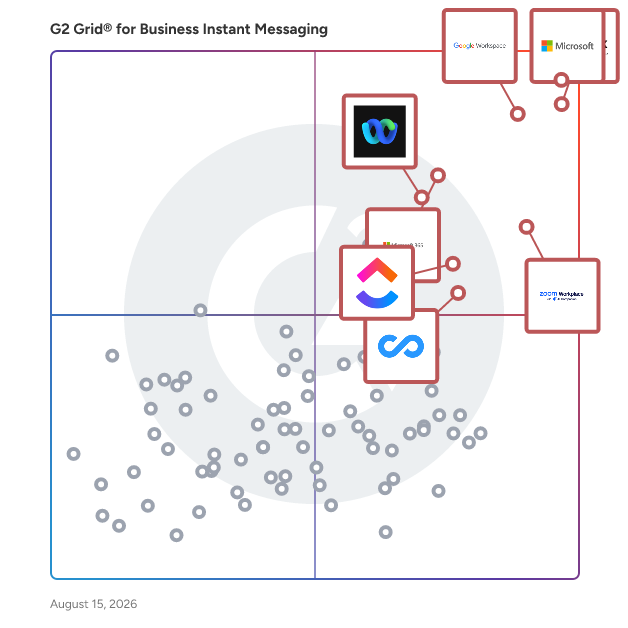
G2 Grid® for Business Instant Messaging Software

G2 Grid® for Business Instant Messaging Software plotting products by satisfaction and market presence

Highlighted products: Microsoft Teams, Slack, Google Workspace, Zoom Workplace, Microsoft 365, Webex Suite, ClickUp, and Connecteam.

Underlying data: [Grid® JSON](https://www.g2.com/categories/business-instant-messaging/grids.json?focus%5B%5D=microsoft-teams&focus%5B%5D=slack&focus%5B%5D=google-workspace&focus%5B%5D=zoom-workplace&focus%5B%5D=microsoft365&focus%5B%5D=cisco-webex-suite&focus%5B%5D=clickup&focus%5B%5D=connecteam)

Microsoft Teams

Microsoft Teams is a comprehensive collaboration platform developed by Microsoft, designed to streamline communication and teamwork within organizations. It integrates chat, video conferencing, file storage, and application integration into a single interface, facilitating seamless collaboration across various devices and operating systems. As part of the Microsoft 365 suite, Teams enhances productivity by providing a centralized hub for team interactions and project management. Key Features and Functionality: - Chat and Messaging: Facilitates real-time text communication with individuals or groups, supporting rich text, emojis, stickers, and GIFs. - Video Conferencing: Offers high-quality video meetings with features like screen sharing, custom backgrounds, and live captions, accommodating both small team huddles and large webinars. - File Sharing and Collaboration: Enables secure file storage and sharing through integration with OneDrive and SharePoint, allowing multiple users to co-author documents simultaneously. - Integration with Applications: Supports integration with a wide range of Microsoft and third-party applications, enhancing workflow efficiency by bringing various tools into one platform. - Security and Compliance: Provides enterprise-grade security measures, including data encryption for meetings, chats, calls, and files, ensuring compliance with industry standards. Primary Value and Solutions Provided: Microsoft Teams addresses the challenges of modern workplace collaboration by unifying communication channels, reducing the need for multiple disparate tools. It enhances team productivity by centralizing resources, facilitating real-time collaboration, and ensuring secure information sharing. By integrating with the broader Microsoft 365 ecosystem, Teams offers a cohesive environment that supports remote work, hybrid teams, and in-person collaboration, adapting to the diverse needs of today's workforce.

Average Rating: 4.4/5.0

Total Reviews: 17,695

G2 Deal: % off Microsoft Teams

Our partnership with Pax8 brings you Microsoft 365 Teams directly. Click claim offer to get started!

View this exclusive G2 deal

How Do G2 Users Rate Microsoft Teams?

  • Has the product been a good partner in doing business?: 8.9/10 (Category avg: 8.8/10)
  • Web Application: 8.8/10 (Category avg: 9.0/10)
  • Third-Party Integrations: 8.7/10 (Category avg: 8.4/10)
  • File Sharing: 8.9/10 (Category avg: 8.9/10)

Who Is the Company Behind Microsoft Teams?

  • Seller: Microsoft
  • Year Founded: 1975
  • HQ Location: Redmond, Washington
  • Twitter: @microsoft
    13,091,739 Twitter followers
  • LinkedIn® Page: www.linkedin.com
    232,750 employees on LinkedIn®
  • Ownership: MSFT

Who Uses This Product?

  • Who Uses This: Software Engineer, Project Manager
  • Top Industries: Information Technology and Services, Computer Software
  • Company Size: 39% Large, 38% Medium

What Do G2 Reviewers Say About Microsoft Teams?

AI-generated summary from verified user reviews

Pros
  • Users find Microsoft Teams very easy to use, enhancing daily communication and collaboration across different platforms effortlessly.
  • Users find team collaboration seamless with Microsoft Teams, integrating meetings, chats, and file sharing efficiently.
  • Users find Microsoft Teams to be a superb tool for communication, enhancing collaboration through integrated features and organization.
  • Users value the easy file sharing in Microsoft Teams, enhancing collaboration and streamlining communication across teams.
  • Users value the easy communication features of Microsoft Teams, enhancing collaboration and availability awareness among team members.
Cons
  • Users often experience slow loading with Microsoft Teams, especially when using multiple applications or during video meetings.
  • Users experience performance issues with Teams, including high resource consumption and difficulties in low-bandwidth situations.
  • Users report the user interface can be overwhelming and slow, complicating their navigation and experience during usage.
  • Users often face connectivity issues with Microsoft Teams, particularly during low-bandwidth situations disrupting their experience.
  • Users experience performance delays with Microsoft Teams, leading to frustration, particularly on older machines and low-bandwidth connections.

What Are Recent G2 Reviews of Microsoft Teams?

What Are G2 Users Discussing About Microsoft Teams?

Slack

Slack is your single workspace that connects you with the people and tools you work with everyday, no matter where you are or what you do. With Slack you get real-time messaging through calls and chat, a searchable record of all your files and conversations, and integrations with a growing number of handy bots and apps. Now everyone can finally be on the same page and get their work done. Slack: It’s where work happens.

Average Rating: 4.5/5.0

Total Reviews: 37,864

G2 Deal: 25% off eligible upgrades to Slack Pro and Business+ for 12 months

Slack goes beyond chat and video—it empowers teams to work more efficiently by automating everyday tasks, putting your most important conversations at the center, and connecting everyone instantly (right where they're already working). Limited time offer for companies with 200 or fewer users.

View this exclusive G2 deal

How Do G2 Users Rate Slack?

  • Has the product been a good partner in doing business?: 9.1/10 (Category avg: 8.8/10)
  • Web Application: 9.2/10 (Category avg: 9.0/10)
  • Third-Party Integrations: 9.0/10 (Category avg: 8.4/10)
  • File Sharing: 9.1/10 (Category avg: 8.9/10)

Who Is the Company Behind Slack?

  • Seller: Salesforce
  • Company Website:
  • Year Founded: 1999
  • HQ Location: San Francisco, CA
  • Twitter: @salesforce
    579,511 Twitter followers
  • LinkedIn® Page: www.linkedin.com
    89,711 employees on LinkedIn®

Who Uses This Product?

  • Who Uses This: Software Engineer, Project Manager
  • Top Industries: Computer Software, Information Technology and Services
  • Company Size: 41% Small, 41% Medium

What Do G2 Reviewers Say About Slack?

AI-generated summary from verified user reviews

Pros
  • Users find Slack to be extremely easy to use, facilitating seamless collaboration and integration across teams.
  • Users love the effective team collaboration in Slack, finding huddles and organized channels enhance communication and task management.
  • Users love Slack for its efficient communication, enabling quick responses and seamless team collaboration across time zones.
  • Users love the seamless integrations of Slack, enhancing collaboration and automating tasks effortlessly across the platform.
  • Users appreciate the ease of coordination and integrations in Slack, enhancing team communication and productivity.
Cons
  • Users often face notification issues in Slack, causing missed messages and overwhelming alerts from multiple channels.
  • Users find the missing features in Slack lead to confusion and difficulty in organizing channels efficiently.
  • Users are frustrated by Slack's limited message history and lack of intuitive organization for shared assets.
  • Users find the overwhelming experience of constant alerts and message volume to be stressful and distracting.
  • Users find the overwhelming number of channels and limited message history challenging for project tracking and communication.

What Are Recent G2 Reviews of Slack?

What Are G2 Users Discussing About Slack?

Google Workspace

Google Workspace is a comprehensive productivity and collaboration solution designed to help users streamline their work processes by integrating essential tools such as email, chat, file storage, and video conferencing into a unified platform. This suite of applications is tailored for businesses, educational institutions, and individuals looking to enhance their communication and collaboration efforts, all while leveraging the power of Google’s artificial intelligence. Targeted at a diverse audience, Google Workspace caters to teams of all sizes, from small startups to large enterprises. It is particularly beneficial for remote teams and organizations that prioritize collaboration across different locations. The platform supports various use cases, including project management, team communication, document sharing, and virtual meetings, making it an ideal choice for professionals who need to work together efficiently, regardless of their physical location. One of the key features of Google Workspace is its seamless integration of applications such as Gmail, Google Meet, Google Drive, and Google Docs. This interconnectedness allows users to switch effortlessly between tasks, whether they are sending emails, participating in video calls, or collaborating on documents in real-time. The AI capabilities embedded within the platform enhance user experience by providing smart suggestions, automating repetitive tasks, and improving search functionalities, ultimately saving time and increasing productivity. Additionally, Google Workspace prioritizes security and data protection, offering robust features such as two-factor authentication, advanced phishing protection, and customizable access controls. These measures ensure that sensitive information remains secure while allowing teams to collaborate freely. The platform also supports third-party integrations, enabling users to connect their favorite applications and tools, further enhancing their workflow. In summary, Google Workspace stands out in the productivity software category by providing a holistic approach to collaboration. Its user-friendly interface, combined with powerful AI-driven features and strong security protocols, makes it a valuable tool for anyone looking to improve their work processes and foster effective teamwork. Whether for managing projects, communicating with colleagues, or sharing files, Google Workspace is designed to meet the diverse needs of its users, making it an essential resource in today’s digital workplace.

Average Rating: 4.6/5.0

Total Reviews: 45,693

How Do G2 Users Rate Google Workspace?

  • Has the product been a good partner in doing business?: 9.0/10 (Category avg: 8.8/10)
  • Web Application: 9.1/10 (Category avg: 9.0/10)
  • Third-Party Integrations: 8.7/10 (Category avg: 8.4/10)
  • File Sharing: 8.8/10 (Category avg: 8.9/10)

Who Is the Company Behind Google Workspace?

  • Seller: Google
  • Year Founded: 1998
  • HQ Location: Mountain View, CA
  • Twitter: @google
    31,899,995 Twitter followers
  • LinkedIn® Page: www.linkedin.com
    301,144 employees on LinkedIn®
  • Ownership: NASDAQ:GOOG

Who Uses This Product?

  • Who Uses This: Student, Teacher
  • Top Industries: Information Technology and Services, Education Management
  • Company Size: 46% Small, 35% Medium

What Do G2 Reviewers Say About Google Workspace?

AI-generated summary from verified user reviews

Pros
  • Users appreciate the ease of use in Google Workspace, facilitating smooth and efficient workflow management.
  • Users love the seamless team collaboration in Google Workspace, enhancing communication and boosting productivity effortlessly.
  • Users love the seamless integrations in Google Workspace, enhancing efficiency with easy access to tools and scheduling.
  • Users praise the ease of use and integration in Google Workspace, enhancing productivity and collaboration seamlessly.
  • Users appreciate the seamless Google integration of Workspace, enhancing collaboration and efficiency across all tools.
Cons
  • Users face missing features in Google Workspace, such as limited offline capabilities and restrictions on accessing certain functionalities.
  • Users find the limited features of Google Workspace unnecessary for smaller teams, lacking essential tools for their needs.
  • Users find Google Workspace lacking features compared to other platforms, impacting effective campaign management and data handling.
  • Users find internet dependency challenging, as offline functionality is limited and issues with quality can arise.
  • Users find limited customization options in Google Workspace, particularly for calendars and forms, restricting flexibility and creativity.

What Are Recent G2 Reviews of Google Workspace?

What Are G2 Users Discussing About Google Workspace?

Zoom Workplace

Goodbye app overload. Hello effortless work. Work can be complicated. Your tools shouldn't be. Zoom Workplace connects all the ways you collaborate — from meetings to docs to chat and more — with built-in AI and seamless integrations that help teams focus and work flawlessly. Zoom Communications: Unified, Effortless Connection for Modern Work Bring every way your teams communicate—meetings, chat, calls, email, and scheduling—into one seamless experience. With Zoom, collaboration happens faster and more naturally across channels, without switching apps or losing context. From spontaneous chats to scheduled meetings and calls, everything stays connected, searchable, and secure—powered by one intuitive platform built for how modern teams work. Zoom Productivity: Workflows Connected, Work Effortless Transform how work gets done with AI-first collaboration that keeps people, content, and actions in one place. From brainstorming on whiteboards to co-creating in docs, sharing clips, and automating follow-ups, Zoom connects every step of your workflow. With Zoom Hub and integrated video management, knowledge stays organized, accessible, and actionable—so teams can move from idea to outcome without friction. Zoom Spaces: Smarter, Connected Workplaces for Every Team Bring your physical and hybrid environments to life with intelligent, connected spaces. Zoom Spaces unifies meeting rooms, desk reservations, digital signage, and visitor management into one seamless experience—making it simple to collaborate, navigate, and manage the workplace. Whether employees are remote, hybrid, or on-site, Zoom creates a consistent, secure, and flexible environment that keeps teams connected wherever work happens. Zoom Employee Engagement: Connect, Inspire, and Empower Every Employee Foster belonging and alignment with Workvivo by Zoom—a modern employee experience platform that unites communication, culture, and community in one place. From company-wide updates to recognition, feedback, and social engagement, Workvivo gives every employee a voice and a sense of connection. Built right into Zoom Workplace, it helps organizations strengthen culture, boost engagement, and keep teams informed and inspired—no matter where they work.

Average Rating: 4.5/5.0

Total Reviews: 53,599

How Do G2 Users Rate Zoom Workplace?

  • Has the product been a good partner in doing business?: 9.1/10 (Category avg: 8.8/10)
  • Web Application: 8.9/10 (Category avg: 9.0/10)
  • Third-Party Integrations: 8.5/10 (Category avg: 8.4/10)
  • File Sharing: 8.6/10 (Category avg: 8.9/10)

Who Is the Company Behind Zoom Workplace?

  • Seller: Zoom
  • Company Website:
  • Year Founded: 2011
  • HQ Location: San Jose, CA
  • Twitter: @zoom
    1,042,714 Twitter followers
  • LinkedIn® Page: www.linkedin.com
    14,013 employees on LinkedIn®

Who Uses This Product?

  • Who Uses This: Owner, Software Engineer
  • Top Industries: Information Technology and Services, Computer Software
  • Company Size: 51% Small, 31% Medium

What Do G2 Reviewers Say About Zoom Workplace?

AI-generated summary from verified user reviews

Pros
  • Users love the ease of use of Zoom Workplace, enjoying seamless access to features with just a click.
  • Users enjoy the easy-to-use video conferencing features of Zoom, facilitating smooth communication and collaboration in hybrid work settings.
  • Users appreciate the excellent video quality of Zoom Workplace, enhancing communication and making meetings more effective.
  • Users value the reliability of Zoom Workplace, ensuring seamless connectivity and stability even during adverse conditions.
  • Users appreciate the ease of collaboration in Zoom Workplace, especially with breakout rooms and seamless screen sharing.
Cons
  • Users note the limited features of Zoom Workplace, expressing a need for improved built-in collaboration tools.
  • Users experience Zoom issues like fatigue, connectivity problems, and confusing configurations that hinder their overall meeting effectiveness.
  • Users experience Zoom fatigue, notification overload, and connectivity issues, making long meetings feel overwhelming and impersonal.
  • Users often face connection issues with Zoom Workplace, leading to a frustrating and less seamless experience.
  • Users face video quality issues and discomfort with camera usage, impacting the overall experience of Zoom meetings.

What Are Recent G2 Reviews of Zoom Workplace?

What Are G2 Users Discussing About Zoom Workplace?

Microsoft 365

Launch and grow your business with Microsoft 365. Do more, faster, with intelligent tools to create, send, share, and store professional, branded documents with your customers and team - securely in the cloud. Microsoft 365 is a cloud-based suite of software tools designed to help you do more—with best-in-class communication, design, and data management apps, intelligent cloud services, and advanced security. Access your data from anywhere, collaborate with team members in real time, meet with people virtually, and use thousands of predesigned templates to better communicate with customers and manage your business - all with built-in security technology that safeguards your data and devices from anywhere. Get the latest Office apps, such as Microsoft Teams, Word, Excel, PowerPoint, Outlook, OneDrive, and more.

Average Rating: 4.6/5.0

Total Reviews: 5,545

How Do G2 Users Rate Microsoft 365?

  • Has the product been a good partner in doing business?: 8.8/10 (Category avg: 8.8/10)
  • Web Application: 9.2/10 (Category avg: 9.0/10)
  • Third-Party Integrations: 8.9/10 (Category avg: 8.4/10)
  • File Sharing: 9.4/10 (Category avg: 8.9/10)

Who Is the Company Behind Microsoft 365?

  • Seller: Microsoft
  • Year Founded: 1975
  • HQ Location: Redmond, Washington
  • Twitter: @microsoft
    13,091,739 Twitter followers
  • LinkedIn® Page: www.linkedin.com
    232,750 employees on LinkedIn®
  • Ownership: MSFT

Who Uses This Product?

  • Who Uses This: Owner, Software Engineer
  • Top Industries: Information Technology and Services, Education Management
  • Company Size: 37% Medium, 35% Small

What Do G2 Reviewers Say About Microsoft 365?

AI-generated summary from verified user reviews

Pros
  • Users highlight the ease of use in Microsoft 365, enjoying straightforward implementation and seamless navigation.
  • Users appreciate the seamless team collaboration in Microsoft 365, enhancing efficiency and communication across various applications.
  • Users value the easy integration with Microsoft apps, enhancing data access and collaboration across devices.
  • Users value the easy integration of Microsoft 365 with other tools, enhancing collaboration and accessibility across devices.
  • Users love the seamless integration of Microsoft 365 with other apps, enhancing accessibility and collaboration.
Cons
  • Users find Microsoft 365 too expensive for small teams, encountering frustrating limitations and issues with updates.
  • Users find the missing features frustrating, as essential tools are locked behind higher-priced plans and updates disrupt functionality.
  • Users find the learning curve daunting with Microsoft 365, often feeling overwhelmed by its complexity and features.
  • Users find Microsoft 365 lacking essential features, especially with frequent updates that disrupt established workflows and settings.
  • Users are frustrated by limited features in Microsoft 365, often requiring costly plans for full functionality.

What Are Recent G2 Reviews of Microsoft 365?

What Are G2 Users Discussing About Microsoft 365?

Webex Suite

Webex Suite is an all-in-one, AI-powered collaboration suite built to increase productivity and maximize teamwork in today’s hybrid work. With 8 powerful individual workflows – Meetings, Messaging, Calling, Webinar, Events, Polling, Whiteboarding and Video Messaging in one, Webex Suite delivers exceptional value, world-class user experiences, and incredible audio and video, anywhere on any device. With a variety of collaboration and AI innovations, such as Webex AI Assistant, Real-time Translation, Background Noise Removal, and more, Webex Suite delivers rich and innovative experiences for employees and customers, enabling them to seamlessly connect, collaborate, engage and get work done. Webex Suite is powered by the industry-leading Webex Platform that is secure, compliant, and easily managed with built-in pervasive intelligence, bringing AI innovations across the entire Webex portfolio. The entire Webex Suite can be managed via the single-pane-of-glass management tool, Webex Control Hub. Webex Suite is backed by Cisco’s industry-leading security and networking infrastructure that ensures the best quality video and audio communications. Webex Suite Workflows: Meetings: Drive more productive meetings with AI-powered experiences and high-quality audio and video. Messaging: Collaborate async with rich messaging, secure file sharing, and digital whiteboarding to keep work flowing between meetings. Calling: Stay connected with modern business phone system and flexible calling options. Webinar: Host high quality webinars and drive engagement with immersive content and interactive audience experiences. Events: Power virtual, in-person, and hybrid events with immersive multi-track agendas, ticketing, attendee networking, analytics, and more. Polling: Enable active participation in every meeting with quizzes, polling, and interactive Q&A. Whiteboarding: Unleash creativity with a digital whiteboarding solution for everyone, on any device. Video Messaging: Record, share ideas, engage, and facilitate real-time feedback with intuitive video messaging.

Average Rating: 4.2/5.0

Total Reviews: 17,664

How Do G2 Users Rate Webex Suite?

  • Has the product been a good partner in doing business?: 8.7/10 (Category avg: 8.8/10)
  • Web Application: 8.8/10 (Category avg: 9.0/10)
  • Third-Party Integrations: 8.7/10 (Category avg: 8.4/10)
  • File Sharing: 8.6/10 (Category avg: 8.9/10)

Who Is the Company Behind Webex Suite?

  • Seller: Cisco
  • Company Website:
  • Year Founded: 1984
  • HQ Location: San Jose, CA
  • Twitter: @Cisco
    720,366 Twitter followers
  • LinkedIn® Page: www.linkedin.com
    95,294 employees on LinkedIn®

Who Uses This Product?

  • Who Uses This: Software Engineer, Senior Software Engineer
  • Top Industries: Information Technology and Services, Computer Software
  • Company Size: 50% Large, 31% Medium

What Do G2 Reviewers Say About Webex Suite?

AI-generated summary from verified user reviews

Pros
  • Users appreciate the ease of use of Webex Suite for its all-in-one solution for communication and collaboration.
  • Users value the high-quality video and audio of Webex Suite, enabling effective and seamless collaboration across locations.
  • Users appreciate the reliable connections provided by Webex Suite, enhancing their collaboration experience seamlessly.
  • Users value the all-in-one collaboration capabilities of Webex Suite, enhancing productivity with excellent video and audio quality.
  • Users commend the excellent video quality of Webex Suite, enhancing their meeting and collaboration experiences.
Cons
  • Users often experience slow loading issues with Webex Suite, causing frustration during calls and overall usage.
  • Users report performance issues with Webex Suite, describing lag, freezes, and a cluttered interface that complicates usability.
  • Users find Webex Suite not user-friendly, citing a cluttered interface and confusion with settings as major drawbacks.
  • Users find the lack of intuitiveness in Webex Suite's interface challenging, especially for new users navigating features.
  • Users find the poor user experience of Webex Suite challenging, with a complex setup and a cluttered interface.

What Are Recent G2 Reviews of Webex Suite?

What Are G2 Users Discussing About Webex Suite?

ClickUp

ClickUp is the world’s first Converged AI Workspace, bringing together all work apps, data, and workflows. ClickUp eliminates all forms of work sprawl to provide 100% context and a single place for humans and agents to work, together. Trusted by more than 20 million users worldwide, ClickUp is on a mission to maximize human productivity.

Average Rating: 4.6/5.0

Total Reviews: 13,546

How Do G2 Users Rate ClickUp?

  • Has the product been a good partner in doing business?: 9.0/10 (Category avg: 8.8/10)
  • Web Application: 9.2/10 (Category avg: 9.0/10)
  • Third-Party Integrations: 8.8/10 (Category avg: 8.4/10)
  • File Sharing: 9.0/10 (Category avg: 8.9/10)

Who Is the Company Behind ClickUp?

  • Seller: ClickUp
  • Company Website:
  • Year Founded: 2017
  • HQ Location: San Diego, California
  • Twitter: @clickup
    69,539 Twitter followers
  • LinkedIn® Page: www.linkedin.com
    7,082 employees on LinkedIn®

Who Uses This Product?

  • Who Uses This: CEO, Project Manager
  • Top Industries: Marketing and Advertising, Computer Software
  • Company Size: 77% Small, 19% Medium

What Do G2 Reviewers Say About ClickUp?

AI-generated summary from verified user reviews

Pros
  • Users find ClickUp to be incredibly easy and simple to use, streamlining tasks and enhancing productivity effortlessly.
  • Users value the flexibility in task management, enabling customized workflows for personal, team, and project tasks.
  • Users appreciate the abundance of features in ClickUp, making task management seamless and efficient.
  • Users appreciate ClickUp for its streamlined management tasks, enabling better organization and efficiency in project handling.
  • Users appreciate ClickUp for its streamlined organization, making team management and project tracking efficient and effortless.
Cons
  • Users find the missing features in ClickUp frustrating, particularly the lack of basic tools like subfolders.
  • Users experience a learning curve with ClickUp, finding the plethora of features daunting at first.
  • Users note limited features in ClickUp, with missing basic options and a complex setup process hindering ease of use.
  • Users find ClickUp not intuitive, feeling overwhelmed by its many features and struggling with initial setup and performance.
  • Users experience slow loading times in ClickUp, which affects their productivity when managing multiple tasks and fields.

What Are Recent G2 Reviews of ClickUp?

What Are G2 Users Discussing About ClickUp?

Connecteam

Connecteam is a mobile-first workforce management app featuring a robust set of tools designed to help organizations with deskless teams improve communication, retain staff, and drive operational efficiency. Connecteam allows managers to put their business processes on autopilot and focus on business growth while also freeing up employees to be more productive, professional, and satisfied. At the heart of Connecteam lies a powerful suite of tools for scheduling, time tracking, task management, communication, HR processes, and training—all built for the realities of frontline teams. Whether you need to create complex shift schedules, automate payroll-ready timesheets, distribute company announcements, or onboard new hires at scale, Connecteam brings everything under one intuitive app. Save time and increase productivity with AI assisted scheduling, mobile-first custom checklists, forms, and reports; Track work hours with GPS time clock; Simplify employee communication, enhance professional skills with mobile courses (AI powered course content creator), manage daily tasks and so much more, all in one app. Connecteam AI helps you work faster and smarter than humanly possible, while keeping it simple: -AI Agent : Just ask your AI sidekick in chat. From stock info to safety steps, manuals, or care procedures, employees get instant spot-on answers, pulled straight from your in-app resources. No delays, no guesswork. -Auto scheduling : Your team schedule’s fully covered in seconds. AI puzzles availability, roles, fairness, and requirements with expert precision. The result? Reliable schedules, happier employees, and no admin hassle. -AI course creation: Turn any training topic into a full course. Just describe the subject and AI instantly builds a pro-level course, ready to go. Your team, trained the way you need, to the standard you expect. -File to Form: Digitize forms in a snap - upload a file or take a photo of any paper form. AI turns it into a fillable version your team can complete wherever they are. Easy for them, efficient for you. -AI updates and feed: Level up every update - write clear team updates that land. AI enhances your message and auto-translates it into each employee’s preferred language. Everyone stays aligned, nothing gets misinterpreted. -Speech to text: Fill forms, hands-free - simply speak into forms. AI captures, summarizes, and sorts your team’s input on the spot, without them having to look down or slow down. No distractions, no delays—just clear, accurate reporting. Additionally, ensure a secure and easy login for system admins with Active Directory Single Sign-On (SSO).

Average Rating: 4.6/5.0

Total Reviews: 3,491

How Do G2 Users Rate Connecteam?

  • Has the product been a good partner in doing business?: 9.3/10 (Category avg: 8.8/10)
  • Web Application: 9.0/10 (Category avg: 9.0/10)
  • Third-Party Integrations: 8.0/10 (Category avg: 8.4/10)
  • File Sharing: 8.8/10 (Category avg: 8.9/10)

Who Is the Company Behind Connecteam?

  • Seller: Connecteam
  • Year Founded: 2015
  • HQ Location: New York, NY
  • Twitter: @ConnecteamApp
    1,235 Twitter followers
  • LinkedIn® Page: www.linkedin.com
    533 employees on LinkedIn®

Who Uses This Product?

  • Who Uses This: Owner, Manager
  • Top Industries: Construction, Retail
  • Company Size: 83% Small, 14% Medium

What Do G2 Reviewers Say About Connecteam?

AI-generated summary from verified user reviews

Pros
  • Users find Connecteam's ease of use remarkable, noting its intuitive design and straightforward setup for all staff members.
  • Users value the ease of use and comprehensive features of Connecteam, enhancing communication and efficiency within teams.
  • Users love the customizable scheduling feature of Connecteam, enhancing organization and accountability among staff greatly.
  • Users value the effortless team collaboration in Connecteam, enhancing scheduling, communication, and overall team rapport.
  • Users find Connecteam to be user-friendly, enabling easy navigation and effective communication among staff members.
Cons
  • Users find missing features in Connecteam, such as limited templates and underwhelming admin organization, frustrating.
  • Users find the limited features of Connecteam to be frustrating and wish for more customization options.
  • Users face scheduling issues with Connecteam, citing limitations in view options and difficulties in managing time effectively.
  • Users report needing improvements for clearer notifications and easier access to admin features in Connecteam.
  • Users find the learning curve challenging, especially with navigation differences between desktop and app functionalities.

What Are Recent G2 Reviews of Connecteam?

What Are G2 Users Discussing About Connecteam?

RingCentral Video

Glip is a conversation platform for teams to plan, share & organize work tasks. Text and video chat features facilitate communication between team members whilst file sharing and collaborative task management encourage efficiency and productivity. Glip helps teams to connect in real-time, unifying chat, tasks, video calling, file sharing, and event scheduling. Glip simplifies teamwork with secure instant messaging designed for teams to communicate and get work done at the same time. With Glip, work can be organized around conversations because the two are aligned. Users will always know what their team is doing and what needs to be done next. Glip enables the free flow of communication in teams. With text and and video chat at Glip's core, conversation barriers between team members are removed, enabling productivity and a smoother workflow. Ideas can be debated and problems solved through swift communication with Glip, which can be used like a Knowledge Base. Email and third party integrations mean that Glip - which requires no technical knowledge - can be implemented by teams already using different applications.

Average Rating: 4.2/5.0

Total Reviews: 496

How Do G2 Users Rate RingCentral Video?

  • Has the product been a good partner in doing business?: 8.7/10 (Category avg: 8.8/10)
  • Web Application: 8.7/10 (Category avg: 9.0/10)
  • Third-Party Integrations: 8.3/10 (Category avg: 8.4/10)
  • File Sharing: 8.6/10 (Category avg: 8.9/10)

Who Is the Company Behind RingCentral Video?

  • Seller: RingCentral
  • Year Founded: 1999
  • HQ Location: Belmont, CA
  • Twitter: @RingCentral
    61,963 Twitter followers
  • LinkedIn® Page: www.linkedin.com
    6,675 employees on LinkedIn®
  • Ownership: NYSE:RNG

Who Uses This Product?

  • Who Uses This: Owner
  • Top Industries: Information Technology and Services, Computer Software
  • Company Size: 48% Medium, 42% Small

What Do G2 Reviewers Say About RingCentral Video?

AI-generated summary from verified user reviews

Pros
  • Users appreciate the ease of use of RingCentral Video, making connections and setups straightforward and efficient.
  • Users enjoy the great video quality of RingCentral Video, enhancing their conferencing experience significantly.
  • Users appreciate the easy screen sharing feature of RingCentral Video, enabling seamless collaboration and connectivity.
  • Users praise the accessible connectivity of RingCentral Video, making it easy for everyone to join meetings effortlessly.
  • Users find RingCentral Video to be highly reliable, ensuring stable connections and clear communication for meetings.
Cons
  • Users experience connectivity issues with RingCentral Video, including delays and audio sync problems during meetings.
  • Users report slow loading times, particularly when joining large meetings, negatively impacting their overall experience.
  • Users find the learning curve to be challenging, requiring extra time to adjust to RingCentral Video's interface.
  • Users find missing features in RingCentral Video, particularly for interactivity and engaging tools during meetings.
  • Users experience occasional performance issues with RingCentral Video, such as lags and app freezes during use.

What Are Recent G2 Reviews of RingCentral Video?

What Are G2 Users Discussing About RingCentral Video?

Zoho Cliq

Zoho Cliq is a business communication software that helps simplify and streamline your communication with organized conversations and information that's easy to find. Cliq is designed to enable a hybrid work style, where you can log in to work through any device from anywhere. This helps improve your team's overall productivity and, in turn, impacts the performance of your business positively.

Average Rating: 4.4/5.0

Total Reviews: 256

How Do G2 Users Rate Zoho Cliq?

  • Has the product been a good partner in doing business?: 9.1/10 (Category avg: 8.8/10)
  • Web Application: 8.9/10 (Category avg: 9.0/10)
  • Third-Party Integrations: 8.6/10 (Category avg: 8.4/10)
  • File Sharing: 9.1/10 (Category avg: 8.9/10)

Who Is the Company Behind Zoho Cliq?

  • Seller: Zoho
  • Year Founded: 1996
  • HQ Location: Austin, TX
  • Twitter: @Zoho
    137,880 Twitter followers
  • LinkedIn® Page: www.linkedin.com
    30,913 employees on LinkedIn®
  • Phone: +1 (888) 900-9646

Who Uses This Product?

  • Who Uses This: Senior Software Engineer
  • Top Industries: Information Technology and Services, Computer Software
  • Company Size: 54% Small, 30% Medium

What Do G2 Reviewers Say About Zoho Cliq?

AI-generated summary from verified user reviews

Pros
  • Users find Zoho Cliq to be simple and efficient, enabling seamless communication and collaboration with minimal setup.
  • Users appreciate the seamless communication capabilities of Zoho Cliq, enhancing team collaboration without switching apps.
  • Users value the easy communication with teams via Zoho Cliq, enhancing collaboration and streamlining workflows efficiently.
  • Users appreciate the excellent customer support of Zoho Cliq, enhancing their communication experience without any issues.
  • Users enjoy the easy file sharing features in Zoho Cliq, enhancing collaboration and communication within their teams.
Cons
  • Users find difficult navigation in Zoho Cliq, especially beginners struggling with settings and features.
  • Users struggle with the non-intuitive navigation of Zoho Cliq, particularly beginners finding it challenging to navigate settings.
  • Users experience slow loading times with Zoho Cliq, impacting performance when managing multiple chats and channels.
  • Users find the channel creation process not user-friendly, suggesting the UI design needs modernization for better usability.
  • Users face a challenging learning curve with Zoho Cliq due to its complex settings and features.

What Are Recent G2 Reviews of Zoho Cliq?

What Are G2 Users Discussing About Zoho Cliq?

Missive

Are you double sending emails? Not knowing who's responding to what, or whether they've responded at all? Losing the thread when the person who owns it is out? What if your business could manage all your email accounts, including its shared inboxes like support@, sales@, info@, and accounting@, along with SMS, WhatsApp, Messenger, and Instagram—all in one place? Missive is inbox collaboration for teams that run on email. Every conversation gets an owner, so nobody replies twice and nothing sits unread for a week. Teammates discuss a thread in private comments right beside it instead of forwarding it around, and when someone's away, whoever picks it up gets the full history. Missive's AI assistant works inside the inbox. It reads a thread and drafts a reply in your voice, searches your email, contacts and calendar, and reads attachments. Through MCP it pulls context from tools like ClickUp, Todoist and Stripe—and the reverse, letting Claude, ChatGPT or Cursor act on your conversations, contacts and drafts from outside Missive. Bring your own Claude, OpenAI or Gemini key, or use Missive AI credits. You approve before anything sends. Used by over 6000 businesses, including accounting firms, manufacturers, property management companies, travel agencies, legal practices, and logistics teams. -- Key features • Team Inboxes: Shared addresses the whole team works from, with assignment so every conversation has a clear owner and coverage when someone's out. • Internal comments and @mentions: Discuss a thread in a private sidebar next to the actual email. The customer never sees it. • AI assistant: Drafts replies in your voice, searches your inbox, contacts and calendar, and reads attachments. Labels, events and sends happen only after you approve. • MCP in both directions: Missive AI connects out to tools like ClickUp, Todoist and Stripe, and Missive's MCP server lets Claude, ChatGPT or Cursor work on your inbox from outside. • Automated Workflows: Create customizable rules to automate repetitive tasks and use AI to get even more efficiency. Popular use cases include auto-categorization of emails, auto-follow-up emails, automatic forwarding of receipts, and out-of-office auto-responses. • Canned responses: Save time with pre-written replies to customer inquiries, sales pitches, or to include that PDF you always need to attach when signing up a new client. • Integrations: Pipedrive, HubSpot, Shopify, Airtable, ClickUp, Asana, Dialpad, Twilio, Aircall, Zapier, and a REST API for building your own.

Average Rating: 4.7/5.0

Total Reviews: 850

How Do G2 Users Rate Missive?

  • Has the product been a good partner in doing business?: 9.6/10 (Category avg: 8.8/10)
  • Web Application: 9.1/10 (Category avg: 9.0/10)
  • Third-Party Integrations: 8.3/10 (Category avg: 8.4/10)
  • File Sharing: 8.7/10 (Category avg: 8.9/10)

Who Is the Company Behind Missive?

  • Seller: Missive
  • Company Website:
  • Year Founded: 2015
  • HQ Location: Quebec, QC
  • Twitter: @missiveapp
    2,667 Twitter followers
  • LinkedIn® Page: www.linkedin.com
    12 employees on LinkedIn®

Who Uses This Product?

  • Who Uses This: CEO, Owner
  • Top Industries: Accounting, Marketing and Advertising
  • Company Size: 87% Small, 12% Medium

What Do G2 Reviewers Say About Missive?

AI-generated summary from verified user reviews

Pros
  • Users value the seamless team collaboration in Missive, enhancing productivity through integrated chat and task assignment.
  • Users appreciate the team collaboration features of Missive, which streamline workflow and enhance productivity significantly.
  • Users find Missive's intuitive interface and seamless collaboration features make email management effortless and efficient.
  • Users appreciate the collaborative features of Missive that enhance team productivity and streamline email management.
  • Users value the collaborative features of Missive, enhancing teamwork and improving email organization effortlessly.
Cons
  • Users note the missing features in Missive, such as offline support and an improved search and labeling system.
  • Users find the learning curve challenging initially, requiring time to become familiar with advanced features and setups.
  • Users find the search functionality lacking, especially for specific and older messages, despite some improvements over time.
  • Users find the search difficulty frustrating, particularly with older messages, though improvements are underway.
  • Users find the steep learning curve of Missive challenging initially, making setup and feature integration feel daunting.

What Are Recent G2 Reviews of Missive?

What Are G2 Users Discussing About Missive?

Lark

Built by ByteDance, Lark is an enterprise AI workspace designed for seamless human-agent collaboration. It unifies teams, communication, knowledge, and business workflows in one connected environment with an open architecture for AI models and agents. By bringing work into one place rather than scattering it across separate apps, Lark gives AI complete, real-time context and the native ability to act across the entire business. Today, organizations in more than 190 markets use Lark to turn AI into measurable business value.

Average Rating: 4.6/5.0

Total Reviews: 178

How Do G2 Users Rate Lark?

  • Has the product been a good partner in doing business?: 9.5/10 (Category avg: 8.8/10)
  • Web Application: 8.9/10 (Category avg: 9.0/10)
  • Third-Party Integrations: 8.4/10 (Category avg: 8.4/10)
  • File Sharing: 9.2/10 (Category avg: 8.9/10)

Who Is the Company Behind Lark?

  • Seller: Lark Technologies
  • Year Founded: 2003
  • HQ Location: Singapore, Singapore
  • Twitter: @lark
    471 Twitter followers
  • LinkedIn® Page: www.linkedin.com
    220 employees on LinkedIn®

Who Uses This Product?

  • Top Industries: Information Technology and Services, Computer Software
  • Company Size: 48% Small, 31% Medium

What Do G2 Reviewers Say About Lark?

AI-generated summary from verified user reviews

Pros
  • Users appreciate the ease of use of Lark, enjoying seamless collaboration and efficient navigation across its features.
  • Users love Lark for its user-friendly features, including real-time collaboration, integrated tools, and easy navigation.
  • Users value the seamless team collaboration offered by Lark, integrating communication, tasks, and documents in one platform.
  • Users admire Lark's innovative communication tools, enhancing collaboration with real-time features and seamless integration.
  • Users love Lark for its user-friendly collaboration, seamlessly integrating meetings, chat, and document sharing in one app.
Cons
  • Users face a notable learning curve with Lark, as navigating features can be confusing at first.
  • Users face integration issues that interrupt workflows and complicate the use of Lark with other platforms.
  • Users report slow loading issues with Lark, causing frustration and inefficiencies during their work experience.
  • Users express frustration over limited customization, affecting ease of use and overall experience with Lark.
  • Users report login issues with Lark, including confusion during setup and occasional bugs affecting accessibility.

What Are Recent G2 Reviews of Lark?

What Are G2 Users Discussing About Lark?

Text Request

Text Request is a business texting software that directly connects your business to your customers through the unmatched engagement power of text messaging. Upgrade your business phone number to send and receive text messages without losing voice capabilities. Our business texting software empowers growing franchises and small businesses to scale through mass messaging (bulk messaging), payment links, appointment reminders, Google review management, SMS marketing, and more. Get 5-star customer service, user-friendly interface, SMS API, and a simple 10DLC registration process that provides white-glove support no matter your plan. We also include a mobile app, Chrome extension, and desktop version, so your team can text the way they want. Our founder saw businesses struggle with unanswered cold calls, unread emails, personal phone switching, and valuable time lost. That’s why we’ve gone all in on building a deeply engaging text conversation platform that scales to the needs of your business. Text Request is the cost-effective solution to streamline your messaging, so you can increase retention rates and revenue.

Average Rating: 4.6/5.0

Total Reviews: 958

G2 Deal: 20% OFF your first three months using code "G2Deal"

Text Request is the business texting platform built to ignite customer engagement. Exclusive to G2 users! Receive 20% off the first 3 months on ANY plan! Head over to: https://www.textrequest.com/pricing

View this exclusive G2 deal

How Do G2 Users Rate Text Request?

  • Has the product been a good partner in doing business?: 9.3/10 (Category avg: 8.8/10)
  • Web Application: 9.0/10 (Category avg: 9.0/10)
  • Third-Party Integrations: 8.2/10 (Category avg: 8.4/10)
  • File Sharing: 8.2/10 (Category avg: 8.9/10)

Who Is the Company Behind Text Request?

  • Seller: Text Request
  • Company Website:
  • Year Founded: 2014
  • HQ Location: Chattanooga, Tennessee
  • Twitter: @Text_Request
    642 Twitter followers
  • LinkedIn® Page: www.linkedin.com
    41 employees on LinkedIn®

Who Uses This Product?

  • Who Uses This: Office Manager, Owner
  • Top Industries: Hospital & Health Care, Medical Practice
  • Company Size: 65% Small, 31% Medium

What Do G2 Reviewers Say About Text Request?

AI-generated summary from verified user reviews

Pros
  • Users appreciate the intuitive and user-friendly interface of Text Request, enhancing communication and client interactions effectively.
  • Users value the effortless communication capabilities of Text Request, enhancing customer service and efficiency.
  • Users love the easy communication with Text Request, appreciating its user-friendly setup and quick customer support.
  • Users find Text Request to be intuitive and user-friendly, enhancing client interactions and communication efficiency.
  • Users value the effective client interaction features of Text Request, enhancing engagement through intuitive mass messaging and real-time analytics.
Cons
  • Users express frustration over missing features like automatic sorting and unresolved conversation notifications affecting usability.
  • Users find the limited features of Text Request frustrating, especially the inability to send videos and unclear pricing.
  • Users feel the cost is steep for Text Request, especially compared to other available free platforms.
  • Users struggle with lack of notifications, facing issues with sound alerts and slow loading times in Text Request.
  • Users report frequent software glitches that disrupt functionality and lead to miscommunication and missed messages.

What Are Recent G2 Reviews of Text Request?

What Are G2 Users Discussing About Text Request?

Teamwork Chat

Teamwork Chat is a real-time messaging platform designed to enhance team collaboration and communication. It offers instant messaging, group chats, and file sharing, enabling teams to stay connected and work efficiently. The platform integrates seamlessly with Teamwork's suite of project management tools, providing a unified workspace for managing tasks and projects. Key Features: - Instant Messaging: Facilitates quick and direct communication among team members. - Group Chats: Allows the creation of channels for specific projects or topics, promoting organized discussions. - File Sharing: Enables easy sharing of documents and media within conversations. - Integration with Teamwork Projects: Links chat discussions directly to tasks and projects, streamlining workflow. - Search Functionality: Provides the ability to search through messages and files for quick information retrieval. - Notifications: Offers customizable alerts to keep users informed without overwhelming them. Primary Value: Teamwork Chat addresses the need for efficient and organized team communication. By integrating with Teamwork's project management tools, it ensures that conversations are directly linked to tasks and projects, reducing miscommunication and enhancing productivity. The platform's user-friendly interface and robust features make it an essential tool for teams aiming to collaborate effectively in real-time.

Average Rating: 4.4/5.0

Total Reviews: 63

How Do G2 Users Rate Teamwork Chat?

  • Has the product been a good partner in doing business?: 9.2/10 (Category avg: 8.8/10)
  • Web Application: 9.1/10 (Category avg: 9.0/10)
  • Third-Party Integrations: 8.2/10 (Category avg: 8.4/10)
  • File Sharing: 9.0/10 (Category avg: 8.9/10)

Who Is the Company Behind Teamwork Chat?

  • Seller: Teamwork
  • Year Founded: 2007
  • HQ Location: Cork
  • Twitter: @teamwork
    1 Twitter followers
  • LinkedIn® Page: www.linkedin.com
    549 employees on LinkedIn®

Who Uses This Product?

  • Top Industries: Information Technology and Services
  • Company Size: 63% Small, 24% Medium

What Do G2 Reviewers Say About Teamwork Chat?

AI-generated summary from verified user reviews

Pros
  • Users value the easy group communication of Teamwork Chat, enhancing collaboration and keeping all discussions organized.
  • Users appreciate the ease of use of Teamwork Chat, facilitating smooth communication and project management.
  • Users value the real-time communication and organization features of Teamwork Chat, enhancing team collaboration and productivity.
  • Users value the organization of Teamwork Chat, which facilitates focused discussions and enhances team collaboration.
  • Users appreciate the easy and fast file sharing feature of Teamwork Chat, enhancing collaboration and communication effectively.
Cons
  • Users find the experience overwhelming due to frequent notifications and message clutter, hindering focus and efficiency.
  • Users find the slow loading times frustrating, leading to delays and a less efficient chat experience.
  • Users experience file sharing issues with Teamwork Chat, facing slow speeds and inadequate file management capabilities.
  • Users note the missing features in Teamwork Chat, especially compared to more advanced alternatives like Slack or Microsoft Teams.
  • Users experience performance issues, including slow mobile app response, unreliable notifications, and sluggish file sharing.

What Are Recent G2 Reviews of Teamwork Chat?

What Are G2 Users Discussing About Teamwork Chat?

Blink

Blink is a leading employee experience platform designed to connect users to the tools, information, and actions necessary for effective work performance. Specifically tailored for frontline and deskless organizations, as well as complex and distributed workforces, Blink addresses the digital divide between desk-based and non-desk employees. This platform ensures that every worker, regardless of their work environment, has access to the resources they need to excel in their roles. The target audience for Blink includes industries where a significant portion of the workforce operates without a traditional desk, such as healthcare, transportation, logistics, manufacturing, hospitality, and retail. By providing a mobile-first digital front door, Blink unifies communications, knowledge, and workflows into a cohesive platform. This integration promotes higher adoption rates, increased productivity, and enhanced employee engagement across organizations. Unlike traditional intranet solutions or standalone communication tools, Blink facilitates actionable insights, allowing employees to not only receive information but also to engage with it effectively. Key features of Blink include a comprehensive employee communications system that offers a social-style news feed, priority posts, push notifications, newsletters, and two-way messaging. This ensures that all employees receive real-time updates and can communicate seamlessly. Additionally, Blink serves as an employee intranet, providing a centralized hub for easy access to documents, policies, HR tools, workflows, and third-party applications. This streamlined access is particularly beneficial for organizations with a diverse workforce, as it eliminates the need for a company email address or fixed workstation, allowing for quick onboarding through single sign-on (SSO) authentication and an intuitive mobile interface. Moreover, Blink enhances employee engagement through features such as peer recognition, surveys, onboarding flows, and shift scheduling. Its built-in AI capabilities improve search functionality, content creation, and analytics, enabling employees to find answers quickly and communicate more effectively. The platform has demonstrated significant impact, with customers reporting an average of seven app opens per day per user and a reduction in frontline attrition of up to 25%. Blink’s high employee activation rate of 95% and its endorsement by global organizations like McDonald's, Domino's, and Nokia underscore its effectiveness in fostering a connected and engaged workforce. Recognized as a leader in employee engagement software, Blink continues to set the standard for employee experience platforms in today's dynamic work environments.

Average Rating: 4.6/5.0

Total Reviews: 400

How Do G2 Users Rate Blink?

  • Has the product been a good partner in doing business?: 9.4/10 (Category avg: 8.8/10)
  • Web Application: 9.2/10 (Category avg: 9.0/10)
  • Third-Party Integrations: 8.5/10 (Category avg: 8.4/10)
  • File Sharing: 8.6/10 (Category avg: 8.9/10)

Who Is the Company Behind Blink?

  • Seller: Blink
  • Company Website:
  • Year Founded: 2015
  • HQ Location: Boston, MA
  • Twitter: @joinBlink
    2,743 Twitter followers
  • LinkedIn® Page: www.linkedin.com
    372 employees on LinkedIn®

Who Uses This Product?

  • Who Uses This: Operations Manager, Assistant Operations Manager
  • Top Industries: Transportation/Trucking/Railroad, Hospital & Health Care
  • Company Size: 46% Large, 42% Medium

What Do G2 Reviewers Say About Blink?

AI-generated summary from verified user reviews

Pros
  • Users praise Blink for its ease of use, making engagement and daily tasks simple and efficient.
  • Users enjoy the ease of communication provided by Blink, enhancing teamwork and information sharing across staff.
  • Users appreciate the transformative internal communications Blink offers, fostering connection and collaboration in a user-friendly manner.
  • Users commend Blink for its transformative internal communication, enhancing connections and information access for front-line workers.
  • Users value the engaging social experience of Blink, fostering connection and pride across the organization.
Cons
  • Users express disappointment over missing features like Blink Forms and lack of message search functionality.
  • Users experience file sharing issues due to sync problems and lack of notifications, leading to missed updates on important content.
  • Users express frustration with the lack of features, limiting their ability to utilize Blink's full potential.
  • Users find Blink's limited functionality frustrating, missing key features like Blink Forms and shared notepad capabilities.
  • Users find the messaging issues in Blink frustrating, particularly with photo sending limitations and email clutter.

What Are Recent G2 Reviews of Blink?

Neeraja Prakash
NP
Researched and written by Neeraja Prakash
Updated October 23, 2024