Best Enterprise IT Management Software

How Many Enterprise IT Management Software Products Does G2 Track?

Total Products under this Category: 123

Category Stats (Aug 2026)

  • Average Rating: 4.4/5 The average rating of products in this category, based on all submitted ratings
  • Top Trending Product: AWS Systems Manager (+1.01%) - Among all products in this category, AWS Systems Manager recorded the largest rating increase compared to last month

Last updated: August 06, 2026

How Does G2 Rank Enterprise IT Management Software Products?

Why You Can Trust G2's Software Rankings:

  • 30 Analysts and Data Experts
  • 19,900+ Authentic Reviews
  • 123+ Products
  • Unbiased Rankings

G2's software rankings are built on verified user reviews, rigorous moderation, and a consistent research methodology maintained by a team of analysts and data experts. Each product is measured using the same transparent criteria, with no paid placement or vendor influence. While reviews reflect real user experiences, which can be subjective, they offer valuable insight into how software performs in the hands of professionals. Together, these inputs power the G2 Score, a standardized way to compare tools within every category.

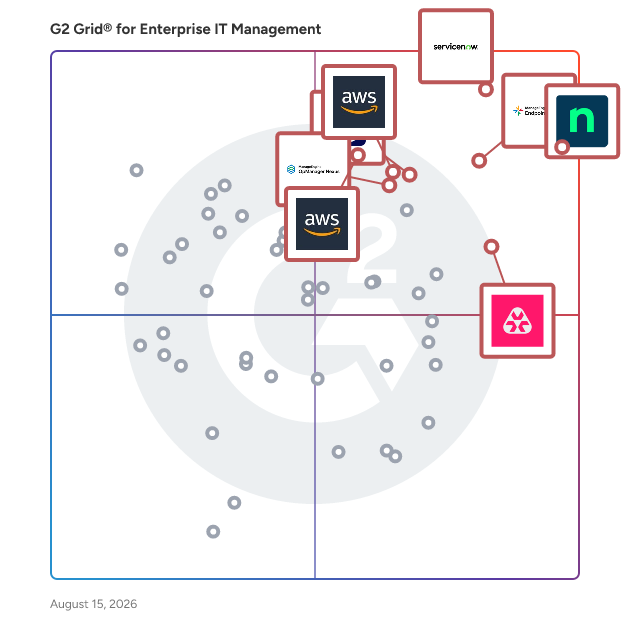
G2 Grid® for Enterprise IT Management Software

G2 Grid® for Enterprise IT Management Software plotting products by satisfaction and market presence

Highlighted products: NinjaOne, ServiceNow IT Operations Management, ManageEngine Endpoint Central, TeamViewer, Atera, AWS Systems Manager, AWS Management Console, and OpManager Nexus.

Underlying data: [Grid® JSON](https://www.g2.com/categories/enterprise-it-management/grids.json?focus%5B%5D=ninjaone&focus%5B%5D=servicenow-it-operations-management&focus%5B%5D=manageengine-endpoint-central&focus%5B%5D=teamviewer&focus%5B%5D=atera&focus%5B%5D=aws-systems-manager&focus%5B%5D=aws-management-console&focus%5B%5D=opmanager-nexus)

Sponsored

Asato

Asato is an IT asset optimization platform designed to assist Chief Information Officers (CIOs) and IT leaders in managing and enhancing their IT asset portfolios. This solution focuses on optimizing the entire IT asset estate through continuous discovery and AI-driven execution, aiming to eliminate waste, capture value, and maximize the return on investment (ROI) of IT expenditures across various domains, including Software as a Service (SaaS), hardware, and cloud infrastructure. The platform serves a diverse audience, particularly organizations looking to streamline their IT operations and improve asset management. Asato is particularly beneficial for enterprises that operate in complex environments with multiple IT systems and assets. By unifying data from disparate sources into a connected knowledge layer, Asato provides actionable insights that facilitate risk and compliance analysis, cost optimization, and proactive decision-making support for IT operations. This holistic approach enables organizations to align their technology strategies with overarching business objectives. One of the standout features of Asato is its ability to deliver unified visibility and management of IT assets across various platforms, including SaaS, hardware, and cloud services. This comprehensive visibility allows organizations to monitor and manage their assets effectively, ensuring that resources are utilized efficiently and that potential issues are identified before they escalate. Additionally, the platform leverages AI to provide powerful insights that drive cost optimization and enhance operational efficiency, making it easier for IT leaders to make informed decisions. Asato also emphasizes risk and compliance monitoring, which is crucial in today's digital landscape. By continuously assessing digital assets for compliance with regulatory requirements and organizational policies, the platform helps mitigate risks associated with IT asset management. Furthermore, real-time analytics and decision support capabilities empower IT leaders to adapt their strategies dynamically, ensuring that they remain responsive to changing business needs and technological advancements. Overall, Asato stands out in the IT asset optimization category by combining advanced AI technologies with a comprehensive approach to asset management. Its focus on delivering actionable insights, risk mitigation, and operational efficiency positions it as a valuable tool for organizations aiming to enhance their IT asset management practices and drive better business outcomes.

Visit website

NinjaOne

NinjaOne is the unified IT operations platform that helps IT teams and managed service providers manage, secure, and support every endpoint from a single cloud-native console. Nearly 40,000 customers across 140+ countries use NinjaOne to replace fragmented point tools with one platform built to scale. The platform brings together the core work of modern IT operations: endpoint management, autonomous patch management, vulnerability management, endpoint and SaaS backup, remote access, and IT service desk. Teams monitor and control Windows, macOS, Linux, mobile, and virtual devices in one place, automate routine work with policy-based automation and human-centered AI, and cut the cost and risk that come from running many disconnected tools. NinjaOne serves internal IT teams and MSPs alike, from lean IT departments to mid-market and large enterprise organizations managing distributed, multi-site environments. Common uses include consolidating IT tooling, automating patching for security and compliance, managing distributed and hybrid workforces, improving endpoint visibility, and strengthening backup and ransomware readiness. NinjaOne has maintained a 98 percent customer satisfaction score for more than five years, backed by free unlimited onboarding and 24/7 support in seven languages. Organizations that move to NinjaOne report replacing four or more separate tools with the single platform. NinjaOne is FedRAMP Moderate Authorized and SOC 2 Type II and Type III compliant, and supports audit-ready compliance evidence across frameworks including CMMC, ISO 27001, and HIPAA. The mission behind the platform is simple: unify IT to simplify work, giving IT teams better tools and employees a great technology experience at work.

Average Rating: 4.7/5.0

Total Reviews: 4,953

How Do G2 Users Rate NinjaOne?

  • Has the product been a good partner in doing business?: 9.4/10 (Category avg: 8.9/10)
  • Service Management: 8.9/10 (Category avg: 8.6/10)
  • ITIL Policy Compliance: 8.3/10 (Category avg: 8.4/10)
  • Disaster Recovery: 7.8/10 (Category avg: 7.6/10)

Who Is the Company Behind NinjaOne?

  • Seller: NinjaOne
  • Company Website:
  • Year Founded: 2013
  • HQ Location: Austin, Texas
  • Twitter: @NinjaOne
    3,607 Twitter followers
  • LinkedIn® Page: www.linkedin.com
    2,376 employees on LinkedIn®

Who Uses This Product?

  • Who Uses This: IT Manager, Owner
  • Top Industries: Information Technology and Services, Computer & Network Security
  • Company Size: 47% Medium, 45% Small

What Do G2 Reviewers Say About NinjaOne?

AI-generated summary from verified user reviews

Pros
  • Users appreciate the ease of use of NinjaOne, streamlining asset management and automating essential tasks effortlessly.
  • Users praise the powerful automation capabilities of NinjaOne, enhancing efficiency and simplifying device management.
  • Users appreciate the easy navigation and dashboard of NinjaOne, facilitating quick device management and monitoring.
  • Users praise NinjaOne for its automated updates and efficient alerts, significantly simplifying server management and saving time.
  • Users value the excellent customer support from NinjaOne, noting quick access to knowledgeable staff and practical solutions.
Cons
  • Users feel the missing features limit functionality, particularly lacking client and customer portal capabilities.
  • Users find the search function lacking, and the interface can confuse end users with unclear icons.
  • Users find NinjaOne has limited features, especially in mobile app functionality and device management options.
  • Users find that NinjaOne needs improvement in search functionality and a better ticketing dashboard for efficiency tracking.
  • Users report facing feature issues with function settings and a lack of adequate role-based controls in NinjaOne.

What Are Recent G2 Reviews of NinjaOne?

What Are G2 Users Discussing About NinjaOne?

ServiceNow IT Operations Management

ServiceNow IT Operations Management (ITOM) è una soluzione completa progettata per migliorare la visibilità, la salute e l'ottimizzazione dell'infrastruttura IT di un'organizzazione. Integrando automazione avanzata e intelligenza artificiale, ITOM consente una gestione proattiva delle operazioni IT, riducendo i tempi di inattività e migliorando la fornitura dei servizi. Caratteristiche e Funzionalità Chiave: - Visibilità ITOM: Automatizza la scoperta delle risorse IT in ambienti on-premises, cloud e ibridi, fornendo una visione unificata dell'infrastruttura. Il Service Mapping identifica le dipendenze tra i componenti IT, facilitando l'analisi dell'impatto e la gestione dei cambiamenti. - Salute ITOM: Consolida e correla eventi da vari strumenti di monitoraggio, consentendo ai team IT di dare priorità e rispondere prontamente agli incidenti critici. L'Intelligenza Operativa sfrutta l'AI e il machine learning per rilevare modelli e anomalie, permettendo una risoluzione proattiva dei problemi. - Ottimizzazione ITOM: Gestisce efficacemente le risorse cloud fornendo visibilità e controllo sugli ambienti cloud pubblici, privati e ibridi. Automatizza il provisioning, la gestione del ciclo di vita e l'ottimizzazione dei costi delle risorse IT a supporto dei servizi applicativi. Valore Primario e Soluzioni Fornite: ServiceNow ITOM affronta le sfide della gestione di ambienti IT complessi offrendo una piattaforma unificata che migliora l'efficienza operativa e l'affidabilità del servizio. Consente alle organizzazioni di passare da operazioni reattive a proattive, minimizzando il rischio di interruzioni e ottimizzando l'utilizzo delle risorse. Automatizzando le attività di routine e fornendo approfondimenti in tempo reale, ITOM consente ai team IT di concentrarsi su iniziative strategiche, guidando infine la crescita e la resilienza aziendale.

Average Rating: 4.4/5.0

Total Reviews: 455

How Do G2 Users Rate ServiceNow IT Operations Management?

  • Ritiene che the product sia stato un valido partner commerciale?: 8.8/10 (Category avg: 8.9/10)
  • Gestione dei Servizi: 9.2/10 (Category avg: 8.6/10)
  • Conformità alla Politica ITIL: 9.1/10 (Category avg: 8.4/10)
  • Recupero di emergenza: 8.4/10 (Category avg: 7.6/10)

Who Is the Company Behind ServiceNow IT Operations Management?

  • Venditore: ServiceNow
  • Sito web dell'azienda:
  • Anno di Fondazione: 2004
  • Sede centrale: Santa Clara, CA
  • Twitter: @servicenow
    55,548 follower su Twitter
  • Pagina LinkedIn®: www.linkedin.com
    35,081 dipendenti su LinkedIn®

Who Uses This Product?

  • Top Industries: Tecnologia dell'informazione e servizi, Servizi finanziari
  • Company Size: 50% Large, 20% Medium

What Do G2 Reviewers Say About ServiceNow IT Operations Management?

AI-generated summary from verified user reviews

Pros
  • Gli utenti apprezzano la facilità d'uso nella gestione delle operazioni IT di ServiceNow, migliorando l'efficienza del supporto clienti e della risoluzione dei casi.
  • Gli utenti apprezzano la visibilità offerta da ServiceNow IT Operations Management, migliorando la trasparenza e aumentando l'efficienza organizzativa.
  • Gli utenti apprezzano la maggiore visibilità nell'infrastruttura e nelle applicazioni fornita da ServiceNow IT Operations Management.
  • Gli utenti apprezzano la automazione intelligente di ServiceNow IT Operations Management, migliorando l'efficienza e il controllo nelle operazioni IT.
  • Gli utenti apprezzano la flessibilità di prim'ordine di ServiceNow ITOM, che consente una risoluzione dei casi senza intoppi e una gestione della documentazione.
Cons
  • Gli utenti spesso lottano con la ripida curva di apprendimento di ServiceNow IT Operations Management, limitando l'utilizzo e la configurazione efficaci.
  • Gli utenti trovano la complessità di ServiceNow IT Operations Management impegnativa, in particolare durante la configurazione e l'esplorazione delle funzionalità.
  • Gli utenti trovano la complessità dell'installazione di ServiceNow IT Operations Management impegnativa, richiedendo una pianificazione attenta e un'amministrazione qualificata.
  • Gli utenti notano che ServiceNow IT Operations Management ha un costo elevato che può gravare significativamente sulle organizzazioni di medie dimensioni.
  • Gli utenti lottano con la ripida curva di apprendimento di ServiceNow IT Operations Management, trovandola complessa e dispendiosa in termini di tempo da padroneggiare.

What Are Recent G2 Reviews of ServiceNow IT Operations Management?

What Are G2 Users Discussing About ServiceNow IT Operations Management?

ManageEngine Endpoint Central

ManageEngine Endpoint Central è una soluzione di gestione e sicurezza degli endpoint unificata (UEMS) che offre una gestione completa del ciclo di vita e protezione degli endpoint. Dalla distribuzione automatizzata delle patch multi-OS e del software all'intelligenza degli asset e alla gestione dei dispositivi mobili, unifica i flussi di lavoro principali su cui i team IT fanno affidamento ogni giorno. Sul fronte della sicurezza, il suo antivirus di nuova generazione (NGAV) utilizza il rilevamento comportamentale, l'IA e l'analisi in tempo reale per rilevare e fermare le minacce avanzate, mentre la gestione integrata della superficie di attacco, la sicurezza del browser e la prevenzione della perdita di dati proteggono i dati sensibili su endpoint d'ufficio, remoti e di prima linea. Endpoint Central dà anche priorità alla produttività attraverso il monitoraggio dell'esperienza digitale dei dipendenti (DEX), fornendo informazioni in tempo reale sulla salute dei dispositivi, sulle prestazioni delle applicazioni e sulla telemetria degli endpoint in modo che i team IT possano risolvere i problemi prima che impattino sui dipendenti. Riconosciuto come leader da Gartner®, IDC e Forrester, Endpoint Central è fidato da oltre 31.000 imprese in tutto il mondo ed è disponibile sia in edizioni on-premises che SaaS. Questa soluzione semplifica il complesso panorama della gestione degli endpoint, consentendo ai team IT e di sicurezza di gestire di più con meno, offrendo automazione intelligente e mitigazione delle minacce potenziata dall'IA attraverso un'unica piattaforma unificata. Benefici aziendali e ROI Uno studio commissionato da Forrester Total Economic Impact™ ha rilevato che le organizzazioni che implementano Endpoint Central hanno ottenuto diversi benefici aziendali significativi, tra cui: - Un ritorno sull'investimento del 442% in tre anni, guidato dalla consolidazione degli strumenti, dall'automazione e dalla riduzione dei costi operativi. - 4,5 milioni di dollari in benefici economici totali quantificati (valore attuale), un valore attuale netto di 3,7 milioni di dollari e un periodo di recupero inferiore a sei mesi. - Riduzione del 95% del tempo di patching manuale, oltre a ridurre i costi di licenza e assicurazione grazie a una postura di sicurezza e conformità migliorata. - Riduzioni significative delle violazioni di conformità e delle interruzioni legate alla sicurezza grazie alla capacità di Endpoint Central di convertire la stabilità degli endpoint e la riduzione del rischio in risultati aziendali misurabili.

Average Rating: 4.5/5.0

Total Reviews: 1,119

How Do G2 Users Rate ManageEngine Endpoint Central?

  • Ritiene che the product sia stato un valido partner commerciale?: 8.9/10 (Category avg: 8.9/10)
  • Gestione dei Servizi: 8.2/10 (Category avg: 8.6/10)
  • Conformità alla Politica ITIL: 8.2/10 (Category avg: 8.4/10)
  • Recupero di emergenza: 7.2/10 (Category avg: 7.6/10)

Who Is the Company Behind ManageEngine Endpoint Central?

  • Venditore: Zoho
  • Anno di Fondazione: 1996
  • Sede centrale: Austin, TX
  • Twitter: @Zoho
    137,880 follower su Twitter
  • Pagina LinkedIn®: www.linkedin.com
    30,766 dipendenti su LinkedIn®
  • Telefono: +1 (888) 900-9646

Who Uses This Product?

  • Who Uses This: IT Manager, System Administrator
  • Top Industries: Tecnologia dell'informazione e servizi, Servizi finanziari
  • Company Size: 64% Medium, 24% Large

What Do G2 Reviewers Say About ManageEngine Endpoint Central?

AI-generated summary from verified user reviews

Pros
  • Gli utenti elogiano la facilità d'uso di Endpoint Central, evidenziando la sua interfaccia amichevole e l'integrazione senza soluzione di continuità con i sistemi esistenti.
  • Gli utenti apprezzano il sistema di gestione delle patch facile ed efficiente di ManageEngine Endpoint Central, migliorando la sicurezza e l'usabilità.
  • Gli utenti amano le funzionalità estese di ManageEngine Endpoint Central per una gestione efficiente degli endpoint e delle patch.
  • Gli utenti trovano le capacità di distribuzione del software di ManageEngine Endpoint Central efficienti e che fanno risparmiare tempo per la gestione IT.
  • Gli utenti apprezzano le ricche funzionalità di ManageEngine Endpoint Central, rendendo la gestione degli endpoint e della sicurezza senza soluzione di continuità su un'unica piattaforma.
Cons
  • Gli utenti trovano la mancanza della funzionalità di reportistica uno svantaggio, limitando l'efficacia per i fornitori di servizi gestiti.
  • Gli utenti affrontano sfide con problemi di funzionalità in Endpoint Central, in particolare riguardo ai gruppi dinamici e ai commenti di distribuzione poco chiari.
  • Gli utenti affrontano problemi di patching con ManageEngine Endpoint Central, poiché fatica ad aggiornare software e hardware in modo efficiente.
  • Gli utenti trovano la complessità dell'interfaccia opprimente, con indicazioni poco chiare sulle funzionalità e la gestione mobile.
  • Gli utenti notano una ripida curva di apprendimento e una personalizzazione limitata, ostacolando l'uso efficace di ManageEngine Endpoint Central.

What Are Recent G2 Reviews of ManageEngine Endpoint Central?

What Are G2 Users Discussing About ManageEngine Endpoint Central?

Atera

Atera sta definendo la categoria dell'IT autonomo, dove agenti AI risolvono incidenti tecnici dall'inizio alla fine, senza un tecnico nel processo. La piattaforma di gestione IT nativa AI di Atera consolida RMM, helpdesk, ticketing, reportistica avanzata e automazione, permettendo ai team IT e agli MSP di gestire e proteggere l'infrastruttura, automatizzare compiti e migliorare la qualità del servizio riducendo i tempi di inattività e migliorando gli SLA. L'agente AI autonomo di Atera, Robin, rileva, diagnostica, risolve e verifica gli incidenti agendo direttamente su dispositivi, server, reti e mainframe, risolvendo completamente incidenti di livello 1 e complessi di livello 2. 1) Risoluzione senza attesa. Robin non si limita a suggerire o assistere, agisce e risolve, da solo, istantaneamente. 2) Copertura sempre attiva, giorno e notte. Robin estende la portata del tuo team 24 ore su 24, risolvendo problemi alle 2 del mattino con la stessa affidabilità delle 2 del pomeriggio, così il tuo team non è l'unica linea di difesa quando si tratta di combattere i tempi di inattività. 3) Un tecnico IT personale per ogni dipendente. Un agente AI intelligente e consapevole del contesto che comprende il tuo ambiente, si adatta a ogni utente e risponde istantaneamente. Costruito su un'architettura brevettata, Robin opera come un sistema di azione all'interno del tuo ambiente aziendale esistente, aderendo ai più alti standard di sicurezza e conformità di livello aziendale. È governato da guide configurabili, un tracciato completo di audit e flussi di lavoro di approvazione, quindi l'autonomia non viene mai a scapito del controllo. Più di 13.000 organizzazioni in oltre 120 paesi si affidano ad Atera per mantenere il loro personale operativo, senza interruzioni. Scopri come Atera può aiutarti a raggiungere un'efficienza organizzativa senza pari su www.atera.com.

Average Rating: 4.6/5.0

Total Reviews: 1,228

How Do G2 Users Rate Atera?

  • Ritiene che the product sia stato un valido partner commerciale?: 9.2/10 (Category avg: 8.9/10)
  • Gestione dei Servizi: 8.3/10 (Category avg: 8.6/10)
  • Conformità alla Politica ITIL: 8.1/10 (Category avg: 8.4/10)
  • Recupero di emergenza: 7.4/10 (Category avg: 7.6/10)

Who Is the Company Behind Atera?

  • Venditore: Atera
  • Sito web dell'azienda:
  • Anno di Fondazione: 2011
  • Sede centrale: Tel Aviv
  • Twitter: @AteraCloud
    1,675 follower su Twitter
  • Pagina LinkedIn®: www.linkedin.com
    416 dipendenti su LinkedIn®

Who Uses This Product?

  • Who Uses This: Owner, IT Manager
  • Top Industries: Tecnologia dell'informazione e servizi, Sicurezza informatica e di rete
  • Company Size: 55% Small, 31% Medium

What Do G2 Reviewers Say About Atera?

AI-generated summary from verified user reviews

Pros
  • Gli utenti trovano Atera incredibilmente facile da usare, semplificando la gestione delle workstation e dei server in un unico posto.
  • Gli utenti apprezzano i potenti strumenti di automazione di Atera, che consentono una gestione efficiente delle workstation e dei server tramite script e accesso remoto.
  • Gli utenti apprezzano il cruscotto tutto-in-uno di Atera, che semplifica il loro flusso di lavoro e migliora drasticamente la produttività.
  • Gli utenti apprezzano l'efficienza di Atera, notando che la sua automazione e facilità d'uso semplificano la gestione dei loro dispositivi.
  • Gli utenti apprezzano il monitoraggio proattivo di Atera, migliorando l'efficienza con un dashboard tutto-in-uno senza soluzione di continuità per un flusso di lavoro migliore.
Cons
  • Gli utenti notano funzionalità mancanti come le liste di controllo e un contesto di avviso insufficiente, complicando la loro esperienza complessiva con Atera.
  • Gli utenti trovano le funzionalità limitate di Atera restrittive, specialmente nell'app mobile e nelle opzioni di fatturazione.
  • Gli utenti segnalano che è necessario un miglioramento nei cambiamenti dell'interfaccia di Atera e nell'affidabilità dell'accesso remoto, influenzando i flussi di lavoro.
  • Gli utenti notano che i tempi di caricamento dei report e la personalizzazione limitata possono ostacolare l'efficienza e l'usabilità all'interno di Atera.
  • Gli utenti evidenziano problemi di funzionalità con Atera, inclusi incrementi di fatturazione scomodi e cambiamenti dell'interfaccia che disturbano.

What Are Recent G2 Reviews of Atera?

What Are G2 Users Discussing About Atera?

TeamViewer

TeamViewer è un fornitore leader di software di connettività remota per individui e aziende di tutte le dimensioni. Il nostro software remoto consente alle aziende di vari settori di migliorare la loro efficienza e raggiungere i loro obiettivi aziendali trasformando digitalmente i loro processi. Offriamo una selezione di soluzioni su misura: TeamViewer Tensor, la nostra soluzione di connettività remota per le imprese, consente alle aziende di connettere, gestire e proteggere computer, dispositivi mobili e piattaforme integrate, sia in loco che in tutto il mondo. TeamViewer Remote, la nostra soluzione di accesso e supporto remoto, consente l'accesso sicuro ai dispositivi per il supporto remoto nelle piccole e medie imprese. Una versione gratuita di TeamViewer Remote è disponibile per uso personale. TeamViewer sta lavorando attivamente per plasmare la rivoluzione digitale innovando nei campi della realtà aumentata (AR) e dell'Internet delle cose (IoT). La nostra piattaforma AR, Frontline, porta la tecnologia digitale sul piano di produzione con soluzioni AR industriali progettate per ottimizzare i processi manuali. Partnership strategiche e integrazioni software con altri leader del settore come SAP, Google e Microsoft ci permettono di fornire ai nostri clienti un'esperienza senza interruzioni, indipendentemente dal loro dispositivo o sistema operativo. Da quando TeamViewer è stata fondata a Göppingen, in Germania, nel 2005, le nostre soluzioni sono state installate su oltre 2,5 miliardi di dispositivi in tutto il mondo. Per ulteriori informazioni, visita www.teamviewer.com.

Average Rating: 4.5/5.0

Total Reviews: 4,047

How Do G2 Users Rate TeamViewer?

  • Ritiene che the product sia stato un valido partner commerciale?: 8.6/10 (Category avg: 8.9/10)
  • Gestione dei Servizi: 9.7/10 (Category avg: 8.6/10)
  • Conformità alla Politica ITIL: 9.1/10 (Category avg: 8.4/10)
  • Recupero di emergenza: 9.2/10 (Category avg: 7.6/10)

Who Is the Company Behind TeamViewer?

  • Venditore: TeamViewer
  • Sito web dell'azienda:
  • Anno di Fondazione: 2005
  • Sede centrale: Goppingen
  • Twitter: @TeamViewer
    48,070 follower su Twitter
  • Pagina LinkedIn®: www.linkedin.com
    2,769 dipendenti su LinkedIn®

Who Uses This Product?

  • Who Uses This: Software Engineer, IT Manager
  • Top Industries: Tecnologia dell'informazione e servizi, Software per computer
  • Company Size: 41% Small, 34% Medium

What Do G2 Reviewers Say About TeamViewer?

AI-generated summary from verified user reviews

Pros
  • Gli utenti apprezzano la facilità d'uso di TeamViewer, apprezzando la sua interfaccia flessibile e le funzionalità accessibili per la collaborazione.
  • Gli utenti apprezzano la facilità d'uso e le connessioni affidabili offerte da TeamViewer, rendendo l'accesso remoto fluido ed efficace.
  • Gli utenti apprezzano la facilità d'uso di TeamViewer per un accesso remoto affidabile e un supporto tecnico senza interruzioni.
  • Gli utenti apprezzano il facile accesso di TeamViewer, che consente un controllo e supporto senza interruzioni su tutti i dispositivi.
  • Gli utenti trovano le capacità di accesso remoto di TeamViewer inestimabili per riunioni virtuali e collaborazione senza interruzioni, senza limitazioni di piattaforma.
Cons
  • Gli utenti spesso affrontano problemi di connessione con TeamViewer, portando a frustrazioni nel mantenere connessioni stabili durante l'uso.
  • Gli utenti riscontrano problemi di connettività con TeamViewer, portando a difficoltà durante le connessioni e influenzando le prestazioni.
  • Gli utenti trovano i prezzi di TeamViewer abbastanza elevati, soprattutto se confrontati con le offerte dei concorrenti.
  • Gli utenti spesso sperimentano prestazioni lente durante la condivisione dello schermo, in particolare con connessioni Internet deboli che influenzano l'usabilità.
  • Gli utenti trovano problemi di accesso remoto con TeamViewer frustranti, spesso lottando con la connettività e pannelli di controllo confusi.

What Are Recent G2 Reviews of TeamViewer?

What Are G2 Users Discussing About TeamViewer?

AWS Systems Manager

AWS Systems Manager gives you visibility and control of your infrastructure on AWS. Systems Manager provides a user interface so you can view operational data from multiple AWS services and allows you to automate operational tasks across your AWS resources.

Average Rating: 4.5/5.0

Total Reviews: 25

How Do G2 Users Rate AWS Systems Manager?

  • Has the product been a good partner in doing business?: 8.8/10 (Category avg: 8.9/10)
  • Service Management: 9.0/10 (Category avg: 8.6/10)
  • ITIL Policy Compliance: 9.0/10 (Category avg: 8.4/10)
  • Disaster Recovery: 8.8/10 (Category avg: 7.6/10)

Who Is the Company Behind AWS Systems Manager?

  • Seller: Amazon Web Services (AWS)
  • Year Founded: 2006
  • HQ Location: Seattle, WA
  • Twitter: @awscloud
    2,232,483 Twitter followers
  • LinkedIn® Page: www.linkedin.com
    147,094 employees on LinkedIn®
  • Ownership: NASDAQ: AMZN

Who Uses This Product?

  • Top Industries: Computer Software, Information Technology and Services
  • Company Size: 42% Large, 31% Medium

What Do G2 Reviewers Say About AWS Systems Manager?

AI-generated summary from verified user reviews

Pros
  • Users value the automation features of AWS Systems Manager, enhancing security and compliance through efficient patch management.
  • Users appreciate the robust customer support for AWS Systems Manager, with easy access to documentation and community help.
  • Users find the ease of use in AWS Systems Manager beneficial for managing security and compliance effectively.
  • Users value the easy integrations of AWS Systems Manager, enhancing security and compliance effortlessly across services.
  • Users find implementation easy with AWS Systems Manager, benefiting from straightforward integration and excellent support resources.
Cons
  • Users find the complexity of identifying sensitive information using AWS Systems Manager to be a significant challenge.
  • Users find learning difficulties with identifying PII in images or PDFs using AWS Systems Manager, complicating compliance efforts.

What Are Recent G2 Reviews of AWS Systems Manager?

What Are G2 Users Discussing About AWS Systems Manager?

AWS Management Console

The AWS Management Console is a web-based interface that provides centralized access to a vast array of Amazon Web Services (AWS). It enables users to manage and monitor their cloud resources efficiently, offering tools to configure, deploy, and oversee applications across AWS's global infrastructure. With its intuitive design, the console simplifies cloud management tasks, making it accessible for both beginners and experienced users. Key Features and Functionality: - Unified Dashboard: Access and manage over 200 AWS services from a single location, streamlining operations and reducing the need to switch between multiple platforms. - Customization: Tailor the Console Home with widgets such as Recently Visited, AWS Health, and Cost and Usage, allowing users to focus on the information most relevant to their needs. - Resource Management: Easily create, configure, and monitor AWS resources like EC2 instances, S3 buckets, and RDS databases, facilitating efficient resource allocation and oversight. - Billing and Cost Management: Monitor usage patterns and manage expenses with integrated billing tools, providing transparency and control over cloud expenditures. - Security and Compliance: Utilize AWS Identity and Access Management (IAM) to control user permissions and ensure secure access to resources, enhancing the overall security posture. - Mobile Access: Manage AWS resources on-the-go with the AWS Console Mobile Application, offering flexibility and continuous oversight of cloud operations. Primary Value and Solutions Provided: The AWS Management Console addresses the complexity of cloud resource management by offering a centralized, user-friendly platform. It empowers users to efficiently oversee their cloud infrastructure, optimize performance, and control costs. By integrating various AWS services into a cohesive interface, the console enhances productivity, accelerates deployment times, and ensures that users can effectively manage their cloud environments without the need for extensive technical expertise.

Average Rating: 4.5/5.0

Total Reviews: 46

How Do G2 Users Rate AWS Management Console?

  • Has the product been a good partner in doing business?: 8.5/10 (Category avg: 8.9/10)
  • Service Management: 8.5/10 (Category avg: 8.6/10)
  • ITIL Policy Compliance: 8.9/10 (Category avg: 8.4/10)
  • Disaster Recovery: 8.6/10 (Category avg: 7.6/10)

Who Is the Company Behind AWS Management Console?

  • Seller: Amazon Web Services (AWS)
  • Year Founded: 2006
  • HQ Location: Seattle, WA
  • Twitter: @awscloud
    2,232,483 Twitter followers
  • LinkedIn® Page: www.linkedin.com
    147,094 employees on LinkedIn®
  • Ownership: NASDAQ: AMZN

Who Uses This Product?

  • Top Industries: Information Technology and Services, Computer Software
  • Company Size: 45% Small, 28% Large

What Do G2 Reviewers Say About AWS Management Console?

AI-generated summary from verified user reviews

Pros
  • Users value the centralized management of AWS services, facilitating efficiency and reducing context switching across accounts.
  • Users appreciate the unified web interface of AWS Management Console for streamlined access and enhanced productivity.
  • Users value the customizable home page that optimizes their AWS experience with tailored widgets and organization.
  • Users appreciate the ease of use of AWS Management Console, benefiting from a streamlined, intuitive interface for managing resources.
  • Users appreciate the unified web interface and customizable dashboard, enhancing efficiency and accessibility for AWS services.

What Are Recent G2 Reviews of AWS Management Console?

What Are G2 Users Discussing About AWS Management Console?

OpManager Nexus

OpManager Nexus is a full-stack observability platform that helps IT teams monitor and manage their entire infrastructure, including networks, servers, applications, databases, and websites, from a single console. Designed for mid-size to large organizations managing hybrid and on-premises environments, OpManager Nexus provides deep visibility across every layer of the IT stack. IT teams gain a consolidated view of their infrastructure, eliminating the need for multiple disconnected monitoring tools and reducing the operational overhead that comes with managing them. This unified approach enables faster decision-making and helps organizations maintain service reliability across complex, distributed environments where downtime can have a direct impact on business continuity. OpManager Nexus includes AIOps capabilities that go beyond traditional monitoring. Agentic AI and generative AI integrations automate routine diagnostics and accelerate issue resolution, while smart event correlation identifies relationships between alerts across the stack. Together, these capabilities help IT teams detect issues early, cut through alert noise, and resolve problems before they impact end users or broader business operations. For IT teams dealing with high volumes of events across large environments, this level of automation significantly reduces the time spent on manual troubleshooting. On the deployment front, OpManager Nexus supports both on-premises installation and cloud access (powered by Site24x7) through ManageEngine's private datacenters. Organizations can choose the model that aligns with their infrastructure strategy, security policies, and compliance requirements, without compromising on monitoring depth or platform capability. As part of the ManageEngine ecosystem, OpManager Nexus integrates natively with ITSM, analytics, and security tools, giving IT teams the full operational context needed to manage infrastructure performance and respond to incidents end to end.

Average Rating: 4.6/5.0

Total Reviews: 223

How Do G2 Users Rate OpManager Nexus?

  • Has the product been a good partner in doing business?: 9.0/10 (Category avg: 8.9/10)
  • Service Management: 10.0/10 (Category avg: 8.6/10)
  • ITIL Policy Compliance: 10.0/10 (Category avg: 8.4/10)

Who Is the Company Behind OpManager Nexus?

  • Seller: Zoho
  • Company Website:
  • Year Founded: 1996
  • HQ Location: Austin, TX
  • Twitter: @Zoho
    137,880 Twitter followers
  • LinkedIn® Page: www.linkedin.com
    30,766 employees on LinkedIn®

Who Uses This Product?

  • Who Uses This: IT Manager, Network Administrator
  • Top Industries: Information Technology and Services, Financial Services
  • Company Size: 54% Medium, 32% Large

What Do G2 Reviewers Say About OpManager Nexus?

AI-generated summary from verified user reviews

Pros
  • Users value the monitoring capabilities of OpManager Nexus, praising its ease of use and effective real-time alerting.
  • Users value the real-time monitoring of OpManager Nexus, enhancing issue resolution and maintaining system efficiency.
  • Users appreciate the ease of use of OpManager Nexus, which simplifies monitoring and management of critical systems.
  • Users value the intuitive user interface of OpManager Nexus, enhancing their monitoring experience with easy navigation and alerts.
  • Users value the comprehensive monitoring capabilities of OpManager Nexus for enhanced server and network management.
Cons
  • Users find that the complexity of setup for OpManager Nexus can lead to difficulties in management and notifications.
  • Users find the complex configuration of OpManager challenging, especially during initial setup and management of alerts.
  • Users find the complex setup of OpManager Nexus challenging, especially during the initial onboarding process.
  • Users note missing features in OpManager Nexus, with some advanced options locked behind higher editions, limiting functionality.
  • Users find the difficult configuration of OpManager challenging, often leading to excessive alerts without proper adjustments.

What Are Recent G2 Reviews of OpManager Nexus?

What Are G2 Users Discussing About OpManager Nexus?

Freshservice

Freshservice by Freshworks is an AI-powered, unified service operations platform built for agile enterprises that need to move fast without sacrificing control. Freshworks is named a Leader in the 2026 Gartner® Magic Quadrant™ for IT Service Management Platforms, recognition we believe reflects our strategic platform investments, product enhancements shaped by customer feedback, and strong visibility among ITSM buyers. By bringing ITSM, ITOM, ITAM, and enterprise service management together on one platform with a shared data and context model, Freshservice reduces the fragmentation and tool sprawl that slow teams down, creating a more consistent source of truth across services, assets, and infrastructure. IT teams gain visibility into their environment through automated discovery, a robust CMDB for impact analysis and root cause resolution, and streamlined incident, problem, change, and major incident management. Beyond IT, Freshservice extends service delivery to HR, finance, and facilities, giving business teams a consistent and efficient service experience without requiring separate tools. Freshservice includes Freddy AI, a domain-specific AI layer that helps agents resolve issues faster, automates employee service requests, and gives leaders insights to make better decisions. Embedded across service workflows, Freddy AI acts as a force multiplier for teams by helping reduce repetitive work, accelerate resolution, and surface patterns and risks earlier. The result is faster, more informed service operations that help teams become more proactive while maintaining the governance and control the business requires.

Average Rating: 4.6/5.0

Total Reviews: 1,305

How Do G2 Users Rate Freshservice?

  • Has the product been a good partner in doing business?: 9.1/10 (Category avg: 8.9/10)
  • Service Management: 8.9/10 (Category avg: 8.6/10)
  • ITIL Policy Compliance: 8.7/10 (Category avg: 8.4/10)
  • Disaster Recovery: 7.5/10 (Category avg: 7.6/10)

Who Is the Company Behind Freshservice?

  • Seller: Freshworks
  • Company Website:
  • Year Founded: 2010
  • HQ Location: San Mateo, CA
  • Twitter: @FreshworksInc
    19,020 Twitter followers
  • LinkedIn® Page: www.linkedin.com
    7,505 employees on LinkedIn®

Who Uses This Product?

  • Who Uses This: IT Manager, IT Director
  • Top Industries: Information Technology and Services, Computer Software
  • Company Size: 61% Medium, 21% Large

What Do G2 Reviewers Say About Freshservice?

AI-generated summary from verified user reviews

Pros
  • Users highlight the ease of use of Freshservice, appreciating its intuitive design and efficient ticket management.
  • Users appreciate the intuitive interface and extensive features of Freshservice, simplifying both complex tasks and daily activities.
  • Users value the automation features of Freshservice, significantly enhancing efficiency and streamlining ticket management processes.
  • Users praise the variety of ticket organization options in Freshservice, enhancing efficiency and user experience.
  • Users value the intuitive ticket management in Freshservice, enhancing usability and streamlining internal approval processes.
Cons
  • Users find the missing features in Freshservice frustrating, particularly the lack of intuitive reporting and search functionalities.
  • Users find the limited features of Freshservice restrictive, impacting the effectiveness of reporting and project management.
  • Users find the learning curve steep, with complicated configurations and unintuitive reporting features causing frustration.
  • Users find limited customization options in Freshservice, which can restrict tailoring the system to specific business needs.
  • Users find ticketing issues frustrating, especially with confusing reporting and difficulty in extracting data for management.

What Are Recent G2 Reviews of Freshservice?

What Are G2 Users Discussing About Freshservice?

Red Hat Smart Management

Red Hat Smart Management combines the flexible and powerful infrastructure management capabilities of Red Hat Satellite with the simplicity of cloud management services for Red Hat Enterprise Linux. It helps you more securely manage any environment supported by Red Hat Enterprise Linux—from physical machines to hybrid multiclouds.

Average Rating: 4.9/5.0

Total Reviews: 32

How Do G2 Users Rate Red Hat Smart Management?

  • Has the product been a good partner in doing business?: 9.4/10 (Category avg: 8.9/10)
  • Service Management: 9.5/10 (Category avg: 8.6/10)
  • ITIL Policy Compliance: 9.6/10 (Category avg: 8.4/10)
  • Disaster Recovery: 9.3/10 (Category avg: 7.6/10)

Who Is the Company Behind Red Hat Smart Management?

  • Seller: Red Hat
  • Year Founded: 1993
  • HQ Location: Raleigh, NC
  • Twitter: @RedHat
    300,769 Twitter followers
  • LinkedIn® Page: www.linkedin.com
    19,413 employees on LinkedIn®

Who Uses This Product?

  • Top Industries: Information Technology and Services
  • Company Size: 73% Medium, 18% Small

What Are Recent G2 Reviews of Red Hat Smart Management?

What Are G2 Users Discussing About Red Hat Smart Management?

Nerdio Manager

Nerdio Manager is an Azure-native management platform designed to help IT teams deploy, manage, and optimize Microsoft cloud desktops and endpoints at scale. This solution operates entirely within a customer’s Azure tenant, adhering to Microsoft best practices, and enhances the native capabilities of Azure Virtual Desktop (AVD), Windows 365 Cloud PCs, Microsoft 365, and Microsoft Intune. With built-in automation, cost optimization, security controls, and migration tooling, Nerdio Manager addresses the complexities of managing cloud environments. As organizations increasingly adopt hybrid and remote work models, the responsibility of IT teams has expanded to ensure secure and high-performance access to corporate resources across both cloud and physical environments. While Microsoft technologies like AVD, Windows 365, and Intune provide essential building blocks for modern endpoint strategies, managing these platforms through native tools can lead to operational challenges. Nerdio Manager fills this gap by offering a unified management layer that simplifies administration and centralizes control across these services, thereby reducing the manual effort and cost challenges often encountered at scale. Key features of Nerdio Manager include intelligent automation and autoscaling capabilities, which help decrease infrastructure and operational costs while ensuring users have timely access to necessary resources. The platform offers centralized policy management and role-based controls, allowing IT teams to enforce consistent security and compliance standards across diverse environments. Additionally, built-in monitoring and insights provide near real-time visibility into endpoint performance, usage, and capacity, empowering IT teams to make informed decisions. Moreover, Nerdio Manager includes migration tools that facilitate the transition from legacy Virtual Desktop Infrastructure (VDI) platforms and on-premises environments to Microsoft cloud desktops with minimal disruption. This capability is particularly beneficial for organizations looking to modernize their digital workspace without incurring significant downtime or operational hiccups. In essence, Nerdio Manager serves as the operational control plane for Microsoft cloud desktops and endpoint management. It enables organizations to modernize their digital workspace environments while effectively managing costs, simplifying daily operations, and retaining full ownership and control over their infrastructure. By transforming powerful but fragmented tools into a cohesive and manageable platform, Nerdio Manager maximizes the value of Microsoft Cloud investments, making it a vital asset for IT teams navigating the complexities of modern endpoint management.

Average Rating: 4.7/5.0

Total Reviews: 230

How Do G2 Users Rate Nerdio Manager?

  • Has the product been a good partner in doing business?: 9.4/10 (Category avg: 8.9/10)
  • Service Management: 8.3/10 (Category avg: 8.6/10)
  • ITIL Policy Compliance: 7.0/10 (Category avg: 8.4/10)
  • Disaster Recovery: 7.8/10 (Category avg: 7.6/10)

Who Is the Company Behind Nerdio Manager?

  • Seller: Nerdio
  • Company Website:
  • Year Founded: 2016
  • HQ Location: Chicago, IL
  • Twitter: @GetNerdio
    2,103 Twitter followers
  • LinkedIn® Page: www.linkedin.com
    454 employees on LinkedIn®

Who Uses This Product?

  • Who Uses This: President
  • Top Industries: Information Technology and Services, Computer & Network Security
  • Company Size: 47% Small, 29% Medium

What Do G2 Reviewers Say About Nerdio Manager?

AI-generated summary from verified user reviews

Pros
  • Users appreciate the ease of use of Nerdio Manager, finding it intuitive and straightforward for workspace creation.
  • Users value the automation in Nerdio Manager, enhancing cloud efficiency and reducing costs while simplifying management.
  • Users value the cost efficiency of Nerdio Manager, achieving significant savings and optimized resource management effortlessly.
  • Users value the time-saving automation of Nerdio Manager, simplifying management and reducing the need for complex scripts.
  • Users value the automation efficiency of Nerdio Manager, enhancing cloud operations while minimizing costs and risks.
Cons
  • Users experience a steep learning curve with Nerdio Manager, finding the UI initially overwhelming and documentation lacking.
  • Users note the missing features in Nerdio Manager, specifically lacking support for GCC 365 tenants and enhanced visibility.
  • Users find the complex setup challenging and often feel frustrated with the unclear functionality of Nerdio Manager.
  • Users find the difficult setup of Nerdio Manager challenging due to its self-hosted Azure instance and unclear initial instructions.
  • Users find the cost of Nerdio Manager to be high, affecting smaller deployments despite potential savings on Azure.

What Are Recent G2 Reviews of Nerdio Manager?

What Are G2 Users Discussing About Nerdio Manager?

Amazon EC2 Systems Manager

Amazon EC2 Systems Manager is a management service designed to help users automatically collect software inventory, apply OS patches, create system images, and configure Windows and Linux operating systems.

Average Rating: 4.4/5.0

Total Reviews: 108

How Do G2 Users Rate Amazon EC2 Systems Manager?

  • Has the product been a good partner in doing business?: 8.4/10 (Category avg: 8.9/10)
  • Service Management: 8.7/10 (Category avg: 8.6/10)
  • ITIL Policy Compliance: 8.4/10 (Category avg: 8.4/10)
  • Disaster Recovery: 8.1/10 (Category avg: 7.6/10)

Who Is the Company Behind Amazon EC2 Systems Manager?

  • Seller: Amazon Web Services (AWS)
  • Year Founded: 2006
  • HQ Location: Seattle, WA
  • Twitter: @awscloud
    2,232,483 Twitter followers
  • LinkedIn® Page: www.linkedin.com
    147,094 employees on LinkedIn®
  • Ownership: NASDAQ: AMZN

Who Uses This Product?

  • Who Uses This: Software Engineer
  • Top Industries: Information Technology and Services, Computer Software
  • Company Size: 58% Large, 30% Medium

What Are Recent G2 Reviews of Amazon EC2 Systems Manager?

What Are G2 Users Discussing About Amazon EC2 Systems Manager?

Tines

Tines is the intelligent workflow platform trusted by the world's most advanced organizations. Companies like Coinbase, Databricks, Mars, Reddit, and SAP use Tines to power their most important workflows. With Tines, they’ve built a secure, flexible foundation to operationalize AI agents and intelligent workflows, unlocking productivity, moving faster, and future-proofing how work gets done.

Average Rating: 4.7/5.0

Total Reviews: 402

How Do G2 Users Rate Tines?

  • Has the product been a good partner in doing business?: 9.7/10 (Category avg: 8.9/10)
  • Service Management: 9.2/10 (Category avg: 8.6/10)
  • Disaster Recovery: 8.3/10 (Category avg: 7.6/10)

Who Is the Company Behind Tines?

  • Seller: Tines
  • Company Website:
  • Year Founded: 2018
  • HQ Location: Dublin, IE
  • LinkedIn® Page: www.linkedin.com
    568 employees on LinkedIn®

Who Uses This Product?

  • Who Uses This: Security Engineer, Software Engineer
  • Top Industries: Computer & Network Security, Information Technology and Services
  • Company Size: 39% Medium, 35% Large

What Do G2 Reviewers Say About Tines?

AI-generated summary from verified user reviews

Pros
  • Users appreciate the ease of use of Tines, enabling efficient automation without requiring extensive technical knowledge.
  • Users find Tines makes automation effortless, enabling easy task handling without requiring coding skills.
  • Users praise Tines for their exceptional customer support, providing fast, friendly, and effective assistance anytime it’s needed.
  • Users value the easy integrations of Tines, enabling quick and effective automation without coding skills.
  • Users praise Tines for its seamless integrations and robust support, enabling efficient workflow automation with ease.
Cons
  • Users find Tines lacks essential features, notably a robust IDE and code review capabilities, affecting workflow efficiency.
  • Users experience a steep learning curve with Tines, requiring deep understanding for effective automation and customization.
  • Users find the lack of advanced features in Tines hampers their ability to create complex workflows effectively.
  • Users find Tines expensive, particularly for smaller teams, due to its rigid pricing model and limited ticketing features.
  • Users find the learning curve and complexity challenging, making it hard to fully utilize Tines' capabilities.

What Are Recent G2 Reviews of Tines?

What Are G2 Users Discussing About Tines?

SymphonyAI IT Service Management

SymphonyAI IT Service Management offers an enterprise-class solution that delivers measurable business outcomes leveraging automation, predictive, and generative AI. Customers have been able to automate 60% of service requests, achieve a 50% faster resolution, and realize a 30% savings on hardware and software costs using our ITSM platform. We are recognized as a Gartner Customers’ Choice, featured as a leader and significant player in many leading analyst reports. Leading global companies like KPMG, Toyota, Trelix, Ameritas, Hershey’s, Smart & Final, are SymphonyAI customers. SymphonyAI ITSM can generate significant cost savings and a faster time to value compared to any leading players in the market.

Average Rating: 4.6/5.0

Total Reviews: 66

How Do G2 Users Rate SymphonyAI IT Service Management?

  • Has the product been a good partner in doing business?: 8.7/10 (Category avg: 8.9/10)
  • Service Management: 8.7/10 (Category avg: 8.6/10)
  • ITIL Policy Compliance: 8.8/10 (Category avg: 8.4/10)
  • Disaster Recovery: 6.7/10 (Category avg: 7.6/10)

Who Is the Company Behind SymphonyAI IT Service Management?

  • Seller: SymphonyAI
  • Year Founded: 2017
  • HQ Location: Palo Alto, California
  • Twitter: @SymphonySummit
    470 Twitter followers
  • LinkedIn® Page: www.linkedin.com
    2,086 employees on LinkedIn®

Who Uses This Product?

  • Top Industries: Information Technology and Services, Automotive
  • Company Size: 68% Large, 32% Medium

What Do G2 Reviewers Say About SymphonyAI IT Service Management?

AI-generated summary from verified user reviews

Pros
  • Users praise the automation of service requests, enhancing efficiency and streamlining the onboarding process for organizations.
  • Users love the automation efficiency in SymphonyAI, especially for seamlessly converting emails into service requests.
  • Users praise the ease of configuration for service requests, highlighting the seamless automation and manual creation options.
  • Users value the customizability of SymphonyAI, allowing easy configuration and automation of service requests via email.
  • Users find SymphonyAI IT Service Management extremely easy to use with intuitive configuration and seamless email integration.
Cons
  • Users find the complex configuration challenging and seek more streamlined back-end setup options.
  • Users find the back end configurations too complex, leading to challenges in usability and overall integration.
  • Users find the complex setup of SymphonyAI IT Service Management challenging, requiring simplification for better usability.
  • Users find the expensive subscription model challenging for mid to large organizations, limiting accessibility and flexibility.
  • Users face filtering issues with SymphonyAI IT Service Management, particularly in excluding specific email addresses.

What Are Recent G2 Reviews of SymphonyAI IT Service Management?

What Are G2 Users Discussing About SymphonyAI IT Service Management?

ConnectWise RMM

ConnectWise RMM is a cloud-native remote monitoring and management (RMM) solution designed for IT professionals who need to monitor, manage, and support diverse IT environments. It provides centralized visibility, intelligent alerting, and advanced automation to help teams proactively address IT challenges and prevent downtime. Comprehensive Monitoring and Visibility ConnectWise RMM delivers 24/7 monitoring across endpoints, networks, backups, cloud health and availability, and security posture. Unified dashboards bring this information together in one place, making it easier to identify issues and act before issues affect end users. With more than 1,200 expert-maintained alerts, the system can reduce typical RMM alerting noise by up to 90% without sacrificing visibility, helping technicians focus on meaningful issues instead of spending time reviewing false positives. Automated Patch Management The solution includes automated OS and third-party patch management for over 7,000 applications. Uniquely, Windows OS security updates are reviewed and approved by ConnectWise NOC experts before each release. This helps teams' patch faster and with more confidence to reduce vulnerabilities, streamline compliance, and keep systems optimized. Advanced Automation and Scripting ConnectWise RMM provides automation capabilities such as built-in automation to select intelligent alerts, AI-assisted script generation, and multi-solution workflow orchestration. These tools simplify routine maintenance tasks, enforce consistent standards, and enable faster response to common IT events. Teams can complete work up to 75% faster, reducing repetitive manual effort and creating more time for strategic projects. Scalability and Endpoint Management ConnectWise RMM is built to support a wide range of businesses, including large and complex environments, with the ability to manage more than 100,000 devices in a single tenant. By unifying monitoring, patching, automation, and scripting into one solution, IT professionals can deliver reliable service, reduce ticket volume, and improve overall IT performance. Multi-site visibility, flexible add-ons, and seamless integration with security, backup, and business management tools make it easy to adapt as environments grow without adding unnecessary complexity.

Average Rating: 4.2/5.0

Total Reviews: 63

How Do G2 Users Rate ConnectWise RMM?

  • Has the product been a good partner in doing business?: 8.2/10 (Category avg: 8.9/10)
  • Service Management: 8.7/10 (Category avg: 8.6/10)
  • ITIL Policy Compliance: 8.0/10 (Category avg: 8.4/10)
  • Disaster Recovery: 6.7/10 (Category avg: 7.6/10)

Who Is the Company Behind ConnectWise RMM?

  • Seller: ConnectWise
  • Company Website:
  • Year Founded: 1982
  • HQ Location: Tampa, FL
  • Twitter: @ConnectWise
    14,926 Twitter followers
  • LinkedIn® Page: www.linkedin.com
    3,401 employees on LinkedIn®

Who Uses This Product?

  • Top Industries: Information Technology and Services, Computer & Network Security
  • Company Size: 68% Small, 26% Medium

What Do G2 Reviewers Say About ConnectWise RMM?

AI-generated summary from verified user reviews

Pros
  • Users appreciate the ease of use of ConnectWise RMM, finding it helpful for monitoring and automation tasks.
  • Users value the seamless remote access of ConnectWise RMM, enabling efficient support from any location with minimal lag.
  • Users value automation in ConnectWise RMM, appreciating its convenience in managing tasks and enhancing security.
  • Users value the All-in-One Solution of ConnectWise RMM for its simplicity and effective management capabilities.
  • Users appreciate the user-friendly interface of ConnectWise RMM, enhancing visibility and efficiency in managing organizations.
Cons
  • Users are frustrated with the missing features in ConnectWise RMM, hindering workflow and reporting efficiency.
  • Users experience poor customer support, often facing delays and communication issues that hinder prompt issue resolution.
  • Users find feature issues in ConnectWise RMM, leading to complexity and underutilization for smaller businesses.
  • Users face significant integration issues with ConnectWise RMM, impacting functionality and causing connectivity problems.
  • Users find ConnectWise RMM to be expensive due to charges per device and per technician, seeking more affordable options.

What Are Recent G2 Reviews of ConnectWise RMM?

What Are G2 Users Discussing About ConnectWise RMM?

Tian Lin
TL
Researched and written by Tian Lin
Updated October 3, 2024

Learn More About Enterprise IT Management Software

What is Enterprise IT Management Software?

Enterprise IT management software provides a centralized point of control for hundreds or thousands of IT asset lifecycles and users involved in one or multiple environments. IT departments use this comprehensive tool to monitor, optimize, and troubleshoot hardware, software, and applications to ensure that they have enough resources to perform at the SLA level. 

This software is a collection of software that usually includes monitoring tools, help desk software, service desk software, IT service management tools, incident management software, endpoint management software, and other types of IT management solutions. Beyond basic monitoring and inventory management, many tools in this category offer assistance for cloud computing processes and automated software patching so IT experts can manage their time better and not have to manually update each computer. Some of the tools can also assist routine IT tasks automation, allowing IT departments to focus time and energy on more pressing activities. There is no standard as to which software capabilities should be included in this software. Software features requirements for companies are different based on factors such as operating systems, workflows, business processes, business applications, and so on. The main goal is to centralize different IT management processes into a one-stop tool for enterprise-grade IT environments.

For mid-size and enterprise business operations with a complex tech environment, IT issues can halt daily operations. Once an organization reaches a certain size, it’s nearly impossible for IT teams to manually deliver system maintenance and updates. Furthermore, ensuring each company computer is updated with the correct applications and compliant with internal standards affects everything from security to financial outcomes. If a business is approaching a headcount that demands a simplified version of IT operational health, this software is a must-have to complete all of the tasks mentioned above.

What Types of Enterprise IT Management Software Exist?

Service management tools

This type of tool focuses on IT service management to help employees and customers navigate the company’s IT operations. This includes help desk, service desk, knowledge management, patch management, IT service management, and incident management software. DevOps and IT teams would use this type of tool to respond and deliver great user experiences.

Performance management tools

Performance management tools focus on ensuring that the company’s IT infrastructure is running smoothly. This includes a set of monitoring software such as application performance monitoring, cloud infrastructure monitoring, ​​network monitoring, and so on. This provides visibility to all the company’s IT infrastructure performance and connects with service management tools when a performance problem arises. Advanced tools also have AIOps and machine learning to analyze to identify performance issues and provide root-cause analysis for the IT teams. 

What are the Common Features of Enterprise IT Management Software?

The following are some core features within enterprise IT management tools that can help users in better managing their IT infrastructure and service:

Asset discovery: At any point in an enterprise, there can be hundreds or thousands of technology assets that are critical for employees and the operation of the company. Taking proper stock of these assets is important for tracking, maintenance, and ensuring compliance and security. The platforms in this category offer enterprise data management related to asset inventory, performance, and history, beginning with the initial discovery of assets for accurate representation. A primary component of many enterprise IT management solutions is the ability to scan a company’s networks and identify the connected devices and assets, including laptops, desktops, and monitors. If new computers are added or removed, the discovery tools in some platforms can automatically detect this and update the data as necessary. IT experts might still need to perform certain manual tasks for configuring new assets based on proper compliance and permissions, but automated asset discovery and history tracking can help provide an accurate picture with minimal legwork.

IT monitoring: Monitor or log abnormalities is one of the key capabilities. Monitoring software allows companies to keep tabs on every aspect of their application, software, network, and other IT assets’ functionality. It sets a functional baseline for their overall IT health status and alerts IT managers when the performance dips below the baseline. Most software provides dashboards that allow companies to view their IT performance in real-time.

Patch management: Technology evolves quickly, and once employees are set up with appropriate systems, they require ongoing support to keep various applications updated with the constant flow of security patches and third-party updates. The platforms in this category help IT specialists maintain a bird’s eye view of the many patches and updates required for company assets, and the status of each device and network concerning these updates. When an important patch comes along, the files can be mass distributed to many systems connected to the company network, and in some cases automatically installed within corresponding apps. Several platforms offer similar capabilities with new software as a whole, deploying new applications onto devices so employees don’t have to do it themselves.

Remote desktop access and control: Although IT teams in larger companies can’t always deliver in-person assistance, modern solutions allow them to assist with individual support issues from afar. Many enterprise IT tools in this category share features of remote support software, which provide users with a way to remotely connect and gain temporary control over employee devices. If an employee is having technical issues with an application or the device itself, IT experts can leverage some of the tools in the category to provide direct support, either walking the employee through the troubleshooting process or taking specific actions directly on their computers through remote control. These capabilities can also be leveraged to help onboard new employees or help them master complex processes involving their technology assets. 

ITSM integration: IT service management (ITSM) tools should be connected with the monitoring and system management tools. This makes it easier for the users to manage their IT resources and support tickets. For optimal monitoring and resolution of internal issues, these platforms may integrate with service desk software or other programs designed around internal IT support ticketing, case assignment, and resource management.

What are the Benefits of Enterprise IT Management Software?

A few of the benefits of enterprise IT management software are as follows:

Provide visibility over the complete IT infrastructure: The enterprise solutions in this category offer high-level insights into critical systems, assist with project management related to optimization, balancing, and remediation of company infrastructure. The data generated by these platforms makes them a natural complement to corporate performance management software, which provides insight into business objectives and the distributed activities that play a role in several KPIs. In addition, this solution can collect data from various sources such as SaaS, cloud platforms, mobile devices, on-premise assets, and so on. Enterprise IT management platforms offer the most relevant data for keeping systems running alongside other assets that assist with many other tasks IT teams perform. Visibility is a priceless commodity for modern IT teams; these tools are an ideal way for these departments to achieve it.

Reduce downtime: For mid-size and enterprise businesses, the integrity and performance of company data centers and devices are paramount. With these robust platforms, IT teams can better manage IT asset performance via a central dashboard and related systems to ensure that operations run smoothly. The comprehensive performance metrics and actionable insights offered by these solutions benefit IT teams with planning and execution of resource allocation. When companies get too big for more hands-on IT processes, these tools can help transition teams into the enterprise mindset with large-scale device management and analysis.

Save time from repetitive tasks: To manage hundreds to thousands of IT assets and devices, IT managers can streamline tasks such as patch deployment and user administration to make sure everything is up to date and follows compliance. Enterprise IT management solutions help automate security and compliance by systematically applying patches, configurations, and custom policies. This helps companies to enforce the most up-to-date IT policies to better control their IT infrastructure.

Who Uses Enterprise IT Management Software?

Below are the teams, personas, roles, and functions that may use the software:

IT teams: Enterprise IT management tools are specially designed to be used across the IT department of a mid-sized or larger organization. With this software, the IT team can automate asset management, fix abnormalities, and support individual employees with IT issues. 

Cross-functional teams: Outside of the IT department, other teams can use this software to manage software and devices. They can file tickets and receive remote support when they encounter IT problems. 

Software Related to Enterprise IT Management Software

Related solutions that can be used together with enterprise IT management software include:

Software asset management (SAM) software: The software used by any organization are central to the daily processes and objectives. These applications can require a great deal of tracking and updating as new versions are released and licenses approach expiration. Software asset management (SAM) is a natural complement to enterprise IT management software since they help IT teams maintain visibility over software, its usage, and use cases across teams. These platforms offer a detailed inventory of a company’s active and inactive software tools, along with their versioning and license details, and the employees currently using them. If an important patch is made available for a tool, these platforms can help deploy and configure timely updates. Furthermore, if a critical application is nearing the end of its license terms, these platforms can help facilitate renewals or upgrades so employees can continue to use and benefit from their important applications.

IT strategy consulting providers: Deciding how to structure an IT team—including the technology and how they use it—requires a great deal of consideration, with each decision affecting the business as a whole. As a company grows and IT operations become more complex, it may benefit a company to hire an outside consultant for assistance in making the best decisions for a business’s unique needs. IT strategy consulting providers offer a variety of advisory services related to planning and implementing technology strategies. These services might come in handy when mapping out a company’s initial IT efforts, but also when restructuring or optimizing an existing IT department.

Challenges with Enterprise IT Management Software

Software solutions can come with their own set of challenges. 

Integration with other solutions: Since an enterprise IT management software is usually a collection of software, it is difficult to integrate them with existing infrastructure. Unless the company operates under a single environment, which is rarely the case with large companies, there will be compatibility issues. The company should prepare to pay for additional customization to integrate the software into its legacy systems. 

Resistance to change: There will be resistance from employees when the company is introducing a set of software. This is an implementation challenge that usually comes with the introduction of any new software, except that this time the challenge is bigger with a collection of software. Those who benefit from the current infrastructure or manual work might fear losing their job or have trouble adapting to the new software. The best way to handle this is to communicate with the stakeholders early during the RFP process so they can have their input. This also encourages buy-in since everyone’s voice is being heard.

Lack of training: It is not easy to adapt to a new set of software. The company needs to ensure that the IT team and other employees have time for training before the official launch. There should also be a place where staff can ask questions early so everyone is on the same page. Again, those questions sometimes bring out integration issues so it is best to spot them early. 

How to Buy Enterprise IT Management Software

Requirements Gathering (RFI/RFP) for Enterprise IT Management Software

Enterprise IT management software requirements can include standard asset management features like asset discovery and remote control and industry-specific criteria such as compliance with data regulations. Every company has different needs and many might not even need every software under this software. The buyer should make a business case of what goals need to be accomplished. Then they can list out the feature requirements based on the goals. Last, the buyer needs to create a budget based on the identified goals, and how much value will the software bring to the table. 

Compare Enterprise IT Management Software Products

Create a long list

A long list should include all products that have the core features for an enterprise-level IT management software unless the feature requirement doesn’t need that specific feature. For example, there is no need to have network monitoring if the company is happy with the existing network monitoring software. When buyers also need to replace certain systems, the long list can consist of software with advanced functionality such as workload automation and cloud computing. 

Create a short list

To generate a short list, buyers should eliminate products from the long list based on integration issues, budget, and bundling. Integration issues are paramount, so the buyer should enquire about additional customization costs with the vendor. Some vendors sell everything in a bundle, which increases the cost. Bundling should be negotiated to fit the budget, especially when the buyer already has some part of the system in place. There should be fewer than five vendors at this point. 

Conduct demos

The demos should be based on scenarios that simulate real-life operations at each stage of the IT asset operation, from daily operations to specific scenarios such as server downtime. Each scenario can focus on a type of requirement, such as monitoring abnormalities, remote support on company devices, or patching new software across different environments. This might take a long time because the buyer is testing a software. Ensuring that there are five or lesser than five products from the short list will help the company to save time while conducting extensive demos. 

Selection of Enterprise IT Management Software

Choose a selection team

The selection team usually includes IT asset managers, executives such as the CIO, and subject matter experts with extensive knowledge of the use cases. Managers from other departments such as support or procurement can also be involved in their teams using the software depending on the use case. Employees should also have their input during the product demo so everyone has a basic understanding of the software. 

Negotiation

The negotiation should focus on the strengths and weaknesses of each product and vendor. For instance, the ability of the vendor to customize the system or provide global support can be a deal-breaker.

Final decision

Since different software will provide different capabilities, there might not be a direct comparison between the selections. So while the pricing of the software is important, buyers should try to estimate the potential ROI of each solution before making a decision.