Best Google Workspace Project Management Software

How Many Google Workspace Project Management Software Products Does G2 Track?

Total Products under this Category: 54

Category Stats (Sep 2026)

  • Average Rating: 4.19/5 The average rating of products in this category, based on all submitted ratings
  • Top Trending Product: Hive (+0.04%) - Among all products in this category, Hive recorded the largest rating increase compared to last month

Last updated: September 15, 2026

How Does G2 Rank Google Workspace Project Management Software Products?

Why You Can Trust G2's Software Rankings:

  • 30 Analysts and Data Experts
  • 3,000+ Authentic Reviews
  • 54+ Products
  • Unbiased Rankings

G2's software rankings are built on verified user reviews, rigorous moderation, and a consistent research methodology maintained by a team of analysts and data experts. Each product is measured using the same transparent criteria, with no paid placement or vendor influence. While reviews reflect real user experiences, which can be subjective, they offer valuable insight into how software performs in the hands of professionals. Together, these inputs power the G2 Score, a standardized way to compare tools within every category.

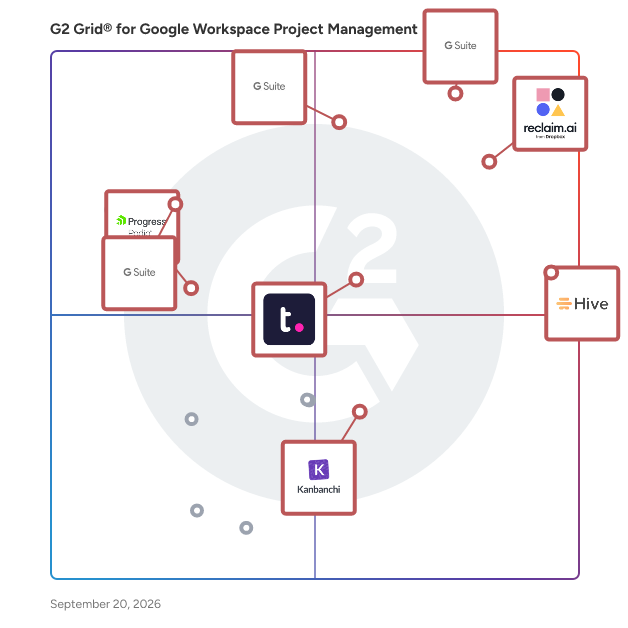
G2 Grid® for Google Workspace Project Management Software

G2 Grid® for Google Workspace Project Management Software plotting products by satisfaction and market presence

Highlighted products: Asana for Gmail for G Suite, Reclaim.ai, Hive, Asana for G Suite, Teamwork.com, Smartsheet for G Suite, Kanbanchi, and Progress Podio.

Underlying data: [Grid® JSON](https://www.g2.com/categories/google-workspace-project-management/grids.json?focus%5B%5D=asana-for-gmail-for-g-suite&focus%5B%5D=reclaim-ai&focus%5B%5D=hive-hive-hive&focus%5B%5D=asana-for-g-suite&focus%5B%5D=teamwork-com&focus%5B%5D=smartsheet-for-g-suite&focus%5B%5D=kanbanchi&focus%5B%5D=progress-podio)

Asana for Gmail for G Suite

Asana for Gmail is designed to help users turn emails into tasks with assigned responsibilities and due dates, right from within their inbox.

Average Rating: 4.4/5.0

Total Reviews: 51

How Do G2 Users Rate Asana for Gmail for G Suite?

  • Has the product been a good partner in doing business?: 9.3/10 (Category avg: 8.7/10)
  • Ease of Use: 8.7/10 (Category avg: 8.7/10)
  • Quality of Support: 8.3/10 (Category avg: 8.4/10)

Who Is the Company Behind Asana for Gmail for G Suite?

  • Seller: Asana
  • Year Founded: 2008
  • HQ Location: San Francisco, CA
  • Twitter: @Asana
    119,913 Twitter followers
  • LinkedIn® Page: www.linkedin.com
    4,427 employees on LinkedIn®
  • Ownership: NYSE: ASAN

Who Uses This Product?

  • Top Industries: Information Technology and Services, Marketing and Advertising
  • Company Size: 58% Small, 34% Medium

What Do G2 Reviewers Say About Asana for Gmail for G Suite?

AI-generated summary from verified user reviews

Pros
  • Users appreciate the seamless email integration of Asana for Gmail, transforming emails into actionable tasks effortlessly.
  • Users appreciate the seamless app integration between Gmail and Asana, enhancing their productivity and task management.
  • Users appreciate the ease of use of Asana for Gmail, simplifying task management directly from their email.
  • Users appreciate the ease of organization with Asana for Gmail, efficiently converting email requests into actionable tasks.
  • Users appreciate how Asana turns emails into actionable, trackable tasks, streamlining workflow and automating key actions.
Cons
  • Users face the frustration of daily authorization that disrupts their workflow and hampers usability.
  • Users feel Asana for Gmail is expensive, though they believe its value justifies the price.
  • Users often face update delays with Asana for Gmail, leading to longer wait times than anticipated.

What Are Recent G2 Reviews of Asana for Gmail for G Suite?

What Are G2 Users Discussing About Asana for Gmail for G Suite?

Reclaim.ai

Reclaim is an AI calendar app that helps individuals and teams automatically plan their time and protect more space to get stuff done. The AI scheduling assistant optimizes meeting times across your workweek, flexibly defends focus time, prevents interruptions, and promotes work-life balance so your productivity thrives—without the burnout. Simply connect your Google Calendar or Outlook Calendar, set up a few AI-powered goals, and automatically start reclaiming your time every week. Reclaim’s AI continuously adapts your schedule as priorities shift — rescheduling tasks, protecting deep work time, and keeping your calendar optimized without the manual effort. On average, Reclaim saves busy people 7.6 hours/week through smarter AI scheduling – even across the most chaotic work environments. Get back up to 40% of the workweek with adaptive, real-time scheduling, while keeping your calendar flexible with predictive intelligence to dynamically defend priorities as your week fills up – so you always have time for focused work, while staying open to collaborate with your team. You get to tell Reclaim exactly how you want your priorities scheduled, just like you would a great assistant. And when plans change, it automatically realigns your schedule in seconds. Over 65,000 companies rely on Reclaim to get more out of their workweeks. Sign up and get started for free so you and your team can spend time where it matters most, every week. Want to learn more? Check out just some of Reclaim’s features below and visit our homepage at Reclaim.ai to get started today: • Focus Time: proactively defend a weekly focus time goal • Tasks: auto-schedule your to-dos in your calendar • Habits: block flexible time for recurring routines • Smart Meetings: find the best time for one-on-one meetings • Scheduling Links: book smarter with flexible meeting links • Calendar Sync: block your availability across calendars including Google Calendar & Microsoft Outlook Calendar • Buffer Time: auto-schedule breaks & travel time • Color Coding: automatically color-code your events by category • No-Meeting Days: prevent meetings & auto-schedule heads-down work • Team Analytics: track your team's time across meetings, tasks, wellness metrics, & more • Task Integrations: sync tasks from Asana, Todoist, Jira, ClickUp, Linear & Google Tasks to your calendar • Slack Integration: customize & sync your Slack status to your calendar in real time

Average Rating: 4.8/5.0

Total Reviews: 143

How Do G2 Users Rate Reclaim.ai?

  • Has the product been a good partner in doing business?: 9.6/10 (Category avg: 8.7/10)
  • Ease of Use: 8.9/10 (Category avg: 8.7/10)
  • Quality of Support: 9.7/10 (Category avg: 8.4/10)

Who Is the Company Behind Reclaim.ai?

  • Seller: Dropbox
  • Year Founded: 2007
  • HQ Location: San Francisco, California
  • Twitter: @Dropbox
    3,279,477 Twitter followers
  • LinkedIn® Page: www.linkedin.com
    4,183 employees on LinkedIn®
  • Ownership: NASDAQ: DBX

Who Uses This Product?

  • Top Industries: Computer Software, Information Technology and Services
  • Company Size: 75% Small, 15% Medium

What Do G2 Reviewers Say About Reclaim.ai?

AI-generated summary from verified user reviews

Pros
  • Users love how Reclaim.ai schedules personal time, ensuring they never miss important breaks or events in their busy lives.
  • Users appreciate the time-saving features of Reclaim.ai, allowing them to focus on tasks and enjoy life.
  • Users praise the ease of use of Reclaim.ai, facilitating effortless time management for busy professionals.
  • Users love the scheduling ease of Reclaim.ai, enabling seamless prioritization and optimal time management for busy professionals.
  • Users appreciate the scheduling flexibility of Reclaim.ai, enabling effective management across multiple calendars and groups.
Cons
  • Users note several missing features, including the lack of a mobile app and persistent syncing issues.
  • Users find the task management limited, struggling with rescheduling and the need for improved functionality.
  • Users find the poor calendar integration frustrating, especially when managing tasks and events on the go.
  • Users face scheduling issues with Reclaim.ai, particularly when trying to reschedule tasks on the fly.
  • Users face calendar issues with Reclaim.ai, finding synchronization and event management frustrating and cumbersome.

What Are Recent G2 Reviews of Reclaim.ai?

What Are G2 Users Discussing About Reclaim.ai?

Hive

Hive is an all-in-one project management software platform that helps teams plan, collaborate, automate workflows, and deliver projects faster. Designed for organizations of every size, Hive combines powerful project planning, task management, team collaboration, and workflow automation tools in one customizable workspace. Whether you're managing marketing campaigns, product launches, creative projects, client work, or cross-functional initiatives, Hive adapts to your team's unique processes. Unlike rigid project management tools, Hive offers flexible workflows, customizable dashboards, and multiple project views so every team can work the way they work best. Hive empowers marketing, operations, product, IT, creative, and remote teams with the tools they need to stay organized and aligned. With customizable workflows and powerful collaboration features, teams can centralize work, reduce manual tasks, and improve visibility across every project. Key capabilities include: - Multiple project views, including Kanban boards, Gantt charts, calendars, tables, and lists - Task management with custom fields, dependencies, milestones, and priorities - Workflow automation to eliminate repetitive work - Real-time team collaboration with messaging, comments, and file sharing - Time tracking, reporting, and analytics - Integrations with hundreds of popular business applications Every organization works differently, which is why Hive is built to be one of the most customizable project management platforms available. Teams can create workflows tailored to their business processes using custom fields, project templates, automations, approvals, and integrations. Instead of forcing teams to change how they work, Hive adapts to existing workflows — helping organizations improve efficiency without disrupting productivity. Hive gives teams the flexibility to manage projects from the perspective that works best for them. Switch seamlessly between: - Kanban boards for agile workflows - Gantt charts for timeline planning - Calendar views for scheduling - Table and List views for detailed task management These flexible project views help teams track deadlines, manage resources, identify bottlenecks, and keep projects moving forward. Hive brings projects, communication, and documentation together in one centralized workspace. Team members can collaborate in real time, assign tasks, share files, provide feedback, and monitor project progress without switching between multiple tools. By combining project planning, collaboration, automation, and reporting in a single platform, Hive helps teams reduce busywork and focus on delivering results. Hive is more than just task management software—it's a scalable work management platform built to evolve alongside your business. As your needs change, Hive continues to expand through new features, integrations, and customer-driven enhancements. With flexible customization, powerful automation, and dedicated customer support, Hive enables organizations to streamline workflows, improve cross-functional collaboration, and execute projects with greater speed and confidence.

Average Rating: 4.6/5.0

Total Reviews: 651

G2 Deal: Get 20% off Hive

Get 20% off Hive Starter or Hive Teams plans. Customize your project management experience with the best tools & functionality for every budget.

Price: ~~$5 per user/month~~ → $4 per user/month

View this exclusive G2 deal

How Do G2 Users Rate Hive?

  • Has the product been a good partner in doing business?: 9.4/10 (Category avg: 8.7/10)
  • Ease of Use: 9.1/10 (Category avg: 8.7/10)
  • Quality of Support: 9.3/10 (Category avg: 8.4/10)

Who Is the Company Behind Hive?

  • Seller: Hive
  • Company Website:
  • Year Founded: 2016
  • HQ Location: New York, New York
  • Twitter: @hive
    3,353 Twitter followers
  • LinkedIn® Page: www.linkedin.com
    63 employees on LinkedIn®

Who Uses This Product?

  • Who Uses This: Project Manager, Graphic Designer
  • Top Industries: Marketing and Advertising, Information Technology and Services
  • Company Size: 63% Small, 29% Medium

What Do G2 Reviewers Say About Hive?

AI-generated summary from verified user reviews

Pros
  • Users appreciate the versatile project tracking capabilities of Hive, enhancing organization and timely documentation across projects.
  • Users appreciate the ease of use of Hive, enabling quick project setup and valuable features right away.
  • Users value the strong team collaboration features of Hive, enhancing interaction and streamlining workflows effectively.
  • Users appreciate the collaborative and efficient features of Hive, enhancing project management and workflow execution.
  • Users appreciate the effective organization of projects and timelines, enhancing overall workflow and documentation.
Cons
  • Users find the missing features in Hive frustrating, such as limited calendar views and inadequate text formatting options.
  • Users note a challenging learning curve initially, but supportive resources help ease navigation through Hive.
  • Users find Hive's limited features a drawback, wishing for more customization and bulk actions to enhance usability.
  • Users find Hive's interface not intuitive, feeling overwhelmed with project organization and mobile app usability issues.
  • Users experience a learning curve with Hive due to its complexity and differences from other project management tools.
What Are Recent G2 Reviews of Hive?

Asana for G Suite

Asana is designed to be an easy way for teams to track their work and get results.

Average Rating: 3.9/5.0

Total Reviews: 57

How Do G2 Users Rate Asana for G Suite?

  • Has the product been a good partner in doing business?: 9.4/10 (Category avg: 8.7/10)
  • Ease of Use: 8.4/10 (Category avg: 8.7/10)
  • Quality of Support: 8.4/10 (Category avg: 8.4/10)

Who Is the Company Behind Asana for G Suite?

  • Seller: Asana
  • Year Founded: 2008
  • HQ Location: San Francisco, CA
  • Twitter: @Asana
    119,913 Twitter followers
  • LinkedIn® Page: www.linkedin.com
    4,427 employees on LinkedIn®
  • Ownership: NYSE: ASAN

Who Uses This Product?

  • Top Industries: Marketing and Advertising
  • Company Size: 69% Small, 31% Medium

What Do G2 Reviewers Say About Asana for G Suite?

AI-generated summary from verified user reviews

Pros
  • Users value the seamless integration of Asana with G Suite, enhancing their productivity and collaboration capabilities.
  • Users value the effective communication capabilities of Asana for G Suite, enhancing coordination for launches and projects.
  • Users value the seamless integration of Asana with G Suite, enhancing productivity through effortless task management.
  • Users value the efficiency of Asana for G Suite, integrating project planning seamlessly within their email workflow.
  • Users appreciate the easy project planning within email, enhancing focus and reducing distractions from switching apps.
Cons
  • Users find the complexity of Asana for G Suite can hinder usability and overwhelm new users, especially with setup.
  • Users find the difficult setup process for custom workflows in Asana challenging, requiring trial and error for effectiveness.
  • Users find the Gmail add-on limited in functionality, making complex task management challenging and setup frustrating for new users.
  • Users find the Gmail add-on limited, especially for complex tasks, and setting up integrations can be challenging for newcomers.
  • Users find the organization lacking, suggesting improvements for a more user-friendly experience are necessary.

What Are Recent G2 Reviews of Asana for G Suite?

What Are G2 Users Discussing About Asana for G Suite?

Teamwork.com

Combining powerful project management and easily streamlined operations - we’re the only platform built for managing client projects, profitably. Deliver work on time and on budget, eliminate client chaos, and understand profitability, all in one platform. Headquartered in Cork, Ireland and founded by a team who have run an agency before, Teamwork.com has more than 20,000 customers around the world with a global team of over 350 employees. Learn more at teamwork.com.

Average Rating: 4.4/5.0

Total Reviews: 1,176

How Do G2 Users Rate Teamwork.com?

  • Has the product been a good partner in doing business?: 9.0/10 (Category avg: 8.7/10)
  • Ease of Use: 8.6/10 (Category avg: 8.7/10)
  • Quality of Support: 8.8/10 (Category avg: 8.4/10)

Who Is the Company Behind Teamwork.com?

  • Seller: Teamwork
  • Company Website:
  • Year Founded: 2007
  • HQ Location: Cork
  • Twitter: @teamwork
    1 Twitter followers
  • LinkedIn® Page: www.linkedin.com
    549 employees on LinkedIn®

Who Uses This Product?

  • Who Uses This: Project Manager, Owner
  • Top Industries: Marketing and Advertising, Information Technology and Services
  • Company Size: 57% Small, 31% Medium

What Do G2 Reviewers Say About Teamwork.com?

AI-generated summary from verified user reviews

Pros
  • Users appreciate the comprehensive project management capabilities of Teamwork.com, enhancing task tracking and workflow efficiency.
  • Users value the easy task management features of Teamwork.com, enhancing productivity and project visibility effectively.
  • Users appreciate the effective team collaboration in Teamwork.com, enhancing focus and productivity through user-friendly features.
  • Users value the comprehensive task tracking of Teamwork.com, enhancing project management and improving productivity.
  • Users find Teamwork.com to be exceptionally user-friendly, making task management and tracking seamless and efficient.
Cons
  • Users find the learning curve steep due to overwhelming features and confusing setup processes, hindering adoption.
  • Users find limited features on Teamwork.com hinder performance, navigation, and reporting capabilities, especially on basic tiers.
  • Users find the setup process complex and time-consuming, leading to frustration and delays in utilizing Teamwork.com effectively.
  • Users find the missing invoicing features in Teamwork.com frustrating, impacting their workflow and project management.
  • Users find some views of Teamwork.com to be not intuitive, complicating navigation and discovery of advanced features.

What Are Recent G2 Reviews of Teamwork.com?

What Are G2 Users Discussing About Teamwork.com?

Smartsheet for G Suite

Smartsheet for G Suite allows users to add emails and attachments to new or existing rows in Smartsheet without leaving Gmail.

Average Rating: 4.0/5.0

Total Reviews: 15

How Do G2 Users Rate Smartsheet for G Suite?

  • Has the product been a good partner in doing business?: 7.5/10 (Category avg: 8.7/10)
  • Ease of Use: 8.5/10 (Category avg: 8.7/10)
  • Quality of Support: 7.7/10 (Category avg: 8.4/10)

Who Is the Company Behind Smartsheet for G Suite?

  • Seller: Smartsheet
  • Year Founded: 2005
  • HQ Location: Bellevue, WA
  • Twitter: @Smartsheet
    26,366 Twitter followers
  • LinkedIn® Page: www.linkedin.com
    4,034 employees on LinkedIn®
  • Ownership: NYSE: SMAR

Who Uses This Product?

  • Company Size: 67% Small, 20% Medium

What Are Recent G2 Reviews of Smartsheet for G Suite?

What Are G2 Users Discussing About Smartsheet for G Suite?

Kanbanchi

Kanbanchi is a powerful project management tool that seamlessly integrates with Google Workspace or Microsoft, including Google Drive or OneDrive, Gmail or Outlook, Calendar, Forms, SharePoint, and more. It features an intuitive Kanban board, Gantt Chart, Time Tracker, and more built-in tools designed specifically for Google and Microsoft users. The Google Kanban board visualizes workflows for your tasks and activities, letting teams collaborate in real-time and manage projects visually within the Google environment! The Microsoft Kanban board works similarly for Microsoft users. As the only project management tool natively integrated with Google Workspace, Kanbanchi offers unmatched convenience. Sign up with your Google account and work with project boards stored directly in your Google Drive, sharing them effortlessly with colleagues. Kanbanchi provides flexible access permissions and a familiar interface with no learning curve - simply deploy Kanbanchi to all your organization's users from the Google Admin Console. The Microsoft version can also be accessed with a Microsoft account, and it works similarly in the Microsoft environment. Kanbanchi has high security standards. Your files remain on YOUR Google Drive with authentication managed by Google. This Google task management system is SOC2 Type II, ISO 27001, and CASA certified, GDPR and PCI DSS compliant, and follows HIPAA rules. Kanbanchi needs some permission to access certain parts of your Google Drive because Kanbanchi doesn’t store data on its side. All your files and sensitive information are stored in your Google Drive. However, the app should be able to operate within your Google Drive. Core functionality of the Kanbanchi project management app: – Create and share unlimited project boards and cards – Share internally and externally according to your company's policies – Receive notifications about board updates – Add events to Google Calendar – Attach files from Google Drive and Shared Drives, OneDrive, or SharePoint – Communicate with colleagues about tasks – Organize cards with text and color tags – Sort and filter cards as needed – Create boards as files in Google Drive (Shared Drives for Enterprise users) or OneDrive for Microsoft users – Launch Kanbanchi from any page with our Chrome extension to switch from browsing to planning instantly – Work from your computer, mobile phone, or tablet – Import your Trello Boards or import data from CSV Advanced functionality of the Kanbanchi project management app: — Gantt Chart for Project Management Convert your Kanbanchi board to a Gantt Chart with one click. See how all your cards relate in time and plan project schedules visually. — Time Tracker for Task Management Track time directly in Kanbanchi - choose a card, start the timer, and monitor your team's progress in the Timing tab, where all user timing data is recorded. — Building Reports for Project Tracking Monitor team progress to adjust the workflow quickly. Check user performance to manage resources effectively within your Google task management system. Extract any data and connect it to your preferred reporting dashboard, like Google Data Studio or Power BI. — Task Prioritization Simplify work by prioritizing each task and sorting accordingly. Automate this process for better control in your project management workflow. — Corporate Branding Customize Kanbanchi's look by adding your company's logo and background images. — Export to Google Sheets or CSV Export all board data, including assignments, dates, checklists, and comments, directly to Google Spreadsheets or CSV. — Card Creation from Gmail or Outlook Create new cards by emailing your board's unique address or installing our Gmail add-on to send information to any accessible board. — Backups for Project Security Back up important Kanbanchi boards for easy recovery, so your project data stays safe. — List View for Task Organization View all cards in a scrollable list, quickly navigate from top to bottom, and filter as needed. — Subcards for Detailed Task Management Organize complex tasks by breaking them into subcards that can be assigned and tracked separately. — Templates for Project Efficiency Speed up workflows with our template gallery or create custom board templates. Create card templates to streamline repetitive tasks. — Shared Drives Integration Attach files from Shared Drives to cards; enterprise users can create boards directly in their Shared Drives. — Swimlanes for Project Organization Easily manage multiple projects on a single board by using swimlanes. This feature lets you visually separate and track tasks from different projects in one place, giving you a clear overview of all your work within your Kanban board. Install Kanbanchi and start your free trial now!

Average Rating: 4.7/5.0

Total Reviews: 93

How Do G2 Users Rate Kanbanchi?

  • Has the product been a good partner in doing business?: 9.3/10 (Category avg: 8.7/10)
  • Ease of Use: 9.4/10 (Category avg: 8.7/10)
  • Quality of Support: 9.4/10 (Category avg: 8.4/10)

Who Is the Company Behind Kanbanchi?

  • Seller: Kanbanchi
  • Year Founded: 2013
  • HQ Location: Dartford, United Kingdom
  • Twitter: @Kanbanchi
    512 Twitter followers
  • LinkedIn® Page: www.linkedin.com
    9 employees on LinkedIn®

Who Uses This Product?

  • Top Industries: Information Technology and Services, Marketing and Advertising
  • Company Size: 59% Small, 23% Medium

What Are Recent G2 Reviews of Kanbanchi?

What Are G2 Users Discussing About Kanbanchi?

Smartsheet for Gmail Add-On for G Suite

Smartsheet for Gmail Add-On allows users to add emails and attachments to new or existing rows in Smartsheet without leaving Gmail.

Average Rating: 4.0/5.0

Total Reviews: 20

How Do G2 Users Rate Smartsheet for Gmail Add-On for G Suite?

  • Has the product been a good partner in doing business?: 10.0/10 (Category avg: 8.7/10)
  • Ease of Use: 6.9/10 (Category avg: 8.7/10)
  • Quality of Support: 6.8/10 (Category avg: 8.4/10)

Who Is the Company Behind Smartsheet for Gmail Add-On for G Suite?

  • Seller: Smartsheet
  • Year Founded: 2005
  • HQ Location: Bellevue, WA
  • Twitter: @Smartsheet
    26,366 Twitter followers
  • LinkedIn® Page: www.linkedin.com
    4,034 employees on LinkedIn®
  • Ownership: NYSE: SMAR

Who Uses This Product?

  • Company Size: 50% Small, 35% Medium

What Are Recent G2 Reviews of Smartsheet for Gmail Add-On for G Suite?

Collavate

Collavate is an easy to use document collaboration tool that helps make idea creation a reality. With security options, all the necessary document tools and features, Collavate meets your needs for simplified workflow automation and team member sharing. Easy to set up Google Docs and Drive Add-on makes document archiving applications easier than ever before in a safe environment perfect for any situation. It provides a secure, centralized place to manage documents and compliance workflow for Google Workspace. With industry experts working behind the scenes to bring you the most relevant features, you can trust Collavate to bring you the features you need without cramming in features you don’t. Plus, compliances such as ISO 9001 , GDPR, HIPAA, ISO 13485 are easy to achieve. We support the entire process of planning, brainstorming, drafting, reviewing, correcting and publishing documents. Group messaging lets you chat in an organized way with other team members while you’re working. You can share screenshots, links, videos, and more using the messenger feature. We have a wide range of collaboration capabilities for corporate documentation, including automated workflows, ledger, reminder/due-date for approval, audit trail, version control and document template options. Automate workflows and establish communication with Collavate with a variety of tasks that require document control, editing, and document collaboration. Issues or Questions: support@collavate.com

Average Rating: 4.8/5.0

Total Reviews: 58

How Do G2 Users Rate Collavate?

  • Has the product been a good partner in doing business?: 8.6/10 (Category avg: 8.7/10)
  • Ease of Use: 9.3/10 (Category avg: 8.7/10)
  • Quality of Support: 9.4/10 (Category avg: 8.4/10)

Who Is the Company Behind Collavate?

  • Seller: Netkiller
  • Year Founded: 2005
  • HQ Location: Palo Alto, California
  • Twitter: @netkiller_cloud
    54 Twitter followers
  • LinkedIn® Page: www.linkedin.com
    31 employees on LinkedIn®

Who Uses This Product?

  • Top Industries: Automotive, Financial Services
  • Company Size: 42% Medium, 39% Large

What Are Recent G2 Reviews of Collavate?

What Are G2 Users Discussing About Collavate?

Progress Podio

Progress Podio is a flexible, custom collaboration database that enables you to accelerate and simplify your work. An all-in-one solution to accelerate productivity, digitize essential processes, streamline data collection, and automate document workflows in one secure tool. Progress Podio can automate, operationalize, and secure important business and document processes that reduces manual work and increases efficiency. Transform how work is done with versatile forms, powerful data collection, and automated client and document workflows— customized all by you with a few simple clicks. From key industries such as, creative agencies, legal services, accounting firms, real-estate, construction / manufacturing, to key departmental areas—sales, HR, marketing, legal, finance. Podio’s ability to connect diverse teams and disparate processes helps thousands of companies optimize their entire operations in one place. With Progress Podio, give your team a single tool to automate timely processes that unify in one tool. From simplifying client data collection to automating client interactions and agreements, Progress Podio simplifies your business’s most core activities.

Average Rating: 4.2/5.0

Total Reviews: 507

How Do G2 Users Rate Progress Podio?

  • Has the product been a good partner in doing business?: 8.4/10 (Category avg: 8.7/10)
  • Ease of Use: 8.3/10 (Category avg: 8.7/10)
  • Quality of Support: 8.1/10 (Category avg: 8.4/10)

Who Is the Company Behind Progress Podio?

  • Seller: Progress Software
  • Company Website:
  • Year Founded: 1981
  • HQ Location: Burlington, MA.
  • Twitter: @ProgressSW
    48,773 Twitter followers
  • LinkedIn® Page: www.linkedin.com
    4,242 employees on LinkedIn®

Who Uses This Product?

  • Who Uses This: Owner, Project Manager
  • Top Industries: Real Estate, Information Technology and Services
  • Company Size: 61% Small, 28% Medium

What Do G2 Reviewers Say About Progress Podio?

AI-generated summary from verified user reviews

Pros
  • Users find Progress Podio's ease of use invaluable, simplifying tasks and enhancing collaboration across various business processes.
  • Users appreciate the automation capabilities of Progress Podio, streamlining workflows and enhancing productivity across various tasks.
  • Users love the integrated workflows and no-code capabilities of Progress Podio, enhancing efficiency in task management.
  • Users appreciate the powerful integrations of Progress Podio, enhancing collaboration and streamlining various business processes.
  • Users love the ease of task tracking with Progress Podio, benefiting from its integrations and simple interface.
Cons
  • Users find the billing issues and lack of responsive customer service frustrating in Progress Podio.
  • Users find the learning curve steep for Progress Podio, making setup challenging and performance occasionally sluggish.
  • Users find poor customer support frustrating, often needing to hire external assistance for setup and issues.
  • Users find Progress Podio to be fiddly for newcomers and occasionally experience slow performance during use.
  • Users struggle with colum management complexities requiring excessive effort and leading to maintenance issues and slow performance.

What Are Recent G2 Reviews of Progress Podio?

What Are G2 Users Discussing About Progress Podio?

Kerika

Kerika is a task management tool with a very user-friendly design and seamless integration with Google Workspace, Microsoft Office 365, and Box. If you use Google Apps, sign up with your Google ID and your Kerika files will be stored in your own Google Drive, where they will remain under your ownership and control. Your IT folks will be thrilled to know that their document management policies are being automatically enforced! You can even create new Google Docs, Slides, Sheets, and Forms from inside Kerika and have them shared automatically with your board's team: Team Members get read+write access and Visitors get read-only access. If you prefer Microsoft, sign up with your Microsoft ID and your Kerika files will be stored in your own OneDrive and, yes, you can even create new Office documents from inside Kerika and have them shared automatically with your board's team! If you use Box, sign up with your Box ID and your Kerika files will be stored in your own Box account. You create new Box Notes from inside Kerika and have them shared automatically with your board's team. Add someone to a board's team and Kerika makes sure all the relevant files in your are shared with the new team member. Change someone's role on a board and Kerika will instantly update that person's access rights to your project files. All of this is done on a board-by-board basis, to give you maximum flexibility and privacy. Within an account you can have as many boards as you like, and each board can be as big as you need it to be. Kerika is the only task management tool that supports both Task Boards that can be used for Kanban-style or Scrum work, and Whiteboards that can be used for creativity. Kerika's Whiteboards are patented and contain other Whiteboards as well as files and Web content, live! Start your new board from scratch or use one of our templates to get started faster. Every board can be completely customized, with the workflow, tags, teams, tasks, and content that you need to get the job done. Each board can also be kept as private as you like, or shared with others in your account team. Everything in Kerika’s clean design, from adjusting automatically to different time zones and highlighting “while you were away” changes supports the needs of distributed and remote teams. Even if your board has thousands of tasks, a unique Highlights feature helps you quickly focus on what matters most to you, like what's assigned to you, or what needs attention. The Dashboard makes sure you stay on top of things when you have dozens of projects to watch over: it summarizes key information across all the boards you care about so you never feel lost or overwhelmed. Kerika is available in 38 languages! After a 30-day free trial (with no strings attached), you can buy a paid plan in 135 currencies. Purchasing annual subscriptions comes with a 30-day Money Back Guarantee.

Average Rating: 4.8/5.0

Total Reviews: 11

How Do G2 Users Rate Kerika?

  • Has the product been a good partner in doing business?: 10.0/10 (Category avg: 8.7/10)
  • Ease of Use: 9.4/10 (Category avg: 8.7/10)
  • Quality of Support: 9.7/10 (Category avg: 8.4/10)

Who Is the Company Behind Kerika?

  • Seller: Kerika
  • Year Founded: 2002
  • HQ Location: Issaquah, WA
  • Twitter: @kerika
    134 Twitter followers
  • LinkedIn® Page: www.linkedin.com
    5 employees on LinkedIn®

Who Uses This Product?

  • Company Size: 83% Small, 17% Medium

What Do G2 Reviewers Say About Kerika?

AI-generated summary from verified user reviews

Pros
  • Users appreciate the user-friendly interface of Kerika, making project management simple and efficient even with large boards.
  • Users value Kerika's powerful collaboration features, enhancing teamwork through real-time updates and intuitive task management.
  • Users commend the clean and intuitive UI of Kerika, making project management a breeze compared to other tools.
  • Users value the seamless app integration of Kerika with Google Drive, enhancing collaboration and file management efficiency.
  • Users appreciate the user-friendly interface of Kerika, enjoying its intuitive drag-and-drop functionality for task organization.
Cons
  • Users find the initial complexity of Kerika overwhelming and desire a mobile version for easier access.
  • Users note a need for improved third-party integration support to enhance their Kerika experience further.
  • Users note the lack of advanced features in Kerika, particularly for complex project customization needs.
  • Users find the limited customization options restrict their ability to effectively manage complex projects in Kerika.
  • Users note the missing advanced features and suggest better customization options for complex projects in Kerika.

What Are Recent G2 Reviews of Kerika?

What Are G2 Users Discussing About Kerika?

Tasks in a Box for G Suite

Tasks in a Box for G Suite is designed to allow users to see what they and their team have under development.

Average Rating: 4.4/5.0

Total Reviews: 27

How Do G2 Users Rate Tasks in a Box for G Suite?

  • Has the product been a good partner in doing business?: 8.8/10 (Category avg: 8.7/10)
  • Ease of Use: 8.7/10 (Category avg: 8.7/10)
  • Quality of Support: 8.4/10 (Category avg: 8.4/10)

Who Is the Company Behind Tasks in a Box for G Suite?

  • Seller: Tasks in
  • Year Founded: 2015
  • HQ Location: New York, New York
  • Twitter: @TasksInABox
    126 Twitter followers
  • LinkedIn® Page: www.linkedin.com
    3 employees on LinkedIn®

Who Uses This Product?

  • Company Size: 50% Small, 32% Medium

What Are Recent G2 Reviews of Tasks in a Box for G Suite?

Ora - Tasks time and team collaboration for G Suite

Ora for G Suite is a task management and team collaboration add-on.

Average Rating: 4.6/5.0

Total Reviews: 13

How Do G2 Users Rate Ora - Tasks time and team collaboration for G Suite?

  • Has the product been a good partner in doing business?: 8.3/10 (Category avg: 8.7/10)
  • Ease of Use: 8.5/10 (Category avg: 8.7/10)
  • Quality of Support: 8.7/10 (Category avg: 8.4/10)

Who Is the Company Behind Ora - Tasks time and team collaboration for G Suite?

  • Seller: Ora
  • Year Founded: 2015
  • HQ Location: N/A
  • Twitter: @oratask
    755 Twitter followers
  • LinkedIn® Page: www.linkedin.com
    1 employees on LinkedIn®

Who Uses This Product?

  • Company Size: 62% Small, 31% Medium

What Are Recent G2 Reviews of Ora - Tasks time and team collaboration for G Suite?

Email Meter

Email Meter is the email analytics and shared inbox reporting platform for Google Workspace and Microsoft 365. It can be hard to know what is happening in your team's email. Who is responding, how fast, what is slipping through, most teams lack this visibility. Most teams lack this visibility, Email Meter provides it, without ever reading email content. Email Meter connects to your team's mailboxes and delivers clear, actionable data, with no changes to existing workflows, available immediately after setup. Unlike a helpdesk, ticketing tool, or CRM, it works as an analytics layer on top of the inbox and the tools you already use, so your team keeps working in Gmail or Outlook while leaders get board-ready reporting. Email Meter offers a free plan to get started, with a free trial of its paid plans for larger teams. Whether managing a CS team, a shared inbox, or an enterprise-wide operation, Email Meter gives IT Managers, Directors of Operations, and Customer Success leaders the insight they need: how quickly the team responds to clients, who is overloaded, and where service quality is at risk. Key capabilities: - Email volume, response and resolution time tracking, and traffic patterns - SLA compliance with custom rules, real-time breach alerts, and automated compliance reports - Individual and team performance benchmarked against industry standards - AI-powered sentiment analysis to detect tone, urgency, and negative signals Custom dashboards with drag-and-drop widgets and flexible date-range filters - Shared inbox analytics and workload distribution - BI integration via BigQuery - Up to 2 years of historical data Common use cases: - Measuring and improving team email response times - Identifying slow replies and response bottlenecks before they affect customers - Tracking SLA compliance without switching to a helpdesk or ticketing tool - Spotting overloaded team members and rebalancing workload - Benchmarking individual and team email performance against industry standards - Giving leadership board-ready reporting on customer responsiveness Customer results: - Payday HCM reduced response times by 71%, resulting in fewer missed leads - Fujifilm Mexico cut after-hours emails by 16.5%, reducing team burnout - Entirety deployed organization-wide in 24 hours Trusted by 10,000+ teams including Carrefour, Avery Denninson, and Fujifilm. Domain-level installation. GDPR ready. ISO 27001. SOC 2 Type 2. SAML 2.0 and SSO. Verified by Google. Email Meter never reads, processes or stores the body of emails. Find out more at emailmeter.com/

Average Rating: 4.1/5.0

Total Reviews: 28

How Do G2 Users Rate Email Meter?

  • Has the product been a good partner in doing business?: 8.9/10 (Category avg: 8.7/10)
  • Ease of Use: 9.2/10 (Category avg: 8.7/10)
  • Quality of Support: 7.9/10 (Category avg: 8.4/10)

Who Is the Company Behind Email Meter?

  • Seller: ShuttleCloud
  • HQ Location: Exton, Pennsylvania
  • Twitter: @ShuttleCloud
    1,363 Twitter followers
  • LinkedIn® Page: www.linkedin.com
    14 employees on LinkedIn®

Who Uses This Product?

  • Company Size: 72% Small, 17% Medium

What Do G2 Reviewers Say About Email Meter?

AI-generated summary from verified user reviews

Pros
  • Users highlight the ease of learning with Email Meter, enabling quick setup and effortless monitoring in no time.
  • Users love the easy implementation of Email Meter, with quick setup allowing rapid monitoring in busy schedules.
  • Users appreciate the easy implementation of Email Meter, allowing quick setup and efficient monitoring in a busy world.

What Are Recent G2 Reviews of Email Meter?

What Are G2 Users Discussing About Email Meter?

PerformFlow

PerformFlow is a Google Forms add-on which automates approval workflow right on Google Forms and with Gmail. Users can use Google Forms to create request form (e.g. Leave Request). Their respondents will submit request via that created form, then specified recipients will receive approval email. Those recipients can make approval decision right on that email.

Average Rating: 4.1/5.0

Total Reviews: 15

How Do G2 Users Rate PerformFlow?

  • Has the product been a good partner in doing business?: 7.5/10 (Category avg: 8.7/10)
  • Ease of Use: 8.6/10 (Category avg: 8.7/10)
  • Quality of Support: 8.3/10 (Category avg: 8.4/10)

Who Is the Company Behind PerformFlow?

Who Uses This Product?

  • Company Size: 67% Small, 20% Medium

What Are Recent G2 Reviews of PerformFlow?

Neeraja Prakash
NP
Researched and written by Neeraja Prakash
Updated June 16, 2025