Introducing G2.ai, the future of software buying.Try now

Best Training Management Software - Page 2

Grace Savides
GS
Researched and written by Grace Savides

Training management software is used by training companies and learning and development departments to streamline training operations. These solutions help users design, organize, scale, and maintain training programs. Training management systems often provide solutions for all learning professionals (including training companies and learning and development departments) that schedule, track, and assess training efforts while overseeing employee training progress and certifications. Training management solutions also deliver tools that help training companies create and sell training courses and events. Additionally, these solutions provide learning and development departments with training resources, program budget monitoring, employee performance tracking, and so on.

Software for training companies and learning and development departments should not be confused with corporate LMS software, which helps companies manage employee training efforts and assign courses created using course authoring software. In addition, training management systems may be integrated with CRM software, CMS tools, and video conferencing software, among others. Some training management tools also provide event management solutions, e-commerce platforms, and corporate LMS tools to administer all training efforts.

To qualify for inclusion in the Training Management Systems category, a product must:

Provide training management solutions that implement, manage, track, and analyze training efforts
Manage certifications and qualifications for users, including teams, individual employees, and contractors
Include tools to schedule and assign training courses
Centralize organizations’ training data
Show More
Show Less

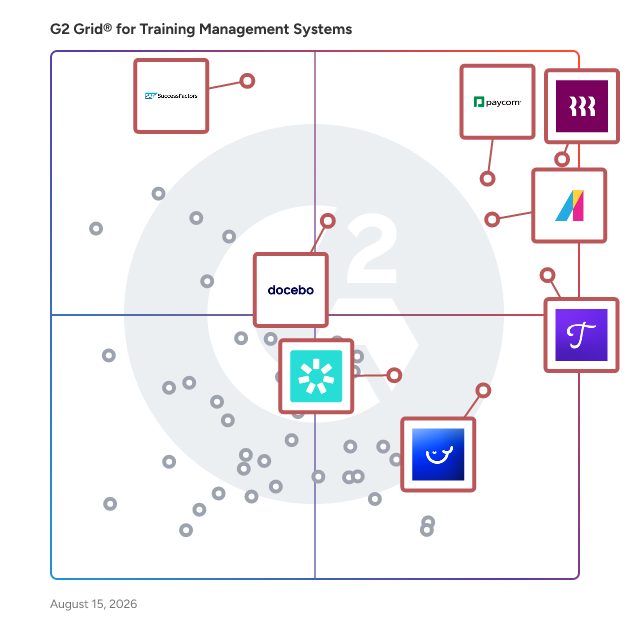
Featured Training Management Software At A Glance

Free Plan Available:
Whale
Sponsored
Leader:
Highest Performer:
Easiest to Use:
Top Trending:
Show LessShow More
Highest Performer:
Easiest to Use:
Top Trending:

G2 takes pride in showing unbiased reviews on user satisfaction in our ratings and reports. We do not allow paid placements in any of our ratings, rankings, or reports. Learn about our scoring methodologies.

Coming Soon
Get Trending Training Management Systems Products in Your Inbox

A weekly snapshot of rising stars, new launches, and what everyone's buzzing about.

Sample Trending Products Newsletter
No filters applied
188 Listings in Training Management Systems Available
Entry Level Price:$109 per month
  • Overview
    Expand/Collapse Overview
  • Product Description
    How are these determined?Information
    This description is provided by the seller.

    A versatile software platform for learning and development in virtual, or a mix of in-person and virtual situations, GoTo Training is now comes as part of GoTo Connect, the all-in-one communications s

    Users
    No information available
    Industries
    No information available
    Market Segment
    • 50% Small-Business
    • 33% Mid-Market
  • User Satisfaction
    Expand/Collapse User Satisfaction
  • GoTo Training features and usability ratings that predict user satisfaction
    8.0
    Has the product been a good partner in doing business?
    Average: 9.3
    8.6
    Content Delivery and Tracking
    Average: 8.9
    9.0
    Customer Training
    Average: 8.8
    8.2
    Content Storage and Management
    Average: 8.8
  • Seller Details
    Expand/Collapse Seller Details
  • Seller Details
    Seller
    GoTo
    Year Founded
    2003
    HQ Location
    Boston, MA
    Twitter
    @goto
    41,422 Twitter followers
    LinkedIn® Page
    www.linkedin.com
    920 employees on LinkedIn®
Product Description
How are these determined?Information
This description is provided by the seller.

A versatile software platform for learning and development in virtual, or a mix of in-person and virtual situations, GoTo Training is now comes as part of GoTo Connect, the all-in-one communications s

Users
No information available
Industries
No information available
Market Segment
  • 50% Small-Business
  • 33% Mid-Market
GoTo Training features and usability ratings that predict user satisfaction
8.0
Has the product been a good partner in doing business?
Average: 9.3
8.6
Content Delivery and Tracking
Average: 8.9
9.0
Customer Training
Average: 8.8
8.2
Content Storage and Management
Average: 8.8
Seller Details
Seller
GoTo
Year Founded
2003
HQ Location
Boston, MA
Twitter
@goto
41,422 Twitter followers
LinkedIn® Page
www.linkedin.com
920 employees on LinkedIn®
(288)4.8 out of 5
Optimized for quick response
Save to My Lists
Entry Level Price:Free
  • Overview
    Expand/Collapse Overview
  • Product Description
    How are these determined?Information
    This description is provided by the seller.

    GoSkills is a leading online learning platform dedicated to delivering interactive, personalized, and irresistible learning experiences. By combining a powerful Learning Management System (LMS) wit

    Users
    No information available
    Industries
    • Hospital & Health Care
    • Accounting
    Market Segment
    • 60% Small-Business
    • 25% Mid-Market
    User Sentiment
    How are these determined?Information
    These insights, currently in beta, are compiled from user reviews and grouped to display a high-level overview of the software.
    • GoSkills is a learning platform that offers a variety of courses and features a gamification aspect to enhance the learning experience.
    • Reviewers like the intuitive setup process, the well-designed reports and layout, the option to learn alongside the instructor, the flexibility in use of licenses, and the pre-prepared Microsoft Office courses.
    • Users reported limited control for administrators, a desire for more courses in other fields, lack of course certifications for career advancement, difficulty in navigation between users and managers, and inability to change the language to Australian English.
  • Pros and Cons
    Expand/Collapse Pros and Cons
  • GoSkills Pros and Cons
    How are these determined?Information
    Pros and Cons are compiled from review feedback and grouped into themes to provide an easy-to-understand summary of user reviews.
    Pros
    Ease of Use
    73
    Courses
    48
    Content Quality
    40
    Ease of Learning
    39
    Course Quality
    26
    Cons
    Limited Courses
    11
    Limited Content
    10
    Expensive
    7
    Limited Course Variety
    7
    High Subscription Cost
    6
  • User Satisfaction
    Expand/Collapse User Satisfaction
  • GoSkills features and usability ratings that predict user satisfaction
    9.3
    Has the product been a good partner in doing business?
    Average: 9.3
    9.3
    Content Delivery and Tracking
    Average: 8.9
    8.6
    Customer Training
    Average: 8.8
    8.8
    Content Storage and Management
    Average: 8.8
  • Seller Details
    Expand/Collapse Seller Details
  • Seller Details
    Seller
    GoSkills
    Company Website
    Year Founded
    2013
    HQ Location
    Palo Alto, CA
    Twitter
    @getgoskills
    4,123 Twitter followers
    LinkedIn® Page
    www.linkedin.com
    27 employees on LinkedIn®
Product Description
How are these determined?Information
This description is provided by the seller.

GoSkills is a leading online learning platform dedicated to delivering interactive, personalized, and irresistible learning experiences. By combining a powerful Learning Management System (LMS) wit

Users
No information available
Industries
  • Hospital & Health Care
  • Accounting
Market Segment
  • 60% Small-Business
  • 25% Mid-Market
User Sentiment
How are these determined?Information
These insights, currently in beta, are compiled from user reviews and grouped to display a high-level overview of the software.
  • GoSkills is a learning platform that offers a variety of courses and features a gamification aspect to enhance the learning experience.
  • Reviewers like the intuitive setup process, the well-designed reports and layout, the option to learn alongside the instructor, the flexibility in use of licenses, and the pre-prepared Microsoft Office courses.
  • Users reported limited control for administrators, a desire for more courses in other fields, lack of course certifications for career advancement, difficulty in navigation between users and managers, and inability to change the language to Australian English.
GoSkills Pros and Cons
How are these determined?Information
Pros and Cons are compiled from review feedback and grouped into themes to provide an easy-to-understand summary of user reviews.
Pros
Ease of Use
73
Courses
48
Content Quality
40
Ease of Learning
39
Course Quality
26
Cons
Limited Courses
11
Limited Content
10
Expensive
7
Limited Course Variety
7
High Subscription Cost
6
GoSkills features and usability ratings that predict user satisfaction
9.3
Has the product been a good partner in doing business?
Average: 9.3
9.3
Content Delivery and Tracking
Average: 8.9
8.6
Customer Training
Average: 8.8
8.8
Content Storage and Management
Average: 8.8
Seller Details
Seller
GoSkills
Company Website
Year Founded
2013
HQ Location
Palo Alto, CA
Twitter
@getgoskills
4,123 Twitter followers
LinkedIn® Page
www.linkedin.com
27 employees on LinkedIn®

This is how G2 Deals can help you:

  • Easily shop for curated – and trusted – software
  • Own your own software buying journey
  • Discover exclusive deals on software
(95)4.7 out of 5
Optimized for quick response
9th Easiest To Use in Training Management Systems software
Save to My Lists
Entry Level Price:Starting at $8.00
  • Overview
    Expand/Collapse Overview
  • Product Description
    How are these determined?Information
    This description is provided by the seller.

    Eddy is the ideal all-in-one HR and payroll platform for small businesses that have outgrown spreadsheets. It offers the key features you need without the complexity and overhead of larger systems, gi

    Users
    No information available
    Industries
    • Construction
    • Information Technology and Services
    Market Segment
    • 62% Small-Business
    • 33% Mid-Market
    User Sentiment
    How are these determined?Information
    These insights, currently in beta, are compiled from user reviews and grouped to display a high-level overview of the software.
    • Eddy is an HR system that assists with hiring, employee reviews, trainings, payroll, and tracking working hours.
    • Reviewers appreciate the ease of use, the automated onboarding process, the ability to clock in and out without issues, and the customization options for onboarding new hires.
    • Users reported that the app is a bit pricey, does not calculate well on holidays and overtimes, and lacks a clear visual of how much paid time has been clocked in a day on the phone app.
  • Pros and Cons
    Expand/Collapse Pros and Cons
  • Eddy Pros and Cons
    How are these determined?Information
    Pros and Cons are compiled from review feedback and grouped into themes to provide an easy-to-understand summary of user reviews.
    Pros
    Ease of Use
    38
    Helpful
    23
    Customer Support
    17
    Features
    14
    Payroll
    13
    Cons
    Missing Features
    11
    Limited Features
    9
    Limited Customization
    8
    Payroll Issues
    8
    Employee Management
    7
  • User Satisfaction
    Expand/Collapse User Satisfaction
  • Eddy features and usability ratings that predict user satisfaction
    9.4
    Has the product been a good partner in doing business?
    Average: 9.3
    9.6
    Content Delivery and Tracking
    Average: 8.9
    8.9
    Customer Training
    Average: 8.8
    9.6
    Content Storage and Management
    Average: 8.8
  • Seller Details
    Expand/Collapse Seller Details
  • Seller Details
    Seller
    Eddy HR
    Company Website
    Year Founded
    2017
    HQ Location
    Provo, US
    Twitter
    @EddyHRsoftware
    172 Twitter followers
    LinkedIn® Page
    www.linkedin.com
    66 employees on LinkedIn®
Product Description
How are these determined?Information
This description is provided by the seller.

Eddy is the ideal all-in-one HR and payroll platform for small businesses that have outgrown spreadsheets. It offers the key features you need without the complexity and overhead of larger systems, gi

Users
No information available
Industries
  • Construction
  • Information Technology and Services
Market Segment
  • 62% Small-Business
  • 33% Mid-Market
User Sentiment
How are these determined?Information
These insights, currently in beta, are compiled from user reviews and grouped to display a high-level overview of the software.
  • Eddy is an HR system that assists with hiring, employee reviews, trainings, payroll, and tracking working hours.
  • Reviewers appreciate the ease of use, the automated onboarding process, the ability to clock in and out without issues, and the customization options for onboarding new hires.
  • Users reported that the app is a bit pricey, does not calculate well on holidays and overtimes, and lacks a clear visual of how much paid time has been clocked in a day on the phone app.
Eddy Pros and Cons
How are these determined?Information
Pros and Cons are compiled from review feedback and grouped into themes to provide an easy-to-understand summary of user reviews.
Pros
Ease of Use
38
Helpful
23
Customer Support
17
Features
14
Payroll
13
Cons
Missing Features
11
Limited Features
9
Limited Customization
8
Payroll Issues
8
Employee Management
7
Eddy features and usability ratings that predict user satisfaction
9.4
Has the product been a good partner in doing business?
Average: 9.3
9.6
Content Delivery and Tracking
Average: 8.9
8.9
Customer Training
Average: 8.8
9.6
Content Storage and Management
Average: 8.8
Seller Details
Seller
Eddy HR
Company Website
Year Founded
2017
HQ Location
Provo, US
Twitter
@EddyHRsoftware
172 Twitter followers
LinkedIn® Page
www.linkedin.com
66 employees on LinkedIn®
Entry Level Price:Free
  • Overview
    Expand/Collapse Overview
  • Product Description
    How are these determined?Information
    This description is provided by the seller.

    TalentLMS is the LMS built for training success. Designed to get a “yes” from everyone, it’s where great teams, and companies, go to grow. With an experience that’s fully customizable, easy to manage,

    Users
    • CEO
    • Director
    Industries
    • E-Learning
    • Education Management
    Market Segment
    • 49% Small-Business
    • 40% Mid-Market
    User Sentiment
    How are these determined?Information
    These insights, currently in beta, are compiled from user reviews and grouped to display a high-level overview of the software.
    • TalentLMS is a platform for e-learning management that allows course instructors to develop content in various formats and manage enrollments.
    • Reviewers frequently mention the ease of creating courses, delivering training content, and the ability to use AI to design and develop modules, along with the flexibility of enabling course instructors to quickly develop content in various formats such as video, text and presentation files.
    • Reviewers noted issues with proprietary modules making it difficult to export or download content, a dramatic price increase, and difficulties with customer service, including issues with refunds and response times.
  • Pros and Cons
    Expand/Collapse Pros and Cons
  • TalentLMS Pros and Cons
    How are these determined?Information
    Pros and Cons are compiled from review feedback and grouped into themes to provide an easy-to-understand summary of user reviews.
    Pros
    Ease of Use
    115
    Course Creation
    60
    Features
    51
    Customer Support
    48
    Helpful
    45
    Cons
    Limited Features
    45
    Missing Features
    39
    Limited Customization
    32
    Feature Issues
    19
    Inadequate Reporting
    18
  • User Satisfaction
    Expand/Collapse User Satisfaction
  • TalentLMS features and usability ratings that predict user satisfaction
    9.2
    Has the product been a good partner in doing business?
    Average: 9.3
    8.8
    Content Delivery and Tracking
    Average: 8.9
    8.5
    Customer Training
    Average: 8.8
    8.3
    Content Storage and Management
    Average: 8.8
  • Seller Details
    Expand/Collapse Seller Details
  • Seller Details
    Company Website
    Year Founded
    2012
    HQ Location
    San Francisco, California
    Twitter
    @TalentLMS
    44,532 Twitter followers
    LinkedIn® Page
    www.linkedin.com
    205 employees on LinkedIn®
Product Description
How are these determined?Information
This description is provided by the seller.

TalentLMS is the LMS built for training success. Designed to get a “yes” from everyone, it’s where great teams, and companies, go to grow. With an experience that’s fully customizable, easy to manage,

Users
  • CEO
  • Director
Industries
  • E-Learning
  • Education Management
Market Segment
  • 49% Small-Business
  • 40% Mid-Market
User Sentiment
How are these determined?Information
These insights, currently in beta, are compiled from user reviews and grouped to display a high-level overview of the software.
  • TalentLMS is a platform for e-learning management that allows course instructors to develop content in various formats and manage enrollments.
  • Reviewers frequently mention the ease of creating courses, delivering training content, and the ability to use AI to design and develop modules, along with the flexibility of enabling course instructors to quickly develop content in various formats such as video, text and presentation files.
  • Reviewers noted issues with proprietary modules making it difficult to export or download content, a dramatic price increase, and difficulties with customer service, including issues with refunds and response times.
TalentLMS Pros and Cons
How are these determined?Information
Pros and Cons are compiled from review feedback and grouped into themes to provide an easy-to-understand summary of user reviews.
Pros
Ease of Use
115
Course Creation
60
Features
51
Customer Support
48
Helpful
45
Cons
Limited Features
45
Missing Features
39
Limited Customization
32
Feature Issues
19
Inadequate Reporting
18
TalentLMS features and usability ratings that predict user satisfaction
9.2
Has the product been a good partner in doing business?
Average: 9.3
8.8
Content Delivery and Tracking
Average: 8.9
8.5
Customer Training
Average: 8.8
8.3
Content Storage and Management
Average: 8.8
Seller Details
Company Website
Year Founded
2012
HQ Location
San Francisco, California
Twitter
@TalentLMS
44,532 Twitter followers
LinkedIn® Page
www.linkedin.com
205 employees on LinkedIn®
Entry Level Price:Starting at €329.00
  • Overview
    Expand/Collapse Overview
  • Product Description
    How are these determined?Information
    This description is provided by the seller.

    EduAdmin is a comprehensive training management system that streamlines the entire workflow for training providers. This software solution enables organizations to manage instructor-led training (ILT)

    Users
    No information available
    Industries
    No information available
    Market Segment
    • 58% Small-Business
    • 17% Mid-Market
  • Pros and Cons
    Expand/Collapse Pros and Cons
  • EduAdmin - Training management software Pros and Cons
    How are these determined?Information
    Pros and Cons are compiled from review feedback and grouped into themes to provide an easy-to-understand summary of user reviews.
    Pros
    Ease of Use
    6
    Customer Support
    4
    Helpful
    4
    Integrations
    3
    Efficiency Improvement
    2
    Cons
    Poor Visual Design
    2
    Inadequate Reporting
    1
    Learning Difficulty
    1
    Limitations
    1
    Limited Customization
    1
  • User Satisfaction
    Expand/Collapse User Satisfaction
  • EduAdmin - Training management software features and usability ratings that predict user satisfaction
    9.8
    Has the product been a good partner in doing business?
    Average: 9.3
    8.1
    Content Delivery and Tracking
    Average: 8.9
    8.5
    Customer Training
    Average: 8.8
    8.6
    Content Storage and Management
    Average: 8.8
  • Seller Details
    Expand/Collapse Seller Details
  • Seller Details
    Company Website
    Year Founded
    1986
    HQ Location
    Stockholm, Sweden
    LinkedIn® Page
    www.linkedin.com
    12 employees on LinkedIn®
    Phone
    +46852802280
Product Description
How are these determined?Information
This description is provided by the seller.

EduAdmin is a comprehensive training management system that streamlines the entire workflow for training providers. This software solution enables organizations to manage instructor-led training (ILT)

Users
No information available
Industries
No information available
Market Segment
  • 58% Small-Business
  • 17% Mid-Market
EduAdmin - Training management software Pros and Cons
How are these determined?Information
Pros and Cons are compiled from review feedback and grouped into themes to provide an easy-to-understand summary of user reviews.
Pros
Ease of Use
6
Customer Support
4
Helpful
4
Integrations
3
Efficiency Improvement
2
Cons
Poor Visual Design
2
Inadequate Reporting
1
Learning Difficulty
1
Limitations
1
Limited Customization
1
EduAdmin - Training management software features and usability ratings that predict user satisfaction
9.8
Has the product been a good partner in doing business?
Average: 9.3
8.1
Content Delivery and Tracking
Average: 8.9
8.5
Customer Training
Average: 8.8
8.6
Content Storage and Management
Average: 8.8
Seller Details
Company Website
Year Founded
1986
HQ Location
Stockholm, Sweden
LinkedIn® Page
www.linkedin.com
12 employees on LinkedIn®
Phone
+46852802280
(84)4.6 out of 5
Optimized for quick response
Save to My Lists
Entry Level Price:Contact Us
  • Overview
    Expand/Collapse Overview
  • Product Description
    How are these determined?Information
    This description is provided by the seller.

    SkyPrep is an intuitive online training software that helps organizations deliver, track, and optimize training for employees, customers, and partners with ease. SkyPrep serves over 500 companies in m

    Users
    • Project Manager
    Industries
    • Hospital & Health Care
    • Construction
    Market Segment
    • 56% Mid-Market
    • 24% Small-Business
  • Pros and Cons
    Expand/Collapse Pros and Cons
  • SkyPrep Pros and Cons
    How are these determined?Information
    Pros and Cons are compiled from review feedback and grouped into themes to provide an easy-to-understand summary of user reviews.
    Pros
    Ease of Use
    13
    Easy Setup
    9
    Course Creation
    6
    Intuitive
    6
    Setup Ease
    6
    Cons
    Limited Features
    3
    Course Management
    2
    Feature Issues
    2
    Learning Curve
    2
    Limitations
    2
  • User Satisfaction
    Expand/Collapse User Satisfaction
  • SkyPrep features and usability ratings that predict user satisfaction
    9.3
    Has the product been a good partner in doing business?
    Average: 9.3
    9.0
    Content Delivery and Tracking
    Average: 8.9
    9.2
    Customer Training
    Average: 8.8
    9.2
    Content Storage and Management
    Average: 8.8
  • Seller Details
    Expand/Collapse Seller Details
  • Seller Details
    Seller
    SkyPrep
    Company Website
    Year Founded
    2012
    HQ Location
    Toronto, Canada
    Twitter
    @SkyPrep
    483 Twitter followers
    LinkedIn® Page
    www.linkedin.com
    24 employees on LinkedIn®
Product Description
How are these determined?Information
This description is provided by the seller.

SkyPrep is an intuitive online training software that helps organizations deliver, track, and optimize training for employees, customers, and partners with ease. SkyPrep serves over 500 companies in m

Users
  • Project Manager
Industries
  • Hospital & Health Care
  • Construction
Market Segment
  • 56% Mid-Market
  • 24% Small-Business
SkyPrep Pros and Cons
How are these determined?Information
Pros and Cons are compiled from review feedback and grouped into themes to provide an easy-to-understand summary of user reviews.
Pros
Ease of Use
13
Easy Setup
9
Course Creation
6
Intuitive
6
Setup Ease
6
Cons
Limited Features
3
Course Management
2
Feature Issues
2
Learning Curve
2
Limitations
2
SkyPrep features and usability ratings that predict user satisfaction
9.3
Has the product been a good partner in doing business?
Average: 9.3
9.0
Content Delivery and Tracking
Average: 8.9
9.2
Customer Training
Average: 8.8
9.2
Content Storage and Management
Average: 8.8
Seller Details
Seller
SkyPrep
Company Website
Year Founded
2012
HQ Location
Toronto, Canada
Twitter
@SkyPrep
483 Twitter followers
LinkedIn® Page
www.linkedin.com
24 employees on LinkedIn®
(36)4.6 out of 5
13th Easiest To Use in Training Management Systems software
Save to My Lists
  • Overview
    Expand/Collapse Overview
  • Product Description
    How are these determined?Information
    This description is provided by the seller.

    Building new skills isn't just about memorizing information; it requires real-life practice and intelligent personal feedback. myQuest LMS was designed to achieve this. With our “Quest Builder,” you c

    Users
    No information available
    Industries
    • Professional Training & Coaching
    • Management Consulting
    Market Segment
    • 94% Small-Business
    • 6% Mid-Market
  • Pros and Cons
    Expand/Collapse Pros and Cons
  • myQuest LMS Pros and Cons
    How are these determined?Information
    Pros and Cons are compiled from review feedback and grouped into themes to provide an easy-to-understand summary of user reviews.
    Pros
    Course Creation
    6
    Customer Support
    6
    Ease of Use
    6
    Helpful
    6
    E-Learning
    4
    Cons
    Navigation Difficulties
    3
    Missing Features
    2
    Platform Issues
    2
    Steep Learning Curve
    2
    App Glitches
    1
  • User Satisfaction
    Expand/Collapse User Satisfaction
  • myQuest LMS features and usability ratings that predict user satisfaction
    9.7
    Has the product been a good partner in doing business?
    Average: 9.3
    8.7
    Content Delivery and Tracking
    Average: 8.9
    9.3
    Customer Training
    Average: 8.8
    8.5
    Content Storage and Management
    Average: 8.8
  • Seller Details
    Expand/Collapse Seller Details
  • Seller Details
    Seller
    myQuest
    Year Founded
    2012
    HQ Location
    Tel Aviv, Israel
    Twitter
    @MyQuestt
    353 Twitter followers
    LinkedIn® Page
    www.linkedin.com
    34 employees on LinkedIn®
Product Description
How are these determined?Information
This description is provided by the seller.

Building new skills isn't just about memorizing information; it requires real-life practice and intelligent personal feedback. myQuest LMS was designed to achieve this. With our “Quest Builder,” you c

Users
No information available
Industries
  • Professional Training & Coaching
  • Management Consulting
Market Segment
  • 94% Small-Business
  • 6% Mid-Market
myQuest LMS Pros and Cons
How are these determined?Information
Pros and Cons are compiled from review feedback and grouped into themes to provide an easy-to-understand summary of user reviews.
Pros
Course Creation
6
Customer Support
6
Ease of Use
6
Helpful
6
E-Learning
4
Cons
Navigation Difficulties
3
Missing Features
2
Platform Issues
2
Steep Learning Curve
2
App Glitches
1
myQuest LMS features and usability ratings that predict user satisfaction
9.7
Has the product been a good partner in doing business?
Average: 9.3
8.7
Content Delivery and Tracking
Average: 8.9
9.3
Customer Training
Average: 8.8
8.5
Content Storage and Management
Average: 8.8
Seller Details
Seller
myQuest
Year Founded
2012
HQ Location
Tel Aviv, Israel
Twitter
@MyQuestt
353 Twitter followers
LinkedIn® Page
www.linkedin.com
34 employees on LinkedIn®
Entry Level Price:$3.58
  • Overview
    Expand/Collapse Overview
  • Product Description
    How are these determined?Information
    This description is provided by the seller.

    iSpring LMS is a feature-rich platform that helps companies accelerate their business momentum through ROI-efficient training. The LMS enables the entire training cycle with clarity and consistency, f

    Users
    No information available
    Industries
    • E-Learning
    • Information Technology and Services
    Market Segment
    • 51% Mid-Market
    • 38% Small-Business
    User Sentiment
    How are these determined?Information
    These insights, currently in beta, are compiled from user reviews and grouped to display a high-level overview of the software.
    • iSpring LMS is a customizable product that allows administrators to manage training profiles, upload new training modules, and create interactive training modules.
    • Users like the intuitive interface, the ability to easily create and edit courses, the responsive technical support, and the variety of features that make content engaging and interactive.
    • Reviewers noted that the product has limited customization options, requires frequent updates that can disrupt functionality, and can be difficult to understand for new users, particularly in terms of certain features and integrations.
  • Pros and Cons
    Expand/Collapse Pros and Cons
  • iSpring LMS Pros and Cons
    How are these determined?Information
    Pros and Cons are compiled from review feedback and grouped into themes to provide an easy-to-understand summary of user reviews.
    Pros
    Ease of Use
    47
    Course Creation
    34
    Customer Support
    27
    Features
    27
    User-Friendly
    27
    Cons
    Missing Features
    21
    Limited Features
    20
    Integration Issues
    13
    Limited Customization
    11
    Limited Functionality
    10
  • User Satisfaction
    Expand/Collapse User Satisfaction
  • iSpring LMS features and usability ratings that predict user satisfaction
    9.3
    Has the product been a good partner in doing business?
    Average: 9.3
    8.8
    Content Delivery and Tracking
    Average: 8.9
    8.3
    Customer Training
    Average: 8.8
    8.4
    Content Storage and Management
    Average: 8.8
  • Seller Details
    Expand/Collapse Seller Details
  • Seller Details
    Seller
    iSpring
    Company Website
    Year Founded
    2001
    HQ Location
    Alexandria, VA
    Twitter
    @iSpringPro
    6,561 Twitter followers
    LinkedIn® Page
    www.linkedin.com
    245 employees on LinkedIn®
Product Description
How are these determined?Information
This description is provided by the seller.

iSpring LMS is a feature-rich platform that helps companies accelerate their business momentum through ROI-efficient training. The LMS enables the entire training cycle with clarity and consistency, f

Users
No information available
Industries
  • E-Learning
  • Information Technology and Services
Market Segment
  • 51% Mid-Market
  • 38% Small-Business
User Sentiment
How are these determined?Information
These insights, currently in beta, are compiled from user reviews and grouped to display a high-level overview of the software.
  • iSpring LMS is a customizable product that allows administrators to manage training profiles, upload new training modules, and create interactive training modules.
  • Users like the intuitive interface, the ability to easily create and edit courses, the responsive technical support, and the variety of features that make content engaging and interactive.
  • Reviewers noted that the product has limited customization options, requires frequent updates that can disrupt functionality, and can be difficult to understand for new users, particularly in terms of certain features and integrations.
iSpring LMS Pros and Cons
How are these determined?Information
Pros and Cons are compiled from review feedback and grouped into themes to provide an easy-to-understand summary of user reviews.
Pros
Ease of Use
47
Course Creation
34
Customer Support
27
Features
27
User-Friendly
27
Cons
Missing Features
21
Limited Features
20
Integration Issues
13
Limited Customization
11
Limited Functionality
10
iSpring LMS features and usability ratings that predict user satisfaction
9.3
Has the product been a good partner in doing business?
Average: 9.3
8.8
Content Delivery and Tracking
Average: 8.9
8.3
Customer Training
Average: 8.8
8.4
Content Storage and Management
Average: 8.8
Seller Details
Seller
iSpring
Company Website
Year Founded
2001
HQ Location
Alexandria, VA
Twitter
@iSpringPro
6,561 Twitter followers
LinkedIn® Page
www.linkedin.com
245 employees on LinkedIn®
  • Overview
    Expand/Collapse Overview
  • Product Description
    How are these determined?Information
    This description is provided by the seller.

    HCM Deck is a learning and development platform that creates a space to engage in learning, access knowledge and resources that enable employees to excel at their job. With a people-first, custom

    Users
    No information available
    Industries
    No information available
    Market Segment
    • 58% Enterprise
    • 38% Mid-Market
  • Pros and Cons
    Expand/Collapse Pros and Cons
  • HCM Deck Pros and Cons
    How are these determined?Information
    Pros and Cons are compiled from review feedback and grouped into themes to provide an easy-to-understand summary of user reviews.
    Pros
    Automation
    1
    Course Creation
    1
    Customer Support
    1
    Customizability
    1
    Customization
    1
    Cons
    Difficult Navigation
    1
    Not Intuitive
    1
    Update Issues
    1
  • User Satisfaction
    Expand/Collapse User Satisfaction
  • HCM Deck features and usability ratings that predict user satisfaction
    9.0
    Has the product been a good partner in doing business?
    Average: 9.3
    8.9
    Content Delivery and Tracking
    Average: 8.9
    8.3
    Customer Training
    Average: 8.8
    8.9
    Content Storage and Management
    Average: 8.8
  • Seller Details
    Expand/Collapse Seller Details
  • Seller Details
    Seller
    HCM Deck
    Year Founded
    2017
    HQ Location
    Kraków, PL
    Twitter
    @hcmdeck
    24 Twitter followers
    LinkedIn® Page
    www.linkedin.com
    45 employees on LinkedIn®
Product Description
How are these determined?Information
This description is provided by the seller.

HCM Deck is a learning and development platform that creates a space to engage in learning, access knowledge and resources that enable employees to excel at their job. With a people-first, custom

Users
No information available
Industries
No information available
Market Segment
  • 58% Enterprise
  • 38% Mid-Market
HCM Deck Pros and Cons
How are these determined?Information
Pros and Cons are compiled from review feedback and grouped into themes to provide an easy-to-understand summary of user reviews.
Pros
Automation
1
Course Creation
1
Customer Support
1
Customizability
1
Customization
1
Cons
Difficult Navigation
1
Not Intuitive
1
Update Issues
1
HCM Deck features and usability ratings that predict user satisfaction
9.0
Has the product been a good partner in doing business?
Average: 9.3
8.9
Content Delivery and Tracking
Average: 8.9
8.3
Customer Training
Average: 8.8
8.9
Content Storage and Management
Average: 8.8
Seller Details
Seller
HCM Deck
Year Founded
2017
HQ Location
Kraków, PL
Twitter
@hcmdeck
24 Twitter followers
LinkedIn® Page
www.linkedin.com
45 employees on LinkedIn®
(50)4.7 out of 5
Optimized for quick response
Save to My Lists
Entry Level Price:Contact Us
  • Overview
    Expand/Collapse Overview
  • Product Description
    How are these determined?Information
    This description is provided by the seller.

    For organisations that value skills, compliance, and workforce development, Cloud Assess is the go-to training, assessment and AI-driven platform. Unlike generic Learning Management Systems (LMS), Clo

    Users
    No information available
    Industries
    • Education Management
    • E-Learning
    Market Segment
    • 10% Small-Business
    User Sentiment
    How are these determined?Information
    These insights, currently in beta, are compiled from user reviews and grouped to display a high-level overview of the software.
    • Cloud Assess is a software that assists in the delivery of training and retains all evidence in easy to access areas.
    • Users like the ease of use, efficient customer support, ability to send bulk emails, read students notes, and the constant updates and new features that keep their training products fresh and interactive.
    • Users reported issues such as difficulty in marking student attendance, inability to get rid of empty class lists, difficulty in copying and pasting in the feedback section, and the platform not notifying students when their trainer/assessor is out of office.
  • Pros and Cons
    Expand/Collapse Pros and Cons
  • Cloud Assess Pros and Cons
    How are these determined?Information
    Pros and Cons are compiled from review feedback and grouped into themes to provide an easy-to-understand summary of user reviews.
    Pros
    Ease of Use
    13
    Customer Support
    8
    Helpful
    7
    Easy Access
    4
    Easy Setup
    4
    Cons
    Technical Issues
    3
    Confusing Interface
    2
    Content Management
    2
    Difficulty
    2
    Limitations
    2
  • User Satisfaction
    Expand/Collapse User Satisfaction
  • Cloud Assess features and usability ratings that predict user satisfaction
    10.0
    Has the product been a good partner in doing business?
    Average: 9.3
    9.7
    Content Delivery and Tracking
    Average: 8.9
    7.9
    Customer Training
    Average: 8.8
    9.0
    Content Storage and Management
    Average: 8.8
  • Seller Details
    Expand/Collapse Seller Details
  • Seller Details
    Company Website
    Year Founded
    2013
    HQ Location
    Coomera, AU
    Twitter
    @CloudAssess
    499 Twitter followers
    LinkedIn® Page
    www.linkedin.com
    33 employees on LinkedIn®
Product Description
How are these determined?Information
This description is provided by the seller.

For organisations that value skills, compliance, and workforce development, Cloud Assess is the go-to training, assessment and AI-driven platform. Unlike generic Learning Management Systems (LMS), Clo

Users
No information available
Industries
  • Education Management
  • E-Learning
Market Segment
  • 10% Small-Business
User Sentiment
How are these determined?Information
These insights, currently in beta, are compiled from user reviews and grouped to display a high-level overview of the software.
  • Cloud Assess is a software that assists in the delivery of training and retains all evidence in easy to access areas.
  • Users like the ease of use, efficient customer support, ability to send bulk emails, read students notes, and the constant updates and new features that keep their training products fresh and interactive.
  • Users reported issues such as difficulty in marking student attendance, inability to get rid of empty class lists, difficulty in copying and pasting in the feedback section, and the platform not notifying students when their trainer/assessor is out of office.
Cloud Assess Pros and Cons
How are these determined?Information
Pros and Cons are compiled from review feedback and grouped into themes to provide an easy-to-understand summary of user reviews.
Pros
Ease of Use
13
Customer Support
8
Helpful
7
Easy Access
4
Easy Setup
4
Cons
Technical Issues
3
Confusing Interface
2
Content Management
2
Difficulty
2
Limitations
2
Cloud Assess features and usability ratings that predict user satisfaction
10.0
Has the product been a good partner in doing business?
Average: 9.3
9.7
Content Delivery and Tracking
Average: 8.9
7.9
Customer Training
Average: 8.8
9.0
Content Storage and Management
Average: 8.8
Seller Details
Company Website
Year Founded
2013
HQ Location
Coomera, AU
Twitter
@CloudAssess
499 Twitter followers
LinkedIn® Page
www.linkedin.com
33 employees on LinkedIn®
  • Overview
    Expand/Collapse Overview
  • Product Description
    How are these determined?Information
    This description is provided by the seller.

    ClearCompany is a unified talent management platform that helps organizations hire faster, develop their people, and build a high-performing workforce with clarity and confidence. Designed for modern,

    Users
    • HR Generalist
    • Talent Acquisition Specialist
    Industries
    • Hospital & Health Care
    • Non-Profit Organization Management
    Market Segment
    • 68% Mid-Market
    • 21% Enterprise
    User Sentiment
    How are these determined?Information
    These insights, currently in beta, are compiled from user reviews and grouped to display a high-level overview of the software.
    • ClearCompany is a platform designed to simplify the hiring and onboarding process by organizing applicants and streamlining workflows.
    • Reviewers frequently mention the user-friendly nature of the platform, its intuitive layout, and the efficiency it brings to the hiring process, along with the excellent customer support and the ability to post jobs across multiple sites.
    • Reviewers experienced issues with outdated features, lack of customization, tedious updating processes, and inadequate GDPR compliance, along with difficulties in setting up integrations and customizing certain reports.
  • Pros and Cons
    Expand/Collapse Pros and Cons
  • ClearCompany Pros and Cons
    How are these determined?Information
    Pros and Cons are compiled from review feedback and grouped into themes to provide an easy-to-understand summary of user reviews.
    Pros
    Ease of Use
    78
    Helpful
    42
    Customer Support
    37
    Intuitive
    32
    Simple
    28
    Cons
    Limited Features
    18
    Missing Features
    17
    Candidate Management
    13
    Limited Customization
    12
    Recruitment Issues
    12
  • User Satisfaction
    Expand/Collapse User Satisfaction
  • ClearCompany features and usability ratings that predict user satisfaction
    9.4
    Has the product been a good partner in doing business?
    Average: 9.3
    8.8
    Content Delivery and Tracking
    Average: 8.9
    8.4
    Customer Training
    Average: 8.8
    8.5
    Content Storage and Management
    Average: 8.8
  • Seller Details
    Expand/Collapse Seller Details
  • Seller Details
    Company Website
    Year Founded
    2004
    HQ Location
    Boston, MA
    Twitter
    @ClearCompany
    2,949 Twitter followers
    LinkedIn® Page
    www.linkedin.com
    326 employees on LinkedIn®
Product Description
How are these determined?Information
This description is provided by the seller.

ClearCompany is a unified talent management platform that helps organizations hire faster, develop their people, and build a high-performing workforce with clarity and confidence. Designed for modern,

Users
  • HR Generalist
  • Talent Acquisition Specialist
Industries
  • Hospital & Health Care
  • Non-Profit Organization Management
Market Segment
  • 68% Mid-Market
  • 21% Enterprise
User Sentiment
How are these determined?Information
These insights, currently in beta, are compiled from user reviews and grouped to display a high-level overview of the software.
  • ClearCompany is a platform designed to simplify the hiring and onboarding process by organizing applicants and streamlining workflows.
  • Reviewers frequently mention the user-friendly nature of the platform, its intuitive layout, and the efficiency it brings to the hiring process, along with the excellent customer support and the ability to post jobs across multiple sites.
  • Reviewers experienced issues with outdated features, lack of customization, tedious updating processes, and inadequate GDPR compliance, along with difficulties in setting up integrations and customizing certain reports.
ClearCompany Pros and Cons
How are these determined?Information
Pros and Cons are compiled from review feedback and grouped into themes to provide an easy-to-understand summary of user reviews.
Pros
Ease of Use
78
Helpful
42
Customer Support
37
Intuitive
32
Simple
28
Cons
Limited Features
18
Missing Features
17
Candidate Management
13
Limited Customization
12
Recruitment Issues
12
ClearCompany features and usability ratings that predict user satisfaction
9.4
Has the product been a good partner in doing business?
Average: 9.3
8.8
Content Delivery and Tracking
Average: 8.9
8.4
Customer Training
Average: 8.8
8.5
Content Storage and Management
Average: 8.8
Seller Details
Company Website
Year Founded
2004
HQ Location
Boston, MA
Twitter
@ClearCompany
2,949 Twitter followers
LinkedIn® Page
www.linkedin.com
326 employees on LinkedIn®
(903)4.2 out of 5
View top Consulting Services for Dayforce
Save to My Lists
  • Overview
    Expand/Collapse Overview
  • Product Description
    How are these determined?Information
    This description is provided by the seller.

    Dayforce is the global people platform for the modern workforce. An enterprise HCM solution, Dayforce combines payroll, HR, benefits, talent management, workforce management, and more in a single clou

    Users
    • Payroll Manager
    • Payroll Specialist
    Industries
    • Retail
    • Hospital & Health Care
    Market Segment
    • 47% Mid-Market
    • 47% Enterprise
    User Sentiment
    How are these determined?Information
    These insights, currently in beta, are compiled from user reviews and grouped to display a high-level overview of the software.
    • Dayforce is a comprehensive HCM platform that integrates payroll, HR, benefits, and workforce management in one system, with a focus on compliance and real-time payroll processing.
    • Reviewers like the platform's ability to manage multiple locations from one webpage, its user-friendly nature, its automated payroll processing, and its ability to integrate with almost any system.
    • Reviewers experienced issues with the platform's complexity, particularly for new users, slow system responsiveness and load times, lack of customization, and high operating cost for small companies.
  • Pros and Cons
    Expand/Collapse Pros and Cons
  • Dayforce Pros and Cons
    How are these determined?Information
    Pros and Cons are compiled from review feedback and grouped into themes to provide an easy-to-understand summary of user reviews.
    Pros
    Ease of Use
    139
    Features
    66
    Comprehensive Features
    64
    Helpful
    61
    Payroll Management
    59
    Cons
    Poor Customer Support
    61
    Missing Features
    49
    Reporting Issues
    45
    Limited Features
    44
    Limited Customization
    43
  • User Satisfaction
    Expand/Collapse User Satisfaction
  • Dayforce features and usability ratings that predict user satisfaction
    8.1
    Has the product been a good partner in doing business?
    Average: 9.3
    8.6
    Content Delivery and Tracking
    Average: 8.9
    8.3
    Customer Training
    Average: 8.8
    8.5
    Content Storage and Management
    Average: 8.8
  • Seller Details
    Expand/Collapse Seller Details
  • Seller Details
    Seller
    Dayforce
    Year Founded
    2012
    HQ Location
    Minneapolis, MN
    Twitter
    @Ceridian
    16,663 Twitter followers
    LinkedIn® Page
    www.linkedin.com
    4,388 employees on LinkedIn®
    Ownership
    NYSE: CDAY
Product Description
How are these determined?Information
This description is provided by the seller.

Dayforce is the global people platform for the modern workforce. An enterprise HCM solution, Dayforce combines payroll, HR, benefits, talent management, workforce management, and more in a single clou

Users
  • Payroll Manager
  • Payroll Specialist
Industries
  • Retail
  • Hospital & Health Care
Market Segment
  • 47% Mid-Market
  • 47% Enterprise
User Sentiment
How are these determined?Information
These insights, currently in beta, are compiled from user reviews and grouped to display a high-level overview of the software.
  • Dayforce is a comprehensive HCM platform that integrates payroll, HR, benefits, and workforce management in one system, with a focus on compliance and real-time payroll processing.
  • Reviewers like the platform's ability to manage multiple locations from one webpage, its user-friendly nature, its automated payroll processing, and its ability to integrate with almost any system.
  • Reviewers experienced issues with the platform's complexity, particularly for new users, slow system responsiveness and load times, lack of customization, and high operating cost for small companies.
Dayforce Pros and Cons
How are these determined?Information
Pros and Cons are compiled from review feedback and grouped into themes to provide an easy-to-understand summary of user reviews.
Pros
Ease of Use
139
Features
66
Comprehensive Features
64
Helpful
61
Payroll Management
59
Cons
Poor Customer Support
61
Missing Features
49
Reporting Issues
45
Limited Features
44
Limited Customization
43
Dayforce features and usability ratings that predict user satisfaction
8.1
Has the product been a good partner in doing business?
Average: 9.3
8.6
Content Delivery and Tracking
Average: 8.9
8.3
Customer Training
Average: 8.8
8.5
Content Storage and Management
Average: 8.8
Seller Details
Seller
Dayforce
Year Founded
2012
HQ Location
Minneapolis, MN
Twitter
@Ceridian
16,663 Twitter followers
LinkedIn® Page
www.linkedin.com
4,388 employees on LinkedIn®
Ownership
NYSE: CDAY
Entry Level Price:Free
  • Overview
    Expand/Collapse Overview
  • Product Description
    How are these determined?Information
    This description is provided by the seller.

    Think big, start small, learn fast—and make it fun. Everything you need to transform your training into short & spicy microlearning experiences. Upload a document, drop in an idea, and let Coassem

    Users
    No information available
    Industries
    • E-Learning
    • Non-Profit Organization Management
    Market Segment
    • 57% Small-Business
    • 35% Mid-Market
  • Pros and Cons
    Expand/Collapse Pros and Cons
  • Coassemble Pros and Cons
    How are these determined?Information
    Pros and Cons are compiled from review feedback and grouped into themes to provide an easy-to-understand summary of user reviews.
    Pros
    Ease of Use
    9
    Customer Support
    7
    Course Creation
    5
    Content Quality
    4
    Features
    4
    Cons
    Bug Issues
    2
    Limitations
    2
    Limited Customization
    2
    Missing Features
    2
    Slow Performance
    2
  • User Satisfaction
    Expand/Collapse User Satisfaction
  • Coassemble features and usability ratings that predict user satisfaction
    9.5
    Has the product been a good partner in doing business?
    Average: 9.3
    9.0
    Content Delivery and Tracking
    Average: 8.9
    9.0
    Customer Training
    Average: 8.8
    8.9
    Content Storage and Management
    Average: 8.8
  • Seller Details
    Expand/Collapse Seller Details
  • Seller Details
    Year Founded
    2016
    HQ Location
    Newcastle West, AU
    Twitter
    @coassemble
    1,085 Twitter followers
    LinkedIn® Page
    www.linkedin.com
    18 employees on LinkedIn®
Product Description
How are these determined?Information
This description is provided by the seller.

Think big, start small, learn fast—and make it fun. Everything you need to transform your training into short & spicy microlearning experiences. Upload a document, drop in an idea, and let Coassem

Users
No information available
Industries
  • E-Learning
  • Non-Profit Organization Management
Market Segment
  • 57% Small-Business
  • 35% Mid-Market
Coassemble Pros and Cons
How are these determined?Information
Pros and Cons are compiled from review feedback and grouped into themes to provide an easy-to-understand summary of user reviews.
Pros
Ease of Use
9
Customer Support
7
Course Creation
5
Content Quality
4
Features
4
Cons
Bug Issues
2
Limitations
2
Limited Customization
2
Missing Features
2
Slow Performance
2
Coassemble features and usability ratings that predict user satisfaction
9.5
Has the product been a good partner in doing business?
Average: 9.3
9.0
Content Delivery and Tracking
Average: 8.9
9.0
Customer Training
Average: 8.8
8.9
Content Storage and Management
Average: 8.8
Seller Details
Year Founded
2016
HQ Location
Newcastle West, AU
Twitter
@coassemble
1,085 Twitter followers
LinkedIn® Page
www.linkedin.com
18 employees on LinkedIn®
(47)4.8 out of 5
10th Easiest To Use in Training Management Systems software
Save to My Lists
Entry Level Price:Contact Us
  • Overview
    Expand/Collapse Overview
  • Product Description
    How are these determined?Information
    This description is provided by the seller.

    At Learn Amp we aim to align employees and organisations so they can grow better, together. We offer an AI-powered platform that makes it easier for employees to learn, grow, perform, and progress.

    Users
    No information available
    Industries
    • Leisure, Travel & Tourism
    Market Segment
    • 53% Mid-Market
    • 30% Enterprise
  • Pros and Cons
    Expand/Collapse Pros and Cons
  • Learn Amp Pros and Cons
    How are these determined?Information
    Pros and Cons are compiled from review feedback and grouped into themes to provide an easy-to-understand summary of user reviews.
    Pros
    All-in-one Platform
    1
    Customizability
    1
    Customization
    1
    Customization Ability
    1
    Ease of Use
    1
    Cons
    This product has not yet received any negative sentiments.
  • User Satisfaction
    Expand/Collapse User Satisfaction
  • Learn Amp features and usability ratings that predict user satisfaction
    9.8
    Has the product been a good partner in doing business?
    Average: 9.3
    9.2
    Content Delivery and Tracking
    Average: 8.9
    8.8
    Customer Training
    Average: 8.8
    9.5
    Content Storage and Management
    Average: 8.8
  • Seller Details
    Expand/Collapse Seller Details
  • Seller Details
    Seller
    Learn Amp
    Year Founded
    2017
    HQ Location
    London, England
    Twitter
    @Learnamp
    6,232 Twitter followers
    LinkedIn® Page
    www.linkedin.com
    41 employees on LinkedIn®
Product Description
How are these determined?Information
This description is provided by the seller.

At Learn Amp we aim to align employees and organisations so they can grow better, together. We offer an AI-powered platform that makes it easier for employees to learn, grow, perform, and progress.

Users
No information available
Industries
  • Leisure, Travel & Tourism
Market Segment
  • 53% Mid-Market
  • 30% Enterprise
Learn Amp Pros and Cons
How are these determined?Information
Pros and Cons are compiled from review feedback and grouped into themes to provide an easy-to-understand summary of user reviews.
Pros
All-in-one Platform
1
Customizability
1
Customization
1
Customization Ability
1
Ease of Use
1
Cons
This product has not yet received any negative sentiments.
Learn Amp features and usability ratings that predict user satisfaction
9.8
Has the product been a good partner in doing business?
Average: 9.3
9.2
Content Delivery and Tracking
Average: 8.9
8.8
Customer Training
Average: 8.8
9.5
Content Storage and Management
Average: 8.8
Seller Details
Seller
Learn Amp
Year Founded
2017
HQ Location
London, England
Twitter
@Learnamp
6,232 Twitter followers
LinkedIn® Page
www.linkedin.com
41 employees on LinkedIn®
  • Overview
    Expand/Collapse Overview
  • Product Description
    How are these determined?Information
    This description is provided by the seller.

    Build Business Processes with the Power of AI. Whether you’re looking to onboard new people, scale or sell, or simply drive the performance of your organization, PlaybookBuilder – now with ChatGPT ca

    Users
    • Director of Operations
    Industries
    • Financial Services
    • Construction
    Market Segment
    • 79% Small-Business
    • 19% Mid-Market
  • Pros and Cons
    Expand/Collapse Pros and Cons
  • PlaybookBuilder Pros and Cons
    How are these determined?Information
    Pros and Cons are compiled from review feedback and grouped into themes to provide an easy-to-understand summary of user reviews.
    Pros
    Ease of Use
    14
    Course Creation
    7
    Training
    6
    Customer Support
    5
    Customizability
    5
    Cons
    Difficult Setup
    3
    Learning Curve
    3
    Limitations
    3
    Missing Features
    3
    Limited Capabilities
    2
  • User Satisfaction
    Expand/Collapse User Satisfaction
  • PlaybookBuilder features and usability ratings that predict user satisfaction
    9.5
    Has the product been a good partner in doing business?
    Average: 9.3
    8.9
    Content Delivery and Tracking
    Average: 8.9
    8.9
    Customer Training
    Average: 8.8
    9.0
    Content Storage and Management
    Average: 8.8
  • Seller Details
    Expand/Collapse Seller Details
  • Seller Details
    Company Website
    Year Founded
    2009
    HQ Location
    Holland, US
    Twitter
    @PlaybookBuilder
    30 Twitter followers
    LinkedIn® Page
    www.linkedin.com
    4 employees on LinkedIn®
Product Description
How are these determined?Information
This description is provided by the seller.

Build Business Processes with the Power of AI. Whether you’re looking to onboard new people, scale or sell, or simply drive the performance of your organization, PlaybookBuilder – now with ChatGPT ca

Users
  • Director of Operations
Industries
  • Financial Services
  • Construction
Market Segment
  • 79% Small-Business
  • 19% Mid-Market
PlaybookBuilder Pros and Cons
How are these determined?Information
Pros and Cons are compiled from review feedback and grouped into themes to provide an easy-to-understand summary of user reviews.
Pros
Ease of Use
14
Course Creation
7
Training
6
Customer Support
5
Customizability
5
Cons
Difficult Setup
3
Learning Curve
3
Limitations
3
Missing Features
3
Limited Capabilities
2
PlaybookBuilder features and usability ratings that predict user satisfaction
9.5
Has the product been a good partner in doing business?
Average: 9.3
8.9
Content Delivery and Tracking
Average: 8.9
8.9
Customer Training
Average: 8.8
9.0
Content Storage and Management
Average: 8.8
Seller Details
Company Website
Year Founded
2009
HQ Location
Holland, US
Twitter
@PlaybookBuilder
30 Twitter followers
LinkedIn® Page
www.linkedin.com
4 employees on LinkedIn®