# Best Enterprise Knowledge Base Software - Page 2

  *By [Gauri Pawsey](https://research.g2.com/insights/author/gauri-pawsey)*

   Products classified in the overall Knowledge Base category are similar in many regards and help companies of all sizes solve their business problems. However, enterprise business features, pricing, setup, and installation differ from businesses of other sizes, which is why we match buyers to the right Enterprise Business Knowledge Base to fit their needs. Compare product ratings based on reviews from enterprise users or connect with one of G2&#39;s buying advisors to find the right solutions within the Enterprise Business Knowledge Base category.

In addition to qualifying for inclusion in the Knowledge Base Software category, to qualify for inclusion in the Enterprise Business Knowledge Base Software category, a product must have at least 10 reviews left by a reviewer from an enterprise business.


---

**Sponsored**

### Stravito

Stravito is the Insights Intelligence Platform global leaders like Nestlé and Comcast trust to turn existing knowledge into confident, growth-driving decisions. Built for insights teams, Stravito unifies research in one secure space and pairs best-in-class AI with human expertise. Whether you’re deciding where to expand next, which innovation to pursue, or what message will resonate most with your customers, teams simply ask strategic questions, and Stravito AI Assistant delivers relevant, source-cited insights in seconds. AI Personas, powered by your brand’s segmentation studies, simulate real consumer perspectives so you can stress-test ideas in real-time. The outcome: faster, evidence-backed, commercially-impactful decisions.


[Visit company website](https://www.g2.com/external_clickthroughs/record?secure%5Bad_program%5D=ppc&amp;secure%5Bad_slot%5D=category_product_list&amp;secure%5Bcategory_id%5D=2038&amp;secure%5Bdisplayable_resource_id%5D=2038&amp;secure%5Bdisplayable_resource_type%5D=Category&amp;secure%5Bmedium%5D=sponsored&amp;secure%5Bplacement_reason%5D=page_category&amp;secure%5Bplacement_resource_ids%5D%5B%5D=2038&amp;secure%5Bprioritized%5D=false&amp;secure%5Bproduct_id%5D=133525&amp;secure%5Bresource_id%5D=2038&amp;secure%5Bresource_type%5D=Category&amp;secure%5Bsource_type%5D=category_page&amp;secure%5Bsource_url%5D=https%3A%2F%2Fwww.g2.com%2Fcategories%2Fknowledge-base-software%2Fenterprise%3Fpage%3D2&amp;secure%5Btoken%5D=548f00b59f83a11ce4afbbce545887fa44c08dbb78c978e2f58c89eaf2e6f9d1&amp;secure%5Burl%5D=https%3A%2F%2Fwww.stravito.com%3Futm_source%3DG2%26utm_medium%3Dadvertising%26utm_campaign%3DG2_2026_02&amp;secure%5Burl_type%5D=custom_url)

---

## Top-Rated Products (Ranked by G2 Score)
  ### 1. [Ocasta](https://www.g2.com/products/ocasta/reviews)
  Ocasta is a frontline operations platform that brings knowledge and insight to teams on the frontline, from retail and hospitality to fitness and contact centres. We turn daily uncertainty into confident, informed action. With Ocasta, staff know what to do, how to do it, and when to act — no manager relay required. Everything is built to streamline communication and make essential knowledge instantly accessible, so teams work faster, feel supported, and stay engaged. Made for the frontline, Ocasta tackles the real-world challenges these teams face. Whether it’s rolling out a new process, sharing product info, or finding a how-to guide mid-shift, Ocasta helps people get what they need, right when they need it. That means no more wasting time hunting down old documents or waiting on manager approvals. Instead, frontline teams feel capable, confident, and in control. Our customers have seen 98% team engagement, faster onboarding, and fewer operational issues as a result. The platform is made up of five hubs — each focused on turning moments into performance: Internal Comms HubKnow what’s changing. Know what matters.Targeted operational comms go straight to the people who need them — no cascading through layers of management. Push alerts, internal calendars, corporate podcasts, and recognition tools help make messages stick and teams feel connected. Knowledge &amp; Learning HubKnow more. Do more.A single source of truth for your frontline. It&#39;s searchable, editable on the fly, and backed by microlearning and knowledge checks so teams stay sharp and up to speed. Inspections &amp; Checklist HubKnow what’s working. Fix what isn’t.Turn site visits and daily checks into consistent data you can act on. Spot patterns, track performance, and fix issues before they become problems. Observation &amp; Coaching HubKnow the gaps. Coach the moment.Support your team where it matters most — on the floor. Managers can observe real behaviour, coach in real time, and see what training’s needed to close skill gaps quickly. New Starter HubLess unknowns. Less no-shows.Give new hires confidence from day one with welcome videos, site details, and the info they need before they start. It builds connection early and helps people hit the ground running. Together, these hubs make up Ocasta’s frontline operations platform — giving teams the tools and know-how to perform at their best, every day.


  **Average Rating:** 4.7/5.0
  **Total Reviews:** 32

**User Satisfaction Scores:**

- **Has the product been a good partner in doing business?:** 9.9/10 (Category avg: 9.0/10)
- **Quality of Support:** 9.6/10 (Category avg: 8.8/10)
- **Other Integrations:** 7.3/10 (Category avg: 8.2/10)
- **Ease of Use:** 9.3/10 (Category avg: 8.8/10)


**Seller Details:**

- **Seller:** [Ocasta](https://www.g2.com/sellers/ocasta)
- **Year Founded:** 2011
- **HQ Location:** Brighton, United Kingdom
- **Twitter:** @ocastahq (967 Twitter followers)
- **LinkedIn® Page:** https://www.linkedin.com/company/ocasta/ (15 employees on LinkedIn®)

**Reviewer Demographics:**
  - **Top Industries:** Telecommunications
  - **Company Size:** 74% Enterprise, 12% Mid-Market


#### Pros & Cons

**Pros:**

- Ease of Use (5 reviews)
- Customer Support (3 reviews)
- Platform Usability (2 reviews)
- Simple (2 reviews)
- User Interface (2 reviews)

**Cons:**

- Connectivity Issues (1 reviews)
- Inadequate Reporting (1 reviews)
- Organizational Challenges (1 reviews)
- Reporting Issues (1 reviews)

  ### 2. [Upland RightAnswers](https://www.g2.com/products/upland-rightanswers/reviews)
  RightAnswers is the leading KCS v6 verified knowledge management platform purpose-built for complex enterprises needing scalable, AI-powered support solutions. With over 20 years of experience providing enterprise knowledge management solutions to some of the world’s largest companies. We have proven scalability to support customers in excess of 2M searches monthly with user populations of over 200,000. With flexible AI options including BYO AI, AI Approver Review, Gen Answers API, and more, RightAnswers transforms how organizations handle technical support. The platform seamlessly integrates across entire tech stacks, enabling L1 agents to handle L2/L3 issues while empowering customer self-service. Organizations can dramatically reduce resolution times, scale operations without adding headcount, and maintain perfect accuracy across exploding product portfolios. RightAnswers turns technical complexity into competitive advantage through intelligent knowledge creation, curation, and delivery. RightAnswers transforms support chaos into confidence by combining battle-tested knowledge management with intelligent AI, empowering both agents and customers to solve complex technical challenges at expert speed. Our KCS v6 verified platform turns every support interaction into a powerful resolution engine – enabling L1 agents to handle L2/L3 issues, slashing resolution times, and scaling support operations without adding headcount. While others offer tools, we deliver a complete solution that makes technical complexity your competitive advantage. Our Unique Selling Points (USPs) - KCS v6 Verified - 23 years of proven KM expertise across consulting &amp; product - RightAnswers X- make knowledge available wherever agents work without added cost. - Connected Knowledge framework - Embedded and flexible AI options - Scalable, configurable enterprise ready Why RightAnswers is the right AI knowledge management platform for you: 1) Next-Generation Technical Support with Intelligent Knowledge Automation -Accelerate time-to-value: RightAnswers comes with 30,000+ pre-built knowledge articles (K-Paks), so you start seeing measurable value from Day 1. -Create and curate knowledge intelligently: With AI-driven content authoring, duplication detection, and AI knowledge lifecycle management, teams achieve up to 85% faster content creation and 90% faster quality control, ensuring your knowledge stays current, compliant, and clean. -Knowledge in the flow of work: RightAnswers seamlessly integrates with CRM, ITSM, and self-service systems, ensuring agents and customers access precise answers where they already work, cutting search time by nearly 50% and boosting resolution accuracy to 80%+. 2) Conquer Enterprise Complexity with Configurability that Fits You -Built for scale: Unlike other KM platforms, RightAnswers speaks the language of large, technical support organizations, built to support thousands of agents, complex workflows, and multi-system dependencies without friction. -Configurable to your reality: Every process, permission, and workflow can be tuned to your organization’s needs from role-based access control to automated retirement policies, ensuring security and governance at enterprise scale. -Connect your entire ecosystem: RightAnswers connects effortlessly with leading CRMs and ITSMs, ensuring every ticket, interaction, and self-service portal draws from the same accurate knowledge source eliminating silos and reducing escalations. 3) Knowledge Expertise that Drives Measurable Results -KCS leadership you can trust: As the world’s first KCS v6 Verified platform with certified trainers and consultants, RightAnswers embeds KCS best practices directly into your workflows, touching various focus points where knowledge is needed, enabling faster adoption and measurable performance improvements. -Backed by decades of innovation: With 23+ years of knowledge management and contact-center leadership, RightAnswers brings the proven frameworks replicable in various use cases to operationalize knowledge and scale globally. -Partnership beyond software: Our experts work with you to align strategy, metrics, and enablement, ensuring your knowledge program drives higher CSAT, lower cost-to-serve, and sustainable adoption across every department.


  **Average Rating:** 4.5/5.0
  **Total Reviews:** 46

**User Satisfaction Scores:**

- **Has the product been a good partner in doing business?:** 9.2/10 (Category avg: 9.0/10)
- **Quality of Support:** 9.0/10 (Category avg: 8.8/10)
- **Other Integrations:** 6.7/10 (Category avg: 8.2/10)
- **Ease of Use:** 8.5/10 (Category avg: 8.8/10)


**Seller Details:**

- **Seller:** [Upland Software](https://www.g2.com/sellers/upland-software)
- **Company Website:** https://uplandsoftware.com/
- **Year Founded:** 2010
- **HQ Location:** Austin, TX
- **LinkedIn® Page:** https://www.linkedin.com/company/3139095/ (828 employees on LinkedIn®)
- **Ownership:** NASDAQ:UPLD

**Reviewer Demographics:**
  - **Top Industries:** Information Technology and Services
  - **Company Size:** 56% Enterprise, 25% Mid-Market


#### Pros & Cons

**Pros:**

- Ease of Use (10 reviews)
- Customer Support (5 reviews)
- Features (5 reviews)
- Knowledge Base (4 reviews)
- Artificial Intelligence (3 reviews)

**Cons:**

- Software Bugs (4 reviews)
- AI Limitations (3 reviews)
- Delays (3 reviews)
- Issue Resolution (3 reviews)
- Poor Customer Support (3 reviews)

  ### 3. [Slab](https://www.g2.com/products/slab/reviews)
  Slab is a modern knowledge hub and wiki that helps teams unlock their full potential through shared learning and documentation. Slab features a beautiful, easy-to-use editor, dozens of integrations like Slack, GitHub and Google, and blazing-fast search, both across Slab and across your integrated apps. No matter where it lives, the knowledge you need to do your best work is just a click away!


  **Average Rating:** 4.6/5.0
  **Total Reviews:** 303

**User Satisfaction Scores:**

- **Has the product been a good partner in doing business?:** 9.3/10 (Category avg: 9.0/10)
- **Quality of Support:** 9.4/10 (Category avg: 8.8/10)
- **Other Integrations:** 8.8/10 (Category avg: 8.2/10)
- **Ease of Use:** 9.2/10 (Category avg: 8.8/10)


**Seller Details:**

- **Seller:** [Slab, Inc](https://www.g2.com/sellers/slab-inc)
- **Company Website:** https://slab.com
- **Year Founded:** 2016
- **HQ Location:** San Francisco, California
- **Twitter:** @SLAB (1,251 Twitter followers)
- **LinkedIn® Page:** https://www.linkedin.com/company/12902672/ (20 employees on LinkedIn®)

**Reviewer Demographics:**
  - **Who Uses This:** Account Manager, Software Engineer
  - **Top Industries:** Computer Software, Information Technology and Services
  - **Company Size:** 59% Small-Business, 37% Mid-Market


#### Pros & Cons

**Pros:**

- Ease of Use (22 reviews)
- Daily Use (9 reviews)
- Integrations (9 reviews)
- Easy Integrations (7 reviews)
- Easy Access (6 reviews)

**Cons:**

- Limited Customization (3 reviews)
- Learning Curve (2 reviews)
- Limited Functionality (2 reviews)
- Missing Features (2 reviews)
- Overwhelming (2 reviews)

  ### 4. [eXo Platform](https://www.g2.com/products/exo-platform/reviews)
  eXo Platform is an open source digital workplace solution that helps you connect, align and engage your teams around a single interface. You can use it to improve company and peer-to-peer communication, boost employee collaboration and engagement and manage company knowledge. To achieve this, eXo Platform offers a rich set of features such as enterprise social networking (people profiles, directory, activity streams, notifications, etc.), corporate or team spaces, document management, content publishing, wikis, calendars, task management, forums, polls, private or team chat, video calls, and search function for quickly finding any information. The platform also helps boost employee engagement through gamification, reward programs, employee recognition tools and more. Features can be switched on or off according to your needs. You can brand and personalize the interface of the platform, build internal resource centers, news areas, collaborative spaces, communities and tailor each one of them with all the content and apps you need. The platform is accessible from any web browser. Mobile apps for Android and iOS devices are also available and allow users on the go to be notified about important things through push notifications and access all of the platform’s features. The platform is open-source-based and has long bet on flexibility, standards and interoperability. Several extension points and APIs allow developers to extend and customize it or leverage its 40+ community add-ons. eXo has a very solid experience supporting enterprise clients since 15 years, including government, defence, financial, retail, healthcare, education and tech organizations.


  **Average Rating:** 4.3/5.0
  **Total Reviews:** 83

**User Satisfaction Scores:**

- **Has the product been a good partner in doing business?:** 8.3/10 (Category avg: 9.0/10)
- **Quality of Support:** 8.6/10 (Category avg: 8.8/10)
- **Other Integrations:** 10.0/10 (Category avg: 8.2/10)
- **Ease of Use:** 8.7/10 (Category avg: 8.8/10)


**Seller Details:**

- **Seller:** [eXo Platform](https://www.g2.com/sellers/exo-platform)
- **Year Founded:** 2003
- **HQ Location:** Paris, Paris
- **Twitter:** @eXoPlatform (102,550 Twitter followers)
- **LinkedIn® Page:** https://www.linkedin.com/company/242623/ (95 employees on LinkedIn®)

**Reviewer Demographics:**
  - **Top Industries:** Information Technology and Services, Computer Software
  - **Company Size:** 38% Small-Business, 33% Mid-Market


#### Pros & Cons

**Pros:**

- Activities (2 reviews)
- Helpful (2 reviews)
- Marketing Opportunities (2 reviews)
- Task Management (2 reviews)
- Team Collaboration (2 reviews)


  ### 5. [Zoho Learn](https://www.g2.com/products/zoho-zoho-learn/reviews)
  Online Portals for Group Collaboration &amp; Knowledge Sharing


  **Average Rating:** 4.1/5.0
  **Total Reviews:** 36

**User Satisfaction Scores:**

- **Has the product been a good partner in doing business?:** 9.2/10 (Category avg: 9.0/10)
- **Quality of Support:** 7.9/10 (Category avg: 8.8/10)
- **Ease of Use:** 7.6/10 (Category avg: 8.8/10)


**Seller Details:**

- **Seller:** [Zoho](https://www.g2.com/sellers/zoho-b00ca9d5-bca8-41b5-a8ad-275480841704)
- **Year Founded:** 1996
- **HQ Location:** Austin, TX
- **Twitter:** @Zoho (137,047 Twitter followers)
- **LinkedIn® Page:** https://www.linkedin.com/company/38373/ (30,531 employees on LinkedIn®)
- **Phone:** +1 (888) 900-9646 

**Reviewer Demographics:**
  - **Who Uses This:** Graduate Teaching Assistant
  - **Top Industries:** Higher Education, Education Management
  - **Company Size:** 42% Enterprise, 39% Mid-Market


  ### 6. [Slite](https://www.g2.com/products/slite/reviews)
  Slite is the fastest way to access trusted company information. Powered by AI, Slite’s knowledge base enables growing teams to instantly get the answers they need - without even searching. From onboarding guides to all hands notes, Slite keeps all types of company information centralised in one place. Docs stay organised, can be verified, and are tracked so everyone can get on with their work, informed. Replace all-in-one workspaces with a tool built for company knowledge and see it scale with your team. Join more than 200,000 companies that use Slite as their single source of truth today.


  **Average Rating:** 4.6/5.0
  **Total Reviews:** 268

**User Satisfaction Scores:**

- **Has the product been a good partner in doing business?:** 8.9/10 (Category avg: 9.0/10)
- **Quality of Support:** 9.2/10 (Category avg: 8.8/10)
- **Other Integrations:** 7.5/10 (Category avg: 8.2/10)
- **Ease of Use:** 9.3/10 (Category avg: 8.8/10)


**Seller Details:**

- **Seller:** [Slite](https://www.g2.com/sellers/slite)
- **Year Founded:** 2016
- **HQ Location:** Paris
- **Twitter:** @sliteHQ (3,458 Twitter followers)
- **LinkedIn® Page:** https://www.linkedin.com/company/11163379/ (40 employees on LinkedIn®)

**Reviewer Demographics:**
  - **Who Uses This:** Product Manager, CEO
  - **Top Industries:** Computer Software, Information Technology and Services
  - **Company Size:** 63% Small-Business, 28% Mid-Market


#### Pros & Cons

**Pros:**

- Ease of Use (9 reviews)
- Intuitive (7 reviews)
- Team Collaboration (7 reviews)
- Helpful (6 reviews)
- User Interface (6 reviews)

**Cons:**

- Limited Customization (3 reviews)
- Formatting Issues (2 reviews)
- Integration Issues (2 reviews)
- Limited Reporting (2 reviews)
- Tool Limitations (2 reviews)

  ### 7. [Docsie](https://www.g2.com/products/docsie/reviews)
  Docsie is an innovative documentation management tool designed for ease of use and efficiency. It stands out with its AI-powered features, enabling automated content creation and updates. Ideal for technical writers, product managers, and developers, Docsie supports multi-language documentation and integrates seamlessly into various workflows. It is particularly popular in the manufacturing sector for its ability to handle extensive product manuals and technical documents. With Docsie, businesses can significantly streamline their documentation processes, improving overall productivity and user experience. You can access Docsie through a SaaS web application to create and edit documentation from any location. Then, you can publish content to a dynamic knowledge portal that end-users and employees can access whenever they need information! Docsie offers a range of powerful business-grade features to help you write and manage product documentation with ease. Onboarding Service: • Free onboarding with Docsie Pilot to import your content and help you get the most value from the platform. • Get help with custom portal design, and an optional training session so your employees can maximize their productivity in Docsie. Knowledge Base and Documentation Portal: • Internal knowledge portals to share self-service knowledge with employees. • External customer knowledge bases to share self-service help documentation and reduce customer support workloads. • Built-in knowledge base statistics and documentation feedback surveys with Docsie Vocally. • Use the default Docsie portal design or deploy a custom knowledge base design based on your brand style and image. • A free custom domain on the free plan for everyone, with additional domains available on paid plans. • Deploy knowledge portals using Docsie hosting, custom deployments, or on-premise instances (Organization plan) Documents and Content Editor: • Support for Markdown syntax and import or export Markdown content. • Docsie Editor allows you to create content in a WYSIWYG editor that supports rich text formatting, emoji symbols, section headers, tables and lists, image and video, iFrame embedded content, tooltip callouts, code snippets, URL hyperlinks • Grammar or spell checking with a configurable rule-based content linter. • Create API documentation, standard operating procedures (SOPs), and technical documents from scratch or with built-in templates. • Create your own snippet and fragment templates to reuse content across your documents with one click. Help Centers and In-App Help Interfaces: • Deploy help centers and in-app support interfaces to share contextual point-in-time help documentation with end-users using a HTML footer script. • Create product and software guided tours to walk end-users through step-by-step workflows. • Add in-app help interfaces to your web application so users can access documentation on the same page. Languages, Versions, and Translations: • Version management allows end-users to view historical documentation in your knowledge base via canonical URLs rather than duplicate pages. • Language management and extended localization helps you automate the deployment of multilingual content without the need for professional translators. • Ghost AI language translation converts source documents automatically to the target language. Docsie AI translation supports these languages: English, French, Spanish, German, Dutch, Norwegian, Portuguese, Danish, Swedish, Arabic, Chinese, and Japanese. Collaboration and Project Management: • Create workspaces for each team, business department, or product and service in your portfolio and organize your content. • Add comments, notes, and tasks to documents and tag team members to assign tasks. • Project management tools based on Agile working methodologies, with Kanban style status indicators for Draft-Review-Approval, per task user assignment, due dates and timelines, and target document or topic selection. • Webhook support enables you to share updates when content is created, edited, deleted, and published in Slack, Mattermost and other business IM tools. Security, Compliance, User Roles, and Data Protection: • Role-based access controls (RBAC) and granular permissions for each workspace. • JWT token authentication with strict and lax options. • Temporary passwords to enable access for contractors and freelancers. • Single sign on via corporate SSO, Google, LinkedIn, or Microsoft logins.


  **Average Rating:** 4.8/5.0
  **Total Reviews:** 115

**User Satisfaction Scores:**

- **Has the product been a good partner in doing business?:** 9.7/10 (Category avg: 9.0/10)
- **Quality of Support:** 9.9/10 (Category avg: 8.8/10)
- **Other Integrations:** 10.0/10 (Category avg: 8.2/10)
- **Ease of Use:** 9.5/10 (Category avg: 8.8/10)


**Seller Details:**

- **Seller:** [Docsie](https://www.g2.com/sellers/docsie)
- **Company Website:** https://www.docsie.io/
- **Year Founded:** 2022
- **HQ Location:** Ontario, Canada
- **Twitter:** @likalo_llc (18,931 Twitter followers)
- **LinkedIn® Page:** https://www.linkedin.com/company/likalo/ (17 employees on LinkedIn®)

**Reviewer Demographics:**
  - **Who Uses This:** Technical Writer, Project Manager
  - **Top Industries:** Information Technology and Services, Management Consulting
  - **Company Size:** 78% Small-Business, 19% Enterprise


#### Pros & Cons

**Pros:**

- Centralization (1 reviews)
- Collaboration (1 reviews)
- Content Management (1 reviews)
- Document Management (1 reviews)
- Ease of Use (1 reviews)

**Cons:**

- Integration Issues (1 reviews)
- Lack of Integrations (1 reviews)
- Learning Curve (1 reviews)
- Learning Difficulty (1 reviews)
- Limitations (1 reviews)


## Parent Category

[Knowledge Management Software](https://www.g2.com/categories/knowledge-management)


## Related Categories

- [Customer Self-Service Software](https://www.g2.com/categories/customer-self-service)
- [Employee Intranet Software](https://www.g2.com/categories/employee-intranet)
- [Contact Center Knowledge Base Software](https://www.g2.com/categories/contact-center-knowledge-base)


---

## Buyer Guide

### What You Should Know About Knowledge Base Software

### Knowledge Base Software software buying insights at a glance

[Knowledge base software](https://www.g2.com/categories/knowledge-base-software) helps organizations create, organize, and manage internal or customer-facing documentation so teams can quickly find reliable answers and standardized information. These platforms centralize product documentation, processes, troubleshooting guides, and training materials in a searchable system, helping companies maintain a consistent source of truth as teams work across more tools and distributed environments.

Organizations adopt knowledge base software to reduce knowledge silos, document SOPs, accelerate onboarding, and help employees or customers quickly find answers. Across the G2 reviews analyzed, buyers frequently highlight benefits such as centralized documentation, faster information retrieval, and improved collaboration across teams. The strongest knowledge base platforms combine intuitive authoring tools, powerful search, and integrations that connect knowledge directly to daily workflows.

Pricing varies based on user volume, governance capabilities, and advanced administration features. Many vendors offer free or entry-level plans, while higher tiers add analytics, integrations, and stronger content governance for larger organizations.

**Top 5 FAQs from software buyers:**

- What features should I look for in the best knowledge base software for internal documentation?
- How do knowledge base platforms enable powerful search and AI-assisted knowledge retrieval?
- What makes a knowledge base solution easy for nontechnical teams to maintain and update?
- How do knowledge base tools help with onboarding, SOPs, and support workflows?
- What should I expect to pay for top knowledge base software?

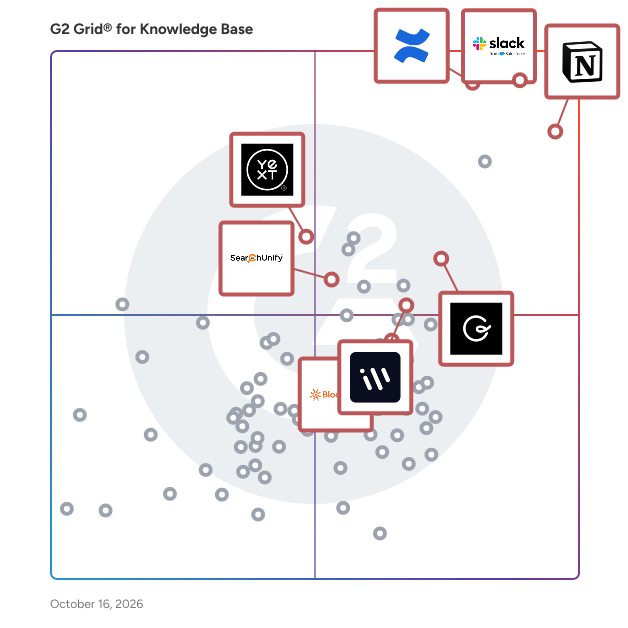
G2’s top-rated knowledge base software, based on verified reviews, includes [Slack](https://www.g2.com/products/slack/reviews) **,** [Confluence](https://www.g2.com/products/confluence/reviews) **,** [Notion](https://www.g2.com/products/notion/reviews), [ClickUp](https://www.g2.com/products/clickup/reviews), and [IT Glue](https://www.g2.com/products/it-glue/reviews).

### What are the top-reviewed Knowledge Base Software on G2?&amp;nbsp;

[Notion](https://www.g2.com/products/notion/reviews)

- Number of Reviews: 4,913
- Satisfaction: 98
- Market Score: 85
- G2 Score: 91

[Slack](https://www.g2.com/products/slack/reviews)

- Number of Reviews: 1,208
- Satisfaction: 89
- Market Score: 92
- G2 Score: 91

[Confluence](https://www.g2.com/products/confluence/reviews)

- Number of Reviews: 3,929
- Satisfaction: 77
- Market Score: 99
- G2 Score: 88

[ClickUp](https://www.g2.com/products/clickup/reviews)

- Number of Reviews: 1,892
- Satisfaction: 77
- Market Score: 85
- G2 Score: 81

[**IT Glue**](https://www.g2.com/products/it-glue/reviews)

- Number of Reviews: 519
- Satisfaction: 72
- Market Score: 77
- G2 Score: 75

Satisfaction reflects user-reported ratings across various factors, including ease of use, feature fit, and quality of support. ([Source 2](https://www.g2.com/reports))

Market Presence scores are calculated based on review volume, third-party signals, and overall market visibility. ([Source 2](https://www.g2.com/reports))

G2 Score is a weighted composite of Satisfaction and Market Presence. ([Source 2](https://www.g2.com/reports))

Learn how G2 scores products. ([Source 1](https://documentation.g2.com/docs/research-scoring-methodologies?_gl=1*5vlk6s*_gcl_au*MTAwMzU5MzUxLjE3NjM0MTg0NzYuNjY0NTIxMTY0LjE3NjQ2MTc0NzcuMTc2NDYxNzQ3Nw..*_ga*NzY1MDU0NjE3LjE3NjM0NzQ3ODM.*_ga_MFZ5NDXZ5F*czE3NjYwODk1MTMkbzY3JGcxJHQxNzY2MDkyMjQyJGo1NyRsMCRoMA..))

### What I Often See in Knowledge Base Software

#### Feedback Pros: What Users Consistently Appreciate

- **Flexible page databases and templates centralize cross-team documentation**
- “_Flexible pages, Databases and templates allow everything from notes to project tracking in one clean workspace. Customisation feels intuitive and saves a lot of time once the setup is completed”_ - [Kiran S.](https://www.g2.com/products/notion/reviews/notion-review-12426914), Notion review

- **Transforms Communication with Stellar Integrations**
- “_I use Slack daily for work, mostly for quick syncs, async updates, and keeping project threads organized, which really helps cut through email chaos. I find Threads extremely useful for keeping chats clean and preventing main channel chaos. The Search feature is fantastic for finding anything fast, eliminating those &#39;where’d we decide that?&#39; moments. I&#39;m impressed by the integrations with tools like Figma, Jira, and Google Docs, which allow me to work seamlessly without switching tabs or losing context. I appreciate the custom notifications and Do Not Disturb settings that let me control when I&#39;m interrupted. Having all my tools like Figma comments, Jira tickets, and Google Drive built right into Slack makes my workflow smooth and efficient._” - [Souptik D.](https://www.g2.com/products/slack/reviews/slack-review-12459330), Slack review

- **AI meeting notes and integrations turn discussions into reusable knowledge**
- _“What I like most about Confluence is how it brings everything into one place. It makes documenting processes, sharing knowledge, and collaborating with teams much easier. Instead of information being scattered across emails or chats, it lives in a structured space where everyone can access and update it when needed. I also find the page hierarchy and linking between pages really helpful for organizing information logically. It saves a lot of time when you need to look up something quickly or onboard someone new to a project. Overall, it helps teams stay aligned and keeps knowledge from getting lost.”_ - [Ashutosh J.](https://www.g2.com/products/confluence/reviews/confluence-review-12444610), Confluence review

#### Cons: Where Many Platforms Fall Short

- **Wide range of tools creates complexity for new users**
- _“ClickUp can feel overwhelming at times. There are many features and configuration options, which is helpful, but it also means the system can become cluttered if it is not set up carefully. New users often need guidance to understand how our team uses it.”_ - [Kirsti H.](https://www.g2.com/products/clickup/reviews/clickup-review-12411150), ClickUp review&amp;nbsp;

- **Steep learning curve for first-time Confluence users**
- “_When I first started using Confluence, I didn’t understand a lot of the buttons or the sidebar. The interface felt overwhelming at first, so it took me some time to adjust to Confluence and figure out what to do and how to get to where everything is.”_ - Dr. [Akshay M.](https://www.g2.com/products/confluence/reviews/confluence-review-12444378), Confluence review

- **Large knowledge bases can require extra effort to stay organized**
- “_One drawback is that organising a large number of knowledge cards can sometimes require extra effort to maintain structure. New users may also need a short learning period to fully understand how to manage and verify content effectively.”_ - [Piyush P.](https://www.g2.com/products/guru/reviews/guru-review-12452472), Guru review

### My Expert Takeaway on Knowledge Base Software

Knowledge base software delivers the most value when organizations treat it as a structured knowledge system rather than a simple document repository. The strongest implementations organize information so teams can quickly retrieve answers, standardize processes, and reuse institutional knowledge across support, operations, and product workflows.

Review sentiment shows strong adoption. Across the 500-review dataset analyzed, the category averages 4.51/5 stars and 9.02/10 likelihood to recommend, alongside strong usability scores for Meets Requirements, Ease of Use, Ease of Setup, Ease of Admin, Ease of Doing Business With, and Quality of Support. These signals suggest buyers see clear operational value once knowledge bases are implemented effectively.

Friction usually appears when organizations treat knowledge bases as static document storage. High-performing teams approach knowledge base software with clear governance, defined content ownership, and consistent documentation practices. The best knowledge base platforms balance flexible documentation with strong structure and search, making them increasingly essential infrastructure for teams that rely on fast, reliable knowledge sharing.

### Knowledge Base Software FAQs

#### **What is knowledge base software?**

Knowledge base software is a system for creating, organizing, searching, and governing company knowledge in one place. Teams use it to publish SOPs, product information, onboarding materials, and common answers so employees or customers can self-serve faster.

#### **What is the best knowledge base software?**

The best knowledge base software depends on your team’s documentation needs, search capabilities, and governance requirements. On G2, top-rated tools include [Slack](https://www.g2.com/products/slack/reviews), [Notion](https://www.g2.com/products/notion/reviews) **,** [Guru](https://www.g2.com/products/guru/reviews) **,** [ClickUp](https://www.g2.com/products/clickup/reviews) **,** [Confluence](https://www.g2.com/products/confluence/reviews) **,** and [IT Glue](https://www.g2.com/products/it-glue/reviews), each earning strong user ratings around 4.6/5 stars and recognized for flexible documentation, integrations, and scalable knowledge management features.

#### **How does knowledge base software help call centers?**

Knowledge base software helps call centers reduce handle time by giving agents fast access to approved answers, scripts, and process steps. It improves consistency, speeds ramp time, and makes it easier to update frontline guidance when policies, products, or procedures change.

#### **What are the leading knowledge base software for SaaS businesses?**

Leading knowledge base software for SaaS businesses typically combines strong documentation features, search capabilities, and integrations with product and support tools. Based on G2 ratings and user reviews, popular options include [Guru](https://www.g2.com/products/guru/reviews) **,** [IT Glue](https://www.g2.com/products/it-glue/reviews) **,** [Bloomfire](https://www.g2.com/products/bloomfire/reviews) **,** and [Confluence](https://www.g2.com/products/confluence/reviews), which consistently receive high satisfaction scores and strong adoption among SaaS and IT teams.

#### **What are the reliable knowledge base software for remote teams?**

Some of the most reliable knowledge base software for remote teams, based on high G2 ratings and strong user reviews, include:

- [Guru](https://www.g2.com/products/guru/reviews) – 4.7/5 rating; strong workflow integrations with Slack and Teams for distributed teams.
- [Document360](https://www.g2.com/products/document360/reviews) – ~4.7/5 rating; scalable documentation platform with version control and analytics.
- [Slite](https://www.g2.com/products/slite/reviews) – ~4.6/5 rating; designed for asynchronous documentation and remote collaboration.
- [Helpjuice](https://www.g2.com/products/helpjuice/reviews) – ~4.7/5 rating; advanced search and customization for internal and customer knowledge bases.

These tools consistently rank highly on G2 due to ease of use, strong collaboration features, and reliable knowledge-sharing capabilities, making them well-suited for remote or distributed teams that rely on centralized documentation.

### Sources

1. [G2 Scoring Methodologies](https://documentation.g2.com/docs/research-scoring-methodologies?_gl=1*5ky9es*_gcl_au*MTY2NDg2MDY3Ny4xNzU1MDQxMDU4*_ga*MTMwMTMzNzE1MS4xNzQ5MjMyMzg1*_ga_MFZ5NDXZ5F*czE3NTUwOTkzMjgkbzQkZzEkdDE3NTUwOTk3NzYkajU3JGwwJGgw)
2. [G2 Winter 2026 Reports](https://company.g2.com/news/g2-winter-2026-reports)

Researched By: [Gauri Pawsey](https://research.g2.com/insights/author/gauri-pawsey)

Last updated on March 16, 2026