# Best HCM Software for Small Business - Page 2

*By [Jeffrey Lin](https://research.g2.com/insights/author/jeffrey-lin)*


Products classified in the overall HCM Software category are similar in many regards and help companies of all sizes solve their business problems. However, small business features, pricing, setup, and installation differ from businesses of other sizes, which is why we match buyers to the right Small Business HCM Software to fit their needs. Compare product ratings based on reviews from enterprise users or connect with one of G2&#39;s buying advisors to find the right solutions within the Small Business HCM Software category.

In addition to qualifying for inclusion in the HCM Software category, to qualify for inclusion in the Small Business HCM Software category, a product must have at least 10 reviews left by a reviewer from a small business.


## Top HCM Software at a Glance
| # | Product | Rating | Best For | What Users Say |
|---|---------|--------|----------|----------------|
| 1 | [Gusto](https://www.g2.com/products/gusto/reviews) | 4.6/5.0 (11,672 reviews) | Automated payroll, tax compliance, and SMB onboarding | "[All-in-One HR Made Easy: Intuitive, Reliable, and Great Value](https://www.g2.com/survey_responses/gusto-review-13098217)" |
| 2 | [Paycom](https://www.g2.com/products/paycom/reviews) | 4.5/5.0 (4,607 reviews) | Unified payroll and employee self-service HCM | "[Paycom Review 06.26.2026](https://www.g2.com/survey_responses/paycom-review-13036323)" |
| 3 | [Rippling](https://www.g2.com/products/rippling/reviews) | 4.8/5.0 (11,558 reviews) | Unified HR-IT-payroll onboarding automation | "[Smooth User Experience with Rippling](https://www.g2.com/survey_responses/rippling-review-11136743)" |
| 4 | [BambooHR](https://www.g2.com/products/bamboohr/reviews) | 4.4/5.0 (5,214 reviews) | Employee self-service HR with centralized records | "[Streamlined HR Tasks with Ultimate Ease](https://www.g2.com/survey_responses/bamboohr-review-13088413)" |
| 5 | [UKG Ready](https://www.g2.com/products/ukg-ready/reviews) | 4.4/5.0 (2,369 reviews) | Unified HR, payroll, and timekeeping workflows | "[Intuitive, Fast, and Insightful—UKG Ready Delivers Real Workflow Efficiency](https://www.g2.com/survey_responses/ukg-ready-review-12643555)" |
| 6 | [Paylocity](https://www.g2.com/products/paylocity/reviews) | 4.4/5.0 (5,995 reviews) | Unified payroll-to-onboarding HR lifecycle automation | "[Seamless All-in-One HR Platform That Saves Hours](https://www.g2.com/survey_responses/paylocity-review-12915096)" |
| 7 | [Deel HR](https://www.g2.com/products/deel-hr/reviews) | 4.8/5.0 (1,302 reviews) | Cross-border payroll and compliance automation | "[User-Friendly Platform with Fast, Trackable Payments](https://www.g2.com/survey_responses/deel-hr-review-12683686)" |
| 8 | [ADP Workforce Now](https://www.g2.com/products/adp-workforce-now/reviews) | 4.2/5.0 (4,147 reviews) | Unified payroll, HR, and compliance workflows | "[Helpful HR Tool for Attendance, Payroll, and Employee Information](https://www.g2.com/survey_responses/adp-workforce-now-review-12882746)" |
| 9 | [HiBob HRIS](https://www.g2.com/products/hibob-hris/reviews) | 4.5/5.0 (2,480 reviews) | Employee lifecycle automation with self-service HR | "[Highly Customizable, Saves Time with Automation](https://www.g2.com/survey_responses/hibob-hris-review-13055546)" |
| 10 | [Keka](https://www.g2.com/products/keka/reviews) | 4.4/5.0 (2,034 reviews) | India-compliant payroll and employee lifecycle automation | "[Streamlines HR with Seamless Efficiency](https://www.g2.com/survey_responses/keka-review-8624783)" |


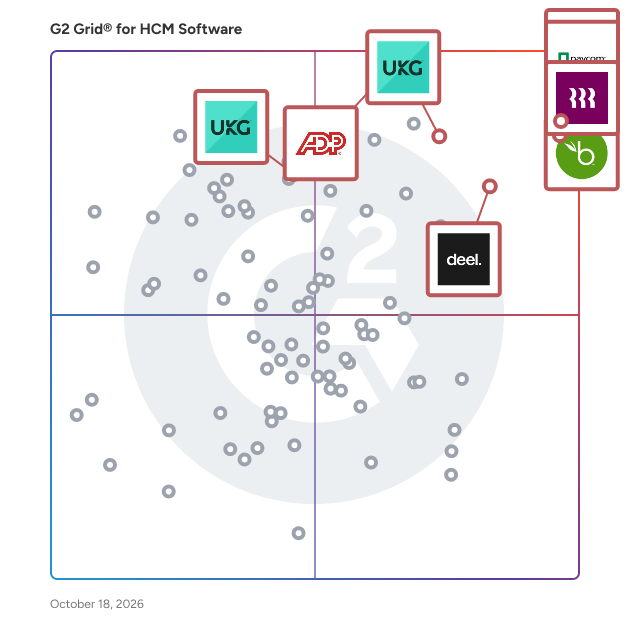
## G2 Grid® for HCM Software
![G2 Grid® for HCM Software plotting products by satisfaction and market presence](https://www.g2.com/categories/hcm-software/grids.png?focus%5B%5D=3637&focus%5B%5D=53090&focus%5B%5D=3236&focus%5B%5D=1621546&focus%5B%5D=4132&focus%5B%5D=1209&focus%5B%5D=553&focus%5B%5D=3924)
Highlighted products: Gusto, Rippling, BambooHR, Deel HR, UKG Ready, Paylocity, UKG Pro, and ADP Workforce Now.
Underlying data: [Grid® JSON](https://www.g2.com/categories/hcm-software/grids.json?focus%5B%5D=gusto&amp;focus%5B%5D=rippling&amp;focus%5B%5D=bamboohr&amp;focus%5B%5D=deel-hr&amp;focus%5B%5D=ukg-ready&amp;focus%5B%5D=paylocity&amp;focus%5B%5D=ukg-pro&amp;focus%5B%5D=adp-workforce-now&amp;segment=small-business)


## How Many HCM Software Products Does G2 Track?
**Total Products under this Category:** 158

### Category Stats (Jul 2026)
- **Average Rating**: 4.31/5 The average rating of products in this category, based on all submitted ratings
- **Top Trending Product**: Sólides RH (+12.37%) - Among all products in this category, Sólides RH recorded the largest rating increase compared to last month
*Last updated: July 15, 2026*


## How Does G2 Rank HCM Software Products?

**Why You Can Trust G2's Software Rankings:**

- 30 Analysts and Data Experts
- 84,500+ Authentic Reviews
- 158+ Products
- Unbiased Rankings

G2's software rankings are built on verified user reviews, rigorous moderation, and a consistent research methodology maintained by a team of analysts and data experts. Each product is measured using the same transparent criteria, with no paid placement or vendor influence. While reviews reflect real user experiences, which can be subjective, they offer valuable insight into how software performs in the hands of professionals. Together, these inputs power the G2 Score, a standardized way to compare tools within every category.


## Which HCM Software Is Best for Your Use Case?

- **Best for Small Businesses:** [Gusto](https://www.g2.com/products/gusto/reviews)
- **Best for Mid-Market:** [Rippling](https://www.g2.com/products/rippling/reviews)
- **Best for Enterprise:** [UKG Ready](https://www.g2.com/products/ukg-ready/reviews)
- **Highest User Satisfaction:** [Rippling](https://www.g2.com/products/rippling/reviews)
- **Best Free Software:** [Paylocity](https://www.g2.com/products/paylocity/reviews)


---

**Sponsored**

### Teamflect

Teamflect is the all-in-one performance management platform built natively inside Microsoft Teams and Outlook, helping organizations from startups to global enterprises align goals, run reviews, and develop talent without ever leaving the tools they already use. There are no extra logins or complicated rollouts, just a tool that feels natural from day one. Adoption is where most HR software fails, but it’s where Teamflect shines. Because everything lives in Microsoft Teams, employees and managers actually use it. Teamflect also includes AI-powered assistance that helps managers and employees quickly generate insights, summaries, and guidance across goals, feedback, and performance. Recognizing a colleague takes seconds, feedback is always at hand, and 1-on-1s are guided by shared agendas that appear right in meeting invites. Goals, OKRs, and development plans remain visible, actionable, and connected to performance reviews. As an official Microsoft partner, Teamflect meets enterprise-grade standards and GDPR compliance. With Teamflect, HR can spend less time chasing adoption and more time on what matters most: helping people grow, perform, and stay engaged.


[Visit website](https://www.g2.com/external_clickthroughs/record?secure%5Bad_program%5D=ppc&amp;secure%5Bad_slot%5D=category_product_list&amp;secure%5Bcategory_id%5D=47&amp;secure%5Bchosen_at%5D=2026-07-15T15%3A43%3A54Z&amp;secure%5Bdisplayable_resource_id%5D=50&amp;secure%5Bdisplayable_resource_type%5D=Category&amp;secure%5Bmedium%5D=sponsored&amp;secure%5Bplacement_reason%5D=neighbor_category&amp;secure%5Bplacement_resource_ids%5D%5B%5D=50&amp;secure%5Bprioritized%5D=false&amp;secure%5Bproduct_id%5D=130319&amp;secure%5Bresource_id%5D=47&amp;secure%5Bresource_type%5D=Category&amp;secure%5Bsource_type%5D=category_page&amp;secure%5Bsource_url%5D=https%3A%2F%2Fwww.g2.com%2Fcategories%2Fhcm-software%2Fsmall-business%3Fpage%3D2&amp;secure%5Btoken%5D=8793bcf5d8e3a7066d222720204b98994168dcc8b5e3bbdacac2936f144fa14e&amp;secure%5Burl%5D=https%3A%2F%2Fteamflect.com%2F%3Futm_source%3Dg2%26utm_medium%3Dcpc%26utm_campaign%3Dg2-cpc&amp;secure%5Burl_type%5D=custom_url)

---

## What Are the Top-Rated HCM Software Products in 2026?
### 1. [BrioHR](https://www.g2.com/products/briohr/reviews)
BrioHR is a simple, modular, affordable, and intuitive HR management system that provides end-to-end tools for digitizing and automating all HR processes such as Recruitment &amp; ATS, Onboarding, Performance Management, Leave Management, Payroll, Employee Files, and more. Easy to implement, use, and scale, with live support from our team of experts helping you customize and configure to suit your needs.


**Average Rating:** 4.7/5.0
**Total Reviews:** 28
**How Do G2 Users Rate BrioHR?**

- **Has the product been a good partner in doing business?:** 9.8/10 (Category avg: 8.7/10)
- **Ease of Admin:** 9.5/10 (Category avg: 8.5/10)
- **Quality of Support:** 9.7/10 (Category avg: 8.5/10)
- **Ease of Use:** 9.4/10 (Category avg: 8.7/10)

**Who Is the Company Behind BrioHR?**

- **Seller:** [BrioHR](https://www.g2.com/sellers/briohr)
- **Year Founded:** 2018
- **HQ Location:** Kuala Lumpur
- **Twitter:** @BrioHR (76 Twitter followers)
- **LinkedIn® Page:** https://www.linkedin.com/company/briohr/ (64 employees on LinkedIn®)

**Who Uses This Product?**
- **Company Size:** 68% Small-Business, 29% Mid-Market


#### What Are BrioHR's Pros and Cons?

**Pros:**

- Ease of Use (4 reviews)
- Intuitive (4 reviews)
- Comprehensive Features (3 reviews)
- Customer Support (2 reviews)
- Customization (2 reviews)

**Cons:**

- Limited Customization (2 reviews)
- Missing Features (2 reviews)
- Deletion Difficulty (1 reviews)
- Deletion Issues (1 reviews)
- Editing Difficulties (1 reviews)


### What Do G2 Reviewers Say About BrioHR?
*AI-generated summary from verified user reviews*

**Pros:**

- Users praise BrioHR for its **intuitive usability** , making it easy for non-HR teams to navigate and manage.
- Users love the **intuitive usability** of BrioHR, making it easy for non-HR teams to manage essential tasks efficiently.
- Users appreciate the **comprehensive features** of BrioHR, simplifying compliance and enhancing usability for non-HR teams.
- Users praise the **fast and helpful customer support** at BrioHR, enhancing their overall experience with the platform.
- Users value the **customization options** in BrioHR, making it user-friendly and adaptable to specific needs.

**Cons:**

- Users find **limited customization** options frustrating, as certain features require complex setups and lack flexibility.
- Users find the **lack of billable hour tracking for contract labor** a significant limitation in using BrioHR effectively.
- Users find the **deletion difficulty** frustrating, wishing for easier options to manage unsubmitted claims.
- Users face **deletion issues** with BrioHR, struggling to modify or remove unsubmitted claims efficiently.
- Users find **editing difficulties** frustrating, especially when unable to cancel unsubmitted claims in BrioHR.

#### What Are Recent G2 Reviews of BrioHR?

**"[I liked this one best](https://www.g2.com/survey_responses/briohr-review-11507590)"**

**Rating:** 4.5/5.0 stars
*— Kristina P.*

[Read full review](https://www.g2.com/survey_responses/briohr-review-11507590)

---

**"[Complete Payroll System That Delivers](https://www.g2.com/survey_responses/briohr-review-11191708)"**

**Rating:** 4.0/5.0 stars
*— Verified User in Computer Software*

[Read full review](https://www.g2.com/survey_responses/briohr-review-11191708)

---


#### What Are G2 Users Discussing About BrioHR?

- [What is BrioHR used for?](https://www.g2.com/discussions/what-is-briohr-used-for)

### 2. [Workday HCM](https://www.g2.com/products/workday-hcm/reviews)
Workday Human Capital Management is a single, unified system, offering one security model and a seamless user experience. Infused with artificial intelligence, Workday provides a cloud-based platform that intelligently adapts to your organization&#39;s evolving needs. This user-friendly, global system leverages AI to deliver personalized experiences and predictive insights, ensuring you&#39;re always on the latest version, whether on a browser or mobile device. As part of the unified Workday suite, which includes Financial Management, Payroll, and Recruiting, its AI capabilities help you make smarter, data-driven decisions for the future of your workforce.


**Average Rating:** 4.1/5.0
**Total Reviews:** 1,603
**How Do G2 Users Rate Workday HCM?**

- **Has the product been a good partner in doing business?:** 8.3/10 (Category avg: 8.7/10)
- **Ease of Admin:** 7.8/10 (Category avg: 8.5/10)
- **Quality of Support:** 8.2/10 (Category avg: 8.5/10)
- **Ease of Use:** 8.2/10 (Category avg: 8.7/10)

**Who Is the Company Behind Workday HCM?**

- **Seller:** [Workday](https://www.g2.com/sellers/workday)
- **Company Website:** https://www.workday.com
- **Year Founded:** 2005
- **HQ Location:** Pleasanton, CA
- **Twitter:** @Workday (52,273 Twitter followers)
- **LinkedIn® Page:** https://www.linkedin.com/company/17719/ (24,145 employees on LinkedIn®)

**Who Uses This Product?**
- **Who Uses This:** Recruiter, Account Executive
- **Top Industries:** Information Technology and Services, Computer Software
- **Company Size:** 70% Enterprise, 22% Mid-Market


#### What Are Workday HCM's Pros and Cons?

**Pros:**

- Ease of Use (153 reviews)
- Comprehensive Features (55 reviews)
- Integrations (47 reviews)
- Helpful (46 reviews)
- User Interface (46 reviews)

**Cons:**

- Limited Customization (40 reviews)
- Poor Interface Design (37 reviews)
- Not User-Friendly (35 reviews)
- Learning Curve (33 reviews)
- Not Intuitive (30 reviews)


### What Do G2 Reviewers Say About Workday HCM?
*AI-generated summary from verified user reviews*

**Pros:**

- Users find Workday HCM to have a **user-friendly interface** that simplifies daily HR tasks efficiently.
- Users value the **comprehensive features** of Workday HCM, enhancing efficiency and simplifying HR management through automation.
- Users appreciate the **seamless integrations** in Workday HCM, which facilitate intuitive data management across platforms.
- Users appreciate the **transparency and control** Workday HCM provides, making HR tasks simple and efficient.
- Users love the **intuitive user interface** of Workday HCM, making HR processes simple and efficient across devices.

**Cons:**

- Users find **limited customization** in Workday HCM, leading to challenges in configuring workflows and templates effectively.
- Users struggle with the **poor interface design** of Workday HCM, finding it complex and challenging to navigate.
- Users often face a **confusing navigation** experience in Workday, complicating simple tasks and requiring excessive clicks.
- Users find the **learning curve steep** , as Workday HCM&#39;s complex UI and configurations can be challenging for newcomers.
- Users often find the navigation **confusing and not intuitive** , leading to excessive clicks for simple tasks.

#### What Are Recent G2 Reviews of Workday HCM?

**"[Intuitive, Fast, and Customizable HCM Solution](https://www.g2.com/survey_responses/workday-hcm-review-12642058)"**

**Rating:** 4.5/5.0 stars
*— Tim C.*

[Read full review](https://www.g2.com/survey_responses/workday-hcm-review-12642058)

---

**"[Seamless Compensation Management with Intuitive Updates](https://www.g2.com/survey_responses/workday-hcm-review-12626194)"**

**Rating:** 5.0/5.0 stars
*— Samantha R.*

[Read full review](https://www.g2.com/survey_responses/workday-hcm-review-12626194)

---


#### What Are G2 Users Discussing About Workday HCM?

- [What is Workday HCM used for?](https://www.g2.com/discussions/what-is-workday-hcm-used-for) - 1 comment, 2 upvotes
- [What are the different workday modules?](https://www.g2.com/discussions/what-are-the-different-workday-modules)
- [What is the workday platform?](https://www.g2.com/discussions/what-is-the-workday-platform)
- [What is Workday software used for?](https://www.g2.com/discussions/workday-hcm-what-is-workday-software-used-for)
- [What is included in Workday HCM?](https://www.g2.com/discussions/what-is-included-in-workday-hcm) - 2 comments

### 3. [Personio](https://www.g2.com/products/personio/reviews)
Personio is the intelligent HR platform built for the way European businesses actually work. Most HR software was designed in the US and adapted for Europe as an afterthought. Personio was built here from the start, for companies navigating multiple languages, varying labor laws, and a patchwork of local compliance requirements that change faster than most platforms can keep up with. Manage the full employee lifecycle in one place: hiring, onboarding, time tracking, absence management, payroll, performance, and workforce reporting. No more switching between systems or maintaining spreadsheets on the side. Everything your HR team needs lives in one place, connected and up to date. Smart automations handle the repetitive admin that consumes your HR team&#39;s day. Approval workflows, absence tracking, contract generation, and onboarding checklists run in the background so your team can focus on the work that actually moves the business forward. Proactive insights turn workforce data into clear, shareable intelligence, helping HR leaders spot trends, anticipate change, and walk into leadership meetings with something worth saying. The platform adapts to how your organisation works, not the other way around. Customise workflows, approval chains, and reporting to fit your structure, whether you are running one office or coordinating teams across five countries. Personio connects with over 200 tools European businesses rely on, including DATEV, Slack, and Google Workspace. It runs natively in German, English, Spanish, French, Dutch, and Italian, among other languages and is built for GDPR compliance across every market you operate in. More than 14,000 companies across Germany, Austria, Switzerland, the UK, and Spain trust Personio to run their HR. It is the intelligent platform that grows with European businesses, because it was made for them.


**Average Rating:** 4.4/5.0
**Total Reviews:** 853
**How Do G2 Users Rate Personio?**

- **Has the product been a good partner in doing business?:** 8.5/10 (Category avg: 8.7/10)
- **Ease of Admin:** 8.3/10 (Category avg: 8.5/10)
- **Quality of Support:** 8.7/10 (Category avg: 8.5/10)
- **Ease of Use:** 9.0/10 (Category avg: 8.7/10)

**Who Is the Company Behind Personio?**

- **Seller:** [Personio](https://www.g2.com/sellers/personio)
- **Company Website:** https://www.personio.com
- **Year Founded:** 2015
- **HQ Location:** München, Bayern
- **LinkedIn® Page:** https://www.linkedin.com/company/personio/ (1,745 employees on LinkedIn®)

**Who Uses This Product?**
- **Who Uses This:** HR Manager, CEO
- **Top Industries:** Computer Software, Information Technology and Services
- **Company Size:** 60% Mid-Market, 28% Small-Business


#### What Are Personio's Pros and Cons?

**Pros:**

- Ease of Use (351 reviews)
- Intuitive (192 reviews)
- Features (184 reviews)
- HR Management (179 reviews)
- Comprehensive Features (177 reviews)

**Cons:**

- Missing Features (110 reviews)
- Limited Customization (100 reviews)
- Limited Features (94 reviews)
- Lacking Features (66 reviews)
- Limited Options (62 reviews)


### What Do G2 Reviewers Say About Personio?
*AI-generated summary from verified user reviews*

**Pros:**

- Users find Personio&#39;s **ease of use** impressive, with clear navigation and helpful support that simplifies HR tasks.
- Users find Personio **intuitive and straightforward** , enhancing their experience with easy access to essential HR information.
- Users appreciate the **comprehensive and intuitive features** of Personio, making HR management streamlined and effective.
- Users appreciate the **high employee acceptance** of Personio, benefiting from its centralized and versatile HR management capabilities.
- Users value the **comprehensive features** of Personio, praising its versatility and ease of use for team collaboration.

**Cons:**

- Users desire improved **feature functionality** in Personio, citing limitations in automated notifications and mobile capabilities.
- Users find the **limited customization** options in Personio challenging, affecting the tailoring of their HR processes.
- Users find **limited features** in Personio, causing frustrations with setup and inconsistent functionality across tools.
- Users find Personio&#39;s **lack of essential features** frustrating, particularly with reporting and mobile functionality.
- Users express concerns about **limited customization options** in Personio, impacting their ability to tailor the system to their needs.

#### What Are Recent G2 Reviews of Personio?

**"[Personio noticeably relieves our HR processes and continuously evolves](https://www.g2.com/survey_responses/personio-review-12852402)"**

**Rating:** 5.0/5.0 stars
*— Silke A.*

[Read full review](https://www.g2.com/survey_responses/personio-review-12852402)

---

**"[Effortless HR Self-Service](https://www.g2.com/survey_responses/personio-review-13002993)"**

**Rating:** 5.0/5.0 stars
*— Robert K.*

[Read full review](https://www.g2.com/survey_responses/personio-review-13002993)

---


#### What Are G2 Users Discussing About Personio?

- [What is Personio used for?](https://www.g2.com/discussions/what-is-personio-used-for)

### 4. [Odoo ERP](https://www.g2.com/products/odoo-odoo-erp/reviews)
Odoo is the #1 open source integrated business apps suite. Main apps include CRM, Accounting, Project Management, Inventory, Manufacturing, Human Resources, Marketing, Website Builder, and eCommerce, . There is an app for everything you need to manage your business, supported by the largest business app store in the world (https://odoo.com/apps)! Odoo thrives in a unique ecosystem combining the resources of its community, partner network, and expert developer team. Odoo is the most installed business application worldwide with 3,000 installs a day. Try it for free at https://odoo.com/trial


**Average Rating:** 4.2/5.0
**Total Reviews:** 313
**How Do G2 Users Rate Odoo ERP?**

- **Has the product been a good partner in doing business?:** 8.3/10 (Category avg: 8.7/10)
- **Ease of Admin:** 8.1/10 (Category avg: 8.5/10)
- **Quality of Support:** 7.8/10 (Category avg: 8.5/10)
- **Ease of Use:** 8.4/10 (Category avg: 8.7/10)

**Who Is the Company Behind Odoo ERP?**

- **Seller:** [Odoo](https://www.g2.com/sellers/odoo)
- **Company Website:** https://www.odoo.com
- **Year Founded:** 2005
- **HQ Location:** Brussels, Belgium
- **Twitter:** @Odoo (55,391 Twitter followers)
- **LinkedIn® Page:** https://www.linkedin.com/company/633558/ (8,467 employees on LinkedIn®)

**Who Uses This Product?**
- **Who Uses This:** CEO, Software Engineer
- **Top Industries:** Information Technology and Services, Computer Software
- **Company Size:** 68% Small-Business, 26% Mid-Market


#### What Are Odoo ERP's Pros and Cons?

**Pros:**

- Ease of Use (24 reviews)
- Cloud-Based (14 reviews)
- Customizability (14 reviews)
- Flexibility (14 reviews)
- Inventory Management (13 reviews)

**Cons:**

- Missing Features (14 reviews)
- Limited Customization (10 reviews)
- Difficult Customization (9 reviews)
- Learning Curve (9 reviews)
- Expensive (6 reviews)


### What Do G2 Reviewers Say About Odoo ERP?
*AI-generated summary from verified user reviews*

**Pros:**

- Users appreciate the **ease of use** of Odoo ERP, benefiting from its seamless integration and user-friendly interface.
- Users value the **seamless cloud-based integration** of Odoo ERP, streamlining operations across all business modules efficiently.
- Users value the **customization capabilities** of Odoo ERP, allowing tailored solutions for diverse business needs and growth.
- Users appreciate the **modularity and flexibility** of Odoo ERP, allowing seamless growth and customization for diverse business needs.
- Users appreciate the **seamless integration** of Odoo ERP, enhancing efficiency and simplifying operations across all departments.

**Cons:**

- Users find the **missing features** in Odoo ERP lead to challenges in specialization and setup complexity.
- Users note the **limited customization** options in Odoo ERP, often leading to frustrating implementation and functionality issues.
- Users find **difficult customization** in Odoo ERP a strain on resources, complicating implementation and workflow management.
- Users find Odoo&#39;s **steep learning curve** challenging, necessitating significant time and effort for mastery and effective use.
- Users note that Odoo ERP can be **expensive** due to its pricing structure and additional support costs for multiple apps.

#### What Are Recent G2 Reviews of Odoo ERP?

**"[Unified, Modular ERP That Streamlines Workflows and Reporting](https://www.g2.com/survey_responses/odoo-erp-review-12739254)"**

**Rating:** 4.0/5.0 stars
*— Chinecherem N.*

[Read full review](https://www.g2.com/survey_responses/odoo-erp-review-12739254)

---

**"[Good ERP Platform for Managing Daily Business Operations](https://www.g2.com/survey_responses/odoo-erp-review-12795816)"**

**Rating:** 4.0/5.0 stars
*— Muhammad O.*

[Read full review](https://www.g2.com/survey_responses/odoo-erp-review-12795816)

---


#### What Are G2 Users Discussing About Odoo ERP?

- [What is the use of Odoo?](https://www.g2.com/discussions/odoo-erp-what-is-the-use-of-odoo) - 1 comment
- [What are the main features of ERP?](https://www.g2.com/discussions/odoo-erp-what-are-the-main-features-of-erp) - 1 comment
- [Is Odoo a good ERP?](https://www.g2.com/discussions/is-odoo-a-good-erp) - 2 comments
- [What is Odoo ERP system?](https://www.g2.com/discussions/what-is-odoo-erp-system) - 1 comment

### 5. [EPAY HCM](https://www.g2.com/products/epay-hcm/reviews)
EPAY Systems seamless human capital management solution will ease the HR burden right off your shoulders, while reducing your admin costs and—this is important—helping you get more from your workforce. Our unified suite of HCM technology and professional services streamline your HR processes. They include: -Recruiting and applicant tracking -Onboarding -Human resource management -Benefits administration -Time and attendance -Payroll and tax management -ACA compliance -COBRA benefits administration Together, our human capital management solutions will help you simplify workflows, cut your labor expenses, improve labor compliance, and manage your people more effectively. Our powerful time and labor management application elevates our entire unified human capital management solution. Beyond capturing time and attendance, we provide you with real-time visibility into labor hours and dollars, which allows you to manage your workforce in ways you didn’t think possible. At EPAY, we take the time to understand your business needs, so we can provide you with the best possible service. And we back it up with free, round-the-clock customer support. Our HCM system is easy to use, so your staff may not need help very often. But we’ll be close by when they do.


**Average Rating:** 4.7/5.0
**Total Reviews:** 154
**How Do G2 Users Rate EPAY HCM?**

- **Has the product been a good partner in doing business?:** 9.0/10 (Category avg: 8.7/10)
- **Ease of Admin:** 9.1/10 (Category avg: 8.5/10)
- **Quality of Support:** 9.5/10 (Category avg: 8.5/10)
- **Ease of Use:** 9.2/10 (Category avg: 8.7/10)

**Who Is the Company Behind EPAY HCM?**

- **Seller:** [Vensure Employer Solutions](https://www.g2.com/sellers/vensure-employer-solutions)
- **Year Founded:** 2004
- **HQ Location:** Chandler, US
- **Twitter:** @VensureHR (600 Twitter followers)
- **LinkedIn® Page:** https://www.linkedin.com/company/vensure-employer-services/ (3,336 employees on LinkedIn®)

**Who Uses This Product?**
- **Who Uses This:** Account Manager
- **Top Industries:** Facilities Services, Hospital &amp; Health Care
- **Company Size:** 43% Enterprise, 31% Mid-Market


#### What Are EPAY HCM's Pros and Cons?

**Pros:**

- Ease of Use (2 reviews)
- Simple (2 reviews)
- Ease of Understanding (1 reviews)
- Navigation Ease (1 reviews)
- Time Tracking (1 reviews)

**Cons:**

- Limited Admin Control (1 reviews)
- Software Glitches (1 reviews)


### What Do G2 Reviewers Say About EPAY HCM?
*AI-generated summary from verified user reviews*

**Pros:**

- Users value the **ease of use** of EPAY HCM, finding it simple to navigate and learn quickly.
- Users appreciate the **ease of use** of EPAY HCM, finding it simple to navigate and efficient for time tracking.
- Users appreciate the **ease of understanding** in EPAY HCM, allowing for quick adaptation and efficient navigation.
- Users appreciate the **navigation ease** of EPAY HCM, finding it user-friendly and simple to access employee information.
- Users value the **easy time tracking** with EPAY HCM, facilitating seamless clock-ins and effortless information access.

**Cons:**

- Users find the **limited admin control** frustrating, hindering access to full details for better management.
- Users report occasional **software glitches** with EPAY HCM, including freezing frames that disrupt usability.

#### What Are Recent G2 Reviews of EPAY HCM?

**"[Love Them, or Lose Them](https://www.g2.com/survey_responses/epay-hcm-review-7030425)"**

**Rating:** 5.0/5.0 stars
*— Wilma C.*

[Read full review](https://www.g2.com/survey_responses/epay-hcm-review-7030425)

---

**"[Get On-Top of Your Hours Worked](https://www.g2.com/survey_responses/epay-hcm-review-7325435)"**

**Rating:** 5.0/5.0 stars
*— Verified User in Security and Investigations*

[Read full review](https://www.g2.com/survey_responses/epay-hcm-review-7325435)

---


#### What Are G2 Users Discussing About EPAY HCM?

- [What is EPAY HCM used for?](https://www.g2.com/discussions/what-is-epay-hcm-used-for)

### 6. [PeopleForce](https://www.g2.com/products/peopleforce/reviews)
PeopleForce is an all-in-one HR platform designed to automate and streamline human resources management for small to midsize businesses (SMBs) and organizations. This comprehensive solution empowers HR leaders, managers, recruiters, and People partners to focus on their most valuable asset—people—by significantly reducing the time spent on routine HR tasks. With over 1,000 companies already leveraging its capabilities, PeopleForce has demonstrated the potential to save up to 80% of the time traditionally allocated to HR activities. The platform encompasses several key modules tailored to various HR functions, ensuring that organizations can address their unique needs effectively. The CoreHR product centralizes all HR tasks and employee information within a single, intuitive interface, promoting transparency and efficiency across the organization. Users can manage leave and paid time off tracking, automate employee onboarding, preboarding, offboarding, and other essential processes, while eSignature capabilities streamline documentation. Additionally, robust internal communication tools enhance collaboration among team members, ensuring alignment and informed decision-making. For organizations looking to enhance their talent acquisition efforts, the Recruit product offers a comprehensive Applicant Tracking System (ATS). This feature automates candidate sourcing, screening, and interview scheduling, allowing HR teams to secure top talent swiftly and effectively. By streamlining the recruitment process, PeopleForce helps organizations reduce time-to-hire and improve the overall quality of their candidate selection, ultimately contributing to a stronger workforce. The Perform product focuses on driving excellence within teams by monitoring performance through Objectives and Key Results (OKRs), Key Performance Indicators (KPIs), one-on-one sessions, and 360-degree reviews. This fosters a culture of continuous improvement and achievement, empowering employees to reach their full potential. Additionally, the Pulse product utilizes employee Net Promoter Score (eNPS) and online surveys to gauge engagement and satisfaction, enabling organizations to proactively enhance their workplace environments based on real-time feedback. PeopleForce also includes a Time product for tracking employees&#39; working hours and configuring attendance policies, ensuring effective workload management and productivity tracking. The Desk product empowers employees to voice concerns and requests through a streamlined case management and whistleblowing system, facilitating prompt, personalized resolutions. Integration with tools such as Google Workspace, Microsoft Outlook, Slack, and many more creates a cohesive HR ecosystem that aligns seamlessly with existing workflows, further enhancing the platform&#39;s effectiveness and overall employee experience.


**Average Rating:** 4.8/5.0
**Total Reviews:** 244
**How Do G2 Users Rate PeopleForce?**

- **Has the product been a good partner in doing business?:** 9.5/10 (Category avg: 8.7/10)
- **Ease of Admin:** 9.1/10 (Category avg: 8.5/10)
- **Quality of Support:** 9.7/10 (Category avg: 8.5/10)
- **Ease of Use:** 9.2/10 (Category avg: 8.7/10)

**Who Is the Company Behind PeopleForce?**

- **Seller:** [PeopleForce](https://www.g2.com/sellers/peopleforce)
- **Company Website:** https://peopleforce.io/
- **Year Founded:** 2018
- **HQ Location:** Kyiv, UA
- **Twitter:** @peopleforcehrm (313 Twitter followers)
- **LinkedIn® Page:** https://www.linkedin.com/company/peopleforceapp/ (145 employees on LinkedIn®)

**Who Uses This Product?**
- **Who Uses This:** HR Manager, Human Resources Manager
- **Top Industries:** Information Technology and Services, Computer Software
- **Company Size:** 58% Mid-Market, 40% Small-Business


#### What Are PeopleForce's Pros and Cons?

**Pros:**

- Ease of Use (51 reviews)
- Customer Support (40 reviews)
- Helpful (40 reviews)
- Intuitive (35 reviews)
- Simple (29 reviews)

**Cons:**

- Missing Features (19 reviews)
- Limited Customization (13 reviews)
- Incomplete Features (7 reviews)
- Limited Features (7 reviews)
- Insufficient Information (6 reviews)


### What Do G2 Reviewers Say About PeopleForce?
*AI-generated summary from verified user reviews*

**Pros:**

- Users appreciate the **intuitive design** of PeopleForce, making HR processes easy and clear for everyone involved.
- Users commend the **quick and helpful customer support** from PeopleForce, ensuring smooth onboarding and resolution of issues.
- Users value the **streamlined automation** of tasks in PeopleForce, greatly enhancing efficiency and saving valuable time.
- Users love the **intuitive design** of PeopleForce, making HR management straightforward and enhancing daily work comfort.
- Users appreciate the **user-friendly interface** of PeopleForce, making HR management intuitive and efficient for all employees.

**Cons:**

- Users find the **missing essential features** in PeopleForce limits its effectiveness for their company&#39;s needs.
- Users find **limited customization** in PeopleForce, hindering tailored solutions for diverse HR processes and functionalities.
- Users express concern about the **incomplete features** in PeopleForce, impacting essential functionalities and customization options.
- Users note the **limited features** in PeopleForce, impacting essential functionalities needed for effective management.
- Users find **insufficient information** available, including outdated instructions and limited data export options, hindering their experience.

#### What Are Recent G2 Reviews of PeopleForce?

**"[All in one place: calendar, contacts, and convenient onboarding](https://www.g2.com/survey_responses/peopleforce-review-12924044)"**

**Rating:** 5.0/5.0 stars
*— Maryna B.*

[Read full review](https://www.g2.com/survey_responses/peopleforce-review-12924044)

---

**"[PeopleForce Makes Core HR Processes Easy and Organized](https://www.g2.com/survey_responses/peopleforce-review-12952085)"**

**Rating:** 5.0/5.0 stars
*— Zhanar B.*

[Read full review](https://www.g2.com/survey_responses/peopleforce-review-12952085)

---


### 7. [isolved](https://www.g2.com/products/isolved/reviews)
isolved is a provider of human capital management (HCM) solutions that help organizations recruit, retain and elevate their workforce. More than 195,000 employers and 8 million employees rely on isolved&#39;s software and services to streamline human resource (HR) operations and deliver employee experiences that matter. isolved People Cloud™ is a unified yet modular HCM platform with built-in artificial intelligence (AI) and analytics that connects HR, payroll, benefits, and workforce and talent management into a single solution that drives better business outcomes. Through the Sidekick Advantage™, isolved also provides expert guidance, embedded services and an engaged community that empowers People Heroes™ to grow their companies and careers. Learn more at www.isolvedhcm.com.


**Average Rating:** 4.3/5.0
**Total Reviews:** 1,281
**How Do G2 Users Rate isolved?**

- **Has the product been a good partner in doing business?:** 8.5/10 (Category avg: 8.7/10)
- **Ease of Admin:** 8.2/10 (Category avg: 8.5/10)
- **Quality of Support:** 8.5/10 (Category avg: 8.5/10)
- **Ease of Use:** 8.2/10 (Category avg: 8.7/10)

**Who Is the Company Behind isolved?**

- **Seller:** [isolved HCM](https://www.g2.com/sellers/isolved-hcm)
- **Company Website:** https://www.isolvedhcm.com/
- **Year Founded:** 1986
- **HQ Location:** Charlotte, NC
- **Twitter:** @iSolvedHCM (2,254 Twitter followers)
- **LinkedIn® Page:** https://www.linkedin.com/company/10862921/ (1,867 employees on LinkedIn®)

**Who Uses This Product?**
- **Who Uses This:** HR Manager, Office Manager
- **Top Industries:** Hospital &amp; Health Care, Non-Profit Organization Management
- **Company Size:** 54% Mid-Market, 41% Small-Business


#### What Are isolved's Pros and Cons?

**Pros:**

- Helpful (156 reviews)
- Customer Support (145 reviews)
- Ease of Use (139 reviews)
- Response Time (126 reviews)
- Comprehensive Features (98 reviews)

**Cons:**

- Poor Customer Support (70 reviews)
- Not User-Friendly (62 reviews)
- Not Intuitive (58 reviews)
- Limited Features (56 reviews)
- Missing Features (47 reviews)


### What Do G2 Reviewers Say About isolved?
*AI-generated summary from verified user reviews*

**Pros:**

- Users value the **excellent support** from Isolved, which offers quick solutions and ease of use.
- Users praise Isolved for its **exceptional customer support** , noting the team&#39;s responsiveness and helpfulness with inquiries.
- Users highlight the **ease of use** of isolved, praising its user-friendly platform and supportive customer service.
- Users commend iSolved for its **quick response time** , enhancing user satisfaction and support for HR operations.
- Users value the **comprehensive features** of iSolved, which streamline HR operations and enhance user satisfaction on a unified platform.

**Cons:**

- Users experience **poor customer support** , noting inefficiencies and inadequate responses, which complicate their overall experience with isolved.
- Users find Isolved **not user-friendly** due to unexpected changes and a lack of intuitive design for admins and mobile.
- Users find the **interface not intuitive** , often discovering screen changes unexpectedly and needing help to access features.
- Users note the **limited features** of isolved, expressing a desire for enhanced functionality and usability improvements.
- Users express frustration with **missing features** in isolved, hindering navigation and accessibility across multiple platforms.

#### What Are Recent G2 Reviews of isolved?

**"[Flexible Payroll Processing with Top-Notch UI and Support Materials](https://www.g2.com/survey_responses/isolved-review-13001705)"**

**Rating:** 4.0/5.0 stars
*— Derrick R.*

[Read full review](https://www.g2.com/survey_responses/isolved-review-13001705)

---

**"[Easy Timecards and Onboarding with Responsive Support](https://www.g2.com/survey_responses/isolved-review-12939213)"**

**Rating:** 5.0/5.0 stars
*— Leigh F.*

[Read full review](https://www.g2.com/survey_responses/isolved-review-12939213)

---


#### What Are G2 Users Discussing About isolved?

- [What is isolved used for?](https://www.g2.com/discussions/isolved-what-is-isolved-used-for) - 1 comment
- [What is isolved used for?](https://www.g2.com/discussions/what-is-isolved-used-for) - 1 comment

### 8. [VensureHR](https://www.g2.com/products/vensurehr/reviews)
VensureHR helps businesses simplify workforce management through flexible payroll, HR, benefits, compliance, and workforce solutions designed to support every stage of growth. Rather than forcing every organization into the same platform, VensureHR takes a diagnostic approach to understand each employer&#39;s workforce, operational complexity, and business goals. This allows organizations to align the right combination of technology, services, and expertise to their unique needs today while providing a path to scale as they grow. VensureHR solutions include: - Payroll Processing - Human Resources - Benefits Administration - Time &amp; Attendance - Hiring, Onboarding &amp; Talent Management - HR Compliance &amp; Risk Management - Workers&#39; Compensation - Employee Self-Service - Reporting &amp; Workforce Analytics - Integrations &amp; Workforce Technology Whether supporting small businesses looking to simplify HR administration or growing organizations managing increasingly complex workforce needs, VensureHR combines modern technology with experienced HR professionals to help reduce administrative burden, improve compliance, increase operational efficiency, and create better employee experiences. Powered by the VensureONE workforce technology ecosystem, VensureHR connects employers with flexible technology, integrated workforce solutions, and expert support that can adapt as business needs evolve. Rather than locking organizations into a one-size-fits-all platform, VensureHR delivers the right combination of payroll, HR, compliance, benefits, and workforce technology to help businesses operate more efficiently today while supporting future growth.


**Average Rating:** 3.7/5.0
**Total Reviews:** 181
**How Do G2 Users Rate VensureHR?**

- **Has the product been a good partner in doing business?:** 8.0/10 (Category avg: 8.7/10)
- **Ease of Admin:** 8.0/10 (Category avg: 8.5/10)
- **Quality of Support:** 7.7/10 (Category avg: 8.5/10)
- **Ease of Use:** 7.6/10 (Category avg: 8.7/10)

**Who Is the Company Behind VensureHR?**

- **Seller:** [Vensure Employer Solutions](https://www.g2.com/sellers/vensure-employer-solutions)
- **Company Website:** https://vensure.com
- **Year Founded:** 2004
- **HQ Location:** Chandler, US
- **Twitter:** @VensureHR (600 Twitter followers)
- **LinkedIn® Page:** https://www.linkedin.com/company/vensure-employer-services/ (3,336 employees on LinkedIn®)

**Who Uses This Product?**
- **Who Uses This:** Owner, Office Manager
- **Top Industries:** Construction, Computer Software
- **Company Size:** 79% Small-Business, 21% Mid-Market


#### What Are VensureHR's Pros and Cons?

**Pros:**

- Customer Support (17 reviews)
- Helpful (16 reviews)
- Payroll (14 reviews)
- Ease of Use (9 reviews)
- Payroll Ease (6 reviews)

**Cons:**

- Poor Customer Support (7 reviews)
- Lack of Knowledge (6 reviews)
- Ineffective HR Management (4 reviews)
- Account Management Issues (3 reviews)
- Complex Reporting (3 reviews)


### What Do G2 Reviewers Say About VensureHR?
*AI-generated summary from verified user reviews*

**Pros:**

- Users praise the **excellent customer support** from VensureHR, highlighting its responsiveness and effectiveness in resolving issues.
- Users appreciate the **helpfulness** of VensureHR, benefiting from attentive support and professional responses to HR needs.
- Users value the **efficient payroll service** of VensureHR, which simplifies multi-state management and accelerates business growth.
- Users find VensureHR&#39;s platform very **easy to use** , especially after familiarizing themselves with its features.
- Users value the **ease of use** and integration of payroll services, complemented by excellent customer support.

**Cons:**

- Users report a **severe lack of customer support** from VensureHR, leading to unresolved issues and payroll failures.
- Users report a significant **lack of knowledge** from VensureHR, leading to persistent payroll errors and poor communication.
- Users experience **ineffective HR management** with limited support and frustrating delays in payroll and benefits coordination.
- Users report severe **account management issues** , describing unresponsiveness and persistent payroll errors that hinder their experience.
- Users experience challenges with **complex reporting** , noting delays and difficulty producing convenient and accurate reports.

#### What Are Recent G2 Reviews of VensureHR?

**"[Exceptional Personal Support and Solid Value from VensureHR](https://www.g2.com/survey_responses/vensurehr-review-13074969)"**

**Rating:** 5.0/5.0 stars
*— Ilan L.*

[Read full review](https://www.g2.com/survey_responses/vensurehr-review-13074969)

---

**"[Excellent Integration, Payroll Accuracy, and Responsive Support](https://www.g2.com/survey_responses/vensurehr-review-13076909)"**

**Rating:** 5.0/5.0 stars
*— Jayne D.*

[Read full review](https://www.g2.com/survey_responses/vensurehr-review-13076909)

---


#### What Are G2 Users Discussing About VensureHR?

- [What is Vensure HRIS used for?](https://www.g2.com/discussions/what-is-vensure-hris-used-for)

### 9. [Dayforce](https://www.g2.com/products/dayforce/reviews)
Dayforce is the global people platform for the modern workforce. An enterprise HCM solution, Dayforce combines payroll, HR, benefits, talent management, workforce management, and more in a single cloud application to power today’s boundless workforce. Dayforce helps deliver experiences that help organizations unlock their full workforce potential and operate with confidence no matter where they operate in the world. Dayforce is headquartered in Toronto, Ontario and Minneapolis, Minnesota with operations across the globe. The company’s brand promise to make work life better is the commitment it makes not only to customers, but to its own people and the communities Dayforce operates in. Key product areas: · HRIS · Global payroll, on-demand pay · Benefits · Workforce management, including time and attendance and task management · Talent acquisition, including recruiting and onboarding · Talent management, including performance management, succession planning, compensation management, engagement surveys, and an integrated learning management system · Advanced reporting, analytics, and dashboards · HR self service via the Dayforce mobile app


**Average Rating:** 4.2/5.0
**Total Reviews:** 943
**How Do G2 Users Rate Dayforce?**

- **Has the product been a good partner in doing business?:** 8.2/10 (Category avg: 8.7/10)
- **Ease of Admin:** 7.9/10 (Category avg: 8.5/10)
- **Quality of Support:** 7.7/10 (Category avg: 8.5/10)
- **Ease of Use:** 8.3/10 (Category avg: 8.7/10)

**Who Is the Company Behind Dayforce?**

- **Seller:** [Dayforce](https://www.g2.com/sellers/dayforce)
- **Year Founded:** 2012
- **HQ Location:** Minneapolis, MN
- **Twitter:** @Ceridian (16,537 Twitter followers)
- **LinkedIn® Page:** https://www.linkedin.com/company/3169/ (4,201 employees on LinkedIn®)
- **Ownership:** NYSE: CDAY

**Who Uses This Product?**
- **Who Uses This:** Payroll Manager, Payroll Specialist
- **Top Industries:** Retail, Non-Profit Organization Management
- **Company Size:** 47% Mid-Market, 46% Enterprise


#### What Are Dayforce's Pros and Cons?

**Pros:**

- Ease of Use (153 reviews)
- Helpful (75 reviews)
- Features (73 reviews)
- Comprehensive Features (67 reviews)
- Customer Support (58 reviews)

**Cons:**

- Poor Customer Support (59 reviews)
- Limited Features (51 reviews)
- Missing Features (49 reviews)
- Limited Customization (48 reviews)
- Reporting Issues (43 reviews)


### What Do G2 Reviewers Say About Dayforce?
*AI-generated summary from verified user reviews*

**Pros:**

- Users appreciate the **ease of use** of Dayforce, thanks to its customizable options and helpful guides.
- Users value the **quick support** provided by Dayforce, enhancing their experience and addressing key financial challenges.
- Users appreciate the **seamless integration** of Dayforce for time card, payroll, and employee profile management.
- Users appreciate the **comprehensive features** of Dayforce, which enhance payroll, employee profiles, and overall utilization experience.
- Users value the **responsive customer support** of Dayforce, ensuring assistance is always available when needed.

**Cons:**

- Users often experience **poor customer support** , leading to confusion and issues persisting despite seeking help.
- Users find Dayforce to have **limited features** , making it less intuitive and flexible for their needs.
- Users note the **missing features** in Dayforce, expressing frustrations over outdated support and limited reporting capabilities.
- Users express frustration over **limited customization** , feeling essential tweaks are often overlooked or delayed by Ceridian.
- Users find the **reporting complexity** challenging, often struggling to locate necessary information efficiently.

#### What Are Recent G2 Reviews of Dayforce?

**"[Streamlined HR Management with Unified System](https://www.g2.com/survey_responses/dayforce-review-12736676)"**

**Rating:** 4.5/5.0 stars
*— Matthew S.*

[Read full review](https://www.g2.com/survey_responses/dayforce-review-12736676)

---

**"[Easy Mobile Clock-In with Scheduling, Time-Off, Pay &amp; Benefits at Your Fingertips](https://www.g2.com/survey_responses/dayforce-review-12410597)"**

**Rating:** 5.0/5.0 stars
*— Kerry D.*

[Read full review](https://www.g2.com/survey_responses/dayforce-review-12410597)

---


#### What Are G2 Users Discussing About Dayforce?

- [What is Ceridian Dayforce used for?](https://www.g2.com/discussions/what-is-ceridian-dayforce-used-for) - 1 comment
- [What is eloomi used for?](https://www.g2.com/discussions/what-is-eloomi-used-for)
- [How do you create a dayforce account?](https://www.g2.com/discussions/how-do-you-create-a-dayforce-account)
- [What companies use dayforce?](https://www.g2.com/discussions/what-companies-use-dayforce)
- [Is Ceridian a SaaS?](https://www.g2.com/discussions/is-ceridian-a-saas)

### 10. [Push Operations](https://www.g2.com/products/push-operations/reviews)
Push Operations is the hospitality industry’s leading all-in-one people management platform, built to streamline and automate every aspect of the employee lifecycle. Trusted by thousands of restaurant owners, Push combines payroll, HR, scheduling, time tracking, and reporting into one seamless system, saving both time and money. With features like one-click payroll, AI-powered scheduling, real-time customizable reporting, and digital hiring and onboarding, Push simplifies complex tasks, reduces manual admin work, minimizes errors, and ensures compliance with labor laws. This allows restaurant teams to focus on what they do best—delivering exceptional service.


**Average Rating:** 4.4/5.0
**Total Reviews:** 155
**How Do G2 Users Rate Push Operations?**

- **Has the product been a good partner in doing business?:** 8.9/10 (Category avg: 8.7/10)
- **Ease of Admin:** 8.8/10 (Category avg: 8.5/10)
- **Quality of Support:** 8.8/10 (Category avg: 8.5/10)
- **Ease of Use:** 8.8/10 (Category avg: 8.7/10)

**Who Is the Company Behind Push Operations?**

- **Seller:** [Push Operations](https://www.g2.com/sellers/push-operations)
- **HQ Location:** Vancouver, Canada
- **Twitter:** @pushoperations (309 Twitter followers)
- **LinkedIn® Page:** https://www.linkedin.com/company/3710179/ (155 employees on LinkedIn®)

**Who Uses This Product?**
- **Who Uses This:** General Manager, Manager
- **Top Industries:** Restaurants, Hospitality
- **Company Size:** 50% Mid-Market, 48% Small-Business


#### What Are Push Operations's Pros and Cons?

**Pros:**

- Ease of Use (64 reviews)
- Scheduling (41 reviews)
- Helpful (39 reviews)
- Payroll Management (39 reviews)
- Scheduling Ease (38 reviews)

**Cons:**

- Limited Features (28 reviews)
- Navigation Difficulty (28 reviews)
- Missing Features (26 reviews)
- Limited Customization (24 reviews)
- Navigation Issues (15 reviews)


### What Do G2 Reviewers Say About Push Operations?
*AI-generated summary from verified user reviews*

**Pros:**

- Users find Push Operations to be extremely **easy to use** , simplifying scheduling and payroll management effectively.
- Users find scheduling a breeze with **efficient automation** and quick support, enhancing overall work experience.
- Users appreciate the **user-friendly interface** of Push Operations, enhancing efficiency and streamlining HR processes effectively.
- Users appreciate the **automation and efficiency** of Push Operations, simplifying payroll processing and staff scheduling.
- Users appreciate the **ease of scheduling** with Push Operations, enhancing efficiency in managing staff and payroll.

**Cons:**

- Users find Push Operations has **limited features** that hinder usability, with incomplete functionality and confusing reports.
- Users find the **navigation difficult** , often struggling to locate features and remember how to use them effectively.
- Users report **missing features** and inconsistent support, leading to confusion and challenges in effectively using Push Operations.
- Users find **limited customization** in Push Operations, highlighting a desire for more reporting options and streamlined navigation.
- Users face **navigation issues** with the scheduler, making it challenging to find information and complete tasks easily.

#### What Are Recent G2 Reviews of Push Operations?

**"[Transitioning to Push](https://www.g2.com/survey_responses/push-operations-review-10861185)"**

**Rating:** 4.0/5.0 stars
*— Karen D.*

[Read full review](https://www.g2.com/survey_responses/push-operations-review-10861185)

---

**"[Promising interface with a few shortfalls and challenges](https://www.g2.com/survey_responses/push-operations-review-10895687)"**

**Rating:** 4.0/5.0 stars
*— Raffi Z.*

[Read full review](https://www.g2.com/survey_responses/push-operations-review-10895687)

---


#### What Are G2 Users Discussing About Push Operations?

- [What is Restaurant Focused Workforce Management used for?](https://www.g2.com/discussions/what-is-restaurant-focused-workforce-management-used-for) - 1 comment
- [What is Attendance Tracking for Restaurants used for?](https://www.g2.com/discussions/what-is-attendance-tracking-for-restaurants-used-for) - 1 comment
- [What does Push Operations do?](https://www.g2.com/discussions/what-does-push-operations-do)
- [What is push schedule?](https://www.g2.com/discussions/what-is-push-schedule)
- [What is push payroll?](https://www.g2.com/discussions/what-is-push-payroll)

### 11. [Access PeopleHR](https://www.g2.com/products/access-peoplehr/reviews)
Access PeopleHR Suite is the UK&#39;s trusted, AI-powered HR software suite built specifically for small-to-medium businesses. Trusted by over 7,000 UK organisations, we&#39;ve transformed how SMBs manage their people, eliminating the chaos of multiple systems, duplicate data entry, and fragmented employee experiences. Our next-gen HR platform integrates everything you need under one roof: core HR management, automated payroll (HMRC approved and RTI compliant), performance management, learning content, employee benefits, and people analytics. Our suite provides one platform, one log-in, and one contract experience.


**Average Rating:** 4.0/5.0
**Total Reviews:** 436
**How Do G2 Users Rate Access PeopleHR?**

- **Has the product been a good partner in doing business?:** 8.0/10 (Category avg: 8.7/10)
- **Ease of Admin:** 8.4/10 (Category avg: 8.5/10)
- **Quality of Support:** 7.6/10 (Category avg: 8.5/10)
- **Ease of Use:** 8.2/10 (Category avg: 8.7/10)

**Who Is the Company Behind Access PeopleHR?**

- **Seller:** [The Access Group](https://www.g2.com/sellers/the-access-group-c8efff47-00e5-4546-a552-82de6e4cb43b)
- **Company Website:** https://www.theaccessgroup.com
- **Year Founded:** 1991
- **HQ Location:** Loughborough, Leicestershire
- **Twitter:** @theaccessgroup (4,212 Twitter followers)
- **LinkedIn® Page:** https://www.linkedin.com/company/403139/ (7,362 employees on LinkedIn®)

**Who Uses This Product?**
- **Who Uses This:** HR Manager, Manager
- **Top Industries:** Information Technology and Services, Financial Services
- **Company Size:** 64% Mid-Market, 22% Small-Business


#### What Are Access PeopleHR's Pros and Cons?

**Pros:**

- Ease of Use (123 reviews)
- Features (52 reviews)
- Helpful (45 reviews)
- Leave Management (45 reviews)
- Comprehensive Features (44 reviews)

**Cons:**

- Not User-Friendly (42 reviews)
- Missing Features (36 reviews)
- Limited Features (32 reviews)
- Not Intuitive (32 reviews)
- Navigation Difficulty (30 reviews)


### What Do G2 Reviewers Say About Access PeopleHR?
*AI-generated summary from verified user reviews*

**Pros:**

- Users appreciate the **ease of use** of Access PeopleHR, enjoying straightforward management of holidays and employee information.
- Users appreciate the **centralized HR information** and features of Access PeopleHR for enhanced efficiency and user experience.
- Users value the **centralized HR information** in Access PeopleHR, enhancing convenience and efficiency across tasks and processes.
- Users value the **simple self-service leave management** in Access PeopleHR, enhancing efficiency and user satisfaction.
- Users value the **comprehensive features** of Access PeopleHR, enhancing recruitment, data management, and user experience efficiently.

**Cons:**

- Users find Access PeopleHR **not user-friendly** , citing issues with interface design, navigation, and limited functionality.
- Users note several **missing features** in Access PeopleHR, impacting usability and customization options significantly.
- Users find the **limited features** of Access PeopleHR cumbersome and outdated, requiring significant effort for basic functions.
- Users find the interface **not intuitive** , citing design issues that hinder usability and disrupt workflow.
- Users find **navigation difficulty** in Access PeopleHR due to a busy layout and unresponsive support.

#### What Are Recent G2 Reviews of Access PeopleHR?

**"[Intuitive, Great Value HR Tool with Helpful Reporting and Easy Document Signing](https://www.g2.com/survey_responses/access-peoplehr-review-12859310)"**

**Rating:** 5.0/5.0 stars
*— Atom B.*

[Read full review](https://www.g2.com/survey_responses/access-peoplehr-review-12859310)

---

**"[Brilliant all-in-one HR Platform!](https://www.g2.com/survey_responses/access-peoplehr-review-12858402)"**

**Rating:** 4.5/5.0 stars
*— Georgia-Beth M.*

[Read full review](https://www.g2.com/survey_responses/access-peoplehr-review-12858402)

---


#### What Are G2 Users Discussing About Access PeopleHR?

- [What is the most popular HR software?](https://www.g2.com/discussions/access-peoplehr-what-is-the-most-popular-hr-software)
- [What does a HR system do?](https://www.g2.com/discussions/what-does-a-hr-system-do)
- [What makes a good HR system?](https://www.g2.com/discussions/what-makes-a-good-hr-system) - 1 comment
- [What are the features of HR?](https://www.g2.com/discussions/what-are-the-features-of-hr)

### 12. [Oracle PeopleSoft](https://www.g2.com/products/oracle-peoplesoft/reviews)
Oracle PeopleSoft is a comprehensive suite of enterprise resource planning (ERP) applications designed to meet the complex business requirements of organizations across various industries. Originally developed to support human resources and financial operations, PeopleSoft has evolved to offer a wide range of industry-specific solutions, including those for healthcare, education, communications, and manufacturing. Acquired by Oracle Corporation in 2005, PeopleSoft now provides an integrated platform that helps organizations manage human capital, finance, supply chain, customer relationships, and business analytics from a centralized system. Key Features and Functionality: - Human Capital Management (HCM): Streamlines HR processes, including talent acquisition, payroll, benefits administration, and workforce analytics. - Financial Management Solutions (FMS): Offers tools for managing financial operations, such as general ledger, accounts payable and receivable, and asset management. - Supply Chain Management (SCM): Enhances supply chain efficiency through inventory management, procurement, and supplier collaboration. - Customer Relationship Management (CRM): Provides capabilities for sales automation, customer service, and marketing campaigns. - Enterprise Performance Management (EPM): Delivers analytics and reporting tools to monitor and improve business performance. - PeopleTools Technology: A robust development toolset that supports the customization and extension of PeopleSoft applications, facilitating integration with other systems and adherence to service-oriented architecture (SOA) principles. Primary Value and Solutions Provided: PeopleSoft&#39;s primary value lies in its ability to integrate various business functions into a unified system, thereby enhancing operational efficiency and decision-making. By offering a modular and scalable architecture, it allows organizations to tailor the software to their specific needs, ensuring flexibility and adaptability in a dynamic business environment. The platform&#39;s intuitive user interface and powerful analytics empower users to access critical information and insights, facilitating informed decision-making and strategic planning. Additionally, PeopleSoft&#39;s continuous delivery model ensures that organizations can adopt new features and updates seamlessly, reducing the total cost of ownership and improving the overall user experience.


**Average Rating:** 3.8/5.0
**Total Reviews:** 664
**How Do G2 Users Rate Oracle PeopleSoft?**

- **Has the product been a good partner in doing business?:** 8.0/10 (Category avg: 8.7/10)
- **Ease of Admin:** 7.8/10 (Category avg: 8.5/10)
- **Quality of Support:** 7.5/10 (Category avg: 8.5/10)
- **Ease of Use:** 7.4/10 (Category avg: 8.7/10)

**Who Is the Company Behind Oracle PeopleSoft?**

- **Seller:** [Oracle](https://www.g2.com/sellers/oracle)
- **Year Founded:** 1977
- **HQ Location:** Austin, TX
- **Twitter:** @Oracle (827,997 Twitter followers)
- **LinkedIn® Page:** https://www.linkedin.com/company/1028/ (208,078 employees on LinkedIn®)
- **Ownership:** NYSE:ORCL

**Who Uses This Product?**
- **Top Industries:** Hospital &amp; Health Care, Higher Education
- **Company Size:** 70% Enterprise, 23% Mid-Market


#### What Are Oracle PeopleSoft's Pros and Cons?

**Pros:**

- Ease of Use (15 reviews)
- Simple (8 reviews)
- Efficiency (6 reviews)
- Time Tracking (5 reviews)
- Comprehensive Features (4 reviews)

**Cons:**

- Slow Loading (8 reviews)
- Not User-Friendly (6 reviews)
- Slow Performance (6 reviews)
- Steep Learning Curve (6 reviews)
- Not Intuitive (5 reviews)


### What Do G2 Reviewers Say About Oracle PeopleSoft?
*AI-generated summary from verified user reviews*

**Pros:**

- Users find **Oracle PeopleSoft easy to use** , appreciating its user-friendly design and efficient report generation.
- Users find Oracle PeopleSoft to be a **user-friendly tool** for easily managing client billing and HR processes.
- Users appreciate the **efficiency** of Oracle PeopleSoft, seamlessly managing complex payroll and HR tasks in one system.
- Users appreciate the **ability to view detailed time summaries and manage schedules** , enhancing productivity and organization.
- Users value the **comprehensive features** of Oracle PeopleSoft, offering centralized data for enhanced operational efficiency.

**Cons:**

- Users find the **slow loading** times frustrating, leading to delays in processing and task completion.
- Users find the **lack of user-friendliness** in Oracle PeopleSoft frustrating due to its complexity and dated interface.
- Users experience **slow performance** with Oracle PeopleSoft, facing a steep learning curve and frustrating inefficiencies.
- Users struggle with the **steep learning curve** of Oracle PeopleSoft, finding it complex and not user-friendly for newcomers.
- Users find Oracle PeopleSoft&#39;s interface **not intuitive** , leading to a cumbersome experience and steep learning curve.

#### What Are Recent G2 Reviews of Oracle PeopleSoft?

**"[Reliable and Stable for Daily Accounting Tasks](https://www.g2.com/survey_responses/oracle-peoplesoft-review-12381142)"**

**Rating:** 4.5/5.0 stars
*— William L.*

[Read full review](https://www.g2.com/survey_responses/oracle-peoplesoft-review-12381142)

---

**"[People soft All the Basics Covered: Tax Structure, Salary Slips, and KRA](https://www.g2.com/survey_responses/oracle-peoplesoft-review-12701452)"**

**Rating:** 5.0/5.0 stars
*— Savitha N.*

[Read full review](https://www.g2.com/survey_responses/oracle-peoplesoft-review-12701452)

---


#### What Are G2 Users Discussing About Oracle PeopleSoft?

- [What is Oracle PeopleSoft used for?](https://www.g2.com/discussions/oracle-peoplesoft-what-is-oracle-peoplesoft-used-for) - 1 comment
- [Is PeopleSoft an accounting software?](https://www.g2.com/discussions/is-peoplesoft-an-accounting-software) - 1 comment
- [Is Oracle and PeopleSoft the same?](https://www.g2.com/discussions/is-oracle-and-peoplesoft-the-same) - 1 comment
- [Who uses PeopleSoft software?](https://www.g2.com/discussions/who-uses-peoplesoft-software) - 1 comment
- [What is Oracle PeopleSoft used for?](https://www.g2.com/discussions/what-is-oracle-peoplesoft-used-for) - 1 comment

### 13. [Paycor](https://www.g2.com/products/paycor/reviews)
Paycor, a Paychex company, offers the most comprehensive, flexible, and innovative Human Capital Management (HCM) platform on the market. Paycor unifies employee data in a single system while seamlessly integrating with third-party applications. Paycor’s cloud-based solution delivers everything from applicant tracking and onboarding to payroll, benefits administration, talent management, and expense management—all within one intuitive interface. This integrated approach eliminates platform switching and re-keying information, ensuring data accuracy and saving valuable time. The combination of Paycor and Paychex provides more choice, more expertise, and more flexibility to customers. Organizations gain access to an expanded suite of solutions that combines Paycor&#39;s innovative technology with Paychex&#39;s deep compliance expertise and advisory services. This powerful partnership raises the bar for what businesses can expect from their HCM provider. With Paycor, leaders can modernize every aspect of people management and focus on what really matters: building winning teams. The platform automates tedious administrative tasks, mitigates compliance risk through built-in safeguards and real-time updates, and drives organizational efficiencies through streamlined workflows. Employees benefit from self-service capabilities and mobile access that allow them to manage their own information, request time off, access pay statements and control their financial health. Leaders gain strategic advantages through COR Leadership Insights, providing data-driven intelligence that transforms routine workforce information into actionable insights. These analytics help managers improve team performance, strengthen employee engagement, and make more informed business decisions. The platform&#39;s open architecture ensures that as business needs evolve, Paycor scales accordingly, supporting both rapid growth scenarios and long-term sustainability goals. Backed by responsive customer support and enhanced by Paychex&#39;s advisory expertise, Paycor functions as more than just a technology provider—it serves as a trusted partner in helping organizations optimize their most valuable asset: their people.


**Average Rating:** 3.9/5.0
**Total Reviews:** 1,266
**How Do G2 Users Rate Paycor?**

- **Has the product been a good partner in doing business?:** 7.7/10 (Category avg: 8.7/10)
- **Ease of Admin:** 7.9/10 (Category avg: 8.5/10)
- **Quality of Support:** 7.6/10 (Category avg: 8.5/10)
- **Ease of Use:** 8.4/10 (Category avg: 8.7/10)

**Who Is the Company Behind Paycor?**

- **Seller:** [Paycor](https://www.g2.com/sellers/paycor)
- **Company Website:** https://www.paycor.com
- **Year Founded:** 1990
- **HQ Location:** Cincinnati, OH
- **Twitter:** @PaycorInc (3,842 Twitter followers)
- **LinkedIn® Page:** https://www.linkedin.com/company/22803/ (2,736 employees on LinkedIn®)

**Who Uses This Product?**
- **Who Uses This:** HR Manager, Human Resources Manager
- **Top Industries:** Hospital &amp; Health Care, Non-Profit Organization Management
- **Company Size:** 71% Mid-Market, 18% Small-Business


#### What Are Paycor's Pros and Cons?

**Pros:**

- Ease of Use (414 reviews)
- Payroll Management (221 reviews)
- Easy Access (190 reviews)
- Simple (184 reviews)
- Helpful (182 reviews)

**Cons:**

- Poor Customer Support (192 reviews)
- Poor Support Services (107 reviews)
- Reporting Issues (102 reviews)
- Not User-Friendly (101 reviews)
- Missing Features (96 reviews)


### What Do G2 Reviewers Say About Paycor?
*AI-generated summary from verified user reviews*

**Pros:**

- Users find Paycor to be **very easy to use** , enjoying its intuitive features for managing PTO and time tracking.
- Users appreciate the **ease of use** in managing payroll with Paycor, enhancing efficiency and simplicity for their teams.
- Users appreciate the **easy access** to paycheck details and PTO requests, enhancing overall user experience and convenience.
- Users value Paycor for its **all-in-one HRIS functionality** , integrating multiple features at a competitive price.
- Users appreciate the **user-friendly interface and responsive customer service** of Paycor, enhancing their HRIS management experience.

**Cons:**

- Users face challenges with **poor customer support** , as responses often lack accuracy and timely assistance.
- Users are frustrated with Paycor&#39;s **poor support services** , highlighting issues with knowledge and inconsistent responses from customer service.
- Users often face **reporting issues** and receive inconsistent support, leading to frustration and unresolved problems.
- Users find Paycor to be **not user-friendly** , struggling with navigation and ineffective self-help resources even after extended use.
- Users are frustrated by **missing features** in Paycor, especially the lack of comprehensive online support and key functionalities.

#### What Are Recent G2 Reviews of Paycor?

**"[Paycor: A Comprehensive HR Solution Enhancer](https://www.g2.com/survey_responses/paycor-review-12676440)"**

**Rating:** 5.0/5.0 stars
*— Nia Y.*

[Read full review](https://www.g2.com/survey_responses/paycor-review-12676440)

---

**"[User-Friendly HRIS with Exceptional Issue Resolution](https://www.g2.com/survey_responses/paycor-review-6728223)"**

**Rating:** 5.0/5.0 stars
*— Verified User in Program Development*

[Read full review](https://www.g2.com/survey_responses/paycor-review-6728223)

---


#### What Are G2 Users Discussing About Paycor?

- [What is Paycor used for?](https://www.g2.com/discussions/what-is-paycor-used-for)
- [What is Talenya used for?](https://www.g2.com/discussions/what-is-talenya-used-for)
- [Does paycor have an app?](https://www.g2.com/discussions/does-paycor-have-an-app) - 3 comments
- [What companies use paycor?](https://www.g2.com/discussions/what-companies-use-paycor)
- [How much does paycor cost?](https://www.g2.com/discussions/how-much-does-paycor-cost)

### 14. [QuickBooks Workforce](https://www.g2.com/products/quickbooks-workforce/reviews)
QuickBooks Workforce is a payroll and human capital management (HCM) solution that helps businesses manage payroll processing, tax compliance, time tracking, HR operations, and talent management within a single platform. It is available in three tiers, each one expanding capabilities to support teams as they grow. QuickBooks Workforce is built on the same platform as QuickBooks Online, giving businesses one place to manage their people and their finances together. Rather than syncing data between separate systems, payroll costs, time, and employee records live natively alongside accounting — so business owners can see how workforce decisions affect the bottom line without toggling between tools or reconciling separate sources of truth. Key features across plans include: - Automated payroll and taxes: QuickBooks Workforce calculates wages, deductions, overtime, and bonuses, and handles federal and state payroll tax filings, W-2 and 1099 generation, and direct deposit. Workforce Elite includes tax penalty protection of up to $25,000 per year. - Time tracking and labor cost visibility: Geofencing, project tracking, manager approval workflows, and real-time reporting give businesses a clear view of hours worked and what those hours mean for the business — all in the same place as payroll and accounting. - HR tools and compliance support: Hiring, onboarding, and offboarding workflows can be automated across the employee lifecycle. Plus, get access to HR advisory support through Mineral, Inc. for guidance on wages, overtime, hiring, and termination. - Talent management: Workforce includes tools for recruiting and applicant tracking, AI-powered job descriptions and candidate summaries, performance reviews, goal-setting, and progress tracking — supporting the full employee journey from hire to development. - Intuit AI and payroll automation: AI-assisted tools collect time data, flag payroll issues, and send updates to help you run payroll accurately and on time. Auto Payroll enables recurring payroll to run automatically after initial setup, on qualifying plans. QuickBooks Workforce is designed for businesses that want payroll, HR, time tracking, and financial data to work as one system rather than a patchwork of connected tools. Availability of features and functionality varies by plan. Subscription to QuickBooks Online is required for integrated financials and accounting.


**Average Rating:** 4.4/5.0
**Total Reviews:** 489
**How Do G2 Users Rate QuickBooks Workforce?**

- **Has the product been a good partner in doing business?:** 8.9/10 (Category avg: 8.7/10)
- **Ease of Admin:** 8.8/10 (Category avg: 8.5/10)
- **Quality of Support:** 8.9/10 (Category avg: 8.5/10)
- **Ease of Use:** 9.1/10 (Category avg: 8.7/10)

**Who Is the Company Behind QuickBooks Workforce?**

- **Seller:** [Intuit](https://www.g2.com/sellers/intuit)
- **Company Website:** https://www.intuit.com/
- **Year Founded:** 1983
- **HQ Location:** Mountain View, California
- **Twitter:** @Intuit (80,559 Twitter followers)
- **LinkedIn® Page:** https://www.linkedin.com/company/1666/ (18,185 employees on LinkedIn®)

**Who Uses This Product?**
- **Who Uses This:** Owner, CEO
- **Top Industries:** Computer Software, Non-Profit Organization Management
- **Company Size:** 53% Small-Business, 41% Mid-Market


#### What Are QuickBooks Workforce's Pros and Cons?

**Pros:**

- Ease of Use (39 reviews)
- Helpful (23 reviews)
- Customer Support (19 reviews)
- Payroll (18 reviews)
- Efficiency (15 reviews)

**Cons:**

- Poor Customer Support (16 reviews)
- Missing Features (14 reviews)
- Lack of Features (9 reviews)
- Inadequate Reporting (8 reviews)
- Payroll Issues (8 reviews)


### What Do G2 Reviewers Say About QuickBooks Workforce?
*AI-generated summary from verified user reviews*

**Pros:**

- Users appreciate the **ease of use** of QuickBooks Workforce, making payroll setup and management straightforward and efficient.
- Users find GoCo **incredibly helpful** , streamlining HR tasks and keeping essential information organized and accessible.
- Users praise GoCo for its **excellent customer support** , receiving timely responses that enhance the overall user experience.
- Users value the **simplicity and efficiency** of QuickBooks Payroll, finding it easy to set up and manage.
- Users value the **efficiency** of QuickBooks Workforce, enabling quick and easy payroll setup and document preparation.

**Cons:**

- Users report **poor customer support** from QuickBooks Workforce, leading to unresolved issues and significant frustration. 
- Users find the **basic payroll reports** from QuickBooks Workforce unsatisfactory and challenging to customize effectively.
- Users are frustrated by the **lack of features** in QuickBooks Workforce, complicating essential tasks and configurations.
- Users express frustration with the **inadequate reporting** features, finding them basic and not user-friendly.
- Users face **payroll issues** with GoCo, including lack of customization and slow response times from partners.

#### What Are Recent G2 Reviews of QuickBooks Workforce?

**"[Easy Setup, Strong Privacy, and Time-Saving Payroll at a Great Price](https://www.g2.com/survey_responses/quickbooks-workforce-review-12548723)"**

**Rating:** 5.0/5.0 stars
*— Denyse C.*

[Read full review](https://www.g2.com/survey_responses/quickbooks-workforce-review-12548723)

---

**"[One-Click Payroll That Handles Direct Deposits and Tax Filings](https://www.g2.com/survey_responses/quickbooks-workforce-review-12792022)"**

**Rating:** 5.0/5.0 stars
*— Brian M.*

[Read full review](https://www.g2.com/survey_responses/quickbooks-workforce-review-12792022)

---


#### What Are G2 Users Discussing About QuickBooks Workforce?

- [What are the 3 QuickBooks Online Payroll offerings?](https://www.g2.com/discussions/what-are-the-3-quickbooks-online-payroll-offerings)
- [What is included in QuickBooks enhanced payroll?](https://www.g2.com/discussions/what-is-included-in-quickbooks-enhanced-payroll)
- [Which QuickBooks does payroll?](https://www.g2.com/discussions/which-quickbooks-does-payroll)
- [Does QuickBooks help with payroll?](https://www.g2.com/discussions/does-quickbooks-help-with-payroll)

### 15. [Worknice](https://www.g2.com/products/worknice/reviews)
Delightful HR software - 100% designed, made &amp; supported in Australia. Harness a flexible and intuitive HR platform to streamline your HR systems &amp; structure data to achieve great things. Worknice boasts a market leading user experience across core HR; streamlined onboarding, smart documents and compliance, employee change management, payroll integration, time-off, reviews, and surveys. Built for thriving HR teams who need to solve challenges now and as new ones arise.


**Average Rating:** 4.8/5.0
**Total Reviews:** 26
**How Do G2 Users Rate Worknice?**

- **Has the product been a good partner in doing business?:** 10.0/10 (Category avg: 8.7/10)
- **Ease of Admin:** 10.0/10 (Category avg: 8.5/10)
- **Quality of Support:** 9.7/10 (Category avg: 8.5/10)
- **Ease of Use:** 9.8/10 (Category avg: 8.7/10)

**Who Is the Company Behind Worknice?**

- **Seller:** [Worknice](https://www.g2.com/sellers/worknice)
- **Year Founded:** 2016
- **HQ Location:** N/A
- **Twitter:** @worknice (62 Twitter followers)
- **LinkedIn® Page:** https://www.linkedin.com/company/worknice/ (1 employees on LinkedIn®)

**Who Uses This Product?**
- **Top Industries:** Information Technology and Services
- **Company Size:** 46% Mid-Market, 46% Small-Business


#### What Are Worknice's Pros and Cons?

**Pros:**

- Ease of Use (4 reviews)
- Simplicity (4 reviews)
- Customer Support (3 reviews)
- Simple (3 reviews)
- Comprehensive Features (2 reviews)

**Cons:**

- Holiday Management (1 reviews)
- Integration Issues (1 reviews)
- Leave Management (1 reviews)
- Leave Tracking (1 reviews)
- Limited Capabilities (1 reviews)


### What Do G2 Reviewers Say About Worknice?
*AI-generated summary from verified user reviews*

**Pros:**

- Users highlight the **ease of use** of Worknice, praising its intuitive interface and responsive support.
- Users highlight the **simplicity** of Worknice, making HR management intuitive and efficient with everything in one place.
- Users commend the **excellent customer support** from Worknice, noting their responsiveness and helpfulness in resolving issues.
- Users find Worknice to be a **simple and effective HR solution** , greatly simplifying document management and team support.
- Users praise the **comprehensive features** of Worknice, enhancing their HR management experience effortlessly.

**Cons:**

- Users find the **limited global leave accrual options** frustrating, especially for teams not using common AU payroll systems.
- Users face **integration issues** with Worknice, particularly regarding leave accruals for global payroll systems.
- Users find that the **leave accrual linking to payroll systems** is limited for global teams, impacting functionality.
- Users find the **limited global leave tracking** frustrating due to poor integration with non-AU payroll systems.
- Users find the **limited capabilities** for global teams regarding leave accruals and payroll linking frustrating.

#### What Are Recent G2 Reviews of Worknice?

**"[Simple and Intuitive Experience](https://www.g2.com/survey_responses/worknice-review-12188108)"**

**Rating:** 4.0/5.0 stars
*— Karen C.*

[Read full review](https://www.g2.com/survey_responses/worknice-review-12188108)

---

**"[Solid Hospital HR Platform Held Back By Integration &amp; Export Flaws](https://www.g2.com/survey_responses/worknice-review-13062358)"**

**Rating:** 4.0/5.0 stars
*— Tanty B.*

[Read full review](https://www.g2.com/survey_responses/worknice-review-13062358)

---


#### What Are G2 Users Discussing About Worknice?

- [What is Worknice used for?](https://www.g2.com/discussions/what-is-worknice-used-for)

### 16. [Lanteria HR](https://www.g2.com/products/lanteria-hr/reviews)
Welcome to Lanteria HR: an All-In-One HR Solution powered by Microsoft With Lanteria, you can manage all your HR processes in one place, consolidating employee data, processes, and documents in an easy-to-use interface. Plus get managers and employees using it too, with secure, permission-based access and mobile apps for convenience. Lanteria is a Microsoft Gold Partner and offers seamless integration with apps like Microsoft 365, SharePoint, Teams, and Power BI to simplify your HR tasks and enhance collaboration within your company. Lanteria&#39;s five modules cover every HR process in a company — from automated onboarding and performance appraisal to PTO tracking, employee charts, reports, and so much more! You can select the modules that you need now, with the option to grow in the future, or choose our all-in-one suite to automate all of your HR tasks today. Learn more at www.lanteria.com.


**Average Rating:** 4.7/5.0
**Total Reviews:** 44
**How Do G2 Users Rate Lanteria HR?**

- **Has the product been a good partner in doing business?:** 9.5/10 (Category avg: 8.7/10)
- **Ease of Admin:** 9.3/10 (Category avg: 8.5/10)
- **Quality of Support:** 9.7/10 (Category avg: 8.5/10)
- **Ease of Use:** 8.8/10 (Category avg: 8.7/10)

**Who Is the Company Behind Lanteria HR?**

- **Seller:** [Lanteria HR](https://www.g2.com/sellers/lanteria-hr)
- **Year Founded:** 2006
- **HQ Location:** Miami, FL
- **Twitter:** @LanteriaHR (165 Twitter followers)
- **LinkedIn® Page:** https://www.linkedin.com/company/328501/ (22 employees on LinkedIn®)

**Who Uses This Product?**
- **Top Industries:** Marketing and Advertising, Computer Software
- **Company Size:** 51% Mid-Market, 47% Small-Business


#### What Are Lanteria HR's Pros and Cons?

**Pros:**

- Customizability (10 reviews)
- Ease of Use (8 reviews)
- Customization Ability (7 reviews)
- Customization Features (6 reviews)
- Customer Support (5 reviews)

**Cons:**

- Limited Features (4 reviews)
- Limited Customization (3 reviews)
- Missing Features (3 reviews)
- Data Management (2 reviews)
- Integration Issues (2 reviews)


### What Do G2 Reviewers Say About Lanteria HR?
*AI-generated summary from verified user reviews*

**Pros:**

- Users appreciate the **customizability** of Lanteria HR, allowing it to adapt perfectly to their unique business needs.
- Users love the **user-friendly interface** of Lanteria HR, making HR management tasks simple and efficient.
- Users value the **customization ability** of Lanteria HR, allowing tailored integration with their unique business needs.
- Users value the **customization features** of Lanteria HR, making it adaptable to various HR needs effortlessly.
- Users commend Lanteria HR for its **exceptional customer support** , ensuring prompt assistance and technical expertise when needed.

**Cons:**

- Users note the **limited features** of Lanteria HR, particularly in permissions and missing reports, affecting usability.
- Users find the **limited customization options** frustrating, often requiring workarounds due to underlying platform constraints.
- Users often find **missing features** in Lanteria HR, particularly with recruitment reports and integration options.
- Users experience **occasional delays in data syncing** and find the system&#39;s complexity overwhelming during setup and reporting.
- Users are concerned about the **limited integration options** for payroll, which hinders seamless user data management.

#### What Are Recent G2 Reviews of Lanteria HR?

**"[Efficient HR Management with Easy Setup](https://www.g2.com/survey_responses/lanteria-hr-review-13083128)"**

**Rating:** 5.0/5.0 stars
*— Andy G.*

[Read full review](https://www.g2.com/survey_responses/lanteria-hr-review-13083128)

---

**"[Lantaria - highly recommended for your HR solution needs](https://www.g2.com/survey_responses/lanteria-hr-review-9140723)"**

**Rating:** 4.5/5.0 stars
*— Shrung V.*

[Read full review](https://www.g2.com/survey_responses/lanteria-hr-review-9140723)

---


#### What Are G2 Users Discussing About Lanteria HR?

- [What does Lanteria Hr do?](https://www.g2.com/discussions/what-does-lanteria-hr-do)
- [What is the use of Lanteria Hr?](https://www.g2.com/discussions/what-is-the-use-of-lanteria-hr) - 1 comment
- [What HR software should look for?](https://www.g2.com/discussions/lanteria-hr-what-hr-software-should-look-for)
- [What are the features of HR software?](https://www.g2.com/discussions/lanteria-hr-what-are-the-features-of-hr-software)

### 17. [Breathe](https://www.g2.com/products/centurion-management-systems-breathe/reviews)
Breathe is a type of human resource management software solution designed to help users streamline their core people processes online. Specifically tailored for small and medium-sized enterprises (SMEs) in the UK, Breathe facilitates the management of essential HR functions, allowing businesses to save time, enhance efficiency, and provide peace of mind, regardless of their operational location. Targeted primarily at UK-based SMEs and charities, Breathe addresses the unique challenges these organisations face in managing their workforce. With over 16,000 businesses already utilizing the platform to oversee more than 500,000 employees, Breathe has established itself as a trusted partner in the HR space. Its endorsement by a network of over 950 partners further solidifies its reputation as a reliable solution for organisations looking to modernise their HR processes. Breathe offers a comprehensive suite of features designed to meet the diverse needs of its users. Key functionalities include holiday and leave management, which simplifies the process of tracking employee time off, and sickness and absence monitoring, ensuring that organizations can maintain productivity even when employees are away. The platform also includes performance management tools that help businesses set goals and evaluate employee performance effectively. Additionally, expense management and employee scheduling features streamline financial tracking and workforce planning, while time tracking capabilities provide insights into employee hours and productivity. The platform&#39;s employee database and analytics feature allows organizations to maintain a centralised repository of employee information, facilitating better decision-making through data-driven insights. Unlimited document storage ensures that essential HR documents are easily accessible and securely stored, while rota, time, and attendance functionalities help organisations manage their workforce efficiently. By integrating these features into a single platform, Breathe stands out in its category, offering a holistic approach to HR management that is both intuitive and user-friendly. Overall, Breathe provides a robust solution for SMEs looking to enhance their HR processes. By moving core people management functions online, organisations can not only save time but also improve compliance and employee satisfaction. The platform&#39;s focus on security and ease of use makes it an appealing choice for businesses aiming to modernize their HR practices while maintaining a strong connection with their workforce.


**Average Rating:** 4.4/5.0
**Total Reviews:** 600
**How Do G2 Users Rate Breathe?**

- **Has the product been a good partner in doing business?:** 8.7/10 (Category avg: 8.7/10)
- **Ease of Admin:** 8.7/10 (Category avg: 8.5/10)
- **Quality of Support:** 8.5/10 (Category avg: 8.5/10)
- **Ease of Use:** 8.8/10 (Category avg: 8.7/10)

**Who Is the Company Behind Breathe?**

- **Seller:** [Breathe](https://www.g2.com/sellers/breathe-10f68cea-ed3c-435a-9e0b-ba3e053a1da9)
- **Year Founded:** 1996
- **HQ Location:** Horsham, West Sussex
- **LinkedIn® Page:** https://www.linkedin.com/company/2237549/ (118 employees on LinkedIn®)

**Who Uses This Product?**
- **Who Uses This:** Director, HR Manager
- **Top Industries:** Non-Profit Organization Management, Construction
- **Company Size:** 73% Small-Business, 26% Mid-Market


#### What Are Breathe's Pros and Cons?

**Pros:**

- Ease of Use (36 reviews)
- Helpful (23 reviews)
- Intuitive (23 reviews)
- User Interface (20 reviews)
- Easy Access (18 reviews)

**Cons:**

- Limited Features (11 reviews)
- Missing Features (11 reviews)
- Limited Customization (9 reviews)
- Navigation Difficulty (7 reviews)
- Poor Navigation (6 reviews)


### What Do G2 Reviewers Say About Breathe?
*AI-generated summary from verified user reviews*

**Pros:**

- Users appreciate the **ease of use** of Breathe, highlighting its intuitive interface and helpful customer support.
- Users appreciate the **user-friendly interface** of Breathe, which simplifies navigation and enhances overall experience.
- Users appreciate the **intuitive navigation** of Breathe, making it easy to use and set up for everyone.
- Users appreciate the **user-friendly interface** of Breathe, highlighting its ease of navigation and intuitive design.
- Users love the **easy access** of Breathe, finding it simple to track leave and manage employee details.

**Cons:**

- Users find the **limited features** of Breathe frustrating, leading to a clunky and confusing experience during reviews.
- Users find the **missing features** in Breathe, especially regarding customization and integrations, frustrating for their workflow.
- Users experience **limited customization** that hampers specific reporting needs and integration with other essential systems.
- Users experience **navigation difficulty** within Breathe, finding it confusing to locate objectives and key areas.
- Users find **navigation challenging** , often struggling to locate objectives and deliverables within the Breathe platform.

#### What Are Recent G2 Reviews of Breathe?

**"[Streamlined HR Processes with Room for Improvement in Compliance](https://www.g2.com/survey_responses/breathe-review-13058314)"**

**Rating:** 4.0/5.0 stars
*— Hellgren G.*

[Read full review](https://www.g2.com/survey_responses/breathe-review-13058314)

---

**"[Centralizes HR Admin with Intuitive Self-Service](https://www.g2.com/survey_responses/breathe-review-13088693)"**

**Rating:** 4.5/5.0 stars
*— Jessel W.*

[Read full review](https://www.g2.com/survey_responses/breathe-review-13088693)

---


#### What Are G2 Users Discussing About Breathe?

- [Who owns BreatheHR?](https://www.g2.com/discussions/who-owns-breathehr) - 1 comment
- [Is there a BreatheHR app?](https://www.g2.com/discussions/is-there-a-breathehr-app) - 2 comments
- [What is Breathe website?](https://www.g2.com/discussions/what-is-breathe-website) - 1 comment
- [What is HR breathe?](https://www.g2.com/discussions/what-is-hr-breathe) - 1 comment

### 18. [PrimePay](https://www.g2.com/products/primepay/reviews)
PrimePay makes HCM simple. For over 38 years, we’ve combined unwavering service with a unified payroll platform that streamlines time tracking, payroll and tax filing, and compliance. The result? Employees get paid accurately and on time, while businesses save hours, reduce compliance worries, and gain efficiency with personalized support. What sets PrimePay apart? • Unlimited Payroll Runs: Process Payroll as often as needed at no extra cost. • Chat or Phone Support: Get quick answers from our team through real-time chat or US-based phone service. • Free 2-Day Direct Deposit: Pay employees quickly with no extra cost for fast processing. • Single or Multi-State Tax Filing: Handle all payroll tax filings for one or multiple states with ease and compliance. • Reports &amp; Pay Stubs: Access detailed payroll reports and digital pay stubs anytime. To learn more, visit primepay.com


**Average Rating:** 4.2/5.0
**Total Reviews:** 96
**How Do G2 Users Rate PrimePay?**

- **Has the product been a good partner in doing business?:** 8.4/10 (Category avg: 8.7/10)
- **Ease of Admin:** 8.3/10 (Category avg: 8.5/10)
- **Quality of Support:** 7.5/10 (Category avg: 8.5/10)
- **Ease of Use:** 8.2/10 (Category avg: 8.7/10)

**Who Is the Company Behind PrimePay?**

- **Seller:** [PrimePay](https://www.g2.com/sellers/primepay)
- **Company Website:** https://www.primepay.com
- **Year Founded:** 1986
- **HQ Location:** West Chester, PA
- **Twitter:** @PrimePay (1,895 Twitter followers)
- **LinkedIn® Page:** https://www.linkedin.com/company/21408/ (476 employees on LinkedIn®)

**Who Uses This Product?**
- **Top Industries:** Construction, Accounting
- **Company Size:** 65% Small-Business, 32% Mid-Market


#### What Are PrimePay's Pros and Cons?

**Pros:**

- Customer Support (26 reviews)
- Ease of Use (25 reviews)
- Helpful (23 reviews)
- Payroll (20 reviews)
- Response Time (10 reviews)

**Cons:**

- Poor Customer Support (17 reviews)
- Missing Features (7 reviews)
- Complex Reporting (5 reviews)
- Poor Support Services (5 reviews)
- Tax Issues (5 reviews)


### What Do G2 Reviewers Say About PrimePay?
*AI-generated summary from verified user reviews*

**Pros:**

- Users commend PrimePay&#39;s **professional and reliable customer support** , appreciating the promptness in answering queries and providing assistance.
- Users appreciate the **ease of use** of PrimePay, highlighting its smooth integration and user-friendly features.
- Users value the **responsive and caring support** from PrimePay, enhancing their payroll experience and efficiency.
- Users appreciate the **full-service payroll functionality** of PrimePay, simplifying tax payments and reporting for businesses.
- Users value the **immediate and professional response time** of PrimePay, ensuring reliable support for their needs.

**Cons:**

- Users frequently express frustrations with **poor customer support** , citing long wait times and unreturned calls as major issues.
- Users report frustrating **missing features** in PrimePay, including limited payroll options and inadequate customer support.
- Users find **complex reporting** systems time-consuming and frustrating, hindering efficiency and causing delays in accounting processes.
- Users report **poor support services** , citing long response times and unresolved issues leading to frustration and additional costs.
- Users express frustration over **tax issues** with PrimePay, marking inefficiencies in withholding and poor customer service.

#### What Are Recent G2 Reviews of PrimePay?

**"[Makes Employee Departures Compliance Easy and Stress-Free](https://www.g2.com/survey_responses/primepay-review-12383435)"**

**Rating:** 5.0/5.0 stars
*— Irma Y.*

[Read full review](https://www.g2.com/survey_responses/primepay-review-12383435)

---

**"[Effortless Payroll Management with User-Friendly Interface](https://www.g2.com/survey_responses/primepay-review-12389421)"**

**Rating:** 4.0/5.0 stars
*— Karolina B.*

[Read full review](https://www.g2.com/survey_responses/primepay-review-12389421)

---


#### What Are G2 Users Discussing About PrimePay?

- [Why use Gusto?](https://www.g2.com/discussions/primepay-why-use-gusto)
- [How much does PrimePay cost?](https://www.g2.com/discussions/how-much-does-primepay-cost)
- [Is PrimePay a good company?](https://www.g2.com/discussions/is-primepay-a-good-company) - 1 comment

### 19. [Factorial](https://www.g2.com/products/factorial/reviews)
Factorial is the AI-powered business software that connects everything you need to manage your team. It takes care of the time-consuming (and energy-draining) stuff, like hiring, holidays, and payroll, giving leaders more time to focus on their people. But it’s not just about automation. It co-creates with managers on the bigger things, too, like reports, surveys, and workflows, so their work can shine. Real-time insights help them take decisions led by data, not gut feeling, to make even more impact. It’s easy-to-use and intuitive, so anyone on the team can jump in!


**Average Rating:** 4.4/5.0
**Total Reviews:** 97
**How Do G2 Users Rate Factorial?**

- **Has the product been a good partner in doing business?:** 8.9/10 (Category avg: 8.7/10)
- **Ease of Admin:** 8.4/10 (Category avg: 8.5/10)
- **Quality of Support:** 8.7/10 (Category avg: 8.5/10)
- **Ease of Use:** 9.1/10 (Category avg: 8.7/10)

**Who Is the Company Behind Factorial?**

- **Seller:** [Factorial](https://www.g2.com/sellers/factorial)
- **Year Founded:** 2016
- **HQ Location:** Barcelona
- **LinkedIn® Page:** https://www.linkedin.com/company/11016997/ (2,944 employees on LinkedIn®)

**Who Uses This Product?**
- **Top Industries:** Information Technology and Services, Marketing and Advertising
- **Company Size:** 57% Mid-Market, 42% Small-Business


#### What Are Factorial's Pros and Cons?

**Pros:**

- Ease of Use (11 reviews)
- Comprehensive Features (9 reviews)
- Features (8 reviews)
- Intuitive (8 reviews)
- Easy Tracking (6 reviews)

**Cons:**

- Missing Features (8 reviews)
- Limited Features (5 reviews)
- Limited Customization (4 reviews)
- Limited Options (4 reviews)
- Module Issues (4 reviews)


### What Do G2 Reviewers Say About Factorial?
*AI-generated summary from verified user reviews*

**Pros:**

- Users find Factorial&#39;s **ease of use** outstanding, benefiting from its intuitive interface and comprehensive employee lifecycle coverage.
- Users appreciate the **comprehensive features** of Factorial, enabling seamless management of diverse business needs across locations.
- Users appreciate Factorial for its **comprehensive features** , ensuring compliance and simplifying HR management seamlessly.
- Users find Factorial **intuitive and user-friendly** , making it easy to cover diverse business needs effectively.
- Users appreciate the **easy tracking** features of Factorial, which streamline HR management and ensure compliance with regulations.

**Cons:**

- Users note the **missing features** in Factorial&#39;s payroll module, requiring external tools for complex situations.
- Users find that Factorial has **limited payroll features** and some modules lack maturity, affecting overall functionality.
- Users find that Factorial offers **limited customization** , restricting advanced functionalities like detailed reporting and tailored options.
- Users find Factorial&#39;s **limited options** in payroll and certain modules restrict its effectiveness for advanced HR needs.
- Users find that the **module issues** in Factorial, particularly in payroll and software, hinder advanced HR management.

#### What Are Recent G2 Reviews of Factorial?

**"[Streamlines HR Processes with Compliance Challenges](https://www.g2.com/survey_responses/factorial-review-12970375)"**

**Rating:** 4.5/5.0 stars
*— Martin  M.*

[Read full review](https://www.g2.com/survey_responses/factorial-review-12970375)

---

**"[Intuitive and User-Friendly: Factorial Simplifies HR Processes](https://www.g2.com/survey_responses/factorial-review-11831429)"**

**Rating:** 4.5/5.0 stars
*— A guy named Gui P.*

[Read full review](https://www.g2.com/survey_responses/factorial-review-11831429)

---


#### What Are G2 Users Discussing About Factorial?

- [What is Factorial used for?](https://www.g2.com/discussions/what-is-factorial-used-for) - 1 comment

### 20. [Sloneek](https://www.g2.com/products/sloneek/reviews)
Sloneek is a cloud-based HR system designed to streamline human resource management for hybrid teams operating across various countries. This innovative solution leverages advanced technology, including an AI assistant, to significantly reduce the time spent on HR-related tasks and paperwork, potentially saving users up to 20 hours each week. By automating essential HR functions, Sloneek aims to alleviate administrative burdens and enhance overall productivity within organizations. Targeted primarily at businesses with remote or hybrid workforces, Sloneek caters to the needs of HR professionals and team leaders who require efficient tools to manage employee records, attendance, absence management, and time tracking. The platform is particularly beneficial for organizations that operate in multiple countries, as it provides features that accommodate diverse work environments and cultural differences. For instance, Sloneek offers insights into public holidays based on each user’s location, ensuring that teams remain informed and connected despite geographical barriers. Key features of Sloneek include comprehensive worker records management, streamlined onboarding and offboarding processes, and the ability to supervise work tools and documents. The platform’s automation capabilities simplify HR workflows, allowing users to focus on strategic initiatives rather than getting bogged down by administrative tasks. Additionally, Sloneek integrates seamlessly with popular collaboration tools such as Slack and JIRA, facilitating a cohesive work experience and enhancing communication across teams. Another significant advantage of Sloneek is its people analytics functionality, which provides valuable insights into employee engagement and performance. By enabling HR professionals to monitor trends and identify potential issues early on, Sloneek empowers organizations to foster a positive work environment and address challenges proactively. Furthermore, the platform encourages social interaction among colleagues by connecting team members based on shared interests, making the workplace more enjoyable and collaborative. Overall, Sloneek stands out in the HR software category by offering a comprehensive, user-friendly solution that addresses the unique challenges faced by hybrid teams. Its focus on automation, integration, and analytics positions it as a valuable tool for organizations looking to enhance their HR processes and improve employee satisfaction.


**Average Rating:** 4.7/5.0
**Total Reviews:** 85
**How Do G2 Users Rate Sloneek?**

- **Has the product been a good partner in doing business?:** 9.6/10 (Category avg: 8.7/10)
- **Ease of Admin:** 8.8/10 (Category avg: 8.5/10)
- **Quality of Support:** 9.7/10 (Category avg: 8.5/10)
- **Ease of Use:** 9.0/10 (Category avg: 8.7/10)

**Who Is the Company Behind Sloneek?**

- **Seller:** [Sloneek Europe](https://www.g2.com/sellers/sloneek-europe)
- **Company Website:** https://sloneek.com
- **Year Founded:** 2016
- **HQ Location:** London, England
- **Twitter:** @SloneekHR (7 Twitter followers)
- **LinkedIn® Page:** https://www.linkedin.com/company/sloneek-eu/ (39 employees on LinkedIn®)

**Who Uses This Product?**
- **Top Industries:** Computer Software, Information Technology and Services
- **Company Size:** 71% Small-Business, 29% Mid-Market


#### What Are Sloneek's Pros and Cons?

**Pros:**

- Ease of Use (43 reviews)
- Helpful (32 reviews)
- Comprehensive Features (31 reviews)
- Features (31 reviews)
- Intuitive (30 reviews)

**Cons:**

- Missing Features (19 reviews)
- Limited Features (17 reviews)
- Limited Customization (6 reviews)
- Software Bugs (6 reviews)
- Learning Curve (5 reviews)


### What Do G2 Reviewers Say About Sloneek?
*AI-generated summary from verified user reviews*

**Pros:**

- Users find Sloneek to be **extremely user-friendly** , with a clear design and excellent customer support for all HR needs.
- Users value the **exceptional customer support** of Sloneek, enhancing their overall experience and satisfaction.
- Users value the **comprehensive features** of Sloneek, which efficiently manage the entire workforce journey with ease.
- Users benefit from Sloneek&#39;s **pro-client approach and comprehensive features** , streamlining HR processes efficiently and effectively.
- Users love the **intuitive design** of Sloneek, making HR tasks easy and efficient to manage.

**Cons:**

- Users desire **missing features** like global AI implementation and enhanced reporting, which would improve their experience with Sloneek.
- Users find the **limited features** in Sloneek overwhelming, leading to confusion and difficulty in navigation.
- Users find the **limited customization** options frustrating, as it restricts adapting the app to their needs.
- Users experience occasional **software bugs** in Sloneek, but support efficiently addresses issues as they arise.
- Users find the **learning curve challenging** , especially for older employees and due to complex setup requirements.

#### What Are Recent G2 Reviews of Sloneek?

**"[All-in-One HR Platform with Built-In ATS for Seamless Recruiting](https://www.g2.com/survey_responses/sloneek-review-12279045)"**

**Rating:** 5.0/5.0 stars
*— Tamara I.*

[Read full review](https://www.g2.com/survey_responses/sloneek-review-12279045)

---

**"[Efficient HR Management, Needs Enhanced Appraisals](https://www.g2.com/survey_responses/sloneek-review-12951975)"**

**Rating:** 4.0/5.0 stars
*— Verified User in Information Technology and Services*

[Read full review](https://www.g2.com/survey_responses/sloneek-review-12951975)

---


### 21. [HR365](https://www.g2.com/products/cubiclogics-hr365/reviews)
HR365 is a complete Human Resource Management System designed to work seamlessly within Microsoft 365 and SharePoint, giving organizations a secure, connected, and easy-to-use platform to manage their entire employee lifecycle from recruitment to offboarding. Built for both growing companies and large enterprises, HR365 combines automation, analytics, and collaboration to simplify daily HR tasks and create a more engaging workplace. With its intuitive interface and integration with familiar Microsoft tools like SharePoint, MS Teams, Outlook, Power BI and Power Automate. HR365 empowers HR professionals to focus on people, not paperwork. Key Features HRMS365 HRMS: Centralize employee records, documents, and workflows in one place for better control and visibility. Employee Directory 365: A smart, searchable directory that helps users instantly connect and collaborate across departments. Timesheet 365: A Microsoft 365-native time tracking solution that helps employees log hours effortlessly, enables managers to approve timesheets faster, and gives organizations accurate insights into project time, productivity, and resource utilization. Performance 365: Facilitate ongoing feedback, goal alignment, and structured reviews to promote continuous employee growth. Time Off Manager 365: Automate leave requests, approvals, and tracking to maintain transparency and accuracy. Recruitment Management 365: Streamline hiring by managing job postings, candidate screening, and interview workflows efficiently. Employee Onboarding 365: Create seamless onboarding experiences that help new hires settle in quickly and feel engaged from day one. Expense 365: Simplify expense submission and approval workflows directly within Microsoft 365. LMS 365: Enable continuous learning and upskilling with a built-in Learning Management System. Why Organizations Choose HR365 HR365 eliminates the complexity of disconnected HR systems by bringing everything together in one familiar Microsoft environment. Its data stays within your Microsoft tenant, ensuring full compliance and security. HR teams can automate repetitive processes, manage HR documents, track time, review performance, and analyze workforce data all in one platform. With built-in analytics and customizable dashboards, HR365 provides powerful insights into HR metrics, engagement levels, and performance trends. These insights enable smarter decision-making and help organizations nurture a high-performance culture. Whether you need a full HR suite or individual modules, HR365 adapts to your needs helping your organization improve efficiency, boost collaboration, and empower every employee to perform at their best. HR365 – Simplify HR. Empower People. Drive Success.


**Average Rating:** 4.8/5.0
**Total Reviews:** 340
**How Do G2 Users Rate HR365?**

- **Has the product been a good partner in doing business?:** 9.5/10 (Category avg: 8.7/10)
- **Ease of Admin:** 9.0/10 (Category avg: 8.5/10)
- **Quality of Support:** 9.4/10 (Category avg: 8.5/10)
- **Ease of Use:** 9.3/10 (Category avg: 8.7/10)

**Who Is the Company Behind HR365?**

- **Seller:** [CubicLogics](https://www.g2.com/sellers/cubiclogics)
- **Company Website:** https://www.apps365.com/
- **Year Founded:** 2015
- **HQ Location:** Wilmington, US
- **Twitter:** @cubiclogics (17 Twitter followers)
- **LinkedIn® Page:** https://www.linkedin.com/company/cubiclogics/ (133 employees on LinkedIn®)

**Who Uses This Product?**
- **Top Industries:** Financial Services, Accounting
- **Company Size:** 30% Mid-Market, 6% Small-Business


#### What Are HR365's Pros and Cons?

**Pros:**

- Ease of Use (75 reviews)
- Helpful (62 reviews)
- Customer Support (56 reviews)
- Comprehensive Features (23 reviews)
- Features (22 reviews)

**Cons:**

- Limited Customization (10 reviews)
- Access Limitations (6 reviews)
- Approval Issues (5 reviews)
- Learning Curve (5 reviews)
- Limited Functionality (5 reviews)


### What Do G2 Reviewers Say About HR365?
*AI-generated summary from verified user reviews*

**Pros:**

- Users find HR365 **easy to use and navigate** , enhancing their experience with great support and customization options.
- Users find HR365&#39;s support to be **friendly and helpful** , with quick responses and knowledgeable resources available.
- Users commend the **first-class customer support** from the HR365 team, especially valuing their responsiveness and assistance.
- Users appreciate the **comprehensive features** of HR365, finding it essential for managing assets and billing effectively.
- Users appreciate the **useful tools and advanced features** of HR365, which help in organizing assets efficiently.

**Cons:**

- Users find the **limited customization options** frustrating, including the inability to change themes or labels.
- Users express concerns about **access limitations** due to unclear features and risk of losing unsaved timesheet data.
- Users report **approval issues** leading to frustration, although support team assistance helps mitigate some challenges.
- Users find the **learning curve challenging** due to overwhelming tasks and occasionally unclear training guidance.
- Users find HR365 has **limited functionality** , causing confusion and rigidity in their workflows.

#### What Are Recent G2 Reviews of HR365?

**"[Support is quick and easy to use.](https://www.g2.com/survey_responses/hr365-review-12805971)"**

**Rating:** 5.0/5.0 stars

[Read full review](https://www.g2.com/survey_responses/hr365-review-12805971)

---

**"[Centralized Employee Data with Room for Improvement](https://www.g2.com/survey_responses/hr365-review-12942076)"**

**Rating:** 4.0/5.0 stars
*— berria w.*

[Read full review](https://www.g2.com/survey_responses/hr365-review-12942076)

---


#### What Are G2 Users Discussing About HR365?

- [What is HR365 Timesheets used for?](https://www.g2.com/discussions/what-is-hr365-timesheets-used-for)
- [What is HR365 Employee Directory used for?](https://www.g2.com/discussions/what-is-hr365-employee-directory-used-for)

### 22. [Cinode](https://www.g2.com/products/cinode/reviews)
Cinode is the AI-powered operating platform for consulting firms — the single system that connects skills, sales, and resource planning to supercharge growth. Founded in 2010, Cinode was built specifically for the consulting industry to solve its most fundamental questions: Who knows what? Who’s available? What can we sell? and How do we win more business — faster and smarter? From first client contact to staffing, delivery, and long-term growth, Cinode gives consultancy leaders real-time insights that drive better decisions and measurable results. With intuitive skills management, instant CV creation, advanced utilization planning, and AI-driven matching — all in one platform — teams work with clarity, speed, and confidence. A Platform Built for the Future of Consulting Cinode brings together the core building blocks of a modern consultancy: • Skills &amp; Competence Management – Map every skill, identify gaps, and unlock the full value of your collective expertise. • Professional CV &amp; Profiles – Create tailored, high-quality consultant profiles in seconds to win more deals. • Resource Planning &amp; Matching – Maximize utilization with intelligent planning and precision matching. • Sales &amp; Delivery Integration – Connect pipeline and delivery to shorten sales cycles and reduce friction. • Partners &amp; Subcontractors – Scale delivery through collaboration with external consultants and partners. • AI-Driven Automation – Automate intake, matching, insights, and actions with AI, including MCP Server and AI chat directly on your Cinode data. A Growing Global Network Cinode is not just a platform — it’s an ecosystem. Today, Cinode connects a network of over 9,000 consulting firms, enabling collaboration, partner sourcing, and access to a broader pool of skills when demand peaks. Why Cinode Consulting firms use Cinode to: • respond to client requests in minutes instead of days, • improve utilization and profitability, • engage consultants with better matching and transparency, and • scale their business with data-driven confidence. Headquartered in Stockholm, Cinode is trusted by consulting firms across Europe and beyond — helping tens of thousands of consultants match the right skills to the right assignments, every day.


**Average Rating:** 4.6/5.0
**Total Reviews:** 145
**How Do G2 Users Rate Cinode?**

- **Has the product been a good partner in doing business?:** 9.1/10 (Category avg: 8.7/10)
- **Ease of Admin:** 8.5/10 (Category avg: 8.5/10)
- **Quality of Support:** 9.3/10 (Category avg: 8.5/10)
- **Ease of Use:** 8.3/10 (Category avg: 8.7/10)

**Who Is the Company Behind Cinode?**

- **Seller:** [Cinode](https://www.g2.com/sellers/cinode)
- **Company Website:** https://cinode.com/
- **Year Founded:** 2010
- **HQ Location:** Stockholm, Sweden
- **LinkedIn® Page:** https://www.linkedin.com/company/1813914 (24 employees on LinkedIn®)

**Who Uses This Product?**
- **Who Uses This:** CEO
- **Top Industries:** Information Technology and Services, Consulting
- **Company Size:** 45% Small-Business, 39% Mid-Market


#### What Are Cinode's Pros and Cons?

**Pros:**

- Ease of Use (23 reviews)
- Comprehensive Features (9 reviews)
- Easy Creation (9 reviews)
- Helpful (9 reviews)
- Skill Management (9 reviews)

**Cons:**

- Learning Difficulty (7 reviews)
- Learning Curve (6 reviews)
- Time-Consuming (6 reviews)
- Navigation Difficulty (4 reviews)
- Not Intuitive (4 reviews)


### What Do G2 Reviewers Say About Cinode?
*AI-generated summary from verified user reviews*

**Pros:**

- Users find Cinode to enhance **ease of use** , streamlining project management and simplifying CV creation effortlessly.
- Users value the **comprehensive features** of Cinode, enhancing efficiency in matching consultants to assignments seamlessly.
- Users love the **easy creation** of projects and CVs, streamlining workflows and improving efficiency in project management.
- Users appreciate the **AI support** of Cinode, making profile updates and CV creation seamless and efficient.
- Users value **efficient competence management** in Cinode, enabling quick consultant matching and streamlined CV creation effortlessly.

**Cons:**

- Users find Cinode to have a **learning difficulty** , requiring significant time and effort to master its features.
- Users find that the **learning curve** for Cinode can be steep, requiring significant time to master its features.
- Users find the **time-consuming updates** needed for multiple resumes to be a significant drawback of Cinode.
- Users find the **navigation difficult** , especially for new users struggling with the interface and search functionality.
- Users often find Cinode **not intuitive** , requiring significant time to understand its features and interface.

#### What Are Recent G2 Reviews of Cinode?

**"[Cinode makes the annoying job pretty easy](https://www.g2.com/survey_responses/cinode-review-12366595)"**

**Rating:** 4.5/5.0 stars

[Read full review](https://www.g2.com/survey_responses/cinode-review-12366595)

---

**"[Quick, easy quality agreements between suppliers and customers.](https://www.g2.com/survey_responses/cinode-review-12562877)"**

**Rating:** 5.0/5.0 stars
*— CARL E.*

[Read full review](https://www.g2.com/survey_responses/cinode-review-12562877)

---


#### What Are G2 Users Discussing About Cinode?

- [What improvements would you recommend for Cinode to better meet your resource management needs?](https://www.g2.com/discussions/what-improvements-would-you-recommend-for-cinode-to-better-meet-your-resource-management-needs)

### 23. [ZingHR](https://www.g2.com/products/zinghr/reviews)
ZingHR, a Gartner-recognized, Global Enterprise HR Tech platform accelerated at Microsoft and backed by Tata Capital Growth Fund, is renowned for its innovative, cloud-based HCM software and unwavering commitment to customer success. ZingHR offers a complete cloud-based, Hire to Rehire HCM solution delivered using future-ready technologies including Blockchain, Artificial Intelligence, Machine, and Deep Learning Algorithms. ZingHR caters to multiple industries including BFSI, Healthcare, IT, Manufacturing, and Retail, supporting organizations that require robust and scalable HR technology. Platform Highlights \* 1200+ worldwide enterprise customers across multiple industries. \* 2.8M+ active users globally using the platform daily \* 30+ HCM modules covering core HR, payroll, workforce and talent management \* 32+ global languages supporting diverse and distributed teams \* Strong presence across India, SEA and EMEA regions Key Features and Benefits \* Mobile First. \* AI-Driven HCM Platform. \* 25 Years of Domain Experience. \* Multilingual Application. \* All IP’s Owned by Company. \* AI &amp; ML Capabilities. \* In-house Product &amp; Implementation team. \* AI helpdesk assistant


**Average Rating:** 4.2/5.0
**Total Reviews:** 91
**How Do G2 Users Rate ZingHR?**

- **Has the product been a good partner in doing business?:** 8.1/10 (Category avg: 8.7/10)
- **Ease of Admin:** 8.1/10 (Category avg: 8.5/10)
- **Quality of Support:** 7.9/10 (Category avg: 8.5/10)
- **Ease of Use:** 8.5/10 (Category avg: 8.7/10)

**Who Is the Company Behind ZingHR?**

- **Seller:** [ZingHR](https://www.g2.com/sellers/zinghr)
- **Year Founded:** 2014
- **HQ Location:** Mumbai, India
- **Twitter:** @ZingHR (1,483 Twitter followers)
- **LinkedIn® Page:** https://www.linkedin.com/company/6377598/ (558 employees on LinkedIn®)

**Who Uses This Product?**
- **Top Industries:** Information Technology and Services, Computer Software
- **Company Size:** 54% Mid-Market, 34% Enterprise


#### What Are ZingHR's Pros and Cons?

**Pros:**

- Ease of Use (14 reviews)
- Attendance Tracking (8 reviews)
- User Interface (8 reviews)
- Easy Access (7 reviews)
- Attendance Management (6 reviews)

**Cons:**

- Slow Loading (10 reviews)
- Performance Issues (8 reviews)
- Integration Issues (7 reviews)
- Login Issues (4 reviews)
- Poor Customer Support (4 reviews)


### What Do G2 Reviewers Say About ZingHR?
*AI-generated summary from verified user reviews*

**Pros:**

- Users praise ZingHR for its **user-friendly interface** , making HR tasks easily manageable and accessible on mobile.
- Users appreciate the **user-friendly attendance tracking** of ZingHR, simplifying management of payroll and leave in one portal.
- Users highlight the **user-friendly interface** of ZingHR, making HR management accessible and efficient across devices.
- Users appreciate the **easy access through mobile** , enhancing their ability to manage HR tasks efficiently on the go.
- Users appreciate the **user-friendly interface** of ZingHR, making attendance management and HR processes seamless and efficient.

**Cons:**

- Users experience **slow loading** and performance issues that hinder the usability of ZingHR, affecting their overall satisfaction.
- Users experience **performance issues** like slow loading and lagging, alongside difficulties with third-party integrations.
- Users experience **integration issues** leading to performance problems, including slow loading and lag with third-party systems.
- Users face **login issues** with slow load times and frequent automatic logouts, impacting overall usability.
- Users experience **poor customer support** , with delayed responses negatively impacting their overall satisfaction with ZingHR.

#### What Are Recent G2 Reviews of ZingHR?

**"[Intuitive, User-Friendly HR Platform That Streamlines Everyday Tasks](https://www.g2.com/survey_responses/zinghr-review-12909405)"**

**Rating:** 5.0/5.0 stars
*— Anjaly T.*

[Read full review](https://www.g2.com/survey_responses/zinghr-review-12909405)

---

**"[User-Friendly, Feature-Rich HRMS with Seamless Integration](https://www.g2.com/survey_responses/zinghr-review-12136279)"**

**Rating:** 5.0/5.0 stars
*— Bansee B.*

[Read full review](https://www.g2.com/survey_responses/zinghr-review-12136279)

---


#### What Are G2 Users Discussing About ZingHR?

- [What is HRMS tool?](https://www.g2.com/discussions/what-is-hrms-tool) - 1 comment
- [How do you use the ZingHR app?](https://www.g2.com/discussions/how-do-you-use-the-zinghr-app)
- [Which HR software is best?](https://www.g2.com/discussions/zinghr-which-hr-software-is-best) - 2 comments
- [What is the use of ZingHR?](https://www.g2.com/discussions/what-is-the-use-of-zinghr) - 2 comments

### 24. [OrangeHRM](https://www.g2.com/products/orangehrm/reviews)
With OrangeHRM, you don&#39;t have to settle for a one-size-fits-all HR solution! As a pioneer in HR software, we serve over 5 million users across 100 countries, with 25 global partners. Our modular approach allows you to choose what you need now and add more as your business grows. Don&#39;t break the bank on an inflexible solution - join the OrangeHRM community today!


**Average Rating:** 4.2/5.0
**Total Reviews:** 39
**How Do G2 Users Rate OrangeHRM?**

- **Has the product been a good partner in doing business?:** 8.9/10 (Category avg: 8.7/10)
- **Ease of Admin:** 9.5/10 (Category avg: 8.5/10)
- **Quality of Support:** 7.8/10 (Category avg: 8.5/10)
- **Ease of Use:** 8.6/10 (Category avg: 8.7/10)

**Who Is the Company Behind OrangeHRM?**

- **Seller:** [OrangeHRM](https://www.g2.com/sellers/orangehrm)
- **Year Founded:** 2006
- **HQ Location:** Secaucus, NJ
- **Twitter:** @orangehrm (9,661 Twitter followers)
- **LinkedIn® Page:** https://www.linkedin.com/company/orangehrm/ (173 employees on LinkedIn®)

**Who Uses This Product?**
- **Top Industries:** Information Technology and Services, Computer Software
- **Company Size:** 48% Mid-Market, 40% Small-Business


#### What Are OrangeHRM's Pros and Cons?

**Pros:**

- Ease of Use (2 reviews)
- Attendance Tracking (1 reviews)
- Efficiency (1 reviews)
- Leave Management (1 reviews)
- Simple (1 reviews)


### What Do G2 Reviewers Say About OrangeHRM?
*AI-generated summary from verified user reviews*

**Pros:**

- Users value the **ease of use** of OrangeHRM, highlighting its efficiency in managing HR tasks.
- Users value the **attendance tracking** capabilities of OrangeHRM, praising its ease of use and efficiency in managing time.
- Users find the **efficiency** of OrangeHRM great for leave management, time tracking, and recruitment ease.
- Users love the **free version** of OrangeHRM for efficient leave management and easy time tracking.
- Users find OrangeHRM to be **simple to use** , appreciating its comprehensive basic HR functionalities.


#### What Are Recent G2 Reviews of OrangeHRM?

**"[Easy to Use for Applying for Leave](https://www.g2.com/survey_responses/orangehrm-review-12794950)"**

**Rating:** 5.0/5.0 stars
*— Yama Sulkhan S.*

[Read full review](https://www.g2.com/survey_responses/orangehrm-review-12794950)

---

**"[Easy to Administer, Update, and Stay Notified](https://www.g2.com/survey_responses/orangehrm-review-12703785)"**

**Rating:** 4.5/5.0 stars
*— Adrian  A.*

[Read full review](https://www.g2.com/survey_responses/orangehrm-review-12703785)

---


#### What Are G2 Users Discussing About OrangeHRM?

- [Is OrangeHRM free?](https://www.g2.com/discussions/is-orangehrm-free)
- [Does OrangeHRM have payroll?](https://www.g2.com/discussions/does-orangehrm-have-payroll)
- [Is OrangeHRM open-source?](https://www.g2.com/discussions/is-orangehrm-open-source)
- [What is the purpose of OrangeHRM?](https://www.g2.com/discussions/what-is-the-purpose-of-orangehrm)

### 25. [KayaPush](https://www.g2.com/products/kayapush/reviews)
KayaPush is the only fully integrated HR and payroll software for cannabis businesses. Designed specifically for the industry, KayaPush streamlines hiring, onboarding, scheduling, time tracking, payroll, human resources, and reporting in one easy-to-use platform. Save time with automations, reduce labor spend through unique POS integrations, and grow and scale your dispensary with a platform designed just for you.


**Average Rating:** 4.6/5.0
**Total Reviews:** 24
**How Do G2 Users Rate KayaPush?**

- **Has the product been a good partner in doing business?:** 9.1/10 (Category avg: 8.7/10)
- **Ease of Admin:** 8.5/10 (Category avg: 8.5/10)
- **Quality of Support:** 8.5/10 (Category avg: 8.5/10)
- **Ease of Use:** 8.6/10 (Category avg: 8.7/10)

**Who Is the Company Behind KayaPush?**

- **Seller:** [Push Operations](https://www.g2.com/sellers/push-operations)
- **HQ Location:** Vancouver, Canada
- **Twitter:** @pushoperations (309 Twitter followers)
- **LinkedIn® Page:** https://www.linkedin.com/company/3710179/ (155 employees on LinkedIn®)

**Who Uses This Product?**
- **Top Industries:** Retail
- **Company Size:** 88% Small-Business, 13% Mid-Market


#### What Are KayaPush's Pros and Cons?

**Pros:**

- Customer Support (1 reviews)
- Ease of Use (1 reviews)
- Easy Access (1 reviews)
- Easy Management (1 reviews)
- Easy Setup (1 reviews)


### What Do G2 Reviewers Say About KayaPush?
*AI-generated summary from verified user reviews*

**Pros:**

- Users appreciate the **responsive customer support** of KayaPush, finding it easy and user-friendly for resolving issues.
- Users value the **ease of use** of KayaPush, appreciating its user-friendly interface and helpful online support.
- Users value the **easy access** of KayaPush, benefiting from quick support and a user-friendly interface.
- Users appreciate the **easy management** of KayaPush, benefiting from its user-friendly interface and efficient support.
- Users love the **easy setup** of KayaPush, finding it user-friendly and efficient with quick online support.


#### What Are Recent G2 Reviews of KayaPush?

**"[Great customer service and trouble shooting help!](https://www.g2.com/survey_responses/kayapush-review-10872024)"**

**Rating:** 5.0/5.0 stars
*— Kylie P.*

[Read full review](https://www.g2.com/survey_responses/kayapush-review-10872024)

---

**"[Payroll solutions to fit business needs](https://www.g2.com/survey_responses/kayapush-review-10865965)"**

**Rating:** 4.5/5.0 stars
*— Verified User in Retail*

[Read full review](https://www.g2.com/survey_responses/kayapush-review-10865965)

---


## What Is HCM Software?

[HR Software](https://www.g2.com/categories/hr)

## What Software Categories Are Similar to HCM Software?

- [Performance Management Software](https://www.g2.com/categories/performance-management)
- [Payroll Software](https://www.g2.com/categories/payroll)
- [Core HR Software](https://www.g2.com/categories/core-hr)


---

## How Do You Choose the Right HCM Software?

### What You Should Know About HRMS &amp; HCM Software

### **HCM software buying insights at a glance**

[Human Capital Management (HCM) software](https://www.g2.com/categories/hcm-software) enables organizations to manage and optimize a wide array of HR processes, including payroll, employee records, recruitment, performance tracking, benefits administration, and workforce analytics. These platforms focus on HR data and automate workflows, supporting both operational HR tasks and strategic workforce planning.

Organizations primarily use HCM software to streamline core HR functions such as automated payroll, employee onboarding and offboarding, time and attendance tracking, performance reviews, benefits management, and compliance reporting. HCM systems are also leveraged for advanced functions like succession planning, learning and development, and workforce analytics.

Most HCM solutions are priced per user monthly or annually, averaging approximately $31.25 per user/month or $375 per user/year, according to G2 data. Vendors may offer free versions or trials for basic HR functionality, while enterprise-grade platforms—equipped with features such as AI-driven insights, custom integrations, and compliance modules—can cost up to $7,188 per user/year.

If you’re evaluating HCM software, consider your organization’s scale, HR complexity, regional compliance needs, desired integrations, and overall workforce strategy. Essential questions include:

- What customization is available for workflows, templates, and employee portals?
- What is the implementation process, and are onboarding specialists provided?
- How well does the software integrate with existing payroll, ERP, and ATS platforms?
- What performance and uptime benchmarks does the vendor guarantee?
- Does the platform leverage AI for insights, personalization, or process automation?

G2’s top-rated HCM systems currently include **Rippling** , **Deel** , **UKG Ready** , **BambooHR** , and **HiBob HRIS**.

### **What is HCM Software?**

G2 defines [Human Capital Management (HCM) software](https://www.g2.com/categories/hcm-software) as a type of HR software used to manage and optimize HR processes within organizations, such as employee data. These platforms are made up of multiple integrated modules that support a wide range of HR functions. Some of these functions include managing employee records, recruiting and onboarding, tracking performance, and overseeing training and development processes.&amp;nbsp;

HCM tools simplify the HR process by helping businesses manage a broad range of employee-related functions. Common functionalities across these systems include personnel record management, payroll and benefits administration, recruitment and onboarding, performance tracking, and training program oversight.

The human capital management (HCM) software market is expected to reach $33.04 billion by 2030, growing at a compound annual growth rate (CAGR) of 9.1% from 2022 to 2030, driven by increased demand for unified HR platforms and workforce analytics solutions across industries. ([Source 1](https://www.grandviewresearch.com/industry-analysis/north-america-human-capital-management-hcm-market))&amp;nbsp;

On G2, the&amp;nbsp;HCM Software category includes 113 products and has amassed 48635 verified user reviews on G2, highlighting it as one of the most actively researched and reviewed HR software segments on the platform. ([Source](https://documentation.g2.com/docs/research-scoring-methodologies)[2](https://documentation.g2.com/docs/research-scoring-methodologies))&amp;nbsp;

### **What are the top-reviewed HCM software on G2?**

G2 ranks the best HCM software using a [proprietary algorithm](https://documentation.g2.com/docs/research-scoring-methodologies) that combines real-user satisfaction scores with product popularity based on review data. Below are the five highest-rated HCM solutions in this category on G2:

#### [1. Rippling](https://www.g2.com/products/rippling/reviews)

- Number of Reviews: 6305
- Satisfaction: 100
- Market Presence: 97
- G2 Score: 98

#### [2. Deel](https://www.g2.com/products/deel/reviews)

- Number of Reviews: 6834
- Satisfaction: 100
- Market Presence: 94
- G2 Score: 97

#### [3. UKG Ready](https://www.g2.com/products/ukg-ready/reviews)

- Number of Reviews: 1706
- Satisfaction: 87
- Market Presence: 93
- G2 Score: 90

#### [4. BambooHR](https://www.g2.com/products/bamboohr/reviews)

- Number of Reviews: 2445
- Satisfaction: 84
- Market Presence: 87
- G2 Score: 85

#### [5. HiBob HRIS](https://www.g2.com/products/hibob-hris/reviews)

- Number of Reviews: 1466
- Satisfaction: 81
- Market Presence: 80
- G2 Score: 80

These rankings are determined by combining verified user ratings and publicly available web search popularity data:

- The **Satisfaction Score** measures user satisfaction with software products based on user feedback, review quality, quantity, and recency. It helps buyers easily understand how well a product meets user expectations. ([Source](https://documentation.g2.com/docs/research-scoring-methodologies)[2](https://documentation.g2.com/docs/research-scoring-methodologies))&amp;nbsp;
- The **Market Presence Score** measures a product&#39;s prominence in its market. It combines data from G2 user reviews and external sources, focusing primarily on product-specific factors to reflect real-world popularity and vendor influence. ([Source](https://documentation.g2.com/docs/research-scoring-methodologies)[2](https://documentation.g2.com/docs/research-scoring-methodologies))&amp;nbsp;

G2 ranks products using a unique scoring system called the **G2 Score** , calculated from real user reviews, online data, and social signals. These scores make it easier to compare and evaluate different software products within each G2 category. ([Source](https://documentation.g2.com/docs/research-scoring-methodologies)[2](https://documentation.g2.com/docs/research-scoring-methodologies))&amp;nbsp;

### **HCM software pricing and cost considerations**

HCM software pricing varies based on several factors, which include: vendor pricing model, feature depth, number of employees or users (seat-based or employee-based models), system usage limits, cloud or on-premise deployment, business size, customization, integration options, contract terms and billing cycles, security and compliance, and regional configurations.

Pricing categories typically include:

- Free Tiers and Trials: Some vendors offer limited-feature free versions or time-bound free trials geared toward small teams, nonprofits, or startups evaluating core HCM functionalities. These often focus on basic HR recordkeeping or performance tracking.
- Entry-Level and Mid-Market Tiers: These editions provide moderate functionality and typically follow a per-employee or per-user subscription model. They are best suited for growing companies looking to manage payroll, time tracking, benefits, and early-stage talent development.
- Enterprise-Level Tiers: Designed for large or complex organizations, these tiers offer advanced workforce planning, performance management, learning and development, AI-powered insights, analytics dashboards, compliance tools, and custom integrations with ERP or payroll systems.

Most HCM platforms are priced per user per month, though annual billing is often available at a discount. According to G2 data covering 13 HCM products across 25 pricing editions, the average annual license cost is approximately $375, or about $31.25 per user per month when billed annually. While some vendors offer [free versions](https://www.g2.com/categories/hcm-software/free), premium or enterprise-grade HCM solutions can reach up to $7,188 per user per year.

Organizations should assess the Total Cost of Ownership (TCO), factoring in costs related to implementation and data migration, user onboarding and ongoing training, integration with third-party platforms (such as payroll, ERP, or ATS), access to dedicated support teams, compliance features (e.g., SOC 2, HIPAA), and optional modules for succession planning, learning management, or workforce forecasting.

### **Types of HCM software on G2**

G2 categorizes HCM software into different types based on functionality and focus areas:

- [Applicant Tracking Systems (ATS)](https://www.g2.com/categories/applicant-tracking-systems-ats): Streamlines recruitment by managing job postings and tracking candidates.
- Benefits Administration: Helps manage employee benefits like health insurance and retirement plans.
- [Core HR](https://www.g2.com/categories/core-hr) and [Payroll](https://www.g2.com/categories/payroll): Provides integrated management of HR data and payroll processing. This can include [multi-country payroll](https://www.g2.com/categories/multi-country-payroll) and [contractor payments](https://www.g2.com/categories/contractor-payments).
- [Corporate Learning Management Systems](https://www.g2.com/categories/corporate-learning-management-systems): Facilitate employee training and education programs.
- [Employee Engagement:](https://www.g2.com/categories/employee-engagement) Enhances employee interaction and satisfaction for better workplace morale.&amp;nbsp;
- [Employee Onboarding](https://www.g2.com/categories/onboarding-software): Automates the onboarding process for smooth new hire integration. This includes [sales training and onboarding software](https://www.g2.com/categories/sales-training-and-onboarding).
- [HR Analytics](https://www.g2.com/categories/hr-analytics): Offers insights and data analysis into HR operations for informed decision-making.
- [Performance Management](https://www.g2.com/categories/performance-management): Assists in managing employee evaluations and performance metrics.
- [Time and Attendance Management](https://www.g2.com/categories/time-attendance): Tracks employee time with [time tracking software](https://www.g2.com/categories/time-tracking-software), attendance, and scheduling.

### **Top HCM Software features rated by G2 reviewers**

HCM software can have many functionalities for different use purposes, and no-size-fits-all. Depending on the tasks and goals your organization would like to achieve, it’s important to evaluate some of the top features for HCM software rated by G2 reviewers:

- Core HR management: Centralize employee data, manage organizational structure, and enable employee self-service.
- Payroll &amp; benefits administration: Automate payroll processing, manage benefits enrollment, and maintain compliance with tax and labor laws.
- Time &amp; attendance tracking: Record work hours, manage leave requests, and oversee shift scheduling.
- Talent acquisition: Post jobs, track applicants, and streamline the hiring process from recruitment to onboarding.
- Performance management: Set goals, conduct reviews, and enable continuous feedback and employee recognition.
- Learning &amp; development: Assign training, track course completion, and support career development.
- Succession &amp; career planning: Identify high-potential talent and plan for future leadership needs.
- Workforce analytics: Gain insights from HR data to support headcount planning, engagement tracking, and retention strategies.
- Generative AI capabilities: Use AI to generate job descriptions, performance summaries, and condense feedback for quicker decision-making.
- Integration capabilities: Connect seamlessly with payroll systems, ERP platforms, and other HR tools to create a unified HR tech stack.

### **Top HCM Software benefits identified by G2 reviewers**

Based on G2 reviewers, there are several benefits when utilizing HCM software, including:

**Centralized HR and Payroll Management** : HCM software can manage HR and payroll functions in one unified platform. This integration reduces administrative overhead, eliminates data silos, and ensures accuracy across employee records and compensation.

_“The tool is like having one smart system that handles all the behind-the-scenes stuff that comes with running a team — HR, payroll, IT, and even finance. Instead of juggling 5 different tools, and putting everything in one place and making it all talk to each other.” -_ [Avinash K, Full Stack Intern.](https://www.g2.com/products/rippling/reviews/rippling-review-10934202)

**Time-Saving Automation** : HCM tools help save time through streamlining processes, whether it’s automating payroll, onboarding training, time tracking, or employee performance reports.

“_I really like how the tool brings performance reviews, goal tracking, feedback, and learning into one seamless platform. It is also user-friendly and makes it easy to align team development with company values. Especially people like me, new to this platform, it took no time to get used to the Leapsome platform. The continuous feedback and 1:1 features is awesome._” - [Siva K, Sr. Security Engineer.](https://www.g2.com/products/leapsome/reviews/leapsome-review-11030275)

**All-in-One Functionality** : The “all-in-one” nature of many HCM systems is highly valued, especially among small to mid-sized companies. Having benefits, payroll, HRIS, and even IT provisioning in a single system simplifies operations.

“_The all-in-one features where the system allows it to handle all aspects of HR, payroll, and benefits administration. It saves time calculating payroll or benefit items manually. The HCM apps are probably the best feature, as there is no need to check every payroll if new employees came on board, if there were life event changes, it flows over into the payroll app without any need for time-consuming reviews of all employee deductions. The offboarding is convenient where it auto creates a final pay check pay run. The best part is the payroll preview, where you can see the change from the last pay run to the current pay run and easily click into the detail to see what changed on an employee&#39;s check amount. Customer support is good, but you have to use the chat first to start the process of creating a ticket. But via email, they get back to you pretty quick_.” - [Christine C, Sr. Accountant.](https://www.g2.com/products/rippling/reviews/rippling-review-11024552)

**User-Friendliness and Accessibility** : G2 reviewers often highlight the intuitive and easy-to-use interface, which reduces the learning curve and helps HR teams and employees complete tasks without further assistance.

“_I use this tool daily for HR procedures. Everything employee-related is housed there. I think their performance review process is very helpful, and I LOVE their reports. I can pull so much helpful data very easily. We&#39;ve been using this program for over 7 years. As a company, we&#39;ve looked at different software in the past, but this tool is so sleek and user-friendly that I could never go back to another clunky HRIS software. They have a lot of great content to help you figure out different things, and everyone I&#39;ve talked to at that company is very helpful, kind, and professional. They are also always trying to come out with new updates to improve their product._” - [Chanté L, HR Generalist.](https://www.g2.com/products/bamboohr/reviews/bamboohr-review-10785059)

### **Top HCM software challenges identified by G2 reviewers**

Where there are benefits, there are challenges that come with software. Reviewing thousands of G2 reviews reveals pain points related to performance, flexibility, onboarding, and usability. Below is a breakdown of the most often encountered challenges affecting system usability, efficiency, and overall ROI:

**1. System slowdowns and performance hiccups** : Reviewers frequently mention processing delays, particularly with time tracking, payroll, and analytic features. These delays can hinder HR productivity and frustrate users trying to execute tasks.

- **Questions to ask your HCM software vendor** : What uptime and response time benchmarks do you maintain? How do you handle system performance during peak usage?
- **How to overcome this challenge:** Request a trial during a high-usage time and monitor system responsiveness. Ask vendors for service level agreements (SLAs), uptime guarantees, and performance transparency.

**2. Limited customization and feature constraints** : Some reviewers expressed frustration with fixed workflows or a lack of flexibility in platforms like onboarding, benefit configuration, or performance review templates.&amp;nbsp;

- **Questions to ask your HCM software vendor** : Which workflows or modules are customizable? Can admins tailor forms, fields, or review structures to our policies?
- **How to overcome this challenge:** When looking for an HCM software, check for modular configurations or admin-level customizations. Explore if the UI offers sandbox functionality (the ability to customize your interface).

**3. Complex onboarding and implementation** : For many teams, setting up an HCM system takes longer than expected. Reviewers mention challenges in data migration, user training, and configuration, which can delay ROI.

- **Questions to ask your HCM software vendor** : What implementation resources and onboarding timelines do you provide? Do you offer dedicated onboarding specialists or guided setup tools?
- **How to overcome this challenge:** Prioritize vendors with structured onboarding programs, data import tools, and live support. Ask for potential case studies or demos before committing.&amp;nbsp;

**4. User interface inconsistencies** : Even when praised for their capabilities, some HCM platforms receive criticism for clunky or unintuitive interfaces. These UX issues often affect non-HR users who need occasional access to perform tasks like submitting PTO or updating information.

- **Questions to ask your HCM software vendor** : Can the user experience be customized by role or department? How frequently is the interface updated based on user feedback?
- **How to overcome this challenge:** Ask for a product demo to get a further perspective or better understanding of the HCM software before committing. Look for vendors that provide regular updates with robust user feedback.

**5. Integration challenges with existing tools** : Many organizations struggle with syncing HCM platforms to payroll systems, ATS tools, ERP platforms, or single sign-on (SSO) providers. Poor integration can create data silos or double entry work.

- **Questions to ask your HCM software vendor** : What integrations are built-in versus requiring middleware? Do you provide API access and integration support for enterprise systems?
- **How to overcome this challenge:** Ensure the platform supports integrations with your existing HR tech stack. Clarify technical support availability for setup, testing, and long-term maintenance.

### **What is HCM software used for?**

Based on thousands of G2 reviews, HCM software is used for automated payroll and benefits processing, time and attendance tracking, employee onboarding and offboarding, performance reviews, and compliance reporting and audits. Here is a detailed breakdown of these uses:

- **Automated payroll and benefits processing:** Users frequently rely on HCM platforms to streamline recurring payroll tasks and manage employee benefits with accuracy and consistency.
- **Time and attendance tracking for workforce management:** Reviewers cite the value of automated clock-in/out systems, leave management, and real-time attendance tracking for keeping workforce data organized and compliant. This functionality is especially helpful for hourly or distributed teams.
- **Employee onboarding, offboarding, and recordkeeping:** HCM systems support the full employee lifecycle, making it easy to onboard new hires, maintain up-to-date personnel records, and ensure a smooth offboarding process when employees exit the organization.
- **Performance reviews and engagement tracking:** Reviewers highlight features such as goal setting, feedback cycles, and engagement surveys that help HR teams with performance conversations and monitor employee sentiment across departments.
- **Compliance reporting and audits:** Organizations depend on HCM tools to generate compliance reports, track certifications, and store documentation needed for audits.

### **Who uses HCM software?**

HCM software users span across a variety of roles, from HR managers to software engineers to general HR roles. Based on G2 reviewer demographics, typical users are HR specialists and IT professionals, with department roles ranging from CEOs, owners, founders, account executives, directors, and managers. Common industries mentioned were computer software, IT services, and hospital/healthcare.

### Common HCM software integrations

We analyzed extensive user-review data to identify common software categories users frequently integrate with HCM software:

- **Customer Relationship Management (**[CRM](https://www.g2.com/categories/crm)**) systems**: Enable reps to work from a single interface while maintaining accurate records across both platforms. Keeps prospect activity, email cadences, and deal stages aligned with HCM data.
- **Email &amp; Calendar Integrations** : Allows tracking of email opens, clicks, and replies directly within the HCM tool. Automatically logs meetings and [emails](https://www.g2.com/categories/email) to the HCM software.
- **Collaboration &amp; Communication Tools** : Keeps marketing, sales, and revenue operations informed and fosters [cross-team collaboration](https://www.g2.com/categories/collaboration-productivity) on deal progress or account strategy.
- **Analytics &amp; BI Tools:** [Business Intelligence (BI) tools](https://www.g2.com/categories/business-intelligence) help leaders assess what&#39;s working, optimize strategies, and scale successful rep behavior.
- **E-signature and Proposal Tools** : Integrated with HCM software, [E-signature](https://www.g2.com/categories/e-signature) tools can speed up the final stages of the sales cycle and track document engagement in one place.

### **Future of HCM software**

- **AI-Driven Personalization and Automation** : As AI continues to grow, HCM platforms are leveraging AI to enhance personalization and automate HR processes. This includes improving onboarding experiences, customizing learning paths, and automating routine tasks for efficiency and employee engagement. ([Source 3](https://learn.g2.com/hr-tech-trends))
- **Emphasis on Unified HR Suites** : Organizations are moving away from siloed HR systems towards unified HCM suites that consolidate various HR functions. This integration facilitates seamless data flow across modules like payroll, benefits, and performance management, enhancing overall HR efficiency. ([Source 4](https://learn.g2.com/best-hcm-software))
- **Emphasis on Unified HR Suites** : Organizations are moving away from siloed HR systems towards unified HCM suites that consolidate various HR functions. This integration facilitates seamless data flow across modules like payroll, benefits, and performance management, enhancing overall HR efficiency.
- **Focus on the employee experience** : The competitive market for top talent has made employers reevaluate how they are supporting their employees and in what ways they can improve the employee experience. Employees want to know that they are fairly compensated, that they can learn and grow in their job, and that their feedback is valued.

### Sources

1. [Grand View Research, “Human Capital Management Market Size Report, 2022-2030](https://www.grandviewresearch.com/industry-analysis/north-america-human-capital-management-hcm-market).
2. **G2 reviews data:** G2 reviews are sourced from verified software users and factor in satisfaction ratings, market presence, and real-time popularity data. Rankings in this guide are based on an analysis of G2 user reviews published within the last 12 months. For more details, read [G2’s full scoring methodology](https://documentation.g2.com/docs/research-scoring-methodologies) **.**
3. [G2, Top 10 HR Technology Trends You Can’t Miss in 2024](https://learn.g2.com/hr-tech-trends)
4. [My Exclusive Take: 7 Best HCM Tools in 2025 to Consider](https://learn.g2.com/best-hcm-software)


