Best Digital Experience Monitoring (DEM) Software - Page 2

How Many Digital Experience Monitoring (DEM) Software Products Does G2 Track?

Total Products under this Category: 74

Category Stats (Oct 2026)

  • Average Rating: 4.55/5 The average rating of products in this category, based on all submitted ratings
  • Top Trending Product: Insightech (+1.99%) - Among all products in this category, Insightech recorded the largest rating increase compared to last month

Last updated: October 07, 2026

How Does G2 Rank Digital Experience Monitoring (DEM) Software Products?

Why You Can Trust G2's Software Rankings:

  • 30 Analysts and Data Experts
  • 7,900+ Authentic Reviews
  • 74+ Products
  • Unbiased Rankings

G2's software rankings are built on verified user reviews, rigorous moderation, and a consistent research methodology maintained by a team of analysts and data experts. Each product is measured using the same transparent criteria, with no paid placement or vendor influence. While reviews reflect real user experiences, which can be subjective, they offer valuable insight into how software performs in the hands of professionals. Together, these inputs power the G2 Score, a standardized way to compare tools within every category.

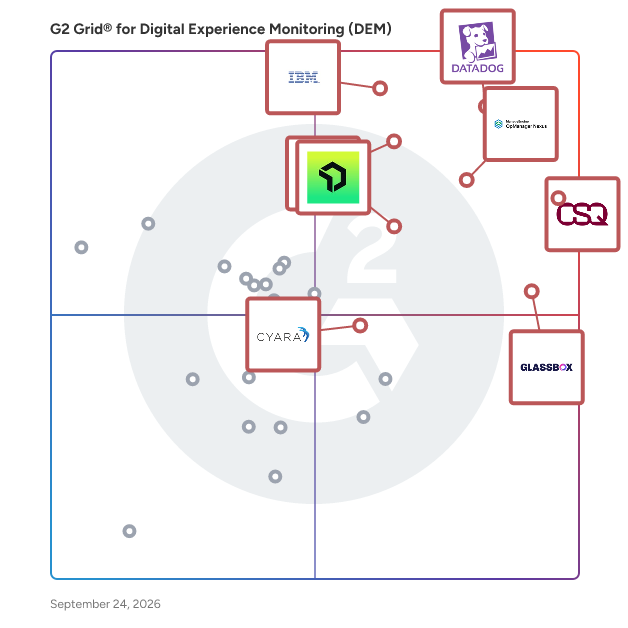
G2 Grid® for Digital Experience Monitoring (DEM) Software

G2 Grid® for Digital Experience Monitoring (DEM) Software plotting products by satisfaction and market presence

Highlighted products: Datadog, Contentsquare, IBM Instana, OpManager Nexus, Dynatrace, Glassbox, New Relic, and Cyara Platform.

Underlying data: [Grid® JSON](https://www.g2.com/categories/digital-experience-monitoring-dem/grids.json?focus%5B%5D=datadog&focus%5B%5D=contentsquare&focus%5B%5D=ibm-instana&focus%5B%5D=opmanager-nexus&focus%5B%5D=dynatrace&focus%5B%5D=glassbox&focus%5B%5D=new-relic&focus%5B%5D=cyara-platform)

ThousandEyes

Cisco ThousandEyes empowers organizations to assure every digital experience across every network, everywhere, every time. With built-in AI and powerful ecosystem integrations, ThousandEyes enables IT teams to proactively detect, diagnose, and resolve issues before they impact end-user experiences. ThousandEyes is deeply integrated across Cisco's entire technology portfolio and beyond, enabling customers to deploy at scale while delivering assurance across Cisco's industry-leading Networking, Security, Collaboration, and Observability solutions.

Average Rating: 4.5/5.0

Total Reviews: 79

How Do G2 Users Rate ThousandEyes?

  • Behavioral Analysis: 9.4/10 (Category avg: 8.2/10)
  • Has the product been a good partner in doing business?: 8.9/10 (Category avg: 9.0/10)
  • Real-Time Monitoring: 10.0/10 (Category avg: 9.0/10)
  • Alerts: 9.4/10 (Category avg: 8.8/10)

Who Is the Company Behind ThousandEyes?

  • Seller: Cisco
  • Year Founded: 1984
  • HQ Location: San Jose, CA
  • Twitter: @Cisco
    720,366 Twitter followers
  • LinkedIn® Page: www.linkedin.com
    95,294 employees on LinkedIn®
  • Ownership: NASDAQ:CSCO

Who Uses This Product?

  • Top Industries: Information Technology and Services, Computer Networking
  • Company Size: 79% Large, 13% Medium

What Do G2 Reviewers Say About ThousandEyes?

AI-generated summary from verified user reviews

Pros
  • Users value the clear visibility and comprehensive insights of ThousandEyes, streamlining issue tracking and enhancing network performance.
  • Users value the clear and detailed visibility provided by ThousandEyes, enhancing efficiency in diagnosing network issues.
  • Users value the clear visibility provided by ThousandEyes, enabling quick identification of network issues in real time.
  • Users praise the real-time visibility of ThousandEyes, significantly reducing time spent on manual issue tracking.
  • Users value the real-time alert notifications from ThousandEyes that simplify issue tracking and improve network efficiency.
Cons
  • Users find the complex configuration and metric screens less intuitive, impacting their overall experience with ThousandEyes.
  • Users find the complex interface of ThousandEyes challenging, impacting their ability to navigate configuration and metrics effectively.
  • Users find the complex setup challenging, requiring significant time to master all features effectively.
  • Users find the configuration difficulties in ThousandEyes challenging, as some screens lack intuitiveness.
  • Users find the difficult learning curve challenging at first, requiring time to grasp all the features effectively.

What Are Recent G2 Reviews of ThousandEyes?

Catchpoint

The Internet relies on Catchpoint Global 5000 companies, top online retailers, financial services, cloud infrastructure and services companies, and xSPs trust Catchpoint’s Internet Performance Monitoring (IPM) to detect and resolve internal or external issues across the Internet stack before they impact customers, employees, or digital experiences. Offering Internet Synthetics, RUM, BGP, Heartbeat Monitoring, Distributed Tracing, and performance optimization with high-fidelity data and flexible visualizations, Catchpoint is powered by the world’s largest active agent network to provide real-world user experience visibility and internet stack insights that complement Application Performance Monitoring (APM) to give IT Ops team instant awareness of incidents, root cause insights, and quick resolution.

Average Rating: 4.5/5.0

Total Reviews: 109

How Do G2 Users Rate Catchpoint?

  • Behavioral Analysis: 8.6/10 (Category avg: 8.2/10)
  • Has the product been a good partner in doing business?: 9.3/10 (Category avg: 9.0/10)
  • Real-Time Monitoring: 8.3/10 (Category avg: 9.0/10)
  • Alerts: 9.0/10 (Category avg: 8.8/10)

Who Is the Company Behind Catchpoint?

  • Seller: LogicMonitor
  • Company Website:
  • Year Founded: 2007
  • HQ Location: Santa Barbara, CA
  • Twitter: @logicmonitor
    12,430 Twitter followers
  • LinkedIn® Page: www.linkedin.com
    1,258 employees on LinkedIn®

Who Uses This Product?

  • Who Uses This: Software Engineer
  • Top Industries: Information Technology and Services, Financial Services
  • Company Size: 65% Large, 22% Medium

What Do G2 Reviewers Say About Catchpoint?

AI-generated summary from verified user reviews

Pros
  • Users value Catchpoint for its real-time issue detection, enhancing performance monitoring and speeding up resolution times.
  • Users value Catchpoint for its effective monitoring capabilities, providing real-time insights and proactive issue detection.
  • Users appreciate the real-time alerting features of Catchpoint, enabling quick issue detection and seamless user experience.
  • Users value the real-time alerts from Catchpoint that enhance issue detection and improve system performance monitoring.
  • Users value the real-time alert notifications from Catchpoint, enabling swift issue resolution and enhanced performance monitoring.
Cons
  • Users feel that the pricing is too high and lacks transparency, making it less accessible for smaller teams.
  • Users find the complex configuration challenging initially, as it requires time to learn and master the features.
  • Users find the complex setup of Catchpoint challenging initially, requiring time to learn and configure its features.
  • Users report data inaccuracy with Catchpoint, noting false alerts that misrepresent test case failures during manual checks.
  • Users find the difficult learning curve of Catchpoint challenging initially, though it becomes easier with time.

What Are Recent G2 Reviews of Catchpoint?

What Are G2 Users Discussing About Catchpoint?

ManageEngine Applications Manager

ManageEngine Applications Manager is an application performance & IT infrastructure monitoring solution that is designed to combat modern infrastructure problems and ensure that your business and end users are unaffected by substandard performance and downtime. By leveraging deep application performance monitoring with byte-code instrumentation, infrastructure monitoring, hybrid cloud monitoring, and digital experience monitoring from a single console, IT and DevOps teams will be able to gain code-level insights, automate their processes, pinpoint & resolve performance issues, and deliver better business outcomes. Overall, our product will help businesses optimize application usage & revenue, reduce MTTR, improve DevOps processes, migrate to the cloud with confidence, respond to incidents faster, and ensure seamless user experiences.

Average Rating: 4.7/5.0

Total Reviews: 111

How Do G2 Users Rate ManageEngine Applications Manager?

  • Behavioral Analysis: 8.7/10 (Category avg: 8.2/10)
  • Has the product been a good partner in doing business?: 9.3/10 (Category avg: 9.0/10)
  • Real-Time Monitoring: 9.3/10 (Category avg: 9.0/10)
  • Alerts: 8.8/10 (Category avg: 8.8/10)

Who Is the Company Behind ManageEngine Applications Manager?

  • Seller: Zoho
  • Year Founded: 1996
  • HQ Location: Austin, TX
  • Twitter: @Zoho
    137,880 Twitter followers
  • LinkedIn® Page: www.linkedin.com
    30,913 employees on LinkedIn®
  • Phone: +1 (888) 900-9646

Who Uses This Product?

  • Top Industries: Information Technology and Services, Computer Software
  • Company Size: 46% Medium, 42% Large

What Do G2 Reviewers Say About ManageEngine Applications Manager?

AI-generated summary from verified user reviews

Pros
  • Users appreciate the real-time monitoring capabilities of ManageEngine Applications Manager, enhancing visibility and troubleshooting efficiency.
  • Users value the real-time monitoring capabilities of ManageEngine Applications Manager, enhancing troubleshooting and application health visibility.
  • Users value the real-time monitoring features of ManageEngine Applications Manager for proactive issue resolution and performance tracking.
  • Users value the real-time monitoring capabilities of ManageEngine Applications Manager, enhancing their ability to troubleshoot proactively.
  • Users value the real-time visibility in ManageEngine Applications Manager, enabling proactive issue resolution and performance monitoring.
Cons
  • Users experience limited features that hinder integration and scalability, making it hard to monitor efficiently.
  • Users face feature limitations in ManageEngine Applications Manager, impacting integration and scalability for large enterprises.
  • Users face integration issues that hinder scalability and complicate monitoring across diverse applications in large environments.
  • Users find the learning curve steep for ManageEngine Applications Manager, complicating setup and utilization of advanced features.
  • Users find the initial setup complexity to be time-consuming and challenging, especially in larger environments.

What Are Recent G2 Reviews of ManageEngine Applications Manager?

What Are G2 Users Discussing About ManageEngine Applications Manager?

AI can help you find the answers. G2 helps you trust them.

Connect G2 to Claude or ChatGPT for answers grounded in G2's trusted reviews, comparisons, and pricing from real user insights.

How it works

Zipy

Zipy is a trusted digital experience platform which combines session replay, frontend error monitoring, product analytics and prioritisation into one while ensuring privacy and security. What can you do with Zipy? > Understand user behaviour to avoid churn > Monitor live users and real time errors to get actionable insights > Reduce time to resolve JS and API errors with inbuilt dev tools > Collaborate with your team members on customer experience problems > Get customer journey video replay, network logs, console logs, and stack traces all in one place Who can use Zipy? Zipy is most useful for Product teams, Business Analysts, Customer Success, Customer Support and Developers who have to solve customer problems. What will you achieve with Zipy? > Bring down TTR by 50% and save your support and development team’s debugging time > Reduce customer churn by proactively fixing their problems > Build a better product and GTM strategy based on user behaviour understanding by product and analyst teams

Average Rating: 4.9/5.0

Total Reviews: 52

How Do G2 Users Rate Zipy?

  • Behavioral Analysis: 10.0/10 (Category avg: 8.2/10)
  • Has the product been a good partner in doing business?: 9.9/10 (Category avg: 9.0/10)
  • Real-Time Monitoring: 10.0/10 (Category avg: 9.0/10)
  • Alerts: 9.7/10 (Category avg: 8.8/10)

Who Is the Company Behind Zipy?

  • Seller: Zipy
  • Year Founded: 2020
  • HQ Location: San Francisco, US
  • LinkedIn® Page: www.linkedin.com
    12 employees on LinkedIn®

Who Uses This Product?

  • Top Industries: Computer Software, Information Technology and Services
  • Company Size: 65% Small, 23% Medium

What Do G2 Reviewers Say About Zipy?

AI-generated summary from verified user reviews

Pros
  • Users benefit from session replay in Zipy, enabling faster debugging and enhancing overall user experience with detailed insights.
  • Users value Zipy's efficiency in tracking interactions and improving performance, saving time and enhancing the overall experience.
  • Users find Zipy remarkably easy to use, facilitating seamless tracking of product interactions and enhancing overall efficiency.
  • Users value the customizable filtering options of Zipy, enhancing their ability to analyze user behavior effectively.
  • Users value the detailed analytics from Zipy, enhancing UI improvement efforts and overall user experience significantly.
Cons
  • Users note that slow loading times may cause missed sessions and sluggish performance, but overall functionality remains acceptable.
  • Users find that slow performance can occur, especially with large datasets, though it doesn’t hinder overall functionality.
  • Users report frequent bug issues with Zipy, including incorrect AI responses and missing session replay recordings.
  • Users face challenges with error handling, as Zipy struggles to ignore specific error types, impacting performance.
  • Users highlight the integration difficulty of Zipy with other tools, affecting their overall experience.

What Are Recent G2 Reviews of Zipy?

Splunk APM

Splunk APM is critical to help provide visibility and context into your apps and services as your environment scales. Splunk APM provides the most advanced solution for engineers who build and troubleshoot modern applications; with full fidelity trace analysis to provide context across complex cloud and microservice environments, AI directed troubleshooting and high cardinality to identify and resolve problems faster, AlwaysOn Profiling to provide code level visibility of service bottlenecks, and OpenTelemetry standardization to provide greater flexibility and control as you embrace new technologies and processes.

Average Rating: 4.4/5.0

Total Reviews: 17

How Do G2 Users Rate Splunk APM?

  • Has the product been a good partner in doing business?: 9.4/10 (Category avg: 9.0/10)

Who Is the Company Behind Splunk APM?

  • Seller: Splunk
  • Year Founded: 2003
  • HQ Location: San Francisco, California, United States
  • Twitter: @splunk
    78,182 Twitter followers
  • LinkedIn® Page: www.linkedin.com
    8,466 employees on LinkedIn®
  • Ownership: NASDAQ:SPLK

Who Uses This Product?

  • Top Industries: Financial Services, Information Technology and Services
  • Company Size: 70% Large, 20% Medium

What Do G2 Reviewers Say About Splunk APM?

AI-generated summary from verified user reviews

Pros
  • Users appreciate the high-quality data from Splunk APM, which enhances product quality and boosts customer satisfaction.
  • Users value the high-quality data provided by Splunk APM, enhancing product quality and customer satisfaction.
  • Users appreciate the high quality data from Splunk APM, leading to improved products and happier customers.
  • Users value the high quality data provided by Splunk APM, enhancing product quality and customer satisfaction.
  • Users value the high-quality error tracking of Splunk APM, enhancing product quality and customer satisfaction.
Cons
  • Users find the inadequate reporting features of Splunk APM cumbersome, making data retrieval a challenging task.
  • Users find the inefficient log management challenging, often leading to difficulties in accessing specific logs and reports.
  • Users find it challenging to pull logs and data reports, highlighting the difficulties in log management within Splunk APM.
  • Users face log management issues, making it challenging to pull specific logs and data reports efficiently.
  • Users find reporting cumbersome, often struggling to pull specific logs and preferring broader reports instead.

What Are Recent G2 Reviews of Splunk APM?

What Are G2 Users Discussing About Splunk APM?

Raygun

Get instant visibility into the health of your software to proactively identify and resolve issues before they impact your customers. Raygun's suite of digital experience monitoring tools surfaces actionable, customer-centric insights across your entire tech stack. Monitor and improve software quality and performance to deliver fast, error-free experiences that delight your customers and grow your business. Raygun's products cover three main areas, all fully integrated with each other to unlock deeply powerful insights, unlike anything your team has experienced before. Crash Reporting - Fix bugs with greater speed and accuracy. Go straight to the root cause of crashes and errors with granular diagnostics right down to the line of code. Replicate and resolve issues faster, improve reliability, and free up time for more meaningful work. Real User Monitoring - Deliver flawless software experiences. Understand your customer's digital experience with real-user insights you can trust across every user, session, and device. Monitor error and performance trends in real-time and proactively address business-critical issues before they impact your customers — and your revenue. APM - Out of this world application performance monitoring. Get unrivaled visibility into server-side performance. Uncover detailed, code-level insights into server-side performance with a comprehensive session trace breakdown that tells you exactly how your code executed, down to the millisecond. Raygun is the fastest way to improve your customers' digital experience. Try it for free today!

Average Rating: 4.3/5.0

Total Reviews: 123

How Do G2 Users Rate Raygun?

  • Behavioral Analysis: 8.3/10 (Category avg: 8.2/10)
  • Has the product been a good partner in doing business?: 8.5/10 (Category avg: 9.0/10)
  • Real-Time Monitoring: 9.4/10 (Category avg: 9.0/10)
  • Alerts: 8.3/10 (Category avg: 8.8/10)

Who Is the Company Behind Raygun?

  • Seller: Raygun
  • Year Founded: 2007
  • HQ Location: Wellington, New Zealand
  • Twitter: @raygunio
    2,877 Twitter followers
  • LinkedIn® Page: www.linkedin.com
    20 employees on LinkedIn®

Who Uses This Product?

  • Who Uses This: Software Engineer, Senior Software Engineer
  • Top Industries: Computer Software, Information Technology and Services
  • Company Size: 55% Small, 37% Medium

What Do G2 Reviewers Say About Raygun?

AI-generated summary from verified user reviews

Pros
  • Users praise the ease of use of Raygun, allowing for quick navigation and efficient issue identification.
  • Users find the ease of issue detection in Raygun excellent, providing clear insights and solutions quickly.
  • Users find the issue identification process easy, providing clear insights and guidance for fixes quickly.
  • Users value the navigation ease of Raygun, praising its smooth interface and user-friendly layout.
  • Users praise the problem-solving capabilities of Raygun, enabling quick identification and resolution of issues.
Cons
  • Users struggle with error handling in Raygun, finding it difficult to differentiate between similarly named databases during searches.
  • Users struggle with search accuracy, finding it difficult to differentiate between similarly named databases with errors.
  • Users face filtering issues in Raygun, struggling to distinguish similarly named databases during searches.
  • Users face inefficient search functionality, making it difficult to distinguish between similarly named databases with errors.
  • Users find the search difficulty challenging as similar database names complicate finding the correct one.

What Are Recent G2 Reviews of Raygun?

What Are G2 Users Discussing About Raygun?

Martello Vantage DX

Martello Vantage DX is the only Experience Management Solution purpose-built for Microsoft Teams and Office 365. IS MICROSOFT TEAMS DOWN? Know instantly which users are impacted, in which locations and who is responsible. Vantage DX transforms Microsoft Teams call performance data into monitoring insights. This allows you to detect, alert, and help prioritize all Teams issues. Whether at the user, location, network or tenant level. UNDERSTAND IN SECONDS THE ROOT CAUSE OF A MICROSOFT TEAMS OR MICROSOFT 365 ISSUE Martello Vantage DX constantly analyzes network quality from end-to-end, between your critical locations and users and Microsoft cloud services. This allows you to pinpoint exactly where any latency is introduced and who owns a Teams, SharePoint, OneDrive, Exchange, or Office Web app network quality issue. DETECT PERFORMANCE PROBLEMS IN REAL-TIME AND PREVENT ANY SERVICE DISRUPTIONS Martello Vantage DX immediately detects any Microsoft Teams slowness and Microsoft 365 service issues, giving you the information you need to fix these problems before they affect your business productivity. Synthetic transactions tests the entire set of Microsoft Modern Workplace features – including Teams, OneDrive, Exchange, SharePoint, Office Web Apps, Azure AD Connect, ADFS and more – on a 24/7 basis, from all your critical locations. MAXIMIZE OFFICE 365 AND MICROSOFT TEAMS ROI - Reduce mean time to repair (MTTR) and associated costs for any Microsoft 365 issue - Increase business productivity by ensuring the best quality of service - Lower total cost of ownership (TCO) while increasing user satisfaction

Average Rating: 4.7/5.0

Total Reviews: 10

How Do G2 Users Rate Martello Vantage DX?

  • Behavioral Analysis: 9.2/10 (Category avg: 8.2/10)
  • Has the product been a good partner in doing business?: 9.7/10 (Category avg: 9.0/10)
  • Real-Time Monitoring: 9.2/10 (Category avg: 9.0/10)
  • Alerts: 7.5/10 (Category avg: 8.8/10)

Who Is the Company Behind Martello Vantage DX?

  • Seller: Martello
  • Year Founded: 2009
  • HQ Location: Ottawa, CA
  • Twitter: @MartelloTech
    1,238 Twitter followers
  • LinkedIn® Page: www.linkedin.com
    51 employees on LinkedIn®

Who Uses This Product?

  • Company Size: 70% Medium, 30% Large

What Do G2 Reviewers Say About Martello Vantage DX?

AI-generated summary from verified user reviews

Pros
  • Users value the easy implementation of Martello Vantage DX, enhancing their Microsoft Teams call performance seamlessly.
  • Users value the effective monitoring capabilities of Martello Vantage DX, enhancing their Office 365 and Microsoft Teams experience.
  • Users commend the excellent customer support from Martello Vantage DX, highlighting the knowledgeable staff and proactive assistance.
  • Users value the easy integrations of Martello Vantage DX, enhancing support services and overall client experience.
  • Users value the detailed analysis capabilities of Martello Vantage DX, enhancing their understanding of O365 processes.
Cons
  • Users wish for a combined platform as the separation complicates deployment and management of Martello Vantage DX.
  • The high cost of Martello Vantage DX is seen as a downside, though users understand quality comes at a price.
  • Users find the learning curve steep, as creating queries takes time and effort to master.

What Are Recent G2 Reviews of Martello Vantage DX?

Splunk Observability Cloud

Splunk Observability Cloud is a comprehensive, real-time monitoring and troubleshooting platform designed to provide full-stack visibility across any environment. By integrating application performance monitoring, infrastructure monitoring, and digital experience monitoring, it enables organizations to detect and resolve issues swiftly, ensuring optimal system performance and enhanced user experiences. Built on OpenTelemetry standards, Splunk Observability Cloud offers AI-driven insights and analytics, facilitating proactive management of complex, distributed systems. Key Features and Functionality: - Application Performance Monitoring (APM): Identifies and addresses application issues by combining related data into intuitive visuals, accelerating mean time to resolution (MTTR). - Infrastructure Monitoring: Provides instant visibility and real-time alerts to improve hybrid cloud performance. - Digital Experience Monitoring: Delivers insights into frontend performance through Real User Monitoring and Synthetic Monitoring, ensuring seamless user experiences. - AI-Powered Analytics: Utilizes machine learning-driven features like Service Maps and Trace Analytics to offer guided troubleshooting and faster issue resolution. - OpenTelemetry-Native: Ensures data ownership and control, preventing vendor lock-in and allowing consistent instrumentation across applications. - No Data Sampling: Collects and analyzes 100% of data with NoSample™ tracing, eliminating blind spots. - Log Observer Connect: Correlates logs stored in Splunk Platform with real-time metrics and traces, providing deeper context for software behavior. Primary Value and Problem Solving: Splunk Observability Cloud addresses the challenges of monitoring and managing complex, distributed systems by offering unified visibility and real-time troubleshooting capabilities. It empowers organizations to: - Accelerate Issue Resolution: By correlating metrics, traces, and logs, teams can quickly identify root causes, reducing downtime and improving system reliability. - Enhance User Experiences: Continuous monitoring of digital experiences ensures that performance issues are detected and resolved before impacting end-users. - Optimize Operational Efficiency: AI-driven insights and automated analytics streamline troubleshooting processes, allowing teams to focus on innovation rather than firefighting. - Maintain Data Control: The OpenTelemetry-native approach provides flexibility and prevents vendor lock-in, enabling organizations to adapt and scale their observability practices as needed. By integrating these capabilities, Splunk Observability Cloud enables organizations to maintain high system performance, deliver exceptional user experiences, and drive continuous innovation.

Average Rating: 4.3/5.0

Total Reviews: 55

How Do G2 Users Rate Splunk Observability Cloud?

  • Behavioral Analysis: 8.3/10 (Category avg: 8.2/10)
  • Has the product been a good partner in doing business?: 8.0/10 (Category avg: 9.0/10)
  • Real-Time Monitoring: 8.3/10 (Category avg: 9.0/10)
  • Alerts: 8.3/10 (Category avg: 8.8/10)

Who Is the Company Behind Splunk Observability Cloud?

  • Seller: Cisco
  • Year Founded: 1984
  • HQ Location: San Jose, CA
  • Twitter: @Cisco
    720,366 Twitter followers
  • LinkedIn® Page: www.linkedin.com
    95,294 employees on LinkedIn®
  • Ownership: NASDAQ:CSCO

Who Uses This Product?

  • Top Industries: Information Technology and Services, Computer Software
  • Company Size: 38% Large, 33% Small

What Do G2 Reviewers Say About Splunk Observability Cloud?

AI-generated summary from verified user reviews

Pros
  • Users value the detailed insights and analytics from Splunk Observability Cloud, enhancing performance and health monitoring of infrastructure.
  • Users find Splunk Observability Cloud to be extremely user-friendly, streamlining tasks and enhancing efficiency in monitoring.
Cons
  • Users find the pricing too expensive, suggesting a need for more economical options to increase accessibility.
  • Users find the pricing issues significant, citing high costs and a lack of training resources for effective use.
  • Users find the steep learning curve of Splunk Observability Cloud challenging, requiring time and prior knowledge to master.
  • Users find the complex setup of Splunk Observability Cloud challenging, making it difficult to effectively utilize the tool.
  • Users find the difficult learning curve of Splunk Observability Cloud challenging, especially for beginners requiring time to adapt.

What Are Recent G2 Reviews of Splunk Observability Cloud?

What Are G2 Users Discussing About Splunk Observability Cloud?

VWO Insights - Web

Find the unmet needs of your website visitors with VWO Insights - Web. Our powerful and precise behavior analytics engine, VWO Insights - Web, helps you identify bottlenecks and opportunities in your website visitors' purchase journeys. VWO Insights - Web stands apart as the only visitor behavior analytics solution in the market that offers a connected view of visitor behavior analytics, capturing the complete journey of website users. This unique capability allows businesses to access session recordings of every user visit, providing unprecedented insight into visitor interactions. Additionally, VWO Web Insights encompasses of four powerful tools – heatmaps, session recordings, surveys, and form field analytics – into a single, cohesive product. Our advanced segmentation filters let you hone in on specific user groups by device type, operating system, geography, user status (new or returning), language, and more. Custom event filters give you the power to track and analyze visitor actions during key moments in your website, providing the context you need to optimize the visitor experience. These insights drive informed decision-making, ultimately reducing churn and lifting conversion rates. Privacy is paramount; we ensure your data collection complies with GDPR, SOC2, and other privacy standards. Learn about our privacy practices at VWO Privacy Principles - https://vwo.com/compliance/privacy-principles/

Average Rating: 4.2/5.0

Total Reviews: 61

How Do G2 Users Rate VWO Insights - Web?

  • Behavioral Analysis: 8.3/10 (Category avg: 8.2/10)
  • Has the product been a good partner in doing business?: 8.7/10 (Category avg: 9.0/10)
  • Real-Time Monitoring: 8.3/10 (Category avg: 9.0/10)
  • Alerts: 8.3/10 (Category avg: 8.8/10)

Who Is the Company Behind VWO Insights - Web?

  • Seller: Wingify
  • Year Founded: 2009
  • HQ Location: PARIS, France
  • Twitter: @ABTasty
    11,859 Twitter followers
  • LinkedIn® Page: www.linkedin.com
    297 employees on LinkedIn®

Who Uses This Product?

  • Top Industries: Marketing and Advertising, Internet
  • Company Size: 53% Medium, 32% Small

What Do G2 Reviewers Say About VWO Insights - Web?

AI-generated summary from verified user reviews

Pros
  • Users value the ease of use of VWO Insights, appreciating its user-friendly interface and straightforward installation.
  • Users appreciate the user-friendly interface and advanced features of VWO Insights, enhancing their analysis experience significantly.
  • Users value the AI integration for summarizing recordings, enhancing their ability to analyze user interactions effectively.
  • Users love the AI summarization feature in VWO Insights, along with the convenience of funnels and heatmaps.
  • Users appreciate the automation features of VWO Insights, enhancing efficiency with AI summaries and useful metrics.
Cons
  • Users are frustrated by the limited features of VWO Insights, particularly regarding survey customization and template options.
  • Users find the complexity issues of VWO Insights challenging, especially when handling multiple customizations in the editor tool.
  • Users find the customization difficulty frustrating, especially when the editor becomes clumsy with multiple adjustments.
  • Users feel the pricing is too expensive, desiring more flexibility and a la carte options for the features.
  • Users find the limited filtering options frustrating, as they can't view survey response recordings effectively.

What Are Recent G2 Reviews of VWO Insights - Web?

What Are G2 Users Discussing About VWO Insights - Web?

GermainUX

GermainUX is a real-time Operational Experience Intelligence platform that helps enterprises improve conversion, adoption, productivity, and digital experience by detecting, analyzing, and helping resolve friction across business applications and workflows. GermainUX monitors the complete operational experience across CRM, ERP, eCommerce, contact center, web, and custom applications—including Salesforce, Oracle Siebel, Shopify, Windows/.NET applications, and complex enterprise environments. Unlike tools focused only on user behavior, application performance, or infrastructure, GermainUX brings user experience, business processes, application behavior, and technology performance together in one platform. WHAT GERMAINUX HELPS ORGANIZATIONS DO • Detect friction in real time — Identify UX issues, workflow failures, errors, performance problems, broken integrations, crashes, and other obstacles affecting users and customers. • Understand business impact — Connect friction to outcomes such as conversion, adoption, productivity, customer experience, and SLA performance. • Find root causes faster — Use session replay, AI analysis, analytics, KPI relationships, process insights, and technical diagnostics to understand what happened and why. • Prioritize what matters — Analyze affected users, frequency, persistence, business impact, and other signals to focus teams on the most important problems. • Automate detection and response — Continuously monitor critical conditions, trigger alerts and workflows, create tickets, and automate actions when appropriate. • Analyze experiences at scale with AI — Summarize sessions, conversations, errors, feedback, and large datasets to surface recurring issues and opportunities. MORE THAN SOFTWARE GermainUX combines a highly customizable platform with hands-on support. Our team helps customers configure monitoring, analytics, dashboards, alerts, and automation around their specific applications and business goals. This can complement existing observability, CRM, analytics, and experience platforms—or provide an alternative to building specialized monitoring and analytics solutions internally. GermainUX has been 100% bootstrapped since 2011 and has maintained approximately 90% customer retention, with long-term enterprise customers across industries including financial services, healthcare, retail, travel, and technology. FROM FRICTION TO MEASURABLE IMPROVEMENT Detect → Analyze → Understand Impact → Find Root Cause → Prioritize → Resolve → Automate Whether the goal is increasing conversion, improving application adoption, reducing employee workflow friction, or resolving technology issues faster, GermainUX helps teams understand what is getting in the way, why it is happening, who it affects, and what to do about it.

Average Rating: 4.7/5.0

Total Reviews: 66

How Do G2 Users Rate GermainUX?

  • Behavioral Analysis: 9.2/10 (Category avg: 8.2/10)
  • Has the product been a good partner in doing business?: 9.2/10 (Category avg: 9.0/10)
  • Real-Time Monitoring: 9.2/10 (Category avg: 9.0/10)
  • Alerts: 9.3/10 (Category avg: 8.8/10)

Who Is the Company Behind GermainUX?

  • Seller: GermainUX
  • Company Website:
  • Year Founded: 2006
  • HQ Location: San Francisco, US
  • Twitter: @GermainUX
    182 Twitter followers
  • LinkedIn® Page: www.linkedin.com
    26 employees on LinkedIn®

Who Uses This Product?

  • Top Industries: Information Technology and Services, Computer Software
  • Company Size: 82% Small, 15% Medium

What Do G2 Reviewers Say About GermainUX?

AI-generated summary from verified user reviews

Pros
  • Users greatly value the prompt and affordable customer support from Germain UX, which enhances their overall experience.
  • Users love the user-friendly interface of Germain UX, enhancing workflow efficiency and support for problem-solving.
  • Users value the invaluable insights into user behavior provided by Germain UX, enhancing site optimization and decision-making.
  • Users find the user behavior tracking feature invaluable, allowing for enhanced insights and streamlined support processes.
  • Users appreciate the user-friendly interface of Germain UX, enhancing efficiency and workflow management effectively.
Cons
  • Users experience display issues with Germain UX, as some fields only appear on mouse hover and aren't mobile-friendly.
  • Users emphasize the need for incomplete data, citing outdated documentation and insufficient support options.
  • Users find the lack of information concerning outdated documentation and support options limits their overall experience with Germain UX.
  • Users express concern over limited language support, which hinders usability for non-English speakers.
  • Users note the limited opportunities for improvement, citing outdated documentation and lack of live chat support.

What Are Recent G2 Reviews of GermainUX?

What Are G2 Users Discussing About GermainUX?

Insightech

Insightech provides digital teams with clear digital experience insights unhindered by sampled or incomplete data. With Insightech you get all the tools to do thorough marketing reporting, page content analysis, conversion funnel optimisation and website re-platforming in one easy-to-install and run solution. Benefit from dedicated APAC region support, in-person training, workshops and webinars to ensure continued success as you advance your organisation's experience analytics capability.

Average Rating: 4.8/5.0

Total Reviews: 22

How Do G2 Users Rate Insightech?

  • Behavioral Analysis: 8.8/10 (Category avg: 8.2/10)
  • Has the product been a good partner in doing business?: 9.8/10 (Category avg: 9.0/10)
  • Real-Time Monitoring: 8.3/10 (Category avg: 9.0/10)
  • Alerts: 7.2/10 (Category avg: 8.8/10)

Who Is the Company Behind Insightech?

  • Seller: Insightech
  • Year Founded: 2019
  • HQ Location: Sydney, NSW
  • Twitter: @insightech_com
    1,218 Twitter followers
  • LinkedIn® Page: www.linkedin.com
    17 employees on LinkedIn®

Who Uses This Product?

  • Top Industries: Retail
  • Company Size: 64% Medium, 23% Large

What Do G2 Reviewers Say About Insightech?

AI-generated summary from verified user reviews

Pros
  • Users value the robust analytics features of Insightech, enhancing understanding of user behavior and website performance.
  • Users praise the exceptional customer support of Insightech, emphasizing its invaluable assistance and guidance for their needs.
  • Users value the deep customer understanding provided by Insightech's insightful replays and comprehensive analytics features.
  • Users value the customizability of Insightech, finding it easy to adapt to various platforms and needs.
  • Users find Insightech's platform incredibly easy to use, streamlining the user research process and enhancing insights.
Cons
  • Users report dashboard issues due to shuttering in session recordings and inconsistent mouse movement tracking.
  • Users experience data inaccuracy with Insightech, noting issues with session recordings and mouse tracking fidelity.
  • Users experience data loss with Insightech due to poor recording quality and missed mouse tracking.
  • Users find difficult usability in Insightech, although guidance helps make setup manageable.
  • Users report inadequate tracking issues, with recordings often lacking smoothness and precise mouse movement capture.

What Are Recent G2 Reviews of Insightech?

What Are G2 Users Discussing About Insightech?

Panelbear

Deliver an amazing experience to your website visitors. Get real time traffic insights, performance monitoring, and powerful alerting integrations - all in one tool.

Average Rating: 4.1/5.0

Total Reviews: 10

How Do G2 Users Rate Panelbear?

  • Behavioral Analysis: 9.2/10 (Category avg: 8.2/10)
  • Has the product been a good partner in doing business?: 10.0/10 (Category avg: 9.0/10)
  • Real-Time Monitoring: 10.0/10 (Category avg: 9.0/10)
  • Alerts: 10.0/10 (Category avg: 8.8/10)

Who Is the Company Behind Panelbear?

  • Seller: Cronitor
  • HQ Location: San Francisco, US
  • Twitter: @cronitorio
    686 Twitter followers
  • LinkedIn® Page: www.linkedin.com
    2 employees on LinkedIn®

Who Uses This Product?

  • Company Size: 80% Small, 30% Medium

What Are Recent G2 Reviews of Panelbear?

What Are G2 Users Discussing About Panelbear?

OpenText Operations Bridge (OpsBridge)

Micro Focus is now part of OpenText! OpenText™ Operations Bridge (OpsBridge) automatically monitors and analyzes the health and performance of Hybrid IT resources across any device, operating system, database, application, or service on all data types. With industry-leading AIOps capabilities, including event consolidation engines and noise reduction technology, it uniquely integrates end-to-end service awareness with rule and machine learning-based event correlation capabilities. Problems identified using a Vertica big data lake and machine learning, for example, to identify significant logs, can be manually or automatically remediated with flexible runbook automation and orchestration. These capabilities also apply to over 200 integrations with third-party tools and technology stacks. Executive stakeholders gain actionable insight on any device that has a browser with tailored dashboards showing vital status, business, and IT KPIs. Hybrid Cloud Monitoring for the Digital Enterprise Hybrid IT has quickly become the new normal, and IT operations teams are expected to offer both cloud and on-premises infrastructure options, whichever best meets the needs of the application or service. IT operations teams must adapt to new technologies, adopt new cloud vendors and other services chosen by the business, and monitor new applications and application releases with increasing frequency. OpenText™ OpsBridge exploits all AIOps capabilities to consolidate and analyze all your data. It reduces event volumes, isolates root-cause, and provides chatbots for ChatOps. It includes automation to remediate problems quickly while reducing human error with over 8000 provided runbook – or you can build your own. Deliver What the Business Needs When It Needs It Designed to deliver real business value, OpenText™ OpsBridge integrates all your tools and automates manual tasks. It focuses operations teams on the business services and users being impacted by automatically identifying root cause faster than ever before possible. Built-in AIOps intelligent analytics drives historical analysis, applying machine learning and 50+ patented algorithms to logs, events, metrics, and topology, which is so much more powerful than search alone. Key Benefits - Increased effectiveness (time, money, resources) of tools and services - Reduced effort and time to process service requests and resolve problems - Confidence from the lines of business in IT’s ability to deliver consistent, compliant services - Business needs and strategy that are on time and budget, and in stronger collaboration with IT - Reduced business risk, better service price performance, and accelerated time-to-market for new services Key Features - Automated Hybrid IT Discovery and Monitoring: Discovery and monitoring consolidates and exploits all your data types (events, metrics, logs, and topology) within a dynamically updated and accurate model. It shows the impact of incidents, ensuring no new service goes overlooked with dynamic top-down and bottoms-up service modeling and with monitoring automation. Aggregate all our your Hybrid IT resources into a single view with 200+ technology integrations. OpsBridge solution templates and management packs provide in-depth domain-specific monitoring, including infrastructure, databases, Microsoft environments, SAP environments, middleware, cloud, big data, application platforms, automation, load balancers, and web servers. The data is integrated into collect once store one technology (COSO), a containerized common data collection and storage for real-time streaming data ingestion and processing. - Consolidate Data and Reduce Noise: IT experts advise that the application of common data ingestion and algorithmic Big Data driven analytics to all your data is the key to improving service excellence. OpsBridge includes analytics and incorporates 50+ patents for high-speed, high-volume data analysis. Automated log, metric, and event analysis, plus anomaly detection, proactively alerts operators to abnormal activity and uncovers the most relevant insights from hundreds of millions of records to help your team better prioritize. With “time machine” replay, which correlates disparate data over any time range and in relation to topology graphs, users can visualize with ease when the problem started and find the offending resource. To enhance your control of virtualized resources and dynamically changing workloads, OpsBridge proposes optimized recipes for your resources. These recipes give you the ability to visualize resources, forecast their allocation impact, and master costs to set the right level of service. - Automated AIOps: OpsBridge incorporates all 11 AIOps capabilities, from agent-based intelligence and real-time performance analytics to multi-mode stream-based and topology-based correlation of event streams over time and across dependencies. - Robotize Processes and Remediation: With more than 8,000 runbooks to choose from, including hundreds of out-of-the-box integrations to popular IT Service Management tools, OpsBridge simplifies and accelerates the automation of tasks such as remedial actions, notifications, and recovery procedures. Orchestration of complex and conditional execution and rollback provides the means to strengthen compliance, remove manual errors, and develop IT Process Automation (ITPA) to slash costs and drive compliance, releasing rare resources for more critical business priorities. Adapting to changing circumstances is a core requirement for an agile organization. That’s the DevOps methodology, and OpsBridge supports it with: > A dynamically updating model that reflects the deployment of new application and infrastructure instances, automatically activating the required monitoring. > Robotized features for ChatOps-based collaboration across teams and tools such as Sitescope, OpsBridge Reporter and Operations Orchestration > Automated tasks capture and share vital production information to the extended teams, as well as activating alternative configurations to keep your business on track. - Analyze Application Health: OpsBridge provides probes dispersed across the world to measure service quality, control SLAs, and application health. That data is also fed to COSO, processed by the AIOps based analytics, and shown in reports and dashboards. - Customize Dashboards and Reporting: The Business Value Dashboard (BVD) can exploit all the status and KPI data at your disposal to provide a TV-like, live channel of business and IT news that the BVD “paints” onto any device with a browser. BVD software can display online information—such as internet news feeds, live programs, and streaming videos—in views developed using popular office tools. BVD can consume historical data stored in COSO, preprocessing, and analyzing that data before being displayed for reporting. OpsBridge Performance Engine and BVD provide highly scalable, real-time performance collection, analysis, and graphing for hundreds of metrics and consume data from COSO. You can build and combine different metrics and IT status information into powerful dashboards you can quickly tailor into domain-specific or contextually-specific dashboard mashups. Supported Technologies Management Packs are domain-specific add-ons to OpsBridge that provide pre-programmed intelligence for that domain, domain-specific reports, and correlation rules. Full details are available here: https://www.microfocus.com/media/data-sheet/operations_bridge_ds.pdf - Infrastructure AIX CentOS Cluster Debian HPE-UX HyperV IBM LPAR KVM Oracle Enterprise Linux RedHat Solaris Solaris Zone SUSE Ubuntu VMware vSphere Windows XEN - Databases Cassandra Couchbase Apache CouchDB Informix Marklogic Microsoft SQL Server MongoDB MySQL Oracle Database Oracle RAC PostgreSQL Riak SAP Sybase ASE - Microsoft Environments Microsoft Active Directory Microsoft Azure Microsoft Exchange Server Microsoft IIS Microsoft SharePoint Server Microsoft Skype for Business - SAP Environments SAP SAP HANA - Middleware Apache ActiveMQ Apache Kafka Apache Tomcat Apache Web Server Glassfish IBM WebSphere Application Server iPlanet JBoss Memcached Oracle Weblogic Application Server Rabbit MQ Redis Varnish - Cloud Amazon Services (EC2, EBS, ECS, Dynamo DB, Beanstalk Services, AWS Service Status, RDS, ASG, ELB, SQS, RedShift, KMS, S3, AWS Billing, AWS Service Health Dashboards) Microsoft Azure (Azure Data Factory, Azure Data Lake, Virtual Machines, Azure SQL, Storage Account, Azure App Service Plan, Azure Web Apps, Azure Active Directory Discovery, Activity Logs, Windows Activity Logs hosted on the Azure environment, Azure Load Balancer, Multi-instance support for Storage account service) Google Cloud Platform OpenStack Kubernetes - Big Data Apache Falcon Apache Flume Apache Oozie Apache Spark Apache Storm Apache Zookeeper Hadoop (Apache, Cloudera distributions) HBase Micro Focus Vertica Database Solr - Application Platforms Docker (certified) Node.js - Automation Chef Jenkins - Generic BIND DHCP File Change Monitor FTP server Generic SMTP JMX Microsoft .NET OpenSSH Perfmon SNMP - Load Balancer HAProxy Nginx - Partner IBM AS/400 IBM DB2 IBM Mainframe - Web Server gUnicorn HTTP Lighttpd - Others Github Postfix - Integrations are connectors to other tools that bring in their data for display and analysis: Ambari AppDynamics Aternity BMC Impact Manager BMC Remedy CA Spectrum Cherwell ITSM CollectD DynaTrace APM (Compuware) Dynatrace Data Center RUM (Do IT WiSE) Dynatrace Data Center RUM (J9) Dynatrace Synthetics (Do IT Wise) ExtraHop Networks Helion Monasca HEP OneView HPE Systems Insight Manager IBM NetCool IBM Tivoli (J9) OpenText™ APM OpenText™ AppPulse Active / Mobile OpenText™ ArcSight Logger / ESM OpenText™ AppManager OpenText™ Network Node Manager i (NNMi) OpenText™ Operations Manager for UNIX OpenText™ Operations Manager for Windows OpenText™ Service Manager OpenText™ Universal CMDB Microsoft SCOM Nagios New Relic Nutanix Oracle Enterprise Manager Propel Service Exchange RemedyForce / Salesforce SAP Solution Manager Service Anywhere ServiceNow (AppLink) ServiceNow (Do IT WiSE) Solarwinds Network Performance Monitor Solarwinds Server and Application Monitor Splunk VMWare vCenter Operations Manager VMware vRealize Operations (VROPS) xMatters Zabbix Zenoss

Average Rating: 4.0/5.0

Total Reviews: 16

How Do G2 Users Rate OpenText Operations Bridge (OpsBridge)?
  • Has the product been a good partner in doing business?: 8.0/10 (Category avg: 9.0/10)

Who Is the Company Behind OpenText Operations Bridge (OpsBridge)?

  • Seller: OpenText
  • Year Founded: 1991
  • HQ Location: Waterloo, ON
  • Twitter: @OpenText
    21,565 Twitter followers
  • LinkedIn® Page: www.linkedin.com
    22,835 employees on LinkedIn®
  • Ownership: NASDAQ:OTEX

Who Uses This Product?

  • Top Industries: Information Technology and Services, Retail
  • Company Size: 106% Large, 3% Medium

What Do G2 Reviewers Say About OpenText Operations Bridge (OpsBridge)?

AI-generated summary from verified user reviews

Pros
  • Users value the powerful infrastructure monitoring capabilities of OpenText OpsBridge for efficient system management.
  • Users commend the powerful infrastructure monitoring capabilities of OpenText OpsBridge, enhancing overall operational oversight.
  • Users appreciate the monitoring ease of OpenText OpsBridge, which simplifies the management of their infrastructure effectively.
  • Users value the powerful infrastructure monitoring capabilities of OpenText OpsBridge, enhancing their operational efficiency.
Cons
  • Users face significant delay issues with OpsBridge, as support tickets often remain unresolved for extended periods.
  • Users are frustrated by delays in support, as unresolved tickets linger for weeks without adequate assistance.
  • Users report frustrating logging issues with unresolved tickets, leading to wasted time and diminished support effectiveness.
  • Users report a poor support team that often leaves tickets unresolved for extended periods, frustrating the overall experience.
  • Users are frustrated with the poor customer support, as unresolved issues linger and response times are unacceptable.

What Are Recent G2 Reviews of OpenText Operations Bridge (OpsBridge)?

What Are G2 Users Discussing About OpenText Operations Bridge (OpsBridge)?

Blue Triangle

Every red light is not the same. Nor is every business opportunity. Blue Triangle gives you unified tracking of technical, security, business and marketing KPIs like broken links, out of stock, bounce and exit rates and much more – all in a single customizable dashboard. Digital experience monitoring is just part of the story. Imagine the power of actionable insights that tell you which problems are robbing you of the most revenue, so you can fix them before they impact your site. Unlike observability tools or digital experience management solutions, Blue Triangle starts and ends with business outcomes. First, quantify the revenue loss from user friction on your website or mobile app. Then, prioritize where to deploy limited time and resources to resolve friction points based on business and customer experience impact. Lastly, validate the actual business outcomes from your site optimization efforts to prove ROI.

Average Rating: 4.7/5.0

Total Reviews: 14

How Do G2 Users Rate Blue Triangle?

  • Has the product been a good partner in doing business?: 10.0/10 (Category avg: 9.0/10)

Who Is the Company Behind Blue Triangle?

Who Uses This Product?

  • Top Industries: Retail
  • Company Size: 60% Large, 27% Medium

What Are Recent G2 Reviews of Blue Triangle?

What Are G2 Users Discussing About Blue Triangle?

Alokai

Alokai is a comprehensive Frontend as a Service solution that helps you build, deploy, and manage enterprise ecommerce storefronts smarter. It's a plug-and-play solution that frees you from monolithic constraints and allows you to introduce changes faster, easier, and safer. Alokai provides all the tools to embrace composable commerce and start the digital transformation for your ecommerce business hassle-free. We simplify composable architecture, provide guidance every step of the way, and accelerate your implementation process, ensuring faster time-to-market and maximized ROI. Benefits you get with Alokai: > Get to market 50% faster with ready integrations > Improve performance and address issues instantly > Keep your ecommerce backend with new flexibility > De-risk transformation to composable commerce Alokai Storefront - A production-ready application covering an end-to-end ecommerce journey with out-of-the-box and custom integrations. Alokai Connect - An orchestration API layer facilitating communication between your storefront and third-party integrations. Thanks to Alokai Connect, you can unite your ecommerce platform, CMS, and all third-party vendors in one place. Forget about spaghetti code once and for all and see how simple composable commerce can get. Alokai Cloud - Cloud hosting explicitly optimized for ecommerce frontends, allowing you to scale from day one. Lower your TCO and handle the highest demand spikes with ease, thanks to auto-scaling. Maintain peace of mind with the global network of CDNs for maximum reliability of your international operations. Minimize the risks and increase efficiency with the latest Cloud solutions. Alokai Console - A dedicated monitoring and management hosting solution that provides real-time insights into your storefront’s performance. Keep up with the key metrics of your storefront and react to any issue instantly, thanks to real-time alerts. Eliminate unnecessary spending and get your data under control with our frontend monitoring solution. Storefront UI - A free, open-source library of ready-made UI components designed specifically for ecommerce. Built for React and Vue.js, Storefront UI significantly speeds up the frontend development of modern online stores.

Average Rating: 4.3/5.0

Total Reviews: 29

How Do G2 Users Rate Alokai?

  • Behavioral Analysis: 0.0/10 (Category avg: 8.2/10)
  • Has the product been a good partner in doing business?: 8.8/10 (Category avg: 9.0/10)
  • Real-Time Monitoring: 6.7/10 (Category avg: 9.0/10)
  • Alerts: 5.0/10 (Category avg: 8.8/10)

Who Is the Company Behind Alokai?

  • Seller: Alokai
  • Year Founded: 2020
  • HQ Location: Warsaw, Poland
  • Twitter: @useAlokai
    4,890 Twitter followers
  • LinkedIn® Page: www.linkedin.com
    72 employees on LinkedIn®

Who Uses This Product?

  • Top Industries: Computer Software, Information Technology and Services
  • Company Size: 67% Small, 25% Large

What Do G2 Reviewers Say About Alokai?

AI-generated summary from verified user reviews

Pros
  • Users praise the responsive and helpful customer support of Alokai, ensuring swift assistance whenever needed.
  • Users praise the intuitive and user-friendly interface of Alokai, facilitating a smooth experience for all users.
  • Users find Alokai's platform to have excellent scalability, facilitating seamless integrations and a smooth user experience.
  • Users value the wide range of integrations offered by Alokai, enhancing connectivity with third-party tools effortlessly.
  • Users value the flexibility of Alokai, appreciating its wide range of integrations and seamless customization options.
Cons
  • Users experience integration issues with Alokai that sometimes require custom workarounds, slowing down implementation efforts.
  • Users find the limited customization options in Alokai restrictive, hindering advanced project needs and flexibility.
  • Users express frustration with poor documentation, making troubleshooting and exploring features challenging without direct support.
  • Users express that advanced technical expertise is required for custom changes and effective log management in Alokai.
  • Users feel the administration limitations in Alokai hinder custom changes and complicate log management significantly.

What Are Recent G2 Reviews of Alokai?

Tian Lin
TL
Researched and written by Tian Lin
Updated April 10, 2026