Best CMMS Software - Page 2

Nathan Calabrese
NC
Researched and written by Nathan Calabrese

Computerized maintenance management system (CMMS) software helps companies manage assets and equipment across their lifecycle to optimize utilization, reduce downtime, and support data-driven maintenance decisions. Technicians use CMMS tools to keep assets in optimal condition, while managers rely on them to track performance and plan improvements.

Core Capabilities of CMMS Software

To qualify for inclusion in the CMMS category, a product must:

  • Manage various types of assets and equipment across multiple locations
  • Track inventory for spare parts and materials needed for maintenance
  • Schedule maintenance activities such as inspections, repairs, and upgrades
  • Manage resources (human and equipment) and allocate them to maintenance operations
  • Deliver reports on asset utilization, maintenance costs, and technician productivity
  • Ensure asset compliance with safety and environmental regulations
  • Provide a mobile-friendly interface or mobile apps for field service technicians

How CMMS Software Differs from Other Tools

CMMS best serves small and midsize businesses, while tools such as enterprise asset management (EAM) software offer more advanced capabilities for large enterprises and industries with highly complex operational needs. CMMS platforms also commonly integrate with accounting software to support asset valuation and depreciation tracking.

Insights from G2 Reviews on CMMS Software

According to G2 review data, users highlight the value of streamlined maintenance scheduling, stronger visibility into asset performance, and the convenience of mobile access for technicians in the field.

Show More
Show Less

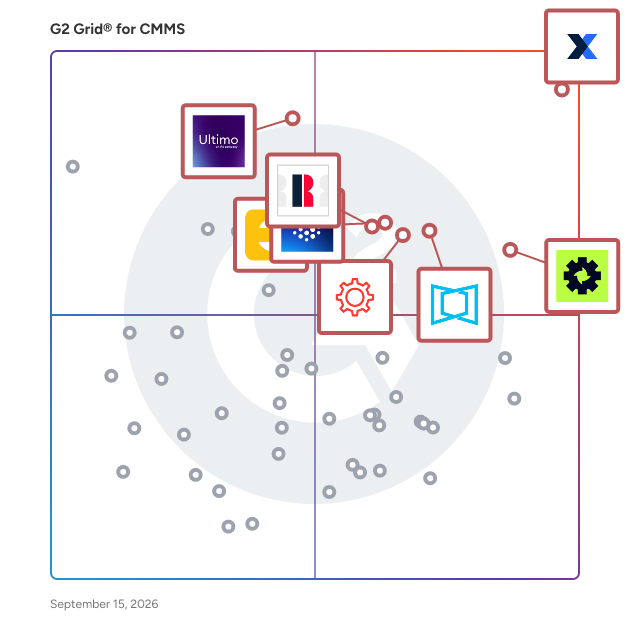
Featured CMMS Software At A Glance

Leader:
Highest Performer:
Easiest to Use:
Top Trending:
Show LessShow More
Highest Performer:
Easiest to Use:
Top Trending:

G2 takes pride in showing unbiased reviews on user satisfaction in our ratings and reports. We do not allow paid placements in any of our ratings, rankings, or reports. Learn about our scoring methodologies.

No filters applied
387 Listings in CMMS Available
  • Overview
    Expand/Collapse Overview
  • Product Description
    How are these determined?Information
    This description is provided by the seller.

    Tractian is the AI-powered platform for Predictive Maintenance and Production Performance chosen by 1,500 of the world’s most demanding manufacturers. We provide an end-to-end "Plug & Play" ecosys

    Users
    No information available
    Industries
    • Manufacturing
    • Food & Beverages
    Market Segment
    • 42% Mid-Market
    • 20% Enterprise
    User Sentiment
    How are these determined?Information
    These insights, currently in beta, are compiled from user reviews and grouped to display a high-level overview of the software.
    • TRACTIAN is a software that provides real-time operational feedback, predictive maintenance, and machine monitoring for effective management and maintenance of equipment.
    • Reviewers appreciate TRACTIAN's easy-to-use interface, real-time alerts, predictive capabilities, and the ability to consolidate machine information in one spot, which helps in reducing unplanned equipment downtime and managing equipment effectively.
    • Reviewers mentioned issues with the implementation process being slow, the physical implementation on production machines being difficult, limitations with dashboard customization and mobile app, and the alerts being too frequent.
  • Pros and Cons
    Expand/Collapse Pros and Cons
  • TRACTIAN Pros and Cons
    How are these determined?Information
    Pros and Cons are compiled from review feedback and grouped into themes to provide an easy-to-understand summary of user reviews.
    Pros
    Ease of Use
    20
    Real-time Monitoring
    11
    Customer Support
    10
    Efficiency
    10
    Real-Time Monitoring
    10
    Cons
    Complex Usability
    10
    Difficult Learning
    9
    Expensive
    5
    Learning Curve
    5
    Usability Issues
    4
  • User Satisfaction
    Expand/Collapse User Satisfaction
  • TRACTIAN features and usability ratings that predict user satisfaction
    8.8
    Has the product been a good partner in doing business?
    Average: 9.1
    9.0
    Work Order Management
    Average: 8.6
    9.0
    Preventative Maintenance (PM)
    Average: 8.6
    9.1
    Equipment Breakdown Reports
    Average: 8.3
  • Seller Details
    Expand/Collapse Seller Details
  • Seller Details
    Seller
    Tractian
    Company Website
    Year Founded
    2019
    HQ Location
    Atlanta, GA
    Twitter
    @tractian
    519 Twitter followers
    LinkedIn® Page
    www.linkedin.com
    275 employees on LinkedIn®
Product Description
How are these determined?Information
This description is provided by the seller.

Tractian is the AI-powered platform for Predictive Maintenance and Production Performance chosen by 1,500 of the world’s most demanding manufacturers. We provide an end-to-end "Plug & Play" ecosys

Users
No information available
Industries
  • Manufacturing
  • Food & Beverages
Market Segment
  • 42% Mid-Market
  • 20% Enterprise
User Sentiment
How are these determined?Information
These insights, currently in beta, are compiled from user reviews and grouped to display a high-level overview of the software.
  • TRACTIAN is a software that provides real-time operational feedback, predictive maintenance, and machine monitoring for effective management and maintenance of equipment.
  • Reviewers appreciate TRACTIAN's easy-to-use interface, real-time alerts, predictive capabilities, and the ability to consolidate machine information in one spot, which helps in reducing unplanned equipment downtime and managing equipment effectively.
  • Reviewers mentioned issues with the implementation process being slow, the physical implementation on production machines being difficult, limitations with dashboard customization and mobile app, and the alerts being too frequent.
TRACTIAN Pros and Cons
How are these determined?Information
Pros and Cons are compiled from review feedback and grouped into themes to provide an easy-to-understand summary of user reviews.
Pros
Ease of Use
20
Real-time Monitoring
11
Customer Support
10
Efficiency
10
Real-Time Monitoring
10
Cons
Complex Usability
10
Difficult Learning
9
Expensive
5
Learning Curve
5
Usability Issues
4
TRACTIAN features and usability ratings that predict user satisfaction
8.8
Has the product been a good partner in doing business?
Average: 9.1
9.0
Work Order Management
Average: 8.6
9.0
Preventative Maintenance (PM)
Average: 8.6
9.1
Equipment Breakdown Reports
Average: 8.3
Seller Details
Seller
Tractian
Company Website
Year Founded
2019
HQ Location
Atlanta, GA
Twitter
@tractian
519 Twitter followers
LinkedIn® Page
www.linkedin.com
275 employees on LinkedIn®
(38)4.5 out of 5
Optimized for quick response
  • Overview
    Expand/Collapse Overview
  • Product Description
    How are these determined?Information
    This description is provided by the seller.

    WebTMA is an enterprise CMMS and enterprise asset management (EAM) platform built for mid-size to large organizations managing complex, multi-site facilities and maintenance operations across sectors

    Users
    No information available
    Industries
    • Higher Education
    • Facilities Services
    Market Segment
    • 53% Mid-Market
    • 39% Enterprise
  • Pros and Cons
    Expand/Collapse Pros and Cons
  • WebTMA Pros and Cons
    How are these determined?Information
    Pros and Cons are compiled from review feedback and grouped into themes to provide an easy-to-understand summary of user reviews.
    Pros
    Ease of Use
    4
    Tracking Ease
    3
    Customer Support
    2
    Features
    2
    Reporting
    2
    Cons
    Integration Issues
    2
    Training Required
    2
    Asset Management Issues
    1
    Billing Problems
    1
    Bugs
    1
  • User Satisfaction
    Expand/Collapse User Satisfaction
  • WebTMA features and usability ratings that predict user satisfaction
    9.7
    Has the product been a good partner in doing business?
    Average: 9.1
    9.7
    Work Order Management
    Average: 8.6
    9.2
    Preventative Maintenance (PM)
    Average: 8.6
    9.8
    Equipment Breakdown Reports
    Average: 8.3
  • Seller Details
    Expand/Collapse Seller Details
  • Seller Details
    Company Website
    Year Founded
    1988
    HQ Location
    Tulsa, Oklahoma
    Twitter
    @TMA_Systems
    121 Twitter followers
    LinkedIn® Page
    www.linkedin.com
    204 employees on LinkedIn®
Product Description
How are these determined?Information
This description is provided by the seller.

WebTMA is an enterprise CMMS and enterprise asset management (EAM) platform built for mid-size to large organizations managing complex, multi-site facilities and maintenance operations across sectors

Users
No information available
Industries
  • Higher Education
  • Facilities Services
Market Segment
  • 53% Mid-Market
  • 39% Enterprise
WebTMA Pros and Cons
How are these determined?Information
Pros and Cons are compiled from review feedback and grouped into themes to provide an easy-to-understand summary of user reviews.
Pros
Ease of Use
4
Tracking Ease
3
Customer Support
2
Features
2
Reporting
2
Cons
Integration Issues
2
Training Required
2
Asset Management Issues
1
Billing Problems
1
Bugs
1
WebTMA features and usability ratings that predict user satisfaction
9.7
Has the product been a good partner in doing business?
Average: 9.1
9.7
Work Order Management
Average: 8.6
9.2
Preventative Maintenance (PM)
Average: 8.6
9.8
Equipment Breakdown Reports
Average: 8.3
Seller Details
Company Website
Year Founded
1988
HQ Location
Tulsa, Oklahoma
Twitter
@TMA_Systems
121 Twitter followers
LinkedIn® Page
www.linkedin.com
204 employees on LinkedIn®
G2 Advertising
Sponsored
G2 Advertising
Get 2x conversion than Google Ads with G2 Advertising!
G2 Advertising places your product in premium positions on high-traffic pages and on targeted competitor pages to reach buyers at key comparison moments.
  • Overview
    Expand/Collapse Overview
  • Product Description
    How are these determined?Information
    This description is provided by the seller.

    MIR-RT is a fleet maintenance software designed for heavy-duty vehicle and equipment fleets. It helps both fleet managers and technicians work smarter, not harder, by reducing manual data entry, strea

    Users
    No information available
    Industries
    • Transportation/Trucking/Railroad
    Market Segment
    • 46% Mid-Market
    • 46% Small-Business
  • Pros and Cons
    Expand/Collapse Pros and Cons
  • MIR-RT Pros and Cons
    How are these determined?Information
    Pros and Cons are compiled from review feedback and grouped into themes to provide an easy-to-understand summary of user reviews.
    Pros
    Efficiency
    2
    Customer Support
    1
    Customizability
    1
    Ease of Use
    1
    Efficiency Improvement
    1
    Cons
    Learning Curve
    1
    Overwhelming Management
    1
    User Confusion
    1
  • User Satisfaction
    Expand/Collapse User Satisfaction
  • MIR-RT features and usability ratings that predict user satisfaction
    9.7
    Has the product been a good partner in doing business?
    Average: 9.1
    10.0
    Work Order Management
    Average: 8.6
    10.0
    Preventative Maintenance (PM)
    Average: 8.6
    9.8
    Equipment Breakdown Reports
    Average: 8.3
  • Seller Details
    Expand/Collapse Seller Details
  • Seller Details
    Seller
    DataDis
    Year Founded
    1990
    HQ Location
    Quebec City, CA
    LinkedIn® Page
    fr.linkedin.com
    60 employees on LinkedIn®
Product Description
How are these determined?Information
This description is provided by the seller.

MIR-RT is a fleet maintenance software designed for heavy-duty vehicle and equipment fleets. It helps both fleet managers and technicians work smarter, not harder, by reducing manual data entry, strea

Users
No information available
Industries
  • Transportation/Trucking/Railroad
Market Segment
  • 46% Mid-Market
  • 46% Small-Business
MIR-RT Pros and Cons
How are these determined?Information
Pros and Cons are compiled from review feedback and grouped into themes to provide an easy-to-understand summary of user reviews.
Pros
Efficiency
2
Customer Support
1
Customizability
1
Ease of Use
1
Efficiency Improvement
1
Cons
Learning Curve
1
Overwhelming Management
1
User Confusion
1
MIR-RT features and usability ratings that predict user satisfaction
9.7
Has the product been a good partner in doing business?
Average: 9.1
10.0
Work Order Management
Average: 8.6
10.0
Preventative Maintenance (PM)
Average: 8.6
9.8
Equipment Breakdown Reports
Average: 8.3
Seller Details
Seller
DataDis
Year Founded
1990
HQ Location
Quebec City, CA
LinkedIn® Page
fr.linkedin.com
60 employees on LinkedIn®
  • Overview
    Expand/Collapse Overview
  • Product Description
    How are these determined?Information
    This description is provided by the seller.

    Oracle Maintenance Cloud offers an integrated asset management solution that enables efficient and productive plant maintenance operations.

    Users
    No information available
    Industries
    No information available
    Market Segment
    • 45% Mid-Market
    • 36% Enterprise
  • Pros and Cons
    Expand/Collapse Pros and Cons
  • Oracle Maintenance Cloud Pros and Cons
    How are these determined?Information
    Pros and Cons are compiled from review feedback and grouped into themes to provide an easy-to-understand summary of user reviews.
    Pros
    Ease of Use
    4
    Customer Support
    2
    Intuitive
    2
    Navigation Ease
    2
    Reporting
    2
    Cons
    Access Control
    1
    Data Management Issues
    1
    Expensive
    1
    Learning Curve
    1
    Poor Customer Support
    1
  • User Satisfaction
    Expand/Collapse User Satisfaction
  • Oracle Maintenance Cloud features and usability ratings that predict user satisfaction
    9.4
    Has the product been a good partner in doing business?
    Average: 9.1
    8.0
    Work Order Management
    Average: 8.6
    7.7
    Preventative Maintenance (PM)
    Average: 8.6
    8.1
    Equipment Breakdown Reports
    Average: 8.3
  • Seller Details
    Expand/Collapse Seller Details
  • Seller Details
    Seller
    Oracle
    Year Founded
    1977
    HQ Location
    Austin, TX
    Twitter
    @Oracle
    825,309 Twitter followers
    LinkedIn® Page
    www.linkedin.com
    198,071 employees on LinkedIn®
    Ownership
    NYSE:ORCL
Product Description
How are these determined?Information
This description is provided by the seller.

Oracle Maintenance Cloud offers an integrated asset management solution that enables efficient and productive plant maintenance operations.

Users
No information available
Industries
No information available
Market Segment
  • 45% Mid-Market
  • 36% Enterprise
Oracle Maintenance Cloud Pros and Cons
How are these determined?Information
Pros and Cons are compiled from review feedback and grouped into themes to provide an easy-to-understand summary of user reviews.
Pros
Ease of Use
4
Customer Support
2
Intuitive
2
Navigation Ease
2
Reporting
2
Cons
Access Control
1
Data Management Issues
1
Expensive
1
Learning Curve
1
Poor Customer Support
1
Oracle Maintenance Cloud features and usability ratings that predict user satisfaction
9.4
Has the product been a good partner in doing business?
Average: 9.1
8.0
Work Order Management
Average: 8.6
7.7
Preventative Maintenance (PM)
Average: 8.6
8.1
Equipment Breakdown Reports
Average: 8.3
Seller Details
Seller
Oracle
Year Founded
1977
HQ Location
Austin, TX
Twitter
@Oracle
825,309 Twitter followers
LinkedIn® Page
www.linkedin.com
198,071 employees on LinkedIn®
Ownership
NYSE:ORCL
Entry Level Price:Free
  • Overview
    Expand/Collapse Overview
  • Product Description
    How are these determined?Information
    This description is provided by the seller.

    Fabrico is a mobile-first, AI-powered CMMS and OEE solution designed to help manufacturers reduce downtime, optimize maintenance, and improve operational efficiency. It enables factories to digitalize

    Users
    No information available
    Industries
    • Information Technology and Services
    Market Segment
    • 58% Mid-Market
    • 37% Small-Business
    User Sentiment
    How are these determined?Information
    These insights, currently in beta, are compiled from user reviews and grouped to display a high-level overview of the software.
    • Fabrico is a maintenance management platform that allows users to scan QR codes on machines to view maintenance history, manuals, and open work orders, assign and track work orders, and view dashboards for downtime, MTTR, and OEE.
    • Reviewers frequently mention the ease of use, mobile accessibility, clear task prioritization, real-time analytics, and excellent customer support as key benefits of using Fabrico, with the mobile app and QR code scanning feature being particularly appreciated for its time-saving capabilities.
    • Users experienced challenges during the initial setup, particularly with migrating data from spreadsheets and integrating with existing systems, and some found the custom reporting features and dashboard configurations to be lacking in flexibility, while others noted occasional issues with the mobile app in areas with weak signal.
  • Pros and Cons
    Expand/Collapse Pros and Cons
  • Fabrico Pros and Cons
    How are these determined?Information
    Pros and Cons are compiled from review feedback and grouped into themes to provide an easy-to-understand summary of user reviews.
    Pros
    Ease of Use
    12
    Task Management
    8
    Real-time Updates
    7
    Efficiency
    6
    Intuitive
    6
    Cons
    Complex Customization
    3
    Complex Setup
    3
    Difficult Setup
    3
    Integration Issues
    2
    Integration Problems
    2
  • User Satisfaction
    Expand/Collapse User Satisfaction
  • Fabrico features and usability ratings that predict user satisfaction
    8.9
    Has the product been a good partner in doing business?
    Average: 9.1
    9.9
    Work Order Management
    Average: 8.6
    9.2
    Preventative Maintenance (PM)
    Average: 8.6
    9.3
    Equipment Breakdown Reports
    Average: 8.3
  • Seller Details
    Expand/Collapse Seller Details
  • Seller Details
    Company Website
    HQ Location
    Sofia, Sofia City, Bulgaria
    LinkedIn® Page
    www.linkedin.com
    22 employees on LinkedIn®
Product Description
How are these determined?Information
This description is provided by the seller.

Fabrico is a mobile-first, AI-powered CMMS and OEE solution designed to help manufacturers reduce downtime, optimize maintenance, and improve operational efficiency. It enables factories to digitalize

Users
No information available
Industries
  • Information Technology and Services
Market Segment
  • 58% Mid-Market
  • 37% Small-Business
User Sentiment
How are these determined?Information
These insights, currently in beta, are compiled from user reviews and grouped to display a high-level overview of the software.
  • Fabrico is a maintenance management platform that allows users to scan QR codes on machines to view maintenance history, manuals, and open work orders, assign and track work orders, and view dashboards for downtime, MTTR, and OEE.
  • Reviewers frequently mention the ease of use, mobile accessibility, clear task prioritization, real-time analytics, and excellent customer support as key benefits of using Fabrico, with the mobile app and QR code scanning feature being particularly appreciated for its time-saving capabilities.
  • Users experienced challenges during the initial setup, particularly with migrating data from spreadsheets and integrating with existing systems, and some found the custom reporting features and dashboard configurations to be lacking in flexibility, while others noted occasional issues with the mobile app in areas with weak signal.
Fabrico Pros and Cons
How are these determined?Information
Pros and Cons are compiled from review feedback and grouped into themes to provide an easy-to-understand summary of user reviews.
Pros
Ease of Use
12
Task Management
8
Real-time Updates
7
Efficiency
6
Intuitive
6
Cons
Complex Customization
3
Complex Setup
3
Difficult Setup
3
Integration Issues
2
Integration Problems
2
Fabrico features and usability ratings that predict user satisfaction
8.9
Has the product been a good partner in doing business?
Average: 9.1
9.9
Work Order Management
Average: 8.6
9.2
Preventative Maintenance (PM)
Average: 8.6
9.3
Equipment Breakdown Reports
Average: 8.3
Seller Details
Company Website
HQ Location
Sofia, Sofia City, Bulgaria
LinkedIn® Page
www.linkedin.com
22 employees on LinkedIn®
  • Overview
    Expand/Collapse Overview
  • Product Description
    How are these determined?Information
    This description is provided by the seller.

    Click Maint CMMS is a Computerized Maintenance Management System (CMMS) solution designed to help users streamline their maintenance operations. This software is tailored for organizations aiming to e

    Users
    No information available
    Industries
    • Manufacturing
    Market Segment
    • 48% Small-Business
    • 45% Mid-Market
    User Sentiment
    How are these determined?Information
    These insights, currently in beta, are compiled from user reviews and grouped to display a high-level overview of the software.
    • Click Maint CMMS is a software accessible through mobile devices that allows staff to access and close work orders from the field, track preventative maintenance, and manage multiple facilities.
    • Reviewers appreciate the user-friendly interface, straightforward navigation, and the ability to preplan work orders, which enhances productivity by handling repetitive scheduling without constant oversight.
    • Users experienced issues with the mobile app not being formatted the same as the desktop version, system performance slowing down during heavy usage, and difficulty in integrating the system with other platforms or exporting certain reports.
  • Pros and Cons
    Expand/Collapse Pros and Cons
  • Click Maint CMMS Pros and Cons
    How are these determined?Information
    Pros and Cons are compiled from review feedback and grouped into themes to provide an easy-to-understand summary of user reviews.
    Pros
    Ease of Use
    31
    Simple
    12
    Customer Support
    11
    Implementation Ease
    11
    Intuitive
    11
    Cons
    Missing Features
    8
    Limited Features
    4
    App Stability
    3
    Asset Management
    3
    Asset Management Issues
    2
  • User Satisfaction
    Expand/Collapse User Satisfaction
  • Click Maint CMMS features and usability ratings that predict user satisfaction
    9.8
    Has the product been a good partner in doing business?
    Average: 9.1
    9.5
    Work Order Management
    Average: 8.6
    9.3
    Preventative Maintenance (PM)
    Average: 8.6
    8.2
    Equipment Breakdown Reports
    Average: 8.3
  • Seller Details
    Expand/Collapse Seller Details
  • Seller Details
    Company Website
    Year Founded
    2023
    HQ Location
    Headingley, CA
    Twitter
    @clickmaint
    34 Twitter followers
    LinkedIn® Page
    www.linkedin.com
    15 employees on LinkedIn®
Product Description
How are these determined?Information
This description is provided by the seller.

Click Maint CMMS is a Computerized Maintenance Management System (CMMS) solution designed to help users streamline their maintenance operations. This software is tailored for organizations aiming to e

Users
No information available
Industries
  • Manufacturing
Market Segment
  • 48% Small-Business
  • 45% Mid-Market
User Sentiment
How are these determined?Information
These insights, currently in beta, are compiled from user reviews and grouped to display a high-level overview of the software.
  • Click Maint CMMS is a software accessible through mobile devices that allows staff to access and close work orders from the field, track preventative maintenance, and manage multiple facilities.
  • Reviewers appreciate the user-friendly interface, straightforward navigation, and the ability to preplan work orders, which enhances productivity by handling repetitive scheduling without constant oversight.
  • Users experienced issues with the mobile app not being formatted the same as the desktop version, system performance slowing down during heavy usage, and difficulty in integrating the system with other platforms or exporting certain reports.
Click Maint CMMS Pros and Cons
How are these determined?Information
Pros and Cons are compiled from review feedback and grouped into themes to provide an easy-to-understand summary of user reviews.
Pros
Ease of Use
31
Simple
12
Customer Support
11
Implementation Ease
11
Intuitive
11
Cons
Missing Features
8
Limited Features
4
App Stability
3
Asset Management
3
Asset Management Issues
2
Click Maint CMMS features and usability ratings that predict user satisfaction
9.8
Has the product been a good partner in doing business?
Average: 9.1
9.5
Work Order Management
Average: 8.6
9.3
Preventative Maintenance (PM)
Average: 8.6
8.2
Equipment Breakdown Reports
Average: 8.3
Seller Details
Company Website
Year Founded
2023
HQ Location
Headingley, CA
Twitter
@clickmaint
34 Twitter followers
LinkedIn® Page
www.linkedin.com
15 employees on LinkedIn®
  • Overview
    Expand/Collapse Overview
  • Product Description
    How are these determined?Information
    This description is provided by the seller.

    FMX is a Computerized Maintenance Management System (CMMS) that allows organizations to increase operational efficiency and leverage data to justify additional resources. One of the most significant p

    Users
    No information available
    Industries
    • Education Management
    • Primary/Secondary Education
    Market Segment
    • 87% Mid-Market
    • 10% Enterprise
  • Pros and Cons
    Expand/Collapse Pros and Cons
  • FMX Pros and Cons
    How are these determined?Information
    Pros and Cons are compiled from review feedback and grouped into themes to provide an easy-to-understand summary of user reviews.
    Pros
    Ease of Use
    12
    Customer Support
    9
    Task Management
    7
    Customizability
    6
    Efficiency
    4
    Cons
    Feature Overload
    3
    Missing Features
    3
    Work Order Issues
    3
    Expensive
    2
    Implementation Delays
    2
  • User Satisfaction
    Expand/Collapse User Satisfaction
  • FMX features and usability ratings that predict user satisfaction
    9.3
    Has the product been a good partner in doing business?
    Average: 9.1
    8.8
    Work Order Management
    Average: 8.6
    8.7
    Preventative Maintenance (PM)
    Average: 8.6
    7.4
    Equipment Breakdown Reports
    Average: 8.3
  • Seller Details
    Expand/Collapse Seller Details
  • Seller Details
    Company Website
    Year Founded
    2012
    HQ Location
    Grandview Heights, Ohio
    Twitter
    @FMXpress
    190 Twitter followers
    LinkedIn® Page
    www.linkedin.com
    216 employees on LinkedIn®
Product Description
How are these determined?Information
This description is provided by the seller.

FMX is a Computerized Maintenance Management System (CMMS) that allows organizations to increase operational efficiency and leverage data to justify additional resources. One of the most significant p

Users
No information available
Industries
  • Education Management
  • Primary/Secondary Education
Market Segment
  • 87% Mid-Market
  • 10% Enterprise
FMX Pros and Cons
How are these determined?Information
Pros and Cons are compiled from review feedback and grouped into themes to provide an easy-to-understand summary of user reviews.
Pros
Ease of Use
12
Customer Support
9
Task Management
7
Customizability
6
Efficiency
4
Cons
Feature Overload
3
Missing Features
3
Work Order Issues
3
Expensive
2
Implementation Delays
2
FMX features and usability ratings that predict user satisfaction
9.3
Has the product been a good partner in doing business?
Average: 9.1
8.8
Work Order Management
Average: 8.6
8.7
Preventative Maintenance (PM)
Average: 8.6
7.4
Equipment Breakdown Reports
Average: 8.3
Seller Details
Company Website
Year Founded
2012
HQ Location
Grandview Heights, Ohio
Twitter
@FMXpress
190 Twitter followers
LinkedIn® Page
www.linkedin.com
216 employees on LinkedIn®
  • Overview
    Expand/Collapse Overview
  • Product Description
    How are these determined?Information
    This description is provided by the seller.

    MVP One CMMS is a comprehensive maintenance management platform designed to streamline operations and transition organizations from reactive to proactive maintenance. By serving as a single source of

    Users
    • Maintenance Manager
    • Maintenance Supervisor
    Industries
    • Food Production
    • Food & Beverages
    Market Segment
    • 64% Mid-Market
    • 19% Small-Business
  • Pros and Cons
    Expand/Collapse Pros and Cons
  • MVP One Pros and Cons
    How are these determined?Information
    Pros and Cons are compiled from review feedback and grouped into themes to provide an easy-to-understand summary of user reviews.
    Pros
    Customizability
    1
    Ease of Use
    1
    Cons
    Software Bugs
    1
  • User Satisfaction
    Expand/Collapse User Satisfaction
  • MVP One features and usability ratings that predict user satisfaction
    9.5
    Has the product been a good partner in doing business?
    Average: 9.1
    9.0
    Work Order Management
    Average: 8.6
    9.3
    Preventative Maintenance (PM)
    Average: 8.6
    8.6
    Equipment Breakdown Reports
    Average: 8.3
  • Seller Details
    Expand/Collapse Seller Details
  • Seller Details
    Seller
    MVP One
    Year Founded
    2000
    HQ Location
    Chicago, IL
    Twitter
    @winreliability
    1,822 Twitter followers
    LinkedIn® Page
    www.linkedin.com
    85 employees on LinkedIn®
Product Description
How are these determined?Information
This description is provided by the seller.

MVP One CMMS is a comprehensive maintenance management platform designed to streamline operations and transition organizations from reactive to proactive maintenance. By serving as a single source of

Users
  • Maintenance Manager
  • Maintenance Supervisor
Industries
  • Food Production
  • Food & Beverages
Market Segment
  • 64% Mid-Market
  • 19% Small-Business
MVP One Pros and Cons
How are these determined?Information
Pros and Cons are compiled from review feedback and grouped into themes to provide an easy-to-understand summary of user reviews.
Pros
Customizability
1
Ease of Use
1
Cons
Software Bugs
1
MVP One features and usability ratings that predict user satisfaction
9.5
Has the product been a good partner in doing business?
Average: 9.1
9.0
Work Order Management
Average: 8.6
9.3
Preventative Maintenance (PM)
Average: 8.6
8.6
Equipment Breakdown Reports
Average: 8.3
Seller Details
Seller
MVP One
Year Founded
2000
HQ Location
Chicago, IL
Twitter
@winreliability
1,822 Twitter followers
LinkedIn® Page
www.linkedin.com
85 employees on LinkedIn®
(63)4.9 out of 5
Optimized for quick response
Entry Level Price:Starting at €185.00
  • Overview
    Expand/Collapse Overview
  • Product Description
    How are these determined?Information
    This description is provided by the seller.

    Timly is a cloud-based asset tracking and maintenance solution designed to help businesses efficiently monitor and manage their inventory processes. This platform caters to a wide range of industries,

    Users
    No information available
    Industries
    • Construction
    • Hospital & Health Care
    Market Segment
    • 62% Mid-Market
    • 33% Small-Business
  • Pros and Cons
    Expand/Collapse Pros and Cons
  • Timly Pros and Cons
    How are these determined?Information
    Pros and Cons are compiled from review feedback and grouped into themes to provide an easy-to-understand summary of user reviews.
    Pros
    Alerts
    1
    Communication
    1
    Customer Support
    1
    Ease of Use
    1
    Efficiency
    1
    Cons
    Poor Design
    1
    Poor Interface Design
    1
  • User Satisfaction
    Expand/Collapse User Satisfaction
  • Timly features and usability ratings that predict user satisfaction
    9.4
    Has the product been a good partner in doing business?
    Average: 9.1
    8.3
    Work Order Management
    Average: 8.6
    8.3
    Preventative Maintenance (PM)
    Average: 8.6
    9.4
    Equipment Breakdown Reports
    Average: 8.3
  • Seller Details
    Expand/Collapse Seller Details
  • Seller Details
    Company Website
    Year Founded
    2020
    HQ Location
    Zürich, CH
    LinkedIn® Page
    www.linkedin.com
    28 employees on LinkedIn®
Product Description
How are these determined?Information
This description is provided by the seller.

Timly is a cloud-based asset tracking and maintenance solution designed to help businesses efficiently monitor and manage their inventory processes. This platform caters to a wide range of industries,

Users
No information available
Industries
  • Construction
  • Hospital & Health Care
Market Segment
  • 62% Mid-Market
  • 33% Small-Business
Timly Pros and Cons
How are these determined?Information
Pros and Cons are compiled from review feedback and grouped into themes to provide an easy-to-understand summary of user reviews.
Pros
Alerts
1
Communication
1
Customer Support
1
Ease of Use
1
Efficiency
1
Cons
Poor Design
1
Poor Interface Design
1
Timly features and usability ratings that predict user satisfaction
9.4
Has the product been a good partner in doing business?
Average: 9.1
8.3
Work Order Management
Average: 8.6
8.3
Preventative Maintenance (PM)
Average: 8.6
9.4
Equipment Breakdown Reports
Average: 8.3
Seller Details
Company Website
Year Founded
2020
HQ Location
Zürich, CH
LinkedIn® Page
www.linkedin.com
28 employees on LinkedIn®
  • Overview
    Expand/Collapse Overview
  • Product Description
    How are these determined?Information
    This description is provided by the seller.

    MapTrack is the AI AssetOps Platform built to unify asset tracking, maintenance, compliance & scheduling/planning for industrial and field-based teams. Designed for heavy-duty environments like

    Users
    No information available
    Industries
    • Construction
    Market Segment
    • 57% Mid-Market
    • 21% Small-Business
  • Pros and Cons
    Expand/Collapse Pros and Cons
  • MapTrack Pros and Cons
    How are these determined?Information
    Pros and Cons are compiled from review feedback and grouped into themes to provide an easy-to-understand summary of user reviews.
    Pros
    Ease of Use
    10
    Features
    7
    Tracking
    6
    Efficiency
    5
    Time-saving
    4
    Cons
    Bug Issues
    1
    Complex Setup
    1
    Inaccurate Location Tracking
    1
    Integration Issues
    1
    Integration Problems
    1
  • User Satisfaction
    Expand/Collapse User Satisfaction
  • MapTrack features and usability ratings that predict user satisfaction
    10.0
    Has the product been a good partner in doing business?
    Average: 9.1
    0.0
    No information available
    0.0
    No information available
    0.0
    No information available
  • Seller Details
    Expand/Collapse Seller Details
  • Seller Details
    Seller
    MapTrack
    Year Founded
    2019
    HQ Location
    Coorparoo, AU
    LinkedIn® Page
    www.linkedin.com
    14 employees on LinkedIn®
Product Description
How are these determined?Information
This description is provided by the seller.

MapTrack is the AI AssetOps Platform built to unify asset tracking, maintenance, compliance & scheduling/planning for industrial and field-based teams. Designed for heavy-duty environments like

Users
No information available
Industries
  • Construction
Market Segment
  • 57% Mid-Market
  • 21% Small-Business
MapTrack Pros and Cons
How are these determined?Information
Pros and Cons are compiled from review feedback and grouped into themes to provide an easy-to-understand summary of user reviews.
Pros
Ease of Use
10
Features
7
Tracking
6
Efficiency
5
Time-saving
4
Cons
Bug Issues
1
Complex Setup
1
Inaccurate Location Tracking
1
Integration Issues
1
Integration Problems
1
MapTrack features and usability ratings that predict user satisfaction
10.0
Has the product been a good partner in doing business?
Average: 9.1
0.0
No information available
0.0
No information available
0.0
No information available
Seller Details
Seller
MapTrack
Year Founded
2019
HQ Location
Coorparoo, AU
LinkedIn® Page
www.linkedin.com
14 employees on LinkedIn®
  • Overview
    Expand/Collapse Overview
  • Product Description
    How are these determined?Information
    This description is provided by the seller.

    Maintenance Care is a simply powerful maintenance management software designed to help keep facilities running smoothly. This computerized maintenance management system (CMMS) is accessible through ei

    Users
    No information available
    Industries
    • Hospital & Health Care
    • Non-Profit Organization Management
    Market Segment
    • 57% Mid-Market
    • 35% Small-Business
  • Pros and Cons
    Expand/Collapse Pros and Cons
  • Maintenance Care Pros and Cons
    How are these determined?Information
    Pros and Cons are compiled from review feedback and grouped into themes to provide an easy-to-understand summary of user reviews.
    Pros
    Ease of Use
    13
    Maintenance Efficiency
    9
    Task Management
    9
    Work Orders
    9
    Customer Support
    6
    Cons
    Work Order Issues
    4
    Not User-Friendly
    3
    Difficult Learning
    2
    Limited Customization
    2
    Poor Usability
    2
  • User Satisfaction
    Expand/Collapse User Satisfaction
  • Maintenance Care features and usability ratings that predict user satisfaction
    9.3
    Has the product been a good partner in doing business?
    Average: 9.1
    9.5
    Work Order Management
    Average: 8.6
    9.4
    Preventative Maintenance (PM)
    Average: 8.6
    8.3
    Equipment Breakdown Reports
    Average: 8.3
  • Seller Details
    Expand/Collapse Seller Details
  • Seller Details
    Year Founded
    2003
    HQ Location
    Cambridge ON , ON
    Twitter
    @MaintenanceCare
    125 Twitter followers
    LinkedIn® Page
    www.linkedin.com
    33 employees on LinkedIn®
Product Description
How are these determined?Information
This description is provided by the seller.

Maintenance Care is a simply powerful maintenance management software designed to help keep facilities running smoothly. This computerized maintenance management system (CMMS) is accessible through ei

Users
No information available
Industries
  • Hospital & Health Care
  • Non-Profit Organization Management
Market Segment
  • 57% Mid-Market
  • 35% Small-Business
Maintenance Care Pros and Cons
How are these determined?Information
Pros and Cons are compiled from review feedback and grouped into themes to provide an easy-to-understand summary of user reviews.
Pros
Ease of Use
13
Maintenance Efficiency
9
Task Management
9
Work Orders
9
Customer Support
6
Cons
Work Order Issues
4
Not User-Friendly
3
Difficult Learning
2
Limited Customization
2
Poor Usability
2
Maintenance Care features and usability ratings that predict user satisfaction
9.3
Has the product been a good partner in doing business?
Average: 9.1
9.5
Work Order Management
Average: 8.6
9.4
Preventative Maintenance (PM)
Average: 8.6
8.3
Equipment Breakdown Reports
Average: 8.3
Seller Details
Year Founded
2003
HQ Location
Cambridge ON , ON
Twitter
@MaintenanceCare
125 Twitter followers
LinkedIn® Page
www.linkedin.com
33 employees on LinkedIn®
Entry Level Price:$1,000.00
  • Overview
    Expand/Collapse Overview
  • Product Description
    How are these determined?Information
    This description is provided by the seller.

    GoCodes Asset Tracking Software was built for trades! Use it to track your fleet, heavy equipment & hand tools with our people-friendly software and our Real Time GPS trackers, Bluetooth Beacons &

    Users
    No information available
    Industries
    • Education Management
    Market Segment
    • 45% Mid-Market
    • 41% Small-Business
  • Pros and Cons
    Expand/Collapse Pros and Cons
  • GoCodes Asset Tracking Pros and Cons
    How are these determined?Information
    Pros and Cons are compiled from review feedback and grouped into themes to provide an easy-to-understand summary of user reviews.
    Pros
    Ease of Use
    6
    Organization
    2
    Centralization
    1
    Clarity
    1
    Customizability
    1
    Cons
    Data Entry Issues
    1
    Data Management
    1
    Expensive
    1
    Insufficient Information
    1
    Inventory Management
    1
  • User Satisfaction
    Expand/Collapse User Satisfaction
  • GoCodes Asset Tracking features and usability ratings that predict user satisfaction
    9.5
    Has the product been a good partner in doing business?
    Average: 9.1
    0.0
    No information available
    0.0
    No information available
    0.0
    No information available
  • Seller Details
    Expand/Collapse Seller Details
  • Seller Details
    Seller
    GoCodes
    Company Website
    Year Founded
    2011
    HQ Location
    Bloomington, Minnesota
    LinkedIn® Page
    www.linkedin.com
    4 employees on LinkedIn®
Product Description
How are these determined?Information
This description is provided by the seller.

GoCodes Asset Tracking Software was built for trades! Use it to track your fleet, heavy equipment & hand tools with our people-friendly software and our Real Time GPS trackers, Bluetooth Beacons &

Users
No information available
Industries
  • Education Management
Market Segment
  • 45% Mid-Market
  • 41% Small-Business
GoCodes Asset Tracking Pros and Cons
How are these determined?Information
Pros and Cons are compiled from review feedback and grouped into themes to provide an easy-to-understand summary of user reviews.
Pros
Ease of Use
6
Organization
2
Centralization
1
Clarity
1
Customizability
1
Cons
Data Entry Issues
1
Data Management
1
Expensive
1
Insufficient Information
1
Inventory Management
1
GoCodes Asset Tracking features and usability ratings that predict user satisfaction
9.5
Has the product been a good partner in doing business?
Average: 9.1
0.0
No information available
0.0
No information available
0.0
No information available
Seller Details
Seller
GoCodes
Company Website
Year Founded
2011
HQ Location
Bloomington, Minnesota
LinkedIn® Page
www.linkedin.com
4 employees on LinkedIn®
(121)4.3 out of 5
Optimized for quick response
  • Overview
    Expand/Collapse Overview
  • Product Description
    How are these determined?Information
    This description is provided by the seller.

    L2L is the Connected Manufacturing Operations Platform that eliminates downtime and increases productivity. Our platform delivers real-time guidance to frontline teams, unified control for operations

    Users
    No information available
    Industries
    • Manufacturing
    • Automotive
    Market Segment
    • 57% Mid-Market
    • 36% Enterprise
    User Sentiment
    How are these determined?Information
    These insights, currently in beta, are compiled from user reviews and grouped to display a high-level overview of the software.
    • L2L is a software that connects different areas within a plant, aiding in thorough quality checks and tracking operations effectively.
    • Users frequently mention the software's intuitive nature, its ability to hold a ton of data, and its real-time visibility that empowers teams and makes tasks more manageable.
    • Users experienced issues with the software being cluttered, having to log in multiple times to authenticate checks, and difficulty in accessing clear guidance on setting up and using certain features.
  • Pros and Cons
    Expand/Collapse Pros and Cons
  • L2L Pros and Cons
    How are these determined?Information
    Pros and Cons are compiled from review feedback and grouped into themes to provide an easy-to-understand summary of user reviews.
    Pros
    Ease of Use
    20
    Efficiency
    9
    Efficiency Improvement
    8
    Features
    7
    Navigation Ease
    7
    Cons
    Complex Usability
    12
    Confusing Interface
    5
    Learning Curve
    4
    Poor Interface Usability
    4
    Poor Navigation
    4
  • User Satisfaction
    Expand/Collapse User Satisfaction
  • L2L features and usability ratings that predict user satisfaction
    8.9
    Has the product been a good partner in doing business?
    Average: 9.1
    7.9
    Work Order Management
    Average: 8.6
    8.2
    Preventative Maintenance (PM)
    Average: 8.6
    8.3
    Equipment Breakdown Reports
    Average: 8.3
  • Seller Details
    Expand/Collapse Seller Details
  • Seller Details
    Seller
    L2L
    Company Website
    Year Founded
    2010
    HQ Location
    Salt Lake City, US
    Twitter
    @Leading2Lean
    348 Twitter followers
    LinkedIn® Page
    www.linkedin.com
    167 employees on LinkedIn®
Product Description
How are these determined?Information
This description is provided by the seller.

L2L is the Connected Manufacturing Operations Platform that eliminates downtime and increases productivity. Our platform delivers real-time guidance to frontline teams, unified control for operations

Users
No information available
Industries
  • Manufacturing
  • Automotive
Market Segment
  • 57% Mid-Market
  • 36% Enterprise
User Sentiment
How are these determined?Information
These insights, currently in beta, are compiled from user reviews and grouped to display a high-level overview of the software.
  • L2L is a software that connects different areas within a plant, aiding in thorough quality checks and tracking operations effectively.
  • Users frequently mention the software's intuitive nature, its ability to hold a ton of data, and its real-time visibility that empowers teams and makes tasks more manageable.
  • Users experienced issues with the software being cluttered, having to log in multiple times to authenticate checks, and difficulty in accessing clear guidance on setting up and using certain features.
L2L Pros and Cons
How are these determined?Information
Pros and Cons are compiled from review feedback and grouped into themes to provide an easy-to-understand summary of user reviews.
Pros
Ease of Use
20
Efficiency
9
Efficiency Improvement
8
Features
7
Navigation Ease
7
Cons
Complex Usability
12
Confusing Interface
5
Learning Curve
4
Poor Interface Usability
4
Poor Navigation
4
L2L features and usability ratings that predict user satisfaction
8.9
Has the product been a good partner in doing business?
Average: 9.1
7.9
Work Order Management
Average: 8.6
8.2
Preventative Maintenance (PM)
Average: 8.6
8.3
Equipment Breakdown Reports
Average: 8.3
Seller Details
Seller
L2L
Company Website
Year Founded
2010
HQ Location
Salt Lake City, US
Twitter
@Leading2Lean
348 Twitter followers
LinkedIn® Page
www.linkedin.com
167 employees on LinkedIn®
  • Overview
    Expand/Collapse Overview
  • Product Description
    How are these determined?Information
    This description is provided by the seller.

    SAIM (Smart Asset Integrity Management) is a modern, cloud-based platform that empowers infrastructure and operations teams to manage facilities, assets, and field data with greater visibility, accoun

    Users
    No information available
    Industries
    • Airlines/Aviation
    Market Segment
    • 60% Small-Business
    • 35% Mid-Market
    User Sentiment
    How are these determined?Information
    These insights, currently in beta, are compiled from user reviews and grouped to display a high-level overview of the software.
    • SAIM is a product that provides backend support and user-friendly features, designed to centralize data, track progress, manage asset integrity, and facilitate efficient operations.
    • Reviewers frequently mention the product's ability to keep maintenance records paperless, its user-friendly nature, the personalized support provided by the team, and its role in improving workflow and efficiency.
    • Users mentioned challenges in securing external buy-in due to the product's relative novelty, the need for multiple clicks and browsing to locate information, and issues with task filtering and inventory displays.
  • Pros and Cons
    Expand/Collapse Pros and Cons
  • SAIM Pros and Cons
    How are these determined?Information
    Pros and Cons are compiled from review feedback and grouped into themes to provide an easy-to-understand summary of user reviews.
    Pros
    Ease of Use
    12
    Data Management
    8
    Efficiency
    8
    Customer Support
    7
    Task Management
    7
    Cons
    Missing Features
    3
    Inadequate Reporting
    2
    Inefficiency
    2
    Limited Filtering
    2
    Poor User Experience
    2
  • User Satisfaction
    Expand/Collapse User Satisfaction
  • SAIM features and usability ratings that predict user satisfaction
    9.5
    Has the product been a good partner in doing business?
    Average: 9.1
    8.3
    Work Order Management
    Average: 8.6
    8.3
    Preventative Maintenance (PM)
    Average: 8.6
    7.3
    Equipment Breakdown Reports
    Average: 8.3
  • Seller Details
    Expand/Collapse Seller Details
  • Seller Details
    Seller
    SAIM
    Year Founded
    2019
    HQ Location
    Overland Park, US
    LinkedIn® Page
    www.linkedin.com
    20 employees on LinkedIn®
Product Description
How are these determined?Information
This description is provided by the seller.

SAIM (Smart Asset Integrity Management) is a modern, cloud-based platform that empowers infrastructure and operations teams to manage facilities, assets, and field data with greater visibility, accoun

Users
No information available
Industries
  • Airlines/Aviation
Market Segment
  • 60% Small-Business
  • 35% Mid-Market
User Sentiment
How are these determined?Information
These insights, currently in beta, are compiled from user reviews and grouped to display a high-level overview of the software.
  • SAIM is a product that provides backend support and user-friendly features, designed to centralize data, track progress, manage asset integrity, and facilitate efficient operations.
  • Reviewers frequently mention the product's ability to keep maintenance records paperless, its user-friendly nature, the personalized support provided by the team, and its role in improving workflow and efficiency.
  • Users mentioned challenges in securing external buy-in due to the product's relative novelty, the need for multiple clicks and browsing to locate information, and issues with task filtering and inventory displays.
SAIM Pros and Cons
How are these determined?Information
Pros and Cons are compiled from review feedback and grouped into themes to provide an easy-to-understand summary of user reviews.
Pros
Ease of Use
12
Data Management
8
Efficiency
8
Customer Support
7
Task Management
7
Cons
Missing Features
3
Inadequate Reporting
2
Inefficiency
2
Limited Filtering
2
Poor User Experience
2
SAIM features and usability ratings that predict user satisfaction
9.5
Has the product been a good partner in doing business?
Average: 9.1
8.3
Work Order Management
Average: 8.6
8.3
Preventative Maintenance (PM)
Average: 8.6
7.3
Equipment Breakdown Reports
Average: 8.3
Seller Details
Seller
SAIM
Year Founded
2019
HQ Location
Overland Park, US
LinkedIn® Page
www.linkedin.com
20 employees on LinkedIn®
  • Overview
    Expand/Collapse Overview
  • Product Description
    How are these determined?Information
    This description is provided by the seller.

    MasterControl Asset Excellence (Ax) combines modern CMMS capabilities with commercial-grade maintenance and calibration functionality on a trusted, cloud-based platform. Ax helps highly regulated comp

    Users
    No information available
    Industries
    • Biotechnology
    Market Segment
    • 62% Small-Business
    • 29% Mid-Market
  • Pros and Cons
    Expand/Collapse Pros and Cons
  • MasterControl Asset Excellence Pros and Cons
    How are these determined?Information
    Pros and Cons are compiled from review feedback and grouped into themes to provide an easy-to-understand summary of user reviews.
    Pros
    Customer Support
    3
    Asset Management
    1
    Customization
    1
    Downtime Reduction
    1
    Ease of Use
    1
    Cons
    Complexity
    1
    Implementation Delays
    1
    Location Limitations
    1
    Update Issues
    1
  • User Satisfaction
    Expand/Collapse User Satisfaction
  • MasterControl Asset Excellence features and usability ratings that predict user satisfaction
    9.8
    Has the product been a good partner in doing business?
    Average: 9.1
    9.2
    Work Order Management
    Average: 8.6
    9.4
    Preventative Maintenance (PM)
    Average: 8.6
    8.8
    Equipment Breakdown Reports
    Average: 8.3
  • Seller Details
    Expand/Collapse Seller Details
  • Seller Details
    Year Founded
    1993
    HQ Location
    Salt Lake City, UT
    Twitter
    @MCMasterControl
    6,287 Twitter followers
    LinkedIn® Page
    www.linkedin.com
    782 employees on LinkedIn®
Product Description
How are these determined?Information
This description is provided by the seller.

MasterControl Asset Excellence (Ax) combines modern CMMS capabilities with commercial-grade maintenance and calibration functionality on a trusted, cloud-based platform. Ax helps highly regulated comp

Users
No information available
Industries
  • Biotechnology
Market Segment
  • 62% Small-Business
  • 29% Mid-Market
MasterControl Asset Excellence Pros and Cons
How are these determined?Information
Pros and Cons are compiled from review feedback and grouped into themes to provide an easy-to-understand summary of user reviews.
Pros
Customer Support
3
Asset Management
1
Customization
1
Downtime Reduction
1
Ease of Use
1
Cons
Complexity
1
Implementation Delays
1
Location Limitations
1
Update Issues
1
MasterControl Asset Excellence features and usability ratings that predict user satisfaction
9.8
Has the product been a good partner in doing business?
Average: 9.1
9.2
Work Order Management
Average: 8.6
9.4
Preventative Maintenance (PM)
Average: 8.6
8.8
Equipment Breakdown Reports
Average: 8.3
Seller Details
Year Founded
1993
HQ Location
Salt Lake City, UT
Twitter
@MCMasterControl
6,287 Twitter followers
LinkedIn® Page
www.linkedin.com
782 employees on LinkedIn®