Best Calendar Software - Page 4

How Many Calendar Software Products Does G2 Track?

Total Products under this Category: 153

Category Stats (Sep 2026)

  • Average Rating: 4.46/5 (↑0.01 vs Aug 2026) The average rating of products in this category, based on all submitted ratings
  • Top Trending Product: GlossGenius (+4.34%) - Among all products in this category, GlossGenius recorded the largest rating increase compared to last month

Last updated: September 01, 2026

How Does G2 Rank Calendar Software Products?

Why You Can Trust G2's Software Rankings:

  • 30 Analysts and Data Experts
  • 150,100+ Authentic Reviews
  • 153+ Products
  • Unbiased Rankings

G2's software rankings are built on verified user reviews, rigorous moderation, and a consistent research methodology maintained by a team of analysts and data experts. Each product is measured using the same transparent criteria, with no paid placement or vendor influence. While reviews reflect real user experiences, which can be subjective, they offer valuable insight into how software performs in the hands of professionals. Together, these inputs power the G2 Score, a standardized way to compare tools within every category.

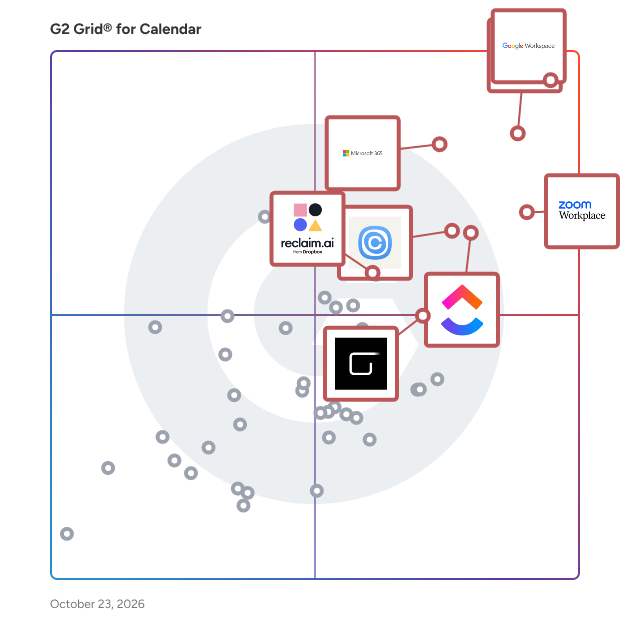
G2 Grid® for Calendar Software

G2 Grid® for Calendar Software plotting products by satisfaction and market presence

Highlighted products: Google Workspace, Microsoft Outlook, Zoom Workplace, Microsoft 365, Calendly, ClickUp, Zoho Mail, and Reclaim.ai.

Underlying data: [Grid® JSON](https://www.g2.com/categories/calendar-software/grids.json?focus%5B%5D=google-workspace&focus%5B%5D=microsoft-outlook&focus%5B%5D=zoom-workplace&focus%5B%5D=microsoft365&focus%5B%5D=calendly&focus%5B%5D=clickup&focus%5B%5D=zoho-mail&focus%5B%5D=reclaim-ai)

Bookeo Appointments

Simplify your appointment scheduling with Bookeo Appointments. Ideal for small businesses like spas, salons, service providers, therapists, party planners, and more. With Bookeo, you can accept bookings and payments anytime through web and mobile. Effortlessly manage your schedule with real-time availability and recurring appointments, eliminating double bookings. Grow your business by offering promotions, packages, memberships, and gift vouchers, while ensuring secure payment processing both online and in person. Stay organized by syncing your personal calendar, managing clients efficiently, and scheduling or rescheduling appointments with ease. Enjoy automatic email and text reminders, along with advanced reporting features. Sign up for a free 30-day trial today—no credit card needed.

Average Rating: 3.8/5.0

Total Reviews: 16

How Do G2 Users Rate Bookeo Appointments?

  • Has the product been a good partner in doing business?: 6.7/10 (Category avg: 9.0/10)

Who Is the Company Behind Bookeo Appointments?

  • Seller: Bookeo
  • Year Founded: 2007
  • HQ Location: Bondi Junction, Australia
  • Twitter: @bookeo
    414 Twitter followers
  • LinkedIn® Page: www.linkedin.com
    2 employees on LinkedIn®

Who Uses This Product?

  • Top Industries: Entertainment
  • Company Size: 63% Small, 38% Medium

What Are Recent G2 Reviews of Bookeo Appointments?

CalendarBridge

Cross-platform calendar syncing, scheduling links, Unified Calendar view, and AI-powered scheduling CalendarBridge connects Outlook, Google Workspace, iCloud, and ICS calendars to sync availability across all your accounts, simply scheduling, eliminate double bookings, and save time.

Average Rating: 4.6/5.0

Total Reviews: 7

How Do G2 Users Rate CalendarBridge?

  • Has the product been a good partner in doing business?: 10.0/10 (Category avg: 9.0/10)
  • Sync Multiple Calendars: 10.0/10 (Category avg: 8.6/10)
  • Software Integrations: 7.5/10 (Category avg: 8.2/10)
  • Customized Calendar Notifications: 10.0/10 (Category avg: 8.8/10)

Who Is the Company Behind CalendarBridge?

  • Seller: CalendarBridge
  • Year Founded: 2020
  • HQ Location: Miami, US
  • Twitter: @CalendarBridge
    100 Twitter followers
  • LinkedIn® Page: www.linkedin.com
    3 employees on LinkedIn®

Who Uses This Product?

  • Company Size: 57% Small, 14% Medium

What Do G2 Reviewers Say About CalendarBridge?

AI-generated summary from verified user reviews

Pros
  • Users value the seamless syncing capabilities of CalendarBridge, greatly simplifying calendar management and reducing scheduling conflicts.
  • Users appreciate the ease of use of CalendarBridge, enjoying simple setup and seamless calendar syncing.
  • Users enjoy the easy setup of CalendarBridge, enabling quick links between Google and Outlook calendars effortlessly.
  • Users appreciate the real-time syncing of CalendarBridge, making management of multiple calendars seamless and efficient.
  • Users love the seamless scheduling capabilities of CalendarBridge, making calendar management and client booking effortless.
Cons
  • Users express frustration over integration issues, as advanced features are limited to higher-tier plans, affecting usability.
  • Users face a challenging learning curve with setup, often finding customer support unhelpful during the process.
  • Users note that limited features in lower-tier plans restrict access to advanced capabilities like custom integrations.
  • Users report experiencing poor customer support, making setup and troubleshooting a frustrating process.
  • Users find pricing issues frustrating as advanced features are limited to higher-tier plans, impacting overall value.

What Are Recent G2 Reviews of CalendarBridge?

What Are G2 Users Discussing About CalendarBridge?

Demodesk Scheduling

Demodesk Scheduling is a robust scheduling automation platform for customer meetings. It is built for teams that handle many leads and need to distribute meetings efficiently to their salespeople. Industry leaders use Demodesk’s automated, intelligent real-time appointment routing to save time, increase conversion, boost efficiency and improve customer satisfaction. Key features include: - Personalized booking pages - Deep CRM integration (Salesforce, Hubspot, Pipedrive) to sync to any contact, deal or activity - HubSpot Forms integration - Smart time zone detection - Real-time lead routing - Real-time lead qualification - Real-time lead distribution based on weighted criteria - Meeting handoff / Scheduling on behalf of others (e.g. SDR to AE handover) - Automatic no-show tracking and features to reduce them - Meeting analytics Key results from Demodesk's customers: - up to 20% decrease in no-show rates - 30% less time spent on manual admin - 50% faster lead response time

Average Rating: 4.6/5.0

Total Reviews: 16

How Do G2 Users Rate Demodesk Scheduling?

  • Has the product been a good partner in doing business?: 9.5/10 (Category avg: 9.0/10)
  • Sync Multiple Calendars: 9.2/10 (Category avg: 8.6/10)
  • Software Integrations: 8.9/10 (Category avg: 8.2/10)
  • Customized Calendar Notifications: 9.2/10 (Category avg: 8.8/10)

Who Is the Company Behind Demodesk Scheduling?

  • Seller: Demodesk
  • Year Founded: 2018
  • HQ Location: Munich, Germany
  • Twitter: @demodesk
    258 Twitter followers
  • LinkedIn® Page: www.linkedin.com
    22 employees on LinkedIn®

Who Uses This Product?

  • Company Size: 88% Medium, 13% Small

What Are Recent G2 Reviews of Demodesk Scheduling?

Synology Office Suite

Synology Office Suite is a comprehensive on-prem productivity solution designed to help organizations embrace AI transformation, enhancing communication, streamlining workflows, and accelerating content creation. With a one-time purchase, it provides a cost-effective solution for organizations of all sizes. The suite brings user-friendly and intuitive tools including Synology Drive, Office, MailPlus, Chat, Calendar, Contacts, Note Station, and AI Console, making it easy for teams to get started. For more information please visit: https://www.synology.com/en-global/dsm/overview/productivity

Average Rating: 4.4/5.0

Total Reviews: 22

How Do G2 Users Rate Synology Office Suite?

  • Has the product been a good partner in doing business?: 8.9/10 (Category avg: 9.0/10)
  • Sync Multiple Calendars: 8.6/10 (Category avg: 8.6/10)
  • Customized Calendar Notifications: 8.6/10 (Category avg: 8.8/10)

Who Is the Company Behind Synology Office Suite?

  • Seller: Synology
  • Year Founded: 2000
  • HQ Location: Taiwan
  • Twitter: @Synology
    67,298 Twitter followers
  • LinkedIn® Page: www.linkedin.com
    974 employees on LinkedIn®

Who Uses This Product?

  • Company Size: 68% Small, 32% Medium

What Do G2 Reviewers Say About Synology Office Suite?

AI-generated summary from verified user reviews

Pros
  • Users find Synology Office Suite easy to use, enhancing daily collaboration and efficiency in small office environments.
  • Users appreciate the seamless integrations of Synology Office Suite, enhancing collaboration and data protection across various platforms.
  • Users enjoy the seamless team collaboration with Synology Office Suite, enhancing productivity through real-time document sharing and management.
  • Users appreciate the real-time collaboration features of Synology Office Suite, enhancing teamwork and document management effortlessly.
  • Users enjoy the easy-to-use collaboration tools of Synology Office Suite, enhancing productivity and workflow efficiency.
Cons
  • Users find the limited features of Synology Office Suite restrict its functionality compared to Office 365.
  • Users note the missing features in Synology Office Suite, impacting functionality and limiting complex task performance.
  • Users find Synology Office Suite lacking in features compared to competitors, impacting usability for complex tasks.
  • Users find the lack of advanced features in Synology Office Suite makes it a less viable solution compared to Office 365.
  • Users find the learning curve steep with Synology Office Suite, especially when transitioning from other office solutions.

What Are Recent G2 Reviews of Synology Office Suite?

CalendarX

CalendarX is the discovery platform for a wide variety of calendars, powered by AddEvent, the leading calendar marketing platform trusted by over 400,000+ organizations worldwide. CalendarX is built leveraging AddEvent, the platform that makes it simple for organizations to create, manage, and share Subscription Calendars with their audience. Users create Subscription Calendars in AddEvent and then list them on CalendarX for attendees, fans, students, and the like to find and subscribe to.Email sits in inboxes. Social posts get buried in feeds. But calendars? Calendars are where people actually plan their lives. Calendar marketing is the practice of using subscription calendars as a direct channel to reach your audience, placing your events, schedules, and announcements on the one platform your audience opens every single day.

Average Rating: 4.6/5.0

Total Reviews: 6

How Do G2 Users Rate CalendarX?

  • Sync Multiple Calendars: 8.8/10 (Category avg: 8.6/10)
  • Software Integrations: 8.8/10 (Category avg: 8.2/10)
  • Customized Calendar Notifications: 9.6/10 (Category avg: 8.8/10)

Who Is the Company Behind CalendarX?

Who Uses This Product?

  • Company Size: 50% Small, 50% Medium

What Are Recent G2 Reviews of CalendarX?

FieldCamp

Most field service businesses still run on a patchwork of phone calls, spreadsheets, and manual coordination. A job comes in → someone assigns it → confirms it → follows up → invoices it. At every step, a human has to run the process. FieldCamp was built to automate that entire operational layer. Unlike traditional field service management software that forces businesses into rigid workflows, FieldCamp works differently. You tell the platform how your business operates and the system adapts to your workflow, not the other way around. That flexibility comes from a two-layer architecture: • Core Layer → clients, jobs, visits, invoices, payments • Custom Layer → custom objects, workflows, fields, and operational logic tailored to your business No developers. No workarounds. No rigid templates. Across that foundation, FieldCamp runs four products that automate field operations from first contact to final payment. AI Dispatcher An optimization-based dispatch engine that evaluates: * Technician skills * Location * Availability * Workload * Multi-day routing efficiency Jobs are assigned automatically with intelligent scheduling logic — eliminating manual dispatch coordination. AI Agents Autonomous AI agents that automate: * Appointment confirmations * Rescheduling * Follow-ups * Invoice triggers * Workflow automations Configured once. Running 24/7. AI Receptionist Handles inbound calls, texts, and messages automatically. The AI receptionist can: * Qualify leads * Answer service inquiries * Schedule jobs directly into the calendar No human intervention required. AI Field Service Management Software The operational core of FieldCamp. Manages the full lifecycle: * Service requests * Scheduling * Dispatching * Work orders * Invoicing * Payment collection Accessible from both desktop and mobile. All FieldCamp products run on the same data layer. When: * the AI Receptionist books a job * the AI Dispatcher schedules it * the technician completes it …invoice generation and operational workflows trigger automatically. No duplicate entry. No disconnected systems. No manual handoffs between tools. Everything runs from one command centre. Dispatch, scheduling, client communication, invoicing, technician tracking, and AI agent activity are all visible from a single operational interface. No switching between tools. No context loss between teams. FieldCamp is designed for operations leaders managing 20–200+ field technicians across: * HVAC * Plumbing * Electrical * Cleaning * Pest Control * Landscaping * Insulation * Specialty Field Services If your business sends technicians to job sites and still relies on manual coordination, FieldCamp replaces that operational bottleneck with AI-driven automation. Key Features Automation & Dispatch AI Dispatcher Automated technician-job matching based on: * skills * location * workload * route efficiency * multi-day optimization Capacity-Based Dispatching Tracks operational constraints beyond simple availability: * vehicle capacity * equipment load * service-specific limits Hierarchical Skill Matching Jobs only assign when the required technician skill tier matches exactly. Multi-Day Route Chaining Optimizes technician schedules across multiple days, not just single appointments. AI Products AI Agents 24/7 operational workflow automation for: * scheduling * reminders * follow-ups * custom business logic AI Receptionist AI-powered inbound communication handling with direct-to-calendar booking. Operations & Scheduling Recurring & Multi-Day Scheduling Supports: * recurring service contracts * multi-day projects * grouped invoicing * automated visit generation Online Booking Customers can self-book services directly into the dispatch pipeline. Real-Time Team Location Live GPS visibility across all active technicians and routes. Revenue Operations Estimates & Quoting Create, send, approve, and convert estimates into jobs within one workflow. Invoicing & Payments Automated invoicing tied directly to job completion. Analytics & Reporting Track: * revenue trends * technician utilization * recurring vs one-time jobs * operational performance Platform & Infrastructure Custom Data Model Flexible architecture supporting custom workflows and service operations without code. Command Centre Single operational interface to monitor: * dispatch activity * AI agent status * technician locations * client communication * job pipelines * revenue operations All in real time from one dashboard. Client Pipeline Management Track the full lifecycle: lead → request → customer → active account Inventory Management Track: * parts * materials * warehouse inventory * vehicle stock * vendor purchasing Timesheet & Labor Tracking Track technician labor hours by: * job * visit * project Exportable for payroll and operational analysis. Integrations Works alongside existing tools including: * Jobber * ServiceTrade * Housecall Pro * FieldEdge * Google Calendar * QuickBooks No rip-and-replace migration required.

Average Rating: 4.8/5.0

Total Reviews: 8

How Do G2 Users Rate FieldCamp?

  • Has the product been a good partner in doing business?: 10.0/10 (Category avg: 9.0/10)

Who Is the Company Behind FieldCamp?

  • Seller: FieldCamp
  • Year Founded: 2024
  • HQ Location: Brampton, CA
  • Twitter: @FieldCamp_ai
    8 Twitter followers
  • LinkedIn® Page: www.linkedin.com
    5 employees on LinkedIn®

Who Uses This Product?

  • Company Size: 100% Small

What Do G2 Reviewers Say About FieldCamp?

AI-generated summary from verified user reviews

Pros
  • Users praise the ease of use of FieldCamp, highlighting its intuitive interface and seamless scheduling capabilities.
  • Users love the efficient scheduling management in FieldCamp, streamlining technician tasks and enhancing overall productivity.
  • Users love the intuitive interface of FieldCamp, making scheduling and job management seamless and efficient.
  • Users admire the efficient task management of FieldCamp, enhancing scheduling and organization for service companies.
  • Users love the time efficiency of FieldCamp, streamlining scheduling and organization while avoiding double bookings.
Cons
  • Users experience slow loading times occasionally, especially with slow on-site internet, but issues are resolved quickly.
  • Users report slow performance during loading times, especially with slow internet, affecting overall usability.
  • Users desire more customization options for equipment in FieldCamp, noting occasional slow loading times on-site.

What Are Recent G2 Reviews of FieldCamp?

BusyCal

BusyCal is a calendar app for macOS.

Average Rating: 4.6/5.0

Total Reviews: 5

How Do G2 Users Rate BusyCal?

  • Sync Multiple Calendars: 9.2/10 (Category avg: 8.6/10)
  • Software Integrations: 9.6/10 (Category avg: 8.2/10)
  • Customized Calendar Notifications: 9.2/10 (Category avg: 8.8/10)

Who Is the Company Behind BusyCal?

  • Seller: Busy Apps
  • HQ Location: Al Barsha Third, AE
  • Twitter: @busymac
    1,771 Twitter followers
  • LinkedIn® Page: www.linkedin.com
    1 employees on LinkedIn®

Who Uses This Product?

  • Company Size: 40% Large, 40% Medium

What Do G2 Reviewers Say About BusyCal?

AI-generated summary from verified user reviews

Pros
  • Users appreciate the ease of use of BusyCal, benefiting from its seamless integration and user-friendly calendar experience.
  • Users love the seamless integrations of BusyCal, connecting with numerous apps for an excellent calendar experience.
  • Users love the ease of use and integration of BusyCal, appreciating its seamless unification of calendar services.

What Are Recent G2 Reviews of BusyCal?

Calday

Calday is an appointment scheduling tool for consultants, professionals, individual service providers, and small businesses. Whether you are a therapist, tutor, counselor, or coach, Calday can help you establish your online presence. Calday app is designed to be easy to use and offers advanced features that enable users to schedule meetings, manage appointments, and send automatic reminders. Create your own appointment link and share it with the prospects for a seamless booking experience, or automate workflows and allow your clients to book, reschedule, cancel, and pay for your services on their own. Calday easily integrates with Google Calendar and other apps like Zoom. To learn more, visit Calday.app.

Average Rating: 4.8/5.0

Total Reviews: 9

How Do G2 Users Rate Calday?

  • Has the product been a good partner in doing business?: 9.6/10 (Category avg: 9.0/10)
  • Sync Multiple Calendars: 8.7/10 (Category avg: 8.6/10)
  • Software Integrations: 9.0/10 (Category avg: 8.2/10)
  • Customized Calendar Notifications: 9.7/10 (Category avg: 8.8/10)

Who Is the Company Behind Calday?

  • Seller: Calday
  • Year Founded: 1636
  • HQ Location: West Kirby, GB
  • LinkedIn® Page: www.linkedin.com
    91 employees on LinkedIn®

Who Uses This Product?

  • Company Size: 82% Small, 18% Medium

What Do G2 Reviewers Say About Calday?

AI-generated summary from verified user reviews

Pros
  • Users enjoy the ease of use of Calday, finding it simple and intuitive for scheduling and organization.
  • Users appreciate the sophisticated booking management of Calday, enabling quick client scheduling and seamless calendar integration.
  • Users rave about the fantastic customer support of Calday, quickly resolving issues and enhancing user experience.
  • Users appreciate the clean and cozy design of Calday, enhancing their overall user experience significantly.
  • Users appreciate the easy integrations of Calday, enabling seamless connections with various calendars for efficient scheduling.
Cons
  • Users desire more calendar features on Calday, such as recurring events and improved analytics for better insights.
  • Users desire additional calendar features in Calday, such as recurring events and enhanced filtering options.
  • Users find the requirement for email a limitation, impacting accessibility and usability of Calday.
  • Users often find that the requirement of an email for Calday is inconvenient and limits accessibility.
  • Users feel Calday lacks advanced features like better analytics for tracking bookings and insights.

What Are Recent G2 Reviews of Calday?

Cron

It’s about time. Cron is the next-generation calendar for professionals and teams.

Average Rating: 4.4/5.0

Total Reviews: 5

How Do G2 Users Rate Cron?

  • Sync Multiple Calendars: 9.3/10 (Category avg: 8.6/10)
  • Software Integrations: 8.0/10 (Category avg: 8.2/10)
  • Customized Calendar Notifications: 9.3/10 (Category avg: 8.8/10)

Who Is the Company Behind Cron?

  • Seller: Cron
  • Year Founded: 2019
  • HQ Location: San Francisco, US
  • LinkedIn® Page: www.linkedin.com
    12 employees on LinkedIn®

Who Uses This Product?

  • Company Size: 60% Small, 20% Large

What Do G2 Reviewers Say About Cron?

AI-generated summary from verified user reviews

Pros
  • Users appreciate the automation capabilities of Cron, enabling background jobs even when logged out or system is off.
Cons
  • Users find the lack of failure notifications frustrating, making it hard to track job statuses effectively.

What Are Recent G2 Reviews of Cron?

FullCalendar

A JavaScript event calendar. Customizable and open source.

Average Rating: 4.8/5.0

Total Reviews: 5

How Do G2 Users Rate FullCalendar?

  • Has the product been a good partner in doing business?: 8.3/10 (Category avg: 9.0/10)
  • Sync Multiple Calendars: 5.0/10 (Category avg: 8.6/10)
  • Software Integrations: 6.7/10 (Category avg: 8.2/10)
  • Customized Calendar Notifications: 6.7/10 (Category avg: 8.8/10)

Who Is the Company Behind FullCalendar?

Who Uses This Product?

  • Company Size: 80% Small, 20% Large

What Are Recent G2 Reviews of FullCalendar?

What Are G2 Users Discussing About FullCalendar?

Spark for Teams

Spark for Teams is a collaborative email platform builds on the foundation of the Spark email app, which is widely recognized for its smart features that help users manage their email more efficiently. The primary goal of Spark for Teams is to enhance team productivity and streamline communication by offering several key features: 1. **Shared Inboxes**: Teams can collaborate on emails from shared addresses like support@ or info@, ensuring that all team members can access and respond to messages. 2. **Shared Emails**: Stop forwarding or screenshooting your emails to post them into Slack or Microsoft Teams — with Shared Emails you could paste a link and your team will have access to all the email conversations without noisy "adding to cc" emails. 3. **Email Delegation**: Assign emails to team members directly within the app, allowing for clear responsibility and follow-up on tasks. 4. **Team Comments**: Team members can discuss emails internally without forwarding or copying emails back and forth, making internal communication more efficient. 5. **Shared Drafts +AI**: Collaborate on email drafts in real-time, allowing multiple team members to contribute to the creation of important messages. 6. **Templates +AI**: Create and share email templates within the team to ensure consistent communication and save time on repetitive responses. 7. **+AI Meeting Notes** can transcribe and summarize your meeting to capture every point. Fully focus during every discussion and never miss a detail. No bots joining your call, works with any meeting tool. Access all your meeting notes anytime in Spark Mail App. 8. **Centralized Email Management**: Manage multiple email accounts from a single interface, which is particularly useful for teams handling multiple projects or client accounts. 9. **Smart Inbox +AI**: Prioritize important emails and filter out distractions with intelligent sorting and categorization of incoming messages. 10. **Integrations**: Connect Spark with other productivity tools like Trello, Asana, and more to streamline workflows and ensure that email communications integrate smoothly with other team activities. Spark for Teams aims to reduce the chaos often associated with team email management by providing a suite of tools that enhance collaboration, improve communication efficiency, and streamline workflows.

Average Rating: 4.4/5.0

Total Reviews: 22

How Do G2 Users Rate Spark for Teams?

  • Has the product been a good partner in doing business?: 9.6/10 (Category avg: 9.0/10)

Who Is the Company Behind Spark for Teams?

  • Seller: Spark Mail
  • Year Founded: 2007
  • HQ Location: Odessa, Ukraine
  • Twitter: @Readdle
    25,721 Twitter followers
  • LinkedIn® Page: www.linkedin.com
    336 employees on LinkedIn®

Who Uses This Product?

  • Top Industries: Marketing and Advertising
  • Company Size: 86% Small, 9% Medium

What Do G2 Reviewers Say About Spark for Teams?

AI-generated summary from verified user reviews

Pros
  • Users highlight the effective email management features of Spark, enhancing team collaboration and productivity significantly.
  • Users value the seamless collaboration features in Spark for Teams, enhancing productivity and email management significantly.
  • Users praise the ease of use of Spark for Teams, enhancing collaboration and productivity effortlessly.
  • Users value the efficient collaboration features in Spark for Teams, enhancing email management and teamwork seamlessly.
  • Users value the streamlined communication features of Spark for Teams, enhancing collaboration and efficiency significantly.
Cons
  • Users report bug issues with syncing delays and crashes, impacting usability and complicating user experience.
  • Users express frustration over missing features in Spark for Teams, impacting usability and experience across devices.
  • Users experience frequent software bugs with syncing delays and crashes, complicating their productivity and usability.
  • Users face challenges with infrequent updates, leading to unexpected changes that complicate management and team efficiency.
  • Users find the interface design lacking on Mac, preferring the native feel of previous versions for smoother performance.

What Are Recent G2 Reviews of Spark for Teams?

Team Calendars for Confluence

Team Calendars for Confluence is an integrated scheduling tool designed to help teams coordinate and communicate effectively within Confluence. It enables users to create, share, and manage calendars that link personal and team events directly to Confluence pages and individual work calendars. This integration ensures that all team members stay informed about project timelines, availability, and key milestones, fostering better collaboration and planning. Key Features and Functionality: - Calendar Sharing and Integration: Team Calendars supports CalDAV integration, allowing synchronization with popular calendar clients such as Microsoft Outlook, Google Calendar, and Apple Calendar. This feature ensures seamless collaboration across different platforms. - Customizable Views: Users can choose from four distinct calendar views—list, week, month, and timeline—to visualize schedules in a way that best suits their needs. - Event Planning and Management: The tool allows for the creation of recurring events and the ability to toggle event types on and off, facilitating organized and efficient planning. - Embedding Calendars: Calendars can be embedded directly into Confluence pages, linking events to specific spaces and pages, thereby enhancing the context and accessibility of scheduling information. - Jira Integration: Team Calendars integrates with Jira, enabling teams to add sprints, releases, or any custom date fields to a calendar, providing comprehensive insight into development work. Primary Value and User Benefits: Team Calendars for Confluence addresses the challenge of disjointed scheduling and communication within teams. By centralizing calendars and linking them to Confluence content, it ensures that all team members have a unified view of project timelines, individual availability, and key events. This centralization reduces miscommunication, enhances transparency, and streamlines project planning and execution. The integration with Jira further bridges the gap between project management and scheduling, offering a holistic view of development progress and deadlines. Overall, Team Calendars enhances team productivity by providing a single source of truth for scheduling and availability within the Confluence environment.

Average Rating: 4.1/5.0

Total Reviews: 5

How Do G2 Users Rate Team Calendars for Confluence?

  • Has the product been a good partner in doing business?: 7.5/10 (Category avg: 9.0/10)
  • Sync Multiple Calendars: 7.3/10 (Category avg: 8.6/10)
  • Software Integrations: 8.0/10 (Category avg: 8.2/10)
  • Customized Calendar Notifications: 7.7/10 (Category avg: 8.8/10)

Who Is the Company Behind Team Calendars for Confluence?

  • Seller: Atlassian
  • Year Founded: 2002
  • HQ Location: Sydney and San Francisco
  • Twitter: @Atlassian
    106,496 Twitter followers
  • LinkedIn® Page: www.linkedin.com
    21,081 employees on LinkedIn®
  • Ownership: NASDAQ:TEAM

Who Uses This Product?

  • Company Size: 60% Large, 40% Medium

What Do G2 Reviewers Say About Team Calendars for Confluence?

AI-generated summary from verified user reviews

Pros
  • Users appreciate the intuitive experience of Team Calendars for Confluence, making it easy to navigate and use.
  • Users value the multiple calendar types, enhancing scheduling and collaboration while integrating seamlessly with Jira.
  • Users appreciate the multiple calendar type integrations that significantly enhance scheduling and team collaboration efficiency.
  • Users value the intuitive experience of Team Calendars for Confluence, which simplifies navigation and enhances usability.
  • Users appreciate the multiple calendar types for effective scheduling and improved team collaboration integrated with Jira.
Cons
  • Users struggle with the lack of read receipt functionality, making it unclear if team members have seen appointments.
  • Users find the integration issues with other calendars like Outlook frustrating, limiting overall functionality and accessibility.
  • Users find the limited storage and integration options frustrating, hindering seamless calendar management and mobile access.

What Are Recent G2 Reviews of Team Calendars for Confluence?

Weezly

Weezly is a groundbreaking platform that redefines how businesses communicate with potential customers, combining the efficiency of scheduling with the personal touch of video messaging and the versatility of screen recording. Designed to streamline the outreach process, Weezly empowers businesses to connect with clients in a more meaningful and efficient way. WATCH THE DEMO: https://www.youtube.com/watch?v=_UhbwEoVTwM Weezly Features: Booking Page: Simplify the process of scheduling meetings with a customizable booking page that reflects your availability. This feature allows clients to easily book appointments without the need for back-and-forth emails, streamlining your scheduling process. Timeslot Picker: Empower your invitees by letting them choose a meeting time that works best for them. You propose available times, and they pick the one that suits them the most, making scheduling efficient and hassle-free. Group Poll: Coordinating group meetings has never been easier. With the group poll feature, invitees can vote on the best time that works for everyone, ensuring maximum participation with minimum scheduling conflicts. Website Widget: Convert website visitors into potential customers by adding a video with a booking feature directly to your site. This innovative widget engages visitors and offers them a straightforward way to connect with you. Screencast: Create and send personalized video messages with the screencast feature, an ideal alternative for businesses seeking more engaging ways to communicate. Whether it’s a product demo, a tutorial, or a personal message, screencasts add a personal touch to your digital communication. Screencast + Booking Page: Weezly is the only platform in the world that combines screencasting with a booking page. Record a video and immediately offer viewers the chance to schedule a meeting via an embedded booking page next to your video. This unique solution bridges the gap between engagement and action, enhancing the customer journey. Dynamic Videos: Elevate your outreach with dynamic videos. Record a single introduction message, enter a website address, and let Weezly create a personalized video that combines your message with a scrolling view of a specific website. This feature offers unparalleled personalization, making each communication uniquely tailored to the recipient. Benefits of Using Weezly: Enhanced Efficiency: Weezly’s integrated features save time and streamline the scheduling and communication processes, allowing businesses to focus on growth and client service. Increased Engagement: With personalized screencasts, dynamic videos, and easy scheduling options, Weezly significantly boosts engagement rates, turning prospects into clients. Flexibility and Customization: Whether you’re planning individual meetings, group sessions, or looking to enhance your website’s engagement, Weezly’s versatile features can be tailored to meet your specific needs. Innovative Communication: By combining video messaging with scheduling capabilities, Weezly sets a new standard for business communication, offering a more personal and effective way to connect with clients. Businesses that have adopted Weezly report transformative outcomes, including: Up to 50% less time spent on scheduling meetings. Over 70% increase in engagement rates using dynamic and personalized video content. Significant uplift in conversion rates due to the streamlined scheduling process and enhanced communication methods.

Average Rating: 5.0/5.0

Total Reviews: 21

How Do G2 Users Rate Weezly?

  • Has the product been a good partner in doing business?: 10.0/10 (Category avg: 9.0/10)
  • Sync Multiple Calendars: 9.6/10 (Category avg: 8.6/10)
  • Software Integrations: 10.0/10 (Category avg: 8.2/10)
  • Customized Calendar Notifications: 9.6/10 (Category avg: 8.8/10)

Who Is the Company Behind Weezly?

  • Seller: Easynote
  • Year Founded: 2016
  • HQ Location: Malmö, SE
  • Twitter: @easynote
  • LinkedIn® Page: www.linkedin.com
    6 employees on LinkedIn®

Who Uses This Product?

  • Top Industries: Consulting
  • Company Size: 81% Small, 14% Medium

What Do G2 Reviewers Say About Weezly?

AI-generated summary from verified user reviews

Pros
  • Users appreciate the seamless AI integration of Weezly, enhancing their LinkedIn inbox management effortlessly.
  • Users value the automatic scheduling feature of Weezly, enhancing productivity and streamlining LinkedIn interactions effortlessly.
  • Users love the automation features of Weezly, making LinkedIn inbox management and follow-ups effortless and efficient.
  • Users love the efficient booking management in Weezly, simplifying meetings and enhancing conversation organization.
  • Users find call management in Weezly efficient, simplifying meeting bookings and enhancing overall communication organization.
Cons
  • Users feel limited by customization options as some CRM features are still unavailable, affecting overall flexibility.
  • Users notice limited features due to Weezly being new, impacting the overall functionality and experience slightly.
  • Users note the missing features in Weezly, as some CRM functions are not yet live.
  • Users note the poor interface design of Weezly, which could benefit from a smoother experience despite its utility.
  • Users note poor organization in Weezly, with some CRM features still unavailable and a less smooth design.

What Are Recent G2 Reviews of Weezly?

CalendarWiz

Customizable calendar with must-have features to share activities, events and schedules. Improve communications with desktop and mobile access, website calendar plugins, invites & reminders, room booking and more.

Average Rating: 3.6/5.0

Total Reviews: 4

Who Is the Company Behind CalendarWiz?

  • Seller: CalendarWiz
  • Year Founded: 2004
  • HQ Location: North Hampton, US
  • Twitter: @CalendarWiz
    39 Twitter followers
  • LinkedIn® Page: www.linkedin.com
    1 employees on LinkedIn®

Who Uses This Product?

  • Company Size: 100% Small

What Are Recent G2 Reviews of CalendarWiz?

Fastmail

Fastmail is a privacy-focused email hosting and productivity solution that helps businesses manage professional email communication, calendars, and contacts through a unified, ad-free platform. Founded in 1999 and independently operated from Melbourne, Australia, Fastmail provides organizations with custom domain email hosting, team collaboration tools, and administrative controls without relying on advertising revenue or scanning user data for commercial purposes. Fastmail is designed for small to mid-size businesses, professional teams, agencies, and organizations that require reliable email infrastructure paired with strong privacy practices. It supports companies that want to operate branded email addresses on their own domains. The platform also serves compliance-conscious organizations and some regulated industries through its email retention and archiving capabilities on the highest-tier plan. Fastmail's dedicated business plans offer per-user pricing with the flexibility to mix and match tiers across a team, allowing administrators to assign different storage and feature levels based on individual roles, all while reducing costs. Users can access their accounts through a polished web interface, native desktop applications for macOS, Windows, and Linux, and mobile apps for iOS and Android. The platform supports standard protocols including IMAP, SMTP, CalDAV, CardDAV, and WebDAV, ensuring compatibility with third-party clients such as Outlook and Apple Mail. Fastmail also co-authored and implements JMAP (JSON Meta Application Protocol), an open IETF standard that unifies email, contacts, and calendar synchronization under a single modern protocol. For AI-assisted workflows, Fastmail offers a Model Context Protocol (MCP) server, enabling integration with compatible AI tools and agents. Key features and capabilities include: ● Custom domain hosting and branded email addresses: Businesses can connect multiple custom domains, create individual mailboxes for team members, set up shared email addresses (e.g., support@yourbusiness.com), and configure DNS through a guided setup wizard. ● Team collaboration tools: Shared calendars, a company-wide contact address book, and shared mail folders allow teams to coordinate schedules, maintain centralized contact records, and collaboratively manage inbound communications, each from their own accounts. ● Administrative controls and user management: Account administrators can add or remove users, assign plan tiers, monitor storage usage, manage domains and aliases, and oversee account security settings from a centralized dashboard with consolidated billing. ● Privacy and security architecture: Fastmail does not display ads or scan email content for advertising purposes, and anonymizes remote image fetching to prevent tracking-pixel-based surveillance. All accounts include two-factor authentication, app-specific passwords, and session management. Data is hosted across geographically distributed data centers in the United States and the Netherlands, and the company operates under Australian law. ● Migration and interoperability: Built-in migration tools support importing email, contacts, and calendars. Open protocol support and a public JMAP API enable integration with existing workflows, automation tools, and custom applications.

Average Rating: 4.2/5.0

Total Reviews: 17

How Do G2 Users Rate Fastmail?

  • Has the product been a good partner in doing business?: 8.8/10 (Category avg: 9.0/10)

Who Is the Company Behind Fastmail?

  • Seller: FastMail
  • Year Founded: 1999
  • HQ Location: Melbourne, AU
  • LinkedIn® Page: www.linkedin.com
    310 employees on LinkedIn®

Who Uses This Product?

  • Top Industries: Information Technology and Services
  • Company Size: 76% Small, 29% Medium

What Are Recent G2 Reviews of Fastmail?

What Are G2 Users Discussing About Fastmail?

Neeraja Prakash
NP
Researched and written by Neeraja Prakash
Updated March 6, 2025