Best Resource Management Software - Page 3

How Many Resource Management Software Products Does G2 Track?

Total Products under this Category: 127

Category Stats (Sep 2026)

  • Average Rating: 4.33/5 The average rating of products in this category, based on all submitted ratings
  • Top Trending Product: Operating (+1.19%) - Among all products in this category, Operating recorded the largest rating increase compared to last month

Last updated: September 01, 2026

How Does G2 Rank Resource Management Software Products?

Why You Can Trust G2's Software Rankings:

  • 30 Analysts and Data Experts
  • 21,400+ Authentic Reviews
  • 127+ Products
  • Unbiased Rankings

G2's software rankings are built on verified user reviews, rigorous moderation, and a consistent research methodology maintained by a team of analysts and data experts. Each product is measured using the same transparent criteria, with no paid placement or vendor influence. While reviews reflect real user experiences, which can be subjective, they offer valuable insight into how software performs in the hands of professionals. Together, these inputs power the G2 Score, a standardized way to compare tools within every category.

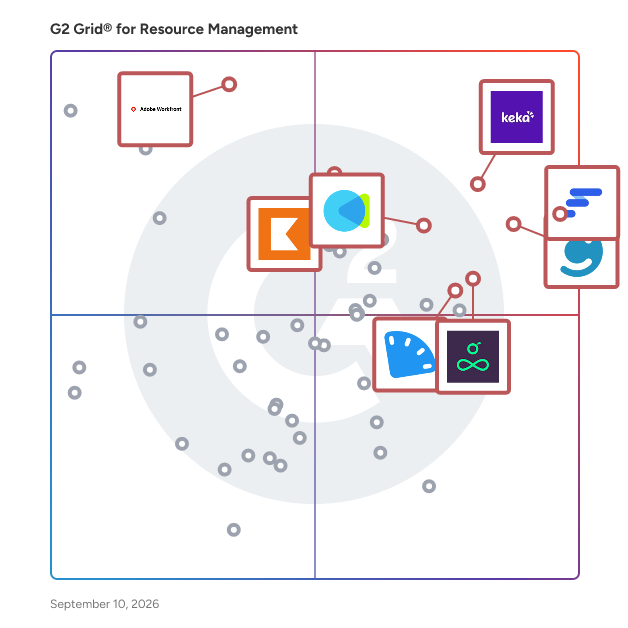
G2 Grid® for Resource Management Software

G2 Grid® for Resource Management Software plotting products by satisfaction and market presence

Highlighted products: Float.com, Keka, Celoxis, CMap, Resource Guru, Kantata Professional Services Automation (formerly Mavenlink+ Kimble), ClickTime, and Workfront.

Underlying data: [Grid® JSON](https://www.g2.com/categories/resource-management/grids.json?focus%5B%5D=float-com&focus%5B%5D=keka&focus%5B%5D=celoxis&focus%5B%5D=cmap&focus%5B%5D=resource-guru&focus%5B%5D=kantata-professional-services-automation-formerly-mavenlink-kimble&focus%5B%5D=clicktime&focus%5B%5D=workfront)

MYOB Acumatica

MYOB Acumatica is Australia and New Zealand's #1 ERP* designed for mid-sized businesses. MYOB Acumatica is a cloud-based enterprise resource planning (ERP) platform for mid-sized organisations that need to manage finance, operations, projects and customer workflows in a single integrated system. It is designed for businesses that have outgrown entry-level accounting software, desktop systems or legacy ERP systems and need greater automation, visibility and scalability as they grow. The platform provides browser-based access, configurable workflows, embedded AI capabilities, modern APIs and integration capabilities that enable businesses to connect third-party applications while maintaining a single source of truth across the organisation. Security and governance features include user roles, access controls, audit trails and two-factor authentication. Built-in AI capabilities help businesses reduce manual work, improve accuracy and make faster decisions. MYOB Acumatica's AI is embedded within the ERP and works with the business data, workflows and controls already in the platform. Designed to assist users, automate repetitive processes and provide insights that support better decision-making, AI capabilities include accounts payable bill processing, expense management, predictive data entry, anomaly detection and workflow automation. AI operates within existing role-based permissions and security controls, helping organisations maintain governance while benefiting from intelligent automation. MYOB Acumatica connects finance, operations and customer data to help reduce manual processes, improve reporting and streamline workflows across distribution, manufacturing, construction, field service, project accounting, payroll and workforce management. It is localised for Australian and New Zealand compliance requirements, including GST, BAS, Single Touch Payroll (STP), superannuation and ATO reporting for Australian businesses and GST, payday filing, KiwiSaver and IRD reporting for New Zealand businesses and is delivered through MYOB services and accredited implementation partners. Implementation is supported by MYOB Acumatica services and accredited implementation partners, with configuration and onboarding shaped around each organisation’s industry, processes and system requirements. Key capabilities include: Financial management covering general ledger, accounts payable and receivable, cash management, tax, fixed assets, budgeting and multi-entity support. Industry capabilities for manufacturing, construction, field service, project accounting and project management with project budgeting, time and expense management, resource tracking, job costing and project profitability reporting. Inventory and supply chain management including sales orders, purchase orders, inventory management, warehouse operations, replenishment and planning tools. Payroll and workforce management for Australian and New Zealand businesses, supporting payroll processing, workforce administration and compliance requirements. Customer relationship management (CRM) with integrated sales and customer management, connected workflows across finance, operations and service teams, and APIs that support third-party integrations. Financial reporting, dashboards and analytics with configurable KPIs, workflow automation, AI-powered anomaly detection and real-time business visibility. AI can help identify unusual financial, operational and production trends, enabling teams to act earlier and make more informed decisions. MYOB Acumatica is typically adopted by growing mid-market organisations across wholesale distribution, manufacturing, construction, professional services and multi-entity businesses that need a scalable cloud ERP platform tailored to Australian and New Zealand business conditions, with the flexibility to integrate with existing business applications and support future growth. Organisations typically evaluate MYOB Acumatica when comparing cloud ERP platforms for finance, inventory, manufacturing, construction, project-based businesses or wholesale distribution. Common reasons for adopting the platform include replacing disconnected systems, reducing manual data entry, improving reporting, supporting multi-entity operations and providing a scalable ERP platform for business growth. *iStart ERP Buyer's Guide 2025-26, based on the upper range of each vendor's declared installed base in the region.

Average Rating: 4.2/5.0

Total Reviews: 85

How Do G2 Users Rate MYOB Acumatica?

  • Ease of Use: 7.6/10 (Category avg: 8.7/10)
  • Resource Definiton: 10.0/10 (Category avg: 8.7/10)
  • Forecasting: 10.0/10 (Category avg: 8.5/10)

Who Is the Company Behind MYOB Acumatica?

  • Seller: MYOB
  • Company Website:
  • Year Founded: 1991
  • HQ Location: Cremorne, AU
  • Twitter: @MYOB
    18,643 Twitter followers
  • LinkedIn® Page: www.linkedin.com
    2,992 employees on LinkedIn®

Who Uses This Product?

  • Top Industries: Construction, Accounting
  • Company Size: 67% Small, 32% Medium

What Are Recent G2 Reviews of MYOB Acumatica?

Operating

Operating is an AI-enabled professional services automation (PSA) platform for running the business behind complex consulting work. It puts time, people, projects, and money in one place and sits in between the CRM and accounting platform. It's the one hub for running the professional services delivery. Operating is built by former IT services professionals. Operating does the following: - Skills-based project staffing & resource planning with timeline views - Project planning with rate cards, labor costs, and margin & profit forecasting - Time tracking - Project health monitoring: margin, profits, project progress, budget burndown - Revenue recognition: ASC-06 compliant revenue recognition specific to professional services - Invoice generation and integrations to accounting platforms (QuickBooks & Xero) to close the month. On top of the the already mentioned features, Operating is design to work with an MCP-first approach: anything you do in the UI, you can do with AI assistants. We also provide a robust REST API to connect Operating with your tooling of choice. Operating doesn't replace your issue tracking or task management system, so you can continue using your project management tool of choice for collaborating with your team within projects.

Average Rating: 4.7/5.0

Total Reviews: 18

How Do G2 Users Rate Operating?

  • Ease of Use: 9.2/10 (Category avg: 8.7/10)
  • Resource Definiton: 8.9/10 (Category avg: 8.7/10)
  • Capacity: 8.8/10 (Category avg: 8.8/10)
  • Forecasting: 8.5/10 (Category avg: 8.5/10)

Who Is the Company Behind Operating?

Who Uses This Product?

  • Top Industries: Consulting
  • Company Size: 61% Medium, 39% Small

What Do G2 Reviewers Say About Operating?

AI-generated summary from verified user reviews

Pros
  • Users highlight the exceptional customer support of Operating, praising its responsiveness and helpfulness throughout their experience.
  • Users value the intuitive user experience of Operating, enhancing team collaboration and project management efficiency.
  • Users love the intuitive user experience of Operating, making resource management and project tracking seamless and efficient.
  • Users commend the efficient project management capabilities of Operating, enhancing visibility and resource tracking for teams.
  • Users appreciate the effective time tracking capabilities of Operating, enhancing project profitability and resource management.
Cons
  • Users find the lack of customization limits flexibility, particularly for reporting needs and developing features.
  • Users find the report customization process lacks intuitiveness, requiring extra steps for effective use.
  • Users find the reporting features less intuitive, requiring extra steps for customizing and accessing time tracking insights.
  • Users find update issues frustrating, particularly with features in development and limited reporting flexibility.

What Are Recent G2 Reviews of Operating?

Certinia PS Cloud

Certinia Professional Services (PS) Cloud is the world’s only Salesforce-native professional services automation (PSA) solution trusted by more than 1,400 organizations. It connects projects, people, and financials on the Salesforce platform you already trust; eliminating silos and providing the high-fidelity data required to run your services business with absolute certainty. • Get 360º visibility into your business: Manage resources, projects, and financials in the same application as your customer interactions. With a single system of record, leaders view margins and forecasts in real time with 100% auditability, ensuring your ""Services Math"" is accurate and your financial integrity is maintained at scale. • Keep customers at the center: Eliminate the ""Context Gap"" with a customer-centric PSA where every team works from one master record. The Project Assistant Agent accelerates delivery by proactively identifying data anomalies, such as missing time cards or overdue items—ensuring sales promises align with delivery for a superior customer experience. • Optimize resource management: Close utilization gaps and keep projects on track. The Staffing Agent identifies ""best-match"" resources for work-in-flight, while enhanced work planning tools allow managers to take direct staffing actions instantly. Assign the right people to the right work to drive efficiency without overloading staff. • Accelerate quoting and billing: Handle complex contracts with a hardened financial engine that supports everything from fixed-fee to outcome-based pricing. New Top-Down Estimation and Role Multipliers drastically reduce the time required to quote large, multi-year engagements while ensuring every dollar is trackable and compliant. • Drive certainty in revenue forecasting: Replace guesswork with connected, real-time data. By unifying the engagement lifecycle, PS Cloud powers reliable revenue forecasting with as little as a 1% variance. Close your books faster and make smarter growth decisions backed by a system that eliminates manual data syncing. • Turn insights into action: PS Cloud turns insights into action directly within a unified Salesforce-native workflow, where real-time project data triggers immediate operational changes. By connecting delivery and financials on a single record, the system identifies margin leaks and resource gaps as they happen, allowing managers to execute staffing and project updates instantly rather than waiting for historical reports.

Average Rating: 4.3/5.0

Total Reviews: 645

How Do G2 Users Rate Certinia PS Cloud?

  • Ease of Use: 7.9/10 (Category avg: 8.7/10)
  • Resource Definiton: 8.2/10 (Category avg: 8.7/10)
  • Capacity: 7.9/10 (Category avg: 8.8/10)
  • Forecasting: 8.0/10 (Category avg: 8.5/10)

Who Is the Company Behind Certinia PS Cloud?

  • Seller: Certinia
  • Company Website:
  • Year Founded: 2009
  • HQ Location: Austin, TX
  • Twitter: @CertiniaInc
    12,206 Twitter followers
  • LinkedIn® Page: www.linkedin.com
    995 employees on LinkedIn®

Who Uses This Product?

  • Who Uses This: Salesforce Administrator, Project Manager
  • Top Industries: Information Technology and Services, Computer Software
  • Company Size: 53% Medium, 36% Large

What Do G2 Reviewers Say About Certinia PS Cloud?

AI-generated summary from verified user reviews

Pros
  • Users value the deep integration with Salesforce in Certinia PS Cloud, enhancing project management and collaboration efficiency.
  • Users find Certinia PS Cloud incredibly easy to use, thanks to its seamless Salesforce integration and efficient workflows.
  • Users appreciate the deep integration with Salesforce of Certinia PS Cloud, streamlining project and financial management effectively.
  • Users value the deep Salesforce integration of Certinia PS Cloud, enabling efficient project management and real-time insights.
  • Users value the comprehensive case management features of Certinia PS Cloud, enhancing project tracking and billing efficiency.
Cons
  • Users find the user interface unfriendliness of Certinia PS Cloud hinders their overall experience and usability.
  • Users experience a steep learning curve with Certinia PS Cloud, finding it challenging to navigate and configure initially.
  • Users report insufficient information and challenging learning experiences due to lacking documentation and ambiguous error messages.
  • Users experience slow performance in Certinia PS Cloud, particularly during complex reports and high data volume tasks.
  • Users find the complex usability of Certinia PS Cloud frustrating, particularly due to setup and interface inconsistencies.

What Are Recent G2 Reviews of Certinia PS Cloud?

What Are G2 Users Discussing About Certinia PS Cloud?

Primetric

With Primetric, you can easily forecast people availability and projects profitability in your professional service company. Plan, track, budget, and optimize from a high-level view.

Average Rating: 4.9/5.0

Total Reviews: 68

How Do G2 Users Rate Primetric?

  • Ease of Use: 9.5/10 (Category avg: 8.7/10)
  • Resource Definiton: 10.0/10 (Category avg: 8.7/10)
  • Capacity: 9.6/10 (Category avg: 8.8/10)
  • Forecasting: 9.4/10 (Category avg: 8.5/10)

Who Is the Company Behind Primetric?

  • Seller: Primetric
  • Year Founded: 2016
  • HQ Location: Wrocław, Dolnosląskie
  • LinkedIn® Page: www.linkedin.com
    17 employees on LinkedIn®

Who Uses This Product?

  • Top Industries: Computer Software, Information Technology and Services
  • Company Size: 63% Medium, 28% Small

What Do G2 Reviewers Say About Primetric?

AI-generated summary from verified user reviews

Pros
  • Users value the effective resource management feature of Primetric, enhancing visibility and organization within IT projects.
  • Users benefit from the automation features of Primetric, streamlining project management and time tracking effortlessly.
  • Users value the easy report generation in Primetric, allowing seamless customization and efficient data sharing.
  • Users find Primetric to be highly intuitive and user-friendly, enabling seamless navigation and efficient time tracking.
  • Users value the comprehensive project management tools offered by Primetric, enhancing efficiency and decision-making in IT companies.
Cons
  • Users find the missing features of Primetric limiting, particularly in time tracking and safety measures for deletions.
  • Users experience data loss during long sessions, as Primetric fails to remember inputs after relogging.
  • Users note the lack of sufficient budgeting options in Primetric compared to dedicated financial apps.
  • Users experience temporary freezing while adjusting input data, indicating a need for improvements in performance.
  • Users desire native language support in Primetric but find it currently unavailable, limiting usability for non-English speakers.

What Are Recent G2 Reviews of Primetric?

What Are G2 Users Discussing About Primetric?

Screendragon

Screendragon is an enterprise work management and orchestrated intelligence platform built for complex marketing, and agency operations.​ It combines structured work management with AI-powered workflow orchestration, giving organisations real-time operational intelligence across projects, people, budgets, approvals, and performance. By connecting planning, execution, governance, and reporting in one platform, Screendragon helps teams run work with confidence at scale.​ Designed for organisations managing high volumes of work, multiple stakeholders, and strict governance requirements, Screendragon is commonly used by enterprise content teams, in-house agencies, external agencies, and marketing project teams that need visibility, control, and automation beyond basic task management.​ Key capabilities include configurable workflows, automated and AI-assisted approvals, resource and capacity planning, financial forecasting, and advanced operational reporting. The platform adapts to existing processes rather than forcing rigid templates, making it well suited to complex or regulated environments.​ Screendragon is designed to work as part of a broader enterprise ecosystem. It integrates with existing tools and platforms and provides an open API, enabling organisations to extend workflows, automate data exchange, and connect Screendragon to their wider technology stack.​ Trusted by global organisations including Kellogg’s, BP, TBWA, and McCann Worldgroup.

Average Rating: 4.7/5.0

Total Reviews: 110

How Do G2 Users Rate Screendragon?

  • Ease of Use: 9.0/10 (Category avg: 8.7/10)
  • Resource Definiton: 8.6/10 (Category avg: 8.7/10)
  • Capacity: 9.1/10 (Category avg: 8.8/10)
  • Forecasting: 9.0/10 (Category avg: 8.5/10)

Who Is the Company Behind Screendragon?

  • Seller: Screendragon
  • Company Website:
  • Year Founded: 2001
  • HQ Location: London, England
  • Twitter: @screendragon
    4,101 Twitter followers
  • LinkedIn® Page: www.linkedin.com
    86 employees on LinkedIn®

Who Uses This Product?

  • Who Uses This: Project Manager
  • Top Industries: Marketing and Advertising, Consumer Goods
  • Company Size: 50% Medium, 45% Large

What Do G2 Reviewers Say About Screendragon?

AI-generated summary from verified user reviews

Pros
  • Users praise Screendragon's excellent customer support for quick responses and effective solutions to customization needs.
  • Users commend the efficient and responsive team collaboration that tailors support to meet unique project needs.
  • Users find Screendragon to be extremely easy to use, simplifying project management and collaboration with clients.
  • Users value the flexibility of Screendragon, appreciating its adaptability for diverse project scopes and workflows.
  • Users highly value the quick response of Screendragon's team, appreciating their efficiency and eagerness to assist.
Cons
  • Users face platform limitations that hinder flexibility and user-friendliness, complicating effective use in large organizations.
  • Users find the complexity of the admin console to be a barrier to a smoother user experience.
  • Users find the admin console complex, noting that it can lack user-friendly dynamics and ease of use.
  • Users find the confusing platform of Screendragon limits their ability to create reports independently and easily.
  • Users find reporting inadequate in Screendragon, facing challenges with manual builds and exporting data effectively.

What Are Recent G2 Reviews of Screendragon?

What Are G2 Users Discussing About Screendragon?

SmartTask

SmartTask is work management software for Service Firms to track and manage their processes. Some of the marquee clients includes companies like ABB, Adecco, M3M, Highrise, etc. With customizations like Custom Charts, Custom Fields, Filtered views get the information you need to make the best decision for your organization's growth.

Average Rating: 4.4/5.0

Total Reviews: 63

How Do G2 Users Rate SmartTask?

  • Ease of Use: 9.2/10 (Category avg: 8.7/10)
  • Resource Definiton: 10.0/10 (Category avg: 8.7/10)
  • Capacity: 6.7/10 (Category avg: 8.8/10)
  • Forecasting: 10.0/10 (Category avg: 8.5/10)

Who Is the Company Behind SmartTask?

  • Seller: SmartTask
  • Year Founded: 2017
  • HQ Location: Cincinnati, Ohio
  • Twitter: @SmartTask_io
    115 Twitter followers
  • LinkedIn® Page: www.linkedin.com
    9 employees on LinkedIn®

Who Uses This Product?

  • Top Industries: Marketing and Advertising, Computer Software
  • Company Size: 86% Small, 11% Medium

What Do G2 Reviewers Say About SmartTask?

AI-generated summary from verified user reviews

Pros
  • Users appreciate the intuitive and user-friendly interface of SmartTask, making it easy to navigate and use.
  • Users praise the affordable pricing of SmartTask, enhancing their overall experience with simplified service delivery.
  • Users appreciate the amazing customer support of SmartTask, effectively addressing specific business needs and complexities.
  • Users find SmartTask intuitive and user-friendly, complemented by excellent support for business-specific queries.
  • Users find SmartTask's intuitive task management features and excellent support immensely beneficial for their business challenges.
Cons
  • Users express concern about trust issues with SmartTask due to past shutdowns of lifetime accounts without warning.
  • Users express concern about SmartTask's incompetence and untrustworthiness due to past experiences with lifetime subscriptions being revoked.
  • Users express concern over limited features, fearing a repeat of past experiences with unexpected service changes and charges.
  • Users express concern over poor management as lifetime deals were abruptly ended, raising trust issues with SmartTask.

What Are Recent G2 Reviews of SmartTask?

What Are G2 Users Discussing About SmartTask?

Workamajig

Workamajig is a purpose-built agency management software for creative agencies, advertising agencies, marketing agencies, design studios, PR firms, and in-house creative departments. Unlike general project management tools, Workamajig is built around how agencies actually work - combining project management, time tracking, resource planning, client billing and invoicing, digital proofing, financial reporting, and CRM in one integrated system. No separate accounting software. No disconnected tools. One platform from creative brief to final invoice. Agency principals, project managers, and traffic coordinators get real-time visibility into project profitability, retainer hours, staff utilization, and client budgets. Serves agencies of 10 to 500+ users.

Average Rating: 3.9/5.0

Total Reviews: 301

How Do G2 Users Rate Workamajig?

  • Ease of Use: 7.1/10 (Category avg: 8.7/10)
  • Capacity: 10.0/10 (Category avg: 8.8/10)
  • Forecasting: 10.0/10 (Category avg: 8.5/10)

Who Is the Company Behind Workamajig?

  • Seller: Workamajig
  • Year Founded: 2008
  • HQ Location: Anthem, AZ
  • Twitter: @workamajig
    2,401 Twitter followers
  • LinkedIn® Page: www.linkedin.com
    38 employees on LinkedIn®

Who Uses This Product?

  • Who Uses This: Project Manager, Account Manager
  • Top Industries: Marketing and Advertising, Information Technology and Services
  • Company Size: 62% Small, 31% Medium

What Do G2 Reviewers Say About Workamajig?

AI-generated summary from verified user reviews

Pros
  • Users value the ease of use in Workamajig, particularly for time entry and project review.
  • Users value the customization options in Workamajig, allowing adaptation to any company's workflows and needs.
  • Users value the customizability of Workamajig, enabling tailored solutions for diverse company needs and workflows.
  • Users love the comprehensive features of Workamajig, enabling full customization for their unique business needs.
  • Users value the easy tracking of projects, benefiting from centralized communications and customizable portal features.
Cons
  • Users find the complex usability of Workamajig frustrating, requiring extensive training to navigate effectively.
  • Users note a large learning curve with Workamajig, requiring training to navigate its robust features effectively.
  • Users find the poor design lacking in visuals and color, impacting its usability for creative tasks.
  • Users find the user interface lacking in friendliness, requiring additional training for effective use and navigation.
  • Users find the steep learning curve challenging, impacting full adoption within their agency and workflow integration.

What Are Recent G2 Reviews of Workamajig?

BigPicture

What is BigPicture? BigPicture is a Project Portfolio Management (PPM) app where teams can plan, track, and report on work across the business. It serves as the organization's single source of truth. BigPicture is compatible with Classic, Agile, and Hybrid approaches, making it suitable for any stage of digital transformation. The app is available in Atlassian and monday.com ecosystems. Purpose Manage products, projects, programs, products, and portfolios in one place, from planning to execution. Streamline your teams' work, save time, and gather invaluable insights, regardless of scale. Key Features - Gantt charts with timeline and WBS: Visualize the timeline and scope of initiatives for unprecedented clarity of information. - Resource management: Oversee teams’ workload and capacity across projects, programs, and portfolios to allocate resources efficiently. - Roadmapping: Craft detailed project and product roadmaps to track the progress and keep relevant stakeholders informed. - Cross-project dependencies: Visualize and map dependencies across initiatives to strengthen the alignment between cross-functional work. - Reporting: Track progress easily with customizable views and real-time updates. Benefits to Users BigPicture centralizes all your management efforts at any granularity level. You can structure and visualize all your initiatives with aggregated data to see the whole picture in one place. Thanks to seamless two-way integration with Jira and monday.com, your teams can work in their management tools of choice, and the management data is always up-to-date. As enterprise-grade software, BigPicture handles even the most complex portfolios without sacrificing performance and usability.

Average Rating: 4.3/5.0

Total Reviews: 25

How Do G2 Users Rate BigPicture?

  • Ease of Use: 7.2/10 (Category avg: 8.7/10)
  • Resource Definiton: 7.4/10 (Category avg: 8.7/10)
  • Capacity: 7.8/10 (Category avg: 8.8/10)
  • Forecasting: 6.9/10 (Category avg: 8.5/10)

Who Is the Company Behind BigPicture?

  • Seller: Appfire
  • Company Website:
  • Year Founded: 2005
  • HQ Location: Boston, Massachusetts
  • Twitter: @Appfire
    1,632 Twitter followers
  • LinkedIn® Page: www.linkedin.com
    727 employees on LinkedIn®

Who Uses This Product?

  • Top Industries: Computer Software
  • Company Size: 54% Medium, 27% Large

What Do G2 Reviewers Say About BigPicture?

AI-generated summary from verified user reviews

Pros
  • Users appreciate the ease of use in BigPicture, enjoying its intuitive interface for project management.
  • Users value the effective organization features of BigPicture for managing Jira projects and facilitating team collaboration.
  • Users value how BigPicture enhances Jira project organization, providing real-time updates for better task tracking and collaboration.
  • Users value the flexible project tracking of BigPicture, effectively managing Agile and waterfall methodologies in one view.
  • Users find the intuitive drag and drop interface of BigPicture smooth, enhancing their project management experience.
Cons
  • Users find the learning curve steep, as BigPicture can be slow and complex for new users and large datasets.
  • Users find the difficult setup and configuration time-consuming, especially with large datasets and expanding teams.
  • Users feel that the expensive pricing model of BigPicture limits accessibility, especially for larger teams.
  • Users find the slow loading of BigPicture frustrating, particularly when dealing with large datasets during initial setup.
  • Users often experience slow performance, particularly with large datasets, impacting their efficiency and user experience.

What Are Recent G2 Reviews of BigPicture?

What Are G2 Users Discussing About BigPicture?

Milient Resource Flow

Milients solutions helps teams plan resources and deliver projects with confidence. Built by resource managers who needed more than spreadsheets, Milients resource solutions gives you the visibility and control to match the right people to the right projects, without the guesswork. From day-to-day scheduling to long-term forecasting, Milient makes resource management simple, intuitive, and powerful. Thousands of teams worldwide use Milient Resource Flow (formerly Hub Planner) to: Schedule resources: see who’s working on what and when with a visual scheduler that keeps everyone aligned. Plan capacity: track availability, manage time off, and balance workloads to prevent burnout. Forecast demand: use real-time data to align pipeline, skills, and project needs for smarter planning. Track time: log actuals with integrated timesheets for more accurate reporting and billing. Report: analyze utilization, project performance, and budgets with powerful built-in reports. Alongside Milient’s stand-alone solutions for project, knowledge, and time management, Milient Resource Flow (formerly Hub Planner) remains the go-to for resource management. It gives you the visibility and data you need to match the right people to the right projects, move beyond spreadsheets, and keep schedules on track as work shifts.

Average Rating: 4.2/5.0

Total Reviews: 58

How Do G2 Users Rate Milient Resource Flow?

  • Ease of Use: 8.3/10 (Category avg: 8.7/10)
  • Resource Definiton: 7.9/10 (Category avg: 8.7/10)
  • Capacity: 8.1/10 (Category avg: 8.8/10)
  • Forecasting: 7.5/10 (Category avg: 8.5/10)

Who Is the Company Behind Milient Resource Flow?

  • Seller: Milient Software
  • Company Website:
  • Year Founded: 2023
  • HQ Location: Sankt Hanshaugen, Oslo
  • Twitter: @hubplanner
    224 Twitter followers
  • LinkedIn® Page: www.linkedin.com
    92 employees on LinkedIn®

Who Uses This Product?

  • Top Industries: Information Technology and Services, Computer Software
  • Company Size: 59% Medium, 34% Small

What Do G2 Reviewers Say About Milient Resource Flow?

AI-generated summary from verified user reviews

Pros
  • Users value the ease of use in Milient Resource Flow's scheduling and reporting features, simplifying project management.
  • Users appreciate the intuitive interface of Milient Resource Flow, making data input and scheduling effortless.
  • Users value the ease of task management in Milient Resource Flow, enhancing project tracking and scheduling efficiency.
  • Users value the effortless team collaboration in Milient Resource Flow, enhancing project tracking and scheduling efficiency.
  • Users appreciate the tracking ease of Milient Resource Flow, facilitating project planning and resource allocation effortlessly.
Cons
  • Users find the mobile app limitations challenging, struggling with usability and poor viewing experience on devices.
  • Users struggle with timesheet issues, finding it difficult to view past hours and manage incorrectly filled weeks.
  • Users find the complex UI challenging, making navigation and usability difficult for efficient resource management.
  • Users find the high costs of add-ons make Milient Resource Flow less affordable for small to mid-size organizations.
  • Users note the limited customization options in Milient Resource Flow, which hampers flexibility and personal preference.

What Are Recent G2 Reviews of Milient Resource Flow?

What Are G2 Users Discussing About Milient Resource Flow?

WETHOD

wethod is an integrated management platform that breaks down the traditional barriers between CRM and Project Management. Designed specifically for project-based organizations, it provides a real-time, unified view of budgets, resources, and margins, ensuring financial health is never an afterthought. Beyond simple task tracking, wethod coordinates complex activities by turning operational data into strategic insights: - End-to-end visibility: seamlessly connect your sales pipeline to project delivery. Forecast workloads and future revenues before the deal is even signed. - Real-time profitability: Monitor margins and budget consumption as they happen. No more waiting for end-of-month reports. - Resource harmony: Balance team capacity with a visual planning tool that respects both project deadlines and people's time. By centralizing KPIs from lead to invoice, wethod is a "single source of truth": a decision-making engine to scale with confidence while keeping teams aligned.

Average Rating: 4.6/5.0

Total Reviews: 14

How Do G2 Users Rate WETHOD?

  • Ease of Use: 8.2/10 (Category avg: 8.7/10)

Who Is the Company Behind WETHOD?

  • Seller: WETHOD
  • Year Founded: 2015
  • HQ Location: Roncade, IT
  • Twitter: @wethodhq
    135 Twitter followers
  • LinkedIn® Page: www.linkedin.com
    16 employees on LinkedIn®

Who Uses This Product?

  • Top Industries: Consulting
  • Company Size: 57% Medium, 43% Small

What Are Recent G2 Reviews of WETHOD?

What Are G2 Users Discussing About WETHOD?

TeamBoard for Monday.com

Team management, capacity planning and reports for teams to visualize projects and team's time.Key FeaturesResource Scheduler: Visualize and allocate your team's resources with ease. Gain valuable insights into your team's workload, empowering both managers and team members to make informed resource allocation decisions.Working Capacity Scheme & Holiday Calendar: Seamlessly integrate working capacity schemes and holiday calendars into your planning, allowing for precise scheduling and resource allocation.Time Tracking & Timesheets: Keep a close eye on project timelines and manage timesheet approval workflows efficiently, ensuring accurate tracking of project hours.Dashboard & Reports: Enjoy a customizable dashboard and interactive time reports to monitor project progress and resource utilization effortlessly.Recurring Tasks: Effortlessly create and plan recurring tasks, simplifying project management and saving you time

Average Rating: 4.2/5.0

Total Reviews: 19

How Do G2 Users Rate TeamBoard for Monday.com?

  • Ease of Use: 8.6/10 (Category avg: 8.7/10)
  • Resource Definiton: 9.5/10 (Category avg: 8.7/10)
  • Capacity: 9.4/10 (Category avg: 8.8/10)
  • Forecasting: 9.6/10 (Category avg: 8.5/10)

Who Is the Company Behind TeamBoard for Monday.com?

Who Uses This Product?

  • Company Size: 47% Small, 37% Medium

What Do G2 Reviewers Say About TeamBoard for Monday.com?

AI-generated summary from verified user reviews

Pros
  • Users find task management effortless with TeamBoard, appreciating the automation, organization, and seamless planning it provides.
  • Users value the seamless team collaboration of TeamBoard, which simplifies task management and enhances organization.
  • Users appreciate the time-saving automation for recurring tasks, making team management much easier and organized.
  • Users appreciate the comprehensive features of TeamBoard for Monday.com, finding it very helpful and organized.
  • Users appreciate the good overview and clear management of responsibilities and deadlines in TeamBoard for Monday.com.
Cons
  • Users find the upgraded plans too expensive, limiting access to essential features and complicating the user experience.
  • Users find the complex UI hindered by limited customization and performance issues on larger boards.
  • Users are concerned about data inaccuracy, particularly regarding the randomness of task IDs affecting organization and tracking.
  • Users find the difficult start challenging, noting that TeamBoard lacks features for complex project management tasks.
  • Users face a lack of customization, with limited options affecting their overall experience and usability on TeamBoard.

What Are Recent G2 Reviews of TeamBoard for Monday.com?

Retain Cloud

The Only Platform Built to Unify Resource Planning for Professional Services — Now with AI and Enhanced Skills Taxonomy Established in 1992, Retain is the world’s first platform built to give professional services firms and complex, multi-entity organisations one place to plan, schedule, and forecast across every department. No more spreadsheets. No more disconnected tools. Just a single, intuitive system that brings clarity and control to resourcing. With AI-powered insights, a governed skills taxonomy, and behavioural profiling, Retain goes beyond availability. It matches people to work based on skills, capacity, and team fit, helping firms build capable, balanced teams that deliver with confidence. Backed by 30+ years of enterprise experience, Retain is trusted by leading PS firms to: Unify planning across Audit, Tax, Advisory, and beyond Gain real-time visibility into skills, demand, and capacity Plan ahead, not react — no more last-minute fire drills Increase utilisation without burnout — balance workloads intelligently Scale with certainty — simple to use, fast to roll out, proven at global scale

Average Rating: 4.2/5.0

Total Reviews: 13

How Do G2 Users Rate Retain Cloud?

  • Ease of Use: 9.1/10 (Category avg: 8.7/10)
  • Resource Definiton: 7.5/10 (Category avg: 8.7/10)
  • Capacity: 9.2/10 (Category avg: 8.8/10)
  • Forecasting: 8.0/10 (Category avg: 8.5/10)

Who Is the Company Behind Retain Cloud?

  • Seller: AdvT
  • Company Website:
  • HQ Location: N/A
  • LinkedIn® Page: www.linkedin.com
    1 employees on LinkedIn®

Who Uses This Product?

  • Top Industries: Accounting
  • Company Size: 38% Medium, 31% Large

What Do G2 Reviewers Say About Retain Cloud?

AI-generated summary from verified user reviews

Pros
  • Users love the intuitive dashboard features of Retain Cloud, enabling easy tracking and efficient planning for teams.
  • Users value the ease of use in Retain Cloud, enhancing team management and visibility effortlessly.
  • Users appreciate the stellar API integration and excellent support, enhancing efficiency and collaboration across teams.
  • Users value the insightful reporting capabilities of Retain Cloud, enhancing decision-making and collaboration for resource management.
  • Users value the real-time visibility and automated scheduling features of Retain Cloud, enhancing resource planning and collaboration.
Cons
  • Users find limited customization in Retain Cloud, hindering their ability to adapt the system to specific needs.
  • Users find frequent refreshing disruptive, requiring them to redo actions and impacting workflow efficiency.
  • Users face integration issues with Retain Cloud, finding it challenging to connect with other systems and customize experiences.
  • Users find limitations in customization and connectivity within Retain Cloud, which restricts their desired configurations and usability.
  • Users report performance issues with Retain Cloud, citing slow interface and unreliable dashboard refreshes impacting usability.

What Are Recent G2 Reviews of Retain Cloud?

Accelo

Most PSA platforms tell you what happened. Accelo tells you what's coming. Professional services firms running on disconnected tools are making critical decisions on data that's always a few weeks behind: a project tool here, a resourcing spreadsheet there, an invoicing system that talks to neither. Scope drifts unnoticed. Margins erode before anyone sees them. Resourcing decisions get made on gut feel. And 42% of professional services firms are losing revenue they've already earned as a result. Accelo is an AI-powered PSA platform that connects project delivery, resourcing, and financials in one place and tells you what's coming before it becomes a problem. Not another tool to add to the stack. The platform that replaces the gaps between them. Where traditional PSA software records and reports, Accelo forecasts and flags. AI surfaces scope drift and margin risk in real time, while there's still a conversation to have, not a write-off to explain. Intelligent resourcing matches people to work based on skills, workload, and past performance, not just who has an opening in a spreadsheet. Capacity gaps show up against your live pipeline before they affect delivery, not after a hiring decision goes wrong. Accelo's AI is embedded across the platform, not bolted on as a separate module or a marketing claim. Predictive risk flagging monitors projects, resourcing, and financials simultaneously, surfacing early warning signals before they escalate. AI-predicted project completion dates update in real time as delivery data changes. Automated time capture logs billable hours as work happens, closing the gap between hours worked and revenue collected. Intelligent resource matching evaluates skills, workload, and past project performance (not just calendar availability) to recommend the right person for every engagement. For teams already using AI tools in their workflow, Accelo connects natively to ChatGPT, Claude, Gemini, and Microsoft Copilot via MCP, enabling natural language queries against live project, resource, and financial data without leaving the tools your team already uses. Every project your team completes makes the platform's recommendations sharper. Accelo serves agencies, consulting firms, IT services companies, and other professional services businesses with 20 to +500 employees managing a mix of project and retainer work, where leadership is making decisions based on incomplete or delayed data and the cost of finding out too late is already showing up in the margins.

Average Rating: 4.3/5.0

Total Reviews: 661

How Do G2 Users Rate Accelo?

  • Ease of Use: 8.1/10 (Category avg: 8.7/10)
  • Resource Definiton: 7.6/10 (Category avg: 8.7/10)
  • Capacity: 7.6/10 (Category avg: 8.8/10)
  • Forecasting: 7.2/10 (Category avg: 8.5/10)

Who Is the Company Behind Accelo?

  • Seller: Accelo
  • Company Website:
  • Year Founded: 2011
  • HQ Location: Denver, Colorado
  • Twitter: @accelo
    2,980 Twitter followers
  • LinkedIn® Page: www.linkedin.com
    71 employees on LinkedIn®

Who Uses This Product?

  • Who Uses This: Project Manager, CEO
  • Top Industries: Marketing and Advertising, Information Technology and Services
  • Company Size: 72% Small, 25% Medium

What Do G2 Reviewers Say About Accelo?

AI-generated summary from verified user reviews

Pros
  • Users find Accelo easy to learn and access, enhancing collaboration and task management across various departments.
  • Users appreciate the effective project tracking features of Accelo, enhancing coordination and profitability across all tasks.
  • Users appreciate the efficiency of Accelo, seamlessly integrating multiple tools to streamline business processes and enhance productivity.
  • Users appreciate the integrated client management features of Accelo, enhancing coordination and transparency across all projects.
  • Users benefit from efficient task and project management in Accelo, enhancing transparency and profitability across teams.
Cons
  • Users find missing features in Accelo, like insufficient reporting and complex processes, hinder usability and efficiency.
  • Users find the learning curve steep, causing confusion and frustration with implementation and insufficient training support.
  • Users are frustrated with Accelo's limited features, outdated UI, and lack of effective customer support.
  • Users find Accelo's complexity overwhelming, with difficult configurations and inadequate training leading to frustration and inefficiency.
  • Users find limited customization in Accelo, making it challenging to tailor workflows and reports to specific needs.

What Are Recent G2 Reviews of Accelo?

What Are G2 Users Discussing About Accelo?

Allfred

Allfred is a workflow management tool tailor-made for Ad or PR agencies that enables all team members to work seamlessly together from the client's first brief to invoicing, streamlining the process and minimizing mistakes. Allfred was designed with "creatives in mind" to shift agencies' focus to do more creative work and less on paperwork and numerous Spreadsheets. We understand that for CFOs and managing directors, every decision must be rooted in financial data. That's why our platform offers real-time integrated financial and project data, allowing for better business decisions and increased profitability. Starting with automated Proposals and Budgeting, through interactive Resource Planning up to integrated Project Management and one-click Time Tracking, Allfred gives agency teams the right tools to make the process simple and efficient to deliver agencies more profit. *Time management* To-do-list and one-click time tracking reduces friction in communication within creative departments. *Resource planning* Interactive resource planning with drag&drop options increases agency team capacity and helps reduce overwork. *Project management* Time-saving automation and process assistance reduce dull work and frequent budgeting and project management mistakes. *Financial analysis* The Finance dashboard provides a comprehensive overview of your financial data and KPIs in one place. It helps you understand and analyze the sources of your revenue and identify opportunities for growth and allows you to track and optimize profitability and performance. With a step-by-step approach to onboarding into agency processes, we reduce the management effort and shorten the implementation time. We believe that better work for everyone means better profit for the agency.

Average Rating: 4.7/5.0

Total Reviews: 52

How Do G2 Users Rate Allfred?

  • Ease of Use: 8.8/10 (Category avg: 8.7/10)
  • Resource Definiton: 8.8/10 (Category avg: 8.7/10)
  • Capacity: 9.3/10 (Category avg: 8.8/10)
  • Forecasting: 7.3/10 (Category avg: 8.5/10)

Who Is the Company Behind Allfred?

  • Seller: Allfred
  • Year Founded: 2020
  • HQ Location: Bratislava, Slovakia
  • LinkedIn® Page: www.linkedin.com
    8 employees on LinkedIn®

Who Uses This Product?

  • Who Uses This: Account Manager
  • Top Industries: Marketing and Advertising
  • Company Size: 83% Small, 17% Medium

What Do G2 Reviewers Say About Allfred?

AI-generated summary from verified user reviews

Pros
  • Users highlight the ease of use of Allfred, appreciating its intuitive interface and seamless integration capabilities.
  • Users love the simple and organized task management of Allfred, finding it essential and efficient for daily use.
  • Users appreciate the comprehensive project management capabilities of Allfred, streamlining processes and enhancing team collaboration.
  • Users value the robust and customizable features of Allfred for effective resource management and streamlined project organization.
  • Users love the user-friendly interface of Allfred, appreciating its seamless integration and productivity-boosting capabilities.
Cons
  • Users experience slow loading times occasionally, especially with large sheets, which can hinder efficiency.
  • Users occasionally experience slow performance when handling large data sheets, impacting their overall efficiency.
  • Users often experience slow update issues, leading to confusion and delays in project and task management.
  • Users report encountering bug issues with Allfred, which can occasionally disrupt their workflow and experience.
  • Users encounter occasional glitches in Allfred, which can disrupt workflow but are generally minor and manageable.

What Are Recent G2 Reviews of Allfred?

Precursive

Precursive is a fast and flexible professional services automation solution to connect demand with delivery, improve execution and grow recurring revenue, that is 100% native to the Salesforce platform. Optimize sales, resourcing, delivery execution, customer collaboration and revenue management. Trusted by the worlds's best services teams such as Relias, Degreed, DealerTrack (COX Automotive), PagerDuty, Dutchie, Torrent Consulting. HOW WE HELP SALES - SERVICES HANDOVERS Create smooth transitions between sales, services and customer success by automating project creation from opportunities in Salesforce with the relevant staffing requirements and project plans ready to go! CUSTOMER ONBOARDING & IMPLEMENTATION Precursive combines award-winning customer onboarding & project management functionality with the leading capacity planning & resource management tool. AGILE RESOURCE MANAGEMENT Agile resourcing tool with capacity planning, utilization monitoring & simple scheduling. Easy-to-use planner so when projects shift, you can react. Gantt view & skill seeker so the right person & knowledge is found. HIGH-VELOCITY SERVICES DELIVERY Improve time-to-value with smooth services delivery. Close a new customer, launch them quickly and seamlessly transition to services delivery with project templates, Kanban boards, task allocation and easy-to-use time tracking. PROJECT ACCOUNTING Track project performance: see budgets, costings, profit & margin in clear dashboards. Forecast and recognise services revenues across all people & projects. Get rollups of all your key KPIs including billings, margins and revenues. TIMESHEET, EXPENSES & BILLING Pre-populate timesheets for billable & non-billable time + expenses. Accurate time tracking & billing reduces revenue leakage. Improve cashflow with on-time accurate invoicing. Workforce management incl. staff profiles. REPORTING & DASHBOARDS Make better decisions about your team, projects and customers across professional services. Get real-time information on capacity, demand, margins, project health, services revenues, and utilization. CUSTOMER SUCCESS Examples of how we have helped our customers include: Dealertrack | Automotive Software + $1M cost saving with increased visibility into resource management and finances. + 1.5 hours per week saved by 7 senior VPs Relias | Healthcare E-learning Software + $500k in cost savings without staff reductions and accelerated speed-to-revenue. + 34% increase on margin now easily tracked on a PS dashboard P3 Adaptive | Consultancy + 30 hours saved monthly - Streamlined systems now allow time spent on other tasks + 100% better forecasting - Financial forecasting has now doubled to 2 months

Average Rating: 4.2/5.0

Total Reviews: 64

How Do G2 Users Rate Precursive?

  • Ease of Use: 8.1/10 (Category avg: 8.7/10)
  • Resource Definiton: 8.2/10 (Category avg: 8.7/10)
  • Capacity: 8.2/10 (Category avg: 8.8/10)
  • Forecasting: 8.1/10 (Category avg: 8.5/10)

Who Is the Company Behind Precursive?

  • Seller: Precursive
  • Year Founded: 2011
  • HQ Location: London
  • Twitter: @precursive
    2,598 Twitter followers
  • LinkedIn® Page: www.linkedin.com
    35 employees on LinkedIn®

Who Uses This Product?

  • Top Industries: Computer Software, Information Technology and Services
  • Company Size: 73% Medium, 16% Small

What Do G2 Reviewers Say About Precursive?

AI-generated summary from verified user reviews

Pros
  • Users commend the exceptional customer support from Precursive, appreciating their responsiveness and commitment to success.
  • Users appreciate the ease of use of Precursive, enjoying seamless access and intuitive navigation within Salesforce.
  • Users appreciate the seamless integration of Precursive with SFDC, enhancing project management with minimal learning curve.
  • Users admire the user-friendly design of Precursive, finding it intuitive and easy to navigate within Salesforce.
  • Users find Precursive incredibly intuitive, enjoying the seamless integration with Salesforce and efficient project management tools.
Cons
  • Users face access limitations with Precursive, experiencing challenges with editing permissions and mobile functionality.
  • Users find the limited reporting capabilities frustrating, wishing for more flexibility and ease of access to data.
  • Users experience reporting issues due to restrictive capabilities and inefficient workflows, impacting overall efficiency with data access.
  • Users find reporting limitations restrictive, feeling the need for multi-object data visibility and simpler navigation.
  • Users find the app functionality lacking, with too many clicks and limited mobile experience hindering usability.

What Are Recent G2 Reviews of Precursive?

What Are G2 Users Discussing About Precursive?

Subhransu Sahu
SS
Researched and written by Subhransu Sahu
Updated November 6, 2024