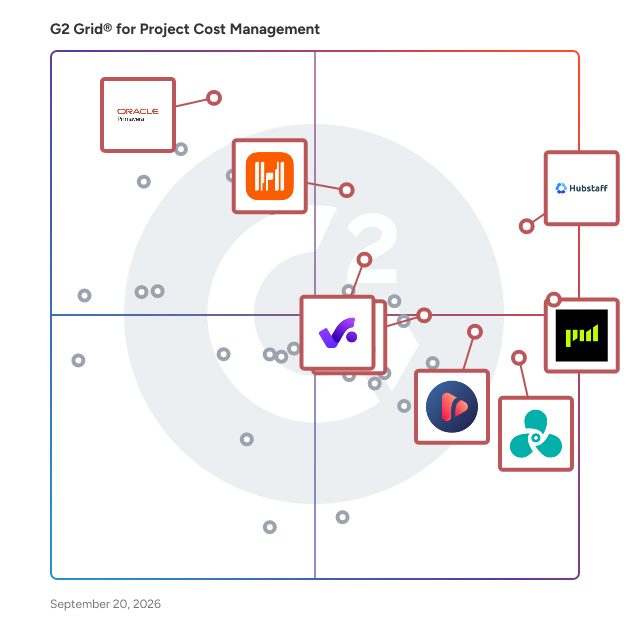
# Best Project Cost Management Software

*By [Subhransu Sahu](https://research.g2.com/insights/author/subhransu-sahu)*


Companies use project cost management software to monitor the profitability of the projects they deliver. This type of software allows businesses to estimate the cost of delivering different types of projects, identify actual costs, and compare them to calculate profit. Project cost management software is used by project managers and project control officers to ensure projects do not exceed estimated costs. Accountants also use this type of software to monitor costs per project or portfolio of projects, and by type of resource (human or material).

Project cost management software can be delivered as a module of [project management software](https://www.g2.com/categories/project-management) or [project and portfolio management software](https://www.g2.com/categories/project-and-portfolio-management). [Project-based ERP software](https://www.g2.com/categories/project-based-erp) also includes features for project cost management. When provided separately, project cost management solutions integrate with project, portfolio &amp; program management software, [ERP systems](https://www.g2.com/categories/erp-systems), and [accounting software](https://www.g2.com/categories/accounting).

To qualify for inclusion in the Project Cost Management category, a product must:

- Allow companies to define standard costs for resources and activities
- Create project budgets using estimated and standard costs
- Calculate costs per activity, project, portfolio, or customer
- Compare budgets and actual costs per project or portfolio


## Top Project Cost Management Software at a Glance
| # | Product | Rating | Best For | What Users Say |
|---|---------|--------|----------|----------------|
| 1 | [Hubstaff](https://www.g2.com/products/hubstaff/reviews) | 4.4/5.0 (2,244 reviews) | Screenshot-backed time tracking for remote billing | "[So much at the same place](https://www.g2.com/survey_responses/hubstaff-review-9900407)" |
| 2 | [Projectworks](https://www.g2.com/products/projectworks/reviews) | 4.5/5.0 (204 reviews) | Professional services margin tracking with Xero integration | "[Reliable, Data-Rich Projectworks with Great Integrations and Support](https://www.g2.com/survey_responses/projectworks-review-12888353)" |
| 3 | [Harvest](https://www.g2.com/products/harvest/reviews) | 4.3/5.0 (831 reviews) | Billable hour tracking with project budget alerts | "[Harvest Makes Mundane Time Tracking Simple and Effortless](https://www.g2.com/survey_responses/harvest-review-12862022)" |
| 4 | [Productive](https://www.g2.com/products/productive/reviews) | 4.6/5.0 (73 reviews) | Project profitability tracking with budget-to-actuals visibility | "[We have used Productive for almost 10 years. It was good when we started and keeps getting better!](https://www.g2.com/survey_responses/productive-review-9235077)" |
| 5 | [Timely](https://www.g2.com/products/timely-time-tracking/reviews) | 4.8/5.0 (480 reviews) | Billable hour recovery with automatic activity tracking | "[Timely is the best data tracking app for any organization.](https://www.g2.com/survey_responses/timely-review-8084200)" |
| 6 | [Ruddr Professional Services Automation](https://www.g2.com/products/ruddr-professional-services-automation/reviews) | 4.6/5.0 (331 reviews) | Project margin visibility with billable time tracking | "[Intuitive Time Logging and Clear Reporting for Better Team Transparency](https://www.g2.com/survey_responses/ruddr-professional-services-automation-review-12907642)" |
| 7 | [Oracle Primavera](https://www.g2.com/products/oracle-primavera/reviews) | 4.4/5.0 (341 reviews) | Resource-loaded CPM schedules with earned value | "[Promising Tool with Scope for Enhancements](https://www.g2.com/survey_responses/oracle-primavera-review-12906556)" |
| 8 | [Oracle Aconex](https://www.g2.com/products/oracle-aconex/reviews) | 4.5/5.0 (198 reviews) | Construction document control with budget approvals | "[Role of Oracle Aconex in project management](https://www.g2.com/survey_responses/oracle-aconex-review-9164527)" |
| 9 | [Toggl Track](https://www.g2.com/products/toggl-track/reviews) | 4.6/5.0 (1,555 reviews) | Granular task-level time tracking for client billing | "[Clean, Fast Time Tracking with Visual Reports](https://www.g2.com/survey_responses/toggl-track-review-12640228)" |
| 10 | [PSOHUB.](https://www.g2.com/products/psohub/reviews) | 4.2/5.0 (207 reviews) | Billable time tracking with CRM-to-project integration | "[PSOHUB Boosts Productivity with Intuitive Drag-and-Drop and Real-Time Collaboration](https://www.g2.com/survey_responses/psohub-review-12819605)" |


## How Many Project Cost Management Software Products Does G2 Track?
**Total Products under this Category:** 90

### Category Stats (Jun 2026)
- **Average Rating**: 4.38/5 The average rating of products in this category, based on all submitted ratings
- **Top Trending Product**: Planview PPM Pro (+1.1%) - Among all products in this category, Planview PPM Pro recorded the largest rating increase compared to last month
*Last updated: June 30, 2026*


## How Does G2 Rank Project Cost Management Software Products?

**Why You Can Trust G2's Software Rankings:**

- 30 Analysts and Data Experts
- 12,700+ Authentic Reviews
- 90+ Products
- Unbiased Rankings

G2's software rankings are built on verified user reviews, rigorous moderation, and a consistent research methodology maintained by a team of analysts and data experts. Each product is measured using the same transparent criteria, with no paid placement or vendor influence. While reviews reflect real user experiences, which can be subjective, they offer valuable insight into how software performs in the hands of professionals. Together, these inputs power the G2 Score, a standardized way to compare tools within every category.


## Which Project Cost Management Software Is Best for Your Use Case?

- **Leader:** [Hubstaff](https://www.g2.com/products/hubstaff/reviews)
- **Highest Performer:** [Ruddr Professional Services Automation](https://www.g2.com/products/ruddr-professional-services-automation/reviews)
- **Easiest to Use:** [Hubstaff](https://www.g2.com/products/hubstaff/reviews)
- **Top Trending:** [Projectworks](https://www.g2.com/products/projectworks/reviews)
- **Best Free Software:** [Harvest](https://www.g2.com/products/harvest/reviews)


---

**Sponsored**

### Insightful

Insightful is a Work Intelligence platform that helps organizations understand how work actually happens across people, processes, and AI, so they can improve performance, optimize workflows, and reduce operational waste. When work is spread across people, locations, and tools, small gaps add up fast. Time goes missing. Work slows down. Problems surface late. Insightful brings this together in one platform, built to help organizations optimize People, Process, and Technology through three core capabilities: 1. Workforce Analytics: Measure workforce productivity, utilization, and performance with real-time visibility into how work gets done. 2. Workflow Optimization: Identify bottlenecks, eliminate inefficiencies, and optimize how workflows across teams and processes. 3. Work Intelligence: Measure AI adoption, usage, and business impact to maximize the ROI of your AI investments. You can see where time is going, how AI is being absorbed across your organization, how teams are performing, and where work is breaking down — without relying on manual tracking or guesswork. With Insightful, you can: - Understand how work happens across teams, processes, and AI - Spot drops in utilization and output early - Track AI adoption, usage, and business impact - See where work slows, stalls, or creates rework across workflows - Compare performance across teams, roles, or locations - Use real activity data to review work and resolve disputes - Automate time tracking and reporting This is not just another monitoring tool. It’s a precision Work Intelligence for actionable bottom line impact. Insightful helps you run better operations. You get clear data you can use in weekly reviews, planning, and day-to-day decisions. It combines automatic time tracking, activity data, and reporting in one place — so you can improve performance without adding overhead. Teams choose Insightful because it delivers strong visibility and control without the cost or complexity of heavier tools.


[Visit website](https://www.g2.com/external_clickthroughs/record?secure%5Bad_program%5D=ppc&amp;secure%5Bad_slot%5D=category_product_list&amp;secure%5Bcategory_id%5D=1589&amp;secure%5Bdisplayable_resource_id%5D=247&amp;secure%5Bdisplayable_resource_type%5D=Category&amp;secure%5Bmedium%5D=sponsored&amp;secure%5Bplacement_reason%5D=neighbor_category&amp;secure%5Bplacement_resource_ids%5D%5B%5D=247&amp;secure%5Bprioritized%5D=false&amp;secure%5Bproduct_id%5D=37386&amp;secure%5Bresource_id%5D=1589&amp;secure%5Bresource_type%5D=Category&amp;secure%5Bsource_type%5D=category_page&amp;secure%5Bsource_url%5D=https%3A%2F%2Fwww.g2.com%2Fcategories%2Fproject-cost-management%3Fpage%3D2&amp;secure%5Btoken%5D=9469cc61f0d94de281113f9f4d9e8b0f6b4d15f9de47410ded8c425e7131be11&amp;secure%5Burl%5D=https%3A%2F%2Fwww.insightful.io%2Fworkforce-analytics-enterprise%3Futm_source%3Dg2%26utm_medium%3Dreferral%26utm_campaign%3Ddirectories_paid%26utm_content%3Dpaid%26utm_term%3Dppc2026_topic_time_tracking&amp;secure%5Burl_type%5D=custom_url)

---

## What Are the Top-Rated Project Cost Management Software Products in 2026?
### 1. [Hubstaff](https://www.g2.com/products/hubstaff/reviews)
Hubstaff is a time tracking software built for global teams. Track hours with precision, automate payments and invoicing, and gain full visibility into how work gets done — whether your team is remote, hybrid, in-office or field-based. In addition to time tracking, Hubstaff includes built-in productivity monitoring features such as activity rates, app and URL usage, and optional screenshots — helping managers understand how time is spent and where focus is lost. The platform also offers advanced workforce analytics that classify work time, detect unusual activity patterns, and highlight inefficiencies — enabling data-driven decisions that improve performance and reduce wasted hours. Available on Mac, Windows, Linux, iOS, Android, and Chrome, Hubstaff platform integrates with over 35+ tools to streamline operations and support productive, high-performing teams.


**Average Rating:** 4.4/5.0
**Total Reviews:** 2,244
**How Do G2 Users Rate Hubstaff?**

- **Identification:** 8.7/10 (Category avg: 8.9/10)
- **Has the product been a good partner in doing business?:** 8.8/10 (Category avg: 8.9/10)
- **Standard Costs:** 8.5/10 (Category avg: 8.8/10)
- **Allocation:** 8.6/10 (Category avg: 8.9/10)

**Who Is the Company Behind Hubstaff?**

- **Seller:** [Hubstaff](https://www.g2.com/sellers/hubstaff)
- **Company Website:** https://hubstaff.com
- **Year Founded:** 2013
- **HQ Location:** Indianapolis, IN
- **Twitter:** @HubStaff (11,558 Twitter followers)
- **LinkedIn® Page:** https://www.linkedin.com/company/2358159/ (341 employees on LinkedIn®)

**Who Uses This Product?**
- **Who Uses This:** Owner, CEO
- **Top Industries:** Information Technology and Services, Computer Software
- **Company Size:** 45% Small-Business, 26% Mid-Market


#### What Are Hubstaff's Pros and Cons?

**Pros:**

- Ease of Use (751 reviews)
- Time Tracking (726 reviews)
- Tracking Ease (553 reviews)
- Simple (443 reviews)
- Productivity Tracking (362 reviews)

**Cons:**

- Time Tracking (227 reviews)
- Inaccurate Tracking (196 reviews)
- Limited Features (132 reviews)
- Time Tracking Issues (126 reviews)
- Slow Loading (118 reviews)


### What Do G2 Reviewers Say About Hubstaff?
*AI-generated summary from verified user reviews*

**Pros:**

- Users love Hubstaff for its **ease of use** , enjoying seamless navigation and straightforward time tracking functionality.
- Users praise Hubstaff for its **easy time management** , making remote team tracking simple and efficient.
- Users find **tracking time effortless** with Hubstaff, making management of remote teams simple and effective.
- Users value the **easy setup and effective time tracking** of Hubstaff, which enhances their productivity and billing accuracy.
- Users value the **effective productivity tracking** of Hubstaff, making it essential for managing work efficiently.

**Cons:**

- Users experience issues with **automatic time tracking failures** , leading to frustration and inaccurate productivity insights.
- Users often experience **inaccurate tracking** of work percentages, leading to concerns about reliability and trust in data.
- Users find the **limited features** in Hubstaff restrictive, affecting functionality and increasing overall costs.
- Users face **time tracking issues** with Hubstaff, especially when project hours are exceeded, leading to frustration and micro-management.
- Users experience **slow loading** times with Hubstaff, especially when syncing tasks between the website and app.

#### What Are Recent G2 Reviews of Hubstaff?

**"[Easy Time Tracking and Clear Productivity Visibility for Remote Teams](https://www.g2.com/survey_responses/hubstaff-review-12970854)"**

**Rating:** 5.0/5.0 stars
*— Amro A.*

[Read full review](https://www.g2.com/survey_responses/hubstaff-review-12970854)

---

**"[So much at the same place](https://www.g2.com/survey_responses/hubstaff-review-9900407)"**

**Rating:** 5.0/5.0 stars
*— Kriti  K.*

[Read full review](https://www.g2.com/survey_responses/hubstaff-review-9900407)

---


#### What Are G2 Users Discussing About Hubstaff?

- [What is Hubstaff used for?](https://www.g2.com/discussions/hubstaff-what-is-hubstaff-used-for) - 4 comments
- [How do you use the Hubstaff app?](https://www.g2.com/discussions/how-do-you-use-the-hubstaff-app)
- [Is Hubstaff legal?](https://www.g2.com/discussions/is-hubstaff-legal) - 5 comments, 2 upvotes
- [How does Hubstaff measure activity?](https://www.g2.com/discussions/how-does-hubstaff-measure-activity) - 3 comments
- [What is Hubstaff used for?](https://www.g2.com/discussions/what-is-hubstaff-used-for) - 2 comments

### 2. [Projectworks](https://www.g2.com/products/projectworks/reviews)
Grow your firm - and your impact Projectworks is professional services automation software built for consulting firms that want to grow - and make a difference. As a project intelligence platform, Projectworks connects time tracking, expense tracking, resource management, invoicing, and financial reporting in one live system. It gives you the visibility to see what’s working, fix what’s not, and scale your firm with confidence. Projectworks was built by consultants who know what it’s like to lose hours to spreadsheets and billing chaos. Designed specifically for engineering, architecture, software development, and management consulting, it’s professional services automation (PSA) software that gets experts out of the admin grind and back to the work that matters. Our cloud-based PSA tool brings together everything your business needs to plan, track, forecast, and grow. By automating time tracking, expense tracking, resource planning, project financials, and real-time reporting, Projectworks frees your people to focus on solving the world’s hardest problems - not wrestling with manual processes. On average, Projectworks users grow 20% in their first year. Connect Projectworks with your existing stack - including Xero, QuickBooks Online, MYOB, Jira, Azure DevOps, HubSpot, and Salesforce - to eliminate double handling, align your data, and operate with confidence. We’ll help you set up for success with expert data migration, comprehensive training, and responsive ongoing support. Key features Time tracking software Easy, accurate timesheets that actually get filled out. Simplify project time tracking and keep billing up to date with integrated time management software for consultants. Expense tracking Track project spend against budget with simple, mobile-friendly expense submission. Sync approved expenses directly to Xero as bills to pay. Resource management software Plan and allocate resources effectively. See availability, utilization, and capacity in real time with powerful resource planning tools that make project delivery predictable. Revenue forecasting &amp; project profitability Combine financial and resourcing data to model revenue, monitor utilization and profitability, and make confident growth decisions. Invoicing automation Create pre-populated invoices that sync seamlessly with Xero, reducing admin and helping you get paid faster. Reporting &amp; insights Access real-time dashboards, project profitability reports, and PSA analytics that bring clarity to every decision. Track the consulting metrics that matter most - across projects, clients, and teams. Integrations Connect your favorite tools and run your firm on a unified project management and financial reporting platform. Flexible pricing means you only pay for what you use - plus, get a 10% discount on annual subscriptions.


**Average Rating:** 4.5/5.0
**Total Reviews:** 204
**How Do G2 Users Rate Projectworks?**

- **Identification:** 8.9/10 (Category avg: 8.9/10)
- **Has the product been a good partner in doing business?:** 9.4/10 (Category avg: 8.9/10)
- **Standard Costs:** 8.7/10 (Category avg: 8.8/10)
- **Allocation:** 8.7/10 (Category avg: 8.9/10)

**Who Is the Company Behind Projectworks?**

- **Seller:** [Projectworks](https://www.g2.com/sellers/projectworks)
- **Company Website:** https://projectworks.com
- **Year Founded:** 2019
- **HQ Location:** San Mateo, California
- **Twitter:** @projectworksltd (28 Twitter followers)
- **LinkedIn® Page:** https://www.linkedin.com/company/projectworks-io/ (77 employees on LinkedIn®)

**Who Uses This Product?**
- **Who Uses This:** Project Manager, Director
- **Top Industries:** Information Technology and Services, Consulting
- **Company Size:** 65% Small-Business, 32% Mid-Market


#### What Are Projectworks's Pros and Cons?

**Pros:**

- Ease of Use (82 reviews)
- Project Management (63 reviews)
- User-Friendly (38 reviews)
- User Interface (37 reviews)
- Comprehensive Features (36 reviews)

**Cons:**

- Missing Features (25 reviews)
- Limited Features (23 reviews)
- Limited Customization (19 reviews)
- Learning Curve (18 reviews)
- Reporting Issues (18 reviews)


### What Do G2 Reviewers Say About Projectworks?
*AI-generated summary from verified user reviews*

**Pros:**

- Users find Projectworks&#39; **ease of use** exceptional, simplifying invoicing, scheduling, and project management all in one platform.
- Users appreciate the **effective centralization and streamlining** of Projectworks, significantly enhancing management across multiple regions.
- Users appreciate the **user-friendly interface** of Projectworks, enabling effective and intuitive management of complex projects.
- Users highlight the **user-friendly interface** of Projectworks, facilitating reliable management and collaboration across diverse teams.
- Users appreciate the **comprehensive features** of Projectworks, enabling streamlined management and powerful integration for their consulting businesses.

**Cons:**

- Users find Projectworks has a **lack of essential features** on mobile and limited flexibility in forecasting tools.
- Users find **limited features** in Projectworks hinder the overall project management experience and require costly upgrades for better integration.
- Users note **limited customization** in reporting and workflows, causing minor frictions during fast-paced tasks.
- Users face a steep **learning curve** with Projectworks, requiring time to fully grasp its interface and capabilities.
- Users find **reporting issues** in Projectworks, citing complications in custom reports and limited export options.

#### What Are Recent G2 Reviews of Projectworks?

**"[Reliable, Data-Rich Projectworks with Great Integrations and Support](https://www.g2.com/survey_responses/projectworks-review-12888353)"**

**Rating:** 4.5/5.0 stars
*— Stefi G.*

[Read full review](https://www.g2.com/survey_responses/projectworks-review-12888353)

---

**"[Game changer for managing projects and team workloads](https://www.g2.com/survey_responses/projectworks-review-12520231)"**

**Rating:** 4.5/5.0 stars
*— Rahul N.*

[Read full review](https://www.g2.com/survey_responses/projectworks-review-12520231)

---


#### What Are G2 Users Discussing About Projectworks?

- [What is Projectworks used for?](https://www.g2.com/discussions/what-is-projectworks-used-for) - 1 comment

### 3. [Harvest](https://www.g2.com/products/harvest/reviews)
Harvest makes it easy to track time, gain insights from past projects, and get paid for your work. Dedicated apps and integrations with popular tools like Asana and Slack allow Harvest to fit into your team’s workflow. A wide selection of visual reports keep projects running smoothly and your team supported. Turn your team’s tracked time and expenses into invoices and collect payment quickly with integrated online payments. Help your team spend time wisely with Harvest.


**Average Rating:** 4.3/5.0
**Total Reviews:** 831
**How Do G2 Users Rate Harvest?**

- **Identification:** 8.6/10 (Category avg: 8.9/10)
- **Has the product been a good partner in doing business?:** 8.9/10 (Category avg: 8.9/10)
- **Standard Costs:** 8.5/10 (Category avg: 8.8/10)
- **Allocation:** 8.4/10 (Category avg: 8.9/10)

**Who Is the Company Behind Harvest?**

- **Seller:** [Harvest](https://www.g2.com/sellers/harvest)
- **Year Founded:** 2006
- **HQ Location:** New York
- **Twitter:** @harvest (20,409 Twitter followers)
- **LinkedIn® Page:** https://www.linkedin.com/company/951058/ (505 employees on LinkedIn®)

**Who Uses This Product?**
- **Who Uses This:** Project Manager, Owner
- **Top Industries:** Marketing and Advertising, Information Technology and Services
- **Company Size:** 72% Small-Business, 23% Mid-Market


#### What Are Harvest's Pros and Cons?

**Pros:**

- Time Tracking (15 reviews)
- Ease of Use (13 reviews)
- Time-saving (12 reviews)
- Integrations (7 reviews)
- Invoicing (7 reviews)

**Cons:**

- Limited Features (5 reviews)
- Missing Features (5 reviews)
- Time Tracking Issues (3 reviews)
- Integration Issues (2 reviews)
- Confusing Visualization (1 reviews)


### What Do G2 Reviewers Say About Harvest?
*AI-generated summary from verified user reviews*

**Pros:**

- Users appreciate the **effortless one-click timer** in Harvest for accurate time tracking across devices.
- Users praise the **ease of use** of Harvest, enabling quick setup and effortless time tracking across devices.
- Users appreciate the **time-saving features** of Harvest, effortlessly tracking hours across devices and enhancing project management.
- Users value the **seamless integrations** of Harvest, enhancing project management and financial tracking with various applications.
- Users appreciate the **automated invoicing features** of Harvest, making it easy to manage and visualize commercial collections.

**Cons:**

- Users find Harvest&#39;s **limited features** restrictive, impacting project management and integration capabilities significantly.
- Users feel Harvest has **missing features** , limiting functionality and increasing costs for basic functions like visibility and tracking.
- Users struggle with **time tracking issues** due to manual entry requirements and unclear task addition processes.
- Users find the **integration issues** frustrating, as the API lacks clarity and capabilities for effective system compatibility.
- Users find the lack of **visual charts** in Harvest confusing, making it harder to track hours efficiently.

#### What Are Recent G2 Reviews of Harvest?

**"[Harvest Makes Mundane Time Tracking Simple and Effortless](https://www.g2.com/survey_responses/harvest-review-12862022)"**

**Rating:** 5.0/5.0 stars
*— Frank C.*

[Read full review](https://www.g2.com/survey_responses/harvest-review-12862022)

---

**"[Support and develop your projects and work processes with Harvest&#39;s advanced features.](https://www.g2.com/survey_responses/harvest-review-12161169)"**

**Rating:** 5.0/5.0 stars
*— Martin P.*

[Read full review](https://www.g2.com/survey_responses/harvest-review-12161169)

---


#### What Are G2 Users Discussing About Harvest?

- [What is Harvest used for?](https://www.g2.com/discussions/what-is-harvest-used-for) - 1 comment

### 4. [Productive](https://www.g2.com/products/productive/reviews)
Productive is the all-in-one professional services automation platform built for agencies, consultancies, and service businesses. Manage projects, resources, and finances in one place — with real-time visibility across your entire company. Sales Pipeline Easily manage your sales funnel and win more deals with a simple CRM solution. You won&#39;t ever forget to follow up on that potential business opportunity. When the deal is won, convert it into a project, and continue working in the same tool. Project Management Assign work, collaborate, and organize agency projects. Project Management features are integrated with Time Tracking and Task Management so you will run projects faster and more elegantly. Resource Planning Organize and plan a work schedule for your entire agency. Find bottlenecks that cost money and consume time. Avoid collisions, burnouts, and overbooking with resource planning features. Powerful Business Insights Build customizable reports from scratch by focusing on what&#39;s important for you: Actual Utilization by People, Revenue &amp; Profitability by Client, Invoiced Revenue by Months, Overtime by People, Profitability by Months, etc. Billing and Invoicing Automatically track invoiced amounts and be confident you’ve billed everything you need. Simply generate invoices using tracked time on billable services.


**Average Rating:** 4.6/5.0
**Total Reviews:** 73
**How Do G2 Users Rate Productive?**

- **Identification:** 8.3/10 (Category avg: 8.9/10)
- **Has the product been a good partner in doing business?:** 9.5/10 (Category avg: 8.9/10)
- **Standard Costs:** 8.1/10 (Category avg: 8.8/10)
- **Allocation:** 8.0/10 (Category avg: 8.9/10)

**Who Is the Company Behind Productive?**

- **Seller:** [Productive](https://www.g2.com/sellers/productive)
- **Year Founded:** 2014
- **HQ Location:** Claymont, US
- **LinkedIn® Page:** https://www.linkedin.com/company/productive-io/ (161 employees on LinkedIn®)

**Who Uses This Product?**
- **Top Industries:** Marketing and Advertising, Computer Software
- **Company Size:** 80% Small-Business, 17% Mid-Market


#### What Are Productive's Pros and Cons?

**Pros:**

- Ease of Use (10 reviews)
- Customizability (8 reviews)
- Team Collaboration (7 reviews)
- User Interface (7 reviews)
- Customer Support (6 reviews)

**Cons:**

- Lack of Integrations (3 reviews)
- Missing Features (3 reviews)
- Organization Difficulties (3 reviews)
- Challenging Reporting (2 reviews)
- Complex Usability (2 reviews)


### What Do G2 Reviewers Say About Productive?
*AI-generated summary from verified user reviews*

**Pros:**

- Users find Productive&#39;s **ease of use** enhances their workflow and integrates well with other essential tools.
- Users value the **high customizability** of Productive, tailoring their experience to fit individual preferences and workflows.
- Users value the **excellent team collaboration** features of Productive, enhancing project management and overall workflow efficiency.
- Users appreciate the **intuitive user interface** of Productive, making onboarding and daily tasks seamless and efficient.
- Users commend the **responsive and personal customer support** from Productive, enhancing their overall experience and satisfaction.

**Cons:**

- Users note a **lack of integrations** with tools like Xero and Google Chat, complicating workflow efficiency and usability.
- Users note the **missing features** like flexible reporting and mobile options, affecting usability and convenience.
- Users face challenges with **organization difficulties** , particularly in navigating the layout and accessing customizable reports.
- Users find the **reporting challenging** , wishing for more flexibility and detailed reporting access on mobile.
- Users find **configuring reports challenging** due to overwhelming layout and limited customization options in Productive.

#### What Are Recent G2 Reviews of Productive?

**"[Intuitive Dashboards and Powerful AI Reporting That Transformed Our Workflow](https://www.g2.com/survey_responses/productive-review-13031933)"**

**Rating:** 5.0/5.0 stars
*— Verified User in Marketing and Advertising*

[Read full review](https://www.g2.com/survey_responses/productive-review-13031933)

---

**"[We have used Productive for almost 10 years. It was good when we started and keeps getting better!](https://www.g2.com/survey_responses/productive-review-9235077)"**

**Rating:** 5.0/5.0 stars
*— Torin S.*

[Read full review](https://www.g2.com/survey_responses/productive-review-9235077)

---


#### What Are G2 Users Discussing About Productive?

- [What are the benefits of productivity software?](https://www.g2.com/discussions/what-are-the-benefits-of-productivity-software)
- [What are 3 examples of productivity software?](https://www.g2.com/discussions/what-are-3-examples-of-productivity-software)
- [What is productivity software?](https://www.g2.com/discussions/what-is-productivity-software)
- [What does productivity software include?](https://www.g2.com/discussions/what-does-productivity-software-include)

### 5. [Timely](https://www.g2.com/products/timely-time-tracking/reviews)
The world’s first automatic time tracking app, developed by Vikings in Norway. Timely helps 5,000 companies across 160 countries stay connected with their workforce and report accurately on their business – covering payroll, project management, team management and capacity planning. By automating timesheet admin, Timely frees teams for the important work that matters. Offering strict user-level privacy by design, it&#39;s a tracking tool that employees actually trust.


**Average Rating:** 4.8/5.0
**Total Reviews:** 480
**How Do G2 Users Rate Timely?**

- **Identification:** 8.8/10 (Category avg: 8.9/10)
- **Has the product been a good partner in doing business?:** 9.6/10 (Category avg: 8.9/10)
- **Standard Costs:** 8.5/10 (Category avg: 8.8/10)
- **Allocation:** 8.8/10 (Category avg: 8.9/10)

**Who Is the Company Behind Timely?**

- **Seller:** [Timely](https://www.g2.com/sellers/timely-b4336c85-3f45-46a9-be29-c829e03fcd55)
- **Company Website:** https://timely.com
- **Year Founded:** 2013
- **HQ Location:** Oslo, Norway
- **Twitter:** @timelyapp (1,550 Twitter followers)
- **LinkedIn® Page:** https://www.linkedin.com/company/memory-ai/ (39 employees on LinkedIn®)

**Who Uses This Product?**
- **Who Uses This:** CEO, Partner
- **Top Industries:** Marketing and Advertising, Computer Software
- **Company Size:** 75% Small-Business, 19% Mid-Market


#### What Are Timely's Pros and Cons?

**Pros:**

- Time Tracking (39 reviews)
- Time-saving (33 reviews)
- Ease of Use (22 reviews)
- Tracking (16 reviews)
- Automatic Tracking (15 reviews)

**Cons:**

- Time Tracking Issues (14 reviews)
- Time Management Issues (7 reviews)
- Limited Features (6 reviews)
- Missing Features (6 reviews)
- Cost Issues (3 reviews)


### What Do G2 Reviewers Say About Timely?
*AI-generated summary from verified user reviews*

**Pros:**

- Users praise Timely&#39;s **time tracking memory feature** for its ease of use and accurate activity overview.
- Users appreciate the **time-saving features** of Timely, making time tracking effortless and enjoyable across devices.
- Users appreciate the **ease of use** with Timely, enjoying its intuitive layout and helpful features for tracking activities.
- Users love the **easy time tracking** with Timely, streamlining reporting and simplifying timesheet management.
- Users love the **automatic tracking** feature of Timely, enhancing task recall and simplifying invoicing and timesheets.

**Cons:**

- Users face **time tracking issues** with Timely, as it inadequately logs short tasks and phone calls.
- Users face **time management issues** with Timely, as it struggles to accurately track shorter tasks and phone calls.
- Users find Timely&#39;s **limited features** frustrating, particularly with AI accuracy, integration issues, and customization options.
- Users express frustration over **missing features** in Timely, such as improved PDF generation and better AI functionality.
- Users find the **cost issues** with Timely concerning, especially for small teams or individuals.

#### What Are Recent G2 Reviews of Timely?

**"[Timely is the best data tracking app for any organization.](https://www.g2.com/survey_responses/timely-review-8084200)"**

**Rating:** 5.0/5.0 stars
*— Aashir S.*

[Read full review](https://www.g2.com/survey_responses/timely-review-8084200)

---

**"[Timely: Flexible Tracking and Easy Integration](https://www.g2.com/survey_responses/timely-review-11959773)"**

**Rating:** 5.0/5.0 stars
*— Gianfranco R.*

[Read full review](https://www.g2.com/survey_responses/timely-review-11959773)

---


#### What Are G2 Users Discussing About Timely?

- [What is the best free scheduling software?](https://www.g2.com/discussions/timely-what-is-the-best-free-scheduling-software)
- [How much does timely app cost?](https://www.g2.com/discussions/how-much-does-timely-app-cost)
- [Is timely free?](https://www.g2.com/discussions/is-timely-free) - 1 comment
- [What is timely software?](https://www.g2.com/discussions/what-is-timely-software) - 1 comment

### 6. [Ruddr Professional Services Automation](https://www.g2.com/products/ruddr-professional-services-automation/reviews)
Ruddr is an AI-native Professional Services Automation (PSA) platform that helps professional services organizations manage project delivery, resource planning, financial operations, and business performance in a single system. The platform is designed for consulting firms, agencies, IT services companies, and other project-based organizations with 20 to 2,000 billable employees. Our software supports the full professional services lifecycle, including client management, project planning, budgeting, task management, resource allocation, time and expense tracking, invoicing, revenue recognition, forecasting, utilization tracking, gross margin analysis, and KPI reporting. The platform also supports more than 150 global currencies, making it suitable for firms operating across multiple regions, subsidiaries, and distributed teams. Ruddr Intelligence, the platform’s embedded AI functionality, enables users to analyze operational data, generate reports and visualizations, answer business questions, and identify trends using natural language prompts. Teams can use AI-powered workflows to reduce manual reporting, improve visibility into project and financial performance, and support faster operational decision-making. Users can also create downloadable custom reports and generate data visualizations for executive reporting and planning. Ruddr is designed to provide enterprise-level functionality with an intuitive user experience and flexible deployment options for growing and established services organizations that need operational visibility, financial oversight, and scalable project management capabilities. Key capabilities include: - Project management, budgeting, forecasting, and resource management - Time tracking, expense management, invoicing, and revenue recognition - AI-powered reporting, analytics, and operational insights through Ruddr Intelligence - Support for multi-currency operations and global professional services teams - Flexible subscription options with monthly or annual billing and free licenses for non-billable users


**Average Rating:** 4.6/5.0
**Total Reviews:** 331
**How Do G2 Users Rate Ruddr Professional Services Automation?**

- **Identification:** 9.0/10 (Category avg: 8.9/10)
- **Has the product been a good partner in doing business?:** 9.8/10 (Category avg: 8.9/10)
- **Standard Costs:** 9.2/10 (Category avg: 8.8/10)
- **Allocation:** 9.1/10 (Category avg: 8.9/10)

**Who Is the Company Behind Ruddr Professional Services Automation?**

- **Seller:** [Ruddr](https://www.g2.com/sellers/ruddr)
- **Company Website:** https://www.ruddr.com
- **Year Founded:** 2018
- **HQ Location:** Atlanta, Georgia, United States
- **Twitter:** @RuddrHQ (52 Twitter followers)
- **LinkedIn® Page:** https://www.linkedin.com/company/ruddr (24 employees on LinkedIn®)

**Who Uses This Product?**
- **Who Uses This:** Software Engineer, Account Coordinator
- **Top Industries:** Information Technology and Services, Marketing and Advertising
- **Company Size:** 54% Small-Business, 43% Mid-Market


#### What Are Ruddr Professional Services Automation's Pros and Cons?

**Pros:**

- Ease of Use (38 reviews)
- Time Tracking (25 reviews)
- Intuitive (20 reviews)
- User Interface (16 reviews)
- Customer Support (15 reviews)

**Cons:**

- Report Customization (12 reviews)
- Missing Features (11 reviews)
- Limited Features (10 reviews)
- Learning Curve (9 reviews)
- Limited Customization (7 reviews)


### What Do G2 Reviewers Say About Ruddr Professional Services Automation?
*AI-generated summary from verified user reviews*

**Pros:**

- Users appreciate the **ease of use** of Ruddr PSA, simplifying project management and resource tracking effectively.
- Users value the **efficient time tracking** feature of Ruddr, enhancing project management and resource utilization seamlessly.
- Users love the **intuitive interface** of Ruddr, making resource management and time tracking a breeze.
- Users love the **clean and intuitive user interface** of Ruddr, enhancing time tracking and project management efficiency.
- Users value the **excellent customer support** from Ruddr, ensuring quick and helpful responses to inquiries.

**Cons:**

- Users note that the lack of **custom report flexibility** limits their ability to tailor data for projects effectively.
- Users feel that **basic functionality is missing** in Ruddr, complicating tasks like timesheet approvals and project management.
- Users find some **limited features** in Ruddr, noting difficulties with report customization and data syncing issues.
- Users find the **learning curve steep** due to challenging setups and limited onboarding for beginners.
- Users find the **limited customization** options frustrating, particularly for dashboards and report filters in Ruddr.

#### What Are Recent G2 Reviews of Ruddr Professional Services Automation?

**"[Intuitive Time Logging and Clear Reporting for Better Team Transparency](https://www.g2.com/survey_responses/ruddr-professional-services-automation-review-12907642)"**

**Rating:** 5.0/5.0 stars
*— Keila G.*

[Read full review](https://www.g2.com/survey_responses/ruddr-professional-services-automation-review-12907642)

---

**"[Ruddr Centralizes Project Planning, Time Tracking, and Billing Seamlessly](https://www.g2.com/survey_responses/ruddr-professional-services-automation-review-12470418)"**

**Rating:** 5.0/5.0 stars
*— Amahle M.*

[Read full review](https://www.g2.com/survey_responses/ruddr-professional-services-automation-review-12470418)

---


#### What Are G2 Users Discussing About Ruddr Professional Services Automation?

- [What is Ruddr used for?](https://www.g2.com/discussions/what-is-ruddr-used-for) - 1 comment

### 7. [Oracle Primavera](https://www.g2.com/products/oracle-primavera/reviews)
For more than 30 years, successful projects around the world have relied on Oracle Construction and Engineering&#39;s Primavera solutions to plan, build, and operate critical assets. It is the only solution that integrates project and portfolio planning and delivery teams for planning, resourcing, risk mitigation, scheduling, and program management. Manage projects of any size. Robust and easy-to-use. Key Benefits - Cloud-based, delivering fast time to value - One platform for planning, prioritizing, executing, and monitoring projects and programs - Optimization and oversight of capital spend to maximize return and align with strategies - Enhanced risk mitigation; better visibility of project and portfolio health - Comprehensive, integrated planning - critical path method (CPM) and Lean scheduling, plus upstream portfolio planning and downstream risk mitigation - Total resource management – maintain optimal staffing levels to improve delivery efficiency - Collaboration and control across teams – drive efficiency and quality, reduce waste - Connect teams with access from any device, create and update activities and tasks, and view portfolios and files with offline support - Risk mitigation – avoid delays and cost overruns


**Average Rating:** 4.4/5.0
**Total Reviews:** 341
**How Do G2 Users Rate Oracle Primavera?**

- **Identification:** 8.5/10 (Category avg: 8.9/10)
- **Has the product been a good partner in doing business?:** 8.0/10 (Category avg: 8.9/10)
- **Standard Costs:** 8.6/10 (Category avg: 8.8/10)
- **Allocation:** 8.4/10 (Category avg: 8.9/10)

**Who Is the Company Behind Oracle Primavera?**

- **Seller:** [Oracle](https://www.g2.com/sellers/oracle)
- **Year Founded:** 1977
- **HQ Location:** Austin, TX
- **Twitter:** @Oracle (827,997 Twitter followers)
- **LinkedIn® Page:** https://www.linkedin.com/company/1028/ (208,078 employees on LinkedIn®)
- **Ownership:** NYSE:ORCL

**Who Uses This Product?**
- **Who Uses This:** Planning Engineer, Project Manager
- **Top Industries:** Construction, Oil &amp; Energy
- **Company Size:** 38% Mid-Market, 37% Enterprise


#### What Are Oracle Primavera's Pros and Cons?

**Pros:**

- Project Management (2 reviews)
- Centralization (1 reviews)
- Comprehensive Coverage (1 reviews)
- Comprehensive Features (1 reviews)
- Organization (1 reviews)

**Cons:**

- Complex Setup (1 reviews)
- Cost Issues (1 reviews)
- Expensive (1 reviews)
- Limited Features (1 reviews)
- Limited Functionality (1 reviews)


### What Do G2 Reviewers Say About Oracle Primavera?
*AI-generated summary from verified user reviews*

**Pros:**

- Users value the **essential project management capabilities** of Oracle Primavera, keeping high-stakes projects organized and on track.
- Users value the **centralization** provided by Oracle Primavera, ensuring organization and progress in high-stakes projects.
- Users appreciate the **comprehensive coverage** of Oracle Primavera, effectively managing projects from planning to execution.
- Users find Oracle Primavera&#39;s **comprehensive features** essential for effective project management throughout all stages.
- Users find Oracle Primavera essential for **keeping large projects organized** and ensuring smooth progress under high stakes.

**Cons:**

- Users struggle with the **complex setup** of Oracle Primavera due to its steep learning curve and outdated interface.
- Users find Oracle Primavera to be **expensive** and overly complex for small or straightforward projects.
- Users find Oracle Primavera **expensive** , especially when its extensive features exceed the needs of smaller projects.
- Users find the **limited features** of Oracle Primavera inadequate for smaller or simpler project needs.
- Users find the **limited functionality** of Oracle Primavera excessive for smaller or simpler projects.

#### What Are Recent G2 Reviews of Oracle Primavera?

**"[Promising Tool with Scope for Enhancements](https://www.g2.com/survey_responses/oracle-primavera-review-12906556)"**

**Rating:** 4.5/5.0 stars
*— Valli K.*

[Read full review](https://www.g2.com/survey_responses/oracle-primavera-review-12906556)

---

**"[Essential for Organizing and Managing High-Stakes Projects](https://www.g2.com/survey_responses/oracle-primavera-review-11850374)"**

**Rating:** 4.5/5.0 stars
*— Sanket W.*

[Read full review](https://www.g2.com/survey_responses/oracle-primavera-review-11850374)

---


#### What Are G2 Users Discussing About Oracle Primavera?

- [What is Oracle Primavera used for?](https://www.g2.com/discussions/oracle-primavera-what-is-oracle-primavera-used-for) - 1 comment
- [Is Primavera better than Microsoft Project?](https://www.g2.com/discussions/is-primavera-better-than-microsoft-project)
- [What are the features and applications of Primavera?](https://www.g2.com/discussions/what-are-the-features-and-applications-of-primavera) - 1 comment
- [What is Primavera p6 software used for?](https://www.g2.com/discussions/what-is-primavera-p6-software-used-for) - 1 comment
- [What is Oracle Primavera used for?](https://www.g2.com/discussions/what-is-oracle-primavera-used-for) - 1 comment

### 8. [Oracle Aconex](https://www.g2.com/products/oracle-aconex/reviews)
Owners and delivery teams trust Oracle Aconex for visibility, control, reduced risk, and connected teams. Drive efficiency in design and construction coordination, project controls and cost management, document management, and field management. Get fast time to value with construction management software that is easy to use and deploys in days. The Aconex Difference: - A trusted platform and rock-solid audit trail drives adoption, visibility, a single source of truth and minimizes disputes. - Connected processes and data drives performance, insights, continuous learning and control. - Set up flexible processes based on how you work, and change as your processes develop. - Secure and compliant, meeting the highest international security standards. - Unparalleled service and support get your projects off to the best possible start and helps keep them running smoothly. Key Business Benefits of Oracle Aconex include: - Control, insights, effortless handover, and fast ROI - Process management across the entire lifecycle - Connected project team enhances collaboration - Common data environment (CDE) connects all project and model information - Configurable platform - enable specific processes - Single source of truth improves data management, reduces errors - Data-driven intelligence fuels continuous improvement Product Features: - Secure Document Management - Advanced Communications and Forms - Model Coordination in a Common Data Environment - Integrated Cost Management - Quality and Safety Processes - Unparalleled Service and Support “Using the review process, workflows and the online viewer have removed work duplication due to easy collaboration between all parties.” Nisha Khetani, Head of Document Control, Multiplex


**Average Rating:** 4.5/5.0
**Total Reviews:** 198
**How Do G2 Users Rate Oracle Aconex?**

- **Identification:** 8.4/10 (Category avg: 8.9/10)
- **Has the product been a good partner in doing business?:** 8.5/10 (Category avg: 8.9/10)
- **Standard Costs:** 8.3/10 (Category avg: 8.8/10)
- **Allocation:** 8.5/10 (Category avg: 8.9/10)

**Who Is the Company Behind Oracle Aconex?**

- **Seller:** [Oracle](https://www.g2.com/sellers/oracle)
- **Year Founded:** 1977
- **HQ Location:** Austin, TX
- **Twitter:** @Oracle (827,997 Twitter followers)
- **LinkedIn® Page:** https://www.linkedin.com/company/1028/ (208,078 employees on LinkedIn®)
- **Ownership:** NYSE:ORCL

**Who Uses This Product?**
- **Who Uses This:** Document Controller, Senior Document Controller
- **Top Industries:** Construction, Civil Engineering
- **Company Size:** 54% Mid-Market, 30% Enterprise


#### What Are Oracle Aconex's Pros and Cons?


**Cons:**

- File Organization (1 reviews)
- Missing Features (1 reviews)


### What Do G2 Reviewers Say About Oracle Aconex?
*AI-generated summary from verified user reviews*


**Cons:**

- Users find the **missing hierarchy** and lack of document attributes frustrating for effective project organization in Oracle Aconex.
- Users note a **lack of hierarchical structure** in Aconex, impacting document organization and management efficiency.

#### What Are Recent G2 Reviews of Oracle Aconex?

**"[Streamlines Project Management and Communication](https://www.g2.com/survey_responses/oracle-aconex-review-12541171)"**

**Rating:** 5.0/5.0 stars
*— Umer I.*

[Read full review](https://www.g2.com/survey_responses/oracle-aconex-review-12541171)

---

**"[Role of Oracle Aconex in project management](https://www.g2.com/survey_responses/oracle-aconex-review-9164527)"**

**Rating:** 4.0/5.0 stars
*— Aaron S.*

[Read full review](https://www.g2.com/survey_responses/oracle-aconex-review-9164527)

---


#### What Are G2 Users Discussing About Oracle Aconex?

- [What is Oracle Aconex used for?](https://www.g2.com/discussions/what-is-oracle-aconex-used-for)
- [Is aconex free?](https://www.g2.com/discussions/is-aconex-free) - 1 comment
- [What is the main purpose of the Aconex Software?](https://www.g2.com/discussions/oracle-aconex-what-is-the-main-purpose-of-the-aconex-software)
- [What is Oracle aconex?](https://www.g2.com/discussions/what-is-oracle-aconex) - 1 comment

### 9. [Toggl Track](https://www.g2.com/products/toggl-track/reviews)
Toggl Track is a customizable time tracking software for small and large teams. Our easy-to-use timer syncs tracking across multiple devices to track tasks and projects in real time. Teams can create detailed profitability and workload reports, uncover unprofitable projects, and spot uneven workload distribution. Managers can export time logs as spreadsheets, get reports via email or share saved reports with public links with clients for additional transparency. Available for web, desktop (Windows, Mac and Linux), and mobile (iOS and Android) and integrates with hundreds of invoicing and project management tools.


**Average Rating:** 4.6/5.0
**Total Reviews:** 1,555
**How Do G2 Users Rate Toggl Track?**

- **Identification:** 9.0/10 (Category avg: 8.9/10)
- **Has the product been a good partner in doing business?:** 9.1/10 (Category avg: 8.9/10)
- **Standard Costs:** 8.8/10 (Category avg: 8.8/10)
- **Allocation:** 9.0/10 (Category avg: 8.9/10)

**Who Is the Company Behind Toggl Track?**

- **Seller:** [Toggl](https://www.g2.com/sellers/toggl)
- **Year Founded:** 2007
- **HQ Location:** Tallinn
- **Twitter:** @toggl (21,788 Twitter followers)
- **LinkedIn® Page:** https://www.linkedin.com/company/3039441/ (123 employees on LinkedIn®)

**Who Uses This Product?**
- **Who Uses This:** Owner, Founder
- **Top Industries:** Marketing and Advertising, Computer Software
- **Company Size:** 76% Small-Business, 15% Mid-Market


#### What Are Toggl Track's Pros and Cons?

**Pros:**

- Ease of Use (11 reviews)
- Time Tracking (11 reviews)
- Time-saving (7 reviews)
- Tracking (6 reviews)
- Reporting Features (5 reviews)

**Cons:**

- Limited Features (7 reviews)
- Time Tracking Issues (3 reviews)
- Missing Features (2 reviews)
- Not Intuitive (2 reviews)
- Poor Color Customization (2 reviews)


### What Do G2 Reviewers Say About Toggl Track?
*AI-generated summary from verified user reviews*

**Pros:**

- Users appreciate the **ease of use** of Toggl Track, enjoying its simple interface and quick time tracking.
- Users appreciate the **simplicity and ease of time tracking** with Toggl Track, enhancing productivity and control.
- Users value Toggl Track for its **time-saving capabilities** , allowing for efficient task management and enhanced daily planning.
- Users appreciate the **effective time tracking** of Toggl Track, enhancing productivity and organization in their daily tasks.
- Users appreciate the **reporting features** of Toggl Track, finding them clear and essential for tracking time effectively.

**Cons:**

- Users express dissatisfaction with **limited features** like slow syncing, inadequate mobile app, and restricted report filters.
- Users experience **time tracking issues** with Toggl Track, often forgetting to start the timer and facing sync delays.
- Users note the **missing features** in Toggl Track, such as custom reporting and a built-in calendar view.
- Users find Toggl Track&#39;s interface **not intuitive** , with navigation issues and a dark theme complicating the user experience.
- Users find the **poor color customization** options of Toggl Track limiting and not appealing to personal preferences.

#### What Are Recent G2 Reviews of Toggl Track?

**"[Clean, Fast Time Tracking with Visual Reports](https://www.g2.com/survey_responses/toggl-track-review-12640228)"**

**Rating:** 5.0/5.0 stars
*— Mariana V.*

[Read full review](https://www.g2.com/survey_responses/toggl-track-review-12640228)

---

**"[Easy Time Tracking and Reporting for Multiple Clients and Projects](https://www.g2.com/survey_responses/toggl-track-review-12986369)"**

**Rating:** 4.0/5.0 stars
*— Verified User in Marketing and Advertising*

[Read full review](https://www.g2.com/survey_responses/toggl-track-review-12986369)

---


#### What Are G2 Users Discussing About Toggl Track?

- [I&#39;m confused about using Toggl Track’s detailed reporting feature. How do I generate specific reports for team productivity analysis?](https://www.g2.com/discussions/i-m-confused-about-using-toggl-track-s-detailed-reporting-feature-how-do-i-generate-specific-reports-for-team-productivity-analysis)
- [What is Toggl Track used for?](https://www.g2.com/discussions/what-is-toggl-track-used-for)
- [What is Toggl app?](https://www.g2.com/discussions/what-is-toggl-app)
- [Is Toggl track free?](https://www.g2.com/discussions/is-toggl-track-free) - 2 comments
- [How do I use Toggl track?](https://www.g2.com/discussions/how-do-i-use-toggl-track) - 1 comment

### 10. [PSOHUB.](https://www.g2.com/products/psohub/reviews)
PSOhub is PSA software purpose-built for professional services organizations: IT firms, consultancies, marketing agencies, and financial services teams. It covers the entire delivery cycle in one connected platform, from quoting and project management through resource and capacity planning, time and expense tracking, and invoicing. Built by a founding team with over 30 years of combined experience in professional services, and trusted by organizations across 40+ countries. From quote to project When a quote is accepted, the project is ready to start. Tasks are structured, budgets are set, and the team is assigned. Project managers get a real-time view of task progress, budget burn, and margin at every stage, so there are no surprises at month-end. Most professional services teams run 6 to 10 separate tools. PSOhub replaces that stack so data flows without manual handovers at every step. Resource and capacity planning The AI scheduling layer automatically assigns and reschedules resources based on skills, live capacity, and current utilization. When someone hits full utilization, the system flags it and suggests moving tasks to another team member with headroom. Keeping utilization high without blowing deadlines used to mean constant manual oversight. With PSOhub, it largely handles itself. Time and expense tracking Time and expenses connect directly to each project&#39;s budget and contract type. Whether billing fixed-fee, time and material, or retainer, hours log against the right scope and invoices generate without a manual reconciliation step. AI project and risk management The AI Copilot generates a full project plan, including financials, team assignment, and timeline, in around 10 seconds, drawing on the organization&#39;s own historical data rather than generic benchmarks. It monitors margins continuously, flags scope creep early, including situations like a senior consultant logging hours on a junior task, and generates risk assessments with concrete recommended actions. Integrations For teams using HubSpot as their CRM, a native two-way integration connects closed deals directly to projects, with time logs flowing back to the CRM. Also integrates with SAP Business One, QuickBooks, Xero, and Salesforce. Works for organizations of 10 to 1,000+.


**Average Rating:** 4.2/5.0
**Total Reviews:** 207
**How Do G2 Users Rate PSOHUB.?**

- **Identification:** 7.7/10 (Category avg: 8.9/10)
- **Has the product been a good partner in doing business?:** 8.6/10 (Category avg: 8.9/10)
- **Standard Costs:** 8.0/10 (Category avg: 8.8/10)
- **Allocation:** 7.8/10 (Category avg: 8.9/10)

**Who Is the Company Behind PSOHUB.?**

- **Seller:** [PSOHUB.](https://www.g2.com/sellers/psohub)
- **Company Website:** https://www.psohub.com/
- **Year Founded:** 2020
- **HQ Location:** Bussum, North Holland, Netherlands
- **Twitter:** @PSOhub (38 Twitter followers)
- **LinkedIn® Page:** https://www.linkedin.com/company/64996832/ (16 employees on LinkedIn®)

**Who Uses This Product?**
- **Top Industries:** Consulting, Marketing and Advertising
- **Company Size:** 66% Small-Business, 32% Mid-Market


#### What Are PSOHUB.'s Pros and Cons?

**Pros:**

- Ease of Use (44 reviews)
- Time Tracking (38 reviews)
- Project Management (29 reviews)
- Project Tracking (26 reviews)
- Intuitive (21 reviews)

**Cons:**

- Not Intuitive (15 reviews)
- Limited Customization (11 reviews)
- Limited Features (10 reviews)
- Time Tracking Issues (10 reviews)
- Complex Usability (9 reviews)


### What Do G2 Reviewers Say About PSOHUB.?
*AI-generated summary from verified user reviews*

**Pros:**

- Users appreciate the **ease of use** of PSOHUB, which streamlines project management with its intuitive interface and automation.
- Users appreciate the **easy time tracking** and seamless integration, enhancing project management efficiency and data output.
- Users appreciate the **simplicity and ease of use** of PSOHUB, enhancing their project management efficiency.
- Users love the **ease of project tracking** in PSOHUB, appreciating its user-friendly interface and efficient data management.
- Users find the **intuitive user interface** of PSOHUB easy to use, enhancing task organization and efficiency.

**Cons:**

- Users find PSOHUB **not intuitive** , facing challenges with navigation and understanding certain features effectively.
- Users find the **limited customization options** for reports restrictive, impacting their overall experience with PSOHUB.
- Users find the **limited features** of PSOhub restrict customization options and overall functionality compared to competitors.
- Users face significant **time tracking issues** with PSOHUB, affecting task management and overall efficiency.
- Users find PSOHUB to have a **complex usability** , making initial navigation and feature understanding quite challenging.

#### What Are Recent G2 Reviews of PSOHUB.?

**"[PSOHUB Boosts Productivity with Intuitive Drag-and-Drop and Real-Time Collaboration](https://www.g2.com/survey_responses/psohub-review-12819605)"**

**Rating:** 5.0/5.0 stars
*— Muhammad Ganda R.*

[Read full review](https://www.g2.com/survey_responses/psohub-review-12819605)

---

**"[PSOhub: All-in-One Project Management That Boosts Team Productivity](https://www.g2.com/survey_responses/psohub-review-12754483)"**

**Rating:** 4.5/5.0 stars
*— M. Arghian T.*

[Read full review](https://www.g2.com/survey_responses/psohub-review-12754483)

---


#### What Are G2 Users Discussing About PSOHUB.?

- [What is PSOHUB. used for?](https://www.g2.com/discussions/what-is-psohub-used-for)

### 11. [Oracle Primavera Unifier](https://www.g2.com/products/oracle-primavera-unifier/reviews)
Drive best practices that increase visibility and efficiency. Leverage extensive configurability along with prebuilt processes for a rapid start to automate any business process with custom forms and workflows. Key Benefits: - Ultimate configurability and governance—automate any process, from simple to complex, with total control and data ownership - Cloud or on-premise deployment - Comprehensive solution for the entire project lifecycle—control planning through asset management - Best-in-class cost control capabilities - Full earned value management analysis - Real-time enterprise visibility to make fast, accurate decisions - Easy monitoring, visualization, and adjustment of plans based on financial forecasts - Multilevel hierarchies to model programs, portfolios, facilities, and assets - Completely integrated and user-friendly collaboration


**Average Rating:** 4.3/5.0
**Total Reviews:** 40
**How Do G2 Users Rate Oracle Primavera Unifier?**

- **Identification:** 8.1/10 (Category avg: 8.9/10)
- **Has the product been a good partner in doing business?:** 8.6/10 (Category avg: 8.9/10)
- **Standard Costs:** 8.1/10 (Category avg: 8.8/10)
- **Allocation:** 8.0/10 (Category avg: 8.9/10)

**Who Is the Company Behind Oracle Primavera Unifier?**

- **Seller:** [Oracle](https://www.g2.com/sellers/oracle)
- **Year Founded:** 1977
- **HQ Location:** Austin, TX
- **Twitter:** @Oracle (827,997 Twitter followers)
- **LinkedIn® Page:** https://www.linkedin.com/company/1028/ (208,078 employees on LinkedIn®)
- **Ownership:** NYSE:ORCL

**Who Uses This Product?**
- **Who Uses This:** Planning Engineer
- **Top Industries:** Construction, Oil &amp; Energy
- **Company Size:** 46% Mid-Market, 36% Enterprise


#### What Are Oracle Primavera Unifier's Pros and Cons?

**Pros:**

- Ease of Use (1 reviews)
- Interface Simplicity (1 reviews)
- User Interface (1 reviews)
- Workflow Efficiency (1 reviews)
- Workflow Management (1 reviews)

**Cons:**

- Limited Features (1 reviews)
- Missing Features (1 reviews)


### What Do G2 Reviewers Say About Oracle Primavera Unifier?
*AI-generated summary from verified user reviews*

**Pros:**

- Users appreciate the **ease of use** in Oracle Primavera Unifier, highlighting its intuitive interface and advanced functionalities.
- Users value the **interface simplicity** of Oracle Primavera Unifier, which enhances usability and efficiency in project management.
- Users appreciate the **enhanced user interface** and advanced formulas for improved functionality in Oracle Primavera Unifier.
- Users appreciate the **workflow efficiency** of Oracle Primavera Unifier, highlighting its enhanced user interface and advanced formulas.
- Users value the **enhanced UI and advanced formulas** in Oracle Primavera Unifier for streamlined workflow management.

**Cons:**

- Users note the **limited features** in rules and data definitions, indicating a need for improvement.
- Users feel there are **missing features** due to limitations in rules and data definitions that require improvement.

#### What Are Recent G2 Reviews of Oracle Primavera Unifier?

**"[Streamlined, efficient, and organized: Unifier gets any job done in any building](https://www.g2.com/survey_responses/oracle-primavera-unifier-review-5165693)"**

**Rating:** 5.0/5.0 stars
*— Verified User in Higher Education*

[Read full review](https://www.g2.com/survey_responses/oracle-primavera-unifier-review-5165693)

---

**"[PMS with Unifier.](https://www.g2.com/survey_responses/oracle-primavera-unifier-review-4631338)"**

**Rating:** 4.5/5.0 stars
*— Hemanth D.*

[Read full review](https://www.g2.com/survey_responses/oracle-primavera-unifier-review-4631338)

---


#### What Are G2 Users Discussing About Oracle Primavera Unifier?

- [What is Primavera cloud?](https://www.g2.com/discussions/what-is-primavera-cloud)
- [Who uses Oracle Primavera?](https://www.g2.com/discussions/who-uses-oracle-primavera)
- [Is unifier an Oracle product?](https://www.g2.com/discussions/is-unifier-an-oracle-product)
- [What is Primavera unifier used for?](https://www.g2.com/discussions/what-is-primavera-unifier-used-for) - 2 comments

### 12. [ClickTime](https://www.g2.com/products/clicktime/reviews)
Most mid-market and enterprise organizations track cloud spend, software costs, and equipment depreciation with precision. Labor costs—typically 70% of operating expenses—get managed with spreadsheets and manager estimates. When finance needs accurate numbers for reporting, audits, or compliance, the data isn&#39;t there. ClickTime fixes that. It&#39;s time tracking software built to produce finance-ready labor cost data—so every hour captured feeds billing, cost classification, compliance reporting, and audit readiness without anyone rebuilding the numbers after the fact. No monitoring. No friction. No new tools to learn. ClickTime is not invasive monitoring software. There&#39;s no computer install, no keystroke logging, no screenshots. Smart Match—available as an add-on—works by connecting to the work tools your team already uses—Jira, Google Calendar, Outlook, GitHub, Zoom—and reading the activity data already in those systems. Those integrations are configured by your IT team, not installed on individual machines. Smart Match surfaces that activity as suggested time entries for employees to review and approve before anything is submitted. Employees stay in control. IT stays comfortable. Finance gets complete records. What makes ClickTime&#39;s AI different Most AI tools for workforce data query whatever they can find—unverified logs, rough estimates, reconstructed activity. The answers are only as good as the data behind them. ClickTime&#39;s AI add-ons start from a different foundation. Smart Match maps your team&#39;s activity to the cost categories your finance team already uses—CapEx, OpEx, R&amp;D, overhead, billable client work—before employees confirm and submit. AI Chat then queries that clean, structured, human-approved data to deliver instant answers about labor costs, project burn, and utilization. No pivot tables. No waiting. Contact ClickTime for add-on pricing and plan availability. Clean data in. Defensible answers out. Who uses ClickTime Professional services firms use ClickTime to capture billable hours, protect margins, and give clients transparent project reporting. Internal teams use it to classify CapEx vs. OpEx labor, track R&amp;D tax credit eligibility, manage departmental chargebacks, and prepare for audits without scrambling. Nonprofits rely on ClickTime to prove where grant funding went—meeting funder reporting requirements and staying audit-ready year-round. Key capabilities - Billable and non-billable hour tracking with client billing outputs - CapEx/OpEx labor classification at the moment of entry - R&amp;D tax credit labor tracking - Grant compliance reporting for nonprofits - Departmental chargebacks and internal billing - Budget monitoring and project profitability dashboards - Audit trail with approval workflows - Smart Match (available as an add-on): AI-powered engine that reads activity from your team&#39;s connected work tools and suggests time entries—reviewed and approved by employees before submission. No computer install. No monitoring. - AI Chat (available as an add-on): ask questions about your labor cost data on demand, get instant answers, and build charts or dashboards without building a report—backed by verified, structured data Integrations with major ERP, HRIS, and project management platforms Built for finance, designed for adoption ClickTime works alongside your existing systems—not as a replacement for your ERP or financial planning tools, but as the point of capture that feeds them accurate, verified labor data. Trusted by organizations from 50 to 5,000 employees across professional services, technology, healthcare, and the public sector. Lear more clicktime.com


**Average Rating:** 4.6/5.0
**Total Reviews:** 1,146
**How Do G2 Users Rate ClickTime?**

- **Identification:** 7.3/10 (Category avg: 8.9/10)
- **Has the product been a good partner in doing business?:** 9.3/10 (Category avg: 8.9/10)
- **Standard Costs:** 8.8/10 (Category avg: 8.8/10)
- **Allocation:** 7.1/10 (Category avg: 8.9/10)

**Who Is the Company Behind ClickTime?**

- **Seller:** [ClickTime](https://www.g2.com/sellers/clicktime)
- **Company Website:** https://www.clicktime.com
- **Year Founded:** 1999
- **HQ Location:** San Francisco, CA
- **Twitter:** @clicktime (1,662 Twitter followers)
- **LinkedIn® Page:** https://www.linkedin.com/company/281619/ (46 employees on LinkedIn®)

**Who Uses This Product?**
- **Who Uses This:** Software Engineer, Director
- **Top Industries:** Non-Profit Organization Management, Information Technology and Services
- **Company Size:** 49% Small-Business, 29% Mid-Market


#### What Are ClickTime's Pros and Cons?

**Pros:**

- Ease of Use (224 reviews)
- Time Tracking (119 reviews)
- Intuitive (88 reviews)
- Simplicity (85 reviews)
- Time-saving (67 reviews)

**Cons:**

- Time Tracking Issues (30 reviews)
- Limited Options (29 reviews)
- Manual Entry (28 reviews)
- Timesheet Issues (26 reviews)
- Limited Features (22 reviews)


### What Do G2 Reviewers Say About ClickTime?
*AI-generated summary from verified user reviews*

**Pros:**

- Users find ClickTime&#39;s interface **easy to use** , enabling efficient time tracking and seamless integration into workflows.
- Users find ClickTime&#39;s **easy time tracking** invaluable, enhancing efficiency while keeping time records seamless and organized.
- Users appreciate the **intuitive user interface** of ClickTime, enhancing efficiency in time tracking and invoicing.
- Users value the **simplicity** of ClickTime, appreciating its clean interface and intuitive layout for efficient time management.
- Users value ClickTime for its **time-saving features** , enhancing overall efficiency in time management and reporting tasks.

**Cons:**

- Users are frustrated by **time tracking issues** , including the lack of autofill and visibility of logged hours.
- Users find **limited options** in ClickTime&#39;s features, leading to frustration with customization and reporting capabilities.
- Users find the **manual entry requirement** tedious, making data tracking feel cumbersome and less efficient.
- Users face **timesheet issues** with entry deletions and dropdown menus, complicating their workflow on certain devices.
- Users find ClickTime&#39;s **limited features** frustrating, especially regarding customization and reporting capabilities.

#### What Are Recent G2 Reviews of ClickTime?

**"[Clean, Intuitive UI That Makes Time Tracking Effortless](https://www.g2.com/survey_responses/clicktime-review-12960439)"**

**Rating:** 5.0/5.0 stars
*— Ashwin P.*

[Read full review](https://www.g2.com/survey_responses/clicktime-review-12960439)

---

**"[Flexible Time Tracking: Timer and Manual Entry with Clear Task Breakdown](https://www.g2.com/survey_responses/clicktime-review-13045642)"**

**Rating:** 5.0/5.0 stars
*— Amanda F.*

[Read full review](https://www.g2.com/survey_responses/clicktime-review-13045642)

---


#### What Are G2 Users Discussing About ClickTime?

- [What is ClickTime used for?](https://www.g2.com/discussions/what-is-clicktime-used-for) - 2 comments

### 13. [Dapt Job Costing Solution](https://www.g2.com/products/dapt-job-costing-solution/reviews)
Dapt provides a job costing and certified payroll platform that automates and streamlines project financial management, empowering businesses to optimize margins, reduce errors and operational costs, and achieve unprecedented project profitability. DAPT bridges the gap between your payroll data and your project&#39;s profitability. It automatically assigns every labor dollar to the correct job, phase, and cost code eliminating manual effort and reducing errors to almost none. DAPT Certified Payroll Automates compliance for government and prevailing wage contracts. DAPT pulls time and wage data directly from your system , for example ADP, and automatically formats it into the specific federal (WH-347) or state-mandated reports required for public works projects. It turns a 20-hour-per-week manual compliance headache into a &quot;one-click&quot; process. It significantly reduces the risk of labor audits or withheld payments due to reporting errors.


**Average Rating:** 4.6/5.0
**Total Reviews:** 17
**How Do G2 Users Rate Dapt Job Costing Solution?**

- **Identification:** 9.2/10 (Category avg: 8.9/10)
- **Has the product been a good partner in doing business?:** 9.4/10 (Category avg: 8.9/10)
- **Standard Costs:** 9.2/10 (Category avg: 8.8/10)
- **Allocation:** 9.3/10 (Category avg: 8.9/10)

**Who Is the Company Behind Dapt Job Costing Solution?**

- **Seller:** [Dapt](https://www.g2.com/sellers/dapt)
- **Year Founded:** 2021
- **HQ Location:** Crofton, US
- **LinkedIn® Page:** https://www.linkedin.com/company/dapt-tech/ (16 employees on LinkedIn®)

**Who Uses This Product?**
- **Top Industries:** Construction
- **Company Size:** 65% Mid-Market, 35% Small-Business


#### What Are Dapt Job Costing Solution's Pros and Cons?

**Pros:**

- Customer Support (5 reviews)
- Ease of Use (3 reviews)
- Helpful (2 reviews)
- Interface Simplicity (2 reviews)
- Tracking (2 reviews)

**Cons:**

- Data Inaccuracy (1 reviews)
- Difficult Onboarding (1 reviews)
- Inadequate Reporting (1 reviews)
- Payment Issues (1 reviews)


### What Do G2 Reviewers Say About Dapt Job Costing Solution?
*AI-generated summary from verified user reviews*

**Pros:**

- Users value the **excellent customer support** from Dapt, appreciating their quick and helpful responses to issues.
- Users appreciate the **ease of use** of Dapt, benefiting from a streamlined and user-friendly job costing process.
- Users value the **responsive communication** of Dapt Job Costing Solution, appreciating quick assistance for meeting deadlines.
- Users praise the **interface simplicity** of Dapt, enhancing efficiency and clarity in job costing processes.
- Users commend Dapt for its **efficient job costing and tracking** , streamlining payroll processes and enhancing overall productivity.

**Cons:**

- Users report **data inaccuracy** issues in Dapt Job Costing Solution, leading to errors in entries and amounts.
- Users notice that the **difficult onboarding** process can extend timeframes and require patience during initial use.
- Users desire more options for report generation, as current formats feel **inadequate and too technical** for presentation purposes.
- Users face persistent **payment issues** , with payroll uploads often requiring resolution 75% of the time.

#### What Are Recent G2 Reviews of Dapt Job Costing Solution?

**"[Efficient and User-Friendly with Stellar Support](https://www.g2.com/survey_responses/dapt-job-costing-solution-review-12845883)"**

**Rating:** 5.0/5.0 stars
*— Pat P.*

[Read full review](https://www.g2.com/survey_responses/dapt-job-costing-solution-review-12845883)

---

**"[Simplified Job Allocation, Game-Changer for Accuracy](https://www.g2.com/survey_responses/dapt-job-costing-solution-review-12768116)"**

**Rating:** 5.0/5.0 stars
*— Janisa C.*

[Read full review](https://www.g2.com/survey_responses/dapt-job-costing-solution-review-12768116)

---


### 14. [Octave Sequence Enterprise (EcoSys)](https://www.g2.com/products/octave-sequence-enterprise-ecosys/reviews)
Octave Sequence Enterprise (formerly EcoSys) is an enterprise project performance solution designed to bring clarity, control, and predictability to complex project environments. It connects project portfolio management, project controls, and project management into a unified platform that helps organizations manage the full lifecycle of their capital programs. Built for complex engineering, construction, and infrastructure projects, Sequence Enterprise provides the structure needed to align strategy with execution. Organizations gain a consistent view of cost, schedule, risk, and performance, allowing teams to act earlier, manage change more effectively, and deliver better outcomes. The platform is highly configurable and easy to use, enabling organizations to adapt workflows, dashboards, and reporting to their delivery models without heavy customization. Sequence Enterprise also integrates with key enterprise systems, including ERP, scheduling, and other critical project data sources, creating a connected ecosystem that replaces fragmented tools and eliminates data silos. With trusted data and enterprise-wide visibility, leaders can better understand performance, allocate resources more effectively, and forecast outcomes with greater confidence. Ultimately, Sequence Enterprise helps organizations move from fragmented project oversight to coordinated performance, empowering teams to deliver projects on time, on budget, and aligned with strategic goals.


**Average Rating:** 4.1/5.0
**Total Reviews:** 56
**How Do G2 Users Rate Octave Sequence Enterprise (EcoSys)?**

- **Identification:** 8.8/10 (Category avg: 8.9/10)
- **Has the product been a good partner in doing business?:** 8.9/10 (Category avg: 8.9/10)
- **Standard Costs:** 8.7/10 (Category avg: 8.8/10)
- **Allocation:** 9.4/10 (Category avg: 8.9/10)

**Who Is the Company Behind Octave Sequence Enterprise (EcoSys)?**

- **Seller:** [Octave](https://www.g2.com/sellers/octave-9e5a428c-f303-4735-9417-dff1ef5736d4)
- **Company Website:** https://www.octave.com/
- **HQ Location:** Madison, US
- **LinkedIn® Page:** https://www.linkedin.com/company/octaveintelligence/ (3,001 employees on LinkedIn®)

**Who Uses This Product?**
- **Top Industries:** Construction, Computer Software
- **Company Size:** 41% Mid-Market, 38% Small-Business


#### What Are Octave Sequence Enterprise (EcoSys)'s Pros and Cons?

**Pros:**

- Ease of Use (22 reviews)
- Project Management (20 reviews)
- Features (15 reviews)
- Easy Integration (14 reviews)
- Project Tracking (14 reviews)

**Cons:**

- Learning Curve (16 reviews)
- Steep Learning Curve (11 reviews)
- Difficult Onboarding (9 reviews)
- Complexity (8 reviews)
- Difficult Learning Curve (8 reviews)


### What Do G2 Reviewers Say About Octave Sequence Enterprise (EcoSys)?
*AI-generated summary from verified user reviews*

**Pros:**

- Users appreciate the **ease of use** of EcoSys, seamlessly integrating all project data into one efficient platform.
- Users value EcoSys for its **seamless integration of complex project data** , enhancing efficiency and productivity in project management.
- Users appreciate the **seamless integration** of EcoSys into project management, enhancing efficiency and eliminating manual tasks.
- Users value EcoSys for its **easy integration** of complex data, streamlining project management and enhancing productivity.
- Users value the **powerful project tracking** capabilities of Octave Sequence Enterprise, enhancing efficiency across multiple projects.

**Cons:**

- Users find the **learning curve steep** , requiring significant time and training to use EcoSys effectively.
- Users find the **steep learning curve** of Octave Sequence Enterprise challenging, requiring significant time and patience to master.
- Users find the **difficult onboarding** process of EcoSys challenging, especially without prior experience or proper training.
- Users find EcoSys to be **complex for new users** , requiring significant time to learn and navigate the cluttered interface.
- Users find the **difficult learning curve** of Octave Sequence Enterprise challenging, requiring significant time and patience to master.

#### What Are Recent G2 Reviews of Octave Sequence Enterprise (EcoSys)?

**"[Strong Project Financial Management Tool with Room for Improvement](https://www.g2.com/survey_responses/octave-sequence-enterprise-ecosys-review-12959087)"**

**Rating:** 5.0/5.0 stars
*— ATUL A.*

[Read full review](https://www.g2.com/survey_responses/octave-sequence-enterprise-ecosys-review-12959087)

---

**"[Powerful Platform for Project Controls and Performance Management](https://www.g2.com/survey_responses/octave-sequence-enterprise-ecosys-review-12957995)"**

**Rating:** 4.5/5.0 stars
*— Jad F.*

[Read full review](https://www.g2.com/survey_responses/octave-sequence-enterprise-ecosys-review-12957995)

---


#### What Are G2 Users Discussing About Octave Sequence Enterprise (EcoSys)?

- [What is a cost control software?](https://www.g2.com/discussions/ecosys-what-is-a-cost-control-software)
- [What is hexagon EcoSys?](https://www.g2.com/discussions/ecosys-what-is-hexagon-ecosys)
- [What is EcoSys EPC?](https://www.g2.com/discussions/ecosys-what-is-ecosys-epc)
- [What is EcoSys used for?](https://www.g2.com/discussions/ecosys-what-is-ecosys-used-for)

### 15. [Beebole](https://www.g2.com/products/beebole/reviews)
Beebole is a cloud-based time tracking and project management tool for teams that need to track hours, manage resources, and monitor project costs and profitability. It has been used by companies worldwide of all sizes across multiple industries since 2008. Core capabilities: •Time tracking: Log hours against unlimited clients, projects, subprojects, and tasks. Track billable and non-billable time separately. Set flexible logging modes — daily, weekly, or monthly — and configure automated reminders for timesheet submission. •Resource planning: Plan and allocate work across the team using Gantt or Kanban views. Compare planned hours to actuals in real time, monitor capacity, and turn planned tasks into timesheet entries directly. •Time off and attendance: Create custom time off types (vacation, sick leave, accrued time, etc.), assign annual allowances, and manage requests and approvals in the same place as timesheets. •Costs, billing, and budgets: Define billing rates and costs at the person, client, project, subproject, or task level. Track labor and project expenses against budgets in real time. Beebole supports multiple currencies and multiple billing rates. •Approvals and permissions: Multi-level timesheet approval workflows allow managers to review, approve, reject, and lock entries individually or in bulk. Role-based permissions control what each user can see and do. •Reporting and dashboards: Build custom reports on time, costs, profitability, overtime, billable ratios, budget status, and more. Save views to a KPI dashboard or export as CSV, PDF, or directly to Excel and Google Sheets via native add-ons. •Integrations: Connects natively with Microsoft 365, Google Workspace, BambooHR, Slack, Jira, Asana, and others. Also available via Zapier, Pipedream, and an open API. •Security and compliance: GDPR and DCAA compliant. Data protected with 256-bit encryption, SSL/TLS connections, multi-layer server security, and daily backups. Beebole is available on web, iOS, and Android, and it&#39;s supported in 10 languages with live multilingual customer support. Plans start with a free tier (project tracking, resource planning, basic time off, custom reports) for up to 5 users. Paid plans — Essential ($9/user/mo) and Advanced ($18/user/mo) — add billing rates, approvals, integrations, cost tracking, expense tracking, project budgets, and advanced configuration options.


**Average Rating:** 4.5/5.0
**Total Reviews:** 79
**How Do G2 Users Rate Beebole?**

- **Identification:** 7.6/10 (Category avg: 8.9/10)
- **Has the product been a good partner in doing business?:** 9.2/10 (Category avg: 8.9/10)
- **Standard Costs:** 7.3/10 (Category avg: 8.8/10)
- **Allocation:** 7.8/10 (Category avg: 8.9/10)

**Who Is the Company Behind Beebole?**

- **Seller:** [Beebole](https://www.g2.com/sellers/beebole)
- **Company Website:** https://beebole.com/
- **Year Founded:** 2008
- **HQ Location:** Brussels, Belgium
- **Twitter:** @BeeBole (694 Twitter followers)
- **LinkedIn® Page:** https://www.linkedin.com/company/237639/ (8 employees on LinkedIn®)

**Who Uses This Product?**
- **Top Industries:** Information Technology and Services, Computer Software
- **Company Size:** 63% Small-Business, 30% Mid-Market


#### What Are Beebole's Pros and Cons?

**Pros:**

- Ease of Use (9 reviews)
- Time Tracking (9 reviews)
- Time-saving (6 reviews)
- Customer Support (5 reviews)
- Customization (4 reviews)

**Cons:**

- Missing Features (4 reviews)
- Not Intuitive (3 reviews)
- Data Inaccuracy (2 reviews)
- Limited Features (2 reviews)
- Poor Interface Design (2 reviews)


### What Do G2 Reviewers Say About Beebole?
*AI-generated summary from verified user reviews*

**Pros:**

- Users praise the **ease of use** of Beebole, enjoying its intuitive design and seamless integration with other applications.
- Users value the **detailed time tracking** in Beebole, enabling precise allocation to projects and tasks for enhanced analysis.
- Users value the **time-saving capabilities** of Beebole, streamlining operations and enhancing overall workflow efficiency.
- Users praise the **wonderful customer support** of Beebole, highlighting its timeliness and reliability in addressing queries.
- Users value the **customization options** in Beebole, enhancing efficiency and tailoring reports to specific client needs.

**Cons:**

- Users desire improved **forecasting and scenario planning features** , as current options are manual and lacking flexibility.
- Users find Beebole&#39;s interface **not intuitive** , encountering a complex menu and outdated design that hampers usability.
- Users find **data inaccuracy** in Beebole, struggling with incomplete timesheets not clearly displayed in the Draft section.
- Users feel the **limited features** in Beebole hinder effective forecasting and permissions management for their teams.
- Users find the **poor interface design** hinders usability, with outdated visuals and a cumbersome menu structure.

#### What Are Recent G2 Reviews of Beebole?

**"[Beebole Streamlined Our Timesheets and Reporting Processes](https://www.g2.com/survey_responses/beebole-review-12104853)"**

**Rating:** 5.0/5.0 stars
*— Sunčica L.*

[Read full review](https://www.g2.com/survey_responses/beebole-review-12104853)

---

**"[User-Friendly Interface, But Navigational Hurdles](https://www.g2.com/survey_responses/beebole-review-8611198)"**

**Rating:** 4.0/5.0 stars
*— Benjamin L.*

[Read full review](https://www.g2.com/survey_responses/beebole-review-8611198)

---


#### What Are G2 Users Discussing About Beebole?

- [How do you automate a timesheet process?](https://www.g2.com/discussions/how-do-you-automate-a-timesheet-process)
- [What is the best free time tracking software?](https://www.g2.com/discussions/beebole-what-is-the-best-free-time-tracking-software)
- [What is the best timesheet app?](https://www.g2.com/discussions/what-is-the-best-timesheet-app)
- [What does a time tracking software do?](https://www.g2.com/discussions/what-does-a-time-tracking-software-do)

### 16. [4castplus](https://www.g2.com/products/4castplus/reviews)
What is this product?: 4castplus provides performance-driven Project Cost Management software for construction contractors worldwide. Organizations can get free of outdated, inefficient spreadsheet solutions for managing construction projects, and move forward into an integrated cloud platform where multiple disciplines share data and workflows in real-time to deliver projects on budget, on time and with exacting precision. Contractors maximize profitability by letting the software do much of the heavy-lifting and time-consuming work so that professionals can spend time on the high-value work of successful execution of projects. Built to integrate data seamlessly with your ERP finance system, 4castplus gives your finance team the assurance that project financial data is controlled, secure and in total harmony with your accounting system. We deliver true one-touch enterprise information that connects your business from the construction Jobsite to project management to finance. Key Features include: Project Controls, Project Procurement, Jobsite Cost Tracking, Forecasting, Construction Estimating, Contract Management, Labor Time Tracking, Change Orders, Client Billing, Project Management, Portfolio Management, and Labor Resource Management


**Average Rating:** 3.9/5.0
**Total Reviews:** 44
**How Do G2 Users Rate 4castplus?**

- **Identification:** 9.6/10 (Category avg: 8.9/10)
- **Has the product been a good partner in doing business?:** 9.7/10 (Category avg: 8.9/10)
- **Standard Costs:** 8.9/10 (Category avg: 8.8/10)
- **Allocation:** 9.4/10 (Category avg: 8.9/10)

**Who Is the Company Behind 4castplus?**

- **Seller:** [4CastPlus](https://www.g2.com/sellers/4castplus)
- **Company Website:** https://www.4castplus.com
- **HQ Location:** Calgary, Alberta
- **Twitter:** @4castplus (423 Twitter followers)
- **LinkedIn® Page:** https://www.linkedin.com/company/2223764/ (17 employees on LinkedIn®)

**Who Uses This Product?**
- **Top Industries:** Oil &amp; Energy, Construction
- **Company Size:** 66% Mid-Market, 15% Small-Business


#### What Are 4castplus's Pros and Cons?

**Pros:**

- Ease of Use (3 reviews)
- Budget Management (2 reviews)
- Easy Integrations (2 reviews)
- Features (2 reviews)
- Integration Capabilities (2 reviews)

**Cons:**

- Update Issues (2 reviews)
- Poor Navigation (1 reviews)


### What Do G2 Reviewers Say About 4castplus?
*AI-generated summary from verified user reviews*

**Pros:**

- Users find 4castplus to be **extremely user-friendly** , enhancing project management with its easy integration and fast performance.
- Users value the **budget management capabilities** of 4castplus for precise tracking and control of project expenditures.
- Users appreciate the **easy integrations** of 4castplus, enhancing collaborative project management across various tools effortlessly.
- Users praise the **analytical and reporting tools** of 4castplus, ensuring clear visibility and insights into project performance.
- Users value the **easy integration capabilities** of 4castplus, streamlining project management with other essential tools seamlessly.

**Cons:**

- Users express frustration with **update issues** , particularly regarding occasional delays in cost code updates in 4castplus.
- Users experience **poor navigation** initially with 4castplus, but find it improves after a short learning period.

#### What Are Recent G2 Reviews of 4castplus?

**"[Invoice Automating or Batch-Processing](https://www.g2.com/survey_responses/4castplus-review-12854393)"**

**Rating:** 4.0/5.0 stars
*— K K.*

[Read full review](https://www.g2.com/survey_responses/4castplus-review-12854393)

---

**"[4castplus: Extremely User-Friendly, Well-Organized, and Capable](https://www.g2.com/survey_responses/4castplus-review-12861579)"**

**Rating:** 5.0/5.0 stars
*— Joshua  R.*

[Read full review](https://www.g2.com/survey_responses/4castplus-review-12861579)

---


#### What Are G2 Users Discussing About 4castplus?

- [What is 4castplus used for?](https://www.g2.com/discussions/what-is-4castplus-used-for) - 1 comment

### 17. [Runrun.it](https://www.g2.com/products/runrun-it/reviews)
Runrun.it is a Cloud Work Management Solution. If your company needs to track where people’s time goes and centralize the use of AI in a single platform, Runrun.it can help in a simple and unique way. Imagine Runrun.it as a playlist of tasks, projects, AI Agents, and workflows. Users simply click Play, and Runrun.it automatically tracks time, allocates costs to clients, projects, and task types, and creates, reviews, and analyzes content with AI. You gain greater control and visibility into the profitability of your projects and clients through a powerful set of data. Try it free.


**Average Rating:** 4.8/5.0
**Total Reviews:** 1,231
**How Do G2 Users Rate Runrun.it?**

- **Identification:** 9.1/10 (Category avg: 8.9/10)
- **Has the product been a good partner in doing business?:** 9.2/10 (Category avg: 8.9/10)
- **Standard Costs:** 8.8/10 (Category avg: 8.8/10)
- **Allocation:** 9.1/10 (Category avg: 8.9/10)

**Who Is the Company Behind Runrun.it?**

- **Seller:** [Runrun.it](https://www.g2.com/sellers/runrun-it)
- **Year Founded:** 2012
- **HQ Location:** Sao Paulo, Brazil
- **Twitter:** @runrun_it (1,387 Twitter followers)
- **LinkedIn® Page:** https://www.linkedin.com/company/2689312 (51 employees on LinkedIn®)

**Who Uses This Product?**
- **Who Uses This:** CEO, Designer
- **Top Industries:** Marketing and Advertising, Information Technology and Services
- **Company Size:** 58% Small-Business, 36% Mid-Market


#### What Are Runrun.it's Pros and Cons?

**Pros:**

- Organization (6 reviews)
- Efficiency (5 reviews)
- Task Management (5 reviews)
- Task Tracking (5 reviews)
- Time Tracking (5 reviews)

**Cons:**

- App Functionality (2 reviews)
- App Issues (2 reviews)
- Bug Issues (2 reviews)
- Confusing Visualization (2 reviews)
- Learning Curve (2 reviews)


### What Do G2 Reviewers Say About Runrun.it?
*AI-generated summary from verified user reviews*

**Pros:**

- Users value the **effective organization** of Runrun.it, finding it easy to track projects and prioritize tasks.
- Users commend Runrun.it for its **efficiency in organizing tasks** , streamlining productivity and simplifying collaboration.
- Users find the **task management** in Runrun.it intuitive, enhancing productivity through easy navigation and built-in tracking features.
- Users appreciate the **effective task tracking** of Runrun.it, enabling easy navigation and real-time project monitoring.
- Users value the **efficient time tracking** features of Runrun.it, which enhance project organization and task prioritization.

**Cons:**

- Users often face **app functionality issues** like unresponsive buttons and constant login requirements, hindering task access.
- Users face **app issues** , like unresponsive buttons and constant login requirements, hindering quick task access.
- Users report **bug issues** including slowness and occasional offline statuses, impacting their overall experience with Runrun.it.
- Users find the **visualization confusing** , making it difficult to adjust and count hours efficiently in Runrun.it.
- Users find the **learning curve steep** with Runrun.it, often struggling with the complex setup and confusing interfaces.

#### What Are Recent G2 Reviews of Runrun.it?

**"[He is very useful in my daily life.](https://www.g2.com/survey_responses/runrun-it-review-11137007)"**

**Rating:** 5.0/5.0 stars
*— Sarah S.*

[Read full review](https://www.g2.com/survey_responses/runrun-it-review-11137007)

---

**"[RunRun.it Experience](https://www.g2.com/survey_responses/runrun-it-review-11173125)"**

**Rating:** 4.5/5.0 stars
*— Gabriel F.*

[Read full review](https://www.g2.com/survey_responses/runrun-it-review-11173125)

---


#### What Are G2 Users Discussing About Runrun.it?

- [What is Runrun.it used for?](https://www.g2.com/discussions/what-is-runrun-it-used-for)

### 18. [Worksection](https://www.g2.com/products/worksection/reviews)
Worksection — one tool instead of 5: tasks, project timeline, time tracking, work chats, and file storage. When work lives in five apps — tasks in one, chats in another, files somewhere else — things get lost, and nobody sees the full picture. Worksection puts it all in one system, for one per-user price. Free for teams up to 5 users. What Worksection replaces: • Project management tool — tasks with deadlines, assignees, statuses • Planner — Gantt chart, Kanban board, calendar • Time tracker — track hours and bill clients at hourly rates • Work chats — discussions live inside each task • File storage — files stored next to the tasks they belong to Time tracking and client billing are built in — features other tools sell as separate add-ons. Who it fits: teams of 5 to 50+ — agencies, IT, consulting, manufacturing, construction. Especially teams that bill clients for their hours. Worksection has been doing this since 2008. GDPR + ISO 27001 certified, available in 11 languages.


**Average Rating:** 4.8/5.0
**Total Reviews:** 121
**How Do G2 Users Rate Worksection?**

- **Identification:** 9.5/10 (Category avg: 8.9/10)
- **Has the product been a good partner in doing business?:** 9.7/10 (Category avg: 8.9/10)
- **Standard Costs:** 10.0/10 (Category avg: 8.8/10)
- **Allocation:** 9.8/10 (Category avg: 8.9/10)

**Who Is the Company Behind Worksection?**

- **Seller:** [Worksection](https://www.g2.com/sellers/worksection)
- **Year Founded:** 2008
- **HQ Location:** Kyiv, Ukraine
- **Twitter:** @worksection (238 Twitter followers)
- **LinkedIn® Page:** https://www.linkedin.com/company/1230921/ (25 employees on LinkedIn®)

**Who Uses This Product?**
- **Top Industries:** Marketing and Advertising, Civic &amp; Social Organization
- **Company Size:** 76% Small-Business, 20% Mid-Market


#### What Are Worksection's Pros and Cons?

**Pros:**

- Ease of Use (6 reviews)
- Project Management (6 reviews)
- Task Management (6 reviews)
- Task Tracking (6 reviews)
- Management Ease (5 reviews)

**Cons:**

- Limited Features (4 reviews)
- Mobile App Limitations (4 reviews)
- Missing Features (3 reviews)
- Poor Integration (3 reviews)
- App Functionality (2 reviews)


### What Do G2 Reviewers Say About Worksection?
*AI-generated summary from verified user reviews*

**Pros:**

- Users appreciate the **ease of use** in Worksection, allowing for effortless team adoption and efficient task management.
- Users value the **user-friendly interface** of Worksection, enabling quick team adoption and effective project management.
- Users value the **intuitive and user-friendly task management** of Worksection, enabling quick project setup and clear organization.
- Users praise the **intuitive task tracking** in Worksection, enabling seamless team adoption and effective project management.
- Users appreciate the **management ease** of Worksection, enabling smooth project coordination and seamless team collaboration.

**Cons:**

- Users find the **limited features** of Worksection hinder advanced functionality and integration options, impacting workflow efficiency.
- Users find the **mobile app limitations** hinder effective project management and complicate task adjustments while on the go.
- Users find the **mobile app functionality limited** , lacking full feature parity and complicating on-the-go project management.
- Users criticize the **poor integration** capabilities of Worksection, limiting seamless connectivity with essential tools and platforms.
- Users find the **mobile app functionality limited** , lacking full feature parity with the desktop version for seamless project management.

#### What Are Recent G2 Reviews of Worksection?

**"[Worksection Keeps Project Management Clean, Simple, and All-in-One](https://www.g2.com/survey_responses/worksection-review-12744735)"**

**Rating:** 4.0/5.0 stars
*— Verified User in Oil &amp; Energy*

[Read full review](https://www.g2.com/survey_responses/worksection-review-12744735)

---

**"[The Perfect Central Hub for All Our Projects](https://www.g2.com/survey_responses/worksection-review-12404200)"**

**Rating:** 5.0/5.0 stars
*— Maxim N.*

[Read full review](https://www.g2.com/survey_responses/worksection-review-12404200)

---


#### What Are G2 Users Discussing About Worksection?

- [What do you recommend for those considering Worksection for project management?](https://www.g2.com/discussions/what-do-you-recommend-for-those-considering-worksection-for-project-management)
- [What is Worksection used for?](https://www.g2.com/discussions/what-is-worksection-used-for) - 1 comment

### 19. [TimeCamp](https://www.g2.com/products/timecamp/reviews)
Know what every project earns. You bill by the hour and only find out how fruitful the project is after it&#39;s done? We change that – TimeCamp logs your team hands-free, in the background, and with AI suggestions, so the profit you see is based on what actually happened, not what someone remembered on Friday. - Hours log themselves in the background, no timers, no timesheet chasing - Real-time margin on every client and project - Time, attendance, reporting, and capacity planning in one login Automatic capture, not clock-watching. For teams who are done guessing. TimeCamp is the time tracking software teams use to record work hours, create accurate timesheets, and bill with confidence. Designed for remote, hybrid, and in-office environments, it delivers granular, up-to-date insights into team performance, employees’ daily activity, project progress, and billable vs. non-billable time. Track hours by project and client, streamline employee time tracking, and simplify timesheet submission so managers get reliable data without the back-and-forth. With billable hours tracking and clear time reports, you can improve productivity, stay on budget, and keep work on schedule while ensuring accurate invoicing and better forecasting. If you need dependable timesheet software that makes project time tracking effortless and provides real-time team insights, TimeCamp brings everything together in one place. Start your free trial or book a demo to see how TimeCamp can help your team track hours, bill accurately, and make smarter decisions faster. TimeCamp is a perfect fit for mid-market services firms, agencies, software houses, and consultancies in the 51–1,000-employee range that bill by the hour and need to see real project margins. Larger enterprise teams (1,000+) are also a strong fit, especially where a high volume of time and project data, as well as a self-hosted deployment, are important for scaling. Still weighing your options? We&#39;ve put together honest, side-by-side breakdowns of how TimeCamp stacks up against the tools you&#39;re probably evaluating: TimeCamp vs Clockify (https://www.timecamp.com/blog/timecamp-vs-clockify/), TimeCamp vs Toggl (https://www.timecamp.com/blog/timecamp-vs-toggl/), TimeCamp vs Harvest (https://www.timecamp.com/blog/timecamp-vs-harvest/), TimeCamp vs Hubstaff (https://www.timecamp.com/blog/timecamp-vs-hubstaff/), TimeCamp vs Everhour (https://www.timecamp.com/blog/timecamp-vs-everhour/), TimeCamp vs Time Doctor (https://www.timecamp.com/blog/timecamp-vs-time-doctor/), and TimeCamp vs Jibble (https://www.timecamp.com/blog/timecamp-vs-jibble/). Feature-by-feature comparisons so you can pick what actually fits your team. 1. Native Integrations (Account-Level API Sync) These integrations import project/task structure, synchronize data bidirectionally, or export time to the connected tool. Each is configured in the TimeCamp Integrations panel by an Administrator. Jira (Cloud + Self-hosted) Asana Trello Monday.com ClickUp Notion Smartsheet Wrike Basecamp (2 + 3) Teamwork Podio Redmine ActiveCollab MeisterTask Breeze Targetprocess Dropbox Paper Todoist Azure DevOps GitHub GitLab Slack Microsoft Teams Salesforce Insightly Zendesk Freshdesk QuickBooks (Online only) Xero Google Calendar Outlook Calendar iCal / Calendar (ICS feed) Microsoft Entra (Azure AD) LDAP BambooHR Sage HRIS Zapier Toggl (migration tool) Global Holidays Custom Attendance Day Types 2. Browser Extension Timer Buttons (Chrome / Edge) These integrations add a one-click &quot;Start timer&quot; button directly into the interface of third-party web applications via the TimeCamp Chrome Extension or Microsoft Edge Extension. They do NOT sync project structure – they only provide a timer button that logs time to the currently selected project in TimeCamp. Requirement: TimeCamp Chrome Extension or Microsoft Edge Extension installed and logged in. Project Management Asana Trello ClickUp Monday.com Notion Wrike Todoist Podio Teamwork Projects OpenProject YouTrack Redbooth Fibery DokuWiki Unfuddle CodebaseHQ Zube Kantree Sprintly CRM &amp; Sales HubSpot Pipedrive Insightly MiniCRM Bitrix24 Helpdesk &amp; Support Zendesk Freshdesk osTicket Zammad Google Workspace Google Docs Google Keep Google Mail (Gmail) Productivity &amp; Other TickTick Habitica Odoo Remember The Milk Toodledo PagerDuty Sifterapp Spidergap Focuster Husky Marketing Planner Engineering &amp; CAD Onshape 3. Tools with Both Native Integration + Browser Extension These tools appear in both categories – they have a native account-level integration AND a dedicated Chrome extension timer button for quick access: Asana Trello ClickUp Monday.com Notion Wrike Todoist Insightly Zendesk Podio Teamwork Summary: 40 native integrations, 42 browser extension timer integrations, 11 tools available in both categories.


**Average Rating:** 4.7/5.0
**Total Reviews:** 350
**How Do G2 Users Rate TimeCamp?**

- **Identification:** 8.4/10 (Category avg: 8.9/10)
- **Has the product been a good partner in doing business?:** 9.1/10 (Category avg: 8.9/10)
- **Standard Costs:** 8.4/10 (Category avg: 8.8/10)
- **Allocation:** 8.3/10 (Category avg: 8.9/10)

**Who Is the Company Behind TimeCamp?**

- **Seller:** [TimeCamp](https://www.g2.com/sellers/timecamp)
- **Year Founded:** 2010
- **HQ Location:** Covina, CA
- **Twitter:** @timecamp (4,985 Twitter followers)
- **LinkedIn® Page:** https://www.linkedin.com/company/851167/ (39 employees on LinkedIn®)

**Who Uses This Product?**
- **Who Uses This:** Owner, Founder
- **Top Industries:** Information Technology and Services, Marketing and Advertising
- **Company Size:** 79% Small-Business, 16% Mid-Market


#### What Are TimeCamp's Pros and Cons?

**Pros:**

- Ease of Use (13 reviews)
- Time Tracking (10 reviews)
- Task Management (6 reviews)
- Simple (5 reviews)
- Time-saving (5 reviews)

**Cons:**

- Time Tracking Issues (4 reviews)
- Deletion Difficulty (3 reviews)
- Slow Loading (3 reviews)
- Task Management (3 reviews)
- Task Management Issues (3 reviews)


### What Do G2 Reviewers Say About TimeCamp?
*AI-generated summary from verified user reviews*

**Pros:**

- Users praise the **ease of use** in TimeCamp, highlighting its simplicity and intuitive interface for effective team management.
- Users value the **automatic time tracking** feature of TimeCamp, facilitating effortless hour logging and task management.
- Users commend the **easy setup and intuitive task tracking** , which enhances productivity without complicating workflows.
- Users appreciate the **simple and easy-to-use interface** of TimeCamp, enhancing team productivity and accessibility.
- Users love how TimeCamp offers **time-saving features** that streamline tracking and invoicing for their projects.

**Cons:**

- Users face **time tracking issues** as they can&#39;t easily pause and resume timers, complicating billable hours management.
- Users face **deletion difficulty** in TimeCamp, struggling to &quot;undelete&quot; items and experiencing frustrating task management issues.
- Users report **slow loading** issues with TimeCamp, making it challenging to track activities accurately and efficiently.
- Users find the **task management cumbersome** , particularly when selecting and moving multiple tasks efficiently.
- Users face **task management issues** in TimeCamp, finding the selection process cumbersome and inefficient for moving tasks.

#### What Are Recent G2 Reviews of TimeCamp?

**"[High value in free features for a time-blind user.](https://www.g2.com/survey_responses/timecamp-review-9692553)"**

**Rating:** 5.0/5.0 stars
*— Shannon P.*

[Read full review](https://www.g2.com/survey_responses/timecamp-review-9692553)

---

**"[Effortless project management, Packed with Useful Features to improve productivity and efficiency.](https://www.g2.com/survey_responses/timecamp-review-12022245)"**

**Rating:** 5.0/5.0 stars
*— Verified User in Accounting*

[Read full review](https://www.g2.com/survey_responses/timecamp-review-12022245)

---


#### What Are G2 Users Discussing About TimeCamp?

- [What is TimeCamp used for?](https://www.g2.com/discussions/what-is-timecamp-used-for)
- [Is TimeCamp free?](https://www.g2.com/discussions/is-timecamp-free)
- [Does TimeCamp take screenshots?](https://www.g2.com/discussions/does-timecamp-take-screenshots)
- [What is the best free time tracking software?](https://www.g2.com/discussions/what-is-the-best-free-time-tracking-software) - 1 comment
- [What Does TimeCamp do?](https://www.g2.com/discussions/what-does-timecamp-do)

### 20. [BusyBusy](https://www.g2.com/products/busybusy/reviews)
AlignOps BusyBusy is the leading construction time tracking and job costing software. Leverage GPS to efficiently track field time, equipment, materials, and progress. Simplify payroll, manage employee schedules, and generate daily reports in one easy-to-use app. BusyBusy&#39;s job site data is instantly available to your team, allowing you to see what’s happening anytime, anywhere. Voted #1 by employees for ease of use and reliability, join 75,000+ happy customers who’ve ditched outdated paper timesheets. The #1 Mobile Time Tracking and Job Costing App for Construction, and all industries with employees out in the field. Make GPS Time Tracking &amp; scheduling a breeze with an easy-to-use, reliable app. Favorite features include GPS Time Tracking, Supervisor Time Tracking, Scheduling, Photos &amp; Notes, Budgets, PTO, Safety Reports, Daily Project Reports, Work Accomplished, and more. We offer a 90-day money-back guarantee, no contract, &amp; bill based on usage, ensuring great customer service!


**Average Rating:** 4.8/5.0
**Total Reviews:** 157
**How Do G2 Users Rate BusyBusy?**

- **Identification:** 9.1/10 (Category avg: 8.9/10)
- **Has the product been a good partner in doing business?:** 9.6/10 (Category avg: 8.9/10)
- **Standard Costs:** 9.2/10 (Category avg: 8.8/10)
- **Allocation:** 9.2/10 (Category avg: 8.9/10)

**Who Is the Company Behind BusyBusy?**

- **Seller:** [AlignOps](https://www.g2.com/sellers/alignops)
- **Company Website:** https://alignops.com/
- **Year Founded:** 1991
- **HQ Location:** Englewood, Colorado
- **Twitter:** @ToolWatch (127 Twitter followers)
- **LinkedIn® Page:** https://www.linkedin.com/company/78430/ (142 employees on LinkedIn®)

**Who Uses This Product?**
- **Who Uses This:** Office Manager, Operations Manager
- **Top Industries:** Construction, Accounting
- **Company Size:** 77% Small-Business, 20% Mid-Market


#### What Are BusyBusy's Pros and Cons?

**Pros:**

- Ease of Use (21 reviews)
- Time Tracking (14 reviews)
- Time Management (12 reviews)
- Time-saving (12 reviews)
- Efficiency Improvement (11 reviews)

**Cons:**

- Missing Features (5 reviews)
- Clocking Issues (4 reviews)
- Location Issues (4 reviews)
- Complex Usability (3 reviews)
- Data Inaccuracy (3 reviews)


### What Do G2 Reviewers Say About BusyBusy?
*AI-generated summary from verified user reviews*

**Pros:**

- Users find BusyBusy&#39;s **ease of use** remarkable, enjoying its intuitive design and effortless navigation for time tracking.
- Users find BusyBusy&#39;s **time tracking functionality** simple and effective, streamlining the clock-in and payroll process.
- Users love the **efficient time tracking** capabilities of BusyBusy, making clocking in and out hassle-free.
- Users value the **time-saving features** of BusyBusy, making tracking hours and payroll effortless and efficient.
- Users find BusyBusy to provide **efficient time tracking** , making clocking in and out easy and organized.

**Cons:**

- Users find the **missing features** in BusyBusy limiting, especially for syncing data and unnecessary functionalities.
- Users find **clocking issues** inconvenient, particularly with mapping and syncing data to QuickBooks.
- Users experience **location inaccuracies** with BusyBusy, causing confusion and frustrating navigation issues.
- Users find the **complex usability** of BusyBusy frustrating due to confusing equipment numbers and cumbersome processes.
- Users report frequent **data inaccuracies** in BusyBusy, affecting location tracking and equipment identification negatively.

#### What Are Recent G2 Reviews of BusyBusy?

**"[Effortless Time and Project Tracking](https://www.g2.com/survey_responses/busybusy-review-12160879)"**

**Rating:** 4.5/5.0 stars
*— Sarah M.*

[Read full review](https://www.g2.com/survey_responses/busybusy-review-12160879)

---

**"[Spectacular Accuracy with Seamless Time Tracking](https://www.g2.com/survey_responses/busybusy-review-12149805)"**

**Rating:** 5.0/5.0 stars
*— Colton M.*

[Read full review](https://www.g2.com/survey_responses/busybusy-review-12149805)

---


#### What Are G2 Users Discussing About BusyBusy?

- [What is your primary use case for busybusy in construction time tracking, and how has it impacted your project management?](https://www.g2.com/discussions/what-is-your-primary-use-case-for-busybusy-in-construction-time-tracking-and-how-has-it-impacted-your-project-management)
- [How much is busybusy app?](https://www.g2.com/discussions/how-much-is-busybusy-app)
- [How does busy app work?](https://www.g2.com/discussions/how-does-busy-app-work) - 1 comment
- [WHAT IS BUSY BUSY software?](https://www.g2.com/discussions/what-is-busy-busy-software) - 2 comments
- [How does busybusy work?](https://www.g2.com/discussions/how-does-busybusy-work) - 1 comment

### 21. [Oracle Project Financial Management Cloud](https://www.g2.com/products/oracle-project-financial-management-cloud/reviews)
Modern enterprise-grade solutions for project-centric businesses let you stay informed and stay in control, with complete and integrated project financial management


**Average Rating:** 4.2/5.0
**Total Reviews:** 18
**How Do G2 Users Rate Oracle Project Financial Management Cloud?**

- **Identification:** 9.2/10 (Category avg: 8.9/10)
- **Has the product been a good partner in doing business?:** 7.9/10 (Category avg: 8.9/10)
- **Standard Costs:** 9.4/10 (Category avg: 8.8/10)
- **Allocation:** 7.9/10 (Category avg: 8.9/10)

**Who Is the Company Behind Oracle Project Financial Management Cloud?**

- **Seller:** [Oracle](https://www.g2.com/sellers/oracle)
- **Year Founded:** 1977
- **HQ Location:** Austin, TX
- **Twitter:** @Oracle (827,997 Twitter followers)
- **LinkedIn® Page:** https://www.linkedin.com/company/1028/ (208,078 employees on LinkedIn®)
- **Ownership:** NYSE:ORCL

**Who Uses This Product?**
- **Company Size:** 50% Enterprise, 45% Mid-Market


#### What Are Recent G2 Reviews of Oracle Project Financial Management Cloud?

**"[Oracle Project Financial Management Performance and Abilities](https://www.g2.com/survey_responses/oracle-project-financial-management-cloud-review-4145106)"**

**Rating:** 4.5/5.0 stars
*— Jane N.*

[Read full review](https://www.g2.com/survey_responses/oracle-project-financial-management-cloud-review-4145106)

---

**"[It has make it very simple and easy to budget and forecasting process](https://www.g2.com/survey_responses/oracle-project-financial-management-cloud-review-4247546)"**

**Rating:** 4.0/5.0 stars
*— Amjad M.*

[Read full review](https://www.g2.com/survey_responses/oracle-project-financial-management-cloud-review-4247546)

---


#### What Are G2 Users Discussing About Oracle Project Financial Management Cloud?

- [What is Oracle Project Financial Management Cloud used for?](https://www.g2.com/discussions/what-is-oracle-project-financial-management-cloud-used-for)

### 22. [ProjectManager](https://www.g2.com/products/projectmanager-com-projectmanager/reviews)
ProjectManager is a project and portfolio management software that offers unparalleled control, in-depth project data and the most comprehensive planning features on the market. With advanced scheduling, automated cost and time tracking, risk analysis and resource management, our platform ensures flawless execution while providing unbeatable insights at every stage. Trusted by thousands worldwide for seamless collaboration, ProjectManager empowers teams to deliver with precision.


**Average Rating:** 4.4/5.0
**Total Reviews:** 95
**How Do G2 Users Rate ProjectManager?**

- **Identification:** 9.3/10 (Category avg: 8.9/10)
- **Has the product been a good partner in doing business?:** 8.7/10 (Category avg: 8.9/10)
- **Standard Costs:** 8.7/10 (Category avg: 8.8/10)
- **Allocation:** 9.0/10 (Category avg: 8.9/10)

**Who Is the Company Behind ProjectManager?**

- **Seller:** [ProjectManager](https://www.g2.com/sellers/projectmanager)
- **Year Founded:** 2008
- **HQ Location:** Austin, Texas
- **Twitter:** @ProjectTips (52,588 Twitter followers)
- **LinkedIn® Page:** https://www.linkedin.com/company/411289 (90 employees on LinkedIn®)

**Who Uses This Product?**
- **Who Uses This:** Project Manager
- **Top Industries:** Information Technology and Services, Construction
- **Company Size:** 50% Small-Business, 32% Mid-Market


#### What Are ProjectManager's Pros and Cons?

**Pros:**

- Ease of Use (5 reviews)
- Helpful (3 reviews)
- Project Management (3 reviews)
- Centralization (2 reviews)
- Communication (2 reviews)

**Cons:**

- Frequent Refreshing (2 reviews)
- App Crashes (1 reviews)
- App Functionality (1 reviews)
- Bugs (1 reviews)
- Dashboard Issues (1 reviews)


### What Do G2 Reviewers Say About ProjectManager?
*AI-generated summary from verified user reviews*

**Pros:**

- Users appreciate the **ease of use** of ProjectManager, enabling smooth project management and efficient task control.
- Users value the **helpful support** from Project Manager, enhancing their project management experience with effective guidance.
- Users appreciate ProjectManager for its **effortless planning and smart execution** , enhancing project management from start to finish.
- Users value the **centralization of information** in ProjectManager, which streamlines project management and enhances collaboration.
- Users commend ProjectManager for its **effective communication** , enhancing collaboration and coordination throughout project execution.

**Cons:**

- Users often face **frequent refreshing** issues that disrupt workflow and require constant screen updates.
- Users often face **app crashes** , necessitating browser refreshes that disrupt workflow and efficiency.
- Users find the **inadequate integration with existing programs** to be a significant drawback in ProjectManager.
- Users often face **website errors** that necessitate refreshing the browser to continue using ProjectManager.
- Users often face **glitches** with the website, requiring frequent browser refreshes for a smooth experience.

#### What Are Recent G2 Reviews of ProjectManager?

**"[Easy Task Tracking and Team Collaboration with Real-Time Dashboard Updates](https://www.g2.com/survey_responses/projectmanager-review-12724498)"**

**Rating:** 4.0/5.0 stars
*— Verified User in Information Technology and Services*

[Read full review](https://www.g2.com/survey_responses/projectmanager-review-12724498)

---

**"[Comprehensive Management with Some Mobile Hiccups](https://www.g2.com/survey_responses/projectmanager-review-12535602)"**

**Rating:** 5.0/5.0 stars
*— Rocio M.*

[Read full review](https://www.g2.com/survey_responses/projectmanager-review-12535602)

---


#### What Are G2 Users Discussing About ProjectManager?

- [What do you like most about ProjectManager for project management, and what could be improved?](https://www.g2.com/discussions/what-do-you-like-most-about-projectmanager-for-project-management-and-what-could-be-improved)
- [Does Google have a project management tool?](https://www.g2.com/discussions/projectmanager-does-google-have-a-project-management-tool) - 1 comment
- [Does Google have a project management tool?](https://www.g2.com/discussions/does-google-have-a-project-management-tool) - 1 comment
- [What are the main features of a Gantt chart?](https://www.g2.com/discussions/projectmanager-what-are-the-main-features-of-a-gantt-chart-4302ea17-adce-42fd-a228-332e12af25cd) - 1 comment
- [What are the main features of a Gantt chart?](https://www.g2.com/discussions/projectmanager-what-are-the-main-features-of-a-gantt-chart)

### 23. [Avaza](https://www.g2.com/products/avaza/reviews)
Avaza provides an integrated suite of functionality for running your client-focused business. This includes Project Management &amp; Collaboration, Team Chat, Resource Scheduling, Time Tracking, Expense Management, Quoting &amp; Invoicing. Each of these modules can be used together or independently to suit a wide range of businesses. Avaza is particularly useful for consulting &amp; professional services companies that need all these functions, and enjoy having a single source of truth &amp; powerful reporting. Avaza is built in the cloud and available on any device.


**Average Rating:** 4.5/5.0
**Total Reviews:** 371
**How Do G2 Users Rate Avaza?**

- **Identification:** 8.5/10 (Category avg: 8.9/10)
- **Has the product been a good partner in doing business?:** 9.3/10 (Category avg: 8.9/10)
- **Standard Costs:** 8.4/10 (Category avg: 8.8/10)
- **Allocation:** 8.6/10 (Category avg: 8.9/10)

**Who Is the Company Behind Avaza?**

- **Seller:** [Avaza Software](https://www.g2.com/sellers/avaza-software)
- **Company Website:** https://www.avaza.com
- **Year Founded:** 2014
- **HQ Location:** Neutral Bay
- **Twitter:** @AvazaHQ (1,038 Twitter followers)
- **LinkedIn® Page:** https://www.linkedin.com/company/3778536/ (20 employees on LinkedIn®)

**Who Uses This Product?**
- **Who Uses This:** Owner, Project Manager
- **Top Industries:** Marketing and Advertising, Information Technology and Services
- **Company Size:** 75% Small-Business, 22% Mid-Market


#### What Are Avaza's Pros and Cons?

**Pros:**

- Ease of Use (16 reviews)
- Time Tracking (15 reviews)
- Customer Support (12 reviews)
- Time-saving (12 reviews)
- User Interface (12 reviews)

**Cons:**

- Limited Features (11 reviews)
- Missing Features (10 reviews)
- Limited Customization (6 reviews)
- Challenging Reporting (5 reviews)
- Reporting Issues (5 reviews)


### What Do G2 Reviewers Say About Avaza?
*AI-generated summary from verified user reviews*

**Pros:**

- Users find Avaza to be **easy to use** , enhancing collaboration and providing clarity in project management.
- Users appreciate the **effective time tracking** in Avaza, simplifying insight into team utilization and project costs.
- Users praise the **world-class customer support** of Avaza, noting quick responses and effective issue resolution.
- Users find Avaza to be a **time-saving tool** that simplifies project management and enhances team collaboration.
- Users admire Avaza&#39;s **intuitive user interface** , which seamlessly combines simplicity with powerful functionality for daily tasks.

**Cons:**

- Users find the **limited features** of Avaza restrict their efficiency and hinder proper customization for their needs.
- Users find the **missing features** in Avaza limiting, particularly regarding time grouping and sub-task functionality.
- Users face **limited customization** with Avaza, especially in templates and task management features, affecting personal preference and workflow.
- Users find **reporting challenging** in Avaza due to complexity, leading to difficulties in pulling relevant data.
- Users find **reporting issues** in Avaza, struggling with irrelevant data and complexity in generating useful reports.

#### What Are Recent G2 Reviews of Avaza?

**"[Avaza has help my team stay organized](https://www.g2.com/survey_responses/avaza-review-9237212)"**

**Rating:** 4.0/5.0 stars
*— Craig S.*

[Read full review](https://www.g2.com/survey_responses/avaza-review-9237212)

---

**"[Avaza Helps Me Track Time, Bill Accurately, and Build Client Trust](https://www.g2.com/survey_responses/avaza-review-9235185)"**

**Rating:** 5.0/5.0 stars
*— Trent C.*

[Read full review](https://www.g2.com/survey_responses/avaza-review-9235185)

---


#### What Are G2 Users Discussing About Avaza?

- [What is Avaza used for?](https://www.g2.com/discussions/what-is-avaza-used-for)

### 24. [Synergist](https://www.g2.com/products/synergist/reviews)
Synergist is an all-in-one agency and project management software, designed for agencies that want to improve performance and profitability. From CRM, job costing, project management, resource scheduling and capacity planning to timesheets, expenses, billing and reporting, Synergist gives you everything you need to manage your agency’s projects, people, clients, and financials. Synergist comes with hundreds of features and gives you more advanced functionality as you grow. But we get that every agency is unique, so your system setup should be too. Synergist’s flexible nature means it can be configured to work as your agency does and give you the exact data intelligence you need. https://www.synergist.co.uk/


**Average Rating:** 4.6/5.0
**Total Reviews:** 31
**How Do G2 Users Rate Synergist?**

- **Identification:** 9.3/10 (Category avg: 8.9/10)
- **Has the product been a good partner in doing business?:** 8.9/10 (Category avg: 8.9/10)
- **Standard Costs:** 8.8/10 (Category avg: 8.8/10)
- **Allocation:** 9.7/10 (Category avg: 8.9/10)

**Who Is the Company Behind Synergist?**

- **Seller:** [Synergist](https://www.g2.com/sellers/synergist)
- **Company Website:** https://www.synergist.co.uk/
- **Year Founded:** 2003
- **HQ Location:** Bollington, England, United Kingdom
- **LinkedIn® Page:** https://www.linkedin.com/company/synergist/ (41 employees on LinkedIn®)
- **Ownership:** Private

**Who Uses This Product?**
- **Top Industries:** Marketing and Advertising
- **Company Size:** 63% Small-Business, 34% Mid-Market


#### What Are Synergist's Pros and Cons?

**Pros:**

- Ease of Use (11 reviews)
- Features (9 reviews)
- Project Management (9 reviews)
- Ease of Learning (8 reviews)
- Project Tracking (8 reviews)

**Cons:**

- Learning Curve (8 reviews)
- Complexity (6 reviews)
- Steep Learning Curve (5 reviews)
- Difficult Navigation (3 reviews)
- Difficult Onboarding (3 reviews)


### What Do G2 Reviewers Say About Synergist?
*AI-generated summary from verified user reviews*

**Pros:**

- Users appreciate the **ease of use** of Synergist, enabling informed decision-making with real-time project insights.
- Users highly value the **end-to-end visibility** Synergist provides, enhancing project management and decision-making across the organization.
- Users appreciate the **comprehensive project management capabilities** of Synergist, facilitating seamless workflow and collaboration across functions.
- Users value the **ease of learning** with Synergist, thanks to excellent training and responsive support.
- Users value the **end-to-end project visibility** in Synergist, enhancing decision-making with real-time insights and reporting features.

**Cons:**

- Users find the **initial learning curve** of Synergist challenging, requiring time and training to master its features.
- Users find Synergist to have **complex navigation** , requiring training and support for effective use of the system.
- Users report a **steep learning curve** , requiring time and training to navigate Synergist’s complex features effectively.
- Users find the **difficult navigation** of Synergist challenging initially, but support helps ease the learning curve.
- Users often find the **difficult onboarding** process challenging, necessitating extensive training to maximize system usage.

#### What Are Recent G2 Reviews of Synergist?

**"[End-to-End Project Visibility and Profitability Insights with Synergist](https://www.g2.com/survey_responses/synergist-review-12409450)"**

**Rating:** 5.0/5.0 stars
*— Paula M.*

[Read full review](https://www.g2.com/survey_responses/synergist-review-12409450)

---

**"[User-Friendly ERP with Stellar Scheduling, Needs Better Integration](https://www.g2.com/survey_responses/synergist-review-12970708)"**

**Rating:** 5.0/5.0 stars
*— Vince M.*

[Read full review](https://www.g2.com/survey_responses/synergist-review-12970708)

---


#### What Are G2 Users Discussing About Synergist?

- [What is Synergist used for?](https://www.g2.com/discussions/what-is-synergist-used-for)

### 25. [Deltek Project Portfolio Management](https://www.g2.com/products/deltek-project-portfolio-management/reviews)
Deltek&#39;s industry-leading Project Portfolio Management (PPM) solutions provide effective cost management, scalable scheduling and reliable risk evaluation, which in turn enable you to achieve consistent project success. Our earned value management software gives you unparalleled flexibility in deployment and configuration and sets the standard for analyzing, sharing and reporting data. Join the thousands of customers worldwide who trust Deltek to help them drive peak performance and profitability. •Deltek Open Plan – An enterprise planning and scheduling tool that optimizes program management. •Deltek Acumen – Scheduling software that identifies acceleration options and assesses risk at every step of the project cycle. •Deltek Acumen Touchstone - Automate the schedule submission process while adhering to the company’s metrics, best practices, and quality standards. •Deltek Cobra – Earned value and cost management software that allows firms to control and report on project costs. •Deltek wInsight Analytics – The defacto standard and platform for analyzing, sharing, consolidating, and reporting earned value management data •Deltek PM Compass – Instantly retrieve detailed program information from one central command center to ensure projects stay appropriately resourced and on task


**Average Rating:** 4.2/5.0
**Total Reviews:** 23
**How Do G2 Users Rate Deltek Project Portfolio Management?**

- **Identification:** 8.6/10 (Category avg: 8.9/10)
- **Has the product been a good partner in doing business?:** 8.1/10 (Category avg: 8.9/10)
- **Standard Costs:** 7.8/10 (Category avg: 8.8/10)
- **Allocation:** 8.6/10 (Category avg: 8.9/10)

**Who Is the Company Behind Deltek Project Portfolio Management?**

- **Seller:** [Deltek](https://www.g2.com/sellers/deltek)
- **Year Founded:** 1983
- **HQ Location:** Herndon, VA
- **Twitter:** @Deltek (6,574 Twitter followers)
- **LinkedIn® Page:** https://www.linkedin.com/company/163414/ (4,776 employees on LinkedIn®)

**Who Uses This Product?**
- **Top Industries:** Defense &amp; Space
- **Company Size:** 42% Enterprise, 42% Mid-Market


#### What Are Deltek Project Portfolio Management's Pros and Cons?

**Pros:**

- Integrations (2 reviews)
- Budget Management (1 reviews)
- Ease of Use (1 reviews)
- Easy Integration (1 reviews)
- Features (1 reviews)

**Cons:**

- Beginner Difficulty (1 reviews)
- Difficult Onboarding (1 reviews)
- Layout Issues (1 reviews)
- Learning Curve (1 reviews)
- Limited Customization (1 reviews)


### What Do G2 Reviewers Say About Deltek Project Portfolio Management?
*AI-generated summary from verified user reviews*

**Pros:**

- Users appreciate the **seamless integration** of Deltek Project Portfolio Management with enterprise risk management for effective risk management.
- Users find it easy to conduct **cost analysis** with Deltek Project Portfolio Management, enhancing their EVM capabilities.
- Users praise the **ease of use** in Deltek Project Portfolio Management, especially for cost analysis and EVM tasks.
- Users value the **easy integration** of Deltek Project Portfolio Management, enhancing overall risk management capabilities.
- Users value the **seamless integration with enterprise risk management** , highlighting its potential for effective risk management.

**Cons:**

- Users feel that **more walkthrough tutorials** are needed for easier navigation and understanding as beginners.
- Users feel that the **difficult onboarding** process could improve with more tutorials for better navigation and understanding.
- Users find **layout issues** in Deltek Project Portfolio Management frustrating, making the software feel dated and clunky.
- Users feel the **learning curve is steep** and suggest more tutorials to enhance usability for new users.
- Users find the **limited customization** options of Deltek Project Portfolio Management restrictive, feeling it lacks modern capabilities.

#### What Are Recent G2 Reviews of Deltek Project Portfolio Management?

**"[Deltec saves a lot of time in organizing my narratives each month](https://www.g2.com/survey_responses/deltek-project-portfolio-management-review-11284250)"**

**Rating:** 5.0/5.0 stars
*— Verified User in Architecture &amp; Planning*

[Read full review](https://www.g2.com/survey_responses/deltek-project-portfolio-management-review-11284250)

---

**"[Promising Tool with Risk Management Integration](https://www.g2.com/survey_responses/deltek-project-portfolio-management-review-11944054)"**

**Rating:** 4.5/5.0 stars
*— Conor L.*

[Read full review](https://www.g2.com/survey_responses/deltek-project-portfolio-management-review-11944054)

---


## What Is Project Cost Management Software?

[Project, Portfolio &amp; Program Management Software](https://www.g2.com/categories/project-portfolio-program-management)

## What Software Categories Are Similar to Project Cost Management Software?

- [Project Management Software](https://www.g2.com/categories/project-management)
- [Professional Services Automation Software](https://www.g2.com/categories/professional-services-automation)
- [Time Tracking Software](https://www.g2.com/categories/time-tracking-software)
- [Task Management Software](https://www.g2.com/categories/task-management-software)
- [Project and Portfolio Management Software](https://www.g2.com/categories/project-and-portfolio-management)
- [Resource Management Software](https://www.g2.com/categories/resource-management)
- [Work Management Software](https://www.g2.com/categories/work-management)


