# Best Physical Security Software for Small Business

  *By [Neya Kumaresan](https://research.g2.com/insights/author/neya-kumaresan)*

   Products classified in the overall Physical Security category are similar in many regards and help companies of all sizes solve their business problems. However, small business features, pricing, setup, and installation differ from businesses of other sizes, which is why we match buyers to the right Small Business Physical Security to fit their needs. Compare product ratings based on reviews from enterprise users or connect with one of G2&#39;s buying advisors to find the right solutions within the Small Business Physical Security category.

In addition to qualifying for inclusion in the Physical Security Software category, to qualify for inclusion in the Small Business Physical Security Software category, a product must have at least 10 reviews left by a reviewer from a small business.


## Category Overview

**Total Products under this Category:** 159


## Trust & Credibility Stats

**Why You Can Trust G2's Software Rankings:**

- 30 Analysts and Data Experts
- 2,700+ Authentic Reviews
- 159+ Products
- Unbiased Rankings

G2's software rankings are built on verified user reviews, rigorous moderation, and a consistent research methodology maintained by a team of analysts and data experts. Each product is measured using the same transparent criteria, with no paid placement or vendor influence. While reviews reflect real user experiences, which can be subjective, they offer valuable insight into how software performs in the hands of professionals. Together, these inputs power the G2 Score, a standardized way to compare tools within every category.


---

**Sponsored**

### Guardian

Alert Enterprise Guardian is a leading Physical Identity and Access Management (PIAM), Visitor Management, and Identity &amp; Access Management (IAM) platform that unifies physical security, identity governance, and physical access control systems (PACS) into a single, automated solution. Guardian provides a single pane of glass to manage access for employees, contractors, and visitors, helping organizations reduce manual effort, automate workflows, improve compliance, and gain real-time visibility across facilities. 🔐 Physical Identity &amp; Access Management (PIAM) Guardian transforms systems like LenelS2, C•CURE, Honeywell and Genetec into an identity-driven platform with lifecycle automation and governance. By integrating with HR systems (Workday, SAP, Oracle) and IT identity platforms, Guardian enables: Automated provisioning and deprovisioning Real-time access visibility User access reviews (UAR) and compliance reporting (NERC, SOC 2, HIPAA) This replaces fragmented processes with centralized, policy-based access control. 🏢 Enterprise Visitor Management Guardian delivers enterprise-grade visitor management beyond tools like Envoy, connecting visitor workflows directly to PACS and identity systems. Pre-registration, check-in, and badge printing Integration with turnstiles and access systems Real-time visibility into site activity This ensures secure, consistent visitor experiences across locations. 🧠 IAM with Cyber-Physical Convergence Guardian extends IAM solutions like Saviynt, SailPoint and Okta by bridging digital identity and physical access. Identity lifecycle automation (joiner, mover, leaver) Role-based access control (RBAC) Access certifications and audit reporting Organizations gain full control over who has access to what, across IT and physical environments. 🚀 Why Organizations Choose Guardian Guardian combines: End-to-end access automation HR–IT–PACS integration Enterprise visitor management Faster provisioning and reduced manual effort Improved compliance and audit readiness Mobile credentials and AI-driven insights Customers highlight ease of use, scalability, strong integrations, and responsive support. 🏭 Built for Enterprise &amp; Regulated Environments Ideal for: Healthcare, energy, and utilities (NERC) Global enterprises with multiple PACS Financial services, manufacturing, and education Technology, Data Centers, Telecommunication Pharmaceuticals, Life Sciences, Biotech 📈 Key Outcomes Automated access processes Faster onboarding and provisioning Reduced risk (e.g., eliminating orphaned access) Enterprise-wide visibility Improved user experience 🌐 Flexible Deployment &amp; Global Support Deploy Guardian your way—SaaS (US/EU), AWS, Azure, GCP, ServiceNow, or on-premise. Backed by a global services team and 24/7, 365 support with SLA, Guardian ensures success from implementation through operations.


[Visit website](https://www.g2.com/external_clickthroughs/record?secure%5Bad_program%5D=ppc&amp;secure%5Bad_slot%5D=category_product_list&amp;secure%5Bcategory_id%5D=1246&amp;secure%5Bdisplayable_resource_id%5D=1246&amp;secure%5Bdisplayable_resource_type%5D=Category&amp;secure%5Bmedium%5D=sponsored&amp;secure%5Bplacement_reason%5D=page_category&amp;secure%5Bplacement_resource_ids%5D%5B%5D=1246&amp;secure%5Bprioritized%5D=false&amp;secure%5Bproduct_id%5D=21372&amp;secure%5Bresource_id%5D=1246&amp;secure%5Bresource_type%5D=Category&amp;secure%5Bsource_type%5D=category_page&amp;secure%5Bsource_url%5D=https%3A%2F%2Fwww.g2.com%2Fcategories%2Fphysical-security%2Fmid-market&amp;secure%5Btoken%5D=d1e870a585e0b9a49e3045ec7816c1cbf5e059cf6dd2cb84c407b528032ccde6&amp;secure%5Burl%5D=https%3A%2F%2Falertenterprise.com%2Fcontact%2F&amp;secure%5Burl_type%5D=book_demo)

---

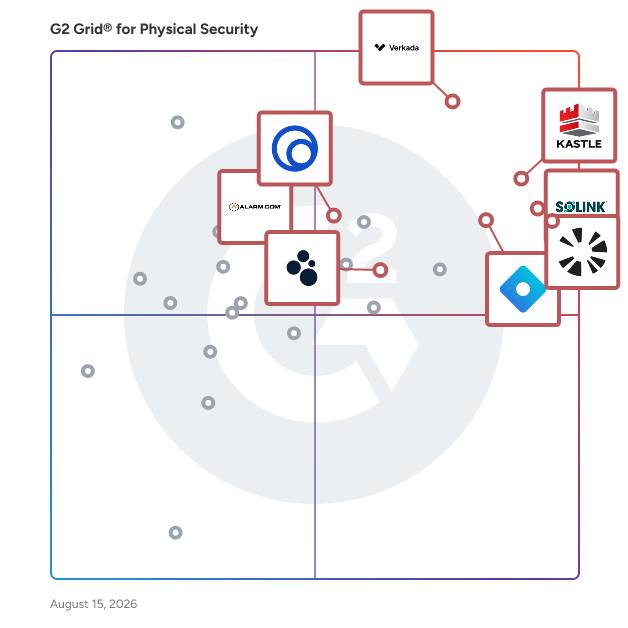
## Top-Rated Products (Ranked by G2 Score)
### 1. [Kastle](https://www.g2.com/products/kastle/reviews)
  Kastle offers unparalleled property technology solutions, safeguarding premier commercial real estate, multifamily communities, enterprise clients, and school and government facilities. Integrating advanced access control, video surveillance, and visitor management technologies, we ensure enhanced security and superior performance. As tens of thousands trust our services daily, we stand out as a partner dedicated to innovation, leadership, and comprehensive managed security services. Discover the Kastle difference at kastle.com.


  **Average Rating:** 4.6/5.0
  **Total Reviews:** 167

**User Satisfaction Scores:**

- **Ease of Use:** 9.1/10 (Category avg: 8.5/10)
- **Has the product been a good partner in doing business?:** 9.3/10 (Category avg: 8.9/10)
- **Quality of Support:** 9.2/10 (Category avg: 8.6/10)
- **Ease of Admin:** 9.1/10 (Category avg: 8.6/10)


**Seller Details:**

- **Seller:** [Kastle Systems ](https://www.g2.com/sellers/kastle-systems)
- **Company Website:** https://www.kastle.com
- **Year Founded:** 1972
- **HQ Location:** Falls Church, VA
- **Twitter:** @KastleSystems (2,063 Twitter followers)
- **LinkedIn® Page:** https://www.linkedin.com/company/kastle-systems (698 employees on LinkedIn®)

**Reviewer Demographics:**
  - **Who Uses This:** Office Manager, Property Manager
  - **Top Industries:** Commercial Real Estate, Real Estate
  - **Company Size:** 49% Mid-Market, 39% Small-Business


#### Pros & Cons

**Pros:**

- Ease of Use (56 reviews)
- Customer Support (54 reviews)
- Helpful (49 reviews)
- Access Control (27 reviews)
- Reliability (18 reviews)

**Cons:**

- Poor Customer Support (22 reviews)
- Access Issues (16 reviews)
- Expensive (10 reviews)
- Inaccurate Detection (10 reviews)
- Miscommunication (9 reviews)

### 2. [Rhombus](https://www.g2.com/products/rhombus-systems/reviews)
  Protecting your organization has never been easier. With Rhombus, you can make your spaces safer and smarter with a platform that’s intuitive to use for your entire team. Rhombus delivers an enterprise physical security platform that combines smart security cameras, IoT sensors, alarms, and integrations with 3rd party solutions all under one unified console. Rhombus&#39; cloud-based platform eliminates bulky hardware, is secure by default, and has built-in AI analytics so you can see, manage, and respond to threats in real-time. Built by cybersecurity experts, Rhombus simplifies security operations and is trusted by school districts, commercial real estate, healthcare facilities, Fortune 500 companies, and more.


  **Average Rating:** 4.6/5.0
  **Total Reviews:** 603

**User Satisfaction Scores:**

- **Ease of Use:** 9.4/10 (Category avg: 8.5/10)
- **Has the product been a good partner in doing business?:** 9.4/10 (Category avg: 8.9/10)
- **Quality of Support:** 9.3/10 (Category avg: 8.6/10)
- **Ease of Admin:** 9.4/10 (Category avg: 8.6/10)


**Seller Details:**

- **Seller:** [Rhombus](https://www.g2.com/sellers/rhombus-79d0b325-14f2-40cf-a885-75a4fad3b3a9)
- **Company Website:** https://rhombus.com
- **Year Founded:** 2016
- **HQ Location:** Sacramento, CA
- **LinkedIn® Page:** https://www.linkedin.com/company/rhombus-systems/ (209 employees on LinkedIn®)

**Reviewer Demographics:**
  - **Who Uses This:** Owner, Director of Technology
  - **Top Industries:** Education Management, Primary/Secondary Education
  - **Company Size:** 48% Mid-Market, 42% Small-Business


#### Pros & Cons

**Pros:**

- Ease of Use (73 reviews)
- Camera Quality (49 reviews)
- Customer Support (42 reviews)
- Features (34 reviews)
- Security (23 reviews)

**Cons:**

- Camera Issues (22 reviews)
- Expensive (15 reviews)
- Access Issues (11 reviews)
- Limited Features (9 reviews)
- Slow Performance (8 reviews)

### 3. [Brivo](https://www.g2.com/products/brivo/reviews)
  Brivo, Inc., created the cloud-based access control and smart spaces technology category over 20 years ago and remains the global leader serving commercial real estate, multifamily residential and large distributed enterprises. The company&#39;s comprehensive product ecosystem and open API provide businesses with powerful digital tools to increase security automation, elevate employee and tenant experience, and improve the safety of all people and assets in the built environment. Brivo&#39;s building access platform is now the digital foundation for the largest collection of customer facilities in the world, protecting over 600 million square feet of real estate across 60+ countries.


  **Average Rating:** 4.6/5.0
  **Total Reviews:** 35

**User Satisfaction Scores:**

- **Ease of Use:** 9.4/10 (Category avg: 8.5/10)
- **Has the product been a good partner in doing business?:** 9.1/10 (Category avg: 8.9/10)
- **Quality of Support:** 8.6/10 (Category avg: 8.6/10)
- **Ease of Admin:** 9.4/10 (Category avg: 8.6/10)


**Seller Details:**

- **Seller:** [Brivo](https://www.g2.com/sellers/brivo)
- **Year Founded:** 1999
- **HQ Location:** Bethesda, MD
- **LinkedIn® Page:** https://www.linkedin.com/company/brivo-inc/ (1,134 employees on LinkedIn®)

**Reviewer Demographics:**
  - **Top Industries:** Security and Investigations, Information Technology and Services
  - **Company Size:** 57% Small-Business, 34% Mid-Market


#### Pros & Cons

**Pros:**

- Cloud Technology (2 reviews)
- Customer Support (2 reviews)
- Access Control (1 reviews)
- Communication Speed (1 reviews)
- Ease of Use (1 reviews)

**Cons:**

- Internet Dependency (1 reviews)
- Slow Performance (1 reviews)

### 4. [Verkada](https://www.g2.com/products/verkada/reviews)
  Verkada is a pioneer in cloud-based physical security solutions, enabling organizations in over 90 countries to protect their people and property in a way that respects individuals&#39; privacy. Designed with simplicity in mind, Verkada offers six product lines — video security cameras, door-based access control, air quality sensors, alarms, workplace, and intercoms — that provide unparalleled visibility through a single cloud-based software platform.


  **Average Rating:** 4.7/5.0
  **Total Reviews:** 135

**User Satisfaction Scores:**

- **Ease of Use:** 9.4/10 (Category avg: 8.5/10)
- **Has the product been a good partner in doing business?:** 9.6/10 (Category avg: 8.9/10)
- **Quality of Support:** 9.2/10 (Category avg: 8.6/10)
- **Ease of Admin:** 9.6/10 (Category avg: 8.6/10)


**Seller Details:**

- **Seller:** [Verkada](https://www.g2.com/sellers/verkada)
- **Company Website:** https://www.verkada.com/
- **Year Founded:** 2016
- **HQ Location:** San Mateo, California
- **Twitter:** @VerkadaHQ (2,513 Twitter followers)
- **LinkedIn® Page:** https://www.linkedin.com/company/verkada/ (2,624 employees on LinkedIn®)

**Reviewer Demographics:**
  - **Who Uses This:** IT Manager
  - **Top Industries:** Primary/Secondary Education, Education Management
  - **Company Size:** 53% Mid-Market, 30% Enterprise


#### Pros & Cons

**Pros:**

- Ease of Use (30 reviews)
- Customer Support (13 reviews)
- Features (13 reviews)
- Integrations (8 reviews)
- Simple (8 reviews)

**Cons:**

- Expensive (15 reviews)
- Access Issues (4 reviews)
- Connectivity Issues (3 reviews)
- Inaccurate Detection (3 reviews)
- Missing Features (3 reviews)

### 5. [Coram AI](https://www.g2.com/products/coram-ai/reviews)
  Coram AI is a type of physical AI solution designed to enhance safety and optimize operations through the integration of cameras, sensors, and access systems. This innovative platform serves as an AI Safety Agent, providing businesses with a comprehensive approach to security that encompasses video surveillance, access control, and emergency management. Suitable for organizations of all sizes, Coram AI is trusted by a diverse range of clients, including Fortune 500 companies, educational institutions, and various sectors such as retail and manufacturing. The target audience for Coram AI includes businesses and organizations that prioritize safety and operational efficiency. The platform is particularly beneficial for environments where security is paramount, such as schools, warehouses, and large venues. Coram AI addresses specific use cases like proactive incident prevention, real-time monitoring, and streamlined emergency response, making it an essential tool for organizations looking to enhance their safety protocols. One of the key features that sets Coram AI apart is its AI-native architecture. Unlike traditional video security systems, Coram embeds intelligence directly into its platform, enabling advanced functionalities such as weapon detection, slip-and-fall detection, and natural language alerts. These capabilities allow organizations to implement proactive safety measures that significantly reduce response times and mitigate risks before they escalate into serious incidents. Additionally, Coram&#39;s compatibility with any IP camera and its open platform design facilitate quick and cost-effective deployment, making it an attractive option for businesses looking to upgrade their security systems without extensive overhauls. Coram AI&#39;s recognition as one of the CB Insights AI 100 Companies of 2025 highlights its leadership in applying advanced AI technologies to real-world security challenges. The team behind Coram brings extensive experience from the self-driving industry, equipping them with the expertise to tackle complex perception problems in real-time. This background allows Coram to leverage the latest advancements in multimodal AI, ensuring that their solutions remain at the forefront of innovation in physical security. Moreover, Coram AI places a strong emphasis on privacy and compliance, holding SOC 2 Type II and HIPAA certifications. This commitment to cybersecurity and data protection ensures that businesses can deploy AI solutions that not only enhance safety but also adhere to the highest standards of trust and resilience. With Coram AI, organizations can confidently secure their environments while maintaining compliance with essential regulations.


  **Average Rating:** 4.9/5.0
  **Total Reviews:** 184

**User Satisfaction Scores:**

- **Ease of Use:** 9.7/10 (Category avg: 8.5/10)
- **Has the product been a good partner in doing business?:** 9.8/10 (Category avg: 8.9/10)
- **Quality of Support:** 9.7/10 (Category avg: 8.6/10)
- **Ease of Admin:** 9.7/10 (Category avg: 8.6/10)


**Seller Details:**

- **Seller:** [Coram AI](https://www.g2.com/sellers/coram-ai)
- **Company Website:** https://www.coram.ai
- **Year Founded:** 2022
- **HQ Location:** Sunnyvale, US
- **LinkedIn® Page:** https://www.linkedin.com/company/coram-ai/about/ (99 employees on LinkedIn®)

**Reviewer Demographics:**
  - **Who Uses This:** IT Director
  - **Top Industries:** Primary/Secondary Education, Education Management
  - **Company Size:** 60% Mid-Market, 30% Small-Business


#### Pros & Cons

**Pros:**

- Ease of Use (83 reviews)
- Customer Support (55 reviews)
- Features (49 reviews)
- Helpful (37 reviews)
- Setup Ease (34 reviews)

**Cons:**

- Camera Issues (13 reviews)
- Lagging Performance (9 reviews)
- Slow Streaming (9 reviews)
- Video Playback Issues (8 reviews)
- Clip Management (7 reviews)

### 6. [SOLINK](https://www.g2.com/products/solink/reviews)
  Solink is an AI-driven video intelligence platform that connects video with business and operational data to help teams detect, investigate, and respond to risk and performance issues across physical locations. Solink is used by multi-location operators and the teams that support them, including security leaders, loss prevention, operations, IT, and store field teams in industries like retail, QSR, and convenience. The platform is designed for environments where incident response, theft and fraud reduction, and operational consistency require more than reactive video review. Solink unifies video with signals from systems such as POS, access control, and alarms, then applies AI and business context to reduce noise and surface events that matter. This supports faster verification, more consistent workflows, and secure visibility from anywhere. Key capabilities include: • Unified visibility across systems: Connects video with operational tools such as POS and access control to provide context around incidents, transactions, and exceptions. • AI guided detection and verification: Helps distinguish real risks and anomalies from routine activity to reduce false positives and investigation effort. • Investigation and reporting workflows: Enables searching, sharing, case documentation, and standardized processes for incident review and follow up. • Remote monitoring for distributed teams: Supports secure access for authorized users across locations to improve response coordination and oversight. • Open ecosystem deployment: Works with many existing camera environments to support expansion and standardization without forcing rip-and-replace hardware changes. Solink supports use cases such as loss prevention, safety and compliance reviews, operational audits, and performance coaching, with the goal of helping teams see more, know more, and do more across every site.


  **Average Rating:** 4.7/5.0
  **Total Reviews:** 112

**User Satisfaction Scores:**

- **Ease of Use:** 9.2/10 (Category avg: 8.5/10)
- **Has the product been a good partner in doing business?:** 9.6/10 (Category avg: 8.9/10)
- **Quality of Support:** 9.5/10 (Category avg: 8.6/10)
- **Ease of Admin:** 9.4/10 (Category avg: 8.6/10)


**Seller Details:**

- **Seller:** [SOLINK](https://www.g2.com/sellers/solink)
- **Company Website:** https://solink.com/
- **Year Founded:** 2009
- **HQ Location:** Ottawa, CA
- **Twitter:** @SolinkCorp (892 Twitter followers)
- **LinkedIn® Page:** https://www.linkedin.com/company/solink (411 employees on LinkedIn®)

**Reviewer Demographics:**
  - **Top Industries:** Retail, Restaurants
  - **Company Size:** 38% Mid-Market, 30% Enterprise


#### Pros & Cons

**Pros:**

- Ease of Use (11 reviews)
- Camera Quality (10 reviews)
- Setup Ease (9 reviews)
- Helpful (8 reviews)
- AI Technology (7 reviews)

**Cons:**

- Inaccurate Detection (5 reviews)
- Limited Functionality (3 reviews)
- Connectivity Issues (2 reviews)
- Limited Features (2 reviews)
- Scheduling Issues (2 reviews)

### 7. [Kisi](https://www.g2.com/products/kisi/reviews)
  www.getkisi.com Kisi is the industry-leading physical security system for modern facilities. Arming your team members with a keyless entry system does more than eliminate keys—it builds a vibrant office culture. Our simple web dashboard and easy-to-use app save administrators and employees time, result in fewer interruptions, and add up to a positive work experience day after day. Kisi is the only access system that offers a future proof end-to-end solution. Over-the-cloud updates occur in real time and enable full automation through third-party software integrations. ‍ Our keyless entry system is installed in thousands of high-traffic facilities across the globe. More and more companies are switching their security to do it the Kisi way.


  **Average Rating:** 4.5/5.0
  **Total Reviews:** 35

**User Satisfaction Scores:**

- **Ease of Use:** 9.2/10 (Category avg: 8.5/10)
- **Has the product been a good partner in doing business?:** 9.4/10 (Category avg: 8.9/10)
- **Quality of Support:** 9.0/10 (Category avg: 8.6/10)
- **Ease of Admin:** 9.1/10 (Category avg: 8.6/10)


**Seller Details:**

- **Seller:** [KISI](https://www.g2.com/sellers/kisi)
- **Year Founded:** 2012
- **HQ Location:** Brooklyn, US
- **Twitter:** @KISI (3,468 Twitter followers)
- **LinkedIn® Page:** https://www.linkedin.com/company/kisi/ (208 employees on LinkedIn®)

**Reviewer Demographics:**
  - **Company Size:** 51% Mid-Market, 37% Small-Business


#### Pros & Cons

**Pros:**

- Customer Support (1 reviews)
- Ease of Use (1 reviews)
- Helpful (1 reviews)
- Simple (1 reviews)
- Staff Professionalism (1 reviews)

**Cons:**

- Expensive (1 reviews)
- Poor Customer Support (1 reviews)

### 8. [Spot AI](https://www.g2.com/products/spot-ai/reviews)
  Spot AI brings Video AI to the physical world, helping organizations see, understand, and improve their workspaces. Built on 1B+ hours of video data and trusted by 1,000+ leading businesses, we deliver measurable ROI in safety, operations, and security across manufacturing floors, retail stores, schools, hospitals, and beyond. Our mission: Turn every camera into a source of business value—helping organizations build safer, smarter, and more efficient spaces.


  **Average Rating:** 4.8/5.0
  **Total Reviews:** 74

**User Satisfaction Scores:**

- **Ease of Use:** 9.4/10 (Category avg: 8.5/10)
- **Has the product been a good partner in doing business?:** 9.6/10 (Category avg: 8.9/10)
- **Quality of Support:** 9.4/10 (Category avg: 8.6/10)
- **Ease of Admin:** 9.6/10 (Category avg: 8.6/10)


**Seller Details:**

- **Seller:** [Spot AI](https://www.g2.com/sellers/spot-ai)
- **Year Founded:** 2018
- **HQ Location:** Burlingame, California
- **LinkedIn® Page:** https://www.linkedin.com/company/spot-ai/ (116 employees on LinkedIn®)

**Reviewer Demographics:**
  - **Top Industries:** Electrical/Electronic Manufacturing, Manufacturing
  - **Company Size:** 61% Mid-Market, 32% Small-Business


#### Pros & Cons

**Pros:**

- Ease of Use (6 reviews)
- Features (6 reviews)
- Remote Access (5 reviews)
- Customer Support (4 reviews)
- Easy Access (4 reviews)

**Cons:**

- Access Issues (2 reviews)
- Camera Issues (1 reviews)
- Clip Management (1 reviews)
- Complex Setup (1 reviews)
- Difficult Setup (1 reviews)

### 9. [Genea Security](https://www.g2.com/products/genea-security/reviews)
  Genea Security is a cloud-native access control solution designed to provide IT and security teams with comprehensive oversight of access activities across global enterprises or building portfolios. This innovative technology combines advanced software capabilities with non-proprietary Mercury-based hardware, allowing administrators to monitor and manage access in real-time. With Genea Security, organizations can streamline their security processes while ensuring the safety and convenience of their users. Targeted at businesses of all sizes, Genea Security caters to a diverse audience, including facility managers, IT professionals, and security teams. Its versatile features make it suitable for various use cases, from managing access in large corporate offices to securing multi-building complexes. The platform&#39;s Custom Dashboard allows users to focus on specific access alerts, providing a clear view of who is entering and exiting facilities. This level of oversight is crucial for organizations looking to enhance security protocols and maintain a safe environment for employees and visitors alike. One of the standout features of Genea Security is its ability to integrate seamlessly with third-party software, including video management systems and identity management platforms. This integration enables organizations to automate user management processes, such as adding and removing users, which can significantly reduce administrative burdens. The provision of mobile keys further enhances security, allowing employees to access doors, gates, and elevators using their smartphones. This flexibility not only improves user experience but also minimizes the need for physical access cards and fobs. Genea Security also emphasizes health and safety through features like Safe Workplace, Building Sync, and Touchless Visitor Management. These tools help organizations navigate the complexities of maintaining a secure environment, especially in light of evolving health guidelines. Additionally, the self-service tenant portals streamline user management for building teams, making it easier to maintain accurate access records and respond to tenant needs efficiently. With a commitment to customer support, Genea Security offers 24/7 assistance, ensuring that users can access help whenever they need it. This dedication to service enhances the overall user experience, reinforcing the platform&#39;s reliability as a comprehensive access control solution. By combining advanced technology with robust support, Genea Security stands out as a valuable asset for organizations seeking to enhance their security infrastructure.


  **Average Rating:** 4.3/5.0
  **Total Reviews:** 97

**User Satisfaction Scores:**

- **Ease of Use:** 9.0/10 (Category avg: 8.5/10)
- **Has the product been a good partner in doing business?:** 9.2/10 (Category avg: 8.9/10)
- **Quality of Support:** 8.8/10 (Category avg: 8.6/10)
- **Ease of Admin:** 9.3/10 (Category avg: 8.6/10)


**Seller Details:**

- **Seller:** [Genea](https://www.g2.com/sellers/genea)
- **Company Website:** https://www.getgenea.com/
- **Year Founded:** 2006
- **HQ Location:** Irvine, CA
- **Twitter:** @GetGenea (782 Twitter followers)
- **LinkedIn® Page:** https://www.linkedin.com/company/getgenea/ (195 employees on LinkedIn®)

**Reviewer Demographics:**
  - **Top Industries:** Computer Software, Information Technology and Services
  - **Company Size:** 58% Mid-Market, 22% Small-Business


#### Pros & Cons

**Pros:**

- Ease of Use (6 reviews)
- Remote Access (4 reviews)
- Access (3 reviews)
- Simple (3 reviews)
- Access Control (2 reviews)

**Cons:**

- Performance Issues (6 reviews)
- Limited Features (3 reviews)
- Poor Customer Support (2 reviews)
- Access Issues (1 reviews)
- Communication Issues (1 reviews)

### 10. [Omnigo](https://www.g2.com/products/omnigo/reviews)
  Omnigo Software is the leading provider of public safety, incident reporting, and security management solutions for law enforcement, education, healthcare, gaming, hospitality, and other enterprises, offering easy-to-use applications that provide actionable insight for making more informed decisions. Over 2,000 customers trust Omnigo&#39;s solutions to help law enforcement and security professionals secure their organization&#39;s property, protect against revenue loss, and ensure safer tomorrows.


  **Average Rating:** 4.2/5.0
  **Total Reviews:** 57

**User Satisfaction Scores:**

- **Ease of Use:** 8.5/10 (Category avg: 8.5/10)
- **Has the product been a good partner in doing business?:** 8.7/10 (Category avg: 8.9/10)
- **Quality of Support:** 8.5/10 (Category avg: 8.6/10)
- **Ease of Admin:** 8.2/10 (Category avg: 8.6/10)


**Seller Details:**

- **Seller:** [Omnigo Software](https://www.g2.com/sellers/omnigo-software-5724d962-d8c8-47d6-b3c4-ac675f7174e3)
- **Company Website:** https://www.omnigo.com/
- **Year Founded:** 2017
- **HQ Location:** St. Louis, MO
- **Twitter:** @OmnigoSoftware (1,111 Twitter followers)
- **LinkedIn® Page:** https://www.linkedin.com/company/omnigosoftware/ (132 employees on LinkedIn®)

**Reviewer Demographics:**
  - **Top Industries:** Law Enforcement, Hospital &amp; Health Care
  - **Company Size:** 41% Small-Business, 32% Mid-Market


#### Pros & Cons

**Pros:**

- Ease of Use (1 reviews)
- Platform Stability (1 reviews)
- Reliability (1 reviews)

**Cons:**

- Limited Features (1 reviews)
- Limited Functionality (1 reviews)
- Outdated Design (1 reviews)
- Poor Documentation (1 reviews)

### 11. [TrackTik](https://www.g2.com/products/trackforce-valiant-tracktik/reviews)
  TrackTik is an integrated security workforce management&amp;nbsp;solution that seamlessly connects field operations with back-office management. The platform automates manual tasks, provides real-time worker tracking, and delivers actionable data insights to reduce costs and boost operational efficiency. With streamlined workflows and comprehensive reporting capabilities, TrackTik enhances productivity, improving&amp;nbsp;job satisfaction and employee retention across frontline operations.


  **Average Rating:** 4.3/5.0
  **Total Reviews:** 61

**User Satisfaction Scores:**

- **Ease of Use:** 8.1/10 (Category avg: 8.5/10)
- **Has the product been a good partner in doing business?:** 8.5/10 (Category avg: 8.9/10)
- **Quality of Support:** 8.1/10 (Category avg: 8.6/10)
- **Ease of Admin:** 8.0/10 (Category avg: 8.6/10)


**Seller Details:**

- **Seller:** [Trackforce](https://www.g2.com/sellers/trackforce)
- **Year Founded:** 2000
- **HQ Location:** Southlake, US
- **Twitter:** @GoTrackforce (979 Twitter followers)
- **LinkedIn® Page:** https://www.linkedin.com/company/trackforce/ (463 employees on LinkedIn®)

**Reviewer Demographics:**
  - **Top Industries:** Security and Investigations
  - **Company Size:** 44% Mid-Market, 33% Small-Business


#### Pros & Cons

**Pros:**

- Ease of Use (11 reviews)
- Efficiency (7 reviews)
- Features (7 reviews)
- Scheduling (6 reviews)
- Tracking Features (5 reviews)

**Cons:**

- Complexity (7 reviews)
- Poor Customer Support (3 reviews)
- Poor Reporting (3 reviews)
- Admin Limitations (2 reviews)
- Difficult Setup (2 reviews)


## Parent Category

[Vertical Industry Software](https://www.g2.com/categories/vertical-industry)


## Related Categories

- [Visitor Management Software](https://www.g2.com/categories/visitor-management)
- [Video Surveillance Software](https://www.g2.com/categories/video-surveillance)


---

## Buyer Guide

### What You Should Know About Physical Security Software

### What is Physical Security Software?

Physical security software tools connect the disparate systems and functions that handle security and surveillance. These platforms go by several names depending on their use case, most commonly corporate security software or physical security information management (PSIM). Some common components of physical security include intrusion alarms, CCTV, building management and lighting control systems, suppression systems, motion detectors, RFID tags, GIS maps, computer-aided dispatch, and access control systems (such as ID keycards).

Physical security solutions serve a wide range of government sectors and industries that are concerned with ensuring employee and visitor safety and maintaining a secure space, from small businesses that manage security personnel to enterprise companies that have multi-layer security systems to monitor employees and facilities. Security departments and third-party security companies also utilize these tools to manage operational tasks such as guard scheduling, dispatch, and daily reporting. By connecting surveillance hardware with information systems, these platforms offer increased control over incident management, threat awareness, dispatch communications, and activity reporting.

Physical security systems are highly adaptable, and help identify and resolve any potential threats proactively before they escalate. By aggregating data from multiple sources, these platforms automate a number of monitoring and alerting tasks that are vulnerable to human error. Not all physical security solutions offer total integration with disparate products; notably, some may lack the ability to connect multiple safety and surveillance systems at a data level.

The most complete physical security software products have six key capabilities:

- **Collection:** Independent device management software collects data from disparate security devices and systems
- **Analysis:** The security platform analyzes all collected data, activities, and alarms to identify real-time priority for addressing threats or incidents
- **Verification:** The system operator receives information about relevant situations in a fast, digestible format to verify threats
- **Resolution:** The system operator receives instructions depending on the type of threat, and those instructions are informed by the organization’s standard operating procedures (SOPs) to resolve the situation
- **Reporting:** The security platform tracks all relevant information for compliance reporting, future improvements, and any necessary investigative analysis
- **Audit trail:** The security platform tracks all interactions with the system, notably response times and any system changes made by each individual operator

Key Benefits of Physical Security Software

- Protect an organization’s assets and facilities from threats
- Expedite security personnel mobilization and dispatch
- Centralize surveillance hardware into one viewing hub
- Improve incident management and threat response procedures

### Why Use Physical Security Software?

Any organization or business that has personnel and assets to protect should use some type of physical security solution. These systems minimize or entirely prevent any damage as a result of intruders, environmental threats, or related hazards, and assist businesses in monitoring employees for inappropriate conduct. Businesses should have some basic physical security system in place to minimize their liability in the event that harm comes to their employees. This becomes even more imperative for businesses and organizations that are open to public visitors, such as museums, hospitals, zoos, malls, or school campuses.

Particularly, enterprise businesses have been under scrutiny for their resistance to adopt new technology that could enhance the efficacy of their security departments. Physical barriers and guard officers no longer offer enough peace of mind to protect large organizations from breaches that can lead to extreme loss and harm. Additionally, physical security breaches often translate into figurative harm to an organization’s image and reputation, weakening public trust and leading to potential loss in revenue.

There are simply too many components for security operations to manage without a dedicated system. Physical security solutions allow users to gain a comprehensive view of their facilities, increasing surveillance intelligence and improving incident response and threat detection. Security camera footage can be viewed from a central hub, allowing operators to identify potential situations and dispatch personnel to de-escalate. Security departments can manage guard scheduling and dispatching with ease to ensure total coverage.

These tools enhance situational awareness, often visualizing security personnel locations, confirmed incidents, and alarm notifications. Businesses can configure these tools to monitor employee actions such as internet browsing history or [email](https://www.g2.com/categories/email) communications. As an added benefit, these tools increase data security indirectly by ensuring the safety of hardware assets that house an organization’s sensitive data. Overall, physical security software allows organizations of all kinds to improve their safety and security processes and ensure the protection of all personnel and assets.

### Who Uses Physical Security Software?

While any organization stands to benefit from physical security solutions, there are certain entities that face more pressure to manage their security operations effectively.

**Government —** Government agencies, perhaps more than any other entity, must protect highly classified information and maintain strict security clearance protocols. From smaller local facilities like the DMV to large government campuses like the White House or the Pentagon, physical security solutions ensure the safety of high ranking government officials as well as all collected citizen data. Transportation agencies also utilize these tools to monitor passengers for fare dodging, violent behavior, and other incidents that require law enforcement response.

**Educational institutions —** K-12 schools and college campuses need physical security solutions to manage access control systems and security personnel, ensuring all guests are accounted for and no intruders compromise the safety of students and staff. Additional integrated tools like metal detectors, intruder alarms, student ID cards add additional layers of preventative security. For college campuses, dedicated security departments use these tools to ensure campus-wide guard coverage and quick dispatch to respond to threats. Additionally, system operators can send out emergency notifications to students’ cell phones for campus-wide threat alerts.

**Museums —** Cultural institutions and zoos host hundreds of visitors daily. Physical security systems help coordinate security personnel placement and communications, track all incoming and outgoing visitors, and ensure the safety of visitors and collections. Motion sensors and alarms help museums protect their collections from theft or damage, such as visitors leaning in too closely to paintings. More elaborate systems can remotely lock doors to certain wings, ensuring thieves cannot escape.

**Healthcare —** Hospitals need to ensure the safety of staff and patients, as well as securing all their patient health records. These tools provide total surveillance of medical facilities, help stationed security personnel communicate and mobilize as needed, and verify the identity of all hospital visitors. Similar to government agencies, hospitals need to manage personnel clearance for restricted areas, and physical security solutions help operationalize surveillance cameras, ID cards, motion sensors, and intruder alarms to keep uncleared staff out. Additionally, patients can be easily monitored for emergencies that require medical or law enforcement dispatch.

**Retail —** Retail outlets and malls must monitor visitors and ensure their safety, while also protecting physical property and merchandise from damage or theft. Integrated tools like metal detectors, RFID tags, and surveillance cameras offer layers of theft prevention for stores. Security operators can monitor all facility activity from a centralized interface, often a full-scale video wall to track all camera footage in key areas, and dispatch personnel as needed.

**Third-party security companies—** Contracted security personnel for businesses or events rely on physical security solutions to schedule personnel, monitor their location, and manage any identified incidents. In this function, these tools offer administrative support more so than security, ensuring security providers are fully prepared to offer contracted services.

### Physical Security Software Features

Physical security platforms vary in their functionality, given that they are often middleware solutions that connect disparate systems and solutions. Middleware software essentially acts as a glue between multiple unconnected software applications, allowing these applications to communicate and share information with each other. The full range of features depends on the user persona and the integrated products, but generally a base solution offers some or all of the following features.

**Access control —** Access control maintains facility security by controlling who can enter or exit any specific area. Users are given preset access permissions and must use some method to verify their identity, such as a key card, a code, or [biometric authentication](https://www.g2.com/categories/biometric-authentication). Digital access control can also be established to secure sensitive computer data.

**Incident reporting —** Incident logs and reports can be completed with preset or custom templates to document ongoing and resolved incidents that security personnel are addressing. These reports may include details such as timestamps, GPS location, facility site locations, and images.

**Computer-aided dispatch —** Computer-aided dispatch drastically reduces the time it takes to mobilize security personnel to a specific location for a reported threat or incident. Operators can communicate with law enforcement officers, track vehicle and emergency locations with GIS mapping, and document any notes from officers or the person who reported the incident.

**Security personnel management—** Security personnel management ensures guards are scheduled properly, can receive and send communications, and that their locations are monitored by the system operator.

**Mass notifications —** Mass notifications allow the system operator to send out text or intercom announcements when threats escalate and all individuals in the building need to prepare for evacuation or lockdown. This could also apply to fire alarms or similar environmental threats. Additionally, many of these alarms are often automated and do not require an operator to trigger.

**Video surveillance —** Video surveillance footage from installed cameras is managed from a central interface. System operators can manipulate specific feeds to zoom, rewind, or stop footage, or they can transmit footage to appropriate security personnel.

**Visitor management —** Visitor management functions may include mobile kiosks for signing in and signing out, printing photo badges for visitors, and tracking total number of visitors over time. These solutions may also integrate with [parking management solutions](https://www.g2.com/categories/parking-management) to track license plates and verify visitor identity.

**GIS mapping —** GIS mapping allows system operators to visualize the entire facility and quickly see marked locations for stationed personnel, specific individuals, or reported incidents. For dispatchers, these maps can show vehicle location.

**SOP management —** Standard operating procedures (SOPs) can be configured to each business&#39;s unique protocols, and these will be displayed in the system so staff can respond accordingly to specific incidents.

**Analytics reporting —** Analytics reporting allows system users to pull specific data reports for previous incidents, response rates, or personnel logs. Reports can highlight areas for improvement, such as time spent between threat identification and security dispatch, or provide insight into how many threats were prevented as a result of the physical security system.

### Trends Related to Physical Security Software

[**Artificial intelligence software**](https://www.g2.com/categories/artificial-intelligence) **—** Artificial intelligence (AI) is a growing feature in physical security solutions, with popular examples including facial recognition, motion sensors, and cameras powered by machine learning to detect specific objects or vehicle models. This could help organizations keep out specific individuals who have been security threats in the past, provide another access control option for employees, and detect potential threats much sooner than the human eye. AI stands to automate and speed up many critical functions that could save precious time for security personnel working to isolate threats before they escalate, but there are also risks related to algorithmic bias and privacy compliance violations. Additionally, some ambiguous incidents require deductive reasoning that only humans can provide.

### Potential Issues with Physical Security Software

**Human error —** While physical security software offers organizations features to improve safety and security procedures, they are only as useful as the security personnel utilizing them. The system may detect threats, but if security guards are slow to respond to an alert, harm can still come to an individual or the property--even with automated alerts, alarms, and access control in place.

**Interoperability —** Physical security platforms are only as capable as the number of manufacturer integrations they allow. There are open industry standards within physical security, such as the physical security interoperability alliance (PSIA) or ONVIF (open network video interface forum), that are concerned with improving interoperability of IP-enabled security devices (such as video surveillance hardware). PSIM tools often utilize open technologies that are compatible with a wide range of physical security manufacturers, in contrast to more simplistic security software tools. When facing limited manufacturer integration options, businesses sometimes sacrifice functionality from their physical security platform.

### Software and Services Related to Physical Security Software

[**Emergency management software**](https://www.g2.com/categories/emergency-management) **—** Emergency management tools help businesses plan for specific incidents or emergency scenarios that could threaten individual safety. They create action plans, manage mass notifications, and allow for retrospective analysis of emergency response. Businesses can utilize these tools to revise their continuity plans and incorporate post-crisis feedback into future emergency responses.

[**Visitor management software**](https://www.g2.com/categories/visitor-management) **—** Visitor management software electronically manages visitor location and information for any business that allows guests into their space. Most physical security solutions incorporate visitor management functionality, but these standalone solutions are usually utilized by front desk receptionists or security guards to keep track of incoming and outgoing visitors. These tools can be used on a computer or as a self-operating kiosk.

[**Emergency notification solutions**](https://www.g2.com/categories/emergency-notification) **—** Emergency notification tools are essentially simplistic forms of emergency management software, focusing solely on two-way communications and mobilizing incident response teams. These tools push out alerts and mass texts to all relevant individuals, allow information to be shared back and forth, and often allow GIS maps and documents to be transmitted.

[**Security information and event management (SIEM) software**](https://www.g2.com/categories/security-information-and-event-management-siem) **—** SIEM tools help IT teams detect anomalies within any given network, such as malware or unauthorized users. Whereas physical security tools manage facilities and bodily safety, SIEM solutions are concerned with cybersecurity and ensuring an organization’s data networks are secure and that access control is maintained, while centralizing IT security operations in one interface.


