Best Knowledge Base Software - Page 5

How Many Knowledge Base Software Products Does G2 Track?

Total Products under this Category: 285

Category Stats (Sep 2026)

  • Average Rating: 4.48/5 The average rating of products in this category, based on all submitted ratings
  • Top Trending Product: DokuWiki (+2.12%) - Among all products in this category, DokuWiki recorded the largest rating increase compared to last month

Last updated: September 01, 2026

How Does G2 Rank Knowledge Base Software Products?

Why You Can Trust G2's Software Rankings:

  • 30 Analysts and Data Experts
  • 96,600+ Authentic Reviews
  • 285+ Products
  • Unbiased Rankings

G2's software rankings are built on verified user reviews, rigorous moderation, and a consistent research methodology maintained by a team of analysts and data experts. Each product is measured using the same transparent criteria, with no paid placement or vendor influence. While reviews reflect real user experiences, which can be subjective, they offer valuable insight into how software performs in the hands of professionals. Together, these inputs power the G2 Score, a standardized way to compare tools within every category.

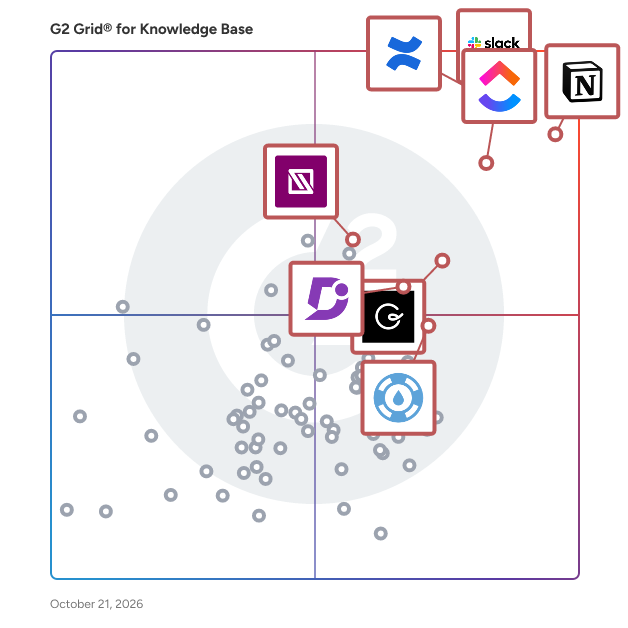
G2 Grid® for Knowledge Base Software

G2 Grid® for Knowledge Base Software plotting products by satisfaction and market presence

Highlighted products: Slack, Notion, Confluence, ClickUp, Guru, IT Glue, Helpjuice, and Workvivo.

Underlying data: [Grid® JSON](https://www.g2.com/categories/knowledge-base-software/grids.json?focus%5B%5D=slack&focus%5B%5D=notion&focus%5B%5D=confluence&focus%5B%5D=clickup&focus%5B%5D=guru&focus%5B%5D=it-glue&focus%5B%5D=helpjuice&focus%5B%5D=workvivo)

HelpDocs

Knowledge base software for customer self-service and team docs. Create, manage, and connect trusted answers across your customers, team, and AI.

Average Rating: 4.3/5.0

Total Reviews: 18

How Do G2 Users Rate HelpDocs?

  • Has the product been a good partner in doing business?: 9.3/10 (Category avg: 9.0/10)
  • Quality of Support: 9.0/10 (Category avg: 8.8/10)
  • Ease of Use: 9.0/10 (Category avg: 8.8/10)

Who Is the Company Behind HelpDocs?

  • Seller: HelpDocs
  • Year Founded: 2016
  • HQ Location: London
  • Twitter: @HelpDocs
    934 Twitter followers
  • LinkedIn® Page: www.linkedin.com
    2 employees on LinkedIn®

Who Uses This Product?

  • Company Size: 44% Small, 33% Large

What Do G2 Reviewers Say About HelpDocs?

AI-generated summary from verified user reviews

Pros
  • Users commend HelpDocs' exceptional customer support, highlighting prompt responses and proactive solutions from the support team.
  • Users value the customizability of HelpDocs, enabling easy creation of personalized and professional documentation.
  • Users love the customization options in HelpDocs, allowing for effortless organization and a professional appearance.
  • Users praise the user-friendly interface of HelpDocs, making documentation creation and organization effortlessly simple.
  • Users are impressed by the exceptional support from HelpDocs, highlighting quick responses and proactive solutions.
Cons
  • Users find the analytics dashboard could provide more detailed insights, making it less effective for understanding user engagement.
  • Users find the integration issues with third-party tools require excessive setup, impacting overall usability and efficiency.
  • Users find the learning curve steep for advanced customization and integrations, impacting accessibility for non-technical users.

What Are Recent G2 Reviews of HelpDocs?

TWiki

TWiki - the Open Source Enterprise Wiki and Web Application Platform

Average Rating: 4.2/5.0

Total Reviews: 14

How Do G2 Users Rate TWiki?

  • Has the product been a good partner in doing business?: 8.7/10 (Category avg: 9.0/10)
  • Quality of Support: 8.7/10 (Category avg: 8.8/10)
  • Ease of Use: 7.5/10 (Category avg: 8.8/10)

Who Is the Company Behind TWiki?

  • Seller: TWiki
  • Year Founded: 1998
  • HQ Location: N/A
  • Twitter: @twiki
    9,814 Twitter followers
  • LinkedIn® Page: www.linkedin.com
    2 employees on LinkedIn®

Who Uses This Product?

  • Top Industries: Computer Software
  • Company Size: 50% Large, 44% Small

What Are Recent G2 Reviews of TWiki?

What Are G2 Users Discussing About TWiki?

Zoho Learn

Online Portals for Group Collaboration & Knowledge Sharing

Average Rating: 4.1/5.0

Total Reviews: 36

How Do G2 Users Rate Zoho Learn?

  • Has the product been a good partner in doing business?: 9.2/10 (Category avg: 9.0/10)
  • Quality of Support: 7.9/10 (Category avg: 8.8/10)
  • Ease of Use: 7.6/10 (Category avg: 8.8/10)

Who Is the Company Behind Zoho Learn?

  • Seller: Zoho
  • Year Founded: 1996
  • HQ Location: Austin, TX
  • Twitter: @Zoho
    137,880 Twitter followers
  • LinkedIn® Page: www.linkedin.com
    30,913 employees on LinkedIn®
  • Phone: +1 (888) 900-9646

Who Uses This Product?

  • Who Uses This: Graduate Teaching Assistant
  • Top Industries: Higher Education, Education Management
  • Company Size: 42% Large, 39% Medium

What Are Recent G2 Reviews of Zoho Learn?

What Are G2 Users Discussing About Zoho Learn?

ProProfs Knowledge Base Software

ProProfs Knowledge Base is built to run your customer help center and internal knowledge base in one place, powered by AI to help organizations create, manage, and deliver help content for both audiences without switching tools. Teams use it to build public help centers, internal wikis, product documentation, SOPs, and onboarding resources, all from one workspace, reducing support tickets and centralizing company knowledge along the way. Popular use cases: Customer help centers and self-service portals Internal wikis and company knowledge hubs Product documentation and user manuals SOPs and process documentation Employee onboarding and training material AI Knowledge Brain: the engine behind the platform The AI Knowledge Brain learns continuously from your existing articles, FAQs, documentation, and videos, keeping answers accurate as your content grows. It powers: AI Writer: drafts full articles from a topic or brief, and refines or simplifies existing content AI Search Assistant: gives a direct, synthesized answer instead of a list of links AI Article Suggestions: reads natural language queries and surfaces the most relevant content AI Translation: translates articles into multiple languages while preserving tone and formatting AI Insights & Reports: flags failed searches, broken links, and knowledge gaps AI SEO Optimization: generates optimized titles and meta descriptions automatically AI Style Guides: keeps brand tone and terminology consistent across every writer AI Guide Creator: converts screen recordings into annotated step-by-step guides Everything else you'd expect from a modern knowledge base: WYSIWYG editor with professionally designed templates Branding and customization (colors, fonts, custom CSS/HTML, custom domains) Roles and permissions, workflows, and conditional content Version control and revision history Ticket forms, deflection, and help widgets SSO/SAML support and multilingual content Detailed reporting and analytics Whether the goal is cutting support volume, keeping internal knowledge from scattering across tools, or building a help center customers actually want to use, ProProfs Knowledge Base brings it all together in one platform.

Average Rating: 4.6/5.0

Total Reviews: 31

How Do G2 Users Rate ProProfs Knowledge Base Software?

  • Has the product been a good partner in doing business?: 8.8/10 (Category avg: 9.0/10)
  • Quality of Support: 9.3/10 (Category avg: 8.8/10)
  • Other Integrations: 9.6/10 (Category avg: 8.3/10)
  • Ease of Use: 9.5/10 (Category avg: 8.8/10)

Who Is the Company Behind ProProfs Knowledge Base Software?

  • Seller: ProProfs
  • Year Founded: 2009
  • HQ Location: Los Angeles, CA
  • Twitter: @ProProfs
    4,731 Twitter followers
  • LinkedIn® Page: www.linkedin.com
    214 employees on LinkedIn®

Who Uses This Product?

  • Top Industries: Computer Software, Information Technology and Services
  • Company Size: 48% Medium, 48% Small

What Are Recent G2 Reviews of ProProfs Knowledge Base Software?

What Are G2 Users Discussing About ProProfs Knowledge Base Software?

MangoApps

MangoApps is a leading intranet platform and employee hub that brings together your people, knowledge, tools, and AI in one secure, unified digital workplace. Whether you’re managing desk-based teams, frontline employees, or a mix of both, MangoApps replaces disconnected apps and outdated systems with a single source of truth—accessible anytime, anywhere, on any device. The platform combines a modern intranet, a frontline employee app, and an AI-powered knowledge experience to make work simpler, faster, and more connected. Employees can find information instantly, collaborate in real time, complete training, manage tasks, and engage with company culture—all in one place. Trusted by global brands across retail, healthcare, finance, manufacturing, and more, MangoApps helps organizations boost employee communication, strengthen employee engagement, and create a better overall employee experience. By reducing app overload and bridging the digital divide, MangoApps empowers every worker to focus on what matters most—getting work done. Key Highlights: - AI-powered search and chat for accurate, role-based answers - Mobile-first experience for frontline employee engagement - Streamlined communication and collaboration tools - Enterprise-grade security (HITRUST, ISO 27001, SOC 2 Type II) - Proven adoption rates of 90%+ in companies from 300 to 300,000+ employees Why Choose MangoApps? Organizations choose MangoApps because it delivers a digital workplace that works for everyone—desk, remote, and frontline employees alike. Instead of juggling multiple tools for intranet, chat, file sharing, training, and workflows, MangoApps gives you one integrated platform that’s easy to use, highly secure, and built for enterprise scale. With MangoApps, you can: - Centralize communications so every announcement, update, and resource is seen - Drive measurable gains in employee engagement with personalized, targeted content - Give frontline employees mobile access to schedules, tasks, and training in real time -Connect AI to your company’s knowledge for instant, reliable answers - Scale effortlessly from hundreds to hundreds of thousands of employees without losing performance or usability From replacing outdated intranets to creating a mobile-first employee communication platform, MangoApps is the employee experience solution that grows with your organization. It’s not just software—it’s a smarter way to connect people, knowledge, and work.

Average Rating: 4.2/5.0

Total Reviews: 118

How Do G2 Users Rate MangoApps?

  • Has the product been a good partner in doing business?: 9.0/10 (Category avg: 9.0/10)
  • Quality of Support: 8.8/10 (Category avg: 8.8/10)
  • Other Integrations: 9.4/10 (Category avg: 8.3/10)
  • Ease of Use: 8.4/10 (Category avg: 8.8/10)

Who Is the Company Behind MangoApps?

  • Seller: MangoApps
  • Year Founded: 2008
  • HQ Location: Issaquah, WA
  • Twitter: @mangoappsinc
    1,254 Twitter followers
  • LinkedIn® Page: www.linkedin.com
    169 employees on LinkedIn®

Who Uses This Product?

  • Who Uses This: Project Manager
  • Top Industries: Hospital & Health Care, Information Technology and Services
  • Company Size: 57% Medium, 22% Large

What Do G2 Reviewers Say About MangoApps?

AI-generated summary from verified user reviews

Pros
  • Users appreciate the ease of use of MangoApps, finding it engaging and intuitive for collaboration across teams.
  • Users find MangoApps intuitive and user-friendly, making collaboration seamless for diverse teams across various platforms.
  • Users appreciate the centralized notification system and feature abundance of MangoApps, enhancing company-wide communication and efficiency.
  • Users value the centralized notification system in MangoApps, enhancing communication and collaboration among diverse teams.
  • Users value the collaborative work environment MangoApps fosters, enhancing teamwork for geographically diverse teams.
Cons
  • Users find the complex features overwhelming, requiring time to learn despite the helpful support resources available.
  • Users find the complexity of MangoApps overwhelming due to its numerous features, despite helpful support resources.
  • Users find the complex usability of MangoApps overwhelming, despite helpful customer support and community resources.
  • Users find the confusion caused by numerous features overwhelming, requiring time to learn and navigate effectively.
  • Users find the difficult learning curve challenging due to the overwhelming number of features in MangoApps.

What Are Recent G2 Reviews of MangoApps?

What Are G2 Users Discussing About MangoApps?

Trupeer

In every company, someone knows exactly how the work gets done, how the migration runs, which step fixes the error, where the real process lives. When they switch teams or leave, that knowledge usually goes with them. Trupeer captures it first. Someone records their screen and talks through the task once. Trupeer's AI turns that single take into a polished video, a step-by-step guide, and an SOP, in 120+ languages, with smart zooms, clean narration, and avatars. No editing or retakes. It all lands in a branded knowledge base on your own domain, live in a day with no setup. Search it and you don't just get a link, you get an answer, plus a clip cued to the exact moment it happens. Your AI agents get the same: ITSM bots, automation platforms, and ops copilots query the same verified knowledge over MCP before they act. Trusted by 10,000+ teams across 200+ countries, including Glean, SAP, Welltower, KPMG, Autodesk, Lufthansa, MSCI, Carrier,Skillsoft ✅ Genpact: 300 SOPs and videos in 15 days, down from 8–10 weeks, at 85% lower cost ✅ Zuora: certification videos from 5 hours to 4 minutes; 1,500 built for Zuora University ✅ Diageo: 87% less IT video production time; 27 localized outputs from a single recording ISO 27001, SOC 2, and GDPR compliant, with SSO & SCIM. Recorded once. Understood forever. Learn more at trupeer.ai

Average Rating: 4.8/5.0

Total Reviews: 68

How Do G2 Users Rate Trupeer?

  • Has the product been a good partner in doing business?: 9.1/10 (Category avg: 9.0/10)
  • Quality of Support: 8.9/10 (Category avg: 8.8/10)
  • Ease of Use: 9.4/10 (Category avg: 8.8/10)

Who Is the Company Behind Trupeer?

  • Seller: Trupeer
  • Company Website:
  • Year Founded: 2023
  • HQ Location: Bengaluru, IN
  • Twitter: @TrupeerAI
    916 Twitter followers
  • LinkedIn® Page: www.linkedin.com
    36 employees on LinkedIn®

Who Uses This Product?

  • Who Uses This: Founder
  • Top Industries: Computer Software, Information Technology and Services
  • Company Size: 63% Small, 31% Medium

What Do G2 Reviewers Say About Trupeer?

AI-generated summary from verified user reviews

Pros
  • Users value the time-saving features of Trupeer, allowing quick and efficient creation of professional product videos.
  • Users find Trupeer's interface incredibly easy to use, simplifying the creation of 'How to Videos' and product guides.
  • Users find it extremely easy to create 'How to Videos' and 'Product Guides' with Trupeer's intuitive AI workflow.
  • Users value the AI-driven tools of Trupeer, simplifying walkthrough creation and enhancing productivity with time-saving features.
  • Users love the ease of use with Trupeer, allowing for quick, professional quality video production without hassle.
Cons
  • Users find the limited features of Trupeer, such as voice options and background music, restrictive and lacking variety.
  • Users feel the meeting limitations of Trupeer are too restrictive, affecting flexibility and overall experience.
  • Users face limited language support with few voice options, affecting customization and convenience in their projects.
  • Users feel the plan limitations restrict customization options and voice variety, impacting their overall experience.
  • Users face challenges with recording issues, needing to re-record entire videos for minor changes in their content.

What Are Recent G2 Reviews of Trupeer?

XWiki

XWiki is a robust open-source collaborative platform designed to enhance efficiency and streamline communication for companies of all sizes. By organizing knowledge effectively, XWiki reduces organizational silos and ensures that critical information is always accessible. This enhances collaboration at both team and organizational levels, preventing email overload and the loss of important knowledge when employees leave. As an adaptable and versatile alternative to proprietary knowledge bases, XWiki offers over 900 pre-made extensions and applications. These features allow businesses to customize and extend their wiki capabilities as needed, making it one of the most flexible collaborative platforms available. The platform's structured design simplifies the process of managing information, with tools like faceted search and pre-built templates, ensuring consistent documentation and reducing the time spent searching for information. XWiki provides transparent pricing models for both cloud and on-premises deployments, including special discounts for NGOs, open-source projects, and educational institutions. This scalability, combined with powerful features, makes it an excellent choice for any organization. The platform supports full customization through its extensive range of extensions, applications, macros, skins, and plugins. Whether a business requires a cloud-based solution or an on-premises deployment, XWiki can be tailored to meet specific needs. Developed with input from a community of experienced and passionate developers, XWiki is continuously advancing, ensuring compatibility, security, and high performance. Privacy and security are prioritized, with features that protect personal files and securely encrypt all login credentials. The platform's complex rights management allows differentiated access on a user basis, and a superadmin account ensures full access for the rightful owner. A standout feature of XWiki is the new Confluence Migration Toolkit, which supports three heavily requested bridge macros: Page Properties, Page Properties Report, and Content by Label. These macros use Confluence's Query Language (CQL), enabling XWiki to interpret queries created in Confluence. This ensures a seamless transition for businesses migrating from Confluence, preserving existing workflows and data structures. XWiki offers more than just software; it fosters a collaborative culture. The platform provides all the tools necessary for effective communication and teamwork, helping organizations break down silos and enhance internal knowledge sharing. By enabling fast and efficient access to critical information, XWiki helps businesses save time and reduce operational costs. Additionally, XWiki ensures ethical software use by providing an open-source option that eliminates vendor lock-in. This commitment to open-source principles guarantees that businesses retain full control over their software and data. A dedicated human support team backs XWiki, offering tailored solutions to meet custom requirements. This personalized support ensures that businesses can fully leverage the platform's capabilities to achieve their collaboration and knowledge management goals. In summary, XWiki is a comprehensive, flexible, and secure open-source platform designed for modern businesses. Its extensive customization options, robust security features, and supportive community make it an ideal choice for enhancing collaboration and knowledge management. Whether deployed in the cloud or on-premises, XWiki offers a scalable solution that grows with businesses, fostering a more connected and productive work environment.

Average Rating: 4.4/5.0

Total Reviews: 13

How Do G2 Users Rate XWiki?

  • Has the product been a good partner in doing business?: 8.7/10 (Category avg: 9.0/10)
  • Quality of Support: 8.8/10 (Category avg: 8.8/10)
  • Ease of Use: 8.5/10 (Category avg: 8.8/10)

Who Is the Company Behind XWiki?

  • Seller: XWiki
  • Year Founded: 2004
  • HQ Location: Paris, France
  • Twitter: @XWiki
    1,655 Twitter followers
  • LinkedIn® Page: www.linkedin.com
    78 employees on LinkedIn®
  • Phone: +33 (0)1 45 42 40 90

Who Uses This Product?

  • Company Size: 38% Large, 38% Medium

What Are Recent G2 Reviews of XWiki?

Knowledge Cloud

Knowledge Cloud is a modern knowledge management system designed specifically for law and consulting firms.

Average Rating: 4.4/5.0

Total Reviews: 10

How Do G2 Users Rate Knowledge Cloud?

  • Quality of Support: 9.5/10 (Category avg: 8.8/10)
  • Other Integrations: 10.0/10 (Category avg: 8.3/10)
  • Ease of Use: 9.3/10 (Category avg: 8.8/10)

Who Is the Company Behind Knowledge Cloud?

Who Uses This Product?

  • Company Size: 60% Medium, 30% Small

What Are Recent G2 Reviews of Knowledge Cloud?

What Are G2 Users Discussing About Knowledge Cloud?

Upland RightAnswers

RightAnswers is the leading KCS v6 verified knowledge management platform purpose-built for complex enterprises needing scalable, AI-powered support solutions. With over 20 years of experience providing enterprise knowledge management solutions to some of the world’s largest companies. We have proven scalability to support customers in excess of 2M searches monthly with user populations of over 200,000. With flexible AI options including BYO AI, AI Approver Review, Gen Answers API, and more, RightAnswers transforms how organizations handle technical support. The platform seamlessly integrates across entire tech stacks, enabling L1 agents to handle L2/L3 issues while empowering customer self-service. Organizations can dramatically reduce resolution times, scale operations without adding headcount, and maintain perfect accuracy across exploding product portfolios. RightAnswers turns technical complexity into competitive advantage through intelligent knowledge creation, curation, and delivery. RightAnswers transforms support chaos into confidence by combining battle-tested knowledge management with intelligent AI, empowering both agents and customers to solve complex technical challenges at expert speed. Our KCS v6 verified platform turns every support interaction into a powerful resolution engine – enabling L1 agents to handle L2/L3 issues, slashing resolution times, and scaling support operations without adding headcount. While others offer tools, we deliver a complete solution that makes technical complexity your competitive advantage. Our Unique Selling Points (USPs) - KCS v6 Verified - 23 years of proven KM expertise across consulting & product - RightAnswers X- make knowledge available wherever agents work without added cost. - Connected Knowledge framework - Embedded and flexible AI options - Scalable, configurable enterprise ready Why RightAnswers is the right AI knowledge management platform for you: 1) Next-Generation Technical Support with Intelligent Knowledge Automation -Accelerate time-to-value: RightAnswers comes with 30,000+ pre-built knowledge articles (K-Paks), so you start seeing measurable value from Day 1. -Create and curate knowledge intelligently: With AI-driven content authoring, duplication detection, and AI knowledge lifecycle management, teams achieve up to 85% faster content creation and 90% faster quality control, ensuring your knowledge stays current, compliant, and clean. -Knowledge in the flow of work: RightAnswers seamlessly integrates with CRM, ITSM, and self-service systems, ensuring agents and customers access precise answers where they already work, cutting search time by nearly 50% and boosting resolution accuracy to 80%+. 2) Conquer Enterprise Complexity with Configurability that Fits You -Built for scale: Unlike other KM platforms, RightAnswers speaks the language of large, technical support organizations, built to support thousands of agents, complex workflows, and multi-system dependencies without friction. -Configurable to your reality: Every process, permission, and workflow can be tuned to your organization’s needs from role-based access control to automated retirement policies, ensuring security and governance at enterprise scale. -Connect your entire ecosystem: RightAnswers connects effortlessly with leading CRMs and ITSMs, ensuring every ticket, interaction, and self-service portal draws from the same accurate knowledge source eliminating silos and reducing escalations. 3) Knowledge Expertise that Drives Measurable Results -KCS leadership you can trust: As the world’s first KCS v6 Verified platform with certified trainers and consultants, RightAnswers embeds KCS best practices directly into your workflows, touching various focus points where knowledge is needed, enabling faster adoption and measurable performance improvements. -Backed by decades of innovation: With 23+ years of knowledge management and contact-center leadership, RightAnswers brings the proven frameworks replicable in various use cases to operationalize knowledge and scale globally. -Partnership beyond software: Our experts work with you to align strategy, metrics, and enablement, ensuring your knowledge program drives higher CSAT, lower cost-to-serve, and sustainable adoption across every department.

Average Rating: 4.5/5.0

Total Reviews: 46

How Do G2 Users Rate Upland RightAnswers?

  • Has the product been a good partner in doing business?: 9.2/10 (Category avg: 9.0/10)
  • Quality of Support: 9.0/10 (Category avg: 8.8/10)
  • Other Integrations: 6.7/10 (Category avg: 8.3/10)
  • Ease of Use: 8.5/10 (Category avg: 8.8/10)

Who Is the Company Behind Upland RightAnswers?

  • Seller: Upland Software
  • Company Website:
  • Year Founded: 2010
  • HQ Location: Austin, TX
  • LinkedIn® Page: www.linkedin.com
    802 employees on LinkedIn®
  • Ownership: NASDAQ:UPLD

Who Uses This Product?

  • Top Industries: Information Technology and Services
  • Company Size: 56% Large, 25% Medium

What Do G2 Reviewers Say About Upland RightAnswers?

AI-generated summary from verified user reviews

Pros
  • Users appreciate the ease of use of Upland RightAnswers, benefiting from its user-friendly interface and fast AI search.
  • Users value the robust features of Upland RightAnswers, enhancing usability, integration, and efficiency for knowledge management.
  • Users praise the excellent customer support of Upland RightAnswers, enhancing their overall experience and efficiency.
  • Users love the efficient knowledge segmentation and AI-assisted search of RightAnswers, significantly enhancing productivity and saving time.
  • Users appreciate the AI search capabilities of Upland RightAnswers for providing fast, accurate, and helpful answers.
Cons
  • Users experience software bugs that can hinder efficiency and complicate the troubleshooting process with long resolution times.
  • Users report AI limitations in Upland RightAnswers, noting issues with search accuracy and response reliability.
  • Users express frustration with delays in customization and support responses, impacting overall satisfaction and effectiveness.
  • Users face challenges with issue resolution, experiencing delays, conflicting information, and unresolved problems over time.
  • Users express frustration with poor customer support, noting delays in issue resolution and communication challenges with customizations.

What Are Recent G2 Reviews of Upland RightAnswers?

What Are G2 Users Discussing About Upland RightAnswers?

Fast.io

Fast.io is an AI-first content workspace where humans and AI agents collaborate on files, knowledge, and workflows. It is designed as a modern alternative to Box, Dropbox, and Google Drive for teams that use AI agents alongside human teammates. Every file uploaded is automatically indexed for semantic search, enabling teams to find content by meaning rather than filename, ask questions across entire workspaces, and get cited answers without building a separate knowledge base. With high intelligence enabled, workspaces gain a full RAG stack on documents for deeper AI querying and document chat. The platform is accessible through the web, a native desktop app for Mac, a CLI installed via npm, a REST API, and an MCP server exposing 251 tools over Streamable HTTP or SSE. Pricing is usage-based with no per-seat fees, starting at $0 per month with 50 GB of storage and 5 seats included. Built by MediaFire, Fast.io is trusted by teams at Samsung, Amazon, Walmart, Target, Autodesk, Logitech, and GoPro. Fast.io organizes work into project workspaces where team members and AI agents share the same permissioned spaces. Each workspace acts as a self-contained environment for a project, client, or department. Collaboration happens in real time with live cursors, presence indicators, and a follow mode that lets you sync your view to any teammate's navigation, similar to how multiplayer design tools work but applied at the filesystem level. Comments can be pinned to specific video frames, document pages, image regions, or audio timestamps, keeping feedback attached to the exact content it references. Threaded discussions stay organized alongside the files they relate to. Activity tracking provides full visibility across workspaces, shared folders, portals, and individual files, including version history, view counts, download counts, comments, and shares. Ripley AI is the built-in intelligence layer that lives inside every workspace, shared folder, portal, and Quickshare link. Intelligence is always on by default. Every file uploaded is automatically processed with text extraction, embedding generation, and summary creation, with new files indexed within seconds. This processing uses credits from the plan's monthly allocation. At the baseline level, every workspace includes semantic search across all content, auto-summarization, auto-titling, and AI metadata extraction. Teams can describe what they are looking for in plain language and get the right file returned instantly. High intelligence can be enabled per workspace to unlock a full RAG stack on documents, adding document chat with retrieval-augmented generation, page-level citations, and deeper AI querying across workspace content. Each intelligence feature has a corresponding MCP tool, so external agents connected to the workspace get the same capabilities that human users access through the UI. Ripley also generates AI-powered link previews and smart summaries that can be exported and shared with external tools. AI agents on Fast.io are not treated as integrations. They have their own accounts with scoped permissions and full audit trails. Teams can connect Claude, ChatGPT, Gemini, Cursor, OpenClaw, or custom-built agents via MCP or REST API, then assign tasks, set approvals, and collaborate with those agents exactly as they would with a human teammate. Agent workspaces persist across sessions, meaning files survive restarts, context switches, and model updates. When a project is ready, ownership can be transferred from the agent to a human team member while the agent retains access. Authentication uses OAuth with PKCE, so there are no API keys to manage. Each supported agent has a dedicated setup guide and optimized integration path. There is a dedicated Agent Plan at $0 per month that allows AI agents to sign up and provision storage fully autonomously, with 50 GB of storage, 5,000 monthly credits, and 3 workspaces included. The MCP server exposes 251 tools through a single connection, covering file operations, search, AI queries, sharing, tasks, approvals, comments, events, and more. Response latency is under 50 milliseconds at the 95th percentile. Transport options include Streamable HTTP, SSE, and local stdio for CLI-based connections. Any MCP-compatible client can connect, not only the agents with dedicated setup guides. Fast.io provides two distinct sharing modes. Quickshare generates expiring links for one-off file transfers. Links can be set to expire from one hour to thirty days, protected with a password, and tracked for download activity. Recipients do not need a Fast.io account. Shared Folders provide a persistent collaboration space with member permissions, desktop app sync, and the ability to invite external collaborators without exposing the rest of the workspace. Each mode is designed for a different workflow: Quickshare for fast delivery, Shared Folders for ongoing collaboration. Content Portals let teams create branded, password-protected spaces where clients or partners access files. Each portal can be customized with a logo, colors, background, vanity URL, custom link previews, and social links. Analytics show who opened the portal, which files were downloaded, how long recipients spent reviewing each document, and a complete audit trail for compliance. Recipients do not need to create an account. Portals can be gated behind an approval step, so internal review happens before external viewers see updated content. This makes portals suitable for deal rooms, client deliveries, press kits, and due diligence packages. The review and approvals system provides structured approval workflows. A team member submits content for sign-off, reviewers are notified and can preview files and leave comments inline, and they approve or reject with a single click. Ripley AI generates plain-language change summaries for each approval request, highlighting what was added, removed, or modified since the last version so reviewers do not need to compare files side by side. Every approval, rejection, and comment is written to an immutable audit log with timestamps and author attribution. This is designed for regulated industries and teams that need verifiable approval records. Tasks, todos, and worklogs are built directly into the workspace alongside the files they reference. Tasks support assignees, watchers, priorities, due dates, and status tracking from open to done, and can be linked to specific files or folders so the task and the deliverable stay connected. Todos provide lightweight checklists for quick action items like launch day rundowns or onboarding steps. Worklogs are append-only activity entries where every human edit, agent action, and status change is recorded with a timestamp and author. Entries cannot be edited or deleted. Both humans and agents write to the same log. This replaces the need for a separate project management tool, time tracker, or audit logger alongside your file storage. The media engine handles video, audio, images, and professional file formats. Videos are automatically optimized for adaptive streaming with instant playback and smooth scrubbing on any connection. Audio files get waveform visualization for navigating silence, speech, and music patterns. Universal previews support professional formats including PSD, AI, RAW photos, and CAD drawings directly in the browser without requiring the original software. Uploaded media is transcoded into lightweight proxies while originals are preserved. The desktop app provides native Mac sync with selective sync, offline file pinning, and a unified activity stream showing what teammates and agents are doing across all synced workspaces in real time. Workspaces mount directly into macOS Finder as native filesystem entries. Files are available offline when pinned, and changes sync automatically on reconnect. Windows support is in development. The CLI, fastio-cli, is installed via npm and provides full terminal-based workspace management including upload, search, share, and AI queries from the shell. It includes a built-in MCP server for local agent connections via stdio. Fast.io also includes an advanced metadata system with AI metadata extraction, metadata templates, and a data grid view for browsing files as structured records. Markdown notes stored in workspaces are auto-indexed for AI, making them searchable and queryable alongside all other file types. Cloud import supports Google Drive, Dropbox, OneDrive, and Box. Teams connect via OAuth, browse their folder tree, select what to import, and Fast.io transfers everything in the background with folder structure preserved. Imported files land in a workspace ready for the team and AI agents to search, preview, and work with immediately. Security features include email risk screening, Geo-IP access controls, virus and malware scanning, scoped access tokens, file locking, and agent-to-human handoff controls. Fast.io is used by marketing teams, creative agencies, video production studios, construction firms, manufacturers, real estate companies, education institutions, and legal teams. Common use cases include managing campaign assets, delivering client proofs through branded portals, running approval workflows on creative deliverables, providing AI agents with persistent cloud storage, and consolidating content from multiple cloud providers into a single searchable workspace. Pricing is usage-based with no per-seat fees. The Free plan is $0 per month and includes 50 GB of storage, 5 seats, 3 workspaces, 10,000 monthly credits, and a 1 GB maximum file size. No credit card is required and the plan does not expire. The Professional plan is $10 per month and includes 1 TB of storage, 25 seats, 10 workspaces, 100,000 monthly credits, and a 25 GB maximum file size. The Business plan is $24 per month and includes 5 TB of storage, 100 seats, 1,000 workspaces, 240,000 monthly credits, and a 50 GB maximum file size. Additional seats beyond the included allocation on Professional and Business plans are $1 per user per month. The Agent Plan is $0 per month and allows AI agents to sign up autonomously with 50 GB of storage, 5,000 monthly credits, and 3 workspaces. All plans include MCP access.

Average Rating: 4.2/5.0

Total Reviews: 57

How Do G2 Users Rate Fast.io?

  • Has the product been a good partner in doing business?: 7.2/10 (Category avg: 9.0/10)
  • Quality of Support: 8.2/10 (Category avg: 8.8/10)
  • Other Integrations: 10.0/10 (Category avg: 8.3/10)
  • Ease of Use: 8.6/10 (Category avg: 8.8/10)

Who Is the Company Behind Fast.io?

  • Seller: Fast Technologies
  • Year Founded: 2017
  • HQ Location: Texas, US
  • Twitter: @fastdotio
    269 Twitter followers
  • LinkedIn® Page: www.linkedin.com
    4 employees on LinkedIn®

Who Uses This Product?

  • Top Industries: Computer Software, Information Technology and Services
  • Company Size: 58% Small, 44% Medium

What Do G2 Reviewers Say About Fast.io?

AI-generated summary from verified user reviews

Pros
  • Users love the ease of use of Fast.io, enabling quick performance testing and effortless file sharing.
  • Users value the simplicity and speed of Fast.io, enabling quick performance tests without unnecessary complexity.
  • Users praise Fast.io for its blazing fast performance, ensuring quick file loading and reliable access across devices.
  • Users find it easy to send and receive files with Fast.io, appreciating its speed and security features.
  • Users value the strong security measures of Fast.io, ensuring privacy and controlled access for their projects.
Cons
  • Users report slow performance during peak times, especially on the free plan, impacting their overall experience.
  • Users experience slow upload speeds, especially with large files, affecting overall performance and efficiency.
  • Users find the limited reporting capabilities of Fast.io restrict their ability to analyze performance effectively and optimize usage.
  • Users find the limited customization options on Fast.io restrict their ability to tailor the experience to their needs.
  • Users are concerned about potential data loss due to interrupted uploads or files flagged by the virus scanning feature.

What Are Recent G2 Reviews of Fast.io?

Tana

Tana is where your meetings produce finished work, not just notes. Most tools stop at the transcript. Tana keeps going. It joins your meeting, captures the conversation, and turns it into the things you actually needed: action items assigned, decisions logged, a summary written, issues filed in GitHub or Linear, a draft ready to send. Often before the call ends. Everything then connects into one workspace that gets smarter the more you use it. Behind the calls, Tana is a connected workspace for notes, tasks, projects, and AI. You start by writing, and structure shows up when you need it. The AI works across everything you've captured, so it answers from your context instead of guessing. What makes Tana different is simple: other tools give you better notes, Tana gives you the work. And because every meeting and decision feeds the same knowledge graph, your AI keeps getting better at your codebase, your roadmap, and how your team thinks. Key features 🎥 Meetings that ship work Start a call in Tana, or capture one from Zoom, Teams, or Google Meet with the Mac app. Tana transcribes in real time and identifies speakers. When the call ends, it writes the summary, pulls out action items and decisions, and assigns tasks to the right people. You leave with finished work instead of a wall of text to clean up later. 🤖 An AI agent that acts in your meetings Say "Hey Tana" to bring an AI agent into the call. Ask it to pull up context, draft a document, or capture a moment as a structured note while you keep talking. It only reads what everyone in the meeting can already see. 🔌 Push work straight to your tools Tana connects to GitHub, Linear, Jira, Slack, and HubSpot. File a bug with an annotated screenshot, open a ticket, log a decision, or send a Slack update from a conversation. Hand a document or chat to coding agents like Claude Code, Cursor, or Codex to keep building. Connect your own tools through custom integrations. 💬 Chat with leading AI models on your own notes Talk to models from OpenAI, Anthropic, and Google inside Tana, and switch between them whenever you want. Point the AI at specific notes, meetings, or projects so it answers from your real context. Every change the AI makes shows up as a proposal you review before anything sticks. 🛠️ Build your own AI agents Describe what you need and Tana scaffolds an agent: its instructions, the tools it can use, even its voice. Run it on a schedule or bring it into a call. Give each space its own agent that knows that team's context. 📐 Structure that emerges as you work Add fields, status, and links to any note with Types, so your tasks, projects, people, and meetings stay connected. You never design a database first. Start by writing, get organized later, and keep all the context along the way. 📅 Walk into every meeting prepared Connect Google Calendar or Outlook and every event shows up in your day, ready for talking points and a one-click join. Before the call, ask Tana to pull together what matters from past meetings, notes, and decisions, so you walk in with the full picture instead of hunting for context. The Mac app reminds you when a call is starting and lets you begin capturing in a click. 🌅 A clear start to every day Each day opens to your meetings, tasks, and priorities in one place, tied to the date so nothing slips. Plan your day and see how it connects to the bigger picture. 🕸️ A knowledge graph that connects everything Your notes aren't dead pages. Backlinks and meaning-based search surface how meetings, decisions, and ideas relate, so patterns show up across your work and nothing lives in a silo. 🎨 Turn conversations into artifacts Generate storyboards, customer journey maps, and slide decks straight from a meeting or chat. Edit them inline and share a link with anyone, no account required. 🤝 Real-time collaboration and spaces Work together with live cursors and presence. Organize by team, project, or client in spaces, each with its own access and AI context. Bring in guests by link. Switch on Off the record to pause transcription and capture for sensitive moments. 🔎 Find anything, fast Search by keyword or meaning across everything you've captured. Filter by people, type, space, or privacy, and browse your meetings, tasks, documents, and agents in one library. Who it's for Tana is built for teams who want to move fast without losing context. - Product and engineering teams turning reviews, standups, and discovery calls into filed issues, PRDs, and logged decisions. - Founders and executives who want follow-ups, memos, and next steps done before the next meeting starts. - Consultants and advisors who send a polished deliverable before they're back at their desk. - Knowledge workers and teams building a shared brain instead of scattered notes across a dozen apps. Why choose Tana - Meetings that produce finished work, not just transcripts. - An AI agent that acts in your calls and pushes results to GitHub, Linear, Jira, Slack, and HubSpot. - Your choice of OpenAI, Anthropic, and Google models, working on your own notes. - A connected workspace where structure emerges as you work, with no setup tax. - Real-time transcription with action items, decisions, and summaries on every call. - Calendar integration, a Mac desktop app, and full access in any browser, synced in real time. - A knowledge graph that makes your AI smarter about your team over time. - You review every AI change before it lands. Other tools give you better notes. Tana gives you finished work, and a workspace that remembers everything your team decides. Start your next meeting in Tana and walk out with the work already done.

Average Rating: 4.3/5.0

Total Reviews: 37

How Do G2 Users Rate Tana?

  • Has the product been a good partner in doing business?: 9.3/10 (Category avg: 9.0/10)
  • Quality of Support: 8.6/10 (Category avg: 8.8/10)
  • Other Integrations: 10.0/10 (Category avg: 8.3/10)
  • Ease of Use: 9.0/10 (Category avg: 8.8/10)

Who Is the Company Behind Tana?

  • Seller: Tana
  • Year Founded: 2021
  • HQ Location: Palo Alto, US
  • Twitter: @tana_inc
    15,322 Twitter followers
  • LinkedIn® Page: www.linkedin.com
    50 employees on LinkedIn®

Who Uses This Product?

  • Top Industries: Information Technology and Services
  • Company Size: 58% Small, 32% Medium

What Are Recent G2 Reviews of Tana?

morningmate

Your team’s new flow starts with Morningmate — the single workspace where work moves seamlessly from morning to done. Not as many integrations as Slack. Not as automated as Asana. But just enough of the right features to manage tasks, communicate in real time, and collaborate with clients — all without per-seat pricing. Stop switching between disconnected tools for chat, tasks, and calendars. Morningmate brings it all together with feed-style collaboration, built-in chat, and customizable workflows that adapt to any team. More than 550,000 teams rely on Morningmate to stay organized and connected. From your first login, our onboarding experts provide tailored, friendly support — for as long as you need it. With a familiar, social-style interface and hands-on help every step of the way, your team will be up and running in minutes — not months.

Average Rating: 4.8/5.0

Total Reviews: 265

How Do G2 Users Rate morningmate?

  • Has the product been a good partner in doing business?: 9.5/10 (Category avg: 9.0/10)
  • Quality of Support: 9.5/10 (Category avg: 8.8/10)
  • Ease of Use: 9.7/10 (Category avg: 8.8/10)

Who Is the Company Behind morningmate?

  • Seller: morningmate
  • Company Website:
  • HQ Location: N/A
  • Twitter: @morningmateGL
    18 Twitter followers
  • LinkedIn® Page: www.linkedin.com
    11 employees on LinkedIn®

Who Uses This Product?

  • Who Uses This: Assistant Manager, Developer
  • Top Industries: Computer Software, Information Technology and Services
  • Company Size: 52% Medium, 40% Small

What Do G2 Reviewers Say About morningmate?

AI-generated summary from verified user reviews

Pros
  • Users enjoy the user-friendly interface of Morningmate, facilitating seamless collaboration and efficient project management.
  • Users value the effective team collaboration features of Morningmate, facilitating seamless communication and task management.
  • Users appreciate the efficient task management of Morningmate, enabling seamless collaboration and clear communication on projects.
  • Users value the clear and organized communication that Morningmate provides for seamless collaboration across remote teams.
  • Users value the effective organization of project materials and seamless collaboration offered by Morningmate.
Cons
  • Users find the missing features in Morningmate, like language support and emotional options, hinder their overall experience.
  • Users report notification issues with morningmate, citing overwhelming alerts during busy project periods affecting workflow.
  • Users note a steep learning curve, as new team members can feel overwhelmed by the interface and features initially.
  • Users experience an overwhelming notification system during busy times, complicating project management and team communication.
  • Users experience slow loading times, particularly when searching for older files or switching between sections.

What Are Recent G2 Reviews of morningmate?

Docsie

Docsie is an innovative documentation management tool designed for ease of use and efficiency. It stands out with its AI-powered features, enabling automated content creation and updates. Ideal for technical writers, product managers, and developers, Docsie supports multi-language documentation and integrates seamlessly into various workflows. It is particularly popular in the manufacturing sector for its ability to handle extensive product manuals and technical documents. With Docsie, businesses can significantly streamline their documentation processes, improving overall productivity and user experience. You can access Docsie through a SaaS web application to create and edit documentation from any location. Then, you can publish content to a dynamic knowledge portal that end-users and employees can access whenever they need information! Docsie offers a range of powerful business-grade features to help you write and manage product documentation with ease. Onboarding Service: • Free onboarding with Docsie Pilot to import your content and help you get the most value from the platform. • Get help with custom portal design, and an optional training session so your employees can maximize their productivity in Docsie. Knowledge Base and Documentation Portal: • Internal knowledge portals to share self-service knowledge with employees. • External customer knowledge bases to share self-service help documentation and reduce customer support workloads. • Built-in knowledge base statistics and documentation feedback surveys with Docsie Vocally. • Use the default Docsie portal design or deploy a custom knowledge base design based on your brand style and image. • A free custom domain on the free plan for everyone, with additional domains available on paid plans. • Deploy knowledge portals using Docsie hosting, custom deployments, or on-premise instances (Organization plan) Documents and Content Editor: • Support for Markdown syntax and import or export Markdown content. • Docsie Editor allows you to create content in a WYSIWYG editor that supports rich text formatting, emoji symbols, section headers, tables and lists, image and video, iFrame embedded content, tooltip callouts, code snippets, URL hyperlinks • Grammar or spell checking with a configurable rule-based content linter. • Create API documentation, standard operating procedures (SOPs), and technical documents from scratch or with built-in templates. • Create your own snippet and fragment templates to reuse content across your documents with one click. Help Centers and In-App Help Interfaces: • Deploy help centers and in-app support interfaces to share contextual point-in-time help documentation with end-users using a HTML footer script. • Create product and software guided tours to walk end-users through step-by-step workflows. • Add in-app help interfaces to your web application so users can access documentation on the same page. Languages, Versions, and Translations: • Version management allows end-users to view historical documentation in your knowledge base via canonical URLs rather than duplicate pages. • Language management and extended localization helps you automate the deployment of multilingual content without the need for professional translators. • Ghost AI language translation converts source documents automatically to the target language. Docsie AI translation supports these languages: English, French, Spanish, German, Dutch, Norwegian, Portuguese, Danish, Swedish, Arabic, Chinese, and Japanese. Collaboration and Project Management: • Create workspaces for each team, business department, or product and service in your portfolio and organize your content. • Add comments, notes, and tasks to documents and tag team members to assign tasks. • Project management tools based on Agile working methodologies, with Kanban style status indicators for Draft-Review-Approval, per task user assignment, due dates and timelines, and target document or topic selection. • Webhook support enables you to share updates when content is created, edited, deleted, and published in Slack, Mattermost and other business IM tools. Security, Compliance, User Roles, and Data Protection: • Role-based access controls (RBAC) and granular permissions for each workspace. • JWT token authentication with strict and lax options. • Temporary passwords to enable access for contractors and freelancers. • Single sign on via corporate SSO, Google, LinkedIn, or Microsoft logins.

Average Rating: 4.8/5.0

Total Reviews: 115

How Do G2 Users Rate Docsie?

  • Has the product been a good partner in doing business?: 9.7/10 (Category avg: 9.0/10)
  • Quality of Support: 9.9/10 (Category avg: 8.8/10)
  • Other Integrations: 10.0/10 (Category avg: 8.3/10)
  • Ease of Use: 9.5/10 (Category avg: 8.8/10)

Who Is the Company Behind Docsie?

  • Seller: Docsie
  • Company Website:
  • Year Founded: 2022
  • HQ Location: Ontario, Canada
  • Twitter: @likalo_llc
    18,887 Twitter followers
  • LinkedIn® Page: www.linkedin.com
    17 employees on LinkedIn®

Who Uses This Product?

  • Who Uses This: Technical Writer, Project Manager
  • Top Industries: Information Technology and Services, Management Consulting
  • Company Size: 78% Small, 19% Large

What Do G2 Reviewers Say About Docsie?

AI-generated summary from verified user reviews

Pros
  • Users value the centralization of documentation in Docsie, enhancing collaboration and management for all team members.
  • Users value the collaboration features of Docsie, enabling simultaneous work and seamless version control for all team members.
  • Users appreciate the centralized documentation management of Docsie, making collaboration and version control seamless for all teams.
  • Users appreciate the centralized documentation management of Docsie, enjoying its intuitive interface and collaboration features.
  • Users love the ease of use of Docsie, enjoying its intuitive interface for seamless documentation collaboration.
Cons
  • Users face integration issues with Docsie, longing for better compatibility with popular tools and smoother experience.
  • Users find the lack of integrations with popular tools limits their workflow and overall productivity in Docsie.
  • Users find a steep learning curve with Docsie, particularly regarding advanced features and intuitive UI elements.
  • Users face a learning difficulty with Docsie, particularly regarding advanced features and UI intuitiveness.
  • Users experience a steep learning curve with Docsie, especially for advanced features and UI intuitiveness.

What Are Recent G2 Reviews of Docsie?

What Are G2 Users Discussing About Docsie?
Knowby

Capture Any Process. Guide Every Worker. Create and Share Any On-Screen or Manual Workflow by QR Code, Link or Embed in Minutes. Full Access Free 30-Day Trial with No Card. Auto-Translate 140+ languages. Minimise Downtime, Speed Up Onboarding and Keep SOPs and Work Instructions up to date. Particularly beneficial for training, onboarding, and everyday operational tasks, enabling teams to transform complex processes into easily digestible instructions. With its availability on both web and mobile platforms, Knowby Pro ensures that assistance is accessible anytime and anywhere, facilitating seamless collaboration and knowledge sharing among team members. Knowby offers four ways to capture work processes from the desk to the shop floor. Capture screen clicks, convert video to step-by-step guides quickly using AI, transform PDF docs into digital know-how or create SOPs from scratch. Targeted primarily at organizations seeking to enhance their training and operational efficiency, Knowby Pro caters to a wide range of industries, including technology, healthcare, and education. The software is designed for teams that require concise and effective communication of procedures, making it an essential resource for onboarding new employees, training staff on new tools, or providing ongoing support for existing processes. By utilizing Knowby Pro, organizations can streamline their training efforts, reduce the time spent on instruction, and improve overall productivity. One of the key features of Knowby Pro is its support for over 140 languages, which allows teams to create inclusive content that caters to diverse audiences. The integration of artificial intelligence enhances the content creation process by automatically generating instructions from video content, suggesting improvements, and providing translation services. This ensures that knowbys are not only accurate but also culturally relevant, as users can manually verify translations for quality assurance. Such capabilities make Knowby Pro a versatile tool for global teams, ensuring that all members can access and understand the necessary information. In addition, Knowby can capture valuable data and feedback from workers as they use instructions, and seamlessly integrate with other business systems. This creates a smooth flow of information across the organisation, strengthening decision-making, compliance, and continuous improvement while closing the gap between workers on the ground and the systems that guide their work. Knowby is grounded in Cognitive Load Theory, which emphasizes the importance of reducing mental effort during the learning process. Each step in a knowby is designed to present only the essential information, minimizing clutter and confusion. This intentional design makes instructions easier to follow and retain, which is particularly advantageous in fast-paced environments where clear communication is critical. By focusing on clarity and simplicity, Knowby helps organizations reduce errors and accelerate the learning curve for new processes or tools. Overall, Knowby stands out in the instructional design software category by offering a user-friendly interface, robust language support, and AI-driven features that enhance content creation. Its commitment to reducing cognitive load and improving communication makes it an invaluable asset for teams looking to optimize their training and operational workflows.

Average Rating: 4.7/5.0

Total Reviews: 22

How Do G2 Users Rate Knowby?

  • Has the product been a good partner in doing business?: 9.4/10 (Category avg: 9.0/10)
  • Quality of Support: 9.3/10 (Category avg: 8.8/10)
  • Ease of Use: 9.0/10 (Category avg: 8.8/10)

Who Is the Company Behind Knowby?

  • Seller: Knowby
  • Company Website:
  • Year Founded: 2019
  • HQ Location: Sydney, AU
  • LinkedIn® Page: www.linkedin.com
    21 employees on LinkedIn®

Who Uses This Product?

  • Company Size: 73% Small, 14% Medium

What Do G2 Reviewers Say About Knowby?

AI-generated summary from verified user reviews

Pros
  • Users appreciate the ease of use of Knowby, which simplifies creating and sharing effective instructions and procedures.
  • Users praise the easy instruction creation feature of Knowby, making procedures simple and accessible for everyone.
  • Users appreciate the ease of creation of Knowby, finding it simple to produce clear and accessible guides.
  • Users praise the ease of understanding in creating guides, enhancing onboarding and overall user confidence.
  • Users value the easy access to creating and sharing how-to guides, enhancing their instructional processes significantly.
Cons
  • Users feel the lack of auto capitalization at the start of sentences detracts from their overall experience with Knowby.

What Are Recent G2 Reviews of Knowby?

Docwriter.io

Docwriter is a markdown language-based tool for creating easy-to-use online Documentation or Knowledge Base for your Project or Product. It is specially designed for business analysis and custom software development (web, mobile). ERP, CRM, Logistics, HR, MICE, Enterprise Software, Business tools.

Average Rating: 4.3/5.0

Total Reviews: 26

How Do G2 Users Rate Docwriter.io?

  • Has the product been a good partner in doing business?: 8.3/10 (Category avg: 9.0/10)
  • Quality of Support: 8.4/10 (Category avg: 8.8/10)
  • Other Integrations: 7.9/10 (Category avg: 8.3/10)
  • Ease of Use: 8.5/10 (Category avg: 8.8/10)

Who Is the Company Behind Docwriter.io?

Who Uses This Product?

  • Top Industries: Computer Software, Marketing and Advertising
  • Company Size: 54% Small, 46% Medium

What Are Recent G2 Reviews of Docwriter.io?

What Are G2 Users Discussing About Docwriter.io?

Neeraja Prakash
NP
Researched and written by Neeraja Prakash
Updated April 9, 2026