Best Digital Analytics Software for Small Business

How Many Digital Analytics Software Products Does G2 Track?

Total Products under this Category: 329

Category Stats (Nov 2026)

  • Average Rating: 4.45/5 (↑0.01 vs Oct 2026) The average rating of products in this category, based on all submitted ratings
  • Top Trending Product: Plausible Analytics (+8.33%) - Among all products in this category, Plausible Analytics recorded the largest rating increase compared to last month

Last updated: November 01, 2026

How Does G2 Rank Digital Analytics Software Products?

Why You Can Trust G2's Software Rankings:

  • 30 Analysts and Data Experts
  • 41,900+ Authentic Reviews
  • 329+ Products
  • Unbiased Rankings

G2's software rankings are built on verified user reviews, rigorous moderation, and a consistent research methodology maintained by a team of analysts and data experts. Each product is measured using the same transparent criteria, with no paid placement or vendor influence. While reviews reflect real user experiences, which can be subjective, they offer valuable insight into how software performs in the hands of professionals. Together, these inputs power the G2 Score, a standardized way to compare tools within every category.

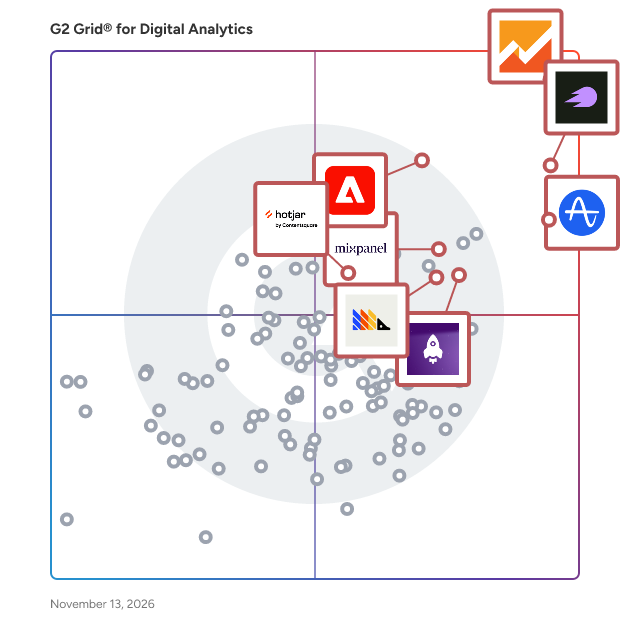
G2 Grid® for Digital Analytics Software

G2 Grid® for Digital Analytics Software plotting products by satisfaction and market presence

Highlighted products: Google Analytics, Semrush, Amplitude Analytics, LogRocket, PostHog, Mixpanel, Adobe Analytics, and Hotjar by Contentsquare.

Underlying data: [Grid® JSON](https://www.g2.com/categories/digital-analytics/grids.json?focus%5B%5D=google-analytics&focus%5B%5D=semrush&focus%5B%5D=amplitude-analytics&focus%5B%5D=logrocket&focus%5B%5D=posthog&focus%5B%5D=mixpanel&focus%5B%5D=adobe-analytics&focus%5B%5D=hotjar-by-contentsquare&segment=small-business)

Google Analytics

Improve the customer experience with digital analytics for your website or mobile app — for free. Google Analytics gives companies rich insights about their websites, their audiences and their digital marketing. Powerful, flexible and easy to use, Analytics helps savvy marketers find the messages and channels that earn them the best results. State-of-the-art conversion attribution and testing tools help companies large and small build better user experiences and maximize their digital strategy. Get user insights that only Google can give you. Understand your site and app users to better evaluate the performance of your content, products, and more. Whether your business is big or small, Google can help you see what’s working and fix what’s not. Let Google Analytics work for you. Learn more at google.com/analytics.

Average Rating: 4.5/5.0

Total Reviews: 6,615

How Do G2 Users Rate Google Analytics?

  • Sessions - Digital Analytics: 9.0/10 (Category avg: 8.8/10)
  • Engagement: 8.8/10 (Category avg: 8.7/10)
  • Trending: 8.5/10 (Category avg: 8.4/10)
  • Has the product been a good partner in doing business?: 8.4/10 (Category avg: 9.0/10)

Who Is the Company Behind Google Analytics?

  • Seller: Google
  • Year Founded: 1998
  • HQ Location: Mountain View, CA
  • LinkedIn® Page: www.linkedin.com
    301,144 employees on LinkedIn®
  • Ownership: NASDAQ:GOOG
  • Phone: +1 (650) 253-0000

Who Uses This Product?

  • Who Uses This: Owner, Founder
  • Top Industries: Marketing and Advertising, Information Technology and Services
  • Company Size: 60% Small, 29% Medium

What Do G2 Reviewers Say About Google Analytics?

AI-generated summary from verified user reviews

Pros
  • Users love the user-friendly insights from Google Analytics, enabling effective website performance analysis without a large budget.
  • Users appreciate the comprehensive traffic tracking of Google Analytics, enhancing insights and optimizing website performance.
  • Users find Google Analytics to be very user-friendly, allowing effortless daily analysis of website traffic and performance.
  • Users appreciate the easy integrations of Google Analytics, allowing seamless tracking of traffic from various sources.
  • Users value the clear, data-driven insights of Google Analytics, enabling them to effectively optimize marketing strategies.
Cons
  • Users find Google Analytics' steep learning curve challenging, making reporting and basic insights difficult to access.
  • Users find the complexity of Google Analytics can hinder beginners and complicate simple metric tracking.
  • Users find the learning difficulty of Google Analytics challenging, especially for beginners struggling with its complex dashboard.
  • Users find Google Analytics not intuitive, facing a steep learning curve and difficulty accessing essential insights.
  • Users find the steep learning curve of Google Analytics challenging, leading to frustrations with report navigation.

What Are Recent G2 Reviews of Google Analytics?

What Are G2 Users Discussing About Google Analytics?

Semrush

Semrush, an Adobe Company, is the leading brand visibility platform, empowering marketers to command their online presence and create measurable impact. Built on the industry’s most expansive proprietary dataset, Semrush delivers AI-driven insights across SEO, Agentic Search Optimization, content marketing, paid media, and social strategy. Used by over 28 million users globally – from scaling startups to the Fortune 500 – Semrush provides the competitive intelligence needed to win visibility in an evolving digital landscape. The company is headquartered in Boston, MA with a global presence across North America, Europe and Asia.

Average Rating: 4.4/5.0

Total Reviews: 4,199

How Do G2 Users Rate Semrush?

  • Sessions - Digital Analytics: 8.5/10 (Category avg: 8.8/10)
  • Engagement: 8.3/10 (Category avg: 8.7/10)
  • Trending: 8.3/10 (Category avg: 8.4/10)
  • Has the product been a good partner in doing business?: 8.7/10 (Category avg: 9.0/10)

Who Is the Company Behind Semrush?

  • Seller: Adobe
  • Company Website:
  • Year Founded: 1982
  • HQ Location: San Jose, CA
  • LinkedIn® Page: www.linkedin.com
    42,975 employees on LinkedIn®
  • Ownership: NASDAQ:ADBE

Who Uses This Product?

  • Who Uses This: Marketing Manager, Digital Marketing Manager
  • Top Industries: Marketing and Advertising, Information Technology and Services
  • Company Size: 62% Small, 28% Medium

What Do G2 Reviewers Say About Semrush?

AI-generated summary from verified user reviews

Pros
  • Users find the interface intuitive and easy to navigate, helping them manage everyday SEO tasks with ease.
  • Users value having a broad range of SEO tools and data in one platform, helping them manage their work centrally.
  • Users value the keyword tools for uncovering relevant terms, evaluating search potential, and exploring a broad range of keywords.
  • Users find setup easy and straightforward, making it simple to get started.
  • Users value the detailed competitor insights and comparisons, which reveal rivals’ keywords, rankings, traffic, and marketing activity.
Cons
  • Users find the base subscription expensive, particularly for small businesses, freelancers, and smaller teams.
  • Users say useful features, modules, and seats often come with extra charges, making the overall subscription expensive.
  • Users say the learning curve is steep, and mastering the many tools takes time, particularly for beginners.
  • Users find the interface cluttered and navigation unintuitive, making tools, reports, and information difficult to locate.
  • Users find the abundance of tools, features, and information overwhelming and sometimes confusing, especially when getting started.

What Are Recent G2 Reviews of Semrush?

What Are G2 Users Discussing About Semrush?

Amplitude Analytics

The core of the Amplitude AI Analytics Platform, Amplitude Analytics lets you dig into the real-time data about what users are doing in your digital products and experiences. These quantitative insights help you quickly and deeply understand what’s working, what’s not, and what to do more of to drive growth. Amplitude Analytics makes it fast and easy for product teams, marketing teams, data teams, or anyone to get actionable insights: • Track every click and metric across the full customer journey to understand conversion, adoption, retention, and more in real time. • Self-serve access lets teams explore insights with simple AI prompts, break down information silos, and free up data teams for higher-impact analysis. • AI Agents automatically surface new trends, unexpected behaviors, and action plans for an unfair advantage. • Marketing analytics gives marketers purpose-built tools to see full-funnel customer behavior, improve ROI, and scale insights with other teams. • Trust your data with precision tracking schema design, AI-enhanced data governance controls, and enterprise-level security. And if you’re new to analytics, don’t worry: you can get started fast with Autocapture event tracking, chat-based interfaces, and expert-built dashboard templates. Coupled with the rest of the Amplitude platform, Analytics’s quantitative insights are just the beginning. Turn behavioral cohorts into A/B test segments, deliver smarter in-app engagement, and activate your data for precise personalization throughout your tech stack. Which you’ll also be able to shrink, thanks to our consolidated platform. Amplitude Analytics lets you understand what your users want so you can give it to them. Use it to get the answers you need to grow relentlessly.

Average Rating: 4.4/5.0

Total Reviews: 3,040

How Do G2 Users Rate Amplitude Analytics?

  • Sessions - Digital Analytics: 8.5/10 (Category avg: 8.8/10)
  • Engagement: 8.5/10 (Category avg: 8.7/10)
  • Trending: 8.3/10 (Category avg: 8.4/10)
  • Has the product been a good partner in doing business?: 8.7/10 (Category avg: 9.0/10)

Who Is the Company Behind Amplitude Analytics?

  • Seller: Amplitude
  • Company Website:
  • Year Founded: 2012
  • HQ Location: San Francisco, CA
  • LinkedIn® Page: www.linkedin.com
    1,635 employees on LinkedIn®
  • Ownership: NASDAQ: AMPL

Who Uses This Product?

  • Who Uses This: Product Manager, Software Engineer
  • Top Industries: Computer Software, Information Technology and Services
  • Company Size: 46% Medium, 31% Small

What Do G2 Reviewers Say About Amplitude Analytics?

AI-generated summary from verified user reviews

Pros
  • Users appreciate the intuitive design and AI tools of Amplitude Analytics, enhancing data understanding and efficiency in decision-making.
  • Users find Amplitude Analytics to be extremely user-friendly, enabling quick data analysis and report generation effortlessly.
  • Users appreciate the visibility into feature usage Amplitude Analytics provides, enabling data-driven decision-making effectively.
  • Users find Amplitude Analytics to be intuitive and easy to use, enhancing their data analysis and reporting experiences.
  • Users value the intuitive and powerful UI of Amplitude Analytics, making data analysis quick and effortless.
Cons
  • Users find the learning curve challenging, especially with complex dashboards and report configurations in Amplitude Analytics.
  • Users find the steep learning curve of Amplitude Analytics challenging, especially for those new to the platform.
  • Users often face missing features, particularly with limited functionalities across plans and slow automated tools.
  • Users often struggle with the complex event management and learning curve, which can hinder usability for new users.
  • Users note that complex features may overwhelm new users, complicating the analysis and setup processes.

What Are Recent G2 Reviews of Amplitude Analytics?

What Are G2 Users Discussing About Amplitude Analytics?

AI can help you find the answers. G2 helps you trust them.

Connect G2 to Claude or ChatGPT for answers grounded in G2's trusted reviews, comparisons, and pricing from real user insights.

How it works

LogRocket

LogRocket is an AI session replay and product analytics tool that helps digital teams understand why users are having bad experiences and ship fixes more quickly. At the core of the platform is Galileo, LogRocket’s AI that continuously watches session replays from real users, reads support tickets, listens to customer calls, and tracks product changes to surface user struggles and technical issues automatically. LogRocket then routes these fixes into the development workflow (including AI coding tools such as Cursor and Claude Code) to help teams fix issues faster. LogRocket is used by engineers, product managers, and UX teams building web and mobile applications. Galileo surfaces issues proactively, so instead of going into the platform to look for problems, teams are alerted to what matters most and handed the context they need to act. Core capabilities include: - Session replay: Pixel-perfect recordings of user sessions captured alongside console logs, network requests, Redux state, and performance data, giving engineers the context needed to reproduce issues without guesswork. - Error and performance monitoring: Automatic capture of JavaScript errors, network failures, and performance degradation, surfaced alongside the session in which they occurred. - Product analytics: Funnel analysis, user segmentation, feature usage tracking, and retention metrics, built on the same session data used for debugging. - Workflow integrations: Connects with tools including Jira, GitHub, Datadog, and Intercom, routing issues identified in LogRocket into existing development and support workflows. - MCP server: Allows AI agents to connect directly to LogRocket, enabling them to watch real session replays and gain context on the user experience. LogRocket supports modern web frameworks, including React, Angular, and Vue, as well as native iOS and Android applications. LogRocket is shortening the distance between identifying a user problem and shipping a fix. The platform integrates with AI coding tools such as Cursor and Claude Code, allowing issues identified in the platform to be passed directly to an AI agent as a fully-loaded coding task, complete with session replay, error context, and reproduction steps.

Average Rating: 4.6/5.0

Total Reviews: 2,466

How Do G2 Users Rate LogRocket?

  • Sessions - Digital Analytics: 8.9/10 (Category avg: 8.8/10)
  • Engagement: 8.5/10 (Category avg: 8.7/10)
  • Trending: 8.0/10 (Category avg: 8.4/10)
  • Has the product been a good partner in doing business?: 9.1/10 (Category avg: 9.0/10)

Who Is the Company Behind LogRocket?

  • Seller: LogRocket, Inc.
  • Company Website:
  • Year Founded: 2016
  • HQ Location: Boston, Massachusetts
  • LinkedIn® Page: www.linkedin.com
    429 employees on LinkedIn®

Who Uses This Product?

  • Who Uses This: Software Engineer, CTO
  • Top Industries: Computer Software, Information Technology and Services
  • Company Size: 59% Small, 30% Medium

What Do G2 Reviewers Say About LogRocket?

AI-generated summary from verified user reviews

Pros
  • Users find session replay invaluable for troubleshooting, saving time and enhancing understanding of user issues seamlessly.
  • Users find LogRocket easy to use and navigate, making it an invaluable tool for resolving technical issues efficiently.
  • Users value the intuitive session replay and efficient issue triage that significantly enhance their troubleshooting processes.
  • Users value insightful user tracking with LogRocket, enhancing their ability to resolve technical issues efficiently.
  • Users love the user behavior tracking in LogRocket, enabling seamless troubleshooting and insights into user interactions.
Cons
  • Users find session management cumbersome, especially when retrieving analytics becomes tedious and sessions appear as anonymous.
  • Users note the missing features in LogRocket, including tooltip capture and AI detection inaccuracies.
  • Users find filtering issues with LogRocket, as it can be overwhelming to sift through extensive session data.
  • Users find LogRocket expensive, especially for small businesses, desiring more affordable pricing options for better access.
  • Users find the search difficulty in LogRocket overwhelming, experiencing inconsistent results and lagging playback during sessions.

What Are Recent G2 Reviews of LogRocket?

PostHog

PostHog is the open-source, all-in-one platform that helps engineers build better products. We enable software teams to capture events, perform analytics, record user sessions, conduct experiments and deploy new features, all in one platform. - DESIGN BETTER: Robust product analytics. Multivariate A/B experiments. User segmentation and 50+ integrations. PostHog has everything you need to build better products. - BUILD BETTER: Roll out new features safely with feature flags, debug issues with session recordings and plan new features with correlation analysis -- all in PostHog. - DEVELOP BETTER: Expect an SDK, API, event pipelines, an SQL-like syntax for deep analysis, and an open-source app platform. - SCALE BETTER: US or EU hosting available, powered by ClickHouse. Everything is SOC2 certified, GDPR-ready, and HIPAA-compliant. PostHog is scalable to teams of any size and priced based on usage. It's entirely open source, so you can inspect every line of code, make suggestions or even build directly on top of the product to add new features and integrations.

Average Rating: 4.5/5.0

Total Reviews: 1,049

How Do G2 Users Rate PostHog?

  • Sessions - Digital Analytics: 8.9/10 (Category avg: 8.8/10)
  • Engagement: 8.6/10 (Category avg: 8.7/10)
  • Trending: 8.3/10 (Category avg: 8.4/10)
  • Has the product been a good partner in doing business?: 8.9/10 (Category avg: 9.0/10)

Who Is the Company Behind PostHog?

  • Seller: PostHog
  • Year Founded: 2020
  • HQ Location: San Francisco, US
  • LinkedIn® Page: www.linkedin.com
    225 employees on LinkedIn®

Who Uses This Product?

  • Who Uses This: Software Engineer, Founder
  • Top Industries: Computer Software, Information Technology and Services
  • Company Size: 77% Small, 16% Medium

What Do G2 Reviewers Say About PostHog?

AI-generated summary from verified user reviews

Pros
  • Users value the ease of use of PostHog, appreciating its intuitive design and straightforward integration process.
  • Users highlight the easy setup of PostHog, allowing for quick implementation and seamless integration into their workflow.
  • Users value the powerful analytics capabilities of PostHog, enjoying seamless integration and flexibility in tracking and experiments.
  • Users value the comprehensive insights from PostHog, enjoying seamless analytics and feature management in one robust platform.
  • Users enjoy the high-quality session recordings of PostHog, which enhance their understanding of user interactions effectively.
Cons
  • Users struggle with the initial learning curve, finding the overwhelming UI and features challenging to navigate at first.
  • Users find the steep learning curve of PostHog overwhelming initially, but it improves with familiarity and use.
  • Users often find the initial complexity of PostHog overwhelming, especially for those less tech-savvy.
  • Users often face a confusing learning curve with PostHog, finding the UI overwhelming and navigation challenging initially.
  • Users highlight the missing features in PostHog, expressing a need for improved UI and more functional capabilities.

What Are Recent G2 Reviews of PostHog?

What Are G2 Users Discussing About PostHog?

Adobe Analytics

Adobe Analytics empowers marketing, product, and business teams with insights to understand their customers and the journeys they take across digital channels, products, content, and services. From digital data collection and relational clickstream processing to in-depth analysis, and reporting, Adobe Analytics helps you understand visitor engagement across your digital properties — making it possible to optimize digital marketing strategies, improve user experience, and drive business growth. Features: - Collect and ingest behavioral data in real-time from your web and mobile channels. - Automatically convert raw data for unlimited analysis to discover customer patterns, spot anomalies, identify friction in your digital experiences, and uncover insights from digital journeys. - Equip marketers and analysts with AI capabilities that speed through analyses so they can quickly and confidently generate insights to improve the digital experience. - Integrate and share insights, segments, and outputs from your data across other business applications.

Average Rating: 4.2/5.0

Total Reviews: 1,189

How Do G2 Users Rate Adobe Analytics?

  • Sessions - Digital Analytics: 8.7/10 (Category avg: 8.8/10)
  • Engagement: 8.5/10 (Category avg: 8.7/10)
  • Trending: 8.3/10 (Category avg: 8.4/10)
  • Has the product been a good partner in doing business?: 8.0/10 (Category avg: 9.0/10)

Who Is the Company Behind Adobe Analytics?

  • Seller: Adobe
  • Company Website:
  • Year Founded: 1982
  • HQ Location: San Jose, CA
  • LinkedIn® Page: www.linkedin.com
    42,975 employees on LinkedIn®
  • Ownership: NASDAQ:ADBE

Who Uses This Product?

  • Who Uses This: Data Analyst, Analyst
  • Top Industries: Marketing and Advertising, Information Technology and Services
  • Company Size: 43% Large, 30% Medium

What Do G2 Reviewers Say About Adobe Analytics?

AI-generated summary from verified user reviews

Pros
  • Users value the advanced segmentation and customizable dashboards of Adobe Analytics for effective data analysis and visualization.
  • Users love the advanced segmentation and customizable dashboards in Adobe Analytics, enabling detailed data analysis and visualization.
  • Users value the ease of use in Adobe Analytics, enabled by advanced segmentation and customizable dashboards for efficient data analysis.
  • Users love Adobe Analytics for its advanced segmentation and customizable dashboards, enhancing data analysis and visualization significantly.
  • Users value the customizable reporting in Adobe Analytics, enabling in-depth analysis and meaningful insights for marketing strategies.
Cons
  • Users struggle with a steep learning curve and complex setup in Adobe Analytics, making initial usage challenging.
  • Users often face a steep learning curve with Adobe Analytics, making setup and tracking complex and challenging for newcomers.
  • Users find Adobe Analytics expensive, particularly for smaller teams, and its complex setup adds to the overall burden.
  • Users experience slow performance with Adobe Analytics, especially when handling large datasets, impacting overall efficiency.
  • Users find the complexity of setup in Adobe Analytics challenging, especially for new users and smaller teams.

What Are Recent G2 Reviews of Adobe Analytics?

What Are G2 Users Discussing About Adobe Analytics?

Mixpanel

Mixpanel's product intelligence turns data clarity into innovation. Trusted by more than 29,000 companies, including Workday, Pinterest, LG, and Rakuten Viber, Mixpanel’s AI-first product analytics help teams accelerate adoption, improve retention, and ship with confidence. Powering this is an industry-leading platform that combines product and web analytics, session replay, experimentation, feature flags, and metric trees. Mixpanel delivers insights built for the AI era.

Average Rating: 4.5/5.0

Total Reviews: 1,358

How Do G2 Users Rate Mixpanel?

  • Sessions - Digital Analytics: 8.8/10 (Category avg: 8.8/10)
  • Engagement: 8.8/10 (Category avg: 8.7/10)
  • Trending: 8.6/10 (Category avg: 8.4/10)
  • Has the product been a good partner in doing business?: 8.8/10 (Category avg: 9.0/10)

Who Is the Company Behind Mixpanel?

  • Seller: Mixpanel
  • Company Website:
  • Year Founded: 2009
  • HQ Location: San Francisco, CA
  • LinkedIn® Page: www.linkedin.com
    767 employees on LinkedIn®

Who Uses This Product?

  • Who Uses This: Product Manager, Software Engineer
  • Top Industries: Computer Software, Information Technology and Services
  • Company Size: 53% Small, 37% Medium

What Do G2 Reviewers Say About Mixpanel?

AI-generated summary from verified user reviews

Pros
  • Users love Mixpanel's ease of use, allowing effortless dashboard creation and straightforward event tracking for insights.
  • Users value Mixpanel's flexible dashboard design and its reliable, user-friendly analytics for informed decision-making.
  • Users appreciate the super clean and easy-to-use UI of Mixpanel, enabling non-technical teams to access data effortlessly.
  • Users appreciate the intuitive user interface of Mixpanel, making analytics enjoyable and accessible for everyone.
  • Users appreciate the robust reporting capabilities of Mixpanel, enhancing their ability to analyze data effectively and intuitively.
Cons
  • Users find a steep learning curve with advanced features in Mixpanel, complicating efficient usage and updates.
  • Users face a steep learning curve with Mixpanel, particularly for mastering advanced features and managing updates efficiently.
  • Users find a clunky event tracking process in Mixpanel, complicating the analysis of user activity feeds.
  • Users find Mixpanel expensive and challenging to manage A/B tests effectively without substantial effort and cost.
  • Users find the complexity of Mixpanel overwhelming, especially lacking proper onboarding for effective usage and feature access.

What Are Recent G2 Reviews of Mixpanel?

What Are G2 Users Discussing About Mixpanel?

Hotjar by Contentsquare

Hotjar by Contentsquare is the experience platform for teams who want to build better digital journeys, faster. With trusted data, context-aware AI, and built-in testing, it helps you optimize every part of the customer (or agent) journey. You can now understand, prioritize, and act faster to create experiences people love.

Average Rating: 4.3/5.0

Total Reviews: 332

How Do G2 Users Rate Hotjar by Contentsquare?

  • Sessions - Digital Analytics: 8.7/10 (Category avg: 8.8/10)
  • Engagement: 9.1/10 (Category avg: 8.7/10)
  • Trending: 9.0/10 (Category avg: 8.4/10)
  • Has the product been a good partner in doing business?: 8.7/10 (Category avg: 9.0/10)

Who Is the Company Behind Hotjar by Contentsquare?

Who Uses This Product?

  • Who Uses This: Product Manager, Digital Marketing Specialist
  • Top Industries: Marketing and Advertising, Computer Software
  • Company Size: 52% Small, 37% Medium

What Do G2 Reviewers Say About Hotjar by Contentsquare?

AI-generated summary from verified user reviews

Pros
  • Users appreciate the ease of use of Hotjar, making UX measurement straightforward and efficient for all organizations.
  • Users value the clear user interaction insights from Hotjar's heatmaps, enhancing their understanding of UX issues effectively.
  • Users appreciate the clear overview of user interactions provided by Hotjar's heatmaps, enhancing website optimization efforts.
  • Users appreciate the helpfulness of Hotjar for understanding user interactions and improving UX effectively.
  • Users love the high-quality session recordings from Hotjar, which reveal critical insights into user interactions and UX issues.
Cons
  • Users face accuracy and functionality issues with Hotjar, including heatmap misalignment and restrictive session recording limits.
  • Users note that the pricing is high due to individual feature costs, which can add up quickly.
  • Users report missing features in Hotjar, including inaccurate heatmaps and limited analytics capabilities.
  • Users find recording issues frustrating due to limits, missed interactions, and overwhelming data management with high-traffic sites.
  • Users find the difficult filtering of Hotjar hinders effective data segmentation and may require additional upgrades to manage recordings.

What Are Recent G2 Reviews of Hotjar by Contentsquare?

What Are G2 Users Discussing About Hotjar by Contentsquare?

Lucky Orange

Lucky Orange combines website analytics, visitor feedback and AI-powered analysis to help businesses understand visitor behavior and identify opportunities to improve conversions. Its suite of tools includes Dynamic Heatmaps, Session Recordings, Conversion Funnels and Discovery AI, an analytics assistant that answers questions about your website in plain language. Ask Discovery which traffic sources bring visitors who convert, which pages have the most visitor frustration or what non-converting visitors have in common. Discovery analyzes actual visitor interactions and provides written findings, guiding you to relevant heatmaps, session recordings and other tools so you can investigate the behavior behind the insights. Discovery Visualize brings those findings to life with supporting charts, graphs and lists. Written analysis and visualizations work together to help you explore trends, compare visitor groups and decide what to investigate next. Use the Visualize workspace to review conversion performance over time, compare mobile and desktop engagement or prepare findings for a team meeting or client presentation. Rearrange or archive visual cards, download the workspace and ask follow-up questions to explore a specific card in more detail. Built for website owners, digital marketers, ecommerce teams and agencies, Lucky Orange supports workflows ranging from investigating landing page performance to understanding cart abandonment and reporting on client results. Trusted by more than 500,000 websites worldwide, it offers integrations and installation options for platforms including Shopify, Shopify Plus, BigCommerce, WordPress and Square. Understand visitor behavior with Session Recordings and Dynamic Heatmaps Session Recordings let you watch individual visitor journeys to understand how people navigate your website, where they hesitate and what obstacles they encounter. Optimizable Segments help you find sessions with behaviors worth investigating, including signs of frustration or confusion. The AI Referrals segment helps you identify visits referred by supported AI platforms, including ChatGPT, Gemini, Perplexity, Claude and Microsoft Copilot. Dynamic Heatmaps reveal where visitors click, tap, move their mouse and scroll, including interactions with dropdown menus and hover content. Explore engagement patterns across visitors and use Scroll Heatmaps to determine whether people reach important content and calls to action. Investigate conversion barriers with Funnels and Form Analytics Conversion Funnels show where visitors drop off between defined steps, such as viewing a product, starting checkout and placing an order. Form Analytics helps you identify obstacles to form completion. Together with recordings and heatmaps, these tools help teams narrow their investigation and prioritize potential improvements. Collect feedback and engage visitors Surveys let you ask visitors directly what they need or what is preventing them from converting. Choose multiple-choice, rating, like/dislike or open-ended questions, and target surveys to relevant visitors. Live Chat helps your team answer questions and assist visitors while they’re on your website. Announcements let you deliver targeted messages, such as promotions, product updates or requests for reviews. These tools complement behavioral analytics with direct feedback and opportunities to address visitor concerns. Evaluate individual pages with Page Insights Page Insights brings traffic, engagement, frustration events and page speed metrics together for each page. Review activity such as bounces, unique visitors and form submissions, compare performance across timeframes and open relevant recordings or heatmaps to investigate further. Lucky Orange helps teams connect performance metrics with the visitor experiences behind them. Discovery AI and Discovery Visualize make those findings easier to explore, explain and share, helping you move from a website question to a more informed decision about what to improve next.

Average Rating: 4.6/5.0

Total Reviews: 393

G2 Deal: 30% off your first month - even on Enterprise plans!

Lucky Orange can help you understand why your website is getting traffic that doesn’t convert into sales or leads. Our conversion rate optimization tools have been trusted by more than 500,000 websites worldwide. Get 30% off your first month of a paid Lucky Orange plan with this exclusive G2 deal.

Price: ~~$39 per month~~ → $27.30 per month

View this exclusive G2 deal

How Do G2 Users Rate Lucky Orange?

  • Sessions - Digital Analytics: 8.9/10 (Category avg: 8.8/10)
  • Engagement: 8.8/10 (Category avg: 8.7/10)
  • Trending: 8.5/10 (Category avg: 8.4/10)
  • Has the product been a good partner in doing business?: 9.2/10 (Category avg: 9.0/10)

Who Is the Company Behind Lucky Orange?

  • Seller: Lucky Orange
  • Company Website:
  • Year Founded: 2012
  • HQ Location: Overland Park, KS
  • LinkedIn® Page: www.linkedin.com
    23 employees on LinkedIn®

Who Uses This Product?

  • Who Uses This: Owner, Founder
  • Top Industries: Retail, Marketing and Advertising
  • Company Size: 83% Small, 12% Medium

What Do G2 Reviewers Say About Lucky Orange?

AI-generated summary from verified user reviews

Pros
  • Users value the approachable interface of Lucky Orange, enabling easy use across the entire team without extensive training.
  • Users commend the ease of use of Lucky Orange, enabling quick setup and intuitive navigation for all team members.
  • Users find the easy setup of Lucky Orange to be quick and intuitive, enhancing team accessibility and efficiency.
  • Users love the Session Replay feature of Lucky Orange, revealing critical user behavior for better decision-making.
  • Users find heatmaps invaluable for understanding visitor behavior, enabling effective website strategy and optimization.
Cons
  • Users find Lucky Orange expensive, especially with automatic tier upgrades that can lead to unexpected charges.
  • Users face recording issues with navigation, inconsistent data, and difficulty accessing past recordings, complicating their experience.
  • Users express frustration over plan limitations that restrict functionality and complicate billing processes, especially on lower-tier subscriptions.
  • Users express frustration with the limitations on the free plan, desiring more features and better session availability.
  • Users experience slow loading sessions with Lucky Orange, occasionally leading to missed tracking opportunities and glitches.

What Are Recent G2 Reviews of Lucky Orange?

What Are G2 Users Discussing About Lucky Orange?

Google Analytics 360

Google Analytics 360 is an enterprise-level analytics solution designed to help large organizations gain comprehensive insights into customer behavior across various channels and devices. By consolidating data from websites, mobile apps, and offline interactions, it enables businesses to understand the complete customer journey and make informed decisions to enhance marketing strategies and user experiences. Key Features and Functionality: - Comprehensive Data Integration: Aggregates data from multiple touchpoints, including websites, mobile applications, and offline sources, providing a unified view of customer interactions. - Advanced Analysis and Segmentation: Offers robust tools for in-depth analysis and segmentation, allowing businesses to identify specific audience behaviors and tailor marketing efforts accordingly. - Real-Time Reporting: Provides continuous intraday data, typically available within an hour after collection, enabling timely decision-making during critical business periods. - Machine Learning Insights: Utilizes Google's machine learning models to automatically detect and surface actionable insights, such as emerging trends and significant changes in data. - Customizable User Roles and Access: Allows the creation of custom user roles to control feature access, ensuring that teams and partners have appropriate data access in compliance with organizational policies. - Seamless Integrations: Integrates with other Google solutions like Google Ads, Display & Video 360, and BigQuery, facilitating a cohesive marketing and analytics ecosystem. Primary Value and Solutions Provided: Google Analytics 360 addresses the complex measurement needs of large enterprises by offering scalable tools and enterprise-level support. It enables organizations to unlock customer-centric measurement, gain smarter insights to improve return on investment (ROI), and connect these insights to actionable results. By providing a comprehensive and customizable analytics platform, it empowers businesses to make data-driven decisions, optimize marketing strategies, and deliver better customer experiences.

Average Rating: 4.4/5.0

Total Reviews: 554

How Do G2 Users Rate Google Analytics 360?

  • Sessions - Digital Analytics: 8.7/10 (Category avg: 8.8/10)
  • Engagement: 8.5/10 (Category avg: 8.7/10)
  • Trending: 8.6/10 (Category avg: 8.4/10)
  • Has the product been a good partner in doing business?: 8.5/10 (Category avg: 9.0/10)

Who Is the Company Behind Google Analytics 360?

  • Seller: Google
  • Year Founded: 1998
  • HQ Location: Mountain View, CA
  • LinkedIn® Page: www.linkedin.com
    301,144 employees on LinkedIn®
  • Ownership: NASDAQ:GOOG
  • Phone: +1 (650) 253-0000

Who Uses This Product?

  • Who Uses This: Owner, Manager
  • Top Industries: Marketing and Advertising, Information Technology and Services
  • Company Size: 51% Small, 32% Medium

What Do G2 Reviewers Say About Google Analytics 360?

AI-generated summary from verified user reviews

Pros
  • Users appreciate the advanced reporting and seamless integration of Google Analytics 360, enhancing data-driven marketing strategies.
  • Users appreciate the seamless integrations of Google Analytics 360, enhancing data-driven decisions and marketing strategies.
  • Users appreciate the ease of use of Google Analytics 360, simplifying data integration and performance analysis effortlessly.
  • Users appreciate the seamless integration with Google Marketing Platform tools, enhancing data-driven marketing decisions and insights.
  • Users appreciate the advanced reporting capabilities of Google Analytics 360, which enhance data-driven decision-making and insights.
Cons
  • Users find the steep learning curve of Google Analytics 360 challenging, particularly in mastering advanced features and setups.
  • Users find the complex features of Google Analytics 360 overwhelming, leading to a challenging learning curve.
  • Users find the complexity of Google Analytics 360 overwhelming, especially with its steep learning curve and advanced features.
  • Users find the steep learning curve of Google Analytics 360 daunting, particularly for advanced tracking and custom reports.
  • Users find the cluttered interface of Google Analytics 360 challenging, leading to a steep learning curve.

What Are Recent G2 Reviews of Google Analytics 360?

What Are G2 Users Discussing About Google Analytics 360?

Contentsquare

Contentsquare is the experience platform for teams who want to build better digital journeys, faster. With trusted data, context-aware AI, and built-in testing, it helps you optimize every part of the customer (or agent) journey. You can now understand, prioritize, and act faster to create experiences people love.

Average Rating: 4.6/5.0

Total Reviews: 737

How Do G2 Users Rate Contentsquare?

  • Sessions - Digital Analytics: 9.0/10 (Category avg: 8.8/10)
  • Engagement: 9.3/10 (Category avg: 8.7/10)
  • Trending: 8.8/10 (Category avg: 8.4/10)
  • Has the product been a good partner in doing business?: 9.2/10 (Category avg: 9.0/10)

Who Is the Company Behind Contentsquare?

  • Seller: Contentsquare
  • Company Website:
  • Year Founded: 2012
  • HQ Location: Paris
  • LinkedIn® Page: www.linkedin.com
    1,688 employees on LinkedIn®

Who Uses This Product?

  • Who Uses This: Digital Analyst, Digital Experience Manager
  • Top Industries: Retail, Apparel & Fashion
  • Company Size: 45% Large, 32% Medium

What Do G2 Reviewers Say About Contentsquare?

AI-generated summary from verified user reviews

Pros
  • Users value the comprehensive analytics and user-friendly platform of Contentsquare, enhancing collaboration and optimization efforts.
  • Users value the comprehensive analytics of Contentsquare, enabling deep insights and actionable recommendations for optimization.
  • Users appreciate the user-friendly interface of Contentsquare, facilitating collaboration and actionable insights across teams.
  • Users appreciate the comprehensive analytics and insights of Contentsquare, enhancing understanding of user behavior and engagement.
  • Users value the comprehensive journey analysis provided by Contentsquare, enhancing understanding of customer experiences and insights.
Cons
  • Users find the complex features of Contentsquare challenging, often requiring additional training for effective use.
  • Users face missing features like unreliable session replays and limited integration with qualitative feedback tools.
  • Users find the complexity of Contentsquare challenging, requiring significant onboarding to effectively utilize its features.
  • Users find navigation difficulties in engagement maps frustrating and desire clearer updates for dashboard changes.
  • Users find the learning curve steep, as the complexity and multitude of features can be overwhelming initially.

What Are Recent G2 Reviews of Contentsquare?

What Are G2 Users Discussing About Contentsquare?

Funnel

Funnel is the leading marketing intelligence platform for marketing and data teams. It brings all their marketing data together and puts it to work, from reporting and AI agents to marketing mix modeling (MMM). Funnel collects, stores and prepares marketing data from every source, then makes it available for reporting, measurement, AI workflows and your BI tools or warehouse, all from one trusted foundation. Consistent definitions and complete historical data mean the numbers hold up no matter where the data is used. Funnel Data Hub is the core platform, with 600+ data sources. Funnel Measure builds on that data with marketing mix modeling (MMM), incrementality testing and budget optimization.

Average Rating: 4.5/5.0

Total Reviews: 295

How Do G2 Users Rate Funnel?

  • Sessions - Digital Analytics: 9.0/10 (Category avg: 8.8/10)
  • Engagement: 8.9/10 (Category avg: 8.7/10)
  • Trending: 8.7/10 (Category avg: 8.4/10)
  • Has the product been a good partner in doing business?: 9.3/10 (Category avg: 9.0/10)

Who Is the Company Behind Funnel?

  • Seller: Funnel
  • Company Website:
  • Year Founded: 2014
  • HQ Location: Stockholm, Sweden
  • LinkedIn® Page: www.linkedin.com
    393 employees on LinkedIn®

Who Uses This Product?

  • Top Industries: Marketing and Advertising, Retail
  • Company Size: 44% Medium, 41% Small

What Do G2 Reviewers Say About Funnel?

AI-generated summary from verified user reviews

Pros
  • Users find Funnel's ease of use remarkable, streamlining data integration and reporting effortlessly across platforms.
  • Users value the extensive integrations Funnel offers, allowing seamless data connection across multiple platforms easily.
  • Users love the easy data integration of Funnel, seamlessly connecting marketing and analytics platforms for unified insights.
  • Users value the user-friendly data management capabilities of Funnel, simplifying data centralization and workflow customization.
  • Users appreciate the extensive number of connectors Funnel offers, making integration with various platforms straightforward and beneficial.
Cons
  • Users face a steep learning curve with Funnel, especially when configuring data sources and field mappings.
  • Users feel the product is expensive, particularly when needing integrations and facing additional fees for basic connectors.
  • Users find limited connectors and scalability issues frustrating, affecting the overall efficiency of their data integration tasks.
  • Users find missing features in Funnel, such as limited scalability and basic connector fees, frustrating their overall experience.
  • Users experience slow performance, especially with processing time for large data volumes and limited scalability.

What Are Recent G2 Reviews of Funnel?

What Are G2 Users Discussing About Funnel?

ConvertCart

ConvertCart helps online businesses deliver outstanding experiences to customers throughout their journey—build lasting relations with them—and drive more revenue. 500+ brands across 35 countries, including Everlast, USA Hockey, American Heart Association use ConvertCart to boost traffic-to-sales conversion rate—without having to break the bank. Why business owners and marketers love us: Custom-made for you: Unlike regular SaaS, we don’t deliver a one-size-for-all product. We talk to you and customize our software to suit “your” needs. Say goodbye to software handouts! Driving real outcomes: We actively consult businesses and ensure that they see “real” results: higher conversion rates, improved customer retention, and lower cost of acquisition. Keeping it simple: We combine 16 tools that address the entire shopper journey—into a single ecosystem. You no longer have to handle multiple apps and dashboards to run the show. Top capabilities: Product recommendations, Reviews, Intelligent search, Personalized emails, Social proof, AB/Testing, deep analytics, and more. Integrates with platforms you’re on: ConvertCart smoothly integrates with every major eCommerce platform and ESP, including Shopify, Shopify Plus, BigCommerce, Magento, and more.

Average Rating: 4.8/5.0

Total Reviews: 36

How Do G2 Users Rate ConvertCart?

  • Sessions - Digital Analytics: 9.0/10 (Category avg: 8.8/10)
  • Engagement: 9.3/10 (Category avg: 8.7/10)
  • Trending: 9.3/10 (Category avg: 8.4/10)
  • Has the product been a good partner in doing business?: 10.0/10 (Category avg: 9.0/10)

Who Is the Company Behind ConvertCart?

Who Uses This Product?

  • Top Industries: Retail, Health, Wellness and Fitness
  • Company Size: 87% Small, 13% Medium

What Do G2 Reviewers Say About ConvertCart?

AI-generated summary from verified user reviews

Pros
  • Users commend ConvertCart for its exceptional conversion optimization, resulting in significant boosts in sales and customer engagement.
  • Users praise ConvertCart for their impressive boost in conversion rates and exceptional support from dedicated account managers.
  • Users commend the exceptional customer support from ConvertCart, highlighting responsiveness and partnership that drive tangible results.
  • Users commend ConvertCart for their expert recommendations and dedicated account managers that drive significant business improvements.
  • Users praise the exceptional support and expertise from ConvertCart, leading to significant improvements in eCommerce performance.
Cons
  • Users suggest that ConvertCart has limited templates, craving fresher and more modern email design options.
  • Users experience slow loading times on ConvertCart, particularly with complex reports and advanced features.
  • Users experience occasional slow performance, especially with complex reports, which hinders overall efficiency.
  • Users find the complex features of ConvertCart to be challenging, noting slow report loading and a steep learning curve.
  • Users find the difficult learning curve for advanced features challenging, impacting their overall experience with ConvertCart.

What Are Recent G2 Reviews of ConvertCart?

What Are G2 Users Discussing About ConvertCart?

Google Tag Manager

Free website and app tag management by Google. Marketers want tag management that’s simple, reliable, and integrates easily with existing systems. That’s what Google Tag Manager delivers. You’ll launch programs faster, so you can make swifter decisions. Add and update your own tags for conversion tracking, site analytics, remarketing, and more. Quickly deploy Google and third-party tags. Error checking, security features, and speedy tag loading ensure that all your tags work. Tag Manager improves collaboration across your business. Features like workspaces, granular access controls, and support for multi-environment testing mean that marketing and IT can work together efficiently.

Average Rating: 4.6/5.0

Total Reviews: 426

How Do G2 Users Rate Google Tag Manager?

  • Sessions - Digital Analytics: 9.0/10 (Category avg: 8.8/10)
  • Engagement: 8.9/10 (Category avg: 8.7/10)
  • Trending: 8.4/10 (Category avg: 8.4/10)
  • Has the product been a good partner in doing business?: 8.1/10 (Category avg: 9.0/10)

Who Is the Company Behind Google Tag Manager?

  • Seller: Google
  • Year Founded: 1998
  • HQ Location: Mountain View, CA
  • LinkedIn® Page: www.linkedin.com
    301,144 employees on LinkedIn®
  • Ownership: NASDAQ:GOOG
  • Phone: +1 (650) 253-0000

Who Uses This Product?

  • Who Uses This: Digital Marketing Manager, Digital Marketing Specialist
  • Top Industries: Marketing and Advertising, Computer Software
  • Company Size: 55% Small, 35% Medium

What Do G2 Reviewers Say About Google Tag Manager?

AI-generated summary from verified user reviews

Pros
  • Users find Google Tag Manager to be easy to use, enabling efficient management of tags and analytics.
  • Users appreciate the easy integrations of Google Tag Manager, enabling seamless connections and enhanced customer data capture.
  • Users appreciate the insightful analytics integration of Google Tag Manager, optimizing campaign performance with ease and accuracy.
  • Users appreciate the flexible variable system and clear tag management in Google Tag Manager, enhancing event tracking efficiency.
  • Users value the seamless integrations of Google Tag Manager, enhancing tracking and functionality without additional costs.
Cons
  • Users find Google Tag Manager complicated to use, often relying on developers to add codes and configurations.
  • Users find the preview debugger unreliable under specific conditions, often impacting their testing efficiency and workflow.
  • Users report frustration with Google Tag Manager due to occasional slowdowns and potential security vulnerabilities.
  • Users find limited options in Google Tag Manager when integrating with non-Google Analytics platforms, seeking improvements.
  • Users experience product limitations with Google Tag Manager, requiring extra QA steps and careful management of containers.

What Are Recent G2 Reviews of Google Tag Manager?

What Are G2 Users Discussing About Google Tag Manager?

Looker

Looker, Google Cloud’s business intelligence platform, enables you to chat with your data. Organizations turn to Looker for self-service and governed BI, to build custom applications with trusted metrics, or to bring Looker modeling to their existing environment. The result is improved data engineering efficiency and true business transformation.

Average Rating: 4.4/5.0

Total Reviews: 1,686

How Do G2 Users Rate Looker?

  • Sessions - Digital Analytics: 8.8/10 (Category avg: 8.8/10)
  • Engagement: 8.7/10 (Category avg: 8.7/10)
  • Trending: 9.2/10 (Category avg: 8.4/10)
  • Has the product been a good partner in doing business?: 8.9/10 (Category avg: 9.0/10)

Who Is the Company Behind Looker?

  • Seller: Google
  • Year Founded: 1998
  • HQ Location: Mountain View, CA
  • LinkedIn® Page: www.linkedin.com
    301,144 employees on LinkedIn®
  • Ownership: NASDAQ:GOOG
  • Phone: +1 (650) 253-0000

Who Uses This Product?

  • Who Uses This: Data Analyst, Data Engineer
  • Top Industries: Computer Software, Information Technology and Services
  • Company Size: 59% Medium, 21% Small

What Do G2 Reviewers Say About Looker?

AI-generated summary from verified user reviews

Pros
  • Users appreciate the ease of use with Looker, facilitating real-time reporting and seamless integration for effective analytics.
  • Users value Looker's real-time dashboards and powerful data modeling, enhancing self-service analytics and consistent reporting across teams.
  • Users enjoy the easy integrations of Looker, facilitating seamless connection with data warehouses for efficient analytics.
  • Users appreciate the seamless integrations of Looker, enhancing data management and analytics accessibility across their platforms.
  • Users value Looker's real-time data visualization, enabling clear, interactive dashboards that drive informed decision-making.
Cons
  • Users find the learning curve steep, especially non-technical users who may struggle with LookML and dashboard customization.
  • Users find the learning difficulty of Looker's LookML challenging, especially for those without technical expertise.
  • Users often face slow loading times, especially with large data sets, impacting their overall experience with Looker.
  • Users often experience slow performance with Looker, particularly when handling large datasets and complex dashboards.
  • Users find the complexity of Looker challenging, especially due to the steep learning curve and limited customizations.

What Are Recent G2 Reviews of Looker?

What Are G2 Users Discussing About Looker?

Alanna Iwuh
A
Researched and written by Alanna Iwuh
Updated