  # Best Budgeting and Forecasting Software

  *By [Nathan Calabrese](https://research.g2.com/insights/author/nathan-calabrese)*

   Budgeting and forecasting software helps companies plan and manage financial resources by estimating future revenues and expenses across departments or business entities. Managers, executives, and accountants use these tools to create, consolidate, and monitor budgets, and to identify potential changes in revenues and expenses that may affect company profitability.

### Core Capabilities of Budgeting and Forecasting Software

To qualify for inclusion in the Budgeting and Forecasting category, a product must:

- Provide templates for different types of budgets
- Allow users to create multiple versions of a budget
- Maintain budgeting history and use it to develop forecasts
- Compare revenue and expense estimates with actuals
- Consolidate budgets from several departments
- Use what-if scenarios to forecast possible budget changes
- Monitor the performance of budgeting processes

### How Budgeting and Forecasting Software Differs from Other Tools

While most [accounting software](https://www.g2.com/categories/accounting) products include basic budgeting features, dedicated budgeting and forecasting tools offer advanced planning functionality beyond those capabilities. These solutions pull financial and operational data from [ERP systems](https://www.g2.com/categories/erp-systems) and integrate with [corporate performance management (CPM) software](https://www.g2.com/categories/corporate-performance-management-cpm) for advanced financial analytics, making them the preferred choice when deeper forecasting and cross-departmental consolidation are required.

### Insights from G2 on Budgeting and Forecasting Software

Based on category trends on G2, the value of scenario planning and departmental budget consolidation stand out as top capabilities. The ability to compare forecasts against actuals, and adjust plans in real time, is critical for effective financial decision-making.


## How Many Budgeting and Forecasting Software Products Does G2 Track?
**Total Products under this Category:** 265

### Category Stats (May 2026)
- **Average Rating**: 4.48/5
- **New Reviews This Quarter**: 211
- **Buyer Segments**: Mid-Market 58% │ Small-Business 25% │ Enterprise 17%
- **Top Trending Product**: CloudBudget (+0.125)
*Last updated: May 18, 2026*

  
## How Does G2 Rank Budgeting and Forecasting Software Products?

**Why You Can Trust G2's Software Rankings:**

- 30 Analysts and Data Experts
- 11,200+ Authentic Reviews
- 265+ Products
- Unbiased Rankings

G2's software rankings are built on verified user reviews, rigorous moderation, and a consistent research methodology maintained by a team of analysts and data experts. Each product is measured using the same transparent criteria, with no paid placement or vendor influence. While reviews reflect real user experiences, which can be subjective, they offer valuable insight into how software performs in the hands of professionals. Together, these inputs power the G2 Score, a standardized way to compare tools within every category.

  
## Top Budgeting and Forecasting Software at a Glance
| # | Product | Rating | Best For | What Users Say |
|---|---------|--------|----------|----------------|
| 1 | [Anaplan](https://www.g2.com/products/anaplan/reviews) | 4.6/5.0 (392 reviews) | Cross-functional connected budgeting and scenario forecasting | "[Anaplan’s Real-Time Calculations Are a Game-Changer](https://www.g2.com/survey_responses/anaplan-review-12677648)" |
| 2 | [Datarails](https://www.g2.com/products/datarails/reviews) | 4.6/5.0 (322 reviews) | Excel-native multi-source budgeting and consolidation | "[Datarails Streamlines Financial Reporting with Powerful Dashboards and Excel Integration](https://www.g2.com/survey_responses/datarails-review-12804837)" |
| 3 | [Vena](https://www.g2.com/products/vena/reviews) | 4.5/5.0 (468 reviews) | Excel-native FP&amp;A with centralized version control | "[Endless Solution for Finance professionals](https://www.g2.com/survey_responses/vena-review-9663699)" |
| 4 | [IBM Planning Analytics](https://www.g2.com/products/ibm-planning-analytics/reviews) | 4.4/5.0 (224 reviews) | Multidimensional budgeting with in-memory scenario modeling | "[Robust, Efficient Yet Complex for New Users](https://www.g2.com/survey_responses/ibm-planning-analytics-review-12802559)" |
| 5 | [LiveFlow](https://www.g2.com/products/liveflow/reviews) | 4.9/5.0 (332 reviews) | QuickBooks-native budget-vs-actuals with live spreadsheet sync | "[Real-Time Data Sync Revolutionizes Financial Reporting](https://www.g2.com/survey_responses/liveflow-review-12166608)" |
| 6 | [Planful](https://www.g2.com/products/planful/reviews) | 4.3/5.0 (487 reviews) | Excel-to-centralized budgeting and consolidation workflows | "[A User‑Friendly FP&amp;A Platform with Strong Reporting Capabilities](https://www.g2.com/survey_responses/planful-review-12576630)" |
| 7 | [Aleph](https://www.g2.com/products/getaleph/reviews) | 4.9/5.0 (98 reviews) | Spreadsheet-native FP&amp;A with multi-source actuals sync | "[Replaced Colossal Excel Files and Pivot Tables with Easy-to-Use Templates](https://www.g2.com/survey_responses/aleph-review-12658189)" |
| 8 | [Workiva](https://www.g2.com/products/workiva-workiva/reviews) | 4.5/5.0 (2,126 reviews) | Linked budget-to-report financial close workflows | "[Streamlined Reporting with Room for Improvement](https://www.g2.com/survey_responses/workiva-review-4678942)" |
| 9 | [Velixo](https://www.g2.com/products/velixo/reviews) | 4.7/5.0 (252 reviews) | ERP-to-Excel budgeting with live writeback | "[Transforms Acumatica into a Dynamic Solution](https://www.g2.com/survey_responses/velixo-review-10438038)" |
| 10 | [OneStream - Unified EPM](https://www.g2.com/products/onestream-unified-epm/reviews) | 4.6/5.0 (146 reviews) | Multi-source consolidation with unified budgeting and forecasting | "[AVP, Engineering](https://www.g2.com/survey_responses/onestream-unified-epm-review-12716812)" |

  
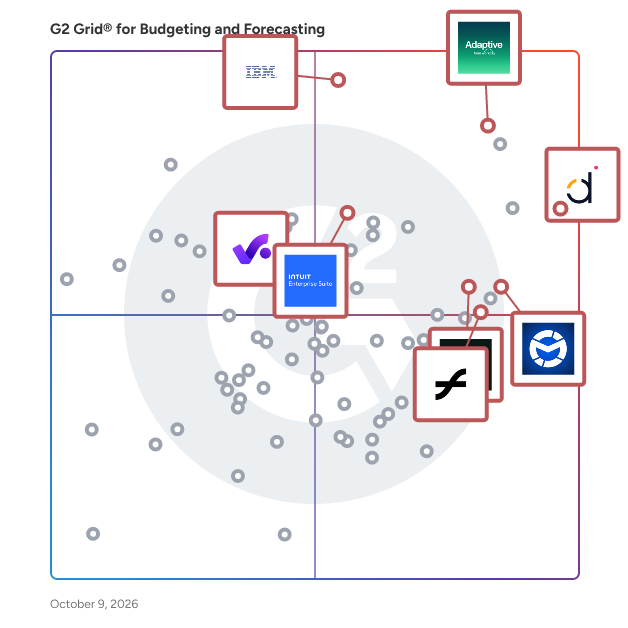
## Which Budgeting and Forecasting Software Is Best for Your Use Case?

- **Leader:** [Anaplan](https://www.g2.com/products/anaplan/reviews)
- **Highest Performer:** [Velixo](https://www.g2.com/products/velixo/reviews)
- **Easiest to Use:** [Aleph](https://www.g2.com/products/getaleph/reviews)
- **Top Trending:** [Aleph](https://www.g2.com/products/getaleph/reviews)
- **Best Free Software:** [Workday Adaptive Planning](https://www.g2.com/products/workday-adaptive-planning/reviews)

  
## Which Type of Budgeting and Forecasting Software Tools Are You Looking For?
  - [Budgeting and Forecasting Software](https://www.g2.com/categories/budgeting-and-forecasting) *(current)*
  - [FP&amp;A Software](https://www.g2.com/categories/fp-a-financial-planning-analysis)
  - [Financial Analysis Software](https://www.g2.com/categories/financial-analysis)
  - [Cash Flow Management Software](https://www.g2.com/categories/cash-flow-management)

  
---

**Sponsored**

### Abacum

Abacum is an AI-native Financial Planning and Analysis (FP&amp;A) platform designed to enhance business performance through clarity, speed, and impactful decision-making. This innovative solution provides users with instant access to essential operational and financial key performance indicators (KPIs) all in one centralized location. With just a single click, users can automate management reporting, forecast revenue, plan headcount, budget operational expenditures (OPEX), and run multiple scenarios, all seamlessly integrated within the Abacum environment. Targeted primarily at mid-market companies, Abacum caters to finance teams seeking a robust yet user-friendly solution for their planning and analysis needs. The platform stands out by combining intuitive workflows with enterprise-grade flexibility, allowing users to create collaborative plans, analyze performance in real time, and share valuable insights that drive business progress. Its ability to integrate with over 700 systems, including ERP, CRM, HRIS, and data warehouses, ensures that all data is automatically synced, cleaned, structured, and consistently up to date, thus eliminating the need for manual data handling. One of the key features of Abacum is its multi-dimensional modeling engine, which empowers finance teams to conduct complex analyses and scenario planning with ease. This capability, coupled with collaborative workflows, facilitates seamless business partnering across various functions within an organization. As a result, finance teams can plan and report up to 75% faster, significantly improving efficiency and allowing them to focus on strategic initiatives rather than time-consuming manual processes. Abacum is designed to support fast-growing companies and industry leaders, including names such as Strava, Dish Networks, JG Wentworth, BetterUp, Factorial, Kajabi, Abridge, and Aiven. By providing a scalable FP&amp;A solution that balances power with simplicity, Abacum enables organizations to navigate the complexities of financial planning and analysis confidently.


[Visit website](https://www.g2.com/external_clickthroughs/record?secure%5Bad_program%5D=ppc&amp;secure%5Bad_slot%5D=category_product_list&amp;secure%5Bcategory_id%5D=1538&amp;secure%5Bdisplayable_resource_id%5D=1538&amp;secure%5Bdisplayable_resource_type%5D=Category&amp;secure%5Bmedium%5D=sponsored&amp;secure%5Bplacement_reason%5D=page_category&amp;secure%5Bplacement_resource_ids%5D%5B%5D=1538&amp;secure%5Bprioritized%5D=false&amp;secure%5Bproduct_id%5D=154807&amp;secure%5Bresource_id%5D=1538&amp;secure%5Bresource_type%5D=Category&amp;secure%5Bsource_type%5D=category_page&amp;secure%5Bsource_url%5D=https%3A%2F%2Fwww.g2.com%2Fcategories%2Fbudgeting-and-forecasting%2Fsmall-business&amp;secure%5Btoken%5D=80d1cec264cc96b70a5e9265e4497b95144ee2f751be93bd82d3e4f6f410c28f&amp;secure%5Burl%5D=https%3A%2F%2Fwww.abacum.ai%2F%3Futm_source%3Dg2%26utm_medium%3Dcpc%26utm_campaign%3Dg2_paid&amp;secure%5Burl_type%5D=custom_url)

---

  
  ## What Are the Top-Rated Budgeting and Forecasting Software Products in 2026?
### 1. [Anaplan](https://www.g2.com/products/anaplan/reviews)
  **Average Rating:** 4.6/5.0
  **Total Reviews:** 392
  **Product Description:** Anaplan is the only scenario planning and analysis platform designed to optimize decision-making in today’s complex business environment so that enterprises can outpace their competition and the market. By building connections and collaboration across organizational silos, the platform intelligently surfaces key insights — so businesses can make the right decisions, right now.​ More than 2,400 of the world’s best brands continually optimize their decision-making by planning with Anaplan. G2 categories include: Corporate Performance Management, Budgeting &amp; Forecasting, Compensation Management, Financial Close, Sales &amp; Ops Planning, Sales Performance Management, Sales Planning, Supply Chain Planning, and Workforce Management.


### What Do G2 Reviewers Say About Anaplan?
*AI-generated summary from verified user reviews*

**Pros:**

- Users find Anaplan&#39;s **ease of use** remarkable, highlighting its intuitive interface and seamless integration for diverse planning needs.
- Users value the **flexibility** of Anaplan, enabling tailored planning models that adapt and enhance their business needs.
- Users praise Anaplan’s **user-friendly features** and flexibility, enabling seamless collaboration across various business functions.
- Users value Anaplan for its **efficiency** in connected planning, enabling quick adaptations to changing business needs.
- Users value the **ease of use and scalability** of Anaplan, enhancing their planning and decision-making processes.

**Cons:**

- Users face **performance limitations** in Anaplan, particularly with large datasets and costly AI features, impacting usability.
- Users are frustrated by the **missing features** in Anaplan, such as limited public APIs and data visualization tools.
- Users often find the **learning curve steep** , requiring expertise to fully leverage Anaplan&#39;s capabilities effectively.
- Users experience frustrating **performance issues** with Anaplan, particularly with slow loading times and complex recalculations.
- Users find a **lack of features** in Anaplan, noting missing functionalities despite community demand and high costs.

#### Key Features
  - Customization 
  - Shift Scheduling
  - Data Visualization
  - Collaboration
  - Production Planning - Supply Chain Planning
  #### What Are Recent G2 Reviews of Anaplan?

**"[Anaplan’s Real-Time Calculations Are a Game-Changer](https://www.g2.com/survey_responses/anaplan-review-12677648)"**

**Rating:** 5.0/5.0 stars
*— Tony V.*

[Read full review](https://www.g2.com/survey_responses/anaplan-review-12677648)

---

**"[Real-Time, Flexible Modeling That Speeds Up Decision-Making](https://www.g2.com/survey_responses/anaplan-review-12715706)"**

**Rating:** 4.0/5.0 stars
*— Alex P.*

[Read full review](https://www.g2.com/survey_responses/anaplan-review-12715706)

---

  #### What Are G2 Users Discussing About Anaplan?

- [What is Fluence Technologies used for?](https://www.g2.com/discussions/what-is-fluence-technologies-used-for) - 1 comment
- [How is anaplan different?](https://www.g2.com/discussions/how-is-anaplan-different) - 6 comments
- [Is anaplan any good?](https://www.g2.com/discussions/is-anaplan-any-good) - 1 comment
### 2. [Datarails](https://www.g2.com/products/datarails/reviews)
  **Average Rating:** 4.6/5.0
  **Total Reviews:** 322
  **Product Description:** Datarails is an AI-powered, Excel-native platform for financial reporting and insights that brings FP&amp;A, cash management, spend control, and month-end close into one flexible, scalable workspace. With 600+ integrations across accounting, ERP, CRM, banking, and HRIS systems, it automatically consolidates data into a single source of truth so finance teams can spend less time collecting information and more time analyzing it. Easy to use and built to fit the way finance teams work, Datarails supports existing workflows while strengthening visibility, controls, and collaboration. By removing manual tasks and unifying financial operations, it helps the CFO’s office deliver faster reporting, more accurate insights, and confident, data-driven decisions.


### What Do G2 Reviewers Say About Datarails?
*AI-generated summary from verified user reviews*

**Pros:**

- Users value the **ease of use** in Datarails, appreciating its intuitive platform and seamless integration with Excel.
- Users value the **reporting efficiency** of Datarails, appreciating its simplicity and quick problem resolution for smooth operations.
- Users value the **Excel integration** with Datarails, enhancing productivity while leveraging familiar tools for data management.
- Users appreciate Datarails for its **seamless data management** , simplifying financial reporting and enhancing accuracy across multiple sources.
- Users highlight the **efficiency** of Datarails in streamlining data processes and enhancing overall productivity.

**Cons:**

- Users find the **learning difficulty** of Datarails steep initially, requiring time to master its features effectively.
- Users find the **learning curve steep** , requiring significant time investment and effort to master Datarails&#39; functionalities.
- Users struggle with **missing features** like complex custom column functions and lack of Excel export options.
- Users note a **steep learning curve** with Datarails, requiring training and familiarization with coding before becoming effective.
- Users find the **complexity of data input and backend navigation** in Datarails can be challenging initially.

#### Key Features
  - Planning
  - Collaboration
  - Consolidation
  - Historical Data
  - Forward Looking
  #### What Are Recent G2 Reviews of Datarails?

**"[Datarails Streamlines Financial Reporting with Powerful Dashboards and Excel Integration](https://www.g2.com/survey_responses/datarails-review-12804837)"**

**Rating:** 5.0/5.0 stars
*— Monica P.*

[Read full review](https://www.g2.com/survey_responses/datarails-review-12804837)

---

**"[Efficient Financial Reviews with Seamless Integration and Incredible Support](https://www.g2.com/survey_responses/datarails-review-12783450)"**

**Rating:** 4.5/5.0 stars
*— Donavan L.*

[Read full review](https://www.g2.com/survey_responses/datarails-review-12783450)

---

  #### What Are G2 Users Discussing About Datarails?

- [What do you like most about Datarails for financial planning, and what features do you find most valuable?](https://www.g2.com/discussions/what-do-you-like-most-about-datarails-for-financial-planning-and-what-features-do-you-find-most-valuable)
### 3. [Vena](https://www.g2.com/products/vena/reviews)
  **Average Rating:** 4.5/5.0
  **Total Reviews:** 468
  **Product Description:** Vena is an agentic AI-powered Complete FP&amp;A platform that fully amplifies the Microsoft technology ecosystem with native integrations and product innovation to make it easy for anyone to independently access FP&amp;A capabilities, expertise and insights within their natural flow of work. Over 2,000 companies of all sizes use Vena&#39;s award-winning platform to accelerate budget cycles, planning processes, financial and business-wide reporting and more. Vena is perfect for finance and accounting teams looking for flexible and easy-to-use Excel-based FP&amp;A platform that can be implemented quickly. Try an interactive product tour: https://www.venasolutions.com/product-tours-hub Get a free demo: https://www.venasolutions.com/request-a-demo G2 categories include: Corporate Performance Management (CPM) Software, Budgeting and Forecasting Software, Financial Close Software, Sales Performance Management Software and more.


### What Do G2 Reviewers Say About Vena?
*AI-generated summary from verified user reviews*

**Pros:**

- Users appreciate the **user-friendly interface** of Vena, finding it reliable and easy for office management tasks.
- Users value the **seamless Excel integration** of Vena, facilitating easy report creation and enhanced efficiency.
- Users value the **seamless integration with Excel** , enhancing financial planning and simplifying data management for their operations.
- Users love Vena&#39;s **user-friendly interface** , which simplifies financial data management and enhances overall user experience.
- Users value the **Excel-based reporting** in Vena, making report creation and implementation straightforward and efficient.

**Cons:**

- Users find the **learning difficulty** of Vena challenging, as setup and navigation can be complex for newcomers.
- Users note a challenging **learning curve** for newcomers, with complexities that hinder a smooth onboarding experience.
- Users face a **steep learning curve** with Vena, finding initial setup and functionality quite complex and challenging.
- Users face a **difficult learning** curve, especially with complex features and advanced settings that require time to master.
- Users report a challenging **setup difficulty** with Vena, noting prolonged implementation times and the need for extra support.

#### Key Features
  - Budgeting
  - Data Visualization
  - Collaboration
  - Data Import
  - Consolidation
  #### What Are Recent G2 Reviews of Vena?

**"[Streamlined Data Analysis with Excel-Based Integration](https://www.g2.com/survey_responses/vena-review-12798457)"**

**Rating:** 5.0/5.0 stars
*— James W.*

[Read full review](https://www.g2.com/survey_responses/vena-review-12798457)

---

**"[Endless Solution for Finance professionals](https://www.g2.com/survey_responses/vena-review-9663699)"**

**Rating:** 5.0/5.0 stars
*— Mohamed S.*

[Read full review](https://www.g2.com/survey_responses/vena-review-9663699)

---

### 4. [IBM Planning Analytics](https://www.g2.com/products/ibm-planning-analytics/reviews)
  **Average Rating:** 4.4/5.0
  **Total Reviews:** 224
  **Product Description:** IBM Planning Analytics is an AI-powered integrated planning solution that automates your planning, budgeting, and forecasting processes, enabling real-time analysis on a single governed platform. Eliminate manual models, spot risks sooner, and make decisions that keep your numbers ahead of the trends. Designed for finance and business operations leaders across Finance, Supply Chain, HR, Marketing, Sales, and beyond, IBM Planning Analytics helps eliminate inefficient and error-prone planning processes by connecting financial and operational plans. Automate data integration, analysis, and collaboration for greater agility across the business. Key Capabilities: Integrated Planning: Connect financial and operational plans using a governed source of truth under a single license, unifying teams and accelerating planning cycles. Performance Tracking: Monitor, analyze, and communicate performance with interactive dashboards, personalized reports, and a native spreadsheet experience for trusted, real-time insights. AI-Powered Forecasting: Improve speed and accuracy of forecasts with built-in AI, enabling smarter scenario modeling and predictive insights. Collaborative Decision-Making: Increase participation and streamline workflows by lowering the skill barrier with a generative AI assistant, driving faster, more informed decisions. Bring collaborative, AI-powered business planning to your organization starting at $825/month for 5 users.


### What Do G2 Reviewers Say About IBM Planning Analytics?
*AI-generated summary from verified user reviews*

**Pros:**

- Users value the **efficiency** of IBM Planning Analytics for rapid financial planning and insightful data management.
- Users value the **planning efficiency** of IBM Planning Analytics, benefiting from streamlined processes and powerful forecasting tools.
- Users appreciate the **flexibility and real-time analytics** of IBM Planning Analytics, enhancing decision-making and efficiency.
- Users highlight the **user-friendly interface** of IBM Planning Analytics, enabling seamless navigation and efficient decision-making.
- Users commend the **forecasting accuracy** of IBM Planning Analytics, enhancing efficiency in budget planning and decision-making.

**Cons:**

- Users experience a **steep initial learning curve** with IBM Planning Analytics, making setup and usage challenging.
- Users highlight the **steep learning curve** of IBM Planning Analytics, requiring significant training for effective utilization.
- Users face a **steep learning curve** and struggle with the complexity of using IBM Planning Analytics effectively.
- Users experience a **difficult learning curve** with IBM Planning Analytics, making it challenging for new users to adapt.
- Users find the **complexity of setup and the steep learning curve** detrimental, hindering quick adoption and usability.

#### Key Features
  - Budgeting
  - Collaboration
  - Variance Analysis
  - Optimization
  - Data Import
  #### What Are Recent G2 Reviews of IBM Planning Analytics?

**"[Robust, Efficient Yet Complex for New Users](https://www.g2.com/survey_responses/ibm-planning-analytics-review-12802559)"**

**Rating:** 4.0/5.0 stars
*— Jeanpierre L.*

[Read full review](https://www.g2.com/survey_responses/ibm-planning-analytics-review-12802559)

---

**"[Powerful Planning &amp; Forecasting With Fast Updates and Smooth Excel Integration](https://www.g2.com/survey_responses/ibm-planning-analytics-review-12648783)"**

**Rating:** 4.5/5.0 stars
*— Himanshu J.*

[Read full review](https://www.g2.com/survey_responses/ibm-planning-analytics-review-12648783)

---

  #### What Are G2 Users Discussing About IBM Planning Analytics?

- [What is IBM Planning Analytics with Watson used for?](https://www.g2.com/discussions/what-is-ibm-planning-analytics-with-watson-used-for)
- [How do you upgrade planning analytics workspace?](https://www.g2.com/discussions/how-do-you-upgrade-planning-analytics-workspace)
- [What is planning analytics for Excel?](https://www.g2.com/discussions/what-is-planning-analytics-for-excel)
### 5. [LiveFlow](https://www.g2.com/products/liveflow/reviews)
  **Average Rating:** 4.9/5.0
  **Total Reviews:** 332
  **Product Description:** LiveFlow is the #1 platform for multi-entity finance. LiveFlow transforms how accounting and finance teams work. Flow: AI-Native ERP Flow is an AI-native ERP that brings Accounting, AP/AR, and FP&amp;A together in one place. - Built with multi-entity in mind. Manage intercompany workflows, shared accounts, and eliminations across all entities, all in one place. - Reports the way you want them. Build and customize reports in real time, with the flexibility to match how your business actually runs. - Built-in AI to accelerate your workflows. Automate routine tasks and surface insights faster with AI that you control. LiveFlow FP&amp;A Platform Transform Excel and Google Sheets into your financial command center. - Effortless Reporting in spreadsheets:&amp;nbsp;Import QuickBooks data in seconds to create shareable dashboards that automatically update. Drill down, build visualizations, and create impactful, always-current reporting. - Consolidation in Under 3 Minutes:&amp;nbsp;Consolidate financials from multi-entity businesses in seconds. - Pre-built Financial Models:&amp;nbsp;Choose from 100+ report templates to completely customize foryour business or clients, all while being supported by our Customer Success Team staffed byfinancial experts.


### What Do G2 Reviewers Say About LiveFlow?
*AI-generated summary from verified user reviews*

**Pros:**

- Users find LiveFlow to be **incredibly easy to use** , streamlining financial reporting with minimal setup and ongoing adjustments.
- Users value the **time-saving capabilities** of LiveFlow, significantly speeding up their month-end review processes.
- Users appreciate the **time-saving benefits** of LiveFlow, drastically reducing monthly reporting hours and enhancing efficiency.
- Users commend LiveFlow for its **reporting efficiency** , saving time and enhancing report quality with ease of use.
- Users love the **efficiency** of LiveFlow, drastically reducing time spent on financial reporting and enhancing productivity.

**Cons:**

- Users note a lack of **missing features** like third-party integrations and budget syncing, limiting LiveFlow&#39;s versatility.
- Users find **limited customization options** in LiveFlow, wishing for more flexibility in reports and integrations.
- Users find **inefficient reporting** in LiveFlow, as complex reports require manual adjustments and lack direct replication from QuickBooks.
- Users find LiveFlow to be **expensive** , especially early-stage businesses feeling the cost of premium features and templates.
- Users find **limited reporting options** in LiveFlow, wishing for better customization and less manual adjustments.

#### Key Features
  - Data Import
  - Historical Data
  - Variance Analysis
  - Data Import
  - Report Templates
  #### What Are Recent G2 Reviews of LiveFlow?

**"[Real-Time Data Sync Revolutionizes Financial Reporting](https://www.g2.com/survey_responses/liveflow-review-12166608)"**

**Rating:** 5.0/5.0 stars
*— Jessica E.*

[Read full review](https://www.g2.com/survey_responses/liveflow-review-12166608)

---

**"[Reliable, Fast, and Supportive – Liveflow Is a Game-Changer for Financial Reporting](https://www.g2.com/survey_responses/liveflow-review-11110255)"**

**Rating:** 4.5/5.0 stars
*— Zaid N.*

[Read full review](https://www.g2.com/survey_responses/liveflow-review-11110255)

---

  #### What Are G2 Users Discussing About LiveFlow?

- [What is LiveFlow Google Sheets Add-On used for?](https://www.g2.com/discussions/what-is-liveflow-google-sheets-add-on-used-for)
### 6. [Planful](https://www.g2.com/products/planful/reviews)
  **Average Rating:** 4.3/5.0
  **Total Reviews:** 487
  **Product Description:** Planful is the pioneer of financial performance management cloud software. The Planful platform, which helps businesses drive peak financial performance, is used around the globe to streamline business-wide planning, budgeting, consolidations, reporting, and analytics. Planful’s award-winning AI capabilities accelerate decision-making, helping Planful users in over 100 countries to close faster, accelerate cycle times, increase productivity, and improve accuracy. Planful is a private company with more than 1,500 customers, including Bose, Boston Red Sox, Five Guys, Grafton Plc, Gousto, and Specialized, and is backed by Vector Capital, a leading global private equity firm. Learn more at Planful.com.


### What Do G2 Reviewers Say About Planful?
*AI-generated summary from verified user reviews*

**Pros:**

- Users highlight the **ease of use** of Planful, making budgeting and reporting simple and intuitive without IT dependency.
- Users value the **streamlined reporting capabilities** of Planful, which enhance efficiency and focus on strategic analysis.
- Users value the **reporting efficiency** of Planful, enabling fast queries and strategic financial analysis with ease.
- Users value the **automation capabilities** of Planful, enhancing efficiency and enabling deeper data analysis without user errors.
- Users appreciate Planful for its **centralized data management and user-friendly interface** , facilitating seamless integration and efficient collaboration.

**Cons:**

- Users face a **steep learning curve** with Planful, making initial setup and understanding quite challenging for newcomers.
- Users face a **steep learning curve** with Planful, hindering initial setup and understanding for newcomers.
- Users find the **missing features** in Planful hinder usability, particularly for reporting, archiving, and user access.
- Users find **Planful&#39;s interface not intuitive** , facing complexity and a steep learning curve during initial use.
- Users note that there are **improvements needed** in planning modules, implementation process, and overall user experience with Planful.

#### Key Features
  - Budgeting
  - Data Analysis
  - Scorecards
  - Data Import
  - Historical Data
  #### What Are Recent G2 Reviews of Planful?

**"[Customize with Ease, But Support Needs Improvement](https://www.g2.com/survey_responses/planful-review-12707843)"**

**Rating:** 4.0/5.0 stars
*— Carter O.*

[Read full review](https://www.g2.com/survey_responses/planful-review-12707843)

---

**"[A User‑Friendly FP&amp;A Platform with Strong Reporting Capabilities](https://www.g2.com/survey_responses/planful-review-12576630)"**

**Rating:** 5.0/5.0 stars
*— Verified User in Higher Education*

[Read full review](https://www.g2.com/survey_responses/planful-review-12576630)

---

  #### What Are G2 Users Discussing About Planful?

- [What is Planful used for?](https://www.g2.com/discussions/what-is-planful-used-for)
### 7. [Aleph](https://www.g2.com/products/getaleph/reviews)
  **Average Rating:** 4.9/5.0
  **Total Reviews:** 98
  **Product Description:** Aleph is an AI-native Financial Planning and Analysis (FP&amp;A) platform designed to enhance real-time data access and automation for finance teams. This innovative solution streamlines the way finance professionals manage, consolidate, and analyze data across various systems, making it an essential tool for organizations looking to improve their financial operations. The platform is equipped with over 150 data connectors and bi-directional spreadsheet integrations, enabling finance teams to maintain full control over their data processes. Users can seamlessly work with data from multiple sources using familiar tools such as Excel, Google Sheets, and web-based dashboards. This flexibility caters to a wide range of users, from small businesses to large enterprises, ensuring that finance teams can adapt the platform to their specific needs and workflows. Aleph&#39;s no-code tools significantly reduce the time spent on repetitive tasks, eliminating up to 90% of the time-consuming and error-prone busywork typically associated with financial reporting and analysis. By automating these processes, finance teams can redirect their focus towards more strategic initiatives, such as forecasting, budgeting, and performance analysis. This shift not only enhances productivity but also empowers finance professionals to provide deeper insights and make informed decisions that drive business growth. Key features of Aleph include its robust data integration capabilities, user-friendly interface, and powerful analytics tools. The platform&#39;s ability to consolidate data from various sources ensures that finance teams have access to accurate and up-to-date information, which is crucial for effective decision-making. Additionally, the intuitive design allows users to create customized reports and dashboards without requiring extensive technical expertise, further enhancing the platform&#39;s accessibility. Aleph stands out in the FP&amp;A category by combining advanced AI technology with a user-centric approach, making it a valuable asset for organizations seeking to optimize their financial processes. With hundreds of businesses already relying on Aleph for faster reporting and better insights, the platform continues to demonstrate its effectiveness in transforming the way finance teams operate, ultimately leading to improved decision-making and enhanced organizational performance.


### What Do G2 Reviewers Say About Aleph?
*AI-generated summary from verified user reviews*

**Pros:**

- Users find Aleph&#39;s **ease of use** invaluable for visualizing and managing data effectively across multiple sources.
- Users appreciate the **helpful customer support** from Aleph, enhancing their overall experience and efficiency.
- Users appreciate the **seamless integrations** of Aleph, enabling effective collaboration and unified data analysis across systems.
- Users find the **implementation ease** of Aleph exceptional, enabling quick setup and seamless integration into existing workflows.
- Users find the **ease of implementation** of Aleph exceptional, enabling quick access to data and streamlined workflows.

**Cons:**

- Users note the **missing features** in Aleph, highlighting a need for more comprehensive customization options in the Dashboard.
- Users experience **occasional bugs** with Aleph, but the support team resolves issues promptly and effectively.
- Users often face **Excel integration issues** with Aleph, making dashboard setup more challenging compared to Excel.
- Users experience **slow performance** with Aleph, noting long load times and frequent timeouts during use.
- Users report **software bugs** and integration issues, but appreciate the team&#39;s quick response to resolve them.

#### Key Features
  - Data Import
  - Consolidation
  - Historical Data
  - Variance Analysis
  - Data Import
  #### What Are Recent G2 Reviews of Aleph?

**"[Replaced Colossal Excel Files and Pivot Tables with Easy-to-Use Templates](https://www.g2.com/survey_responses/aleph-review-12658189)"**

**Rating:** 5.0/5.0 stars
*— Richard A.*

[Read full review](https://www.g2.com/survey_responses/aleph-review-12658189)

---

**"[Effortless &amp; Quick Data Automation](https://www.g2.com/survey_responses/aleph-review-12673821)"**

**Rating:** 5.0/5.0 stars
*— Michele Z.*

[Read full review](https://www.g2.com/survey_responses/aleph-review-12673821)

---

### 8. [Workiva](https://www.g2.com/products/workiva-workiva/reviews)
  **Average Rating:** 4.5/5.0
  **Total Reviews:** 2,126
  **Product Description:** Workiva Inc. (NYSE:WK) is on a mission to power transparent reporting for a better world. We build and deliver the world’s leading regulatory, financial, and ESG reporting solutions to meet stakeholder demands for action, transparency, and disclosure of financial and non-financial data. Our cloud-based platform simplifies the most complex reporting and disclosure challenges by streamlining processes, connecting data and teams, and ensuring consistency. Learn more at workiva.com. Follow Workiva on LinkedIn: www.linkedin.com/company/workiva Like Workiva on Facebook: www.facebook.com/workiva


### What Do G2 Reviewers Say About Workiva?
*AI-generated summary from verified user reviews*

**Pros:**

- Users find Workiva **extremely easy to use** , appreciating its intuitive design and centralized information management.
- Users value the **real-time collaboration** features of Workiva, enhancing team efficiency and streamlining document workflows.
- Users value the **real-time collaboration** features of Workiva, enhancing efficiency and simplifying reporting processes.
- Users appreciate the **efficient linking tool** in Workiva, which significantly simplifies financial reporting tasks and saves time.
- Users value the **enhanced efficiency** of Workiva, streamlining processes and improving workflow for better productivity.

**Cons:**

- Users find the **missing features** in Workiva limit its effectiveness for reporting needs and integration capabilities.
- Users find that Workiva has **limited functionality** , lacking key features like pivot tables and intuitive UI compared to competitors.
- Users note a **steep learning curve** with Workiva, requiring time and experience to navigate the platform effectively.
- Users find the **learning difficulty** significant, requiring time and effort to grasp Workiva&#39;s features effectively.
- Users find Workiva’s limitations in **office integration and advanced spreadsheet features** hinder their overall experience and efficiency.

#### Key Features
  - Consolidation
  - Investment
  - Audit
  - Risk Classification
  - Reporting

  #### What Are Recent G2 Reviews of Workiva?

**"[Streamlined Reporting with Excel Integration](https://www.g2.com/survey_responses/workiva-review-12603376)"**

**Rating:** 4.5/5.0 stars
*— Michelle L.*

[Read full review](https://www.g2.com/survey_responses/workiva-review-12603376)

---

**"[Streamlined Reporting with Room for Improvement](https://www.g2.com/survey_responses/workiva-review-4678942)"**

**Rating:** 4.0/5.0 stars
*— Chad B.*

[Read full review](https://www.g2.com/survey_responses/workiva-review-4678942)

---

### 9. [Velixo](https://www.g2.com/products/velixo/reviews)
  **Average Rating:** 4.7/5.0
  **Total Reviews:** 252
  **Product Description:** Velixo is a modern reporting, budgeting and data automation software that seamlessly integrates with your cloud ERP from Excel, in real-time. Are you looking for a way to enhance your reporting and budgeting capabilities with your ERP? Do you want to leverage the power and flexibility of Excel without sacrificing the accuracy and security of your data? Velixo connects directly to Acumatica, Sage Intacct, MYOB Acumatica, Cegid XRP Flex, Haufe X360, bidirectionally, and provides you with a range of optimized features to create reports, analyze and interact with your financials, operational or project data in real-time, all within the Excel you love and already know. It can also push any data to your Cloud ERP, making it a real game changer for budgeting and automating data entry for data quality purposes or key business use cases. With research indicating that 80% of users revert to Excel for further analysis after exploring alternatives, Velixo offers a compelling solution starting directly from Excel. Use cases include: financial reporting &amp; analysis, consolidation, allocation, operational reporting, budgeting and planning, project accounting, project forecasting, construction reporting, bulk data input, and fixing data quality issues. Velixo helps thousands of organizations of any size, and boasts an impressive perfect satisfaction score among the community. If you know how to Excel, you know how to Velixo! Ready to see how our multi-award winning software can maximize the value derived from your ERP investment, boost your productivity and accelerate business outcomes? Key features: • Real-time reporting &amp; budgeting • Purpose-built Accelerator functions • Velixo Intelligence • Smart drilldown to explore data in Excel and in your ERP • Live writeback of Journals, Budgets, and Project forecasts • Data push for any data, in any ERP entity • Pre-built Templates • SSO and synchronized ERP security • Automated report distribution • Report embedding • Microsoft 365 integrations


### What Do G2 Reviewers Say About Velixo?
*AI-generated summary from verified user reviews*

**Pros:**

- Users find Velixo&#39;s **ease of use** invaluable for efficient reporting, enhancing data accessibility within familiar Excel workflows.
- Users value the **seamless Excel integration** of Velixo, enhancing efficiency and accessibility of accounting data.
- Users value the **reporting efficiency** of Velixo, enjoying fast real-time data integration with minimal manual work.
- Users value Velixo for its **time-saving integration** with Excel, streamlining financial reporting and reducing manual work.
- Users appreciate the **real-time data** of Velixo, enabling quick access to updated financial information for effective monitoring.

**Cons:**

- Users note a significant **learning curve** with Velixo, making initial setup and mastery challenging for newcomers.
- Users face challenges with **formula issues** in Velixo, requiring fixes and creative workarounds for complex reports.
- Users face challenges with **Excel dependency** , including integration limits, a learning curve, and no standalone app.
- Users experience **Excel integration issues** , leading to significant lag and delays when loading Velixo in Excel.
- Users experience **reporting issues** with Velixo, including error messages and dependency on trained colleagues for fixes.

#### Key Features
  - Versioning
  - Consolidation
  - AI
  - Forward Looking
  - Data Import
  #### What Are Recent G2 Reviews of Velixo?

**"[Transforms Acumatica into a Dynamic Solution](https://www.g2.com/survey_responses/velixo-review-10438038)"**

**Rating:** 5.0/5.0 stars
*— Johanna K.*

[Read full review](https://www.g2.com/survey_responses/velixo-review-10438038)

---

**"[Streamlined Budgeting &amp; Data Analysis](https://www.g2.com/survey_responses/velixo-review-11544025)"**

**Rating:** 5.0/5.0 stars
*— Kelly M.*

[Read full review](https://www.g2.com/survey_responses/velixo-review-11544025)

---

  #### What Are G2 Users Discussing About Velixo?

- [What is Velixo used for?](https://www.g2.com/discussions/what-is-velixo-used-for) - 1 comment, 1 upvote
### 10. [OneStream - Unified EPM](https://www.g2.com/products/onestream-unified-epm/reviews)
  **Average Rating:** 4.6/5.0
  **Total Reviews:** 146
  **Product Description:** OneStream empowers today&#39;s CFOs, Controllers, and finance executives to go beyond traditional reporting and drive future-ready strategies with a comprehensive Enterprise Performance Management (EPM) / Corporate Performance Management (CPM) platform. By unifying all financial and operational data on a single, extensible platform, OneStream enables finance teams to accelerate financial consolidation and close, streamline planning and forecasting, and harness AI to convert complex data into impactful business strategies. With over 1,700 customers, including 15% of the Fortune 500, more than 280+ go-to-market, implementation, and development partners and approximately 1,400 employees, our vision is to be the operating system for modern finance. Platform Overview and Key Capabilities: OneStream unifies essential financial functions—from financial consolidation to AI-driven planning and analytics—all in one place. The platform supports rapid planning and forecasting, enhances productivity, and adapts to your business&#39;s evolving needs without accumulating technical debt. Key capabilities include: • Financial Consolidation: Uniquely unify financial data quality management with prebuilt capabilities to support US GAAP, IFRS, intercompany eliminations, foreign exchange, currency translation and cash flow and provides insights into acquisitions. Advanced foreign exchange and cash flow calculations. • Financial Close &amp; Reporting: Simplify financial close processes with a single trial balance and workflow across account reconciliations, transaction matching, interactive dashboards, MSFT Certified Power BI Connector, narrative reporting, statutory reporting, management reporting, and MSFT Excel and PowerPoint integrations. • Compliance, Tax, and ESG Reporting: Meet regulatory requirements, streamline tax provisions, and address environmental, social, and governance (ESG) reporting with ease. • Financial Planning &amp; Analysis (FP&amp;A): Comprehensive financial planning, budgeting, and forecasting prebuilt capabilities, including scenario analysis, driver-based planning, top-down and bottom-up forecasting, and strategic planning at every level of your business. • AI-Powered Integrated Business Planning: Create touchless forecasts across your products and operations with demand forecasting, workforce planning, sales performance management and capital planning to unify your teams, drive collaboration and steer business performance. • Profitability &amp; Cost Analysis: Perform detailed profitability analysis to inform resource allocation and optimize financial outcomes.


### What Do G2 Reviewers Say About OneStream - Unified EPM?
*AI-generated summary from verified user reviews*

**Pros:**

- Users appreciate the **user-friendly interface** of OneStream, making it easy to learn and troubleshoot.
- Users value the **versatility and flexibility** of OneStream for comprehensive data management across different operational needs.
- Users value the **flexibility** of OneStream, appreciating its extensibility and capability to integrate with other solutions seamlessly.
- Users value the **powerful reporting capabilities** of OneStream, streamlining financial processes across departments with a single source of truth.
- Users value the **flexibility and versatility** of OneStream, which effectively meets diverse finance needs on a unified platform.

**Cons:**

- Users find the **learning difficulty** of OneStream to be steep, requiring more in-depth training for better understanding.
- Users find the **steep learning curve** challenging, making it difficult for non-technical individuals to adapt quickly.
- Users find the **learning curve steep** , complicating the initial experience and requiring considerable time to master.
- Users find the **complexity** of OneStream challenging, particularly with dashboarding and writing business rules without prior knowledge.
- Users face **dashboard limitations** , finding performance challenging and lacking a fully functional web and Mac application.

#### Key Features
  - Forecasting
  - Data Analysis
  - Collaboration
  - Budget Hierarchies
  - Adjustments
  #### What Are Recent G2 Reviews of OneStream - Unified EPM?

**"[AVP, Engineering](https://www.g2.com/survey_responses/onestream-unified-epm-review-12716812)"**

**Rating:** 4.0/5.0 stars
*— Damaris D.*

[Read full review](https://www.g2.com/survey_responses/onestream-unified-epm-review-12716812)

---

**"[OneStream Review](https://www.g2.com/survey_responses/onestream-unified-epm-review-7860983)"**

**Rating:** 5.0/5.0 stars
*— Tahir H.*

[Read full review](https://www.g2.com/survey_responses/onestream-unified-epm-review-7860983)

---

  #### What Are G2 Users Discussing About OneStream - Unified EPM?

- [What does OneStream XF stand for?](https://www.g2.com/discussions/what-does-onestream-xf-stand-for) - 2 comments
- [What is OneStream Excel add in?](https://www.g2.com/discussions/what-is-onestream-excel-add-in) - 1 comment
- [Is OneStream an ERP?](https://www.g2.com/discussions/is-onestream-an-erp) - 2 comments
### 11. [Pigment](https://www.g2.com/products/pigment-2024-01-19/reviews)
  **Average Rating:** 4.6/5.0
  **Total Reviews:** 104
  **Product Description:** Pigment is an AI business planning and performance management platform. Built for the complexity of modern enterprises, Pigment combines dynamic modeling with autonomous AI agents and an intuitive UX, to help teams make intelligent decisions with speed and clarity. Across finance, sales, supply chain, and other business functions, teams at companies like Unilever, Snowflake, Siemens, and Anthropic use Pigment every day to anticipate change, plan ahead, and act with confidence.


### What Do G2 Reviewers Say About Pigment?
*AI-generated summary from verified user reviews*

**Pros:**

- Users praise the **flexibility** of Pigment, enabling seamless adjustments to models as business needs evolve.
- Users value the **flexibility and multidimensionality** of Pigment, enabling easy adjustments and real-time reporting for dynamic needs.
- Users highlight the **efficient customer support** of Pigment, ensuring smooth implementations and rapid assistance.
- Users find Pigment to be **very easy to use** , facilitating straightforward implementation and integration for seamless workflow.
- Users appreciate the **robust automation capabilities** of Pigment, enabling seamless data integration and efficient forecasting processes.

**Cons:**

- Users face challenges with **data inaccuracy** due to incomplete availability of fields and evolving features in Pigment.
- Users find the **formulas complex** , leading to slower calculations and a desire for simpler API setup options.
- Users find the **complex setup** of Pigment challenging, especially with its formulas and API management.
- Users experience **connectivity issues** when handling large data volumes, affecting performance and speed of calculations.
- Users find the **formulas tricky** , with complexity causing slow calculations and challenges in API setup and ownership changes.

#### Key Features
  - Reports Interface
  - Historical Snapshots
  - Variance Analysis
  - What-If
  - Consolidation
  #### What Are Recent G2 Reviews of Pigment?

**"[Easy-to-Use, Visually Clear Dashboards with Powerful Filtering](https://www.g2.com/survey_responses/pigment-review-12723711)"**

**Rating:** 4.5/5.0 stars
*— Gowtham R.*

[Read full review](https://www.g2.com/survey_responses/pigment-review-12723711)

---

**"[Power Pivot on Steroids—Intuitive, Modern Planning with Real-Time Collaboration](https://www.g2.com/survey_responses/pigment-review-12511185)"**

**Rating:** 5.0/5.0 stars
*— Maria M.*

[Read full review](https://www.g2.com/survey_responses/pigment-review-12511185)

---

### 12. [Drivetrain](https://www.g2.com/products/drivetrain-drivetrain/reviews)
  **Average Rating:** 4.8/5.0
  **Total Reviews:** 113
  **Product Description:** Drivetrain is an AI-native business planning platform that accelerates your budgeting, reporting, and forecasting with Autonomous FP&amp;A. Mid-market and enterprise finance teams choose Drivetrain when they need a financial planning and analysis software that scales with complexity while remaining intuitive for users. Finance teams use Drivetrain to support core FP&amp;A workflows such as 3-statement modeling, board and investor reporting, headcount and workforce planning, sales planning, cash flow and revenue forecasting, scenario modeling, budgeting, and variance analysis. By unifying these use cases into a single platform, finance leaders plan with greater accuracy, collaborate more effectively, and deliver timely insights for better decision-making. Drivetrain natively integrates with 800+ business systems including Salesforce, NetSuite, QuickBooks, Xero, Hubspot, Salesforce, Rippling, Excel and Looker. These integrations create a single source of truth that reduces manual data preparation and reconciliation. The platform supports flexible, multi-dimensional modeling. And, these models can be built using plain-English formulas, allowing finance teams to handle complexity without relying on rigid templates or specialized technical expertise. Drivetrain also has intuitive reporting and visualization capabilities, combining drag-and-drop report building with charts and dashboards for clear communication of performance. Robust role-based access controls allow finance leaders to manage permissions at a granular level, ensuring stakeholders receive secure, relevant access to metrics, models, and reports. AI is embedded throughout the platform to support data transformation, anomaly detection, model building, insight generation, and more. These capabilities help automate manual work so that finance teams can focus on analysis and decision-making. Finance teams in more than 20 countries and 13 verticals use Drivetrain for their FP&amp;A needs. Customers include category-leading companies such as Postman, Javvy Coffee, Graham Allen, Matillion, Spinnaker Support, and Jumia Group.


### What Do G2 Reviewers Say About Drivetrain?
*AI-generated summary from verified user reviews*

**Pros:**

- Users appreciate the **ease of use** of Drivetrain, enabling faster scenario building and intuitive navigation.
- Users appreciate the **flexibility in report creation** with Drivetrain, enhancing collaboration and efficiency in data management.
- Users value the **reporting efficiency** of Drivetrain, streamlining workflow and providing quick access to essential financial reports.
- Users value the **excellent customer support** from Drivetrain, enhancing their overall experience with the platform.
- Users value the **easy integrations** with data sources, greatly enhancing speed and efficiency in financial analysis.

**Cons:**

- Users note a significant **learning curve** that requires time but can lead to beneficial outcomes over time.
- Users note the **missing features** like conditional formatting and limited flexibility in report building hinder the experience.
- Users report a **learning difficulty** with Drivetrain, requiring time to adapt to its features and workflows.
- Users face a **steep learning curve** initially, requiring commitment but yielding benefits over time.
- Users find Drivetrain to have a **difficult learning curve** , particularly with advanced features lacking guidance and documentation.

#### Key Features
  - Data Analysis
  - Collaboration
  - Versioning
  - Forecast Types
  - Data Import
  #### What Are Recent G2 Reviews of Drivetrain?

**"[Happy Drivetrain User](https://www.g2.com/survey_responses/drivetrain-review-12242899)"**

**Rating:** 5.0/5.0 stars
*— Kevin B.*

[Read full review](https://www.g2.com/survey_responses/drivetrain-review-12242899)

---

**"[Drivetrain Replaced Excel and Automated Our Reporting with Actionable Insights](https://www.g2.com/survey_responses/drivetrain-review-12273623)"**

**Rating:** 5.0/5.0 stars
*— Jean-Thomas C.*

[Read full review](https://www.g2.com/survey_responses/drivetrain-review-12273623)

---

### 13. [Prophix Software](https://www.g2.com/products/prophix-software/reviews)
  **Average Rating:** 4.4/5.0
  **Total Reviews:** 217
  **Product Description:** Prophix® is a global leader in financial performance management, empowering finance teams to lead with clarity, capacity, and confidence. Prophix One is a cloud-based Financial Performance Platform that unifies budgeting, forecasting, reporting, and financial close and consolidation in one secure SaaS solution. Powered by Prophix One Intelligence (AI), the platform automates data preparation, identifies anomalies, and delivers actionable insights. Built-in workflows and configurable templates are designed to accelerate implementation and enable faster time to value. The user interface is tailored for finance professionals, supporting adoption without requiring extensive technical expertise while maintaining enterprise-grade security and controls. With nearly four decades of innovation and more than 3,000 customers across over 100 countries, Prophix is trusted partner to organizations managing complex financial processes at scale.


### What Do G2 Reviewers Say About Prophix Software?
*AI-generated summary from verified user reviews*

**Pros:**

- Users value the **ease of use** of Prophix Software, praising its user-friendly, flexible, and self-service capabilities.
- Users value the **easy report building and sharing** features of Prophix Software, enhancing efficiency and collaboration.
- Users find that Prophix Software greatly enhances **financial management efficiency** , simplifying reporting and supporting growth effectively.
- Users value the **time-saving capabilities** of Prophix Software, streamlining budgeting and reporting processes effectively.
- Users appreciate the **automation of data consolidation** in Prophix, enhancing accuracy and collaboration across multiple users.

**Cons:**

- Users experience a **steep learning curve** with Prophix Software, requiring significant time and training to master its features.
- Users find the **steep learning curve** of Prophix Software challenging, requiring significant time and training for mastery.
- Users face a **steep learning curve** with Prophix, requiring significant time and training to master the software.
- Users experience **slow performance** with Prophix, struggling with lengthy report loading times and complex setup processes.
- Users face **limited functionality** with Prophix Software, hindering their ability to customize reports effectively.

#### Key Features
  - Planning
  - Data Visualization
  - Version Control
  - Versioning
  - Consolidation
  #### What Are Recent G2 Reviews of Prophix Software?

**"[Effortless Financial Management with Prophix](https://www.g2.com/survey_responses/prophix-software-review-12781305)"**

**Rating:** 5.0/5.0 stars
*— James W.*

[Read full review](https://www.g2.com/survey_responses/prophix-software-review-12781305)

---

**"[Efficient Finance Management with Flexible Features](https://www.g2.com/survey_responses/prophix-software-review-9692897)"**

**Rating:** 4.5/5.0 stars
*— Verified User in Manufacturing*

[Read full review](https://www.g2.com/survey_responses/prophix-software-review-9692897)

---

  #### What Are G2 Users Discussing About Prophix Software?

- [What is Prophix Software used for?](https://www.g2.com/discussions/what-is-prophix-software-used-for) - 1 comment
### 14. [Martus](https://www.g2.com/products/martus/reviews)
  **Average Rating:** 4.7/5.0
  **Total Reviews:** 61
  **Product Description:** Martus Solutions is a cloud-based financial management and budgeting software designed to help organizations streamline budgeting, forecasting, and reporting with greater speed, accuracy, and collaboration. Built to replace complex, disconnected and error-prone spreadsheets, Martus enables finance teams to collaboratively create, manage, and analyze budgets in up to 50% less time, while improving visibility into real-time financial performance. Purpose-built for scaling organizations like nonprofits, churches and faith-based organizations, and small to mid-sized businesses that need a more efficient and collaborative budgeting process. The platform supports multi-user budget creation with role-based permissions, structured approval workflows, and centralized data all designed to make it easier for finance leaders and department managers to work together with confidence. Martus offers seamless integration with more than 20 ERP and accounting systems, including Sage Intacct, QuickBooks, Blackbaud Financial Edge, Microsoft Dynamics 365 Business Central, Acumatica, Xero, NetSuite, and legacy systems like Sage 100. These integrations reduce manual data entry, improve data accuracy, and ensure budgets and forecasts are always aligned with actuals from your core financial systems. Organizations using Martus report faster budgeting cycles, improved forecasting accuracy, and real-time budget-to-actual reporting that supports informed decision-making. Built-in scenario planning and forecasting tools allow teams to model multiple financial outcomes, helping organizations plan proactively for growth, uncertainty, and changing funding conditions. Martus is known for its rapid implementation and fast time to value. Customers can begin using the platform in as little as one hour, with full implementation typically completed in approximately three weeks. Martus also provides best-in-class customer support, including hands-on onboarding, on-demand training resources, live webinars, and ongoing education to ensure long-term success. As a modern budget management solution, Martus empowers organizations to move beyond spreadsheets, improve collaboration across teams, and gain the financial clarity needed achieve their mission.


### What Do G2 Reviewers Say About Martus?
*AI-generated summary from verified user reviews*

**Pros:**

- Users appreciate the **ease of use** of Martus, highlighting its clear presentation and seamless integration with accounting systems.
- Users highlight the **excellent customer support** of Martus, enhancing their overall experience and implementation process.
- Users appreciate the **seamless integrations** of Martus, enhancing financial transparency and streamlining budgeting processes effectively.
- Users find the **budgeting management** of Martus straightforward and time-saving, enhancing overall efficiency across departments.
- Users value the **budgeting efficiency** of Martus, significantly reducing time spent on budget management and reporting tasks.

**Cons:**

- Users find the **learning curve challenging** as mastering data pulling and reporting takes time and effort.
- Users find a **steep learning curve** with Martus, needing time to adapt and understand data handling and reporting.
- Users find the **complexity** of Martus challenging, with a confusing UI and overwhelming filter options for small schools.
- Users often experience **confusion** with Martus due to unintuitive navigation and difficulty in managing filters effectively.
- Users find the **learning difficulty** of Martus frustrating, requiring time and effort to master data retrieval and reporting.

#### Key Features
  - Data Import
  - Workflows
  - Historical Data
  - Variance Analysis
  - Data Import
  #### What Are Recent G2 Reviews of Martus?

**"[User-Friendly Budgeting Software](https://www.g2.com/survey_responses/martus-review-12305254)"**

**Rating:** 5.0/5.0 stars
*— Mark K.*

[Read full review](https://www.g2.com/survey_responses/martus-review-12305254)

---

**"[Streamlined Budgeting and Forecasting with Some Sharing Challenges](https://www.g2.com/survey_responses/martus-review-12704490)"**

**Rating:** 4.0/5.0 stars
*— Marna S.*

[Read full review](https://www.g2.com/survey_responses/martus-review-12704490)

---

  #### What Are G2 Users Discussing About Martus?

- [What is MartusTools used for?](https://www.g2.com/discussions/what-is-martustools-used-for)
### 15. [Abacum](https://www.g2.com/products/abacum/reviews)
  **Average Rating:** 4.8/5.0
  **Total Reviews:** 144
  **Product Description:** Abacum is an AI-native Financial Planning and Analysis (FP&amp;A) platform designed to enhance business performance through clarity, speed, and impactful decision-making. This innovative solution provides users with instant access to essential operational and financial key performance indicators (KPIs) all in one centralized location. With just a single click, users can automate management reporting, forecast revenue, plan headcount, budget operational expenditures (OPEX), and run multiple scenarios, all seamlessly integrated within the Abacum environment. Targeted primarily at mid-market companies, Abacum caters to finance teams seeking a robust yet user-friendly solution for their planning and analysis needs. The platform stands out by combining intuitive workflows with enterprise-grade flexibility, allowing users to create collaborative plans, analyze performance in real time, and share valuable insights that drive business progress. Its ability to integrate with over 700 systems, including ERP, CRM, HRIS, and data warehouses, ensures that all data is automatically synced, cleaned, structured, and consistently up to date, thus eliminating the need for manual data handling. One of the key features of Abacum is its multi-dimensional modeling engine, which empowers finance teams to conduct complex analyses and scenario planning with ease. This capability, coupled with collaborative workflows, facilitates seamless business partnering across various functions within an organization. As a result, finance teams can plan and report up to 75% faster, significantly improving efficiency and allowing them to focus on strategic initiatives rather than time-consuming manual processes. Abacum is designed to support fast-growing companies and industry leaders, including names such as Strava, Dish Networks, JG Wentworth, BetterUp, Factorial, Kajabi, Abridge, and Aiven. By providing a scalable FP&amp;A solution that balances power with simplicity, Abacum enables organizations to navigate the complexities of financial planning and analysis confidently.


### What Do G2 Reviewers Say About Abacum?
*AI-generated summary from verified user reviews*

**Pros:**

- Users commend the **responsive customer support** of Abacum, enhancing their experience and facilitating efficient tool usage.
- Users admire the **ease of use** of Abacum, facilitating flexible reporting and quick analysis with intuitive features.
- Users value Abacum for its **seamless integrations** and powerful tools that enhance financial planning and analysis efficiency.
- Users praise Abacum for its **ease of implementation** , streamlining processes and empowering teams effectively and efficiently.
- Users value the **flexibility** of Abacum, allowing for custom solutions that adapt to unique business needs.

**Cons:**

- Users find that the **learning difficulty** with Abacum can hinder effective use and requires extra effort for configuration.
- Users find **missing features** in Abacum, including slow performance and limited reporting capabilities, affecting usability.
- Users find the **complex setup** can be challenging initially, requiring training and creating multiple sub-calculations.
- Users note a **slight learning curve** with Abacum, but find the supportive team helpful in onboarding.
- Users note a **steep learning curve** for Abacum, but support teams effectively assist during the onboarding process.

#### Key Features
  - Data Import
  - Consolidation
  - Historical Data
  - Variance Analysis
  - Data Import
  #### What Are Recent G2 Reviews of Abacum?

**"[Powerful FP&amp;A tool, and surprisingly easy to use](https://www.g2.com/survey_responses/abacum-review-12632724)"**

**Rating:** 4.5/5.0 stars
*— Verified User in Financial Services*

[Read full review](https://www.g2.com/survey_responses/abacum-review-12632724)

---

**"[Consolidates Complex Tasks, But Needs Time Investment](https://www.g2.com/survey_responses/abacum-review-12805796)"**

**Rating:** 4.5/5.0 stars
*— Ankush B.*

[Read full review](https://www.g2.com/survey_responses/abacum-review-12805796)

---

  #### What Are G2 Users Discussing About Abacum?

- [What is Abacum used for?](https://www.g2.com/discussions/what-is-abacum-used-for)
### 16. [Budgyt](https://www.g2.com/products/budgyt/reviews)
  **Average Rating:** 4.8/5.0
  **Total Reviews:** 103
  **Product Description:** Budgyt is database-driven budgeting software that replaces Excel budgets entirely - eliminating formula errors, version control chaos, and the career-ending risk of broken budgets in board meetings. Unlike platforms built on top of Excel that perpetuate formula risks, Budgyt uses a pure database foundation where two plus two always equals four. No #REF errors. No broken rollups. No more frantically hunting through hidden worksheets while your board watches. Purpose-built for finance teams with board accountability. Whether you&#39;re a nonprofit managing grant allocation across multiple programs, a professional services firm tracking practice profitability, or a growing business with complex department structures, Budgyt solves the collaboration and control problems Excel can&#39;t. Why 800+ organizations and 6,000 users have trusted Budgyt: Unbreakable formulas. Database-driven calculations mean your budget never breaks. Your team contributes safely without touching your master budget. No more &quot;did I break something?&quot; panic or weekend formula archaeology. Complete audit trail. Click any number to see exactly how it was calculated. From summary to transaction detail in two clicks. No more &quot;let me get back to you&quot; moments that kill credibility in board meetings. True collaboration. Unlimited users included (no per-seat fees). Department heads and program managers contribute directly while you maintain complete control. Granular permissions protect sensitive data like payroll while enabling transparency. Implementation in days. Deep API integrations with several accounting platforms (QuickBooks, Xero, NetSuite, Sage Intacct, Microsoft Business Central) automatically map your chart of accounts, departments, and dimensions. Start budgeting immediately. Recognized by G2 as Users Most Likely to Recommend, Easiest to Do Business With, and Easiest Admin. Starting at $399/month with unlimited users included. Budget with confidence. Present without fear.


### What Do G2 Reviewers Say About Budgyt?
*AI-generated summary from verified user reviews*

**Pros:**

- Users find Budgyt to be **exceptionally user-friendly** , facilitating a smooth transition from Excel budgeting to a team-based process.
- Users highlight the **user-friendly and customizable budgeting** features of Budgyt that enhance financial planning efficiency.
- Users find Budgyt to be **very user-friendly** , facilitating a smooth transition from Excel budgeting to collaborative management.
- Users value the **budgeting efficiency** of Budgyt, streamlining processes and significantly saving time across teams.
- Users praise Budgyt for its **excellent customer support** , enhancing the overall experience and aiding project setup seamlessly.

**Cons:**

- Users experience **integration issues** with Budgyt, lacking connections with systems like Microsoft Dynamics and Netsuite.
- Users experience a **significant learning difficulty** with Budgyt, especially those unfamiliar with accounting practices.
- Users note a significant **learning curve** for Budgyt, which can hinder initial understanding and usability for stakeholders.
- Users find the **difficult setup** process requires significant time, but the product&#39;s benefits may justify the effort.
- Users often face **Excel integration issues** , relying on external spreadsheets due to Budgyt&#39;s manual data input and complex equation builders.

#### Key Features
  - Versioning
  - Consolidation
  - Historical Data
  - Forecasts Comparison
  - Data Consolidation
  #### What Are Recent G2 Reviews of Budgyt?

**"[Robust Payroll Budgeting Module](https://www.g2.com/survey_responses/budgyt-review-10479862)"**

**Rating:** 5.0/5.0 stars
*— Matthew V.*

[Read full review](https://www.g2.com/survey_responses/budgyt-review-10479862)

---

**"[Budgyt is awesome!](https://www.g2.com/survey_responses/budgyt-review-10887248)"**

**Rating:** 5.0/5.0 stars
*— Kathleen P.*

[Read full review](https://www.g2.com/survey_responses/budgyt-review-10887248)

---

  #### What Are G2 Users Discussing About Budgyt?

- [What is Budgyt used for?](https://www.g2.com/discussions/what-is-budgyt-used-for) - 1 comment
### 17. [Mosaic Tech](https://www.g2.com/products/mosaic-tech/reviews)
  **Average Rating:** 4.6/5.0
  **Total Reviews:** 217
  **Product Description:** Mosaic is the first Strategic Finance Platform for agile planning, real-time reporting, and better decision making. Easily consolidating insights across ERP, CRM, HRIS, and Billing systems, Mosaic empowers teams to work together in a unified, cross-functional platform that acts as a simple source of truth for the entire organization. Mosaic was founded in 2019 by three finance leaders frustrated by the slow speed, high complexity, and inefficiencies of existing tools in the market. Knowing the office of the CFO needed an overhaul, they set out to build a platform that would address the technical challenges modern-day finance and business teams face. Today, Mosaic is leveraged by some of the fastest-growing companies, helping them align, collaborate and plan for the future. To learn more and to see it in action, visit www.mosaic.tech or send a note to info@mosaic.tech.


### What Do G2 Reviewers Say About Mosaic Tech?
*AI-generated summary from verified user reviews*

**Pros:**

- Users appreciate the **ease of use** of Mosaic Tech, enjoying intuitive navigation and automated updates for seamless reporting.
- Users commend the **knowledgeable and responsive customer support** of Mosaic Tech, enhancing their overall experience with the platform.
- Users value the **seamless integrations** with existing systems, enhancing efficiency and simplifying finance processes.
- Users appreciate the **robust features** of Mosaic Tech, enabling efficient financial management and real-time updates.
- Users value the **reporting efficiency** of Mosaic Tech, enjoying streamlined processes and real-time updates for quick insights.

**Cons:**

- Users note a **learning difficulty** with Mosaic Tech, requiring time and effort to master the tool effectively.
- Users find the **learning curve steep** with Mosaic Tech, requiring time and multiple attempts to grasp its features.
- Users find the **limited customization** options in Mosaic Tech frustrating, especially for variance analysis and charts.
- Users find the **difficult customization** of Mosaic Tech limits flexibility and hinders usability during model editing.
- Users face **customization difficulties** with Mosaic Tech, limiting their ability to tailor functions and metrics effectively.

#### Key Features
  - Data Import
  - Historical Data
  - Forecasts Comparison
  - Data Validation
  - Report Types
  #### What Are Recent G2 Reviews of Mosaic Tech?

**"[Strong planning and real-time reporting tool](https://www.g2.com/survey_responses/mosaic-tech-review-10829789)"**

**Rating:** 4.0/5.0 stars
*— Verified User in Computer Software*

[Read full review](https://www.g2.com/survey_responses/mosaic-tech-review-10829789)

---

**"[Mosaic for Budgeting and Reporting](https://www.g2.com/survey_responses/mosaic-tech-review-10519207)"**

**Rating:** 5.0/5.0 stars
*— Dan O.*

[Read full review](https://www.g2.com/survey_responses/mosaic-tech-review-10519207)

---

  #### What Are G2 Users Discussing About Mosaic Tech?

- [What does Mosaic Tech do?](https://www.g2.com/discussions/what-does-mosaic-tech-do)
- [What is FP&amp;A software?](https://www.g2.com/discussions/mosaic-tech-what-is-fp-a-software)
- [What is the Mosaic platform?](https://www.g2.com/discussions/what-is-the-mosaic-platform)
### 18. [Parallel](https://www.g2.com/products/parallel-parallel/reviews)
  **Average Rating:** 4.9/5.0
  **Total Reviews:** 28
  **Product Description:** Parallel is an easy-to-use financial modeling platform built for early-stage companies helping them understand their runway, revenue, burn, and the impact of decisions without needing to build complex financial models.


### What Do G2 Reviewers Say About Parallel?
*AI-generated summary from verified user reviews*

**Pros:**

- Users appreciate the **comprehensive forecasting capabilities** of Parallel, enabling them to analyze multiple business scenarios effectively.
- Users value the **exceptional customer support** from Parallel, enhancing usability and ensuring satisfaction for business needs.
- Users highlight the **ease of use** of Parallel, facilitating quick setup and seamless scenario modeling for better decision-making.
- Users find the **easy setup** of Parallel remarkable, enabling quick decision-making and efficient financial modeling.
- Users value the **efficiency in decision-making** that Parallel provides, facilitating quick and informed business strategies.

**Cons:**

- Users have faced **occasional software bugs** initially, but many report improved stability over time.
- Users note a **steep learning curve** with Parallel, especially for those without a strong finance background.
- Users struggle with **exporting financial views** , but appreciate the team&#39;s quick response to feedback.
- Users experience a **steep learning curve** with Parallel, especially those lacking a strong finance background.
- Users face a **learning curve** due to limited visualization, making finance concepts challenging to grasp initially.

#### Key Features
  - Data Import
  - Reporting Hierarchy
  - Standard KPIs
  - Dashboards
  - Decision Making
  #### What Are Recent G2 Reviews of Parallel?

**"[Empowering Financial Forecasts with Seamless Integration](https://www.g2.com/survey_responses/parallel-review-12252730)"**

**Rating:** 5.0/5.0 stars
*— Richie S.*

[Read full review](https://www.g2.com/survey_responses/parallel-review-12252730)

---

**"[Easiest Financial Modeling Tool to Stress Test Big Decisions](https://www.g2.com/survey_responses/parallel-review-12298809)"**

**Rating:** 5.0/5.0 stars
*— Mason S.*

[Read full review](https://www.g2.com/survey_responses/parallel-review-12298809)

---

### 19. [Acterys](https://www.g2.com/products/acterys/reviews)
  **Average Rating:** 4.8/5.0
  **Total Reviews:** 59
  **Product Description:** Acterys is a cloud or on-premise based service for data discovery and planning. It enables business users to generate professional data models that integrate all your relevant data sources with connectors to a variety of accounting systems and other sources. Supported by a wide variety of templates (Cost Center, Management Consolidation, HR, CAPEX, Cash Flow, etc.) users can build effective xP&amp;A (Extended Planning &amp; Analytics) and performance management processes in Power BI, Excel, web browser and mobile devices the quickest way.


### What Do G2 Reviewers Say About Acterys?
*AI-generated summary from verified user reviews*

**Pros:**

- Users value the **automation capabilities** of Acterys, streamlining enterprise-grade planning and enhancing efficiency in data management.
- Users value the **seamless connectivity** of Acterys, facilitating easy integration with various data sources and Power BI.
- Users value the **easy integrations** of Acterys, enabling seamless connections with various data sources and tools.
- Users value the **intuitive integration and extendability** of Acterys, making data management seamless for finance and dev teams.
- Users value the **seamless integrations** of Acterys, finding it efficient for managing data and enhancing collaboration across teams.


#### Key Features
  - Forecasting
  - Scorecards
  - Data Import
  - Consolidation
  - Historical Data
  #### What Are Recent G2 Reviews of Acterys?

**"[Initially bought it for FP&amp;A and now use it for so much more](https://www.g2.com/survey_responses/acterys-review-9657795)"**

**Rating:** 5.0/5.0 stars
*— Verified User in Venture Capital &amp; Private Equity*

[Read full review](https://www.g2.com/survey_responses/acterys-review-9657795)

---

**"[Acterys - An innovative solution](https://www.g2.com/survey_responses/acterys-review-11449495)"**

**Rating:** 5.0/5.0 stars
*— Luis C.*

[Read full review](https://www.g2.com/survey_responses/acterys-review-11449495)

---

  #### What Are G2 Users Discussing About Acterys?

- [What is Acterys used for?](https://www.g2.com/discussions/what-is-acterys-used-for)
### 20. [Fathom](https://www.g2.com/products/fathom/reviews)
  **Average Rating:** 4.7/5.0
  **Total Reviews:** 71
  **Product Description:** Fathom provides a suite of in-depth analysis tools and metrics which help you see exactly how well your business is performing. These tools and metrics help to assess profitability, cash flow, growth and other key performance indicators (KPIs). Fathom seamlessly integrates with Xero, QuickBooks Online/Desktop, Sage and MYOB; or import data via Excel &amp; Google Sheets. Create beautiful reports and dashboards: Whether presenting to a client, reporting to investors, or updating your management team, you&#39;ll always be prepared with Fathom. Confidently plan with Cash Flow Forecasting: Fathom combines business planning with powerfully simple three-way cash flow forecasting software. Consolidated reporting... made easy: Fathom enables you to group your related companies together to create consolidated reports for an organisation. In addition to reporting for an individual company, you can easily track and monitor the performance of a group to which a company belongs. On-the-fly benchmarking: Fathom helps you easily compare, rank and benchmark your companies, clients or franchisees. Get a clear view with the Insights Dashboard: If you&#39;re managing a portfolio of clients or multiple business entities, the Insights Dashboard comprises key financial metrics to help you monitor performance and spot opportunities at a glance.


### What Do G2 Reviewers Say About Fathom?
*AI-generated summary from verified user reviews*

**Pros:**

- Users appreciate Fathom&#39;s **intuitive automation features** and excellent reports, enhancing efficiency and insight into business operations.
- Users value the **excellent reporting capabilities** of Fathom, which enhance clarity and efficiency in financial presentations.
- Users find Fathom to be **incredibly easy to use** , streamlining financial reporting and saving valuable time each month.
- Users value the **reporting efficiency** of Fathom, streamlining financial analysis and saving significant time each month.
- Users appreciate Fathom&#39;s **excellent customer support** , with quick responses and thoughtful assistance for their needs.

**Cons:**

- Users find Fathom lacks **customization options** for reports and faces challenges with accruals and template updates.
- Users find **upload issues** frustrating, as they complicate seamless integration and require tedious manual processes.
- Users find **customization difficult** in Fathom, often feeling constrained by rigid reporting tools and separate KPI setups.
- Users face **import issues** that complicate seamless data uploads and hinder budget management effectively.
- Users find that **accruals and revenue recognition** need significant improvements in Fathom to enhance usability and functionality.
  #### What Are Recent G2 Reviews of Fathom?

**"[Seamless Meeting Summaries and Action Items—Accurate Notes Without the Effort](https://www.g2.com/survey_responses/fathom-review-12511853)"**

**Rating:** 5.0/5.0 stars
*— Nicholas L.*

[Read full review](https://www.g2.com/survey_responses/fathom-review-12511853)

---

**"[Effortless Financial Presentations with Fathom](https://www.g2.com/survey_responses/fathom-review-12814071)"**

**Rating:** 4.5/5.0 stars
*— Michael H.*

[Read full review](https://www.g2.com/survey_responses/fathom-review-12814071)

---

### 21. [Joiin](https://www.g2.com/products/joiin/reviews)
  **Average Rating:** 4.7/5.0
  **Total Reviews:** 83
  **Product Description:** Smarter Financial Reporting &amp; Consolidation Across Leading Accounting Platforms and Spreadsheets Joiin is a financial reporting and consolidation platform built for businesses and accountants that need fast, accurate, and scalable reporting across single entities and complex multi-entity groups. By connecting to platforms like QuickBooks, Xero, Sage, and more, Joiin replaces spreadsheet-heavy processes with structured, automated reporting. Finance teams can move from delayed, manual workflows to real-time, decision-ready insight. Smarter Financial Reporting Automate management reports, dashboards, and board packs in one platform. Standardise reporting across entities and systems, reduce manual effort, and reuse reporting structures every cycle. Multi-Entity Consolidation, Built for Scale Consolidate multiple entities, currencies, and charts of accounts with precision. Handle intercompany eliminations, multi-currency reporting, and complex group structures without the need for an ERP. Board-Ready Report Packs Create professional, branded report packs with custom layouts, visuals, and automated delivery. Tailor reports for leadership teams, investors, lenders, or clients. AI-Powered Insight and Agents (Joiin Intelligence) Go beyond static reporting with AI-driven analysis. Surface key trends, variances, and performance signals automatically, and generate commentary directly within your reports using Joiin Intelligence. Connect Claude, GPT and leading AI platforms with Joiin&#39;s MCP. Live Dashboards &amp; Drill-Down Track performance in real time with live dashboards and KPIs. Drill down from consolidated results to underlying transactions across entities and data sources. Flexible Integrations &amp; Data Access Connect to QuickBooks, Xero, Sage, spreadsheets, and more. Extend reporting into Excel, Power BI, and other tools using Joiin Connect (API) and integrations like Zapier. Transparent, Scalable Pricing All features included on every plan. Unlimited users, no reporting limits, and pricing that scales with your organisation. Security &amp; Governance Enterprise-grade security with encrypted connections, role-based access, audit trails, and strict data controls, ensuring reliable, governed reporting.


### What Do G2 Reviewers Say About Joiin?
*AI-generated summary from verified user reviews*

**Pros:**

- Users find Joiin&#39;s **ease of use** valuable for quick and efficient reporting and data consolidation.
- Users value the **ease of consolidation reporting** , finding the process efficient and the reports visually appealing.
- Users value the **reporting efficiency** of Joiin, praising its ease of consolidation and quick template generation.
- Users praise the **speedy and helpful customer support** , enhancing their experience with quick resolutions and guidance.
- Users value the **ease of report creation** in Joiin, enabling quick customized and consolidated reporting for management.

**Cons:**

- Users face **inefficient reporting** challenges with Joiin, particularly in report setup and data export formatting.
- Users feel the **limited chart types and missing features** restrict functionality and would appreciate enhancements.
- Users experience **reporting issues** with filtering and exporting, complicating the report setup and cleanup process.
- Users note the **limited reporting capabilities** , finding formatting and filter options somewhat restrictive and cumbersome.
- Users note **formatting issues** with reports, including cut-off names and clunky layout changes that require cleanup.

#### Key Features
  - Data Import
  - Data Consolidation
  - Report Templates
  - Standard Reports
  - Dashboards
  #### What Are Recent G2 Reviews of Joiin?

**"[Seamless Consolidation with Stellar Support](https://www.g2.com/survey_responses/joiin-review-12624731)"**

**Rating:** 5.0/5.0 stars
*— Jonothon .*

[Read full review](https://www.g2.com/survey_responses/joiin-review-12624731)

---

**"[Excellent Value for Xero Consolidation with Fast, Responsive Support](https://www.g2.com/survey_responses/joiin-review-12620997)"**

**Rating:** 4.5/5.0 stars
*— Verified User in Financial Services*

[Read full review](https://www.g2.com/survey_responses/joiin-review-12620997)

---

  #### What Are G2 Users Discussing About Joiin?

- [What is Joiin used for?](https://www.g2.com/discussions/what-is-joiin-used-for) - 1 comment
### 22. [Spreadsheet Server by insightsoftware](https://www.g2.com/products/spreadsheet-server-by-insightsoftware/reviews)
  **Average Rating:** 4.4/5.0
  **Total Reviews:** 79
  **Product Description:** Spreadsheet Server is a centralized reporting and automation solution that connects to an ERP database to pull live information into the native spreadsheet environment. Using a pre-configured add-in for Microsoft Excel and compatible for integration with a myriad of popular ERP systems, Spreadsheet Server eliminates any re-keying or repeated downloading of business data. Users are empowered to not only create reports in a familiar workspace, they can also drill-down substantially into live ERP details without specialist IT knowledge. Blending GL and non-GL data into a single worksheet, Spreadsheet Server&#39;s QueryExchange component provides an online repository of pre-configured queries that can be grouped together using the built-in SmartPak feature. In addition, the integrated QueryDesigner promises a user-friendly facility for non-technical users to formulate, design and maintain custom relational database queries. Both these custom queries and those selected pre-configured formulas can be combined to work seamlessly within a single spreadsheet. Spreadsheet Server also aids the sharing of reports by bringing popular workflow operations into Excel, via the Distribution Manager. Here, users can perform printing actions, copying commands and even compose emails with attachments when scheduling a more automated distribution workflow.


### What Do G2 Reviewers Say About Spreadsheet Server by insightsoftware?
*AI-generated summary from verified user reviews*

**Pros:**

- Users highlight the **ease of setup and use** of Spreadsheet Server, enhancing their reporting experience significantly.
- Users value the **efficient financial reporting** capabilities of Spreadsheet Server, enabling quick, accurate report generation and decision-making.
- Users value the **report creation** feature of Spreadsheet Server, finding it easy to automate and customize reporting processes.
- Users appreciate the **high-quality reporting** of Spreadsheet Server, enabling seamless updates and accurate financial insights.
- Users rave about the **exceptional customer support** , highlighting quick responses and knowledgeable agents resolving issues efficiently.

**Cons:**

- Users experience **slow performance** when opening files, but it can be improved by adjusting calculation settings.
- Users report **integration issues** with legacy ERPs, requiring custom SQL that may weaken product performance.
- Users note that **limited customization** hampers performance with legacy or non-standard ERP accounting databases in Spreadsheet Server.
- Users note **performance issues** with Spreadsheet Server, particularly experiencing delays after switching from a client-based service.
- Users report experiencing **delays** after transitioning to the cloud-based Spreadsheet Server, though adaptation is possible.
  #### What Are Recent G2 Reviews of Spreadsheet Server by insightsoftware?

**"[Easy-to-Automate Queries for Thorough, Department-Wide Reporting](https://www.g2.com/survey_responses/spreadsheet-server-by-insightsoftware-review-11448202)"**

**Rating:** 4.0/5.0 stars
*— Brandon H.*

[Read full review](https://www.g2.com/survey_responses/spreadsheet-server-by-insightsoftware-review-11448202)

---

**"[Versatile](https://www.g2.com/survey_responses/spreadsheet-server-by-insightsoftware-review-11714292)"**

**Rating:** 4.0/5.0 stars
*— Verified User in Wholesale*

[Read full review](https://www.g2.com/survey_responses/spreadsheet-server-by-insightsoftware-review-11714292)

---

### 23. [Clockwork.ai](https://www.g2.com/products/clockwork-ai/reviews)
  **Average Rating:** 4.9/5.0
  **Total Reviews:** 46
  **Product Description:** The AI FP&amp;A Analyst built for growing businesses Meet Mira, your AI-Powered FP&amp;A Analyst leveraging the only standalone platform to deliver sophisticated AI modeling with zero delays, no implementation, no specialized teams - just industry-transforming results.


### What Do G2 Reviewers Say About Clockwork.ai?
*AI-generated summary from verified user reviews*

**Pros:**

- Users praise the **outstanding customer support** from the Clockwork team, ensuring a seamless onboarding experience.
- Users praise the **ease of use** of Clockwork.ai, making implementation and management simple and effective for all financial needs.
- Users find Clockwork.ai&#39;s **ease of implementation** exceptional, making setup and customization an effortless experience.
- Users praise the **implementation ease** of Clockwork.ai, noting its straightforward setup and responsive support from the team.
- Users commend **automation** with Clockwork.ai for its easy integration, customization, and responsive support, enhancing efficiency and scalability.

**Cons:**

- Users find the **slow loading times** of Clockwork.ai to be a minor but notable inconvenience during use.
- Users experience **slow performance** at times, with loading and updates taking 1-3 seconds, but it&#39;s generally acceptable.
- Users note **performance issues** with Clockwork.ai, as it takes 1-3 seconds to load and update data.
- Users note that **update issues** cause slight delays, but they find the loading times acceptable given the data processing.
  #### What Are Recent G2 Reviews of Clockwork.ai?

**"[Clockwork&#39;s Magic](https://www.g2.com/survey_responses/clockwork-ai-review-11311387)"**

**Rating:** 5.0/5.0 stars
*— Cassie C.*

[Read full review](https://www.g2.com/survey_responses/clockwork-ai-review-11311387)

---

**"[Seamless Onboarding and Outstanding Support](https://www.g2.com/survey_responses/clockwork-ai-review-11203335)"**

**Rating:** 5.0/5.0 stars
*— Rebecca S.*

[Read full review](https://www.g2.com/survey_responses/clockwork-ai-review-11203335)

---

### 24. [Board](https://www.g2.com/products/board/reviews)
  **Average Rating:** 4.4/5.0
  **Total Reviews:** 300
  **Product Description:** Board is the Enterprise Planning Platform built to accelerate business performance and enable continuous planning with greater forecast accuracy to drive confident, aligned decisions. Its fully integrated planning solution spans the entire enterprise, delivering value for financial and operational planning in one unified platform. Using internal data and expert-curated external indicators, Board provides real-time visibility into your business. Board offers the most flexible, collaborative and adaptive user experience, powering executive dashboards and analytic capabilities that allows clear explanation and interpretation delivered through generative AI. This allows organizations to respond in an agile manner: capitalize on opportunities, optimize resources and mitigate risks.


### What Do G2 Reviewers Say About Board?
*AI-generated summary from verified user reviews*

**Pros:**

- Users find BOARD **easy to use** , appreciating its flexibility and quick report generation capabilities.
- Users admire the **flexibility** of BOARD for creating customized solutions that adapt to diverse business processes.
- Users value the **flexibility and ease of implementation** of Board, which adapts seamlessly to various organizational needs.
- Users value the **efficiency** of BOARD, streamlining Sales, Operations, and Merchandising activities seamlessly on one platform.
- Users value the **customization potential** of BOARD, enabling tailored solutions that enhance efficiency and align with unique business needs.

**Cons:**

- Users experience **slow performance** with complex data, causing inefficiencies and setup challenges during initial implementation.
- Users find the **learning curve steep** , making it challenging to fully utilize Board&#39;s powerful features efficiently.
- Users highlight the **missing features** in report creation, which limits their ability to work efficiently with data.
- Users critique the **poor visualization** capabilities of Board, facing inefficiencies in dashboard design and data handling.
- Users find **complexity** in Board&#39;s setup and performance, particularly with larger datasets and advanced feature learning.
  #### What Are Recent G2 Reviews of Board?

**"[Quick, Very Flexibly and Ease-to-use Planning Tool](https://www.g2.com/survey_responses/board-review-7273494)"**

**Rating:** 5.0/5.0 stars
*— Verified User in Glass, Ceramics &amp; Concrete*

[Read full review](https://www.g2.com/survey_responses/board-review-7273494)

---

**"[Almost Unlimited Flexibility Across Data Models, Workflows, and Reports](https://www.g2.com/survey_responses/board-review-12625234)"**

**Rating:** 4.5/5.0 stars
*— Peter T.*

[Read full review](https://www.g2.com/survey_responses/board-review-12625234)

---

  #### What Are G2 Users Discussing About Board?

- [What is Board used for?](https://www.g2.com/discussions/what-is-board-used-for) - 1 upvote
### 25. [Productive](https://www.g2.com/products/productive/reviews)
  **Average Rating:** 4.6/5.0
  **Total Reviews:** 71
  **Product Description:** Productive is the all-in-one professional services automation platform built for agencies, consultancies, and service businesses. Manage projects, resources, and finances in one place — with real-time visibility across your entire company. Sales Pipeline Easily manage your sales funnel and win more deals with a simple CRM solution. You won&#39;t ever forget to follow up on that potential business opportunity. When the deal is won, convert it into a project, and continue working in the same tool. Project Management Assign work, collaborate, and organize agency projects. Project Management features are integrated with Time Tracking and Task Management so you will run projects faster and more elegantly. Resource Planning Organize and plan a work schedule for your entire agency. Find bottlenecks that cost money and consume time. Avoid collisions, burnouts, and overbooking with resource planning features. Powerful Business Insights Build customizable reports from scratch by focusing on what&#39;s important for you: Actual Utilization by People, Revenue &amp; Profitability by Client, Invoiced Revenue by Months, Overtime by People, Profitability by Months, etc. Billing and Invoicing Automatically track invoiced amounts and be confident you’ve billed everything you need. Simply generate invoices using tracked time on billable services.


### What Do G2 Reviewers Say About Productive?
*AI-generated summary from verified user reviews*

**Pros:**

- Users find **Productive extremely easy to use** , appreciating its integrations and customizable features for efficient workflow.
- Users value the **high level of customizability** in Productive, enabling tailored views and reports for individual preferences.
- Users value the **seamless team collaboration** facilitated by Productive, enhancing project management and communication effortlessly.
- Users appreciate the **intuitive user interface** of Productive, making onboarding and daily use effortless and efficient.
- Users highlight the **exceptional customer support** of Productive, which enhances their overall experience significantly.

**Cons:**

- Users note a **lack of integrations** , making workflow management more challenging and less efficient across platforms.
- Users find the **missing features** in Productive limiting, particularly with reporting flexibility and mobile app functionality.
- Users face **organization difficulties** due to complex navigation and limited customization, making it hard to generate specific reports.
- Users find the **reporting challenging** , lacking flexibility and detail on mobile compared to the web version.
- Users find navigating the **complex usability** challenging, particularly when configuring reports and dealing with overwhelming layouts.
  #### What Are Recent G2 Reviews of Productive?

**"[Productive made my job easier, accurate resource planning, higher productivity and better workflows](https://www.g2.com/survey_responses/productive-review-12406445)"**

**Rating:** 5.0/5.0 stars
*— Yulija K.*

[Read full review](https://www.g2.com/survey_responses/productive-review-12406445)

---

**"[Smooth, Easy-to-Learn Budgeting and Resourcing for Clear Project Tracking](https://www.g2.com/survey_responses/productive-review-12612766)"**

**Rating:** 4.5/5.0 stars
*— Oliver W.*

[Read full review](https://www.g2.com/survey_responses/productive-review-12612766)

---

  #### What Are G2 Users Discussing About Productive?

- [What are the benefits of productivity software?](https://www.g2.com/discussions/what-are-the-benefits-of-productivity-software)
- [What are 3 examples of productivity software?](https://www.g2.com/discussions/what-are-3-examples-of-productivity-software)
- [What is productivity software?](https://www.g2.com/discussions/what-is-productivity-software)

    ## What Is Budgeting and Forecasting Software?
  [Accounting &amp; Finance Software](https://www.g2.com/categories/accounting-finance)
  ## What Software Categories Are Similar to Budgeting and Forecasting Software?
    - [FP&amp;A Software](https://www.g2.com/categories/fp-a-financial-planning-analysis)
    - [Financial Analysis Software](https://www.g2.com/categories/financial-analysis)
    - [Cash Flow Management Software](https://www.g2.com/categories/cash-flow-management)

  
---

## How Do You Choose the Right Budgeting and Forecasting Software?

### What You Should Know About Budgeting and Forecasting Software

### **Budgeting and Forecasting Software Buying Insights at a Glance**

[Budgeting and forecasting software](https://www.g2.com/categories/budgeting-and-forecasting) consolidates financial data from multiple sources, automates planning workflows, and enables real-time scenario modeling for strategic decision-making. Instead of treating budgeting as an annual exercise locked in spreadsheets, these platforms allow finance teams to continuously forecast, model what-if scenarios, and maintain dynamic visibility into financial performance. The result is a planning process that feels more like a strategic partnership and less like data compilation.

As economic uncertainty intensifies and business cycles accelerate, budgeting and forecasting tools have become central to modern finance operations. CFOs and FP&amp;A teams rely on these solutions to consolidate multi-entity financials, automate variance analysis, run driver-based models, and collaborate across departments on planning cycles. In practice, the best budgeting and forecasting software acts as the connective layer between operational data, strategic planning, and financial reporting workflows.

Based on G2 review data that I analyzed, users rate budgeting and forecasting software strongly overall. Software products in this category hold an average star rating of 4.58/5 and an average likelihood to recommend of 9.17/10. Ease-of-use metrics trend high across the category, with 6.15/7 for Ease of Use and 6.38/7 for Quality of Support. These scores suggest that most finance teams are able to adopt budgeting and planning software relatively quickly once financial workflows are configured.

The biggest buying pattern that appears across reviews is that teams evaluating budgeting and forecasting solutions are trying to balance two priorities at once: maintaining financial accuracy and keeping planning cycles efficient. Strong platforms typically succeed by combining automation, financial data visibility, and finance-friendly workflows that reduce manual consolidation.

Common use cases include annual budgeting cycles with departmental approval workflows and version control, rolling forecasts that maintain continuous 12-18 month projections updated monthly or quarterly, and driver-based planning that links operational metrics like headcount, units, and pipeline directly to financial outputs.&amp;nbsp;

Finance teams also rely on these platforms for scenario modeling to run multiple what-if analyses for strategic planning and board presentations, multi-entity consolidation to aggregate financials across subsidiaries and cost centers, and variance analysis that tracks actuals versus budget or forecast with automated reporting workflows.

Pricing for budgeting and forecasting solutions usually scales with company size, number of users, data complexity, and automation capabilities. Entry-level plans typically start with basic consolidation and reporting features, while enterprise budgeting and forecasting tools offer more advanced driver-based modeling, workflow automation, and multi-entity consolidation. Implementation costs often range from 50% to 150% of first-year license fees, depending on data migration complexity and custom workflow requirements.

**Top 5 FAQs from budgeting and forecasting software buyers**

- How do budgeting and forecasting systems improve financial planning accuracy?
- What features should teams evaluate when choosing the best budgeting and forecasting software?
- How well do budgeting and forecasting tools integrate with [ERP](https://www.g2.com/categories/erp-systems) and [accounting systems](https://www.g2.com/categories/accounting)?
- What level of automation do budgeting and planning software solutions offer for reporting?
- How scalable is budgeting and forecasting software for multi-entity organizations?

G2&#39;s top-rated budgeting and forecasting software, based on verified reviews, includes [Anaplan](https://www.g2.com/products/anaplan/reviews), [IBM Planning Analytics](https://www.g2.com/products/ibm-planning-analytics/reviews), [Planful](https://www.g2.com/products/planful/reviews), [Vena](https://www.g2.com/products/vena/reviews), and [Workiva](https://www.g2.com/products/workiva-workiva/reviews).

### What are the top-reviewed budgeting and forecasting software on G2?

[Anaplan](https://www.g2.com/products/anaplan/reviews)

- Number of Reviews: 283
- Satisfaction Score: 98
- Market Presence Score: 85
- G2 Score: 92

[IBM Planning Analytics](https://www.g2.com/products/ibm-planning-analytics/reviews)

- Number of Reviews: 85
- Satisfaction Score: 69
- Market Presence Score: 99
- G2 Score: 84

[Vena](https://www.g2.com/products/vena/reviews)

- Number of Reviews: 297
- Satisfaction Score: 87
- Market Presence Score: 70
- G2 Score: 78

[Planful](https://www.g2.com/products/planful/reviews)

- Number of Reviews: 292
- Satisfaction Score: 84
- Market Presence Score: 68
- G2 Score: 76

[Workiva](https://www.g2.com/products/workiva-workiva/reviews)

- Number of Reviews: 120
- Satisfaction Score: 82
- Market Presence Score: 66
- G2 Score: 74

Satisfaction reflects how users rate their experience with the product based on review signals such as usability, support, and likelihood to recommend. ([Source 2](https://www.g2.com/reports))

Market Presence represents a product&#39;s market footprint based on company size, user adoption, and product growth indicators. ([Source 2](https://www.g2.com/reports))

G2 Score combines Satisfaction and Market Presence to create a category-level ranking that enables direct product comparison. ([Source 2](https://www.g2.com/reports))

Learn more about how G2 calculates these scores. ([Source 1](https://documentation.g2.com/docs/research-scoring-methodologies))

### What I Often See in Budgeting and Forecasting Software

#### Pros: What I See Users Consistently Appreciating

- **Excel-native architecture preserving familiar workflows while adding automation layers**

_“The biggest strength of Datarails is its flexibility. Once you understand how the product works, it becomes incredibly powerful. It has enabled us to build a genuine single source of truth across CRM, finance, and HR systems. The Excel foundation has been a major advantage for us. Rather than forcing significant change management, we enhanced an environment the business already understands, adding automation, control, and governance._

_From an efficiency perspective alone, we’ve saved at least multiple days of rework per month; realistically, close to one FTE’s worth of effort in a business of our size. But the bigger impact isn’t just time saved, it’s accuracy and insight. Having centralized structured data has enabled us to generate insights we couldn’t before.”_ - [Urvesh P.](https://www.g2.com/products/datarails/reviews/datarails-review-12422500), Datarails Review

- **Real-time financial data consolidation, eliminating manual aggregation across systems**

_“I&#39;ve solved many problems, but the most common are - easily consolidating data from many source systems, connecting multiple departments that don&#39;t usually &quot;pass&quot; data over the cloud, building near &quot;real-time&quot; P&amp;Ls and other financial statements based on decentralized operational inputs. The benefits that I&#39;ve realized have been reduction in hours used for &quot;number crunching&quot; and data consolidation and creating time for powerful analysis and decision making.”_ - [Verified User in Management Consulting](https://www.g2.com/products/anaplan/reviews/anaplan-review-4538424), Anaplan Review

- **Customizable reporting frameworks adapting to company-specific KPIs and structures**

_“Planful has significantly improved both our annual budgeting process and our monthly reporting cycle. Previously, we relied heavily on Excel, manually consolidating multiple tabs from various departments, a process that was time-consuming and prone to errors. With Planful, everything is centralized and streamlined.&amp;nbsp;_

_One of the biggest benefits is the ability to easily pull prior year (PY) actuals and forecasts directly within the platform. Since our actuals are already integrated into the reporting side, we no longer have to dig through spreadsheets or worry about version control. This makes variance analysis, trend tracking, and forecasting much more efficient and accurate.”_ - [Veronica Y.](https://www.g2.com/products/planful/reviews/planful-review-11222466), Planful Review

#### Cons: Where I See Many Platforms Falling Short

- **Steep learning curve requiring weeks of training for advanced modeling features**

_“There is definitely a learning curve and the documentation does not provide enough insight into the less intuitive items such as user roles and permissions; these should not be complex and yet they are difficult to understand and implement, resulting in you often assigning the same individual to the same audit multiple times to ensure they receive the appropriate permissions. The text boxes in Workiva are frustrating to work in; pasting from Word will cause issues with the format of the text box content and the toolbar literally blocks part of the text you are editing.”_ - [Anurag C.](https://www.g2.com/products/workiva-workiva/reviews/workiva-review-12423866), Workiva Review

- **Performance degradation when processing large multi-year datasets or complex formulas**

_“The initial implementation can be time-consuming and requires a steep learning curve for complex custom mappings. Some users may find the interface slightly laggy when dealing with very large datasets.”_ - [Ross I.](https://www.g2.com/products/datarails/reviews/datarails-review-12387609), Datarails Review

- **Reporting interface complexity demanding extensive configuration for custom dashboard builds**

_“I, as a business user, find it hard to build customized dashboards. There are very few self-service capabilities. Some views of reports can be simplified to remove unnecessary details for leadership. The initial implementation can be hard, especially for business users. Without an AI builder, it gets complicated.”_ - [Navneet K.](https://www.g2.com/products/ibm-planning-analytics/reviews/ibm-planning-analytics-review-12427069), IBM Planning Analytics Review

### My expert takeaway on budgeting and forecasting software in 2026

Review data suggests that budgeting and forecasting software performs particularly well in areas that tend to drive long-term product adoption. The category averages 4.58 out of 5 stars, paired with a 9.17 out of 10 likelihood-to-recommend score, which indicates that most finance teams see meaningful value from these platforms once they become part of the planning workflow.

Where I see the biggest difference between average and high-performing finance teams is how they use these tools beyond basic budget templates. The most successful teams treat budgeting and planning software as continuous financial operating systems, not just as annual budget builders. They actively maintain rolling forecasts, run scenario models tied to operational drivers, and track variance signals in real time. That approach helps maintain stronger financial visibility and reduces planning cycle time when business conditions shift.

I also notice stronger adoption patterns in industries with particularly intense financial complexity, such as SaaS, professional services, healthcare, and multi-entity organizations. In those environments, finance teams often need to consolidate across subsidiaries, manage department-level planning, and model growth scenarios that standard spreadsheets can&#39;t handle efficiently. Budgeting and forecasting systems make it easier to maintain accuracy without losing visibility into underlying assumptions.

Another clear trend in the data is that usability and support strongly influence adoption. Products with the highest recommendation scores tend to combine automation capabilities with intuitive workflows that finance teams can adopt quickly. Metrics like Ease of Use (6.15/7) and Quality of Support (6.38/7) reinforce the idea that most teams can implement these platforms without significant operational friction.

If I were advising a team evaluating the best budgeting and forecasting software, I would focus on three things early in the buying process: how easily finance teams can consolidate data from existing systems, how effectively the platform supports continuous forecasting workflows, and how well it integrates with the broader financial technology stack. The tools that perform best in those areas usually become foundational infrastructure for modern FP&amp;A operations.

### Budgeting and Forecasting Software FAQs

#### **What is the best budgeting and forecasting software for enterprises?**

Enterprise teams need platforms that support large user bases, complex organizational structures, and advanced modeling capabilities. [Top enterprise budgeting and forecasting software options](https://www.g2.com/categories/budgeting-and-forecasting/enterprise) on G2 include:

- [Anaplan](https://www.g2.com/products/anaplan/reviews) **:** Widely used by large organizations for multi-dimensional planning and enterprise-scale modeling.
- [OneStream](https://www.g2.com/products/onestream-unified-epm/reviews) **:** Designed for unified corporate performance management across enterprise financial processes.
- [IBM Planning Analytics](https://www.g2.com/products/ibm-planning-analytics/reviews) **:** Provides sophisticated planning and analytics for enterprise financial operations.
- [Planful](https://www.g2.com/products/planful/reviews) **:** Built for enterprise FP&amp;A with sophisticated workflow automation and collaboration features.
- [Workiva](https://www.g2.com/products/workiva-workiva/reviews) **:** Built for enterprise-scale financial reporting, planning, and compliance workflows.

#### **Which budgeting software integrates with ERP systems?**

ERP integration is critical for automating data flows and maintaining financial accuracy. Common choices for G2 users include:

- [Datarails](https://www.g2.com/products/datarails/reviews) **:** Known for strong ERP connectivity and automated data synchronization.
- [Anaplan](https://www.g2.com/products/anaplan/reviews) **:** Provides native connectors and API integration with major ERP platforms.
- [Velixo](https://www.g2.com/products/velixo/reviews) **:** Integrates directly with ERPs like [Acumatica](https://www.g2.com/products/acumatica/reviews) and [SAP Business One](https://www.g2.com/products/sap-business-one/reviews).
- [LiveFlow](https://www.g2.com/products/liveflow/reviews) **:** Offers real-time ERP integration for budget-to-actuals reporting.

#### **Which budgeting platform provides real-time variance reporting?**

Real-time variance analysis helps finance teams track budget vs. actuals continuously. Top tools on G2 include:

- [LiveFlow](https://www.g2.com/products/liveflow/reviews) **:** Built specifically for real-time financial reporting and variance tracking.
- [Datarails](https://www.g2.com/products/datarails/reviews) **:** Enables live variance reporting with automated actuals updates.
- [Velixo](https://www.g2.com/products/velixo/reviews) **:** Provides real-time budget variance dashboards connected to ERP systems.
- [Abacum](https://www.g2.com/products/abacum/reviews) **:** Offers dynamic variance reporting with real-time data integration.

#### **What are the top budgeting and forecasting tools for creating rolling financial forecasts?**

Rolling forecasts require continuous updates and dynamic modeling capabilities. Best budgeting tools on G2 for creating rolling forecasts include:

- [Datarails](https://www.g2.com/products/datarails/reviews) **:** Supports rolling forecast workflows with automated actuals integration.
- [Vena](https://www.g2.com/products/vena/reviews) **:** Enables rolling forecasts through Excel-based modeling.
- [Anaplan](https://www.g2.com/products/anaplan/reviews) **:** Provides driver-based rolling forecast capabilities.
- [Drivetrain](https://www.g2.com/products/drivetrain-drivetrain/reviews) **:** Designed for continuous planning and rolling forecast scenarios.

#### **What are the top-rated budgeting and forecasting tools for scenario planning and analysis?**

Scenario modeling helps finance teams evaluate multiple strategic options. Top tools for such use cases on G2 include:

- [Anaplan](https://www.g2.com/products/anaplan/reviews) **:** Industry-leading scenario planning with what-if modeling capabilities.
- [Parallel](https://www.g2.com/products/parallel-parallel/reviews) **:** Offers advanced scenario modeling for strategic planning.
- [IBM Planning Analytics](https://www.g2.com/products/ibm-planning-analytics/reviews) **:** Provides sophisticated what-if analysis and scenario comparison.
- [Datarails](https://www.g2.com/products/datarails/reviews) **:** Enables scenario planning through flexible Excel-based models.

#### **What is the best budgeting and forecasting software for small businesses?**

Small businesses typically need affordable, easy-to-implement solutions with minimal setup complexity and strong Excel integration. [Top budgeting and forecasting software for small businesses](https://www.g2.com/categories/budgeting-and-forecasting/small-business) on G2 include:

- [LiveFlow](https://www.g2.com/products/liveflow/reviews) **:** Built for small teams needing real-time financial reporting with Google Sheets integration.
- [Joiin](https://www.g2.com/products/joiin/reviews) **:** Designed for small business budgeting with intuitive workflows and quick setup.
- [Parallel](https://www.g2.com/products/parallel-parallel/reviews) **:** Offers streamlined financial planning and forecasting for growing businesses.

### Most Popular FAQs

#### What is budgeting and forecasting software?

Budgeting and forecasting software helps businesses plan future revenues and expenses, consolidate departmental budgets, and update financial projections as business conditions change. It replaces manual spreadsheet processes with structured workflows, scenario modeling, and reporting that connect directly to accounting and ERP systems. Most platforms serve finance teams ranging from small businesses managing a single entity to enterprises running multi-department, multi-currency planning cycles.

#### Which budgeting and forecasting software has the best reviews?

The highest-reviewed budgeting and forecasting platforms on G2 span Excel-connected planning tools, cloud FP&amp;A platforms, and enterprise performance management suites.&amp;nbsp;

- [Datarails](https://www.g2.com/products/datarails/reviews) **:** The most reviewed platform in the category, favored by finance teams that want structured planning and automation without leaving Excel.
- [Anaplan](https://www.g2.com/products/anaplan/reviews) **:** Among the highest-rated platforms with 50 or more reviews, used by mid-market and enterprise teams for connected planning across departments.
- [Planful](https://www.g2.com/products/planful/reviews) **:** The fourth most reviewed platform with the strongest enterprise representation, covering budgeting, close management, and consolidation in one product.
- [LiveFlow](https://www.g2.com/products/liveflow/reviews) **:** One of the highest-rated platforms in the category, with SMB reviewers citing its real-time Google Sheets and Excel integration as a low-friction entry point.

#### What is the difference between budgeting and forecasting?

Budgeting is the process of setting a fixed financial plan for a defined period, typically a fiscal year, against which actual performance is measured. Forecasting is an ongoing process of updating financial projections based on real business data as conditions change. In practice, most finance teams use both together — the budget sets the target, the forecast tracks whether you will hit it.

#### Which budgeting platform provides real-time variance reporting?

Real-time variance reporting, the ability to compare actuals against budget as data flows in rather than at month-end, is one of the most cited capability gaps teams are trying to solve when switching platforms on G2.

- [Joiin](https://www.g2.com/products/joiin/reviews) **:** Reviewed by multi-entity small businesses for consolidated variance reporting across entities, with reviewers noting the speed at which actuals populate after period close.
- [Vena](https://www.g2.com/products/vena/reviews) **:** An Excel-native planning platform reviewed by finance teams for real-time budget vs. actuals tracking that syncs directly from source accounting systems without manual data entry.
- [Budgyt](https://www.g2.com/products/budgyt/reviews) **:** A highly rated SMB-focused budgeting platform cited by small finance teams for its intuitive variance dashboards that surface budget deviations as soon as actuals are posted.

#### Which budgeting software integrates with ERP systems?

ERP integration is the most cited technical requirement in G2 reviews for this category, with finance teams specifically evaluating how cleanly a planning tool connects to source data without manual exports.

- [Velixo](https://www.g2.com/products/velixo/reviews): Built specifically for ERP-connected budgeting, with reviewers citing real-time data sync with Acumatica, NetSuite, and other cloud ERPs as the primary reason for selecting it over standalone planning tools.
- [IDU-Concept](https://www.g2.com/products/idu-concept/reviews): A well-rated budgeting platform reviewed by mid-market finance teams for its structured ERP data integration and departmental budget consolidation capabilities.
- [Workiva](https://www.g2.com/products/workiva/reviews): Reviewed by enterprise finance teams for reliable data connections to ERP and GL systems, with audit trail integrity across integrated workflows cited as a key differentiator.

### Small Business FAQs

#### What is the most affordable budgeting and forecasting software for small businesses?

Small business buyers on G2 prioritize platforms that connect to existing accounting tools and require minimal setup. See the full set of [budgeting and forecasting software for SMBs](https://www.g2.com/categories/budgeting-and-forecasting/small-business).

- [LiveFlow](https://www.g2.com/products/liveflow/reviews) **:** Among the highest-rated SMB platforms in the category, keeping costs accessible with a Google Sheets and Excel-native approach.
- [Drivetrain](https://www.g2.com/products/drivetrain/reviews) **:** Rated above the category average with a strong SMB reviewer base, cited for straightforward pricing and fast time to first report.
- [iplicit](https://www.g2.com/products/iplicit/reviews) **:** Reviewed positively by small finance teams for delivering budgeting and reporting without enterprise-level complexity or cost.

#### What is the best budgeting and forecasting software for startups?

Startups on G2 prioritize tools that connect to their accounting stack, require minimal setup, and don&#39;t demand a dedicated FP&amp;A hire.&amp;nbsp;

- [Datarails](https://www.g2.com/products/datarails/reviews) **:** The most reviewed platform among SMB buyers, with 50 SMB reviews, praised for moving teams from ad hoc spreadsheets to structured planning with minimal disruption.
- [Fathom](https://www.g2.com/products/fathom/reviews) **:** Highly rated by small business and accountant reviewers for clean reporting and fast connection to Xero and QuickBooks.
- [Aleph](https://www.g2.com/products/aleph/reviews) **:** Cited by startup finance teams for its spreadsheet-friendly interface and fast onboarding without a lengthy implementation process.

#### Which budgeting and forecasting tool is the most user-friendly for small teams?

Ease-of-use and ease-of-setup scores from G2 reviewers at smaller companies point to a clear group of platforms that finance generalists can operate without specialist training.

- [Parallel](https://www.g2.com/products/parallel/reviews) **:** The highest-rated platform in the category among tools with 20 or more reviews, with top ease-of-use scores from SMB and mid-market finance teams.
- [Joiin](https://www.g2.com/products/joiin/reviews) **:** Among the highest ease-of-use scores in the category, praised by multi-entity small businesses for fast consolidation and reporting without technical setup.
- [Velixo](https://www.g2.com/products/velixo/reviews) **:** The second most reviewed platform in the category, reviewed positively for keeping the Excel experience familiar while adding structured budgeting and ERP-connected reporting.

#### What is the best budgeting software for non-profits and mission-driven organizations?

Non-profit organization management is one of the top five industries in G2 reviews for this category, with buyers prioritizing fund-based budgeting, grant tracking, and board-level reporting.

- [Martus](https://www.g2.com/products/martus/reviews) **:** Specifically reviewed by non-profit finance teams on G2, cited for collaborative budgeting workflows and reporting suited to board and stakeholder audiences.
- [Solver](https://www.g2.com/products/solver/reviews) **:** A planning and reporting platform reviewed across non-profit and mid-market verticals for ERP-connected budgeting without a custom build.
- [EngineBI](https://www.g2.com/products/enginebi/reviews) **:** Rated above the category average by smaller organizations, including mission-driven teams that need financial consolidation without enterprise pricing.

#### How do small finance teams move from spreadsheets to dedicated budgeting software without disrupting workflows?

The smoothest migrations on G2 share three traits: the new tool connects directly to an existing accounting system, the interface stays close to Excel or Google Sheets, and teams start with reporting before touching budgeting workflows. Platforms with a dedicated onboarding contact in the first 90 days consistently rate higher than those relying on self-serve documentation.

### Enterprise FAQs

#### What is the best-rated budgeting and forecasting software for tech enterprises?

Technology companies are the second-largest industry segment in G2 reviews for this category. See the full list of [budgeting and forecasting software for enterprises](https://www.g2.com/categories/budgeting-and-forecasting/enterprise).

- [Planful](https://www.g2.com/products/planful/reviews) **:** The most reviewed platform among enterprise buyers, cited by large finance teams for structured close, consolidation, and planning in a single cloud environment.
- [OneStream](https://www.g2.com/products/onestream-unified-epm/reviews) **:** Among the highest-rated enterprise-reviewed tools, with large organization reviewers citing its unified EPM architecture for complex multi-entity planning and consolidation.
- [IBM Planning Analytics](https://www.g2.com/products/ibm-planning-analytics/reviews) **:** Rated above the category average among enterprise buyers for multi-dimensional modeling and Excel integration in large planning environments.

#### What is the most reliable budgeting and forecasting platform for enterprises?

Enterprise finance teams on G2 evaluate reliability through data model stability, large-dataset performance, audit-trail integrity, and support quality during close and planning cycles.

- [Anaplan](https://www.g2.com/products/anaplan/reviews) **:** Cited by large organizations for calculation engine stability and ability to support connected planning models across multiple business units simultaneously.
- [Workiva](https://www.g2.com/products/workiva/reviews) **:** Rated above the category average by enterprise reviewers for its audit trail, version control, and SOX-compliant workflow capabilities.
- [Prophix Software](https://www.g2.com/products/prophix-software/reviews) **:** Reviewed by enterprise buyers for financial close, consolidation, and budgeting, with consistent support quality cited as a key differentiator.

#### What is the best-reviewed budgeting and forecasting software for enterprise app integration?

ERP integration is the most cited technical requirement for enterprise buyers in this category, with finance teams evaluating how cleanly a planning platform connects to source data without manual exports.

- [Velixo](https://www.g2.com/products/velixo/reviews) **:** Built specifically for ERP-connected reporting and budgeting, with reviewers citing real-time data sync with Acumatica, NetSuite, and other cloud ERPs as the primary reason for adoption.
- [IBM Planning Analytics](https://www.g2.com/products/ibm-planning-analytics/reviews) **:** Cited by enterprise reviewers for deep ERP integration and Excel connectivity across high-volume, multi-dimensional planning models.
- [Board](https://www.g2.com/products/board/reviews) **:** Reviewed by enterprise buyers for integrating data from multiple source systems into a single planning environment, with connector breadth noted as a key selection factor.

#### Which budgeting and forecasting platforms are best suited for multi-entity and scenario planning at enterprise scale?

Multi-entity consolidation and scenario modeling are the two most operationally complex requirements in enterprise FP&amp;A, with large organizations needing platforms that can run parallel models across business units and rolling time horizons.

- [Pigment](https://www.g2.com/products/pigment/reviews) **:** Reviewed by enterprise finance teams for its flexible data modeling and scenario planning interface that allows multiple forecasting assumptions to be tested without rebuilding the underlying model.
- [Acterys](https://www.g2.com/products/acterys/reviews) **:** The highest-rated platform in the entire category on G2, with enterprise reviewers citing its Power BI-native architecture and multi-entity consolidation capabilities.
- [Abacum](https://www.g2.com/products/abacum/reviews) **:** Cited by enterprise finance teams for collaborative planning and the ability to model multiple scenarios across departments with version control built in.

#### What do enterprise buyers most commonly dislike about budgeting and forecasting software?

The most cited dislikes on G2 include steep setup learning curves, performance slowdowns with large multi-entity datasets, and implementation timelines that vendors underrepresent. Anaplan reviewers flag ongoing specialist dependency for model maintenance; Planful reviewers cite dashboard customization constraints. Piloting with a single business unit before full deployment is the most commonly recommended approach.

### Sources

1. [G2 Research Scoring Methodologies](https://documentation.g2.com/docs/research-scoring-methodologies)
2. [G2 Market Presence Score Overview](https://www.g2.com/reports)

Researched By: [Nathan Calabrese](https://research.g2.com/insights/author/nathan-calabrese)

Last updated on: April 23, 2026


