Best Work Management Software

How Many Work Management Software Products Does G2 Track?

Total Products under this Category: 243

Category Stats (Nov 2026)

  • Average Rating: 4.51/5 (↑0.01 vs Oct 2026) The average rating of products in this category, based on all submitted ratings
  • Top Trending Product: Semsto (+11.11%) - Among all products in this category, Semsto recorded the largest rating increase compared to last month

Last updated: November 01, 2026

How Does G2 Rank Work Management Software Products?

Why You Can Trust G2's Software Rankings:

  • 30 Analysts and Data Experts
  • 149,300+ Authentic Reviews
  • 243+ Products
  • Unbiased Rankings

G2's software rankings are built on verified user reviews, rigorous moderation, and a consistent research methodology maintained by a team of analysts and data experts. Each product is measured using the same transparent criteria, with no paid placement or vendor influence. While reviews reflect real user experiences, which can be subjective, they offer valuable insight into how software performs in the hands of professionals. Together, these inputs power the G2 Score, a standardized way to compare tools within every category.

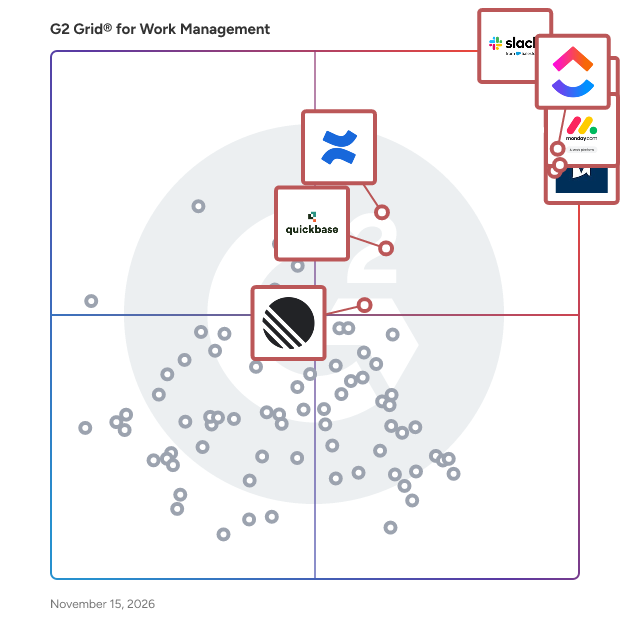
G2 Grid® for Work Management Software

G2 Grid® for Work Management Software plotting products by satisfaction and market presence

Highlighted products: Slack, ClickUp, Asana, monday AI Work Platform, Smartsheet, Confluence, Quickbase, and Linear.

Underlying data: [Grid® JSON](https://www.g2.com/categories/work-management/grids.json?focus%5B%5D=slack&focus%5B%5D=clickup&focus%5B%5D=asana&focus%5B%5D=monday-com&focus%5B%5D=smartsheet&focus%5B%5D=confluence&focus%5B%5D=quickbase&focus%5B%5D=linear)

Slack

Slack is your single workspace that connects you with the people and tools you work with everyday, no matter where you are or what you do. With Slack you get real-time messaging through calls and chat, a searchable record of all your files and conversations, and integrations with a growing number of handy bots and apps. Now everyone can finally be on the same page and get their work done. Slack: It’s where work happens.

Average Rating: 4.5/5.0

Total Reviews: 38,399

G2 Deal: 25% off eligible upgrades to Slack Pro and Business+ for 12 months

Slack goes beyond chat and video—it empowers teams to work more efficiently by automating everyday tasks, putting your most important conversations at the center, and connecting everyone instantly (right where they're already working). Limited time offer for companies with 200 or fewer users.

View this exclusive G2 deal

How Do G2 Users Rate Slack?

  • Has the product been a good partner in doing business?: 9.1/10 (Category avg: 9.1/10)
  • Planning: 8.6/10 (Category avg: 9.0/10)
  • Procedures: 8.6/10 (Category avg: 8.5/10)
  • Insights: 8.5/10 (Category avg: 8.6/10)

Who Is the Company Behind Slack?

  • Seller: Salesforce
  • Company Website:
  • Year Founded: 1999
  • HQ Location: San Francisco, CA
  • LinkedIn® Page: www.linkedin.com
    89,711 employees on LinkedIn®
  • Ownership: NYSE:CRM

Who Uses This Product?

  • Who Uses This: Software Engineer, Project Manager
  • Top Industries: Computer Software, Information Technology and Services
  • Company Size: 41% Small, 41% Medium

What Do G2 Reviewers Say About Slack?

AI-generated summary from verified user reviews

Pros
  • Users love Slack for its user-friendly design and seamless collaboration, making communication easy and efficient.
  • Users appreciate Slack's centralized team communication, fostering organization, quick decision-making, and enhanced workflow efficiency.
  • Users love Slack for its diverse communication options, enhancing workflows and adding a fun element to teamwork.
  • Users value Slack's extensive integrations that significantly enhance workflow efficiency and streamline team communication seamlessly.
  • Users love Slack's intuitive interface and robust integrations, enhancing collaboration and streamlining workflow efficiency effortlessly.
Cons
  • Users struggle with notification issues, finding them overwhelming and disruptive to their focus and productivity.
  • Users find Slack lacking in integrated video conferencing and effective notification management, impacting their overall experience.
  • Users often find limited features in Slack, especially regarding notification management and access limitations after trial periods.
  • Users find the information overwhelming in Slack, leading to difficulty tracking important messages and fragmented conversations.
  • Users find managing channels in Slack frustrating due to poor organization, distracting alerts, and sign-in complexities.

What Are Recent G2 Reviews of Slack?

What Are G2 Users Discussing About Slack?

ClickUp

ClickUp is the world’s first Converged AI Workspace, bringing together all work apps, data, and workflows. ClickUp eliminates all forms of work sprawl to provide 100% context and a single place for humans and agents to work, together. Trusted by more than 20 million users worldwide, ClickUp is on a mission to maximize human productivity.

Average Rating: 4.6/5.0

Total Reviews: 14,543

How Do G2 Users Rate ClickUp?

  • Has the product been a good partner in doing business?: 9.0/10 (Category avg: 9.1/10)
  • Planning: 9.1/10 (Category avg: 9.0/10)
  • Procedures: 8.6/10 (Category avg: 8.5/10)
  • Insights: 8.5/10 (Category avg: 8.6/10)

Who Is the Company Behind ClickUp?

  • Seller: ClickUp
  • Company Website:
  • Year Founded: 2017
  • HQ Location: San Diego, California
  • LinkedIn® Page: www.linkedin.com
    7,082 employees on LinkedIn®

Who Uses This Product?

  • Who Uses This: CEO, Project Manager
  • Top Industries: Marketing and Advertising, Computer Software
  • Company Size: 77% Small, 19% Medium

What Do G2 Reviewers Say About ClickUp?

AI-generated summary from verified user reviews

Pros
  • Users value the flexible customization that lets them tailor workflows, workspaces, and views to their needs.
  • Users like having tasks, projects, documents, and communication centralized in one workspace, reducing the need to switch between multiple apps.
  • Users like its straightforward, intuitive design, which makes daily tasks easy to navigate and learn.
  • Users like the organized task management that helps them plan, track, and keep projects and work in order.
  • Users find team setup quick and straightforward, helping them get started with little effort.
Cons
  • Users face a steep learning curve, with the interface and features taking time to understand and use effectively.
  • Users say the interface can feel slow or laggy, especially when loading or working in large workspaces.
  • Users find the abundance of features and options overwhelming, making the platform feel more complex than necessary.
  • Users find the initial setup complicated and time-consuming, especially when configuring workspaces and workflows.
  • Users say the interface can feel cluttered and overwhelming, with too many visible controls and information.

What Are Recent G2 Reviews of ClickUp?

What Are G2 Users Discussing About ClickUp?

Asana

Asana is a leading work management platform for human + AI collaboration. Over 170,000 customers like Accenture, Amazon, Anthropic, and Suzuki rely on Asana to align teams and accelerate organizational impact. Whether it’s managing strategic initiatives, cross-functional programs, or company-wide goals, Asana helps organizations bring clarity to complexity—turning plans into action with AI working alongside teams every step of the way. To learn more, visit www.asana.com.

Average Rating: 4.4/5.0

Total Reviews: 13,521

How Do G2 Users Rate Asana?

  • Has the product been a good partner in doing business?: 8.7/10 (Category avg: 9.1/10)
  • Planning: 8.9/10 (Category avg: 9.0/10)
  • Procedures: 8.3/10 (Category avg: 8.5/10)
  • Insights: 8.3/10 (Category avg: 8.6/10)

Who Is the Company Behind Asana?

  • Seller: Asana
  • Company Website:
  • Year Founded: 2008
  • HQ Location: San Francisco, CA
  • LinkedIn® Page: www.linkedin.com
    4,427 employees on LinkedIn®
  • Ownership: NYSE: ASAN

Who Uses This Product?

  • Who Uses This: Project Manager, Owner
  • Top Industries: Marketing and Advertising, Information Technology and Services
  • Company Size: 57% Small, 31% Medium

What Do G2 Reviewers Say About Asana?

AI-generated summary from verified user reviews

Pros
  • Users appreciate its intuitive, straightforward interface, which makes day-to-day work easy to learn and navigate.
  • Users appreciate how easily they can organize tasks and projects, keeping work structured and clear.
  • Users find setup and onboarding easy, helping teams get started and adopt the tool quickly.
  • Users value the collaboration tools for coordinating shared work across teams and departments.
  • Users value clear project visibility, which helps teams quickly see task status, progress, and upcoming work.
Cons
  • Users find the platform confusing and nonintuitive at first, with advanced features and workflows taking time to learn.
  • Users find notifications overwhelming and distracting, and say important alerts can be easy to miss.
  • Users find useful features, especially reporting and automation, restricted to higher-priced plans, limiting what lower tiers can do.
  • Users find the extensive feature set overwhelming, simple tasks overcomplicated, and some expected capabilities missing.
  • Users find the pricing expensive, particularly for small teams, growing organizations, and features that require higher-tier plans.

What Are Recent G2 Reviews of Asana?

What Are G2 Users Discussing About Asana?

AI can help you find the answers. G2 helps you trust them.

Connect G2 to Claude or ChatGPT for answers grounded in G2's trusted reviews, comparisons, and pricing from real user insights.

How it works

monday AI Work Platform

monday.com is the AI Workspace where people and agents operate as one team - with shared cross-department context, enterprise-grade trust, and an easy-to-use interface built for adoption at scale. With monday.com, agents work alongside teams in the same boards, workflows, and goals they already use every day, creating a new kind of teamwork where people and agents move work forward together. Beyond agents, monday.com gives every team more ways to turn AI into real business impact. With monday vibe, teams can build custom work apps for their specific needs, and with monday sidekick, every user gets a personal AI assistant to help solve business challenges, move faster, and get more done. monday.com gives organizations the visibility, permissions, human oversight, and compliance standards they need to deploy AI with confidence. AI doesn’t operate in a black box - it operates within the same trusted guardrails teams already rely on. Because monday.com is already used across departments, agents can access the broader context of how work connects across marketing, sales, product, IT, HR, operations, and more. That means smarter decisions, faster execution, and fewer silos - all in one place. Today, over 250,000 customers and more than 60% of Fortune 500 companies trust monday.com with how they run their business.

Average Rating: 4.7/5.0

Total Reviews: 17,348

How Do G2 Users Rate monday AI Work Platform?

  • Has the product been a good partner in doing business?: 9.1/10 (Category avg: 9.1/10)
  • Planning: 9.1/10 (Category avg: 9.0/10)
  • Procedures: 8.7/10 (Category avg: 8.5/10)
  • Insights: 8.6/10 (Category avg: 8.6/10)

Who Is the Company Behind monday AI Work Platform?

  • Seller: monday.com
  • Company Website:
  • Year Founded: 2012
  • HQ Location: Tel Aviv
  • LinkedIn® Page: www.linkedin.com
    10,589 employees on LinkedIn®
  • Ownership: NASDAQ: MNDY

Who Uses This Product?

  • Who Uses This: Project Manager, CEO
  • Top Industries: Marketing and Advertising, Information Technology and Services
  • Company Size: 60% Small, 30% Medium

What Do G2 Reviewers Say About monday AI Work Platform?

AI-generated summary from verified user reviews

Pros
  • Users find the platform intuitive and easy to use, helping them get started with everyday work quickly.
  • Users value the flexible customization of boards and workflows, tailoring them to fit different teams, projects, and processes.
  • Users appreciate the straightforward setup and onboarding, helping teams get started and bring new members in quickly.
  • Users like how easily they can organize tasks, projects, and everyday work, helping them stay on top of their responsibilities.
  • Users value easy-to-set-up automations that handle repetitive tasks and updates, save time, and reduce manual follow-ups.
Cons
  • Users find the platform unintuitive at first, with a steep learning curve for its features and complex workflows.
  • Users say pricing feels high, especially for smaller teams and as organizations scale.
  • Users say the platform can be slow and laggy, especially when loading large boards or handling heavy workloads.
  • Users find third-party integrations limited, difficult to set up, and prone to breaking.
  • Users find the abundance of features and options overwhelming, especially when learning the platform or setting up complex workflows.

What Are Recent G2 Reviews of monday AI Work Platform?

What Are G2 Users Discussing About monday AI Work Platform?

FAQs About Work Management Software

Generated using AI

Last updated: June 3, 2026

Which vendor offers AI-powered work prioritization features

Based on G2 reviews, several work management products are associated with AI-assisted prioritization, planning, or workflow guidance in recent feedback.

  • Asana — task prioritization and workflow planning.
  • monday Work Management — AI-supported boards and automation setup.
  • ClickUp — AI summaries and task organization.
  • Slack — AI summaries for busy channels.

Which work management platform offers the most comprehensive task and project tracking

Based on G2 reviews, buyers most often compare platforms by how well they centralize tasks, deadlines, ownership, and visibility.

  • Asana — task timelines and ownership tracking.
  • monday Work Management — customizable boards and status visibility.
  • ClickUp — dashboards, views, and dependencies.
  • Smartsheet — spreadsheet-style tracking and dashboards.

Which vendor provides real-time work progress dashboards

Based on G2 reviews, several products are described as giving teams real-time visibility into work, workloads, and project status.

What are work management platforms

Work management platforms are tools teams use to organize tasks, timelines, ownership, updates, and collaboration in one place. Across recent G2 reviews, users describe them as replacing scattered work across email, spreadsheets, chat threads, and separate apps. Common capabilities mentioned include task assignment, project tracking, dashboards, reminders, file sharing, workload visibility, and automations. Reviewers also highlight the value of having a central place to see priorities, deadlines, and progress across teams. In practice, buyers use these platforms to reduce follow-up work, improve accountability, and keep projects moving with clearer visibility into who is doing what and when.

What features define modern work management

According to verified users, modern work management is defined by visibility, coordination, and flexibility. In recent reviews, buyers repeatedly mention task assignment, due dates, subtasks, dashboards, workload views, timelines, automations, and reporting as core capabilities. They also value integrations that connect work with tools like Slack, Google Drive, Outlook, GitHub, Jira, and calendars so updates stay in one workflow. Search, notifications, reminders, and customizable views also come up often because they help teams stay organized without losing context. Across products, the strongest theme is centralization: users want one place to track ownership, progress, documents, approvals, and team communication without relying on scattered systems.

Smartsheet

Smartsheet revolutionizes how you manage projects, portfolios, and processes. The Smartsheet AI-powered platform delivers adaptability, sophisticated experiences, and enterprise-grade rigor to support work across industries — from service delivery to construction, clinical trials, and marketing campaigns. Designed to meet demanding requirements, it helps organizations drive efficiency, accelerate innovation, and stay competitive. Over 85% of Fortune 500 companies trust Smartsheet to align their resources to improve efficiency, agility, and collaboration in today’s ever-changing world of work.

Average Rating: 4.4/5.0

Total Reviews: 22,665

How Do G2 Users Rate Smartsheet?

  • Has the product been a good partner in doing business?: 8.6/10 (Category avg: 9.1/10)
  • Planning: 8.6/10 (Category avg: 9.0/10)
  • Procedures: 8.1/10 (Category avg: 8.5/10)
  • Insights: 7.9/10 (Category avg: 8.6/10)

Who Is the Company Behind Smartsheet?

  • Seller: Smartsheet
  • Company Website:
  • Year Founded: 2005
  • HQ Location: Bellevue, WA
  • LinkedIn® Page: www.linkedin.com
    4,034 employees on LinkedIn®
  • Ownership: NYSE: SMAR

Who Uses This Product?

  • Who Uses This: Project Manager, Senior Project Manager
  • Top Industries: Information Technology and Services, Construction
  • Company Size: 41% Medium, 34% Small

What Do G2 Reviewers Say About Smartsheet?

AI-generated summary from verified user reviews

Pros
  • Users find Smartsheet simple and intuitive, allowing for easy project management and effective team collaboration.
  • Users value the easy organization and automation in Smartsheet, enhancing project management and team collaboration effectively.
  • Users value the easy team collaboration and seamless integration features of Smartsheet for effective project management.
  • Users highly value the automation capabilities of Smartsheet, enhancing efficiency and transparency across multiple projects and teams.
  • Users praise Smartsheet for its effective project tracking features, enhancing organization and collaboration across teams.
Cons
  • Users find the learning curve steep with Smartsheet, leading to frustration in navigating its features effectively.
  • Users are disappointed by missing features like limited support and branding on printouts, affecting professionalism.
  • Users find Smartsheet not intuitive, struggling with filters, pivots, and limited form customization options.
  • Users find limited features frustrating, as some functionalities are not available in new views and formulas are hard to access.
  • Users struggle with limited customization in Smartsheet, wishing for better appearance options and improved usability features.

What Are Recent G2 Reviews of Smartsheet?

What Are G2 Users Discussing About Smartsheet?

Confluence

Confluence is the AI-powered collaborative workspace for all teams. Equipped with intelligent AI agents to save time on tedious tasks, brainstorm new ideas, and help you quickly find the answers you need, Confluence is where knowledge becomes impact. Versatile content types like pages, live docs, whiteboards, and databases help teams move seamlessly from ideation to execution. Confluence integrates with the Atlassian suite of products like Jira Software, Trello, and Loom to enable both synchronous and async work and to push work forward.

Average Rating: 4.1/5.0

Total Reviews: 4,256

How Do G2 Users Rate Confluence?

  • Has the product been a good partner in doing business?: 8.5/10 (Category avg: 9.1/10)
  • Planning: 8.9/10 (Category avg: 9.0/10)
  • Procedures: 8.6/10 (Category avg: 8.5/10)
  • Insights: 8.4/10 (Category avg: 8.6/10)

Who Is the Company Behind Confluence?

  • Seller: Atlassian
  • Company Website:
  • Year Founded: 2002
  • HQ Location: Sydney and San Francisco
  • LinkedIn® Page: www.linkedin.com
    16,946 employees on LinkedIn®
  • Ownership: NASDAQ:TEAM

Who Uses This Product?

  • Who Uses This: Software Engineer, Project Manager
  • Top Industries: Computer Software, Information Technology and Services
  • Company Size: 48% Medium, 34% Large

What Do G2 Reviewers Say About Confluence?

AI-generated summary from verified user reviews

Pros
  • Users appreciate the ease of use in Confluence, allowing for efficient organization and seamless collaboration on documentation.
  • Users value seamless team collaboration in Confluence, enhancing real-time editing and integration with essential tools like Jira.
  • Users appreciate the ease of organization in Confluence, facilitating collaboration and efficient document sharing among teams.
  • Users love the seamless integrations of Confluence with Jira and Google Workspace, enhancing collaboration and organization.
  • Users appreciate the collaboration efficiency of Confluence, enhancing teamwork and streamlining project documentation sharing.
Cons
  • Users find the search feature and overall interface not intuitive, leading to difficulties in navigating and utilizing Confluence effectively.
  • Users experience slow performance with Confluence, especially when editing large pages or managing multiple tables.
  • Users face challenges with page management, including poor accountability, lagging performance, and difficult navigation.
  • Users find the learning curve steep, making it hard for non-technical users to effectively utilize Confluence.
  • Users find Confluence complex and cumbersome, especially with large projects and unclear accountability impacting task tracking.

What Are Recent G2 Reviews of Confluence?

What Are G2 Users Discussing About Confluence?

Quickbase

Quickbase is an AI-driven platform designed to help businesses streamline their operations by adapting to their unique workflows and processes. Unlike traditional off-the-shelf software, which often requires users to conform to predefined structures, Quickbase empowers organizations to create customized solutions that align with their specific needs. This flexibility is crucial for companies seeking to eliminate inefficiencies and reduce the burden of 'Gray Work' - what we call the time-consuming tasks and manual processes that arise from using rigid software systems. The target audience for Quickbase includes businesses of all sizes across various industries that are looking to enhance their operational efficiency. Whether it's a 50 person small business or a large enterprise, organizations can benefit from a platform that allows them to connect disparate data sources, automate repetitive tasks, and scale their competitive advantages. Quickbase is particularly valuable for teams that rely on collaboration and data-driven decision-making, as it fosters an environment where information flows seamlessly and processes are optimized. Key features of Quickbase include its intuitive interface, which allows users to build custom applications without extensive coding knowledge. This user-friendly design enables teams to quickly adapt the platform to their specific workflows, ensuring that they can address unique challenges without the need for extensive IT support. Additionally, Quickbase offers powerful automation capabilities, allowing users to set up triggers and workflows that reduce manual effort and streamline operations. The platform also supports integration with various data sources, enabling businesses to consolidate their information and gain valuable insights. One of the standout benefits of Quickbase is its ability to scale with your business. As organizations grow and evolve, their processes often become more complex. Quickbase's adaptable nature ensures that users can modify their applications and workflows as needed, without the constraints typically associated with traditional software. This flexibility not only saves time but also fosters innovation, as teams can experiment with new processes and tools that enhance their productivity. By prioritizing user-centric design and adaptability, Quickbase stands out in the crowded landscape of business software solutions. It provides organizations with the tools they need to optimize their operations, reduce inefficiencies, and ultimately drive growth. With Quickbase, businesses can focus on what truly matters—leveraging their unique processes to gain a competitive edge in their respective markets.

Average Rating: 4.5/5.0

Total Reviews: 1,603

How Do G2 Users Rate Quickbase?

  • Has the product been a good partner in doing business?: 8.8/10 (Category avg: 9.1/10)
  • Planning: 8.4/10 (Category avg: 9.0/10)
  • Procedures: 8.4/10 (Category avg: 8.5/10)
  • Insights: 8.3/10 (Category avg: 8.6/10)

Who Is the Company Behind Quickbase?

  • Seller: Quickbase
  • Company Website:
  • Year Founded: 2012
  • HQ Location: Boston, MA
  • LinkedIn® Page: www.linkedin.com
    806 employees on LinkedIn®

Who Uses This Product?

  • Who Uses This: Project Manager, Project Coordinator
  • Top Industries: Information Technology and Services, Construction
  • Company Size: 44% Medium, 30% Small

What Do G2 Reviewers Say About Quickbase?

AI-generated summary from verified user reviews

Pros
  • Users admire the ease of use of Quickbase, finding it beginner-friendly with intuitive drag-and-drop features.
  • Users value the full customization of Quickbase, enabling seamless integration and efficient business processes across various functions.
  • Users value the customizability of Quick Base, making it adaptable to various business needs and processes.
  • Users value the flexibility of Quickbase, enabling seamless customization and integration for diverse business needs.
  • Users appreciate the fully customizable nature of Quickbase, enabling smooth integration and tailored solutions for their businesses.
Cons
  • Users find the learning curve steep, especially for those without technical experience, making onboarding challenging.
  • Users express frustration over missing features in Quickbase, hindering usability and smooth workflow management.
  • Users find Quickbase not intuitive, with a clunky mobile experience that impacts overall usability and flow.
  • Users find the limited features of Quickbase can complicate use and require additional financial commitment.
  • Users find limited customization options in Quickbase hinder their ability to tailor the experience to their needs.

What Are Recent G2 Reviews of Quickbase?

What Are G2 Users Discussing About Quickbase?

Linear

Linear is the product development system for teams and agents. Purpose-built for planning and building products, and designed for the AI era. Linear powers more than 40,000 organizations, from ambitious startups to major enterprises and Fortune 20 companies, including OpenAI, Ramp, Cash App, Coinbase, Cursor, and Oscar Health.

Average Rating: 4.6/5.0

Total Reviews: 114

How Do G2 Users Rate Linear?

  • Has the product been a good partner in doing business?: 9.0/10 (Category avg: 9.1/10)
  • Planning: 10.0/10 (Category avg: 9.0/10)
  • Procedures: 8.8/10 (Category avg: 8.5/10)
  • Insights: 9.2/10 (Category avg: 8.6/10)

Who Is the Company Behind Linear?

  • Seller: Linear
  • Company Website:
  • Year Founded: 2019
  • HQ Location: San Francisco, California
  • LinkedIn® Page: www.linkedin.com
    280 employees on LinkedIn®

Who Uses This Product?

  • Who Uses This: Software Engineer
  • Top Industries: Computer Software, Information Technology and Services
  • Company Size: 74% Small, 22% Medium

What Do G2 Reviewers Say About Linear?

AI-generated summary from verified user reviews

Pros
  • Users value the ease of use in Linear, enjoying a fast, clean interface and efficient navigation with shortcuts.
  • Users love the developer-friendly interface of Linear, appreciating its simplicity, speed, and effective integrations.
  • Users love the clean and efficient interface of Linear, enhancing their workflow while managing projects effortlessly.
  • Users love the intuitive design of Linear, enhancing productivity with its clean interface and efficient shortcuts.
  • Users value the seamless integrations with GitHub and other platforms, enhancing their workflow and efficiency.
Cons
  • Users find the limited features of Linear restrictive, especially regarding customization and advanced reporting needs.
  • Users find the lack of tools for customization and automation limits their ability to manage complex projects effectively.
  • Users find the limited customization options of Linear restrictive, especially for complex workflows and reporting needs.
  • Users point out the lack of automation and limited epic management features, hindering project planning and organization.
  • Users find the lack of intuitiveness frustrating, especially for non-engineers navigating the system and its features.

What Are Recent G2 Reviews of Linear?

Keka

Keka is a global HRMS built for mid-market and enterprise organizations. 12500 organisations across 180+ countries run people operations across multiple entities, countries, and workforce types on Keka. To support them, Keka's PeopleOS brings Core HR, payroll, time and attendance, hiring, performance, employee experience, and project and service automation onto one employee-first platform. As a result, every people decision flows directly into pay, compliance, and business outcomes. HR teams run statutory-compliant payroll in US, India, APAC, GCC countries, and more. Beyond payroll, HR teams manage attendance, shifts, and leave for office, field, and frontline workers. All of this runs from a single employee record. Moreover, leaders get real-time visibility into headcount, workforce cost, and engagement. Employees, in turn, handle requests, payslips, and approvals from the Keka mobile app. Today, more than 12,500 businesses across 40+ countries trust Keka. The platform is SOC 2 Type II and ISO 27001 certified. Furthermore, Keka integrates with 70+ apps, so it fits right into your existing stack. Notable clients include eBay, Randstad, OnePlus, Grant Thortan, Cleatz and more Pros: 1) One employee record powers every operation. Attendance, leave, bonuses, compensation changes, and full-and-final settlements sync into payroll in real time, so HR and finance close the month on data they already trust. 2) Payroll built for local compliance in each market. Keka calculates TDS, PF, ESI, and PT on current rates in India and prepares 24Q, 26Q, and ECR filings. GCC teams run WPS-compliant payroll with gratuity and end-of-service calculations, and US teams connect their existing payroll provider or run payroll through Keka. 3) Time and attendance that fits every kind of workforce. Keka handles shift scheduling, attendance policies, overtime, and mobile or kiosk check-ins for knowledge workers, field staff, and shift-based teams, and feeds all of it straight into payroll. 4) Scales across entities, locations, and countries. Organizations operate multiple entities, branches, and locations on a single license, with role-based access that keeps sensitive people and pay data visible only to the right teams. 5) People experience that employees actually use. Hiring, onboarding, performance reviews, engagement surveys, and helpdesk requests live on the same platform as payroll and attendance, so every employee interaction builds on one connected profile. 6) Enterprise-grade security and reliability. Keka holds SOC 2 Type II, ISO 27001, GDPR, and CCPA compliance, runs at 99.9% uptime with round-the-clock monitoring, and connects with 70+ business apps. Cons 1) Keka's breadth rewards upfront planning. Organizations with many entities, pay structures, and policies get the most value when they map those policies carefully during implementation. 2) Some AI and advanced analytics capabilities are rolling out in phases. Teams evaluating specific AI workflows should confirm availability for their region and plan during the demo.

Average Rating: 4.4/5.0

Total Reviews: 2,214

How Do G2 Users Rate Keka?

  • Has the product been a good partner in doing business?: 8.9/10 (Category avg: 9.1/10)
  • Planning: 8.5/10 (Category avg: 9.0/10)
  • Procedures: 8.8/10 (Category avg: 8.5/10)
  • Insights: 8.4/10 (Category avg: 8.6/10)

Who Is the Company Behind Keka?

Who Uses This Product?

  • Who Uses This: HR Manager, HR Executive
  • Top Industries: Information Technology and Services, Computer Software
  • Company Size: 69% Medium, 20% Small

What Do G2 Reviewers Say About Keka?

AI-generated summary from verified user reviews

Pros
  • Users like the intuitive, user-friendly interface, which makes everyday HR tasks easy to navigate and use.
  • Users value the responsive, helpful support team for providing timely assistance and guidance.
  • Users like how it streamlines everyday HR processes, making routine tasks and administrative work easier to manage.
  • Users value routine task automation because it saves time and reduces manual effort across HR and payroll work.
  • Users find implementation straightforward and smooth, helping organizations get set up with little difficulty.
Cons
  • Users find some features and modules complicated to understand, making the system difficult to learn, especially for newcomers.
  • Users report slow page loading and occasional lag, particularly during peak usage.
  • Users say support responses and issue resolution can be slow, sometimes requiring days or repeated follow-ups.
  • Users find customization limited across modules and company-specific settings, with some changes requiring support intervention.
  • Users find report customization limited, with settings and formats too rigid for specific or advanced needs.

What Are Recent G2 Reviews of Keka?

What Are G2 Users Discussing About Keka?

ServiceNow Strategic Portfolio Management

ServiceNow Strategic Portfolio Management (SPM) is a comprehensive solution designed to align organizational strategies with business outcomes by integrating planning, execution, and delivery processes on a unified platform. It enables organizations to prioritize investments, optimize resources, and accelerate value delivery, ensuring that all initiatives are strategically aligned and effectively managed. Key Features and Functionality: - Portfolio Management: Provides complete visibility into project, program, and portfolio performance, allowing organizations to prioritize and align investments with strategic goals. - Demand Management: Captures, evaluates, and prioritizes demands across the organization, automating the intake process with workflows for assessment and approval. - Resource Management: Optimizes resource allocation with advanced planning and scheduling tools, monitoring utilization and capacity to ensure project success. - Financial Management: Tracks budgets, forecasts, and expenses to ensure financial alignment with business objectives, offering insights into portfolio ROI for informed decision-making. - Scenario Planning: Models and analyzes various scenarios to evaluate potential outcomes, enabling dynamic strategy adjustments based on real-time data and shifting priorities. - Roadmap Planning: Visualizes and communicates project timelines, dependencies, and milestones with intuitive roadmaps, aligning stakeholders with clear views of priorities and progress. - Risk and Compliance Management: Identifies, assesses, and mitigates risks across projects and portfolios, ensuring compliance with industry standards and organizational policies. - Integration with IT and Business Tools: Seamlessly integrates with ServiceNow ITSM, ITOM, and other business applications for unified operations. - Performance Analytics and Dashboards: Provides actionable insights with real-time dashboards and performance metrics, tracking key performance indicators (KPIs) to measure success and identify areas for improvement. - Collaboration and Workflows: Enables cross-functional collaboration with automated workflows and task management, facilitating updates and alignment among teams. Primary Value and Solutions Provided: ServiceNow SPM empowers organizations to make informed, data-driven decisions by providing real-time insights into project and portfolio performance. It ensures that all work is strategically aligned, resources are optimally utilized, and financial investments are effectively managed. By consolidating processes and increasing visibility on a single platform, SPM enhances efficiency, accelerates value delivery, and fosters cross-team collaboration. Ultimately, it enables organizations to achieve their strategic objectives with agility and precision, adapting to changing business needs and market dynamics.

Average Rating: 4.1/5.0

Total Reviews: 273

How Do G2 Users Rate ServiceNow Strategic Portfolio Management?

  • Has the product been a good partner in doing business?: 8.5/10 (Category avg: 9.1/10)
  • Planning: 10.0/10 (Category avg: 9.0/10)

Who Is the Company Behind ServiceNow Strategic Portfolio Management?

  • Seller: ServiceNow
  • Company Website:
  • Year Founded: 2004
  • HQ Location: Santa Clara, CA
  • LinkedIn® Page: www.linkedin.com
    35,078 employees on LinkedIn®
  • Ownership: NYSE:NOW

Who Uses This Product?

  • Who Uses This: Consultant, ServiceNow Developer
  • Top Industries: Information Technology and Services, Hospital & Health Care
  • Company Size: 49% Large, 27% Medium

What Do G2 Reviewers Say About ServiceNow Strategic Portfolio Management?

AI-generated summary from verified user reviews

Pros
  • Users value the clear visibility into projects and portfolios, enabling better alignment of business goals and execution.
  • Users appreciate the ease of use of ServiceNow Strategic Portfolio Management, making navigation and collaboration seamless.
  • Users value the comprehensive visibility provided by ServiceNow Strategic Portfolio Management, making project management seamless and transparent.
  • Users value the centralized tracking of projects in ServiceNow SPM, enhancing alignment with business objectives and transparency.
  • Users appreciate the comprehensive visibility provided by ServiceNow SPM, seamlessly unifying project management and business goals.
Cons
  • Users face a steep learning curve with ServiceNow, requiring time and support to realize its full potential.
  • Users find the learning difficulty of ServiceNow Strategic Portfolio Management frustrating due to its complex setup and heavy workflows.
  • Users find the interface not intuitive, struggling with clunky workflows and overwhelming information that complicates usage.
  • Users find the platform's overwhelming complexity challenging, especially during initial configuration and adoption processes.
  • Users find the setup complex, requiring meticulous governance and a steep learning curve for effective use.

What Are Recent G2 Reviews of ServiceNow Strategic Portfolio Management?

What Are G2 Users Discussing About ServiceNow Strategic Portfolio Management?

Microsoft Planner

Microsoft Planner is a task management tool designed for team collaboration and project organization. It allows users to create plans, assign tasks, set deadlines, and track progress through an intuitive, visual interface. As part of Microsoft 365, Planner enables real-time collaboration and easy communication within teams. Features like drag-and-drop task management, customizable labels, and progress charts help streamline workflows and improve productivity. Ideal for teams of all sizes, Microsoft Planner simplifies project management and enhances teamwork. The Planner app in Microsoft Teams has been updated recently to converge Microsoft To-Do, Planner, and Project into a singular product to streamline collaborative workflows and team organization

Average Rating: 4.2/5.0

Total Reviews: 234

How Do G2 Users Rate Microsoft Planner?

  • Has the product been a good partner in doing business?: 8.7/10 (Category avg: 9.1/10)
  • Planning: 6.9/10 (Category avg: 9.0/10)
  • Procedures: 7.3/10 (Category avg: 8.5/10)
  • Insights: 5.8/10 (Category avg: 8.6/10)

Who Is the Company Behind Microsoft Planner?

  • Seller: Microsoft
  • Year Founded: 1975
  • HQ Location: Redmond, Washington
  • LinkedIn® Page: www.linkedin.com
    232,750 employees on LinkedIn®
  • Ownership: MSFT
  • Phone: +1 (877) 276-2464

Who Uses This Product?

  • Who Uses This: Project Manager
  • Top Industries: Information Technology and Services, Computer Software
  • Company Size: 37% Large, 35% Medium

What Do G2 Reviewers Say About Microsoft Planner?

AI-generated summary from verified user reviews

Pros
  • Users value the ease of use of Microsoft Planner, appreciating its seamless integration with Microsoft 365 and intuitive design.
  • Users praise the seamless integration of Microsoft Planner with Microsoft 365, enhancing collaboration and task management efficiency.
  • Users value the simple yet effective task management in Microsoft Planner, enhancing team collaboration and productivity seamlessly.
  • Users appreciate the seamless project tracking capabilities of Microsoft Planner, enhancing team coordination and productivity effortlessly.
  • Users appreciate the seamless team collaboration of Microsoft Planner, enhancing productivity through intuitive integration with Microsoft 365 tools.
Cons
  • Users find Microsoft Planner has limited features for advanced project management, restricting more complex workflow needs.
  • Users find Microsoft Planner lacking in advanced project management features, limiting its effectiveness for complex workflows and reporting.
  • Users note that the time tracking features of Microsoft Planner are limited, hindering comprehensive project management.
  • Users note the inadequate reporting in Microsoft Planner limits its effectiveness for complex project management needs.
  • Users find the limited customization options in Microsoft Planner restrictive for complex workflows and project management needs.

What Are Recent G2 Reviews of Microsoft Planner?

What Are G2 Users Discussing About Microsoft Planner?

Wrike

Wrike is the trusted work delivery platform where AI extends what people can accomplish. By centralizing all work in one governed, context-rich environment, Wrike helps organizations streamline collaboration, project planning, and task execution while maintaining the control and accountability that complex work demands. Wrike serves project managers, team leaders, and organizations of all sizes across marketing, IT, product development, professional services, and beyond. Teams use Wrike to track work progress, assign tasks, set deadlines, and facilitate communication, eliminating silos and fostering a culture of transparency and accountability that is crucial for successful delivery. Key features include AI Agents, Wrike Copilot, Wrike MCP Server, workflow automations, customizable dashboards, real-time collaboration tools, and advanced reporting capabilities. Teams can build and automate tailored workflows that reflect their unique processes, visualize timelines through Gantt charts and Kanban boards, and integrate seamlessly with tools like Slack, Google Drive, and Microsoft Teams. Wrike's MCP server extends this further, allowing AI assistants to connect directly to the platform where execution actually happens so AI-driven actions become part of the auditable record of how work gets done, not disconnected outputs living outside the system. And powered by the Wrike Work Intelligence® Graph, the platform gives AI the structured context it needs to act reliably inside the same roles, permissions, and access controls as your people. The result goes far beyond task management. Wrike reduces time spent on administrative work, scales alongside growing organizations, and gives teams the governed foundation they need to put AI to work on their most consequential workflows without losing control. With more than 20,000 organizations worldwide, including Siemens, Walmart, NVIDIA, and The Estée Lauder Companies, trusting Wrike to deliver their most important work, the platform has earned its place as a reliable partner for organizations to deliver without doubt

Average Rating: 4.2/5.0

Total Reviews: 4,483

How Do G2 Users Rate Wrike?

  • Has the product been a good partner in doing business?: 8.5/10 (Category avg: 9.1/10)
  • Planning: 8.5/10 (Category avg: 9.0/10)
  • Procedures: 8.2/10 (Category avg: 8.5/10)
  • Insights: 8.0/10 (Category avg: 8.6/10)

Who Is the Company Behind Wrike?

  • Seller: Wrike, Inc.
  • Company Website:
  • Year Founded: 2006
  • HQ Location: San Diego, CA
  • LinkedIn® Page: www.linkedin.com
    1,257 employees on LinkedIn®
  • Ownership: Symphony Technology Group (STG)

Who Uses This Product?

  • Who Uses This: Project Manager, Marketing Manager
  • Top Industries: Marketing and Advertising, Information Technology and Services
  • Company Size: 43% Medium, 35% Small

What Do G2 Reviewers Say About Wrike?

AI-generated summary from verified user reviews

Pros
  • Users appreciate the flexibility and scalability of Wrike, enhancing project management and team collaboration effectively.
  • Users value the real-time collaboration features of Wrike, enhancing team alignment and project management efficiency.
  • Users value the enhanced task management features of Wrike, which streamline collaboration and improve project tracking.
  • Users commend the organization capabilities of Wrike, enabling clear project visibility and efficient timeline management.
  • Users appreciate the ease of use in Wrike, quickly adapting to its customizable features and integrations.
Cons
  • Users find the learning curve steep in customizing Wrike, leading some to prefer alternatives like Notion.
  • Users find Wrike not intuitive, struggling with its complex navigation and customization options compared to other tools.
  • Users note missing features in Wrike, particularly requiring improved visuals and advanced reporting options for design and management tasks.
  • Users note the limited features for advanced calculations, making complex reporting difficult on Wrike.
  • Users find Wrike's complexity overwhelming, especially when it comes to customization and keeping up with new features.

What Are Recent G2 Reviews of Wrike?

What Are G2 Users Discussing About Wrike?

Teamwork.com

Combining powerful project management and easily streamlined operations - we’re the only platform built for managing client projects, profitably. Deliver work on time and on budget, eliminate client chaos, and understand profitability, all in one platform. Headquartered in Cork, Ireland and founded by a team who have run an agency before, Teamwork.com has more than 20,000 customers around the world with a global team of over 350 employees. Learn more at teamwork.com.

Average Rating: 4.4/5.0

Total Reviews: 1,179

How Do G2 Users Rate Teamwork.com?

  • Has the product been a good partner in doing business?: 9.0/10 (Category avg: 9.1/10)
  • Planning: 8.2/10 (Category avg: 9.0/10)
  • Procedures: 8.3/10 (Category avg: 8.5/10)
  • Insights: 8.0/10 (Category avg: 8.6/10)

Who Is the Company Behind Teamwork.com?

  • Seller: Teamwork
  • Company Website:
  • Year Founded: 2007
  • HQ Location: Cork
  • LinkedIn® Page: www.linkedin.com
    549 employees on LinkedIn®

Who Uses This Product?

  • Who Uses This: Project Manager, Owner
  • Top Industries: Marketing and Advertising, Information Technology and Services
  • Company Size: 57% Small, 31% Medium

What Do G2 Reviewers Say About Teamwork.com?

AI-generated summary from verified user reviews

Pros
  • Users value the efficient project management capabilities of Teamwork.com, enhancing collaboration and simplifying workflows effectively.
  • Users value the efficient task management of Teamwork.com, streamlining project workflows and enhancing team collaboration.
  • Users appreciate the powerful team collaboration in Teamwork.com, enhancing communication and project management efficiency.
  • Users find Teamwork.com to have a simple and organized interface that enhances teamwork and project efficiency.
  • Users find task tracking in Teamwork.com efficient, enabling effective project management and streamlined team collaboration.
Cons
  • Users report a steep learning curve with Teamwork.com, making it challenging for new users and smaller teams.
  • Users find missing features on Teamwork.com, impacting navigation and leading to unexpected errors during usage.
  • Users note limited features in certain tiers, creating frustrations for small businesses needing crucial tools and upgrades.
  • Users experience a steep learning curve and complexity in navigating Teamwork.com, especially for new or small teams.
  • Users find the interface not intuitive, with hidden features and clunky navigation complicating the user experience.

What Are Recent G2 Reviews of Teamwork.com?

What Are G2 Users Discussing About Teamwork.com?

Float.com

Float.com is the #1 resource management software for delivery teams, designed to give Operations and Delivery leaders the full picture of who’s working on what, whether delivery’s on track, and how to take on what’s next. Unlike disconnected spreadsheets or complex PSAs, Float offers a single, clear source of truth to plan, resource, and report on client work. It doesn’t replace existing CRMs, spreadsheets, HRIS, project and finance tools: it works alongside them to give you the full picture of delivery, so every decision gets made with complete visibility. 4,500+ of the best creative agencies, professional services, and in-house delivery teams globally choose Float to: ✔️ Always know who’s available and what’s coming next. No more spreadsheets that don’t match: your people’s availability, roles, and skills live in Float and update in real time. See who’s working on what at a glance, catch capacity issues early, and (re)allocate resources flexibly when plans change. ✔️ Scope accurately and adjust quickly. Set a baseline for every project—price, budget, roles, timeline—and know what delivery takes before work begins. Find the best-fit person with AI-assisted staffing; when something changes, compare your adjusted scope vs. the baseline and adapt with confidence instead of guesswork. ✔️ Stay on top of delivery performance. Get a live view of how delivery’s going, with the reporting depth to understand what’s driving it. From team capacity and utilization to actuals, margin, and budget burn: if things drift from the plan, you see it as it happens instead of finding out weeks (or months) later.

Average Rating: 4.2/5.0

Total Reviews: 2,125

How Do G2 Users Rate Float.com?

  • Has the product been a good partner in doing business?: 8.9/10 (Category avg: 9.1/10)
  • Planning: 8.3/10 (Category avg: 9.0/10)
  • Procedures: 8.0/10 (Category avg: 8.5/10)
  • Insights: 7.9/10 (Category avg: 8.6/10)

Who Is the Company Behind Float.com?

  • Seller: Float.com
  • Company Website:
  • Year Founded: 2011
  • HQ Location: Remote, OO
  • LinkedIn® Page: www.linkedin.com
    53 employees on LinkedIn®

Who Uses This Product?

  • Who Uses This: Project Manager, Designer
  • Top Industries: Marketing and Advertising, Information Technology and Services
  • Company Size: 47% Medium, 43% Small

What Do G2 Reviewers Say About Float.com?

AI-generated summary from verified user reviews

Pros
  • Users love the ease of use of Float.com, benefiting from its clear interface and simple task management.
  • Users value the clarity and visual organization of Float.com, enhancing the ability to manage projects efficiently.
  • Users appreciate the intuitive user interface of Float.com, making scheduling and task management straightforward and efficient.
  • Users praise Float.com for its intuitive scheduling management, enabling effortless tracking of team availability and project planning.
  • Users love the clear visibility of schedules in Float, facilitating project planning and team alignment effortlessly.
Cons
  • Users find Float.com has limited features, lacking advanced project management tools and clarity in day-to-day breakdowns.
  • Users experience scheduling issues due to limited navigation options and difficulty in viewing deadlines, which hampers usability.
  • Users find Float.com lacks advanced project management features, making task tracking and time logging more cumbersome.
  • Users find missing features like task dependencies and deadline visibility limit Float.com’s effectiveness compared to competitors.
  • Users find the limited functionality of Float.com restricts advanced project management and complicates daily usage.

What Are Recent G2 Reviews of Float.com?

What Are G2 Users Discussing About Float.com?

Backlog

Backlog is an all-in-one online tool designed for project management, task tracking, version control, and bug tracking, now supercharged with an AI Assistant to help you get more done with less effort. This comprehensive solution enables teams to seamlessly integrate project and code management, allowing them to plan work, monitor progress, and release code all within a single platform. By consolidating these functions and letting AI handle the busywork, Backlog enhances collaboration and efficiency, making it an ideal choice for teams looking to streamline their workflows and improve project outcomes. Backlog caters to professionals who require robust tools for managing complex projects. It is particularly beneficial for teams that operate in agile environments, where flexibility and rapid iteration are essential. With its diverse range of features, Backlog supports various use cases, from tracking tasks and managing bugs to overseeing version control and facilitating team communication. This versatility makes it suitable for both small startups and larger organizations, combining project management, issue tracking, and team collaboration into one platform without per-user pricing, so you can scale without the extra cost. One of the standout features of Backlog is its subtask management system, which allows users to break down larger tasks into manageable components. This process is now faster than ever: the AI Assistant can turn chats, notes, or meeting takeaways into clear timelines with actionable tasks at the speed of thought. This functionality promotes clarity and accountability, enabling team members to focus on specific aspects of a project without losing sight of the overall objectives. Additionally, customizable statuses provide teams with the ability to tailor their workflow according to their unique processes. Backlog also adapts to how you work with visual project management tools like Kanban-style boards and Gantt charts. Whether you prefer a big-picture view or detailed tracking, the AI Assistant helps create and update tasks quickly. For developers, built-in Git and SVN allow teams to manage code, review pull requests, and link commits to tasks without switching tools, while AI provides instant project updates and generates progress reports. Furthermore, built-in Wikis and file repositories centralize your team’s knowledge; users can leverage AI to draft, review, and polish well-structured documentation in seconds from raw inputs. Overall, Backlog stands out in the project management category by offering a comprehensive suite of tools built with trust in mind—keeping AI support fully secure by ensuring nothing moves forward without your team’s green light. Its ability to unify project and code management in one platform not only enhances transparency but also breaks down silos, enabling teams to work more efficiently. By providing a structured, AI-powered environment for collaboration, Backlog empowers teams to find answers without the deep dive, achieve their goals, and deliver high-quality results.

Average Rating: 4.6/5.0

Total Reviews: 384

How Do G2 Users Rate Backlog?

  • Has the product been a good partner in doing business?: 8.9/10 (Category avg: 9.1/10)
  • Planning: 9.2/10 (Category avg: 9.0/10)
  • Procedures: 9.2/10 (Category avg: 8.5/10)
  • Insights: 9.2/10 (Category avg: 8.6/10)

Who Is the Company Behind Backlog?

Who Uses This Product?

  • Who Uses This: Software Engineer, Software Developer
  • Top Industries: Information Technology and Services, Computer Software
  • Company Size: 45% Medium, 44% Small

What Do G2 Reviewers Say About Backlog?

AI-generated summary from verified user reviews

Pros
  • Users value the efficient task management of Backlog, enhancing teamwork with clear tracking and collaboration features.
  • Users value the ease of use of Backlog, appreciating its clean interface and seamless task management for collaboration.
  • Users commend Backlog for its efficient project management, enhancing organization, collaboration, and productivity in teams.
  • Users value the efficient task tracking in Backlog, enhancing collaboration and project management transparency.
  • Users appreciate the unified project management features of Backlog, enhancing collaboration and overall team productivity.
Cons
  • Users experience slow performance with Backlog, noting delays on the mobile app and webpage loading times.
  • Users experience slow loading issues with Backlog, which hinder their overall user experience and efficiency.
  • Users find the mobile app slow, which affects their overall experience despite other positive aspects of the tool.
  • Users mention the limited advanced features of Backlog, which may restrict complex project management and customization.
  • Users often experience notification issues with Backlog, feeling overwhelmed by excessive alerts affecting productivity.

What Are Recent G2 Reviews of Backlog?

What Are G2 Users Discussing About Backlog?

Subhransu Sahu
SS
Researched and written by Subhransu Sahu
Updated April 9, 2026

Learn More About Work Management Software

Work management software buying insights at a glance

Work management software enables organizations to coordinate projects, tasks, and operational processes across teams. These platforms provide a centralized workspace where teams can assign responsibilities, monitor deadlines, and track progress throughout the lifecycle of work. By consolidating planning, collaboration, and execution in a single system, work management software helps organizations maintain clarity around priorities and responsibilities. It acts as a foundation for coordinating work across multiple teams and functions, maintaining operational alignment as the volume and complexity of work grow.

According to G2 review data, work management software receives consistently high ratings across usability and support indicators. The category averages 4.53 out of 5 stars and an average likelihood-to-recommend score of 9.05 out of 10. Ease-of-use metrics are also strong, including 6.31/7 for Ease of Use, 6.24/7 for Ease of Setup, and 6.28/7 for Quality of Support. These ratings indicate that many organizations are able to implement work management solutions effectively once teams establish clear workflows.

Review trends suggest that organizations evaluating the best work management software often prioritize both flexibility and visibility. Buyers look for platforms that allow teams to customize workflows while maintaining clear oversight of tasks, deadlines, and project progress. The most effective work management platforms typically combine collaboration features, workflow automation, and reporting capabilities that support coordinated work across departments.

Organizations adopt work management software to coordinate projects, manage tasks, and maintain visibility into ongoing work. These platforms support cross-team collaboration, enable structured workflows for recurring operational processes, and provide managers with insight into workloads and project timelines. By centralizing work tracking in a shared system, work management tools help reduce communication gaps and improve coordination across teams.

Pricing for work management solutions typically depends on the number of users, the level of workflow automation, integrations, and the reporting functionality included in each plan. Entry-level options often focus on task management and collaboration for smaller teams, while enterprise work management systems provide more advanced automation, analytics, and governance features designed to support large organizations.

Top 5 FAQs from software buyers

  • What capabilities should organizations evaluate when selecting work management software?
  • How does work management software differ from project management platforms?
  • Which integrations are most valuable for work management tools?
  • Can work management systems support multiple workflows across departments?
  • What is the best work management software for coordinating cross-functional teams?

G2’s top-rated work management software, based on G2 review data, includes Slack, Asana, Smartsheet, monday Work Management, and ClickUp.

What are the top-reviewed work management software on G2?

Slack

  • Number of Reviews: 1713
  • Satisfaction: 100
  • Market Presence: 99
  • G2 Score: 100

Asana

  • Number of Reviews: 3217
  • Satisfaction: 98
  • Market Presence: 87
  • G2 Score: 93

Smartsheet

  • Number of Reviews: 5990
  • Satisfaction: 98
  • Market Presence: 85
  • G2 Score: 91

monday Work Management

  • Number of Reviews: 7739
  • Satisfaction: 100
  • Market Presence: 82
  • G2 Score: 91

ClickUp

  • Number of Reviews: 5702
  • Satisfaction: 92
  • Market Presence: 81
  • G2 Score: 86

Satisfaction reflects how users rate their experience with the product based on review signals such as usability, support quality, and likelihood to recommend. (Source 2)

Market Presence represents a product’s footprint in the market using signals such as company size, user adoption, and product growth indicators. (Source 2)

G2 Score combines Satisfaction and Market Presence to provide a category-level comparison between products. (Source 2)

Learn more about how G2 calculates these scores. (Source 1)

What I Often See in Work Management Software

Feedback Pros: What Users Consistently Appreciate

  • Flexible workflow customization supports different projects and operational processes

“What I like best about monday Work Management is its clear visual structure and flexibility. It makes it easy to track tasks, responsibilities, and deadlines in one centralized place, while still allowing customization to fit different workflows. The automation features also help reduce manual follow-ups and improve overall team transparency and efficiency.”

- monday Work Management Review, Verified User in Consumer Goods

  • Clear task organization improves visibility into responsibilities and deadlines

“I really like how ClickUp keeps me in the loop with my projects and those from other teams. The 'followers' feature is really helpful for that. I also enjoy receiving notifications in my inbox and email. These features help me review what's happening from a broader perspective and remind me of things I have forgotten.”

- ClickUp Review, Ricardo J.

  • Collaboration features help teams coordinate work across projects efficiently

“Confluence's enterprise collaboration features are the best because of their adaptability and integration with all your work processes, facilitating tasks automation and the resolution of problems related to your work processes. I can also say that Confluence stands out for its AI capabilities to create secure and professional work environments for active collaboration among all its users, facilitating communication and the transmission of professional ideas.”

- Confluence Review, Karen C.

Cons: Where Many Platforms Fall Short

  • Advanced features may require additional setup or training

“One downside is that I wish the AI functionality (excluding the Super Agents - those are amazing) had stronger memory and training capabilities. Right now, it’s incredibly helpful in the moment, but it doesn’t retain long-term context about our brand voice, processes, or recurring workflows the way a fully trainable AI model can. If ClickUp’s AI could be trained on our internal documentation and retain memory across projects and time, it would become even more powerful. That would allow us to centralize not just project management, but also strategic thinking and content support, eliminating the need for additional AI tools. The AI is strong, but the ability to personalize and “teach” it over time would take it from helpful to indispensable.”

- ClickUp Review, Danielle W.

  • Reporting capabilities sometimes require configuration to surface useful insights

“One thing I’ve noticed is that when there are too many tasks and notifications, it can feel slightly overwhelming, especially during busy sprints. It takes some effort to organize projects properly in the beginning; otherwise, things can look cluttered. Also, some advanced features like automation and detailed reporting are limited unless you upgrade, which can be a drawback for smaller teams or startups.”

- Asana Review, Radhika R.

  • Performance may slow when managing large volumes of projects or tasks

“High-volume workspace often leads to "notification fatigue and constant pings from numerous channels. The real-time nature of Slack can create a "hyper-responsive" environment where employees feel pressured to respond instantly, often at the expense of deep work and thoughtful decision-making.”

- Slack Review, Venkat R.

My Expert Takeaway on Work Management Software in 2026

Analysis of G2 review data indicates that work management software performs particularly well in areas that support sustained adoption. The category averages 4.53 out of 5 stars, alongside a 9.05 out of 10 likelihood-to-recommend score, suggesting that organizations frequently see operational benefits once these platforms become embedded in daily workflows.

Organizations that gain the most value from work management tools typically use them to structure operational processes rather than relying solely on basic task tracking. Defining clear workflow stages, assigning ownership, and automating routine coordination activities help teams maintain visibility into work progress while reducing manual oversight.

Industry trends within the review data show strong adoption among technology organizations, marketing teams, and professional services firms, where projects often involve multiple stakeholders and overlapping responsibilities. In these environments, work management systems provide a centralized view of tasks, deadlines, and ownership, helping teams coordinate complex initiatives.

Usability also appears to influence adoption patterns. Platforms that receive higher recommendation scores often combine customizable workflows with interfaces that remain accessible to everyday users. Metrics such as Ease of Use (6.31/7) and Quality of Support (6.28/7) indicate that many organizations are able to implement work management solutions without significant onboarding challenges.

Organizations evaluating the best work management software frequently prioritize three factors: the ability to customize workflows, visibility into project progress and workload distribution, and integrations with collaboration or productivity tools. Platforms that perform well across these areas often become central systems for coordinating work across teams.

Work Management Software FAQs

Who are the leaders in work management software?

Several vendors consistently rank among the leaders in the work management software category, based on platform adoption, collaboration capabilities, and user satisfaction, as reflected in G2 review data. Commonly recognized leaders include:

  • Slack is widely used as a collaboration hub that connects conversations, workflows, and integrations with productivity and project tools.
  • Asana is known for structured project planning features such as timelines, task dependencies, and cross-team coordination workflows.
  • Smartsheet is often adopted by organizations that need spreadsheet-style work management combined with automation and reporting.

These platforms are frequently referenced in G2 review data when organizations evaluate the best work management software for managing tasks, projects, and cross-team collaboration.

What is the best work management tool for cross-functional teams?

Cross-functional teams typically need platforms that allow multiple departments to collaborate on shared projects while maintaining visibility into responsibilities. Popular work management tools for cross-team collaboration include:

  • monday Work Management provides customizable workflow boards and dashboards that help teams track work across multiple departments.
  • ClickUp offers shared workspaces, automation rules, and reporting tools to coordinate projects across teams.
  • Teamwork.com focuses on project coordination with task tracking, timelines, and collaboration tools for distributed teams.

These work management platforms are commonly adopted by organizations that manage projects involving multiple stakeholders.

What is the most affordable work management software for SMBs?

Small and midsize businesses often prioritize work management systems that are easy to implement while still supporting task tracking and workflow automation. Affordable options frequently chosen by SMB teams include:

  • Slack provides channel-based collaboration, integrations, and lightweight workflow automation that help smaller teams coordinate work and communication.
  • Asana offers structured project tracking with timelines, task assignments, and workflow visibility designed for growing teams.
  • monday Work Management provides flexible workflow customization with entry-level plans suited to small organizations.

What is the top-rated work management platform for enterprises?

Large organizations typically need work management platforms that support complex workflows, integrations, and reporting capabilities. Platforms commonly used by enterprise teams include:

  • Smartsheet is frequently adopted for large-scale project coordination, reporting, and operational workflow management.
  • Wrike is known for advanced reporting dashboards and workflow customization used by large teams.
  • monday Work Management provides scalable workflow automation and visibility across multiple departments.

What platform integrates work management with collaboration tools?

Many organizations prefer work management software that connects with communication platforms, document tools, and productivity apps. Platforms with strong collaboration integrations include:

  • Slack integrates communication channels with task updates, workflow automation, and productivity tools.
  • Confluence provides documentation-driven workflows that enable teams to manage work alongside shared knowledge and collaboration spaces.
  • ClickUp connects task management with collaboration tools through integrations with communication and productivity platforms.

Sources

  1. G2 Research Scoring Methodologies
  2. G2 Market Presence Score Overview


Researched By: Subhransu Sahu

Last updated on: March 16, 2026