Best Revenue Management Software

How Many Revenue Management Software Products Does G2 Track?

Total Products under this Category: 101

Category Stats (Sep 2026)

  • Average Rating: 4.43/5 The average rating of products in this category, based on all submitted ratings
  • Top Trending Product: Computron AI (+1.04%) - Among all products in this category, Computron AI recorded the largest rating increase compared to last month

Last updated: September 01, 2026

How Does G2 Rank Revenue Management Software Products?

Why You Can Trust G2's Software Rankings:

  • 30 Analysts and Data Experts
  • 16,600+ Authentic Reviews
  • 101+ Products
  • Unbiased Rankings

G2's software rankings are built on verified user reviews, rigorous moderation, and a consistent research methodology maintained by a team of analysts and data experts. Each product is measured using the same transparent criteria, with no paid placement or vendor influence. While reviews reflect real user experiences, which can be subjective, they offer valuable insight into how software performs in the hands of professionals. Together, these inputs power the G2 Score, a standardized way to compare tools within every category.

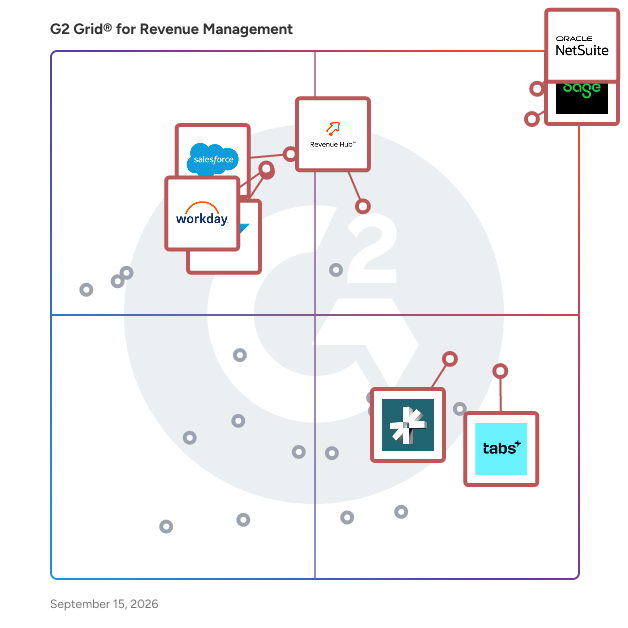
G2 Grid® for Revenue Management Software

G2 Grid® for Revenue Management Software plotting products by satisfaction and market presence

Highlighted products: NetSuite, Sage Intacct, HubSpot Revenue Hub, Agentforce Revenue Management (formerly Salesforce Revenue Cloud), Tabs, SAP Cloud ERP (SAP S/4HANA Cloud), Workday Financial Management, and DualEntry.

Underlying data: [Grid® JSON](https://www.g2.com/categories/revenue-management/grids.json?focus%5B%5D=oracle-netsuite&focus%5B%5D=sage-intacct&focus%5B%5D=hubspot-revenue-hub&focus%5B%5D=agentforce-revenue-management-formerly-salesforce-revenue-cloud&focus%5B%5D=tabs&focus%5B%5D=sap-cloud-erp-sap-s-4hana-cloud&focus%5B%5D=workday-financial-management&focus%5B%5D=dualentry)

NetSuite

NetSuite is the #1 AI cloud ERP, helping organizations streamline operations, improve visibility, and accelerate growth. For more than 28 years, NetSuite has enabled businesses of all sizes—from startups and high-growth companies to global enterprises—to run their entire business on a single, integrated platform. Today, more than 44,000 organizations across a wide range of industries use NetSuite to run their business in over 220 countries and territories. Built natively in the cloud, NetSuite eliminates the need for on-premises infrastructure and complex upgrades, giving organizations continuous access to the latest innovations, security enhancements, and AI capabilities. Originally built to transform financial management, NetSuite has evolved into a comprehensive business management suite that brings together accounting, financial management, inventory and order management, supply chain, procurement, human resources, CRM, professional services automation, and commerce. NetSuite supports organizations across industries including software and technology, manufacturing, wholesale distribution, retail, services, nonprofit, healthcare, advertising and media, and more, with industry-specific capabilities, workflows, dashboards, KPIs, and reports designed to address unique business requirements. With AI embedded throughout the platform, organizations can automate routine tasks, generate insights faster, and make more informed decisions. Ask Oracle, a conversational AI assistant, enables users to interact with NetSuite through natural language by answering questions, analyzing business data, surfacing insights, and providing guidance—all within the security, roles, permissions, and controls already established in NetSuite. Embedded directly into everyday workflows, Ask Oracle helps users make faster, more informed decisions and take action without disrupting their work. Agents and agentic workflows extend these AI capabilities by helping users complete specific tasks and coordinate work across multiple steps. Built-in analytics, AI-powered insights, and customizable reporting provide teams with everything they need to make solid decisions. NetSuite is highly configurable and extensible, allowing businesses to adapt the platform to their unique processes while supporting growth across multiple subsidiaries, currencies, languages, and geographies. By connecting business-critical data and processes in a single cloud platform, NetSuite provides a real-time, unified view of the business, eliminating disconnected systems, manual spreadsheets, and information silos. Organizations gain a single source of truth that improves collaboration across finance, operations, sales, inventory, HR, and customer service while simplifying compliance and reporting. Whether managing rapid growth, expanding internationally, improving financial close processes, optimizing inventory, or gaining deeper operational insights, NetSuite provides the flexibility, automation, and intelligence organizations need to adapt and scale with confidence. By making trusted data readily available and automating core business processes, NetSuite empowers leaders to respond quickly to changing market conditions and make faster, more informed decisions.

Average Rating: 4.1/5.0

Total Reviews: 4,794

How Do G2 Users Rate NetSuite?

  • Has the product been a good partner in doing business?: 7.5/10 (Category avg: 8.9/10)
  • ERP and Accounting: 8.0/10 (Category avg: 8.7/10)
  • Forecasting: 7.1/10 (Category avg: 8.6/10)
  • APIs: 7.3/10 (Category avg: 8.4/10)

Who Is the Company Behind NetSuite?

  • Seller: Oracle
  • Company Website:
  • Year Founded: 1977
  • HQ Location: Austin, TX
  • Twitter: @Oracle
    827,997 Twitter followers
  • LinkedIn® Page: www.linkedin.com
    207,576 employees on LinkedIn®

Who Uses This Product?

  • Who Uses This: Controller, Accounting Manager
  • Top Industries: Computer Software, Accounting
  • Company Size: 57% Medium, 31% Small

What Do G2 Reviewers Say About NetSuite?

AI-generated summary from verified user reviews

Pros
  • Users appreciate the ease of use of NetSuite, finding it smooth and customizable for their needs.
  • Users value the customizability of NetSuite, enabling tailored reporting and improved inventory management across various locations.
  • Users appreciate the robust functionality of NetSuite, enjoying seamless integrations and customizable reporting capabilities.
  • Users value the extensive customization options of NetSuite, significantly enhancing business adaptability and efficiency.
  • Users value the extensive customization options in NetSuite, enhancing their business processes and reporting flexibility.
Cons
  • Users find the learning curve steep, requiring significant time and resources to navigate and customize effectively.
  • Users find the complex reports and interface of NetSuite challenging, leading to time-consuming navigation and customization.
  • Users find missing features in NetSuite, such as integration issues and inadequate project functionalities frustratingly limiting.
  • Users find the limited customization options of NetSuite frustrating, hindering their ability to tailor the system effectively.
  • Users find NetSuite's interface not user-friendly, with complex configurations and a challenging report creation process.

What Are Recent G2 Reviews of NetSuite?

What Are G2 Users Discussing About NetSuite?

Sage Intacct

Sage Intacct is the flexible and scalable financial platform that delivers deep accounting capabilities to thousands of businesses across the world. Sage Intacct delivers an array of core accounting applications such as a general ledger, accounts payable, accounts receivable, cash management, and order management to any accounting department or finance team. It also supports functionality for built-in dashboards, real time reporting, time and expense management, project accounting, revenue management, and global consolidations for multiple entities. The software can be used in a wide variety of industries as a horizontal accounting system, but also delivers specialized features for the following industries: Nonprofit, Software and SaaS, Professional Services, Financial Services, Healthcare, Hospitality, Wholesale Distribution, Construction and Real Estate.

Average Rating: 4.3/5.0

Total Reviews: 4,142

How Do G2 Users Rate Sage Intacct?

  • Has the product been a good partner in doing business?: 8.4/10 (Category avg: 8.9/10)
  • ERP and Accounting: 8.4/10 (Category avg: 8.7/10)
  • Forecasting: 8.1/10 (Category avg: 8.6/10)
  • APIs: 8.1/10 (Category avg: 8.4/10)

Who Is the Company Behind Sage Intacct?

  • Seller: Sage Software
  • Company Website:
  • Year Founded: 1981
  • HQ Location: Newcastle
  • LinkedIn® Page: www.linkedin.com
    15,833 employees on LinkedIn®
  • Ownership: SGE.L

Who Uses This Product?

  • Who Uses This: Controller, Senior Accountant
  • Top Industries: Accounting, Non-Profit Organization Management
  • Company Size: 57% Medium, 26% Small

What Do G2 Reviewers Say About Sage Intacct?

AI-generated summary from verified user reviews

Pros
  • Users find Sage Intacct's interface to be very user friendly, enhanced by numerous helpful tools for assistance.
  • Users find Sage Intacct intuitive and user-friendly, making navigation and finding tools a pleasant experience.
  • Users value Sage Intacct for its comprehensive reporting and dashboards, offering deep insights and enhanced financial transparency.
  • Users find Sage Intacct to be user-friendly, with a logical layout and numerous helpful tools for navigation.
  • Users highlight the efficiency of Sage Intacct, streamlining processes and enhancing real-time data access for better decision-making.
Cons
  • Users find the missing features limiting, feeling the platform lacks essential tools for effective use.
  • Users find the learning curve steep, struggling with setup, ticket help, and complex module interactions.
  • Users find access limitations frustrating, especially with overwhelming information and delayed approvals impacting timely actions.
  • Users find the limited functionality of Sage Intacct challenging, particularly with module integration and search features.
  • Users face a learning difficulty with Sage Intacct's extensive features, requiring time and guidance to navigate effectively.

What Are Recent G2 Reviews of Sage Intacct?

What Are G2 Users Discussing About Sage Intacct?

HubSpot Revenue Hub

Revenue Hub is your team's command center for quotes, billing, and payments. Because revenue context finally lives where your customer data does, your HubSpot AI can work from first prompt to final payment: Breeze Assistant helps reps build quotes from simple chat prompts and surface upsells and renewals automatically, Customer Agent handles billing questions, and Revenue Agent follows up on overdue invoices, so your team can focus on compounding revenue instead of chasing it. The product addresses the challenges of fragmented CPQ workflows by providing AI-powered automation, integrated billing and payments, and a connected buyer–seller experience. It is intended for sales representatives, revenue operations managers, sales leaders, and finance stakeholders who need greater visibility, efficiency, and control over the revenue lifecycle Key features and capabilities include: • One connected quote-to-cash system - Revenue Hub brings CPQ, contracts, billing, and payments into a single workflow instead of a patchwork of point solutions. • Revenue context becomes a competitive advantage - Teams can see what a customer bought, how much they paid, who paid, and what is changing — all inside HubSpot. • Faster revenue, fewer handoffs - Revenue Hub is designed to help businesses quote faster, close faster, automate billing, and reduce the manual re-entry and disconnected workflows that slow revenue down. • More control after the deal closes - Contracts create a central source of revenue information so customers can manage amendments, renewals, and post-close changes without losing the thread. • Bigger platform value, not just bigger feature value - This is the shift from a quoting add-on or payments tool to a true revenue engine that connects selling to finance and powers the broader customer platform.

Average Rating: 4.6/5.0

Total Reviews: 91

How Do G2 Users Rate HubSpot Revenue Hub?

  • Has the product been a good partner in doing business?: 9.6/10 (Category avg: 8.9/10)
  • ERP and Accounting: 8.2/10 (Category avg: 8.7/10)
  • Forecasting: 7.9/10 (Category avg: 8.6/10)
  • APIs: 8.1/10 (Category avg: 8.4/10)

Who Is the Company Behind HubSpot Revenue Hub?

  • Seller: HubSpot
  • Company Website:
  • Year Founded: 2006
  • HQ Location: Cambridge, Massachusetts, United States
  • Twitter: @HubSpot
    784,270 Twitter followers
  • LinkedIn® Page: www.linkedin.com
    17,628 employees on LinkedIn®

Who Uses This Product?

  • Top Industries: Computer Software, Information Technology and Services
  • Company Size: 41% Medium, 38% Small

What Do G2 Reviewers Say About HubSpot Revenue Hub?

AI-generated summary from verified user reviews

Pros
  • Users find Revenue Hub incredibly easy to use, effectively streamlining quoting, payments, and deal management seamlessly.
  • Users value the easy integration capabilities of Revenue Hub, streamlining quoting, payments, and deal management effectively.
  • Users value the efficiency of Revenue Hub, significantly easing payment collection and enhancing record-keeping with streamlined processes.
  • Users praise the easy integrations of Revenue Hub, facilitating seamless setup and enhancing overall business efficiency.
  • Users commend the efficient payment processing and quick implementation capabilities of HubSpot Commerce Hub, enhancing daily operations.
Cons
  • Users find the missing features in Revenue Hub, such as e-signatures and reporting, limiting their overall effectiveness.
  • Users note the limited features of Revenue Hub, wishing for more customization and flexibility in workflows.
  • Users express a need for more customization options in Revenue Hub's quote creation process to enhance flexibility.
  • Users face difficult customization issues with Revenue Hub, hindering advanced billing workflows and e-commerce use cases.
  • Users seek greater customization in quote creation to enhance flexibility for complex pricing and billing workflows.

What Are Recent G2 Reviews of HubSpot Revenue Hub?

Agentforce Revenue Management (formerly Salesforce Revenue Cloud)

Agentforce Revenue Management, formerly Salesforce Revenue Cloud, is Salesforce’s revenue lifecycle management solution for managing pricing, quoting, contracts, billing, and revenue operations on the Salesforce platform. It helps companies automate quote-to-cash workflows, support complex pricing and hybrid revenue models, and keep sales and finance teams aligned from quote through invoice. Agentforce Revenue Management is built for businesses that need more than basic quote or proposal creation. Teams use it to configure products, apply pricing and discount rules, manage approvals, generate accurate quotes, connect contract terms, and support downstream billing and invoicing. It is designed for small business to enterprise companies with complex product catalogs, subscriptions, usage-based pricing, renewals, partner selling, self-service buying, and governed revenue processes. Because it is built on Salesforce, Agentforce Revenue Management connects revenue workflows with customer data, sales processes, reporting, approvals, and automation across the Salesforce platform. Its headless capabilities also allow companies to expose revenue workflows through APIs, agents, and digital channels — so pricing, quoting, approvals, and billing processes can run wherever customers, sellers, and partners work. Agentforce Revenue Management differs from lightweight quoting or proposal tools because it manages the revenue workflow behind the quote. It is designed to govern the full quote-to-cash process, including product configuration, pricing, approvals, contracts, billing alignment, renewals, and revenue operations. The solution is best suited for growing businesses, mid-market companies, and enterprises that sell through multiple sales channels and use more than one pricing model, often called hybrid pricing. Smaller teams with simple pricing or one-off proposals may prefer lightweight quoting or proposal software. Companies with complex pricing, subscriptions, usage-based models, approvals, renewals, multi-channel selling, or billing handoffs are better suited for a revenue lifecycle management platform like Agentforce Revenue Management. FAQ: What is Agentforce Revenue Management? Agentforce Revenue Management, formerly Salesforce Revenue Cloud, is Salesforce’s solution for managing the revenue lifecycle, including pricing, quoting, contracts, billing, and quote-to-cash workflows. Is Agentforce Revenue Management the same as Salesforce CPQ? Agentforce Revenue Management includes CPQ capabilities but goes beyond CPQ. Salesforce CPQ focuses on configuring products, pricing deals, and generating quotes. Agentforce Revenue Management supports a broader revenue lifecycle, including quoting, contracts, orders, billing, invoicing, and revenue operations. Who uses Agentforce Revenue Management? Sales, revenue operations, finance, IT, and operations teams use Agentforce Revenue Management to manage complex pricing, quote approvals, contract terms, billing handoffs, renewals, and revenue workflows. What problems does Agentforce Revenue Management solve? It helps companies reduce manual quote-to-cash work, improve quote accuracy, enforce pricing and approval rules, connect sales and finance processes, and manage complex revenue models such as subscriptions, renewals, usage-based pricing, and multi-channel selling. How is Agentforce Revenue Management different from Proposify, Quoter, or PandaDoc? Proposify, Quoter, and PandaDoc are lighter-weight tools for creating, sending, tracking, or signing quotes and proposals. Agentforce Revenue Management is built for governed revenue execution, including pricing rules, product configuration, approvals, contracts, billing alignment, and quote-to-cash operations.

Average Rating: 4.2/5.0

Total Reviews: 1,416

How Do G2 Users Rate Agentforce Revenue Management (formerly Salesforce Revenue Cloud)?

  • Has the product been a good partner in doing business?: 8.6/10 (Category avg: 8.9/10)
  • ERP and Accounting: 8.4/10 (Category avg: 8.7/10)
  • Forecasting: 8.7/10 (Category avg: 8.6/10)
  • APIs: 8.3/10 (Category avg: 8.4/10)

Who Is the Company Behind Agentforce Revenue Management (formerly Salesforce Revenue Cloud)?

  • Seller: Salesforce
  • Company Website:
  • Year Founded: 1999
  • HQ Location: San Francisco, CA
  • Twitter: @salesforce
    579,511 Twitter followers
  • LinkedIn® Page: www.linkedin.com
    89,711 employees on LinkedIn®

Who Uses This Product?

  • Who Uses This: Account Executive, Salesforce Developer
  • Top Industries: Computer Software, Information Technology and Services
  • Company Size: 45% Medium, 33% Large

What Do G2 Reviewers Say About Agentforce Revenue Management (formerly Salesforce Revenue Cloud)?

AI-generated summary from verified user reviews

Pros
  • Users appreciate the ease of use of Agentforce Revenue Management, streamlining processes and enhancing collaboration effortlessly.
  • Users value the streamlined quote-to-cash process of Agentforce Revenue Management, enhancing collaboration and efficiency across teams.
  • Users value the efficiency of Salesforce Revenue Cloud, which streamlines revenue processes and enhances collaboration across teams.
  • Users value the automation capabilities of Agentforce Revenue Management, simplifying and enhancing their revenue lifecycle processes.
  • Users value the rich features and customization in Agentforce Revenue Management, simplifying product and pricing management.
Cons
  • Users find the complexity of Agentforce Revenue Management frustrating, making straightforward tasks cumbersome and slowing down processes.
  • Users find the complex setup of Agentforce Revenue Management burdensome, hindering agility and requiring specialized knowledge for changes.
  • Users find the learning curve steep due to niche skills required and complex features for new admins.
  • Users find the learning difficulty significant, often struggling with the platform's extensive features and customization options.
  • Users find the steep learning curve of Agentforce Revenue Management challenging, requiring significant time and effort to master.

What Are Recent G2 Reviews of Agentforce Revenue Management (formerly Salesforce Revenue Cloud)?

Tabs

Tabs is the AI-native revenue automation platform built for modern finance teams.Tabs pulls data directly from the signed PDF to automate workflows including billing, collections, payments, revenue recognition, and reporting all in one place. Tabs integrates with your tech stack - including CRMs like Salesforce and HubSpot, ERPs like NetSuite, Quickbooks, and Rillet, and more - to automatically sync all data across your systems, ensuring consistency with your contract as the source of truth. Hundreds of businesses - including Statsig, Cursor, and Anrok - have been able to scale and supercharge their finance teams, closing books 5x faster, reducing DSO by 50% and scaling revenue without scaling headcount.

Average Rating: 4.8/5.0

Total Reviews: 113

How Do G2 Users Rate Tabs?

  • Has the product been a good partner in doing business?: 9.7/10 (Category avg: 8.9/10)
  • ERP and Accounting: 9.4/10 (Category avg: 8.7/10)
  • Forecasting: 8.2/10 (Category avg: 8.6/10)
  • APIs: 8.3/10 (Category avg: 8.4/10)

Who Is the Company Behind Tabs?

  • Seller: Tabs
  • Company Website:
  • HQ Location: New York, New York
  • Twitter: @get_tabs
    24 Twitter followers
  • LinkedIn® Page: www.linkedin.com
    256 employees on LinkedIn®

Who Uses This Product?

  • Who Uses This: Head of Finance
  • Top Industries: Computer Software, Accounting
  • Company Size: 52% Small, 40% Medium

What Do G2 Reviewers Say About Tabs?

AI-generated summary from verified user reviews

Pros
  • Users rave about the exceptional customer support from Tabs, praising their responsiveness and problem-solving capabilities.
  • Users value the automation capabilities of Tabs, significantly easing the QTC process and reducing manual workload.
  • Users value the automation of invoicing with Tabs, significantly reducing manual effort and enhancing overall efficiency.
  • Users value the automation and centralization of invoicing with Tabs, significantly saving time and enhancing accuracy.
  • Users praise the ease of use of Tabs, enabling simple navigation and automation of complex invoicing processes.
Cons
  • Users face invoicing issues in Tabs as it struggles to manage existing QBO invoices, causing confusion.
  • Users note the missing features in Tabs that require reliance on external software for contracts and proposals.
  • Users experience processing delays with contracts, impacting onboarding, but are hopeful for future improvements from the Tabs team.
  • Users face billing issues with Tabs, particularly in ACH tracking and automation for international payments.
  • Users experience integration issues that delay workflows and require reliance on additional software for seamless processes.

What Are Recent G2 Reviews of Tabs?

Workday Financial Management

Workday Financial Management is a native cloud and AI-powered solution that gives Accounting teams a single, trusted foundation to drive greater productivity, deliver superior insights grounded in rich business context, and adapt quickly to changing business needs. Embedded AI and purpose-built finance agents reshape how finance work gets done - streamlining record-to-report, payables, and opportunity-to-cash cycles, surfacing anomalies and insights at the speed of conversation, and strengthening internal controls across global operations. Built on an in-memory architecture and object data model, it unifies transaction processing, multidimensional reporting, consolidation, planning, and compliance in a consistent experience across web and mobile. Key capabilities span Accounting and Finance, Accounting Center, Audit and Internal Controls, Reporting and Analytics, Global Financial Reporting and Consolidation, Financial Planning, Projects, Expenses, Procurement, Inventory, Grants Management, and Project Billing.

Average Rating: 4.2/5.0

Total Reviews: 298

How Do G2 Users Rate Workday Financial Management?

  • Has the product been a good partner in doing business?: 8.3/10 (Category avg: 8.9/10)
  • ERP and Accounting: 8.3/10 (Category avg: 8.7/10)
  • Forecasting: 7.8/10 (Category avg: 8.6/10)
  • APIs: 8.6/10 (Category avg: 8.4/10)

Who Is the Company Behind Workday Financial Management?

  • Seller: Workday
  • Company Website:
  • Year Founded: 2005
  • HQ Location: Pleasanton, CA
  • Twitter: @Workday
    52,273 Twitter followers
  • LinkedIn® Page: www.linkedin.com
    25,204 employees on LinkedIn®

Who Uses This Product?

  • Who Uses This: Accountant
  • Top Industries: Financial Services, Accounting
  • Company Size: 44% Large, 34% Medium

What Do G2 Reviewers Say About Workday Financial Management?

AI-generated summary from verified user reviews

Pros
  • Users enjoy the intuitive interface of Workday Financial Management, simplifying navigation and enhancing data analysis capabilities.
  • Users enjoy the seamless integrations with various applications, enhancing financial data accessibility and analysis capabilities.
  • Users appreciate the user-friendly design of Workday, facilitating easier access to learning and development resources.
  • Users appreciate the intuitive interface of Workday Financial Management, making navigation and data access effortless.
  • Users find the intuitive and easy-to-navigate interface of Workday Financial Management enhances their overall user experience.
Cons
  • Users find Workday Financial Management not user-friendly, requiring extensive training and complicating navigation and reporting processes.
  • Users find that the learning curve is steep, making it challenging for new users to effectively utilize Workday Financial Management.
  • Users often face complexity issues with Workday, especially in navigating and saving document changes effectively.
  • Users find Workday Financial Management not intuitive, struggling with navigation and search functionality complexities and redundancies.
  • Users find the complex processes in Workday difficult, with challenging implementation and slow error responses impacting usability.

What Are Recent G2 Reviews of Workday Financial Management?

What Are G2 Users Discussing About Workday Financial Management?

SAP Cloud ERP (SAP S/4HANA Cloud)

SAP Cloud ERP (S/4HANA Cloud) is a modular, cloud-based enterprise resource planning (ERP) solution that brings embedded AI into core business processes to help organizations of any size improve productivity, efficiency, and scalability. It supports critical business functions including finance, supply chain, human resources, and sales, while providing industry best-practice processes, predictable subscription-based costs, and the flexibility to add capabilities, users, and functionality as business needs evolve. With proven implementation tools and preconfigured processes, SAP Cloud ERP enables organizations to go live quickly and confidently while supporting ongoing growth and innovation. For midsize organizations who want to adopt SAP Cloud ERP the primary offering is SAP GROW, which combines SAP Cloud ERP with preconfigured best practices, implementation services, and adoption resources to help businesses achieve rapid, scalable cloud ERP deployment. For even quicker deployment, there’s SAP GROW Fast, a prepackaged offering delivered by SAP partners.

Average Rating: 4.4/5.0

Total Reviews: 945

How Do G2 Users Rate SAP Cloud ERP (SAP S/4HANA Cloud)?

  • Has the product been a good partner in doing business?: 8.7/10 (Category avg: 8.9/10)
  • ERP and Accounting: 8.8/10 (Category avg: 8.7/10)
  • Forecasting: 8.2/10 (Category avg: 8.6/10)
  • APIs: 8.4/10 (Category avg: 8.4/10)

Who Is the Company Behind SAP Cloud ERP (SAP S/4HANA Cloud)?

  • Seller: SAP
  • Company Website:
  • Year Founded: 1972
  • HQ Location: Walldorf
  • Twitter: @SAP
    297,052 Twitter followers
  • LinkedIn® Page: www.linkedin.com
    149,349 employees on LinkedIn®

Who Uses This Product?

  • Who Uses This: Consultant, Senior Consultant
  • Top Industries: Information Technology and Services, Accounting
  • Company Size: 48% Large, 35% Medium

What Do G2 Reviewers Say About SAP Cloud ERP (SAP S/4HANA Cloud)?

AI-generated summary from verified user reviews

Pros
  • Users appreciate the ease of use of SAP Cloud ERP, making it effective and time-saving for daily tasks.
  • Users appreciate the cloud-based architecture of SAP S/4HANA Cloud for its scalability and reduced IT overhead.
  • Users value the real-time processing and industry-specific functionalities of SAP S/4HANA Cloud for enhanced financial management.
  • Users appreciate the real-time efficiency of SAP S/4HANA Cloud, with instant access to reports and accurate data.
  • Users value the real-time data capabilities of SAP S/4HANA Cloud, enhancing decision-making with instant access to analytics.
Cons
  • Users find the complexity and restrictions of SAP Cloud ERP challenging, leading to costly implementations and training needs.
  • Users find the learning curve steep for SAP Cloud ERP, making initial understanding and training challenging.
  • Users find the learning difficulty significant, as the complex system necessitates extensive training for new users.
  • Users find the complex setup of SAP Cloud ERP challenging, often requiring extensive training and expert assistance.
  • Users find the limited customization of SAP Cloud ERP restrictive, hindering adaptation to unique business processes.

What Are Recent G2 Reviews of SAP Cloud ERP (SAP S/4HANA Cloud)?

What Are G2 Users Discussing About SAP Cloud ERP (SAP S/4HANA Cloud)?

DualEntry

DualEntry is the AI-native ERP that helps finance teams achieve more in less time. With powerful automations, it takes manual work out of everything from everyday accounting, AR/AP, and revenue management to tax handling, financial reporting, and audit prep. DualEntry is built for global, multi-entity, multi-currency operations. It’s designed to scale with business from mid-market to IPO and beyond, adapting to a company’s specific needs – no matter how complex. 𝗕𝘂𝗶𝗹𝘁 𝗯𝘆 𝗮𝗰𝗰𝗼𝘂𝗻𝘁𝗮𝗻𝘁𝘀, 𝗳𝗼𝗿 𝗮𝗰𝗰𝗼𝘂𝗻𝘁𝗮𝗻𝘁𝘀, 𝗗𝘂𝗮𝗹𝗘𝗻𝘁𝗿𝘆 𝗼𝗳𝗳𝗲𝗿𝘀: • Multi-entity consolidation across global subsidiaries • Multi-currency support, covering 180 local currencies in 240 countries, with live FX rates • Automated intercompany eliminations and journal-entry posting • Custom workflows and granular access controls • Role-based, real-time dashboards • Audit-ready financials with SOX, SOC 2, and GDPR compliance • A flexible, complete GL that you can tailor to you with unlimited nestable classifications and custom feeds • Real-time insights and drillable, multi-dimensional reporting across entities • 13,000+ bank connections covering 60+ countries • 200+ free, seamless integrations across CRM, AP, AR, and more Automate your workflows end-to-end with DualEntry, and grow your business without adding to your headcount. Schedule a personalized demo now.

Average Rating: 4.9/5.0

Total Reviews: 124

How Do G2 Users Rate DualEntry?

  • Has the product been a good partner in doing business?: 9.5/10 (Category avg: 8.9/10)
  • ERP and Accounting: 9.6/10 (Category avg: 8.7/10)
  • Forecasting: 9.5/10 (Category avg: 8.6/10)
  • APIs: 9.5/10 (Category avg: 8.4/10)

Who Is the Company Behind DualEntry?

  • Seller: DualEntry
  • Company Website:
  • Year Founded: 2024
  • HQ Location: New York, US
  • Twitter: @dualentry
    765 Twitter followers
  • LinkedIn® Page: www.linkedin.com
    85 employees on LinkedIn®

Who Uses This Product?

  • Who Uses This: Accountant
  • Top Industries: Accounting, Manufacturing
  • Company Size: 49% Medium, 34% Small

What Do G2 Reviewers Say About DualEntry?

AI-generated summary from verified user reviews

Pros
  • Users value the ease of use of DualEntry, benefiting from automated workflows and powerful integrations for efficient tracking.
  • Users admire the intuitive layout and powerful features of DualEntry, enhancing ease of use and efficiency.
  • Users value the efficiency of DualEntry's powerful bulk import and intuitive dashboard for streamlined data management.
  • Users appreciate the seamless integrations in DualEntry, enhancing workflow efficiency and accuracy in financial management.
  • Users appreciate the time-saving automation of DualEntry, allowing teams to focus on strategic decision-making.
Cons
  • Users feel there is confusion due to dependency on the parent company, which could hinder independent operations.
  • Users are disappointed by the absence of a mobile app, limiting access and flexibility for on-the-go use.
  • Users find limited customization in DualEntry, posing challenges for tailored reporting and integration with niche tools.
  • Users find the interface impressive but feel it can be overwhelming due to a lack of guidance for new users.
  • Users find the learning difficulty of DualEntry challenging due to limited guidance for new users during setup.

What Are Recent G2 Reviews of DualEntry?

Chargebee

Chargebee is the billing and monetization platform built for the AI economy. From fast-scaling startups to global enterprises, we help companies capture, optimize, and scale revenue — no matter their GTM strategy or pricing model. Whether you’re experimenting with usage-based pricing, launching AI-powered products, or expanding globally, Chargebee gives you the flexibility and automation to grow with confidence. Chargebee is trusted by businesses of all sizes, including Zapier, Freshworks, DeepL, Condé Nast, and Pret A Manger, and is proud to have been consistently recognized by customers as a Leader in Subscription Management on G2. To learn more about how Chargebee can help unlock and maximize revenue growth, visit Chargebee.com.

Average Rating: 4.4/5.0

Total Reviews: 975

How Do G2 Users Rate Chargebee?

  • Has the product been a good partner in doing business?: 8.6/10 (Category avg: 8.9/10)
  • ERP and Accounting: 7.9/10 (Category avg: 8.7/10)
  • Forecasting: 7.9/10 (Category avg: 8.6/10)
  • APIs: 8.4/10 (Category avg: 8.4/10)

Who Is the Company Behind Chargebee?

  • Seller: Chargebee
  • Company Website:
  • Year Founded: 2011
  • HQ Location: North Bethesda, MD
  • Twitter: @chargebee
    7,333 Twitter followers
  • LinkedIn® Page: www.linkedin.com
    1,303 employees on LinkedIn®

Who Uses This Product?

  • Who Uses This: CEO, Founder
  • Top Industries: Computer Software, Information Technology and Services
  • Company Size: 72% Small, 23% Medium

What Do G2 Reviewers Say About Chargebee?

AI-generated summary from verified user reviews

Pros
  • Users appreciate the ease of use of Chargebee, highlighting its intuitive interface and efficient payment management.
  • Users appreciate the comprehensive subscription management features of Chargebee, enhancing efficiency and productivity in their operations.
  • Users praise the responsive support team at Chargebee, providing quick solutions and enhancing user experience.
  • Users value the user-friendly billing management of Chargebee, which streamlines payment processes and enhances productivity.
  • Users love the seamless integrations with payment gateways and smooth setup, enhancing the overall billing experience.
Cons
  • Users report access limitations due to sudden changes and unresolved bugs that disrupt their workflow and integration.
  • Users experience poor customer support from Chargebee, with slow responses and unresolved issues impacting their workflow.
  • Users report limited customization options in Chargebee, expressing the need for more flexibility in functionality.
  • Users find the missing features in Chargebee frustrating, leading to confusion and inefficiencies in their workflow.
  • Users find access restrictions frustrating, particularly when adjusting existing subscriptions or enabling certain features.

What Are Recent G2 Reviews of Chargebee?

What Are G2 Users Discussing About Chargebee?

Rillet

Rillet is the AI-native ERP built for the modern finance team. Automate manual accounting work, close faster, and report in real time — all from one platform. Rillet supports multi-entity, multi-currency, and multi-geography operations, with native integrations to Salesforce, Stripe, Ramp, Brex, Rippling, and more.

Average Rating: 5.0/5.0

Total Reviews: 83

How Do G2 Users Rate Rillet?

  • Has the product been a good partner in doing business?: 10.0/10 (Category avg: 8.9/10)
  • ERP and Accounting: 9.2/10 (Category avg: 8.7/10)
  • Forecasting: 8.9/10 (Category avg: 8.6/10)
  • APIs: 10.0/10 (Category avg: 8.4/10)

Who Is the Company Behind Rillet?

  • Seller: Rillet
  • Year Founded: 2021
  • HQ Location: New York, NY
  • Twitter: @RilletHQ
    817 Twitter followers
  • LinkedIn® Page: www.linkedin.com
    209 employees on LinkedIn®

Who Uses This Product?

  • Who Uses This: CEO, Accounting Manager
  • Top Industries: Computer Software, Accounting
  • Company Size: 52% Small, 48% Medium

What Do G2 Reviewers Say About Rillet?

AI-generated summary from verified user reviews

Pros
  • Users value the automation efficiency of Rillet, significantly reducing time spent on complex accounting tasks and reconciliations.
  • Users find Rillet's platform extremely easy to use, streamlining finance functions and enhancing the overall experience.
  • Users commend Rillet for its exceptional customer support, highlighting the team's responsiveness and commitment to success.
  • Users value the detailed reporting features of Rillet, enhancing efficiency in revenue analysis and insights.
  • Users value the time-saving automation of Rillet, significantly enhancing efficiency in accounting tasks and operations.
Cons
  • Users feel that missing features hinder functionality but are optimistic about upcoming updates and improvements.
  • Users find the integration issues with Rillet frustrating, as key connections and automation are lacking.
  • Users find the data management in Rillet lacking, particularly in integrations and export functionalities.
  • Users find export issues with Rillet, particularly when integrating drill-down views into Excel, complicating their workflow.
  • Users find the external dependency on integrations like Ramp limiting, impacting their workflow and efficiency.

What Are Recent G2 Reviews of Rillet?

DealHub AI

DealHub AI is the Agentic Quote-to-Revenue (Q2R) platform designed for the AI era. We empower high-growth SaaS and forward-thinking enterprises to fully consolidate, automate, and accelerate their entire revenue lifecycle, from initial quote generation through final cash collection and revenue recognition. DealHub AI gives enterprises ultimate flexibility, enabling the rapid design, launch, and scale of any modern monetization model, such as Sales-Led Growth (SLG), Product-Led Growth (PLG), Self-Serve, Subscription, Usage-Based, and AI Consumption models. The unified platform replaces fragmented revenue tools, integrating critical capabilities into one orchestrated engine, including AI-Powered CPQ (Configure, Price, Quote), CLM (Contract Lifecycle Management), Subscription Management & Billing, Revenue Recognition, Digital DealRoom, and Composable API-first Headless Quoting. Enterprises choose DealHub AI to drive revenue at AI scale, leveraging real-time revenue visibility and predictability across all revenue streams via live ARR, usage, churn, and forecast dashboards. DealHub AI offers seamless, native integration with all leading CRMs, including Salesforce, Microsoft Dynamics, and HubSpot, ensuring customers achieve faster time-to-value. DealHub AI is trusted by global revenue leaders, including Intuit, HP, Gong, and Braze.

Average Rating: 4.7/5.0

Total Reviews: 851

How Do G2 Users Rate DealHub AI?

  • Has the product been a good partner in doing business?: 9.6/10 (Category avg: 8.9/10)
  • ERP and Accounting: 9.4/10 (Category avg: 8.7/10)
  • Forecasting: 9.4/10 (Category avg: 8.6/10)
  • APIs: 9.5/10 (Category avg: 8.4/10)

Who Is the Company Behind DealHub AI?

  • Seller: DealHub.io
  • Company Website:
  • Year Founded: 2014
  • HQ Location: Austin, Texas
  • Twitter: @DealHubIO
    3,887 Twitter followers
  • LinkedIn® Page: www.linkedin.com
    330 employees on LinkedIn®

Who Uses This Product?

  • Who Uses This: Sales Operations Manager, Account Executive
  • Top Industries: Computer Software, Information Technology and Services
  • Company Size: 65% Medium, 23% Small

What Do G2 Reviewers Say About DealHub AI?

AI-generated summary from verified user reviews

Pros
  • Users highly value the responsive support from DealHub AI, praising their thorough assistance and user-friendly tutorials.
  • Users find DealHub AI to have an intuitive interface and quick onboarding, enhancing their sales processes effortlessly.
  • Users value the time-saving features of DealHub AI, enhancing productivity with its intuitive interface and streamlined processes.
  • Users benefit from the efficiency of DealHub AI, significantly improving their sales cycle and operational processes.
  • Users commend the seamless integrations of DealHub AI, enhancing productivity and streamlining information processes effectively.
Cons
  • Users find the learning curve challenging, making navigation and functionality feel cumbersome until fully acclimated.
  • Users find that limited customization in DealHub AI requires workaround solutions and complicates their rollout processes.
  • Users find a steep learning curve with DealHub AI, making it challenging for new users to master the platform.
  • Users struggle with missing features in DealHub AI, leading to cumbersome workarounds and limitations in functionality.
  • Users face integration issues with CRM, making the process challenging and time-consuming despite team support.

What Are Recent G2 Reviews of DealHub AI?

What Are G2 Users Discussing About DealHub AI?

Campfire

Campfire is the AI-native ERP for high-growth companies. We give modern, mid-market and enterprise accounting teams superpowers by automating the work that nobody wants to do: manual transaction categorization, bank reconciliation, revenue recognition, variance analysis. Our customers close 5x faster and save up to hundreds of thousands annually. We're privileged to work with some of the fastest growing AI companies in the world including Replit, Decagon, and PostHog, as well as services providers, health tech, and aerospace companies. Accounting Intelligence automates the manual work that buries your team. Our proprietary AI model was trained specifically on accounting data, auto categorizing transactions, matching payments to invoices, and reconciling bank accounts automatically. You review and approve instead of doing everything from scratch. Ember AI is your built-in analyst. Ask questions in plain language and get answers with source data in 30 seconds. Ember drafts flux variance commentary, analyzes spending anomalies, and builds custom reports on demand. Revenue Automation handles complex billing recognition for modern SaaS companies. Subscription, usage-based, tiered, platform fees, contract modifications: automated schedules and ASC 606 compliance out of the box. Core Accounting delivers multi-entity consolidation, continuous close, and real-time financial statements without downloading to spreadsheets or managing separate instances per entity. Custom Reporting lets you build reports in seconds with drill-down to any transaction. Executive dashboards update continuously, replacing month-old spreadsheets with real-time visibility. Campfire is SOC 1 and 2 certified with granular permissioning and full audit trails, supporting companies from Series B through IPO.

Average Rating: 4.7/5.0

Total Reviews: 43

How Do G2 Users Rate Campfire?

  • Has the product been a good partner in doing business?: 9.7/10 (Category avg: 8.9/10)
  • ERP and Accounting: 9.7/10 (Category avg: 8.7/10)
  • Forecasting: 9.6/10 (Category avg: 8.6/10)
  • APIs: 9.5/10 (Category avg: 8.4/10)

Who Is the Company Behind Campfire?

  • Seller: Campfire
  • Company Website:
  • Year Founded: 2023
  • HQ Location: San Francisco, CA
  • Twitter: @Meet_campfire
    598 Twitter followers
  • LinkedIn® Page: www.linkedin.com
    173 employees on LinkedIn®

Who Uses This Product?

  • Who Uses This: Controller
  • Top Industries: Computer Software, Information Technology and Services
  • Company Size: 56% Medium, 44% Small

What Do G2 Reviewers Say About Campfire?

AI-generated summary from verified user reviews

Pros
  • Users value the broad financial reporting visibility provided by Campfire, enhancing efficiency and transparency in accounting.
  • Users praise the intuitive design of Campfire, making it easy and enjoyable to use and implement.
  • Users praise the implementation ease of Campfire, highlighting intuitive design and seamless onboarding with exceptional support.
  • Users highlight the intuitive design and exceptional support of Campfire, making the transition and usage seamless and enjoyable.
  • Users praise Campfire for its efficiency focus, making accounting fast and intuitive while reducing headaches significantly.
Cons
  • Users find the learning curve challenging when adapting to Campfire's new accounting system despite its user-friendly nature.
  • Users experience a learning difficulty transitioning from previous systems, though the interface is considered user-friendly.

What Are Recent G2 Reviews of Campfire?

Recurly

Recurly is a subscription management and recurring billing platform designed to assist businesses in optimizing revenue, minimizing churn, and expanding their operations on a global scale. This versatile solution caters to a diverse range of industries, including streaming services, e-commerce, publishing, software as a service (SaaS) and many more. Renowned brands such as Twitch, Paramount+, and Nuuly, leverage Recurly to seamlessly launch, acquire, and manage subscriptions across international markets. The platform offers a comprehensive suite of products that address the multifaceted needs of subscription-based businesses. Key features include automated subscription billing and plan management, global payment orchestration, subscriber lifecycle and churn management tools, as well as Shopify subscription management. Additionally, Recurly provides automated revenue recognition and compliance solutions, adhering to standards such as ASC 606 and IFRS 15. These functionalities are essential for businesses navigating the complexities of subscription models in today's competitive landscape. Subscription businesses often encounter a variety of challenges, including failed payments, escalating acquisition costs, intricate pricing structures, and compliance requirements across different jurisdictions. Recurly addresses these issues by offering no-code tools that enable users to create subscriber journeys quickly and efficiently. With over 15 years of industry experience, Recurly empowers businesses to stop churn through predictive cancellation flows, optimize checkout processes, and automate compliance tasks, allowing them to focus on growth without the burden of operational complexities. The platform's capabilities extend to real-time reporting and analytics, providing businesses with valuable insights into their subscriber base and payment performance. With over 100 million subscribers and more than $12 billion in payment volume processed annually, Recurly is equipped to handle high-demand scenarios and facilitate the launch of new subscriptions across borders. Its extensive integrations with tools such as NetSuite, Salesforce, and Avalara, along with support for over 30 payment gateways and 140 currencies, further enhance its appeal to businesses looking to scale efficiently. Recurly also prioritizes the subscriber experience by offering features like pricing segmentation, intelligent retries to combat involuntary churn, and customized dunning campaigns tailored to specific industries. By automating these processes, businesses can maintain a strong connection with their subscribers while minimizing friction in the billing experience. With Recurly, organizations can confidently navigate the complexities of subscription management and position themselves for sustained growth in an increasingly competitive market.

Average Rating: 4.1/5.0

Total Reviews: 222

How Do G2 Users Rate Recurly?

  • Has the product been a good partner in doing business?: 8.0/10 (Category avg: 8.9/10)
  • ERP and Accounting: 7.5/10 (Category avg: 8.7/10)
  • Forecasting: 7.5/10 (Category avg: 8.6/10)
  • APIs: 7.8/10 (Category avg: 8.4/10)

Who Is the Company Behind Recurly?

  • Seller: Recurly
  • Company Website:
  • Year Founded: 2009
  • HQ Location: San Francisco, CA
  • Twitter: @recurly
    3,510 Twitter followers
  • LinkedIn® Page: www.linkedin.com
    1,091 employees on LinkedIn®

Who Uses This Product?

  • Who Uses This: CEO, Account Manager
  • Top Industries: Computer Software, Information Technology and Services
  • Company Size: 53% Small, 41% Medium

What Do G2 Reviewers Say About Recurly?

AI-generated summary from verified user reviews

Pros
  • Users appreciate the quick and helpful customer support of Recurly, enhancing their experience with prompt resolutions.
  • Users appreciate the seamless subscription management of Recurly, benefiting from efficient refunds and robust security features.
  • Users find Recurly to be incredibly easy to use, appreciating its intuitive design and reliable performance.
  • Users appreciate the efficient billing management of Recurly, which simplifies refunds, cancellations, and invoicing with ease.
Cons
  • Users find poor reporting in Recurly, facing challenges with acquisition flow and limited options for analytics.
  • Users face access limitations with Recurly, such as frequent logouts and challenges in handling price localization.
  • Users express frustration with limited customization options, leading to dependency on technical personnel for optimal use.
  • Users face significant billing issues with Recurly, struggling with complex configurations and inadequate customer support.
  • Users experience limited functionality with Recurly, particularly in issuing credits and requiring technical knowledge for operation.

What Are Recent G2 Reviews of Recurly?

What Are G2 Users Discussing About Recurly?

Vayu

Vayu is the flexible revenue system where AI agents meter usage, run billing, recognize revenue, and drive collections. Allowing you to capture more revenue from any model you build. Vayu gives finance teams one connected system to manage the full contract-to-cash process — from contract extraction, pricing logic, and usage metering to billing execution, revenue recognition, reporting, collections, and reconciliation. The platform helps finance teams turn contracts, usage data, pricing rules, billing logic, and revenue activity into a live revenue system that keeps revenue accurate, explainable, and ready to act on as it forms. With Vayu, teams can manage complex customer-specific agreements, automate billing outcomes, reduce manual review, prevent revenue leakage, and understand revenue movement in real time without relying on engineering for every change. Vayu also includes a real-time insights agent that allows teams to ask questions across contracts, usage, billing, revenue recognition, collections, and SaaS performance data. Finance teams can quickly understand what changed, why a number moved, which customers drove ARR or MRR movement, what revenue is still deferred, and which items need attention before close. For AI-enabled finance operations, Vayu can also connect with external agents through MCP, making governed revenue data, context, and workflows available inside the AI systems teams already use. Vayu is designed for modern finance teams managing usage-based pricing, hybrid subscriptions, outcome-based pricing, contract-specific billing logic, mid-cycle expansions, multi-entity billing, and dynamic revenue recognition requirements.

Average Rating: 4.7/5.0

Total Reviews: 16

How Do G2 Users Rate Vayu?

  • Has the product been a good partner in doing business?: 10.0/10 (Category avg: 8.9/10)
  • ERP and Accounting: 10.0/10 (Category avg: 8.7/10)
  • Forecasting: 9.8/10 (Category avg: 8.6/10)
  • APIs: 10.0/10 (Category avg: 8.4/10)

Who Is the Company Behind Vayu?

  • Seller: Vayu
  • Company Website:
  • HQ Location: New York, NY, US
  • LinkedIn® Page: www.linkedin.com
    40 employees on LinkedIn®

Who Uses This Product?

  • Top Industries: Computer Software
  • Company Size: 69% Medium, 31% Small

What Do G2 Reviewers Say About Vayu?

AI-generated summary from verified user reviews

Pros
  • Users highlight Vayu's independence and adaptability, enabling rapid changes in pricing and revenue operations without engineering support.
  • Users value the flexibility of Vayu, enabling independent pricing management and real-time adjustments without engineering reliance.
  • Users value the responsive customer support of Vayu, ensuring quick solutions and personalized assistance for billing challenges.
  • Users value the full control over pricing and revenue automation that Vayu offers, enhancing independence and agility.
  • Users love the easy integrations with Stripe and NetSuite, ensuring a seamless contract-to-cash flow for finance teams.
Cons
  • Users experience a notable learning curve initially due to the system's configurability and workflow adaptation.
  • Users find the difficult setup of Vayu demanding more training than anticipated, but rewarding post-onboarding.
  • Users face a steep learning curve during initial setup, requiring more training than anticipated before realizing the benefits.
  • Users report that a single update can lead to unexpected issues that may be discovered later, causing frustration.

What Are Recent G2 Reviews of Vayu?

Accounting Seed

Accounting Seed is cloud-based accounting software built 100% natively on Salesforce, helping finance teams manage accounting, billing, and reporting without moving data between Salesforce and a separate accounting platform. Operating entirely within Salesforce's Force.com environment, Accounting Seed connects the complete lead-to-ledger process—from initial opportunity and quote management through invoicing, payment collection, project accounting, and financial statement generation—all within a single platform that eliminates the need for third-party connectors or overnight data syncs. Accounting Seed serves small to mid-sized and growing companies on the Salesforce platform across industries including IT services, financial services, manufacturing, retail, and nonprofit organizations. The solution is designed for businesses outgrowing entry-level accounting systems like QuickBooks or replacing disconnected legacy systems. Organizations gain unified visibility across sales, operations, and finance without switching between applications or reconciling data across multiple systems. Core capabilities include general ledger management, accounts payable and receivable with automated workflows, cash management, bank reconciliation, project accounting with cost tracking, multi-entity consolidation, and customizable financial reporting. The platform supports multi-currency transactions, revenue recognition compliance, audit trails, and configurable approval workflows. Users can create custom financial statements, interactive dashboards, and reports that combine CRM data with accounting metrics, enabling profitability analysis by customer, product line, or project. Accounting Seed includes built-in AI accounting capabilities that help finance teams automate repetitive work across accounts receivable, accounts payable, general ledger management, financial reporting, and cash flow management. Purpose-built AI agents support collections, bill payments, and general ledger workflows with capabilities including payment predictions, duplicate payment detection, transaction queries, and financial research. Accounting Seed's native Salesforce architecture provides operational advantages for growing businesses. Finance teams work within the same platform as sales and operations, eliminating data entry duplication between systems. The solution inherits Salesforce's security model and infrastructure scalability. With over 60,000 active users globally and a 4.8 out of 5 star rating based on 400+ reviews on the Salesforce AgentExchange, Accounting Seed has been recognized as an Inc. 5000 fastest-growing company for six consecutive years (2020-2025).

Average Rating: 4.2/5.0

Total Reviews: 155

How Do G2 Users Rate Accounting Seed?

  • Has the product been a good partner in doing business?: 8.4/10 (Category avg: 8.9/10)
  • ERP and Accounting: 8.3/10 (Category avg: 8.7/10)
  • Forecasting: 8.3/10 (Category avg: 8.6/10)
  • APIs: 8.7/10 (Category avg: 8.4/10)

Who Is the Company Behind Accounting Seed?

  • Seller: Accounting Seed
  • Company Website:
  • Year Founded: 2008
  • HQ Location: Columbia, MD
  • Twitter: @AccountingSeed
    3,114 Twitter followers
  • LinkedIn® Page: www.linkedin.com
    120 employees on LinkedIn®

Who Uses This Product?

  • Who Uses This: CFO
  • Top Industries: Information Technology and Services, Accounting
  • Company Size: 57% Small, 44% Medium

What Do G2 Reviewers Say About Accounting Seed?

AI-generated summary from verified user reviews

Pros
  • Users appreciate the seamless integration with Salesforce, enhancing efficiency and unifying financial and CRM data management.
  • Users value the intuitive dashboard and seamless Salesforce integration of Accounting Seed, enhancing productivity and reporting efficiency.
  • Users appreciate the seamless integration with Salesforce, enhancing efficiency and simplifying accounting processes across operations.
  • Users value the automation capabilities of Accounting Seed, significantly reducing tedious manual accounting tasks.
  • Users appreciate the ease of use of Accounting Seed, benefiting from its simple interface and seamless Salesforce integration.
Cons
  • Users experience a challenging learning curve with Accounting Seed, requiring significant time and effort to master its features.
  • Users find reporting complicated in Accounting Seed, noting that it requires additional time and technical knowledge to configure.
  • Users find the learning difficulty of Accounting Seed can complicate initial setup and mastering its features.
  • Users find accounting limitations frustrating, noting issues with billing adjustments, reporting, and complex initial setup.
  • Users find limited customization options in Accounting Seed, often needing custom solutions for specific needs and functions.

What Are Recent G2 Reviews of Accounting Seed?

What Are G2 Users Discussing About Accounting Seed?

Nathan Calabrese
NC
Researched and written by Nathan Calabrese
Updated June 24, 2026

Learn More About Revenue Management Software

What is Revenue Management Software?

Companies use revenue management software (RMS) to match their sales with customer payments and reduce revenue leakage. Accountants leverage these tools to recognize and allocate revenue to multiple business entities. Managers from departments such as sales, marketing, and operations use revenue management software to monitor the performance of products and services sold by the company and to optimize their offerings. Using these tools, revenue data can be evaluated to identify which customers or contracts are most profitable for the company.

What are the Common Features of Revenue Management Software?

The following are some core features within revenue management software that can help users manage revenue and stay compliant:

Revenue recognition: Revenue recognition is a GAAP (generally accepted accounting principle) that determines how and when revenue is to be recognized. This revenue management software feature helps save time by automatically logging customer or sales info into the system and providing accurate calculations quickly, eliminating human error. Usually, revenue can’t be recognized and accounted for until specific criteria, such as a price being determined, collection of payment, and delivery of goods or services, have been met. Once these criteria have been fulfilled, the dollar amount is measurable to a company. The revenue recognition standard, ASC 606, helps maintain a uniform framework for recognizing revenue from customers.

Reporting: Reporting features in revenue management software include revenue from sales, product/customer profitability, pricing details for individual or groups of products and services, as well as analyzing the performance of special offers, packages, and incentives.

Customer management: This feature allows users to create, approve, and track customers across the lifecycle of every contract. Capturing every contractual change creates greater visibility into a customer's behavior, which can help lower future risks of doing business with those customers.

ASC 606/IFRS 15 compliance: ASC 606/IFRS 15 provides a framework for businesses to recognize revenue more consistently. It affects all businesses that enter into contracts with customers to transfer goods or services—public, private and non-profit organizations. Revenue management software can help with these compliances by determining the transaction price, allocating the transaction price, and recognizing revenue when the company performs their contractual obligations, among others.

Forecasting capabilities: When using revenue data from multiple sources, this feature allows companies to forecast future revenue, allowing teams to make more informed decisions for the future. Forecasting also gives insight into the financial impact of changing business models, pricing strategies, and customer contracts.

Integrations: Revenue management software is sometimes delivered as a standalone product, but others can be integrated into accounting software and ERP systems. When used by sales and marketing managers, revenue management must also integrate with CRM software.

What are the Benefits of Revenue Management Software?

Revenue management software has several benefits that help organizations reduce lost revenue and stay compliant.

Minimize revenue leakage: Revenue leakage is a preventable loss of revenue from a company, which can be minimized by eliminating manual data entry, accurately tracking invoices, and attributing the correct costs to the jobs performed, to name a few. Revenue management software can help an organization better manage these tasks, minimizing revenue leakage.

Eliminate manual processes: As mentioned above, manual processes can lead to revenue leakage, human error, and wasted time. Several actions in the revenue management process can be partially or fully automated to save time, reduce human interaction, and minimize the possibility of avoidable errors. Some of these processes are approving invoices or timesheets in real time, flagging invalid data, and tracking invoices.

Stay compliant: The two most prominent frameworks for businesses to manage revenue more consistently are ASC 606 and IFRS 15, which affect all businesses that enter into contracts with customers to transfer goods or services. The higher the volume of contracts and transactions, the more challenging it is for companies to comply with these revenue recognition guidelines. Revenue management software contains tools to help determine the correct contract price, while allocating the price to the correct service/good delivered at the time of completion. 

Who Uses Revenue Management Software?

The following roles will often use revenue management software:

Accountants: Accountants use revenue management tools to recognize and allocate revenue to multiple business entities, track all revenue streams, remain compliant, and verify that payments are received as expected.

Managers: Managers from departments such as sales, marketing, and operations use revenue management software to monitor the performance of products and services sold by the company and to optimize their offerings for the greatest customer value and profitability. This software can provide important insights into which products and services are performing well.

Challenges with Revenue Management Software

Revenue management solutions can come with their own set of challenges. 

Complex sales transactions: The complexity and volume of sales transactions can add their own set of challenges. The most basic of contracts can become challenging if there are hundreds of contracts to manage, while e-commerce transactions can easily be in the thousands every day. A revenue management system must be capable of keeping up with large volumes of contracts and transactions.

Inconsistent data: Tracking and managing revenue requires a variety of inputs. Examples of these inputs include billing overages, pricing, customer support fees, discounts, incentives, and usage charges. To provide the system with accurate data, there needs to be a lot of inter-departmental coordination and communication to accurately support the revenue management process.

How to Buy Revenue Management Software

Requirements Gathering (RFI/RFP) for Revenue Management Software

When selecting revenue management software, it is essential to first look at how the business operates and then familiarize oneself with the different types of software available. There are a variety of options when it comes to revenue management software products, including those designed for the business needs of small and medium-sized companies. Some things to consider include the ability to automate complicated revenue calculations, handle different types of product contracts, and monitor revenue per customer, contract, or project.

Compare Revenue Management Software Products

Create a long list

Depending on the industry, the buyer might want to first create a long list of software products designed to help businesses in the particular industry. For example, there are platforms specifically built for businesses in retail, manufacturers, restaurants, hotels, etc.

Create a short list

After reviewing and researching the software on the long list, the buyer can widdle down this list based on the budget. Revenue management software is available to suit all budgets, and some general applications may be downloaded free or bought off the shelf at a lower price.

Buyers must keep in mind, however, that the more specialized a software is, the more expensive it gets. This is the case because the user base for specialized software is usually relatively small. If the company wants something specific to their industry or customized for the business, they should be prepared to pay a premium.

Conduct demos

As a rule of thumb, companies should make sure to demo all of the products that end up on their short list. During demos, buyers should ask specific questions related to the functionalities they care most about. For example, one might ask to be walked through any features for revenue recognition and allocation, forecasting project cost and revenue, and analyzing the performance of special offers, packages, and incentives.

Selection of Revenue Management Software

Choose a selection team

The accountants or managers from departments such as sales, marketing, and operations who will be using this software must be involved in the selection process. Every business is different, and the accountants, or other frequent users, are most likely in the best position to offer an educated opinion about the best choice for the business's particular needs. The accountant may even be able to help the company install and set up the software of choice.

After choosing a software, buyers must remember that they don’t have to be stuck with this selection forever; most platforms allow for add-ons or modifications. However, this decision shouldn’t be made lightly because no matter what software is chosen, it will be a big time and money commitment. To see ROI, buyers can’t change their minds a few months later and switch software again.

Negotiation

Negotiating a software contract is vital to minimize risk, whether in terms of performance protection, security protection, or simply making sure that both parties are in complete agreement with what to expect from the other. If the business has the cash flow, they could ask for a discount in return for an annual upfront payment, and many software providers are happy to make that deal. Other times, a software provider may offer unlimited usage if the buyer pays upfront instead of paying a monthly or quarterly package price.

Buyers should also determine if they need help implementing the software or integrating it with another system. Usually, a software provider's first offer will include some implementation services in a given timeframe. Buyers can ask for these services to be removed if they can manage it themselves or if a third party can do it for cheaper.

They also need to decide for how long they will need this software. If the company will use the software for years, the buyer can negotiate longer terms which sometimes results in more favorable pricing.

Final decision

The final decision should be based on all the information gathered previously. Businesses should try to prioritize needs and select the solution that meets most, if not all, of their requirements. Companies must remember that there isn't a perfect software, but there is one that is best for their business. If possible, buyers should try to conduct a pilot program with a smaller sample size of users to gauge how well the software is received. If the platform gets high marks, they can buy with more confidence. If the tool is found to be inefficient or not performing as expected, it might be time to test another software.