# Best Document Creation Software

## How Many Document Creation Software Products Does G2 Track?

**Total Products under this Category:** 305

### Category Stats (Aug 2026)

- **Average Rating:** 4.37/5 The average rating of products in this category, based on all submitted ratings
- **Top Trending Product:** KITABOO (+3.93%) - Among all products in this category, KITABOO recorded the largest rating increase compared to last month

_Last updated: August 04, 2026_

## How Does G2 Rank Document Creation Software Products?

**Why You Can Trust G2's Software Rankings:**

- 30 Analysts and Data Experts
- 156,100+ Authentic Reviews
- 305+ Products
- Unbiased Rankings

G2's software rankings are built on verified user reviews, rigorous moderation, and a consistent research methodology maintained by a team of analysts and data experts. Each product is measured using the same transparent criteria, with no paid placement or vendor influence. While reviews reflect real user experiences, which can be subjective, they offer valuable insight into how software performs in the hands of professionals. Together, these inputs power the G2 Score, a standardized way to compare tools within every category.

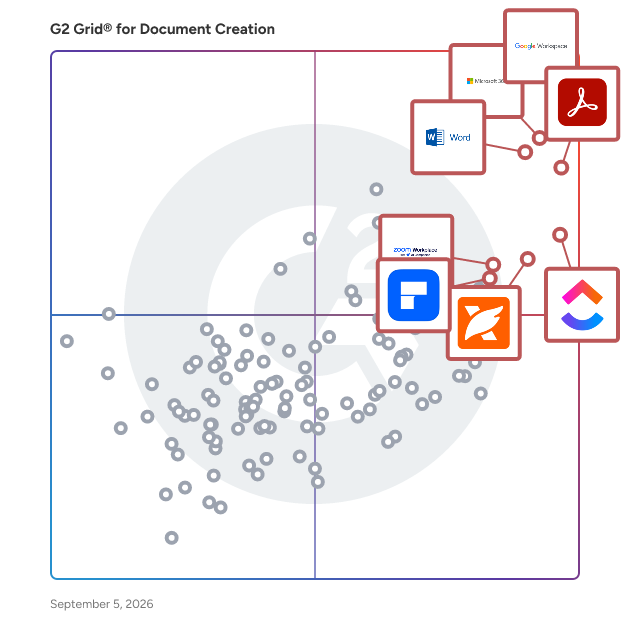
## G2 Grid® for Document Creation Software
 ![G2 Grid® for Document Creation Software plotting products by satisfaction and market presence](https://www.g2.com/categories/document-creation/grids.png?focus%5B%5D=1434&focus%5B%5D=663&focus%5B%5D=1531&focus%5B%5D=4363&focus%5B%5D=25675&focus%5B%5D=10856&focus%5B%5D=7372&focus%5B%5D=16921)

Highlighted products: Google Workspace, Microsoft 365, Adobe Acrobat, Microsoft Word, ClickUp, Foxit PDF Editor, Zoom Workplace, and Wondershare PDFelement.

Underlying data: [Grid® JSON](https://www.g2.com/categories/document-creation/grids.json?focus%5B%5D=google-workspace&focus%5B%5D=microsoft365&focus%5B%5D=adobe-acrobat&focus%5B%5D=microsoft-word&focus%5B%5D=clickup&focus%5B%5D=foxit-pdf-editor&focus%5B%5D=zoom-workplace&focus%5B%5D=wondershare-wondershare-pdfelement)

**Sponsored**

### Mitratech HotDocs

Mitratech HotDocs is document automation software trusted by thousands of law firms, enterprise teams, and government agencies to eliminate manual drafting at scale. Used across legal, financial services, insurance, and corporate teams, it handling everything from contracts and compliance documents to client-facing forms. HotDocs turns your most complex, high-volume documents into intelligent templates that generate accurate, consistent output every time. Instead of copy-paste drafting and manual edits, teams answer a guided interview and HotDocs does the rest: applying rules-based logic to produce compliant, error-free documents across every office, jurisdiction, and use case. Key features and capabilities include: - Rules-based document templates — convert standard documents into intelligent templates with conditional logic that automatically adapts content based on inputs, matter type, or jurisdiction - Guided interviews and dynamic questionnaires — structured data collection ensures the right information is captured upfront, reducing back-and-forth and improving output quality - High-volume and complex document support — purpose-built for organizations generating large quantities of intricate documents where manual drafting creates risk and inefficiency - Reusable data across documents and workflows — enter data once and populate it across multiple documents and templates, reducing duplication and improving consistency - Integration with Mitratech platform — native integrations with TAP, TeamConnect, and CaseCloud™ support connected document generation within broader legal and operational workflows Common use cases include: - Contract drafting and standard agreement generation - Regulated document production in financial services, insurance, and government - Legal form and pleading assembly - High-volume client-facing document generation - Compliance document creation across jurisdictions HotDocs is designed for legal, compliance, operations, and business teams in mid-size to enterprise organizations that produce high volumes of documents where accuracy, consistency, and compliance are non-negotiable. It is particularly well-suited for organizations looking to reduce the time and cost of manual document drafting, standardize document output across distributed teams, and scale document production without proportionally increasing headcount or outside counsel spend. By transforming static documents into intelligent, reusable templates, Mitratech HotDocs helps organizations reduce drafting risk, accelerate document turnaround, and maintain compliance across even their most complex and high-volume document workflows.

[Visit website](https://www.g2.com/external_clickthroughs/record?secure%5Bad_program%5D=ppc&secure%5Bad_slot%5D=category_product_list_llm&secure%5Bcategory_id%5D=237&secure%5Bchosen_at%5D=2026-08-09T21%3A27%3A11Z&secure%5Bdisplayable_resource_id%5D=237&secure%5Bdisplayable_resource_type%5D=Category&secure%5Bmedium%5D=sponsored&secure%5Bplacement_reason%5D=page_category&secure%5Bplacement_resource_ids%5D%5B%5D=237&secure%5Bprioritized%5D=false&secure%5Bproduct_id%5D=65464&secure%5Bresource_id%5D=237&secure%5Bresource_type%5D=Category&secure%5Bsource_type%5D=category_page&secure%5Bsource_url%5D=https%3A%2F%2Fwww.g2.com%2Fcategories%2Fdocument-creation&secure%5Btoken%5D=af9a37c168cc2a6edec11918cd7d1638ae16e2df391ed028d392729ccc389048&secure%5Burl%5D=https%3A%2F%2Fclc.mitratech.com%2Fg2-click%3Futm_source%3Dg2%26utm_medium%3Dcpc%26utm_campaign%3Dclc-hotdocs-g2-click-june-2026&secure%5Burl_type%5D=custom_url)

### [Google Workspace](https://www.g2.com/pt/products/google-workspace/reviews)

O Google Workspace é uma solução abrangente de produtividade e colaboração projetada para ajudar os usuários a otimizar seus processos de trabalho, integrando ferramentas essenciais como e-mail, chat, armazenamento de arquivos e videoconferência em uma plataforma unificada. Este conjunto de aplicativos é adaptado para empresas, instituições educacionais e indivíduos que buscam aprimorar seus esforços de comunicação e colaboração, tudo isso aproveitando o poder da inteligência artificial do Google. Voltado para um público diversificado, o Google Workspace atende a equipes de todos os tamanhos, desde pequenas startups até grandes empresas. É particularmente benéfico para equipes remotas e organizações que priorizam a colaboração em diferentes locais. A plataforma suporta vários casos de uso, incluindo gerenciamento de projetos, comunicação em equipe, compartilhamento de documentos e reuniões virtuais, tornando-se uma escolha ideal para profissionais que precisam trabalhar juntos de forma eficiente, independentemente de sua localização física. Uma das principais características do Google Workspace é sua integração perfeita de aplicativos como Gmail, Google Meet, Google Drive e Google Docs. Essa interconexão permite que os usuários alternem facilmente entre tarefas, seja enviando e-mails, participando de chamadas de vídeo ou colaborando em documentos em tempo real. As capacidades de IA incorporadas na plataforma melhoram a experiência do usuário ao fornecer sugestões inteligentes, automatizar tarefas repetitivas e melhorar as funcionalidades de busca, economizando tempo e aumentando a produtividade. Além disso, o Google Workspace prioriza a segurança e a proteção de dados, oferecendo recursos robustos como autenticação de dois fatores, proteção avançada contra phishing e controles de acesso personalizáveis. Essas medidas garantem que informações sensíveis permaneçam seguras enquanto permitem que as equipes colaborem livremente. A plataforma também suporta integrações de terceiros, permitindo que os usuários conectem seus aplicativos e ferramentas favoritos, aprimorando ainda mais seu fluxo de trabalho. Em resumo, o Google Workspace se destaca na categoria de software de produtividade ao fornecer uma abordagem holística para a colaboração. Sua interface amigável, combinada com recursos poderosos impulsionados por IA e protocolos de segurança fortes, faz dele uma ferramenta valiosa para quem busca melhorar seus processos de trabalho e fomentar o trabalho em equipe eficaz. Seja para gerenciar projetos, comunicar-se com colegas ou compartilhar arquivos, o Google Workspace é projetado para atender às diversas necessidades de seus usuários, tornando-se um recurso essencial no ambiente de trabalho digital de hoje.

**Average Rating:** 4.6/5.0

**Total Reviews:** 45,656

#### How Do G2 Users Rate Google Workspace?

- **the product tem sido um bom parceiro comercial?:** 9.0/10 (Category avg: 9.0/10)
- **Qualidade do Suporte:** 8.6/10 (Category avg: 8.6/10)
- **Facilidade de Uso:** 9.3/10 (Category avg: 8.9/10)
- **Facilidade de administração:** 9.0/10 (Category avg: 8.9/10)

#### Who Is the Company Behind Google Workspace?

- **Vendedor:** [Google](https://www.g2.com/pt/sellers/google)
- **Ano de Fundação:** 1998
- **Localização da Sede:** Mountain View, CA
- **Twitter:** @google  
31,899,995 seguidores no Twitter
- **Página do LinkedIn®:** [www.linkedin.com](https://www.g2.com/pt/external_clickthroughs/record?secure%5Bsource_type%5D=product_profile&secure%5Btoken%5D=fe4a5936665c9702418dd53c477fef5a7baea08078bb117ed67e966fc581b9ec&secure%5Burl%5D=https%3A%2F%2Fwww.linkedin.com%2Fcompany%2F1441%2F&secure%5Burl_type%5D=linkedin_company_website)  
341,888 funcionários no LinkedIn®
- **Propriedade:** NASDAQ:GOOG

#### Who Uses This Product?

- **Who Uses This:** Estudante, Professor
- **Top Industries:** Tecnologia da Informação e Serviços, Gestão Educacional
- **Company Size:** 46% Small, 35% Medium

#### What Do G2 Reviewers Say About Google Workspace?

_AI-generated summary from verified user reviews_

##### Pros

- Os usuários adoram a **facilidade de uso** do Google Workspace, que aumenta a produtividade com suas ferramentas integradas e interface suave.
- Os usuários desfrutam da **colaboração em equipe sem interrupções** no Google Workspace, aumentando a produtividade e a comunicação entre equipes remotas.
- Os usuários valorizam a **integração perfeita** das ferramentas do Google Workspace, aumentando a eficiência e a facilidade de acesso.
- Os usuários adoram a **facilidade de uso e as integrações** no Google Workspace, aumentando a produtividade e a colaboração para equipes remotas.
- Os usuários adoram o **design intuitivo** do Google Workspace, que aumenta a produtividade e simplifica a gestão de fluxo de trabalho de forma perfeita.

##### Cons

- Os usuários estão frustrados com **recursos ausentes** , como acesso offline limitado e restrições em ferramentas de IA e gravação.
- Os usuários acham que os **recursos limitados** do Google Workspace são inadequados para pequenas equipes, faltando ferramentas essenciais para suas necessidades.
- Os usuários acham que o Google Workspace **carece de recursos** em comparação com outras plataformas, particularmente em CRM e capacidades avançadas de planilhas.
- Os usuários encontram uma **falta de recursos** no Google Workspace, observando limitações na personalização e nas opções avançadas de reunião.
- Os usuários acham as opções de **personalização limitada** no Google Workspace insatisfatórias em comparação com outras ferramentas, afetando a usabilidade.

#### What Are Recent G2 Reviews of Google Workspace?

**["O Google Workspace mantém tudo conectado em um só lugar."](https://www.g2.com/pt/survey_responses/google-workspace-review-13037824)**

**Rating:** 4.0/5.0 stars

_— Sameer R._

[Read full review](https://www.g2.com/pt/survey_responses/google-workspace-review-13037824)

**["O Google Workspace oferece colaboração perfeita entre Email, Drive e Reuniões."](https://www.g2.com/pt/survey_responses/google-workspace-review-13193741)**

**Rating:** 5.0/5.0 stars

_— Saurav Kumar J._

[Read full review](https://www.g2.com/pt/survey_responses/google-workspace-review-13193741)

#### What Are G2 Users Discussing About Google Workspace?

- [Quais dicas você tem para usar efetivamente os recursos avançados do Google Meet em grandes reuniões virtuais?](https://www.g2.com/pt/discussions/what-tips-do-you-have-for-effectively-using-google-meet-s-advanced-features-for-large-virtual-meetings) - 16 comments, 12 upvotes
- [Para que são usadas as Pesquisas do Google?](https://www.g2.com/pt/discussions/what-is-google-surveys-used-for) - 9 comments, 3 upvotes
- [What does G Suite do?](https://www.g2.com/pt/discussions/what-does-g-suite-do) - 8 comments, 5 upvotes
- [Quais empresas usam o G Suite?](https://www.g2.com/pt/discussions/what-companies-use-g-suite) - 5 comments, 3 upvotes
- [O G Suite inclui o Google Classroom?](https://www.g2.com/pt/discussions/does-g-suite-include-google-classroom) - 9 comments, 5 upvotes

### [Microsoft 365](https://www.g2.com/pt/products/microsoft365/reviews)

Lance e cresça seu negócio com o Microsoft 365. Faça mais, mais rápido, com ferramentas inteligentes para criar, enviar, compartilhar e armazenar documentos profissionais e com marca com seus clientes e equipe - de forma segura na nuvem. O Microsoft 365 é um conjunto de ferramentas de software baseado em nuvem projetado para ajudá-lo a fazer mais—com aplicativos de comunicação, design e gerenciamento de dados de melhor qualidade, serviços inteligentes em nuvem e segurança avançada. Acesse seus dados de qualquer lugar, colabore com membros da equipe em tempo real, encontre-se com pessoas virtualmente e use milhares de modelos pré-desenhados para se comunicar melhor com os clientes e gerenciar seu negócio - tudo com tecnologia de segurança integrada que protege seus dados e dispositivos de qualquer lugar. Obtenha os aplicativos mais recentes do Office, como Microsoft Teams, Word, Excel, PowerPoint, Outlook, OneDrive e mais.

**Average Rating:** 4.6/5.0

**Total Reviews:** 5,541

#### How Do G2 Users Rate Microsoft 365?

- **the product tem sido um bom parceiro comercial?:** 8.8/10 (Category avg: 9.0/10)
- **Qualidade do Suporte:** 8.5/10 (Category avg: 8.6/10)
- **Facilidade de Uso:** 9.0/10 (Category avg: 8.9/10)
- **Facilidade de administração:** 8.7/10 (Category avg: 8.9/10)

#### Who Is the Company Behind Microsoft 365?

- **Vendedor:** [Microsoft](https://www.g2.com/pt/sellers/microsoft)
- **Ano de Fundação:** 1975
- **Localização da Sede:** Redmond, Washington
- **Twitter:** @microsoft  
13,091,739 seguidores no Twitter
- **Página do LinkedIn®:** [www.linkedin.com](https://www.g2.com/pt/external_clickthroughs/record?secure%5Bsource_type%5D=product_profile&secure%5Btoken%5D=9458f51bd6ded48ad432a804f19ad736469f007787569b63827154231c315630&secure%5Burl%5D=https%3A%2F%2Fwww.linkedin.com%2Fcompany%2Fmicrosoft%2F&secure%5Burl_type%5D=linkedin_company_website)  
231,632 funcionários no LinkedIn®
- **Propriedade:** MSFT

#### Who Uses This Product?

- **Who Uses This:** Proprietário, Engenheiro de Software
- **Top Industries:** Tecnologia da Informação e Serviços, Gestão Educacional
- **Company Size:** 37% Medium, 35% Small

#### What Do G2 Reviewers Say About Microsoft 365?

_AI-generated summary from verified user reviews_

##### Pros

- Os usuários apreciam a **facilidade de uso** no Microsoft 365, desfrutando de acesso contínuo a ferramentas poderosas em qualquer dispositivo.
- Os usuários apreciam a **colaboração em equipe sem interrupções** no Microsoft 365, aumentando a produtividade e a comunicação em todos os aplicativos.
- Os usuários apreciam a **integração perfeita com aplicativos da Microsoft** , melhorando a acessibilidade e a colaboração em seus projetos.
- Os usuários apreciam as **integrações perfeitas** do Microsoft 365, melhorando a colaboração e a acessibilidade entre os aplicativos da Microsoft.
- Os usuários apreciam a **integração perfeita** do Microsoft 365, melhorando a acessibilidade e a colaboração entre aplicativos.

##### Cons

- Os usuários sentem que o **custo da assinatura é caro** em comparação com alternativas gratuitas, limitando a acessibilidade para alguns.
- Os usuários frequentemente enfrentam **recursos ausentes** e atualizações frustrantes no Microsoft 365 que interrompem seu fluxo de trabalho e experiência.
- Os usuários acham a **curva de aprendizado desafiadora** , especialmente para indivíduos não técnicos que navegam por recursos e ferramentas complexas.
- Os usuários estão frustrados com **recursos limitados** no Microsoft 365, muitas vezes exigindo planos caros para funcionalidade completa.
- Os usuários sentem que o Microsoft 365 está **faltando recursos** para equipes menores, já que algumas ferramentas essenciais estão apenas em planos de preços mais altos.

#### What Are Recent G2 Reviews of Microsoft 365?

**["Microsoft 365: Um Ecossistema de Colaboração Abrangente e Seguro Alimentado pelo Copilot"](https://www.g2.com/pt/survey_responses/microsoft-365-review-13193350)**

**Rating:** 5.0/5.0 stars

_— Rene "Rocky" E._

[Read full review](https://www.g2.com/pt/survey_responses/microsoft-365-review-13193350)

**["Não Consigo Imaginar Meu Dia de Trabalho Sem Isso"](https://www.g2.com/pt/survey_responses/microsoft-365-review-11355040)**

**Rating:** 4.0/5.0 stars

_— Chintan P._

[Read full review](https://www.g2.com/pt/survey_responses/microsoft-365-review-11355040)

#### What Are G2 Users Discussing About Microsoft 365?

- [Quais são os usos do software da Microsoft?](https://www.g2.com/pt/discussions/what-are-the-uses-of-microsoft-software) - 2 comments, 1 upvote
- [Que tipo de software é o Microsoft Office?](https://www.g2.com/pt/discussions/what-kind-of-software-is-microsoft-office) - 1 comment, 1 upvote
- [Quais programas estão no pacote Microsoft Office?](https://www.g2.com/pt/discussions/what-programs-are-in-microsoft-office-suite) - 1 comment
- [Quais são os recursos do Microsoft Office?](https://www.g2.com/pt/discussions/what-is-microsoft-office-features) - 2 comments

### [Adobe Acrobat](https://www.g2.com/products/adobe-acrobat/reviews)

Acrobat: Trusted for documents. Now built for how work really happens. For more than 30 years, Acrobat has been the trusted name in document workflow — helping businesses create, sign, and share with confidence. As one of the leading enterprise document platforms that scales for global teams, Acrobat has evolved beyond the PDF. Now with Acrobat Studio, it has been reimagined for how modern teams work: smarter, more collaborative, and powered by AI. Acrobat Studio builds on everything professionals know from Acrobat Pro — powerful PDF editing, signing, and reviewing — and expands it into a connected workspace where teams can create, collaborate, and communicate in entirely new ways. While Acrobat Pro focuses on the PDF itself, Acrobat Studio connects the full document journey, from insight to action. With PDF Spaces, teams can bring related documents together, chat with AI Assistants that summarize content or surface key takeaways, and keep everyone aligned without endless versions or email threads. Express Premium tools make it easy to remix or reuse that same content into branded presentations, visuals, or reports — helping teams communicate ideas faster and more confidently. Security remains a constant. Acrobat follows Adobe's Secure Product Lifecycle to safeguard data at every stage, with encryption, access controls, and enterprise-grade compliance. For organizations evaluating document automation tools suitable for multi-region, multi-team deployments, Acrobat Studio delivers the scale, security, and integrations to support it. From small teams to large enterprises, it turns everyday PDFs into powerful, intelligent workspaces — helping people move ideas forward and communicate with greater clarity and impact.

**Average Rating:** 4.5/5.0

**Total Reviews:** 4,669

#### How Do G2 Users Rate Adobe Acrobat?

- **Has the product been a good partner in doing business?:** 8.9/10 (Category avg: 9.0/10)
- **Quality of Support:** 8.5/10 (Category avg: 8.6/10)
- **Ease of Use:** 8.8/10 (Category avg: 8.9/10)
- **Ease of Admin:** 8.9/10 (Category avg: 8.9/10)

#### Who Is the Company Behind Adobe Acrobat?

- **Seller:** [Adobe](https://www.g2.com/sellers/adobe)
- **Company Website:** adobe.com
- **Year Founded:** 1982
- **HQ Location:** San Jose, CA
- **Twitter:** @Adobe  
956,842 Twitter followers
- **LinkedIn® Page:** [www.linkedin.com](https://www.g2.com/external_clickthroughs/record?secure%5Bsource_type%5D=product_profile&secure%5Btoken%5D=4bd838466d461c6fe81e09c861e82adaaf56d5a567f856b855f9808677f90560&secure%5Burl%5D=https%3A%2F%2Fwww.linkedin.com%2Fcompany%2F1480%2F&secure%5Burl_type%5D=linkedin_company_website)  
42,087 employees on LinkedIn®

#### Who Uses This Product?

- **Who Uses This:** Graphic Designer, Software Engineer
- **Top Industries:** Information Technology and Services, Computer Software
- **Company Size:** 42% Small, 31% Medium

#### What Do G2 Reviewers Say About Adobe Acrobat?

_AI-generated summary from verified user reviews_

##### Pros

- Users appreciate the **ease of use** of Adobe Acrobat, making PDF management simple and efficient across devices.
- Users appreciate the **easy editing** capabilities of Adobe Acrobat, which simplifies document management and enhances productivity.
- Users value the **PDF editing capabilities** of Adobe Acrobat, enhancing productivity and collaboration at work.
- Users appreciate the **editing capabilities** of Adobe Acrobat, finding it essential for seamless PDF document management and collaboration.
- Users appreciate the **all-in-one PDF management** capabilities of Adobe Acrobat, enhancing productivity and document security.

##### Cons

- Users find Adobe Acrobat **expensive** due to many features being locked behind a premium subscription.
- Users often face **slow performance** with Adobe Acrobat, experiencing lags and delays, particularly on slower devices.
- Users often face **performance issues with PDFs** , experiencing lag and slow opening times with large documents.
- Users find Adobe Acrobat's interface **not user friendly** , with complex features that can overwhelm those less technical.
- Users find the **learning curve steep** , particularly with advanced tools and features that can be hard to navigate.

#### What Are Recent G2 Reviews of Adobe Acrobat?

**["Rock-Solid PDF Formatting That Saves Time Across Devices"](https://www.g2.com/survey_responses/adobe-acrobat-review-13231243)**

**Rating:** 4.5/5.0 stars

_— Серафіма ._

[Read full review](https://www.g2.com/survey_responses/adobe-acrobat-review-13231243)

**["Excellent All-in-One PDF Editing, e-Signatures, and Collaboration"](https://www.g2.com/survey_responses/adobe-acrobat-review-13181580)**

**Rating:** 5.0/5.0 stars

_— Jeyaganapathy N._

[Read full review](https://www.g2.com/survey_responses/adobe-acrobat-review-13181580)

#### What Are G2 Users Discussing About Adobe Acrobat?

- [How is Adobe Acrobat redefining the way professionals work with PDFs for documentation and collaboration?](https://www.g2.com/discussions/how-is-adobe-acrobat-redefining-the-way-professionals-work-with-pdfs-for-documentation-and-collaboration) - 5 comments, 9 upvotes
- [How is Adobe Acrobat being used to enhance operational efficiency and user experience in its specific field?](https://www.g2.com/discussions/how-is-adobe-acrobat-being-used-to-enhance-operational-efficiency-and-user-experience-in-its-specific-field) - 3 comments, 1 upvote
- [What does Adobe Pro DC include?](https://www.g2.com/discussions/what-does-adobe-pro-dc-include) - 8 comments, 3 upvotes
- [What is the difference between Adobe Acrobat DC and Adobe Acrobat Reader DC?](https://www.g2.com/discussions/what-is-the-difference-between-adobe-acrobat-dc-and-adobe-acrobat-reader-dc) - 4 comments, 4 upvotes
- [What can Adobe Acrobat DC do?](https://www.g2.com/discussions/what-can-adobe-acrobat-dc-do) - 4 comments, 3 upvotes

### [Microsoft Word](https://www.g2.com/products/microsoft-word/reviews)

Microsoft Word is a comprehensive word processing application developed by Microsoft, first introduced in 1983. It enables users to create, edit, format, and share text documents efficiently. Over the years, Word has evolved into a versatile tool, offering a wide range of features that cater to both personal and professional document creation needs. Key Features and Functionality: - Text Editing and Formatting: Provides a rich set of tools for text manipulation, including font selection, size adjustment, color customization, and paragraph alignment. - Templates: Offers a variety of pre-designed templates for resumes, reports, letters, and more, streamlining the document creation process. - Collaboration Tools: Supports real-time co-authoring, allowing multiple users to work on the same document simultaneously. - Review and Commenting: Includes features for tracking changes, adding comments, and comparing document versions to facilitate collaborative editing. - Integration with Other Microsoft Office Applications: Seamlessly integrates with Excel, PowerPoint, and Outlook, enhancing productivity across the Office suite. - Advanced Formatting: Supports the creation of tables, charts, and graphs, as well as the insertion of images and hyperlinks to enrich documents. - Macros and Automation: Allows users to automate repetitive tasks through the use of macros, improving efficiency. - File Compatibility: Supports various file formats, including its native DOCX, as well as PDF and ODF, ensuring compatibility across different platforms. Primary Value and User Solutions: Microsoft Word addresses the need for a reliable and user-friendly word processing tool that caters to a wide range of document creation and editing tasks. Its intuitive interface and robust feature set make it suitable for drafting simple letters, creating complex reports, designing newsletters, and more. The application's collaboration capabilities enhance teamwork by allowing multiple users to edit documents in real-time, while its integration with other Microsoft Office applications streamlines workflows. By offering extensive formatting options and support for various file formats, Word ensures that users can produce professional-quality documents that meet diverse requirements.

**Average Rating:** 4.7/5.0

**Total Reviews:** 2,015

#### How Do G2 Users Rate Microsoft Word?

- **Has the product been a good partner in doing business?:** 9.0/10 (Category avg: 9.0/10)
- **Quality of Support:** 8.8/10 (Category avg: 8.6/10)
- **Ease of Use:** 9.2/10 (Category avg: 8.9/10)
- **Ease of Admin:** 9.2/10 (Category avg: 8.9/10)

#### Who Is the Company Behind Microsoft Word?

- **Seller:** [Microsoft](https://www.g2.com/sellers/microsoft)
- **Year Founded:** 1975
- **HQ Location:** Redmond, Washington
- **Twitter:** @microsoft  
13,091,739 Twitter followers
- **LinkedIn® Page:** [www.linkedin.com](https://www.g2.com/external_clickthroughs/record?secure%5Bsource_type%5D=product_profile&secure%5Btoken%5D=9458f51bd6ded48ad432a804f19ad736469f007787569b63827154231c315630&secure%5Burl%5D=https%3A%2F%2Fwww.linkedin.com%2Fcompany%2Fmicrosoft%2F&secure%5Burl_type%5D=linkedin_company_website)  
231,632 employees on LinkedIn®
- **Ownership:** MSFT

#### Who Uses This Product?

- **Who Uses This:** Student, Software Engineer
- **Top Industries:** Information Technology and Services, Computer Software
- **Company Size:** 40% Small, 32% Medium

#### What Do G2 Reviewers Say About Microsoft Word?

_AI-generated summary from verified user reviews_

##### Pros

- Users appreciate the **ease of use** in Microsoft Word, finding it smooth for document creation and collaboration.
- Users value the **user-friendly interface and extensive tools** in Microsoft Word, facilitating efficient document creation and collaboration.
- Users find Microsoft Word to be **exceptionally user-friendly** , making it an ideal choice for writing and productivity.
- Users value the **easy editing** capabilities of Microsoft Word, streamlining their document creation and collaboration efforts.
- Users appreciate the **variety of templates** in Microsoft Word, enhancing flexibility and professional presentation for documents.

##### Cons

- Users find some **missing features** in Microsoft Word, complicating tasks like adding borders and maintaining document consistency.
- Users find Microsoft Word's **difficult formatting** and hidden features can complicate their document editing experience.
- Users find Microsoft Word **expensive** and impractical for those needing fewer features or lightweight alternatives.
- Users find the **learning curve steep** as mastering all features can be challenging and time-consuming.
- Users find Microsoft Word's interface **not intuitive** , struggling to locate features and manage formatting effectively.

#### What Are Recent G2 Reviews of Microsoft Word?

**["Reliable for Professional Documentation and Project Reports"](https://www.g2.com/survey_responses/microsoft-word-review-13193708)**

**Rating:** 4.0/5.0 stars

_— Hemant J._

[Read full review](https://www.g2.com/survey_responses/microsoft-word-review-13193708)

**["Keeps Long Business Documents Structured with Powerful Styles and Review Tools"](https://www.g2.com/survey_responses/microsoft-word-review-13198055)**

**Rating:** 4.0/5.0 stars

_— Jayesh W._

[Read full review](https://www.g2.com/survey_responses/microsoft-word-review-13198055)

#### What Are G2 Users Discussing About Microsoft Word?

- [What are some lesser-known Microsoft Word features that can significantly improve document formatting and design?](https://www.g2.com/discussions/what-are-some-lesser-known-microsoft-word-features-that-can-significantly-improve-document-formatting-and-design) - 5 comments
- [What is Microsoft Word used for?](https://www.g2.com/discussions/what-is-microsoft-word-used-for) - 4 comments, 1 upvote
- [What does Microsoft Word do?](https://www.g2.com/discussions/what-does-microsoft-word-do) - 2 comments, 3 upvotes
- [What are 3 new features in Microsoft Word?](https://www.g2.com/discussions/what-are-3-new-features-in-microsoft-word) - 3 comments, 4 upvotes
- [What is Microsoft Word and its features?](https://www.g2.com/discussions/what-is-microsoft-word-and-its-features) - 1 comment, 1 upvote

### [ClickUp](https://www.g2.com/products/clickup/reviews)

ClickUp is the world’s first Converged AI Workspace, bringing together all work apps, data, and workflows. ClickUp eliminates all forms of work sprawl to provide 100% context and a single place for humans and agents to work, together. Trusted by more than 20 million users worldwide, ClickUp is on a mission to maximize human productivity.

**Average Rating:** 4.6/5.0

**Total Reviews:** 13,005

#### How Do G2 Users Rate ClickUp?

- **Has the product been a good partner in doing business?:** 9.0/10 (Category avg: 9.0/10)
- **Quality of Support:** 8.8/10 (Category avg: 8.6/10)
- **Ease of Use:** 8.5/10 (Category avg: 8.9/10)
- **Ease of Admin:** 8.6/10 (Category avg: 8.9/10)

#### Who Is the Company Behind ClickUp?

- **Seller:** [ClickUp](https://www.g2.com/sellers/clickup)
- **Company Website:** ClickUp.com
- **Year Founded:** 2017
- **HQ Location:** San Diego, California
- **Twitter:** @clickup  
69,539 Twitter followers
- **LinkedIn® Page:** [www.linkedin.com](https://www.g2.com/external_clickthroughs/record?secure%5Bsource_type%5D=product_profile&secure%5Btoken%5D=12451d66d580078c16b08985ccc98dcf8d832565fb04a9665439cfd4f2a74fa7&secure%5Burl%5D=https%3A%2F%2Fwww.linkedin.com%2Fcompany%2F12949663%2F&secure%5Burl_type%5D=linkedin_company_website)  
1,526 employees on LinkedIn®

#### Who Uses This Product?

- **Who Uses This:** CEO, Project Manager
- **Top Industries:** Marketing and Advertising, Computer Software
- **Company Size:** 77% Small, 19% Medium

#### What Do G2 Reviewers Say About ClickUp?

_AI-generated summary from verified user reviews_

##### Pros

- Users praise ClickUp for its **ease of use** , enhancing collaboration and project management efficiency effortlessly.
- Users value the **robust task management capabilities** of ClickUp, enhancing organization, productivity, and overall workflow efficiency.
- Users value ClickUp's **robust features and flexibility** , significantly enhancing productivity and project visibility across teams.
- Users appreciate the **flexibility and comprehensive integration** of ClickUp, enhancing teamwork and project execution efficiency.
- Users appreciate the **effective collaboration** of ClickUp, enabling seamless teamwork and task management on a single platform.

##### Cons

- Users find **missing features** frustrating in ClickUp, especially when crucial tools are restricted by paywalls and limits.
- Users find the **learning curve for beginners** to be challenging, requiring time to adapt and master the system.
- Users find ClickUp has **limited features** , lacking integrations and complex functionalities, impacting usability and flexibility.
- Users find ClickUp's interface **not intuitive** , complicating the discovery of features and overall user experience.
- Users report experiencing **slow loading** times in ClickUp, impacting overall efficiency and user experience.

#### What Are Recent G2 Reviews of ClickUp?

**["All-in-One Productivity Hub That’s Convenient and Easy to Use"](https://www.g2.com/survey_responses/clickup-review-13227372)**

**Rating:** 5.0/5.0 stars

_— Bernardo A._

[Read full review](https://www.g2.com/survey_responses/clickup-review-13227372)

**["BEST Project Management and Dashboard Tool on the Planet"](https://www.g2.com/survey_responses/clickup-review-6899099)**

**Rating:** 4.5/5.0 stars

_— Katrina J._

[Read full review](https://www.g2.com/survey_responses/clickup-review-6899099)

#### What Are G2 Users Discussing About ClickUp?

- [What features of ClickUp make it a preferred choice for project management in agile teams?](https://www.g2.com/discussions/what-features-of-clickup-make-it-a-preferred-choice-for-project-management-in-agile-teams) - 6 comments, 6 upvotes
- [What is ClickUp used for?](https://www.g2.com/discussions/what-is-clickup-used-for) - 10 comments, 4 upvotes
- [Does Google use ClickUp?](https://www.g2.com/discussions/does-google-use-clickup) - 4 comments, 3 upvotes
- [Who uses ClickUp?](https://www.g2.com/discussions/who-uses-clickup) - 14 comments, 4 upvotes
- [Is ClickUp really free?](https://www.g2.com/discussions/is-clickup-really-free) - 12 comments, 3 upvotes

### [Foxit PDF Editor](https://www.g2.com/pt/products/foxit-pdf-editor/reviews)

Fundada em 2001, a Foxit é uma fornecedora líder de produtos e serviços inovadores de PDF e eSignature, ajudando trabalhadores do conhecimento a aumentar a produtividade e fazer mais com documentos. A Foxit combina software de desktop fácil de usar, aplicativos móveis e serviços em nuvem em uma solução poderosa: o Foxit PDF Editor. Esta solução inteligente de documentos permite que os usuários criem, editem, preencham e assinem documentos através de suas ofertas integradas de PDF Editor e eSign – de qualquer lugar e em qualquer dispositivo. A maioria das ferramentas de edição foca apenas na criação e modificação de documentos, deixando o armazenamento, organização e controle para outros sistemas. O Sistema de Gerenciamento de Documentos (DMS) da Foxit está incluído no Foxit PDF Editor, então cada documento é armazenado, organizado, governado e conectado de forma segura desde o momento em que é editado. Como a primeira a lançar soluções de edição de PDF com inteligência artificial, a Foxit melhora a produtividade com edição inteligente de documentos e automação de fluxo de trabalho. Vencedora de inúmeros prêmios, a Foxit tem mais de 700 milhões de usuários e vendeu para mais de 528.000 clientes, variando de pequenas e médias empresas a grandes corporações globais em todo o mundo. Os produtos da Foxit são compatíveis com o padrão ISO 32000-1/PDF 1.7, portanto, compatíveis com seus documentos e formulários PDF existentes.

**Average Rating:** 4.6/5.0

**Total Reviews:** 3,464

#### How Do G2 Users Rate Foxit PDF Editor?

- **the product tem sido um bom parceiro comercial?:** 9.0/10 (Category avg: 9.0/10)
- **Qualidade do Suporte:** 8.9/10 (Category avg: 8.6/10)
- **Facilidade de Uso:** 9.0/10 (Category avg: 8.9/10)
- **Facilidade de administração:** 8.9/10 (Category avg: 8.9/10)

#### Who Is the Company Behind Foxit PDF Editor?

- **Vendedor:** [Foxit](https://www.g2.com/pt/sellers/foxit)
- **Website da Empresa:** www.foxit.com
- **Ano de Fundação:** 2001
- **Localização da Sede:** Fremont, CA
- **Twitter:** @foxitsoftware  
6,226 seguidores no Twitter
- **Página do LinkedIn®:** [www.linkedin.com](https://www.g2.com/pt/external_clickthroughs/record?secure%5Bsource_type%5D=product_profile&secure%5Btoken%5D=610d6941f2244e95329cdaa84eafed4ffb9648ec08f60f59ad84b7a5e1c18fe0&secure%5Burl%5D=https%3A%2F%2Fwww.linkedin.com%2Fcompany%2Ffoxit-corporation%2F&secure%5Burl_type%5D=linkedin_company_website)  
569 funcionários no LinkedIn®

#### Who Uses This Product?

- **Who Uses This:** Proprietário, Presidente
- **Top Industries:** Construção, Contabilidade
- **Company Size:** 63% Small, 24% Medium

#### What Do G2 Reviewers Say About Foxit PDF Editor?

_AI-generated summary from verified user reviews_

##### Pros

- Os usuários destacam a **facilidade de uso** no Foxit PDF Editor, tornando a edição de PDF rápida e amigável para todos.
- Os usuários valorizam os **recursos de edição de PDF fáceis de usar** do Foxit PDF Editor, apreciando seu layout intuitivo e facilidade de uso.
- Os usuários apreciam os recursos de **edição fácil** do Foxit PDF Editor, achando-o rápido e intuitivo para todas as tarefas de PDF.
- Os usuários elogiam o Foxit PDF Editor por seu **desempenho leve e rápido** , aumentando a eficiência na edição e gestão de PDFs.
- Os usuários adoram a **interface amigável** do Foxit PDF Editor, apreciando sua velocidade e capacidades de edição para várias tarefas.

##### Cons

- Os usuários acham a **curva de aprendizado íngreme** , com recursos avançados difíceis de descobrir e desafios complexos na configuração inicial.
- Os usuários acham a **configuração inicial e a descoberta de recursos avançados** excessivamente complicadas, impactando sua experiência geral com o Foxit PDF Editor.
- Os usuários observam que o **custo e os recursos limitados** do Foxit PDF Editor o tornam menos acessível para iniciantes.
- Os usuários observam as **funcionalidades ausentes** no Foxit PDF Editor, particularmente na versão gratuita e na compatibilidade com Mac.
- Os usuários sentem que os **recursos limitados** na versão gratuita impedem a funcionalidade completa e o uso profissional do Foxit PDF Editor.

#### What Are Recent G2 Reviews of Foxit PDF Editor?

**["Ferramenta de PDF Eficiente com Alguns Soluços de Desempenho"](https://www.g2.com/pt/survey_responses/foxit-pdf-editor-review-13229375)**

**Rating:** 5.0/5.0 stars

_— Cooper S._

[Read full review](https://www.g2.com/pt/survey_responses/foxit-pdf-editor-review-13229375)

**["Mescla PDFs Sem Esforço, Um Recurso para Pesquisadores"](https://www.g2.com/pt/survey_responses/foxit-pdf-editor-review-13228163)**

**Rating:** 5.0/5.0 stars

_— Emmanuel m._

[Read full review](https://www.g2.com/pt/survey_responses/foxit-pdf-editor-review-13228163)

#### What Are G2 Users Discussing About Foxit PDF Editor?

- [Como o Foxit PDF Editor Suite se destaca em termos de recursos e usabilidade para gerenciamento profissional de PDFs?](https://www.g2.com/pt/discussions/how-does-the-foxit-pdf-editor-suite-stand-out-in-terms-of-features-and-usability-for-professional-pdf-management) - 3 comments, 3 upvotes
- [Para que é usado o Foxit PDF Editor?](https://www.g2.com/pt/discussions/what-is-foxit-pdf-editor-used-for) - 2 comments, 1 upvote
- [O Foxit Phantom PDF é gratuito?](https://www.g2.com/pt/discussions/is-foxit-phantom-pdf-free) - 3 comments
- [How do I use Foxit PhantomPDF?](https://www.g2.com/pt/discussions/how-do-i-use-foxit-phantompdf) - 1 comment
- [O que é o Foxit PhantomPDF standard?](https://www.g2.com/pt/discussions/what-is-foxit-phantompdf-standard) - 2 comments

### [Zoom Workplace](https://www.g2.com/products/zoom-workplace/reviews)

Goodbye app overload. Hello effortless work. Work can be complicated. Your tools shouldn't be. Zoom Workplace connects all the ways you collaborate — from meetings to docs to chat and more — with built-in AI and seamless integrations that help teams focus and work flawlessly. Zoom Communications: Unified, Effortless Connection for Modern Work Bring every way your teams communicate—meetings, chat, calls, email, and scheduling—into one seamless experience. With Zoom, collaboration happens faster and more naturally across channels, without switching apps or losing context. From spontaneous chats to scheduled meetings and calls, everything stays connected, searchable, and secure—powered by one intuitive platform built for how modern teams work. Zoom Productivity: Workflows Connected, Work Effortless Transform how work gets done with AI-first collaboration that keeps people, content, and actions in one place. From brainstorming on whiteboards to co-creating in docs, sharing clips, and automating follow-ups, Zoom connects every step of your workflow. With Zoom Hub and integrated video management, knowledge stays organized, accessible, and actionable—so teams can move from idea to outcome without friction. Zoom Spaces: Smarter, Connected Workplaces for Every Team Bring your physical and hybrid environments to life with intelligent, connected spaces. Zoom Spaces unifies meeting rooms, desk reservations, digital signage, and visitor management into one seamless experience—making it simple to collaborate, navigate, and manage the workplace. Whether employees are remote, hybrid, or on-site, Zoom creates a consistent, secure, and flexible environment that keeps teams connected wherever work happens. Zoom Employee Engagement: Connect, Inspire, and Empower Every Employee Foster belonging and alignment with Workvivo by Zoom—a modern employee experience platform that unites communication, culture, and community in one place. From company-wide updates to recognition, feedback, and social engagement, Workvivo gives every employee a voice and a sense of connection. Built right into Zoom Workplace, it helps organizations strengthen culture, boost engagement, and keep teams informed and inspired—no matter where they work.

**Average Rating:** 4.5/5.0

**Total Reviews:** 53,560

#### How Do G2 Users Rate Zoom Workplace?

- **Has the product been a good partner in doing business?:** 9.1/10 (Category avg: 9.0/10)
- **Quality of Support:** 8.7/10 (Category avg: 8.6/10)
- **Ease of Use:** 9.1/10 (Category avg: 8.9/10)
- **Ease of Admin:** 9.0/10 (Category avg: 8.9/10)

#### Who Is the Company Behind Zoom Workplace?

- **Seller:** [Zoom](https://www.g2.com/sellers/zoom-a5000ea1-6d30-4ab4-b591-20723189ac97)
- **Company Website:** www.zoom.com
- **Year Founded:** 2011
- **HQ Location:** San Jose, CA
- **Twitter:** @zoom  
1,042,714 Twitter followers
- **LinkedIn® Page:** [www.linkedin.com](https://www.g2.com/external_clickthroughs/record?secure%5Bsource_type%5D=product_profile&secure%5Btoken%5D=ea58933ffb5ea1e88769e70b1323ea336f3f35193bdf38ad87831cfc56794a9a&secure%5Burl%5D=https%3A%2F%2Fwww.linkedin.com%2Fcompany%2F2532259%2F&secure%5Burl_type%5D=linkedin_company_website)  
13,494 employees on LinkedIn®

#### Who Uses This Product?

- **Who Uses This:** Owner, Software Engineer
- **Top Industries:** Information Technology and Services, Computer Software
- **Company Size:** 51% Small, 31% Medium

#### What Do G2 Reviewers Say About Zoom Workplace?

_AI-generated summary from verified user reviews_

##### Pros

- Users value the **ease of use** with Zoom Workplace, enjoying convenient access to multiple features in one place.
- Users love the **easy team meetings** on Zoom, with features like breakout rooms and seamless screen sharing enhancing collaboration.
- Users commend the **reliability** of Zoom Workplace, ensuring seamless connections even during challenging internet conditions.
- Users appreciate the **ease of use and reliability** of Zoom Workplace for seamless meetings and effective collaboration.
- Users value the **easy-to-use video conferencing** features of Zoom Workplace, enhancing collaboration and productivity across teams.

##### Cons

- Users note the **limited features** of Zoom Workplace, expressing a desire for improved tools and streamlined functionality.
- Users often experience **Zoom issues** like fatigue and connectivity problems, making long meetings challenging and impersonal.
- Users often experience **meeting issues** like fatigue, cluttered interface, and connectivity problems, impacting overall satisfaction.
- Users note the **missing features** of Zoom Workplace, highlighting the need for improved chat access and recording sharing.
- Users experience **connection issues** with Zoom Workplace, affecting usability and overall satisfaction compared to alternatives like Google Meet.

#### What Are Recent G2 Reviews of Zoom Workplace?

**["Awesome Software for Remote Work"](https://www.g2.com/survey_responses/zoom-workplace-review-7051888)**

**Rating:** 5.0/5.0 stars

_— Tony D._

[Read full review](https://www.g2.com/survey_responses/zoom-workplace-review-7051888)

**["Time-Saving AI Summaries and Handy Notes for More Confident Meetings"](https://www.g2.com/survey_responses/zoom-workplace-review-13216141)**

**Rating:** 4.0/5.0 stars

_— Manish S._

[Read full review](https://www.g2.com/survey_responses/zoom-workplace-review-13216141)

#### What Are G2 Users Discussing About Zoom Workplace?

- [Is Zoom Workplace worth it?](https://www.g2.com/discussions/is-zoom-workplace-worth-it) - 29 comments, 38 upvotes
- [What are your tips for using Zoom Workplace effectively?](https://www.g2.com/discussions/what-are-your-tips-for-using-zoom-workplace-effectively) - 8 comments, 11 upvotes
- [What does Zoom do?](https://www.g2.com/discussions/what-does-zoom-do) - 30 comments, 12 upvotes
- [What are the features offered by Zoom?](https://www.g2.com/discussions/what-are-the-features-offered-by-zoom) - 5 comments, 2 upvotes
- [How do you add features in Zoom?](https://www.g2.com/discussions/how-do-you-add-features-in-zoom) - 18 comments, 2 upvotes

### [Wondershare PDFelement](https://www.g2.com/pt/products/wondershare-wondershare-pdfelement/reviews)

PDFelement é uma solução abrangente de edição de PDF projetada para ajudar os usuários a gerenciar seus documentos PDF de forma eficiente. Este software versátil atende a uma ampla gama de necessidades, incluindo a criação, edição, conversão, anotação e segurança de arquivos PDF. Com sua interface amigável e recursos avançados, o PDFelement é adequado tanto para profissionais quanto para indivíduos que buscam otimizar seus fluxos de trabalho de documentos. O público-alvo do PDFelement inclui empresas, estudantes e profissionais que trabalham frequentemente com arquivos PDF. Suas capacidades são particularmente benéficas para aqueles que necessitam de uma ferramenta confiável para gerenciamento de documentos, seja para criar relatórios, preencher formulários ou colaborar em projetos. O software é projetado para aumentar a produtividade simplificando tarefas complexas associadas ao manuseio de PDFs, tornando-se uma ferramenta essencial para qualquer pessoa que interaja regularmente com documentos digitais. Um dos recursos de destaque do PDFelement é sua tecnologia avançada de Reconhecimento Óptico de Caracteres (OCR), que permite aos usuários converter documentos digitalizados em texto editável e pesquisável. Este recurso é particularmente útil para profissionais que precisam digitalizar documentos em papel enquanto preservam seu formato original. Além disso, o PDFelement suporta a conversão de PDFs para e de vários formatos, incluindo Word, Excel e PowerPoint, garantindo que os usuários possam trabalhar com seus documentos no formato que melhor atenda às suas necessidades. O PDFelement também oferece recursos robustos de segurança, permitindo que os usuários protejam informações sensíveis dentro de seus documentos. Os usuários podem facilmente proteger seus PDFs com senha, redigir dados confidenciais e assinar documentos eletronicamente, facilitando a colaboração segura. As capacidades de preenchimento de formulários do software aumentam ainda mais sua utilidade, permitindo que os usuários criem e preencham formulários sem esforço, o que é especialmente benéfico para empresas que requerem processos de coleta de dados simplificados. No geral, o PDFelement se destaca na categoria de edição de PDF devido à sua combinação de recursos poderosos, facilidade de uso e versatilidade. Ao otimizar tarefas de PDF e fornecer um conjunto abrangente de ferramentas, o PDFelement capacita os usuários a gerenciar seus documentos de forma mais eficaz, aumentando, em última análise, sua produtividade e eficiência no fluxo de trabalho.

**Average Rating:** 4.5/5.0

**Total Reviews:** 1,028

#### How Do G2 Users Rate Wondershare PDFelement?

- **the product tem sido um bom parceiro comercial?:** 8.9/10 (Category avg: 9.0/10)
- **Qualidade do Suporte:** 8.7/10 (Category avg: 8.6/10)
- **Facilidade de Uso:** 9.1/10 (Category avg: 8.9/10)
- **Facilidade de administração:** 9.0/10 (Category avg: 8.9/10)

#### Who Is the Company Behind Wondershare PDFelement?

- **Vendedor:** [Wondershare](https://www.g2.com/pt/sellers/wondershare)
- **Website da Empresa:** www.wondershare.com
- **Ano de Fundação:** 2003
- **Localização da Sede:** Shenzen, CN
- **Twitter:** @Wondershare  
14,154 seguidores no Twitter
- **Página do LinkedIn®:** [www.linkedin.com](https://www.g2.com/pt/external_clickthroughs/record?secure%5Bsource_type%5D=product_profile&secure%5Btoken%5D=42a8a1c3cd18c714b0cd5cd2449a17e67c0c07eae232ab173d3127cb34a22eea&secure%5Burl%5D=https%3A%2F%2Fwww.linkedin.com%2Fcompany%2Fwondershare-technology&secure%5Burl_type%5D=linkedin_company_website)  
644 funcionários no LinkedIn®

#### Who Uses This Product?

- **Who Uses This:** Proprietário, Gerente de Projetos
- **Top Industries:** Tecnologia da Informação e Serviços, Software de Computador
- **Company Size:** 66% Small, 23% Medium

#### What Do G2 Reviewers Say About Wondershare PDFelement?

_AI-generated summary from verified user reviews_

##### Pros

- Os usuários acham o Wondershare PDFelement extremamente **fácil de usar** , facilitando a edição e criação de PDFs sem esforço.
- Os usuários apreciam os **recursos fáceis de usar** do Wondershare PDFelement, tornando a edição e o gerenciamento de PDFs eficientes e agradáveis.
- Os usuários apreciam os **recursos de edição de PDF fáceis de usar** do Wondershare PDFelement, aumentando sua produtividade e eficiência.
- Os usuários adoram as **capacidades de edição fácil** do Wondershare PDFelement, apreciando sua interface suave e ferramentas abrangentes.
- Os usuários apreciam os **recursos abrangentes de gerenciamento de PDF** do Wondershare PDFelement, otimizando seus fluxos de trabalho de documentos de forma eficaz.

##### Cons

- Os usuários acham o **desempenho lento** frustrante, especialmente com arquivos grandes que demoram para carregar ou travam.
- Os usuários experimentam **problemas de atraso** com o recurso de zoom no Wondershare PDFelement, afetando a suavidade do uso.
- Os usuários acham o **custo do Wondershare PDFelement muito alto** e desejam opções de atualização e licenciamento mais acessíveis.
- Os usuários acham que os **recursos limitados** do PDFelement prejudicam sua produtividade e experiência geral.
- Os usuários relatam **recursos ausentes** como modelos aprimorados e edição de arquivos grandes, o que prejudica a usabilidade e flexibilidade.

#### What Are Recent G2 Reviews of Wondershare PDFelement?

**["PDFelement torna a edição, conversão e assinatura altamente eficientes."](https://www.g2.com/pt/survey_responses/wondershare-pdfelement-review-12598352)**

**Rating:** 4.5/5.0 stars

_— Tanvi M._

[Read full review](https://www.g2.com/pt/survey_responses/wondershare-pdfelement-review-12598352)

**["O indiscutível REI dos PDFs -- Fácil de Usar, Solução de IA Tudo-em-Um"](https://www.g2.com/pt/survey_responses/wondershare-pdfelement-review-11605844)**

**Rating:** 5.0/5.0 stars

_— Dhananjay R._

[Read full review](https://www.g2.com/pt/survey_responses/wondershare-pdfelement-review-11605844)

#### What Are G2 Users Discussing About Wondershare PDFelement?

- [Qual é o melhor software editor de PDF?](https://www.g2.com/pt/discussions/what-is-the-best-pdf-editor-software) - 2 comments, 2 upvotes
- [Is PDFelement app free?](https://www.g2.com/pt/discussions/is-pdfelement-app-free)
- [O PDFelement é seguro de usar?](https://www.g2.com/pt/discussions/is-pdfelement-safe-to-use) - 2 comments
- [O que é o PDFelement?](https://www.g2.com/pt/discussions/what-is-pdfelement) - 2 comments

### [pdfFiller](https://www.g2.com/pt/products/pdffiller/reviews)

pdfFiller é uma plataforma baseada em nuvem com um conjunto de ferramentas digitais abrangente que facilita o manuseio de PDFs. Edite, assine, armazene, gerencie e colabore em documentos tudo em um só lugar — sem necessidade de downloads, troca de aplicativos ou pagamento por várias assinaturas. Todos os seus documentos são armazenados com segurança na nuvem, para que você possa acessá-los a qualquer hora, em qualquer lugar, sem se preocupar em perder seus dados.

**Average Rating:** 4.6/5.0

**Total Reviews:** 876

#### How Do G2 Users Rate pdfFiller?

- **the product tem sido um bom parceiro comercial?:** 9.5/10 (Category avg: 9.0/10)
- **Qualidade do Suporte:** 9.0/10 (Category avg: 8.6/10)
- **Facilidade de Uso:** 9.1/10 (Category avg: 8.9/10)
- **Facilidade de administração:** 9.3/10 (Category avg: 8.9/10)

#### Who Is the Company Behind pdfFiller?

- **Vendedor:** [airSlate](https://www.g2.com/pt/sellers/airslate)
- **Website da Empresa:** www.airslate.com
- **Ano de Fundação:** 2006
- **Localização da Sede:** Brookline, Massachusetts
- **Twitter:** @airSlate  
1,234 seguidores no Twitter
- **Página do LinkedIn®:** [www.linkedin.com](https://www.g2.com/pt/external_clickthroughs/record?secure%5Bsource_type%5D=product_profile&secure%5Btoken%5D=a387d416c91f548c7ca2da354b11b960ce5fed9453c45cce8a37df86af1daf78&secure%5Burl%5D=https%3A%2F%2Fwww.linkedin.com%2Fcompany%2Fairslate%2F&secure%5Burl_type%5D=linkedin_company_website)  
798 funcionários no LinkedIn®

#### Who Uses This Product?

- **Who Uses This:** Proprietário, Presidente
- **Top Industries:** Imóveis, Seguros
- **Company Size:** 82% Small, 13% Medium

#### What Do G2 Reviewers Say About pdfFiller?

_AI-generated summary from verified user reviews_

##### Pros

- Os usuários acham o pdfFiller **fácil de usar e conveniente** , simplificando muito o gerenciamento de documentos e economizando tempo.
- Os usuários acham **fácil editar** com o pdfFiller especialmente benéfico, permitindo modificações sem interrupções e manuseio rápido de documentos.
- Os usuários consideram o **recurso de Preenchimento de Formulários** essencial para gerenciar e completar de forma eficiente vários documentos importantes.
- Os usuários valorizam as **capacidades de edição** do pdfFiller, que aumentam a produtividade e agilizam o gerenciamento de documentos de forma eficiente.
- Os usuários apreciam os **recursos eficientes de assinatura eletrônica** do pdfFiller, melhorando o processamento de documentos e aprovações em tempo hábil.

##### Cons

- Os usuários estão desapontados pela **falta de recursos avançados de edição** e pela ausência de opções convenientes de notário no pdfFiller.
- Os usuários acham o produto **caro para o que oferece** , observando bugs e recursos limitados na versão de teste gratuita.
- Os usuários acham a interface do pdfFiller **não amigável** , pois a multitude de ferramentas pode confundir os usuários de primeira viagem.
- Os usuários acham **as limitações de recursos** frustrantes, especialmente quando ferramentas essenciais estão disponíveis apenas em planos pagos ou quando ocorrem tempos de carregamento lentos.
- Os usuários experimentam **desempenho lento com documentos grandes** e confusão em relação à navegação de assinatura eletrônica, impactando seu fluxo de trabalho.

#### What Are Recent G2 Reviews of pdfFiller?

**["Edição de PDF Fácil e Modelos Que Mantêm o Trabalho com Documentos Rápido e Consistente"](https://www.g2.com/pt/survey_responses/pdffiller-review-13119845)**

**Rating:** 5.0/5.0 stars

_— Muzammil M._

[Read full review](https://www.g2.com/pt/survey_responses/pdffiller-review-13119845)

**["pdfFiller nos permite atualizar formulários sem reconstruir todo o fluxo de trabalho"](https://www.g2.com/pt/survey_responses/pdffiller-review-13156175)**

**Rating:** 4.5/5.0 stars

_— Yurii L._

[Read full review](https://www.g2.com/pt/survey_responses/pdffiller-review-13156175)

#### What Are G2 Users Discussing About pdfFiller?

- [Para que serve o pdfFiller da airSlate?](https://www.g2.com/pt/discussions/what-is-pdffiller-by-airslate-used-for) - 1 comment
- [Como usar o pdfFiller gratuitamente?](https://www.g2.com/pt/discussions/how-do-i-use-pdffiller-for-free) - 2 comments
- [Quanto custa o pdfFiller?](https://www.g2.com/pt/discussions/how-much-does-pdffiller-cost) - 2 comments
- [O que o PDF Filler faz?](https://www.g2.com/pt/discussions/what-does-pdf-filler-do) - 1 comment
- [What is pdfFiller software?](https://www.g2.com/pt/discussions/what-is-pdffiller-software) - 2 comments

### [Pages](https://www.g2.com/products/pages/reviews)

Pages is a word processor developed by Apple, designed to create stunning documents with ease. It comes pre-installed on most Apple devices, including Mac, iPad, and iPhone, and is also accessible via iCloud on a PC. With real-time collaboration features, teams can work together seamlessly from anywhere. Key Features and Functionality: - Templates: Over 90 Apple-designed templates for reports, letters, resumes, and more. - Media Integration: Easily add images, videos, audio clips, and customizable shapes to documents. - Apple Pencil Support: On iPad, use Apple Pencil to draw, annotate, and convert handwriting to text. - Real-Time Collaboration: Work simultaneously with others, with automatic saving and change tracking. - Cross-Device Compatibility: Seamlessly transition between Mac, iPad, iPhone, and even PC via iCloud. - Advanced Formatting: Customize fonts, text styles, and utilize features like Smart Annotation. - Multimedia Support: Embed YouTube and Vimeo videos directly into documents. Primary Value and User Solutions: Pages empowers users to produce professional-quality documents effortlessly, catering to both personal and professional needs. Its intuitive design and robust features streamline the document creation process, while real-time collaboration and cross-device compatibility enhance productivity and flexibility. Whether drafting a simple letter or designing an interactive digital book, Pages provides the tools necessary to bring ideas to life.

**Average Rating:** 4.3/5.0

**Total Reviews:** 371

#### How Do G2 Users Rate Pages?

- **Has the product been a good partner in doing business?:** 8.6/10 (Category avg: 9.0/10)
- **Quality of Support:** 8.7/10 (Category avg: 8.6/10)
- **Ease of Use:** 8.9/10 (Category avg: 8.9/10)
- **Ease of Admin:** 8.7/10 (Category avg: 8.9/10)

#### Who Is the Company Behind Pages?

- **Seller:** [Apple](https://www.g2.com/sellers/apple)
- **Year Founded:** 1976
- **HQ Location:** Cupertino, CA
- **Twitter:** @Apple  
9,935,357 Twitter followers
- **LinkedIn® Page:** [www.linkedin.com](https://www.g2.com/external_clickthroughs/record?secure%5Bsource_type%5D=product_profile&secure%5Btoken%5D=1a7decfeea75a4dfc2a4de9fbc597b9cc98e1ac72d3991017b367fd8a38f156b&secure%5Burl%5D=https%3A%2F%2Fwww.linkedin.com%2Fcompany%2F162479%2F&secure%5Burl_type%5D=linkedin_company_website)  
187,339 employees on LinkedIn®
- **Ownership:** NASDAQ:AAPL

#### Who Uses This Product?

- **Who Uses This:** Owner, Teacher
- **Top Industries:** Education Management, Marketing and Advertising
- **Company Size:** 66% Small, 18% Medium

#### What Do G2 Reviewers Say About Pages?

_AI-generated summary from verified user reviews_

##### Pros

- Users find the **ease of use** in Pages commendable, making collaboration and publishing straightforward and efficient.
- Users love the **easy editing** in Pages, enabling real-time collaboration and quick audio note additions.
- Users love the **amazing integrations** like Apple Intelligence, enhancing their writing experience with valuable tools and templates.
- Users appreciate the **sharing ease** of Pages, enabling seamless real-time collaboration and interactive publishing capabilities.
- Users love the **less cluttered interface** of Pages, enjoying seamless integration with other Apple apps.

##### Cons

- Users find **collaboration challenging** on Pages, especially with non-Apple users unable to open .pages files.
- Users experience **missing features** when exporting files, leading to lost formatting and layout issues with tables.

#### What Are Recent G2 Reviews of Pages?

**["Reliable, Easy to Use, Nice iCloud Integration"](https://www.g2.com/survey_responses/pages-review-12680803)**

**Rating:** 4.5/5.0 stars

_— Verified User in Computer Software_

[Read full review](https://www.g2.com/survey_responses/pages-review-12680803)

**["Pages is a professional editor"](https://www.g2.com/survey_responses/pages-review-12371555)**

**Rating:** 5.0/5.0 stars

_— Gerardo E._

[Read full review](https://www.g2.com/survey_responses/pages-review-12371555)

#### What Are G2 Users Discussing About Pages?

- [What is Pages used for?](https://www.g2.com/discussions/what-is-pages-used-for)
- [How do I make a checklist in pages?](https://www.g2.com/discussions/how-do-i-make-a-checklist-in-pages) - 1 comment
- [What's new in Apple Pages?](https://www.g2.com/discussions/what-s-new-in-apple-pages)
- [What does facing pages mean in pages?](https://www.g2.com/discussions/what-does-facing-pages-mean-in-pages)
- [What is the Pages app used for?](https://www.g2.com/discussions/what-is-the-pages-app-used-for)

### [iLovePDF](https://www.g2.com/products/ilovepdf/reviews)

iLovePDF streamlines document management with a versatile suite of 25+ tools, accessible on mobile, desktop, and via a REST API. Whether editing, merging, splitting, compressing, converting, or eSigning PDFs, it offers an all-in-one solution. Trusted by millions worldwide, iLovePDF caters to diverse users, from local businesses to global enterprises and public institutions.

**Average Rating:** 4.6/5.0

**Total Reviews:** 577

#### How Do G2 Users Rate iLovePDF?

- **Has the product been a good partner in doing business?:** 9.0/10 (Category avg: 9.0/10)
- **Quality of Support:** 9.0/10 (Category avg: 8.6/10)
- **Ease of Use:** 9.6/10 (Category avg: 8.9/10)
- **Ease of Admin:** 9.1/10 (Category avg: 8.9/10)

#### Who Is the Company Behind iLovePDF?

- **Seller:** [ILovePDF](https://www.g2.com/sellers/ilovepdf)
- **Year Founded:** 2010
- **HQ Location:** Barcelona
- **Twitter:** @ilovepdf\_com  
28,781 Twitter followers
- **LinkedIn® Page:** [www.linkedin.com](https://www.g2.com/external_clickthroughs/record?secure%5Bsource_type%5D=product_profile&secure%5Btoken%5D=531cddfafa2c17a584102d6b4ea1aa24936d62c3bf5b73830d29ab16ad8a802c&secure%5Burl%5D=https%3A%2F%2Fwww.linkedin.com%2Fcompany%2F9465778%2F&secure%5Burl_type%5D=linkedin_company_website)  
70 employees on LinkedIn®

#### Who Uses This Product?

- **Who Uses This:** Software Engineer, Assistant Manager
- **Top Industries:** Information Technology and Services, Accounting
- **Company Size:** 48% Small, 32% Medium

#### What Do G2 Reviewers Say About iLovePDF?

_AI-generated summary from verified user reviews_

##### Pros

- Users love the **ease of use** of iLovePDF, appreciating its straightforward interface and convenient all-in-one functionality.
- Users appreciate the **easy conversion** capabilities of iLovePDF, streamlining their document management effortlessly.
- Users highlight the **simple and convenient PDF processing** features of iLovePDF, enjoying all tools in one place.
- Users appreciate the **convenience and straightforward features** of iLovePDF for effortlessly managing their PDF files.
- Users love the **simplicity and convenience** of iLovePDF, making PDF tasks quick and hassle-free.

##### Cons

- Users find the **missing features** in iLovePDF's free version to be restrictive and limiting for larger projects.
- Users find the **limited features** of iLovePDF restrictive, especially in the free version and with advanced tools.
- Users find the **subscription model restrictive** as it limits access to advanced features and affects usability.
- Users find iLovePDF **expensive** due to advanced features requiring a paid subscription and limitations on the free version.
- Users are frustrated by the **limitations in the free version** , which restrict functionality and usability, especially for larger files.

#### What Are Recent G2 Reviews of iLovePDF?

**["Simple, Fast PDF Tasks in Just a Few Clicks with iLovePDF"](https://www.g2.com/survey_responses/ilovepdf-review-13176641)**

**Rating:** 5.0/5.0 stars

_— Sree K._

[Read full review](https://www.g2.com/survey_responses/ilovepdf-review-13176641)

**["Simple, Fast, and Reliable for Everyday PDF Tasks"](https://www.g2.com/survey_responses/ilovepdf-review-13099296)**

**Rating:** 5.0/5.0 stars

_— Medusa I._

[Read full review](https://www.g2.com/survey_responses/ilovepdf-review-13099296)

#### What Are G2 Users Discussing About iLovePDF?

- [What is iLovePDF used for?](https://www.g2.com/discussions/what-is-ilovepdf-used-for) - 1 comment, 1 upvote
- [How can I optimize a PDF for free?](https://www.g2.com/discussions/how-can-i-optimize-a-pdf-for-free) - 1 comment, 4 upvotes
- [What is the best PDF Merge software?](https://www.g2.com/discussions/what-is-the-best-pdf-merge-software) - 1 comment
- [How do I unsubscribe from iLovePDF?](https://www.g2.com/discussions/how-do-i-unsubscribe-from-ilovepdf) - 1 comment, 1 upvote
- [How safe is iLovePDF?](https://www.g2.com/discussions/how-safe-is-ilovepdf) - 1 comment

### [Dropbox Paper](https://www.g2.com/products/dropbox-paper/reviews)

Dropbox Paper is a collaborative document-editing service developed by Dropbox, designed to facilitate seamless teamwork and idea sharing. Launched in January 2017, Paper provides a flexible workspace where teams can create, review, and organize content in real-time, enhancing productivity and collaboration. Key Features and Functionality: - Real-Time Collaboration: Multiple users can simultaneously edit documents, with changes instantly visible to all participants. - Rich Media Integration: Embed images, videos, audio files, and even code snippets directly into documents, supporting a wide range of content types. - Task Management: Assign tasks, set due dates, and track progress within documents, streamlining project management. - Commenting and Annotation: Add comments and annotations to specific sections of a document, facilitating clear communication and feedback. - Version History: Access previous versions of documents to track changes and revert to earlier iterations if necessary. - Integration with Third-Party Tools: Connect with popular design and productivity tools like InVision, Figma, and Sketch, allowing for seamless workflow integration. Primary Value and User Solutions: Dropbox Paper addresses the need for a unified platform where teams can collaboratively create and manage content without the constraints of traditional document editors. By combining document creation, media embedding, and task management in a single interface, Paper eliminates the need to switch between multiple applications, thereby reducing workflow fragmentation. Its real-time collaboration features ensure that team members stay aligned, while the integration with various tools enhances versatility. Overall, Dropbox Paper simplifies the collaborative process, making it more efficient and effective for teams of all sizes.

**Average Rating:** 4.1/5.0

**Total Reviews:** 4,381

#### How Do G2 Users Rate Dropbox Paper?

- **Has the product been a good partner in doing business?:** 8.6/10 (Category avg: 9.0/10)
- **Quality of Support:** 8.4/10 (Category avg: 8.6/10)
- **Ease of Use:** 8.7/10 (Category avg: 8.9/10)
- **Ease of Admin:** 8.5/10 (Category avg: 8.9/10)

#### Who Is the Company Behind Dropbox Paper?

- **Seller:** [Dropbox](https://www.g2.com/sellers/dropbox)
- **Year Founded:** 2007
- **HQ Location:** San Francisco, California
- **Twitter:** @Dropbox  
3,279,477 Twitter followers
- **LinkedIn® Page:** [www.linkedin.com](https://www.g2.com/external_clickthroughs/record?secure%5Bsource_type%5D=product_profile&secure%5Btoken%5D=e7505e3c975e91739221f62ad8db1b74e68595cd1fc87ef0554b6ed9b60fce9f&secure%5Burl%5D=https%3A%2F%2Fwww.linkedin.com%2Fcompany%2F167251%2F&secure%5Burl_type%5D=linkedin_company_website)  
4,149 employees on LinkedIn®
- **Ownership:** NASDAQ: DBX

#### Who Uses This Product?

- **Who Uses This:** Teacher, Owner
- **Top Industries:** Education Management, Higher Education
- **Company Size:** 50% Small, 27% Medium

#### What Do G2 Reviewers Say About Dropbox Paper?

_AI-generated summary from verified user reviews_

##### Pros

- Users love the **ease of use** in Dropbox Paper, enjoying seamless integration and collaboration for productive teamwork.
- Users enjoy the **seamless real-time collaboration** in Dropbox Paper, enhancing teamwork with its user-friendly interface and functionality.
- Users love the **seamless Dropbox integration** , making it effortless to include relevant files and enhance collaboration.
- Users love the **easy editing** features of Dropbox Paper, enhancing collaboration and organization for seamless teamwork.
- Users love the **real-time collaboration** in Dropbox Paper, enabling seamless teamwork and idea sharing.

##### Cons

- Users find **Dropbox Paper's limited features** frustrating, especially regarding formatting and third-party integrations.
- Users note the **missing features** in Dropbox Paper, including limited formatting options and inadequate offline capabilities.
- Users often face **integration issues** with Dropbox Paper, resulting in a less seamless experience with external applications.
- Users face challenges due to **internet dependency** , limiting functionality and complicating offline access to Dropbox Paper.
- Users note that the **costs can become very high** due to limited free storage options offered by Dropbox Paper.

#### What Are Recent G2 Reviews of Dropbox Paper?

**["Effortless Collaboration and Clear Client Alignment with Dropbox Paper"](https://www.g2.com/survey_responses/dropbox-paper-review-12727070)**

**Rating:** 4.0/5.0 stars

_— Verified User in Marketing and Advertising_

[Read full review](https://www.g2.com/survey_responses/dropbox-paper-review-12727070)

**["Dropbox Paper Review"](https://www.g2.com/survey_responses/dropbox-paper-review-5203423)**

**Rating:** 4.5/5.0 stars

_— Danesha A._

[Read full review](https://www.g2.com/survey_responses/dropbox-paper-review-5203423)

#### What Are G2 Users Discussing About Dropbox Paper?

- [In what ways is Dropbox Paper changing the dynamics of team collaboration and document sharing?](https://www.g2.com/discussions/in-what-ways-is-dropbox-paper-changing-the-dynamics-of-team-collaboration-and-document-sharing)
- [How is Dropbox Paper being used to enhance operational efficiency and user experience in its specific field?](https://www.g2.com/discussions/how-is-dropbox-paper-being-used-to-enhance-operational-efficiency-and-user-experience-in-its-specific-field)
- [What is Dropbox Paper used for?](https://www.g2.com/discussions/what-is-dropbox-paper-used-for) - 1 comment
- [How do I create a paper in Dropbox?](https://www.g2.com/discussions/how-do-i-create-a-paper-in-dropbox)
- [Does Dropbox paper have a desktop app?](https://www.g2.com/discussions/does-dropbox-paper-have-a-desktop-app) - 1 comment

### [Adobe Export PDF](https://www.g2.com/products/adobe-export-pdf/reviews)

Adobe Export PDF is a subscription-based service that enables users to convert PDF files into editable formats such as Microsoft Word, Excel, PowerPoint, and Rich Text Format (RTF). This tool is designed to streamline workflows by allowing users to repurpose content from PDFs without the need for manual retyping, thereby enhancing productivity and efficiency. Key Features and Functionality: - Multiple Format Conversion: Convert PDFs into various formats, including DOCX, XLSX, PPTX, and RTF, facilitating easy editing and content reuse. - Optical Character Recognition (OCR): Utilize OCR technology to convert scanned documents and images within PDFs into searchable and editable text, supporting multiple languages. - Preserved Formatting: Maintain the original layout, fonts, and formatting of the PDF during conversion, ensuring consistency and reducing the need for post-conversion adjustments. - Cross-Platform Accessibility: Access and use the service across various devices and operating systems, including desktop and mobile platforms, providing flexibility for users on the go. - Integration with Adobe Acrobat Reader: Seamlessly integrate with Adobe Acrobat Reader, allowing users to export PDFs directly from the application. Primary Value and User Solutions: Adobe Export PDF addresses the common challenge of editing and repurposing content locked within PDF files. By enabling straightforward conversion to editable formats, it eliminates the time-consuming process of manual data entry and reformatting. This service is particularly beneficial for professionals who frequently work with documents, such as business reports, academic papers, and legal contracts, allowing them to efficiently extract and modify content as needed. Additionally, the OCR feature enhances accessibility by transforming scanned documents into editable text, making it easier to update and share information. Overall, Adobe Export PDF simplifies document management tasks, enhances collaboration, and boosts overall productivity.

**Average Rating:** 4.6/5.0

**Total Reviews:** 435

#### How Do G2 Users Rate Adobe Export PDF?

- **Has the product been a good partner in doing business?:** 8.7/10 (Category avg: 9.0/10)
- **Quality of Support:** 8.7/10 (Category avg: 8.6/10)
- **Ease of Use:** 9.2/10 (Category avg: 8.9/10)
- **Ease of Admin:** 9.0/10 (Category avg: 8.9/10)

#### Who Is the Company Behind Adobe Export PDF?

- **Seller:** [Adobe](https://www.g2.com/sellers/adobe)
- **Year Founded:** 1982
- **HQ Location:** San Jose, CA
- **Twitter:** @Adobe  
956,842 Twitter followers
- **LinkedIn® Page:** [www.linkedin.com](https://www.g2.com/external_clickthroughs/record?secure%5Bsource_type%5D=product_profile&secure%5Btoken%5D=4bd838466d461c6fe81e09c861e82adaaf56d5a567f856b855f9808677f90560&secure%5Burl%5D=https%3A%2F%2Fwww.linkedin.com%2Fcompany%2F1480%2F&secure%5Burl_type%5D=linkedin_company_website)  
42,087 employees on LinkedIn®
- **Ownership:** NASDAQ:ADBE

#### Who Uses This Product?

- **Who Uses This:** Manager, Student
- **Top Industries:** Information Technology and Services, Computer Software
- **Company Size:** 41% Small, 30% Medium

#### What Do G2 Reviewers Say About Adobe Export PDF?

_AI-generated summary from verified user reviews_

##### Pros

- Users appreciate the **ease of use** of Adobe Export PDF, finding it intuitive for various document tasks.
- Users appreciate the **easy editing** capabilities of Adobe Export PDF, enhancing productivity for both personal and professional use.
- Users appreciate the **user-friendly conversion process** of Adobe Export PDF, enjoying seamless format preservation and integration.
- Users appreciate the **easy integrations** of Adobe Export PDF, enhancing workflow with compatible formats and seamless app communication.
- Users appreciate the **effortless daily conversions** of Adobe Export PDF, ensuring quick and accurate file transformations.

##### Cons

- Users experience **slow performance** , with long loading times that hinder efficient use of Adobe Export PDF.
- Users experience **performance issues** with Adobe Export PDF, especially when converting large files, leading to delays.
- Users experience **slow loading times** with Adobe Export PDF, affecting their workflow and efficiency during usage.
- Users find Adobe Export PDF to be **expensive** , especially for small businesses or individuals needing separate purchases.
- Users find that **internet dependency** can delay large file conversions, requiring a stable connection for effective use.

#### What Are Recent G2 Reviews of Adobe Export PDF?

**["Accurate, Easy PDF Conversions with Flexible Formats and Cross-Device Use"](https://www.g2.com/survey_responses/adobe-export-pdf-review-12727004)**

**Rating:** 4.5/5.0 stars

_— Ria A._

[Read full review](https://www.g2.com/survey_responses/adobe-export-pdf-review-12727004)

**["Seamless, Easy PDF Conversion That Helps Our Team"](https://www.g2.com/survey_responses/adobe-export-pdf-review-12495771)**

**Rating:** 5.0/5.0 stars

_— Timothy S._

[Read full review](https://www.g2.com/survey_responses/adobe-export-pdf-review-12495771)

#### What Are G2 Users Discussing About Adobe Export PDF?

- [What is Adobe Export PDF used for?](https://www.g2.com/discussions/what-is-adobe-export-pdf-used-for) - 1 comment, 1 upvote
- [How do I export an Adobe PDF?](https://www.g2.com/discussions/how-do-i-export-an-adobe-pdf) - 1 comment
- [How much does adobe export pdf cost?](https://www.g2.com/discussions/how-much-does-adobe-export-pdf-cost) - 1 comment
- [Where is export option in PDF?](https://www.g2.com/discussions/where-is-export-option-in-pdf) - 1 comment
- [What is the export PDF tool?](https://www.g2.com/discussions/what-is-the-export-pdf-tool)

### [Conga Composer](https://www.g2.com/pt/products/conga-composer/reviews)

Flexível. Escalável. Incorporado. Conga Composer transforma a forma como as empresas geram documentos Sistemas desconectados e fluxos de trabalho manuais tornam a geração de documentos lenta, propensa a erros e cara. Conga Composer simplifica isso incorporando a criação automatizada de documentos nas suas ferramentas existentes. Ele suporta múltiplos formatos, mescla dados de qualquer fonte e escala sem esforço, capacitando equipes a entregar documentos precisos, com marca bem definida, mais rapidamente, com menos esforço e maior controle. Conga Composer se destaca na geração de documentos com vantagens chave: Lance em Qualquer Lugar – Inicie a geração de documentos a partir de botões, fluxos, Apex ou sistemas externos - sem necessidade de código personalizado. Suporte a Múltiplos Formatos – Crie modelos de Word, PDF, Excel, PowerPoint e e-mails em HTML. Conteúdo Dinâmico – Use lógica condicional, gráficos, painéis, texto rico e moedas globais. Pronto para Alto Volume – Suporta grandes modelos (25MB), saídas mescladas (250MB) e processamento em lote. Escalabilidade Empresarial – Modelos e comportamentos reutilizáveis em departamentos e casos de uso. Integração com Assinatura Eletrônica – Emparelhamento perfeito com Conga Sign para fluxos de trabalho de acordos de ponta a ponta. Alinhamento ao Ciclo de Receita – Único fornecedor que integra geração de documentos em CLM, CPQ e processos de receita completos. Configuração Amigável para Administradores – Construído para administradores do Salesforce e usuários de negócios — sem dependência de desenvolvedores. Desempenho Comprovado – Confiado por mais de 8.000 empresas; milhões de documentos gerados mensalmente. Pronto para o Futuro – Monitorando tendências de IA para investir quando a confiabilidade em nível empresarial for garantida. Com essas forças, Conga Composer oferece uma solução escalável, flexível e automatizada para uma geração de documentos eficiente.

**Average Rating:** 4.4/5.0

**Total Reviews:** 847

#### How Do G2 Users Rate Conga Composer?

- **the product tem sido um bom parceiro comercial?:** 8.7/10 (Category avg: 9.0/10)
- **Qualidade do Suporte:** 8.7/10 (Category avg: 8.6/10)
- **Facilidade de Uso:** 8.3/10 (Category avg: 8.9/10)
- **Facilidade de administração:** 8.1/10 (Category avg: 8.9/10)

#### Who Is the Company Behind Conga Composer?

- **Vendedor:** [Conga](https://www.g2.com/pt/sellers/conga)
- **Website da Empresa:** conga.com
- **Ano de Fundação:** 2006
- **Localização da Sede:** 3200 Kirby Dr., Suite 500, Houston, TX 77098
- **Página do LinkedIn®:** [www.linkedin.com](https://www.g2.com/pt/external_clickthroughs/record?secure%5Bsource_type%5D=product_profile&secure%5Btoken%5D=7394444244195361ceb6e2c02dab0bcbd6dc18af653f4d3d5966325dbbbf9629&secure%5Burl%5D=https%3A%2F%2Fwww.linkedin.com%2Fcompany%2Fconga%2F&secure%5Burl_type%5D=linkedin_company_website)  
2,116 funcionários no LinkedIn®
- **Telefone:** (303) 465-1616

#### Who Uses This Product?

- **Who Uses This:** Administrador do Salesforce, Analista de Negócios
- **Top Industries:** Tecnologia da Informação e Serviços, Software de Computador
- **Company Size:** 47% Medium, 28% Large

#### What Do G2 Reviewers Say About Conga Composer?

_AI-generated summary from verified user reviews_

##### Pros

- Os usuários apreciam a **API em massa e as capacidades de integração** do Conga Composer, melhorando a eficiência e o desempenho da geração de documentos.
- Os usuários valorizam o recurso de **geração em massa de documentos** do Conga Composer, aumentando a eficiência e o desempenho para casos de uso complexos.
- Os usuários acham o Conga Composer **fácil de usar** , simplificando a personalização de documentos e a integração com outras ferramentas.
- Os usuários valorizam a **automação que economiza tempo** do Conga Composer, simplificando significativamente os processos de criação e entrega de documentos.
- Os usuários valorizam as **integrações perfeitas** com o Salesforce, aumentando a eficiência e reduzindo erros na criação de documentos.

##### Cons

- Os usuários acham a **curva de aprendizado íngreme e frustrante** , complicando a configuração e a resolução de problemas no Conga Composer.
- Os usuários acham a **curva de aprendizado íngreme** do Conga Composer desafiadora, especialmente com formatação complexa e mapeamento de dados.
- Os usuários acham a **dificuldade em aprender e navegar** frustrante, afetando o uso eficiente do Conga Composer.
- Os usuários acham os desafios de **configuração demorada e desempenho** do Conga Composer frustrantes, especialmente com documentos grandes.
- Os usuários acham a **configuração complexa** do Conga Composer onerosa, levando a problemas contínuos e resoluções atrasadas.

#### What Are Recent G2 Reviews of Conga Composer?

**["Integração Salesforce Sem Costura com Suporte Excepcional"](https://www.g2.com/pt/survey_responses/conga-composer-review-13109142)**

**Rating:** 5.0/5.0 stars

_— Usuário Verificado em Mídia Online_

[Read full review](https://www.g2.com/pt/survey_responses/conga-composer-review-13109142)

**["Geração Eficiente de Documentos do Salesforce com Relatórios Consistentes e de Alto Retorno sobre Investimento"](https://www.g2.com/pt/survey_responses/conga-composer-review-12706846)**

**Rating:** 4.5/5.0 stars

_— Harshit S._

[Read full review](https://www.g2.com/pt/survey_responses/conga-composer-review-12706846)

#### What Are G2 Users Discussing About Conga Composer?

- [What is conga solution?](https://www.g2.com/pt/discussions/what-is-conga-solution)
- [O que é o Conga Composer?](https://www.g2.com/pt/discussions/what-is-conga-composer) - 3 comments
- [What does conga software do?](https://www.g2.com/pt/discussions/what-does-conga-software-do)

### [UPDF](https://www.g2.com/pt/products/updf/reviews)

Esta principal alternativa ao Adobe® Acrobat® e Foxit® oferece funcionalidades de PDF de nível empresarial e licenciamento perpétuo a uma fração do preço. UPDF é uma solução de PDF tudo-em-um que permite visualizar, OCR, editar, assinar, anotar, converter, proteger, organizar, cortar, dividir e compartilhar arquivos PDF sem esforço. Oferecemos suporte a SSO e portal de gerenciamento online para gerenciar suas licenças. É compatível com sistemas Windows, macOS, iOS e Android. Com o UPDF, você pode processar facilmente seus arquivos PDF onde quer que vá. Uma licença pode ser usada em sistemas Windows, macOS, iOS e Android.

**Average Rating:** 4.5/5.0

**Total Reviews:** 443

#### How Do G2 Users Rate UPDF?

- **the product tem sido um bom parceiro comercial?:** 9.2/10 (Category avg: 9.0/10)
- **Qualidade do Suporte:** 9.0/10 (Category avg: 8.6/10)
- **Facilidade de Uso:** 9.1/10 (Category avg: 8.9/10)
- **Facilidade de administração:** 9.3/10 (Category avg: 8.9/10)

#### Who Is the Company Behind UPDF?

- **Vendedor:** [Superace Software Technology](https://www.g2.com/pt/sellers/superace-software-technology)
- **Website da Empresa:** updf.com
- **Localização da Sede:** Shenzhen, Guangdong
- **Twitter:** @updfeditor  
755 seguidores no Twitter
- **Página do LinkedIn®:** [www.linkedin.com](https://www.g2.com/pt/external_clickthroughs/record?secure%5Bsource_type%5D=product_profile&secure%5Btoken%5D=614ab8480100495e3a6359503ffe4261bd3a9400b828c9044198686cb31d10bc&secure%5Burl%5D=https%3A%2F%2Fwww.linkedin.com%2Fcompany%2Fsuperace-software%2F&secure%5Burl_type%5D=linkedin_company_website)  
22 funcionários no LinkedIn®

#### Who Uses This Product?

- **Who Uses This:** CEO, Proprietário
- **Top Industries:** Consultoria, Educação Superior
- **Company Size:** 81% Small, 9% Medium

#### What Do G2 Reviewers Say About UPDF?

_AI-generated summary from verified user reviews_

##### Pros

- Os usuários acham a **facilidade de uso** do UPDF excepcional, tornando a edição de PDF acessível para todos, independentemente da experiência em design.
- Os usuários elogiam o UPDF por seus **recursos robustos de nuvem** , permitindo acesso e edição contínuos de PDFs em vários dispositivos.
- Os usuários adoram a **facilidade de uso** do UPDF, permitindo uma edição de PDF eficiente e rápida sem complicações.
- Os usuários adoram o recurso de **edição fácil** do UPDF, desfrutando de uma interface simples e intuitiva para todas as suas tarefas de PDF.
- Os usuários apreciam a **interface amigável** do UPDF, melhorando a facilidade de navegação e a eficiência no manuseio de PDFs.

##### Cons

- Os usuários desejam **mais recursos sem assinatura** , sentindo-se limitados pelas ferramentas básicas e pelos avisos de atualização que interrompem os fluxos de trabalho.
- Os usuários enfrentam **problemas de compatibilidade com PDF** , lutando com o reconhecimento de fontes e colaboração entre diferentes plataformas.
- Os usuários acham que a **falta de intuitividade inicial** dos menus do UPDF leva a uma curva de aprendizado mais lenta, exigindo tentativa e erro.
- Os usuários acham a **interface não amigável** , tendo dificuldade para localizar recursos como assinatura e carimbo de forma eficaz.
- Os usuários acham **o UPDF difícil de navegar** no início, enfrentando uma curva de aprendizado acentuada e problemas com a seleção de elementos.

#### What Are Recent G2 Reviews of UPDF?

**["Ferramenta Prática de PDF para Documentação de Projetos"](https://www.g2.com/pt/survey_responses/updf-review-13231455)**

**Rating:** 4.5/5.0 stars

_— Vijay V._

[Read full review](https://www.g2.com/pt/survey_responses/updf-review-13231455)

**["Interface Limpa e Manuseio Suave de PDF em Um Só Lugar"](https://www.g2.com/pt/survey_responses/updf-review-13099777)**

**Rating:** 5.0/5.0 stars

_— Muzammil M._

[Read full review](https://www.g2.com/pt/survey_responses/updf-review-13099777)

- &lsaquo; Prev‹ Prev
- 1
- [2](/categories/document-creation?order=g2_score&page=2#product-list)
- [3](/categories/document-creation?order=g2_score&page=3#product-list)
- [4](/categories/document-creation?order=g2_score&page=4#product-list)
- [5](/categories/document-creation?order=g2_score&page=5#product-list)
- …
- [20](/categories/document-creation?order=g2_score&page=20#product-list)
- [21](/categories/document-creation?order=g2_score&page=21#product-list)
- [Next &rsaquo;Next ›](/categories/document-creation?order=g2_score&page=2#product-list)

Spotlight Categories

[Project Management Software](https://www.g2.com/categories/project-management)

[Online Backup Software](https://www.g2.com/categories/online-backup)

[Accounts Receivable Software](https://www.g2.com/categories/accounts-receivable)

[Event Management Platforms](https://www.g2.com/categories/event-management-platforms)

[Sales Tax and VAT Compliance Software](https://www.g2.com/categories/sales-tax-and-vat-compliance)

Similar Categories

- [Team Collaboration](/categories/team-collaboration)
- [Other Collaboration](/categories/other-collaboration)
- [Agentic AI Browser](/categories/agentic-ai-browser)
- [AI Meeting Assistants](/categories/ai-meeting-assistants)
- [AI Presentation Tools](/categories/ai-presentation-tools)

- [Audio Conferencing](/categories/audio-conferencing)
- [Board Management](/categories/board-management)
- [Bookmark Manager](/categories/bookmark-manager)
- [Browser](/categories/browsers)
- [Business Scheduling](/categories/business-scheduling)

- [Calendar](/categories/calendar-software)
- [Cloud PBX Platforms](/categories/cloud-pbx-platforms)
- [Collaborative Research Writing Tools](/categories/collaborative-research-writing-tools)
- [Decision-Making](/categories/decision-making)
- [Digital Adoption Platform](/categories/digital-adoption-platform)

[Browse Document Creation Themes](/categories/document-creation/themes)

 ![Neeraja Prakash](/assets/transparent-ad5be28fbcd25b7b08d2cebe1d957125437fb5407d75ee717965ad22c8808791.gif "Neeraja Prakash")
NP

Researched and written by [Neeraja Prakash](https://research.g2.com/insights/author/neeraja-prakash)

Updated April 10, 2026

Document creation software allows users to customize, edit, store, and share text-based documents, functioning as word processors and PDF creators with collaborative editing capabilities, either as standalone platforms or as part of a larger business software suite.

### Core Capabilities of Document Creation Software

To qualify for inclusion in the Document Creation category, a product must:

- Enable the creation of text-based documents
- Allow documents to be saved and exported in multiple formats
- Have the ability to store and share documents
- Allow for versions and revision history

### Common Use Cases for Document Creation Software

Teams across functions use document creation software to produce, collaborate on, and manage written content. Common use cases include:

- Drafting and editing reports, proposals, and business documents collaboratively
- Exporting documents in multiple formats such as PDF, DOCX, or plain text for distribution
- Managing document version history and tracking revisions across team members

### How Document Creation Software Differs from Other Tools

Document creation software is designed for editable, collaborative text files, unlike PDF editors, which work with fixed-format documents that require specialized tools to modify. Document creation solutions are often part of a larger suite of productivity products or configured as integrations for more expansive business software, but can also function as independent, highly focused platforms.

### Insights from G2 on Document Creation Software

Based on category trends on G2, collaborative editing and version control stand out as the most valued capabilities. These platforms deliver ease of formatting and seamless document sharing as primary reasons for adoption.

Top Tools at a Glance

| Product | Best for | User Review |
| --- | --- | --- |
| [![Product Avatar Image](https://images.g2crowd.com/uploads/product/image/large_detail/large_detail_4a9a6d57cdd833bf0381d21fd9246641/google-workspace.png "Product Avatar Image")](https://www.g2.com/products/google-workspace/reviews)[Google Workspace](https://www.g2.com/products/google-workspace/reviews)[4.6/5(48,155)](https://www.g2.com/products/google-workspace/reviews) | Real-time co-authoring with version-conflict elimination | ""Google Workspace Keeps Everything Connected in One Place"" |
| [![Product Avatar Image](https://images.g2crowd.com/uploads/product/image/large_detail/large_detail_ae5d46296d0f8afa0fd352fc44bf419d/microsoft365.png "Product Avatar Image")](https://www.g2.com/products/microsoft365/reviews)[Microsoft 365](https://www.g2.com/products/microsoft365/reviews)[4.6/5(5,853)](https://www.g2.com/products/microsoft365/reviews) | Cross-app document creation with real-time co-authoring | "Microsoft 365: A Comprehensive, Secure Collaboration Ecosystem Powered by Copilot" |
| [![Product Avatar Image](https://images.g2crowd.com/uploads/product/image/large_detail/large_detail_e89d21750715f4646ed61c011b2917dc/adobe-acrobat.png "Product Avatar Image")](https://www.g2.com/products/adobe-acrobat/reviews)[Adobe Acrobat](https://www.g2.com/products/adobe-acrobat/reviews)[4.5/5(5,324)](https://www.g2.com/products/adobe-acrobat/reviews) | PDF authoring, editing, and e-signature workflows | "Rock-Solid PDF Formatting That Saves Time Across Devices" |
| [![Product Avatar Image](https://images.g2crowd.com/uploads/product/image/large_detail/large_detail_89403f91f420a370f25b6800af702d70/microsoft-word.png "Product Avatar Image")](https://www.g2.com/products/microsoft-word/reviews)[Microsoft Word](https://www.g2.com/products/microsoft-word/reviews)[4.7/5(2,060)](https://www.g2.com/products/microsoft-word/reviews) | Collaborative document authoring with tracked revisions | "Reliable for Professional Documentation and Project Reports" |
| [![Product Avatar Image](https://images.g2crowd.com/uploads/product/image/large_detail/large_detail_a05e90757d45fd56faa93611eb55814d/clickup.png "Product Avatar Image")](https://www.g2.com/products/clickup/reviews)[ClickUp](https://www.g2.com/products/clickup/reviews)[4.6/5(13,636)](https://www.g2.com/products/clickup/reviews) | Task-linked docs with cross-functional context | "BEST Project Management and Dashboard Tool on the Planet" |
| [![Product Avatar Image](https://images.g2crowd.com/uploads/product/image/large_detail/large_detail_aacb4918faa37f2c4dd538399c278135/foxit-pdf-editor.png "Product Avatar Image")](https://www.g2.com/products/foxit-pdf-editor/reviews)[Foxit PDF Editor](https://www.g2.com/products/foxit-pdf-editor/reviews)[4.6/5(3,698)](https://www.g2.com/products/foxit-pdf-editor/reviews) | PDF creation, editing, and e-signing workflows | "Efficient PDF Tool with Some Performance Hiccups" |
| [![Product Avatar Image](https://images.g2crowd.com/uploads/product/image/large_detail/large_detail_e4029f90aa02b12ad570377a645f5ed9/zoom-workplace.png "Product Avatar Image")](https://www.g2.com/products/zoom-workplace/reviews)[Zoom Workplace](https://www.g2.com/products/zoom-workplace/reviews)[4.5/5(56,553)](https://www.g2.com/products/zoom-workplace/reviews) | AI-summarized meeting docs with unified workspace | "Awesome Software for Remote Work" |
| [![Product Avatar Image](https://images.g2crowd.com/uploads/product/image/large_detail/large_detail_51701ac8a94a55196fb7bf68e3d6a06a/wondershare-wondershare-pdfelement.png "Product Avatar Image")](https://www.g2.com/products/wondershare-wondershare-pdfelement/reviews)[Wondershare PDFelement](https://www.g2.com/products/wondershare-wondershare-pdfelement/reviews)[4.5/5(1,044)](https://www.g2.com/products/wondershare-wondershare-pdfelement/reviews) | All-in-one PDF editing and conversion workflows | "PDFelement Makes Editing, Converting, and Signing Highly Effiecient." |
| [![Product Avatar Image](https://images.g2crowd.com/uploads/product/image/large_detail/large_detail_93c51c1abd23ca4f70022d78ab8c40bd/pdffiller.png "Product Avatar Image")](https://www.g2.com/products/pdffiller/reviews)[pdfFiller](https://www.g2.com/products/pdffiller/reviews)[4.6/5(923)](https://www.g2.com/products/pdffiller/reviews) | Fillable PDF creation with reusable templates | "pdfFiller lets us update forms without rebuilding the whole workflow" |
| [![Product Avatar Image](https://images.g2crowd.com/uploads/product/image/large_detail/large_detail_3f17c2ccac161e2276a1f8a4088dfe4d/pages.jpg "Product Avatar Image")](https://www.g2.com/products/pages/reviews)[Pages](https://www.g2.com/products/pages/reviews)[4.3/5(376)](https://www.g2.com/products/pages/reviews) | Apple-native document creation with design-grade layout | "Reliable, Easy to Use, Nice iCloud Integration" |

* * *

Show More

### Document Creation Topics

- [What is Document Creation Software?](#what-is-document-creation-software)
- [Why Use Document Creation Software?](#why-use-document-creation-software)
- [Who Uses Document Creation Software?](#who-uses-document-creation-software)
- [Kinds of Document Creation software](#kinds-of-document-creation-software)
- [Document Creation Software Features](#document-creation-software-features)
- [Trends Related to Document Creation Software](#trends-related-to-document-creation-software)
- [Potential Issues with Document Creation Software](#potential-issues-with-document-creation-software)
- [Software and Services Related to Document Creation Software](#software-and-services-related-to-document-creation-software)

[
### Document Creation Topics
Expand/Collapse ](#)
- [What is Document Creation Software?](#what-is-document-creation-software)
- [Why Use Document Creation Software?](#why-use-document-creation-software)
- [Who Uses Document Creation Software?](#who-uses-document-creation-software)
- [Kinds of Document Creation software](#kinds-of-document-creation-software)
- [Document Creation Software Features](#document-creation-software-features)
- [Trends Related to Document Creation Software](#trends-related-to-document-creation-software)
- [Potential Issues with Document Creation Software](#potential-issues-with-document-creation-software)
- [Software and Services Related to Document Creation Software](#software-and-services-related-to-document-creation-software)

## Learn More About Document Creation Software

### What is Document Creation Software?

Cloud-based document creation tools can be shared, viewed, and adjusted with anyone a user chooses to collaborate with. Additionally, the tools include access privilege settings so only users with permissions can view certain documents. Cloud-based tools also provide users with access to documents anytime, anywhere, provided you have internet access. In some cases, document creation tools allow offline adjustments—although those edits won’t save until internet access is regained—which is particularly helpful for workers who are traveling and cannot easily access the internet.

On top of its accessibility benefits, document creation software enables better organization. In many cases, the software provides a repository to store and manage all created documents. Such a repository generally exists on a drive that can easily be shared with a team. If an entire team has access to the documents created, they can more easily locate specific projects and better collaborate with team members.

Key Benefits of Document Creation Software

- Provides an easy collaboration solution
- Easily configures settings to formalize consistent formatting standards and ensure privacy
- Eases the sharing and managing of stored documents

### Why Use Document Creation Software?

For businesses, the main benefit of a document creation solution is collaboration on written or visual projects. Document creation software can significantly simplify collaborative projects, easily storing, organizing, and allowing edits to any project-related documentation. That benefit can be felt either in situations where multiple team members must equally contribute to a project or when a single document requires a second set of eyes prior to publication.

Furthermore, document creation software provides a seamless solution for writers. Take, for example, remote freelance writers or team members: Rather than endlessly email pieces of content back and forth, they can easily submit their written content on a company's shared drive. Once the content exists on the drive, then it can easily be shared with other team members and managers, seamlessly fitting into existing processes and workflows.

### Who Uses Document Creation Software?

Written and visual content is everywhere, no matter the industry, so all businesses and freelancers have a use case for document creation software. Document creation tools are most commonly seen in industries that publish or share content, such as marketing, media, and education. Additionally, financial services companies, law firms, and other corporate entities all use document creation tools to produce documents. For example, a loan originator might use a document generator to create a loan contract quickly and easily. The collaborative aspect helps connect teams on single projects, assists with file conversions, and provides an easy word processing solution, which is why the software is popular across all industries.

### Kinds of Document Creation software

There are a couple of different document creation tools available:

**Word processor —** When the goal is putting words onto the page, a word processor is your go-to type of document creation tool. Whether it’s a report, contract, or even brainstorming notes, word processors provide a variety of resources to facilitate the writing process. For example, word count and page count, which are common features of word processors, help the user keep track of any task goals or parameters they have set in place.

**PDF creator/editor —** PDF editors assist in creating, editing, and converting PDFs. PDF editors are useful in situations where text needs to be redacted or when you need to make a document's text searchable.

### Document Creation Software Features

Despite their apparent simplicity, document creation software comes packed with features to streamline the process of typing documents. Most products in the space will come with the same basic features, but many cloud-based solutions are able to provide extra collaborative features because of their syncable nature.

**Word processor —** All document creation solutions serve as a word processor. The main, bare-bones use case of a document creation solution is to allow users to input, edit, and format text.

**Grammar and spell check —** The majority of document creation solutions provide a built-in grammar and spell checker. Words that are either spelled incorrectly or used incorrectly in terms of grammar are highlighted so users can review them and make changes. Grammar and spell checkers will also often provide a recommended fix that offers the potential correct spelling or usage for a word.

**Font modifiers —** Document creation software may provide dozens of preinstalled fonts for users to choose from. For on-premises solutions, users can also download fonts online and use them within the software after installation. Users also have the ability to bold, italicize, and underline text, and some options also allow users to change the color of text and highlight sections.

**Save and store —** Users can save and store their documents from inside the document creation software. On-premises solutions will allow users to name their documents and decide where in their hard drive they want to store the document. Cloud-based solutions will often integrate with a [content management system](https://www.g2.com/categories/content-management) to store saved documents. All saved documents can be opened again later so users can continue writing or edit them.

**Document formatting —** Document creation tools enable users to change all aspects of a document, including margins, headers and footers, line spacing, and indentation.

**Templates —** Document formats can be saved as a template for repeat use. Many document creation tools will also provide premade templates for documents like resumes, legal forms, letters, and brochures.

**Insert images —** Document creation tools can add images to documents from saved local storage or from the cloud, depending on the solution. Some solutions can even pull images like graphs or charts from other software like [spreadsheets](https://www.g2.com/categories/spreadsheets) if integrations are provided.

**File types —** Most document creation tools will allow users to save or download their documents as different file types, including PDF, plain text files, and rich text files.

#### Additional Document Creation Features

**Collaborative editing —** Since cloud-based document creation solutions can sync across devices, most allow multiple users to edit a document at the same time. Users can view changes and additions in real time (and see who is making them). Cloud-based solutions also allow users to see everyone who is viewing the document at a given moment, even if they aren’t making any additions to the document itself.

**Suggest edits —** Cloud-based solutions will allow users to share documents with others so they can proofread their work. Proofreaders will have the option to suggest edits instead of editing the document directly. These suggested edits can then be approved by either the document’s owner or whoever the owner gives permission. Once changes are approved, the recommended edit is then applied to the original document.

**Sharing —** While documents created using on-premises document creation solutions will have to be attached to a message to share it, those made with cloud-based solutions can simply share a link that takes the user to the document. The owner of the document can set different permissions per document or user, such as view-only or allow others to make changes.

### Trends Related to Document Creation Software

As document creation tools become more popular within collaborative environments, there’s more room for digital transformation:

**Social integration —** Many document creation solutions offer connection to social media websites, such as Facebook and Twitter, which enhances collaboration and storage features. For example, some cloud-based tools allow users to instantly share a file via social media.

**More cloud-based platforms —** There are numerous benefits to leveraging a cloud-based document creation tool, such as ease of collaboration, accountability, and project management. Because of this, more and more people are interested in using cloud-based document creation tools. As companies react to this shift, cloud-based solutions are becoming more abundant and developed.

### Potential Issues with Document Creation Software

**Potentially expensive —** While some computers will come with an on-premises, local document creation tool preinstalled, those that don’t will have to pay for a license for an on-premises solution should they want one. On-premises solutions can be expensive without discounts like vouchers or complimentary licenses through schools, universities, or employers. While free on-premises document creation solutions are available, name-brand options that are sometimes required by schools or workplaces come with a hefty price tag.

While popular cloud-based document creation solutions offer a free base product, businesses looking for storage space that can accomodate them might have to pay extra. While the ability to use the document creation software is usually free, the accompanying cloud storage space required may be expensive.

### Software and Services Related to Document Creation Software

There are several other software options available that supplement document creation tools:

[**Spreadsheets software**](https://www.g2.com/categories/spreadsheets) **—** Similar to document creation software, spreadsheets software organizes, catalogues, and maintains data but in the form of a spreadsheet. The data within the spreadsheet can then be turned into charts and graphs. Spreadsheet software also offers collaboration features similar to the ones offered in document creation software.

[**Presentation software**](https://www.g2.com/categories/presentation) **—** Presentation software allows users to create interactive, slide-based presentations using custom or premade templates. Similar to document creation tools, presentation software allows users to generate visual documents in a collaborative manner.

[**Office suites**](https://www.g2.com/categories/office-suites) **—** Document creation software will sometimes come bundled in with a larger suite of office tools that will also include [presentation software](https://www.g2.com/categories/presentation) and spreadsheet software. Users will benefit from the fact that the software in the bundled office suite integrates with one another, allowing users to easily pull information from one into another. For example, a document creation tool that integrates with a spreadsheet software can pull graphs and charts from it and add them to a text document without requiring the user to leave the software.

[**Document generation software**](https://www.g2.com/categories/document-generation) **—** Document generation software is similar to document creation software, in that both are concerned with creating text-based documents. However, document generation software is used specifically for documents that require data to be pulled from an outside source and used to generate a form. While document creation tools can be used on nonroutine instances, businesses that require a streamlined workflow between data and form creation would have their needs best met with a document generation solution.

[**PDF editor software**](https://www.g2.com/categories/pdf-editor) **—** While document creation tools can usually save a document as a PDF, few can edit PDFs themselves. If users don’t have access to a non-PDF version of a document, they won’t be able to make edits to it using only a document creation solution. Instead, users will need to turn to a PDF editor if they want to make changes to a PDF file.