# Best Business Instant Messaging Software

## How Many Business Instant Messaging Software Products Does G2 Track?

**Total Products under this Category:** 144

### Category Stats (Aug 2026)

- **Average Rating:** 4.45/5 The average rating of products in this category, based on all submitted ratings
- **Top Trending Product:** HubEngage (+0.26%) - Among all products in this category, HubEngage recorded the largest rating increase compared to last month

_Last updated: August 21, 2026_

## How Does G2 Rank Business Instant Messaging Software Products?

**Why You Can Trust G2's Software Rankings:**

- 30 Analysts and Data Experts
- 216,000+ Authentic Reviews
- 144+ Products
- Unbiased Rankings

G2's software rankings are built on verified user reviews, rigorous moderation, and a consistent research methodology maintained by a team of analysts and data experts. Each product is measured using the same transparent criteria, with no paid placement or vendor influence. While reviews reflect real user experiences, which can be subjective, they offer valuable insight into how software performs in the hands of professionals. Together, these inputs power the G2 Score, a standardized way to compare tools within every category.

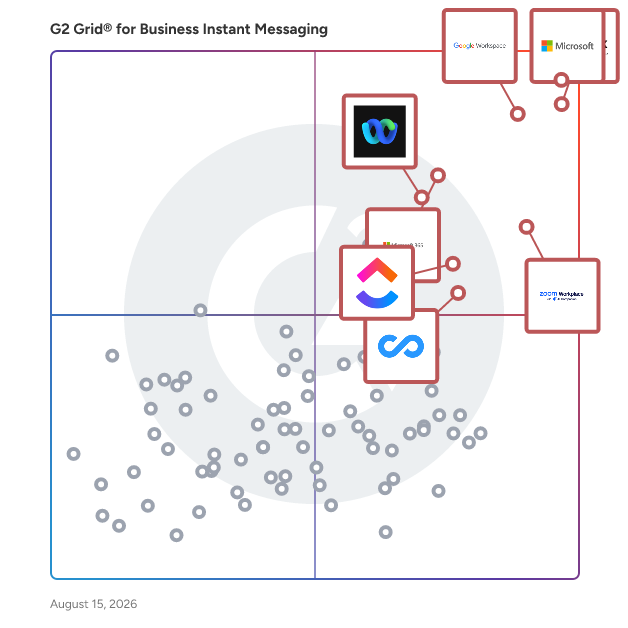
## G2 Grid® for Business Instant Messaging Software
 ![G2 Grid® for Business Instant Messaging Software plotting products by satisfaction and market presence](https://www.g2.com/categories/business-instant-messaging/grids.png?focus%5B%5D=25592&focus%5B%5D=3437&focus%5B%5D=1434&focus%5B%5D=7372&focus%5B%5D=663&focus%5B%5D=18255&focus%5B%5D=25675&focus%5B%5D=20433)

Highlighted products: Microsoft Teams, Slack, Google Workspace, Zoom Workplace, Microsoft 365, Webex Suite, ClickUp, and Connecteam.

Underlying data: [Grid® JSON](https://www.g2.com/categories/business-instant-messaging/grids.json?focus%5B%5D=microsoft-teams&focus%5B%5D=slack&focus%5B%5D=google-workspace&focus%5B%5D=zoom-workplace&focus%5B%5D=microsoft365&focus%5B%5D=cisco-webex-suite&focus%5B%5D=clickup&focus%5B%5D=connecteam)

**Sponsored**

### Hive

Hive is an all-in-one project management software platform that helps teams plan, collaborate, automate workflows, and deliver projects faster. Designed for organizations of every size, Hive combines powerful project planning, task management, team collaboration, and workflow automation tools in one customizable workspace. Whether you're managing marketing campaigns, product launches, creative projects, client work, or cross-functional initiatives, Hive adapts to your team's unique processes. Unlike rigid project management tools, Hive offers flexible workflows, customizable dashboards, and multiple project views so every team can work the way they work best. Hive empowers marketing, operations, product, IT, creative, and remote teams with the tools they need to stay organized and aligned. With customizable workflows and powerful collaboration features, teams can centralize work, reduce manual tasks, and improve visibility across every project. Key capabilities include: - Multiple project views, including Kanban boards, Gantt charts, calendars, tables, and lists - Task management with custom fields, dependencies, milestones, and priorities - Workflow automation to eliminate repetitive work - Real-time team collaboration with messaging, comments, and file sharing - Time tracking, reporting, and analytics - Integrations with hundreds of popular business applications Every organization works differently, which is why Hive is built to be one of the most customizable project management platforms available. Teams can create workflows tailored to their business processes using custom fields, project templates, automations, approvals, and integrations. Instead of forcing teams to change how they work, Hive adapts to existing workflows — helping organizations improve efficiency without disrupting productivity. Hive gives teams the flexibility to manage projects from the perspective that works best for them. Switch seamlessly between: - Kanban boards for agile workflows - Gantt charts for timeline planning - Calendar views for scheduling - Table and List views for detailed task management These flexible project views help teams track deadlines, manage resources, identify bottlenecks, and keep projects moving forward. Hive brings projects, communication, and documentation together in one centralized workspace. Team members can collaborate in real time, assign tasks, share files, provide feedback, and monitor project progress without switching between multiple tools. By combining project planning, collaboration, automation, and reporting in a single platform, Hive helps teams reduce busywork and focus on delivering results. Hive is more than just task management software—it's a scalable work management platform built to evolve alongside your business. As your needs change, Hive continues to expand through new features, integrations, and customer-driven enhancements. With flexible customization, powerful automation, and dedicated customer support, Hive enables organizations to streamline workflows, improve cross-functional collaboration, and execute projects with greater speed and confidence.

[Visit website](https://www.g2.com/external_clickthroughs/record?secure%5Bad_program%5D=ppc&secure%5Bad_slot%5D=category_product_list_llm&secure%5Bcategory_id%5D=2174&secure%5Bchosen_at%5D=2026-08-26T15%3A36%3A53Z&secure%5Bdisplayable_resource_id%5D=2174&secure%5Bdisplayable_resource_type%5D=Category&secure%5Bmedium%5D=sponsored&secure%5Bplacement_reason%5D=page_category&secure%5Bplacement_resource_ids%5D%5B%5D=2174&secure%5Bprioritized%5D=false&secure%5Bproduct_id%5D=27036&secure%5Bresource_id%5D=2174&secure%5Bresource_type%5D=Category&secure%5Bsource_type%5D=category_page&secure%5Bsource_url%5D=https%3A%2F%2Fwww.g2.com%2Fcategories%2Fbusiness-instant-messaging&secure%5Btoken%5D=45cd04d22045cce213413b95a11f3efbad7f4a421fe30b16b91ea5bd6a9ca023&secure%5Burl%5D=https%3A%2F%2Fhive.com%2F&secure%5Burl_type%5D=company_website)

### [Microsoft Teams](https://www.g2.com/products/microsoft-teams/reviews)

Microsoft Teams is a comprehensive collaboration platform developed by Microsoft, designed to streamline communication and teamwork within organizations. It integrates chat, video conferencing, file storage, and application integration into a single interface, facilitating seamless collaboration across various devices and operating systems. As part of the Microsoft 365 suite, Teams enhances productivity by providing a centralized hub for team interactions and project management. Key Features and Functionality: - Chat and Messaging: Facilitates real-time text communication with individuals or groups, supporting rich text, emojis, stickers, and GIFs. - Video Conferencing: Offers high-quality video meetings with features like screen sharing, custom backgrounds, and live captions, accommodating both small team huddles and large webinars. - File Sharing and Collaboration: Enables secure file storage and sharing through integration with OneDrive and SharePoint, allowing multiple users to co-author documents simultaneously. - Integration with Applications: Supports integration with a wide range of Microsoft and third-party applications, enhancing workflow efficiency by bringing various tools into one platform. - Security and Compliance: Provides enterprise-grade security measures, including data encryption for meetings, chats, calls, and files, ensuring compliance with industry standards. Primary Value and Solutions Provided: Microsoft Teams addresses the challenges of modern workplace collaboration by unifying communication channels, reducing the need for multiple disparate tools. It enhances team productivity by centralizing resources, facilitating real-time collaboration, and ensuring secure information sharing. By integrating with the broader Microsoft 365 ecosystem, Teams offers a cohesive environment that supports remote work, hybrid teams, and in-person collaboration, adapting to the diverse needs of today's workforce.

**Average Rating:** 4.4/5.0

**Total Reviews:** 17,678

#### How Do G2 Users Rate Microsoft Teams?

- **Has the product been a good partner in doing business?:** 8.9/10 (Category avg: 8.8/10)
- **Web Application:** 8.8/10 (Category avg: 9.0/10)
- **Third-Party Integrations:** 8.7/10 (Category avg: 8.4/10)
- **File Sharing:** 8.9/10 (Category avg: 8.9/10)

#### Who Is the Company Behind Microsoft Teams?

- **Seller:** [Microsoft](https://www.g2.com/sellers/microsoft)
- **Year Founded:** 1975
- **HQ Location:** Redmond, Washington
- **Twitter:** @microsoft  
13,091,739 Twitter followers
- **LinkedIn® Page:** [www.linkedin.com](https://www.g2.com/external_clickthroughs/record?secure%5Bsource_type%5D=product_profile&secure%5Btoken%5D=9458f51bd6ded48ad432a804f19ad736469f007787569b63827154231c315630&secure%5Burl%5D=https%3A%2F%2Fwww.linkedin.com%2Fcompany%2Fmicrosoft%2F&secure%5Burl_type%5D=linkedin_company_website)  
231,632 employees on LinkedIn®
- **Ownership:** MSFT

#### Who Uses This Product?

- **Who Uses This:** Software Engineer, Project Manager
- **Top Industries:** Information Technology and Services, Computer Software
- **Company Size:** 39% Large, 38% Medium

#### What Do G2 Reviewers Say About Microsoft Teams?

_AI-generated summary from verified user reviews_

##### Pros

- Users find **team collaboration seamless** with Microsoft Teams, integrating meetings, chats, and file sharing efficiently.
- Users find Microsoft Teams **very easy to use** , enhancing daily communication and collaboration across different platforms effortlessly.
- Users find Microsoft Teams to be a **superb tool for communication** , enhancing collaboration through integrated features and organization.
- Users value the **easy file sharing** in Microsoft Teams, enhancing collaboration and streamlining communication across teams.
- Users value the **easy communication** features of Microsoft Teams, enhancing collaboration and availability awareness among team members.

##### Cons

- Users often experience **slow loading** with Microsoft Teams, especially when using multiple applications or during video meetings.
- Users experience **performance issues** with Teams, including high resource consumption and difficulties in low-bandwidth situations.
- Users report the **user interface can be overwhelming and slow** , complicating their navigation and experience during usage.
- Users often face **connectivity issues** with Microsoft Teams, particularly during low-bandwidth situations disrupting their experience.
- Users experience **performance delays** with Microsoft Teams, leading to frustration, particularly on older machines and low-bandwidth connections.

#### What Are Recent G2 Reviews of Microsoft Teams?

**["Microsoft Teams: A Centralized Collaboration Hub That Boosts Productivity"](https://www.g2.com/survey_responses/microsoft-teams-review-13357639)**

**Rating:** 5.0/5.0 stars

_— Cristian G._

[Read full review](https://www.g2.com/survey_responses/microsoft-teams-review-13357639)

**["Highly Collaborative, Well-Integrated Office365 Experience"](https://www.g2.com/survey_responses/microsoft-teams-review-13360998)**

**Rating:** 5.0/5.0 stars

_— Joshua S._

[Read full review](https://www.g2.com/survey_responses/microsoft-teams-review-13360998)

#### What Are G2 Users Discussing About Microsoft Teams?

- [What software do you need for Microsoft teams?](https://www.g2.com/discussions/what-software-do-you-need-for-microsoft-teams) - 19 comments, 10 upvotes
- [What is the use of Microsoft teams?](https://www.g2.com/discussions/what-is-the-use-of-microsoft-teams) - 19 comments, 6 upvotes
- [What are the best features of Microsoft teams?](https://www.g2.com/discussions/what-are-the-best-features-of-microsoft-teams) - 20 comments, 7 upvotes
- [What are Microsoft teams features?](https://www.g2.com/discussions/what-are-microsoft-teams-features) - 13 comments, 4 upvotes

### [Slack](https://www.g2.com/products/slack/reviews)

Slack is your single workspace that connects you with the people and tools you work with everyday, no matter where you are or what you do. With Slack you get real-time messaging through calls and chat, a searchable record of all your files and conversations, and integrations with a growing number of handy bots and apps. Now everyone can finally be on the same page and get their work done. Slack: It’s where work happens.

**Average Rating:** 4.5/5.0

**Total Reviews:** 37,542

#### How Do G2 Users Rate Slack?

- **Has the product been a good partner in doing business?:** 9.1/10 (Category avg: 8.8/10)
- **Web Application:** 9.2/10 (Category avg: 9.0/10)
- **Third-Party Integrations:** 9.0/10 (Category avg: 8.4/10)
- **File Sharing:** 9.1/10 (Category avg: 8.9/10)

#### Who Is the Company Behind Slack?

- **Seller:** [Salesforce](https://www.g2.com/sellers/salesforce)
- **Company Website:** www.salesforce.com
- **Year Founded:** 1999
- **HQ Location:** San Francisco, CA
- **Twitter:** @salesforce  
579,511 Twitter followers
- **LinkedIn® Page:** [www.linkedin.com](https://www.g2.com/external_clickthroughs/record?secure%5Bsource_type%5D=product_profile&secure%5Btoken%5D=c04f36289ca03aeff007197f1d9e74e925e328ed6bcfaff98911c78b3ab382f7&secure%5Burl%5D=https%3A%2F%2Fwww.linkedin.com%2Fcompany%2F3185%2F&secure%5Burl_type%5D=linkedin_company_website)  
83,223 employees on LinkedIn®

#### Who Uses This Product?

- **Who Uses This:** Software Engineer, Project Manager
- **Top Industries:** Computer Software, Information Technology and Services
- **Company Size:** 41% Small, 41% Medium

#### What Do G2 Reviewers Say About Slack?

_AI-generated summary from verified user reviews_

##### Pros

- Users find Slack to be **extremely easy to use** , facilitating seamless collaboration and integration across teams.
- Users love the **effective team collaboration** in Slack, finding huddles and organized channels enhance communication and task management.
- Users love Slack for its **efficient communication** , enabling quick responses and seamless team collaboration across time zones.
- Users love the **seamless integrations** of Slack, enhancing collaboration and automating tasks effortlessly across the platform.
- Users appreciate the **ease of coordination** and **integrations** in Slack, enhancing team communication and productivity.

##### Cons

- Users often face **notification issues** in Slack, causing missed messages and overwhelming alerts from multiple channels.
- Users find the **missing features** in Slack lead to confusion and difficulty in organizing channels efficiently.
- Users are frustrated by Slack's **limited message history** and lack of intuitive organization for shared assets.
- Users find the **overwhelming experience** of constant alerts and message volume to be stressful and distracting.
- Users find the **overwhelming number of channels and limited message history** challenging for project tracking and communication.

#### What Are Recent G2 Reviews of Slack?

**["Slack as a Centralized Digital HQ for Fast, Organized Team Collaboration"](https://www.g2.com/survey_responses/slack-review-13361050)**

**Rating:** 5.0/5.0 stars

_— Arnel A._

[Read full review](https://www.g2.com/survey_responses/slack-review-13361050)

**["Simple and Effective Communication for Distributed Teams"](https://www.g2.com/survey_responses/slack-review-13345720)**

**Rating:** 5.0/5.0 stars

_— Muhammad A._

[Read full review](https://www.g2.com/survey_responses/slack-review-13345720)

#### What Are G2 Users Discussing About Slack?

- [What integrations have you found most effective for streamlining communication in Slack?](https://www.g2.com/discussions/what-integrations-have-you-found-most-effective-for-streamlining-communication-in-slack) - 21 comments, 4 upvotes
- [What is Slack used for?](https://www.g2.com/discussions/what-is-slack-used-for) - 23 comments, 8 upvotes
- [Is Slack a good tool?](https://www.g2.com/discussions/is-slack-a-good-tool) - 20 comments, 23 upvotes
- [What is unique about slack?](https://www.g2.com/discussions/what-is-unique-about-slack) - 11 comments, 5 upvotes
- [What does slack software do?](https://www.g2.com/discussions/what-does-slack-software-do) - 29 comments, 1 upvote

### [Google Workspace](https://www.g2.com/products/google-workspace/reviews)

Google Workspace is a comprehensive productivity and collaboration solution designed to help users streamline their work processes by integrating essential tools such as email, chat, file storage, and video conferencing into a unified platform. This suite of applications is tailored for businesses, educational institutions, and individuals looking to enhance their communication and collaboration efforts, all while leveraging the power of Google’s artificial intelligence. Targeted at a diverse audience, Google Workspace caters to teams of all sizes, from small startups to large enterprises. It is particularly beneficial for remote teams and organizations that prioritize collaboration across different locations. The platform supports various use cases, including project management, team communication, document sharing, and virtual meetings, making it an ideal choice for professionals who need to work together efficiently, regardless of their physical location. One of the key features of Google Workspace is its seamless integration of applications such as Gmail, Google Meet, Google Drive, and Google Docs. This interconnectedness allows users to switch effortlessly between tasks, whether they are sending emails, participating in video calls, or collaborating on documents in real-time. The AI capabilities embedded within the platform enhance user experience by providing smart suggestions, automating repetitive tasks, and improving search functionalities, ultimately saving time and increasing productivity. Additionally, Google Workspace prioritizes security and data protection, offering robust features such as two-factor authentication, advanced phishing protection, and customizable access controls. These measures ensure that sensitive information remains secure while allowing teams to collaborate freely. The platform also supports third-party integrations, enabling users to connect their favorite applications and tools, further enhancing their workflow. In summary, Google Workspace stands out in the productivity software category by providing a holistic approach to collaboration. Its user-friendly interface, combined with powerful AI-driven features and strong security protocols, makes it a valuable tool for anyone looking to improve their work processes and foster effective teamwork. Whether for managing projects, communicating with colleagues, or sharing files, Google Workspace is designed to meet the diverse needs of its users, making it an essential resource in today’s digital workplace.

**Average Rating:** 4.6/5.0

**Total Reviews:** 45,679

#### How Do G2 Users Rate Google Workspace?

- **Has the product been a good partner in doing business?:** 9.0/10 (Category avg: 8.8/10)
- **Web Application:** 9.1/10 (Category avg: 9.0/10)
- **Third-Party Integrations:** 8.7/10 (Category avg: 8.4/10)
- **File Sharing:** 8.8/10 (Category avg: 8.9/10)

#### Who Is the Company Behind Google Workspace?

- **Seller:** [Google](https://www.g2.com/sellers/google)
- **Year Founded:** 1998
- **HQ Location:** Mountain View, CA
- **Twitter:** @google  
31,899,995 Twitter followers
- **LinkedIn® Page:** [www.linkedin.com](https://www.g2.com/external_clickthroughs/record?secure%5Bsource_type%5D=product_profile&secure%5Btoken%5D=fe4a5936665c9702418dd53c477fef5a7baea08078bb117ed67e966fc581b9ec&secure%5Burl%5D=https%3A%2F%2Fwww.linkedin.com%2Fcompany%2F1441%2F&secure%5Burl_type%5D=linkedin_company_website)  
341,888 employees on LinkedIn®
- **Ownership:** NASDAQ:GOOG

#### Who Uses This Product?

- **Who Uses This:** Student, Teacher
- **Top Industries:** Information Technology and Services, Education Management
- **Company Size:** 47% Small, 35% Medium

#### What Do G2 Reviewers Say About Google Workspace?

_AI-generated summary from verified user reviews_

##### Pros

- Users appreciate the **ease of use** in Google Workspace, facilitating smooth and efficient workflow management.
- Users love the **seamless team collaboration** in Google Workspace, enhancing communication and boosting productivity effortlessly.
- Users love the **seamless integrations** in Google Workspace, enhancing efficiency with easy access to tools and scheduling.
- Users praise the **ease of use and integration** in Google Workspace, enhancing productivity and collaboration seamlessly.
- Users enjoy the **intuitive design** of Google Workspace, facilitating productivity and smooth integration of essential tools.

##### Cons

- Users face **missing features** in Google Workspace, such as limited offline capabilities and restrictions on accessing certain functionalities.
- Users find the **limited features** of Google Workspace unnecessary for smaller teams, lacking essential tools for their needs.
- Users find Google Workspace **lacking features** compared to other platforms, impacting effective campaign management and data handling.
- Users find the **lack of advanced features** in Google Workspace limits their productivity and customization options.
- Users find **limited customization** options in Google Workspace, particularly for calendars and forms, restricting flexibility and creativity.

#### What Are Recent G2 Reviews of Google Workspace?

**["All-in-One, Fast, and User-Friendly with Smart Auto-Suggestions"](https://www.g2.com/survey_responses/google-workspace-review-13286093)**

**Rating:** 5.0/5.0 stars

_— Pratiksha K._

[Read full review](https://www.g2.com/survey_responses/google-workspace-review-13286093)

**["Seamless All-in-One Productivity and Collaboration with Google Workspace"](https://www.g2.com/survey_responses/google-workspace-review-13358892)**

**Rating:** 5.0/5.0 stars

_— Simphiwe m._

[Read full review](https://www.g2.com/survey_responses/google-workspace-review-13358892)

#### What Are G2 Users Discussing About Google Workspace?

- [What tips do you have for effectively using Google Meet’s advanced features for large virtual meetings?](https://www.g2.com/discussions/what-tips-do-you-have-for-effectively-using-google-meet-s-advanced-features-for-large-virtual-meetings) - 17 comments, 13 upvotes
- [What is Google Surveys used for?](https://www.g2.com/discussions/what-is-google-surveys-used-for) - 9 comments, 3 upvotes
- [What does G Suite do?](https://www.g2.com/discussions/what-does-g-suite-do) - 8 comments, 5 upvotes
- [What companies use G suite?](https://www.g2.com/discussions/what-companies-use-g-suite) - 5 comments, 3 upvotes
- [Does G suite include Google classroom?](https://www.g2.com/discussions/does-g-suite-include-google-classroom) - 9 comments, 5 upvotes

### [Zoom Workplace](https://www.g2.com/products/zoom-workplace/reviews)

Goodbye app overload. Hello effortless work. Work can be complicated. Your tools shouldn't be. Zoom Workplace connects all the ways you collaborate — from meetings to docs to chat and more — with built-in AI and seamless integrations that help teams focus and work flawlessly. Zoom Communications: Unified, Effortless Connection for Modern Work Bring every way your teams communicate—meetings, chat, calls, email, and scheduling—into one seamless experience. With Zoom, collaboration happens faster and more naturally across channels, without switching apps or losing context. From spontaneous chats to scheduled meetings and calls, everything stays connected, searchable, and secure—powered by one intuitive platform built for how modern teams work. Zoom Productivity: Workflows Connected, Work Effortless Transform how work gets done with AI-first collaboration that keeps people, content, and actions in one place. From brainstorming on whiteboards to co-creating in docs, sharing clips, and automating follow-ups, Zoom connects every step of your workflow. With Zoom Hub and integrated video management, knowledge stays organized, accessible, and actionable—so teams can move from idea to outcome without friction. Zoom Spaces: Smarter, Connected Workplaces for Every Team Bring your physical and hybrid environments to life with intelligent, connected spaces. Zoom Spaces unifies meeting rooms, desk reservations, digital signage, and visitor management into one seamless experience—making it simple to collaborate, navigate, and manage the workplace. Whether employees are remote, hybrid, or on-site, Zoom creates a consistent, secure, and flexible environment that keeps teams connected wherever work happens. Zoom Employee Engagement: Connect, Inspire, and Empower Every Employee Foster belonging and alignment with Workvivo by Zoom—a modern employee experience platform that unites communication, culture, and community in one place. From company-wide updates to recognition, feedback, and social engagement, Workvivo gives every employee a voice and a sense of connection. Built right into Zoom Workplace, it helps organizations strengthen culture, boost engagement, and keep teams informed and inspired—no matter where they work.

**Average Rating:** 4.5/5.0

**Total Reviews:** 53,585

#### How Do G2 Users Rate Zoom Workplace?

- **Has the product been a good partner in doing business?:** 9.1/10 (Category avg: 8.8/10)
- **Web Application:** 8.9/10 (Category avg: 9.0/10)
- **Third-Party Integrations:** 8.5/10 (Category avg: 8.4/10)
- **File Sharing:** 8.6/10 (Category avg: 8.9/10)

#### Who Is the Company Behind Zoom Workplace?

- **Seller:** [Zoom](https://www.g2.com/sellers/zoom-a5000ea1-6d30-4ab4-b591-20723189ac97)
- **Company Website:** www.zoom.com
- **Year Founded:** 2011
- **HQ Location:** San Jose, CA
- **Twitter:** @zoom  
1,042,714 Twitter followers
- **LinkedIn® Page:** [www.linkedin.com](https://www.g2.com/external_clickthroughs/record?secure%5Bsource_type%5D=product_profile&secure%5Btoken%5D=ea58933ffb5ea1e88769e70b1323ea336f3f35193bdf38ad87831cfc56794a9a&secure%5Burl%5D=https%3A%2F%2Fwww.linkedin.com%2Fcompany%2F2532259%2F&secure%5Burl_type%5D=linkedin_company_website)  
13,494 employees on LinkedIn®

#### Who Uses This Product?

- **Who Uses This:** Owner, Software Engineer
- **Top Industries:** Information Technology and Services, Computer Software
- **Company Size:** 51% Small, 31% Medium

#### What Do G2 Reviewers Say About Zoom Workplace?

_AI-generated summary from verified user reviews_

##### Pros

- Users love the **ease of use** of Zoom Workplace, enjoying seamless access to features with just a click.
- Users appreciate the **ease of collaboration** in Zoom Workplace, especially with breakout rooms and seamless screen sharing.
- Users value the **reliability** of Zoom Workplace, ensuring seamless connectivity and stability even during adverse conditions.
- Users find the **ease of use for meetings** in Zoom Workplace invaluable for seamless collaboration and productivity.
- Users enjoy the **easy-to-use video conferencing** features of Zoom, facilitating smooth communication and collaboration in hybrid work settings.

##### Cons

- Users note the **limited features** of Zoom Workplace, expressing a need for improved built-in collaboration tools.
- Users experience **Zoom issues** like fatigue, connectivity problems, and confusing configurations that hinder their overall meeting effectiveness.
- Users experience **Zoom fatigue** , notification overload, and connectivity issues, making long meetings feel overwhelming and impersonal.
- Users find **missing features** in Zoom Workplace, like improved sharing links and chat access post-calls, frustrating.
- Users often face **connection issues** with Zoom Workplace, leading to a frustrating and less seamless experience.

#### What Are Recent G2 Reviews of Zoom Workplace?

**["Effortlessly Connects Teams, Great for Remote Work"](https://www.g2.com/survey_responses/zoom-workplace-review-13232000)**

**Rating:** 5.0/5.0 stars

_— Mazelo X._

[Read full review](https://www.g2.com/survey_responses/zoom-workplace-review-13232000)

**["Zoom’s One-Click Reliability with Seamless Screen Sharing and Stable Quality"](https://www.g2.com/survey_responses/zoom-workplace-review-13290295)**

**Rating:** 4.5/5.0 stars

_— Battier mal B._

[Read full review](https://www.g2.com/survey_responses/zoom-workplace-review-13290295)

#### What Are G2 Users Discussing About Zoom Workplace?

- [Is Zoom Workplace worth it?](https://www.g2.com/discussions/is-zoom-workplace-worth-it) - 29 comments, 38 upvotes
- [What are your tips for using Zoom Workplace effectively?](https://www.g2.com/discussions/what-are-your-tips-for-using-zoom-workplace-effectively) - 7 comments, 11 upvotes
- [What does Zoom do?](https://www.g2.com/discussions/what-does-zoom-do) - 30 comments, 12 upvotes
- [What are the features offered by Zoom?](https://www.g2.com/discussions/what-are-the-features-offered-by-zoom) - 5 comments, 2 upvotes
- [How do you add features in Zoom?](https://www.g2.com/discussions/how-do-you-add-features-in-zoom) - 18 comments, 2 upvotes

### [Microsoft 365](https://www.g2.com/products/microsoft365/reviews)

Launch and grow your business with Microsoft 365. Do more, faster, with intelligent tools to create, send, share, and store professional, branded documents with your customers and team - securely in the cloud. Microsoft 365 is a cloud-based suite of software tools designed to help you do more—with best-in-class communication, design, and data management apps, intelligent cloud services, and advanced security. Access your data from anywhere, collaborate with team members in real time, meet with people virtually, and use thousands of predesigned templates to better communicate with customers and manage your business - all with built-in security technology that safeguards your data and devices from anywhere. Get the latest Office apps, such as Microsoft Teams, Word, Excel, PowerPoint, Outlook, OneDrive, and more.

**Average Rating:** 4.6/5.0

**Total Reviews:** 5,547

#### How Do G2 Users Rate Microsoft 365?

- **Has the product been a good partner in doing business?:** 8.8/10 (Category avg: 8.8/10)
- **Web Application:** 9.2/10 (Category avg: 9.0/10)
- **Third-Party Integrations:** 8.9/10 (Category avg: 8.4/10)
- **File Sharing:** 9.4/10 (Category avg: 8.9/10)

#### Who Is the Company Behind Microsoft 365?

- **Seller:** [Microsoft](https://www.g2.com/sellers/microsoft)
- **Year Founded:** 1975
- **HQ Location:** Redmond, Washington
- **Twitter:** @microsoft  
13,091,739 Twitter followers
- **LinkedIn® Page:** [www.linkedin.com](https://www.g2.com/external_clickthroughs/record?secure%5Bsource_type%5D=product_profile&secure%5Btoken%5D=9458f51bd6ded48ad432a804f19ad736469f007787569b63827154231c315630&secure%5Burl%5D=https%3A%2F%2Fwww.linkedin.com%2Fcompany%2Fmicrosoft%2F&secure%5Burl_type%5D=linkedin_company_website)  
231,632 employees on LinkedIn®
- **Ownership:** MSFT

#### Who Uses This Product?

- **Who Uses This:** Owner, Software Engineer
- **Top Industries:** Information Technology and Services, Education Management
- **Company Size:** 37% Medium, 35% Small

#### What Do G2 Reviewers Say About Microsoft 365?

_AI-generated summary from verified user reviews_

##### Pros

- Users highlight the **ease of use** in Microsoft 365, enjoying straightforward implementation and seamless navigation.
- Users appreciate the **seamless team collaboration** in Microsoft 365, enhancing efficiency and communication across various applications.
- Users value the **easy integration with Microsoft apps** , enhancing data access and collaboration across devices.
- Users value the **easy integration** of Microsoft 365 with other tools, enhancing collaboration and accessibility across devices.
- Users love the **seamless integration** of Microsoft 365 with other apps, enhancing accessibility and collaboration.

##### Cons

- Users find Microsoft 365 **too expensive** for small teams, encountering frustrating limitations and issues with updates.
- Users find the **missing features** frustrating, as essential tools are locked behind higher-priced plans and updates disrupt functionality.
- Users find the **learning curve daunting** with Microsoft 365, often feeling overwhelmed by its complexity and features.
- Users often face **technical issues** with Microsoft 365, including slow performance and frustrating app updates and configurations.
- Users find Microsoft 365 **lacking essential features** , especially with frequent updates that disrupt established workflows and settings.

#### What Are Recent G2 Reviews of Microsoft 365?

**["Microsoft 365: Productive, Secure, data life cycle management and Effortless Collaboration Anywhere"](https://www.g2.com/survey_responses/microsoft-365-review-13234875)**

**Rating:** 5.0/5.0 stars

_— patan b._

[Read full review](https://www.g2.com/survey_responses/microsoft-365-review-13234875)

**["Microsoft 365: A Comprehensive, Secure Collaboration Ecosystem Powered by Copilot"](https://www.g2.com/survey_responses/microsoft-365-review-13193350)**

**Rating:** 5.0/5.0 stars

_— Rene "Rocky" E._

[Read full review](https://www.g2.com/survey_responses/microsoft-365-review-13193350)

#### What Are G2 Users Discussing About Microsoft 365?

- [What are the uses of Microsoft software?](https://www.g2.com/discussions/what-are-the-uses-of-microsoft-software) - 2 comments, 1 upvote
- [What kind of software is Microsoft Office?](https://www.g2.com/discussions/what-kind-of-software-is-microsoft-office) - 1 comment, 1 upvote
- [What programs are in Microsoft Office suite?](https://www.g2.com/discussions/what-programs-are-in-microsoft-office-suite) - 1 comment
- [What is Microsoft Office features?](https://www.g2.com/discussions/what-is-microsoft-office-features) - 2 comments

### [Webex Suite](https://www.g2.com/products/cisco-webex-suite/reviews)

Webex Suite is an all-in-one, AI-powered collaboration suite built to increase productivity and maximize teamwork in today’s hybrid work. With 8 powerful individual workflows – Meetings, Messaging, Calling, Webinar, Events, Polling, Whiteboarding and Video Messaging in one, Webex Suite delivers exceptional value, world-class user experiences, and incredible audio and video, anywhere on any device. With a variety of collaboration and AI innovations, such as Webex AI Assistant, Real-time Translation, Background Noise Removal, and more, Webex Suite delivers rich and innovative experiences for employees and customers, enabling them to seamlessly connect, collaborate, engage and get work done. Webex Suite is powered by the industry-leading Webex Platform that is secure, compliant, and easily managed with built-in pervasive intelligence, bringing AI innovations across the entire Webex portfolio. The entire Webex Suite can be managed via the single-pane-of-glass management tool, Webex Control Hub. Webex Suite is backed by Cisco’s industry-leading security and networking infrastructure that ensures the best quality video and audio communications. Webex Suite Workflows: Meetings: Drive more productive meetings with AI-powered experiences and high-quality audio and video. Messaging: Collaborate async with rich messaging, secure file sharing, and digital whiteboarding to keep work flowing between meetings. Calling: Stay connected with modern business phone system and flexible calling options. Webinar: Host high quality webinars and drive engagement with immersive content and interactive audience experiences. Events: Power virtual, in-person, and hybrid events with immersive multi-track agendas, ticketing, attendee networking, analytics, and more. Polling: Enable active participation in every meeting with quizzes, polling, and interactive Q&A. Whiteboarding: Unleash creativity with a digital whiteboarding solution for everyone, on any device. Video Messaging: Record, share ideas, engage, and facilitate real-time feedback with intuitive video messaging.

**Average Rating:** 4.2/5.0

**Total Reviews:** 17,668

#### How Do G2 Users Rate Webex Suite?

- **Has the product been a good partner in doing business?:** 8.7/10 (Category avg: 8.8/10)
- **Web Application:** 8.8/10 (Category avg: 9.0/10)
- **Third-Party Integrations:** 8.7/10 (Category avg: 8.4/10)
- **File Sharing:** 8.6/10 (Category avg: 8.9/10)

#### Who Is the Company Behind Webex Suite?

- **Seller:** [Cisco](https://www.g2.com/sellers/cisco)
- **Company Website:** www.cisco.com
- **Year Founded:** 1984
- **HQ Location:** San Jose, CA
- **Twitter:** @Cisco  
720,366 Twitter followers
- **LinkedIn® Page:** [www.linkedin.com](https://www.g2.com/external_clickthroughs/record?secure%5Bsource_type%5D=product_profile&secure%5Btoken%5D=476aeabc5a712d049453edd5c54ea0318890d9e60d93782e37fe028224df1cbd&secure%5Burl%5D=https%3A%2F%2Fwww.linkedin.com%2Fcompany%2Fcisco%2F&secure%5Burl_type%5D=linkedin_company_website)  
95,545 employees on LinkedIn®

#### Who Uses This Product?

- **Who Uses This:** Software Engineer, Senior Software Engineer
- **Top Industries:** Information Technology and Services, Computer Software
- **Company Size:** 50% Large, 31% Medium

#### What Do G2 Reviewers Say About Webex Suite?

_AI-generated summary from verified user reviews_

##### Pros

- Users appreciate the **ease of use** of Webex Suite for its all-in-one solution for communication and collaboration.
- Users value the **high-quality video and audio** of Webex Suite, enabling effective and seamless collaboration across locations.
- Users appreciate the **reliable connections** provided by Webex Suite, enhancing their collaboration experience seamlessly.
- Users value the **all-in-one collaboration capabilities** of Webex Suite, enhancing productivity with excellent video and audio quality.
- Users commend the **excellent video quality** of Webex Suite, enhancing their meeting and collaboration experiences.

##### Cons

- Users often experience **slow loading** issues with Webex Suite, causing frustration during calls and overall usage.
- Users find Webex Suite **not user-friendly** , citing a cluttered interface and confusion with settings as major drawbacks.
- Users report **performance issues** with Webex Suite, describing lag, freezes, and a cluttered interface that complicates usability.
- Users find the **lack of intuitiveness** in Webex Suite's interface challenging, especially for new users navigating features.
- Users find the **user interface cluttered and less intuitive** , impacting the overall experience and learning curve.

#### What Are Recent G2 Reviews of Webex Suite?

**["Reliable video conferencing and project plaining suite"](https://www.g2.com/survey_responses/webex-suite-review-13183133)**

**Rating:** 4.0/5.0 stars

_— Chandra K._

[Read full review](https://www.g2.com/survey_responses/webex-suite-review-13183133)

**["Robust Collaboration Platform with Exceptional Audio and Video Clarity"](https://www.g2.com/survey_responses/webex-suite-review-13286311)**

**Rating:** 4.5/5.0 stars

_— JAY P._

[Read full review](https://www.g2.com/survey_responses/webex-suite-review-13286311)

#### What Are G2 Users Discussing About Webex Suite?

- [How has the Webex App evolved to meet the demands of hybrid work environments and virtual collaboration?](https://www.g2.com/discussions/how-has-the-webex-app-evolved-to-meet-the-demands-of-hybrid-work-environments-and-virtual-collaboration) - 4 comments, 5 upvotes
- [How has Webex Meetings catered to the evolving needs of global virtual teams and large-scale webinars?](https://www.g2.com/discussions/how-has-webex-meetings-catered-to-the-evolving-needs-of-global-virtual-teams-and-large-scale-webinars) - 3 comments, 5 upvotes
- [What is Webex Meetings used for?](https://www.g2.com/discussions/what-is-webex-meetings-used-for) - 4 comments, 3 upvotes
- [What is Webex App used for?](https://www.g2.com/discussions/what-is-webex-app-used-for) - 5 comments, 2 upvotes
- [What is the Cisco Webex meetings desktop app?](https://www.g2.com/discussions/what-is-the-cisco-webex-meetings-desktop-app) - 2 comments, 1 upvote

### [ClickUp](https://www.g2.com/products/clickup/reviews)

ClickUp is the world’s first Converged AI Workspace, bringing together all work apps, data, and workflows. ClickUp eliminates all forms of work sprawl to provide 100% context and a single place for humans and agents to work, together. Trusted by more than 20 million users worldwide, ClickUp is on a mission to maximize human productivity.

**Average Rating:** 4.6/5.0

**Total Reviews:** 13,231

#### How Do G2 Users Rate ClickUp?

- **Has the product been a good partner in doing business?:** 9.0/10 (Category avg: 8.8/10)
- **Web Application:** 9.2/10 (Category avg: 9.0/10)
- **Third-Party Integrations:** 8.8/10 (Category avg: 8.4/10)
- **File Sharing:** 9.0/10 (Category avg: 8.9/10)

#### Who Is the Company Behind ClickUp?

- **Seller:** [ClickUp](https://www.g2.com/sellers/clickup)
- **Company Website:** ClickUp.com
- **Year Founded:** 2017
- **HQ Location:** San Diego, California
- **Twitter:** @clickup  
69,539 Twitter followers
- **LinkedIn® Page:** [www.linkedin.com](https://www.g2.com/external_clickthroughs/record?secure%5Bsource_type%5D=product_profile&secure%5Btoken%5D=12451d66d580078c16b08985ccc98dcf8d832565fb04a9665439cfd4f2a74fa7&secure%5Burl%5D=https%3A%2F%2Fwww.linkedin.com%2Fcompany%2F12949663%2F&secure%5Burl_type%5D=linkedin_company_website)  
1,526 employees on LinkedIn®

#### Who Uses This Product?

- **Who Uses This:** CEO, Project Manager
- **Top Industries:** Marketing and Advertising, Computer Software
- **Company Size:** 77% Small, 19% Medium

#### What Do G2 Reviewers Say About ClickUp?

_AI-generated summary from verified user reviews_

##### Pros

- Users find ClickUp to be incredibly **easy and simple to use** , streamlining tasks and enhancing productivity effortlessly.
- Users value the **flexibility in task management** , enabling customized workflows for personal, team, and project tasks.
- Users appreciate the **abundance of features** in ClickUp, making task management seamless and efficient.
- Users appreciate ClickUp for its **streamlined management tasks** , enabling better organization and efficiency in project handling.
- Users appreciate ClickUp for its **streamlined organization** , making team management and project tracking efficient and effortless.

##### Cons

- Users find the **missing features** in ClickUp frustrating, particularly the lack of basic tools like subfolders.
- Users experience a **learning curve** with ClickUp, finding the plethora of features daunting at first.
- Users note **limited features** in ClickUp, with missing basic options and a complex setup process hindering ease of use.
- Users find ClickUp **not intuitive** , feeling overwhelmed by its many features and struggling with initial setup and performance.
- Users experience **slow loading** times in ClickUp, which affects their productivity when managing multiple tasks and fields.

#### What Are Recent G2 Reviews of ClickUp?

**Rating:** 4.5/5.0 stars

_— Cartavista T._

[Read full review](https://www.g2.com/survey_responses/clickup-review-9644948)

**Rating:** 5.0/5.0 stars

_— Marcce R._

[Read full review](https://www.g2.com/survey_responses/clickup-review-13359903)

#### What Are G2 Users Discussing About ClickUp?

- [What features of ClickUp make it a preferred choice for project management in agile teams?](https://www.g2.com/discussions/what-features-of-clickup-make-it-a-preferred-choice-for-project-management-in-agile-teams) - 6 comments, 6 upvotes
- [What is ClickUp used for?](https://www.g2.com/discussions/what-is-clickup-used-for) - 10 comments, 4 upvotes
- [Does Google use ClickUp?](https://www.g2.com/discussions/does-google-use-clickup) - 5 comments, 3 upvotes
- [Who uses ClickUp?](https://www.g2.com/discussions/who-uses-clickup) - 14 comments, 4 upvotes
- [Is ClickUp really free?](https://www.g2.com/discussions/is-clickup-really-free) - 12 comments, 3 upvotes

### [Connecteam](https://www.g2.com/products/connecteam/reviews)

Connecteam is a mobile-first workforce management app featuring a robust set of tools designed to help organizations with deskless teams improve communication, retain staff, and drive operational efficiency. Connecteam allows managers to put their business processes on autopilot and focus on business growth while also freeing up employees to be more productive, professional, and satisfied. At the heart of Connecteam lies a powerful suite of tools for scheduling, time tracking, task management, communication, HR processes, and training—all built for the realities of frontline teams. Whether you need to create complex shift schedules, automate payroll-ready timesheets, distribute company announcements, or onboard new hires at scale, Connecteam brings everything under one intuitive app. Save time and increase productivity with AI assisted scheduling, mobile-first custom checklists, forms, and reports; Track work hours with GPS time clock; Simplify employee communication, enhance professional skills with mobile courses (AI powered course content creator), manage daily tasks and so much more, all in one app. Connecteam AI helps you work faster and smarter than humanly possible, while keeping it simple: -AI Agent : Just ask your AI sidekick in chat. From stock info to safety steps, manuals, or care procedures, employees get instant spot-on answers, pulled straight from your in-app resources. No delays, no guesswork. -Auto scheduling : Your team schedule’s fully covered in seconds. AI puzzles availability, roles, fairness, and requirements with expert precision. The result? Reliable schedules, happier employees, and no admin hassle. -AI course creation: Turn any training topic into a full course. Just describe the subject and AI instantly builds a pro-level course, ready to go. Your team, trained the way you need, to the standard you expect. -File to Form: Digitize forms in a snap - upload a file or take a photo of any paper form. AI turns it into a fillable version your team can complete wherever they are. Easy for them, efficient for you. -AI updates and feed: Level up every update - write clear team updates that land. AI enhances your message and auto-translates it into each employee’s preferred language. Everyone stays aligned, nothing gets misinterpreted. -Speech to text: Fill forms, hands-free - simply speak into forms. AI captures, summarizes, and sorts your team’s input on the spot, without them having to look down or slow down. No distractions, no delays—just clear, accurate reporting. Additionally, ensure a secure and easy login for system admins with Active Directory Single Sign-On (SSO).

**Average Rating:** 4.6/5.0

**Total Reviews:** 3,491

#### How Do G2 Users Rate Connecteam?

- **Has the product been a good partner in doing business?:** 9.3/10 (Category avg: 8.8/10)
- **Web Application:** 9.0/10 (Category avg: 9.0/10)
- **Third-Party Integrations:** 8.0/10 (Category avg: 8.4/10)
- **File Sharing:** 8.8/10 (Category avg: 8.9/10)

#### Who Is the Company Behind Connecteam?

- **Seller:** [Connecteam](https://www.g2.com/sellers/connecteam)
- **Year Founded:** 2015
- **HQ Location:** New York, NY
- **Twitter:** @ConnecteamApp  
1,235 Twitter followers
- **LinkedIn® Page:** [www.linkedin.com](https://www.g2.com/external_clickthroughs/record?secure%5Bsource_type%5D=product_profile&secure%5Btoken%5D=795b5c54de361aeeda657cd81ee2ecfa349540c1b3b54d8aacbf3077305e2261&secure%5Burl%5D=https%3A%2F%2Fwww.linkedin.com%2Fcompany%2F10591384%2F&secure%5Burl_type%5D=linkedin_company_website)  
530 employees on LinkedIn®

#### Who Uses This Product?

- **Who Uses This:** Owner, Manager
- **Top Industries:** Construction, Retail
- **Company Size:** 83% Small, 14% Medium

#### What Do G2 Reviewers Say About Connecteam?

_AI-generated summary from verified user reviews_

##### Pros

- Users find Connecteam's **ease of use** remarkable, noting its intuitive design and straightforward setup for all staff members.
- Users value the **ease of use** and comprehensive features of Connecteam, enhancing communication and efficiency within teams.
- Users love the **customizable scheduling feature** of Connecteam, enhancing organization and accountability among staff greatly.
- Users value the **effortless team collaboration** in Connecteam, enhancing scheduling, communication, and overall team rapport.
- Users find Connecteam to be **user-friendly** , enabling easy navigation and effective communication among staff members.

##### Cons

- Users find **missing features** in Connecteam, such as limited templates and underwhelming admin organization, frustrating.
- Users find the **limited features** of Connecteam to be frustrating and wish for more customization options.
- Users face **scheduling issues** with Connecteam, citing limitations in view options and difficulties in managing time effectively.
- Users report needing **improvements for clearer notifications** and easier access to admin features in Connecteam.
- Users find the **interface not user-friendly** , resulting in confusion and difficulty with corrections and navigation.

#### What Are Recent G2 Reviews of Connecteam?

**["A Game-Changer for Small Businesses: Free, Easy Scheduling and Job Pay Tracking"](https://www.g2.com/survey_responses/connecteam-review-12874312)**

**Rating:** 5.0/5.0 stars

_— Verified User in Construction_

[Read full review](https://www.g2.com/survey_responses/connecteam-review-12874312)

**["Connecteam Review"](https://www.g2.com/survey_responses/connecteam-review-10735494)**

**Rating:** 5.0/5.0 stars

_— Kurt B._

[Read full review](https://www.g2.com/survey_responses/connecteam-review-10735494)

#### What Are G2 Users Discussing About Connecteam?

- [Is Connecteam secure?](https://www.g2.com/discussions/is-connecteam-secure) - 2 comments
- [How do you use Connecteam?](https://www.g2.com/discussions/how-do-you-use-connecteam) - 2 comments
- [Is Connecteam really free?](https://www.g2.com/discussions/is-connecteam-really-free)
- [Is Connecteam a good app?](https://www.g2.com/discussions/is-connecteam-a-good-app) - 2 comments

### [RingCentral Video](https://www.g2.com/products/ringcentral-video/reviews)

Glip is a conversation platform for teams to plan, share & organize work tasks. Text and video chat features facilitate communication between team members whilst file sharing and collaborative task management encourage efficiency and productivity. Glip helps teams to connect in real-time, unifying chat, tasks, video calling, file sharing, and event scheduling. Glip simplifies teamwork with secure instant messaging designed for teams to communicate and get work done at the same time. With Glip, work can be organized around conversations because the two are aligned. Users will always know what their team is doing and what needs to be done next. Glip enables the free flow of communication in teams. With text and and video chat at Glip's core, conversation barriers between team members are removed, enabling productivity and a smoother workflow. Ideas can be debated and problems solved through swift communication with Glip, which can be used like a Knowledge Base. Email and third party integrations mean that Glip - which requires no technical knowledge - can be implemented by teams already using different applications.

**Average Rating:** 4.2/5.0

**Total Reviews:** 495

#### How Do G2 Users Rate RingCentral Video?

- **Has the product been a good partner in doing business?:** 8.7/10 (Category avg: 8.8/10)
- **Web Application:** 8.7/10 (Category avg: 9.0/10)
- **Third-Party Integrations:** 8.3/10 (Category avg: 8.4/10)
- **File Sharing:** 8.6/10 (Category avg: 8.9/10)

#### Who Is the Company Behind RingCentral Video?

- **Seller:** [RingCentral](https://www.g2.com/sellers/ringcentral)
- **Year Founded:** 1999
- **HQ Location:** Belmont, CA
- **Twitter:** @RingCentral  
61,963 Twitter followers
- **LinkedIn® Page:** [www.linkedin.com](https://www.g2.com/external_clickthroughs/record?secure%5Bsource_type%5D=product_profile&secure%5Btoken%5D=c5feb596db1b6a55b89021e6c3d499a6bb38b1cce9bfb6bcc3e569df83d09956&secure%5Burl%5D=https%3A%2F%2Fwww.linkedin.com%2Fcompany%2F60868%2F&secure%5Burl_type%5D=linkedin_company_website)  
6,726 employees on LinkedIn®
- **Ownership:** NYSE:RNG

#### Who Uses This Product?

- **Who Uses This:** Owner
- **Top Industries:** Information Technology and Services, Computer Software
- **Company Size:** 48% Medium, 42% Small

#### What Do G2 Reviewers Say About RingCentral Video?

_AI-generated summary from verified user reviews_

##### Pros

- Users appreciate the **ease of use** of RingCentral Video, making connections and setups straightforward and efficient.
- Users enjoy the **great video quality** of RingCentral Video, enhancing their conferencing experience significantly.
- Users appreciate the **easy screen sharing** feature of RingCentral Video, enabling seamless collaboration and connectivity.
- Users praise the **accessible connectivity** of RingCentral Video, making it easy for everyone to join meetings effortlessly.
- Users commend the **easy setup** of RingCentral Video, enabling quick connectivity and smooth transitions for meetings.

##### Cons

- Users experience **connectivity issues** with RingCentral Video, including delays and audio sync problems during meetings.
- Users report **slow loading** times, particularly when joining large meetings, negatively impacting their overall experience.
- Users find RingCentral Video to be **expensive compared to competitors** , particularly impacting smaller businesses' budgets.
- Users find the **learning curve to be challenging** , requiring extra time to adjust to RingCentral Video's interface.
- Users find **missing features** in RingCentral Video, particularly for interactivity and engaging tools during meetings.

#### What Are Recent G2 Reviews of RingCentral Video?

**["Instant On, Seamless Notetaking"](https://www.g2.com/survey_responses/ringcentral-video-review-12585915)**

**Rating:** 5.0/5.0 stars

_— Tamar H._

[Read full review](https://www.g2.com/survey_responses/ringcentral-video-review-12585915)

**["Reliable and Easy-to-Use Video Collaboration Tool"](https://www.g2.com/survey_responses/ringcentral-video-review-12629528)**

**Rating:** 5.0/5.0 stars

_— Fritzie N._

[Read full review](https://www.g2.com/survey_responses/ringcentral-video-review-12629528)

#### What Are G2 Users Discussing About RingCentral Video?

- [What is RingCentral Video used for?](https://www.g2.com/discussions/what-is-ringcentral-video-used-for) - 1 comment
- [What are the advantages of SD Wan as compared to traditional WAN solution?](https://www.g2.com/discussions/what-are-the-advantages-of-sd-wan-as-compared-to-traditional-wan-solution) - 1 comment
- [What is GLIP RingCentral?](https://www.g2.com/discussions/what-is-glip-ringcentral) - 1 comment
- [What is a GLIP?](https://www.g2.com/discussions/what-is-a-glip) - 1 comment
- [What is GLIP used for?](https://www.g2.com/discussions/what-is-glip-used-for) - 1 comment

### [Missive](https://www.g2.com/products/missive/reviews)

Are you double sending emails? Not knowing who's responding to what, or whether they've responded at all? What if your business could manage all your email accounts, including its shared inboxes like support@, sales@, info@, and accounting@, along with SMS, WhatsApp, Messenger, and Instagram—all in one place? Missive is inbox collaboration for teams that run on email—eliminating chaos and ensuring everyone is aligned. Our powerful tool simplifies collaboration and boosts productivity, breaking down silos between your business's internal and external communications. We help your team work together effortlessly. Used by over 4500 businesses, including accounting firms, logistics companies, travel agencies, and start up tech companies. -- Key features • Teams Inbox: Centralize all your communication channels into shared inboxes for efficient management across your different teams. • Internal Team Chat: Facilitate real-time collaboration and discussions within your team, directly alongside your external communications. • Automated Workflows: Create customizable rules to automate repetitive tasks and use AI to get even more efficiency. Popular use cases include auto-categorization of emails, auto-follow-up emails, automatic forwarding of receipts, and out-of-office auto-responses. • Canned responses: Save time with pre-written replies to customer inquiries, sales pitches, or to include that PDF you always need to attach when signing up a new client • Integrations: Enhance your workflow with integrations to popular tools like OpenAI, ClickUp, Asana, GitHub, HubSpot, Zapier, and many more.

**Average Rating:** 4.7/5.0

**Total Reviews:** 850

#### How Do G2 Users Rate Missive?

- **Has the product been a good partner in doing business?:** 9.6/10 (Category avg: 8.8/10)
- **Web Application:** 9.1/10 (Category avg: 9.0/10)
- **Third-Party Integrations:** 8.3/10 (Category avg: 8.4/10)
- **File Sharing:** 8.7/10 (Category avg: 8.9/10)

#### Who Is the Company Behind Missive?

- **Seller:** [Missive](https://www.g2.com/sellers/missive)
- **Company Website:** missiveapp.com
- **Year Founded:** 2015
- **HQ Location:** Quebec, QC
- **Twitter:** @missiveapp  
2,667 Twitter followers
- **LinkedIn® Page:** [www.linkedin.com](https://www.g2.com/external_clickthroughs/record?secure%5Bsource_type%5D=product_profile&secure%5Btoken%5D=d9e26fbdc5872947384e1a0c1d6b81c04a6469b737ec8658d96bdfdce6d03e75&secure%5Burl%5D=https%3A%2F%2Fwww.linkedin.com%2Fcompany%2Fmissive-app%2F&secure%5Burl_type%5D=linkedin_company_website)  
12 employees on LinkedIn®

#### Who Uses This Product?

- **Who Uses This:** CEO, Owner
- **Top Industries:** Accounting, Marketing and Advertising
- **Company Size:** 87% Small, 12% Medium

#### What Do G2 Reviewers Say About Missive?

_AI-generated summary from verified user reviews_

##### Pros

- Users value the **seamless team collaboration** in Missive, enhancing productivity through integrated chat and task assignment.
- Users appreciate the **team collaboration features** of Missive, which streamline workflow and enhance productivity significantly.
- Users find Missive's **intuitive interface** and seamless collaboration features make email management effortless and efficient.
- Users appreciate the **collaborative features** of Missive that enhance team productivity and streamline email management.
- Users highlight the **communication ease** with Missive, praising its collaborative email drafting and seamless integration features.

##### Cons

- Users note the **missing features** in Missive, such as offline support and an improved search and labeling system.
- Users find the **learning curve challenging** initially, requiring time to become familiar with advanced features and setups.
- Users find the **search functionality lacking** , especially for specific and older messages, despite some improvements over time.
- Users find the **search difficulty** frustrating, particularly with older messages, though improvements are underway.
- Users find the **steep learning curve** of Missive challenging initially, making setup and feature integration feel daunting.

#### What Are Recent G2 Reviews of Missive?

**["Awesome Team Spaces, Easy Email Rules, and Helpful Pipedrive & Shopify Connections"](https://www.g2.com/survey_responses/missive-review-13179778)**

**Rating:** 4.0/5.0 stars

_— April Rose P._

[Read full review](https://www.g2.com/survey_responses/missive-review-13179778)

**["Managing Patient Follow Ups and Clinic Communication Became More Organized"](https://www.g2.com/survey_responses/missive-review-12858905)**

**Rating:** 5.0/5.0 stars

_— Ishan S._

[Read full review](https://www.g2.com/survey_responses/missive-review-12858905)

#### What Are G2 Users Discussing About Missive?

- [What does Missive do?](https://www.g2.com/discussions/what-does-missive-do) - 1 comment
- [Is Front app good?](https://www.g2.com/discussions/is-front-app-good) - 1 comment
- [What is Missive app?](https://www.g2.com/discussions/what-is-missive-app) - 1 comment
- [How do you use missive?](https://www.g2.com/discussions/how-do-you-use-missive) - 1 comment

### [Zoho Cliq](https://www.g2.com/products/zoho-cliq/reviews)

Zoho Cliq is a business communication software that helps simplify and streamline your communication with organized conversations and information that's easy to find. Cliq is designed to enable a hybrid work style, where you can log in to work through any device from anywhere. This helps improve your team's overall productivity and, in turn, impacts the performance of your business positively.

**Average Rating:** 4.4/5.0

**Total Reviews:** 255

#### How Do G2 Users Rate Zoho Cliq?

- **Has the product been a good partner in doing business?:** 9.1/10 (Category avg: 8.8/10)
- **Web Application:** 8.9/10 (Category avg: 9.0/10)
- **Third-Party Integrations:** 8.6/10 (Category avg: 8.4/10)
- **File Sharing:** 9.1/10 (Category avg: 8.9/10)

#### Who Is the Company Behind Zoho Cliq?

- **Seller:** [Zoho](https://www.g2.com/sellers/zoho-b00ca9d5-bca8-41b5-a8ad-275480841704)
- **Year Founded:** 1996
- **HQ Location:** Austin, TX
- **Twitter:** @Zoho  
137,880 Twitter followers
- **LinkedIn® Page:** [www.linkedin.com](https://www.g2.com/external_clickthroughs/record?secure%5Bsource_type%5D=product_profile&secure%5Btoken%5D=9c8e45ddb296c32c6c5597ef9ba945c94562c57624f7bd1dcf1a9e9931f71578&secure%5Burl%5D=https%3A%2F%2Fwww.linkedin.com%2Fcompany%2F38373%2F&secure%5Burl_type%5D=linkedin_company_website)  
30,766 employees on LinkedIn®
- **Phone:** +1 (888) 900-9646 

#### Who Uses This Product?

- **Who Uses This:** Senior Software Engineer
- **Top Industries:** Information Technology and Services, Computer Software
- **Company Size:** 55% Small, 30% Medium

#### What Do G2 Reviewers Say About Zoho Cliq?

_AI-generated summary from verified user reviews_

##### Pros

- Users find Zoho Cliq to be **simple and efficient** , enabling seamless communication and collaboration with minimal setup.
- Users appreciate the **seamless communication** capabilities of Zoho Cliq, enhancing team collaboration without switching apps.
- Users value the **easy communication** with teams via Zoho Cliq, enhancing collaboration and streamlining workflows efficiently.
- Users enjoy the **easy file sharing** features in Zoho Cliq, enhancing collaboration and communication within their teams.
- Users value the **effective team collaboration** in Zoho Cliq, facilitating secure communication and project discussions effortlessly.

##### Cons

- Users experience **slow loading** times with Zoho Cliq, impacting performance when managing multiple chats and channels.
- Users find **difficult navigation** in Zoho Cliq, especially beginners struggling with settings and features.
- Users note the **missing functionality** of in-chat search and mobile app shortcomings, which hinder user experience.
- Users struggle with the **non-intuitive navigation** of Zoho Cliq, particularly beginners finding it challenging to navigate settings.
- Users find the **channel creation process not user-friendly** , suggesting the UI design needs modernization for better usability.

#### What Are Recent G2 Reviews of Zoho Cliq?

**["Nice product to chat with the colleague"](https://www.g2.com/survey_responses/zoho-cliq-review-7818314)**

**Rating:** 4.5/5.0 stars

_— Anto Shajmon M._

[Read full review](https://www.g2.com/survey_responses/zoho-cliq-review-7818314)

**["Organized Team Chats and Seamless Zoho Integrations"](https://www.g2.com/survey_responses/zoho-cliq-review-13094213)**

**Rating:** 5.0/5.0 stars

_— Samiksha P._

[Read full review](https://www.g2.com/survey_responses/zoho-cliq-review-13094213)

#### What Are G2 Users Discussing About Zoho Cliq?

- [What is Zoho Cliq used for?](https://www.g2.com/discussions/what-is-zoho-cliq-used-for) - 1 comment, 2 upvotes
- [What is Zoho platform?](https://www.g2.com/discussions/what-is-zoho-platform) - 2 comments
- [What is Zoho connect?](https://www.g2.com/discussions/zoho-cliq-what-is-zoho-connect) - 1 comment
- [How do I use Zoho Cliq?](https://www.g2.com/discussions/how-do-i-use-zoho-cliq) - 1 comment
- [What is Zoho Cliq?](https://www.g2.com/discussions/what-is-zoho-cliq) - 1 comment

### [Lark](https://www.g2.com/products/lark-lark/reviews)

Built by ByteDance, Lark is an enterprise AI workspace designed for seamless human-agent collaboration. It unifies teams, communication, knowledge, and business workflows in one connected environment with an open architecture for AI models and agents. By bringing work into one place rather than scattering it across separate apps, Lark gives AI complete, real-time context and the native ability to act across the entire business. Today, organizations in more than 190 markets use Lark to turn AI into measurable business value.

**Average Rating:** 4.6/5.0

**Total Reviews:** 175

#### How Do G2 Users Rate Lark?

- **Has the product been a good partner in doing business?:** 9.4/10 (Category avg: 8.8/10)
- **Web Application:** 8.9/10 (Category avg: 9.0/10)
- **Third-Party Integrations:** 8.4/10 (Category avg: 8.4/10)
- **File Sharing:** 9.2/10 (Category avg: 8.9/10)

#### Who Is the Company Behind Lark?

- **Seller:** [Lark Technologies](https://www.g2.com/sellers/lark-technologies-ab8d4472-aa71-4552-8d1c-06f9cf7661e6)
- **Year Founded:** 2003
- **HQ Location:** Singapore, Singapore
- **Twitter:** @lark  
471 Twitter followers
- **LinkedIn® Page:** [www.linkedin.com](https://www.g2.com/external_clickthroughs/record?secure%5Bsource_type%5D=product_profile&secure%5Btoken%5D=a756502056f87231209fe7946b060ad3e1a8c5e8a28d0574db38ca51902710ad&secure%5Burl%5D=https%3A%2F%2Fwww.linkedin.com%2Fcompany%2Flarksuite%2F&secure%5Burl_type%5D=linkedin_company_website)  
210 employees on LinkedIn®

#### Who Uses This Product?

- **Top Industries:** Information Technology and Services, Computer Software
- **Company Size:** 49% Small, 31% Medium

#### What Do G2 Reviewers Say About Lark?

_AI-generated summary from verified user reviews_

##### Pros

- Users appreciate the **ease of use** of Lark, enjoying seamless collaboration and efficient navigation across its features.
- Users love Lark for its **user-friendly features** , including real-time collaboration, integrated tools, and easy navigation.
- Users value the **seamless team collaboration** offered by Lark, integrating communication, tasks, and documents in one platform.
- Users admire Lark's **innovative communication tools** , enhancing collaboration with real-time features and seamless integration.
- Users love Lark for its **user-friendly collaboration** , seamlessly integrating meetings, chat, and document sharing in one app.

##### Cons

- Users face a notable **learning curve** with Lark, as navigating features can be confusing at first.
- Users face **integration issues** that interrupt workflows and complicate the use of Lark with other platforms.
- Users report **slow loading** issues with Lark, causing frustration and inefficiencies during their work experience.
- Users express frustration over **limited customization** , affecting ease of use and overall experience with Lark.
- Users report **login issues** with Lark, including confusion during setup and occasional bugs affecting accessibility.

#### What Are Recent G2 Reviews of Lark?

**["Lark Scales with Us: Flexible Workflows, Automation, and Clear Dashboards"](https://www.g2.com/survey_responses/lark-review-13281841)**

**Rating:** 5.0/5.0 stars

_— Yeoh S._

[Read full review](https://www.g2.com/survey_responses/lark-review-13281841)

**["Powerful engine for complex operational systems — three years in, still finding new capabilities"](https://www.g2.com/survey_responses/lark-review-13325848)**

**Rating:** 5.0/5.0 stars

_— Mica H._

[Read full review](https://www.g2.com/survey_responses/lark-review-13325848)

#### What Are G2 Users Discussing About Lark?

- [Is Lark a Chinese app?](https://www.g2.com/discussions/is-lark-a-chinese-app)
- [How good is Lark?](https://www.g2.com/discussions/lark-how-good-is-lark)
- [How does Lark app work?](https://www.g2.com/discussions/lark-how-does-lark-app-work) - 1 comment
- [What is the use of Lark app?](https://www.g2.com/discussions/lark-what-is-the-use-of-lark-app)

### [Clinked](https://www.g2.com/products/clinked/reviews)

Clinked is a secure, cloud-based client portal and virtual data room that gives teams, clients, and external stakeholders one place to work together without relying on endless email chains, scattered file-sharing links, or disconnected tools. Instead of hunting through inboxes for the latest document, approval, or update, everyone works from the same branded workspace with access to the information relevant to them. Used by organisations across professional services, legal, finance, healthcare, government organisations and other high-trust industries, Clinked helps businesses manage sensitive documents, client communication, projects, and approvals in a secure environment. Whether you're onboarding clients, managing ongoing projects, coordinating due diligence, or sharing confidential information, Clinked brings files, conversations, tasks, and updates together in a single location. Organisations can choose from a range of solutions, including a branded client portal, a fully customised portal experience, or a virtual data room designed for confidential transactions and document-heavy projects. This flexibility allows teams to create an experience that matches both their workflow and their clients' expectations. One of Clinked's defining features is its extensive white-label capability. Businesses can customise portals with their own logos, colours, domains, email templates, and branding elements, creating an experience that feels like a natural extension of their company. Clients interact with your brand, not a third-party platform. Branded mobile apps for iOS and Android further extend that experience beyond the desktop. Clinked is built around reducing the friction that often comes with client work. Instead of sharing files through email, discussing them in separate chat tools, and tracking progress elsewhere, teams can manage documents, conversations, tasks, approvals, events, and project activity in one place. Activity feeds and dashboards provide visibility into what has changed, while task management tools help teams assign responsibilities, track progress, and keep projects moving forward. Document management is a core strength of the platform. Teams can organize files with granular permission controls, version tracking, audit trails, approvals, and secure sharing. Users can quickly find information through intelligent search tools and structured workspaces, while document previews, annotations, and comments make collaboration easier without requiring downloads or lengthy email exchanges. Security remains central to everything Clinked offers. The platform is ISO 27001 certified and protects data through bank-grade encryption, detailed permission controls, two-factor authentication, audit logs, and secure infrastructure. These safeguards make it well suited for organizations handling confidential information, regulated data, or client records where visibility and accountability matter. Clinked also connects with widely used business tools including Zapier, Google Workspace, Microsoft 365, DocuSign, Jotform, and many other third-party applications. Through integrations, APIs, and automation capabilities, organizations can connect Clinked to existing workflows while keeping client-facing collaboration in a secure, branded environment. For organizations looking to reduce email dependency, improve visibility across projects, and provide a more professional experience for clients, Clinked offers a practical alternative to juggling multiple systems. It combines secure document management, communication, project coordination, and branding flexibility in a single platform designed around how modern client work actually happens.

**Average Rating:** 4.8/5.0

**Total Reviews:** 143

#### How Do G2 Users Rate Clinked?

- **Has the product been a good partner in doing business?:** 9.7/10 (Category avg: 8.8/10)
- **Web Application:** 9.6/10 (Category avg: 9.0/10)
- **Third-Party Integrations:** 9.4/10 (Category avg: 8.4/10)
- **File Sharing:** 9.7/10 (Category avg: 8.9/10)

#### Who Is the Company Behind Clinked?

- **Seller:** [Clinked](https://www.g2.com/sellers/clinked)
- **Company Website:** clinked.com
- **Year Founded:** 2008
- **HQ Location:** Cambridge, UK
- **Twitter:** @clinked  
1,295 Twitter followers
- **LinkedIn® Page:** [www.linkedin.com](https://www.g2.com/external_clickthroughs/record?secure%5Bsource_type%5D=product_profile&secure%5Btoken%5D=9c10c6b66c8750834fa35f5c97d82c2948a398bcde15951b77ac7103c15dd04e&secure%5Burl%5D=https%3A%2F%2Fwww.linkedin.com%2Fcompany%2Fclinked%2Fabout&secure%5Burl_type%5D=linkedin_company_website)  
17 employees on LinkedIn®

#### Who Uses This Product?

- **Top Industries:** Computer Software, Marketing and Advertising
- **Company Size:** 66% Small, 25% Medium

#### What Do G2 Reviewers Say About Clinked?

_AI-generated summary from verified user reviews_

##### Pros

- Users appreciate the **ease of use** of Clinked, finding it quick and simple for document sharing with clients.
- Users value the **easy collaboration** features of Clinked, enhancing organization and streamlining communication across projects.
- Users value the **seamless team collaboration** in Clinked, enhancing communication and project management efficiency.
- Users value the **ease of document sharing** in Clinked, finding it quick and efficient for client interactions.
- Users value the **all-in-one functionality** of Clinked, streamlining project management and enhancing client communication effectively.

##### Cons

- Users find the **limited customization** options in Clinked restrict their ability to personalize their workspaces effectively.
- Users find the **learning curve steep** , requiring extra time and support to become comfortable with Clinked's functionalities.
- Users find the **missing features** in Clinked, such as enhanced chat and email syncing, limit its all-in-one potential.
- Users face **integration issues** with Clinked, though prompt customer support helps mitigate some challenges.
- Users identify **limited features** in Clinked's mobile app compared to the desktop version, impacting task management on the go.

#### What Are Recent G2 Reviews of Clinked?

**["Easy to Use with Smooth External Feature Integration"](https://www.g2.com/survey_responses/clinked-review-12988424)**

**Rating:** 5.0/5.0 stars

_— Verified User in Consulting_

[Read full review](https://www.g2.com/survey_responses/clinked-review-12988424)

**["Reliable platform for client collaboration and secure document sharing"](https://www.g2.com/survey_responses/clinked-review-12299037)**

**Rating:** 4.0/5.0 stars

_— Christian K._

[Read full review](https://www.g2.com/survey_responses/clinked-review-12299037)

#### What Are G2 Users Discussing About Clinked?

- [What does Clinked do?](https://www.g2.com/discussions/what-does-clinked-do)
- [What should be included in a client portal?](https://www.g2.com/discussions/what-should-be-included-in-a-client-portal)
- [What does a client portal do?](https://www.g2.com/discussions/what-does-a-client-portal-do) - 2 comments, 1 upvote
- [What is Clinked com?](https://www.g2.com/discussions/what-is-clinked-com) - 2 comments

### [morningmate](https://www.g2.com/products/morningmate/reviews)

Your team’s new flow starts with Morningmate — the single workspace where work moves seamlessly from morning to done. Not as many integrations as Slack. Not as automated as Asana. But just enough of the right features to manage tasks, communicate in real time, and collaborate with clients — all without per-seat pricing. Stop switching between disconnected tools for chat, tasks, and calendars. Morningmate brings it all together with feed-style collaboration, built-in chat, and customizable workflows that adapt to any team. More than 550,000 teams rely on Morningmate to stay organized and connected. From your first login, our onboarding experts provide tailored, friendly support — for as long as you need it. With a familiar, social-style interface and hands-on help every step of the way, your team will be up and running in minutes — not months.

**Average Rating:** 4.8/5.0

**Total Reviews:** 265

#### How Do G2 Users Rate morningmate?

- **Has the product been a good partner in doing business?:** 9.5/10 (Category avg: 8.8/10)

#### Who Is the Company Behind morningmate?

- **Seller:** [morningmate](https://www.g2.com/sellers/morningmate)
- **Company Website:** www.morningmate.com
- **HQ Location:** N/A
- **Twitter:** @morningmateGL  
18 Twitter followers
- **LinkedIn® Page:** [www.linkedin.com](https://www.g2.com/external_clickthroughs/record?secure%5Bsource_type%5D=product_profile&secure%5Btoken%5D=15c1a9ae375da2016ed24369dfec3d17b3207310c328f08f99d200471fb2c673&secure%5Burl%5D=https%3A%2F%2Fwww.linkedin.com%2Fcompany%2Fmorningmate%2F&secure%5Burl_type%5D=linkedin_company_website)  
11 employees on LinkedIn®

#### Who Uses This Product?

- **Who Uses This:** Assistant Manager, Developer
- **Top Industries:** Computer Software, Information Technology and Services
- **Company Size:** 52% Medium, 40% Small

#### What Do G2 Reviewers Say About morningmate?

_AI-generated summary from verified user reviews_

##### Pros

- Users enjoy the **user-friendly interface** of Morningmate, facilitating seamless collaboration and efficient project management.
- Users value the **effective team collaboration** features of Morningmate, facilitating seamless communication and task management.
- Users appreciate the **efficient task management** of Morningmate, enabling seamless collaboration and clear communication on projects.
- Users value the **clear and organized communication** that Morningmate provides for seamless collaboration across remote teams.
- Users value the **effective organization** of project materials and seamless collaboration offered by Morningmate.

##### Cons

- Users find the **missing features** in Morningmate, like language support and emotional options, hinder their overall experience.
- Users report **notification issues** with morningmate, citing overwhelming alerts during busy project periods affecting workflow.
- Users note a steep **learning curve** , as new team members can feel overwhelmed by the interface and features initially.
- Users experience an **overwhelming notification system** during busy times, complicating project management and team communication.
- Users experience **slow loading** times, particularly when searching for older files or switching between sections.

#### What Are Recent G2 Reviews of morningmate?

**["An all-in-one project management tool that excels at measuring KPIs"](https://www.g2.com/survey_responses/morningmate-review-11606171)**

**Rating:** 5.0/5.0 stars

_— Emily C._

[Read full review](https://www.g2.com/survey_responses/morningmate-review-11606171)

**["A project management tool that drives measurable marketing results"](https://www.g2.com/survey_responses/morningmate-review-11606329)**

**Rating:** 5.0/5.0 stars

_— Elias ._

[Read full review](https://www.g2.com/survey_responses/morningmate-review-11606329)

### [Text Request](https://www.g2.com/products/text-request/reviews)

Text Request is a business texting software that directly connects your business to your customers through the unmatched engagement power of text messaging. Upgrade your business phone number to send and receive text messages without losing voice capabilities. Our business texting software empowers growing franchises and small businesses to scale through mass messaging (bulk messaging), payment links, appointment reminders, Google review management, SMS marketing, and more. Get 5-star customer service, user-friendly interface, SMS API, and a simple 10DLC registration process that provides white-glove support no matter your plan. We also include a mobile app, Chrome extension, and desktop version, so your team can text the way they want. Our founder saw businesses struggle with unanswered cold calls, unread emails, personal phone switching, and valuable time lost. That’s why we’ve gone all in on building a deeply engaging text conversation platform that scales to the needs of your business. Text Request is the cost-effective solution to streamline your messaging, so you can increase retention rates and revenue.

**Average Rating:** 4.6/5.0

**Total Reviews:** 957

#### How Do G2 Users Rate Text Request?

- **Has the product been a good partner in doing business?:** 9.3/10 (Category avg: 8.8/10)
- **Web Application:** 9.0/10 (Category avg: 9.0/10)
- **Third-Party Integrations:** 8.2/10 (Category avg: 8.4/10)
- **File Sharing:** 8.2/10 (Category avg: 8.9/10)

#### Who Is the Company Behind Text Request?

- **Seller:** [Text Request](https://www.g2.com/sellers/text-request)
- **Company Website:** www.textrequest.com
- **Year Founded:** 2014
- **HQ Location:** Chattanooga, Tennessee
- **Twitter:** @Text\_Request  
642 Twitter followers
- **LinkedIn® Page:** [www.linkedin.com](https://www.g2.com/external_clickthroughs/record?secure%5Bsource_type%5D=product_profile&secure%5Btoken%5D=dc395963b1bc8ed3fe4d22b948a90cf95156a1e093ef3b4ecbfeb46522f5d62e&secure%5Burl%5D=https%3A%2F%2Fwww.linkedin.com%2Fcompany%2F4807820%2F&secure%5Burl_type%5D=linkedin_company_website)  
41 employees on LinkedIn®

#### Who Uses This Product?

- **Who Uses This:** Office Manager, Owner
- **Top Industries:** Hospital & Health Care, Medical Practice
- **Company Size:** 65% Small, 31% Medium

#### What Do G2 Reviewers Say About Text Request?

_AI-generated summary from verified user reviews_

##### Pros

- Users appreciate the **intuitive and user-friendly interface** of Text Request, enhancing communication and client interactions effectively.
- Users value the **effortless communication** capabilities of Text Request, enhancing customer service and efficiency.
- Users love the **easy communication** with Text Request, appreciating its user-friendly setup and quick customer support.
- Users find Text Request to be **intuitive and user-friendly** , enhancing client interactions and communication efficiency.
- Users value the **effective client interaction** features of Text Request, enhancing engagement through intuitive mass messaging and real-time analytics.

##### Cons

- Users express frustration over **missing features** like automatic sorting and unresolved conversation notifications affecting usability.
- Users find the **limited features** of Text Request frustrating, especially the inability to send videos and unclear pricing.
- Users feel the **cost is steep** for Text Request, especially compared to other available free platforms.
- Users struggle with **lack of notifications** , facing issues with sound alerts and slow loading times in Text Request.
- Users report frequent **software glitches** that disrupt functionality and lead to miscommunication and missed messages.

#### What Are Recent G2 Reviews of Text Request?

**["The best alternative to ZipWhip"](https://www.g2.com/survey_responses/text-request-review-8982757)**

**Rating:** 5.0/5.0 stars

_— Jacqui B._

[Read full review](https://www.g2.com/survey_responses/text-request-review-8982757)

**["Powerful Keyword Campaigns and Message Tagging for Clearer Client Metrics"](https://www.g2.com/survey_responses/text-request-review-12950921)**

**Rating:** 5.0/5.0 stars

_— Michael B._

[Read full review](https://www.g2.com/survey_responses/text-request-review-12950921)

#### What Are G2 Users Discussing About Text Request?

- [How do you use text request?](https://www.g2.com/discussions/how-do-you-use-text-request) - 1 comment
- [What is a Request text?](https://www.g2.com/discussions/what-is-a-request-text) - 1 comment
- [What are texting features?](https://www.g2.com/discussions/what-are-texting-features) - 1 comment
- [What are the common features of text messaging?](https://www.g2.com/discussions/what-are-the-common-features-of-text-messaging)

- &lsaquo; Prev ‹ Prev
- 1
- [2](/categories/business-instant-messaging?order=g2_score&page=2#product-list)
- [3](/categories/business-instant-messaging?order=g2_score&page=3#product-list)
- [4](/categories/business-instant-messaging?order=g2_score&page=4#product-list)
- [5](/categories/business-instant-messaging?order=g2_score&page=5#product-list)
- …
- [9](/categories/business-instant-messaging?order=g2_score&page=9#product-list)
- [10](/categories/business-instant-messaging?order=g2_score&page=10#product-list)
- [Next &rsaquo; Next ›](/categories/business-instant-messaging?order=g2_score&page=2#product-list)

Spotlight Categories

[Email Marketing Software](https://www.g2.com/categories/email-marketing)

[Webinar Platforms](https://www.g2.com/categories/webinar)

[SaaS Backup Software](https://www.g2.com/categories/saas-backup)

[Demo Automation Software](https://www.g2.com/categories/demo-automation)

[Pricing Software](https://www.g2.com/categories/pricing)

Similar Categories

- [Employee Communications](/categories/employee-communications)

- [Enterprise Social Networking (ESN)](/categories/enterprise-social-networking-esn)

- [Frontline Worker Communication Platforms](/categories/frontline-worker-communication-platforms)

[Browse Business Instant Messaging Themes](/categories/business-instant-messaging/themes)

 ![Neeraja Prakash](/assets/transparent-ad5be28fbcd25b7b08d2cebe1d957125437fb5407d75ee717965ad22c8808791.gif "Neeraja Prakash")
NP

Researched and written by [Neeraja Prakash](https://research.g2.com/insights/author/neeraja-prakash)

Updated October 23, 2024

Business instant messaging (BIM) software is a real-time, text-based internal messaging platform for businesses. It typically enables users to create small group chats for team collaboration, as well as larger channels for dispersing company-wide information.

The rapid nature of these instant messaging products provides an internal space to quickly address coworkers without using informal means such as texting from a personal phone number. This enables teams to share information faster and more efficiently, which can help enhance productivity across the enterprise. Regardless of the device used, BIM platforms provide security features via encrypted messages and channel access control. Similar to [email software](https://www.g2.com/categories/email), BIM software enables users to share files, thread messages, archive conversations, and search internally within chats.

A growing number of these products now have artificial intelligence (AI) capabilities, which enable smart replies and auto-responses when activated, as well as sentiment analysis for mood detection with responses.

BIM platforms often have integrations with [AI chatbots software](https://www.g2.com/categories/ai-chatbots) and virtual assistant software to amplify productivity, especially in strengthening search capabilities and real-time language translation. AI also reinforces such platforms’ security features by continually monitoring communication channels and detecting threats to the platform.

Businesses of all types and sizes use BIM solutions with other products, either alongside them or via integrations. This type of communication software allows for customization based on the company’s needs. It can often be integrated with [productivity bots software](https://www.g2.com/categories/productivity-bots), [video conferencing software](https://www.g2.com/categories/best-video-conferencing-software), [screen sharing software](https://www.g2.com/categories/screen-sharing), [project management tools](https://www.g2.com/categories/project-management-tools) and more. Business instant messaging tools can also be integrated with software such as [employee intranet software](https://www.g2.com/categories/employee-intranet) or [employee engagement software](https://www.g2.com/categories/employee-engagement) as ways to strengthen the employee experience. However, there are standalone BIM solutions available that can integrate other productivity software natively. This allows for further personalization based on the needs of the enterprise.

To qualify for inclusion in the Business Instant Messaging (BIM) category, a product must:

- Allow users to engage in peer-to-peer conversations, group chats, or channels in an instant messaging format
- Provide secure file sharing capabilities
- Enable users to search within the channels and chat histories
- Track conversation history
- Integrate with chatbots, employee intranet, video conferencing or productivity apps

Top Tools at a Glance

| Product | Best for | User Review |
| --- | --- | --- |
| [![Product Avatar Image](https://images.g2crowd.com/uploads/product/image/large_detail/large_detail_218a6468d313312e43446d6a8135f441/microsoft-teams.png "Product Avatar Image")](https://www.g2.com/products/microsoft-teams/reviews)[Microsoft Teams](https://www.g2.com/products/microsoft-teams/reviews)[4.4/5(19,295)](https://www.g2.com/products/microsoft-teams/reviews) | Microsoft-365-native persistent team messaging | "Microsoft Teams: A Centralized Collaboration Hub That Boosts Productivity" |
| [![Product Avatar Image](https://images.g2crowd.com/uploads/product/image/large_detail/large_detail_f6ee5c9dddbf5c28b136829c8782ed1b/slack.png "Product Avatar Image")](https://www.g2.com/products/slack/reviews)[Slack](https://www.g2.com/products/slack/reviews)[4.5/5(39,311)](https://www.g2.com/products/slack/reviews) | Channel-based messaging with cross-app workflow integration | "Slack as a Centralized Digital HQ for Fast, Organized Team Collaboration" |
| [![Product Avatar Image](https://images.g2crowd.com/uploads/product/image/large_detail/large_detail_4a9a6d57cdd833bf0381d21fd9246641/google-workspace.png "Product Avatar Image")](https://www.g2.com/products/google-workspace/reviews)[Google Workspace](https://www.g2.com/products/google-workspace/reviews)[4.6/5(48,187)](https://www.g2.com/products/google-workspace/reviews) | Cross-app messaging inside Google's productivity ecosystem | "All-in-One, Fast, and User-Friendly with Smart Auto-Suggestions" |
| [![Product Avatar Image](https://images.g2crowd.com/uploads/product/image/large_detail/large_detail_e4029f90aa02b12ad570377a645f5ed9/zoom-workplace.png "Product Avatar Image")](https://www.g2.com/products/zoom-workplace/reviews)[Zoom Workplace](https://www.g2.com/products/zoom-workplace/reviews)[4.5/5(56,588)](https://www.g2.com/products/zoom-workplace/reviews) | Persistent team chat with AI-captured meeting context | "Zoom’s One-Click Reliability with Seamless Screen Sharing and Stable Quality" |
| [![Product Avatar Image](https://images.g2crowd.com/uploads/product/image/large_detail/large_detail_ae5d46296d0f8afa0fd352fc44bf419d/microsoft365.png "Product Avatar Image")](https://www.g2.com/products/microsoft365/reviews)[Microsoft 365](https://www.g2.com/products/microsoft365/reviews)[4.6/5(5,861)](https://www.g2.com/products/microsoft365/reviews) | Cross-app messaging inside Microsoft 365 ecosystem | "Microsoft 365: Productive, Secure, data life cycle management and Effortless Collaboration Anywhere" |
| [![Product Avatar Image](https://images.g2crowd.com/uploads/product/image/large_detail/large_detail_ced7ac8079efaa2bfefdea53d11f54bb/cisco-webex-suite.png "Product Avatar Image")](https://www.g2.com/products/cisco-webex-suite/reviews)[Webex Suite](https://www.g2.com/products/cisco-webex-suite/reviews)[4.2/5(18,925)](https://www.g2.com/products/cisco-webex-suite/reviews) | Unified messaging inside Cisco-anchored collaboration workflows | "Robust Collaboration Platform with Exceptional Audio and Video Clarity" |
| [![Product Avatar Image](https://images.g2crowd.com/uploads/product/image/large_detail/large_detail_a05e90757d45fd56faa93611eb55814d/clickup.png "Product Avatar Image")](https://www.g2.com/products/clickup/reviews)[ClickUp](https://www.g2.com/products/clickup/reviews)[4.6/5(13,880)](https://www.g2.com/products/clickup/reviews) | Task-anchored team chat with cross-functional context | "" |
| [![Product Avatar Image](https://images.g2crowd.com/uploads/product/image/large_detail/large_detail_48873a1e62e70af369bccaf053a8c9c7/connecteam.png "Product Avatar Image")](https://www.g2.com/products/connecteam/reviews)[Connecteam](https://www.g2.com/products/connecteam/reviews)[4.6/5(3,505)](https://www.g2.com/products/connecteam/reviews) | Deskless-team messaging with workforce operations consolidation | "Connecteam Review" |
| [![Product Avatar Image](https://images.g2crowd.com/uploads/product/image/large_detail/large_detail_be08dab78dcba32b9dfe8cb030a1c88d/ringcentral-video.png "Product Avatar Image")](https://www.g2.com/products/ringcentral-video/reviews)[RingCentral Video](https://www.g2.com/products/ringcentral-video/reviews)[4.2/5(504)](https://www.g2.com/products/ringcentral-video/reviews) | Unified calling, messaging, and AI-transcribed meetings | "Reliable and Easy-to-Use Video Collaboration Tool" |
| [![Product Avatar Image](https://images.g2crowd.com/uploads/product/image/large_detail/large_detail_e7c07f4fa49de54924930c1c198a944b/missive.png "Product Avatar Image")](https://www.g2.com/products/missive/reviews)[Missive](https://www.g2.com/products/missive/reviews)[4.7/5(854)](https://www.g2.com/products/missive/reviews) | In-thread team chat for shared inboxes | "Managing Patient Follow Ups and Clinic Communication Became More Organized" |

* * *

Show More

### Business Instant Messaging Topics

- [What is Business Instant Messaging Software?](#what-is-business-instant-messaging-software)
- [Why Use Business Instant Messaging Software?](#why-use-business-instant-messaging-software)
- [Who Uses Business Instant Messaging Software?](#who-uses-business-instant-messaging-software)
- [Kinds of Business Instant Messaging Software](#kinds-of-business-instant-messaging-software)
- [Business Instant Messaging Software Features](#business-instant-messaging-software-features)
- [Trends Related to Business Instant Messaging Software](#trends-related-to-business-instant-messaging-software)
- [Potential Issues with Business Instant Messaging Software](#potential-issues-with-business-instant-messaging-software)
- [Software and Services Related to Business Instant Messaging Software](#software-and-services-related-to-business-instant-messaging-software)

[
### Business Instant Messaging Topics
 Expand/Collapse ](#)
- [What is Business Instant Messaging Software?](#what-is-business-instant-messaging-software)
- [Why Use Business Instant Messaging Software?](#why-use-business-instant-messaging-software)
- [Who Uses Business Instant Messaging Software?](#who-uses-business-instant-messaging-software)
- [Kinds of Business Instant Messaging Software](#kinds-of-business-instant-messaging-software)
- [Business Instant Messaging Software Features](#business-instant-messaging-software-features)
- [Trends Related to Business Instant Messaging Software](#trends-related-to-business-instant-messaging-software)
- [Potential Issues with Business Instant Messaging Software](#potential-issues-with-business-instant-messaging-software)
- [Software and Services Related to Business Instant Messaging Software](#software-and-services-related-to-business-instant-messaging-software)

## Learn More About Business Instant Messaging Software

### What is Business Instant Messaging Software?
 

Business instant messaging software provide users with instant messaging platforms that allow direct and group messaging capabilities within an organization. These tools aim to facilitate quick conversations between team members. Business messaging tools make communicating with coworkers as easy as chatting with friends on social media or via text. Most business instant messaging options include emoji and GIF capability to promote authentic and natural conversation within the workplace.


Key Benefits of Business Instant Messaging Software

 
- Offer instant communication capability between team members
- Allow teams to connect regardless of location
- Make messages easily searchable
- Provide a less formal virtual space for team communication
- Connect an organization horizontally and vertically


### Why Use Business Instant Messaging Software?
 

Most modern businesses leverage some type of business instant messaging software. They provide a cornucopia of benefits, making them a mainstay of the modern software stack.


**Rapid —** Business messaging tools support employees by bringing instant messaging to a workforce. Teams can rapidly communicate with one another, facilitating collaboration between remote employees, across teams, or across offices.


**Informal —** Email etiquette is notoriously difficult to master and can feel unnecessarily formal for simple questions. Business messaging tools allow teams to toss out overly professional decorum and focus on content over etiquette.


**Mobile —** All competitive business instant messaging products tout a robust, intuitive mobile application to pair with their desktop offering. Today, business requires people to reachable to support their peers at all times. Business instant messaging platforms are easy to use at work and on the go.


**Adoptable —** Instant messaging feels natural for most users at this point. Millennials now constitute the bulk of the workforce, and business instant messaging software is a natural step for this generation. Adoption rates are high since business messengers feel familiar.


### Who Uses Business Instant Messaging Software?
 

Organizations across industries use business instant messengers to connect their employees. The software equips users with a quick, streamlined method of communicating with peers for all topics These platforms provide a time-effective alternative to passive mediums such as email or intrusive in-person meetings. The benefits provided by business instant messaging software are useful to businesses of any size—from three people to 3,000 people. Whether coordinating shifts in a university’s psychology lab or meetings in a Fortune 500 company, efficient communication is paramount.


### Kinds of Business Instant Messaging Software

**Stand-alone —** Many business instant messengers are stand-alone products integrations. Dedicated business instant messaging tools sometimes provide additional features like video conferencing, limited VoIP capability, and employee directories to create a comprehensive communication hub.

**Embedded —** Instant messaging might come as an additional feature in other types of software or larger collaboration suites. Business instant messaging functionality is often found in [employee intranet software](https://www.g2.com/categories/employee-intranet), [employee engagement software](https://www.g2.com/categories/employee-engagement), or virtual workspaces. Other types of communication software, like [video conferencing software](https://www.g2.com/categories/video-conferencing), can also provide instant messaging.

**Industry-specific —** Some business instant messengers are built for specific industries with their unique needs in mind. For example, business instant messaging tools for manufacturing and field service will often include [push-to-talk (PTT) software](https://www.g2.com/categories/push-to-talk-ptt) built in so remote employees have multiple instant communication channels. There are also [clinical communication and collaboration platforms](https://www.g2.com/categories/clinical-communication-and-collaboration) and [HIPAA compliant messaging software](https://www.g2.com/categories/hipaa-compliant-messaging) built specifically for health care organizations. These platforms take patient confidentiality into consideration. Some popular, generalized business messengers have started to create industry-specific solutions or build compliance into their product so they’re available for specific industries.

### Business Instant Messaging Software Features

Business instant messaging software share a few basic features across all products. As the space continues to become more competitive, some vendors have added additional communication and productivity features to help their product stand out.

**Instant messaging —** Instant, direct messaging is the main feature of business messenger applications. Users can instantly send direct or group messages. Depending on the administrator’s permissions, additional groups can be made by users or administrators.

**Status updates —** Users can leave a status attached to their profile to indicate their availability.

**Activity feed —** An activity feed is available to update users on new direct messages sent to them or new messages in groups. The feed will sometimes present replies to posts made by the user.

**Notifications —** Business messaging tools provide notifications when a user receives a direct message or a message is posted in a group. Additionally, users can turn notifications off or set certain permissions for notifications.

**Emojis —** Business messaging apps will often come loaded with emojis. Some applications even allow users to create their own.

**Search —** A search bar enables users to use keywords to easily find old messages.

**File sharing —** One of the main benefits of business messaging is the ability to easily and quickly share files and documents. Users can send links to documents hosted in the cloud or attach files saved on a desktop. Some tools even integrate with file repositories for streamlined file sharing.

**Surveys and polls —** Business messengers often provide simple survey and polling features allowing users to rapidly make decisions within the app.

#### Additional Business Instant Messaging Features

**Conferencing —** There has been increased effort to include audio and video conferencing functionality within business instant messaging products. When users can quickly move between text-based and audio-based communications, problems are resolved and questions are answered more efficiently.

**Knowledge base integration —** Some knowledge management tools serve as connectors between business instant messaging apps and knowledge bases. This type of integration attaches questions to answers then sends both to a searchable knowledge base.

**Automatic translation —** Some business messaging applications can automatically translate messages from one language into another via [machine translation software](https://www.g2.com/categories/machine-translation).

**Screen sharing —** Business messengers with video conferencing capability often allow screen sharing between conference participants.

**AI assistants —** AI assistants are sometimes included in business messaging apps. They guide users to behaviors based on the messages they’ve sent. For example, if a user types to another that they need to meet at a certain date or time, an embedded AI assistant can open a prompt for the user to add an event to their calendar.

### Trends Related to Business Instant Messaging Software

**Addition of conferencing features —** Traditionally, businesses relied on one tool for instant messaging and another for video and audio conferencing. This was beneficial since conferencing often includes external entities without access to internal tools. However, more businesses are recognizing the benefits of video conferencing and VoIP for internal use cases. It’s inconvenient for users having a conversation in one application to move to another, even if it would be a more fruitful exchange if they did so.

Subsequently, more businesses are looking for instant messaging tools that provide avenues for voice and video conferencing. More business messengers include video conferencing and VoIP capability in their offering, albeit not the best of breed since they’re not the main feature of the product. This may change as more vendors prioritize audio and video conferencing within their products.

### Potential Issues with Business Instant Messaging Software

**Contextual inappropriateness —** The convenience of instant messaging in the workplace is often a boon. As useful as business instant messaging software is, it is not always the most efficient or appropriate channel for certain situations. Problems can arise when individuals haven’t created clear distinctions for when it is appropriate to use a business messenger over email or another communication channel. While one-line emails could easily be relayed in an instant messenger, long-form messages with potential external participants aren’t appropriate on a business instant messaging platform.

This potential problem can be avoided with the implementation of clear guidelines identifying which communication channels should be used in a given situation. Businesses and organizations should include these guidelines in their onboarding and training process and make them available in a knowledge base for reference. Individuals who don’t use the appropriate channels should be gently reminded to break these habits.

### Software and Services Related to Business Instant Messaging Software

[**Productivity bots**](https://www.g2.com/categories/productivity-bots) **—** There are productivity bots built for specific instant messaging software to extend their functionality. Productivity bots can serve as AI assistants if a product doesn’t have one embedded, or provide helpful features that aren’t otherwise available to users on the native platform. For example, productivity bots can add polls or surveys to products that don’t offer them natively, or connect the app to other tools.

[**Employee intranet**](https://www.g2.com/categories/employee-intranet) **—** Some employee intranet solutions provide a business instant messaging tool within their product. If one isn’t provided, products often integrate with other popular business messaging options to fill this gap. Users benefit from having instant messaging tools deployed within their intranet since the intranet can serve as a consolidated collaboration and communication suite.

## Frequently asked questions about Business Instant Messaging Software

### How do user reviews reflect the reliability of Business Instant Messaging solutions?

User reviews indicate that reliability in Business Instant Messaging solutions is often assessed through uptime ratings and user satisfaction scores. For instance, Slack has a high reliability rating of 92%, with users praising its consistent performance and minimal downtime. Microsoft Teams follows closely with an 89% reliability score, noted for its integration capabilities and stability. Zoom Chat, while slightly lower at 85%, is recognized for its quick response times and effective troubleshooting. Overall, these ratings reflect users' confidence in the reliability of these platforms.

### What are the best practices for onboarding teams to a new Business Instant Messaging platform?

To effectively onboard teams to a new Business Instant Messaging platform, prioritize clear communication of the platform's features and benefits, provide comprehensive training sessions, and encourage team collaboration through initial group chats. Utilize user-friendly interfaces and integration capabilities to ease the transition. Regular feedback loops can help address concerns and improve user adoption. Platforms like Slack, Microsoft Teams, and Discord are noted for their intuitive onboarding processes, with users highlighting the importance of support resources and community engagement in facilitating smooth transitions.

### How can I measure the ROI of a Business Instant Messaging tool?

To measure the ROI of a Business Instant Messaging tool, consider factors such as increased productivity, reduced email volume, and improved team collaboration. For instance, tools like Slack and Microsoft Teams are noted for enhancing communication efficiency, with users reporting time savings of up to 30%. Additionally, assess the cost savings from reduced travel and meeting times, as well as the impact on employee satisfaction and retention. Tracking these metrics against the total cost of ownership will provide a clearer picture of ROI.

### What are the most common challenges when implementing a Business Instant Messaging solution?

Common challenges when implementing a Business Instant Messaging solution include user adoption resistance, integration with existing tools, and ensuring data security. Many users report difficulties in getting team members to switch from traditional communication methods, which can hinder overall effectiveness. Integration issues arise when the messaging platform does not seamlessly connect with other software, leading to workflow disruptions. Additionally, concerns about data privacy and compliance are prevalent, as organizations seek to protect sensitive information shared through these platforms.

### How secure are Business Instant Messaging platforms in protecting sensitive information?

Business Instant Messaging platforms generally prioritize security, with many offering end-to-end encryption, two-factor authentication, and compliance with industry standards such as GDPR and HIPAA. For instance, Slack and Microsoft Teams are noted for their robust security features, including data encryption in transit and at rest, while Zoom Chat emphasizes secure messaging with advanced encryption protocols. User reviews highlight that platforms like Mattermost and Rocket.Chat provide customizable security settings, allowing organizations to tailor their security measures to specific needs. Overall, users express confidence in the ability of these platforms to protect sensitive information.

### What level of customer support is typically offered by Business Instant Messaging providers?

Business Instant Messaging providers typically offer varying levels of customer support, with many users highlighting the importance of responsiveness and availability. For instance, Slack users often appreciate the 24/7 support and extensive online resources, while Microsoft Teams users note the integration of support within the Microsoft ecosystem, which includes a robust help center. Zoom Chat users frequently mention the effectiveness of live chat support during business hours. Overall, customer support quality can range from basic email support to comprehensive 24/7 assistance, depending on the provider.

### How does user experience differ among popular Business Instant Messaging tools?

User experience among popular Business Instant Messaging tools varies significantly. Slack is highly rated for its user-friendly interface and extensive integrations, scoring an average of 4.7/5. Microsoft Teams, while also favored for its collaboration features, has a slightly lower rating of 4.5/5, with users noting a steeper learning curve. Zoom Chat is appreciated for its simplicity and video integration, achieving a score of 4.6/5. Discord, primarily used by gaming communities, has a unique appeal with a rating of 4.4/5, focusing on community engagement rather than traditional business features.

### What are common use cases for Business Instant Messaging in organizations?

Common use cases for Business Instant Messaging in organizations include real-time team collaboration, where tools like Slack and Microsoft Teams facilitate instant communication and file sharing. These platforms are also utilized for project management, enabling teams to track progress and updates efficiently. Additionally, they serve as a means for remote work support, allowing employees to stay connected regardless of location. Enhanced customer support is another use case, with tools like Discord and Flock enabling quick responses to client inquiries.

### How scalable are Business Instant Messaging tools for growing teams?

Business Instant Messaging tools are generally highly scalable for growing teams, with many products offering features that support large user bases and integrations with other tools. For instance, Slack is noted for its ability to handle thousands of users and channels, while Microsoft Teams provides robust scalability with its integration into the Office 365 ecosystem. Other tools like Discord and Mattermost also emphasize scalability, allowing for extensive user management and customization. User reviews highlight that these platforms maintain performance and usability even as team sizes increase.

### What integrations should I consider for my Business Instant Messaging solution?

When selecting a Business Instant Messaging solution, consider integrations with tools like Slack, Microsoft Teams, and Zoom, which are frequently highlighted for enhancing collaboration. Additionally, integrations with project management software such as Trello and Asana are valued for streamlining workflows. CRM integrations, particularly with Salesforce and HubSpot, are also essential for maintaining customer relationships. These integrations are commonly mentioned in user reviews, emphasizing their importance in creating a cohesive work environment.

### How do pricing models vary across different Business Instant Messaging platforms?

Pricing models for Business Instant Messaging platforms vary significantly. For instance, Slack offers a freemium model with paid plans starting at $6.67 per user per month, while Microsoft Teams is included with Microsoft 365 subscriptions, which start at $5 per user per month. Zoom Chat provides a free tier, with paid plans beginning at $14.99 per user per month. Discord is free for basic use, with a premium subscription at $9.99 per month. These variations reflect different strategies, catering to diverse user needs and organizational sizes.

### What are the key features to look for in a Business Instant Messaging tool?

Key features to look for in a Business Instant Messaging tool include real-time messaging capabilities, file sharing options, integration with other software, user-friendly interface, and robust security measures. High user ratings highlight the importance of mobile accessibility and customizable notifications. Additionally, features like video conferencing and team collaboration tools are increasingly valued, as they enhance communication efficiency. Tools such as Slack, Microsoft Teams, and Discord consistently receive positive feedback for these functionalities, making them strong contenders in this category.