Best Budgeting and Forecasting Software

How Many Budgeting and Forecasting Software Products Does G2 Track?

Total Products under this Category: 434

Category Stats (Nov 2026)

  • Average Rating: 4.49/5 The average rating of products in this category, based on all submitted ratings
  • Top Trending Product: Cash Flow Frog (+1.75%) - Among all products in this category, Cash Flow Frog recorded the largest rating increase compared to last month

Last updated: November 01, 2026

How Does G2 Rank Budgeting and Forecasting Software Products?

Why You Can Trust G2's Software Rankings:

  • 30 Analysts and Data Experts
  • 23,200+ Authentic Reviews
  • 434+ Products
  • Unbiased Rankings

G2's software rankings are built on verified user reviews, rigorous moderation, and a consistent research methodology maintained by a team of analysts and data experts. Each product is measured using the same transparent criteria, with no paid placement or vendor influence. While reviews reflect real user experiences, which can be subjective, they offer valuable insight into how software performs in the hands of professionals. Together, these inputs power the G2 Score, a standardized way to compare tools within every category.

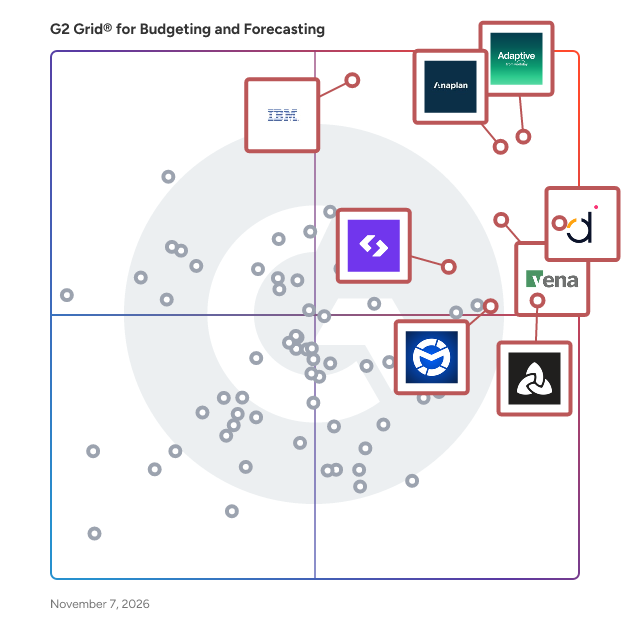
G2 Grid® for Budgeting and Forecasting Software

G2 Grid® for Budgeting and Forecasting Software plotting products by satisfaction and market presence

Highlighted products: Adaptive from Workday, Anaplan, Datarails, IBM Planning Analytics, Vena, Aleph, Spendesk, and Martus.

Underlying data: [Grid® JSON](https://www.g2.com/categories/budgeting-and-forecasting/grids.json?focus%5B%5D=adaptive-from-workday&focus%5B%5D=anaplan&focus%5B%5D=datarails&focus%5B%5D=ibm-planning-analytics&focus%5B%5D=vena&focus%5B%5D=getaleph&focus%5B%5D=spendesk&focus%5B%5D=martus)

Adaptive from Workday

Adaptive from Workday gives finance and business leaders limitless decision intelligence with AI‑powered planning, forecasting, and reporting. The platform connects live data from any combination of ERP, HR, CRM, operational systems, and cloud data platforms—whether or not they run on Workday—into a single planning model, so organizations can see the impact of decisions across the business before they commit. Patented Elastic Hypercube Technology (EHT) powers a high‑performance in‑memory engine that calculates complex, high‑dimensional scenarios in real time, while Decision Intelligence enables boundless exploration across all data sources. It all happens within a responsible AI framework, zero‑retention approach, and enterprise‑grade security.

Average Rating: 4.3/5.0

Total Reviews: 450

How Do G2 Users Rate Adaptive from Workday?

  • Has the product been a good partner in doing business?: 8.5/10 (Category avg: 9.2/10)
  • Adjustments: 8.1/10 (Category avg: 8.8/10)
  • Budget Hierarchies: 8.5/10 (Category avg: 8.8/10)
  • Variance Analysis: 8.1/10 (Category avg: 8.7/10)

Who Is the Company Behind Adaptive from Workday?

  • Seller: Workday
  • Company Website:
  • Year Founded: 2005
  • HQ Location: Pleasanton, CA
  • LinkedIn® Page: www.linkedin.com
    25,204 employees on LinkedIn®
  • Ownership: NYSE: WDAY

Who Uses This Product?

  • Who Uses This: Financial Analyst, Senior Financial Analyst
  • Top Industries: Computer Software, Information Technology and Services
  • Company Size: 51% Medium, 36% Large

What Do G2 Reviewers Say About Adaptive from Workday?

AI-generated summary from verified user reviews

Pros
  • Users appreciate the user-friendly interface of Workday Adaptive Planning, making budgeting and forecasting accessible for everyone.
  • Users value the efficiency of Workday Adaptive Planning, enhancing collaboration and streamlining financial planning and forecasting processes.
  • Users value the flexibility and real-time collaboration of Workday Adaptive Planning, enhancing financial planning and decision-making.
  • Users appreciate the flexibility and user-friendliness of Workday Adaptive Planning, enhancing financial planning and collaboration significantly.
  • Users appreciate the structure, flexibility, and transparency provided by Workday Adaptive Planning for financial planning and forecasting.
Cons
  • Users find the learning curve and complexity of Workday Adaptive Planning challenging, requiring significant training and system knowledge.
  • Users often face complex setup challenges with Workday Adaptive Planning, requiring professional help and extensive training for effective use.
  • Users find a steep learning curve with Workday Adaptive Planning, requiring significant training to navigate effectively.
  • Users note a steep learning curve with Workday Adaptive Planning, requiring extensive training to navigate effectively.
  • Users find the difficult customization in Workday Adaptive Planning to be time-consuming and complex, especially for unique needs.

What Are Recent G2 Reviews of Adaptive from Workday?

What Are G2 Users Discussing About Adaptive from Workday?

Anaplan

Anaplan is a software designed to optimize enterprise decision-making through scenario planning and analysis. The software provides cross-functional collaboration and intelligent insight surfacing by leveraging a connected planning platform that bridges organizational silos. It automates data consolidation across departments and reduces fragmented, siloed planning workflows. Anaplan addresses complex business planning challenges by unifying financial and operational data to support faster, more informed decisions. The software supports use cases across corporate performance management, budgeting and forecasting, compensation management, financial close, sales and operations planning, supply chain planning, and workforce management.

Average Rating: 4.6/5.0

Total Reviews: 428

How Do G2 Users Rate Anaplan?

  • Has the product been a good partner in doing business?: 8.5/10 (Category avg: 9.2/10)
  • Adjustments: 8.8/10 (Category avg: 8.8/10)
  • Budget Hierarchies: 8.8/10 (Category avg: 8.8/10)
  • Variance Analysis: 8.6/10 (Category avg: 8.7/10)

Who Is the Company Behind Anaplan?

  • Seller: Anaplan
  • Company Website:
  • Year Founded: 2006
  • HQ Location: Miami, FL
  • LinkedIn® Page: www.linkedin.com
    3,020 employees on LinkedIn®

Who Uses This Product?

  • Who Uses This: Manager, Senior Consultant
  • Top Industries: Information Technology and Services, Financial Services
  • Company Size: 52% Large, 34% Medium

What Do G2 Reviewers Say About Anaplan?

AI-generated summary from verified user reviews

Pros
  • Users praise Anaplan for its user-friendly interface, allowing easy model building and navigation without technical skills.
  • Users commend Anaplan for its flexibility, allowing easy customization to meet specific business needs effectively.
  • Users value Anaplan for its real-time updates and flexibility, enhancing collaboration and simplifying complex planning processes.
  • Users value the efficiency of Anaplan for instant calculations and seamless what-if analysis across the platform.
  • Users appreciate the real-time data updates in Anaplan, enhancing planning efficiency and collaborative decision-making.
Cons
  • Users experience performance slowdowns with large models and face challenges in debugging and connectivity, impacting usability.
  • Users find missing features in Anaplan, leading to slow performance and complex, time-consuming implementations.
  • Users report a steep learning curve with Anaplan, making initial adoption challenging for new users.
  • Users report performance issues with Anaplan, including slowdowns during peak usage and challenges with model design.
  • Users find a lack of features in Anaplan, impacting functionality and user flexibility significantly.

What Are Recent G2 Reviews of Anaplan?

What Are G2 Users Discussing About Anaplan?

Datarails

Datarails is a software designed to unify financial reporting, FP&A, cash management, spend control, and month-end close into a single scalable workspace. The software provides automated data consolidation into a single source of truth by leveraging an AI-powered, Excel-native platform with 600+ integrations across accounting, ERP, CRM, banking, and HRIS systems. It automates manual data collection tasks and reduces the time finance teams spend gathering information rather than analyzing it. Datarails addresses fragmented financial operations by strengthening visibility, controls, and collaboration across the CFO's office. The software supports faster reporting, more accurate financial insights, and data-driven decision-making for finance teams of all sizes.

Average Rating: 4.6/5.0

Total Reviews: 394

How Do G2 Users Rate Datarails?

  • Has the product been a good partner in doing business?: 9.2/10 (Category avg: 9.2/10)
  • Adjustments: 8.4/10 (Category avg: 8.8/10)
  • Budget Hierarchies: 8.5/10 (Category avg: 8.8/10)
  • Variance Analysis: 8.5/10 (Category avg: 8.7/10)

Who Is the Company Behind Datarails?

  • Seller: Datarails
  • Company Website:
  • Year Founded: 2015
  • HQ Location: New York
  • LinkedIn® Page: www.linkedin.com
    405 employees on LinkedIn®

Who Uses This Product?

  • Who Uses This: CFO, Chief Financial Officer
  • Top Industries: Financial Services, Hospital & Health Care
  • Company Size: 70% Medium, 22% Small

What Do G2 Reviewers Say About Datarails?

AI-generated summary from verified user reviews

Pros
  • Users love the ease of use of Datarails, appreciating its efficiency and seamless integration with Excel.
  • Users value the reporting efficiency of Datarails, as it saves time and produces clear, accurate reports.
  • Users appreciate the seamless Excel integration of Datarails, enhancing their data management experience with familiar tools.
  • Users value Datarails for its centralized data management, enhancing reporting and integrating seamlessly with Excel.
  • Users value the efficiency of Datarails, as it simplifies reporting and significantly reduces time spent on financial tasks.
Cons
  • Users find the learning difficulty of Datarails challenging, requiring significant time to master its features and functions.
  • Users often struggle with a steep learning curve and find the platform challenging, especially for non-tech-savvy individuals.
  • Users express frustration over missing features like consistent formulas and case sensitivity issues, complicating their workflow.
  • Users face a steep learning curve with Datarails, requiring significant time to master complex features and reports.
  • Users find Datarails' interface difficult to understand, especially for those less tech-savvy, complicating their experience.

What Are Recent G2 Reviews of Datarails?

What Are G2 Users Discussing About Datarails?

AI can help you find the answers. G2 helps you trust them.

Connect G2 to Claude or ChatGPT for answers grounded in G2's trusted reviews, comparisons, and pricing from real user insights.

How it works

Vena

Vena is a software designed to deliver complete FP&A capabilities within the Microsoft technology ecosystem for finance and accounting teams. The software provides accelerated budget cycles, planning processes, and business-wide reporting by leveraging an agentic AI-powered, Excel-native platform with native Microsoft integrations. It automates repetitive financial workflows and reduces the time required to complete budget cycles and reporting tasks. Vena addresses the need for accessible FP&A expertise by enabling any user to independently access planning capabilities within their natural flow of work. The software supports over 2,000 companies across financial reporting, budgeting, consolidations, and performance management use cases.

Average Rating: 4.5/5.0

Total Reviews: 476

How Do G2 Users Rate Vena?

  • Has the product been a good partner in doing business?: 9.1/10 (Category avg: 9.2/10)
  • Adjustments: 8.9/10 (Category avg: 8.8/10)
  • Budget Hierarchies: 9.0/10 (Category avg: 8.8/10)
  • Variance Analysis: 8.9/10 (Category avg: 8.7/10)

Who Is the Company Behind Vena?

  • Seller: Vena Solutions
  • Company Website:
  • Year Founded: 2011
  • HQ Location: Toronto
  • LinkedIn® Page: www.linkedin.com
    721 employees on LinkedIn®

Who Uses This Product?

  • Who Uses This: Senior Financial Analyst, Financial Analyst
  • Top Industries: Information Technology and Services, Accounting
  • Company Size: 64% Medium, 20% Large

What Do G2 Reviewers Say About Vena?

AI-generated summary from verified user reviews

Pros
  • Users commend the ease of use of Vena, seamlessly integrating with Excel for efficient finance management.
  • Users value the Excel integration of Vena, enabling effortless collaboration and efficiency for finance teams.
  • Users appreciate Vena's ability to combine Excel flexibility with robust controls, enhancing collaboration and data integrity during planning.
  • Users find Vena's user-friendly interface enhances collaboration and centralizes financial planning, making workflows more efficient.
  • Users commend Vena for its efficient report generation and seamless integrations, enhancing daily operational productivity.
Cons
  • Users face a learning difficulty with Vena due to its reliance on Excel and complex setup requirements.
  • Users experience a learning curve for non-finance roles, requiring strong Excel skills for effective use of Vena.
  • Users face a steep learning curve with Vena, particularly for those unfamiliar with Excel and complex modeling.
  • Users face a notable learning curve with Vena, impacting new users' ability to utilize its capabilities effectively.
  • Users find the setup difficult, requiring extensive tutorials and support to navigate the complex interface initially.

What Are Recent G2 Reviews of Vena?

IBM Planning Analytics

IBM Planning Analytics is a software designed to automate planning, budgeting, and forecasting processes for finance and business operations leaders across finance, supply chain, HR, marketing, and sales. The software provides real-time analysis, performance tracking, and AI-powered forecasting by leveraging an integrated, governed platform with multidimensional modeling and a native spreadsheet experience. It automates data integration and cross-functional collaboration and reduces inefficient, error-prone manual planning processes. IBM Planning Analytics addresses disconnected financial and operational planning by connecting all plans under a single governed source of truth to accelerate planning cycles. The software supports scenario modeling, interactive dashboards, personalized reporting, and collaborative decision-making across enterprise and mid-market organizations.

Average Rating: 4.4/5.0

Total Reviews: 248

How Do G2 Users Rate IBM Planning Analytics?

  • Has the product been a good partner in doing business?: 8.4/10 (Category avg: 9.2/10)
  • Adjustments: 9.1/10 (Category avg: 8.8/10)
  • Budget Hierarchies: 8.8/10 (Category avg: 8.8/10)
  • Variance Analysis: 8.7/10 (Category avg: 8.7/10)

Who Is the Company Behind IBM Planning Analytics?

  • Seller: IBM
  • Company Website:
  • Year Founded: 1911
  • HQ Location: Armonk, New York, United States
  • LinkedIn® Page: www.linkedin.com
    344,328 employees on LinkedIn®
  • Ownership: SWX:IBM

Who Uses This Product?

  • Who Uses This: Financial Analyst
  • Top Industries: Information Technology and Services, Financial Services
  • Company Size: 48% Large, 36% Medium

What Do G2 Reviewers Say About IBM Planning Analytics?

AI-generated summary from verified user reviews

Pros
  • Users praise IBM Planning Analytics for its high efficiency in managing data and automating tasks seamlessly.
  • Users value the planning efficiency of IBM Planning Analytics, effectively transforming chaos into structured, actionable insights.
  • Users value the speed and clarity of IBM Planning Analytics, enabling rapid modeling and insightful decision-making.
  • Users praise the ease of use of IBM Planning Analytics, enabling seamless planning and engagement with advanced insights.
  • Users appreciate the high accuracy of forecasting in IBM Planning Analytics, enabling efficient data handling and real-time insights.
Cons
  • Users find the learning curve challenging, especially for teams unfamiliar with analytics tools, requiring time and patience.
  • Users find the learning difficulty in IBM Planning Analytics can be challenging, especially for those unfamiliar with analytics tools.
  • Users find the user difficulty steep, requiring time and expertise, which may intimidate those unfamiliar with analytics tools.
  • Users find the difficult learning curve challenging, especially for teams unfamiliar with analytics tools and complex workflows.
  • Users find the complexity of IBM Planning Analytics challenging, necessitating technical expertise and patience during onboarding.

What Are Recent G2 Reviews of IBM Planning Analytics?

What Are G2 Users Discussing About IBM Planning Analytics?

Aleph

Aleph is a software designed to enhance real-time data access and automation for finance teams managing FP&A, forecasting, and budgeting workflows. The software provides multi-source data consolidation, customizable reporting, and bi-directional spreadsheet integration by leveraging an AI-native platform with over 150 data connectors compatible with Excel, Google Sheets, and web-based dashboards. It automates repetitive data preparation and reporting tasks and reduces manual busywork by up to 90% for finance professionals. Aleph addresses fragmented financial data management by consolidating information from multiple systems into a single, accurate source of truth accessible through familiar tools. The software supports use cases across forecasting, budgeting, performance analysis, and strategic planning for mid-market organizations seeking faster reporting and deeper financial insights.

Average Rating: 4.9/5.0

Total Reviews: 150

How Do G2 Users Rate Aleph?

  • Has the product been a good partner in doing business?: 9.9/10 (Category avg: 9.2/10)
  • Adjustments: 8.8/10 (Category avg: 8.8/10)
  • Budget Hierarchies: 9.2/10 (Category avg: 8.8/10)
  • Variance Analysis: 9.4/10 (Category avg: 8.7/10)

Who Is the Company Behind Aleph?

  • Seller: Aleph
  • Company Website:
  • Year Founded: 2020
  • HQ Location: New York, US
  • LinkedIn® Page: www.linkedin.com
    105 employees on LinkedIn®

Who Uses This Product?

  • Who Uses This: Senior Financial Analyst, FP&A Manager
  • Top Industries: Computer Software, Financial Services
  • Company Size: 76% Medium, 16% Small

What Do G2 Reviewers Say About Aleph?

AI-generated summary from verified user reviews

Pros
  • Users find Aleph to have a user-friendly interface that simplifies data visualization and overall data management.
  • Users appreciate the helpful customer support from Aleph, enhancing their overall experience with the platform.
  • Users value Aleph's seamless integrations, enabling streamlined communication across systems and enhancing data usability and analysis.
  • Users value the implementation ease of Aleph, praising its quick setup and seamless integration into workflows.
  • Users find Aleph's ease of implementation invaluable, allowing them to quickly integrate it into their workflows.
Cons
  • Users note the missing features in Aleph, impacting its functionality compared to more established alternatives.
  • Users report encountering occasional bugs with Aleph, but the team promptly addresses these issues with quick resolutions.
  • Users experience Excel integration issues with Aleph, finding it harder to set up than expected and inconsistent with Google Sheets.
  • Users experience slow performance with Aleph, citing long load times and frequent timeouts affecting usability.
  • Users experience software bugs, particularly with integrations, although the team addresses issues promptly and effectively.

What Are Recent G2 Reviews of Aleph?

Martus

Martus is a software designed to streamline budgeting, forecasting, and reporting for nonprofits, faith-based organizations, and small to mid-sized businesses seeking to replace error-prone spreadsheets. The software provides multi-user budget creation, role-based permissions, structured approval workflows, and real-time budget-to-actual reporting by leveraging a cloud-based platform integrated with more than 20 ERP and accounting systems including Sage Intacct, QuickBooks, NetSuite, Acumatica, and Xero. It automates data synchronization between budgets and core financial systems and reduces budgeting cycle time by up to 50% compared to manual spreadsheet processes. Martus addresses the challenge of disconnected, siloed budgeting by centralizing financial data and enabling collaborative planning across finance leaders and department managers with confidence. The software supports scenario planning, forecasting, and real-time financial visibility for scaling organizations, with implementation typically completed in approximately three weeks.

Average Rating: 4.7/5.0

Total Reviews: 107

How Do G2 Users Rate Martus?

  • Has the product been a good partner in doing business?: 9.8/10 (Category avg: 9.2/10)
  • Adjustments: 8.7/10 (Category avg: 8.8/10)
  • Budget Hierarchies: 8.7/10 (Category avg: 8.8/10)
  • Variance Analysis: 9.0/10 (Category avg: 8.7/10)

Who Is the Company Behind Martus?

  • Seller: Martus Solutions
  • Company Website:
  • Year Founded: 2008
  • HQ Location: Greenville, US
  • LinkedIn® Page: www.linkedin.com
    49 employees on LinkedIn®

Who Uses This Product?

  • Who Uses This: Controller
  • Top Industries: Non-Profit Organization Management, Religious Institutions
  • Company Size: 51% Medium, 31% Small

What Do G2 Reviewers Say About Martus?

AI-generated summary from verified user reviews

Pros
  • Users find Martus intuitive and easy to use, quickly appreciating its efficient setup and exceptional support services.
  • Users commend Martus for its exceptional customer support, with quick responses and effective solutions to issues.
  • Users value the seamless integrations of Martus, enhancing financial management and improving data accuracy across departments.
  • Users love the real-time financial data availability of Martus, making budgeting efficient and error-free for departments.
  • Users appreciate the budgeting efficiency of Martus, enjoying real-time data and streamlined processes that save time.
Cons
  • Users find the lengthy learning curve challenging, particularly with software terminology and configuration options.
  • Users find the steep learning curve challenging, particularly with software terminology and various configurations and reports.
  • Users find Martus to have complexity issues, particularly for non-accountants and small educational institutions.
  • Users find the confusing interface of Martus hinders their experience, especially with navigation and shared budgets.
  • Users find that there is a lengthy learning curve for mastering Martus, particularly regarding data configuration and reporting.

What Are Recent G2 Reviews of Martus?

What Are G2 Users Discussing About Martus?

Spendesk

Spendesk is the complete spend management platform that saves businesses time and money by connecting company spend. With the integration of everyday technologies, built-in automation, procurement, and an easily adopted approval process, Spendesk’s single solution makes agile, efficient spending easy for employees. It gives finance leaders complete visibility across company spend. With the launch of its Procure-to-Pay solution, Spendesk is the first European platform to fully integrate procurement and spend management for businesses of up to 1,000 employees.

Average Rating: 4.5/5.0

Total Reviews: 791

How Do G2 Users Rate Spendesk?

  • Has the product been a good partner in doing business?: 8.5/10 (Category avg: 9.2/10)
  • Adjustments: 8.9/10 (Category avg: 8.8/10)
  • Budget Hierarchies: 8.7/10 (Category avg: 8.8/10)
  • Variance Analysis: 8.6/10 (Category avg: 8.7/10)

Who Is the Company Behind Spendesk?

  • Seller: Spendesk
  • Company Website:
  • Year Founded: 2016
  • HQ Location: Paris, Île-de-France
  • LinkedIn® Page: www.linkedin.com
    348 employees on LinkedIn®

Who Uses This Product?

  • Who Uses This: CFO, Comptable
  • Top Industries: Computer Software, Information Technology and Services
  • Company Size: 57% Medium, 40% Small

What Do G2 Reviewers Say About Spendesk?

AI-generated summary from verified user reviews

Pros
  • Users praise the ease of use of Spendesk, highlighting its intuitive interface and clear expense tracking process.
  • Users feel that Spendesk lacks timely customer support, impacting their overall satisfaction with the service.
  • Users feel the customer support of Spendesk has declined, impacting their overall experience negatively.
  • Users appreciate the ease of understanding of Spendesk, making it simple to track and order finances.
  • Users value the easy submission process of Spendesk, enjoying its user-friendly interface and efficient expense management.
Cons
  • Users report approval issues with Spendesk, facing delays and lack of support that hinder daily operations.
  • Users report severe credit issues with Spendesk, facing unresponsive support and lost funds during urgent business needs.
  • Users report significant delays in support response, leading to frustration and disruption in their purchasing processes.
  • Users report significant payment issues with Spendesk, citing inaccessible funds and poor customer support response.
  • Users report significant processing delays with Spendesk, impacting accessibility to funds and urgent business transactions.

What Are Recent G2 Reviews of Spendesk?

What Are G2 Users Discussing About Spendesk?

Fathom

Fathom provides a suite of in-depth analysis tools and metrics which help you see exactly how well your business is performing. These tools and metrics help to assess profitability, cash flow, growth and other key performance indicators (KPIs). Fathom seamlessly integrates with Xero, QuickBooks Online/Desktop, Sage and MYOB; or import data via Excel & Google Sheets. Create beautiful reports and dashboards: Whether presenting to a client, reporting to investors, or updating your management team, you'll always be prepared with Fathom. Confidently plan with Cash Flow Forecasting: Fathom combines business planning with powerfully simple three-way cash flow forecasting software. Consolidated reporting... made easy: Fathom enables you to group your related companies together to create consolidated reports for an organisation. In addition to reporting for an individual company, you can easily track and monitor the performance of a group to which a company belongs. On-the-fly benchmarking: Fathom helps you easily compare, rank and benchmark your companies, clients or franchisees. Get a clear view with the Insights Dashboard: If you're managing a portfolio of clients or multiple business entities, the Insights Dashboard comprises key financial metrics to help you monitor performance and spot opportunities at a glance.

Average Rating: 4.6/5.0

Total Reviews: 166

How Do G2 Users Rate Fathom?

  • Has the product been a good partner in doing business?: 9.3/10 (Category avg: 9.2/10)
  • Adjustments: 8.5/10 (Category avg: 8.8/10)
  • Budget Hierarchies: 7.8/10 (Category avg: 8.8/10)
  • Variance Analysis: 8.6/10 (Category avg: 8.7/10)

Who Is the Company Behind Fathom?

Who Uses This Product?

  • Who Uses This: Accountant, Controller
  • Top Industries: Accounting, Information Technology and Services
  • Company Size: 63% Small, 29% Medium

What Do G2 Reviewers Say About Fathom?

AI-generated summary from verified user reviews

Pros
  • Users value the extensive automation features of Fathom, which significantly enhance efficiency and reduce errors.
  • Users appreciate the versatile reporting features of Fathom, enhancing their regular reporting cycles significantly.
  • Users praise the intuitive ease of use of Fathom, finding it highly efficient and user-friendly for reporting.
  • Users appreciate the reporting efficiency of Fathom, highlighting its intuitive automation and detailed customizable reports.
  • Users value the prompt and helpful customer support of Fathom, ensuring assistance is readily available when needed.
Cons
  • Users find the missing features in Fathom, struggling with rigid templates and insufficient customization options for reporting.
  • Users face upload issues with Fathom, finding the Excel format cumbersome and desiring a more seamless process.
  • Users find customization difficulties with Fathom, wishing for more flexibility in reporting and data presentation.
  • Users face import issues, struggling with seamless data uploads and integration with MYOB EXO, adding unnecessary steps.
  • Users feel improvements are needed in Fathom's handling of accruals and reporting customization for better usability.

What Are Recent G2 Reviews of Fathom?

Planful

Planful is a software designed to streamline business-wide planning, budgeting, consolidations, reporting, and analytics for finance teams globally. The software provides accelerated decision-making, faster financial close, and improved forecast accuracy by leveraging award-winning AI capabilities built into a cloud-based financial performance management platform. It automates planning and consolidation workflows and reduces manual cycle times across budgeting and reporting processes. Planful addresses the need for centralized financial performance management by unifying planning, reporting, and analytics in a single cloud solution used in over 100 countries. The software supports more than 1,500 customers across industries including technology, healthcare, and consumer goods, integrating financial close and performance analytics in one platform.

Average Rating: 4.3/5.0

Total Reviews: 500

How Do G2 Users Rate Planful?

  • Has the product been a good partner in doing business?: 8.8/10 (Category avg: 9.2/10)
  • Adjustments: 8.2/10 (Category avg: 8.8/10)
  • Budget Hierarchies: 8.4/10 (Category avg: 8.8/10)
  • Variance Analysis: 8.3/10 (Category avg: 8.7/10)

Who Is the Company Behind Planful?

  • Seller: Planful
  • Company Website:
  • Year Founded: 2000
  • HQ Location: San Francisco, CA
  • LinkedIn® Page: www.linkedin.com
    548 employees on LinkedIn®

Who Uses This Product?

  • Who Uses This: Financial Analyst, Senior Financial Analyst
  • Top Industries: Computer Software, Hospital & Health Care
  • Company Size: 48% Medium, 45% Large

What Do G2 Reviewers Say About Planful?

AI-generated summary from verified user reviews

Pros
  • Users value the ease of use in Planful, enjoying efficient report generation and streamlined workflows.
  • Users value the ease of reporting in Planful, enabling quick and efficient month-end report generation.
  • Users value the reporting efficiency of Planful, enabling quick generation of insightful month-end reports with ease.
  • Users value the automation features of Planful, enhancing efficiency in budgeting and providing a smooth user experience.
  • Users appreciate the customization and user-friendly features of Planful, enhancing efficiency in budgeting and reporting.
Cons
  • Users find a steep learning curve for advanced functions, complicating usage and slowing down progress.
  • Users find a steep learning curve for advanced functions, complicating effective use of Planful's features.
  • Users note missing features in reporting and dashboard formatting, impacting overall functionality and ease of use.
  • Users find Planful not intuitive, expressing a desire for more customizable report options and a better mobile experience.
  • Users feel there are improvements needed in customization options and mobile experience for better functionality on the go.

What Are Recent G2 Reviews of Planful?

What Are G2 Users Discussing About Planful?

Drivetrain

Drivetrain is a software designed to accelerate budgeting, reporting, and forecasting through Autonomous FP&A for mid-market and enterprise finance teams. The software provides 3-statement modeling, headcount planning, revenue forecasting, scenario modeling, and variance analysis by leveraging an AI-native platform with native integrations across 800+ business systems including Salesforce, NetSuite, QuickBooks, Xero, HubSpot, Rippling, Excel, and Looker. It automates manual data preparation and reconciliation and reduces reliance on rigid templates or specialized technical expertise through plain-English formula building. Drivetrain addresses fragmented FP&A workflows by unifying budgeting, reporting, board reporting, and sales planning into a single platform with granular role-based access controls. The software supports finance teams across more than 20 countries and 13 verticals, with customers including Postman, Matillion, Spinnaker Support, and Jumia Group.

Average Rating: 4.7/5.0

Total Reviews: 146

How Do G2 Users Rate Drivetrain?

  • Has the product been a good partner in doing business?: 9.7/10 (Category avg: 9.2/10)
  • Adjustments: 9.3/10 (Category avg: 8.8/10)
  • Budget Hierarchies: 9.2/10 (Category avg: 8.8/10)
  • Variance Analysis: 9.2/10 (Category avg: 8.7/10)

Who Is the Company Behind Drivetrain?

  • Seller: Drivetrain
  • Company Website:
  • Year Founded: 2021
  • HQ Location: Sunnyvale, US
  • LinkedIn® Page: in.linkedin.com
    110 employees on LinkedIn®

Who Uses This Product?

  • Who Uses This: CFO, Finance Manager
  • Top Industries: Computer Software, Information Technology and Services
  • Company Size: 79% Medium, 18% Small

What Do G2 Reviewers Say About Drivetrain?

AI-generated summary from verified user reviews

Pros
  • Users find Drivetrain exceptionally easy to use, with intuitive features that streamline workflows and enhance collaboration.
  • Users find Drivetrain's report creation capabilities essential for streamlining financial reporting and enhancing collaboration.
  • Users appreciate the reporting efficiency of Drivetrain, streamlining financial processes and enhancing productivity significantly.
  • Users commend the exceptional customer support and expertise of Drivetrain's team, ensuring smooth implementation and ongoing assistance.
  • Users value the easy integrations of Drivetrain, enabling seamless connections with various systems for real-time insights.
Cons
  • Users note a significant learning curve with Drivetrain, making model building more complex than traditional spreadsheets.
  • Users note the lack of advanced modeling features and poor documentation, leading to a challenging learning experience.
  • Users face a notable learning difficulty due to the different logic in building models compared to traditional spreadsheets.
  • Users face a steep learning curve with Drivetrain, complicating model structuring compared to traditional spreadsheets.
  • Users face a difficult learning curve with Drivetrain's advanced features, requiring time and guidance for effective use.

What Are Recent G2 Reviews of Drivetrain?

Pigment

Pigment is a software designed to support AI-powered business planning and performance management for enterprise finance, sales, and supply chain teams. The software provides dynamic modeling, autonomous AI agents, and intuitive scenario planning by leveraging a platform built to handle the complexity of cross-functional enterprise planning. It automates plan updates and forecast generation and reduces the time teams spend manually building and adjusting financial models. Pigment addresses the challenge of slow, disconnected planning across business functions by combining AI-driven insight with an intuitive user experience that enables confident decision-making. The software supports use cases across financial planning, sales planning, supply chain planning, and performance management for mid-market and enterprise companies including Unilever, Snowflake, Siemens, and Anthropic.

Average Rating: 4.6/5.0

Total Reviews: 124

How Do G2 Users Rate Pigment?

  • Has the product been a good partner in doing business?: 9.5/10 (Category avg: 9.2/10)
  • Adjustments: 8.9/10 (Category avg: 8.8/10)
  • Budget Hierarchies: 8.7/10 (Category avg: 8.8/10)
  • Variance Analysis: 8.8/10 (Category avg: 8.7/10)

Who Is the Company Behind Pigment?

  • Seller: Pigment
  • Company Website:
  • Year Founded: 2019
  • HQ Location: Paris, FR
  • LinkedIn® Page: www.linkedin.com
    773 employees on LinkedIn®

Who Uses This Product?

  • Who Uses This: FP&A Manager
  • Top Industries: Computer Software, Information Technology and Services
  • Company Size: 71% Medium, 21% Large

What Do G2 Reviewers Say About Pigment?

AI-generated summary from verified user reviews

Pros
  • Users praise the flexibility of Pigment, enabling seamless adjustments and tailored financial planning as needs evolve.
  • Users love the flexibility and AI features in Pigment, enhancing planning and reporting capabilities effectively.
  • Users commend the stellar customer support from Pigment, enhancing their experience and ensuring seamless implementations.
  • Users appreciate the ease of use of Pigment, allowing for quick setup and effective collaboration in financial planning.
  • Users praise Pigment for its powerful automation, seamlessly integrating data and enhancing forecasting capabilities with minimal errors.
Cons
  • Users experience data inaccuracy due to missing fields for reporting, causing bottlenecks for analysts and report builders.
  • Users find the formulas and calculations complicated, impacting their ability to efficiently use Pigment.
  • Users find the setup process complex, noting complicated formulas and a lack of easy API management options.
  • Users face connectivity issues with Pigment, often experiencing slow calculations and performance challenges on large datasets.
  • Users find the formula limitations somewhat tricky, complicating calculations and slowing down forecasts.

What Are Recent G2 Reviews of Pigment?

OneStream - Unified EPM

OneStream - Unified EPM is a software designed to empower CFOs, controllers, and finance executives with a comprehensive enterprise and corporate performance management platform. The software provides unified financial consolidation, planning, forecasting, close management, and AI-driven analytics by leveraging a single extensible platform that connects financial and operational data from multiple ERP sources. It automates financial close and consolidation workflows and reduces the complexity of managing disparate planning and reporting systems. OneStream - Unified EPM addresses fragmented financial operations by unifying data quality management, scenario analysis, driver-based planning, and compliance reporting in one governed platform. The software supports over 1,700 customers including 15% of the Fortune 500, with use cases spanning FP&A, profitability analysis, ESG reporting, workforce planning, and AI-powered integrated business planning.

Average Rating: 4.6/5.0

Total Reviews: 150

How Do G2 Users Rate OneStream - Unified EPM?

  • Has the product been a good partner in doing business?: 9.2/10 (Category avg: 9.2/10)
  • Adjustments: 8.6/10 (Category avg: 8.8/10)
  • Budget Hierarchies: 8.7/10 (Category avg: 8.8/10)
  • Variance Analysis: 8.4/10 (Category avg: 8.7/10)

Who Is the Company Behind OneStream - Unified EPM?

  • Seller: OneStream Software
  • Company Website:
  • HQ Location: Birmingham, Michigan, United States
  • LinkedIn® Page: www.linkedin.com
    1,681 employees on LinkedIn®
  • Ownership: Tom Shea, Bob Powers, Craig Colby
  • Phone: (248) 650-1490

Who Uses This Product?

  • Top Industries: Manufacturing, Accounting
  • Company Size: 62% Large, 28% Medium

What Do G2 Reviewers Say About OneStream - Unified EPM?

AI-generated summary from verified user reviews

Pros
  • Users appreciate the ease of use of OneStream, highlighting its intuitive workflows and quick access to insights.
  • Users value the single platform for data management that integrates consolidation, planning, and reporting seamlessly.
  • Users value the flexibility of OneStream, enabling seamless integration and enhanced efficiency across financial processes.
  • Users find the streamlined reporting capabilities of OneStream impressive, enhancing efficiency across financial operations.
  • Users value the single platform capabilities of OneStream, which streamline consolidation, planning, and reporting processes efficiently.
Cons
  • Users face a steep learning curve, making the initial experience with OneStream challenging for new developers and admins.
  • Users face a steep learning curve with OneStream, necessitating training for effective usage and adoption.
  • Users find the steep learning curve challenging, emphasizing the need for training to ease user adoption.
  • Users highlight the steep learning curve and complexity of OneStream, requiring significant time and support for effective use.
  • Users struggle with dashboard limitations, finding reporting and performance challenging without extensive customization.

What Are Recent G2 Reviews of OneStream - Unified EPM?

What Are G2 Users Discussing About OneStream - Unified EPM?

Intuit Enterprise Suite

Intuit Enterprise Suite is a modern, intelligent ERP designed for larger, growing companies that have outgrown basic financial tools but don’t want the cost, complexity, or disruption of traditional ERP systems. It's an all-in-one platform that goes beyond basic accounting, offering a unified solution that can streamline operations and improve profitability. Unlike legacy ERPs that are often difficult to implement and maintain, Intuit Enterprise Suite is is simple to use and built to scale. It leverages Intuit's long-standing legacy in financial tools, making the transition feel like a natural evolution for businesses already familiar with the company's products. A key differentiator for Intuit Enterprise Suite is its integration of artificial intelligence. By using AI built on decades of anonymized financial data, the platform provides automated, "done-for-you" experiences and intelligent business insights. This helps businesses move away from the fragmented and manual workflows that often hinder growth, allowing them to focus on strategic initiatives and make smarter decisions. Key Features: - One connected platform: The solution serves as a unified platform that consolidates various business functions, including financial management, payroll, payments, workforce, and marketing. This all-in-one approach helps mid-market businesses that are often managing a collection of disparate applications, leading to data silos and increased costs. By bringing everything together, Intuit Enterprise Suite helps reduce the total cost of ownership and streamlines workflows. - Automation and intelligence: The product’s deep integration of artificial intelligence is a significant differentiator across accounting, financial planning, project management, and payments. Built on Intuit's extensive foundation of financial data, the AI capabilities go beyond simple automation, providing proactive, "done-for-you" experiences and intelligent insights. - Multi-entity management: For businesses with multiple entities or subsidiaries, the Intuit Enterprise Suite offers robust multi-entity management capabilities. This includes the ability to manage inter-company transactions and generate consolidated financial reports, providing a single source of truth and a comprehensive view of the entire organization's performance. - Simple to use, built to scale: A familiar, intuitive design makes adoption easy, while advanced capabilities like multi-entity management and consolidated reporting give businesses the confidence to grow. QuickBooks customers can migrate seamlessly.

Average Rating: 4.5/5.0

Total Reviews: 68

How Do G2 Users Rate Intuit Enterprise Suite?

  • Has the product been a good partner in doing business?: 9.3/10 (Category avg: 9.2/10)

Who Is the Company Behind Intuit Enterprise Suite?

  • Seller: Intuit
  • Company Website:
  • Year Founded: 1983
  • HQ Location: Mountain View, California
  • LinkedIn® Page: www.linkedin.com
    15,963 employees on LinkedIn®
  • Ownership: VIE:INTU

Who Uses This Product?

  • Who Uses This: Controller, CFO
  • Top Industries: Construction, Accounting
  • Company Size: 66% Small, 31% Medium

What Do G2 Reviewers Say About Intuit Enterprise Suite?

AI-generated summary from verified user reviews

Pros
  • Users praise the ease of use of Intuit Enterprise Suite, significantly streamlining workflows and saving valuable time.
  • Users highlight the streamlined workflow of Intuit Enterprise Suite, saving significant time on data entry and management.
  • Users appreciate the easy access Intuit Enterprise Suite offers, enhancing workflow and saving significant time.
  • Users highlight the easy management of Intuit Enterprise Suite, enjoying streamlined workflows and significant time savings.
  • Users value the feature-rich capabilities of Intuit Enterprise Suite, enhancing financial management and efficiency for multiple businesses.
Cons
  • Users experience slow loading times for reports, complicating tasks and leading to frustration with the system's performance.
  • Users find the complex features overwhelming at times, especially when performing simple tasks and waiting for reports to load.
  • Users find the complex usability overwhelming, especially when attempting simple tasks, with slow report loading times.
  • Users find the overwhelming features of Intuit Enterprise Suite can complicate simple tasks and slow report loading.
  • Users face frustrating merge issues when managing data across multiple classes, leading to delays and complications.

What Are Recent G2 Reviews of Intuit Enterprise Suite?

LiveFlow

LiveFlow is a software designed to unify multi-entity accounting, AP/AR, and FP&A for accounting and finance teams. The software provides real-time financial reporting, rapid consolidation, and customizable dashboards by leveraging an AI-native ERP platform with deep QuickBooks integration and compatibility with Excel and Google Sheets. It automates routine accounting workflows and reduces the time required to consolidate multi-entity financials to under three minutes. LiveFlow addresses fragmented financial reporting across entities by managing intercompany workflows, shared accounts, and eliminations in one centralized platform. The software supports over 100 pre-built report templates, live spreadsheet sync, drill-down visualizations, and outcomes for small businesses and mid-market accounting teams.

Average Rating: 4.9/5.0

Total Reviews: 332

How Do G2 Users Rate LiveFlow?

  • Has the product been a good partner in doing business?: 9.6/10 (Category avg: 9.2/10)
  • Adjustments: 8.8/10 (Category avg: 8.8/10)
  • Budget Hierarchies: 8.6/10 (Category avg: 8.8/10)
  • Variance Analysis: 9.1/10 (Category avg: 8.7/10)

Who Is the Company Behind LiveFlow?

  • Seller: LiveFlow
  • Year Founded: 2021
  • HQ Location: New York, US
  • LinkedIn® Page: www.linkedin.com
    42 employees on LinkedIn®

Who Uses This Product?

  • Who Uses This: Accounting Manager, CEO
  • Top Industries: Accounting, Financial Services
  • Company Size: 75% Small, 20% Medium

What Do G2 Reviewers Say About LiveFlow?

AI-generated summary from verified user reviews

Pros
  • Users find LiveFlow to be incredibly easy to use, enjoying quick setup and intuitive navigation for reporting.
  • Users value the time-saving capabilities of LiveFlow, significantly reducing the effort needed for financial reporting.
  • Users value the time-saving capabilities of LiveFlow, significantly reducing effort in monthly reporting and financial consolidation.
  • Users value the reporting efficiency of LiveFlow, enhancing productivity and simplifying communication with funders and clients.
  • Users praise LiveFlow for its efficiency and automation, significantly enhancing productivity and streamlining reporting processes.
Cons
  • Users desire more customization options and advanced reporting features in LiveFlow for better usability.
  • Users desire more customization options for dashboards and reports to better fit their specific business needs.
  • Users find the inefficient reporting system cumbersome, lacking essential features for streamlined financial analysis.
  • Users find LiveFlow's pricing high for limited feature usage, affecting its overall value perception.
  • Users express a desire for limited reporting options in LiveFlow, seeking more customization and advanced reporting capabilities.

What Are Recent G2 Reviews of LiveFlow?

What Are G2 Users Discussing About LiveFlow?

Nathan Calabrese
NC
Researched and written by Nathan Calabrese
Updated June 24, 2026

Learn More About Budgeting and Forecasting Software

Budgeting and Forecasting Software Buying Insights at a Glance

Budgeting and forecasting software consolidates financial data from multiple sources, automates planning workflows, and enables real-time scenario modeling for strategic decision-making. Instead of treating budgeting as an annual exercise locked in spreadsheets, these platforms allow finance teams to continuously forecast, model what-if scenarios, and maintain dynamic visibility into financial performance. The result is a planning process that feels more like a strategic partnership and less like data compilation.

As economic uncertainty intensifies and business cycles accelerate, budgeting and forecasting tools have become central to modern finance operations. CFOs and FP&A teams rely on these solutions to consolidate multi-entity financials, automate variance analysis, run driver-based models, and collaborate across departments on planning cycles. In practice, the best budgeting and forecasting software acts as the connective layer between operational data, strategic planning, and financial reporting workflows.

Based on G2 review data that I analyzed, users rate budgeting and forecasting software strongly overall. Software products in this category hold an average star rating of 4.58/5 and an average likelihood to recommend of 9.17/10. Ease-of-use metrics trend high across the category, with 6.15/7 for Ease of Use and 6.38/7 for Quality of Support. These scores suggest that most finance teams are able to adopt budgeting and planning software relatively quickly once financial workflows are configured.

The biggest buying pattern that appears across reviews is that teams evaluating budgeting and forecasting solutions are trying to balance two priorities at once: maintaining financial accuracy and keeping planning cycles efficient. Strong platforms typically succeed by combining automation, financial data visibility, and finance-friendly workflows that reduce manual consolidation.

Common use cases include annual budgeting cycles with departmental approval workflows and version control, rolling forecasts that maintain continuous 12-18 month projections updated monthly or quarterly, and driver-based planning that links operational metrics like headcount, units, and pipeline directly to financial outputs. 

Finance teams also rely on these platforms for scenario modeling to run multiple what-if analyses for strategic planning and board presentations, multi-entity consolidation to aggregate financials across subsidiaries and cost centers, and variance analysis that tracks actuals versus budget or forecast with automated reporting workflows.

Pricing for budgeting and forecasting solutions usually scales with company size, number of users, data complexity, and automation capabilities. Entry-level plans typically start with basic consolidation and reporting features, while enterprise budgeting and forecasting tools offer more advanced driver-based modeling, workflow automation, and multi-entity consolidation. Implementation costs often range from 50% to 150% of first-year license fees, depending on data migration complexity and custom workflow requirements.

Top 5 FAQs from budgeting and forecasting software buyers

  • How do budgeting and forecasting systems improve financial planning accuracy?
  • What features should teams evaluate when choosing the best budgeting and forecasting software?
  • How well do budgeting and forecasting tools integrate with ERP and accounting systems?
  • What level of automation do budgeting and planning software solutions offer for reporting?
  • How scalable is budgeting and forecasting software for multi-entity organizations?

G2's top-rated budgeting and forecasting software, based on verified reviews, includes Anaplan, IBM Planning Analytics, Planful, Vena, and Workiva.

What are the top-reviewed budgeting and forecasting software on G2?

Anaplan

  • Number of Reviews: 283
  • Satisfaction Score: 98
  • Market Presence Score: 85
  • G2 Score: 92

IBM Planning Analytics

  • Number of Reviews: 85
  • Satisfaction Score: 69
  • Market Presence Score: 99
  • G2 Score: 84

Vena

  • Number of Reviews: 297
  • Satisfaction Score: 87
  • Market Presence Score: 70
  • G2 Score: 78

Planful

  • Number of Reviews: 292
  • Satisfaction Score: 84
  • Market Presence Score: 68
  • G2 Score: 76

Workiva

  • Number of Reviews: 120
  • Satisfaction Score: 82
  • Market Presence Score: 66
  • G2 Score: 74

Satisfaction reflects how users rate their experience with the product based on review signals such as usability, support, and likelihood to recommend. (Source 2)

Market Presence represents a product's market footprint based on company size, user adoption, and product growth indicators. (Source 2)

G2 Score combines Satisfaction and Market Presence to create a category-level ranking that enables direct product comparison. (Source 2)

Learn more about how G2 calculates these scores. (Source 1)

What I Often See in Budgeting and Forecasting Software

Pros: What I See Users Consistently Appreciating

  • Excel-native architecture preserving familiar workflows while adding automation layers

“The biggest strength of Datarails is its flexibility. Once you understand how the product works, it becomes incredibly powerful. It has enabled us to build a genuine single source of truth across CRM, finance, and HR systems. The Excel foundation has been a major advantage for us. Rather than forcing significant change management, we enhanced an environment the business already understands, adding automation, control, and governance.

From an efficiency perspective alone, we’ve saved at least multiple days of rework per month; realistically, close to one FTE’s worth of effort in a business of our size. But the bigger impact isn’t just time saved, it’s accuracy and insight. Having centralized structured data has enabled us to generate insights we couldn’t before.” - Urvesh P., Datarails Review

  • Real-time financial data consolidation, eliminating manual aggregation across systems

“I've solved many problems, but the most common are - easily consolidating data from many source systems, connecting multiple departments that don't usually "pass" data over the cloud, building near "real-time" P&Ls and other financial statements based on decentralized operational inputs. The benefits that I've realized have been reduction in hours used for "number crunching" and data consolidation and creating time for powerful analysis and decision making.” - Verified User in Management Consulting, Anaplan Review

  • Customizable reporting frameworks adapting to company-specific KPIs and structures

“Planful has significantly improved both our annual budgeting process and our monthly reporting cycle. Previously, we relied heavily on Excel, manually consolidating multiple tabs from various departments, a process that was time-consuming and prone to errors. With Planful, everything is centralized and streamlined. 

One of the biggest benefits is the ability to easily pull prior year (PY) actuals and forecasts directly within the platform. Since our actuals are already integrated into the reporting side, we no longer have to dig through spreadsheets or worry about version control. This makes variance analysis, trend tracking, and forecasting much more efficient and accurate.” - Veronica Y., Planful Review

Cons: Where I See Many Platforms Falling Short

  • Steep learning curve requiring weeks of training for advanced modeling features

“There is definitely a learning curve and the documentation does not provide enough insight into the less intuitive items such as user roles and permissions; these should not be complex and yet they are difficult to understand and implement, resulting in you often assigning the same individual to the same audit multiple times to ensure they receive the appropriate permissions. The text boxes in Workiva are frustrating to work in; pasting from Word will cause issues with the format of the text box content and the toolbar literally blocks part of the text you are editing.” - Anurag C., Workiva Review

  • Performance degradation when processing large multi-year datasets or complex formulas

“The initial implementation can be time-consuming and requires a steep learning curve for complex custom mappings. Some users may find the interface slightly laggy when dealing with very large datasets.” - Ross I., Datarails Review

  • Reporting interface complexity demanding extensive configuration for custom dashboard builds

“I, as a business user, find it hard to build customized dashboards. There are very few self-service capabilities. Some views of reports can be simplified to remove unnecessary details for leadership. The initial implementation can be hard, especially for business users. Without an AI builder, it gets complicated.” - Navneet K., IBM Planning Analytics Review

My expert takeaway on budgeting and forecasting software in 2026

Review data suggests that budgeting and forecasting software performs particularly well in areas that tend to drive long-term product adoption. The category averages 4.58 out of 5 stars, paired with a 9.17 out of 10 likelihood-to-recommend score, which indicates that most finance teams see meaningful value from these platforms once they become part of the planning workflow.

Where I see the biggest difference between average and high-performing finance teams is how they use these tools beyond basic budget templates. The most successful teams treat budgeting and planning software as continuous financial operating systems, not just as annual budget builders. They actively maintain rolling forecasts, run scenario models tied to operational drivers, and track variance signals in real time. That approach helps maintain stronger financial visibility and reduces planning cycle time when business conditions shift.

I also notice stronger adoption patterns in industries with particularly intense financial complexity, such as SaaS, professional services, healthcare, and multi-entity organizations. In those environments, finance teams often need to consolidate across subsidiaries, manage department-level planning, and model growth scenarios that standard spreadsheets can't handle efficiently. Budgeting and forecasting systems make it easier to maintain accuracy without losing visibility into underlying assumptions.

Another clear trend in the data is that usability and support strongly influence adoption. Products with the highest recommendation scores tend to combine automation capabilities with intuitive workflows that finance teams can adopt quickly. Metrics like Ease of Use (6.15/7) and Quality of Support (6.38/7) reinforce the idea that most teams can implement these platforms without significant operational friction.

If I were advising a team evaluating the best budgeting and forecasting software, I would focus on three things early in the buying process: how easily finance teams can consolidate data from existing systems, how effectively the platform supports continuous forecasting workflows, and how well it integrates with the broader financial technology stack. The tools that perform best in those areas usually become foundational infrastructure for modern FP&A operations.

Budgeting and Forecasting Software FAQs

What is the best budgeting and forecasting software for enterprises?

Enterprise teams need platforms that support large user bases, complex organizational structures, and advanced modeling capabilities. Top enterprise budgeting and forecasting software options on G2 include:

  • Anaplan: Widely used by large organizations for multi-dimensional planning and enterprise-scale modeling.
  • OneStream: Designed for unified corporate performance management across enterprise financial processes.
  • IBM Planning Analytics: Provides sophisticated planning and analytics for enterprise financial operations.
  • Planful: Built for enterprise FP&A with sophisticated workflow automation and collaboration features.
  • Workiva: Built for enterprise-scale financial reporting, planning, and compliance workflows.

Which budgeting software integrates with ERP systems?

ERP integration is critical for automating data flows and maintaining financial accuracy. Common choices for G2 users include:

  • Datarails: Known for strong ERP connectivity and automated data synchronization.
  • Anaplan: Provides native connectors and API integration with major ERP platforms.
  • Velixo: Integrates directly with ERPs like Acumatica and SAP Business One.
  • LiveFlow: Offers real-time ERP integration for budget-to-actuals reporting.

Which budgeting platform provides real-time variance reporting?

Real-time variance analysis helps finance teams track budget vs. actuals continuously. Top tools on G2 include:

  • LiveFlow: Built specifically for real-time financial reporting and variance tracking.
  • Datarails: Enables live variance reporting with automated actuals updates.
  • Velixo: Provides real-time budget variance dashboards connected to ERP systems.
  • Abacum: Offers dynamic variance reporting with real-time data integration.

What are the top budgeting and forecasting tools for creating rolling financial forecasts?

Rolling forecasts require continuous updates and dynamic modeling capabilities. Best budgeting tools on G2 for creating rolling forecasts include:

  • Datarails: Supports rolling forecast workflows with automated actuals integration.
  • Vena: Enables rolling forecasts through Excel-based modeling.
  • Anaplan: Provides driver-based rolling forecast capabilities.
  • Drivetrain: Designed for continuous planning and rolling forecast scenarios.

What are the top-rated budgeting and forecasting tools for scenario planning and analysis?

Scenario modeling helps finance teams evaluate multiple strategic options. Top tools for such use cases on G2 include:

  • Anaplan: Industry-leading scenario planning with what-if modeling capabilities.
  • Parallel: Offers advanced scenario modeling for strategic planning.
  • IBM Planning Analytics: Provides sophisticated what-if analysis and scenario comparison.
  • Datarails: Enables scenario planning through flexible Excel-based models.

What is the best budgeting and forecasting software for small businesses?

Small businesses typically need affordable, easy-to-implement solutions with minimal setup complexity and strong Excel integration. Top budgeting and forecasting software for small businesses on G2 include:

  • LiveFlow: Built for small teams needing real-time financial reporting with Google Sheets integration.
  • Joiin: Designed for small business budgeting with intuitive workflows and quick setup.
  • Parallel: Offers streamlined financial planning and forecasting for growing businesses.

Small Business FAQs

What is the most affordable budgeting and forecasting software for small businesses?

Small business buyers on G2 prioritize platforms that connect to existing accounting tools and require minimal setup. See the full set of budgeting and forecasting software for SMBs.

  • LiveFlow: Among the highest-rated SMB platforms in the category, keeping costs accessible with a Google Sheets and Excel-native approach.
  • Drivetrain: Rated above the category average with a strong SMB reviewer base, cited for straightforward pricing and fast time to first report.
  • iplicit: Reviewed positively by small finance teams for delivering budgeting and reporting without enterprise-level complexity or cost.

What is the best budgeting and forecasting software for startups?

Startups on G2 prioritize tools that connect to their accounting stack, require minimal setup, and don't demand a dedicated FP&A hire. 

  • Datarails: The most reviewed platform among SMB buyers, with 50 SMB reviews, praised for moving teams from ad hoc spreadsheets to structured planning with minimal disruption.
  • Fathom: Highly rated by small business and accountant reviewers for clean reporting and fast connection to Xero and QuickBooks.
  • Aleph: Cited by startup finance teams for its spreadsheet-friendly interface and fast onboarding without a lengthy implementation process.

Which budgeting and forecasting tool is the most user-friendly for small teams?

Ease-of-use and ease-of-setup scores from G2 reviewers at smaller companies point to a clear group of platforms that finance generalists can operate without specialist training.

  • Parallel: The highest-rated platform in the category among tools with 20 or more reviews, with top ease-of-use scores from SMB and mid-market finance teams.
  • Joiin: Among the highest ease-of-use scores in the category, praised by multi-entity small businesses for fast consolidation and reporting without technical setup.
  • Velixo: The second most reviewed platform in the category, reviewed positively for keeping the Excel experience familiar while adding structured budgeting and ERP-connected reporting.

What is the best budgeting software for non-profits and mission-driven organizations?

Non-profit organization management is one of the top five industries in G2 reviews for this category, with buyers prioritizing fund-based budgeting, grant tracking, and board-level reporting.

  • Martus: Specifically reviewed by non-profit finance teams on G2, cited for collaborative budgeting workflows and reporting suited to board and stakeholder audiences.
  • Solver: A planning and reporting platform reviewed across non-profit and mid-market verticals for ERP-connected budgeting without a custom build.
  • EngineBI: Rated above the category average by smaller organizations, including mission-driven teams that need financial consolidation without enterprise pricing.

How do small finance teams move from spreadsheets to dedicated budgeting software without disrupting workflows?

The smoothest migrations on G2 share three traits: the new tool connects directly to an existing accounting system, the interface stays close to Excel or Google Sheets, and teams start with reporting before touching budgeting workflows. Platforms with a dedicated onboarding contact in the first 90 days consistently rate higher than those relying on self-serve documentation.

Enterprise FAQs

What is the best-rated budgeting and forecasting software for tech enterprises?

Technology companies are the second-largest industry segment in G2 reviews for this category. See the full list of budgeting and forecasting software for enterprises.

  • Planful: The most reviewed platform among enterprise buyers, cited by large finance teams for structured close, consolidation, and planning in a single cloud environment.
  • OneStream: Among the highest-rated enterprise-reviewed tools, with large organization reviewers citing its unified EPM architecture for complex multi-entity planning and consolidation.
  • IBM Planning Analytics: Rated above the category average among enterprise buyers for multi-dimensional modeling and Excel integration in large planning environments.

What is the most reliable budgeting and forecasting platform for enterprises?

Enterprise finance teams on G2 evaluate reliability through data model stability, large-dataset performance, audit-trail integrity, and support quality during close and planning cycles.

  • Anaplan: Cited by large organizations for calculation engine stability and ability to support connected planning models across multiple business units simultaneously.
  • Workiva: Rated above the category average by enterprise reviewers for its audit trail, version control, and SOX-compliant workflow capabilities.
  • Prophix Software: Reviewed by enterprise buyers for financial close, consolidation, and budgeting, with consistent support quality cited as a key differentiator.

What is the best-reviewed budgeting and forecasting software for enterprise app integration?

ERP integration is the most cited technical requirement for enterprise buyers in this category, with finance teams evaluating how cleanly a planning platform connects to source data without manual exports.

  • Velixo: Built specifically for ERP-connected reporting and budgeting, with reviewers citing real-time data sync with Acumatica, NetSuite, and other cloud ERPs as the primary reason for adoption.
  • IBM Planning Analytics: Cited by enterprise reviewers for deep ERP integration and Excel connectivity across high-volume, multi-dimensional planning models.
  • Board: Reviewed by enterprise buyers for integrating data from multiple source systems into a single planning environment, with connector breadth noted as a key selection factor.

Which budgeting and forecasting platforms are best suited for multi-entity and scenario planning at enterprise scale?

Multi-entity consolidation and scenario modeling are the two most operationally complex requirements in enterprise FP&A, with large organizations needing platforms that can run parallel models across business units and rolling time horizons.

  • Pigment: Reviewed by enterprise finance teams for its flexible data modeling and scenario planning interface that allows multiple forecasting assumptions to be tested without rebuilding the underlying model.
  • Acterys: The highest-rated platform in the entire category on G2, with enterprise reviewers citing its Power BI-native architecture and multi-entity consolidation capabilities.
  • Abacum: Cited by enterprise finance teams for collaborative planning and the ability to model multiple scenarios across departments with version control built in.

What do enterprise buyers most commonly dislike about budgeting and forecasting software?

The most cited dislikes on G2 include steep setup learning curves, performance slowdowns with large multi-entity datasets, and implementation timelines that vendors underrepresent. Anaplan reviewers flag ongoing specialist dependency for model maintenance; Planful reviewers cite dashboard customization constraints. Piloting with a single business unit before full deployment is the most commonly recommended approach.
Sources

  1. G2 Research Scoring Methodologies
  2. G2 Market Presence Score Overview


Researched By: Nathan Calabrese

Last updated on: April 23, 2026