My Expert Takeaway on Employee Scheduling Software
Employee scheduling software delivers the most value when organizations treat it as a workforce coordination and operations system rather than just a scheduling tool. The strongest platforms combine schedule creation with availability management, time tracking, and mobile communication, allowing teams to manage staffing while maintaining visibility into day-to-day operations.
Review sentiment across the category is strong. In this dataset, employee scheduling software has an average star rating of 4.56, with strong usability signals including 6.41 Ease of Use, 6.36 Ease of Setup, and 6.36 Quality of Support. Likelihood to recommend is also high at 9.11 out of 10, indicating that buyers consistently see value once these tools are embedded into daily workflows.
Friction tends to appear as organizations scale usage or introduce more complex scheduling rules. Teams that struggle often underestimate the effort required to standardize availability, define permissions, and align scheduling with payroll and attendance workflows. High-performing teams approach employee scheduling with clear processes and consistent usage across managers and locations.
The best employee scheduling software balances simplicity with operational control. Strong platforms make it easy for employees to access schedules, swap shifts, and manage time off, while giving managers clear visibility into staffing coverage and workforce activity. As distributed teams and dynamic staffing models grow, employee scheduling software is becoming core operational infrastructure.
Employee Scheduling Software FAQs
Most Popular FAQs
What is the best employee scheduling software?
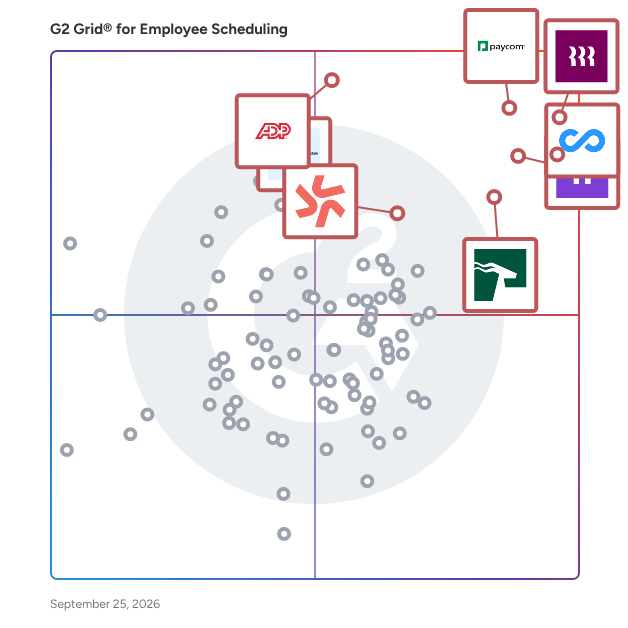
The best employee scheduling software depends on whether you need lightweight shift planning or a broader workforce platform. On G2, tools like Rippling, Connecteam, HROne, Buddy Punch, and Homebase stand out because buyers consistently compare usability, mobile access, and scheduling flexibility.
What is the best employee scheduling software for shift-based businesses?
For shift-based businesses, the best employee scheduling software for shift-based work combines recurring schedule creation, shift swaps, mobile alerts, and time-off handling while reducing manual scheduling work for managers. Based on G2 reviews, these tools are commonly evaluated:
-
Homebase: One place for schedules, swaps, and messaging for hourly teams.
-
Connecteam: Shift visibility and confirmations that keep high-volume roster changes coordinated.
-
Buddy Punch: Mobile schedule access with punch tracking that catches attendance gaps early.
-
7shifts: Shortlisted for swap workflows that keep employee actions simple through mobile-friendly interfaces.
-
Deputy: Employees post shifts they cannot work and teammates claim them.
How to choose an employee scheduling software?
Start with your scheduling complexity, number of locations, hourly staff volume, approval flows, and payroll dependencies. Then compare products like Rippling, Deputy, Homebase, and Connecteam based on mobile usability, setup effort, reporting depth, and support quality, key drivers of adoption in your dataset.
What are the top tools for managing staff rosters?
The top tools for managing staff rosters are usually those that balance fast schedule creation with employee self-service. G2 leaders such as Rippling, Buddy Punch, HROne, Connecteam, Homebase, and Deputy are frequently considered for their ability to simplify roster management.
Which software is best for mobile workforce scheduling?
For mobile-first teams, products like Connecteam, Homebase, Buddy Punch, and Deputy are strong options because they prioritize mobile apps for scheduling, clocking in, requesting time off, and receiving real-time updates, without relying on desktop access.
What is the best free employee scheduling software?
-
Connecteam: Free for teams of up to 10 users with full feature access, which reviewers at new small businesses call a game changer, though costs step up once headcount passes the free threshold.
-
Homebase: A free tier reviewers describe as generous for single-location small businesses, with reporting and advanced tools reserved for paid plans.
What are the best employee scheduling platforms for compliance with labor laws?
-
Homebase: Built-in alerts reviewers say flag state-specific law checks before schedule and break changes, catching compliance details managers would not think of right away.
-
Deputy: Meal break premiums tied to attestation questions and overnight shift handling that reviewers use to stay compliant with state laws in California and New York.
What are the best tools for automating shift swaps and approvals?
-
Deputy: Employees post shifts they cannot work and teammates claim them, removing the manager from the swap negotiation entirely.
-
Homebase: Formal shift trade requests replace endless texting, with PTO requests auto-deducting from balances once approved.
-
Connecteam: Shift confirmations give managers proof employees have seen their schedules before the shift starts.
What is the difference between employee scheduling software and workforce management software?
Employee scheduling software focuses on building shift schedules, managing availability and time-off requests, and communicating changes to employees. Workforce management software is the broader suite: it typically wraps scheduling together with time and attendance, labor forecasting, compliance, and payroll preparation. Most products on G2's Employee Scheduling category sit somewhere on that spectrum, from focused schedule builders to full workforce platforms, which is why buyers should decide early whether they need scheduling alone or the surrounding labor operations stack.
Which employee scheduling platforms handle shift notifications and attendance tracking best?
Employee scheduling platforms handle shift notifications and attendance tracking best when confirmations, reminders, and clock-in data live in the same app employees already check. Based on G2 reviews:
-
Connecteam: Managers describe seeing whether employees have confirmed their shifts, eliminating the "I didn't know I was scheduled" excuses that follow group-text scheduling.
-
Homebase: Gives managers real-time visibility into attendance and labor alongside the schedule, with reviewers crediting it for preventing early clock-ins and tracking hours without manual follow-up.
-
Buddy Punch: Users point to forgotten punch-in and punch-out tracking as the attendance detail that saves the follow-up conversation, with employees checking schedules from home to stay on time.
The honest caveat from reviews: notification behavior needs configuring, with some Connecteam administrators noting that alerts can group together or overwhelm employees on multiple projects if left on defaults.
Which are the highest-rated employee scheduling platforms for fast implementation, fastest setup, and best support?
The highest rated employee scheduling software for fast implementation and user adoption gets teams scheduling in days, not weeks, and the employee scheduling platforms with the fastest setup and best support show it in reviews. Based on G2 reviews:
-
Buddy Punch: Users report full setup in less than a week, with customer service that reviewers describe as consistently finding answers and addressing issues promptly.
-
Connecteam: Administrators credit onboarding videos and responsive support for making setup straightforward, with the app fitting into daily workflows immediately and reviewers describing employees at every experience level using it without training friction.
-
Homebase: Reviewers, including business owners with no software background, describe getting scheduling running quickly and note the platform stays easy for employees on their end.
-
Deputy: Earns adoption evidence from the employee side, with reviewers calling it easy whether you are a manager, a casual worker, or a full-time user. Some Deputy reviewers note support response can run slow even if issues do get resolved.
What is the best employee scheduling software according to user reviews in 2026?
The best employee scheduling software in 2026, according to user reviews on G2, pairs high satisfaction with proven adoption at scale. Based on G2 reviews:
-
Connecteam: Holds a 99 Satisfaction score in the category alongside the largest recent review volume, with 2026 reviewers highlighting mobile-first coordination for frontline and multi-location teams.
-
Rippling: Posts a 98 Satisfaction score, with reviewers valuing scheduling inside a broader payroll and HR platform for distributed workforces.
-
Homebase: Comparing Connecteam against Homebase, reviewers weigh Connecteam's breadth for deskless teams against Homebase's simplicity for hourly small-business teams, where 2026 reviewers report multi-year reliability and generous free-tier value.
-
Buddy Punch: Rounds out the user-review leaders with a 4.8 star average, driven by setup speed and support quality in recent reviews.
Small Business FAQs
For smaller teams, you can compare options on the small business Employee Scheduling software page.
What is the most affordable employee scheduling software for SMBs?
-
Homebase: Pricing reviewers call very competitive against other systems, with a free tier covering core scheduling for single locations.
-
Connecteam: Free for up to 10 users, with reviewers noting the full-feature access at that size.
-
Buddy Punch: Feature set reviewers describe as exactly what a small team needs without paying for extras.
What is the best employee scheduling software for startups?
-
Connecteam: Reviewers at new businesses describe the free small-team plan as the reason they could adopt real scheduling from day one.
-
Homebase: Accessible for business owners of any experience level, with setup reviewers describe as easy.
-
Buddy Punch: Fully set up and understood in under a week, per small-team reviewers.
Which employee scheduling software is the most user-friendly?
-
Homebase: An interface reviewers call intuitive for both managers and employees across five-plus years of use.
-
Deputy: Easy for everyone per reviewers, whether manager, casual worker, or full-time user.
-
Connecteam: Straightforward setup backed by helpful videos and support, fitting daily workflows immediately.
Which employee scheduling app is easiest for hourly teams to clock in and out?
-
Homebase: Employees clock in from phones or a tablet, with managers preventing early clock-ins.
-
Connecteam: Clock in and out on the go, with hours tracked from mobile devices.
-
Buddy Punch: Punch in from a desk or phone, with past timecards and PTO totals always accessible.
Which employee scheduling tools help small businesses prevent missed shifts?
-
Connecteam: Shift confirmation visibility that reviewers say ended "I didn't know I was scheduled" disputes.
-
Buddy Punch: Schedule access from home plus forgotten-punch tracking that catches attendance gaps early.
-
Homebase: One place for schedules, swaps, and messaging so changes reach employees where they already check.
Enterprise FAQs
For larger deployments, you can compare options on the enterprise Employee Scheduling software page.
What is the top-rated employee scheduling platform for enterprises?
-
Rippling: The category's top G2 Score, with reviewers crediting payroll, HR, and global employment management in one system for distributed teams.
-
Connecteam: Multi-location coordination that account managers use to keep scheduling, tasks, and communication in one platform.
-
Deputy: Shift-based workforce depth with compliance controls reviewers apply across state lines.
What is the most reliable employee scheduling software for enterprises?
The most reliable employee scheduling software at large scale, according to user reviews, is the platform that keeps working unchanged as locations, shift volume, and headcount grow. Based on G2 reviews:
-
Homebase: Draws the strongest longevity evidence, with multi-site reviewers describing multi-year use where scheduling, time tracking, and team communication have run without issue.
-
Deputy: Administrators running shift-based teams across many locations credit availability visibility and claimable open shifts with holding rosters together at volume, and reviewers running it across multiple businesses report never hitting an issue requiring support. Deputy reviewers flag that managing large numbers of locations across time zones can require structuring workarounds, a useful honest signal for buyers evaluating at true large scale.
-
Connecteam: Reviewers managing teams across different locations describe it keeping scheduling, task assignments, and communication coordinated in one place so nothing falls through the cracks, and teams managing distributed field workforces call it reliable for day-to-day operations.
What is the best-reviewed employee scheduling software for enterprise app integration?
-
Homebase: Integrations with payroll providers and POS systems that reviewers say remove manual data entry.
-
Rippling: Scheduling connected to payroll, HR, and compliance in a single platform per reviewers managing international employees.
Which employee scheduling platforms manage schedules across many locations and time zones?
-
Connecteam: Managing employees across different locations and schedules is the core strength account managers cite.
-
Homebase: Announcement tracking and communication reviewers use to manage multiple sites.
-
Deputy: Runs nationwide multi-timezone operations, though reviewers note location structures need planning at higher site counts.
Which employee scheduling software supports overnight and complex shift patterns?
-
Deputy: Overnight shift timekeeping that reviewers say their payroll system could not handle, with automated hour calculations.
-
Homebase: Break tracking configured to state-specific rules with built-in legal guideline reminders.
Sources
- G2 Scoring Methodologies
- G2 Winter 2026 Reports
Researched By: Jeffrey Lin