2026 Best Software Awards are here!See the list

Best Enterprise Video Editing Software

Gauri Pawsey
GP
Researched and written by Gauri Pawsey

Products classified in the overall Video Editing category are similar in many regards and help companies of all sizes solve their business problems. However, enterprise business features, pricing, setup, and installation differ from businesses of other sizes, which is why we match buyers to the right Enterprise Business Video Editing to fit their needs. Compare product ratings based on reviews from enterprise users or connect with one of G2's buying advisors to find the right solutions within the Enterprise Business Video Editing category.

In addition to qualifying for inclusion in the Video Editing Software category, to qualify for inclusion in the Enterprise Business Video Editing Software category, a product must have at least 10 reviews left by a reviewer from an enterprise business.

Show More
Show Less

G2 takes pride in showing unbiased reviews on user satisfaction in our ratings and reports. We do not allow paid placements in any of our ratings, rankings, or reports. Learn about our scoring methodologies.

1 filter applied
Clear All

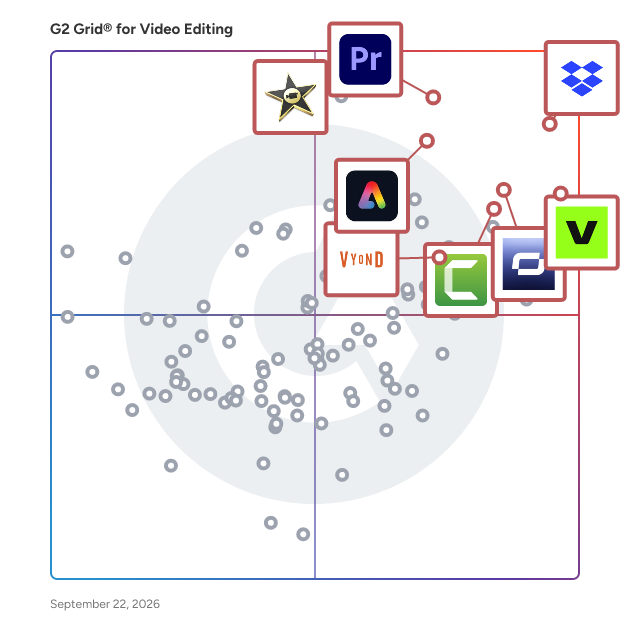
26 Listings in Enterprise Video Editing Software Available

(1,656)4.6 out of 5
10th Easiest To Use in Video Editing software
View top Consulting Services for Camtasia
Save to My Lists
Entry Level Price:Free
  • Overview
    Expand/Collapse Overview
  • Product Description
    How are these determined?Information
    This description is provided by the seller.

    Camtasia is a powerful yet easy-to-use video editor and screen recorder. Camtasia offers a range of plans designed to meet your video creation needs, making it easy to produce professional-looking

    Users
    • Owner
    • CEO
    Industries
    • Computer Software
    • Information Technology and Services
    Market Segment
    • 53% Small-Business
    • 26% Mid-Market
  • Pros and Cons
    Expand/Collapse Pros and Cons
  • Camtasia Pros and Cons
    How are these determined?Information
    Pros and Cons are compiled from review feedback and grouped into themes to provide an easy-to-understand summary of user reviews.
    Pros
    Ease of Use
    304
    Features
    171
    Easy Editing
    168
    Video Editing
    168
    Easy Creation
    142
    Cons
    Expensive
    50
    Feature Limitations
    46
    Slow Rendering
    46
    Learning Curve
    45
    Limited Features
    44
  • User Satisfaction
    Expand/Collapse User Satisfaction
  • Camtasia features and usability ratings that predict user satisfaction
    9.0
    Has the product been a good partner in doing business?
    Average: 9.0
    8.8
    Quality of Support
    Average: 8.7
    9.0
    Ease of Admin
    Average: 9.0
    8.8
    Titles and Captions
    Average: 8.3
  • Seller Details
    Expand/Collapse Seller Details
  • Seller Details
    Seller
    TechSmith
    Company Website
    Year Founded
    1987
    HQ Location
    Okemos, MI
    Twitter
    @TechSmith
    29,607 Twitter followers
    LinkedIn® Page
    www.linkedin.com
    350 employees on LinkedIn®
Product Description
How are these determined?Information
This description is provided by the seller.

Camtasia is a powerful yet easy-to-use video editor and screen recorder. Camtasia offers a range of plans designed to meet your video creation needs, making it easy to produce professional-looking

Users
  • Owner
  • CEO
Industries
  • Computer Software
  • Information Technology and Services
Market Segment
  • 53% Small-Business
  • 26% Mid-Market
Camtasia Pros and Cons
How are these determined?Information
Pros and Cons are compiled from review feedback and grouped into themes to provide an easy-to-understand summary of user reviews.
Pros
Ease of Use
304
Features
171
Easy Editing
168
Video Editing
168
Easy Creation
142
Cons
Expensive
50
Feature Limitations
46
Slow Rendering
46
Learning Curve
45
Limited Features
44
Camtasia features and usability ratings that predict user satisfaction
9.0
Has the product been a good partner in doing business?
Average: 9.0
8.8
Quality of Support
Average: 8.7
9.0
Ease of Admin
Average: 9.0
8.8
Titles and Captions
Average: 8.3
Seller Details
Seller
TechSmith
Company Website
Year Founded
1987
HQ Location
Okemos, MI
Twitter
@TechSmith
29,607 Twitter followers
LinkedIn® Page
www.linkedin.com
350 employees on LinkedIn®
(30,924)4.4 out of 5
6th Easiest To Use in Video Editing software
Save to My Lists
Entry Level Price:$9.99
  • Overview
    Expand/Collapse Overview
  • Product Description
    How are these determined?Information
    This description is provided by the seller.

    Dropbox is the one place to keep life organized and keep work moving. With more than 700 million registered users across approximately 180 countries, we're on a mission to design a more enlightened wa

    Users
    • Owner
    • Project Manager
    Industries
    • Marketing and Advertising
    • Information Technology and Services
    Market Segment
    • 63% Small-Business
    • 23% Mid-Market
  • Pros and Cons
    Expand/Collapse Pros and Cons
  • Dropbox Pros and Cons
    How are these determined?Information
    Pros and Cons are compiled from review feedback and grouped into themes to provide an easy-to-understand summary of user reviews.
    Pros
    Ease of Use
    2,289
    File Sharing
    1,165
    Easy Access
    1,069
    Cloud Storage
    894
    Easy Sharing
    820
    Cons
    Limited Storage
    621
    Expensive
    618
    Plan Limitations
    544
    Expensive Cost
    534
    Syncing Issues
    313
  • User Satisfaction
    Expand/Collapse User Satisfaction
  • Dropbox features and usability ratings that predict user satisfaction
    8.9
    Has the product been a good partner in doing business?
    Average: 9.0
    8.6
    Quality of Support
    Average: 8.7
    8.9
    Ease of Admin
    Average: 9.0
    7.5
    Titles and Captions
    Average: 8.3
  • Seller Details
    Expand/Collapse Seller Details
  • Seller Details
    Seller
    Dropbox
    Company Website
    Year Founded
    2007
    HQ Location
    San Francisco, California
    Twitter
    @Dropbox
    3,296,788 Twitter followers
    LinkedIn® Page
    www.linkedin.com
    3,969 employees on LinkedIn®
Product Description
How are these determined?Information
This description is provided by the seller.

Dropbox is the one place to keep life organized and keep work moving. With more than 700 million registered users across approximately 180 countries, we're on a mission to design a more enlightened wa

Users
  • Owner
  • Project Manager
Industries
  • Marketing and Advertising
  • Information Technology and Services
Market Segment
  • 63% Small-Business
  • 23% Mid-Market
Dropbox Pros and Cons
How are these determined?Information
Pros and Cons are compiled from review feedback and grouped into themes to provide an easy-to-understand summary of user reviews.
Pros
Ease of Use
2,289
File Sharing
1,165
Easy Access
1,069
Cloud Storage
894
Easy Sharing
820
Cons
Limited Storage
621
Expensive
618
Plan Limitations
544
Expensive Cost
534
Syncing Issues
313
Dropbox features and usability ratings that predict user satisfaction
8.9
Has the product been a good partner in doing business?
Average: 9.0
8.6
Quality of Support
Average: 8.7
8.9
Ease of Admin
Average: 9.0
7.5
Titles and Captions
Average: 8.3
Seller Details
Seller
Dropbox
Company Website
Year Founded
2007
HQ Location
San Francisco, California
Twitter
@Dropbox
3,296,788 Twitter followers
LinkedIn® Page
www.linkedin.com
3,969 employees on LinkedIn®
G2 Advertising
Sponsored
G2 Advertising
Get 2x conversion than Google Ads with G2 Advertising!
G2 Advertising places your product in premium positions on high-traffic pages and on targeted competitor pages to reach buyers at key comparison moments.
Entry Level Price:Free
  • Overview
    Expand/Collapse Overview
  • Product Description
    How are these determined?Information
    This description is provided by the seller.

    Synthesia is the best AI video generation platform for business. By turning text into professional AI-generated videos in minutes, Synthesia replaces static documents and slide decks with dynamic,

    Users
    • CEO
    • Founder
    Industries
    • Computer Software
    • E-Learning
    Market Segment
    • 69% Small-Business
    • 17% Mid-Market
    User Sentiment
    How are these determined?Information
    These insights, currently in beta, are compiled from user reviews and grouped to display a high-level overview of the software.
    • Synthesia is a software platform that allows users to create professional quality videos using personal avatars and AI-generated voices.
    • Reviewers like the ease of use, the realistic avatars and voices, the ability to create videos quickly, and the multilingual support that Synthesia offers.
    • Users mentioned issues with the avatars looking unnatural, difficulties with pronunciation and syncing, limited customization options, and the high cost of the software.
  • Pros and Cons
    Expand/Collapse Pros and Cons
  • Synthesia Pros and Cons
    How are these determined?Information
    Pros and Cons are compiled from review feedback and grouped into themes to provide an easy-to-understand summary of user reviews.
    Pros
    Ease of Use
    1,261
    Quality
    787
    Realistic Avatars
    769
    Easy Creation
    724
    Video Creation
    641
    Cons
    Avatar Limitations
    431
    Limited Avatars
    374
    AI Limitations
    352
    Avatar Quality
    349
    Limited Customization
    298
  • User Satisfaction
    Expand/Collapse User Satisfaction
  • Synthesia features and usability ratings that predict user satisfaction
    8.9
    Has the product been a good partner in doing business?
    Average: 9.0
    8.9
    Quality of Support
    Average: 8.7
    9.1
    Ease of Admin
    Average: 9.0
    8.6
    Titles and Captions
    Average: 8.3
  • Seller Details
    Expand/Collapse Seller Details
  • Seller Details
    Seller
    Synthesia
    Company Website
    Year Founded
    2017
    HQ Location
    London
    Twitter
    @synthesiaIO
    28,052 Twitter followers
    LinkedIn® Page
    www.linkedin.com
    662 employees on LinkedIn®
Product Description
How are these determined?Information
This description is provided by the seller.

Synthesia is the best AI video generation platform for business. By turning text into professional AI-generated videos in minutes, Synthesia replaces static documents and slide decks with dynamic,

Users
  • CEO
  • Founder
Industries
  • Computer Software
  • E-Learning
Market Segment
  • 69% Small-Business
  • 17% Mid-Market
User Sentiment
How are these determined?Information
These insights, currently in beta, are compiled from user reviews and grouped to display a high-level overview of the software.
  • Synthesia is a software platform that allows users to create professional quality videos using personal avatars and AI-generated voices.
  • Reviewers like the ease of use, the realistic avatars and voices, the ability to create videos quickly, and the multilingual support that Synthesia offers.
  • Users mentioned issues with the avatars looking unnatural, difficulties with pronunciation and syncing, limited customization options, and the high cost of the software.
Synthesia Pros and Cons
How are these determined?Information
Pros and Cons are compiled from review feedback and grouped into themes to provide an easy-to-understand summary of user reviews.
Pros
Ease of Use
1,261
Quality
787
Realistic Avatars
769
Easy Creation
724
Video Creation
641
Cons
Avatar Limitations
431
Limited Avatars
374
AI Limitations
352
Avatar Quality
349
Limited Customization
298
Synthesia features and usability ratings that predict user satisfaction
8.9
Has the product been a good partner in doing business?
Average: 9.0
8.9
Quality of Support
Average: 8.7
9.1
Ease of Admin
Average: 9.0
8.6
Titles and Captions
Average: 8.3
Seller Details
Seller
Synthesia
Company Website
Year Founded
2017
HQ Location
London
Twitter
@synthesiaIO
28,052 Twitter followers
LinkedIn® Page
www.linkedin.com
662 employees on LinkedIn®
(465)4.8 out of 5
7th Easiest To Use in Video Editing software
Save to My Lists
  • Overview
    Expand/Collapse Overview
  • Product Description
    How are these determined?Information
    This description is provided by the seller.

    Vyond is an all-in-one AI video platform designed to empower organizations in creating secure, compliant, and engaging business content at scale. With a history spanning over 15 years, Vyond has estab

    Users
    • Instructional Designer
    • Learning Experience Designer
    Industries
    • E-Learning
    • Hospital & Health Care
    Market Segment
    • 51% Enterprise
    • 26% Small-Business
    User Sentiment
    How are these determined?Information
    These insights, currently in beta, are compiled from user reviews and grouped to display a high-level overview of the software.
    • Vyond is a software tool used for creating interactive training materials, offering features such as templates, AI voices, and the ability to upload scripts or pre-made materials.
    • Users frequently mention the ease of use, the variety of templates and AI voices, and the ability to create engaging and diverse content quickly, with features like 'Vyond Go' and automatic content creation being particularly appreciated.
    • Reviewers noted issues such as the software occasionally freezing, difficulties with certain pronunciations in non-English languages, limited character movements, and challenges in finding specific templates or creating multiple actions in a single frame.
  • Pros and Cons
    Expand/Collapse Pros and Cons
  • Vyond Pros and Cons
    How are these determined?Information
    Pros and Cons are compiled from review feedback and grouped into themes to provide an easy-to-understand summary of user reviews.
    Pros
    Ease of Use
    185
    Video Creation
    118
    Features
    107
    Easy Creation
    100
    Versatility
    88
    Cons
    Limited Customization
    42
    Limited Features
    33
    Limited Options
    30
    Limited Selection
    27
    Learning Curve
    26
  • User Satisfaction
    Expand/Collapse User Satisfaction
  • Vyond features and usability ratings that predict user satisfaction
    9.2
    Has the product been a good partner in doing business?
    Average: 9.0
    9.4
    Quality of Support
    Average: 8.7
    9.4
    Ease of Admin
    Average: 9.0
    8.9
    Titles and Captions
    Average: 8.3
  • Seller Details
    Expand/Collapse Seller Details
  • Seller Details
    Seller
    Vyond
    Company Website
    Year Founded
    2007
    HQ Location
    San Mateo, California
    Twitter
    @VyondVideo
    134 Twitter followers
    LinkedIn® Page
    www.linkedin.com
    269 employees on LinkedIn®
Product Description
How are these determined?Information
This description is provided by the seller.

Vyond is an all-in-one AI video platform designed to empower organizations in creating secure, compliant, and engaging business content at scale. With a history spanning over 15 years, Vyond has estab

Users
  • Instructional Designer
  • Learning Experience Designer
Industries
  • E-Learning
  • Hospital & Health Care
Market Segment
  • 51% Enterprise
  • 26% Small-Business
User Sentiment
How are these determined?Information
These insights, currently in beta, are compiled from user reviews and grouped to display a high-level overview of the software.
  • Vyond is a software tool used for creating interactive training materials, offering features such as templates, AI voices, and the ability to upload scripts or pre-made materials.
  • Users frequently mention the ease of use, the variety of templates and AI voices, and the ability to create engaging and diverse content quickly, with features like 'Vyond Go' and automatic content creation being particularly appreciated.
  • Reviewers noted issues such as the software occasionally freezing, difficulties with certain pronunciations in non-English languages, limited character movements, and challenges in finding specific templates or creating multiple actions in a single frame.
Vyond Pros and Cons
How are these determined?Information
Pros and Cons are compiled from review feedback and grouped into themes to provide an easy-to-understand summary of user reviews.
Pros
Ease of Use
185
Video Creation
118
Features
107
Easy Creation
100
Versatility
88
Cons
Limited Customization
42
Limited Features
33
Limited Options
30
Limited Selection
27
Learning Curve
26
Vyond features and usability ratings that predict user satisfaction
9.2
Has the product been a good partner in doing business?
Average: 9.0
9.4
Quality of Support
Average: 8.7
9.4
Ease of Admin
Average: 9.0
8.9
Titles and Captions
Average: 8.3
Seller Details
Seller
Vyond
Company Website
Year Founded
2007
HQ Location
San Mateo, California
Twitter
@VyondVideo
134 Twitter followers
LinkedIn® Page
www.linkedin.com
269 employees on LinkedIn®
(755)4.5 out of 5
11th Easiest To Use in Video Editing software
View top Consulting Services for Adobe Express
Save to My Lists
Entry Level Price:Free
  • Overview
    Expand/Collapse Overview
  • Product Description
    How are these determined?Information
    This description is provided by the seller.

    Quickly and easily make standout content from thousands of beautiful templates with the all-new Adobe Express. Simply choose a template, add images and text, and quickly resize your creations to fit y

    Users
    • Graphic Designer
    • Marketing Manager
    Industries
    • Marketing and Advertising
    • Higher Education
    Market Segment
    • 56% Small-Business
    • 27% Mid-Market
  • Pros and Cons
    Expand/Collapse Pros and Cons
  • Adobe Express Pros and Cons
    How are these determined?Information
    Pros and Cons are compiled from review feedback and grouped into themes to provide an easy-to-understand summary of user reviews.
    Pros
    Ease of Use
    279
    Templates
    99
    Speed
    95
    Intuitive
    89
    Simple
    85
    Cons
    Limited Features
    97
    Feature Limitations
    94
    Limited Customization
    59
    Limited Options
    58
    Slow Performance
    47
  • User Satisfaction
    Expand/Collapse User Satisfaction
  • Adobe Express features and usability ratings that predict user satisfaction
    9.2
    Has the product been a good partner in doing business?
    Average: 9.0
    8.7
    Quality of Support
    Average: 8.7
    9.4
    Ease of Admin
    Average: 9.0
    8.9
    Titles and Captions
    Average: 8.3
  • Seller Details
    Expand/Collapse Seller Details
  • Seller Details
    Seller
    Adobe
    Company Website
    Year Founded
    1982
    HQ Location
    San Jose, CA
    Twitter
    @Adobe
    957,472 Twitter followers
    LinkedIn® Page
    www.linkedin.com
    41,406 employees on LinkedIn®
Product Description
How are these determined?Information
This description is provided by the seller.

Quickly and easily make standout content from thousands of beautiful templates with the all-new Adobe Express. Simply choose a template, add images and text, and quickly resize your creations to fit y

Users
  • Graphic Designer
  • Marketing Manager
Industries
  • Marketing and Advertising
  • Higher Education
Market Segment
  • 56% Small-Business
  • 27% Mid-Market
Adobe Express Pros and Cons
How are these determined?Information
Pros and Cons are compiled from review feedback and grouped into themes to provide an easy-to-understand summary of user reviews.
Pros
Ease of Use
279
Templates
99
Speed
95
Intuitive
89
Simple
85
Cons
Limited Features
97
Feature Limitations
94
Limited Customization
59
Limited Options
58
Slow Performance
47
Adobe Express features and usability ratings that predict user satisfaction
9.2
Has the product been a good partner in doing business?
Average: 9.0
8.7
Quality of Support
Average: 8.7
9.4
Ease of Admin
Average: 9.0
8.9
Titles and Captions
Average: 8.3
Seller Details
Seller
Adobe
Company Website
Year Founded
1982
HQ Location
San Jose, CA
Twitter
@Adobe
957,472 Twitter followers
LinkedIn® Page
www.linkedin.com
41,406 employees on LinkedIn®
(1,622)4.5 out of 5
View top Consulting Services for Adobe Premiere Pro
Save to My Lists
  • Overview
    Expand/Collapse Overview
  • Product Description
    How are these determined?Information
    This description is provided by the seller.

    Adobe Premiere Pro is a professional video editing software developed by Adobe Systems, designed for creating high-quality videos across various industries. It offers a comprehensive suite of tools fo

    Users
    • Video Editor
    • Graphic Designer
    Industries
    • Media Production
    • Marketing and Advertising
    Market Segment
    • 64% Small-Business
    • 22% Mid-Market
  • Pros and Cons
    Expand/Collapse Pros and Cons
  • Adobe Premiere Pro Pros and Cons
    How are these determined?Information
    Pros and Cons are compiled from review feedback and grouped into themes to provide an easy-to-understand summary of user reviews.
    Pros
    Video Editing
    62
    High Quality
    52
    Ease of Use
    46
    Video Creation
    33
    Highly Recommendable
    15
    Cons
    Learning Curve
    30
    Slow Rendering
    23
    Expensive Cost
    14
    Update Issues
    14
    Time-Consumption
    11
  • User Satisfaction
    Expand/Collapse User Satisfaction
  • Adobe Premiere Pro features and usability ratings that predict user satisfaction
    8.7
    Has the product been a good partner in doing business?
    Average: 9.0
    8.1
    Quality of Support
    Average: 8.7
    8.5
    Ease of Admin
    Average: 9.0
    8.9
    Titles and Captions
    Average: 8.3
  • Seller Details
    Expand/Collapse Seller Details
  • Seller Details
    Seller
    Adobe
    Year Founded
    1982
    HQ Location
    San Jose, CA
    Twitter
    @Adobe
    957,472 Twitter followers
    LinkedIn® Page
    www.linkedin.com
    41,406 employees on LinkedIn®
    Ownership
    NASDAQ:ADBE
Product Description
How are these determined?Information
This description is provided by the seller.

Adobe Premiere Pro is a professional video editing software developed by Adobe Systems, designed for creating high-quality videos across various industries. It offers a comprehensive suite of tools fo

Users
  • Video Editor
  • Graphic Designer
Industries
  • Media Production
  • Marketing and Advertising
Market Segment
  • 64% Small-Business
  • 22% Mid-Market
Adobe Premiere Pro Pros and Cons
How are these determined?Information
Pros and Cons are compiled from review feedback and grouped into themes to provide an easy-to-understand summary of user reviews.
Pros
Video Editing
62
High Quality
52
Ease of Use
46
Video Creation
33
Highly Recommendable
15
Cons
Learning Curve
30
Slow Rendering
23
Expensive Cost
14
Update Issues
14
Time-Consumption
11
Adobe Premiere Pro features and usability ratings that predict user satisfaction
8.7
Has the product been a good partner in doing business?
Average: 9.0
8.1
Quality of Support
Average: 8.7
8.5
Ease of Admin
Average: 9.0
8.9
Titles and Captions
Average: 8.3
Seller Details
Seller
Adobe
Year Founded
1982
HQ Location
San Jose, CA
Twitter
@Adobe
957,472 Twitter followers
LinkedIn® Page
www.linkedin.com
41,406 employees on LinkedIn®
Ownership
NASDAQ:ADBE
  • Overview
    Expand/Collapse Overview
  • Product Description
    How are these determined?Information
    This description is provided by the seller.

    PlayPlay is the video platform built for business. Everything at PlayPlay is designed, developed and supported to give teams the power to create impactful, branded videos in no time, without requiring

    Users
    • Chargée de communication
    • Community Manager
    Industries
    • Information Technology and Services
    • Marketing and Advertising
    Market Segment
    • 48% Enterprise
    • 33% Mid-Market
  • Pros and Cons
    Expand/Collapse Pros and Cons
  • PlayPlay Pros and Cons
    How are these determined?Information
    Pros and Cons are compiled from review feedback and grouped into themes to provide an easy-to-understand summary of user reviews.
    Pros
    Ease of Use
    39
    Video Creation
    23
    Easy Creation
    18
    Templates
    18
    Video Quality
    17
    Cons
    Limited Customization
    12
    Limited Features
    9
    Feature Limitations
    8
    Editing Difficulties
    7
    Text Limitations
    7
  • User Satisfaction
    Expand/Collapse User Satisfaction
  • PlayPlay features and usability ratings that predict user satisfaction
    9.2
    Has the product been a good partner in doing business?
    Average: 9.0
    9.5
    Quality of Support
    Average: 8.7
    9.3
    Ease of Admin
    Average: 9.0
    8.9
    Titles and Captions
    Average: 8.3
  • Seller Details
    Expand/Collapse Seller Details
  • Seller Details
    Seller
    PlayPlay
    Company Website
    Year Founded
    2017
    HQ Location
    Paris, FR
    Twitter
    @PlayPlayVideo
    1,053 Twitter followers
    LinkedIn® Page
    www.linkedin.com
    212 employees on LinkedIn®
Product Description
How are these determined?Information
This description is provided by the seller.

PlayPlay is the video platform built for business. Everything at PlayPlay is designed, developed and supported to give teams the power to create impactful, branded videos in no time, without requiring

Users
  • Chargée de communication
  • Community Manager
Industries
  • Information Technology and Services
  • Marketing and Advertising
Market Segment
  • 48% Enterprise
  • 33% Mid-Market
PlayPlay Pros and Cons
How are these determined?Information
Pros and Cons are compiled from review feedback and grouped into themes to provide an easy-to-understand summary of user reviews.
Pros
Ease of Use
39
Video Creation
23
Easy Creation
18
Templates
18
Video Quality
17
Cons
Limited Customization
12
Limited Features
9
Feature Limitations
8
Editing Difficulties
7
Text Limitations
7
PlayPlay features and usability ratings that predict user satisfaction
9.2
Has the product been a good partner in doing business?
Average: 9.0
9.5
Quality of Support
Average: 8.7
9.3
Ease of Admin
Average: 9.0
8.9
Titles and Captions
Average: 8.3
Seller Details
Seller
PlayPlay
Company Website
Year Founded
2017
HQ Location
Paris, FR
Twitter
@PlayPlayVideo
1,053 Twitter followers
LinkedIn® Page
www.linkedin.com
212 employees on LinkedIn®
  • Overview
    Expand/Collapse Overview
  • Product Description
    How are these determined?Information
    This description is provided by the seller.

    iMovie is a user-friendly video editing application developed by Apple, designed to help users create professional-quality movies and trailers with ease. Available on Mac, iPhone, and iPad, iMovie off

    Users
    • Teacher
    • Owner
    Industries
    • Marketing and Advertising
    • Entertainment
    Market Segment
    • 73% Small-Business
    • 19% Mid-Market
  • Pros and Cons
    Expand/Collapse Pros and Cons
  • iMovie Pros and Cons
    How are these determined?Information
    Pros and Cons are compiled from review feedback and grouped into themes to provide an easy-to-understand summary of user reviews.
    Pros
    Ease of Use
    8
    Video Editing
    7
    Video Creation
    5
    Ease of Learning
    3
    Easy Creation
    3
    Cons
    Feature Deficiency
    4
    Feature Limitations
    4
    Editing Limitations
    2
    Slow Rendering
    2
    Audio Issues
    1
  • User Satisfaction
    Expand/Collapse User Satisfaction
  • iMovie features and usability ratings that predict user satisfaction
    9.0
    Has the product been a good partner in doing business?
    Average: 9.0
    8.3
    Quality of Support
    Average: 8.7
    9.1
    Ease of Admin
    Average: 9.0
    8.1
    Titles and Captions
    Average: 8.3
  • Seller Details
    Expand/Collapse Seller Details
  • Seller Details
    Seller
    Apple
    Year Founded
    1976
    HQ Location
    Cupertino, CA
    Twitter
    @Apple
    9,939,801 Twitter followers
    LinkedIn® Page
    www.linkedin.com
    166,633 employees on LinkedIn®
    Ownership
    NASDAQ:AAPL
Product Description
How are these determined?Information
This description is provided by the seller.

iMovie is a user-friendly video editing application developed by Apple, designed to help users create professional-quality movies and trailers with ease. Available on Mac, iPhone, and iPad, iMovie off

Users
  • Teacher
  • Owner
Industries
  • Marketing and Advertising
  • Entertainment
Market Segment
  • 73% Small-Business
  • 19% Mid-Market
iMovie Pros and Cons
How are these determined?Information
Pros and Cons are compiled from review feedback and grouped into themes to provide an easy-to-understand summary of user reviews.
Pros
Ease of Use
8
Video Editing
7
Video Creation
5
Ease of Learning
3
Easy Creation
3
Cons
Feature Deficiency
4
Feature Limitations
4
Editing Limitations
2
Slow Rendering
2
Audio Issues
1
iMovie features and usability ratings that predict user satisfaction
9.0
Has the product been a good partner in doing business?
Average: 9.0
8.3
Quality of Support
Average: 8.7
9.1
Ease of Admin
Average: 9.0
8.1
Titles and Captions
Average: 8.3
Seller Details
Seller
Apple
Year Founded
1976
HQ Location
Cupertino, CA
Twitter
@Apple
9,939,801 Twitter followers
LinkedIn® Page
www.linkedin.com
166,633 employees on LinkedIn®
Ownership
NASDAQ:AAPL
(1,050)4.6 out of 5
Optimized for quick response
4th Easiest To Use in Video Editing software
Save to My Lists
Entry Level Price:Free
  • Overview
    Expand/Collapse Overview
  • Product Description
    How are these determined?Information
    This description is provided by the seller.

    Wistia is a complete video marketing platform that helps teams create, host, market, and measure their videos and webinars—all in one place. With Wistia, you can easily create professional videos, hos

    Users
    • Marketing Manager
    • Digital Marketing Manager
    Industries
    • Computer Software
    • Marketing and Advertising
    Market Segment
    • 47% Mid-Market
    • 35% Small-Business
  • Pros and Cons
    Expand/Collapse Pros and Cons
  • Wistia Pros and Cons
    How are these determined?Information
    Pros and Cons are compiled from review feedback and grouped into themes to provide an easy-to-understand summary of user reviews.
    Pros
    Ease of Use
    274
    Features
    180
    Video Quality
    118
    Video Management
    106
    Integrations
    90
    Cons
    Limited Customization
    58
    Expensive
    49
    Missing Features
    49
    Expensive Cost
    46
    Feature Limitations
    44
  • User Satisfaction
    Expand/Collapse User Satisfaction
  • Wistia features and usability ratings that predict user satisfaction
    9.2
    Has the product been a good partner in doing business?
    Average: 9.0
    9.1
    Quality of Support
    Average: 8.7
    9.3
    Ease of Admin
    Average: 9.0
    8.8
    Titles and Captions
    Average: 8.3
  • Seller Details
    Expand/Collapse Seller Details
  • Seller Details
    Seller
    Wistia
    Company Website
    Year Founded
    2006
    HQ Location
    Cambridge, MA
    Twitter
    @wistia
    28,740 Twitter followers
    LinkedIn® Page
    www.linkedin.com
    206 employees on LinkedIn®
Product Description
How are these determined?Information
This description is provided by the seller.

Wistia is a complete video marketing platform that helps teams create, host, market, and measure their videos and webinars—all in one place. With Wistia, you can easily create professional videos, hos

Users
  • Marketing Manager
  • Digital Marketing Manager
Industries
  • Computer Software
  • Marketing and Advertising
Market Segment
  • 47% Mid-Market
  • 35% Small-Business
Wistia Pros and Cons
How are these determined?Information
Pros and Cons are compiled from review feedback and grouped into themes to provide an easy-to-understand summary of user reviews.
Pros
Ease of Use
274
Features
180
Video Quality
118
Video Management
106
Integrations
90
Cons
Limited Customization
58
Expensive
49
Missing Features
49
Expensive Cost
46
Feature Limitations
44
Wistia features and usability ratings that predict user satisfaction
9.2
Has the product been a good partner in doing business?
Average: 9.0
9.1
Quality of Support
Average: 8.7
9.3
Ease of Admin
Average: 9.0
8.8
Titles and Captions
Average: 8.3
Seller Details
Seller
Wistia
Company Website
Year Founded
2006
HQ Location
Cambridge, MA
Twitter
@wistia
28,740 Twitter followers
LinkedIn® Page
www.linkedin.com
206 employees on LinkedIn®
(1,784)4.6 out of 5
Optimized for quick response
9th Easiest To Use in Video Editing software
Save to My Lists
Entry Level Price:$19.00
  • Overview
    Expand/Collapse Overview
  • Product Description
    How are these determined?Information
    This description is provided by the seller.

    VEED is an AI-powered video creation and editing platform that helps creators, marketers, teams and enterprises generate and edit video content at scale. The platform combines advanced AI video genera

    Users
    • Owner
    • Founder
    Industries
    • Marketing and Advertising
    • Computer Software
    Market Segment
    • 80% Small-Business
    • 8% Mid-Market
    User Sentiment
    How are these determined?Information
    These insights, currently in beta, are compiled from user reviews and grouped to display a high-level overview of the software.
    • VEED is a video editing tool that offers features such as subtitling, text-to-speech, auto transcript, and video trimming.
    • Users like VEED's user-friendly interface, its ability to quickly trim videos, add subtitles, adjust audio, and make small visual improvements without needing advanced editing skills.
    • Reviewers mentioned issues such as high subscription fees, lack of control over subtitle styles, lack of advanced AI features in the beginner plan, and occasional slow or glitchy performance when working with long videos or high-resolution footage.
  • Pros and Cons
    Expand/Collapse Pros and Cons
  • VEED Pros and Cons
    How are these determined?Information
    Pros and Cons are compiled from review feedback and grouped into themes to provide an easy-to-understand summary of user reviews.
    Pros
    Ease of Use
    1,182
    Features
    796
    Easy Editing
    712
    Video Editing
    688
    Quality
    618
    Cons
    Slow Performance
    260
    Limited Features
    257
    Expensive
    212
    AI Limitations
    206
    Limited Options
    175
  • User Satisfaction
    Expand/Collapse User Satisfaction
  • VEED features and usability ratings that predict user satisfaction
    9.0
    Has the product been a good partner in doing business?
    Average: 9.0
    8.4
    Quality of Support
    Average: 8.7
    9.2
    Ease of Admin
    Average: 9.0
    9.0
    Titles and Captions
    Average: 8.3
  • Seller Details
    Expand/Collapse Seller Details
  • Seller Details
    Seller
    VEED
    Company Website
    Year Founded
    2018
    HQ Location
    London, GB
    Twitter
    @veedstudio
    20,592 Twitter followers
    LinkedIn® Page
    www.linkedin.com
    189 employees on LinkedIn®
Product Description
How are these determined?Information
This description is provided by the seller.

VEED is an AI-powered video creation and editing platform that helps creators, marketers, teams and enterprises generate and edit video content at scale. The platform combines advanced AI video genera

Users
  • Owner
  • Founder
Industries
  • Marketing and Advertising
  • Computer Software
Market Segment
  • 80% Small-Business
  • 8% Mid-Market
User Sentiment
How are these determined?Information
These insights, currently in beta, are compiled from user reviews and grouped to display a high-level overview of the software.
  • VEED is a video editing tool that offers features such as subtitling, text-to-speech, auto transcript, and video trimming.
  • Users like VEED's user-friendly interface, its ability to quickly trim videos, add subtitles, adjust audio, and make small visual improvements without needing advanced editing skills.
  • Reviewers mentioned issues such as high subscription fees, lack of control over subtitle styles, lack of advanced AI features in the beginner plan, and occasional slow or glitchy performance when working with long videos or high-resolution footage.
VEED Pros and Cons
How are these determined?Information
Pros and Cons are compiled from review feedback and grouped into themes to provide an easy-to-understand summary of user reviews.
Pros
Ease of Use
1,182
Features
796
Easy Editing
712
Video Editing
688
Quality
618
Cons
Slow Performance
260
Limited Features
257
Expensive
212
AI Limitations
206
Limited Options
175
VEED features and usability ratings that predict user satisfaction
9.0
Has the product been a good partner in doing business?
Average: 9.0
8.4
Quality of Support
Average: 8.7
9.2
Ease of Admin
Average: 9.0
9.0
Titles and Captions
Average: 8.3
Seller Details
Seller
VEED
Company Website
Year Founded
2018
HQ Location
London, GB
Twitter
@veedstudio
20,592 Twitter followers
LinkedIn® Page
www.linkedin.com
189 employees on LinkedIn®
(374)4.4 out of 5
View top Consulting Services for Final Cut Pro X
Save to My Lists
  • Overview
    Expand/Collapse Overview
  • Product Description
    How are these determined?Information
    This description is provided by the seller.

    Final Cut Pro X is a professional video editing software developed by Apple, designed to provide filmmakers, video editors, and content creators with a comprehensive suite of tools for crafting high-q

    Users
    • Owner
    • Director
    Industries
    • Media Production
    • Entertainment
    Market Segment
    • 73% Small-Business
    • 16% Mid-Market
  • Pros and Cons
    Expand/Collapse Pros and Cons
  • Final Cut Pro X Pros and Cons
    How are these determined?Information
    Pros and Cons are compiled from review feedback and grouped into themes to provide an easy-to-understand summary of user reviews.
    Pros
    Video Editing
    7
    Ease of Use
    3
    Highly Recommendable
    3
    High Quality
    3
    Speed
    3
    Cons
    Learning Curve
    3
    Feature Limitations
    2
    Time-Consumption
    2
    Limited Templates
    1
    Navigation Difficulty
    1
  • User Satisfaction
    Expand/Collapse User Satisfaction
  • Final Cut Pro X features and usability ratings that predict user satisfaction
    8.8
    Has the product been a good partner in doing business?
    Average: 9.0
    8.2
    Quality of Support
    Average: 8.7
    8.6
    Ease of Admin
    Average: 9.0
    8.7
    Titles and Captions
    Average: 8.3
  • Seller Details
    Expand/Collapse Seller Details
  • Seller Details
    Seller
    Apple
    Year Founded
    1976
    HQ Location
    Cupertino, CA
    Twitter
    @Apple
    9,939,801 Twitter followers
    LinkedIn® Page
    www.linkedin.com
    166,633 employees on LinkedIn®
    Ownership
    NASDAQ:AAPL
Product Description
How are these determined?Information
This description is provided by the seller.

Final Cut Pro X is a professional video editing software developed by Apple, designed to provide filmmakers, video editors, and content creators with a comprehensive suite of tools for crafting high-q

Users
  • Owner
  • Director
Industries
  • Media Production
  • Entertainment
Market Segment
  • 73% Small-Business
  • 16% Mid-Market
Final Cut Pro X Pros and Cons
How are these determined?Information
Pros and Cons are compiled from review feedback and grouped into themes to provide an easy-to-understand summary of user reviews.
Pros
Video Editing
7
Ease of Use
3
Highly Recommendable
3
High Quality
3
Speed
3
Cons
Learning Curve
3
Feature Limitations
2
Time-Consumption
2
Limited Templates
1
Navigation Difficulty
1
Final Cut Pro X features and usability ratings that predict user satisfaction
8.8
Has the product been a good partner in doing business?
Average: 9.0
8.2
Quality of Support
Average: 8.7
8.6
Ease of Admin
Average: 9.0
8.7
Titles and Captions
Average: 8.3
Seller Details
Seller
Apple
Year Founded
1976
HQ Location
Cupertino, CA
Twitter
@Apple
9,939,801 Twitter followers
LinkedIn® Page
www.linkedin.com
166,633 employees on LinkedIn®
Ownership
NASDAQ:AAPL
(1,639)4.8 out of 5
Optimized for quick response
1st Easiest To Use in Video Editing software
Save to My Lists
Entry Level Price:Free
  • Overview
    Expand/Collapse Overview
  • Product Description
    How are these determined?Information
    This description is provided by the seller.

    Riverside is an all-in-one podcast and video studio for businesses and content creators who demand professional quality without technical complexity. Podcasters, video creators, and businesses across

    Users
    • Founder
    • Owner
    Industries
    • Entertainment
    • Marketing and Advertising
    Market Segment
    • 87% Small-Business
    • 11% Mid-Market
  • Pros and Cons
    Expand/Collapse Pros and Cons
  • Riverside Pros and Cons
    How are these determined?Information
    Pros and Cons are compiled from review feedback and grouped into themes to provide an easy-to-understand summary of user reviews.
    Pros
    Ease of Use
    1,015
    Quality
    743
    High Quality
    685
    Recording
    628
    Video Quality
    616
    Cons
    Recording Issues
    239
    Feature Deficiency
    195
    Missing Features
    191
    Audio Issues
    149
    Editing Issues
    135
  • User Satisfaction
    Expand/Collapse User Satisfaction
  • Riverside features and usability ratings that predict user satisfaction
    9.5
    Has the product been a good partner in doing business?
    Average: 9.0
    9.4
    Quality of Support
    Average: 8.7
    9.5
    Ease of Admin
    Average: 9.0
    9.1
    Titles and Captions
    Average: 8.3
  • Seller Details
    Expand/Collapse Seller Details
  • Seller Details
    Company Website
    Year Founded
    2019
    HQ Location
    Tel Aviv, IL
    Twitter
    @RiversidedotFM
    10,328 Twitter followers
    LinkedIn® Page
    www.linkedin.com
    403 employees on LinkedIn®
Product Description
How are these determined?Information
This description is provided by the seller.

Riverside is an all-in-one podcast and video studio for businesses and content creators who demand professional quality without technical complexity. Podcasters, video creators, and businesses across

Users
  • Founder
  • Owner
Industries
  • Entertainment
  • Marketing and Advertising
Market Segment
  • 87% Small-Business
  • 11% Mid-Market
Riverside Pros and Cons
How are these determined?Information
Pros and Cons are compiled from review feedback and grouped into themes to provide an easy-to-understand summary of user reviews.
Pros
Ease of Use
1,015
Quality
743
High Quality
685
Recording
628
Video Quality
616
Cons
Recording Issues
239
Feature Deficiency
195
Missing Features
191
Audio Issues
149
Editing Issues
135
Riverside features and usability ratings that predict user satisfaction
9.5
Has the product been a good partner in doing business?
Average: 9.0
9.4
Quality of Support
Average: 8.7
9.5
Ease of Admin
Average: 9.0
9.1
Titles and Captions
Average: 8.3
Seller Details
Company Website
Year Founded
2019
HQ Location
Tel Aviv, IL
Twitter
@RiversidedotFM
10,328 Twitter followers
LinkedIn® Page
www.linkedin.com
403 employees on LinkedIn®
Entry Level Price:Free
  • Overview
    Expand/Collapse Overview
  • Product Description
    How are these determined?Information
    This description is provided by the seller.

    Animaker is a power-packed, AI-powered video creation platform built to transform the way creators and teams easily produce videos for training, communication, and marketing. Trusted by 30 million

    Users
    • Student
    • Teacher
    Industries
    • Animation
    • Higher Education
    Market Segment
    • 78% Small-Business
    • 13% Mid-Market
    User Sentiment
    How are these determined?Information
    These insights, currently in beta, are compiled from user reviews and grouped to display a high-level overview of the software.
    • Animaker is a video creation tool that allows users to create professional-looking videos using ready-made templates, characters, and drag-and-drop tools.
    • Reviewers like the user-friendly interface, the variety of templates and characters, the AI-enabled features, and the fast and helpful customer support.
    • Users experienced limitations in the free plan, high pricing for accessing basic features, restrictions on video length and quality in free plans, and occasional lags and errors.
  • Pros and Cons
    Expand/Collapse Pros and Cons
  • Animaker Pros and Cons
    How are these determined?Information
    Pros and Cons are compiled from review feedback and grouped into themes to provide an easy-to-understand summary of user reviews.
    Pros
    Ease of Use
    423
    Video Creation
    273
    Animation Features
    138
    Features
    138
    Characters
    129
    Cons
    Not Free
    84
    Expensive
    76
    Lack of Free Access
    74
    Plan Limitations
    64
    Slow Rendering
    62
  • User Satisfaction
    Expand/Collapse User Satisfaction
  • Animaker features and usability ratings that predict user satisfaction
    8.9
    Has the product been a good partner in doing business?
    Average: 9.0
    8.9
    Quality of Support
    Average: 8.7
    8.8
    Ease of Admin
    Average: 9.0
    9.0
    Titles and Captions
    Average: 8.3
  • Seller Details
    Expand/Collapse Seller Details
  • Seller Details
    Company Website
    Year Founded
    2015
    HQ Location
    San Francisco, California
    Twitter
    @animakerhq
    4,088 Twitter followers
    LinkedIn® Page
    www.linkedin.com
    207 employees on LinkedIn®
Product Description
How are these determined?Information
This description is provided by the seller.

Animaker is a power-packed, AI-powered video creation platform built to transform the way creators and teams easily produce videos for training, communication, and marketing. Trusted by 30 million

Users
  • Student
  • Teacher
Industries
  • Animation
  • Higher Education
Market Segment
  • 78% Small-Business
  • 13% Mid-Market
User Sentiment
How are these determined?Information
These insights, currently in beta, are compiled from user reviews and grouped to display a high-level overview of the software.
  • Animaker is a video creation tool that allows users to create professional-looking videos using ready-made templates, characters, and drag-and-drop tools.
  • Reviewers like the user-friendly interface, the variety of templates and characters, the AI-enabled features, and the fast and helpful customer support.
  • Users experienced limitations in the free plan, high pricing for accessing basic features, restrictions on video length and quality in free plans, and occasional lags and errors.
Animaker Pros and Cons
How are these determined?Information
Pros and Cons are compiled from review feedback and grouped into themes to provide an easy-to-understand summary of user reviews.
Pros
Ease of Use
423
Video Creation
273
Animation Features
138
Features
138
Characters
129
Cons
Not Free
84
Expensive
76
Lack of Free Access
74
Plan Limitations
64
Slow Rendering
62
Animaker features and usability ratings that predict user satisfaction
8.9
Has the product been a good partner in doing business?
Average: 9.0
8.9
Quality of Support
Average: 8.7
8.8
Ease of Admin
Average: 9.0
9.0
Titles and Captions
Average: 8.3
Seller Details
Company Website
Year Founded
2015
HQ Location
San Francisco, California
Twitter
@animakerhq
4,088 Twitter followers
LinkedIn® Page
www.linkedin.com
207 employees on LinkedIn®
(594)4.4 out of 5
14th Easiest To Use in Video Editing software
Save to My Lists
Entry Level Price:$19.99
  • Overview
    Expand/Collapse Overview
  • Product Description
    How are these determined?Information
    This description is provided by the seller.

    Wondershare Filmora is a comprehensive video editing software solution designed to help users create, edit, and produce high-quality videos with ease. This versatile platform caters to a wide range of

    Users
    • CEO
    • Graphic Designer
    Industries
    • Marketing and Advertising
    • Computer Software
    Market Segment
    • 79% Small-Business
    • 16% Mid-Market
  • Pros and Cons
    Expand/Collapse Pros and Cons
  • Wondershare Filmora Pros and Cons
    How are these determined?Information
    Pros and Cons are compiled from review feedback and grouped into themes to provide an easy-to-understand summary of user reviews.
    Pros
    Ease of Use
    103
    User-Friendly
    74
    Video Editing
    65
    Video Creation
    44
    High Quality
    41
    Cons
    Expensive Cost
    43
    Not Free
    36
    Slow Rendering
    24
    Feature Limitations
    21
    AI Limitations
    19
  • User Satisfaction
    Expand/Collapse User Satisfaction
  • Wondershare Filmora features and usability ratings that predict user satisfaction
    8.4
    Has the product been a good partner in doing business?
    Average: 9.0
    8.4
    Quality of Support
    Average: 8.7
    8.9
    Ease of Admin
    Average: 9.0
    8.6
    Titles and Captions
    Average: 8.3
  • Seller Details
    Expand/Collapse Seller Details
  • Seller Details
    Company Website
    Year Founded
    2003
    HQ Location
    Shenzen, CN
    Twitter
    @Wondershare
    14,131 Twitter followers
    LinkedIn® Page
    www.linkedin.com
    635 employees on LinkedIn®
Product Description
How are these determined?Information
This description is provided by the seller.

Wondershare Filmora is a comprehensive video editing software solution designed to help users create, edit, and produce high-quality videos with ease. This versatile platform caters to a wide range of

Users
  • CEO
  • Graphic Designer
Industries
  • Marketing and Advertising
  • Computer Software
Market Segment
  • 79% Small-Business
  • 16% Mid-Market
Wondershare Filmora Pros and Cons
How are these determined?Information
Pros and Cons are compiled from review feedback and grouped into themes to provide an easy-to-understand summary of user reviews.
Pros
Ease of Use
103
User-Friendly
74
Video Editing
65
Video Creation
44
High Quality
41
Cons
Expensive Cost
43
Not Free
36
Slow Rendering
24
Feature Limitations
21
AI Limitations
19
Wondershare Filmora features and usability ratings that predict user satisfaction
8.4
Has the product been a good partner in doing business?
Average: 9.0
8.4
Quality of Support
Average: 8.7
8.9
Ease of Admin
Average: 9.0
8.6
Titles and Captions
Average: 8.3
Seller Details
Company Website
Year Founded
2003
HQ Location
Shenzen, CN
Twitter
@Wondershare
14,131 Twitter followers
LinkedIn® Page
www.linkedin.com
635 employees on LinkedIn®
(851)4.6 out of 5
13th Easiest To Use in Video Editing software
View top Consulting Services for Descript
Save to My Lists
Entry Level Price:Free
  • Overview
    Expand/Collapse Overview
  • Product Description
    How are these determined?Information
    This description is provided by the seller.

    In Descript you can make any video you want, any way you want. All you need is an idea; it helps if you know how to type. With the world’s first only AI co-editor, Underlord, you can make a video j

    Users
    • Founder
    • Owner
    Industries
    • Marketing and Advertising
    • Media Production
    Market Segment
    • 87% Small-Business
    • 8% Mid-Market
    User Sentiment
    How are these determined?Information
    These insights, currently in beta, are compiled from user reviews and grouped to display a high-level overview of the software.
    • Descript is a software tool designed for editing videos and podcasts, with features such as text-based editing, AI assistance, and automated transcription.
    • Reviewers appreciate the intuitive user interface, the ease of use, the time-saving AI features, and the ability to create and edit social media videos and podcasts quickly and efficiently.
    • Users reported issues with slow rendering of videos, difficulty understanding some tools, occasional syncing issues, and challenges with the AI voiceover feature and video editing.
  • Pros and Cons
    Expand/Collapse Pros and Cons
  • Descript Pros and Cons
    How are these determined?Information
    Pros and Cons are compiled from review feedback and grouped into themes to provide an easy-to-understand summary of user reviews.
    Pros
    Easy Editing
    271
    Ease of Use
    252
    Video Editing
    186
    Features
    185
    Editing Features
    181
    Cons
    Learning Curve
    80
    Learning Difficulty
    70
    Difficulty/Complexity
    69
    Slow Performance
    67
    Editing Issues
    61
  • User Satisfaction
    Expand/Collapse User Satisfaction
  • Descript features and usability ratings that predict user satisfaction
    8.6
    Has the product been a good partner in doing business?
    Average: 9.0
    8.4
    Quality of Support
    Average: 8.7
    8.5
    Ease of Admin
    Average: 9.0
    8.8
    Titles and Captions
    Average: 8.3
  • Seller Details
    Expand/Collapse Seller Details
  • Seller Details
    Seller
    Descript
    Company Website
    Year Founded
    2017
    HQ Location
    San Francisco, CA
    LinkedIn® Page
    www.linkedin.com
    187 employees on LinkedIn®
Product Description
How are these determined?Information
This description is provided by the seller.

In Descript you can make any video you want, any way you want. All you need is an idea; it helps if you know how to type. With the world’s first only AI co-editor, Underlord, you can make a video j

Users
  • Founder
  • Owner
Industries
  • Marketing and Advertising
  • Media Production
Market Segment
  • 87% Small-Business
  • 8% Mid-Market
User Sentiment
How are these determined?Information
These insights, currently in beta, are compiled from user reviews and grouped to display a high-level overview of the software.
  • Descript is a software tool designed for editing videos and podcasts, with features such as text-based editing, AI assistance, and automated transcription.
  • Reviewers appreciate the intuitive user interface, the ease of use, the time-saving AI features, and the ability to create and edit social media videos and podcasts quickly and efficiently.
  • Users reported issues with slow rendering of videos, difficulty understanding some tools, occasional syncing issues, and challenges with the AI voiceover feature and video editing.
Descript Pros and Cons
How are these determined?Information
Pros and Cons are compiled from review feedback and grouped into themes to provide an easy-to-understand summary of user reviews.
Pros
Easy Editing
271
Ease of Use
252
Video Editing
186
Features
185
Editing Features
181
Cons
Learning Curve
80
Learning Difficulty
70
Difficulty/Complexity
69
Slow Performance
67
Editing Issues
61
Descript features and usability ratings that predict user satisfaction
8.6
Has the product been a good partner in doing business?
Average: 9.0
8.4
Quality of Support
Average: 8.7
8.5
Ease of Admin
Average: 9.0
8.8
Titles and Captions
Average: 8.3
Seller Details
Seller
Descript
Company Website
Year Founded
2017
HQ Location
San Francisco, CA
LinkedIn® Page
www.linkedin.com
187 employees on LinkedIn®