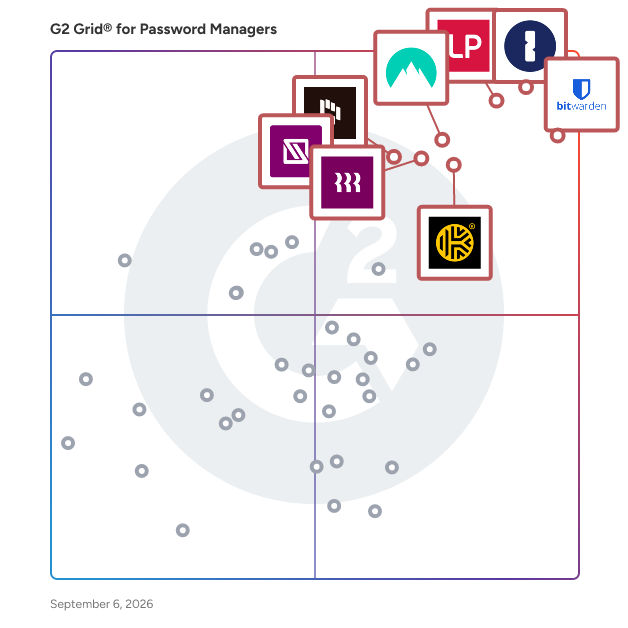
G2 takes pride in showing unbiased reviews on user satisfaction in our ratings and reports. We do not allow paid placements in any of our ratings, rankings, or reports. Learn about our scoring methodologies.
A weekly snapshot of rising stars, new launches, and what everyone's buzzing about.
LastPass is a secure, cloud-based password manager that takes the hassle out of remembering and managing passwords. It works across all your devices, so you can log in faster and stay protected everyw
Trusted by more than 9,000 businesses worldwide, NordPass is a password management tool that upholds the finest privacy and security standards for businesses. Unlock the ease of cybersecurity and b
As the #1 most trusted password management solution, Bitwarden empowers enterprises and individuals to protect critical data with end-to-end encryption and enables secure information sharing for safer
The Most Used Enterprise Password Manager, trusted by over 180,00 businesses, 1Password helps improve security, visibility and control over how their passwords and company data are protected. Secu
Dashlane provides complete credential security, protecting businesses against the threat of human risk. Our intelligent Omnix™ platform unifies credential protection and password management, equipping
Keeper Security is transforming cybersecurity for millions of individuals and thousands of organizations globally. Built with end-to-end encryption, Keeper's intuitive cybersecurity platform is truste
IT Glue is the first documentation platform specifically built for the needs of IT professionals. With IT Glue, your team will have IT asset, vendor and software information, along with passwords, con
Transform your organization’s IT operations with Rippling IT's unified platform for identity, device, access, and security management. Centralize every IT workflow, from provisioning apps and laptops
Zoho Vault is an online password manager for teams. It helps securely store, share, and manage your passwords from anywhere. With Zoho Vault, you stay organized while your passwords remain secure. Say
RoboForm for Business: A Secure and Scalable Password Management Solution RoboForm is a business-focused password management solution designed to eliminate weak, reused, and forgotten passwords—com
Hudu is a comprehensive IT documentation platform designed to help organizations streamline their operations and improve team efficiency. It provides a centralized hub for storing critical documentati
Password Manager Pro offers a complete solution to control, manage, monitor, and audit the entire life-cycle of privileged access. In a single package, it offers four solutions - privileged account ma
C2 Password is a password manager that goes beyond simple password storing, it does more! ‧ Satisfies your password management needs! C2 Password provides a convenient way for users to create, sto
Securden Password Vault for enterprises is a simple, scalable, and enterprise-grade credential management solution available in both cloud (SaaS) and on-premise (self-hosted) editions. It centralizes
N-able™ Passportal is a cloud-based, encrypted, and efficient privileged access management solution built for MSPs. N-able Passportal offers: • Credential injection across your systems and files •
Businesses are continuously increasing their emphasis on addressing security concerns. And since user error is a common cause for data breaches, password managers are an easily implementable solution to keep data secure. Password managers offer a variety of protection features to help safeguard your login information. There are also many free password manager solutions available to those on a budget.
These tools help users store and manage the passwords related to their various accounts to access applications, databases, and social media platforms, as well as myriad other various websites, services, and solutions that require a password.
These tools can also be used by businesses to enforce password policies and facilitate the secured sharing of identity credentials. Policies can help enact and enforce requirements such as length and complexity or require users to periodically update their passwords. Sharing across teams or departments can be improved as well. Instead of emailing sensitive data, many tools allow users to share their information through a secured storage system or encrypted communication channel.
Other features potential buyers may want to search for include the ability to manage multiple logins simultaneously, password strength ratings, local password storage, multi-factor authentication, and automated form-filling tools.
Key Benefits of Password Managers
The major benefits of password management technology are improved security and identity management. Some tools are good for individuals who are either security conscious or simply forget their passwords from time to time. Others are good for enterprise-grade policy enforcement.
For example, many products have the ability to generate unique, random passwords that are strong protection against hackers. Other password managers have the ability to detect password-change incidents and notify the user if an unauthorized person is attempting to change a password.
Many people keep the same password for years or have the same password for dozens of applications. Password managers can help users quickly create unique logins for each of their individual accounts. Administrators can adjust password requirements or force users to generate new passwords every few months.
In addition to improving security, these tools often make life easier for users and expedite the login process across applications. Password managers often automate portions of the login process by inserting these strong passwords automatically, simultaneously saving the user time while protecting their data. Password managers are one of many different password management tips to generate strong passwords and improve your digital security.
There are two main differences between most password manager offerings. Vendors typically sell different versions of the same product in the form of a personal password manager or a business password manager. The key distinctions between the two are the number of users and passwords allowed for storage.
Personal – Password managers designed for personal use are typically cheaper, but provide fewer features. They mainly only facilitate use on a single device or for a limited number of applications. They don’t traditionally allow for policy enforcement or the secure sharing of credentials.
While they may be lacking in a number of administrative capabilities, they can be extremely useful for individuals. Individuals can save time by utilizing autofill capabilities to simplify frequent logins. They can also generate complex passwords, store credentials securely, and set periodic alerts for password updating.
Business – Business benefits range, but still revolve around security. The increased ability to monitor user behavior and enforce password requirements will add a level of security and increase the frequency in which your employees are updating passwords.
These tools also make it easier to manage accounts used by multiple employees or accounts tied to clients and customers. They can help disparate teams securely use the same login and facilitate the exchange of those credentials. Additional features such as multi-factor authentication, management dashboards, and update enforcements will only increase security for employees and other users.
While personal tools are often cheap, open source, or free, enterprise tools will come with added costs. While you want to make sure you have a strong wall between a hacker and your passwords, you want to choose a product that corresponds with the value of your passwords. Some free password managers and open-source products provide a wide range of features, but many of them require technical knowledge and must be configured manually.
Quick login – Expedites user logins using methods such as a master password or password autofill.
Quick logins and automated form filling features are simple and save users time. Instead of typing in access credentials manually, the information is pulled from a password manager and inserted into the login form. This can be extremely useful when typing out extremely long, complex, and random passwords.
Browser extension – Integrates the tool with your web browser for easy use.
Cross-platform support is an advantage that you may want depending on the array of devices you plan to use. Some software has app versions for mobile devices and desktop plugins to make accessing a site more convenient. Typically, software that offers this feature also allows you to click a password to jump straight to that site and instantly login. You can also use the browser plugin to automatically pull all of your web login information and store it in your password manager.
Mobile app usability – Integrates with your mobile device for use on mobile apps.
Mobile app usability is important for many different types of employees including remote workers, traveling staff, and other users who may be accessing business applications using a mobile application. These apps allow users the same security benefits as desktop applications, but integrate withe the various mobile apps and mobile browser tools connected to sensitive business data.
Multi-device use – Enables user to utilize the tool across multiple devices.
Multi-device endpoint access features allow users or administrators to access additional devices remotely. Password management tools allow for endpoint access as secure means for administrator monitoring or use on multiple devices. Mobile access for iOS and Android devices allows users to either securely enter databases or password lists via additional devices and operating systems.
Admin management – Allows an employer or administrator to manage employee access.
Provisioning tools enable users to set roles, policies, and hierarchies for data access. Administrators have the ability to grant, limit, or terminate access capabilities. These tools also allow for password policy editing, multi-device synchronization, and user requests.
Governance tools work as threat monitoring systems to alert administrators when suspicious access occurs. Users can act quickly to limit the impact of data breaches or keep track of inappropriate access. Compliance audits allow the password management system to proactively monitor and compare user access rights against policies.
Password generator – Generates passwords for each of your logins.
Complex passwords are often difficult to create. A variety of letters, numbers and characters should be incorporated, but many people stick with “12345" or “password." Some utilize password generators to help create random passwords made of nonsensical combinations of characters. These may be difficult to memorize, but many products will remember or allow users to keep a secure notepad with authentication requirements to list login credentials.
Security audits – Analyzes and evaluates the quality and variety of your passwords.
Security audits help companies understand their preparedness in terms of access credentials. Companies are able to inspect the complexity of passwords or the length of time since they’ve been updated.
Security audits can help when enforcing security policies. Password policies are often required by password management systems to ensure employees are creating complicated and cryptic passwords. This prevents employees from using “dadada," “12345," or other guessable terms. Other policies relate to password reset and sharing requirements
Digital wallet – Stores records such as credit cards or receipts in addition to passwords.
Digital wallets are essentially personal vaults to store disparate access credentials in a secure password vault. They can be used in case some information has been misplaced or forgotten. Instead of writing them down on a sticky note or leaving them in an unsecured web document, the details can be locked away and encrypted to prevent others from accessing them.
File storage Stores files in addition to passwords.
Many password management products provide sharing services to allow the transfer of credentials safely. These features allow for secure and simple means to distribute login information between teams, coworkers, or even family members.
Password sharing — Password sharing can become an issue when users are sending information through unsecured mediums. Luckily, password managers are useful in providing secure means of transfer. These capabilities range from shared, secure storage tools to encrypted password sharing systems. Still, sharing can still become a risk if employees do not utilize the proper means to exchange identification credentials.
Support — If an incident occurs, you want to be sure you have a plan to protect your passwords. Many products have password recovery features in case an incident occurs, as well as live chats with customer service representatives if you have any questions or concerns. Make sure to select software that has various methods of protection and a customer service team with quick response capabilities.