Top Free Password Managers

How Many Password Managers Products Does G2 Track?

Total Products under this Category: 126

Category Stats (Sep 2026)

  • Average Rating: 4.42/5 (↑0.01 vs Aug 2026) The average rating of products in this category, based on all submitted ratings
  • Top Trending Product: Passwork (+0.13%) - Among all products in this category, Passwork recorded the largest rating increase compared to last month

Last updated: September 01, 2026

How Does G2 Rank Password Managers Products?

Why You Can Trust G2's Software Rankings:

  • 30 Analysts and Data Experts
  • 12,500+ Authentic Reviews
  • 126+ Products
  • Unbiased Rankings

G2's software rankings are built on verified user reviews, rigorous moderation, and a consistent research methodology maintained by a team of analysts and data experts. Each product is measured using the same transparent criteria, with no paid placement or vendor influence. While reviews reflect real user experiences, which can be subjective, they offer valuable insight into how software performs in the hands of professionals. Together, these inputs power the G2 Score, a standardized way to compare tools within every category.

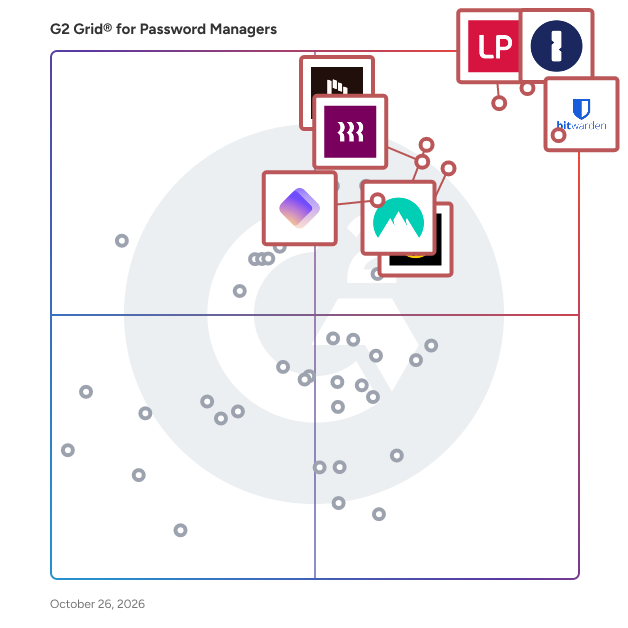
G2 Grid® for Password Managers

G2 Grid® for Password Managers plotting products by satisfaction and market presence

Highlighted products: 1Password, Bitwarden, LastPass, NordPass Business, Keeper Password Manager, Rippling IT, Dashlane Password Manager, and IT Glue.

Underlying data: [Grid® JSON](https://www.g2.com/categories/password-managers/grids.json?focus%5B%5D=1password&focus%5B%5D=bitwarden&focus%5B%5D=lastpass&focus%5B%5D=nordpass-business&focus%5B%5D=keeper-password-manager&focus%5B%5D=rippling-it&focus%5B%5D=dashlane-password-manager&focus%5B%5D=it-glue)

1Password

1Password is a unified access platform that helps organizations discover, secure, and audit access across people, AI agents, and machines. We protect the credentials, secrets, and access paths that modern businesses rely on, while giving IT and security teams the visibility and control they need to reduce risk and keep work moving. 1Password Enterprise Password Manager secures passwords, passkeys, SSH keys, API tokens, developer secrets, and AI agent credentials in encrypted, policy-governed vaults. Teams can centralize sensitive information, manage permissions, support secure sharing, identify weak or exposed credentials, and connect audit events to their security information and event management (SIEM) tools. Our zero-knowledge architecture encrypts data before it reaches our servers, so only authorized users and devices can decrypt it. 1Password SaaS Manager helps organizations discover, secure, and optimize their SaaS and AI environments. It continuously identifies sanctioned and unsanctioned applications through identity providers, single sign-on systems, finance platforms, device agents, 1Password vaults, and browser activity. IT teams can manage app access requests, automate onboarding and offboarding, conduct access reviews, identify unused licenses and overlapping applications, and track AI usage and spend. 1Password Privileged Access replaces standing privileges with just-in-time, just-enough access for people and AI agents. Teams can provision narrowly scoped permissions across cloud infrastructure, databases, Kubernetes, and SaaS platforms, then remove access when the task or session ends. Policy-based approvals, dynamic guardrails, intent monitoring, and detailed audit logs help security teams control high-risk access without slowing down legitimate work. 1Password Credential Broker authenticates machine workloads and AI agents at runtime, then delivers only the credentials approved for that specific job. This reduces long-lived secrets in pipelines and environments while recording who or what requested access and which policy authorized it. 1Password Device Trust verifies device identity and health before granting access to protected resources. Together, these capabilities give organizations a practical foundation for secure access across human, machine, and AI identities, from growing teams to enterprise environments.

Average Rating: 4.6/5.0

Total Reviews: 1,792

G2 Deal: Try 1Password for Free

Try 1Password Business free for 14 days

Price: ~~19.95~~ → 0

View this exclusive G2 deal

How Do G2 Users Rate 1Password?

  • Has the product been a good partner in doing business?: 9.3/10 (Category avg: 9.1/10)
  • Admin Management: 8.9/10 (Category avg: 9.0/10)
  • Quick Login: 9.2/10 (Category avg: 9.1/10)
  • Two-Factor Authentication: 9.2/10 (Category avg: 9.1/10)

Who Is the Company Behind 1Password?

  • Seller: 1Password
  • Company Website:
  • Year Founded: 2005
  • HQ Location: Ontario
  • Twitter: @1Password
    139,683 Twitter followers
  • LinkedIn® Page: www.linkedin.com
    3,263 employees on LinkedIn®

Who Uses This Product?

  • Who Uses This: Software Engineer, CEO
  • Top Industries: Computer Software, Information Technology and Services
  • Company Size: 54% Small, 32% Medium

What Do G2 Reviewers Say About 1Password?

AI-generated summary from verified user reviews

Pros
  • Users value the ease of use of 1Password, enjoying its secure and organized password management across devices.
  • Users value the robust security features of 1Password, ensuring peace of mind while managing their passwords effortlessly.
  • Users enjoy the secure and easy password management of 1Password, providing peace of mind and efficient access.
  • Users find 1Password intuitive, with easy navigation and seamless syncing across devices enhancing password management efficiency.
  • Users praise the easy access of 1Password, streamlining logins and consolidating credentials effortlessly across devices.
Cons
  • Users often find password tracking and management cumbersome, leading to frustration with functionality and usability issues.
  • Users feel that the pricing can be quite high for individuals, making it less accessible for some.
  • Users experience login issues with 1Password, affecting usability and creating frustration during their workflow.
  • Users experience autofill issues with 1Password, finding it intrusive and lacking control over credentials management.
  • Users find the high cost of 1Password concerning, especially with no free plan and limited trial period.

What Are Recent G2 Reviews of 1Password?

What Are G2 Users Discussing About 1Password?

Bitwarden

Bitwarden is an open source password manager for individuals, teams, and enterprise organizations. Ranked first in Enterprise User Satisfaction on the G2 Enterprise Grid for eleven consecutive quarters, Bitwarden stores, generates, autofills, and shares credentials and passkeys using end-to-end AES-256 bit encryption. Bitwarden is a zero-knowledge encryption solution, meaning only the user can access vault data. The Bitwarden source code is publicly available on GitHub and undergoes regular third-party security audits, covering penetration testing, cryptographic analysis, and source code review. Bitwarden is SOC 2 Type II, GDPR, CCPA, HIPAA, and Data Privacy Framework (DPF) compliant. Manage passwords and passkeys - Generate and store strong, unique passwords and passkeys, saved securely across unlimited devices. - Access credentials from anywhere, on any device - Bitwarden offers multiple client options including desktop, mobile, browser, web, and command-line interface (CLI). - Autofill makes it fast and secure to seamlessly log in to websites and apps across devices. Monitor and reduce credential risk - Real-time vault health alerts surface weak, reused, or exposed passwords - Bitwarden Access Intelligence identifies shadow IT and at-risk credentials across an organization, with guided remediation workflows at scale. - Turn on multifactor authentication (MFA) for vault login using a time-based one-time password (TOTP) app or security key. The standalone Bitwarden Authenticator app also generates TOTP codes for any account or service that supports authenticator-based two-factor authentication (2FA). - Exportable event logs provide transparency into user activity around sensitive data within an organization vault. Enterprise integrations and deployment - Bitwarden deploys in both cloud-based and on-premises environments, including self-hosted options for full data sovereignty. - Directory Connector and System for Cross-domain Identity Management (SCIM) integration streamline user and group onboarding with automatic account provisioning and deprovisioning across Microsoft Entra ID, Okta, Google Workspace, and LDAP-based directories. - Bitwarden connects to existing tech stacks with single sign-on (SSO), APIs, and CLI automations, and feeds event logs directly into security operations platforms including Splunk, Microsoft Sentinel, Rapid7, and Elastic. Share encrypted information at scale - Use organization collections to share credentials securely. - Vault items are owned by the organization, not individual employees, enabling full credential lifecycle management. - Transmit encrypted information, text, and attachments to anyone via a secure, randomly generated link through Bitwarden Send.

Average Rating: 4.6/5.0

Total Reviews: 1,438

How Do G2 Users Rate Bitwarden?

  • Has the product been a good partner in doing business?: 9.4/10 (Category avg: 9.1/10)
  • Admin Management: 8.8/10 (Category avg: 9.0/10)
  • Quick Login: 9.1/10 (Category avg: 9.1/10)
  • Two-Factor Authentication: 9.1/10 (Category avg: 9.1/10)

Who Is the Company Behind Bitwarden?

  • Seller: Bitwarden
  • Company Website:
  • Year Founded: 2015
  • HQ Location: Santa Barbara, CA
  • Twitter: @Bitwarden
    130,732 Twitter followers
  • LinkedIn® Page: www.linkedin.com
    278 employees on LinkedIn®

Who Uses This Product?

  • Who Uses This: Software Engineer, IT Manager
  • Top Industries: Information Technology and Services, Computer Software
  • Company Size: 57% Small, 30% Medium

What Do G2 Reviewers Say About Bitwarden?

AI-generated summary from verified user reviews

Pros
  • Users appreciate the ease of use with Bitwarden, enjoying its user-friendly interface and comprehensive platform support.
  • Users appreciate Bitwarden's robust security features, including passkeys and security alerts for protecting login information.
  • Users appreciate the exceptional password management of Bitwarden, benefiting from its user-friendly interface and amazing features.
  • Users find the setup process for Bitwarden remarkably easy, making transition from other managers seamless.
  • Users value the cross-platform compatibility of Bitwarden, seamlessly accessing their accounts across devices and operating systems.
Cons
  • Users face autofill issues on certain sites, limiting Bitwarden's usability and causing frustration with password management.
  • Users find the UI to be clunky, suggesting a more modern and clearer approach for better usability.
  • Users find the process complexity of onboarding and managing reports in Bitwarden somewhat challenging and inefficient.
  • Users find certain missing features in Bitwarden, such as unreliable autofill and absence of TOTP storage.
  • Users find the learning curve steep for Bitwarden, struggling with feature understanding and user onboarding.

What Are Recent G2 Reviews of Bitwarden?

What Are G2 Users Discussing About Bitwarden?

LastPass

LastPass delivers Secure Access Essentials, helping individuals and organizations manage and protect access to AI, applications, and credentials straight from the browser. Trusted by more than 100,000 businesses and millions of users worldwide, LastPass combines strong security with everyday simplicity. For individuals, LastPass makes online life easier by securely storing credentials, generating strong passwords, and autofilling logins when needed. That means less friction, fewer resets, and safer access wherever work and life happens. For businesses, LastPass helps lean IT teams secure AI‑driven work by reducing risk by controlling access to unapproved apps, while storing and managing employee credentials and integrating with identity providers to fill gaps left by SSO. It’s simpler access, better visibility, and stronger security without added complexity.

Average Rating: 4.5/5.0

Total Reviews: 2,073

How Do G2 Users Rate LastPass?

  • Has the product been a good partner in doing business?: 8.6/10 (Category avg: 9.1/10)
  • Admin Management: 8.4/10 (Category avg: 9.0/10)
  • Quick Login: 8.9/10 (Category avg: 9.1/10)
  • Two-Factor Authentication: 8.9/10 (Category avg: 9.1/10)

Who Is the Company Behind LastPass?

  • Seller: LastPass
  • Company Website:
  • Year Founded: 2008
  • HQ Location: Boston, Massachusetts
  • Twitter: @LastPass
    45,838 Twitter followers
  • LinkedIn® Page: www.linkedin.com
    697 employees on LinkedIn®

Who Uses This Product?

  • Who Uses This: Owner, CEO
  • Top Industries: Information Technology and Services, Computer Software
  • Company Size: 63% Small, 25% Medium

What Do G2 Reviewers Say About LastPass?

AI-generated summary from verified user reviews

Pros
  • Users find LastPass easy to use, quickly mastering its structured layout for secure login management.
  • Users appreciate the secure password storage and smart updating features of LastPass, simplifying their password management experience.
  • Users appreciate the high security levels of LastPass, providing confidence against data breaches and ensuring password safety.
  • Users value the autofill feature of LastPass, making password management effortless and secure.
  • Users appreciate the high security levels of LastPass, feeling confident that their passwords remain safe and uncompromised.
Cons
  • Users face autofill issues with LastPass, as incorrect prefill and confusion with fields hinder smooth access.
  • Users find the mobile app experience lacking, with difficulties in login and concerns over security breaches.
  • Users experience login issues with LastPass, including bugs, lengthy processes, and concerns about security risks.
  • Users find password issues frustrating, with frequent changes required and unreliable password copying from the browser extension.
  • Users experience occasional browser extension issues, such as slow syncs and problems with auto-filling passwords.

What Are Recent G2 Reviews of LastPass?

What Are G2 Users Discussing About LastPass?

NordPass Business

Trusted by more than 9,000 businesses worldwide, NordPass is a password management tool that upholds the finest privacy and security standards for businesses. Unlock the ease of cybersecurity and bring peace to your team's digital world. Its intuitive interface ensures seamless adoption for your teams. Optimize daily operations by enabling straightforward account access, secure password sharing, and setting company-wide password policies. Encrypted with the industry-leading XChaCha20 algorithm, NordPass allows companies to manage and monitor access to the company's resources and prevent unwanted credential exposure. In case of an issue, best-in-class 24/7 tech support is always available, with no hidden costs. _____________ Start your NordPass Business Free Trial The 14-day free trial gives you full access to all NordPass features. No credit card required. https://nordpass.com/business-free-trial/

Average Rating: 4.5/5.0

Total Reviews: 641

G2 Deal: 20% OFF 2-year Business Plan

Get 20% OFF NordPass Business Plan for 2 years.

Price: ~~$3.59 user / month~~ → $2.87 user / month

View this exclusive G2 deal

How Do G2 Users Rate NordPass Business?

  • Has the product been a good partner in doing business?: 9.0/10 (Category avg: 9.1/10)
  • Admin Management: 8.7/10 (Category avg: 9.0/10)
  • Quick Login: 8.6/10 (Category avg: 9.1/10)
  • Two-Factor Authentication: 8.6/10 (Category avg: 9.1/10)

Who Is the Company Behind NordPass Business?

  • Seller: Nord Security
  • Company Website:
  • Year Founded: 2012
  • HQ Location: Global
  • Twitter: @NordPass
    9,488 Twitter followers
  • LinkedIn® Page: www.linkedin.com
    2,009 employees on LinkedIn®

Who Uses This Product?

  • Who Uses This: CEO, CTO
  • Top Industries: Information Technology and Services, Marketing and Advertising
  • Company Size: 72% Small, 25% Medium

What Do G2 Reviewers Say About NordPass Business?

AI-generated summary from verified user reviews

Pros
  • Users value the ease of use of NordPass Business, appreciating its simplicity for password management and generation.
  • Users value the security features of NordPass Business, enhancing password management and protecting sensitive information.
  • Users appreciate the convenience of password management with NordPass, enjoying automated filling and secure storage.
  • Users find NordPass Business intuitive, enhancing security and simplifying password management for their businesses.
  • Users value the easy password sharing capability of NordPass Business, enhancing collaboration while maintaining security.
Cons
  • Users report inconsistent password management with NordPass, affecting the reliability of saved passwords during login processes.
  • Users report issues with password reliability, experiencing failures and complications with autofill functionality during usage.
  • Users report frequent login issues, including timeouts and inconsistent password autofill, impacting overall usability.
  • Users frequently experience autofill issues, with inconsistent functionality and interruptions that hinder their efficiency and productivity.
  • Users report browser extension issues with NordPass Business, limiting functionality and causing inconvenience during use.

What Are Recent G2 Reviews of NordPass Business?

Keeper Password Manager

Keeper Security is transforming cybersecurity for millions of individuals and thousands of organizations globally. Built with end-to-end encryption, Keeper's intuitive cybersecurity platform is trusted by Fortune 100 companies to protect every user, on every device, in every location. Our patented zero-trust and zero-knowledge privileged access management solution unifies enterprise password, secrets and connections management with zero-trust network access and endpoint privilege mangement. By combining these critical identity and access management components into a single cloud-based solution, Keeper delivers unparalleled visibility, security and control while ensuring compliance and audit requirements are met. Learn how Keeper can defend your organization against today’s cyber threats at KeeperSecurity.com.

Average Rating: 4.6/5.0

Total Reviews: 1,225

G2 Deal: Try Keeper for Free

Start a 14-day free business trial. Protect your organization’s passwords, credentials and secrets with zero-trust and zero-knowledge security.

Price: ~~$2.00 per user/month~~

View this exclusive G2 deal

How Do G2 Users Rate Keeper Password Manager?

  • Has the product been a good partner in doing business?: 9.0/10 (Category avg: 9.1/10)
  • Admin Management: 8.8/10 (Category avg: 9.0/10)
  • Quick Login: 9.0/10 (Category avg: 9.1/10)
  • Two-Factor Authentication: 9.2/10 (Category avg: 9.1/10)

Who Is the Company Behind Keeper Password Manager?

  • Seller: Keeper Security
  • Company Website:
  • Year Founded: 2011
  • HQ Location: Chicago, IL
  • Twitter: @keepersecurity
    18,913 Twitter followers
  • LinkedIn® Page: www.linkedin.com
    797 employees on LinkedIn®

Who Uses This Product?

  • Who Uses This: IT Manager, Owner
  • Top Industries: Information Technology and Services, Financial Services
  • Company Size: 43% Medium, 41% Small

What Do G2 Reviewers Say About Keeper Password Manager?

AI-generated summary from verified user reviews

Pros
  • Users appreciate the ease of use of Keeper Password Manager, noting its intuitive interface and convenient features.
  • Users value the robust security features of Keeper Password Manager, enhancing safety and awareness of potential breaches.
  • Users appreciate the secure sharing capabilities of Keeper, enhancing team collaboration while keeping passwords safe.
  • Users appreciate the secure and efficient password management of Keeper, making it ideal for both personal and organizational use.
  • Users value the user-friendly setup and frequent updates of Keeper Password Manager, enhancing their overall experience.
Cons
  • Users experience inconsistent autofill functionality with Keeper Password Manager, leading to glitches and frustration during use.
  • Users struggle with autofill issues where passwords aren't always added automatically, hindering convenience and efficiency.
  • Users experience login issues due to cumbersome ADFS setup and frequent sign-in requirements affecting usability.
  • Users face password issues that complicate sharing and management, limiting convenience and accessibility in certain situations.
  • Users find the browser extension limitations frustrating, wishing for easier access to features and password management.

What Are Recent G2 Reviews of Keeper Password Manager?

What Are G2 Users Discussing About Keeper Password Manager?

Rippling IT

Transform your organization’s IT operations with Rippling’s unified platform for identity, device, access, and security management. Centralize every IT workflow, from provisioning apps and laptops to enforcing security policies, in a single dashboard. Seamlessly manage the entire employee lifecycle, automatically granting and revoking app access, configuring devices, and maintaining least-privilege controls. Enforce compliance with real-time monitoring, automated patching, and integrated endpoint protection. Streamline offboarding with instant lockouts and secure device recovery. Gain full visibility across hardware, software, and user risk without the complexity of multiple tools. Rippling helps your business cut costs, eliminate manual work, and strengthen security, so your team can move faster. Experience the power of unified IT management with Rippling today.

Average Rating: 4.7/5.0

Total Reviews: 1,076

How Do G2 Users Rate Rippling IT?

  • Has the product been a good partner in doing business?: 8.9/10 (Category avg: 9.1/10)
  • Admin Management: 9.4/10 (Category avg: 9.0/10)
  • Quick Login: 9.3/10 (Category avg: 9.1/10)
  • Two-Factor Authentication: 9.5/10 (Category avg: 9.1/10)

Who Is the Company Behind Rippling IT?

  • Seller: Rippling
  • Company Website:
  • Year Founded: 2016
  • HQ Location: San Francisco, CA
  • Twitter: @Rippling
    12,402 Twitter followers
  • LinkedIn® Page: www.linkedin.com
    7,798 employees on LinkedIn®

Who Uses This Product?

  • Who Uses This: Software Engineer, CEO
  • Top Industries: Computer Software, Information Technology and Services
  • Company Size: 59% Medium, 27% Small

What Do G2 Reviewers Say About Rippling IT?

AI-generated summary from verified user reviews

Pros
  • Users appreciate the ease of use in Rippling IT, enjoying its organized interface and streamlined processes.
  • Users find Rippling to be intuitive and well-organized, making it easy to access essential applications and information.
  • Users love the user-friendly and intuitive design of Rippling IT, simplifying navigation and enhancing their experience.
  • Users appreciate the easy access Rippling provides to essential applications, enhancing efficiency in their daily work routines.
  • Users appreciate the simple and intuitive user interface that facilitates easy navigation and efficient use of features.
Cons
  • Users express frustration with the missing features of Rippling IT, particularly in integration and support functionalities.
  • Users find the limited features of Rippling IT frustrating, especially with payroll and integration issues complicating the experience.
  • Users express a need for improved organization and functionality within Rippling IT’s payroll and password management features.
  • Users find the learning curve steep, especially for those who are not tech-savvy, impacting their experience.
  • Users express frustration with poor customer support, citing limitations in assistance and the need for custom solutions.

What Are Recent G2 Reviews of Rippling IT?

Dashlane Password Manager

Dashlane enables organizations to proactively protect against credential-related breaches. Dashlane enables organizations to proactively protect against credential-related breaches. Our Omnix® platform equips teams with enterprise password management and browser-native credential protection to protect every workforce login from day one. By securely managing employee passwords and detecting credential-based threats in real time, IT security teams can proactively reduce risk and close critical security gaps—without adding to their workload. By securely managing employee passwords and detecting credential-based threats in real time, IT security teams can proactively reduce risk and close critical security gaps—without adding to their workload. 25,000 brands worldwide trust Dashlane for industry-leading innovations, patented zero-knowledge security, and an unmatched user experience. What are the features of Dashlane Password Manager? - Passkeys, passwords, and payment storage - Admin Console - Granular sharing controls and security policies - Proactive Credential Risk Detection - Smart, in-context employee alerts - Integration with communication tools, such as Slack - AI phishing alerts - SIEM integration - SCIM integration - Password Health score - Activity Logs - Dark Web Monitoring & Insights - VPN for Wi-Fi protection - Zero-knowledge security architecture

Average Rating: 4.5/5.0

Total Reviews: 625

G2 Deal: Try Dashlane Business free for 14 days

Dashlane makes it easy to securely manage passwords across your entire organization. Get started in less than 3 minutes and see why 20,000+ organizations worldwide trust Dashlane.

View this exclusive G2 deal

How Do G2 Users Rate Dashlane Password Manager?

  • Has the product been a good partner in doing business?: 8.8/10 (Category avg: 9.1/10)
  • Admin Management: 8.5/10 (Category avg: 9.0/10)
  • Quick Login: 9.1/10 (Category avg: 9.1/10)
  • Two-Factor Authentication: 8.8/10 (Category avg: 9.1/10)

Who Is the Company Behind Dashlane Password Manager?

  • Seller: Dashlane
  • Company Website:
  • Year Founded: 2009
  • HQ Location: New York
  • Twitter: @dashlane
    28,390 Twitter followers
  • LinkedIn® Page: www.linkedin.com
    311 employees on LinkedIn®

Who Uses This Product?

  • Who Uses This: CEO, Owner
  • Top Industries: Information Technology and Services, Computer Software
  • Company Size: 64% Small, 32% Medium

What Do G2 Reviewers Say About Dashlane Password Manager?

AI-generated summary from verified user reviews

Pros
  • Users find Dashlane easy to use, appreciating its beginner-friendly interface and seamless device integration.
  • Users love the security features of Dashlane, making password storage and sharing effortless and reliable.
  • Users love the seamless sharing of passwords and information, enhancing collaboration and security effortlessly.
  • Users find Dashlane's interface to be intuitive and user-friendly, making password management a breeze to navigate.
  • Users appreciate the secure password sharing capabilities of Dashlane, ensuring team safety and easy collaboration.
Cons
  • Users report autofill issues where it fills in incorrectly, causing confusion and complicating the user experience.
  • Users experience password saving issues that lead to accidental saves and complications when using different accounts.
  • Users experience login issues with Dashlane, often needing to re-sign in, which can be inconvenient.
  • Users face issues with incorrect password cataloguing, leading to frustration in managing multiple accounts effectively.
  • Users find Dashlane's pricing to be too high, especially compared to other password managers with similar offerings.

What Are Recent G2 Reviews of Dashlane Password Manager?

Proton Pass For Business

Proton Pass for Business is a cloud-based password management solution specifically designed to assist small and medium-sized businesses (SMBs) in securely storing, sharing, and managing login credentials and sensitive data. With a focus on end-to-end encryption and robust administrative controls, this platform addresses the critical need for improved credential hygiene, compliance support, and streamlined access to business systems. It is particularly tailored for organizations that prioritize security and efficiency in their operations. The target audience for Proton Pass for Business includes SMBs that face challenges related to password management, such as credential leaks, reused passwords, and unmanaged credential sharing. By consolidating passwords and other sensitive information into a centralized encrypted vault, businesses can enhance their security posture. The platform also allows for the safe sharing of access among employees and external partners, while implementing organization-wide security policies like two-factor authentication (2FA). Furthermore, it supports modern authentication standards, including passkeys and single sign-on (SSO), making it suitable for a variety of business environments. Key features of Proton Pass for Business include secure credential storage and encryption, which ensures that passwords, secure notes, and credit card details are stored in a zero-knowledge vault accessible only to authorized users. The centralized administrative control allows business administrators to deploy the solution across the organization, onboard or offboard users, enforce security policies, and monitor activity logs for compliance purposes. Additionally, the platform supports cross-device and platform access, enabling seamless credential management across web, desktop, and mobile devices. Proton Pass for Business also enhances collaboration and productivity through features such as secure sharing and vaults, which allow teams to create multiple encrypted vaults for projects or departments. The autofill function speeds up the login process by automatically entering credentials and two-factor codes, reducing the time spent logging into systems and minimizing manual errors. Moreover, the platform includes dark web monitoring to alert users if their credentials appear in data leaks, promoting proactive vulnerability management. The security and compliance benefits of Proton Pass for Business are significant, as the platform operates under Swiss privacy laws, which provide strong protections for business data. Its open-source nature and third-party security audits further enhance trust and transparency. By implementing robust access controls and encrypted storage, Proton Pass supports SMBs in meeting regulatory requirements such as GDPR. Overall, this solution provides a structured approach to reducing security risks, improving productivity, and centralizing password management within a secure environment.

Average Rating: 4.7/5.0

Total Reviews: 120

G2 Deal: Try Proton Pass For Business for Free

Start a 14-day free business trial. Protect your data with a business password manager. Create strong passwords, securely share logins, and control access to your accounts.

Price: ~~$4.49 /user per month~~

View this exclusive G2 deal

How Do G2 Users Rate Proton Pass For Business?

  • Has the product been a good partner in doing business?: 9.3/10 (Category avg: 9.1/10)
  • Admin Management: 8.3/10 (Category avg: 9.0/10)
  • Quick Login: 8.1/10 (Category avg: 9.1/10)
  • Two-Factor Authentication: 9.6/10 (Category avg: 9.1/10)

Who Is the Company Behind Proton Pass For Business?

  • Seller: Proton AG
  • Company Website:
  • Year Founded: 2014
  • HQ Location: Plan-les-Ouates, Geneva, Switzerland
  • Twitter: @ProtonPrivacy
    363,085 Twitter followers
  • LinkedIn® Page: www.linkedin.com
    973 employees on LinkedIn®

Who Uses This Product?

  • Who Uses This: Owner
  • Top Industries: Information Technology and Services, Computer Software
  • Company Size: 16% Small, 2% Medium

What Do G2 Reviewers Say About Proton Pass For Business?

AI-generated summary from verified user reviews

Pros
  • Users highlight the ease of use with Proton Pass, making migration and functionality seamless and efficient.
  • Users value the fast performance of Proton Pass For Business, enjoying smooth auto-filling and efficient tools.
  • Users value the cross-platform compatibility of Proton Pass, enabling seamless use across devices and applications.
  • Users love the easy setup of Proton Pass, appreciating its smooth navigation and seamless auto-filling across platforms.
  • Users enjoy the navigation ease of Proton Pass, finding the interface smooth and intuitive across all platforms.
Cons
  • Users find that folder management lacks necessary tools, complicating the organization of their large collections of passwords and notes.
  • Users find the learning curve challenging, requiring significant time to fully utilize Proton Pass For Business.

What Are Recent G2 Reviews of Proton Pass For Business?

Zoho Vault

Zoho Vault is an online password manager for teams. It helps securely store, share, and manage your passwords from anywhere. With Zoho Vault, you stay organized while your passwords remain secure. Say goodbye to storing your important passwords on spreadsheets or post-it notes. Features Securely store: Securely store all your passwords and organize them for easy access and management. Passwords are encrypted with the strongest encryption standard (AES-256). Safely share: Safely share common passwords among members of your work group by granting different access privileges. Directly log in: Directly connect to websites and applications without having to manually enter login credentials. Control access: Easily provide passwords to users and groups in bulk. Instantly deny access when a user is removed. Track actions: Track user actions and maintain complete records of team members' password activity with timestamps. Gain visibility: With in-depth reports, keep track of which users have access to various passwords.

Average Rating: 4.4/5.0

Total Reviews: 74

How Do G2 Users Rate Zoho Vault?

  • Has the product been a good partner in doing business?: 8.8/10 (Category avg: 9.1/10)
  • Admin Management: 9.2/10 (Category avg: 9.0/10)
  • Quick Login: 8.8/10 (Category avg: 9.1/10)
  • Two-Factor Authentication: 9.2/10 (Category avg: 9.1/10)

Who Is the Company Behind Zoho Vault?

  • Seller: Zoho
  • Year Founded: 1996
  • HQ Location: Austin, TX
  • Twitter: @Zoho
    137,880 Twitter followers
  • LinkedIn® Page: www.linkedin.com
    30,913 employees on LinkedIn®
  • Phone: +1 (888) 900-9646

Who Uses This Product?

  • Top Industries: Information Technology and Services, Computer Software
  • Company Size: 59% Small, 38% Medium

What Do G2 Reviewers Say About Zoho Vault?

AI-generated summary from verified user reviews

Pros
  • Users find Zoho Vault to be easy to use, with straightforward implementation and helpful customer support enhancing their experience.
  • Users find implementation easy with Zoho Vault, allowing seamless onboarding and integration into workflows.
  • Users find Zoho Vault to be an incredibly easy tool for organizing and sharing passwords securely across devices.
  • Users value the easy password sharing in Zoho Vault, enhancing team collaboration and security effortlessly.
  • Users value the easy and controlled sharing of passwords in Zoho Vault, enhancing team collaboration and security.
Cons
  • Users find the UI unpolished and outdated, impacting the overall experience and usability of Zoho Vault.
  • Users experience login issues with Zoho Vault, facing frequent logouts that interrupt their work sessions and cause frustration.
  • Users express concerns over the slow performance of Zoho Vault's UI and browser extension, impacting usability.
  • Users find the UI issues in Zoho Vault to be outdated and unpolished, impacting their overall experience.
  • Users experience autofill issues with Zoho Vault, noting slow performance and reliability concerns with the browser extension.

What Are Recent G2 Reviews of Zoho Vault?

What Are G2 Users Discussing About Zoho Vault?

RoboForm

RoboForm for Business: A Secure and Scalable Password Management Solution RoboForm is a business-focused password management solution designed to eliminate weak, reused, and forgotten passwords—common vulnerabilities that lead to security breaches. By streamlining how credentials are stored, shared, and managed, RoboForm strengthens organizational security while reducing the productivity loss and IT costs associated with frequent password resets. Designed for organizations of all sizes, RoboForm for Business serves both IT administrators and end users. It is especially valuable for companies prioritizing regulatory compliance and strong internal security policies. With the growing frequency of cyberattacks and data breaches, businesses increasingly require scalable password solutions that can align with internal controls and evolving industry standards. RoboForm addresses this demand through a highly configurable platform built to support diverse compliance requirements. A standout feature is the intuitive Admin Console, which simplifies onboarding, user provisioning, and security policy enforcement from a centralized interface. Admins can assign roles, enforce access controls, and monitor activity across all users and devices—saving time and ensuring policy compliance. Cross-platform compatibility ensures secure access to credentials from any device, enabling productivity without compromising security. RoboForm’s core functionality includes generating and storing strong, unique passwords, automatically saving and filling credentials, and enabling seamless access with its best-in-class One Click Login. Passwords are protected using advanced encryption standards within secure individual vaults. RoboForm also supports secure, role-based credential sharing to facilitate collaboration without compromising security. These capabilities are backed by robust audit trails, real-time activity monitoring, and detailed reporting—giving organizations full visibility into password usage, policy compliance, and potential security risks. By integrating RoboForm into their IT security stack, businesses can enhance their overall cyber resilience while promoting a culture of secure behavior among employees. Its balance of usability, policy control, and administrative oversight makes RoboForm a strategic tool for any organization aiming to mature its identity and access management posture.

Average Rating: 4.6/5.0

Total Reviews: 741

How Do G2 Users Rate RoboForm?

  • Has the product been a good partner in doing business?: 9.1/10 (Category avg: 9.1/10)
  • Admin Management: 8.9/10 (Category avg: 9.0/10)
  • Quick Login: 9.3/10 (Category avg: 9.1/10)
  • Two-Factor Authentication: 8.9/10 (Category avg: 9.1/10)

Who Is the Company Behind RoboForm?

  • Seller: Siber Systems
  • Company Website:
  • Year Founded: 1995
  • HQ Location: Fairfax, VA
  • Twitter: @roboform
    19,840 Twitter followers
  • LinkedIn® Page: www.linkedin.com
    67 employees on LinkedIn®

Who Uses This Product?

  • Who Uses This: President, CEO
  • Top Industries: Insurance, Information Technology and Services
  • Company Size: 75% Small, 21% Medium

What Do G2 Reviewers Say About RoboForm?

AI-generated summary from verified user reviews

Pros
  • Users find RoboForm's ease of use exceptional, making credential management and setup convenient across all devices.
  • Users love RoboForm for its cross-platform compatibility, seamlessly syncing credentials across all their devices.
  • Users praise the easy setup of RoboForm, making onboarding and credential management straightforward and hassle-free.
  • Users value the secure storage of RoboForm, appreciating effortless password management and enhanced security across devices.
  • Users value the convenience of RoboForm for its ease of use and efficient password management across all devices.
Cons
  • Users find the UI outdated and lacking intuitiveness, impacting their overall experience with RoboForm.
  • Users struggle with password management, facing issues like manual logins, duplicate handling, and password memory glitches.
  • Users experience autofill issues that can hinder efficiency, especially on complex webpages or during critical submissions.
  • Users experience login issues with RoboForm, particularly with frequent re-logins and password recovery complications.
  • Users face duplication issues with RoboForm, struggling with multiple logins for the same site and password updates.

What Are Recent G2 Reviews of RoboForm?

What Are G2 Users Discussing About RoboForm?

Hudu

Hudu is a comprehensive IT documentation platform designed to help organizations streamline their operations and improve team efficiency. It provides a centralized hub for storing critical documentation—covering everything from systems, processes, and policies to credentials, SOPs, and asset records. With Hudu, teams can ensure that important information is always organized, easy to access, and kept up to date, making day-to-day work smoother and decision-making faster. While originally built for internal IT departments and MSPs, Hudu is flexible enough to support a wide range of industries, including finance, healthcare, education, and construction. Its structure can be tailored to fit the needs of any organization, whether you're managing internal infrastructure, supporting clients, or coordinating distributed teams. Teams can build custom asset layouts to track hardware, software, or industry-specific data. Knowledge base articles and SOPs support rich formatting, embedded content, and reusable templates to keep documentation consistent and easy to follow. Passwords and OTPs are stored securely with full access controls and history tracking for auditability and compliance. Hudu supports detailed permission management, so teams can control access at a granular level across departments, roles, or clients. It integrates with popular tools like Microsoft 365, ConnectWise, HaloPSA, NinjaOne, N-able, and many more to automatically sync key data and reduce manual entry. A browser extension and mobile app make it easy to access or update documentation on the go, whether in the office or the field. For more advanced workflows, Hudu offers a powerful API, allowing teams to automate documentation or integrate with internal systems. Organizations with strict security requirements can also choose to deploy Hudu on-premises with full control over their environment. With Hudu, teams can reduce onboarding time, cut down on repetitive questions, and ensure processes are followed consistently. It replaces scattered documentation with a centralized source of truth that’s easy to manage and scale. If your team depends on shared knowledge to operate efficiently, Hudu helps you keep it organized, accessible, and secure—no matter your industry or size.

Average Rating: 4.7/5.0

Total Reviews: 357

How Do G2 Users Rate Hudu?

  • Has the product been a good partner in doing business?: 9.5/10 (Category avg: 9.1/10)
  • Admin Management: 9.2/10 (Category avg: 9.0/10)
  • Quick Login: 9.3/10 (Category avg: 9.1/10)
  • Two-Factor Authentication: 9.5/10 (Category avg: 9.1/10)

Who Is the Company Behind Hudu?

  • Seller: Hudu
  • Company Website:
  • Year Founded: 2018
  • HQ Location: Fort Collins, Colorado
  • Twitter: @HuduHQ
    500 Twitter followers
  • LinkedIn® Page: www.linkedin.com
    40 employees on LinkedIn®

Who Uses This Product?

  • Who Uses This: Owner, Director
  • Top Industries: Information Technology and Services, Computer & Network Security
  • Company Size: 71% Small, 12% Medium

What Do G2 Reviewers Say About Hudu?

AI-generated summary from verified user reviews

Pros
  • Users value the clean and simple interface of Hudu, enhancing usability and customization for their unique needs.
  • Users appreciate the intuitive interface and comprehensive features of Hudu for organizing IT data efficiently.
  • Users rave about Hudu's seamless integrations, making it easy to incorporate existing systems and enhancing daily operations.
  • Users love the easy setup of Hudu, enabling quick customization and immediate access to documentation.
  • Users appreciate the clean and simple interface of Hudu, making it easy to use and customize for their needs.
Cons
  • Users find Hudu's missing features, such as a unified search bar and limited customization, affecting their overall experience.
  • Users find the poor integration process challenging and desire additional options for improved efficiency.
  • Users note that UX improvement is needed, especially in search, navigation, and overall interface design.
  • Users are disappointed by Hudu's limited features, particularly regarding support for VPS providers and third-party integrations.
  • Users face integration issues with Hudu, needing more support for third-party tools and a broader range of VPS options.

What Are Recent G2 Reviews of Hudu?

What Are G2 Users Discussing About Hudu?

ManageEngine Password Manager Pro

Password Manager Pro offers a complete solution to control, manage, monitor, and audit the entire life-cycle of privileged access. In a single package, it offers four solutions - privileged account management, remote access management, privileged session management, and SSL certificate management. Password Manager Pro basically consolidates all your privileged accounts in a centralized vault in fully encrypted form. It enforces password management best practices and secures the privileged accounts, the keys to your kingdom. It helps mitigate security risks related to privileged access and preempt security breaches and compliance issues. Privileged Account Management: Adopt a best practice approach for effective management of privileged accounts that form the security perimeter around mission-critical data servers and other IT assets in your environment—whether they use password or key-based authentication, including those of operating systems, databases, servers, applications, cloud platforms, and networking devices. Remote Access Management: Establish centralized control on access pathways and define how users connect to target systems. Ensure ultimate security in all privileged connections with one-click login capabilities instead of sharing credentials in cleartext. Tunnel connections through an encrypted channel gateway, requiring no direct connectivity between the user device and remote host. Privileged Session Management: Stay aware of what your users are doing with their privileged access and prevent misuse. Facilitate advanced monitoring to check whether users—employees and third parties alike, stay within their provisioned scope. Readily answer questions regarding the ‘who’, ‘what’ and ‘when’ of privileged access. SSL Certificate Management: Gain complete visibility and control over your SSL environment. Stay away from risks of certificate expiration oversights, obsolete hashing algorithms and weak cipher suites that cost you your customers’ trust. Experience seamless, end-to-end management of certificate life cycles.

Average Rating: 3.9/5.0

Total Reviews: 35

How Do G2 Users Rate ManageEngine Password Manager Pro?

  • Has the product been a good partner in doing business?: 8.5/10 (Category avg: 9.1/10)
  • Admin Management: 7.9/10 (Category avg: 9.0/10)
  • Quick Login: 9.2/10 (Category avg: 9.1/10)
  • Two-Factor Authentication: 8.3/10 (Category avg: 9.1/10)

Who Is the Company Behind ManageEngine Password Manager Pro?

  • Seller: Zoho
  • Year Founded: 1996
  • HQ Location: Austin, TX
  • Twitter: @Zoho
    137,880 Twitter followers
  • LinkedIn® Page: www.linkedin.com
    30,913 employees on LinkedIn®
  • Phone: +1 (888) 900-9646

Who Uses This Product?

  • Company Size: 43% Large, 40% Medium

What Do G2 Reviewers Say About ManageEngine Password Manager Pro?

AI-generated summary from verified user reviews

Pros
  • Users find the deployment ease of ManageEngine Password Manager Pro remarkably beneficial for managing privileged access efficiently.
  • Users value the easy integrations of ManageEngine Password Manager Pro, simplifying privileged management and enhancing security.
  • Users value the efficiency of ManageEngine Password Manager Pro, enhancing security and simplifying privileged management tasks.
  • Users find the implementation ease of ManageEngine Password Manager Pro enhances security management effortlessly.
  • Users value the monitoring capabilities of ManageEngine Password Manager Pro, enhancing security and trust in password management.

What Are Recent G2 Reviews of ManageEngine Password Manager Pro?

What Are G2 Users Discussing About ManageEngine Password Manager Pro?

heylogin

heylogin is the first password manager with full hardware-based end-to-end encryption. 2-factor secure by default, developed and hosted in Germany.

Average Rating: 4.6/5.0

Total Reviews: 110

How Do G2 Users Rate heylogin?

  • Has the product been a good partner in doing business?: 9.5/10 (Category avg: 9.1/10)
  • Admin Management: 9.7/10 (Category avg: 9.0/10)
  • Quick Login: 9.5/10 (Category avg: 9.1/10)
  • Two-Factor Authentication: 9.4/10 (Category avg: 9.1/10)

Who Is the Company Behind heylogin?

  • Seller: heylogin
  • Year Founded: 2020
  • HQ Location: Braunschweig, DE
  • LinkedIn® Page: www.linkedin.com
    21 employees on LinkedIn®

Who Uses This Product?

  • Who Uses This: Founder, CEO
  • Top Industries: Marketing and Advertising, Information Technology and Services
  • Company Size: 45% Small, 2% Medium

What Do G2 Reviewers Say About heylogin?

AI-generated summary from verified user reviews

Pros
  • Users praise the ease of use of heylogin, enjoying its quick setup and seamless multi-device login experience.
  • Users love the easy setup of heylogin, enjoying a smooth experience that simplifies password management for everyone.
  • Users praise the intuitive interface of heylogin, making password management and sharing effortless for teams.
  • Users value the strong security measures of heylogin, enhancing team access without compromising credentials safety.
  • Users value the login efficiency of heylogin, appreciating its seamless access and time-saving features for managing multiple accounts.
Cons
  • Users find the missing features of heylogin, like limited app support and few integrations, disappointing overall.
  • Users experience autofill issues with heylogin, particularly on Android, affecting password management efficiency.
  • Users find process complexity in heylogin, citing issues with recovery and limited browser support disrupting functionality.
  • Users experience mobile app issues such as glitches and lag, impacting functionality and user satisfaction.
  • Users note a steep learning curve for new users, with initial setup and advanced features lacking clarity and guidance.

What Are Recent G2 Reviews of heylogin?

Passwork

Passwork — self-hosted enterprise password manager with zero-knowledge encryption. Passwork is an on-premise corporate password manager built for security-conscious organizations. Developed and headquartered in Europe (Barcelona, Spain), Passwork meets GDPR, NIS2, ENS and other European regulatory requirements by design. All passwords and credentials are stored exclusively on your own server. Double-layer AES-256 encryption (server-side and client-side) with zero-knowledge architecture means your data stays within your infrastructure, fully under the control of your system administrators. Passwork is ISO/IEC 27001 certified. Your data never leaves your infrastructure. Trusted by enterprises across Europe for secure password sharing, privileged access management, and centralized credential governance.

Average Rating: 4.7/5.0

Total Reviews: 30

How Do G2 Users Rate Passwork?

  • Has the product been a good partner in doing business?: 9.4/10 (Category avg: 9.1/10)
  • Admin Management: 9.9/10 (Category avg: 9.0/10)
  • Quick Login: 9.8/10 (Category avg: 9.1/10)
  • Two-Factor Authentication: 10.0/10 (Category avg: 9.1/10)

Who Is the Company Behind Passwork?

  • Seller: Passwork
  • Year Founded: 2017
  • HQ Location: Barcelona, Spain
  • LinkedIn® Page: www.linkedin.com
    8 employees on LinkedIn®

Who Uses This Product?

  • Company Size: 60% Medium, 33% Small

What Are Recent G2 Reviews of Passwork?

What Are G2 Users Discussing About Passwork?

Akeyless Identity Security Platform

Akeyless delivers identity security for an era shaped by automation and AI. The cloud-native platform secures machines, AI agents, and human access across hybrid, multi-cloud, and on-prem environments. It provides a practical path to secretless, identity-based access through secrets management, certificate lifecycle management and PKI, PAM, and unified governance. Akeyless is built on a cryptography foundation that combines encryption, key management, and Distributed Fragments Cryptography to keep sensitive material under customer control and protected from post-quantum threats. With integrations for cloud IAM, Kubernetes, CI/CD, and MCP-based AI agent workflows, teams can adopt and scale AI agents securely without expanding risk. Akeyless Jarvis™ delivers AI-powered identity intelligence to surface risky access and strengthen oversight.

Average Rating: 4.6/5.0

Total Reviews: 90

How Do G2 Users Rate Akeyless Identity Security Platform?

  • Has the product been a good partner in doing business?: 9.6/10 (Category avg: 9.1/10)
  • Admin Management: 8.8/10 (Category avg: 9.0/10)
  • Quick Login: 9.3/10 (Category avg: 9.1/10)
  • Two-Factor Authentication: 9.4/10 (Category avg: 9.1/10)

Who Is the Company Behind Akeyless Identity Security Platform?

  • Seller: Akeyless
  • Company Website:
  • Year Founded: 2018
  • HQ Location: Ramat Gan, Israel
  • Twitter: @akeylessio
    293 Twitter followers
  • LinkedIn® Page: www.linkedin.com
    107 employees on LinkedIn®

Who Uses This Product?

  • Top Industries: Information Technology and Services, Computer Software
  • Company Size: 50% Large, 27% Medium

What Do G2 Reviewers Say About Akeyless Identity Security Platform?

AI-generated summary from verified user reviews

Pros
  • Users find the ease of use of Akeyless Identity Security Platform enhances seamless integration with their existing systems.
  • Users value the robust security features of Akeyless, enhancing their infrastructure and ensuring efficient management.
  • Users praise the great customer support of Akeyless Identity Security Platform, enhancing their overall experience and satisfaction.
  • Users love the easy integrations with tools like Ansible and GCP, enhancing their DevOps efficiency and automation.
  • Users appreciate the ease of implementation of Akeyless Identity Security Platform, simplifying integration with existing systems.
Cons
  • Users find the poor documentation limits their ability to fully leverage the Akeyless Identity Security Platform.
  • Users find the poor UI of Akeyless Identity Security Platform hinders intuitive navigation and requires extra effort to use.
  • Users find the complex setup challenging, often requiring support to interpret issues from logs.
  • Users find the complex usage of Akeyless requires significant time and effort for effective integration into workflows.

What Are Recent G2 Reviews of Akeyless Identity Security Platform?

What Are G2 Users Discussing About Akeyless Identity Security Platform?