  # Best Online Form Builder Software

  *By [Gauri Pawsey](https://research.g2.com/insights/author/gauri-pawsey)*

   Online form builder software allows users to create fillable forms, including surveys, quizzes, and questionnaires, using a drag-and-drop interface, collect responses, and store submission data within the application itself.

### Core Capabilities of Online Form Builder Software

To qualify for inclusion in the Online Form Builder category, a product must:

- Offer a drag-and-drop or simplified interface for building fillable forms
- Provide native form building features without relying on integrations
- Allow users to share forms or embed them on websites for data collection
- Provide analytics on form submission data
- Offer multiple templates for distinct types of fillable forms

### Common Use Cases for Online Form Builder Software

Online form builders are used by teams across functions to quickly gather structured information from internal or external audiences. Common use cases include:

- Collecting lead information from potential customers or clients
- Running internal surveys and feedback forms
- Embedding registration or intake forms on web pages

### How Online Form Builder Software Differs from Other Tools

Some online form builders operate as standalone solutions, while tools like [CRM software](https://www.g2.com/categories/crm), [lead capture software](https://www.g2.com/categories/lead-capture), and [survey software](https://www.g2.com/categories/survey) may include form building as a secondary feature. Dedicated online form builders distinguish themselves through native form creation, robust templating, and broad integration support for sharing and exporting data.

### Insights from G2 on Online Form Builder Software

Based on category trends on G2, ease of use and the variety of available templates stand out as primary strengths. The ability to embed forms directly on websites and quickly analyze submission data is frequently noted as a major productivity benefit.


## How Many Online Form Builder Software Products Does G2 Track?
**Total Products under this Category:** 403

### Category Stats (May 2026)
- **Average Rating**: 4.48/5 (↑0.01 vs Apr 2026)
- **New Reviews This Quarter**: 674
- **Buyer Segments**: Small-Business 67% │ Mid-Market 26% │ Enterprise 7%
- **Top Trending Product**: SurveyKing (+0.25)
*Last updated: May 18, 2026*

  
## How Does G2 Rank Online Form Builder Software Products?

**Why You Can Trust G2's Software Rankings:**

- 30 Analysts and Data Experts
- 103,600+ Authentic Reviews
- 403+ Products
- Unbiased Rankings

G2's software rankings are built on verified user reviews, rigorous moderation, and a consistent research methodology maintained by a team of analysts and data experts. Each product is measured using the same transparent criteria, with no paid placement or vendor influence. While reviews reflect real user experiences, which can be subjective, they offer valuable insight into how software performs in the hands of professionals. Together, these inputs power the G2 Score, a standardized way to compare tools within every category.

  
## Top Online Form Builder Software at a Glance
| # | Product | Rating | Best For | What Users Say |
|---|---------|--------|----------|----------------|
| 1 | [Jotform](https://www.g2.com/products/jotform/reviews) | 4.7/5.0 (4,892 reviews) | Multi-step forms with payment and e-signature | "[Easy Form Sharing with Adopters/Fosters, Audit Trails, and Downloadable Spreadsheets](https://www.g2.com/survey_responses/jotform-review-12826165)" |
| 2 | [SurveyMonkey](https://www.g2.com/products/surveymonkey/reviews) | 4.4/5.0 (23,193 reviews) | Survey feedback with built-in analytics and AI | "[Build with AI Makes Survey Creation Fast and Effortless](https://www.g2.com/survey_responses/surveymonkey-review-12696624)" |
| 3 | [Typeform](https://www.g2.com/products/typeform/reviews) | 4.5/5.0 (968 reviews) | Conversational forms with conditional logic and branding | "[Powerful AI Surveys with Automation and Seamless Integrations](https://www.g2.com/survey_responses/typeform-review-12747374)" |
| 4 | [Microsoft Forms](https://www.g2.com/products/microsoft-forms/reviews) | 4.4/5.0 (456 reviews) | Microsoft 365-native surveys with Excel integration | "[Simple and Practical Tool for Managing forms, Follow ups, and Daily Information Collection](https://www.g2.com/survey_responses/microsoft-forms-review-12786461)" |
| 5 | [ClickUp](https://www.g2.com/products/clickup/reviews) | 4.6/5.0 (11,951 reviews) | Form-triggered task automation across connected workflows | "[Strong Collaboration Potential, Excellent Project Management Hub](https://www.g2.com/survey_responses/clickup-review-12829653)" |
| 6 | [ActiveCampaign](https://www.g2.com/products/activecampaign/reviews) | 4.4/5.0 (14,147 reviews) | Lead-capture forms wired into CRM automations | "[Clear UI and Best-in-Class Automations Make CRM Management Effortless](https://www.g2.com/survey_responses/activecampaign-review-12689317)" |
| 7 | [Laserfiche](https://www.g2.com/products/laserfiche/reviews) | 4.7/5.0 (1,204 reviews) | Government forms with automated retention workflows | "[Document Management and Automation](https://www.g2.com/survey_responses/laserfiche-review-3536890)" |
| 8 | [Adobe Acrobat Sign](https://www.g2.com/products/adobe-acrobat-sign/reviews) | 4.4/5.0 (1,015 reviews) | Multi-party contract signing with Adobe integration | "[Fraud-Proof Document Signing, Easy Setup](https://www.g2.com/survey_responses/adobe-acrobat-sign-review-12723943)" |
| 9 | [Tally](https://www.g2.com/products/tally-forms-tally/reviews) | 4.9/5.0 (128 reviews) | Notion-style form building with conditional logic | "[Fast, Minimalist Form Builder with Polished Results, Plus Unlimited Free Forms](https://www.g2.com/survey_responses/tally-review-12703783)" |
| 10 | [PandaDoc](https://www.g2.com/products/pandadoc/reviews) | 4.7/5.0 (3,311 reviews) | Contract workflows with e-signature and payment collection | "[Time-Saving Templates with Few Limitations](https://www.g2.com/survey_responses/pandadoc-review-12240403)" |

  
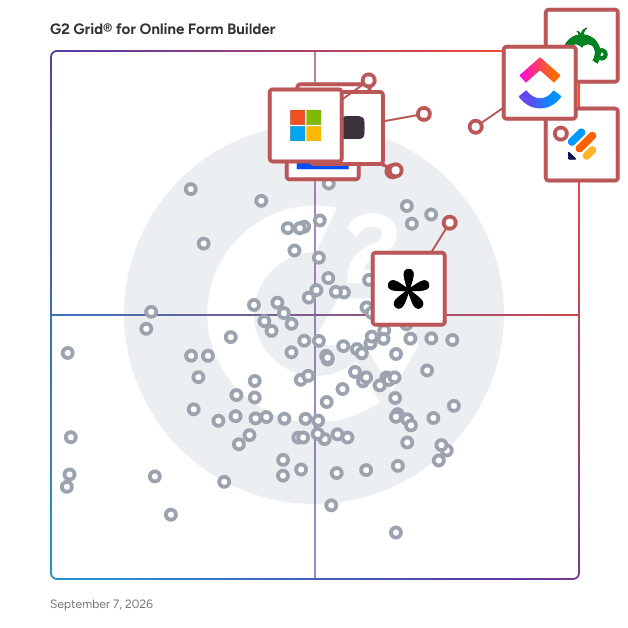
## Which Online Form Builder Software Is Best for Your Use Case?

- **Leader:** [Jotform](https://www.g2.com/products/jotform/reviews)
- **Highest Performer:** [Paperform](https://www.g2.com/products/paperform/reviews)
- **Easiest to Use:** [PandaDoc](https://www.g2.com/products/pandadoc/reviews)
- **Top Trending:** [Tally](https://www.g2.com/products/tally-forms-tally/reviews)
- **Best Free Software:** [SurveyMonkey](https://www.g2.com/products/surveymonkey/reviews)

  
## Which Type of Online Form Builder Software Tools Are You Looking For?
  - [Online Form Builder Software](https://www.g2.com/categories/online-form-builder) *(current)*
  - [Survey Software](https://www.g2.com/categories/survey)
  - [CRM Software](https://www.g2.com/categories/crm)
  - [Lead Capture Software](https://www.g2.com/categories/lead-capture)

  
---

**Sponsored**

### Quizell

Quizell is an AI-powered conversion platform that helps ecommerce brands and B2B marketing teams turn website visitors into qualified buyers through personalized product recommendation quizzes, lead-capture forms, and interactive funnels. Built for teams that need conversion-focused interactive content without writing code, Quizell is used by 25,000+ brands — including Burberry, SharkNinja, Bauerfeind AG, Ouidad, JOTT, and Clear Minds — and has generated over 50 million leads, delivering an average 32% conversion-rate lift for its customers. What Quizell does: The platform combines a drag-and-drop quiz and funnel builder with an AI engine that generates quiz questions, recommends products based on customer responses, and translates content into 25+ languages. Teams can build product recommendation quizzes (the &quot;find your perfect [product]&quot; experience), lead-qualification forms, personalized onboarding funnels, customer feedback and NPS surveys, waitlist capture, and post-purchase upsells. Quizzes can be embedded directly on a website, deployed as a popup or floating button, or shared as a standalone link. Who it&#39;s for: Quizell is built for direct-to-consumer brands, ecommerce retailers (Shopify, Wix, BigCommerce, WooCommerce), and B2B marketing teams that want to personalize the shopping or buying experience and capture higher-intent leads. Use cases span fashion, beauty, health and wellness, supplements, home goods, electronics, and B2B SaaS. Key differentiators: Unlike general-purpose form builders such as Typeform or Jotform, Quizell is purpose-built for ecommerce conversion: it includes a native AI product recommendation engine, deep integrations with ecommerce and email platforms, and analytics specifically focused on product-match performance and revenue attribution. Unlike competitors like ConvertFlow, Octane AI, or Heyflow, Quizell offers a true free plan, a faster setup (most quizzes launch in under 30 minutes), and 30+ native integrations including Shopify, Wix, BigCommerce, Klaviyo, HubSpot, Mailchimp, ActiveCampaign, Google Analytics, plus 8,000+ apps via Zapier and 1,000+ via n8n. Pricing and getting started: Quizell offers a free plan with no credit card required, a 7-day free trial on all paid plans, and paid plans starting at $15/month. An Enterprise plan with a dedicated Customer Success Manager, US/EU data center options, and custom SLAs is available for larger teams. Recognition: Quizell is rated 4.8 on G2, 4.9 on the Shopify App Store, and 4.8 on the Wix App Market. The platform is GDPR-compliant, SOC 2-ready, and offers Two-Factor Authentication, custom data residency (US or EU), and SSO for enterprise customers.


[Visit website](https://www.g2.com/external_clickthroughs/record?secure%5Bad_program%5D=ppc&amp;secure%5Bad_slot%5D=category_product_list&amp;secure%5Bcategory_id%5D=1253&amp;secure%5Bdisplayable_resource_id%5D=1253&amp;secure%5Bdisplayable_resource_type%5D=Category&amp;secure%5Bmedium%5D=sponsored&amp;secure%5Bplacement_reason%5D=page_category&amp;secure%5Bplacement_resource_ids%5D%5B%5D=1253&amp;secure%5Bprioritized%5D=false&amp;secure%5Bproduct_id%5D=165474&amp;secure%5Bresource_id%5D=1253&amp;secure%5Bresource_type%5D=Category&amp;secure%5Bsource_type%5D=category_page&amp;secure%5Bsource_url%5D=https%3A%2F%2Fwww.g2.com%2Fcategories%2Fonline-form-builder%3Fpage%3D9&amp;secure%5Btoken%5D=82934cddb26aa36ab870f0f47b98a04290206f1a7ea745857bc9f3517d91a231&amp;secure%5Burl%5D=https%3A%2F%2Fquizell.com%2F%3Fsource%3Dg2&amp;secure%5Burl_type%5D=custom_url)

---

  
## Buyer Guide: Key Questions for Choosing Online Form Builder Software Software
  ### What does Online Form Builder software do?
  I define Online Form Builder software as a no-code system for creating, publishing, and managing digital forms that collect structured information. Across the G2 feedback I analyzed, users connect this category with surveys, questionnaires, intake forms, registration pages, order forms, payments, e-signatures, CRM sync, conditional logic, and response tracking. These tools help teams turn customer, employee, student, patient, or lead information into clean submissions that can be reviewed, routed, exported, or pushed into other systems. The category matters most when teams want to replace PDFs, email back-and-forth, handwritten details, and spreadsheet-based collection with forms that are easier to send, complete, and manage.


  ### Why do businesses use Online Form Builder software?
  The clearest pattern I saw in G2 reviews was faster data collection without technical help. Users want forms that can be built quickly, shared easily, and adjusted when the information they need changes.

- **Simple form creation:** G2 reviewers often praise drag-and-drop builders, templates, field options, and quick setup for surveys, requests, and questionnaires.
- **Cleaner data capture:** Teams use required fields, dropdowns, file uploads, and structured questions to reduce incomplete or messy submissions.
- **Workflow automation:** Users connect forms with notifications, approvals, email follow-ups, CRM records, and internal task flows.
- **Customer and client intake:** Forms help teams collect leads, applications, orders, feedback, consent, and service details before work begins.

Reviewers point to pricing tiers, response limits, branding restrictions, logic complexity, template edits, and reporting depth as areas to check closely.


  ### Who uses Online Form Builder software primarily?
  When I reviewed G2 reviewer profiles, I saw Online Form Builder software being used by teams that collect information from customers, employees, students, applicants, and internal requesters.

- **Marketing teams:** Create lead forms, surveys, event forms, feedback forms, and campaign intake pages.
- **Operations teams:** Manage internal requests, approvals, order forms, process intake, and recurring submissions.
- **HR and recruiting teams:** Collect applications, employee details, onboarding forms, and policy acknowledgments.
- **Education and training teams:** Build quizzes, polls, course feedback forms, registrations, and student information forms.
- **Small business and service teams:** Capture client details, appointment information, consent forms, payments, and project requests.


  ### What types of Online Form Builder software should I consider?
  G2 reviews show that Online Form Builder tools are usually separated by the level of design control, workflow depth, and data handling a team needs:

- **General form builders:** Suited to surveys, contact forms, request forms, registrations, and everyday data collection.
- **Conversational form tools:** Built around one-question-at-a-time forms, polished survey experiences, and higher-completion feedback flows.
- **Workflow form platforms:** Useful for approvals, routing, internal requests, task creation, and process automation.
- **Document and e-sign form tools:** Designed for PDFs, signatures, contracts, consent forms, and file-heavy workflows.
- **Payment and order form tools:** A strong match for bookings, donations, event fees, product orders, and paid submissions.


  ### What are the core features to look for in Online Form Builder software?
  When evaluating Online Form Builder software, these are the core features that users tend to look for:

- Form design and field control with templates, custom fields, conditional logic, branding, file uploads, and mobile-friendly layouts.
- Response management through submissions, filters, exports, dashboards, and searchable records.
- Automation and routing with notifications, approvals, confirmation emails, task creation, and conditional paths.
- Integrations and data sync across CRM, email, spreadsheets, payment tools, storage systems, and workflow platforms.
- Security and submission controls covering permissions, spam protection, consent, payment handling, e-signatures, and data access.


  ### What trends are shaping Online Form Builder software right now?
  My read of G2 themes and current market signals points to these shifts in Online Form Builder software:

- **AI-generated forms** are shortening setup by creating draft questions, fields, and layouts from prompts.
- **Conversational data collection** is gaining ground as teams use more guided, one-question-at-a-time form experiences.
- **Forms are moving closer to workflow automation** through approvals, routing, notifications, and follow-up tasks.
- **First-party data** is increasing the value of forms as companies collect their own customer, lead, and audience information.
- **Privacy and governance** are becoming buying checks as teams pay closer attention to collected data, access, consent, and storage.


  ### How should I choose an online form builder?
  I would suggest starting with the form your audience completes most often. Marketing teams should place more weight on design control, CRM sync, lead routing, and campaign reporting. Operations-heavy teams need stronger intake logic, approvals, notifications, and submission tracking. When payments, signatures, or sensitive data are involved, security controls, consent handling, file support, and admin permissions deserve closer review. I also advise checking pricing tiers, response limits, branding rules, template editing, and reporting depth because G2 reviewers often tie those details to how well the tool holds up after routine forms become business-critical.


---

  ## What Are the Top-Rated Online Form Builder Software Products in 2026?
### 1. [Jotform](https://www.g2.com/products/jotform/reviews)
  **Average Rating:** 4.7/5.0
  **Total Reviews:** 4,892
  **Product Description:** Trusted by more than 35 million users worldwide, Jotform is an AI-powered online form builder designed to help individuals and organizations create, customize, and publish forms in minutes, from any device. With an intuitive drag-and-drop interface, Jotform makes it simple for anyone to build professional, mobile-responsive forms without writing a single line of code. As a fully no-code platform, Jotform empowers users to automate workflows, streamline data collection, and digitize processes. Jotform offers one of the largest template libraries in the industry, featuring 10,000+ ready-made form templates tailored to every use case. Popular categories include payment forms, lead generation forms, event registration forms, application forms, surveys, order forms, onboarding forms, consent forms, and feedback forms. Each template is fully customizable, allowing users to adjust layouts, add conditional logic, collect e-signatures, upload files, apply branding, and incorporate advanced field types. This level of flexibility ensures every form is optimized for user experience and aligned with organizational goals. To streamline workflows, Jotform integrates seamlessly with over 200 popular third-party apps, including Google Sheets, Slack, Zoom, HubSpot, Salesforce, PayPal, Stripe, and numerous other business tools. These integrations automate data collection, payment processing, CRM updates, and team notifications. By connecting forms directly to the tools your team already uses, Jotform helps eliminate data silos and supports end-to-end process automation—all within a no-code environment. Security and compliance are at the core of Jotform’s platform. Features such as HIPAA compliance options, 256-bit SSL encryption, CAPTCHA, form access controls, and audit logs help organizations protect sensitive data and meet industry standards. Whether you&#39;re collecting healthcare information, financial data, or internal employee records, Jotform provides the reliability and safeguards needed to operate with confidence. With powerful features like automated emails, approval workflows, analytics dashboards, and embeddable widgets, Jotform delivers an all-in-one solution for organizations looking to simplify data collection and improve productivity. From small businesses to enterprises, educational institutions, healthcare providers, and nonprofits, millions of teams rely on Jotform to capture information efficiently and turn submissions into actionable results.


### What Do G2 Reviewers Say About Jotform?
*AI-generated summary from verified user reviews*

**Pros:**

- Users find Jotform to be **extremely easy to use** , seamlessly providing solutions for diverse form requirements.
- Users appreciate Jotform for its **easy setup and user-friendly templates** , enhancing efficiency for bridal inquiries and client communication.
- Users value the **ease of creation** with Jotform, finding setup and publishing both simple and efficient.
- Users appreciate the **flexibility and organization** of Jotform, finding it easy to create and manage forms efficiently.
- Users appreciate the **user-friendly design** of Jotform, providing simple and efficient solutions for all form needs.

**Cons:**

- Users find Jotform&#39;s pricing **too expensive** , especially when opting for monthly payments during tight budget periods.
- Users note the **missing features** in Jotform, particularly regarding integration and customization options, limiting flexibility.
- Users often face **form issues** such as navigation difficulties and resizing problems, impacting their experience with Jotform.
- Users find **limited customization options** in Jotform, making branding integration and field mapping challenging.
- Users find the **form design options limited** , seeking more features for enhanced visual appeal and easier navigation.

#### Key Features
  - Integration APIs
  - Candidate Search
  - Candidate Evaluations
  - Survey Customization
  - Goal and Challenge Creation
  #### What Are Recent G2 Reviews of Jotform?

**"[Easy Form Sharing with Adopters/Fosters, Audit Trails, and Downloadable Spreadsheets](https://www.g2.com/survey_responses/jotform-review-12826165)"**

**Rating:** 5.0/5.0 stars
*— Lisa B.*

[Read full review](https://www.g2.com/survey_responses/jotform-review-12826165)

---

**"[A Mighty, Intuitive Game-Changer—Fully Featured Even on the Free Plan](https://www.g2.com/survey_responses/jotform-review-12846731)"**

**Rating:** 5.0/5.0 stars
*— Craig G.*

[Read full review](https://www.g2.com/survey_responses/jotform-review-12846731)

---

  #### What Are G2 Users Discussing About Jotform?

- [What innovative uses of Jotform are seen in data collection and management across various sectors?](https://www.g2.com/discussions/what-innovative-uses-of-jotform-are-seen-in-data-collection-and-management-across-various-sectors) - 1 upvote
- [What is Jotform used for?](https://www.g2.com/discussions/jotform-what-is-jotform-used-for) - 4 comments, 2 upvotes
- [Who uses JotForm?](https://www.g2.com/discussions/who-uses-jotform)
### 2. [SurveyMonkey](https://www.g2.com/products/surveymonkey/reviews)
  **Average Rating:** 4.4/5.0
  **Total Reviews:** 23,193
  **Product Description:** SurveyMonkey is the world’s most popular platform for surveys and forms, built for business and loved by users. We combine powerful capabilities with intuitive design, effectively serving every use case, from customer experience to employee engagement, market research to payment and registration forms. With built-in research expertise and AI-assisted technology, it’s like having a team of expert researchers right at your fingertips. Trusted by millions—from startups to Fortune 500 companies—SurveyMonkey helps teams gather insights and information that inspire better decisions, create experiences people love, and drive business growth. Discover how at http://surveymonkey.com.


### What Do G2 Reviewers Say About SurveyMonkey?
*AI-generated summary from verified user reviews*

**Pros:**

- Users love the **ease of use** with SurveyMonkey, enabling quick and intuitive survey creation without technical skills.
- Users value the **ease of creation** with SurveyMonkey, finding it user-friendly and fast for building surveys.
- Users find SurveyMonkey **intuitive and user-friendly** , enabling easy survey creation and providing helpful clarifications.
- Users appreciate the **simplicity and efficiency** of SurveyMonkey for creating and analyzing surveys effortlessly.
- Users find SurveyMonkey to be very **easy to use** , ensuring effective feedback collection and insightful analysis.

**Cons:**

- Users find SurveyMonkey to be **expensive** , especially for necessary customizations and accessing features beyond the free plan.
- Users find the **limitations of the free plan** restrict practical use and value, pushing them to upgrade quickly.
- Users find SurveyMonkey&#39;s **survey issues** frustrating due to outdated workflows and limited customization options.
- Users find the **limited features** in free and lower-tier plans restrict their ability to gain detailed insights.
- Users find the **limited customization** options in SurveyMonkey frustrating, especially with advanced features restricted to paid plans.

#### Key Features
  - Customer Service Channels
  - Survey Builder
  - Branding
  - Reporting &amp; Analytics
  - Conditional Logic
  #### What Are Recent G2 Reviews of SurveyMonkey?

**"[Build with AI Makes Survey Creation Fast and Effortless](https://www.g2.com/survey_responses/surveymonkey-review-12696624)"**

**Rating:** 4.5/5.0 stars
*— Chandra K.*

[Read full review](https://www.g2.com/survey_responses/surveymonkey-review-12696624)

---

**"[Fast Idea-to-Live Surveys with Smart Logic Branching](https://www.g2.com/survey_responses/surveymonkey-review-12831740)"**

**Rating:** 4.5/5.0 stars
*— Felipe C.*

[Read full review](https://www.g2.com/survey_responses/surveymonkey-review-12831740)

---

  #### What Are G2 Users Discussing About SurveyMonkey?

- [What is SurveyMonkey used for?](https://www.g2.com/discussions/what-is-surveymonkey-used-for) - 6 comments
- [What is SurveyMonkey Market Research Solutions used for?](https://www.g2.com/discussions/what-is-surveymonkey-market-research-solutions-used-for) - 3 comments, 2 upvotes
- [What is SurveyMonkey?](https://www.g2.com/discussions/what-is-surveymonkey) - 2 comments, 1 upvote
### 3. [Typeform](https://www.g2.com/products/typeform/reviews)
  **Average Rating:** 4.5/5.0
  **Total Reviews:** 968
  **Product Description:** Typeform is a refreshingly different form builder. We help over 150,000 businesses collect the data they need with forms, surveys, and quizzes people enjoy. Designed to look striking and feel effortless to fill out, Typeform drives 500 million responses every year and integrates with essential tools like Slack, Zapier, and HubSpot.


### What Do G2 Reviewers Say About Typeform?
*AI-generated summary from verified user reviews*

**Pros:**

- Users love the **ease of use** with Typeform, appreciating its straightforward interface and intuitive logic structure.
- Users love the **intuitive design** of Typeform, which enhances user experience and increases response rates.
- Users love the **conversational format** of Typeform, enhancing engagement and making forms feel personalized and interactive.
- Users love the **seamless integrations** of Typeform, enhancing functionality with tools like Google Sheets and HubSpot.
- Users appreciate the **ease of creation** with Typeform, enabling intuitive design and efficient form building for all skill levels.

**Cons:**

- Users find Typeform **too expensive** , especially with many features restricted by paywalls and submission limits.
- Users find **limited customization** frustrating, as it requires significant effort to achieve a polished, professional appearance.
- Users express frustration with **limited features** in Typeform, especially regarding data handling and export options as they scale.
- Users find that Typeform is **missing essential features** like advanced reporting and bulk data tools, impacting usability.
- Users face **integration issues** and limited functionality at higher scales, impacting usability and reporting capabilities.

#### Key Features
  - Features
  - Mobile
  - Forms
  - Question Types
  - Branching/Skip Logic
  #### What Are Recent G2 Reviews of Typeform?

**"[Powerful AI Surveys with Automation and Seamless Integrations](https://www.g2.com/survey_responses/typeform-review-12747374)"**

**Rating:** 5.0/5.0 stars
*— Konjengbam  M.*

[Read full review](https://www.g2.com/survey_responses/typeform-review-12747374)

---

**"[imple and Professional Platform for Forms and Data Collection](https://www.g2.com/survey_responses/typeform-review-12799700)"**

**Rating:** 5.0/5.0 stars
*— Ishan S.*

[Read full review](https://www.g2.com/survey_responses/typeform-review-12799700)

---

  #### What Are G2 Users Discussing About Typeform?

- [What is Typeform used for?](https://www.g2.com/discussions/typeform-what-is-typeform-used-for) - 1 comment
- [Is Typeform secure?](https://www.g2.com/discussions/is-typeform-secure) - 1 comment
- [What is included in Typeform free plan?](https://www.g2.com/discussions/what-is-included-in-typeform-free-plan) - 1 comment
### 4. [Microsoft Forms](https://www.g2.com/products/microsoft-forms/reviews)
  **Average Rating:** 4.4/5.0
  **Total Reviews:** 456
  **Product Description:** Microsoft Forms is a, cloud-based application that enables users to create custom surveys, quizzes, polls, and questionnaires with ease. Integrated within the Microsoft 365 suite, it allows for seamless data collection and analysis, making it an ideal tool for educational institutions, businesses, and individual users. With its user-friendly interface, Microsoft Forms simplifies the process of gathering feedback, assessing knowledge, and organizing events. Key Features and Functionality: - Survey and Quiz Creation: Design engaging surveys and quizzes with various question types, including multiple-choice, text, rating, and more. - Real-Time Collaboration: Share forms with others to collaborate on content creation and editing in real time. - Response Collection: Distribute forms via email, a direct link, or embed them into web pages to collect responses from participants across different platforms. - Data Analysis: Utilize built-in analytics to evaluate responses, view automatic charts, and export data to Excel for further analysis. - Integration with Microsoft 365: Seamlessly integrate with other Microsoft 365 applications, enhancing productivity and data management. Primary Value and User Solutions: Microsoft Forms addresses the need for efficient and straightforward data collection and analysis. By providing a platform to create and distribute forms quickly, it enables users to gather valuable insights, assess performance, and make informed decisions. Its integration with Microsoft 365 ensures a cohesive experience, allowing users to leverage familiar tools and workflows. Whether for educational assessments, customer feedback, or event planning, Microsoft Forms streamlines the process, saving time and enhancing productivity.


### What Do G2 Reviewers Say About Microsoft Forms?
*AI-generated summary from verified user reviews*

**Pros:**

- Users love the **ease of use** of Microsoft Forms, appreciating its intuitive design and quick accessibility for all team members.
- Users value the **simple and intuitive creation process** in Microsoft Forms, enhancing efficiency and collaboration effortlessly.
- Users appreciate the **seamless integrations** of Microsoft Forms with other Microsoft tools, enhancing collaboration and productivity.
- Users appreciate the **intuitive interface** of Microsoft Forms, making data collection and survey creation seamless and efficient.
- Users appreciate the **ease of use** of Microsoft Forms, enabling efficient feedback collection and quick project adjustments.

**Cons:**

- Users find the **limited customization** options frustrating, as it leads to identical and poorly themed forms.
- Users are disappointed by the **missing features** , such as limited customization and fewer question types compared to competitors.
- Users note the **limited features** of Microsoft Forms, hindering customization and advanced functionality compared to other platforms.
- Users find the **poor design** of Microsoft Forms limits functionality and customization, affecting overall user experience.
- Users dislike the **limited integrations** of Microsoft Forms, restricting functionality with non-Microsoft applications.
  #### What Are Recent G2 Reviews of Microsoft Forms?

**"[Simple and Practical Tool for Managing forms, Follow ups, and Daily Information Collection](https://www.g2.com/survey_responses/microsoft-forms-review-12786461)"**

**Rating:** 4.5/5.0 stars
*— Ishan S.*

[Read full review](https://www.g2.com/survey_responses/microsoft-forms-review-12786461)

---

**"[Simple and Efficient Tool for Surveys and Academic Forms](https://www.g2.com/survey_responses/microsoft-forms-review-12839124)"**

**Rating:** 5.0/5.0 stars
*— Dr. Shalini P.*

[Read full review](https://www.g2.com/survey_responses/microsoft-forms-review-12839124)

---

  #### What Are G2 Users Discussing About Microsoft Forms?

- [What is Microsoft Forms used for?](https://www.g2.com/discussions/what-is-microsoft-forms-used-for) - 2 comments
- [Is Microsoft form free?](https://www.g2.com/discussions/is-microsoft-form-free) - 2 comments
- [Is Microsoft Forms good?](https://www.g2.com/discussions/is-microsoft-forms-good) - 2 comments
### 5. [ClickUp](https://www.g2.com/products/clickup/reviews)
  **Average Rating:** 4.6/5.0
  **Total Reviews:** 11,951
  **Product Description:** ClickUp is the world’s first Converged AI Workspace, bringing together all work apps, data, and workflows. ClickUp eliminates all forms of work sprawl to provide 100% context and a single place for humans and agents to work, together. Trusted by more than 20 million users worldwide, ClickUp is on a mission to maximize human productivity.


### What Do G2 Reviewers Say About ClickUp?
*AI-generated summary from verified user reviews*

**Pros:**

- Users highlight the **ease of use** of ClickUp, making task management and organization simpler and more efficient.
- Users value the **versatile task management** capabilities of ClickUp, enhancing workflow and productivity across teams.
- Users appreciate the **flexible task management features** of ClickUp, enhancing productivity and collaboration effortlessly.
- Users appreciate ClickUp for its **streamlined project management** , enhancing efficiency and organization across teams and tasks.
- Users commend ClickUp for its **superior organization** , enhancing team management and streamlining workflows in one platform.

**Cons:**

- Users find **missing features** like subfolders and a task time section hinder ClickUp&#39;s overall usability.
- Users find a **steep learning curve** with ClickUp, leading to an overwhelming experience despite its flexibility and customization.
- Users express frustration over **limited features** in ClickUp, making it hard to navigate and set up effectively.
- Users find ClickUp **not intuitive** , as the overwhelming features and setup complexities hinder smooth navigation and performance.
- Users report experiencing **slow loading times** on ClickUp, affecting their efficiency and overall user experience.

#### Key Features
  - Electronic Payments
  - Time Tracking
  - Business Tool Integration
  - Chat
  - Kanban Board
  #### What Are Recent G2 Reviews of ClickUp?

**"[Strong Collaboration Potential, Excellent Project Management Hub](https://www.g2.com/survey_responses/clickup-review-12829653)"**

**Rating:** 4.0/5.0 stars
*— Evan B.*

[Read full review](https://www.g2.com/survey_responses/clickup-review-12829653)

---


**Rating:** 5.0/5.0 stars
*— Diego O.*

[Read full review](https://www.g2.com/survey_responses/clickup-review-12861780)

---

  #### What Are G2 Users Discussing About ClickUp?

- [What features of ClickUp make it a preferred choice for project management in agile teams?](https://www.g2.com/discussions/what-features-of-clickup-make-it-a-preferred-choice-for-project-management-in-agile-teams) - 6 comments, 6 upvotes
- [What is ClickUp used for?](https://www.g2.com/discussions/what-is-clickup-used-for) - 9 comments, 3 upvotes
- [Does Google use ClickUp?](https://www.g2.com/discussions/does-google-use-clickup) - 4 comments, 3 upvotes
### 6. [ActiveCampaign](https://www.g2.com/products/activecampaign/reviews)
  **Average Rating:** 4.4/5.0
  **Total Reviews:** 14,147
  **Product Description:** ActiveCampaign is the autonomous marketing platform built to transform how marketers, agencies, and business owners work. Use Active Intelligence to power goal-aware automations and orchestrate personalized experiences across email, SMS, and WhatsApp. Effortlessly integrate with 1000+ apps, uncover deep performance insights, and optimize your workflows so you win every day. - Autonomous marketing Built on the foundation of marketing automation, fuel your marketing strategy and customer journeys with AI-driven execution, optimization, and insight at every step. - AI agents Run entire marketing campaigns through simple prompts, backed by Active Intelligence. - Cross-channel marketing Reach prospects and customers wherever they are, with email, SMS, WhatsApp, and more. - On-brand, personalized content Creative tools that deliver professional, conversion-ready designs for email and landing pages. - CRM Track, manage, and automate your sales process. - 1000+ apps &amp; integrations Connect ActiveCampaign to your favorite tools.


### What Do G2 Reviewers Say About ActiveCampaign?
*AI-generated summary from verified user reviews*

**Pros:**

- Users find ActiveCampaign&#39;s **ease of use** remarkable, streamlining communication and enhancing engagement effortlessly.
- Users highly value the **automation features** of ActiveCampaign, noting significant improvements in engagement and efficiency.
- Users value the **automation features** of ActiveCampaign, enhancing efficiency in email marketing and lead nurturing significantly.
- Users value the **powerful automations** of ActiveCampaign, enhancing customer engagement and streamlining workflows effectively.
- Users appreciate the **ease of use and powerful automation** features of ActiveCampaign for effective customer engagement.

**Cons:**

- Users face a challenging **learning curve** with ActiveCampaign, requiring time and support to master its features.
- Users find ActiveCampaign **expensive** and suggest more affordable options to accommodate startups and smaller businesses.
- Users find a **lack of testing features** and limited options for client information storage frustrating in ActiveCampaign.
- Users find the **limited features** of ActiveCampaign inadequate compared to other options, affecting overall satisfaction and value.
- Users find ActiveCampaign to be **not intuitive** , struggling with complex setup and overwhelming features for their specific needs.
  #### What Are Recent G2 Reviews of ActiveCampaign?

**"[Clear UI and Best-in-Class Automations Make CRM Management Effortless](https://www.g2.com/survey_responses/activecampaign-review-12689317)"**

**Rating:** 5.0/5.0 stars
*— Tomás Alejandro M.*

[Read full review](https://www.g2.com/survey_responses/activecampaign-review-12689317)

---

**"[Strong Automation Features With Some Scaling Challenges](https://www.g2.com/survey_responses/activecampaign-review-12798717)"**

**Rating:** 4.5/5.0 stars
*— alka m.*

[Read full review](https://www.g2.com/survey_responses/activecampaign-review-12798717)

---

  #### What Are G2 Users Discussing About ActiveCampaign?

- [What are some creative ways businesses are using ActiveCampaign to automate their marketing efforts?](https://www.g2.com/discussions/what-are-some-creative-ways-businesses-are-using-activecampaign-to-automate-their-marketing-efforts) - 1 comment
- [How much does ActiveCampaign cost?](https://www.g2.com/discussions/how-much-does-activecampaign-cost) - 1 comment
- [What is ActiveCampaign CRM?](https://www.g2.com/discussions/what-is-activecampaign-crm) - 1 comment
### 7. [Laserfiche](https://www.g2.com/products/laserfiche/reviews)
  **Average Rating:** 4.7/5.0
  **Total Reviews:** 1,204
  **Product Description:** Get work done faster with Laserfiche, the leading SaaS provider of AI-powered document management and process automation. Through powerful workflows, electronic forms, document management and analytics, Laserfiche accelerates processes across the enterprise. ✓ Organize Your Content with AI-Powered Document Management Optimize your operations and increase team productivity with AI-powered document management. Centralize your content, improve collaboration and maintain audit trails to support compliance needs. ✓ Boost Your Productivity with Intelligent Automation Increase efficiency by automating tasks with low-code process automation and prebuilt solution templates. Work smarter and shift your team’s focus to higher priority strategic goals. ✓ Unify Your Systems with Powerful Integrations Laserfiche is the backbone connecting hundreds of mission-critical applications. Users can access relevant documents from a single location, eliminating the need to search across multiple platforms. ✓ Elevate Your Work with Laserfiche AI Laserfiche AI enables organizations to simplify their work, take control of processes and supercharge productivity — all without losing sight of critical data privacy and security standards.


### What Do G2 Reviewers Say About Laserfiche?
*AI-generated summary from verified user reviews*

**Pros:**

- Users find Laserfiche to be **user-friendly** , enhancing productivity with its intuitive design and helpful tech support.
- Users love the **process automation** in Laserfiche, simplifying workflows and enhancing efficiency in their organizations.
- Users love Laserfiche for its **automation capabilities** , streamlining workflows and enhancing document management efficiency.
- Users value the **automation capabilities** of Laserfiche&#39;s Workflow, enhancing form processes and ensuring efficient document management.
- Users praise the **efficient document management** and exceptional support from Laserfiche, enhancing organization and accessibility.

**Cons:**

- Users find the **learning curve challenging** due to rapid updates and complex navigation in Quickfield.
- Users report a **steep learning curve** with Quickfield, making it challenging to navigate and manage product responsibilities.
- Users find that **missing features** hinder their experience, especially with PDFs and functionality limitations in the unlicensed version.
- Users face **update issues** that can disrupt workflows and cause confusion for new users despite available training resources.
- Users often face **performance issues** due to slow form building and delayed feature implementation in Laserfiche.
  #### What Are Recent G2 Reviews of Laserfiche?

**"[Document Management and Automation](https://www.g2.com/survey_responses/laserfiche-review-3536890)"**

**Rating:** 4.5/5.0 stars
*— Matthew D.*

[Read full review](https://www.g2.com/survey_responses/laserfiche-review-3536890)

---

**"[Robust and Reliable](https://www.g2.com/survey_responses/laserfiche-review-10968098)"**

**Rating:** 4.5/5.0 stars
*— Holly V.*

[Read full review](https://www.g2.com/survey_responses/laserfiche-review-10968098)

---

  #### What Are G2 Users Discussing About Laserfiche?

- [What is Laserfiche used for?](https://www.g2.com/discussions/what-is-laserfiche-used-for)
- [What is document imaging software?](https://www.g2.com/discussions/what-is-document-imaging-software) - 1 upvote
- [How much is laserfiche?](https://www.g2.com/discussions/how-much-is-laserfiche)
### 8. [Adobe Acrobat Sign](https://www.g2.com/products/adobe-acrobat-sign/reviews)
  **Average Rating:** 4.4/5.0
  **Total Reviews:** 1,015
  **Product Description:** At Adobe, we believe that documents are more than just a collection of information and proof. They are foundational to connecting people and ideas, pushing business forward. Adobe Acrobat Sign helps your business move faster. Acrobat Sign is the only intuitive e-signature solution that combines simple and secure e-signatures with the power of Adobe Acrobat. With Acrobat Sign, you can create, sign, send for signature, manage, and track documents – all from one Adobe platform. You can create delightful signing experiences for your customers and teams by enabling them to sign documents on any device or browser – anytime, anywhere. No additional software download or accounts are needed. As Microsoft’s preferred e-signature solution, Acrobat Sign seamlessly integrates with your favorite Microsoft apps. Save time by signing and requesting signatures – all right from Microsoft 365, Teams, Outlook, and more. Plus, you can access smart integrations for Salesforce, Workday, and many more apps you use every day. Minimize legal and compliance risks by choosing Acrobat Sign, designed to be globally compliant and legally-binding in nearly every country in the world.


### What Do G2 Reviewers Say About Adobe Acrobat Sign?
*AI-generated summary from verified user reviews*

**Pros:**

- Users appreciate the **ease of use** of Adobe Acrobat Sign for quick, secure document signing and organization.
- Users appreciate the **integration with other Adobe software** , streamlining document management and signature processes seamlessly.
- Users appreciate the **easy setup** of Adobe Acrobat Sign, enhancing their document management experience seamlessly.
- Users value the **fast and easy document management** in Adobe Acrobat Sign, enhancing professionalism and efficiency in workflows.
- Users love the **effortless signing process** of Adobe Acrobat Sign, streamlining document management efficiently and securely.

**Cons:**

- Users criticize the **expensive subscription model** of Adobe Acrobat Sign, making it difficult for budget-conscious individuals and businesses.
- Users face a **steep learning curve** with Adobe Acrobat Sign, particularly when navigating advanced features and integrations.
- Users find the **signature feature limitations** in Adobe Acrobat Sign frustrating, impacting overall efficiency and functionality.
- Users experience **not intuitive** navigation with Adobe Acrobat Sign, encountering complexities that hinder efficiency and smoothness.
- Users find Adobe Acrobat Sign to be **not user-friendly** , with challenges in navigation and complex processes for document handling.

#### Key Features
  - Performance and Reliability
  - Document Signing
  - Regulatory Compliance
  - Contract Creation
  - Documents
  #### What Are Recent G2 Reviews of Adobe Acrobat Sign?

**"[Clean UI, Smooth Signing, and Seamless PDF Workflow Integration](https://www.g2.com/survey_responses/adobe-acrobat-sign-review-12770100)"**

**Rating:** 4.5/5.0 stars
*— Praveen M.*

[Read full review](https://www.g2.com/survey_responses/adobe-acrobat-sign-review-12770100)

---

**"[Fraud-Proof Document Signing, Easy Setup](https://www.g2.com/survey_responses/adobe-acrobat-sign-review-12723943)"**

**Rating:** 5.0/5.0 stars
*— Verified User in Legal Services*

[Read full review](https://www.g2.com/survey_responses/adobe-acrobat-sign-review-12723943)

---

  #### What Are G2 Users Discussing About Adobe Acrobat Sign?

- [What is Adobe Acrobat Sign used for?](https://www.g2.com/discussions/what-is-adobe-acrobat-sign-used-for) - 2 comments, 1 upvote
- [How do I electronically sign a document in Adobe?](https://www.g2.com/discussions/how-do-i-electronically-sign-a-document-in-adobe)
- [Is Adobe sign free?](https://www.g2.com/discussions/is-adobe-sign-free) - 2 comments, 1 upvote
### 9. [Tally](https://www.g2.com/products/tally-forms-tally/reviews)
  **Average Rating:** 4.9/5.0
  **Total Reviews:** 128
  **Product Description:** Say Goodbye to Boring Forms Tally is the simplest way to create online forms for free. No coding required — just type your questions like you would in a doc, and you’re ready to go. The best part? You get unlimited forms and submissions for free. 💨 As simple as it gets: Tally is the intuitive form builder you’ve been searching for. Just type and build any type of form in seconds.  🆓 Unlimited submissions for free: Say goodbye to paywalls. With Tally, you can create unlimited forms and collect unlimited submissions at no cost, as long as you follow our fair usage guidelines.  💬 Exceptional customer support: At Tally, our users come first. As an independent company, we build in public with a roadmap shaped by your feedback and provide fast, responsive support.


### What Do G2 Reviewers Say About Tally?
*AI-generated summary from verified user reviews*

**Pros:**

- Users value the **ease of use** of Tally, allowing quick setup and seamless integration with various systems.
- Users commend Tally for its **easy setup** , facilitating seamless integration and a smooth start to their projects.
- Users praise the **seamless integrations** of Tally, highlighting its compatibility with various tools and automation systems.
- Users love the **simplicity and speed** of Tally, making form creation easy and efficient across various platforms.
- Users praise Tally&#39;s **excellent customer support** , highlighting their helpfulness and quick responses to queries and issues.

**Cons:**

- Users find the **learning curve steep** , with complexity and difficulty in calculations hindering novice experience.
- Users feel that Tally lacks essential features, such as **version history and integration capabilities** , hindering its overall functionality.
- Users find the **limited customization** options frustrating, wishing for more design flexibility and diverse styling methods.
- Users experience **form issues** including clunky conversions, lost integrations, and cluttered layouts on mobile devices.
- Users face **layout issues** with Tally, including poor mobile scaling and lack of built-in styling options.

#### Key Features
  - Survey Builder
  - Branching/Skip Logic
  - Reporting &amp; Analytics
  - Custom Fields
  - Notifications
  #### What Are Recent G2 Reviews of Tally?

**"[Fast, Minimalist Form Builder with Polished Results, Plus Unlimited Free Forms](https://www.g2.com/survey_responses/tally-review-12703783)"**

**Rating:** 5.0/5.0 stars
*— Jatin B.*

[Read full review](https://www.g2.com/survey_responses/tally-review-12703783)

---

**"[Simple on the Surface, Powerful Under the Hood — and Outstanding Support](https://www.g2.com/survey_responses/tally-review-12721769)"**

**Rating:** 5.0/5.0 stars
*— Yannick P.*

[Read full review](https://www.g2.com/survey_responses/tally-review-12721769)

---

### 10. [PandaDoc](https://www.g2.com/products/pandadoc/reviews)
  **Average Rating:** 4.7/5.0
  **Total Reviews:** 3,311
  **Product Description:** PandaDoc is a comprehensive document management solution designed to assist users in creating, managing, e-signing, and notarizing documents efficiently. This platform serves as a centralized workflow tool, streamlining the document lifecycle from inception to final approval. By digitizing traditional document processes, PandaDoc aims to reduce inefficiencies and enhance productivity for businesses of all sizes. Targeted primarily at professionals and organizations that rely heavily on documentation, PandaDoc is particularly beneficial for sales teams, legal departments, and project managers. These users often face the challenge of managing numerous documents, contracts, and agreements, which can be time-consuming and prone to errors when handled manually. With PandaDoc, users can automate repetitive tasks, ensuring that they can allocate more time to strategic activities that drive business growth. Key features of PandaDoc include customizable templates, an intuitive drag-and-drop editor, and robust e-signature capabilities. Users can create visually appealing documents quickly, using pre-built templates tailored for various industries. The platform also supports real-time collaboration, allowing multiple stakeholders to review and edit documents simultaneously. This feature is particularly valuable in fast-paced environments where timely feedback is crucial. Additionally, PandaDoc&#39;s e-signature functionality ensures that documents can be signed securely and legally, eliminating the need for physical signatures and expediting the approval process. Another significant advantage of PandaDoc is its integration capabilities. The platform seamlessly connects with popular CRM systems, payment processors, and other business tools, enabling users to manage their documents within their existing workflows. This integration reduces the friction often associated with switching between different applications, allowing for a more cohesive user experience. Furthermore, PandaDoc provides analytics and reporting features that help users track document performance, offering insights into how recipients interact with their documents, which can inform future strategies. Overall, PandaDoc stands out in the document management category by providing a user-friendly interface, powerful automation features, and extensive integration options. By addressing common pain points associated with document handling, PandaDoc empowers organizations to enhance their operational efficiency, reduce turnaround times, and ultimately focus on what matters most: achieving their business objectives.


### What Do G2 Reviewers Say About PandaDoc?
*AI-generated summary from verified user reviews*

**Pros:**

- Users find PandaDoc **very user-friendly** , enhancing work efficiency and simplifying client interactions and signatures.
- Users appreciate the **efficient document management** of PandaDoc, simplifying workflows and enhancing organization for client interactions.
- Users find PandaDoc to be **user-friendly** and efficient, enhancing productivity for everyday work tasks.
- Users appreciate the **ease of tracking e-signatures** with PandaDoc, ensuring smooth and efficient contract management.
- Users appreciate the **intuitive design** of PandaDoc, making document preparation and client interactions smooth and efficient.

**Cons:**

- Users find the **signature issues** in PandaDoc to be confusing and limiting, affecting overall usability.
- Users are frustrated by the **missing features** in PandaDoc, particularly limitations on document handling and editing options.
- Users find PandaDoc **expensive** , especially regarding costs for online form submissions and upgrade necessities for usability.
- Users face **difficult editing** challenges in PandaDoc, experiencing issues with document navigation and limited change capabilities.
- Users face challenges with **document management** , including lack of invoices and formatting limitations in PandaDoc.
  #### What Are Recent G2 Reviews of PandaDoc?

**"[Time-Saving Templates with Few Limitations](https://www.g2.com/survey_responses/pandadoc-review-12240403)"**

**Rating:** 4.5/5.0 stars
*— Verified User in Consumer Services*

[Read full review](https://www.g2.com/survey_responses/pandadoc-review-12240403)

---

**"[Professional and Efficient Document Management for My Clinic](https://www.g2.com/survey_responses/pandadoc-review-11856586)"**

**Rating:** 4.5/5.0 stars
*— Shubham S.*

[Read full review](https://www.g2.com/survey_responses/pandadoc-review-11856586)

---

  #### What Are G2 Users Discussing About PandaDoc?

- [What are the innovative ways PandaDoc is being used to streamline document management and workflow automation?](https://www.g2.com/discussions/what-are-the-innovative-ways-pandadoc-is-being-used-to-streamline-document-management-and-workflow-automation) - 2 comments
- [What is PandaDoc used for?](https://www.g2.com/discussions/what-is-pandadoc-used-for) - 4 comments
- [What is PandaDoc com?](https://www.g2.com/discussions/what-is-pandadoc-com) - 3 comments
### 11. [pdfFiller](https://www.g2.com/products/pdffiller/reviews)
  **Average Rating:** 4.6/5.0
  **Total Reviews:** 869
  **Product Description:** pdfFiller is a cloud-based platform with a comprehensive digital toolkit that makes handling PDFs easy. Edit, sign, store, manage, and collaborate on documents all in one place — no downloads, switching apps, or paying for multiple subscriptions needed. All your documents are safely stored in the cloud, so you can access them anytime, anywhere, without worrying about losing your data.


### What Do G2 Reviewers Say About pdfFiller?
*AI-generated summary from verified user reviews*

**Pros:**

- Users appreciate the **ease of use** of pdfFiller, finding it intuitive and straightforward for quick PDF editing.
- Users appreciate the **easy editing** features of pdfFiller, enabling quick modifications and convenient document management from anywhere.
- Users value the **cloud-based access** of pdfFiller, enabling convenient and efficient document management from anywhere.
- Users value the **easy PDF editing** capabilities of pdfFiller, enhancing productivity with intuitive features and cloud access.
- Users love the **efficient e-signing features** of pdfFiller, enhancing document processing speed and productivity seamlessly.

**Cons:**

- Users find the **absence of essential features** frustrating, limiting customization and ease of use for signatures and templates.
- Users express concerns about the **high cost** of pdfFiller, especially for those needing frequent access to advanced features.
- Users find the interface **not user-friendly** , especially for first-timers and when navigating complex tools.
- Users find **feature limitations** frustrating, especially regarding customization and the need for paid plans for advanced tools.
- Users experience **PDF issues** with slow performance on large documents and limited copy-paste functionality between MS apps.
  #### What Are Recent G2 Reviews of pdfFiller?

**"[Streamlining Secured PDFs and Document Workflows in One Place](https://www.g2.com/survey_responses/pdffiller-review-12678568)"**

**Rating:** 5.0/5.0 stars
*— Rodney L.*

[Read full review](https://www.g2.com/survey_responses/pdffiller-review-12678568)

---

**"[Revolutionized Document Handling in Real Estate](https://www.g2.com/survey_responses/pdffiller-review-12664792)"**

**Rating:** 5.0/5.0 stars
*— Chris  H.*

[Read full review](https://www.g2.com/survey_responses/pdffiller-review-12664792)

---

  #### What Are G2 Users Discussing About pdfFiller?

- [What is pdfFiller by airSlate used for?](https://www.g2.com/discussions/what-is-pdffiller-by-airslate-used-for) - 1 comment
- [How do I use pdfFiller for free?](https://www.g2.com/discussions/how-do-i-use-pdffiller-for-free) - 2 comments
- [How much does pdfFiller cost?](https://www.g2.com/discussions/how-much-does-pdffiller-cost) - 2 comments
### 12. [Klaviyo](https://www.g2.com/products/klaviyo/reviews)
  **Average Rating:** 4.6/5.0
  **Total Reviews:** 1,304
  **Product Description:** Klaviyo is the all-in-one platform that helps B2C businesses grow by integrating marketing, analytics, and customer service in one solution. Powered by unified data and built-in AI , Klaviyo empowers B2C businesses: - Orchestrate your email marketing, SMS marketing, RCS, push, WhatsApp, reviews, forms, and ads in one platform - Sync with 400+ tools to capture and unify behavior data - AI-optimized messages, segments, timing, and creative to scale conversions - Unlock analytics like RFM, funnel reporting, and catalog insights By capturing every click, purchase, and conversation into a unified profile, Klaviyo powers marketing automation that drives personalized, trigger-based journeys across every channel - no extra tools or complex setup required. Join more than 170,000 businesses using Klaviyo to create a true omnichannel experience for your customers. To learn more about Klaviyo or to request a demo, visit www.klaviyo.com.


### What Do G2 Reviewers Say About Klaviyo?
*AI-generated summary from verified user reviews*

**Pros:**

- Users find Klaviyo remarkably **easy to use** , with intuitive features that simplify email and SMS campaign management.
- Users appreciate the **powerful automation** of Klaviyo, making email marketing easy and effective for driving engagement.
- Users value the **easy integration** of Klaviyo with various platforms, enhancing their campaign management and effectiveness.
- Users appreciate the **scheduling and integration capabilities** of Klaviyo, enhancing their campaign effectiveness through seamless connections.
- Users value the **powerful automation** in Klaviyo, enabling tailored campaigns that engage customers and drive revenue.

**Cons:**

- Users find Klaviyo to be **expensive** and occasionally overwhelming, particularly for beginners navigating frequent UI changes.
- Users find several **missing features** in Klaviyo, affecting SMS ease, search functionality, and stock notification setups.
- Users find the **learning curve steep** , requiring significant time to master Klaviyo for effective use.
- Users report challenges with **poor customer support** , noting slow response times and limited access for free plan users.
- Users note the **limited features** of Klaviyo, wishing for more templates and intuitive options for better usability.
  #### What Are Recent G2 Reviews of Klaviyo?

**"[Klaviyo Makes Email Automation Simple, Powerful, and Reliable](https://www.g2.com/survey_responses/klaviyo-review-12738916)"**

**Rating:** 4.5/5.0 stars
*— Tejas K.*

[Read full review](https://www.g2.com/survey_responses/klaviyo-review-12738916)

---

**"[Klaviyo Delivers Strong ROI with Seamless Integrations and Powerful Automation](https://www.g2.com/survey_responses/klaviyo-review-12634864)"**

**Rating:** 4.5/5.0 stars
*— Chad T.*

[Read full review](https://www.g2.com/survey_responses/klaviyo-review-12634864)

---

  #### What Are G2 Users Discussing About Klaviyo?

- [What is Klaviyo used for?](https://www.g2.com/discussions/what-is-klaviyo-used-for) - 2 comments
- [What is UTM tracking Klaviyo?](https://www.g2.com/discussions/what-is-utm-tracking-klaviyo) - 3 comments
- [How do you integrate Klaviyo?](https://www.g2.com/discussions/how-do-you-integrate-klaviyo) - 1 comment, 1 upvote
### 13. [Paperform](https://www.g2.com/products/paperform/reviews)
  **Average Rating:** 4.8/5.0
  **Total Reviews:** 82
  **Product Description:** Paperform is a modern online form builder designed for small and growing businesses that want their forms to run the business, not just collect data. Start on a generous free plan and use a familiar doc‑style editor to build anything from simple contact forms to full landing‑page‑style experiences—no code, no designer and no clunky drag‑and‑drop required. Where some tools optimize for “quick and basic” and others focus on sheer feature breadth, Paperform is optimized for SMB workflows. Marketing, eCommerce, agency, education, healthcare and professional services teams use Paperform to power everyday forms: lead capture for campaigns and social ads, client onboarding and briefs, event registrations, bookings, internal requests, surveys and feedback. In one place, you can: - Build any form layout Single page, multi‑page or one‑question‑at‑a‑time—with rich text, images and video so forms look like part of your brand, not a bolted‑on widget. -Take payments and subscriptions Via Stripe, PayPal, Square and more, with live price calculations, discounts and currencies handled directly in the form. -Handle bookings and eSignatures With built‑in scheduling fields and Papersign, turn submissions into contracts and signed documents in a few clicks. - Automate workflows Using conditional logic, on‑form calculations and Stepper, routing approvals, updating CRMs, pinging Slack and creating tasks automatically. Ask Native AI to build In-app AI accelerates everything without taking control away from you: generate full forms from a prompt, ask AI to write complex calculation rules and use AI Insights to summarize survey responses into clear, shareable reports. Forms plug into the tools you already use—like HubSpot, Google Sheets, Notion, Slack and thousands more—via native integrations, Stepper, webhooks and Zapier/Make. Under the hood, Paperform is built for business: trusted by over 500K teams worldwide, SOC 2 Type II &amp; GDPR compliant, with SSO, roles and permissions, data residency controls and a dedicated Trust Center backed by fast, human support. Featuring 30,000+ designer form templates, the result is an “all‑rounder” form builder that lets SMBs design, automate and scale their most important workflows from one simple platform.


### What Do G2 Reviewers Say About Paperform?
*AI-generated summary from verified user reviews*

**Pros:**

- Users appreciate the **ease of use** of Paperform, enjoying its intuitive interface and robust functionality for various tasks.
- Users highlight the **responsive customer support** of Paperform, ensuring timely solutions and excellent follow-up service.
- Users appreciate the **exceptional support** from Paperform, finding it responsive and genuinely helpful in their experience.
- Users love the **intuitive interface** of Paperform, appreciating its balance of simplicity and powerful features.
- Users love Paperform&#39;s **exceptional flexibility** , allowing them to create tailored solutions that adapt to their specific needs.

**Cons:**

- Users face **limited customization** , which can hinder functionality and increase costs for small businesses.
- Users find Paperform to be **expensive** , especially small businesses facing high customization costs and unutilized subscriptions.
- Users find some **missing features** in Paperform, like automatic age calculation, limiting functionality for certain needs.
- Users note the **restrictive calendar integration** and optional white label, which limit customization and functionality.
- Users desire more control over **customizing webhook output** to avoid reliance on intermediary apps, enhancing efficiency.
  #### What Are Recent G2 Reviews of Paperform?

**"[Stand it Up Fast, Start Making Money Now, Stop Duct-Taping Things Together](https://www.g2.com/survey_responses/paperform-review-12358551)"**

**Rating:** 5.0/5.0 stars
*— Starlight M.*

[Read full review](https://www.g2.com/survey_responses/paperform-review-12358551)

---

**"[Way more than just a form builder + really awesome team](https://www.g2.com/survey_responses/paperform-review-12542698)"**

**Rating:** 5.0/5.0 stars
*— Nikki E.*

[Read full review](https://www.g2.com/survey_responses/paperform-review-12542698)

---

  #### What Are G2 Users Discussing About Paperform?

- [What is a paper form?](https://www.g2.com/discussions/what-is-a-paper-form)
- [How do I create an online form?](https://www.g2.com/discussions/how-do-i-create-an-online-form)
- [How do you create a form builder?](https://www.g2.com/discussions/how-do-you-create-a-form-builder)
### 14. [DocuWare](https://www.g2.com/products/docuware/reviews)
  **Average Rating:** 4.4/5.0
  **Total Reviews:** 235
  **Product Description:** DocuWare is a type of digital document management and automated workflow solution designed to help organizations streamline their document processes and enhance operational efficiency. This versatile platform caters to businesses of all sizes and spans various industries, including but not limited to manufacturing, finance, education, and government. By offering a comprehensive suite of tools for managing documents and automating workflows, DocuWare enables users to reduce manual tasks, improve collaboration, and ensure compliance with regulatory requirements. The target audience for DocuWare includes organizations seeking to optimize their document management practices and automate repetitive processes. This solution is particularly beneficial for businesses that handle large volumes of paperwork or require secure access to sensitive information. With its capabilities, DocuWare serves a diverse clientele, from small businesses to large enterprises, making it a flexible choice for any organization looking to enhance its document handling capabilities. DocuWare&#39;s key features include robust document storage, intelligent document processing, advanced search functionalities, and customizable workflow automation. Users can easily store and retrieve documents in a secure digital environment, ensuring that critical information is always accessible. The platform&#39;s advanced search capabilities allow users to locate documents quickly, saving time and improving productivity. Additionally, the customizable workflow automation tools enable organizations to design processes tailored to their specific needs, facilitating smoother operations and reducing the likelihood of errors. One of the standout aspects of DocuWare is its adaptability to various deployment options. Organizations can choose between cloud-based or on-premises solutions, allowing them to select the deployment method that best fits their infrastructure and security requirements. With support for 24 languages, DocuWare is accessible to a global audience, making it a suitable choice for multinational organizations. The platform currently serves over 20,000 customers and 930,000 users across more than 100 countries, backed by a network of over 800 partners, which highlights its widespread acceptance and reliability in the market. Overall, DocuWare provides a comprehensive solution for organizations looking to modernize their document management and workflow processes. By leveraging its advanced features and flexible deployment options, businesses can enhance efficiency, improve collaboration, and ensure that they remain compliant with industry regulations.


### What Do G2 Reviewers Say About DocuWare?
*AI-generated summary from verified user reviews*

**Pros:**

- Users appreciate the **ease of use** of DocuWare, enjoying features like one-click data entry and smart filters.
- Users appreciate the **seamless integrations** of DocuWare, enhancing efficiency through smooth workflows and centralized document management.
- Users appreciate the **seamless workflow automation** in DocuWare, enhancing efficiency and simplifying document management.
- Users value the **efficient document management** in DocuWare, enabling quick access and organized storage of information.
- Users appreciate the **easy integrations** of DocuWare, simplifying document-centric workflows and enhancing productivity across various systems.

**Cons:**

- Users find the **learning curve challenging** , especially with complex customization and workflow setup in DocuWare.
- Users find the **customization process complex** , especially with limited built-in workflow actions and cumbersome methods.
- Users find the **missing features** in DocuWare, especially for offline access and customizable reporting, frustrating.
- Users find the **limited customization** options in DocuWare challenging, affecting their ability to tailor the product to their needs.
- Users often face a **challenging learning curve** and initial setup difficulties with DocuWare, requiring time to adapt.
  #### What Are Recent G2 Reviews of DocuWare?

**"[DocuWare Makes Secure Document Storage and Access Seamless Anywhere](https://www.g2.com/survey_responses/docuware-review-12837116)"**

**Rating:** 5.0/5.0 stars
*— Timothy S.*

[Read full review](https://www.g2.com/survey_responses/docuware-review-12837116)

---

**"[Boosts Document Management with Secure Archiving](https://www.g2.com/survey_responses/docuware-review-12823463)"**

**Rating:** 4.0/5.0 stars
*— Dominic G.*

[Read full review](https://www.g2.com/survey_responses/docuware-review-12823463)

---

  #### What Are G2 Users Discussing About DocuWare?

- [What is DocuWare used for?](https://www.g2.com/discussions/what-is-docuware-used-for)
- [What benefits does DocuWare offer in purchasing?](https://www.g2.com/discussions/what-benefits-does-docuware-offer-in-purchasing) - 1 comment
- [How much does DocuWare cost?](https://www.g2.com/discussions/how-much-does-docuware-cost) - 1 comment
### 15. [WPForms](https://www.g2.com/products/wpforms/reviews)
  **Average Rating:** 4.7/5.0
  **Total Reviews:** 913
  **Product Description:** WPForms is a user-friendly WordPress plugin designed to simplify the creation of various forms, including contact forms, payment forms, surveys, and more. Its intuitive drag-and-drop interface allows users to build professional, mobile-responsive forms without any coding knowledge. With a wide array of pre-built templates and advanced features, WPForms caters to both beginners and experienced developers, enhancing website interactivity and user engagement. Key Features and Functionality: - Drag &amp; Drop Form Builder: Create custom forms effortlessly with a simple drag-and-drop interface. - Pre-Built Form Templates: Access a variety of templates to quickly set up forms for different purposes. - Responsive Design: Ensure forms look great and function seamlessly on all devices. - Smart Conditional Logic: Show or hide fields based on user input to create dynamic forms. - Multi-Page Forms: Break long forms into multiple pages to improve user experience. - File Uploads: Allow users to submit files through your forms. - Instant Notifications: Receive immediate email alerts upon form submissions. - Spam Protection: Utilize CAPTCHA and Honeypot methods to prevent spam entries. - Payment Integrations: Seamlessly integrate with payment gateways like PayPal and Stripe for online transactions. - Marketing Integrations: Connect with email marketing services such as Mailchimp, AWeber, and Constant Contact. Primary Value and Solutions: WPForms addresses the need for an efficient and accessible form-building solution within WordPress. By eliminating the requirement for coding skills, it empowers users to create customized forms that enhance user interaction and data collection. Its comprehensive features, including conditional logic and payment integrations, streamline processes like lead generation, customer feedback, and online payments. Ultimately, WPForms simplifies form creation, saving time and resources while improving website functionality and user engagement.


### What Do G2 Reviewers Say About WPForms?
*AI-generated summary from verified user reviews*

**Pros:**

- Users appreciate the **ease of use** of WPForms, finding it simple and intuitive for their form creation needs.
- Users rave about the **intuitive drag-and-drop builder** and features like Stripe integration that simplify form creation.
- Users love the **seamless integrations** of WPForms, enhancing efficiency and flexibility in form management.
- Users rave about WPForms&#39; **ease of creation** , finding it intuitive and perfect for both beginners and experts.
- Users find WPForms incredibly **intuitive** , enabling even non-technical users to create and manage forms effortlessly.

**Cons:**

- Users find WPForms to be **expensive** , making it a concern for those considering the premium plan.
- Users express frustration over **limited customization** options in WPForms, especially for those using the free version.
- Users note the **missing features** in WPForms, including accessibility options and modern design templates.
- Users feel the **poor design** limits customization options and modern template availability in WPForms.
- Users find the **formatting issues** with WPForms challenging, requiring extra effort to navigate the intricacies effectively.
  #### What Are Recent G2 Reviews of WPForms?

**"[The most practical way to make forms! ](https://www.g2.com/survey_responses/wpforms-review-1791276)"**

**Rating:** 4.0/5.0 stars
*— Carmen A.*

[Read full review](https://www.g2.com/survey_responses/wpforms-review-1791276)

---

**"[Effortless Form Building with WPForms](https://www.g2.com/survey_responses/wpforms-review-12637308)"**

**Rating:** 4.5/5.0 stars
*— ADnan C.*

[Read full review](https://www.g2.com/survey_responses/wpforms-review-12637308)

---

  #### What Are G2 Users Discussing About WPForms?

- [What is WPForms used for?](https://www.g2.com/discussions/what-is-wpforms-used-for) - 1 comment
### 16. [EngageBay All-in-One Suite](https://www.g2.com/products/engagebay-all-in-one-suite/reviews)
  **Average Rating:** 4.6/5.0
  **Total Reviews:** 657
  **Product Description:** EngageBay is an all-in-one customer engagement platform designed for small and mid-sized businesses that want to manage marketing, sales, and support from a unified system. Positioned as a cost-conscious alternative to platforms like HubSpot and ActiveCampaign, it focuses on delivering essential CRM and automation capabilities without the overhead typically associated with enterprise software. The platform combines contact and deal management, marketing automation, email marketing, landing pages, forms, live chat, and help desk functionality within a single interface. By consolidating these functions, EngageBay provides teams with a centralized view of customer interactions across the lifecycle and reduces the need for multiple disconnected tools. EngageBay also incorporates AI-assisted features to streamline common tasks and improve productivity. These capabilities include AI-powered email and content generation, subject line suggestions, and workflow assistance that help teams create campaigns and communications more efficiently. The AI tools are designed to support everyday execution rather than replace core strategy, making them accessible to smaller teams that may not have dedicated automation specialists. On the marketing side, users can build email campaigns, design automation workflows, capture leads through forms and landing pages, and run A/B tests. The CRM module supports pipeline tracking, contact management, task automation, and appointment scheduling to help sales teams manage opportunities in a structured way. For post-purchase engagement, the service suite includes ticketing, knowledge base tools, and live chat to manage customer support conversations from one place. A key design principle of EngageBay is accessibility for growing businesses. The platform offers a free tier with core functionality and scales through bundled paid plans rather than numerous add-ons, helping teams adopt automation without significant upfront investment. EngageBay integrates with a range of third-party tools and provides reporting dashboards to monitor campaign performance, deal progress, and support activity. While it is not positioned as a deep enterprise platform, it is built to meet the day-to-day operational needs of SMB revenue teams looking for an integrated, AI-assisted, and budget-aware solution. The platform is built with a focus on simplicity and performance, integrating advanced marketing automation, sales CRM, and customer support software into one cohesive system. EngageBay leverages cutting-edge AI intelligence to enhance productivity and decision-making across various teams. This integration allows businesses to streamline their operations and improve customer interactions, making it an ideal choice for organizations that require a robust yet user-friendly solution. EngageBay&#39;s AI capabilities are particularly noteworthy, providing users with tools that help create content quickly, predict outcomes intelligently, and deliver personalized experiences at scale. The AI Email &amp; Content Generator allows users to craft engaging emails and campaigns in seconds, while the AI Lead &amp; Deal Scoring feature helps identify and prioritize leads most likely to convert. Additionally, AI Insights &amp; Recommendations offer actionable suggestions to enhance engagement and productivity, making it easier for businesses to navigate their customer journeys effectively. The platform also boasts a suite of key features that add significant value to its users. EngageBay&#39;s marketing automation capabilities include email marketing workflows, landing page and form builders, and social media integration, which collectively enhance outreach efforts. The sales CRM component provides tools for contact and deal management, visual sales pipelines, and team collaboration, ensuring that sales processes are efficient and transparent. Furthermore, the customer support features, such as a helpdesk and ticketing system, live chat, and a unified customer view, facilitate seamless communication and service delivery. EngageBay is particularly well-suited for small to mid-sized businesses, startups, and growing teams that seek an affordable yet powerful alternative to fragmented tools. It is designed for organizations aiming to automate customer interactions, align marketing and sales efforts, and improve support efficiency through the use of AI. This comprehensive approach not only enhances operational efficiency but also positions businesses to compete effectively in their respective markets. What is this product? EngageBay is an all-in-one CRM software platform built for small and mid-sized businesses to manage marketing automation, sales pipelines, and customer support in a single system. It combines email marketing, marketing automation, landing pages, contact management, deal tracking, helpdesk, and live chat—eliminating the need for multiple disconnected tools. Designed as an affordable alternative to HubSpot and ActiveCampaign, EngageBay helps growing businesses attract leads, convert deals, and support customers without enterprise-level costs or complexity. It centralizes customer data, automates workflows, and improves visibility across the entire customer lifecycle.


### What Do G2 Reviewers Say About EngageBay All-in-One Suite?
*AI-generated summary from verified user reviews*

**Pros:**

- Users find EngageBay&#39;s **ease of use** invaluable, streamlining workflows and improving organization across multiple tasks.
- Users value the **time-saving automation** capabilities of EngageBay, which enhance organization and streamline their workflows.
- Users praise the **responsive customer support** of EngageBay, consistently highlighting quick and helpful assistance from the support team.
- Users appreciate the **seamless integration of CRM, email, and automation** , making workflow efficient and reducing tool-switching.
- Users value the **time-saving automations** of EngageBay, enhancing organization and streamlining workflow effectively.

**Cons:**

- Users note the **missing features** , such as email threading and advanced reporting, hinder the overall usability of EngageBay.
- Users find the **limited features** of EngageBay frustrating, especially regarding email threading and mobile app functionality.
- Users find **reporting issues** with EngageBay as it lacks detail and can feel limited for specific needs.
- Users find **limited customization options** for features like landing pages and workflows, restricting their flexibility and creativity.
- Users find the **reporting features inflexible** and lacking customization for complex analysis and advanced segmentation needs.
  #### What Are Recent G2 Reviews of EngageBay All-in-One Suite?

**"[All-in-One CRM and Email Automation That Saves Us Time](https://www.g2.com/survey_responses/engagebay-all-in-one-suite-review-12858586)"**

**Rating:** 4.5/5.0 stars
*— Kian T.*

[Read full review](https://www.g2.com/survey_responses/engagebay-all-in-one-suite-review-12858586)

---

**"[All-in-One Email Marketing and CRM Made Simple](https://www.g2.com/survey_responses/engagebay-all-in-one-suite-review-12848503)"**

**Rating:** 4.5/5.0 stars
*— David L.*

[Read full review](https://www.g2.com/survey_responses/engagebay-all-in-one-suite-review-12848503)

---

  #### What Are G2 Users Discussing About EngageBay All-in-One Suite?

- [What is EngageBay All-in-One Suite used for?](https://www.g2.com/discussions/what-is-engagebay-all-in-one-suite-used-for)
### 17. [forms.app](https://www.g2.com/products/forms-app/reviews)
  **Average Rating:** 4.5/5.0
  **Total Reviews:** 488
  **Product Description:** forms.app is an all-around online form builder that enables businesses to create online forms, surveys, and quizzes effortlessly. forms.app is an obvious choice for businesses of all sizes, from start-ups, small businesses, agencies, to government organizations and large enterprises who are looking for a reliable form building tool.


### What Do G2 Reviewers Say About forms.app?
*AI-generated summary from verified user reviews*

**Pros:**

- Users value the **ease of use** of forms.app, appreciating its seamless integration and organization of multiple forms.
- Users value the **excellent customer support** offered by forms.app, enhancing their overall experience with the product.
- Users value the **ease of creation** with forms.app, streamlining form management and accessibility in one platform.
- Users enjoy the **convenience of a unified tool** for managing all their forms and submissions effectively.
- Users appreciate the **intuitive design** of forms.app, enabling seamless form creation and management in one place.

**Cons:**

- Users find the **form complexity** somewhat challenging compared to other systems, despite overall satisfaction with forms.app.
  #### What Are Recent G2 Reviews of forms.app?

**"[Great for professional-looking forms](https://www.g2.com/survey_responses/forms-app-review-12547888)"**

**Rating:** 5.0/5.0 stars
*— Jerry H.*

[Read full review](https://www.g2.com/survey_responses/forms-app-review-12547888)

---

**"[Intuitive UX with AI Insights; Easy Setup](https://www.g2.com/survey_responses/forms-app-review-12818698)"**

**Rating:** 5.0/5.0 stars
*— Elifnaz B.*

[Read full review](https://www.g2.com/survey_responses/forms-app-review-12818698)

---

  #### What Are G2 Users Discussing About forms.app?

- [What is forms.app used for?](https://www.g2.com/discussions/what-is-forms-app-used-for) - 1 comment
### 18. [HoneyBook](https://www.g2.com/products/honeybook/reviews)
  **Average Rating:** 4.4/5.0
  **Total Reviews:** 201
  **Product Description:** HoneyBook is a clientflow management platform designed for independent service businesses, such as photographers, venues, virtual assistants, wedding planners, and creative freelancers. The platform consolidates every stage of the client lifecycle into one place, from initial inquiry to final payment, allowing users to manage their operations without switching between multiple tools. Unlike generic CRM tools, HoneyBook offers a tailored experience that integrates lead capture, contracts, invoicing, scheduling, and client communication into a single platform. It includes AI-powered automation and customization features designed specifically for the workflows of service-based businesses. The target audience for HoneyBook includes service-oriented professionals who need a system to handle lead generation, client management, and payment processing. The platform is particularly relevant for those who operate in creative industries such as photography, event venues, graphic design, consulting, and virtual assistance, where client interactions and project management are central to running the business. Key features include: Branded lead forms and questionnaires that embed on any website, along with online scheduling, appointment booking, and automated follow-up sequences to convert inquiries into booked clients Online invoices with integrated payment processing, legally binding contracts with e-signatures, and customizable proposals that combine services, pricing, contracts, and payment in one document A visual project pipeline to track every client and job status, CRM and contact management to store client details and history, a branded client portal where clients can view documents and make payments, and automated workflows and task reminders to reduce manual follow-up HoneyBook integrates with over 40 third-party tools including Squarespace, Google Ads, Mailchimp, Zoom, and QuickBooks, allowing businesses to connect their existing tech stack. The platform is available on web and mobile. A 30-day free trial is available. No credit card required.


### What Do G2 Reviewers Say About HoneyBook?
*AI-generated summary from verified user reviews*

**Pros:**

- Users find HoneyBook&#39;s platform incredibly **easy to use** , streamlining invoicing, proposals, and overall business management.
- Users love the **all-in-one solutions** of HoneyBook for streamlined management of client communications and integrations.
- Users commend the **excellent customer support** for HoneyBook, enhancing their experience with seamless integrations.
- Users appreciate the **user-friendly features** of HoneyBook, simplifying business management with invoicing, proposals, and more.
- Users value the **variety of integrations** in HoneyBook, enhancing organization and streamlining tasks across platforms.

**Cons:**

- Users lament the **significant price increase** of HoneyBook, finding it unjustified and frustrating for its offered services.
- Users express frustration with the **lack of integration** , complicating data export and overall project management experience.
- Users report **integration issues** with HoneyBook, making it difficult to sync data and manage complex projects effectively.
- Users find the **missing features** in HoneyBook, such as project tracking and integrations, limit overall functionality.
- Users find the **complex processes** in HoneyBook cumbersome, especially for data migration and external integrations.
  #### What Are Recent G2 Reviews of HoneyBook?

**"[Centralized Organization with a Steep Learning Curve](https://www.g2.com/survey_responses/honeybook-review-12860648)"**

**Rating:** 5.0/5.0 stars
*— Ashley C.*

[Read full review](https://www.g2.com/survey_responses/honeybook-review-12860648)

---

**"[Amazing All In One Tool for Service-Based Businesses!](https://www.g2.com/survey_responses/honeybook-review-12678475)"**

**Rating:** 5.0/5.0 stars
*— Alanna H.*

[Read full review](https://www.g2.com/survey_responses/honeybook-review-12678475)

---

  #### What Are G2 Users Discussing About HoneyBook?

- [What is HoneyBook used for?](https://www.g2.com/discussions/honeybook-what-is-honeybook-used-for)
- [Is HoneyBook secure?](https://www.g2.com/discussions/is-honeybook-secure)
- [How much does HoneyBook cost?](https://www.g2.com/discussions/how-much-does-honeybook-cost) - 2 comments
### 19. [Intuit Mailchimp All-in-One Marketing Platform](https://www.g2.com/products/intuit-mailchimp-all-in-one-marketing-platform/reviews)
  **Average Rating:** 4.4/5.0
  **Total Reviews:** 5,192
  **Product Description:** Mailchimp is a marketing automation platform trusted by 11 million+ users worldwide to personalize every email and SMS for every customer using AI-powered insights and content creation tools. With a 99% delivery rate and over 300 integrations, Mailchimp helps businesses connect with their customers, foster repeat business, and build lasting brand loyalty while seamlessly fitting into their existing workflows. Our platform puts data-backed recommendations at the heart of your marketing so you can find and engage customers with multichannel campaigns. In 2021, Mailchimp was acquired by Intuit Inc. (Nasdaq: INTU), the global financial technology platform that makes Intuit TurboTax, Credit Karma, QuickBooks, and Mailchimp. Since then, we’ve released 100+ new features to help our customers continue to grow. Find out why more than 11+ million businesses trust Intuit Mailchimp to help them turn insights into action and their emails into revenue. Visit Mailchimp.com to get started today.


### What Do G2 Reviewers Say About Intuit Mailchimp All-in-One Marketing Platform?
*AI-generated summary from verified user reviews*

**Pros:**

- Users find the **ease of use** in Intuit Mailchimp exceptional, streamlining campaign creation and management effortlessly.
- Users appreciate the **intuitive and user-friendly email marketing** of Mailchimp, simplifying campaign building and performance tracking.
- Users appreciate the **simple and intuitive email management** features of Intuit Mailchimp, enhancing their marketing efficiency.
- Users appreciate the **intuitive and comprehensive platform** of Mailchimp, which simplifies campaign management and performance tracking.
- Users appreciate the **easy creation** process of Mailchimp, seamlessly building campaigns and tracking performance effortlessly.

**Cons:**

- Users express concern over **expensive pricing** that increases significantly with larger subscriber lists, impacting overall value.
- Users express frustration over the **limited features** of Mailchimp&#39;s free version, making it hard to fully evaluate the platform.
- Users find the **missing features** in contact import and social media setup to hinder their overall experience.
- Users find the **learning curve challenging** , particularly with importing contacts and setting up forms for onboarding.
- Users find **limited customization** options in Intuit Mailchimp, making it difficult to achieve desired mailing list designs.
  #### What Are Recent G2 Reviews of Intuit Mailchimp All-in-One Marketing Platform?

**"[It was really smooth and easy using Mailchimp, Best Email Marketing Platform.](https://www.g2.com/survey_responses/intuit-mailchimp-all-in-one-marketing-platform-review-8578060)"**

**Rating:** 5.0/5.0 stars
*— Hardik C.*

[Read full review](https://www.g2.com/survey_responses/intuit-mailchimp-all-in-one-marketing-platform-review-8578060)

---

**"[Intuitive Email Builder and Affordable Scaling for Small Businesses](https://www.g2.com/survey_responses/intuit-mailchimp-all-in-one-marketing-platform-review-12627025)"**

**Rating:** 5.0/5.0 stars
*— Kato M.*

[Read full review](https://www.g2.com/survey_responses/intuit-mailchimp-all-in-one-marketing-platform-review-12627025)

---

  #### What Are G2 Users Discussing About Intuit Mailchimp All-in-One Marketing Platform?

- [What advantages does the Mailchimp All-in-One Marketing Platform offer over traditional email marketing tools?](https://www.g2.com/discussions/mailchimp-all-in-one-marketing-platform-what-advantages-does-the-mailchimp-all-in-one-marketing-platform-offer-over-traditional-email-marketi) - 3 comments, 1 upvote
- [What advantages does the Mailchimp All-in-One Marketing Platform offer over traditional email marketing tools?](https://www.g2.com/discussions/what-advantages-does-the-mailchimp-all-in-one-marketing-platform-offer-over-traditional-email-marketing-tools) - 1 comment
- [What is Mailchimp All-in-One Marketing Platform used for?](https://www.g2.com/discussions/what-is-mailchimp-all-in-one-marketing-platform-used-for) - 3 comments
### 20. [Wrike](https://www.g2.com/products/wrike/reviews)
  **Average Rating:** 4.2/5.0
  **Total Reviews:** 4,451
  **Product Description:** Wrike is a comprehensive work management platform designed to help teams and organizations streamline their collaboration, project planning, and task execution. By centralizing all work-related activities in one accessible location, Wrike aims to simplify complex workflows, enhance productivity, and empower users to focus on their most impactful tasks. This platform caters to a diverse range of industries and team sizes, making it a versatile solution for any organization looking to improve its operational efficiency. The target audience for Wrike includes project managers, team leaders, and organizations of all sizes seeking to optimize their workflows. Whether in marketing, IT, or product development, teams can leverage Wrike&#39;s features to manage projects more effectively. Specific use cases encompass tracking project progress, assigning tasks, setting deadlines, and facilitating communication among team members. By providing a unified space for collaboration, Wrike helps eliminate silos and fosters a culture of transparency and accountability, which is crucial for successful project execution. Key features of Wrike include customizable dashboards, real-time collaboration tools, and advanced reporting capabilities. Users can create tailored workflows that align with their specific processes, ensuring that the platform adapts to their unique needs. The ability to visualize project timelines through Gantt charts and Kanban boards allows teams to monitor progress at a glance, making it easier to identify bottlenecks and adjust plans accordingly. Furthermore, Wrike&#39;s integration with popular tools such as Slack, Google Drive, and Microsoft Teams enhances its functionality, allowing users to work seamlessly across different applications and improving overall efficiency. The benefits of using Wrike extend beyond mere task management. By centralizing communication and documentation, teams can reduce the time spent on administrative tasks and focus on delivering results. The platform&#39;s scalability means that it can grow alongside an organization, accommodating increasing workloads and team expansions without compromising performance. With over 20,000 customers, including well-known brands like Estée Lauder and Siemens, Wrike has established itself as a reliable partner for organizations aiming to thrive in a competitive landscape, ensuring that teams can work smarter and achieve their goals more effectively.


### What Do G2 Reviewers Say About Wrike?
*AI-generated summary from verified user reviews*

**Pros:**

- Users value the **effective project tracking** features of Wrike, enhancing organization and productivity across teams.
- Users appreciate the **seamless collaboration** features of Wrike, enhancing team productivity and simplifying project management.
- Users value the **effective task management** capabilities of Wrike, enhancing organization and team collaboration significantly.
- Users praise Wrike for its **superior organization capabilities** , enhancing team collaboration and task management efficiency.
- Users find Wrike to be **extremely user-friendly** , facilitating task management and team collaboration effectively.

**Cons:**

- Users find the **learning curve steep** with Wrike, as its complexity can be overwhelming initially.
- Users find Wrike&#39;s interface **not intuitive** , making it challenging to train others and perform basic functions.
- Users often find **missing features** frustrating, such as a lack of templates and customizability, affecting usability.
- Users often find **limited features** in Wrike, particularly in templates and customizability, impacting overall efficiency.
- Users find the **initial complexity** of Wrike daunting, impacting ease of use and navigation.
  #### What Are Recent G2 Reviews of Wrike?

**"[Reliable Tool for Project Workflow Management](https://www.g2.com/survey_responses/wrike-review-12818676)"**

**Rating:** 4.5/5.0 stars
*— Daud B.*

[Read full review](https://www.g2.com/survey_responses/wrike-review-12818676)

---

**"[Managing design work smoothly while keeping projects on track](https://www.g2.com/survey_responses/wrike-review-12736078)"**

**Rating:** 5.0/5.0 stars
*— Ivy M.*

[Read full review](https://www.g2.com/survey_responses/wrike-review-12736078)

---

  #### What Are G2 Users Discussing About Wrike?

- [How is Wrike facilitating project management and team collaboration in fast-paced business environments?](https://www.g2.com/discussions/how-is-wrike-facilitating-project-management-and-team-collaboration-in-fast-paced-business-environments) - 1 comment
- [How is Wrike being used to enhance operational efficiency and user experience in its specific field?](https://www.g2.com/discussions/how-is-wrike-being-used-to-enhance-operational-efficiency-and-user-experience-in-its-specific-field)
- [What is Wrike used for?](https://www.g2.com/discussions/wrike-what-is-wrike-used-for) - 3 comments
### 21. [Cognito Forms](https://www.g2.com/products/cognito-forms/reviews)
  **Average Rating:** 4.6/5.0
  **Total Reviews:** 116
  **Product Description:** Cognito Forms is a powerful form builder that enables users to create, manage, and automate their data collection process. Start with simple drag-and-drop form fields and build your form in minutes – no coding experience is needed. Get started faster with customizable industry-specific templates. Take it further with robust features that work seamlessly on every form and create complex and connected forms. Power your complex business processes with Workflow Automation. Whether there are one or one thousand incoming form entries, acting on the data is vital to business function. Set up conditional logic rules to automate and document approvals, signatures, payments, and other repetitive tasks requiring user input in your workflow. Bring both internal and external User Roles involved in your process at the exact time they are needed. Display only the necessary data for users to perform an action and move the entry to the next Status. Email notifications and generated documents route vital information to your customers and teams. In-app Workflow Tasks are automatically assigned to specific Users or Roles to request signatures, approvals, or other actions on the entry. Take control of your data without waiting for the budget allocation, developers’ time, or IT to create a custom solution. Collect accurate and actionable data every time. Anyone can build complex forms with our intuitive interface. For additional help, there are step-by-step support guides and online support. Our customer success team is highly responsive and provides skilled and helpful assistance for all tickets. Create the flow of information you need with features like powerful calculations, conditional logic, repeating sections, lookup fields, and integrations. Ensure branding continuity with custom form themes. Trust that your data is secure with data encryption, single sign-on, and two-factor authentication. Make your forms GDPR, HIPAA, and CCPA compliant. Provide clients, partners, and members with a secure, self-service Client Portal that allows them to submit forms, view their previous submissions, and track progress. Allow them to access, complete, and manage forms and related tasks in a centralized, branded hub. Whether you&#39;re managing client submissions, approvals, or internal reviews, the Client Portal provides a personalized experience, streamlines interactions, and keeps everyone on the same page. Overall, Cognito Forms delivers a powerful yet approachable solution for anyone looking to streamline data collection and automate workflows. Its advanced features, user-friendly design, and flexible pricing make it a valuable tool for businesses, teams, and solo entrepreneurs.


### What Do G2 Reviewers Say About Cognito Forms?
*AI-generated summary from verified user reviews*

**Pros:**

- Users appreciate the **ease of use** of Cognito Forms, praising its intuitive design and efficient workflow management.
- Users find it easy to create forms with **simple drag-and-drop functionality** , enhancing their experience with workflow options.
- Users appreciate the **easy setup** of Cognito Forms, finding it quick and accessible for creating forms effortlessly.
- Users appreciate the **affordable pricing** of Cognito Forms, highlighting its excellent value for the features offered.
- Users enjoy the **ease of creating forms** , especially with the helpful workflow options for multi-person approvals.

**Cons:**

- Users struggle with **formatting issues** when printing, as field spacing can be inconsistent and challenging to manage.
- Users experience **slow loading** times with Cognito Forms, impacting their efficiency and overall user experience.
  #### What Are Recent G2 Reviews of Cognito Forms?

**"[Flexible, Easy-to-Build Forms with Reliable Performance and Great Integrations](https://www.g2.com/survey_responses/cognito-forms-review-12741576)"**

**Rating:** 5.0/5.0 stars
*— Robert B.*

[Read full review](https://www.g2.com/survey_responses/cognito-forms-review-12741576)

---

**"[Cognito Forms Streamlined Our Real Estate Workflows with Reliable Performance and Support](https://www.g2.com/survey_responses/cognito-forms-review-12737254)"**

**Rating:** 5.0/5.0 stars
*— Budd N.*

[Read full review](https://www.g2.com/survey_responses/cognito-forms-review-12737254)

---

  #### What Are G2 Users Discussing About Cognito Forms?

- [What is Cognito Forms used for?](https://www.g2.com/discussions/what-is-cognito-forms-used-for) - 1 comment
- [How do you make a Cognito form?](https://www.g2.com/discussions/how-do-you-make-a-cognito-form)
- [Is Cognito free form?](https://www.g2.com/discussions/is-cognito-free-form) - 1 comment
### 22. [Pipedrive](https://www.g2.com/products/pipedrive/reviews)
  **Average Rating:** 4.3/5.0
  **Total Reviews:** 2,996
  **Product Description:** Pipedrive is an easy-to-use sales CRM (customer relationship management) tool that empowers teams of all sizes to close more deals. With its customizable sales pipelines, real-time insights and powerful AI features, it’s no wonder 100,000 companies worldwide use Pipedrive for smarter, faster sales.


### What Do G2 Reviewers Say About Pipedrive?
*AI-generated summary from verified user reviews*

**Pros:**

- Users commend the **ease of use** of Pipedrive, appreciating its intuitive interface and seamless navigation.
- Users value the **intuitive interface** of Pipedrive, appreciating its ease of use and customization capabilities.
- Users appreciate the **simplicity and user-friendliness** of Pipedrive, making it easy to manage tasks and integrate systems.
- Users appreciate the **helpful support and training resources** offered by Pipedrive, enhancing their CRM experience.
- Users value the **seamless integrations** of Pipedrive, enhancing organization and enabling effective campaign attribution effortlessly.

**Cons:**

- Users express frustration over the **missing features** that come at a high cost, limiting functionality for solo practices.
- Users find Pipedrive&#39;s **limited features** restrictive, especially for advanced reporting and necessary automations.
- Users find the **learning curve steep** , requiring extensive training and time to master Pipedrive&#39;s functionalities.
- Users face **integration issues** with Pipedrive, particularly with Google Calendar not syncing essential meeting details.
- Users find Pipedrive to be **expensive** , with high costs for add-ons and features suitable for solo practices.
  #### What Are Recent G2 Reviews of Pipedrive?

**"[Practical CRM for Managing Communication and Workflow Activities](https://www.g2.com/survey_responses/pipedrive-review-12829512)"**

**Rating:** 5.0/5.0 stars
*— VINAY P.*

[Read full review](https://www.g2.com/survey_responses/pipedrive-review-12829512)

---

**"[Essential for Customer Management, Easy to Use](https://www.g2.com/survey_responses/pipedrive-review-9534286)"**

**Rating:** 5.0/5.0 stars
*— Mark R.*

[Read full review](https://www.g2.com/survey_responses/pipedrive-review-9534286)

---

  #### What Are G2 Users Discussing About Pipedrive?

- [What features of Pipedrive are most beneficial for new sales professionals to track and optimize their sales pipeline?](https://www.g2.com/discussions/what-features-of-pipedrive-are-most-beneficial-for-new-sales-professionals-to-track-and-optimize-their-sales-pipeline) - 2 comments
- [What is Pipedrive used for?](https://www.g2.com/discussions/pipedrive-what-is-pipedrive-used-for) - 2 comments
- [Is Pipedrive free?](https://www.g2.com/discussions/is-pipedrive-free) - 2 comments
### 23. [Outgrow](https://www.g2.com/products/outgrow/reviews)
  **Average Rating:** 4.7/5.0
  **Total Reviews:** 314
  **Product Description:** Outgrow allows you to better acquire, qualify and engage leads by making it easy to build personalized quizzes, calculators, assessments, contests, forms/surveys, recommendations, polls &amp; chatbots. No developers or designers required! Outgrow has a host of design templates which are fully optimized for mobile, desktop, and tablet, and are easily embeddable into your advertising, websites, mobile apps, social media, SMS and email communication. In addition, there are over 1000 pre-made content pieces and funnels that are optimized to improve conversion so you can change the questions, make a few tweaks so it&#39;s consistent with your brand and have your own interactive content ready in minutes.


### What Do G2 Reviewers Say About Outgrow?
*AI-generated summary from verified user reviews*

**Pros:**

- Users highly value the **ease of use** of Outgrow, enabling quick setup and efficient solutions for engagement.
- Users commend Outgrow&#39;s **exceptional customer support** , appreciating its availability and responsiveness to questions and issues.
- Users find Outgrow **quick and easy to use** , enabling fast implementation and enhanced lead generation with engaging tools.
- Users love Outgrow for its **intuitive tools** that enhance lead generation with engaging quizzes and calculators.
- Users value the **easy setup** of Outgrow, enabling quick implementation and efficient use for their business needs.

**Cons:**

- Users find the **learning curve** of Outgrow challenging, particularly for new users navigating complex features.
- Users note the **limited features** of Outgrow, finding the basic options insufficient compared to competitors.
- Users express frustration over **missing features** in the basic plan, limiting functionality and customization options.
- Users find the pricing of Outgrow to be **expensive** , making it hard to justify its overall value.
- Users find **limited customization options** with Outgrow, requiring extra payments for advanced features and branding.
  #### What Are Recent G2 Reviews of Outgrow?

**"[Essential Platform for Client Engagement and Business Growth](https://www.g2.com/survey_responses/outgrow-review-11964145)"**

**Rating:** 4.5/5.0 stars
*— Abhijeet K.*

[Read full review](https://www.g2.com/survey_responses/outgrow-review-11964145)

---

**"[Outgrow:Transforms Static Content into Engaging Interactive Experiences](https://www.g2.com/survey_responses/outgrow-review-11941437)"**

**Rating:** 5.0/5.0 stars
*— ADITYA T.*

[Read full review](https://www.g2.com/survey_responses/outgrow-review-11941437)

---

### 24. [Constant Contact Advanced Automation](https://www.g2.com/products/constant-contact-advanced-automation/reviews)
  **Average Rating:** 4.4/5.0
  **Total Reviews:** 938
  **Product Description:** Constant Contact Advanced Automation helps you send the right message at the right time. From Social to SMS and email to ecommerce, we deliver tools to help you build deeper relationships with your audience. Our powerful digital marketing platform helps you be more efficient with your marketing so you can focus on your building your business. Engage Your Audience where They are with Multi-Channel Campaigns - Create comprehensive marketing campaigns with just a few clicks. Our Campaign Builder tool will help you launch a multi-channel campaign across email, social, and SMS to help you achieve your goals. Get Started Fast With Pre-Built Automation Templates - Setup your automations quickly with pre-built automation templates to help you send timely SMS and email messages. Easily Manage Your Contacts - Manage customer segments automatically using customer tags. Then, trigger automations based on how customers engage with your businesses. Automate Your Messaging - Deliver timely, relevant content with SMS and email marketing automation using our drag-and-drop Automation Path Builder. Make sure that your audience receives the right message, at the right time: automatically. Learn more at www.constantcontact.com


### What Do G2 Reviewers Say About Constant Contact Advanced Automation?
*AI-generated summary from verified user reviews*

**Pros:**

- Users find Constant Contact Advanced Automation to be **intuitive and user-friendly** , making email campaign setup effortless for everyone.
- Users love the **easy editing and automation features** of Constant Contact, simplifying their email marketing efforts.
- Users appreciate the **ease of building and managing automations** , significantly enhancing efficiency and engagement with minimal effort.
- Users appreciate the **user-friendly automation features** of Constant Contact, enhancing engagement and saving valuable time.
- Users appreciate the **easy creation** of Constant Contact Advanced Automation, making it highly intuitive and user-friendly.

**Cons:**

- Users find the **limited customization** of Constant Contact Advanced Automation restricts their ability to optimize workflows effectively.
- Users find **limited features** , particularly in user access and integration options, affecting their overall experience with automation.
- Users find the **limited features** of Constant Contact&#39;s Advanced Automation restrictive, hindering customization and workflow options.
- Users experience **editing issues** with Constant Contact Advanced Automation, leading to time-consuming restarts of email sequences.
- Users find it challenging to **parse email performance reports** , which complicates analysis and leads to inefficiencies.
  #### What Are Recent G2 Reviews of Constant Contact Advanced Automation?

**"[Easy Set-Up, Multi-Domain Capability](https://www.g2.com/survey_responses/constant-contact-advanced-automation-review-8969236)"**

**Rating:** 5.0/5.0 stars
*— James C.*

[Read full review](https://www.g2.com/survey_responses/constant-contact-advanced-automation-review-8969236)

---

**"[Simple, All-in-One Marketing Platform with Easy Email Campaigns](https://www.g2.com/survey_responses/constant-contact-advanced-automation-review-11542733)"**

**Rating:** 4.0/5.0 stars
*— Verified User in Oil &amp; Energy*

[Read full review](https://www.g2.com/survey_responses/constant-contact-advanced-automation-review-11542733)

---

  #### What Are G2 Users Discussing About Constant Contact Advanced Automation?

- [What is SharpSpring used for?](https://www.g2.com/discussions/what-is-sharpspring-used-for)
- [How do I cancel SharpSpring?](https://www.g2.com/discussions/how-do-i-cancel-sharpspring) - 1 comment
- [How much does SharpSpring cost?](https://www.g2.com/discussions/how-much-does-sharpspring-cost) - 1 comment, 1 upvote
### 25. [DocHub](https://www.g2.com/products/dochub/reviews)
  **Average Rating:** 4.6/5.0
  **Total Reviews:** 231
  **Product Description:** DocHub offers a comprehensive online solution to streamline and enhance your document workflows. With DocHub, you can effortlessly edit, sign, fill out, and share documents or forms from anywhere, making it perfect for work, school, or everyday tasks. With seamless Google integrations, you can manage your documents directly from your favorite apps—no hassle, no downloads, just productivity.


### What Do G2 Reviewers Say About DocHub?
*AI-generated summary from verified user reviews*

**Pros:**

- Users value the **ease of use** of DocHub, finding it straightforward for document handling and client interactions.
- Users love the **signature functionality** of DocHub, enabling effortless signing and editing of PDFs with ease.
- Users appreciate the **simplicity and straightforwardness** of DocHub, finding it easy to edit and sign documents.
- Users love the **signature features** of DocHub, finding it intuitive and reliable for managing documents effortlessly.
- Users praise DocHub for its **intuitive interface** , making PDF editing and signing exceptionally seamless and efficient.

**Cons:**

- Users find **signature issues** in DocHub, as edits can&#39;t be made once a document is sent for signing.
- Users find the **missing advanced editing features** limiting for complex tasks, impacting overall document management.
- Users find DocHub **not user-friendly** , especially on handheld devices, making tasks cumbersome and time-consuming.
- Users find **difficult editing** limitations frustrating, especially for complex changes and document management in DocHub.
- Users find DocHub **not user-friendly** , especially on mobile, with a confusing interface and limited editing capabilities.
  #### What Are Recent G2 Reviews of DocHub?

**"[Efficient, Affordable, and User-Friendly Document Management](https://www.g2.com/survey_responses/dochub-review-9341787)"**

**Rating:** 5.0/5.0 stars
*— Shari L.*

[Read full review](https://www.g2.com/survey_responses/dochub-review-9341787)

---

**"[Effortless Remote Document Management](https://www.g2.com/survey_responses/dochub-review-9332986)"**

**Rating:** 5.0/5.0 stars
*— Lydia C.*

[Read full review](https://www.g2.com/survey_responses/dochub-review-9332986)

---

  #### What Are G2 Users Discussing About DocHub?

- [What is DocHub used for?](https://www.g2.com/discussions/what-is-dochub-used-for) - 3 comments
- [What is DocHub PDF Sign and edit?](https://www.g2.com/discussions/what-is-dochub-pdf-sign-and-edit) - 1 comment
- [How do you sign with DocHub?](https://www.g2.com/discussions/how-do-you-sign-with-dochub) - 1 comment

    ## What Is Online Form Builder Software?
  [Content Management Systems](https://www.g2.com/categories/content-management)
  ## What Software Categories Are Similar to Online Form Builder Software?
    - [Survey Software](https://www.g2.com/categories/survey)
    - [CRM Software](https://www.g2.com/categories/crm)
    - [Lead Capture Software](https://www.g2.com/categories/lead-capture)

  
---

## How Do You Choose the Right Online Form Builder Software?

### What You Should Know About Online Form Builder Software

### Online form builder software buying insights at a glance&amp;nbsp;

[Online form builder software](https://www.g2.com/categories/online-form-builder) helps teams capture requests and collect structured information by turning questions into shareable, mobile-friendly forms that feed directly into the systems where work happens. These platforms typically support templates, drag-and-drop form creation, conditional logic, and routing so submissions can trigger workflows across [CRMs](https://www.g2.com/categories/crm), [service desks,](https://www.g2.com/categories/service-desk) [onboarding processes](https://www.g2.com/categories/onboarding-software), approvals, and analytics. In practice, online form builder software bridges intake and execution—helping organizations move from “what do we need to collect?” to “where should this go next?” with less manual follow-up.

As more customer and internal workflows shift to self-serve experiences, expectations have risen around both polish and speed: forms need to look clean on any device and deliver data that’s immediately usable. That’s why the best online form builder software and modern online form builder platforms aren’t limited to simple surveys; they function as lightweight workflow engines that reduce back-and-forth and keep teams moving.

Based on G2 review data, buyers consistently reward form builder software that’s easy to learn and quick to deploy: the average star rating is 4.62/5, and the average “likely to recommend” score is 9.23/10. Ease scores are especially strong (average 6.46/7 for ease of use; 6.42/7 for ease of setup), reinforcing that the category delivers the most value when it removes friction for both form creators and respondents. While most reviewers didn’t switch tools, 21% did, signaling teams outgrowing basic online form builder tools and moving toward deeper logic, controls, and integrations that better align with how they operate.

**Common use cases (and how businesses benefit)**

- **Lead capture and qualification:** Route form submissions into sales pipelines automatically for faster follow-up.
- **Customer intake, onboarding, and documentation:** Standardize required details upfront to reduce rework and delays.
- **Internal request workflows (IT, HR, facilities, procurement):** Centralize requests with approvals and SLAs to keep work moving.
- **Event registration, payments, and waivers:** Collect attendee data cleanly while minimizing manual errors and reconciliation time.
- **Feedback loops and surveys:** Capture structured responses that can be tied back to teams, accounts, and outcomes.

Most online form builder software vendors offer a free plan or free trial, then tier pricing based on submissions, features (logic, branding, permissions), and integrations. On G2 listings, entry-level pricing for prominent tools often starts at roughly $15-$30/user/month, with higher tiers unlocking advanced logic, admin controls, and reporting.

### Top 5 FAQs from software buyers:

- What platform supports payment collection through forms?
- What tool provides real-time analytics for form submissions?
- Which platform supports multi-language form creation?
- Which vendor offers advanced conditional logic for form fields?
- Which vendor provides the most customizable form templates?

G2’s top-rated **Online Form Builder** software, based on verified reviews, includes [Jotform](https://www.g2.com/products/jotform/reviews) **,** [ActiveCampaign](https://www.g2.com/sellers/activecampaign) **,** [Survey Monkey](https://www.g2.com/products/surveymonkey/reviews) **, and** [Microsoft Forms.](https://www.g2.com/products/microsoft-forms/reviews)

### What are the top-reviewed Online Form Builder on G2?

[Jotform](https://www.g2.com/products/jotform/reviews)

- Number of Reviews: 3445
- Satisfaction: 99&amp;nbsp;
- Market Score: 88
- G2 Score: 94

[ActiveCampaign](https://www.g2.com/sellers/activecampaign)

- Number of Reviews: 2830
- Satisfaction: 89
- Market Score: 84
- G2 Score: 87

[Survey Monkey](https://www.g2.com/products/surveymonkey/reviews)

- Number of Reviews: 5326
- Satisfaction: 75
- Market Score: 94
- G2 Score: 84

[Microsoft Forms](https://www.g2.com/products/microsoft-forms/reviews)

- Number of Reviews: 335
- Satisfaction: 67
- Market Score: 99
- G2 Score: 83

[Click Up](https://www.g2.com/products/clickup/reviews)

- Number of Reviews: 1093
- Satisfaction: 75
- Market Score: 89
- G2 Score: 82

**Satisfaction score** reflects how positively users rate and feel about a product based on review-driven signals (beyond just a star average). ([Source 2](https://www.g2.com/reports))&amp;nbsp;

**Market Presence score** reflects a product’s reach and strength in the market using signals like market share, seller size, and broader visibility/impact indicators. ([Source 2](https://www.g2.com/reports))

**G2 Score** is calculated as a proprietary composite that (in simplified terms) averages Satisfaction and Market Presence to rank products within a category. ([Source 2](https://www.g2.com/reports))

Learn how G2 scores products. ([Source 1](https://documentation.g2.com/docs/research-scoring-methodologies?_gl=1*5vlk6s*_gcl_au*MTAwMzU5MzUxLjE3NjM0MTg0NzYuNjY0NTIxMTY0LjE3NjQ2MTc0NzcuMTc2NDYxNzQ3Nw..*_ga*NzY1MDU0NjE3LjE3NjM0NzQ3ODM.*_ga_MFZ5NDXZ5F*czE3NjYwODk1MTMkbzY3JGcxJHQxNzY2MDkyMjQyJGo1NyRsMCRoMA..))

### What I Often See in Online Form Builder Tools

#### Feedback Pros: What Users Consistently Appreciate

- **Drag-and-drop templates accelerate building branded multi-step forms**

_&quot;What I like best about Jotform is how intuitive and flexible it is. The platform makes it incredibly easy to build forms, collect responses, and streamline workflows without needing any technical background. The drag-and-drop builder is clean and user-friendly, and I love how quickly I can customize designs, add conditional logic, and automate follow-up emails. Jotform also integrates seamlessly with the tools I use every day, which saves me time and keeps everything organized in one place. Whether I need to create a simple sign-off form or a more complex registration workflow, Jotform makes the entire process smooth and efficient.”_

_-_ [_Allison C._](https://www.g2.com/products/jotform/reviews/jotform-review-12077608)_, Jotform Review_

- **Native integrations push submissions into spreadsheets, CRMs, and workflows**

_&quot;What is most helpful about ActiveCampaign is how automation-friendly and integration-ready the platform is. It is built in a way that doesn&#39;t fight me; it actually supports my mindset. The automation builder is honestly one of the cleanest I have used. The webhooks are reliable, the API documentation is solid, and syncing between systems doesn&#39;t feel fragile. The reporting dashboards provide the right level of details.”_

_-_ [_Sathya G._](https://www.g2.com/products/activecampaign/reviews/activecampaign-review-12373182)_,_ _ActiveCampaign Review_

- **Conditional logic and routing reduce manual follow-up and errors**

_“What I don’t like about SurveyMonkey is that many advanced features—such as deeper analytics, logic controls, and export options—are locked behind higher-priced plans. Because of this, the free and lower-tier versions can feel quite limiting if you need more detailed insights. Also, while the interface is easy to use, the design and branding customization options are fairly limited, which can be a downside for teams that want surveys to look more tailored or visually distinctive.”_

_-_ [_Tiwari S_](https://www.g2.com/products/surveymonkey/reviews/surveymonkey-review-12293707)_._ **_,_** _Survey Monkey Review_

#### Cons: Where Many Platforms Fall Short

- **Advanced logic, reporting, and design controls gated by tiers**

_“Many essential features are only available on higher-tier plans, which can become pretty spendy fast. It would also be helpful if the customization options were more flexible without requiring coding knowledge. You can apply some branding to your surveys, but achieving complete design control is difficult unless you upgrade or work directly with CSS. Finally, mastering some of the advanced logic features takes a fair amount of trial and error.”_

_-_ [_Julie K_](https://www.g2.com/products/surveymonkey/reviews/surveymonkey-review-11764117)_._ **_,_** _Survey Monkey Review_

- **Complex forms become clunky; learning curve for new admins**

_“While excellent for basic to intermediate surveys, it lacks the deep analytical and branding features of a dedicated platform like Qualtrics. The customisation options for fonts and themes are limited, which can be a minor drawback for customer-facing surveys that require a fully branded experience. It&#39;s a tool for gathering data efficiently, not for complex customer experience (CX) program management.”_

_-_ [_Krisztián T.,_](https://www.g2.com/products/microsoft-forms/reviews/microsoft-forms-review-11996308)_Microsoft Forms Review_

- **Integration setup can be inconsistent, especially for real-time syncing**

_“The API is great and solid, but the rate limits at times feel tight for high-volume operations when syncing large datasets. This requires batching strategies sometimes.”_

_-_ [_Ramesh K._](https://www.g2.com/products/activecampaign/reviews/activecampaign-review-12313091)_, ActiveCampaign Review_

### My Expert Takeaway on Online Form Builder in 2026

Based on G2 reviews, Online form builder tools score strongly on the signals that typically drive adoption: a 4.62/5 average star rating, 9.23/10 likelihood to recommend, 6.46/7 ease of use, and 6.42/7 ease of setup. That profile suggests the category works well for fast rollouts and quick launches, especially when the workflow is straightforward: collect a submission, route it, and notify the right person.

The differences show up after teams move past the first few forms. For basic intake, templates and drag-and-drop builders are usually enough. As usage expands across departments, requirements become more operational. Teams start needing multi-step flows, conditional logic, dependable data syncing, shared assets, and consistent branding. At that point, the question shifts from “How fast can we build?” to “How well can we run this at scale?” In reviews, friction tends to concentrate in two areas: advanced features are often tied to higher tiers, and administration effort increases as more teams share the same environment.

Teams that get the best long-term outcomes treat form builders as workflow infrastructure. They define where submissions land and who owns downstream systems, standardize repeatable patterns like intake, approvals, and handoffs, and enforce guardrails through permissions, templates, and brand controls. They also validate early with the people building the most complex forms, since platforms that feel simple for basic use cases can strain under heavier logic, reporting needs, and sync expectations.

If you’re choosing an Online form builder for a scaling organization, validate four things up front: conditional logic depth, admin controls and permissions, integration reliability, and pricing that stays predictable as volume and governance needs increase. Teams that confirm these early tend to land on a platform that supports both rapid launches and standardized intake across the business.

### Online Form Builder FAQs

#### **What is the best software to create forms?&amp;nbsp;**

[Jotform](https://www.g2.com/products/jotform/reviews) is known for its large template library, drag-and-drop builder, and support for payments and integrations, making it useful for registrations, intake workflows, and business forms. [Survey Monkey](https://www.g2.com/products/surveymonkey/reviews) is often chosen for surveys and feedback programs where analytics and reporting are important. Microsoft Forms is a strong option for teams already using Microsoft 365 that need quick internal surveys or simple forms.

#### **What is the easiest way to make a fillable form?&amp;nbsp;**

The easiest way to create a fillable form is to use a drag-and-drop online form builder that lets you add fields and publish forms without coding. [Microsoft Forms](https://www.g2.com/products/microsoft-forms/reviews) is often considered one of the simplest tools because of its streamlined interface and quick setup for surveys or quizzes. [Jotform](https://www.g2.com/products/jotform/reviews) also makes it easy to build forms with a drag-and-drop editor and prebuilt templates, which helps teams launch forms quickly.

#### **What is the best free online form builder?**

[Jotform](https://www.g2.com/products/jotform/reviews) provides a free plan with templates, integrations, and the ability to create forms for registrations or data collection. [Survey Monkey](https://www.g2.com/products/surveymonkey/reviews) is commonly used for free surveys and feedback collection with built-in reporting. Microsoft Forms is another free option included with Microsoft 365 and widely used for internal [surveys](https://www.g2.com/categories/survey) and quizzes.

#### **What is the best form builder for integrating with CRM systems?**

[ActiveCampaign](https://www.g2.com/products/activecampaign/reviews) includes built-in forms that connect directly to its [CRM](https://www.g2.com/categories/crm) and marketing automation platform, allowing teams to capture leads and trigger campaigns automatically. [Jotform](https://www.g2.com/products/jotform/reviews) integrates with many CRM systems, making it useful for collecting leads that sync into sales pipelines.

#### **What is the most affordable online form builder for small businesses?**

[Jotform](https://www.g2.com/products/jotform/reviews) is commonly used by small businesses because it offers a free plan and flexible paid options while still supporting features like payments and integrations. [Microsoft Forms](https://www.g2.com/products/microsoft-forms/reviews) can also be cost-effective for organizations already using Microsoft 365 since it’s included in the subscription. [Survey Monkey](https://www.g2.com/products/surveymonkey/reviews) provides entry-level plans that work well for teams focused on surveys and feedback collection.

#### Sources

- [G2 Research Hub](https://research.g2.com/insights/demo-automation)
- [G2 Research Scoring Methodologies](https://documentation.g2.com/docs/research-scoring-methodologies)
- [G2 Market Presence Score Overview](https://www.g2.com/reports)

Researched and written by[Gauri Pawsey](https://research.g2.com/insights/author/gauri-pawsey)[&amp;nbsp;](https://research.g2.com/insights/author/gauri-pawsey)

Date published: March 16, 2026


