Best Google Workspace for Sales Software

How Many Google Workspace for Sales Software Products Does G2 Track?

Total Products under this Category: 62

Category Stats (Sep 2026)

  • Average Rating: 4.19/5 The average rating of products in this category, based on all submitted ratings
  • Top Trending Product: Pipedrive CRM for Sales for G Suite (+0.33%) - Among all products in this category, Pipedrive CRM for Sales for G Suite recorded the largest rating increase compared to last month

Last updated: September 15, 2026

How Does G2 Rank Google Workspace for Sales Software Products?

Why You Can Trust G2's Software Rankings:

  • 30 Analysts and Data Experts
  • 15,000+ Authentic Reviews
  • 62+ Products
  • Unbiased Rankings

G2's software rankings are built on verified user reviews, rigorous moderation, and a consistent research methodology maintained by a team of analysts and data experts. Each product is measured using the same transparent criteria, with no paid placement or vendor influence. While reviews reflect real user experiences, which can be subjective, they offer valuable insight into how software performs in the hands of professionals. Together, these inputs power the G2 Score, a standardized way to compare tools within every category.

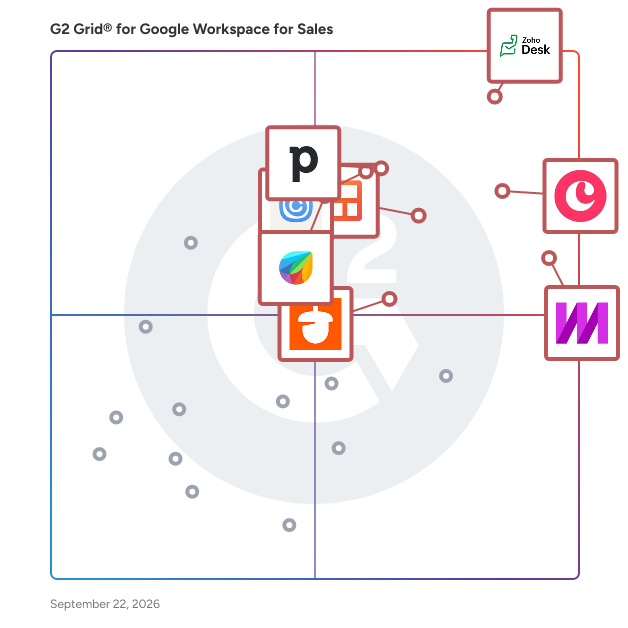
G2 Grid® for Google Workspace for Sales Software

G2 Grid® for Google Workspace for Sales Software plotting products by satisfaction and market presence

Highlighted products: Zoho Desk, Copper, Mixmax, Pipedrive CRM for Sales for G Suite, Streak, Calendly for G Suite, Freshdesk for G Suite, and Nutshell.

Underlying data: [Grid® JSON](https://www.g2.com/categories/google-workspace-for-sales/grids.json?focus%5B%5D=zoho-desk&focus%5B%5D=copper&focus%5B%5D=mixmax&focus%5B%5D=pipedrive-crm-for-sales-for-g-suite&focus%5B%5D=streak&focus%5B%5D=calendly-for-g-suite&focus%5B%5D=freshdesk-for-g-suite&focus%5B%5D=nutshell)

Zoho Desk

Zoho Desk is a web-based help desk software solution designed to assist organizations in providing exceptional customer support experiences. This platform serves as a centralized hub for managing customer interactions across multiple channels, allowing businesses to streamline their support processes and enhance overall customer satisfaction. By focusing on the needs of both customers and support agents, Zoho Desk aims to create a more efficient and effective help desk environment. Targeted primarily at businesses of all sizes, Zoho Desk caters to customer support teams looking to improve their service delivery and operational efficiency. The software is particularly beneficial for organizations that require a robust system to manage inquiries from various communication channels, including email, chat, social media, and phone. With its comprehensive feature set, Zoho Desk is well-suited for industries such as retail, technology, healthcare, and finance, where customer engagement and support are critical to success. One of the standout features of Zoho Desk is its omnichannel support capability, which allows businesses to engage with customers seamlessly across different platforms. This ensures that customers receive consistent and timely responses, regardless of how they choose to reach out. Additionally, the platform enhances agent productivity through automation tools that handle repetitive tasks, enabling support teams to focus on more complex customer issues. The integration of AI capabilities further empowers agents by providing them with insights and suggestions based on historical data and customer interactions. Zoho Desk also offers extensive customization options, allowing organizations to tailor the help desk experience to their specific needs. Users can create custom workflows, set up automated responses, and design personalized dashboards to monitor performance metrics. This level of customization ensures that businesses can adapt the software to fit their unique operational requirements, ultimately leading to improved service delivery and customer satisfaction. Furthermore, Zoho Desk provides real-time performance insights, enabling support managers to track key metrics and make data-driven decisions. The ability to analyze customer interactions and agent performance helps organizations identify areas for improvement and optimize their support strategies. With its cost-effective pricing model, Zoho Desk stands out as a practical solution for businesses seeking to enhance their customer support capabilities without incurring excessive expenses.

Average Rating: 4.4/5.0

Total Reviews: 7,695

G2 Deal: 50% discount on your first year with Zoho Desk

With Zoho Desk, you can deliver seamless omnichannel support, improve agent productivity at scale, customize your help desk, leverage powerful AI capabilities, automate mundane tasks, get live performance insights, and deeply integrate with apps you use daily - all without spending a fortune.

Price: ~~$14-40/agent/month~~ → $7-20/agent/month

View this exclusive G2 deal

How Do G2 Users Rate Zoho Desk?

  • Has the product been a good partner in doing business?: 8.4/10 (Category avg: 9.1/10)
  • Quality of Support: 8.3/10 (Category avg: 8.3/10)
  • Ease of Admin: 8.3/10 (Category avg: 8.9/10)
  • Ease of Use: 8.5/10 (Category avg: 8.6/10)

Who Is the Company Behind Zoho Desk?

  • Seller: Zoho
  • Company Website:
  • Year Founded: 1996
  • HQ Location: Austin, TX
  • Twitter: @Zoho
    137,880 Twitter followers
  • LinkedIn® Page: www.linkedin.com
    30,913 employees on LinkedIn®

Who Uses This Product?

  • Who Uses This: CEO, Director
  • Top Industries: Information Technology and Services, Computer Software
  • Company Size: 74% Small, 23% Medium

What Do G2 Reviewers Say About Zoho Desk?

AI-generated summary from verified user reviews

Pros
  • Users appreciate the ease of use of Zoho Desk, finding setup simple and customization straightforward.
  • Users appreciate the customization features and email integration of Zoho Desk, enhancing team efficiency and visibility.
  • Users love the efficient ticket management in Zoho Desk, streamlining support and enhancing team collaboration effortlessly.
  • Users value the extensive integrations of Zoho Desk, facilitating seamless communication across various platforms and enhancing productivity.
  • Users value the intuitive interface of Zoho Desk, enhancing organization and simplifying customer support management.
Cons
  • Users find the learning curve steep due to a busy interface and complex setup, making navigation challenging.
  • Users experience a steep learning curve due to a busy interface and complex setup for new features.
  • Users note the limited customization options can be confusing and restrict functionality in certain features of Zoho Desk.
  • Users find the complexity of Zoho Desk's UI and reporting features hampers their daily workflow and efficiency.
  • Users find the interface not intuitive, feeling overwhelmed by many options and hidden elements that complicate navigation.

What Are Recent G2 Reviews of Zoho Desk?

What Are G2 Users Discussing About Zoho Desk?

Copper

Copper is the only client and project management tool that's a Recommended for Google Workspace app. Built for agencies, consultants and professional services, Copper helps you connect with leads, win deals, deliver projects and create repeat clients. All in one easy-to-use tool. Join 30,000+ professional services businesses in building more valuable, longer-lasting relationships. Collect leads with website contact forms or scan business cards from our mobile app. Leads flow effortlessly into your sales pipeline. Pipeline flags and reports help you keep things moving. Transition new clients over to your onboarding or project delivery pipelines with one click. Manage next steps and tasks directly on your pipeline without needing to click into projects. Copper’s integration with Google works seamlessly with your Gmail, Calendar and Drive, you never have to switch tabs to add leads, track email conversations, find files and manage tasks in your marketing and sales process. Talking to a new person? Add new contacts directly from Gmail through our Chrome Extension. Hover over any Copper contact for rich, contextualized communication and activity details. Surface your CRM reminders and tasks alongside your Gmail inbox. Speed up your email responses with email templates, automations and merge fields. Add new leads and update old ones based on your email interactions, Google Contacts and Copper suggestions. Manual data entry is a thing of the past. Your Google Calendar gets a makeover too. You can look up event details, customer interactions, and materials directly from Google Calendar without breaking your workflow. Stop hunting for files, they're right where you need them. Files and Google docs sync to your Copper contact records automatically. Quickly surface customer files across company and deal records, and easily attach suggested files in Gmail based on your email activity. Export any data from Copper directly to Google Sheets via the custom report builder, or connect to Looker Studio to visualize Copper data longside other data sources.

Average Rating: 4.5/5.0

Total Reviews: 1,126

G2 Deal: 15% Off Annual Plan for Life

15% Off Annual Plan for Life on all available Copper plans

Price: ~~Starting at $23/user/month~~ → Starting at $19/user/month

View this exclusive G2 deal

How Do G2 Users Rate Copper?

  • Has the product been a good partner in doing business?: 9.0/10 (Category avg: 9.1/10)
  • Quality of Support: 8.6/10 (Category avg: 8.3/10)
  • Ease of Admin: 8.9/10 (Category avg: 8.9/10)
  • Ease of Use: 9.1/10 (Category avg: 8.6/10)

Who Is the Company Behind Copper?

  • Seller: Copper
  • Company Website:
  • Year Founded: 2012
  • HQ Location: San Francisco, CA
  • Twitter: @CopperInc
    2,379 Twitter followers
  • LinkedIn® Page: www.linkedin.com
    313 employees on LinkedIn®

Who Uses This Product?

  • Who Uses This: CEO, Founder
  • Top Industries: Marketing and Advertising, Information Technology and Services
  • Company Size: 79% Small, 18% Medium

What Do G2 Reviewers Say About Copper?

AI-generated summary from verified user reviews

Pros
  • Users highlight the ease of use of Copper, thanks to its seamless integration with Google Workspace and tools.
  • Users appreciate the seamless integration with Gmail, enhancing productivity without leaving the inbox.
  • Users appreciate the seamless integration with Google Workspace, enhancing contact management and making operations effortless.
  • Users value the seamless integration with Google Workspace, enhancing efficiency in contact and pipeline management.
  • Users value the seamless integration of Copper with Google Workspace, enhancing contact management and reducing manual effort significantly.
Cons
  • Users find Copper to be expensive, with pricing for additional features feeling higher than expected.
  • Users find Copper's limited features restricts customization and scalability, especially for larger teams and complex requirements.
  • Users express concern over missing advanced features like workflow automation and inadequate customer support, hindering productivity.
  • Users find integration issues with Copper cumbersome, leading to time-consuming manual tasks for managing documents and communications.
  • Users note the limited customization options in Copper, which may not meet the needs of larger organizations.

What Are Recent G2 Reviews of Copper?

What Are G2 Users Discussing About Copper?

Mixmax

Mixmax works inside Gmail so nothing falls through the cracks. Founded in 2014, it's used by people who handle their own outreach — founders, agency owners, recruiters, consultants, fundraisers and small business owners — and by the teams they work with. When you send an email, Mixmax keeps track of it. You can see when someone opens it or clicks a link. If they don't reply, Mixmax reminds you, or sends your next email for you. By default, follow-ups stop the moment the person writes back, so nobody gets another nudge after they've answered. When it's time to talk, they can book a meeting with you in one click, without the back-and-forth. What you can do with Mixmax: • See who opened your email and clicked your links • Get reminded when someone doesn't reply or hasn't opened your email • Send follow-up emails automatically, and stop them when someone replies • Save templates for the emails you write again and again, and share them with your team • Share a booking link, or offer a few times right inside an email • Log emails and meetings to Salesforce and HubSpot without copying and pasting • Get AI help drafting an email when you want it It all happens in the Gmail tab you already have open. There's no separate app to learn, and if you use Salesforce or HubSpot, Mixmax works alongside it instead of replacing it. You can start free, with no credit card. The free plan includes email tracking, reminders, templates and meeting scheduling, with monthly limits. Paid plans raise those limits and let you send automated follow-ups to more people.

Average Rating: 4.6/5.0

Total Reviews: 1,463

How Do G2 Users Rate Mixmax?

  • Has the product been a good partner in doing business?: 9.2/10 (Category avg: 9.1/10)
  • Quality of Support: 9.0/10 (Category avg: 8.3/10)
  • Ease of Admin: 9.0/10 (Category avg: 8.9/10)
  • Ease of Use: 9.0/10 (Category avg: 8.6/10)

Who Is the Company Behind Mixmax?

  • Seller: Mixmax
  • Company Website:
  • Year Founded: 2014
  • HQ Location: San Francisco, CA
  • Twitter: @Mixmax
    4,233 Twitter followers
  • LinkedIn® Page: www.linkedin.com
    138 employees on LinkedIn®

Who Uses This Product?

  • Who Uses This: Account Executive, Customer Success Manager
  • Top Industries: Computer Software, Information Technology and Services
  • Company Size: 54% Small, 43% Medium

What Do G2 Reviewers Say About Mixmax?

AI-generated summary from verified user reviews

Pros
  • Users love the email tracking features of Mixmax, enabling them to efficiently monitor opens and manage responses.
  • Users love the ease of use of Mixmax, finding scheduling and templates quick and seamless for everyday tasks.
  • Users love Mixmax for its time-saving features, simplifying scheduling and enhancing productivity with automation.
  • Users appreciate the AI assistant features of Mixmax, boosting productivity with helpful templates and drafting for sequences.
  • Users appreciate the email tracking and scheduling features of Mixmax, which enhance efficiency and ensure timely follow-ups.
Cons
  • Users express a desire for additional missing features like an iOS app and enhanced capabilities in the standard version.
  • Users are frustrated by the frequent downtime that disrupts email functionality and limits productivity.
  • Users are disappointed with the limited features available in Mixmax, wishing for more capabilities without an upgrade.
  • Users find Mixmax's features too expensive to access since essential tools are locked behind higher subscription tiers.
  • Users experience a challenging learning curve with Mixmax, finding the onboarding process and campaign sequences overwhelming initially.

What Are Recent G2 Reviews of Mixmax?

What Are G2 Users Discussing About Mixmax?

Pipedrive CRM for Sales for G Suite

Pipedrive is a sales management tool designed to help salespeople get more organized. Pipedrive delivers a simple experience that just makes sense from a salespersons perspective.

Average Rating: 4.3/5.0

Total Reviews: 50

How Do G2 Users Rate Pipedrive CRM for Sales for G Suite?

  • Has the product been a good partner in doing business?: 9.3/10 (Category avg: 9.1/10)
  • Quality of Support: 8.9/10 (Category avg: 8.3/10)
  • Ease of Admin: 8.5/10 (Category avg: 8.9/10)
  • Ease of Use: 8.8/10 (Category avg: 8.6/10)

Who Is the Company Behind Pipedrive CRM for Sales for G Suite?

  • Seller: Pipedrive
  • Year Founded: 2010
  • HQ Location: New York
  • Twitter: @pipedrive
    14,355 Twitter followers
  • LinkedIn® Page: www.linkedin.com
    1,051 employees on LinkedIn®
  • Phone: +1 (650) 924-9906

Who Uses This Product?

  • Top Industries: Computer Software, Marketing and Advertising
  • Company Size: 68% Small, 26% Medium

What Do G2 Reviewers Say About Pipedrive CRM for Sales for G Suite?

AI-generated summary from verified user reviews

Pros
  • Users appreciate the ease of use of Pipedrive CRM, seamlessly integrating with email for efficient lead management.
  • Users enjoy the seamless integrations with email, enhancing communication and streamlining the sales process in Pipedrive.
  • Users find the intuitive lead tracking in Pipedrive invaluable for managing sales opportunities effectively.
  • Users enjoy the clean interface of Pipedrive CRM, appreciating its simplicity and attention to detail.
  • Users value the easy client follow-up with date organization and the ability to update client information seamlessly.
Cons
  • Users find the complexity of task management cumbersome, requiring frequent manual updates after each call.
  • Users find that contact update issues can complicate their experience with Pipedrive CRM for Sales.
  • Users often experience duplicate issues with contacts and deals in Pipedrive CRM, causing confusion and inefficiencies.
  • Users face integration issues with Pipedrive CRM, limiting adaptability across different sales processes and industries.
  • Users experience a small learning curve when adapting to Pipedrive's various functionalities compared to Salesforce.

What Are Recent G2 Reviews of Pipedrive CRM for Sales for G Suite?

What Are G2 Users Discussing About Pipedrive CRM for Sales for G Suite?

Streak

Streak is a CRM built directly inside Gmail — not a sidebar, not a browser extension backed by a separate app. It runs natively in your inbox, so your team tracks deals, manages contacts, and runs pipelines without switching tabs or logging into another tool. Pipeline management works in a spreadsheet-style grid inside Gmail. Every deal, contact, and relationship lives in a customizable pipeline with stages you define to maintain structured data and processes. Manage your sales, hiring, investor outreach, fundraising, partnerships, and more — all from the same system. Streak logs emails automatically. Every conversation with a contact is captured to the right deal or pipeline record, so the full history is always visible. Shared pipelines give your whole team visibility into who's talking to who and where things stand. AI features are built into the workflow. AI autofill pulls data from your email history and web research to populate CRM fields. AI-generated pipelines build stages and fields from a plain-language description. AI actions trigger inside automations, so a pipeline event can kick off a multi-step workflow without manual updates. Core email tools are included on all plans: email tracking, mail merge, email templates, and email sharing. Best for: sales teams, talent agencies, marketing agencies, real estate agents, nonprofits, and any team that runs their business from Gmail and wants a CRM that actually gets used.

Average Rating: 4.5/5.0

Total Reviews: 267

How Do G2 Users Rate Streak?

  • Has the product been a good partner in doing business?: 9.2/10 (Category avg: 9.1/10)
  • Quality of Support: 8.7/10 (Category avg: 8.3/10)
  • Ease of Admin: 9.2/10 (Category avg: 8.9/10)
  • Ease of Use: 8.8/10 (Category avg: 8.6/10)

Who Is the Company Behind Streak?

  • Seller: Streak
  • Year Founded: 2011
  • HQ Location: San Francisco, CA
  • Twitter: @Streak
    7,473 Twitter followers
  • LinkedIn® Page: www.linkedin.com
    38 employees on LinkedIn®

Who Uses This Product?

  • Who Uses This: Engineer, Owner
  • Top Industries: Marketing and Advertising, Computer Software
  • Company Size: 75% Small, 14% Medium

What Do G2 Reviewers Say About Streak?

AI-generated summary from verified user reviews

Pros
  • Users enjoy the ease of use of Streak, seamlessly integrating with Gmail for efficient management of tasks and relationships.
  • Users love the easy tracking features of Streak, conveniently managing everything directly within Gmail for efficient email management.
  • Users love the Gmail integration of Streak, which simplifies deal management and keeps everything organized effortlessly.
  • Users love the real-time email tracking feature of Streak, enhancing their communication and planning efficiency.
  • Users love the seamless integration with Gmail, allowing efficient management of email campaigns directly from their inbox.
Cons
  • Users find the initial learning curve steep, making it challenging to fully utilize Streak’s features effectively.
  • Users find the limited features of Streak hinder customization and deeper analytics, complicating user experience.
  • Users are disappointed by the missing features of Streak, wishing for more built-in analytics and easier setup.
  • Users experience email issues with Streak, including lag and compatibility problems with Outlook and Thunderbird.
  • Users find the analytics inadequate, desiring more customization and deeper reporting options for complex pipelines.

What Are Recent G2 Reviews of Streak?

What Are G2 Users Discussing About Streak?

Calendly for G Suite

Calendly for G Suite is a simple, modern interface that works seamlessly with Google calendar so you're never double booked.

Average Rating: 4.6/5.0

Total Reviews: 58

How Do G2 Users Rate Calendly for G Suite?

  • Has the product been a good partner in doing business?: 9.5/10 (Category avg: 9.1/10)
  • Quality of Support: 9.0/10 (Category avg: 8.3/10)
  • Ease of Admin: 9.0/10 (Category avg: 8.9/10)
  • Ease of Use: 9.0/10 (Category avg: 8.6/10)

Who Is the Company Behind Calendly for G Suite?

  • Seller: Calendly
  • Year Founded: 2013
  • HQ Location: Atlanta, Georgia
  • Twitter: @Calendly
    21,838 Twitter followers
  • LinkedIn® Page: www.linkedin.com
    5,999 employees on LinkedIn®

Who Uses This Product?

  • Top Industries: Computer Software, Marketing and Advertising
  • Company Size: 55% Small, 36% Medium

What Do G2 Reviewers Say About Calendly for G Suite?

AI-generated summary from verified user reviews

Pros
  • Users find Calendly's ease of use enhances scheduling efficiency, allowing for quick and hassle-free meeting arrangements.
  • Users love the seamless integration with Google Calendar and Google Meet, enhancing scheduling efficiency and saving time.
  • Users appreciate the easy setup of Calendly for G Suite, making scheduling hassle-free and efficient.
  • Users value the efficiency of Calendly for G Suite, streamlining scheduling and keeping their calendars organized.
  • Users appreciate the seamless integration with Google Calendar and Google Meet, enhancing their scheduling experience significantly.
Cons
  • Users frequently face connectivity issues that disrupt syncing with Google Calendar and Meet, hindering their experience.
  • Users face a lack of information regarding troubleshooting issues, making it difficult to resolve problems with Calendly.
  • Users face scheduling issues due to limited time slots and the need to pre-set unavailable times.
  • Users face update issues that disrupt functionality, making it challenging to access meeting links via the Gmail extension.

What Are Recent G2 Reviews of Calendly for G Suite?

What Are G2 Users Discussing About Calendly for G Suite?

Freshdesk for G Suite

Freshdesk is a multi-channel customer support solution that brings helps you deliver support across channels (Phone, email, chat, social, forums and more)

Average Rating: 4.4/5.0

Total Reviews: 26

How Do G2 Users Rate Freshdesk for G Suite?

  • Has the product been a good partner in doing business?: 8.7/10 (Category avg: 9.1/10)
  • Quality of Support: 8.9/10 (Category avg: 8.3/10)
  • Ease of Admin: 8.7/10 (Category avg: 8.9/10)
  • Ease of Use: 8.8/10 (Category avg: 8.6/10)

Who Is the Company Behind Freshdesk for G Suite?

  • Seller: Freshworks
  • Year Founded: 2010
  • HQ Location: San Mateo, CA
  • Twitter: @FreshworksInc
    19,020 Twitter followers
  • LinkedIn® Page: www.linkedin.com
    7,783 employees on LinkedIn®
  • Ownership: NASDAQ: FRSH

Who Uses This Product?

  • Company Size: 54% Small, 43% Medium

What Do G2 Reviewers Say About Freshdesk for G Suite?

AI-generated summary from verified user reviews

Pros
  • Users appreciate the automation of email to ticket conversion in Freshdesk, simplifying customer management and enhancing efficiency.
  • Users appreciate the ease of use of Freshdesk for G Suite, enjoying seamless integration and efficient ticket management.
  • Users appreciate the seamless email integration of Freshdesk for G Suite, streamlining customer management and reducing manual workload.
  • Users love the seamless Gmail integration of Freshdesk, making ticket management smooth and efficient.
  • Users appreciate the smooth client management of Freshdesk for G Suite, streamlining customer interactions effortlessly.
Cons
  • Users find the sluggish synchronization between Gmail and Freshdesk can affect efficiency during high email influxes.
  • Users experience slow performance with Gmail synchronization in Freshdesk, especially during high email influx periods.

What Are Recent G2 Reviews of Freshdesk for G Suite?

What Are G2 Users Discussing About Freshdesk for G Suite?

Nutshell

Founded in 2010, Nutshell is an all-in-one sales, marketing and engagement platform that helps B2B organizations work together to win more deals. Simple enough for any user and sophisticated enough for any business, Nutshell is built for teams who are tired of juggling separate sales and marketing tools and don’t want to pay a full-time admin to manage their software. If you're aiming to boost revenue, streamline your sales process, or craft engaging marketing messages, Nutshell could be the solution. Every Nutshell subscription includes unlimited CRM contacts and data storage, fully customizable reporting tools, free data migration assistance, and world-class live support, all at an extremely affordable price. In 2024, Nutshell introduced Nutshell Marketing and Nutshell Engagement. Nutshell Marketing helps businesses create compelling email campaigns and landing pages to drive audience engagement, while Nutshell Engagement connects you with leads and customers throughout the sales journey via web chat and text messaging. Nutshell also integrates with popular tools like Google Workspace/Gmail, Microsoft Office/Outlook, QuickBooks Online, Intercom, and Slack. Nutshell also offers a mobile version, allowing sales reps to create, search, and edit contact information while in the field. Nutshell serves thousands of businesses around the world and has been named a top CRM for both user-friendliness and affordability. Nutshell has been honored as a "Leader" in G2's Grid® Report for CRM every quarter since Fall 2020.

Average Rating: 4.3/5.0

Total Reviews: 1,433

How Do G2 Users Rate Nutshell?

  • Has the product been a good partner in doing business?: 8.8/10 (Category avg: 9.1/10)
  • Quality of Support: 8.7/10 (Category avg: 8.3/10)
  • Ease of Admin: 8.7/10 (Category avg: 8.9/10)
  • Ease of Use: 8.7/10 (Category avg: 8.6/10)

Who Is the Company Behind Nutshell?

  • Seller: Nutshell
  • Company Website:
  • Year Founded: 2009
  • HQ Location: Ann Arbor, US
  • Twitter: @nutshell
    2,794 Twitter followers
  • LinkedIn® Page: www.linkedin.com
    82 employees on LinkedIn®

Who Uses This Product?

  • Who Uses This: CEO, Owner
  • Top Industries: Marketing and Advertising, Computer Software
  • Company Size: 73% Small, 17% Medium

What Do G2 Reviewers Say About Nutshell?

AI-generated summary from verified user reviews

Pros
  • Users appreciate the ease of use of Nutshell, keeping everything organized in one application effortlessly.
  • Users find Nutshell to be a reliable and intuitive tool that simplifies tracking and managing admissions efficiently.
  • Users praise Nutshell's exceptional customer support, highlighting prompt issue resolution and helpful educational resources.
  • Users love the powerful email marketing tools in Nutshell, noting their ease of use and effective tracking capabilities.
  • Users find Nutshell to be intuitive and easy to use, enhancing collaboration and daily sales activity management.
Cons
  • Users find missing features like better task differentiation and automations hinder efficiency and usability in Nutshell.
  • Users find Nutshell's limited features in customization and integrations somewhat restrictive for their business needs.
  • Users find limited customization in Nutshell, especially for mobile features and email templates, impacting user experience.
  • Users find the steep learning curve of Nutshell frustrating due to frequent feature changes and layout complications.
  • Users experience email integration issues occasionally, requiring cleanup of incorrect leads and dealing with duplicate notifications.

What Are Recent G2 Reviews of Nutshell?

Coefficient

Coefficient is a new way to work with your company data better, faster, and more accurately without ever leaving your spreadsheet, integrating with the tools you already use. Install the Coefficient Excel or Google Sheets extension and use it in a new or existing sheet in seconds. Once installed, Coefficient lives as a sidebar companion so your company data is only a couple of clicks away at any time. Any data source that you work with is available directly in your Coefficient sidebar – such as Salesforce, HubSpot, Snowflake, NetSuite, QuickBooks, MySQL, and Looker – with the ability to consolidate your data from multiple systems into one spreadsheet. Use Coefficient filters to easily customize your imports to only work with the data you need, keeping your spreadsheets performant. Quickly go back anytime to add more data in the same report. Never rebuild the same analysis twice by keeping your data up to date with scheduled updates. And, use Coefficient alerts to trigger Slack or email messages anytime your spreadsheet updates. Now, you can turn your spreadsheet into the most flexible, powerful monitoring system across all of your company data. Say “goodbye” to manual data workflows and “hello” to connected spreadsheets.

Average Rating: 4.7/5.0

Total Reviews: 201

How Do G2 Users Rate Coefficient?

  • Has the product been a good partner in doing business?: 9.0/10 (Category avg: 9.1/10)
  • Quality of Support: 9.0/10 (Category avg: 8.3/10)
  • Ease of Admin: 9.2/10 (Category avg: 8.9/10)
  • Ease of Use: 9.2/10 (Category avg: 8.6/10)

Who Is the Company Behind Coefficient?

  • Seller: Coefficient
  • Company Website:
  • Year Founded: 2020
  • HQ Location: Palo Alto, CA
  • Twitter: @coefficient_io
    346 Twitter followers
  • LinkedIn® Page: www.linkedin.com
    70 employees on LinkedIn®

Who Uses This Product?

  • Top Industries: Computer Software, Information Technology and Services
  • Company Size: 45% Medium, 36% Small

What Do G2 Reviewers Say About Coefficient?

AI-generated summary from verified user reviews

Pros
  • Users appreciate the ease of use of Coefficient, enjoying seamless data extraction and hassle-free synchronization across tools.
  • Users value the automation capabilities of Coefficient, making data management effortless and efficient.
  • Users appreciate the seamless integrations of Coefficient, enabling effortless data flow between systems like Salesforce and QuickBooks.
  • Users value the time-saving automation of Coefficient, reclaiming hours in their weekly reporting tasks.
  • Users find easy integrations with Coefficient seamless, enhancing productivity and simplifying their data workflow considerably.
Cons
  • Users find the limited filtering options in Coefficient restrictive and detrimental to their data analysis experience.
  • Users find the feature limitations of Coefficient frustrating, particularly with filtering and integration challenges.
  • Users find the limit of Google Sheets for multiple filters and imports restricts their data management capabilities.
  • Users find the missing features in Coefficient limiting, especially with filters and integrating charts from SFDC.
  • Users face integration issues with Coefficient, leading to frustrating limitations when connecting to other tools and systems.

What Are Recent G2 Reviews of Coefficient?

OnceHub

OnceHub is a single platform to engage, screen, and schedule across phone and web channels. The right booking experience creates a solid first impression and prioritizes your team's time. OnceHub screens visitors for fit, matches them to the right expert, and delivers a polished, branded experience before the conversation even begins. Professional booking pages eliminate back-and-forth. Smart routing ensures only high-value conversations reach your calendar. When the office is closed, OnceHub stays open. Phone agents answer calls and book meetings around the clock. Web chatbots answer questions and route visitors to the right outcome. Financial advisors, healthcare providers, universities, coaches, and recruitment teams start every day with booked calendars and conversations that are already qualified. Every booking triggers the details automatically — video links, email & SMS notifications, and reminders created the moment a meeting is confirmed. One-on-one, multi-host, group, or concurrent meetings are all supported, with hosts pre-assigned or dynamically matched to the right person. Monitor team utilization, track booking performance, and identify where conversions are won or lost. Customizable dashboards give managers full visibility into every host, calendar, and meeting outcome across the organization. For enterprises in regulated industries, OnceHub maintains compliance with GDPR, FINRA, HIPAA, and FERPA. Tiered permissions, real-time utilization tracking, and full interaction visibility give operations teams the control they need without slowing anyone down. OnceHub works with the tools your team already runs on: Google and Microsoft calendars, Salesforce and HubSpot for CRM, Stripe and PayPal for payments, plus thousands more through automation platforms like Zapier, Make, and others. Start a free 14-day trial. No credit card required.

Average Rating: 4.4/5.0

Total Reviews: 58

How Do G2 Users Rate OnceHub?

  • Has the product been a good partner in doing business?: 9.3/10 (Category avg: 9.1/10)
  • Quality of Support: 9.0/10 (Category avg: 8.3/10)
  • Ease of Admin: 8.7/10 (Category avg: 8.9/10)
  • Ease of Use: 8.8/10 (Category avg: 8.6/10)

Who Is the Company Behind OnceHub?

  • Seller: OnceHub
  • Year Founded: 2006
  • HQ Location: Claymont, DE
  • Twitter: @OnceHub
    1,384 Twitter followers
  • LinkedIn® Page: www.linkedin.com
    171 employees on LinkedIn®

Who Uses This Product?

  • Top Industries: Computer Software, Marketing and Advertising
  • Company Size: 71% Small, 17% Medium

What Do G2 Reviewers Say About OnceHub?

AI-generated summary from verified user reviews

Pros
  • Users commend the ease of use of OnceHub, making setup and integration with other tools a breeze.
  • Users praise the seamless integrations with tools like Zoom and Google Calendar, enhancing their overall experience effortlessly.
  • Users highlight the easy integrations of OnceHub, making setup seamless with tools like Zoom and Google Calendar.
  • Users admire the easy setup of OnceHub, finding integration with other tools seamless and effortless.
  • Users love the user-friendly interface and extensive features of OnceHub, making integration seamless and efficient.
Cons
  • Users find the learning curve steep, as understanding the process and terminology can be challenging initially.
  • Users express disappointment over the limited features of OnceHub, particularly the absence of booking with approval.
  • Users find the learning curve difficult due to the unintuitive process and terminology, but it improves over time.
  • Users are frustrated by the missing booking approval feature, which limits flexibility in scheduling appointments on different days.
  • Users face compliance issues with appointment selection, leading to reduced flexibility due to back-to-back bookings.

What Are Recent G2 Reviews of OnceHub?

What Are G2 Users Discussing About OnceHub?

folk

folk is like the sales assistant your team never had. Our CRM is simple, integrated, and proactive. The tool of choice for over 3000+ award-winning service businesses around the world. folk does the busy work for you, so you can focus on building real relationship - Sync all your inboxes and centralize your history of interactions - Import contacts from anywhere on the web with our folkX extension - Find emails and contact details with 1-click Enrichment - Customize pipeline views and collaborate on deals as a team - Automate workflows with over 6,000+ integrations - Send messages, schedule multi-step sequences, and personalize faster with templates Client management is complicated enough, your CRM doesn’t have to be…

Average Rating: 4.5/5.0

Total Reviews: 340

How Do G2 Users Rate folk?

  • Has the product been a good partner in doing business?: 8.9/10 (Category avg: 9.1/10)
  • Quality of Support: 9.1/10 (Category avg: 8.3/10)
  • Ease of Admin: 8.7/10 (Category avg: 8.9/10)
  • Ease of Use: 9.0/10 (Category avg: 8.6/10)

Who Is the Company Behind folk?

  • Seller: folk
  • Year Founded: 2020
  • HQ Location: Distributed Team, FR
  • LinkedIn® Page: www.linkedin.com
    66 employees on LinkedIn®

Who Uses This Product?

  • Who Uses This: CEO, Founder
  • Top Industries: Consulting, Computer Software
  • Company Size: 96% Small, 3% Medium

What Do G2 Reviewers Say About folk?

AI-generated summary from verified user reviews

Pros
  • Users value the ease of use of Folk, finding it straightforward and efficient compared to other CRM options.
  • Users value Folk for its user-friendly simplicity, making relationship management effortless and enjoyable for everyone.
  • Users love the intuitive interface that simplifies their workflow and enhances overall user experience.
  • Users appreciate the easy contact management of Folk, enjoying its clean interface and efficient relationship tracking.
  • Users value the seamless integrations of folk, enhancing productivity by centralizing communication and maintaining connections effortlessly.
Cons
  • Users find the missing features in Folk limiting, affecting customization and overall usability in their workflow.
  • Users find limited features in Folk, wishing for greater flexibility and essential CRM capabilities to enhance usability.
  • Users find email management cumbersome due to limited functionality and integration issues with Gmail.
  • Users face integration issues with Folk CRM, impacting email tracking and third-party connections like LinkedIn and Kit.
  • Users face email issues with Folk CRM, including tracking problems and lack of automatic sent notification in Outlook.

What Are Recent G2 Reviews of folk?

Freshdesk Gmail Gadget for G Suite

The Freshdesk Gmail gadget pulls up contact information, all recent tickets from this customer, gives you a complete context that you need to start working on the ticket even before you shoot out the first reply.

Average Rating: 4.5/5.0

Total Reviews: 17

How Do G2 Users Rate Freshdesk Gmail Gadget for G Suite?

  • Has the product been a good partner in doing business?: 9.6/10 (Category avg: 9.1/10)
  • Quality of Support: 9.4/10 (Category avg: 8.3/10)
  • Ease of Admin: 10.0/10 (Category avg: 8.9/10)
  • Ease of Use: 9.1/10 (Category avg: 8.6/10)

Who Is the Company Behind Freshdesk Gmail Gadget for G Suite?

  • Seller: Freshworks
  • Year Founded: 2010
  • HQ Location: San Mateo, CA
  • Twitter: @FreshworksInc
    19,020 Twitter followers
  • LinkedIn® Page: www.linkedin.com
    7,783 employees on LinkedIn®
  • Ownership: NASDAQ: FRSH

Who Uses This Product?

  • Company Size: 67% Small, 24% Medium

What Are Recent G2 Reviews of Freshdesk Gmail Gadget for G Suite?

What Are G2 Users Discussing About Freshdesk Gmail Gadget for G Suite?

Pipeline CRM

Pipeline CRM is a sales-first CRM designed to help teams close deals faster, automate processes, and drive predictable revenue growth. Our platform eliminates time-consuming admin work with powerful automation, seamlessly moving leads from prospect to customer. With an intuitive interface and highly customizable workflows, sales teams can focus on selling—not data entry.

Average Rating: 4.3/5.0

Total Reviews: 911

How Do G2 Users Rate Pipeline CRM?

  • Has the product been a good partner in doing business?: 9.1/10 (Category avg: 9.1/10)
  • Quality of Support: 8.9/10 (Category avg: 8.3/10)
  • Ease of Admin: 8.9/10 (Category avg: 8.9/10)
  • Ease of Use: 8.9/10 (Category avg: 8.6/10)

Who Is the Company Behind Pipeline CRM?

  • Seller: Pipeline CRM
  • Company Website:
  • Year Founded: 2006
  • HQ Location: Seattle, WA
  • Twitter: @PipelineDeals
    2,861 Twitter followers
  • LinkedIn® Page: www.linkedin.com
    28 employees on LinkedIn®

Who Uses This Product?

  • Who Uses This: Account Manager, Owner
  • Top Industries: Construction, Marketing and Advertising
  • Company Size: 65% Small, 27% Medium

What Do G2 Reviewers Say About Pipeline CRM?

AI-generated summary from verified user reviews

Pros
  • Users value the ease of use of Pipeline CRM, enabling quick learning and seamless lead management.
  • Users highlight the organized pipeline management of Pipeline CRM, which effectively keeps deals progressing and enhances productivity.
  • Users appreciate the intuitive interface of Pipeline CRM, making it simple and fast to adopt for their teams.
  • Users appreciate the organized approach to lead management in Pipeline CRM, enhancing deal progression and team efficiency.
  • Users appreciate the helpful reporting features of Pipeline CRM, which facilitate effective tracking of sales progress.
Cons
  • Users note the limited features of Pipeline CRM, hindering deep integration and automation for enhanced productivity.
  • Users find the limited customization options in Pipeline CRM restrict their ability to optimize complex sales processes.
  • Users face integration issues with Pipeline CRM due to limited third-party connections and mobile app functionality challenges.
  • Users note the missing features in Pipeline CRM, particularly in mobile app functionality and third-party integrations.
  • Users experience slow performance with Pipeline CRM, leading to frustrations during updates and integration challenges.

What Are Recent G2 Reviews of Pipeline CRM?

What Are G2 Users Discussing About Pipeline CRM?

SaneBox

SaneBox is an email management tool that helps the average worker save at least 2.5 hours per week so they can spend more time outside their inbox. Founded in 2011, SaneBox offers individuals and enterprise clients alike a full suite of email organizational tools to take back control of their inbox.

Average Rating: 4.8/5.0

Total Reviews: 241

How Do G2 Users Rate SaneBox?

  • Has the product been a good partner in doing business?: 9.7/10 (Category avg: 9.1/10)
  • Quality of Support: 9.7/10 (Category avg: 8.3/10)
  • Ease of Admin: 9.7/10 (Category avg: 8.9/10)
  • Ease of Use: 9.5/10 (Category avg: 8.6/10)

Who Is the Company Behind SaneBox?

  • Seller: SaneBox
  • Year Founded: 2010
  • HQ Location: Boston, MA
  • Twitter: @sanebox
    9,146 Twitter followers
  • LinkedIn® Page: www.linkedin.com
    14 employees on LinkedIn®

Who Uses This Product?

  • Who Uses This: Owner, CEO
  • Top Industries: Information Technology and Services, Marketing and Advertising
  • Company Size: 80% Small, 9% Medium

What Do G2 Reviewers Say About SaneBox?

AI-generated summary from verified user reviews

Pros
  • Users appreciate the ease of use of SaneBox, enjoying its effective auto sorting and simple initial setup.
  • Users appreciate the effective inbox management of SaneBox, simplifying email organization and promoting a clear workflow.
  • Users appreciate the auto sorting and mass delete features of SaneBox, effectively keeping their inbox organized.
  • Users praise SaneBox for its efficiency in organizing emails and achieving inbox zero effortlessly.
  • Users highlight the easy setup of SaneBox, finding it straightforward and efficient for managing their inbox.
Cons
  • Users find SaneBox expensive, especially when adding multiple accounts, impacting its overall value perception.
  • Users find the lack of training requires time and oversight, as the AI still misses some spam.
  • Users report a steep learning curve, requiring time to train the AI for effective spam filtering.
  • Users desire more features and customization in SaneBox, feeling the current set is limited for the price.
  • Users feel SaneBox lacks adequate AI features, requiring manual checking and limiting customization options.

What Are Recent G2 Reviews of SaneBox?

What Are G2 Users Discussing About SaneBox?

NetHunt CRM

NetHunt is a sales automation tool that literally lives inside your Gmail and other Google Workspace apps. It helps sales teams manage leads, nurture customer relations, monitor sales progress, and close more deals. Businesses grow x5 with NetHunt CRM, check customer stories - https://nethunt.com/case-studies 🥇 Google Cloud Partner 🥇 Google Security Assessment Program Passed We’ve built the best CRM integration with Gmail allowing for 100% CRM functionality from within Gmail. ✅ No more switching tabs ✅ No more data entry ✅ Everything is in one place ✅ In a familiar interface, within an app that you use daily Watch our demo: https://youtu.be/wD-tjeX6x_s Browse Help Center: https://help.nethunt.com/en/ MORE ABOUT NETHUNT CRM 🙂 Organize your customer base Use core CRM features in NetHunt to organize your customer base in the most efficient way. ✓ Say goodbye to tedious data entry forever. ✓ Use NetHunt’s duplicate prevention feature to keep your data clean at all times. ✓ The required fields feature watches over your data to make sure you’ve got what you need. ✓ Your customer base is securely stored in one place, protected from leaks or prying eyes by proper access management. 📞 Capture new leads through multiple channels NetHunt CRM is integrated with multiple tools that allows you to get new leads from different sources and store communication within CRM records. ✓ Create new leads from inbound and outbound calls ✓ Turn website chats into new leads ✓ Get new leads from social media platforms ✓ Add new leads to CRM from messengers ✓ Capture leads from custom web forms 📋 Segment leads and customers base Break down your customer base into targeted segments to send personalized pitches by using various macros - job title, need, company size and more. ✓ Use custom filters and views to segment your contacts. ✓ Save an unlimited number of segments for yourself or share them with the team. ✓ Have these segments updated automatically when new users match certain parameters. 💲 Build sales pipeline Turn contacts into leads and push them down the beautiful, functional pipeline. ✓ Add new deals, their value, probability of closing and expected close date. ✓ Track deals progress through the pipeline stages. ✓ Know revenue stuck at every stage of the pipeline ✓ Spot blocked leads and how to push them towards purchase. ✓ Create one or several custom pipelines for your products and services. ✓ Build forecasts you can trust. ⭕ Manage Tasks Organize your workday and manage the workload of your team. All within Gmail. ✓ Manage Tasks and collaborate with your team inside Gmail. ✓ Assign Tasks automatically by certain criteria or round-robin algorithm. ✓ Link Tasks to emails and CRM records. ✓ Receive daily Tasks Digest to plan your day. 🤖 Automate sales processes in Gmail NetHunt CRM allows users to automate the entire sales process – from lead capture to deals’ pipeline stage to notifications. ✓ Capture leads from different sources and add them in your CRM. ✓ Assign managers to leads and set up personalised auto-replies. ✓ Prioritise leads automatically depending on their behaviour ✓ Set sequences to nurture leads. ✓ Automatically link email conversations, chats, calls to CRM profiles. ✓ Have an algorithm move a lead to the next pipeline stage based on the lead’s response. ✓ Create automatic tasks for the team. ✓ Set notifications to the team when important changes happen in the pipeline. ✓ Automate data entry. ✉️ Email automation ✓ Create personal and shared email templates in Gmail. ✓ Write repetitive emails easily and quickly. ✓ Personalize email templates with custom fields. ✓ Use email templates in daily email correspondence, email campaigns or automated email sequences. 📩 Email tracking Track your email opens and clicks in Gmail. ✓ Know if, when, and how often the receiver views your emails in real-time. ✓ Know when people open your emails to provide insights for your team. ✓ Prioritise leads based on how many times they open emails or click on the links. ✓ Use email tracking for regular emails, email campaigns and automated email sequences. 🔁 Email campaigns Send email campaigns and follow-up campaigns in Gmail. ✓ Send email campaigns to custom segments or all of your customer base. ✓ Set follow-up emails to previous email campaigns. ✓ Monitor campaigns stats: opens, clicks, unsubscribes, bounces, and replies. ✓ Send email campaigns via Gmail, NetHunt SMTP or your own SMTP server. 📊 Sales reporting Track key business metrics and team performance with reports in NetHunt CRM. ✓ Track the effectiveness of the entire team and every manager separately – the number of sent emails, presentations made, calls made, etc. ✓ Analyze business growth compared to previous periods – the number of closed deals as well as revenue generated. ✓ Analyze revenue by breaking it down by a manager, by a certain product, by country, etc. ✓ Track your quota attainment. ✓ Analyze the reasons for losing deals. ✓ Build a sales forecast you can trust.

Average Rating: 4.6/5.0

Total Reviews: 279

How Do G2 Users Rate NetHunt CRM?

  • Has the product been a good partner in doing business?: 9.3/10 (Category avg: 9.1/10)
  • Quality of Support: 9.3/10 (Category avg: 8.3/10)
  • Ease of Admin: 9.0/10 (Category avg: 8.9/10)
  • Ease of Use: 9.1/10 (Category avg: 8.6/10)

Who Is the Company Behind NetHunt CRM?

  • Seller: NetHunt CRM
  • Year Founded: 2015
  • HQ Location: Kiev
  • Twitter: @nethuntcrm
    2,154 Twitter followers
  • LinkedIn® Page: www.linkedin.com
    22 employees on LinkedIn®

Who Uses This Product?

  • Who Uses This: CEO, Director
  • Top Industries: Marketing and Advertising, Information Technology and Services
  • Company Size: 79% Small, 17% Medium

What Do G2 Reviewers Say About NetHunt CRM?

AI-generated summary from verified user reviews

Pros
  • Users find NetHunt CRM easy to use, appreciating quick setup and seamless integration with LinkedIn and Gmail.
  • Users value the Gmail integration of NetHunt CRM, enhancing workflow efficiency and simplifying outreach efforts seamlessly.
  • Users value the seamless integrations of NetHunt CRM, enhancing organization and efficiency within their sales pipeline.
  • Users benefit from the seamless integration with LinkedIn and Gmail, enhancing their outreach and productivity significantly.
  • Users value the easy integration with Google Workspace, enhancing communication and automation for a seamless experience.
Cons
  • Users find the learning curve steep, requiring significant time and experience to effectively utilize NetHunt CRM.
  • Users miss the absence of key features like email templates and advanced duplicate detection in NetHunt CRM.
  • Users face email issues like limitations on sending frequency and lag, impacting efficiency and communication.
  • Users find the limited features of NetHunt CRM hinder advanced usage and create challenges in reporting and automation.
  • Users find the complexity of automation and reporting features a challenge, requiring time and effort to master.

What Are Recent G2 Reviews of NetHunt CRM?

What Are G2 Users Discussing About NetHunt CRM?

Neeraja Prakash
NP
Researched and written by Neeraja Prakash
Updated June 16, 2025