# Best Employee Scheduling Software

*By [Jeffrey Lin](https://research.g2.com/insights/author/jeffrey-lin)*


Employee scheduling software automates the creation, maintenance, and tracking of employee schedules, improving productivity, team coordination, and company-wide visibility into workforce bandwidth, while managing vacations, sick days, and shift conflicts.

### Core Capabilities of Employee Scheduling Software

To qualify for inclusion in the Employee Scheduling category, a product must:

- Automate the creation and maintenance of schedules
- Help manage and provide visibility into employee tasks
- Include self-service functionality for employees, such as messaging and shift swapping

### Common Use Cases for Employee Scheduling Software

Employee scheduling software is widely used in retail, hospitality, and service industries to manage shift-based workforces. Common use cases include:

- Automating shift assignments and preventing scheduling conflicts
- Enabling employees to view, swap, and request changes to their schedules
- Feeding scheduling data into [payroll software](https://www.g2.com/categories/payroll) for accurate compensation processing

### How Employee Scheduling Software Differs from Other Tools

Employee scheduling software is more targeted than [workforce management software](https://www.g2.com/categories/workforce-management), which provides a broader set of capabilities typically found within larger [HRMS and HCM platforms](https://www.g2.com/categories/hcm-software) or [core HR software](https://www.g2.com/categories/core-hr). Scheduling tools focus specifically on shift planning and employee self-service, rather than full workforce optimization.

### Insights from G2 on Employee Scheduling Software

Based on category trends on G2, automated conflict detection and employee self-service features stand out as top strengths. Improved schedule visibility and reduced manual coordination stand out as core benefits.
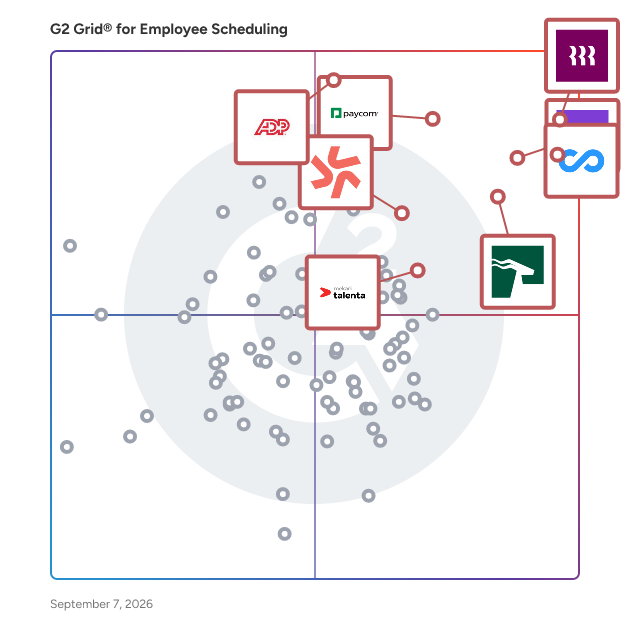


## Top Employee Scheduling Software at a Glance
| # | Product | Rating | Best For | What Users Say |
|---|---------|--------|----------|----------------|
| 1 | [Rippling](https://www.g2.com/products/rippling/reviews) | 4.8/5.0 (11,478 reviews) | Unified HR, payroll, and scheduling administration | "[User-Friendly, Tech-Forward Platform with Highly Responsive Support Team](https://www.g2.com/survey_responses/rippling-review-13036551)" |
| 2 | [Connecteam](https://www.g2.com/products/connecteam/reviews) | 4.6/5.0 (3,491 reviews) | Mobile workforce scheduling and communication | "[Connecteam Review](https://www.g2.com/survey_responses/connecteam-review-10735494)" |
| 3 | [Homebase](https://www.g2.com/products/homebase/reviews) | 4.6/5.0 (522 reviews) | Hourly team scheduling and time tracking | "[Fast, Reliable Scheduling and Payroll That Streamlines My Workflow](https://www.g2.com/survey_responses/homebase-review-12865843)" |
| 4 | [HROne](https://www.g2.com/products/uneecops-hrone/reviews) | 4.8/5.0 (2,060 reviews) | Centralized HR and attendance automation | "[On-time support &amp; easy access, email pay-slip automation can be improved](https://www.g2.com/survey_responses/hrone-review-10898412)" |
| 5 | [ADP Time and Labor Management](https://www.g2.com/products/adp-adp-time-and-labor-management/reviews) | 4.4/5.0 (156 reviews) | Time tracking with labor rule enforcement | "[ADP Makes Payroll and Workforce Management Easy](https://www.g2.com/survey_responses/adp-time-and-labor-management-review-12722127)" |
| 6 | [Paycom](https://www.g2.com/products/paycom/reviews) | 4.5/5.0 (4,508 reviews) | Employee self-service time and payroll access | "[HR Business Partner](https://www.g2.com/survey_responses/paycom-review-13034131)" |
| 7 | [Deputy](https://www.g2.com/products/deputy/reviews) | 4.6/5.0 (647 reviews) | Shift scheduling and timecard management | "[Simple, User-Friendly Interface for Time-Off Requests and Weekly Timecards](https://www.g2.com/survey_responses/deputy-review-12630419)" |
| 8 | [Mekari Talenta](https://www.g2.com/products/mekari-talenta/reviews) | 4.8/5.0 (27 reviews) | HR operations automation | "[Reliable Compliance and Seamless Attendance-to-Payroll Integration](https://www.g2.com/survey_responses/mekari-talenta-review-12606077)" |
| 9 | [Hubstaff](https://www.g2.com/products/hubstaff/reviews) | 4.4/5.0 (2,247 reviews) | Remote time tracking and activity visibility | "[Easy Time Tracking and Clear Productivity Visibility for Remote Teams](https://www.g2.com/survey_responses/hubstaff-review-12970854)" |
| 10 | [Viventium Software](https://www.g2.com/products/viventium-software/reviews) | 4.7/5.0 (77 reviews) | Healthcare HR and payroll support | "[has made our payroll  and compliance tasks faster, easier, and more accurate saving time.](https://www.g2.com/survey_responses/viventium-software-review-11401924)" |

---
## What Are the Most Common Questions About Employee Scheduling Software?
*AI-generated · Last updated: May 26, 2026*
### What employee scheduling tools provide drag-and-drop shift planning?
Based on G2 reviews, employee scheduling buyers often look for tools that make schedule creation and edits feel quick and visual. Verified users mention that products in this category help managers assign, move, and update shifts without relying on spreadsheets or back-and-forth messages. Across recent reviews, common themes include easier schedule adjustments, better visibility into staff availability, and simpler communication when changes happen. According to verified users, these tools are especially useful when managers need to respond to callouts, overtime issues, or changing coverage needs while keeping teams informed through web and mobile access.


### How to choose a scheduling tool for hourly and part-time teams?
Based on G2 reviews, buyers choosing employee scheduling software for hourly and part-time teams should focus on tools that make availability, time tracking, and shift communication easy for both managers and staff. G2 reviewers mention that products work best when employees can quickly view schedules, request time off, swap shifts, and receive updates on mobile devices. According to verified users, useful platforms also reduce manual tracking by keeping hours, attendance, and payroll-related data in one place. Reviews also point to ease of setup, intuitive interfaces, and clear visibility into who is working when as important factors for teams with changing schedules and varied availability.


### Which platforms support compliance with labor laws and overtime rules?
Based on G2 reviews, several employee scheduling platforms are described by users as helping organizations manage overtime, labor rules, and scheduling compliance more consistently. Reviewers commonly mention alerts for overtime risk, visibility into worked hours, and scheduling controls that help reduce overstaffing or missed break issues. According to verified users, these tools are especially valuable when managers need to monitor attendance, approve timecards, and keep payroll data aligned with worked time. G2 reviewers also mention that some platforms are used to support compliance across multiple locations or more complex scheduling environments where labor policies and staffing rules are harder to manage manually.


### How to compare scheduling features across hospitality and healthcare sectors?
Based on G2 reviews, comparing scheduling tools across hospitality and healthcare starts with understanding how each environment handles coverage, shift changes, and employee communication. G2 reviewers in hospitality often mention labor cost visibility, shift swaps, and schedule updates for fast-changing demand. According to verified users in healthcare, buyers may need stronger support for role-specific staffing, more complex schedules, and reliable visibility into who is on duty. Reviews across both sectors consistently mention mobile access, attendance tracking, and easier coordination as important. G2 reviewers also point to setup simplicity and the ability to keep schedules, hours, and time-off requests organized in one place.


### Where to find scheduling software with labor cost forecasting?
Based on G2 reviews, buyers looking for scheduling software with labor cost forecasting often evaluate products that connect scheduling decisions with hours worked, staffing coverage, and budget visibility. Verified users mention tools that help managers compare schedules against labor goals, monitor staffing levels during peak periods, and make quicker adjustments when costs rise. G2 reviewers mention that forecasting features are especially useful in environments with changing demand, such as hospitality, retail, and service teams. According to verified users, products in this category can also help surface overtime trends, coverage gaps, and planned labor before payroll is finalized.


### Best employee scheduling software with mobile notifications and reminders?
Based on G2 reviews, Rippling stands out in this dataset because reviewers frequently mention mobile-friendly access to schedules, time tracking, approvals, and reminders in one place. According to verified users, employee scheduling software with mobile notifications and reminders is most valuable when staff can quickly see shifts, request changes, and stay updated without extra follow-up from managers. G2 reviewers mention that strong mobile access helps reduce missed shifts, improves visibility into schedule changes, and keeps employees informed in real time. Across recent reviews, buyers also look for simple navigation, reliable alerts, and the ability to manage hours, PTO, and attendance directly from a mobile device.

**Here are some of the top-rated products on G2:**

- [Rippling](https://www.g2.com/products/rippling/reviews) – used for viewing schedules, tracking hours, and handling time-off and approvals in one place
- [Homebase](https://www.g2.com/products/homebase/reviews) – helps teams get instant schedule updates, shift reminders, and mobile access for swaps and requests
- [Connecteam](https://www.g2.com/products/connecteam/reviews) – supports mobile-first scheduling, updates, forms, and communication for distributed teams


### Best scheduling tools for managing multiple locations and teams?
Based on G2 reviews, buyers managing multiple locations and teams often prioritize software that centralizes schedules, communication, and staffing visibility. Verified users mention that the best tools help managers see coverage across sites, coordinate updates quickly, and reduce the confusion that comes from juggling separate spreadsheets or apps. G2 reviewers mention benefits such as easier staff deployment, better visibility into who is working where, and stronger control over time tracking and labor planning. According to verified users, these platforms are especially helpful when organizations need one system to support scheduling, attendance, and day-to-day team coordination across dispersed workforces.

**Here are some of the top-rated products on G2:**

- [Rippling](https://www.g2.com/products/rippling/reviews) – used to manage employee schedules, availability, time tracking, and HR workflows across teams
- [Connecteam](https://www.g2.com/products/connecteam/reviews) – helps coordinate schedules, tasks, communication, and attendance across multiple locations
- [Homebase](https://www.g2.com/products/homebase/reviews) – supports schedule sharing, shift coverage, payroll-linked hours, and team communication in one system


### Where to buy employee scheduling software with attendance tracking?
Based on G2 reviews, buyers can evaluate employee scheduling software with attendance tracking directly through products reviewed on G2, where recent users describe how these tools combine schedules, clock-ins, worked hours, and time-off management. G2 reviewers mention that attendance tracking is especially helpful for reducing manual timesheets, correcting missed punches, and keeping payroll inputs more accurate. According to verified users, platforms in this category often bring together scheduling, clock-in and clock-out workflows, and attendance visibility in one place. Reviews also highlight the value of mobile access, easier manager approvals, and clearer records for daily workforce management.


### Who offers scheduling platforms with payroll integration?
Based on G2 reviews, a range of vendors in this category offer scheduling platforms that connect scheduling with payroll-related workflows. G2 reviewers mention that these tools help reduce duplicate entry by linking worked hours, timesheets, approvals, and payroll processing more closely. According to verified users, payroll integration is most valuable when managers can move from scheduling and attendance tracking into payroll preparation without relying on spreadsheets or manual exports. Reviews also mention that products with stronger payroll connections help improve accuracy, reduce time spent on corrections, and keep employees, managers, and payroll teams working from the same information.


### Which employee scheduling platforms support shift swaps and availability tracking?
Based on G2 reviews, employee scheduling platforms that support shift swaps and availability tracking are often valued for reducing manager back-and-forth while giving employees more control over their schedules. Verified users mention that the strongest tools make it easy to post availability, request time off, trade shifts, and keep schedule updates visible in real time. G2 reviewers mention that these capabilities are especially useful for hourly, part-time, and multi-location teams where coverage changes often. According to verified users, platforms with clear mobile access and intuitive schedule views help prevent confusion and make it easier to maintain appropriate staffing levels.


## How Many Employee Scheduling Software Products Does G2 Track?
**Total Products under this Category:** 304

### Category Stats (Jun 2026)
- **Average Rating**: 4.44/5 The average rating of products in this category, based on all submitted ratings
- **Top Trending Product**: G&amp;A Partners (+10.0%) - Among all products in this category, G&amp;A Partners recorded the largest rating increase compared to last month
*Last updated: June 29, 2026*


## How Does G2 Rank Employee Scheduling Software Products?

**Why You Can Trust G2's Software Rankings:**

- 30 Analysts and Data Experts
- 43,300+ Authentic Reviews
- 304+ Products
- Unbiased Rankings

G2's software rankings are built on verified user reviews, rigorous moderation, and a consistent research methodology maintained by a team of analysts and data experts. Each product is measured using the same transparent criteria, with no paid placement or vendor influence. While reviews reflect real user experiences, which can be subjective, they offer valuable insight into how software performs in the hands of professionals. Together, these inputs power the G2 Score, a standardized way to compare tools within every category.


## Which Employee Scheduling Software Is Best for Your Use Case?

- **Leader:** [Rippling](https://www.g2.com/products/rippling/reviews)
- **Highest Performer:** [Buddy Punch](https://www.g2.com/products/buddy-punch/reviews)
- **Easiest to Use:** [HROne](https://www.g2.com/products/uneecops-hrone/reviews)
- **Top Trending:** [HROne](https://www.g2.com/products/uneecops-hrone/reviews)
- **Best Free Software:** [Connecteam](https://www.g2.com/products/connecteam/reviews)


---

**Sponsored**

### Humanity Schedule by TCP

Humanity Schedule by TCP provides a flexible approach to employee scheduling, no matter where your teams work or what device they use. Humanity Schedule automates dynamic scheduling and shift planning to eliminate over-scheduling issues and staffing errors, reduces unexpected labor costs, and mitigates compliance concerns to create an efficient, stress-free scheduling experience for managers and employees alike.  With Humanity Schedule, you easily fill coverage gaps with AI-driven demand forecasting, avoid scheduling conflicts with adaptive scheduling capabilities, and eliminate manual tasks and overspending — all in one solution that ensures compliance and clarity for every employee.


[Visit website](https://www.g2.com/external_clickthroughs/record?secure%5Bad_program%5D=ppc&amp;secure%5Bad_slot%5D=category_product_list&amp;secure%5Bcategory_id%5D=1129&amp;secure%5Bdisplayable_resource_id%5D=1129&amp;secure%5Bdisplayable_resource_type%5D=Category&amp;secure%5Bmedium%5D=sponsored&amp;secure%5Bplacement_reason%5D=page_category&amp;secure%5Bplacement_resource_ids%5D%5B%5D=1129&amp;secure%5Bprioritized%5D=false&amp;secure%5Bproduct_id%5D=2917&amp;secure%5Bresource_id%5D=1129&amp;secure%5Bresource_type%5D=Category&amp;secure%5Bsource_type%5D=category_page&amp;secure%5Bsource_url%5D=https%3A%2F%2Fwww.g2.com%2Fcategories%2Femployee-scheduling-software%3Fpage%3D10&amp;secure%5Btoken%5D=d9b0bfb1cc8fb3f3e72a7588c5c11e48a14b9c0c505fdff1724d3ff8975b7d36&amp;secure%5Burl%5D=https%3A%2F%2Ftcpsoftware.com%2Fproducts%2Fhumanity%2F%3Futm_source%3Dg2%26utm_medium%3Dppc&amp;secure%5Burl_type%5D=custom_url)

---

## What Are the Top-Rated Employee Scheduling Software Products in 2026?
### 1. [Rippling](https://www.g2.com/products/rippling/reviews)
Streamline your business with Rippling’s all-in-one platform for HR, IT, payroll, and spend management. Effortlessly manage the entire employee lifecycle, from hiring to benefits administration. Automate HR tasks, ensure compliance, and streamline approvals. Enjoy timely payroll, real-time financial visibility, and dynamic spend policies. Simplify IT with device management, software access, and compliance monitoring, all from one dashboard. Rippling empowers your business to save time, reduce costs, and enhance efficiency, allowing you to focus on growth. Experience the power of unified management with Rippling today.


**Average Rating:** 4.8/5.0
**Total Reviews:** 11,478
**How Do G2 Users Rate Rippling?**

- **Has the product been a good partner in doing business?:** 9.1/10 (Category avg: 9.0/10)
- **Reporting:** 9.2/10 (Category avg: 8.5/10)
- **Portal:** 9.1/10 (Category avg: 8.4/10)
- **Automation:** 9.2/10 (Category avg: 8.5/10)

**Who Is the Company Behind Rippling?**

- **Seller:** [Rippling](https://www.g2.com/sellers/rippling)
- **Company Website:** https://www.rippling.com
- **Year Founded:** 2016
- **HQ Location:** San Francisco, CA
- **Twitter:** @Rippling (12,402 Twitter followers)
- **LinkedIn® Page:** https://www.linkedin.com/company/17988315/ (7,523 employees on LinkedIn®)

**Who Uses This Product?**
- **Who Uses This:** Software Engineer, Account Executive
- **Top Industries:** Computer Software, Information Technology and Services
- **Company Size:** 54% Mid-Market, 29% Small-Business


#### What Are Rippling's Pros and Cons?

**Pros:**

- Ease of Use (6968 reviews)
- Intuitive (5171 reviews)
- Simple (4565 reviews)
- User Interface (3811 reviews)
- Easy Access (3660 reviews)

**Cons:**

- Missing Features (1241 reviews)
- Not User-Friendly (886 reviews)
- Learning Curve (858 reviews)
- Limited Features (843 reviews)
- Improvement Needed (820 reviews)


### What Do G2 Reviewers Say About Rippling?
*AI-generated summary from verified user reviews*

**Pros:**

- Users appreciate the **ease of use** of Rippling, benefiting from a seamless experience with single login access.
- Users appreciate the **intuitive interface** of Rippling, making navigation and feature access effortlessly simple.
- Users find Rippling&#39;s interface **very easy to navigate** , promoting efficiency with quick access to essential features.
- Users enjoy the **user-friendly interface** of Rippling, which simplifies navigation and enhances overall usability.
- Users appreciate the **easy access** to clock-in/out and payslips, making navigation streamlined and efficient.

**Cons:**

- Users find the **reporting and analytics features lacking** , with complexities that complicate obtaining straightforward insights.
- Users find Rippling **not user-friendly** , experiencing slow load times and confusion with reporting and review processes.
- Users experience a **steep learning curve** with Rippling&#39;s comprehensive features, leading to initial confusion and slower usage.
- Users find Rippling&#39;s **limited features** lacking in design appeal and accessibility, affecting overall user experience.
- Users experience **improvement needed** in Rippling due to slow loading times and unclear processes for leave and reviews.

#### What Are Recent G2 Reviews of Rippling?

**"[Intuitive, Well-Designed Platform — Unified Profiles &amp; Easy Device Management](https://www.g2.com/survey_responses/rippling-review-13046239)"**

**Rating:** 5.0/5.0 stars
*— Larry K.*

[Read full review](https://www.g2.com/survey_responses/rippling-review-13046239)

---

**"[User-Friendly, Tech-Forward Platform with Highly Responsive Support Team](https://www.g2.com/survey_responses/rippling-review-13036551)"**

**Rating:** 5.0/5.0 stars
*— Victoria M.*

[Read full review](https://www.g2.com/survey_responses/rippling-review-13036551)

---


#### What Are G2 Users Discussing About Rippling?

- [How is Rippling innovating in the field of HR and IT management for businesses?](https://www.g2.com/discussions/how-is-rippling-innovating-in-the-field-of-hr-and-it-management-for-businesses) - 6 comments, 7 upvotes
- [What is Rippling used for?](https://www.g2.com/discussions/what-is-rippling-used-for) - 6 comments, 3 upvotes

### 2. [Connecteam](https://www.g2.com/products/connecteam/reviews)
Connecteam is a mobile-first workforce management app featuring a robust set of tools designed to help organizations with deskless teams improve communication, retain staff, and drive operational efficiency. Connecteam allows managers to put their business processes on autopilot and focus on business growth while also freeing up employees to be more productive, professional, and satisfied. At the heart of Connecteam lies a powerful suite of tools for scheduling, time tracking, task management, communication, HR processes, and training—all built for the realities of frontline teams. Whether you need to create complex shift schedules, automate payroll-ready timesheets, distribute company announcements, or onboard new hires at scale, Connecteam brings everything under one intuitive app. Save time and increase productivity with AI assisted scheduling, mobile-first custom checklists, forms, and reports; Track work hours with GPS time clock; Simplify employee communication, enhance professional skills with mobile courses (AI powered course content creator), manage daily tasks and so much more, all in one app. Connecteam AI helps you work faster and smarter than humanly possible, while keeping it simple: -AI Agent : Just ask your AI sidekick in chat. From stock info to safety steps, manuals, or care procedures, employees get instant spot-on answers, pulled straight from your in-app resources. No delays, no guesswork. -Auto scheduling : Your team schedule’s fully covered in seconds. AI puzzles availability, roles, fairness, and requirements with expert precision. The result? Reliable schedules, happier employees, and no admin hassle. -AI course creation: Turn any training topic into a full course. Just describe the subject and AI instantly builds a pro-level course, ready to go. Your team, trained the way you need, to the standard you expect. -File to Form: Digitize forms in a snap - upload a file or take a photo of any paper form. AI turns it into a fillable version your team can complete wherever they are. Easy for them, efficient for you. -AI updates and feed: Level up every update - write clear team updates that land. AI enhances your message and auto-translates it into each employee’s preferred language. Everyone stays aligned, nothing gets misinterpreted. -Speech to text: Fill forms, hands-free - simply speak into forms. AI captures, summarizes, and sorts your team’s input on the spot, without them having to look down or slow down. No distractions, no delays—just clear, accurate reporting. Additionally, ensure a secure and easy login for system admins with Active Directory Single Sign-On (SSO).


**Average Rating:** 4.6/5.0
**Total Reviews:** 3,491
**How Do G2 Users Rate Connecteam?**

- **Has the product been a good partner in doing business?:** 9.2/10 (Category avg: 9.0/10)
- **Reporting:** 8.4/10 (Category avg: 8.5/10)
- **Portal:** 9.0/10 (Category avg: 8.4/10)
- **Automation:** 8.4/10 (Category avg: 8.5/10)

**Who Is the Company Behind Connecteam?**

- **Seller:** [Connecteam](https://www.g2.com/sellers/connecteam)
- **Year Founded:** 2015
- **HQ Location:** New York, NY
- **Twitter:** @ConnecteamApp (1,235 Twitter followers)
- **LinkedIn® Page:** https://www.linkedin.com/company/10591384/ (524 employees on LinkedIn®)

**Who Uses This Product?**
- **Who Uses This:** Owner, Manager
- **Top Industries:** Construction, Retail
- **Company Size:** 83% Small-Business, 14% Mid-Market


#### What Are Connecteam's Pros and Cons?

**Pros:**

- Ease of Use (1623 reviews)
- Features (950 reviews)
- Scheduling (870 reviews)
- Team Collaboration (726 reviews)
- User-Friendly (702 reviews)

**Cons:**

- Missing Features (442 reviews)
- Limited Features (424 reviews)
- Scheduling Issues (300 reviews)
- Improvement Needed (280 reviews)
- Learning Curve (280 reviews)


### What Do G2 Reviewers Say About Connecteam?
*AI-generated summary from verified user reviews*

**Pros:**

- Users find Connecteam&#39;s **ease of use** exceptional, making it accessible for non-IT savvy individuals to adopt quickly.
- Users appreciate the **intuitive interface** of Connecteam, enhancing communication and simplifying task management seamlessly.
- Users appreciate the **easy scheduling** feature of Connecteam, enhancing team communication and time tracking effortlessly.
- Users appreciate the **seamless team collaboration** on Connecteam, enhancing communication and rapport within the team.
- Users find Connecteam to be **user-friendly** , simplifying staff management and enhancing communication across multiple locations.

**Cons:**

- Users find the **missing mobile admin features** in Connecteam limiting, as key tools are only available on desktop.
- Users find the **limited features** in Connecteam&#39;s admin mobile app hinder usability and overall experience.
- Users find **scheduling issues** in Connecteam, particularly with the auto-assign feature and admin approval processes.
- Users find **improvement needed** in Connecteam&#39;s functionality and clarity, affecting payroll, scheduling, and overall user experience.
- Users find the **steep learning curve** of Connecteam challenging, especially with navigation and limited mobile features.

#### What Are Recent G2 Reviews of Connecteam?

**"[A Game-Changer for Small Businesses: Free, Easy Scheduling and Job Pay Tracking](https://www.g2.com/survey_responses/connecteam-review-12874312)"**

**Rating:** 5.0/5.0 stars
*— Verified User in Construction*

[Read full review](https://www.g2.com/survey_responses/connecteam-review-12874312)

---

**"[Connecteam Review](https://www.g2.com/survey_responses/connecteam-review-10735494)"**

**Rating:** 5.0/5.0 stars
*— Kurt B.*

[Read full review](https://www.g2.com/survey_responses/connecteam-review-10735494)

---


#### What Are G2 Users Discussing About Connecteam?

- [Is Connecteam secure?](https://www.g2.com/discussions/is-connecteam-secure) - 2 comments
- [How do you use Connecteam?](https://www.g2.com/discussions/how-do-you-use-connecteam) - 2 comments
- [Is Connecteam really free?](https://www.g2.com/discussions/is-connecteam-really-free)
- [Is Connecteam a good app?](https://www.g2.com/discussions/is-connecteam-a-good-app) - 2 comments

### 3. [Homebase](https://www.g2.com/products/homebase/reviews)
Homebase is a comprehensive workforce management solution designed specifically for hourly teams, catering to the unique needs of small businesses. This platform streamlines various aspects of team management, including time tracking, scheduling, communication, and payroll, making it an essential tool for businesses looking to enhance their operational efficiency. By automating many time-consuming tasks, Homebase allows managers to focus on more strategic initiatives, ultimately improving overall productivity. Targeted primarily at small to medium-sized businesses, Homebase is particularly beneficial for industries that rely heavily on hourly workers, such as retail, hospitality, and service sectors. The platform addresses common pain points such as scheduling conflicts, time theft, and compliance with labor laws. By providing a centralized hub for team management, Homebase enables businesses to maintain a well-organized and productive workforce while ensuring that employees remain engaged and informed about their roles and responsibilities. Key features of Homebase include an automated time clock that simplifies time tracking, significantly reducing the administrative burden on managers. This feature can save managers over five hours a week, allowing them to allocate their time more effectively to other important tasks. The scheduling tools offered by Homebase help eliminate chaos by providing templates, reminders, and shift notes, ensuring that all team members are aware of their responsibilities and schedules. Additionally, the platform centralizes team communications, fostering a collaborative environment where employees can easily share updates and information, thus enhancing teamwork and transparency. Homebase also simplifies payroll processing by eliminating manual data entry and paperwork. This feature not only saves time but also minimizes the risk of errors, ensuring that employees are paid accurately and on time. Furthermore, Homebase offers resources to help businesses stay compliant with federal and state labor laws, reducing the risk of costly penalties. Its integration capabilities with various point-of-sale systems, sales tools, job boards, and payroll providers further enhance the platform&#39;s versatility, making it a valuable asset for any small business looking to streamline operations. With mobile applications available for both iOS and Android, Homebase ensures that users can stay connected and manage their teams on the go. This flexibility is particularly advantageous for businesses with employees who are frequently on-site or working remotely. With over 2 million hourly workers already benefiting from Homebase, it has established itself as a trusted solution in the workforce management landscape, recognized for its effectiveness and user satisfaction across various platforms.


**Average Rating:** 4.6/5.0
**Total Reviews:** 522
**How Do G2 Users Rate Homebase?**

- **Has the product been a good partner in doing business?:** 8.7/10 (Category avg: 9.0/10)
- **Reporting:** 7.9/10 (Category avg: 8.5/10)
- **Portal:** 7.7/10 (Category avg: 8.4/10)
- **Automation:** 7.8/10 (Category avg: 8.5/10)

**Who Is the Company Behind Homebase?**

- **Seller:** [Homebase](https://www.g2.com/sellers/homebase)
- **Company Website:** https://joinhomebase.com
- **Year Founded:** 2014
- **HQ Location:** San Francisco, California
- **Twitter:** @joinhomebase (1,753 Twitter followers)
- **LinkedIn® Page:** https://www.linkedin.com/company/6464539/ (1,856 employees on LinkedIn®)

**Who Uses This Product?**
- **Who Uses This:** Owner, General Manager
- **Top Industries:** Restaurants, Food &amp; Beverages
- **Company Size:** 79% Small-Business, 15% Mid-Market


#### What Are Homebase's Pros and Cons?

**Pros:**

- Ease of Use (88 reviews)
- Scheduling (76 reviews)
- Scheduling Ease (74 reviews)
- Simple (48 reviews)
- Time-saving (39 reviews)

**Cons:**

- Limited Customization (19 reviews)
- Scheduling Issues (19 reviews)
- Limited Features (17 reviews)
- Missing Features (14 reviews)
- Shift Management (12 reviews)


### What Do G2 Reviewers Say About Homebase?
*AI-generated summary from verified user reviews*

**Pros:**

- Users appreciate the **ease of use** of Homebase, finding it convenient for team communication and shift management.
- Users appreciate the **easy scheduling** features of Homebase, allowing for seamless communication and shift management.
- Users value the **scheduling ease** of Homebase, which streamlines management and enhances team communication effortlessly.
- Users praise Homebase for its **user-friendly interface** , making scheduling and communication seamless and efficient.
- Users love the **time-saving features** of Homebase, making scheduling quick and efficient for their teams.

**Cons:**

- Users express frustration over **limited customization** options, hindering their ability to tailor the Homebase experience to their needs.
- Users face **scheduling issues** with Homebase, including difficulties in clocking out and accessing time-off requests.
- Users find Homebase has **limited features** , wishing for more functionalities and options in basic plans.
- Users feel that Homebase lacks **essential HR features** , limiting functionality in areas like payroll and scheduling.
- Users report **issues with clocking in and out** during updates, impacting shift management efficiency and user experience.

#### What Are Recent G2 Reviews of Homebase?

**"[Fast, Reliable Scheduling and Payroll That Streamlines My Workflow](https://www.g2.com/survey_responses/homebase-review-12865843)"**

**Rating:** 4.0/5.0 stars
*— Russ R.*

[Read full review](https://www.g2.com/survey_responses/homebase-review-12865843)

---

**"[Usable, Versatile, and Seamless Integrations—Homebase Just Works](https://www.g2.com/survey_responses/homebase-review-12972469)"**

**Rating:** 4.5/5.0 stars
*— Grant N.*

[Read full review](https://www.g2.com/survey_responses/homebase-review-12972469)

---


#### What Are G2 Users Discussing About Homebase?

- [Is Homebase really free?](https://www.g2.com/discussions/is-homebase-really-free) - 2 comments
- [How does Homebase app work?](https://www.g2.com/discussions/how-does-homebase-app-work) - 1 comment
- [Is Homebase legit?](https://www.g2.com/discussions/is-homebase-legit) - 2 comments
- [What is homebase software?](https://www.g2.com/discussions/what-is-homebase-software) - 1 comment

### 4. [HROne](https://www.g2.com/products/uneecops-hrone/reviews)
HROne is a future-ready HCM suite that automates HR processes, simplifies human interactions and delivers actionable insights to build better workplaces. In our pursuit to set everything HR on autopilot, we have successfully streamlined HR functions across the entire employee lifecycle, saving millions of hours for 1100+ enterprises. This count includes names from 20+ industries— Timex, ABP, Lux Cozi, Droom, Amar Ujala, Haier, Bikanervala, Weikfield, Burberry, Harvest Gold, Studds, Nippon Steel, Annapurna, Nissin, TravelXp, Career Launcher, and Paynearby are some to name a few. The best part? We gift our users a MOBILE APP at zero cost to help them experience the true power of HR automation anywhere, anytime. We differentiate ourselves in the HR software market with the following salient functionalities- ✅ First ever Gmail-inspired Inbox for HR to guide your day ✅ Innovative task insights to get work done in time ✅ Intuitive global search box to trace &amp; access any information and a system that doesn’t just promise but actually SHOWS YOU ITS REAL ROI. Being the first HCM that takes real-time actions on all HR tasks, discouraging backlogs with subtle reminders, we set you up for success by automating all operational tasks. To know more, visit our website- https://hrone.cloud/


**Average Rating:** 4.8/5.0
**Total Reviews:** 2,060
**How Do G2 Users Rate HROne?**

- **Has the product been a good partner in doing business?:** 9.4/10 (Category avg: 9.0/10)
- **Reporting:** 9.7/10 (Category avg: 8.5/10)
- **Portal:** 9.6/10 (Category avg: 8.4/10)
- **Automation:** 9.6/10 (Category avg: 8.5/10)

**Who Is the Company Behind HROne?**

- **Seller:** [HROne](https://www.g2.com/sellers/hrone-94ee16e4-7edc-45bb-803d-2eb147a2e6ba)
- **Company Website:** https://www.hrone.cloud
- **Year Founded:** 2016
- **HQ Location:** Noida
- **Twitter:** @hronecloud (1,569 Twitter followers)
- **LinkedIn® Page:** https://www.linkedin.com/company/hronecloud/ (450 employees on LinkedIn®)

**Who Uses This Product?**
- **Who Uses This:** HR Manager, Assistant Manager
- **Top Industries:** Manufacturing, Information Technology and Services
- **Company Size:** 61% Mid-Market, 27% Enterprise


#### What Are HROne's Pros and Cons?

**Pros:**

- Ease of Use (1127 reviews)
- Payroll (644 reviews)
- Helpful (571 reviews)
- Customer Support (546 reviews)
- Automation (467 reviews)

**Cons:**

- Slow Loading (331 reviews)
- Limited Features (273 reviews)
- Limited Customization (272 reviews)
- Missing Features (233 reviews)
- Slow Performance (167 reviews)


### What Do G2 Reviewers Say About HROne?
*AI-generated summary from verified user reviews*

**Pros:**

- Users find HROne to be **user-friendly and easy to modify** , enhancing their management experience significantly.
- Users find HROne&#39;s **payroll processing** easy and efficient, saving time on manual tasks and improving overall productivity.
- Users value the **exceptional support** from HROne, which enhances their overall experience and efficiency in HR operations.
- Users value the **excellent customer support** from HROne, appreciating their quick responses and cooperative assistance during payroll.
- Users value the **automation features** of HROne, which enhance efficiency and accuracy in HR processes.

**Cons:**

- Users report **slow loading** at peak times, impacting the overall efficiency and user experience of HROne.
- Users note the **limited features** of HROne, particularly missing tools like an overtime planner and pre-approval process.
- Users face **limited customization** , as full year attendance cannot be configured at once, causing inconvenience.
- Users find the **missing features** in HROne, such as an overtime planner and user-friendly mobile app, disappointing.
- Users experience **slow performance** with HROne, particularly during peak usage and while marking attendance.

#### What Are Recent G2 Reviews of HROne?

**"[On-time support &amp; easy access, email pay-slip automation can be improved](https://www.g2.com/survey_responses/hrone-review-10898412)"**

**Rating:** 4.5/5.0 stars
*— Dhanaji T.*

[Read full review](https://www.g2.com/survey_responses/hrone-review-10898412)

---

**"[All-in-One HR Platform That Makes Daily Tasks Fast and Convenient](https://www.g2.com/survey_responses/hrone-review-12909282)"**

**Rating:** 4.5/5.0 stars
*— Anjaly T.*

[Read full review](https://www.g2.com/survey_responses/hrone-review-12909282)

---


#### What Are G2 Users Discussing About HROne?

- [What does Hr-One do?](https://www.g2.com/discussions/what-does-hr-one-do) - 2 comments
- [How do I use HR one app?](https://www.g2.com/discussions/how-do-i-use-hr-one-app) - 2 comments
- [What software is used in HR?](https://www.g2.com/discussions/what-software-is-used-in-hr) - 2 comments
- [What are the features of HR software?](https://www.g2.com/discussions/hr-one-what-are-the-features-of-hr-software) - 1 comment

### 5. [ADP Time and Labor Management](https://www.g2.com/products/adp-adp-time-and-labor-management/reviews)
ADP® Time and Labor Management collects and tracks employee time like never before — enforce your organization’s specific rules, prevent buddy-punching, provide employee and manager self-service, and more.


**Average Rating:** 4.4/5.0
**Total Reviews:** 156
**How Do G2 Users Rate ADP Time and Labor Management?**

- **Has the product been a good partner in doing business?:** 8.0/10 (Category avg: 9.0/10)
- **Reporting:** 9.0/10 (Category avg: 8.5/10)
- **Portal:** 8.9/10 (Category avg: 8.4/10)
- **Automation:** 9.6/10 (Category avg: 8.5/10)

**Who Is the Company Behind ADP Time and Labor Management?**

- **Seller:** [ADP](https://www.g2.com/sellers/adp)
- **Year Founded:** 1949
- **HQ Location:** Roseland, New Jersey
- **Twitter:** @ADP (48,757 Twitter followers)
- **LinkedIn® Page:** https://www.linkedin.com/company/adp/ (99,043 employees on LinkedIn®)
- **Ownership:** NASDAQ:ADP

**Who Uses This Product?**
- **Top Industries:** Information Technology and Services, Hospital &amp; Health Care
- **Company Size:** 46% Mid-Market, 34% Enterprise


#### What Are ADP Time and Labor Management's Pros and Cons?

**Pros:**

- Ease of Use (58 reviews)
- Payroll Management (37 reviews)
- Time Tracking (25 reviews)
- Attendance Management (19 reviews)
- Time-saving (18 reviews)

**Cons:**

- Complexity (17 reviews)
- Login Problems (13 reviews)
- Poor Interface Design (13 reviews)
- Improvement Needed (10 reviews)
- Expensive (9 reviews)


### What Do G2 Reviewers Say About ADP Time and Labor Management?
*AI-generated summary from verified user reviews*

**Pros:**

- Users find the **ease of use** in ADP Time and Labor Management enhances productivity and simplifies time tracking.
- Users value the **easy access to paycheck stubs and W-2s** , enhancing convenience and functionality in payroll management.
- Users value the **easy time tracking** feature of ADP, enhancing efficiency in managing hours and time off requests.
- Users appreciate the **reliability and organization** of ADP Time and Labor Management in tracking attendance and labor data.
- Users value the **time-saving features** of ADP Time and Labor Management, streamlining HR tasks and enhancing efficiency.

**Cons:**

- Users find the **complexity** of ADP Time and Labor Management creates navigation challenges and requires additional training.
- Users face **login problems** due to strict password policies and glitches, complicating the access process.
- Users find the **interface design poor** , noting it&#39;s confusing and difficult to navigate, impacting usability.
- Users suggest that **improvement is needed** in ADP Time and Labor Management due to usability and navigation issues.
- Users find the **price point too high** , which limits their willingness to fully embrace ADP Time and Labor Management.

#### What Are Recent G2 Reviews of ADP Time and Labor Management?

**"[ADP Makes Payroll and Workforce Management Easy](https://www.g2.com/survey_responses/adp-time-and-labor-management-review-12722127)"**

**Rating:** 5.0/5.0 stars
*— Jagdish D.*

[Read full review](https://www.g2.com/survey_responses/adp-time-and-labor-management-review-12722127)

---

**"[Efficient and reliable solution for time and work management](https://www.g2.com/survey_responses/adp-time-and-labor-management-review-12515197)"**

**Rating:** 5.0/5.0 stars
*— Shalini R.*

[Read full review](https://www.g2.com/survey_responses/adp-time-and-labor-management-review-12515197)

---


#### What Are G2 Users Discussing About ADP Time and Labor Management?

- [What is ADP Time and Labor Management used for?](https://www.g2.com/discussions/what-is-adp-time-and-labor-management-used-for) - 1 comment

### 6. [Paycom](https://www.g2.com/products/paycom/reviews)
Paycom is the most automated HCM platform and the only HR and payroll software built on a truly single, unique database that automates the entire employee life cycle. Designed as a unified system, Paycom eliminates inefficiencies and errors caused by integrating multiple platforms by using command driven AI and full solution automation. Built on a single data source, Paycom enables uninterrupted data flow across HR and payroll, streamlining performance, communication and compliance. Frequently recognized by third party reviewers as one of the best payroll and HR software solutions, Paycom is used by organizations of all sizes across the U.S. and internationally to simplify workforce management and free HR teams to focus on strategic initiatives.


**Average Rating:** 4.5/5.0
**Total Reviews:** 4,508
**How Do G2 Users Rate Paycom?**

- **Has the product been a good partner in doing business?:** 8.3/10 (Category avg: 9.0/10)
- **Reporting:** 8.5/10 (Category avg: 8.5/10)
- **Portal:** 9.7/10 (Category avg: 8.4/10)
- **Automation:** 8.7/10 (Category avg: 8.5/10)

**Who Is the Company Behind Paycom?**

- **Seller:** [Paycom](https://www.g2.com/sellers/paycom)
- **Company Website:** https://www.paycom.com/
- **Year Founded:** 1998
- **HQ Location:** Oklahoma City, OK
- **Twitter:** @Paycom (33,252 Twitter followers)
- **LinkedIn® Page:** https://www.linkedin.com/company/37759/ (5,844 employees on LinkedIn®)

**Who Uses This Product?**
- **Who Uses This:** HR Manager, Human Resources Manager
- **Top Industries:** Hospital &amp; Health Care, Non-Profit Organization Management
- **Company Size:** 19% Mid-Market, 4% Small-Business


#### What Are Paycom's Pros and Cons?

**Pros:**

- Ease of Use (451 reviews)
- Helpful (326 reviews)
- Payroll Management (308 reviews)
- Customer Support (291 reviews)
- Simple (240 reviews)

**Cons:**

- Learning Curve (134 reviews)
- Poor Customer Support (128 reviews)
- Limited Features (115 reviews)
- Not Intuitive (115 reviews)
- Not User-Friendly (109 reviews)


### What Do G2 Reviewers Say About Paycom?
*AI-generated summary from verified user reviews*

**Pros:**

- Users find Paycom to be **extremely easy to use** , benefiting from its simple interface and efficient setup.
- Users find Paycom&#39;s **user-friendly technology** and straightforward payroll processing to significantly enhance their workflow.
- Users value the **user-friendly payroll management** of Paycom, significantly simplifying processes for both HR and employees.
- Users highly value the **knowledgeable and responsive customer support** at Paycom, enhancing their overall experience significantly.
- Users appreciate the **user-friendly technology** of Paycom, finding setup and payroll processing straightforward and efficient.

**Cons:**

- Users struggle with a steep **learning curve** in Paycom, finding the interface unintuitive and complicated to navigate.
- Users express frustration with **poor customer support** , highlighting unresponsiveness and lack of urgency in addressing issues.
- Users highlight **limited features** in Paycom, finding it outdated and difficult to adapt to their needs.
- Users find Paycom to be **not intuitive** , often requiring excessive steps for simple tasks and lacking user-friendliness.
- Users find Paycom to be **not user-friendly** , citing an unintuitive interface and a lack of responsiveness in support.

#### What Are Recent G2 Reviews of Paycom?

**"[HR Business Partner](https://www.g2.com/survey_responses/paycom-review-13034131)"**

**Rating:** 5.0/5.0 stars
*— Delila M.*

[Read full review](https://www.g2.com/survey_responses/paycom-review-13034131)

---

**"[Paycom Review 06.26.2026](https://www.g2.com/survey_responses/paycom-review-13036323)"**

**Rating:** 4.0/5.0 stars
*— Mia J.*

[Read full review](https://www.g2.com/survey_responses/paycom-review-13036323)

---


### 7. [Deputy](https://www.g2.com/products/deputy/reviews)
Deputy is the leading workforce management software and unified end-to-end people platform for shift-based work.Trusted by over 390,000 workplaces globally, Deputy simplifies the entire employee lifecycle by combining HR, advanced scheduling, time tracking, and compliance tools into a single seamless app. Move beyond employee scheduling with a platform that provides a centralised source of visibility for navigating complex labor laws, streamlining team communication, and controlling costs in real-time. Whether you need to simplify recruitment and onboarding with Deputy HR, capture accurate timesheets with GPS verification, or bridge the gap to pay with 300+ payroll integrations, Deputy empowers you to manage your entire workforce infrastructure from anywhere.


**Average Rating:** 4.6/5.0
**Total Reviews:** 647
**How Do G2 Users Rate Deputy?**

- **Has the product been a good partner in doing business?:** 9.2/10 (Category avg: 9.0/10)
- **Reporting:** 8.5/10 (Category avg: 8.5/10)
- **Portal:** 8.4/10 (Category avg: 8.4/10)
- **Automation:** 8.7/10 (Category avg: 8.5/10)

**Who Is the Company Behind Deputy?**

- **Seller:** [Deputy](https://www.g2.com/sellers/deputy)
- **Company Website:** https://www.deputy.com
- **Year Founded:** 2008
- **HQ Location:** Sydney, Australia
- **Twitter:** @deputyapp (4,306 Twitter followers)
- **LinkedIn® Page:** https://www.linkedin.com/company/2451628/ (471 employees on LinkedIn®)

**Who Uses This Product?**
- **Who Uses This:** Owner, Barista
- **Top Industries:** Hospitality, Retail
- **Company Size:** 53% Small-Business, 33% Mid-Market


#### What Are Deputy's Pros and Cons?

**Pros:**

- Ease of Use (241 reviews)
- Scheduling (148 reviews)
- Scheduling Ease (135 reviews)
- Intuitive (129 reviews)
- User Interface (108 reviews)

**Cons:**

- Scheduling Issues (48 reviews)
- Shift Management (41 reviews)
- Clocking Issues (27 reviews)
- Missing Features (25 reviews)
- Slow Loading (24 reviews)


### What Do G2 Reviewers Say About Deputy?
*AI-generated summary from verified user reviews*

**Pros:**

- Users love the **ease of use** of Deputy, making shift management simple and efficient on any device.
- Users find **Scheduling** in Deputy highly effective, enabling easy tracking of shifts and personal availability management.
- Users praise the **scheduling ease** of Deputy, enjoying its reliability and intuitive interface for managing shifts effortlessly.
- Users appreciate the **intuitive setup** of Deputy, enhancing ease of use and overall efficiency for managing shifts.
- Users find the **intuitive user interface** of Deputy enhances usability, making shift management straightforward and efficient.

**Cons:**

- Users find **scheduling issues** problematic, noting challenges with shift uploads and lack of a search feature.
- Users find it **tedious to manage unavailability and rostering** in Deputy, complicating schedule transparency and shift management.
- Users face **clocking issues** , struggling with location pin changes and app loading delays affecting timely shift starts.
- Users express frustration over **missing features** like a search option and insufficient mobile functionality, making tasks cumbersome.
- Users experience **slow loading** times and glitches that hinder clock ins and overall app performance.

#### What Are Recent G2 Reviews of Deputy?

**"[Simple, User-Friendly Interface for Time-Off Requests and Weekly Timecards](https://www.g2.com/survey_responses/deputy-review-12630419)"**

**Rating:** 4.0/5.0 stars
*— Verified User in Automotive*

[Read full review](https://www.g2.com/survey_responses/deputy-review-12630419)

---

**"[Seamless Scheduling, Multi-Business Support](https://www.g2.com/survey_responses/deputy-review-11854030)"**

**Rating:** 5.0/5.0 stars
*— Christina D.*

[Read full review](https://www.g2.com/survey_responses/deputy-review-11854030)

---


#### What Are G2 Users Discussing About Deputy?

- [What is Deputy used for?](https://www.g2.com/discussions/what-is-deputy-used-for) - 1 comment
- [How do I change my availability on deputy?](https://www.g2.com/discussions/how-do-i-change-my-availability-on-deputy)
- [How much does Deputy app cost?](https://www.g2.com/discussions/how-much-does-deputy-app-cost)
- [Can Deputy track your location?](https://www.g2.com/discussions/can-deputy-track-your-location) - 2 comments
- [What is deputy app?](https://www.g2.com/discussions/what-is-deputy-app)

### 8. [Mekari Talenta](https://www.g2.com/products/mekari-talenta/reviews)
Mekari Talenta is a cloud-based end-to-end that automates HR operations. The system simplifies administrative processes to only the essentials, enabling businesses to operate their business at any place and time using multiple devices.


**Average Rating:** 4.8/5.0
**Total Reviews:** 27
**How Do G2 Users Rate Mekari Talenta?**

- **Has the product been a good partner in doing business?:** 9.4/10 (Category avg: 9.0/10)
- **Reporting:** 9.6/10 (Category avg: 8.5/10)
- **Portal:** 9.3/10 (Category avg: 8.4/10)
- **Automation:** 9.8/10 (Category avg: 8.5/10)

**Who Is the Company Behind Mekari Talenta?**

- **Seller:** [Mekari](https://www.g2.com/sellers/mekari)
- **Year Founded:** 2015
- **HQ Location:** Jakarta Pusat, ID
- **Twitter:** @mekaricom (168 Twitter followers)
- **LinkedIn® Page:** https://www.linkedin.com/company/mekari/ (1,688 employees on LinkedIn®)

**Who Uses This Product?**
- **Company Size:** 66% Mid-Market, 31% Small-Business


#### What Are Mekari Talenta's Pros and Cons?

**Pros:**

- Ease of Use (8 reviews)
- Attendance Management (7 reviews)
- Attendance Tracking (7 reviews)
- Efficiency (5 reviews)
- Helpful (5 reviews)

**Cons:**

- Slow Loading (3 reviews)
- Attendance Issues (2 reviews)
- Inaccurate Tracking (2 reviews)
- Limited Customization (2 reviews)
- Missing Features (2 reviews)


### What Do G2 Reviewers Say About Mekari Talenta?
*AI-generated summary from verified user reviews*

**Pros:**

- Users find Mekari Talenta&#39;s **user-friendly interface** and automation features greatly enhance productivity and team management.
- Users appreciate the **automated attendance management** of Mekari Talenta, simplifying payroll processes and saving valuable time.
- Users appreciate how Mekari Talenta&#39;s **attendance tracking** simplifies HR processes and ensures accurate data management.
- Users value the **efficiency** of Mekari Talenta for seamless payroll management and accurate attendance tracking.
- Users find Mekari Talenta&#39;s **complete HR solution** enhances team management, fostering productivity and transparency seamlessly.

**Cons:**

- Users experience **slow loading** times with Mekari Talenta, particularly during peak hours, impacting efficiency and user experience.
- Users experience **attendance issues** with limited customization, affecting payroll processing and overall efficiency in project tracking.
- Users experience **inaccurate location tracking** with Mekari Talenta, causing issues with clocking in and out remotely.
- Users find the **limited customization** options frustrating, particularly in payroll and attendance configurations.
- Users desire **missing features** in Mekari Talenta, such as improved project insights and customizable payroll components.

#### What Are Recent G2 Reviews of Mekari Talenta?

**"[Reliable Compliance and Seamless Attendance-to-Payroll Integration](https://www.g2.com/survey_responses/mekari-talenta-review-12606077)"**

**Rating:** 5.0/5.0 stars
*— padmayoni l.*

[Read full review](https://www.g2.com/survey_responses/mekari-talenta-review-12606077)

---

**"[Streamlining L&amp;D Admin: A Coach’s Perspective on Mekari Talenta](https://www.g2.com/survey_responses/mekari-talenta-review-12930649)"**

**Rating:** 4.5/5.0 stars
*— Rufus N.*

[Read full review](https://www.g2.com/survey_responses/mekari-talenta-review-12930649)

---


### 9. [Hubstaff](https://www.g2.com/products/hubstaff/reviews)
Hubstaff is a time tracking software built for global teams. Track hours with precision, automate payments and invoicing, and gain full visibility into how work gets done — whether your team is remote, hybrid, in-office or field-based. In addition to time tracking, Hubstaff includes built-in productivity monitoring features such as activity rates, app and URL usage, and optional screenshots — helping managers understand how time is spent and where focus is lost. The platform also offers advanced workforce analytics that classify work time, detect unusual activity patterns, and highlight inefficiencies — enabling data-driven decisions that improve performance and reduce wasted hours. Available on Mac, Windows, Linux, iOS, Android, and Chrome, Hubstaff platform integrates with over 35+ tools to streamline operations and support productive, high-performing teams.


**Average Rating:** 4.4/5.0
**Total Reviews:** 2,247
**How Do G2 Users Rate Hubstaff?**

- **Has the product been a good partner in doing business?:** 8.8/10 (Category avg: 9.0/10)
- **Reporting:** 9.2/10 (Category avg: 8.5/10)
- **Portal:** 8.9/10 (Category avg: 8.4/10)
- **Automation:** 8.9/10 (Category avg: 8.5/10)

**Who Is the Company Behind Hubstaff?**

- **Seller:** [Hubstaff](https://www.g2.com/sellers/hubstaff)
- **Company Website:** https://hubstaff.com
- **Year Founded:** 2013
- **HQ Location:** Indianapolis, IN
- **Twitter:** @HubStaff (11,558 Twitter followers)
- **LinkedIn® Page:** https://www.linkedin.com/company/2358159/ (341 employees on LinkedIn®)

**Who Uses This Product?**
- **Who Uses This:** Owner, CEO
- **Top Industries:** Information Technology and Services, Computer Software
- **Company Size:** 45% Small-Business, 26% Mid-Market


#### What Are Hubstaff's Pros and Cons?

**Pros:**

- Time Tracking (536 reviews)
- Ease of Use (506 reviews)
- Tracking Ease (397 reviews)
- Time-saving (330 reviews)
- Simple (313 reviews)

**Cons:**

- Inaccurate Tracking (196 reviews)
- Time Tracking Issues (173 reviews)
- Time Tracking (135 reviews)
- Limited Features (114 reviews)
- Missing Features (110 reviews)


### What Do G2 Reviewers Say About Hubstaff?
*AI-generated summary from verified user reviews*

**Pros:**

- Users praise Hubstaff for its **easy time management** , making remote team tracking simple and efficient.
- Users love Hubstaff for its **ease of use** , enjoying seamless navigation and straightforward time tracking functionality.
- Users find **tracking time effortless** with Hubstaff, making management of remote teams simple and effective.
- Users value the **time-saving features** of Hubstaff, simplifying accurate billing and enhancing daily work efficiency.
- Users value the **easy setup and effective time tracking** of Hubstaff, which enhances their productivity and billing accuracy.

**Cons:**

- Users often experience **inaccurate tracking** of work percentages, leading to concerns about reliability and trust in data.
- Users face **time tracking issues** with Hubstaff, especially when project hours are exceeded, leading to frustration and micro-management.
- Users experience issues with **automatic time tracking failures** , leading to frustration and inaccurate productivity insights.
- Users find the **limited features** in Hubstaff restrictive, affecting functionality and increasing overall costs.
- Users feel Hubstaff lacks **essential features** for payroll integration and intuitive usability, limiting its effectiveness.

#### What Are Recent G2 Reviews of Hubstaff?

**"[Easy Time Tracking and Clear Productivity Visibility for Remote Teams](https://www.g2.com/survey_responses/hubstaff-review-12970854)"**

**Rating:** 5.0/5.0 stars
*— Amro A.*

[Read full review](https://www.g2.com/survey_responses/hubstaff-review-12970854)

---

**"[So much at the same place](https://www.g2.com/survey_responses/hubstaff-review-9900407)"**

**Rating:** 5.0/5.0 stars
*— Kriti  K.*

[Read full review](https://www.g2.com/survey_responses/hubstaff-review-9900407)

---


#### What Are G2 Users Discussing About Hubstaff?

- [What is Hubstaff used for?](https://www.g2.com/discussions/hubstaff-what-is-hubstaff-used-for) - 4 comments
- [How do you use the Hubstaff app?](https://www.g2.com/discussions/how-do-you-use-the-hubstaff-app)
- [Is Hubstaff legal?](https://www.g2.com/discussions/is-hubstaff-legal) - 5 comments, 2 upvotes
- [How does Hubstaff measure activity?](https://www.g2.com/discussions/how-does-hubstaff-measure-activity) - 3 comments
- [What is Hubstaff used for?](https://www.g2.com/discussions/what-is-hubstaff-used-for) - 2 comments

### 10. [Viventium Software](https://www.g2.com/products/viventium-software/reviews)
Viventium is healthcare’s trusted ally for payroll, HR, and compliance, combining innovative solutions with deep expertise in the healthcare industry. Its purpose-built cloud-based platform is designed to tackle the complexity and compliance challenges healthcare providers face, simplifying the workday, every day. Viventium helps organizations hire and retain care staff, improve the employee experience, and drive measurable value. Serving clients in all 50 states and supporting over 500,000 healthcare employees, Viventium enables organizations to focus on what matters most: providing compassionate care. It’s a new day, with Viventium. Viventium Product Suite: - Applicant Tracking - Payroll - Employee Self Service and Flexible Pay Options - Human Resources - Scheduling &amp; Time - Task Management - Business Intelligence - Benefits Administration and ACA - Learning Management For more information, visit viventium.com.


**Average Rating:** 4.7/5.0
**Total Reviews:** 77
**How Do G2 Users Rate Viventium Software?**

- **Has the product been a good partner in doing business?:** 9.7/10 (Category avg: 9.0/10)

**Who Is the Company Behind Viventium Software?**

- **Seller:** [Viventium](https://www.g2.com/sellers/viventium)
- **Year Founded:** 1991
- **HQ Location:** Berkeley Heights, New Jersey
- **Twitter:** @viventium (9,129 Twitter followers)
- **LinkedIn® Page:** https://www.linkedin.com/company/897154/ (303 employees on LinkedIn®)

**Who Uses This Product?**
- **Top Industries:** Hospital &amp; Health Care, Health, Wellness and Fitness
- **Company Size:** 52% Mid-Market, 35% Small-Business


#### What Are Viventium Software's Pros and Cons?

**Pros:**

- Ease of Use (39 reviews)
- Helpful (29 reviews)
- Customer Support (25 reviews)
- Payroll Management (21 reviews)
- Payroll (15 reviews)

**Cons:**

- Onboarding Issues (7 reviews)
- Poor Customer Support (6 reviews)
- Poor Onboarding (6 reviews)
- Technical Issues (5 reviews)
- Difficulty (4 reviews)


### What Do G2 Reviewers Say About Viventium Software?
*AI-generated summary from verified user reviews*

**Pros:**

- Users praise the **user-friendly interface** of Viventium Software, making navigation simple for all experience levels.
- Users highlight the **outstanding customer service** of Viventium, appreciating their knowledgeable and fast support team.
- Users appreciate the **fantastic customer support** of Viventium Software, noting quick responses that enhance problem-solving.
- Users love the **intuitive and efficient payroll management** of Viventium, enhancing their overall processing experience.
- Users praise Viventium for its **easy and efficient payroll processing** , making their experience seamless and reliable.

**Cons:**

- Users find **onboarding issues** challenging, particularly with document submission and third-party app support.
- Users report **poor customer support** with Viventium, experiencing delays and unresolved issues impacting their overall satisfaction.
- Users find the **poor onboarding experience** challenging, especially with document submission and third-party app limitations.
- Users experience **technical issues** like long waits for needed changes and errors in W-2 preparation.
- Users report **difficulty** in setting up General Ledger and managing additional document submissions after onboarding.

#### What Are Recent G2 Reviews of Viventium Software?

**"[has made our payroll  and compliance tasks faster, easier, and more accurate saving time.](https://www.g2.com/survey_responses/viventium-software-review-11401924)"**

**Rating:** 4.0/5.0 stars
*— Ahmed J.*

[Read full review](https://www.g2.com/survey_responses/viventium-software-review-11401924)

---

**"[User-Friendly Payroll Software with Room for Support Improvement](https://www.g2.com/survey_responses/viventium-software-review-8669656)"**

**Rating:** 4.5/5.0 stars
*— Zack T.*

[Read full review](https://www.g2.com/survey_responses/viventium-software-review-8669656)

---


### 11. [WorkJam](https://www.g2.com/products/workjam/reviews)
WorkJam is the complete frontline operations platform for deskless employees. It connects employees to each other, headquarters, and the systems that run their business. The platform combines targeted employee communications, task management and audits, learning, flexible scheduling, employee self-service, and AI-powered workflow automation as part of a modular platform that scales with the business. The world’s most iconic brands in retail, manufacturing, hospitality, and distribution trust WorkJam to drive productivity, strengthen employee retention, and run more consistent operations at scale. WorkJam integrates directly with existing WFM, HRIS, and LMS platforms via open APIs and pre-built connectors. It offers flexible deployment options, running natively on iOS and Android, web browsers, shared devices or kiosks, and embedded directly within Microsoft Teams. Core Platform Modules • Task Management: A centralized system for deploying, assigning, and verifying frontline tasks. Managers can require real-time proof of completion via photo, video, or digital sign-offs to standardize execution across locations. • Communications: A targeted digital workspace offering channels, secure 1-to-1 messaging, and live streaming. A proprietary Target Audience engine ensures updates reach specific employees based on dynamic attributes like role, location, or shift status. • Scheduling &amp; Labor Orchestration: Employee self-service tools for managing availability, shift swaps, and time-off requests. Includes an Open Shift Marketplace where workers can bid on available shifts based on their specific qualifications. • Learning: Delivers SCORM-compliant microlearning, assessments, and role-based training directly to mobile devices. Completing certifications can automatically unlock eligibility for picking up new shifts. • Surveys &amp; Feedback: Captures employee sentiment, operational feedback, and mandatory policy attestations. Surveys can be gated by shift or IP/geofencing to ensure compliance. • AI Agent: An embedded, conversational assistant providing 24/7 answers to HR questions, policy lookups, and step-by-step task guidance. The AI agent respects shift-fencing, ensuring compliance by restricting off-clock interactions. Proven Business Impact A 2023 study by Forrester Consulting evaluated WorkJam&#39;s financial impact, finding that organizations deploying the platform achieved a 410% ROI and a payback period of less than six months. WorkJam is trusted to power frontline operations for global enterprise brands including Ulta Beauty and JCPenney. Real Impact for Real Frontlines: • Shell utilized WorkJam to unify operational standards across 43,000+ retail sites, moving away from robotic execution to genuine hospitality. • Ulta Beauty revolutionized their in-store experience, giving associates the digital tools to succeed without ever leaving the sales floor. • Safety Leaders achieved a 64% reduction in health &amp; safety incidents by crowdsourcing safety culture directly from the frontline.


**Average Rating:** 4.5/5.0
**Total Reviews:** 58
**How Do G2 Users Rate WorkJam?**

- **Has the product been a good partner in doing business?:** 9.6/10 (Category avg: 9.0/10)
- **Reporting:** 9.2/10 (Category avg: 8.5/10)
- **Portal:** 9.5/10 (Category avg: 8.4/10)
- **Automation:** 9.1/10 (Category avg: 8.5/10)

**Who Is the Company Behind WorkJam?**

- **Seller:** [WorkJam](https://www.g2.com/sellers/workjam)
- **Company Website:** https://www.workjam.com
- **Year Founded:** 2014
- **HQ Location:** Montreal, CA
- **Twitter:** @WorkJam (695 Twitter followers)
- **LinkedIn® Page:** https://www.linkedin.com/company/5399003/ (239 employees on LinkedIn®)

**Who Uses This Product?**
- **Top Industries:** Retail
- **Company Size:** 42% Enterprise, 27% Mid-Market


#### What Are WorkJam's Pros and Cons?

**Pros:**

- Ease of Use (24 reviews)
- Communication Efficiency (15 reviews)
- Communication (13 reviews)
- Scheduling (13 reviews)
- Intuitive (12 reviews)

**Cons:**

- App Glitches (4 reviews)
- Scheduling Issues (4 reviews)
- Integration Issues (3 reviews)
- Learning Curve (3 reviews)
- Complexity (2 reviews)


### What Do G2 Reviewers Say About WorkJam?
*AI-generated summary from verified user reviews*

**Pros:**

- Users appreciate the **ease of use** of WorkJam, which enhances organization and communication among remote teams.
- Users value the **communication efficiency** of WorkJam, facilitating seamless engagement and organization across remote teams.
- Users value the **efficient communication** tools in WorkJam, streamlining updates and collaboration among team members seamlessly.
- Users appreciate the **easy scheduling** features of WorkJam, enhancing workforce connectivity and operational efficiency.
- Users find WorkJam to be **intuitive and user-friendly** , requiring no real training for seamless daily use.

**Cons:**

- Users experience **app glitches** including sign-outs, password issues, and video lag that disrupt workflow significantly.
- Users face **scheduling issues** with WorkJam, as the in-app scheduler is clunky and not user-friendly for all businesses.
- Users experience **integration issues** with WorkJam, leading to challenges in seamlessly connecting with existing systems.
- Users experience a **steep learning curve** with WorkJam, needing time to master its complex features and configurations.
- Users often experience **complexity** with WorkJam, facing glitches and a steep learning curve during onboarding.

#### What Are Recent G2 Reviews of WorkJam?

**"[Centralizes Communication Efficiently, Needs Messaging Enhancements](https://www.g2.com/survey_responses/workjam-review-12562357)"**

**Rating:** 4.0/5.0 stars
*— Jeff K.*

[Read full review](https://www.g2.com/survey_responses/workjam-review-12562357)

---

**"[WorkJam Improved Corporate/Field Communication, but has not been a One Stop Shop for us](https://www.g2.com/survey_responses/workjam-review-12791997)"**

**Rating:** 4.0/5.0 stars
*— Verified User in Retail*

[Read full review](https://www.g2.com/survey_responses/workjam-review-12791997)

---


#### What Are G2 Users Discussing About WorkJam?

- [Who owns WorkJam?](https://www.g2.com/discussions/who-owns-workjam)
- [How much does WorkJam cost?](https://www.g2.com/discussions/how-much-does-workjam-cost)
- [How does work jam work?](https://www.g2.com/discussions/how-does-work-jam-work)
- [What is WorkJam app?](https://www.g2.com/discussions/what-is-workjam-app)

### 12. [Workforce.com](https://www.g2.com/products/workforce-com/reviews)
Workforce.com is a workforce, HR, and payroll platform purpose-built for teams that run on hourly and shift-based labor. Instead of juggling multiple systems for scheduling, time tracking, HR, and payroll, Workforce.com brings everything together in one unified platform so businesses can run frontline operations with clarity, accuracy, and speed. With Workforce.com, managers can create optimal / efficient schedules, forecast staffing needs, monitor attendance in real time, and approve clean, compliant timesheets in just a few clicks. The system automatically applies complex pay rules—like overtime, shift differentials, multi-role pay, and compliance requirements—so payroll is accurate before it even begins. Employees benefit from a simple mobile experience that lets them clock in, swap shifts, request PTO, access their information, and stay connected to their workplace. The platform scales easily for single-location operators as well as multi-site businesses, offering consolidated wage visibility, multi-team management, and integrations with major payroll, POS, and HR systems. Workforce.com is trusted across industries like hospitality, retail, healthcare, staffing, manufacturing, and entertainment. By automating manual tasks and giving leaders real-time insight into wage costs and staffing needs, Workforce.com helps businesses operate more efficiently, stay compliant, and create better experiences for both managers and employees


**Average Rating:** 4.5/5.0
**Total Reviews:** 119
**How Do G2 Users Rate Workforce.com?**

- **Has the product been a good partner in doing business?:** 8.8/10 (Category avg: 9.0/10)
- **Reporting:** 8.2/10 (Category avg: 8.5/10)
- **Portal:** 8.0/10 (Category avg: 8.4/10)
- **Automation:** 8.2/10 (Category avg: 8.5/10)

**Who Is the Company Behind Workforce.com?**

- **Seller:** [Workforce.com](https://www.g2.com/sellers/workforce-com)
- **Year Founded:** 1922
- **HQ Location:** Chicago, Illinois
- **Twitter:** @workforcedotcom (19,237 Twitter followers)
- **LinkedIn® Page:** https://www.linkedin.com/company/workforcemanagement/ (98 employees on LinkedIn®)

**Who Uses This Product?**
- **Who Uses This:** Operations Manager, Director
- **Top Industries:** Hospitality, Hospital &amp; Health Care
- **Company Size:** 45% Mid-Market, 44% Small-Business


#### What Are Workforce.com's Pros and Cons?

**Pros:**

- Ease of Use (25 reviews)
- Helpful (22 reviews)
- Customer Support (20 reviews)
- Setup Ease (16 reviews)
- Time-saving (16 reviews)

**Cons:**

- Not User-Friendly (5 reviews)
- Complexity (4 reviews)
- Difficult Navigation (4 reviews)
- Difficult Setup (4 reviews)
- Learning Curve (4 reviews)


### What Do G2 Reviewers Say About Workforce.com?
*AI-generated summary from verified user reviews*

**Pros:**

- Users appreciate the **ease of use** of Workforce.com, leading to improved engagement and streamlined operations.
- Users value the **exceptional customer support** provided by Workforce.com, enhancing their implementation experience and satisfaction.
- Users commend the **outstanding customer support** from Workforce.com, praising its efficiency and helpfulness during implementation.
- Users find **setup ease** with Workforce.com exceptional, appreciating its user-friendly interface and supportive implementation team.
- Users appreciate the **time-saving features** of Workforce.com, making processes like scheduling and payroll quick and efficient.

**Cons:**

- Users find the **user interface unintuitive** , facing challenges in navigation and complicated setups despite prior experience.
- Users find the **setup process complex and time-consuming** , with navigation sometimes challenging despite helpful customer service.
- Users find **difficult navigation** in Workforce.com, often struggling despite prior experience and needing assistance to set up features.
- Users find the **difficult setup** of Workforce.com challenging, often requiring additional assistance despite previous experience with similar systems.
- Users find the **learning curve steep** , with navigation and setup being especially challenging despite prior experience.

#### What Are Recent G2 Reviews of Workforce.com?

**"[Effortless Setup and Customization, Perfect for Our Ice Cream Shop!](https://www.g2.com/survey_responses/workforce-com-review-12918098)"**

**Rating:** 5.0/5.0 stars
*— Cina K.*

[Read full review](https://www.g2.com/survey_responses/workforce-com-review-12918098)

---

**"[Workforce transformed our operations, efficient, accurate, and staff-friendly!](https://www.g2.com/survey_responses/workforce-com-review-11972950)"**

**Rating:** 5.0/5.0 stars
*— J G.*

[Read full review](https://www.g2.com/survey_responses/workforce-com-review-11972950)

---


#### What Are G2 Users Discussing About Workforce.com?

- [What is Workforce.com used for?](https://www.g2.com/discussions/what-is-workforce-com-used-for)

### 13. [Humanity Schedule by TCP](https://www.g2.com/products/humanity-schedule-by-tcp/reviews)
Humanity Schedule by TCP provides a flexible approach to employee scheduling, no matter where your teams work or what device they use. Humanity Schedule automates dynamic scheduling and shift planning to eliminate over-scheduling issues and staffing errors, reduces unexpected labor costs, and mitigates compliance concerns to create an efficient, stress-free scheduling experience for managers and employees alike.  With Humanity Schedule, you easily fill coverage gaps with AI-driven demand forecasting, avoid scheduling conflicts with adaptive scheduling capabilities, and eliminate manual tasks and overspending — all in one solution that ensures compliance and clarity for every employee.


**Average Rating:** 4.3/5.0
**Total Reviews:** 1,055
**How Do G2 Users Rate Humanity Schedule by TCP?**

- **Has the product been a good partner in doing business?:** 8.9/10 (Category avg: 9.0/10)
- **Reporting:** 8.5/10 (Category avg: 8.5/10)
- **Portal:** 8.5/10 (Category avg: 8.4/10)
- **Automation:** 8.3/10 (Category avg: 8.5/10)

**Who Is the Company Behind Humanity Schedule by TCP?**

- **Seller:** [TCP Software](https://www.g2.com/sellers/tcp-software)
- **Company Website:** https://www.tcpsoftware.com/
- **Year Founded:** 1988
- **HQ Location:** Plano, US
- **Twitter:** @tcpsoftware (450 Twitter followers)
- **LinkedIn® Page:** https://www.linkedin.com/company/2644323/ (1,308 employees on LinkedIn®)

**Who Uses This Product?**
- **Who Uses This:** General Manager, Manager
- **Top Industries:** Hospital &amp; Health Care, Retail
- **Company Size:** 49% Mid-Market, 38% Small-Business


#### What Are Humanity Schedule by TCP's Pros and Cons?

**Pros:**

- Ease of Use (18 reviews)
- Scheduling Ease (15 reviews)
- Scheduling (14 reviews)
- Simple (10 reviews)
- Intuitive (8 reviews)

**Cons:**

- Scheduling Issues (7 reviews)
- Learning Curve (5 reviews)
- Missing Features (5 reviews)
- Slow Loading (5 reviews)
- Complexity (4 reviews)


### What Do G2 Reviewers Say About Humanity Schedule by TCP?
*AI-generated summary from verified user reviews*

**Pros:**

- Users appreciate the **intuitive and user-friendly interface** of Humanity Schedule, streamlining scheduling and coordination effectively.
- Users value the **scheduling ease** of Humanity Schedule, enjoying intuitive updates and smooth team coordination.
- Users appreciate the **intuitive scheduling** of Humanity Schedule, which enhances team coordination and reduces confusion effectively.
- Users find the **intuitive and user-friendly interface** of Humanity Schedule by TCP greatly enhances team shift management.
- Users appreciate the **intuitive interface** of Humanity Schedule by TCP, making scheduling effortless and easy to understand.

**Cons:**

- Users struggle with **scheduling issues** , including unexpected schedule disappearance and slow updates, leading to confusion and frustration.
- Users find the **learning curve challenging** , often struggling to navigate the system effectively for scheduling.
- Users find the **lack of user-friendly features** in Humanity Schedule frustrating, impacting their overall scheduling experience.
- Users experience **slow loading** times on the app, especially during bulk updates and shift management tasks.
- Users find the **complexity of navigating schedules** in Humanity Schedule frustrating, particularly for those new to the system.

#### What Are Recent G2 Reviews of Humanity Schedule by TCP?

**"[Humanity continues to impress!](https://www.g2.com/survey_responses/humanity-schedule-by-tcp-review-8833879)"**

**Rating:** 5.0/5.0 stars
*— Bruno G.*

[Read full review](https://www.g2.com/survey_responses/humanity-schedule-by-tcp-review-8833879)

---

**"[Easy-to-View Scheduling That Keeps the Whole Team Connected](https://www.g2.com/survey_responses/humanity-schedule-by-tcp-review-12724270)"**

**Rating:** 4.0/5.0 stars
*— Suzette K.*

[Read full review](https://www.g2.com/survey_responses/humanity-schedule-by-tcp-review-12724270)

---


#### What Are G2 Users Discussing About Humanity Schedule by TCP?

- [What is TCP Humanity Scheduling used for?](https://www.g2.com/discussions/what-is-tcp-humanity-scheduling-used-for)
- [How do you use humanity scheduling?](https://www.g2.com/discussions/how-do-you-use-humanity-scheduling) - 1 comment
- [How much does humanity cost?](https://www.g2.com/discussions/how-much-does-humanity-cost) - 1 comment
- [What is the humanity app?](https://www.g2.com/discussions/what-is-the-humanity-app) - 4 comments

### 14. [OnShift](https://www.g2.com/products/onshift/reviews)
From recruitment to retention and everything in between, OnShift’s human capital management software platform transforms the relationship between healthcare organizations and their employees. Our innovative approach to recruitment, hiring, workforce management, pay and engagement fosters a culture where people want to work. Thousands of senior care organizations rely on OnShift software to dramatically reduce turnover rates, decrease costs and improve the quality and continuity of care. We are focused on redefining the employee experience, while offering managers actionable data and insights throughout the entire employee journey—all from one unified software platform. Purpose-built for post-acute and senior living organizations, OnShift’s integrated suite of software features: • Talent Acquisition - Applicant tracking system, automated background screenings, electronic onboarding &amp; hiring analytics • Workforce Management - Employee scheduling, workforce management, overtime monitoring &amp; communication system • Employee Engagement &amp; Retention - Staff surveys, performance monitoring, automated rewards system, new hire tracking, financial wellness &amp; early wage access for employees • Reporting &amp; Compliance - Overtime tracking, time theft monitoring, employee utilization, hiring analytics &amp; payroll- based journal reporting


**Average Rating:** 4.5/5.0
**Total Reviews:** 40
**How Do G2 Users Rate OnShift?**

- **Has the product been a good partner in doing business?:** 9.2/10 (Category avg: 9.0/10)
- **Reporting:** 8.3/10 (Category avg: 8.5/10)
- **Portal:** 8.3/10 (Category avg: 8.4/10)
- **Automation:** 10.0/10 (Category avg: 8.5/10)

**Who Is the Company Behind OnShift?**

- **Seller:** [OnShift](https://www.g2.com/sellers/onshift)
- **Year Founded:** 2008
- **HQ Location:** Cleveland, OH
- **Twitter:** @OnShift (727 Twitter followers)
- **LinkedIn® Page:** https://www.linkedin.com/company/1105660/ (101 employees on LinkedIn®)

**Who Uses This Product?**
- **Top Industries:** Hospital &amp; Health Care
- **Company Size:** 68% Mid-Market, 20% Small-Business


#### What Are OnShift's Pros and Cons?

**Pros:**

- Ease of Use (11 reviews)
- Navigation Ease (4 reviews)
- Helpful (3 reviews)
- Time-saving (3 reviews)
- Reporting (2 reviews)

**Cons:**

- Notification Issues (2 reviews)
- Software Bugs (2 reviews)
- Complex Setup (1 reviews)
- Data Integration (1 reviews)
- Difficult Customization (1 reviews)


### What Do G2 Reviewers Say About OnShift?
*AI-generated summary from verified user reviews*

**Pros:**

- Users appreciate the **ease of use** of OnShift, finding it flexible and intuitive for effective scheduling.
- Users love the **easy navigation** of OnShift, enabling seamless access to all needed features in one place.
- Users find OnShift to be **very easy to use** , appreciating its modern features and excellent customer support.
- Users value the **time-saving automation** of OnShift, simplifying scheduling and enhancing communication between employers and employees.
- Users value the **easy-to-read reports** in OnShift, enhancing schedule management and team communication effectively.

**Cons:**

- Users report **notification issues** , missing updates and alerts for shift requests that hinder effective communication.
- Users often experience **software bugs** in OnShift, causing unexpected behavior like birthdays reverting to the current year.
- Users find the **complex setup** of OnShift can be time-consuming, especially for larger organizations needing customization.
- Users find the **data integration challenging** , as time clock discrepancies hinder effective tracking and add complications.
- Users find **difficult customization** of OnShift can complicate implementation, especially for larger organizations with specific needs.

#### What Are Recent G2 Reviews of OnShift?

**"[OnShift Review](https://www.g2.com/survey_responses/onshift-review-9062983)"**

**Rating:** 4.0/5.0 stars
*— Shawn B.*

[Read full review](https://www.g2.com/survey_responses/onshift-review-9062983)

---

**"[Easy to Use, Modern Features, and Quick, Helpful Support](https://www.g2.com/survey_responses/onshift-review-12160275)"**

**Rating:** 5.0/5.0 stars
*— Melissa M.*

[Read full review](https://www.g2.com/survey_responses/onshift-review-12160275)

---


#### What Are G2 Users Discussing About OnShift?

- [How does OnShift wallet work?](https://www.g2.com/discussions/how-does-onshift-wallet-work) - 1 comment
- [How do I access OnShift?](https://www.g2.com/discussions/how-do-i-access-onshift) - 1 comment
- [What is OnShift app?](https://www.g2.com/discussions/what-is-onshift-app) - 1 comment

### 15. [When I Work](https://www.g2.com/products/when-i-work/reviews)
When I Work is an easy way for businesses to schedule, track time and attendance, and communicate with their hourly employees. Put the schedule and time clock in every employee&#39;s pocket with free iOS and Android apps. Keep track of time off, employee availability, and manage shift swaps with just a few clicks. Integrate with your payroll provider to streamline the process and avoid human error. Get started with a 14-day free trial now.


**Average Rating:** 4.4/5.0
**Total Reviews:** 387
**How Do G2 Users Rate When I Work?**

- **Has the product been a good partner in doing business?:** 8.7/10 (Category avg: 9.0/10)
- **Reporting:** 8.0/10 (Category avg: 8.5/10)
- **Portal:** 8.2/10 (Category avg: 8.4/10)
- **Automation:** 8.4/10 (Category avg: 8.5/10)

**Who Is the Company Behind When I Work?**

- **Seller:** [When I Work](https://www.g2.com/sellers/when-i-work)
- **Company Website:** https://wheniwork.com
- **Year Founded:** 2010
- **HQ Location:** Minneapolis, MN
- **Twitter:** @wheniwork (13,637 Twitter followers)
- **LinkedIn® Page:** https://www.linkedin.com/company/1106813/ (193 employees on LinkedIn®)

**Who Uses This Product?**
- **Who Uses This:** Owner, General Manager
- **Top Industries:** Hospital &amp; Health Care, Retail
- **Company Size:** 60% Small-Business, 31% Mid-Market


#### What Are When I Work's Pros and Cons?

**Pros:**

- Ease of Use (62 reviews)
- Scheduling (44 reviews)
- Scheduling Ease (43 reviews)
- Time-saving (25 reviews)
- Shift Management (22 reviews)

**Cons:**

- Scheduling Issues (15 reviews)
- Missing Features (10 reviews)
- Software Bugs (10 reviews)
- Limited Features (9 reviews)
- Notification Issues (9 reviews)


### What Do G2 Reviewers Say About When I Work?
*AI-generated summary from verified user reviews*

**Pros:**

- Users find **When I Work incredibly user-friendly** , simplifying scheduling and communication for part-time staff effectively.
- Users find **scheduling easy and efficient** with When I Work, appreciating its clear communication and user-friendly interface.
- Users value the **ease of scheduling** with When I Work, appreciating its clarity and user-friendliness for managing shifts.
- Users find **When I Work saves time** by simplifying timesheet entry and scheduling, enhancing organization and efficiency.
- Users appreciate the **ease of shift management** in When I Work, finding it user-friendly and visually clear for scheduling.

**Cons:**

- Users find **scheduling issues** with When I Work challenging, often facing limitations and bugs that disrupt usability.
- Users often face **missing features** in When I Work, leading to frustrations with scheduling and notifications.
- Users encounter **software bugs** in When I Work, leading to frustration with scheduling and sharing functionalities.
- Users feel the **limited features** of When I Work hinder efficiency and complicate essential scheduling tasks.
- Users often face **notification issues** with When I Work, finding them overwhelming and sometimes delayed or missed.

#### What Are Recent G2 Reviews of When I Work?

**"[Loving it so far!](https://www.g2.com/survey_responses/when-i-work-review-13033272)"**

**Rating:** 5.0/5.0 stars
*— Halie .*

[Read full review](https://www.g2.com/survey_responses/when-i-work-review-13033272)

---

**"[Streamlined Scheduling with Seamless Payroll Integration](https://www.g2.com/survey_responses/when-i-work-review-11014132)"**

**Rating:** 4.0/5.0 stars
*— Bree N.*

[Read full review](https://www.g2.com/survey_responses/when-i-work-review-11014132)

---


#### What Are G2 Users Discussing About When I Work?

- [What is When I Work used for?](https://www.g2.com/discussions/when-i-work-what-is-when-i-work-used-for)
- [What is When I Work used for?](https://www.g2.com/discussions/what-is-when-i-work-used-for) - 1 comment
- [How do you work as an employee?](https://www.g2.com/discussions/how-do-you-work-as-an-employee)
- [What is the best work schedule app?](https://www.g2.com/discussions/what-is-the-best-work-schedule-app)
- [How much does when I work app cost?](https://www.g2.com/discussions/how-much-does-when-i-work-app-cost) - 1 comment

### 16. [Quinyx](https://www.g2.com/products/quinyx/reviews)
Quinyx is the workforce management platform built for the world’s frontline industries, where efficiency, agility, and employee engagement make all the difference. More than just scheduling, Quinyx connects labor planning to real business outcomes. It helps organizations optimize staffing levels, control costs, and ensure compliance, all while empowering frontline teams with AI-powered, mobile-first tools designed for the way people actually work. Fast to deploy and simple to adopt, Quinyx delivers measurable ROI within months, transforming workforce management from a back-office function into a strategic driver of performance. With built-in global compliance and advanced AI capabilities, the platform enables businesses to forecast demand accurately, adapt to operational complexity, and scale seamlessly across regions and markets. Quinyx doesn’t just manage workforces — it elevates them. By aligning people, processes, and performance in one intuitive platform, Quinyx gives organizations the clarity and agility to make smarter labor decisions, engage their teams, and build a more productive, sustainable future of work.


**Average Rating:** 4.3/5.0
**Total Reviews:** 500
**How Do G2 Users Rate Quinyx?**

- **Has the product been a good partner in doing business?:** 8.5/10 (Category avg: 9.0/10)
- **Reporting:** 7.9/10 (Category avg: 8.5/10)
- **Portal:** 8.0/10 (Category avg: 8.4/10)
- **Automation:** 8.0/10 (Category avg: 8.5/10)

**Who Is the Company Behind Quinyx?**

- **Seller:** [Quinyx](https://www.g2.com/sellers/quinyx)
- **Company Website:** https://www.quinyx.com
- **Year Founded:** 2005
- **HQ Location:** Stockholm
- **LinkedIn® Page:** https://www.linkedin.com/company/1281172/ (296 employees on LinkedIn®)

**Who Uses This Product?**
- **Who Uses This:** Store Manager, Supervisor
- **Top Industries:** Retail, Hospital &amp; Health Care
- **Company Size:** 37% Enterprise, 37% Mid-Market


#### What Are Quinyx's Pros and Cons?

**Pros:**

- Ease of Use (40 reviews)
- Intuitive (25 reviews)
- Simple (19 reviews)
- Navigation Ease (17 reviews)
- Scheduling (16 reviews)

**Cons:**

- Scheduling Issues (11 reviews)
- Missing Features (8 reviews)
- Not User-Friendly (8 reviews)
- Limited Features (7 reviews)
- Not Intuitive (7 reviews)


### What Do G2 Reviewers Say About Quinyx?
*AI-generated summary from verified user reviews*

**Pros:**

- Users love the **ease of use** of Quinyx, appreciating its intuitive design and helpful AI assistant.
- Users appreciate the **intuitive design** of Quinyx, finding it easy to use and highly manageable for various tasks.
- Users value Quinyx for its **effective staff timing management** and user-friendly interface, enhancing team oversight and efficiency.
- Users appreciate the **navigation ease** of Quinyx, allowing for efficient scheduling and management in one place.
- Users value the **ease of scheduling and shift management** with Quinyx, simplifying team coverage and oversight.

**Cons:**

- Users experience **scheduling issues** with Quinyx, including glitches and confusing time representation for employees.
- Users find the **missing features** in reporting and lead management hinder their overall experience with Quinyx.
- Users find Quinyx **not user-friendly** , citing issues with accessibility and complexity in navigation and functionality.
- Users find some features of Quinyx to be **limited and not very intuitive** , impacting their overall experience.
- Users find Quinyx **not intuitive** , struggling with complex features and inconsistent experiences between mobile and web interfaces.

#### What Are Recent G2 Reviews of Quinyx?

**"[Effortless Scheduling, Precision Tracking](https://www.g2.com/survey_responses/quinyx-review-12442907)"**

**Rating:** 5.0/5.0 stars
*— Daniela F.*

[Read full review](https://www.g2.com/survey_responses/quinyx-review-12442907)

---

**"[Effortlessly Manages Large Workforce](https://www.g2.com/survey_responses/quinyx-review-7184284)"**

**Rating:** 5.0/5.0 stars
*— Muhammad I.*

[Read full review](https://www.g2.com/survey_responses/quinyx-review-7184284)

---


#### What Are G2 Users Discussing About Quinyx?

- [What is Quinyx used for?](https://www.g2.com/discussions/quinyx-what-is-quinyx-used-for) - 1 comment
- [What is Quinyx used for?](https://www.g2.com/discussions/what-is-quinyx-used-for) - 1 comment

### 17. [Bizimply](https://www.g2.com/products/bizimply/reviews)
Bizimply is a specialised workforce management solution built specifically for shift-based businesses across the UK and Ireland. We focus on perfecting daily operations by combining scheduling, time and attendance, frontline HR, and team communication into one intuitive, easy-to-use platform. Who We Serve We support multi-location operations in the hospitality, retail, and healthcare sectors. Bizimply gives managers the tools they need to run efficient daily shifts and manage their people on the floor without the administrative headache of spreadsheets and disconnected tools. Key Capabilities - Efficient Scheduling: Create, adjust, and share staff rotas in minutes, ensuring your shifts are always optimally staffed. - Smart Time &amp; Attendance: Track hours accurately with our photo-verified Timestation app to eliminate buddy punching. - Frontline HR &amp; E-Signatures: Manage secure digital employee profiles, track training certifications, and utilise our integrated e-signature feature to send, track, and complete legally binding employment contracts and policy updates digitally. - Bizimply Connect™ Communication: Broadcast company-wide news, share shift reminders, and message your team directly via the MyZimply employee app to drive alignment and accountability. - Payroll Ready Timesheets: Automatically convert tracked hours into approved timesheets that plug smoothly into UK and Irish payroll systems. The Results By bridging the gap between scheduling, actual hours worked, and employee compliance, our customers typically achieve: - Up to a 5% reduction in labour costs through better shift visibility and optimised scheduling. - Up to 80% faster onboarding turnarounds using seamless, paperless digital document e-signing. - Up to 10 Hours saved weekly on administrative tasks, rota creation, and payroll preparation. - Enhanced staff engagement by giving teams instant access to schedules, communication, and time-off requests right on their phones.


**Average Rating:** 4.6/5.0
**Total Reviews:** 219
**How Do G2 Users Rate Bizimply?**

- **Has the product been a good partner in doing business?:** 9.3/10 (Category avg: 9.0/10)
- **Reporting:** 8.6/10 (Category avg: 8.5/10)
- **Portal:** 9.1/10 (Category avg: 8.4/10)
- **Automation:** 8.9/10 (Category avg: 8.5/10)

**Who Is the Company Behind Bizimply?**

- **Seller:** [Bizimply](https://www.g2.com/sellers/bizimply)
- **Company Website:** https://www.bizimply.com
- **Year Founded:** 2013
- **HQ Location:** Dublin, Ireland
- **Twitter:** @bizimply (9,211 Twitter followers)
- **LinkedIn® Page:** https://www.linkedin.com/company/bizimply (66 employees on LinkedIn®)

**Who Uses This Product?**
- **Who Uses This:** General Manager, Store Manager
- **Top Industries:** Hospitality, Retail
- **Company Size:** 52% Mid-Market, 46% Small-Business


#### What Are Bizimply's Pros and Cons?

**Pros:**

- Ease of Use (13 reviews)
- Scheduling (9 reviews)
- Attendance Management (7 reviews)
- Attendance Tracking (6 reviews)
- Communication Efficiency (5 reviews)

**Cons:**

- Limited Features (7 reviews)
- Missing Features (6 reviews)
- Cluttered Interface (2 reviews)
- Display Issues (2 reviews)
- Holiday Management (2 reviews)


### What Do G2 Reviewers Say About Bizimply?
*AI-generated summary from verified user reviews*

**Pros:**

- Users appreciate the **ease of use** of Bizimply, benefiting from streamlined scheduling, attendance tracking, and communication.
- Users praise the **easy-to-use scheduling system** of Bizimply, enhancing efficiency in planning and attendance tracking.
- Users love the **seamless integration** of rota planning and attendance tracking in one easy-to-use platform.
- Users appreciate the **seamless attendance tracking** of Bizimply, simplifying payroll and schedule management effortlessly.
- Users appreciate the **communication efficiency** of Bizimply, highlighting excellent support for updates and customer service.

**Cons:**

- Users find that Bizimply has **limited features** , requiring workarounds and seeking more customization options for better usability.
- Users find **missing features** in Bizimply, wishing for monthly scheduling and enhanced app functionality for better usability.
- Users find the interface **cluttered and dated** , causing confusion and limiting their ability to customize features effectively.
- Users find **display issues** in Bizimply hinder effective scheduling and user experience, seeking improved visibility and functionality.
- Users find it challenging that **staff cannot view remaining holiday balances** , complicating holiday planning and approval processes.

#### What Are Recent G2 Reviews of Bizimply?

**"[Bizimply Brings Clarity and Peace of Mind to Staff Scheduling](https://www.g2.com/survey_responses/bizimply-review-12629768)"**

**Rating:** 4.5/5.0 stars
*— TOMAS C.*

[Read full review](https://www.g2.com/survey_responses/bizimply-review-12629768)

---

**"[User-Friendly and Supportive Staff Management Tool](https://www.g2.com/survey_responses/bizimply-review-12819593)"**

**Rating:** 5.0/5.0 stars
*— Sonya M.*

[Read full review](https://www.g2.com/survey_responses/bizimply-review-12819593)

---


#### What Are G2 Users Discussing About Bizimply?

- [What is Bizimply used for?](https://www.g2.com/discussions/what-is-bizimply-used-for) - 1 comment

### 18. [Zoho Workerly](https://www.g2.com/products/zoho-workerly/reviews)
Zoho Workerly is a comprehensive cloud-based solution designed specifically for temporary staffing agencies to streamline their operations. It offers an integrated platform that facilitates efficient management of client and temporary worker databases, job scheduling, timesheet tracking, and invoicing, all within a single interface. By automating key processes, Zoho Workerly enhances productivity and ensures seamless communication between agencies, clients, and temporary workers. Key Features and Functionality: - AI-Powered Candidate Matching: Utilizes artificial intelligence to automatically match suitable temporary workers to job requirements, reducing the time spent on manual searches. - Job Scheduling: Provides tools for creating, tracking, and finalizing job schedules, with flexibility for workers to accept or reject assignments through a dedicated portal. - Timesheet Management: Enables the creation of daily, weekly, or monthly electronic timesheets, automatically calculating work hours and maintaining organized records. - Invoicing Integration: Facilitates the generation and dispatch of invoices upon job completion, ensuring timely payments through integration with Zoho Books. - Mobile Accessibility: Offers a mobile application that allows temporary workers to accept jobs, create digital timesheets, and clock in their time directly from their devices. Primary Value and Solutions Provided: Zoho Workerly addresses the common challenges faced by temporary staffing agencies by automating and centralizing critical tasks. It eliminates the inefficiencies of manual candidate searches and scheduling conflicts through AI-driven matching and comprehensive scheduling tools. The platform&#39;s electronic timesheet management reduces paperwork and errors, while the invoicing feature ensures prompt and accurate billing. By enhancing communication and operational efficiency, Zoho Workerly empowers agencies to deliver better service to clients and foster positive relationships with their temporary workforce.


**Average Rating:** 4.4/5.0
**Total Reviews:** 64
**How Do G2 Users Rate Zoho Workerly?**

- **Has the product been a good partner in doing business?:** 9.3/10 (Category avg: 9.0/10)
- **Reporting:** 8.1/10 (Category avg: 8.5/10)
- **Portal:** 8.1/10 (Category avg: 8.4/10)
- **Automation:** 8.6/10 (Category avg: 8.5/10)

**Who Is the Company Behind Zoho Workerly?**

- **Seller:** [Zoho](https://www.g2.com/sellers/zoho-b00ca9d5-bca8-41b5-a8ad-275480841704)
- **Year Founded:** 1996
- **HQ Location:** Austin, TX
- **Twitter:** @Zoho (137,880 Twitter followers)
- **LinkedIn® Page:** https://www.linkedin.com/company/38373/ (30,766 employees on LinkedIn®)
- **Phone:** +1 (888) 900-9646 

**Who Uses This Product?**
- **Top Industries:** Staffing and Recruiting, Hospital &amp; Health Care
- **Company Size:** 69% Small-Business, 15% Mid-Market


#### What Are Zoho Workerly's Pros and Cons?

**Pros:**

- Ease of Use (17 reviews)
- Time-saving (11 reviews)
- Scheduling Ease (9 reviews)
- Automation (7 reviews)
- Easy Integrations (7 reviews)

**Cons:**

- Limited Customization (9 reviews)
- Complexity (8 reviews)
- Improvement Needed (6 reviews)
- Mobile App Issues (6 reviews)
- Mobile Accessibility (5 reviews)


### What Do G2 Reviewers Say About Zoho Workerly?
*AI-generated summary from verified user reviews*

**Pros:**

- Users appreciate the **simplicity and flexibility** of Zoho Workerly, making temporary staff management effortless and efficient.
- Users praise the **time-saving automation** features of Zoho Workerly, significantly improving efficiency in workforce management.
- Users enjoy the **ease of scheduling** with Zoho Workerly, benefiting from its intuitive interface and automation features.
- Users appreciate the **automation features** of Zoho Workerly, which streamline processes and enhance overall efficiency.
- Users greatly value the **easy integrations** of Zoho Workerly, enhancing workflow efficiency across the Zoho suite.

**Cons:**

- Users express concerns over **limited customization** , finding it challenging to create tailored workflows and reports.
- Users find the **complexity** of Zoho Workerly frustrating, particularly with app fragmentation and steep learning curves.
- Users experience a **steep learning curve** with Zoho Workerly due to limited integrations and complex customization processes.
- Users find the **mobile app experience lacking** , with slow performance and limited features compared to the desktop version.
- Users find the **mobile experience less responsive** than expected, impacting usability for on-the-go tasks.

#### What Are Recent G2 Reviews of Zoho Workerly?

**"[Easy Setup, Smooth Workforce Management, and Seamless Zoho Integrations](https://www.g2.com/survey_responses/zoho-workerly-review-12221621)"**

**Rating:** 5.0/5.0 stars
*— Priya S.*

[Read full review](https://www.g2.com/survey_responses/zoho-workerly-review-12221621)

---

**"[Simplifies Temporary Staffing with an All-in-One, Well-Organized Platform](https://www.g2.com/survey_responses/zoho-workerly-review-12211556)"**

**Rating:** 5.0/5.0 stars
*— Jishan P.*

[Read full review](https://www.g2.com/survey_responses/zoho-workerly-review-12211556)

---


#### What Are G2 Users Discussing About Zoho Workerly?

- [What is Zoho Workerly used for?](https://www.g2.com/discussions/what-is-zoho-workerly-used-for)

### 19. [Buddy Punch](https://www.g2.com/products/buddy-punch/reviews)
Buddy Punch is a cloud-based platform that transforms how businesses track employee time and manage schedules, bringing clarity and control to workforce operations across industries. This software helps organizations accurately track employee work hours, manage time-off requests, monitor attendance, and prepare data for payroll. Buddy Punch is built to accommodate remote, mobile, and in-office teams with tools that support accountability, transparency, and flexibility. Designed for small to mid-sized businesses across industries like construction, healthcare, retail, professional services, and more, Buddy Punch provides customizable features to support both hourly and salaried workers. Employees can clock in and out using web browsers or mobile apps on iOS and Android devices, while employers can oversee operations in real time with GPS tracking, geofencing, and customizable permissions. Buddy Punch features: \*Real-Time Tracking &amp; Visibility: Monitor who is on the clock, their current location, and their punch activity with GPS and geofencing tools. \*Payroll-Ready Reporting: Export timesheets directly to payroll systems or download them in Excel format, with integrations for QuickBooks, ADP, Paychex, and SurePayroll. \*Flexible Punch Options: Employees can punch in via Face ID, QR codes, PIN, or mobile device, which ensures security and convenience. \*Advanced Time Management Tools: Includes automatic break rules, punch rounding, PTO accrual tracking, and job code reporting. \*Secure Access &amp; SSO: Offers role-based permissions and single sign-on (SSO) for a streamlined and secure login experience. Buddy Punch enables managers and business owners to reduce manual entry, enforce time tracking policies, and empower their teams with tools that are easy to use and built for accountability. Whether employees are on-site, remote, or mobile, Buddy Punch helps organizations ensure accurate time tracking and efficient payroll processing by making workforce management straightforward and reliable.


**Average Rating:** 4.8/5.0
**Total Reviews:** 376
**How Do G2 Users Rate Buddy Punch?**

- **Has the product been a good partner in doing business?:** 9.8/10 (Category avg: 9.0/10)
- **Reporting:** 9.3/10 (Category avg: 8.5/10)
- **Portal:** 9.8/10 (Category avg: 8.4/10)
- **Automation:** 8.9/10 (Category avg: 8.5/10)

**Who Is the Company Behind Buddy Punch?**

- **Seller:** [Buddy Punch](https://www.g2.com/sellers/buddy-punch)
- **Company Website:** https://buddypunch.com/
- **Year Founded:** 2013
- **HQ Location:** Grandville, MI
- **Twitter:** @buddypunch (1,167 Twitter followers)
- **LinkedIn® Page:** https://www.linkedin.com/company/18281990/ (15 employees on LinkedIn®)

**Who Uses This Product?**
- **Who Uses This:** Data Steward, Office Manager
- **Top Industries:** Construction, Hospital &amp; Health Care
- **Company Size:** 73% Small-Business, 24% Mid-Market


#### What Are Buddy Punch's Pros and Cons?

**Pros:**

- Ease of Use (58 reviews)
- Intuitive (24 reviews)
- Time Tracking (24 reviews)
- Tracking Ease (22 reviews)
- Simple (21 reviews)

**Cons:**

- Punching Issues (15 reviews)
- Clocking Issues (12 reviews)
- Attendance Issues (6 reviews)
- Scheduling Issues (6 reviews)
- Time Tracking Issues (5 reviews)


### What Do G2 Reviewers Say About Buddy Punch?
*AI-generated summary from verified user reviews*

**Pros:**

- Users appreciate the **ease of use** of Buddy Punch, finding it simple and user-friendly for tracking time.
- Users appreciate the **intuitive design** of Buddy Punch, valuing its ease of use and straightforward navigation.
- Users find the **flexible time adjustments** feature of Buddy Punch incredibly helpful for managing their hours effectively.
- Users appreciate the **tracking ease** of Buddy Punch, enjoying automatic overtime and clear visibility of time punches.
- Users appreciate the **simplicity and ease of use** of Buddy Punch, enhancing their overall experience and navigation.

**Cons:**

- Users find the **punching process cumbersome** , with an inconvenient interface that complicates time management features.
- Users struggle with **clocking issues** related to geo-fencing and note-taking, impacting efficiency and ease of use.
- Users find **attendance issues** frustrating, especially with geo-fencing and the mandatory camera feature when clocking in and out.
- Users experience **scheduling issues** with Buddy Punch, particularly with time-off requests and employee attendance management.
- Users experience **time tracking issues** that complicate adjustments and lead to unfair time discrepancies while monitoring concerns persist.

#### What Are Recent G2 Reviews of Buddy Punch?

**"[Clean interace, easy copying of hours, automatic OT](https://www.g2.com/survey_responses/buddy-punch-review-12544211)"**

**Rating:** 4.5/5.0 stars
*— Joanne C.*

[Read full review](https://www.g2.com/survey_responses/buddy-punch-review-12544211)

---

**"[Convenient Scheduling with Room for Improvement](https://www.g2.com/survey_responses/buddy-punch-review-13000677)"**

**Rating:** 5.0/5.0 stars
*— Benjamin P.*

[Read full review](https://www.g2.com/survey_responses/buddy-punch-review-13000677)

---


#### What Are G2 Users Discussing About Buddy Punch?

- [What is Buddy Punch used for?](https://www.g2.com/discussions/what-is-buddy-punch-used-for)

### 20. [Workstream](https://www.g2.com/products/workstream-workstream/reviews)
Workstream is the modern HR, payroll, and hiring platform built specifically for multi-location restaurants. Trusted by 46 of the top 50 restaurant brands, Workstream centralizes the entire employee lifecycle, from sourcing and onboarding to scheduling, payroll, benefits, and compliance, in one mobile-first and multi-lingual system. With Workstream, restaurants can grow with confidence, build repeatable systems, and reduce compliance risk while navigating complex wage rules, multi-location operations, and high-turnover hiring. From text-to-apply recruiting to ACA compliance and labor optimization, Workstream is designed to support restaurant operators and their teams at every stage of growth, accelerated by AI solutions that automate tasks and surface smarter insights. Workstream is headquartered in San Francisco, CA and serves more than 35,000+ locations across the U.S. and is backed by Founders Fund, CRV, GGV Capital, Basis Set, Coatue, and more.


**Average Rating:** 4.7/5.0
**Total Reviews:** 59
**How Do G2 Users Rate Workstream?**

- **Has the product been a good partner in doing business?:** 9.2/10 (Category avg: 9.0/10)
- **Reporting:** 8.3/10 (Category avg: 8.5/10)
- **Portal:** 10.0/10 (Category avg: 8.4/10)
- **Automation:** 9.4/10 (Category avg: 8.5/10)

**Who Is the Company Behind Workstream?**

- **Seller:** [Workstream](https://www.g2.com/sellers/workstream)
- **Company Website:** https://www.workstream.us/
- **Year Founded:** 2017
- **HQ Location:** San Francisco, California
- **Twitter:** @workstream_us (625 Twitter followers)
- **LinkedIn® Page:** https://www.linkedin.com/company/10180844/ (259 employees on LinkedIn®)

**Who Uses This Product?**
- **Top Industries:** Food &amp; Beverages, Restaurants
- **Company Size:** 65% Mid-Market, 24% Small-Business


#### What Are Workstream's Pros and Cons?

**Pros:**

- Ease of Use (30 reviews)
- Customer Support (23 reviews)
- Helpful (20 reviews)
- Time-saving (20 reviews)
- Onboarding (17 reviews)

**Cons:**

- Integration Issues (4 reviews)
- Reporting Issues (4 reviews)
- Scheduling Issues (4 reviews)
- Update Issues (4 reviews)
- Change Management (3 reviews)


### What Do G2 Reviewers Say About Workstream?
*AI-generated summary from verified user reviews*

**Pros:**

- Users praise the **user-friendly interface** of Workstream, facilitating smooth recruiting and interview management effortlessly.
- Users praise Workstream&#39;s **exceptional customer support** , noting its quick response times and helpful assistance during issues.
- Users value the **streamlined communication** and responsive support of Workstream, making candidate engagement effortless.
- Users love the **time-saving features** of Workstream, streamlining applicant management and interview scheduling efficiently.
- Users highlight the **ease of onboarding** , enjoying quick setup and excellent customer support throughout the process.

**Cons:**

- Users face **integration issues** with Outlook accounts and proprietary software, affecting their overall experience with Workstream.
- Users highlight the **difficulties in reporting issues** , noting inconsistent support and challenges with system updates.
- Users face **scheduling issues** with Workstream, including time-consuming setups and the need for frequent manual adjustments.
- Users find **update issues** challenging, as they disrupt reliability and require tedious adjustments for job postings.
- Users find the **change management process challenging** , as updates disrupt reliability and cause confusion when adapting to new settings.

#### What Are Recent G2 Reviews of Workstream?

**"[I recommend Workstream to others trying to simplify onboarding and employee file maintenance!](https://www.g2.com/survey_responses/workstream-review-12093185)"**

**Rating:** 4.5/5.0 stars
*— Jaime L.*

[Read full review](https://www.g2.com/survey_responses/workstream-review-12093185)

---

**"[Streamlined Hiring with Strong GDPR Compliance](https://www.g2.com/survey_responses/workstream-review-12952146)"**

**Rating:** 4.5/5.0 stars
*— Hellgren G.*

[Read full review](https://www.g2.com/survey_responses/workstream-review-12952146)

---


#### What Are G2 Users Discussing About Workstream?

- [How do you use Workstream?](https://www.g2.com/discussions/how-do-you-use-workstream)
- [How do you use Workstream in a sentence?](https://www.g2.com/discussions/how-do-you-use-workstream-in-a-sentence)
- [What does Workstream do?](https://www.g2.com/discussions/what-does-workstream-do)
- [What is Workstream software?](https://www.g2.com/discussions/what-is-workstream-software)

### 21. [Tanda](https://www.g2.com/products/tanda/reviews)
Tanda helps you manage and pay staff for the time they work - quickly and compliantly. Built for a variety of industries, Tanda pays your staff the correct entitlements, using award rules maintained by our in-house compliance team. Tanda’s rostering forecasts wages, paired with live data from your POS system to provide unmatched accuracy in your budgeting. Tanda offers truly paperless onboarding for new employees including electronic TFND lodgement, upload qualifications and attachments, &amp; acknowledgment of key documents such as contracts and policies. The best place for managers is running shifts, not running payroll.


**Average Rating:** 4.8/5.0
**Total Reviews:** 56
**How Do G2 Users Rate Tanda?**

- **Has the product been a good partner in doing business?:** 9.3/10 (Category avg: 9.0/10)
- **Reporting:** 9.1/10 (Category avg: 8.5/10)
- **Portal:** 8.5/10 (Category avg: 8.4/10)
- **Automation:** 9.0/10 (Category avg: 8.5/10)

**Who Is the Company Behind Tanda?**

- **Seller:** [Tanda](https://www.g2.com/sellers/tanda)
- **Company Website:** https://tanda.com.au
- **Year Founded:** 2012
- **HQ Location:** Brisbane
- **Twitter:** @TandaHQ (1,346 Twitter followers)
- **LinkedIn® Page:** https://www.linkedin.com/company/2942441/ (243 employees on LinkedIn®)

**Who Uses This Product?**
- **Top Industries:** Hospitality, Retail
- **Company Size:** 53% Small-Business, 43% Mid-Market


#### What Are Tanda's Pros and Cons?

**Pros:**

- Ease of Use (19 reviews)
- Helpful (17 reviews)
- Customer Support (15 reviews)
- Payroll (10 reviews)
- Time-saving (10 reviews)

**Cons:**

- Integration Issues (3 reviews)
- Poor Customer Support (3 reviews)
- Delayed Support (2 reviews)
- Improvement Needed (2 reviews)
- Learning Curve (2 reviews)


### What Do G2 Reviewers Say About Tanda?
*AI-generated summary from verified user reviews*

**Pros:**

- Users commend Tanda for its **ease of use** , making rostering and payroll management simple and efficient.
- Users praise Tanda for its **fantastic support** , highlighting responsiveness and a commitment to finding the best solutions.
- Users highlight Tanda&#39;s **exceptional customer support** , noting the team&#39;s dedication and expertise in resolving challenges effectively.
- Users value the **responsive support** from Tanda, enhancing their payroll and rostering experience significantly.
- Users value Tanda for its **time-saving capabilities** , seamlessly consolidating processes and providing quick updates on schedules.

**Cons:**

- Users face **integration issues** , including slow syncing and limitations with multiple accounts, affecting overall efficiency.
- Users express frustration with **poor customer support** , highlighting delays in communication and inadequate immediate assistance when needed.
- Users often face **delayed support** , experiencing frustrating wait times for assistance during critical pay run moments.
- Users find the **set-up process lacking organization** , suggesting a need for a more structured approach to begin effectively.
- Users find the **learning curve steep** due to disorganized setup and lack of comprehensive training resources.

#### What Are Recent G2 Reviews of Tanda?

**"[All-in-One Workforce and Payroll Management That Saves Serious Admin Time](https://www.g2.com/survey_responses/tanda-review-12809173)"**

**Rating:** 5.0/5.0 stars
*— Margaret B.*

[Read full review](https://www.g2.com/survey_responses/tanda-review-12809173)

---

**"[Intuitive, Time-Saving Rostering with Awesome Features](https://www.g2.com/survey_responses/tanda-review-12698891)"**

**Rating:** 5.0/5.0 stars
*— Daniel C.*

[Read full review](https://www.g2.com/survey_responses/tanda-review-12698891)

---


#### What Are G2 Users Discussing About Tanda?

- [Is Tanda good?](https://www.g2.com/discussions/is-tanda-good)
- [How does the Tanda app work?](https://www.g2.com/discussions/how-does-the-tanda-app-work)
- [What is Tanda system?](https://www.g2.com/discussions/what-is-tanda-system) - 1 comment
- [What does Tanda do?](https://www.g2.com/discussions/what-does-tanda-do) - 1 comment

### 22. [WhenToWork by TCP](https://www.g2.com/products/whentowork-by-tcp/reviews)
Tired of paper schedules and software that does far more than you need? WhenToWork is simple to use, built for how your team already works, and priced right for seasonal and small teams. From templates to work preferences to mobile shift trading and reminders, it gives managers the control they need and employees the flexibility they expect. No learning curve and no big software price tag. With WhenToWork, you can: Build the best schedule fast: Create and adjust shifts in minutes using drag-and-drop tools, schedule templates, and auto-fill. Improve coverage and avoid last-minute scrambles: View availability and staffing gaps at a glance to stay ahead of no-shows and overtime. Empower your team with more flexibility: Let employees trade shifts, pick up open slots, and request time off with built-in manager approval. Keep everyone in the loop: Send automatic shift reminders and updates via email, text, and in the app so no one misses a change. Manage multiple teams with ease: Create and view schedules by role, department, or location all in one place. No tab toggling required. Whether you&#39;re managing a small business, seasonal crew, or large department, WhenToWork gets scheduling done fast without slowing down your day.


**Average Rating:** 4.4/5.0
**Total Reviews:** 98
**How Do G2 Users Rate WhenToWork by TCP?**

- **Has the product been a good partner in doing business?:** 8.8/10 (Category avg: 9.0/10)
- **Reporting:** 9.6/10 (Category avg: 8.5/10)
- **Portal:** 10.0/10 (Category avg: 8.4/10)
- **Automation:** 9.3/10 (Category avg: 8.5/10)

**Who Is the Company Behind WhenToWork by TCP?**

- **Seller:** [TCP Software](https://www.g2.com/sellers/tcp-software)
- **Year Founded:** 1988
- **HQ Location:** Plano, US
- **Twitter:** @tcpsoftware (450 Twitter followers)
- **LinkedIn® Page:** https://www.linkedin.com/company/2644323/ (1,308 employees on LinkedIn®)

**Who Uses This Product?**
- **Top Industries:** Higher Education, Hospital &amp; Health Care
- **Company Size:** 50% Mid-Market, 30% Small-Business


#### What Are WhenToWork by TCP's Pros and Cons?

**Pros:**

- Scheduling Ease (2 reviews)
- Comprehensive Features (1 reviews)
- Ease of Use (1 reviews)
- Mobile Access (1 reviews)

**Cons:**

- Complexity (1 reviews)
- Limited Features (1 reviews)
- Login Problems (1 reviews)


### What Do G2 Reviewers Say About WhenToWork by TCP?
*AI-generated summary from verified user reviews*

**Pros:**

- Users appreciate the **scheduling ease** of WhenToWork, benefiting from clear organization and off-site access to schedules.
- Users appreciate the **comprehensive features** of WhenToWork, finding the interface user-friendly and helpful for scheduling.
- Users appreciate the **ease of use** of WhenToWork, finding it clear and effective for scheduling shifts.
- Users love the **mobile access** to schedules, transitioning from paper to a modern, efficient solution.

**Cons:**

- Users find the **complexity of unnecessary features** challenging, suggesting it complicates operations for small businesses.
- Users find the **limited features** of WhenToWork unsuitable for small businesses, preferring simpler solutions.
- Users dislike the **multiple login requirements** for different facilities, which complicates access and usability.

#### What Are Recent G2 Reviews of WhenToWork by TCP?

**"[Easy Shift Scheduling with Weekly Copy and Built-In Availability](https://www.g2.com/survey_responses/whentowork-by-tcp-review-12477715)"**

**Rating:** 4.5/5.0 stars
*— Verified User in Higher Education*

[Read full review](https://www.g2.com/survey_responses/whentowork-by-tcp-review-12477715)

---

**"[Efficient Shifts with Easy Setup](https://www.g2.com/survey_responses/whentowork-by-tcp-review-12596059)"**

**Rating:** 5.0/5.0 stars
*— Evelyn S.*

[Read full review](https://www.g2.com/survey_responses/whentowork-by-tcp-review-12596059)

---


#### What Are G2 Users Discussing About WhenToWork by TCP?

- [What are the benefits and challenges of using WhenToWork for employee scheduling, and what features do you find most valuable?](https://www.g2.com/discussions/what-are-the-benefits-and-challenges-of-using-whentowork-for-employee-scheduling-and-what-features-do-you-find-most-valuable)
- [What is WhenToWork used for?](https://www.g2.com/discussions/what-is-whentowork-used-for)
- [How much does when I work app cost?](https://www.g2.com/discussions/whentowork-how-much-does-when-i-work-app-cost)
- [When can I work for free?](https://www.g2.com/discussions/when-can-i-work-for-free)
- [What is w2w app?](https://www.g2.com/discussions/what-is-w2w-app)

### 23. [Dayforce](https://www.g2.com/products/dayforce/reviews)
Dayforce is the global people platform for the modern workforce. An enterprise HCM solution, Dayforce combines payroll, HR, benefits, talent management, workforce management, and more in a single cloud application to power today’s boundless workforce. Dayforce helps deliver experiences that help organizations unlock their full workforce potential and operate with confidence no matter where they operate in the world. Dayforce is headquartered in Toronto, Ontario and Minneapolis, Minnesota with operations across the globe. The company’s brand promise to make work life better is the commitment it makes not only to customers, but to its own people and the communities Dayforce operates in. Key product areas: · HRIS · Global payroll, on-demand pay · Benefits · Workforce management, including time and attendance and task management · Talent acquisition, including recruiting and onboarding · Talent management, including performance management, succession planning, compensation management, engagement surveys, and an integrated learning management system · Advanced reporting, analytics, and dashboards · HR self service via the Dayforce mobile app


**Average Rating:** 4.2/5.0
**Total Reviews:** 943
**How Do G2 Users Rate Dayforce?**

- **Has the product been a good partner in doing business?:** 8.2/10 (Category avg: 9.0/10)
- **Reporting:** 7.8/10 (Category avg: 8.5/10)
- **Portal:** 7.1/10 (Category avg: 8.4/10)
- **Automation:** 7.6/10 (Category avg: 8.5/10)

**Who Is the Company Behind Dayforce?**

- **Seller:** [Dayforce](https://www.g2.com/sellers/dayforce)
- **Year Founded:** 2012
- **HQ Location:** Minneapolis, MN
- **Twitter:** @Ceridian (16,537 Twitter followers)
- **LinkedIn® Page:** https://www.linkedin.com/company/3169/ (4,201 employees on LinkedIn®)
- **Ownership:** NYSE: CDAY

**Who Uses This Product?**
- **Who Uses This:** Payroll Manager, Payroll Specialist
- **Top Industries:** Retail, Non-Profit Organization Management
- **Company Size:** 47% Mid-Market, 46% Enterprise


#### What Are Dayforce's Pros and Cons?

**Pros:**

- Ease of Use (153 reviews)
- Helpful (75 reviews)
- Features (73 reviews)
- Comprehensive Features (67 reviews)
- Payroll Management (63 reviews)

**Cons:**

- Poor Customer Support (59 reviews)
- Limited Features (51 reviews)
- Missing Features (49 reviews)
- Limited Customization (48 reviews)
- Reporting Issues (43 reviews)


### What Do G2 Reviewers Say About Dayforce?
*AI-generated summary from verified user reviews*

**Pros:**

- Users find Dayforce to have a **user-friendly interface** , with helpful guides that make navigation and use seamless.
- Users appreciate the **quick support** and customizable options of Dayforce, tailored to address key financial challenges.
- Users appreciate the **seamless integration of features** in Dayforce, enhancing time card and payroll management effectively.
- Users value the **comprehensive features** of Dayforce, enhancing time management and payroll processes effectively.
- Users appreciate the **ease of payroll management** with Dayforce, enjoying streamlined access to pay and benefits.

**Cons:**

- Users often face **poor customer support** , experiencing confusion and frustration with multiple associates and unresolved issues.
- Users find Dayforce has **limited features** , impacting overall usability and leaving many improvements unaddressed.
- Users highlight **missing features** in Dayforce, including outdated help articles and limited reporting tools.
- Users express frustration with **limited customization** , as many suggestions remain unaddressed and hinder operational efficiency.
- Users find the **reporting complexities** of Dayforce challenging, often struggling to locate necessary information efficiently.

#### What Are Recent G2 Reviews of Dayforce?

**"[Streamlined HR Management with Unified System](https://www.g2.com/survey_responses/dayforce-review-12736676)"**

**Rating:** 4.5/5.0 stars
*— Matthew S.*

[Read full review](https://www.g2.com/survey_responses/dayforce-review-12736676)

---

**"[Easy Mobile Clock-In with Scheduling, Time-Off, Pay &amp; Benefits at Your Fingertips](https://www.g2.com/survey_responses/dayforce-review-12410597)"**

**Rating:** 5.0/5.0 stars
*— Kerry D.*

[Read full review](https://www.g2.com/survey_responses/dayforce-review-12410597)

---


#### What Are G2 Users Discussing About Dayforce?

- [What is Ceridian Dayforce used for?](https://www.g2.com/discussions/what-is-ceridian-dayforce-used-for) - 1 comment
- [What is eloomi used for?](https://www.g2.com/discussions/what-is-eloomi-used-for)
- [How do you create a dayforce account?](https://www.g2.com/discussions/how-do-you-create-a-dayforce-account)
- [What companies use dayforce?](https://www.g2.com/discussions/what-companies-use-dayforce)
- [Is Ceridian a SaaS?](https://www.g2.com/discussions/is-ceridian-a-saas)

### 24. [Dialpad Support](https://www.g2.com/products/dialpad-support/reviews)
Dialpad elevates every conversation with the leading Ai-powered customer communications platform. Tap into real-time Ai insights to enhance and streamline every interaction. Dialpad Support modernizes your inbound contact center with Ai agents, assistants, real-time guidance, and coaching. Dialpad Sell is the outbound solution that guides your sales reps with real-time Ai coaching, automation, and insights. Together Dialpad Support and Dialpad Sell are the leading contact center solution. You can: - Call, message, and meet in a single app - Focus on the conversation with real-time call transcriptions, Ai summaries, and action items - Provide real-time guidance and instant knowledge to agents - Empower supervisors to coach and monitor teams with live sentiment and automated quality management - Deflect simple customer inquiries 24/7 with our Ai Agent


**Average Rating:** 4.4/5.0
**Total Reviews:** 671
**How Do G2 Users Rate Dialpad Support?**

- **Has the product been a good partner in doing business?:** 9.0/10 (Category avg: 9.0/10)
- **Reporting:** 8.4/10 (Category avg: 8.5/10)
- **Portal:** 8.9/10 (Category avg: 8.4/10)
- **Automation:** 8.5/10 (Category avg: 8.5/10)

**Who Is the Company Behind Dialpad Support?**

- **Seller:** [Dialpad](https://www.g2.com/sellers/dialpad)
- **Company Website:** https://Dialpad.com
- **Year Founded:** 2011
- **HQ Location:** San Ramon, California
- **Twitter:** @DialpadHQ (60 Twitter followers)
- **LinkedIn® Page:** https://www.linkedin.com/company/3967399/ (1,475 employees on LinkedIn®)

**Who Uses This Product?**
- **Who Uses This:** Account Manager, Customer Service Rep
- **Top Industries:** Financial Services, Consumer Services
- **Company Size:** 45% Mid-Market, 31% Small-Business


#### What Are Dialpad Support's Pros and Cons?

**Pros:**

- Helpful (84 reviews)
- Ease of Use (60 reviews)
- Customer Support (46 reviews)
- Features (27 reviews)
- Response Time (22 reviews)

**Cons:**

- Poor Customer Support (32 reviews)
- Call Issues (29 reviews)
- Delayed Support (21 reviews)
- Dialer Issues (21 reviews)
- Long Wait Times (21 reviews)


### What Do G2 Reviewers Say About Dialpad Support?
*AI-generated summary from verified user reviews*

**Pros:**

- Users find the **online help section incredibly helpful** , making support easily accessible without long wait times.
- Users find Dialpad Support to be **easy to navigate** , making support requests and information access hassle-free.
- Users value the **efficient customer support** of Dialpad Support, appreciating timely resolutions and helpful communication.
- Users appreciate the **efficient call transcription** and seamless CRM integration, streamlining client communication and saving time.
- Users value the **quick response times** of Dialpad Support, ensuring prompt assistance for their issues.

**Cons:**

- Users find **poor customer support** frustrating, often facing long wait times and unresolved issues with Dialpad Support.
- Users face **call connection delays** and issues with reporting and transcript access in Dialpad Support.
- Users express frustration over the **delayed support** from Dialpad, especially during urgent situations needing immediate assistance.
- Users experience **dialer issues** with delays, missed call updates, and unhelpful reporting within Dialpad Support.
- Users experience **long wait times** for support responses, causing frustration during urgent issues despite good quality once connected.

#### What Are Recent G2 Reviews of Dialpad Support?

**"[Easy Setup, Fair Pricing, and Solid Integrations with Halo PSA and Slack](https://www.g2.com/survey_responses/dialpad-support-review-12836209)"**

**Rating:** 5.0/5.0 stars
*— Christopher R.*

[Read full review](https://www.g2.com/survey_responses/dialpad-support-review-12836209)

---

**"[Dialpad Updated Review](https://www.g2.com/survey_responses/dialpad-support-review-10344582)"**

**Rating:** 5.0/5.0 stars
*— Mohammed P.*

[Read full review](https://www.g2.com/survey_responses/dialpad-support-review-10344582)

---


#### What Are G2 Users Discussing About Dialpad Support?

- [What is Dialpad Sell used for?](https://www.g2.com/discussions/what-is-dialpad-sell-used-for)
- [What is Dialpad Contact Center used for?](https://www.g2.com/discussions/what-is-dialpad-contact-center-used-for) - 1 comment

### 25. [Agendrix](https://www.g2.com/products/agendrix/reviews)
Agendrix is a staff scheduling and workforce management software designed to help businesses of all sizes improve their scheduling processes, streamline employee communication, and simplify time and attendance tracking. Some of the key features of Agendrix include: - Staff scheduling: Create, manage, and publish work schedules with ease, and quickly make changes as needed. - Time and attendance: Easily track employee work hours and attendance by turning any device into a punch clock that feeds your timesheets automatically. - Employee requests management: Review and approve employee requests submitted directly in the app, including leaves, replacements, and shift swaps. - Communication: Communicate with your team through the platform, and share schedules and messages in real time. - Reporting and analytics: Generate detailed reports and analytics on employee attendance and scheduling data. Thanks to its flexible pricing model, many optional add-ons, and cancel anytime policy, Agendrix&#39;s software is made to be affordable and accessible to businesses of all sizes. The platform is cloud-based, meaning that it can be accessed from anywhere with an internet connection, and there are no installation or setup fees. With Agendrix’s newest HR module, businesses can onboard new employees more efficiently, centralize employee records and documents, and gather employee feedback through surveys. This helps businesses to streamline their HR processes and ensure that they are complying with regulations and best practices. Additionally, the ability to highlight good work every day through the High fives feature can help businesses to foster a positive work culture and improve employee morale. Overall, Agendrix is a comprehensive and user-friendly workforce management software that streamlines scheduling, internal communication, and workforce management processes. Employees love Agendrix, too, because it helps their managers build schedules that truly meet their needs—which goes a long way toward becoming a business people love to work for.


**Average Rating:** 4.7/5.0
**Total Reviews:** 207
**How Do G2 Users Rate Agendrix?**

- **Has the product been a good partner in doing business?:** 9.5/10 (Category avg: 9.0/10)
- **Reporting:** 9.0/10 (Category avg: 8.5/10)
- **Portal:** 9.4/10 (Category avg: 8.4/10)
- **Automation:** 9.0/10 (Category avg: 8.5/10)

**Who Is the Company Behind Agendrix?**

- **Seller:** [Agendrix](https://www.g2.com/sellers/agendrix)
- **Year Founded:** 2015
- **HQ Location:** Sherbrooke, CA
- **Twitter:** @Agendrix (82 Twitter followers)
- **LinkedIn® Page:** https://www.linkedin.com/company/agendrix/ (61 employees on LinkedIn®)

**Who Uses This Product?**
- **Top Industries:** Pharmaceuticals, Retail
- **Company Size:** 67% Small-Business, 33% Mid-Market


#### What Are Recent G2 Reviews of Agendrix?

**"[Good price for scheduling](https://www.g2.com/survey_responses/agendrix-review-9405154)"**

**Rating:** 4.0/5.0 stars
*— Melanie W.*

[Read full review](https://www.g2.com/survey_responses/agendrix-review-9405154)

---

**"[Agendrix had improved our scheduling and employee communication efficiency immensely](https://www.g2.com/survey_responses/agendrix-review-7866171)"**

**Rating:** 4.5/5.0 stars
*— Greg S.*

[Read full review](https://www.g2.com/survey_responses/agendrix-review-7866171)

---


#### What Are G2 Users Discussing About Agendrix?

- [What is Agendrix used for?](https://www.g2.com/discussions/what-is-agendrix-used-for) - 1 comment


## What Is Employee Scheduling Software?

[HR Software](https://www.g2.com/categories/hr)

## What Software Categories Are Similar to Employee Scheduling Software?

- [Workforce Management Software](https://www.g2.com/categories/workforce-management)
- [Time Tracking Software](https://www.g2.com/categories/time-tracking-software)
- [Time &amp; Attendance Software](https://www.g2.com/categories/time-attendance)


---

## How Do You Choose the Right Employee Scheduling Software?

### What You Should Know About Employee Scheduling Software

### Employee Scheduling Software software buying insights at a glance

[Employee Scheduling Software](https://www.g2.com/categories/employee-scheduling-software) helps businesses build, update, and communicate employee schedules without relying on spreadsheets, group texts, or manual manager oversight. On G2, the category centers on tools that automate schedule creation and maintenance, give visibility into employee tasks, and let workers access schedules with self-service features such as messaging and shift swapping. As labor costs stay under scrutiny and teams become more distributed, this software is increasingly essential for organizations that need tighter [staffing](https://www.g2.com/categories/staffing) control, faster schedule changes, and better coordination across locations.

Common use cases include building recurring shift plans, handling time-off requests, giving employees mobile schedule access, coordinating shift swaps, reducing scheduling conflicts, and linking labor planning more closely to attendance and payroll workflows. Businesses benefit most when they use these tools to cut manual admin, respond faster to callouts or staffing changes, and give frontline teams one place to check shifts, punch in, and communicate.

Pricing is usually shaped by employee count, number of locations, and whether the product bundles broader [HR](https://www.g2.com/categories/core-hr) **,** [payroll](https://www.g2.com/categories/payroll) **,** or [workforce management](https://www.g2.com/categories/workforce-management) capabilities. On the category page, G2 shows both free-entry options and products with published pricing, which matches what I see in the review file: buyers are comparing everything from lighter-weight scheduling tools to broader workforce suites. In practice, total cost depends less on the schedule builder alone and more on whether a team needs compliance controls, reporting depth, mobile workflows, and integration with adjacent systems.

### Top 5 FAQs from software buyers:

- How do employee scheduling systems improve workforce coordination and staffing efficiency?
- What features should teams evaluate when choosing the best employee scheduling software?
- How well do employee scheduling tools integrate with payroll, HR, and time tracking systems?
- What level of automation do employee scheduling platforms offer for shifts, availability, and approvals?
- How scalable is employee scheduling software for businesses managing multiple locations or distributed teams?

G2’s top-rated Employee Scheduling software, based on verified reviews, includes [Rippling](https://www.g2.com/products/rippling/reviews) **,** [Connecteam](https://www.g2.com/products/connecteam/reviews) **,** [HROne](https://www.g2.com/products/uneecops-hrone/reviews) **,** and [Deputy](https://www.g2.com/products/deputy/reviews).

### What are the top-reviewed Employee Scheduling Software on G2?

[Rippling](https://www.g2.com/products/rippling/reviews)

- Number of Reviews: ​​761
- Satisfaction: 98
- Market Score: 90
- G2 score: 94

[Connecteam](https://www.g2.com/products/connecteam/reviews)

- Number of Reviews: 1,911
- Satisfaction: 99
- Market Score: 84
- G2 score: 92

[HROne](https://www.g2.com/products/uneecops-hrone/reviews)

- Number of Reviews: 933
- Satisfaction: 91
- Market Score: 76
- G2 score: 84

[Deputy](https://www.g2.com/products/deputy/reviews)

- Number of Reviews: 319
- Satisfaction: 72
- Market Score: 74
- G2 score: 73

[Homebase](https://www.g2.com/products/homebase/reviews)

- Number of Reviews: 210
- Satisfaction: 58
- Market Score: 81
- G2 score: 70

Satisfaction reflects user-reported ratings across factors such as ease of use, feature fit, and support quality. ([Source 2](https://www.g2.com/reports))

Market Presence scores are calculated based on review volume, third-party signals, and overall market visibility. ([Source 2](https://www.g2.com/reports))

G2 Score is a weighted composite of Satisfaction and Market Presence. ([Source 2](https://www.g2.com/reports))

Learn how G2 scores products. ([Source 1](https://documentation.g2.com/docs/research-scoring-methodologies?_gl=1*5vlk6s*_gcl_au*MTAwMzU5MzUxLjE3NjM0MTg0NzYuNjY0NTIxMTY0LjE3NjQ2MTc0NzcuMTc2NDYxNzQ3Nw..*_ga*NzY1MDU0NjE3LjE3NjM0NzQ3ODM.*_ga_MFZ5NDXZ5F*czE3NjYwODk1MTMkbzY3JGcxJHQxNzY2MDkyMjQyJGo1NyRsMCRoMA..))

### What I Often See in Employee Scheduling Software

#### Feedback Pros: What Users Consistently Appreciate

- **Seamless global payroll and compliance management for distributed teams**
- “_Rippling makes global employment feel simple and reliable. I work remotely in Asia for a U.S.-based company, and Rippling helps ensure I’m paid accurately and on time. Having payroll, HR, and global employment management in one system makes the whole process more transparent and much easier to manage. It’s particularly helpful for international employees because it streamlines cross-border payroll and compliance, providing both the company and employees with peace of mind. Overall, the platform is intuitive, efficient, and dependable.”_ - [Jeannie W.](https://www.g2.com/products/rippling/reviews/rippling-review-12491553), Rippling review
- **Cost-effective HR platform with engaging employee-centric features and recruitment tools**
- “_The best part of HROne is that it’s less costly and still provides all the features that other tools charge more for. This tool helps keep my organisation’s HR processes smooth. I’m currently using it, and one of the best things is that the team always stays up to date with trends. For example, during the India T20 World Cup, they created a scorecard you could play to earn rewards. This kind of activity makes employees feel more comfortable and motivated. Also, the recruitment portal in this tool is good.”_ - [Abhishek K.](https://www.g2.com/products/uneecops-hrone/reviews/hrone-review-12468514), HROne review
- **All-in-one workforce management with easy setup and daily operational efficiency**
- “_There are so many features to Homebase. Scheduling, onboarding, timesheets, and reporting. All very helpful for operations and labor reporting in a business. Was easy to set up, and is easy to use but thorough. Pricing for it is also very competitive to other systems. We use it daily, and it works exactly for what we need without major headaches. Also easy for employees on their end. Communication, scheduling, etc.”_ - [Emily E.](https://www.g2.com/products/homebase/reviews/homebase-review-12341315), Homebase review

#### Cons: Where Many Platforms Fall Short

- **Delayed task loading and grouped notifications can cause missed updates**
- “_When I open a task to update it, it takes a moment longer to load before I can type anything. One thing I have noticed is that notifications sometimes come in groups rather than one by one. If multiple tasks are updated close to each other, the alerts show together, and it is easy to miss a small detail unless I open the app and check properly.”_ - [Ishan S.](https://www.g2.com/products/connecteam/reviews/connecteam-review-12423368), Connecteam review
- **Limited mobile admin capabilities for complex scheduling and compliance tasks**
- “_What I dislike with Rippling&#39;s mobile apps is the lack of advanced administrative capabilities; currently, to resolve complex schedule management conflicts or compliance audits still require for a desktop version of the platform._” - [Imanda I.](https://www.g2.com/products/rippling/reviews/rippling-review-12489225), Rippling review
- **Extra navigation steps and learning curve for accessing settings and reports**
- “_Some workflows take a few extra clicks to complete, especially when navigating between modules. While the system is powerful, new users may need a short learning period to understand where certain settings or reports are located.”_ - [Priyanka T.](https://www.g2.com/products/uneecops-hrone/reviews/hrone-review-12356840), HROne review

### My Expert Takeaway on Employee Scheduling Software

Employee scheduling software delivers the most value when organizations treat it as a workforce coordination and operations system rather than just a scheduling tool. The strongest platforms combine schedule creation with availability management, time tracking, and mobile communication, allowing teams to manage staffing while maintaining visibility into day-to-day operations.

Review sentiment across the category is strong. In this dataset, employee scheduling software has an average star rating of 4.56, with strong usability signals including 6.41 Ease of Use, 6.36 Ease of Setup, and 6.36 Quality of Support. Likelihood to recommend is also high at 9.11 out of 10, indicating that buyers consistently see value once these tools are embedded into daily workflows.

Friction tends to appear as organizations scale usage or introduce more complex scheduling rules. Teams that struggle often underestimate the effort required to standardize availability, define permissions, and align scheduling with payroll and attendance workflows. High-performing teams approach employee scheduling with clear processes and consistent usage across managers and locations.

The best employee scheduling software balances simplicity with operational control. Strong platforms make it easy for employees to access schedules, swap shifts, and manage time off, while giving managers clear visibility into staffing coverage and workforce activity. As distributed teams and dynamic staffing models grow, employee scheduling software is becoming core operational infrastructure.

### Employee Scheduling Software FAQs

#### **What is the best employee scheduling software?**

The best employee scheduling software depends on whether you need lightweight shift planning or a broader workforce platform. On G2, tools like [Rippling](https://www.g2.com/products/rippling/reviews) **,** [Connecteam](https://www.g2.com/products/connecteam/reviews) **,** [HROne](https://www.g2.com/products/uneecops-hrone/reviews), [Buddy Punch](https://www.g2.com/products/buddy-punch/reviews), and [Homebase](https://www.g2.com/products/homebase/reviews) stand out because buyers consistently compare usability, mobile access, and scheduling flexibility.

#### **What is the best employee scheduling software for shift-based businesses?**

For shift-based businesses, tools like [Homebase](https://www.g2.com/products/homebase/reviews) **,** [Connecteam](https://www.g2.com/products/connecteam/reviews) **,** [Buddy Punch](https://www.g2.com/products/buddy-punch/reviews) **,** [7shifts](https://www.g2.com/products/7shifts/reviews) **,** and [Deputy](https://www.g2.com/products/deputy/reviews) are commonly evaluated because they combine recurring schedule creation, shift swaps, mobile alerts, and time-off handling while reducing manual scheduling work for managers.

#### **How to choose an employee scheduling software?**

Start with your scheduling complexity, number of locations, hourly staff volume, approval flows, and payroll dependencies. Then compare products like [Rippling](https://www.g2.com/products/rippling/reviews) **,** [Deputy](https://www.g2.com/products/deputy/reviews) **,** [Homebase](https://www.g2.com/products/homebase/reviews) **,** and [Connecteam](https://www.g2.com/products/connecteam/reviews) based on mobile usability, setup effort, reporting depth, and support quality, key drivers of adoption in your dataset.

#### **What are the top tools for managing staff rosters?**

The top tools for managing staff rosters are usually those that balance fast schedule creation with employee self-service. G2 leaders such as [Rippling](https://www.g2.com/products/rippling/reviews) **,** [Buddy Punch](https://www.g2.com/products/buddy-punch/reviews) **,** [HROne](https://www.g2.com/products/uneecops-hrone/reviews) **,** [Connecteam](https://www.g2.com/products/connecteam/reviews) **,** [Homebase](https://www.g2.com/products/homebase/reviews) **,** and [Deputy](https://www.g2.com/products/deputy/reviews) are frequently considered for their ability to streamline roster management.

#### **Which software is best for mobile workforce scheduling?**

For mobile-first teams, products like [Connecteam](https://www.g2.com/products/connecteam/reviews) **,** [Homebase](https://www.g2.com/products/homebase/reviews) **,** [Buddy Punch](https://www.g2.com/products/buddy-punch/reviews) **,** and [Deputy](https://www.g2.com/products/deputy/reviews) are strong options because they prioritize mobile apps for scheduling, clocking in, requesting time off, and receiving real-time updates, without relying on desktop access.

#### **Which is the best employee scheduling software for shift-based work?**

For shift-based work, solutions like [7shifts](https://www.g2.com/products/7shifts/reviews) **,** [Deputy](https://www.g2.com/products/deputy/reviews) **,** [Homebase](https://www.g2.com/products/homebase/reviews) **,** and [Connecteam](https://www.g2.com/products/connecteam/reviews) are often shortlisted because they handle high-volume roster changes, shift visibility, and swap workflows while keeping employee actions simple through mobile-friendly interfaces.

### Sources

1. [G2 Scoring Methodologies](https://documentation.g2.com/docs/research-scoring-methodologies?_gl=1*5ky9es*_gcl_au*MTY2NDg2MDY3Ny4xNzU1MDQxMDU4*_ga*MTMwMTMzNzE1MS4xNzQ5MjMyMzg1*_ga_MFZ5NDXZ5F*czE3NTUwOTkzMjgkbzQkZzEkdDE3NTUwOTk3NzYkajU3JGwwJGgw)
2. [G2 Winter 2026 Reports](https://company.g2.com/news/g2-winter-2026-reports)

Researched By: [Jeffrey Lin](https://research.g2.com/insights/author/jeffrey-lin)

**Last updated on March 18, 2026**


