Best Document Management Software - Page 4

How Many Document Management Software Products Does G2 Track?

Total Products under this Category: 710

Category Stats (Sep 2026)

  • Average Rating: 4.42/5 The average rating of products in this category, based on all submitted ratings
  • Top Trending Product: Docuplete (+1.75%) - Among all products in this category, Docuplete recorded the largest rating increase compared to last month

Last updated: September 01, 2026

How Does G2 Rank Document Management Software Products?

Why You Can Trust G2's Software Rankings:

  • 30 Analysts and Data Experts
  • 19,900+ Authentic Reviews
  • 710+ Products
  • Unbiased Rankings

G2's software rankings are built on verified user reviews, rigorous moderation, and a consistent research methodology maintained by a team of analysts and data experts. Each product is measured using the same transparent criteria, with no paid placement or vendor influence. While reviews reflect real user experiences, which can be subjective, they offer valuable insight into how software performs in the hands of professionals. Together, these inputs power the G2 Score, a standardized way to compare tools within every category.

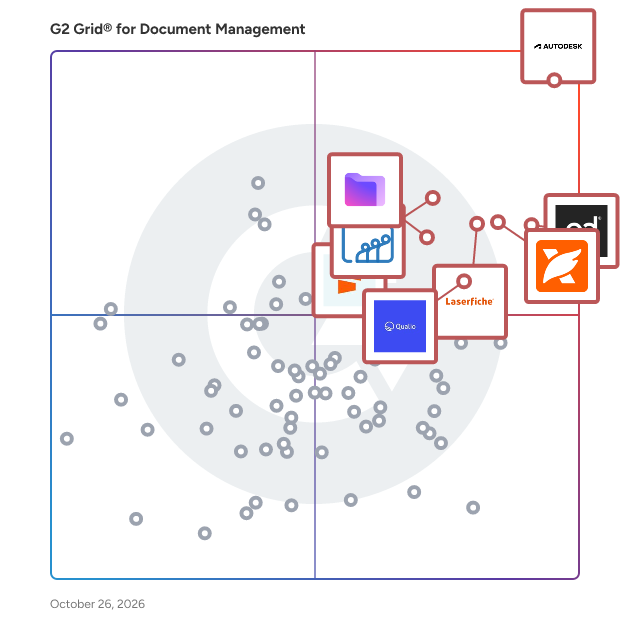
G2 Grid® for Document Management Software

G2 Grid® for Document Management Software plotting products by satisfaction and market presence

Highlighted products: PandaDoc, Foxit PDF Editor, Laserfiche, Zoho WorkDrive, Seismic Enablement Cloud, Proton Drive For Business, M-Files, and Signify.

Underlying data: [Grid® JSON](https://www.g2.com/categories/document-management/grids.json?focus%5B%5D=pandadoc&focus%5B%5D=foxit-pdf-editor&focus%5B%5D=laserfiche&focus%5B%5D=zoho-workdrive&focus%5B%5D=seismic-enablement-cloud&focus%5B%5D=proton-drive-for-business&focus%5B%5D=m-files&focus%5B%5D=signify-signify)

SuiteFiles

SuiteFiles is an intelligent workspace solution specifically designed for professional service firms, aimed at streamlining the way teams manage their documents and client interactions. This comprehensive platform integrates essential functions such as document creation, review, approval, client collaboration, and digital signing into a single, cohesive system. By eliminating the need to juggle multiple folders, emails, and manual follow-ups, SuiteFiles provides a structured environment that enhances productivity and ensures efficient completion of work. The target audience for SuiteFiles encompasses a diverse range of professional service firms, including accounting firms, law firms, and consultancy agencies. These organizations often handle extensive documentation and require effective communication with clients. SuiteFiles addresses these challenges by creating a centralized workspace where all relevant documents, conversations, and approvals are easily accessible. This organization reduces the likelihood of important information being overlooked or lost, ultimately fostering better collaboration among team members and clients. Key features of SuiteFiles include seamless integration with widely-used tools such as Microsoft 365, Xero, Karbon, WorkflowMax, HubSpot, and QuickBooks Online. This compatibility allows firms to enhance their existing tech stack rather than complicate it with additional software. By connecting these tools, SuiteFiles helps create a more efficient workflow, enabling users to manage their tasks and client interactions without the hassle of switching between different applications. The platform’s ability to consolidate various functions into one interface simplifies the user experience and promotes a more streamlined approach to document management. The benefits of using SuiteFiles extend beyond mere organization; it empowers professional service firms to focus on their core competencies by minimizing busy work. With everything living in context, teams can spend less time chasing down documents or coordinating approvals and more time on delivering quality service to their clients. The platform promotes clarity and control, ensuring that all team members are aligned and that client confidence is maintained throughout the process. SuiteFiles is designed for firms that prioritize efficiency and client satisfaction. By providing an intelligent workspace that consolidates essential functions and integrates with existing tools, it enables professional service firms to work smarter, not harder, ultimately leading to more finished work and enhanced client relationships. This solution not only supports the operational needs of these firms but also contributes to a more collaborative and productive work environment.

Average Rating: 4.5/5.0

Total Reviews: 65

How Do G2 Users Rate SuiteFiles?

  • Has the product been a good partner in doing business?: 9.2/10 (Category avg: 8.8/10)
  • Ease of Admin: 9.2/10 (Category avg: 8.4/10)
  • Quality of Support: 9.0/10 (Category avg: 8.5/10)
  • Ease of Use: 9.1/10 (Category avg: 8.6/10)

Who Is the Company Behind SuiteFiles?

  • Seller: SuiteFiles
  • Company Website:
  • Year Founded: 2012
  • HQ Location: Wellington, NZ
  • Twitter: @SuiteFiles
    681 Twitter followers
  • LinkedIn® Page: www.linkedin.com
    25 employees on LinkedIn®

Who Uses This Product?

  • Who Uses This: Director
  • Top Industries: Accounting
  • Company Size: 94% Small, 6% Medium

What Do G2 Reviewers Say About SuiteFiles?

AI-generated summary from verified user reviews

Pros
  • Users appreciate the centralization of documents in SuiteFiles, enhancing collaboration and efficiency for teams and clients.
  • Users appreciate the quick and reliable customer support of SuiteFiles, enhancing their overall experience and efficiency.
  • Users appreciate the easy editing capabilities of SuiteFiles, streamlining collaboration and boosting overall efficiency.
  • Users find SuiteFiles highly efficient, enhancing collaboration and providing quick access to client correspondence and documents.
  • Users appreciate the efficient organization features of SuiteFiles, enhancing collaboration and centralizing all client correspondence.
Cons
  • Users find the accessibility issues of SuiteFiles can make document retrieval somewhat frustrating and cumbersome.
  • Users find the difficult learning curve challenging, impacting their ability to adapt quickly to SuiteFiles.
  • Users find the difficult navigation in SuiteFiles can be cumbersome when accessing documents, affecting overall efficiency.
  • Users find the document access to be a bit chunky, which can hinder their efficiency and ease of use.
  • Users find the access to documents can be a bit chunky, leading to a less smooth experience.

What Are Recent G2 Reviews of SuiteFiles?

DigitalDrawer

DigitalDrawer is an on-premise, secure digital filing software designed to help small and medium-sized businesses transition from paper-based systems to efficient electronic document management. By digitizing and organizing documents, DigitalDrawer enhances productivity, ensures data security, and optimizes office space. Key Features and Functionality: - Document Capture: Quickly scan paper documents directly into DigitalDrawer using any TWAIN-compliant scanner. The software supports batch scanning, allowing for the efficient processing of large volumes of documents. Additionally, users can import existing electronic files through drag-and-drop or copy-paste methods. - Organization: Utilize a familiar Windows-based folder structure to create multiple, customizable file cabinets. This setup enables users to store and categorize documents systematically, ensuring easy retrieval. - Search and Retrieval: Leverage keyword and full-text search capabilities, powered by automatic Optical Character Recognition (OCR), to locate documents swiftly. The system indexes text within documents, facilitating quick and accurate searches. - Document Management: Add annotations such as highlights, notes, stamps, and redactions without altering the original file. The software also offers version control for Microsoft Word and Excel documents, allowing users to revert to previous versions if necessary. - Security: Implement permission-based access controls to restrict document access to authorized users. Monitor system activity and document access through comprehensive audit trails. Documents are stored using AES 128-bit encryption, ensuring data protection and compliance with regulations like HIPAA. Primary Value and Solutions Provided: DigitalDrawer addresses the challenges associated with managing physical documents by offering a centralized, secure, and efficient electronic filing system. It eliminates the need for physical storage, reduces the risk of document loss or damage, and enhances data security. By streamlining document capture, organization, and retrieval processes, DigitalDrawer significantly improves operational efficiency, allowing businesses to focus on core activities without the burden of manual document management.

Average Rating: 4.4/5.0

Total Reviews: 30

How Do G2 Users Rate DigitalDrawer?

  • Has the product been a good partner in doing business?: 9.0/10 (Category avg: 8.8/10)
  • Ease of Admin: 8.7/10 (Category avg: 8.4/10)
  • Quality of Support: 8.7/10 (Category avg: 8.5/10)
  • Ease of Use: 9.0/10 (Category avg: 8.6/10)

Who Is the Company Behind DigitalDrawer?

  • Seller: AscendoSoft
  • Year Founded: 2009
  • HQ Location: Redmond, WA
  • Twitter: @AscendoSoft
    48 Twitter followers
  • LinkedIn® Page: www.linkedin.com
    3 employees on LinkedIn®

Who Uses This Product?

  • Top Industries: Information Technology and Services
  • Company Size: 57% Small, 30% Medium

What Do G2 Reviewers Say About DigitalDrawer?

AI-generated summary from verified user reviews

Pros
  • Users value the ease of use of DigitalDrawer, appreciating its convenience for organizing and accessing digital files.
  • Users find DigitalDrawer to be a reliable data management tool, effectively organizing and securing their files.
  • Users value the convenience of accessibility in DigitalDrawer, enabling easy organization and retrieval of files on any device.
  • Users praise DigitalDrawer for its effective collaboration tools, enabling seamless document sharing and teamwork without conflicts.
  • Users praise DigitalDrawer for its efficient document organization and collaboration tools, making file sharing seamless and secure.
Cons
  • Users find the mobile capacity lacking, making document interaction less convenient and limiting flexibility on-the-go.
  • Users find the mobile accessibility inconvenient, restricting their ability to work seamlessly from various locations.
  • Users find the learning curve steep due to the initially confusing setup of DigitalDrawer's digital cabinets.
  • Users find offline limitations in DigitalDrawer hinder convenience, restricting mobility and interaction when on the go.
  • Users find the search difficulties onerous as tagging documents is helpful but time-consuming.

What Are Recent G2 Reviews of DigitalDrawer?

What Are G2 Users Discussing About DigitalDrawer?

Anvil

Anvil helps turn clunky paperwork processes into embeddable document workflows with document APIs for product teams. We work closely with HRtech, Insurtech, FinTech, Healthcare, Real Estate, and startup companies where paperwork, user experience, and data accessibility are considered "high-priority".

Average Rating: 4.7/5.0

Total Reviews: 33

How Do G2 Users Rate Anvil?

  • Has the product been a good partner in doing business?: 8.8/10 (Category avg: 8.8/10)
  • Ease of Admin: 8.9/10 (Category avg: 8.4/10)
  • Quality of Support: 9.4/10 (Category avg: 8.5/10)
  • Ease of Use: 9.0/10 (Category avg: 8.6/10)

Who Is the Company Behind Anvil?

Who Uses This Product?

  • Company Size: 63% Small, 26% Medium

What Do G2 Reviewers Say About Anvil?

AI-generated summary from verified user reviews

Pros
  • Users find Anvil's ease of use exceptional, praising its effortless implementation and outstanding support experience.
  • Users commend Anvil for its outstanding customer support, noting swift onboarding and superb assistance throughout setup.
  • Users praise Anvil's efficiency in connecting databases and APIs, streamlining app development for non-developers.
  • Users appreciate the effortless software integration of Anvil, making app development fast and accessible for everyone.
  • Users highlight the incredible ease of use of Anvil, appreciating its intuitive setup and seamless integration features.
Cons
  • Users find the navigation confusing, often losing their place in long documents despite robust documentation.
  • Users find the template builder complex and tedious, making the experience less user-friendly and efficient.
  • Users face implementation difficulties with Anvil, particularly in integrating APIs and navigating costly custom workflow options.
  • Users find the missing translation and document versioning features hinder their experience, leading to inaccuracies and inefficiencies.
  • Users find the poor documentation lacking in clear examples and tutorials, complicating the learning experience.

What Are Recent G2 Reviews of Anvil?

Veryfi

Veryfi empowers organizations to capture, extract and transform unstructured documents into structured data at scale. Our suite of data transformation APIs and mobile capture technology can be leveraged across industries to eliminate manual data entry, avoid human error, and unlock valuable business intelligence in seconds. Trusted by enterprises and software companies alike, Veryfi’s AI-based platform is delivering fast, accurate, and secure data to hundreds of companies globally. Veryfi supports the following document types: Expense Receipts FMCG/CPG Receipts HSA/FSA Receipts Invoices Purchase Orders (POs) Bills Hotel Folios Bills of lading (BOLs) Checks Credit Cards Insurance Cards Business Cards W-2s W-9s Download the Veryfi Lens mobile capture technology from the Apple App Store: https://apps.apple.com/us/app/veryfi-lens/id1498300628.

Average Rating: 4.6/5.0

Total Reviews: 57

How Do G2 Users Rate Veryfi?

  • Has the product been a good partner in doing business?: 9.6/10 (Category avg: 8.8/10)
  • Ease of Admin: 9.4/10 (Category avg: 8.4/10)
  • Quality of Support: 9.3/10 (Category avg: 8.5/10)
  • Ease of Use: 9.4/10 (Category avg: 8.6/10)

Who Is the Company Behind Veryfi?

  • Seller: Veryfi
  • Year Founded: 2017
  • HQ Location: San Mateo, California
  • LinkedIn® Page: www.linkedin.com
    57 employees on LinkedIn®

Who Uses This Product?

  • Top Industries: Information Technology and Services, Retail
  • Company Size: 81% Small, 16% Medium

What Do G2 Reviewers Say About Veryfi?

AI-generated summary from verified user reviews

Pros
  • Users commend the ease of use of Veryfi, appreciating its simple integration and quick scanning capabilities.
  • Users praise the accurate data extraction of Veryfi, highlighting its efficiency in managing receipts and expenses.
  • Users appreciate the easy integration of Veryfi, praising its simplicity and compatibility with various applications like Quickbooks.
  • Users find the integration process incredibly simple, making it easy to connect with various apps and services.
  • Users love the easy setup of Veryfi, appreciating its simple integration and quick scanning capabilities.
Cons
  • Users find Veryfi to be expensive, making it less appealing for those with budget constraints.
  • Users find Veryfi's pricing issues problematic, as it’s expensive compared to competitors and may not suit budget-conscious individuals.
  • Users note the need for improved multi-language support in the admin panel for better usability across regions.
  • Users express concerns about data accuracy in Veryfi, wishing for a feedback loop to enhance performance.
  • Users experience inadequate reporting issues with Veryfi, facing reliability concerns and inconsistent product extraction outcomes.

What Are Recent G2 Reviews of Veryfi?

What Are G2 Users Discussing About Veryfi?

ShareDocView

ShareDocView.com is a sales enablement tool that allows to share documents via links in order to get email leads, analytics and many other benefits. Upload PDF, Doc and PPT files to create links which can range from public to accessible only via verified emails or passwords. Add your company logo, colors and link to a website of your choice to keep promoting your brand. New Since July 2022 - Add your company custom domain (CNAME) for example docs.YOURDOMAIN.COM Stop Attaching files...just ShareDocView.com

Average Rating: 4.6/5.0

Total Reviews: 48

G2 Deal: New Customers Get 30% off ShareDocView Subscriptions

Upload PDF, DOC and PPT files on ShareDocView.com to get doc links for new 📧 email leads or embedding docs on your website. Get analytics 📈 on views or downloads by doc link + ⏱️ time spent on each page. Add your Brand🎖️ company logo + 🌈 colors + watermark.

Price: ~~$10 /month~~ → $7 /month

View this exclusive G2 deal

How Do G2 Users Rate ShareDocView?

  • Has the product been a good partner in doing business?: 8.8/10 (Category avg: 8.8/10)
  • Ease of Admin: 9.2/10 (Category avg: 8.4/10)
  • Quality of Support: 8.5/10 (Category avg: 8.5/10)
  • Ease of Use: 9.2/10 (Category avg: 8.6/10)

Who Is the Company Behind ShareDocView?

  • Seller: Krivisoft
  • Year Founded: 2019
  • HQ Location: Delaware, US
  • Twitter: @sharedocview
    29 Twitter followers
  • LinkedIn® Page: www.linkedin.com
    13 employees on LinkedIn®

Who Uses This Product?

  • Top Industries: Marketing and Advertising
  • Company Size: 71% Small, 18% Medium

What Do G2 Reviewers Say About ShareDocView?

AI-generated summary from verified user reviews

Pros
  • Users value the intuitive UI of ShareDocView, enabling quick setup and effortless document sharing without needing tutorials.
  • Users value the easy sharing capabilities of ShareDocView, enhancing collaboration and document security effortlessly.
  • Users value the seamless integration of ShareDocView, enhancing collaboration and document management effortlessly across platforms.
  • Users value the easy access to documents with ShareDocView, enhancing collaboration and efficiency for teams and clients.
  • Users value the easy setup of ShareDocView, allowing quick access to documents and seamless integration with other tools.
Cons
  • Users experience inefficient searching due to glitches and limited file type support, which hinders their productivity.
  • Users report search difficulties due to glitches and limited file type support, impacting their overall experience.
  • Users experience technical glitches including search issues and limited file type support, impacting functionality and usability.
  • Users highlight the limited functionality of ShareDocView, particularly for non-PDF formats and search features.
  • Users experience search and file management glitches along with limited support for various file types.

What Are Recent G2 Reviews of ShareDocView?

What Are G2 Users Discussing About ShareDocView?

AODocs

AODocs is an AI-enabled Document Management System that combines knowledge management and control with workflow automation across use cases. With cloud-native architecture and reliable AI tools, AODocs extracts structured data from documents at scale and automates processes such as claims management, sales proposal review, engineering design, manufacturing instructions, and more. This significantly reduces manual processing, ensures compliance, and boosts productivity.

Average Rating: 4.2/5.0

Total Reviews: 112

How Do G2 Users Rate AODocs?

  • Has the product been a good partner in doing business?: 8.6/10 (Category avg: 8.8/10)
  • Ease of Admin: 8.2/10 (Category avg: 8.4/10)
  • Quality of Support: 8.4/10 (Category avg: 8.5/10)
  • Ease of Use: 8.1/10 (Category avg: 8.6/10)

Who Is the Company Behind AODocs?

  • Seller: AODocs
  • Year Founded: 2012
  • HQ Location: Atlanta, GA
  • Twitter: @aodocs
    805 Twitter followers
  • LinkedIn® Page: www.linkedin.com
    115 employees on LinkedIn®

Who Uses This Product?

  • Top Industries: Accounting, Information Technology and Services
  • Company Size: 36% Medium, 32% Large

What Do G2 Reviewers Say About AODocs?

AI-generated summary from verified user reviews

Pros
  • Users appreciate the ease of use of AODocs, seamlessly integrating with Google Workspace for enhanced productivity.
  • Users appreciate the automation capabilities of AODocs, enabling streamlined workflows and enhanced analytics without a new interface.
  • Users love the easy integrations with Google Workspace, enhancing their experience and productivity with AODocs.
  • Users praise the flexibility of AODocs in designing workflows, roles, and automating tasks with ease.
  • Users value the seamless Google Workspace integration in AODocs, enhancing their overall document management experience.
Cons
  • Users face challenges with poor interface design, leading to navigation slowdowns and insufficient customization options.
  • Users experience interface issues with slow performance when navigating large folders, causing friction during audits.
  • Users experience performance slowdowns with the outdated AODocs interface, particularly when navigating large folders of files.
  • Users are frustrated with access issues in AODocs, having to delete existing users before adding new ones.

What Are Recent G2 Reviews of AODocs?

What Are G2 Users Discussing About AODocs?

FileHold Document Management Software

FileHold is an enterprise-grade document management and workflow solution designed to help organizations securely manage their digital documents with confidence. This comprehensive platform enables users to capture, index, store, search, and collaborate on documents efficiently, ensuring that critical information is accessible anytime and anywhere. Since its inception in 2005, FileHold has gained the trust of businesses, governments, and institutions globally, establishing itself as a reliable choice for document management. Targeted at a diverse range of organizations, from small businesses to large enterprises, FileHold is particularly beneficial for those seeking flexibility, scalability, and control over their document management processes. The solution supports various deployment options, including on-premise, cloud, or hybrid models, allowing organizations to choose the setup that best fits their operational needs. This adaptability makes FileHold suitable for industries such as healthcare, legal, education, finance, and manufacturing, where document security and compliance are paramount. FileHold boasts a variety of key features that enhance its functionality and user experience. Version control ensures that users can track changes and maintain the integrity of documents over time, while metadata tagging facilitates efficient organization and retrieval of information. The automated workflow capabilities streamline processes such as document reviews and approvals, reducing the time spent on manual tasks. Additionally, FileHold supports electronic forms and e-signatures, further simplifying document handling. Advanced security permissions provide organizations with the ability to control access to sensitive information, ensuring that only authorized personnel can view or edit specific documents. The integration of FileHold with Microsoft technologies, including Microsoft Office, SharePoint, and Active Directory, enhances its usability and allows for a more cohesive working environment. Accessible via desktop, web browser, and mobile devices, FileHold empowers teams to transition to a paperless operation, thereby streamlining workflows and improving overall productivity. By reducing reliance on physical documents, organizations can not only enhance compliance but also minimize operational costs and environmental impact, aligning with the growing trend of sustainability in business practices.

Average Rating: 4.6/5.0

Total Reviews: 33

How Do G2 Users Rate FileHold Document Management Software?

  • Has the product been a good partner in doing business?: 9.9/10 (Category avg: 8.8/10)
  • Ease of Admin: 9.1/10 (Category avg: 8.4/10)
  • Quality of Support: 9.4/10 (Category avg: 8.5/10)
  • Ease of Use: 9.1/10 (Category avg: 8.6/10)

Who Is the Company Behind FileHold Document Management Software?

  • Seller: FileHold Systems
  • Company Website:
  • Year Founded: 2005
  • HQ Location: Burnaby, British Columbia
  • Twitter: @FileHoldSystems
    195 Twitter followers
  • LinkedIn® Page: www.linkedin.com
    11 employees on LinkedIn®

Who Uses This Product?

  • Top Industries: Information Technology and Services
  • Company Size: 64% Small, 27% Medium

What Are Recent G2 Reviews of FileHold Document Management Software?

What Are G2 Users Discussing About FileHold Document Management Software?

Lasernet

Lasernet is an end-to-end document management platform: giving you the ability to generate, design, distribute, archive, and retrieve documents within your ERP, core banking platform or other business systems. The platform has a built-in editor and design tool that gives you the ability to design business-ready, branded documents enriched with account specific information directly from your business systems. After your documents are created, by storing them in Lasernet’s archive you can retrieve and store your documents for a fraction of the price of traditional data storage.

Average Rating: 4.4/5.0

Total Reviews: 15

How Do G2 Users Rate Lasernet?

  • Has the product been a good partner in doing business?: 10.0/10 (Category avg: 8.8/10)
  • Ease of Admin: 10.0/10 (Category avg: 8.4/10)
  • Quality of Support: 8.7/10 (Category avg: 8.5/10)
  • Ease of Use: 8.2/10 (Category avg: 8.6/10)

Who Is the Company Behind Lasernet?

  • Seller: Lasernet Group
  • Company Website:
  • Year Founded: 2004
  • HQ Location: Stockholm, Sweden
  • Twitter: @lasernetgroup
    377 Twitter followers
  • LinkedIn® Page: www.linkedin.com
    38 employees on LinkedIn®

Who Uses This Product?

  • Company Size: 40% Large, 33% Medium

What Are Recent G2 Reviews of Lasernet?

What Are G2 Users Discussing About Lasernet?

SmartVault

SmartVault is the easiest and most secure way to optimize how you, your staff, and your clients gather, store, share, and eSign documents in the cloud. Streamline how you work, collaborate with clients more easily, and reduce costs — through one integrated document management and client portal solution.

Average Rating: 4.3/5.0

Total Reviews: 98

How Do G2 Users Rate SmartVault?

  • Has the product been a good partner in doing business?: 8.5/10 (Category avg: 8.8/10)
  • Ease of Admin: 8.5/10 (Category avg: 8.4/10)
  • Quality of Support: 8.4/10 (Category avg: 8.5/10)
  • Ease of Use: 8.7/10 (Category avg: 8.6/10)

Who Is the Company Behind SmartVault?

  • Seller: GetBusy
  • Year Founded: 1998
  • HQ Location: CAMBRIDGE, Cambridgeshire
  • Twitter: @getbusy
    453 Twitter followers
  • LinkedIn® Page: www.linkedin.com
    87 employees on LinkedIn®

Who Uses This Product?

  • Top Industries: Accounting, Financial Services
  • Company Size: 82% Small, 13% Medium

What Do G2 Reviewers Say About SmartVault?

AI-generated summary from verified user reviews

Pros
  • Users appreciate the ease of use of SmartVault, finding it intuitive for file uploading, organizing, and sharing.
  • Users find SmartVault's easy upload feature extremely convenient for securely managing and sharing documents effortlessly.
  • Users commend SmartVault for its secure sharing capabilities, simplifying document management with user-friendly features.
  • Users value SmartVault for its strong security measures, ensuring secure uploads and seamless access for clients.
  • Users appreciate the secure file sharing capabilities of SmartVault, enabling safe and efficient document management.
Cons
  • Users find the limited customization options frustrating, impacting their ability to tailor SmartVault to their needs.
  • Users find SmartVault to be expensive, making it less suitable for smaller businesses or individual use.
  • Users express concerns over high pricing for SmartVault, making it less suitable for smaller businesses or individuals.
  • Users find the high cost of SmartVault to be a barrier, particularly for smaller businesses and individuals.
  • Users faced integration issues with SmartVault, leading to the creation of numerous duplicate entries.

What Are Recent G2 Reviews of SmartVault?

What Are G2 Users Discussing About SmartVault?

Hyland Nuxeo

Nuxeo is a cloud-native, cloud-first, scalable solution which utilizes automation technologies to improve efficiencies, increase accuracy, and provide robust capabilities. With it’s low-code technology, organizations can easily implement Nuxeo with easy-to-customize features allowing organizations to develop the creative workflow their business needs. Their employees can then easily create, tag, organize, and share dynamic content, including rich media and 3D digital assets and their metadata to be used in collaboration across the organization.

Average Rating: 4.0/5.0

Total Reviews: 75

How Do G2 Users Rate Hyland Nuxeo?

  • Has the product been a good partner in doing business?: 7.4/10 (Category avg: 8.8/10)
  • Ease of Admin: 7.6/10 (Category avg: 8.4/10)
  • Quality of Support: 7.8/10 (Category avg: 8.5/10)
  • Ease of Use: 7.7/10 (Category avg: 8.6/10)

Who Is the Company Behind Hyland Nuxeo?

  • Seller: Hyland
  • Company Website:
  • Year Founded: 1991
  • HQ Location: Westlake, OH
  • Twitter: @Hyland
    13,165 Twitter followers
  • LinkedIn® Page: www.linkedin.com
    4,269 employees on LinkedIn®

Who Uses This Product?

  • Who Uses This: System Engineer
  • Top Industries: Information Technology and Services, Computer Software
  • Company Size: 59% Large, 32% Medium

What Do G2 Reviewers Say About Hyland Nuxeo?

AI-generated summary from verified user reviews

Pros
  • Users praise the ease of deployment with Hyland Nuxeo, noting its scalability and cloud-friendly nature.
  • Users appreciate the easy implementation of Hyland Nuxeo, finding it scalable and cloud-friendly for their needs.
  • Users praise the easy setup of Hyland Nuxeo, making deployment and scaling a breeze in the cloud.
  • Users praise the flexibility and scalability of Hyland Nuxeo, benefiting from its robust features tailored to their needs.
  • Users value the flexibility and scalability of Hyland Nuxeo, along with its wide range of available features.
Cons
  • Users find the insufficient training of Hyland Nuxeo problematic due to unclear documentation and lack of examples.
  • Users find the documentation unclear, often lacking examples, which impedes the learning process for Hyland Nuxeo.
  • Users find the poor documentation of Hyland Nuxeo unclear and lacking necessary examples for effective use.

What Are Recent G2 Reviews of Hyland Nuxeo?

Hyland Alfresco

Hyland’s Alfresco Digital Business Platform offers open, secure, comprehensive content services with content at its core to let you unlock the value from your most important business information. Alfresco gives users access to their content wherever and however they work with open, flexible and highly scalable content services. Easily integrate and connect with business-critical applications and processes. Find, view, collaborate on, govern and securely share digital content. Get relevant information to the right person at the right time.

Average Rating: 3.8/5.0

Total Reviews: 52

How Do G2 Users Rate Hyland Alfresco?

  • Has the product been a good partner in doing business?: 6.0/10 (Category avg: 8.8/10)
  • Ease of Admin: 6.3/10 (Category avg: 8.4/10)
  • Quality of Support: 6.4/10 (Category avg: 8.5/10)
  • Ease of Use: 7.1/10 (Category avg: 8.6/10)

Who Is the Company Behind Hyland Alfresco?

  • Seller: Hyland
  • Company Website:
  • Year Founded: 1991
  • HQ Location: Westlake, OH
  • Twitter: @Hyland
    13,165 Twitter followers
  • LinkedIn® Page: www.linkedin.com
    4,269 employees on LinkedIn®

Who Uses This Product?

  • Top Industries: Information Technology and Services, Computer Software
  • Company Size: 44% Medium, 31% Large

What Do G2 Reviewers Say About Hyland Alfresco?

AI-generated summary from verified user reviews

Pros
  • Users value the centralized content management of Hyland Alfresco, enhancing efficiency with accessible tools and features.
  • Users value the centralized management offered by Alfresco, simplifying digital content creation and enhancing accessibility.
  • Users value the centralized content management features of Hyland Alfresco, enhancing workflow efficiency and accessibility.
  • Users value the high customization capabilities of Hyland Alfresco, enhancing their content management experience seamlessly.
  • Users value the centralized digital content management of Hyland Alfresco, making their workflow simpler and more efficient.
Cons
  • Users often experience performance issues with Hyland Alfresco, especially when downloading large files and processing data.
  • Users struggle with capacity handling for content statistics, making it difficult to track certain repository metrics effectively.
  • Users find the licensing costs of Hyland Alfresco to be expensive, necessitating upgrades every 2 to 3 years.
  • Users frequently experience slow processing times for large data downloads, which hinders their efficiency with the software.
  • Users often face delayed customer support with Hyland Alfresco, especially when contacting from LATAM.

What Are Recent G2 Reviews of Hyland Alfresco?

What Are G2 Users Discussing About Hyland Alfresco?

Klyck.io

Unlock Sales Brilliance with Klyck — a dynamic platform for enterprise content management, playbooks, and seamless collaboration. Help your team find the right content for any scenario, effortlessly share it with prospects and colleagues, and gain insights into how your content performs. Klyck ensures your conversations are seamless, deals progress faster and time isn't wasted. Content Library — Make it easy to find content for every interaction. Organize your content by using filters, tags, categories and more. Content Analytics — Unlock insights into engagement and utilization. Track how prospects interact with your content including opens, views, and time spent. Playbooks — Empower your team with organized steps for success. Our playbooks bring content, messaging, training, coaching and more to your fingertips. Digital Sales Rooms — Centralize deals with ease. No more endless email threads, just streamlined information, content and next steps for your customers.

Average Rating: 4.6/5.0

Total Reviews: 85

How Do G2 Users Rate Klyck.io?

  • Has the product been a good partner in doing business?: 9.9/10 (Category avg: 8.8/10)
  • Ease of Admin: 9.2/10 (Category avg: 8.4/10)
  • Quality of Support: 9.6/10 (Category avg: 8.5/10)
  • Ease of Use: 9.2/10 (Category avg: 8.6/10)

Who Is the Company Behind Klyck.io?

  • Seller: Klyck.io
  • Year Founded: 2016
  • HQ Location: Toronto, Ontario
  • Twitter: @klyckio
    137 Twitter followers
  • LinkedIn® Page: www.linkedin.com
    14 employees on LinkedIn®

Who Uses This Product?

  • Top Industries: Electrical/Electronic Manufacturing, Consulting
  • Company Size: 42% Medium, 28% Large

What Do G2 Reviewers Say About Klyck.io?

AI-generated summary from verified user reviews

Pros
  • Users appreciate the ease of use of Klyck.io, enabling efficient content management and seamless client connections.
  • Users appreciate the efficient content management of Klyck.io, enhancing workflow and streamlining meeting preparations seamlessly.
  • Users love the easy sharing capabilities of Klyck.io, streamlining workflows and enhancing collaboration across teams.
  • Users value the intuitive design of Klyck.io, enabling effortless access to content and enhancing meeting preparations.
  • Users love the navigation ease of Klyck.io, enjoying quick access to organized content tailored for their needs.
Cons
  • Users note a challenging learning curve requiring initial buy-in, typical for any new solution.
  • Users experience a steep learning curve with Klyck.io, requiring significant initial investment and adaptation.
  • Users experience upload issues with Klyck.io, noting that onboarding data can be time-consuming and frustrating.
  • Users find that initial user adoption challenges can make the onboarding process difficult but improve over time.

What Are Recent G2 Reviews of Klyck.io?

What Are G2 Users Discussing About Klyck.io?

Cloud Hosted Document Management

Cloud Hosted Document Management is a comprehensive solution designed to streamline the storage, organization, and retrieval of documents in a secure, cloud-based environment. This service enables businesses to manage their documents efficiently without the need for on-premises infrastructure, reducing costs and enhancing accessibility. Key Features and Functionality: - Secure Cloud Storage: Safeguards documents with advanced encryption and regular backups, ensuring data integrity and protection against unauthorized access. - Document Organization: Offers intuitive categorization and tagging systems, allowing users to organize documents systematically for easy retrieval. - Access Control: Provides customizable user permissions, enabling administrators to control who can view or edit specific documents. - Collaboration Tools: Facilitates real-time collaboration among team members, allowing multiple users to work on documents simultaneously. - Version Control: Maintains a history of document revisions, allowing users to track changes and revert to previous versions if necessary. - Search Functionality: Incorporates powerful search tools to quickly locate documents based on keywords, tags, or metadata. Primary Value and Solutions Provided: Cloud Hosted Document Management addresses the challenges of traditional document storage by offering a scalable and secure platform accessible from anywhere with an internet connection. It eliminates the need for physical storage space and reduces the risk of data loss due to hardware failures. By centralizing documents in the cloud, businesses can improve operational efficiency, enhance collaboration among remote teams, and ensure compliance with data protection regulations. This solution is particularly beneficial for organizations seeking to modernize their document management processes while maintaining high standards of security and accessibility.

Average Rating: 4.4/5.0

Total Reviews: 16

How Do G2 Users Rate Cloud Hosted Document Management?

  • Has the product been a good partner in doing business?: 8.3/10 (Category avg: 8.8/10)
  • Ease of Admin: 8.3/10 (Category avg: 8.4/10)
  • Quality of Support: 8.7/10 (Category avg: 8.5/10)
  • Ease of Use: 8.2/10 (Category avg: 8.6/10)

Who Is the Company Behind Cloud Hosted Document Management?

  • Seller: Digital Documents
  • Year Founded: 2001
  • HQ Location: Vienna, VA
  • Twitter: @ScanDocuments
    155 Twitter followers
  • LinkedIn® Page: www.linkedin.com
    5 employees on LinkedIn®

Who Uses This Product?

  • Company Size: 56% Medium, 25% Large

What Do G2 Reviewers Say About Cloud Hosted Document Management?

AI-generated summary from verified user reviews

Pros
  • Users value the cloud storage for simplifying workflows and enhancing accessibility and collaboration in document management.
  • Users praise the ease of use, making document access and workflow management seamless from any location.
  • Users value the accessibility of cloud-hosted document management, benefiting from the flexibility to work anywhere.
  • Users value the enhanced collaboration features of Cloud Hosted Document Management, boosting teamwork and efficiency across their organizations.
  • Users value the simplified workflows of Cloud Hosted Document Management, eliminating reliance on local storage.
Cons
  • Users express concern over internet dependence, noting that connectivity issues can restrict access to important documents.
  • Users note the dependence on internet connectivity can restrict access to documents during service disruptions.
  • Users express frustration over limited options for data storage and backup with the cloud-hosted document management system.
  • Users are concerned about limited storage availability and the lack of control over data management and backup.
  • Users face challenges with offline limitations, making document access difficult when away from the office.

What Are Recent G2 Reviews of Cloud Hosted Document Management?

What Are G2 Users Discussing About Cloud Hosted Document Management?

AmpleLogic EDMS

AmpleLogic EDMS Software is a power-packed electronic document management system exclusively designed for Pharmaceutical and Biotech companies, developed, and implemented exclusively to meet the cGMP needs of Pharma domain with 21CFR Part 11 compliance, EU Annex 11 compliance can easily eliminate all the challenges faced by different companies AmpleLogic EDMS is a paperless document management system enables you to experience the effortless handling of all the documents and information. Various activities like document creation, review, approval, editing, document comparison, version control, parallel reviews are part of AmpleLogic Document Management System. AmpleLogic DMS helps to streamline the entire organization’s documents with full control and traceability. It ensures that the latest published document is used and eliminates the risk of using obsolete documentation. AmpleLogic Electronic Document Management and Issuance Software has been developed on the highly configurable LOW-CODE NO-CODE (LCNC) DEVELOPMENT PLATFORM. This EDMS Solution can be accessed from any devices.

Average Rating: 4.7/5.0

Total Reviews: 55

How Do G2 Users Rate AmpleLogic EDMS?

  • Has the product been a good partner in doing business?: 9.4/10 (Category avg: 8.8/10)
  • Ease of Admin: 9.4/10 (Category avg: 8.4/10)
  • Quality of Support: 9.3/10 (Category avg: 8.5/10)
  • Ease of Use: 9.6/10 (Category avg: 8.6/10)

Who Is the Company Behind AmpleLogic EDMS?

  • Seller: AmpleLogic
  • Year Founded: 2010
  • HQ Location: Hyderabad, Telangana
  • Twitter: @Ample_Logic
    636 Twitter followers
  • LinkedIn® Page: www.linkedin.com
    322 employees on LinkedIn®

Who Uses This Product?

  • Top Industries: Pharmaceuticals
  • Company Size: 76% Medium, 16% Large

What Do G2 Reviewers Say About AmpleLogic EDMS?

AI-generated summary from verified user reviews

Pros
  • Users value the centralization of AmpleLogic EDMS, benefiting from enhanced team support in a unified workspace.
  • Users value the team support from AmpleLogic EDMS, appreciating the benefits of a shared workplace.
  • Users appreciate the excellent team support provided by AmpleLogic EDMS, enhancing the collaborative workspace experience.
  • Users find the user-friendly dashboards of AmpleLogic EDMS helpful for tracking document statuses efficiently.
  • Users find AmpleLogic EDMS to be easy to use, thanks to its user-friendly dashboards and legacy uploading feature.
Cons
  • Users find that integration issues require significant effort and time, impacting overall user experience with AmpleLogic EDMS.
  • Users find the limited customization of AmpleLogic EDMS requires significant effort for integration and adaptation.

What Are Recent G2 Reviews of AmpleLogic EDMS?

DocFynd

DocFynd is a simple click-and-configure app available in Salesforce AppExchange. It allows you to link documents to multiple records, save them to various external drives, hashtag for easy searching, automate folder creation based on any criteria, and tag documents received via email

Average Rating: 4.5/5.0

Total Reviews: 14

How Do G2 Users Rate DocFynd?

  • Has the product been a good partner in doing business?: 8.3/10 (Category avg: 8.8/10)
  • Ease of Admin: 8.3/10 (Category avg: 8.4/10)
  • Quality of Support: 9.7/10 (Category avg: 8.5/10)
  • Ease of Use: 9.2/10 (Category avg: 8.6/10)

Who Is the Company Behind DocFynd?

Who Uses This Product?

  • Company Size: 43% Small, 43% Medium

What Are Recent G2 Reviews of DocFynd?

What Are G2 Users Discussing About DocFynd?

Neeraja Prakash
NP
Researched and written by Neeraja Prakash
Updated October 3, 2024